What's inside
- Key Takeaways
- Quick Picks
- How We Chose These Picks
- Comparison
- How Much Input Lag Can You Actually Feel?
- Should You Game at 4K, or Drop to a Faster Mode?
- How Do You Set Up a Gaming Projector Properly?
- What About Sound for Gaming — Headphones, Bars and Atmos?
- How Big Should a Gaming Image Be?
- Which Pick Suits Which Kind of Player?
- How Do You Future-Proof a Gaming Projector Purchase?
- What Should You Test in the First Week?
- Does a Gaming Projector Belong in the Living Room or a Dedicated Den?
- How Does HDR Change Games on a Projector?
- What Cables and Accessories Does a Gaming Projector Setup Need?
- How Loud Are Gaming Projectors, and Does It Matter Mid-Match?
- Common Mistakes
- Final Recommendation
- Frequently Asked Questions
- Related Guides
As an Amazon Associate I earn from qualifying purchases. This post may contain affiliate links at no extra cost to you.
widgetverdict.com is reader-supported. When you buy through links on our site, we may earn an affiliate commission.
The best home gaming projectors are decided by a number most projector buyers never learn to read: input lag, the delay between your controller and the picture. A film does not care about forty milliseconds; a fighting game, a rhythm title or a competitive shooter is built from them. The six picks below were chosen the way a player would choose — lag figures first where the listings state them, refresh rates second, and everything else after — and they divide into honest camps. BenQ’s TK700 and TK710 and ViewSonic’s two 4K models publish their milliseconds like a challenge. Optoma’s GT2400HDR and XGIMI’s Horizon 30 Pro claim low latency without a number, and this guide credits the intent while refusing to invent the figure. Every pick also has to survive film night, because a gaming projector that cannot show a movie is a monitor with delusions.
The six picks link to Amazon listings verified against exact model names — the TK700 and TK710 differ by far more than a digit, and ViewSonic’s LX and PX lines are separate families, so read the full model name on the listing before ordering. Gaming models are promotion-prone around console launches and sales seasons; where a comparison turns on cost we say check price on Amazon rather than printing a figure with a short life. One discipline governs this whole guide: an input lag or refresh figure appears only where that model’s listing title states it, at the settings the title describes.
A note on how lag figures work, because the reviews depend on it. Input lag is not one number per projector — it changes with resolution and refresh rate, which is why one listing in this guide can honestly print both 4.2 ms and 16 ms for the same machine: the fast figure belongs to the high-refresh mode, the slower to full 4K. Read each figure with its mode attached, the way the reviews present them, and be suspicious of any guide that quotes the small number without the condition.
Key Takeaways
- BenQ’s TK710 is the complete gaming laser: 4 ms input lag, 240 Hz refresh, 3,200 lumens and a three-year warranty.
- The TK700 is the lamp-based original — its listing states both 4.2 ms latency and 16 ms input lag, the two modes of one honest machine, with PS5 and Xbox readiness named outright.
- ViewSonic’s LX700-4K pairs a laser source with 4.2 ms lag and 240 Hz at a stated 3,500 lumens.
- The PX749-4K is the brightness play: 4,000 lumens, the same 4.2 ms and 240 Hz figures, and a 300-inch ceiling for big rooms.
- Optoma’s GT2400HDR is the short throw specialist — 4,200 lumens, laser light and a golf-simulation brief beside its gaming one.
- XGIMI’s Horizon 30 Pro is the spectacle pick: 4,800 ISO lumens, 4K at 120 Hz, VRR and RGB triple laser colour, with latency described rather than numbered.
Quick Picks
| Pick | Badge | Why it makes the cut |
|---|---|---|
| BenQ TK700 | Console-ready original | Stated 4.2 ms and 16 ms figures, Dolby Atmos speaker and consoles named in the listing. |
| BenQ TK710 | Complete gaming laser | 4 ms, 240 Hz, eARC and laser consistency under a three-year warranty. |
| ViewSonic LX700-4K | Laser speed | 4.2 ms and 240 Hz from a 3,500-lumen laser with dual HDMI. |
| ViewSonic PX749-4K | Brightness play | 4,000 lumens behind the same fast figures, sized for big rooms. |
| Optoma GT2400HDR | Short throw gamer | Coffee-table placement, 4,200 lumens and a golf-sim second career. |
| XGIMI Horizon 30 Pro | Spectacle pick | 4K 120 Hz, VRR, RGB triple laser and Harman Kardon sound in one smart body. |
How We Chose These Picks
Gaming projectors invite a particular kind of spec-sheet fraud — the lag figure for a mode nobody uses, quoted as the machine’s character — so selection began by reading every figure the way a tournament player would: which resolution, which refresh rate, which mode. The picks that survived publish their numbers in their listing titles, where a buyer can hold them to account, or state their gaming intent plainly enough to be judged on placement and picture. Models whose gaming claim dissolved into adjectives alone did not make the list; the two unnumbered picks here earned their places on other, verifiable strengths and are labelled accordingly in every table.
Refresh rate was weighed as the lag figure’s partner rather than its substitute. A 240 Hz capability matters because the fast modes live there — the 4.2 ms figures in this guide belong to high-refresh operation — and because motion clarity in fast games is a visible, nightly benefit even for players who never measure a millisecond. VRR, where the Horizon 30 Pro states it, earned separate credit: variable refresh smooths the frame-rate dips that consoles produce in busy scenes, a quality-of-life feature competitive spec sheets undervalue.
The film test was applied without mercy. A gaming projector occupies the room’s main screen position, and households will watch everything on it; HDR support, colour behaviour and brightness for a dimmed room all had to clear a home-cinema bar, not merely a gaming one. That is why this list is built from home entertainment models with gaming figures rather than from esports monitors’ oversized cousins — the TK700’s own title calls it a gaming and movie projector, in that order of honesty.
Placement realism finished the selection. Gaming rooms are dens, bedrooms and living rooms with consoles on furniture, so short HDMI runs, lens flexibility and — in the GT2400HDR’s case — a short throw lens counted heavily. A projector that demands a rear shelf and a ten-metre cable run will lose to a slightly slower one that sits beside the console, because the best gaming setup is the one that gets used nightly.

BenQ TK700 — Console-ready original
The TK700 is the model that taught the market a home projector could be a gaming display, and its listing still teaches the category’s most useful lesson. It states two figures — 4.2 ms latency in its headline and 16 ms input lag in its details — and rather than a contradiction, that is the honest anatomy of a 4K gaming projector: the fastest mode runs at high refresh and lower resolution, while full 4K operation carries the 16 ms figure. BenQ printing both, where rivals print only the flattering one, is why this guide trusts the machine. Around those figures: 3,200 lumens, 4K HDR, HDMI 2.0, enhanced black detail, a Dolby Atmos speaker, explicit PS5 and Xbox readiness, and a three-year warranty.
Sixteen milliseconds at 4K deserves defence, because number-chasers misread it. At 60 frames per second, a frame lasts about 16.7 ms — so a 16 ms pipeline is effectively a one-frame delay, which the overwhelming majority of players cannot perceive in the story games, racers and sports titles that dominate console libraries. The 4.2 ms mode exists for the genres that can feel it. A projector that serves both honestly, and labels both, respects its buyers more than one quoting a single heroic digit.
The Atmos speaker is a genuine differentiator in a category that usually treats audio as packaging foam: height-aware sound from the projector itself gives small gaming rooms a completeness that normally requires a bar. Enhanced black detail serves the night missions and horror titles where shadow information is gameplay. And the three-year warranty, again, signals a machine built for nightly service rather than occasional ceremony.
Its successor, the TK710 below, adds laser light and a single 4 ms headline; the TK700 counters with its dual-figure honesty, its Atmos audio and a lamp design whose replacement, years away, restores full brightness in one part. Players choosing between them are choosing philosophies, and this guide declines to call either wrong — it calls the TK700 the original, in the complimentary sense.
Multiplayer households should note the social geometry a projector creates that no monitor can: four players on one 100-inch screen, split-screen sessions where each quarter is the size of a television, and spectators who can actually follow the match. The TK700’s brightness and speaker were specified for exactly that room — lights up, people talking, a game at the centre. Competitive solo play may belong to the fastest modes in this guide, but gaming as a household event belongs to machines like this one, and there are more of those evenings in a year than tournaments.
- Resolution: 4K HDR
- Brightness: 3,200 lumens
- Latency figures: 4.2 ms and 16 ms input lag, both per listing title (mode-dependent)
- Connections: HDMI 2.0
- Audio: Dolby Atmos speaker
- Console readiness: PS5 and Xbox named in listing title
- Warranty: 3 years, per listing title
Strengths
- Both lag modes published — the guide’s most honest spec sheet
- Atmos speaker gives small rooms complete sound
- Console readiness stated outright, not implied
Trade-offs
- Lamp light source beside two laser rivals
- Full-4K play runs at the 16 ms figure, not the headline
- No refresh-rate figure stated in the title
Best for: console players wanting a proven 4K gaming projector with real built-in sound.
Not suited for: buyers who want the laser’s decade of consistency — step to the TK710.

BenQ TK710 — Complete gaming laser
The TK710 takes the TK700’s brief and removes its remaining asterisks. A laser light source rated at 3,200 lumens feeds a 4K HDR picture; the input lag is stated at 4 ms; the refresh rate at 240 Hz; HDR10, eARC, lens shift and a 1.3x zoom handle the cinema and placement duties; and a three-year warranty underwrites the whole arrangement. In our laser guide this model is the gamer’s pick; in this guide, surrounded by its own kind, it is the one the others must beat — and on the stated figures, none quite does.
The laser matters to gamers for a reason beyond lamp bills: stability under load. A long competitive session is exactly when a lamp’s output and colour are drifting with heat and age; the TK710’s picture in the final round is the picture from the warm-up, which is what practising on a display is supposed to mean. Add eARC — full-quality audio handed to a bar or receiver without compromise — and the setup around the projector can be as serious as the projector itself, which competitive households eventually demand.
Placement tools respect the gaming room’s furniture: lens shift and zoom forgive the unit-beside-the-console and shelf-above-the-sofa geometries that dominate real dens. Film performance is the TK family’s usual credible 4K HDR — this is a home entertainment projector that games at the highest stated level, not a gaming peripheral that tolerates films.
The costs are the familiar ones: no smart platform is headlined, so the console and streamer provide the brains, and the laser tier asks a premium over its lamp sibling. For the player who will use this machine nightly for years — the usage pattern its warranty anticipates — those costs amortise into the guide’s easiest recommendation for serious play.
A word about the 240 Hz figure’s real beneficiary: the PC player. Consoles top out lower, but a gaming PC feeding this projector at high refresh in fast modes gets the full benefit of the pipeline BenQ built, and the TK710 is one of the few projectors that treats the PC as a first-class gaming source rather than an afterthought with a cable. Households whose gaming spans both ecosystems — console on the sofa, PC for the serious library — will find this the only pick that flatters both without a compromise mode in either direction.
- Resolution: 4K HDR
- Brightness: 3,200 lumens
- Light source: laser
- Input lag: 4 ms, per listing title
- Refresh: 240 Hz, per listing title
- Audio: eARC support
- Lens: shift and 1.3x zoom
- Warranty: 3 years, per listing title
Strengths
- The guide’s most complete stated gaming specification
- Laser stability across marathon sessions and years
- eARC and lens tools suit a serious, permanent setup
Trade-offs
- No built-in streaming; sources are your department
- Laser premium over the TK700’s lamp design
- Standard throw needs placement depth in the room
Best for: dedicated players building one permanent big-screen gaming station.
Not suited for: casual players whose gaming is monthly, who will not use the speed they are funding.

ViewSonic LX700-4K — Laser speed
ViewSonic’s LX700-4K is the laser alternative for buyers who want the fast figures without joining BenQ’s ecosystem: a 4K UHD laser projector at a stated 3,500 lumens, with 240 Hz refresh and 4.2 ms input lag, dual HDMI, HDR support, optical zoom and keystone correction. The “Designed for Xbox” lineage in ViewSonic’s gaming line hangs over the model — the listing names Xbox in its title — and the specification reads like a checklist written from a console’s requirements outward.
The brightness step over the BenQ pair is worth pausing on: 3,500 lumens in a gaming projector serves the room as gamers actually use it — lights partly up, friends present, a headset around one neck and conversation over the game. Dedicated cinema darkness is a film-night condition; gaming is social, and social needs light. The LX700’s figure respects that, while its laser source keeps the output honest across years of evenings.
Optical zoom earns its mention because gaming setups move: the projector that fits this year’s den should fit next year’s room share, and a real zoom range plus keystone tools give it the placement tolerance to survive the move without a new shelf, a new mount or a compromised picture. Dual HDMI keeps console and PC — or two consoles — resident without a switcher.
Against the TK710, the honest comparison is ecosystem and detail: BenQ states the rounder 4 ms and adds eARC and its warranty; ViewSonic states 4.2 ms, adds brightness and its Xbox association. Players with a foot in both camps should choose by the room’s light and the audio plan; players loyal to either brand lose nothing essential on the stated figures, which is a compliment to both.
ViewSonic’s longer history deserves a footnote for buyers who equate gaming projectors with one brand: the company has built console-focused projectors for years, and the LX700’s specification discipline — every gaming figure stated, none inflated — reflects that heritage. A buyer choosing it is not taking a flyer on a newcomer; they are choosing the other established gaming line, with a laser in it. In a category where trust is earned figure by figure, that pedigree is a feature the spec sheet cannot print.
- Resolution: 4K UHD
- Brightness: 3,500 lumens
- Light source: laser
- Input lag: 4.2 ms, per listing title
- Refresh: 240 Hz, per listing title
- Connections: dual HDMI
- Lens: optical zoom, keystone correction
- Colour: SuperColor, per listing title
Strengths
- Laser speed with more brightness than the BenQ pair
- Xbox association signals console-first engineering
- Optical zoom forgives the room changes gaming setups endure
Trade-offs
- No eARC or warranty figure stated in the title
- 4.2 ms matches, but does not beat, the class leaders
- Less established gaming lineage than BenQ’s TK family
Best for: Xbox-led rooms wanting laser consistency and social-light brightness.
Not suited for: audio purists building around eARC, who should compare the TK710 first.

ViewSonic PX749-4K — Brightness play
The PX749-4K is the gaming projector for the room that refuses to darken: a stated 4,000 lumens — the highest numbered brightness among the 4K picks here — behind the same fast figures as its LX sibling, 4.2 ms input lag and 240 Hz refresh, in a 4K UHD design with a 300-inch image ceiling, horizontal and vertical keystone, optical zoom and USB-C among its connections. Where the LX700 spends on laser, the PX749 spends on light, and for a family room that games at teatime, light is the specification that decides whether the session happens at all.
USB-C deserves its sentence: a single cable from a modern laptop or handheld-class PC to the projector simplifies the gaming setup that travels between desk and big screen, and in a category built on HDMI assumptions it signals a design that expects computers as first-class sources. The 300-inch ceiling, as ever, is a headline — but the brightness behind it means the PX749’s honest band extends larger than its rivals’, toward the 150-inch images that big rooms and garden-adjacent dens actually attempt.
The trade is the light source: no laser is claimed in the title, so lamp ownership economics apply — a replacement in the machine’s future, output that renews with it. Households that game daily should weigh that against the LX700’s laser; households whose big-screen gaming is a weekend event will find the PX749’s brightness-per-commitment hard to argue with, especially in rooms where the alternative is not gaming at all because the picture washed out.
Keystone in both axes plus optical zoom make it the most placement-tolerant of the 4K picks, the one most likely to fit a room that was never consulted about becoming a gaming den. That tolerance, at this brightness, is a family feature disguised as a specification.
Consider the shared-house scenario, because it is where the PX749 quietly wins arguments the spec sheet cannot: a projector that must serve a student house or a family with three gaming generations cannot demand darkness, silence or a dedicated room. It must produce a big, fast, legible picture in a lit multipurpose space, survive being aimed at three different walls in a year, and connect to whatever device each resident owns — console, laptop, handheld. Read its specification again with that household in mind and every line, from the lumens to the USB-C to the two-axis keystone, is an answer to a real shared-house problem.
- Resolution: 4K UHD
- Brightness: 4,000 lumens
- Input lag: 4.2 ms, per listing title
- Refresh: 240 Hz, per listing title
- Max image: 300 inches, per listing title
- Connections: dual HDMI, USB-C
- Keystone: horizontal and vertical, optical zoom
- Light source: Not stated as laser in listing title
Strengths
- Brightest 4K gaming picture here for undarkened rooms
- USB-C welcomes laptops and handheld PCs properly
- Two-axis keystone plus zoom fits uncooperative rooms
Trade-offs
- No laser source; lamp economics apply
- 300-inch headline exceeds sensible sizes for its light
- Brightness-first tuning is wasted in a dedicated dark den
Best for: bright family rooms and big-image gaming where darkness is not on the schedule.
Not suited for: nightly marathon players, who will feel the lamp’s ageing before the laser owners do.
Optoma GT2400HDR — Short throw gamer
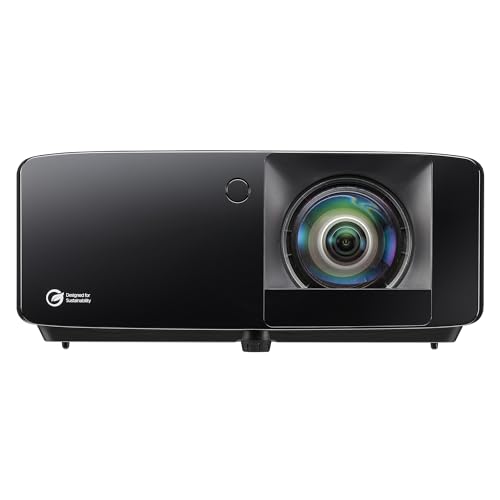
The GT2400HDR changes the geometry of gaming projection. It is a short throw, laser-lit Full HD projector at a stated 4,200 lumens, positioned for low input lag gaming and — in the listing’s own words — golf simulation. That second career explains the first’s priorities: a golf sim needs a bright, responsive image from a projector placed close enough that the player never shadows the screen, which is also exactly what a console den with a coffee table needs. Two hobbies, one lens geometry, and Optoma’s GT line has served both for years.
Short throw transforms the gaming room’s social physics. The projector sits with the console, the cable run is a metre, nobody crosses the beam mid-match, and the player stands inside the game’s space rather than in front of a distant screen. For golf and motion-controlled play that immersion is the product; for ordinary console sessions it is a daily convenience that standard-throw owners underestimate until they have lived with it.
The honest limitations belong in the same paragraph as the praise: the listing claims low input lag without printing a figure, so this guide ranks it below the numbered picks for competitive play, and its resolution is Full HD in a guide of 4K rivals. At short throw distances and gaming seating, 1080p at high refresh is a legitimate competitive choice — many players prefer it — but buyers whose priority is 4K detail should take the BenQ or ViewSonic route. The GT2400HDR is a specialist, and specialists are judged by their specialism: placement, brightness and responsiveness of intent.
Brightness at 4,200 lumens also frees it from the dark-room covenant: sim sheds, garages, bright dens and multi-use rooms are its native soil. If your gaming space has windows and a life beyond gaming, this is the pick that was designed in that room.
The golf simulation brief deserves respect rather than a smirk, because it is the most demanding casual use a projector faces: a bright image, a player standing close and moving, a ball-tracking system’s pace, and sessions that run for hours in a lit garage or shed. A machine specified for that life brings exactly the virtues a family gaming den needs and rarely gets — placement that forgives, light that competes, and a source that does not fade across a season of long sessions. The GT2400HDR’s second career is the strongest evidence for its first.
- Resolution: Full HD 1080p
- Brightness: 4,200 lumens
- Throw: short throw
- Light source: laser
- Input lag: described as low in listing title; no figure stated
- Positioning: gaming and golf simulation, per listing title
Strengths
- Short throw deletes beam shadows and long cable runs
- 4,200 lumens serve bright dens, garages and sim spaces
- Laser consistency for a machine used in long sessions
Trade-offs
- No lag figure stated, so competitive ranking is by intent
- 1080p resolution beside 4K rivals
- Short throw demands its specific placement distance
Best for: golf-sim builders, garage dens and coffee-table gaming rooms.
Not suited for: 4K detail hunters with a room deep enough for standard throw.
XGIMI Horizon 30 Pro — Spectacle pick
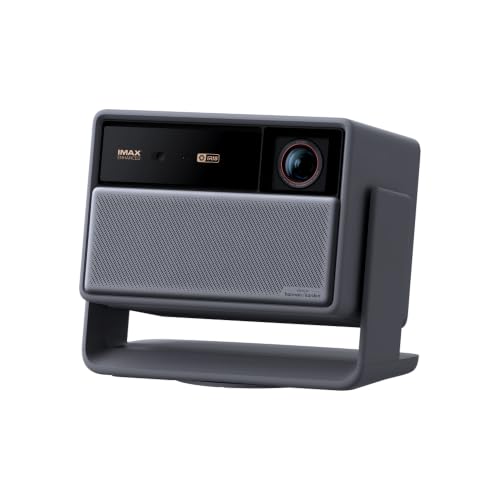
The Horizon 30 Pro is what happens when a lifestyle projector company decides gaming deserves its flagship light. The listing: an RGB triple laser 4K projector at a stated 4,800 ISO lumens — the largest brightness figure in this guide — with 4K at 120 Hz, a dual iris design, a stated 8,000-to-one native contrast ratio, low latency, VRR, X-Vision AI image processing, Dolby Vision, Harman Kardon audio and Google TV. As a collection of claims it reads like three projectors’ worth; as a gaming proposition its centre is the combination of 120 Hz 4K, VRR and that colour-rich laser light.
VRR is the feature competitive console players should circle. Variable refresh rate lets the projector follow the console’s frame rate as it rises and falls, removing the tearing and judder that fixed-refresh displays impose on busy scenes. Paired with 4K at 120 Hz capability, it describes the most modern gaming signal path in this guide. The honest asterisk is latency: the title says “low latency” without a millisecond figure, and this guide’s rule — figures only where stated — means the Horizon cannot be ranked against the BenQ and ViewSonic numbers on evidence. Players for whom the number is the purchase should buy a numbered pick; players for whom the picture is the purchase should see this machine in a room if they possibly can.
Native contrast, quoted at 8,000 to one, is the other figure worth respecting: native figures describe the panel’s own capability without dynamic tricks, and a strong native number underpins the dark-game performance — horror titles, night races, stealth missions — where gaming projectors are usually weakest. Add Harman Kardon audio and Dolby Vision for film nights, and the Horizon 30 Pro is the guide’s most complete entertainment object, gaming-led rather than gaming-only.
Its buyers should be honest about the trade they are making: spectacle and signal modernity over published lag. For the household whose gaming is cinematic — big single-player worlds, racing, sport — that trade is rationally made every day. For the tournament player, it is not, and the guide’s tables exist to make that distinction painless.
Film night, finally, is where the Horizon repays its premium in front of witnesses who do not care about gaming at all. Dolby Vision content on an RGB triple laser at this brightness, with Harman Kardon sound and a smart platform that needs no other box, is the most complete one-object cinema in this entire batch of guides. Households often buy a gaming projector with one enthusiast’s vote and the family’s tolerance; this is the model most likely to convert the tolerance into enthusiasm, because the film evenings are as spectacular as the gaming ones.
- Resolution: 4K, up to 120 Hz
- Brightness: 4,800 ISO lumens
- Light source: RGB triple laser, dual iris
- Contrast: 8,000:1 native, per listing title
- Gaming: VRR, low latency (figure not stated in title)
- HDR: Dolby Vision
- Audio: Harman Kardon
- Platform: Google TV
Strengths
- Most modern gaming signal path here: 4K 120 Hz with VRR
- RGB triple laser colour with strong native contrast
- Complete smart entertainment package around the gaming core
Trade-offs
- No input lag figure stated — competitive buyers cannot rank it on evidence
- ISO lumens are not digit-comparable with rivals’ figures
- Premium, flagship commitment of this guide
Best for: cinematic gamers wanting the biggest, richest picture with modern console features.
Not suited for: tournament players who buy by the millisecond and need the number in writing.
Comparison
| Pick | Resolution | Stated brightness | Lag figure in title | Refresh in title | Light source |
|---|---|---|---|---|---|
| BenQ TK700 | 4K HDR | 3,200 lumens | 4.2 ms and 16 ms (mode-dependent) | Not stated in listing title | Lamp |
| BenQ TK710 | 4K HDR | 3,200 lumens | 4 ms | 240 Hz | Laser |
| ViewSonic LX700-4K | 4K UHD | 3,500 lumens | 4.2 ms | 240 Hz | Laser |
| ViewSonic PX749-4K | 4K UHD | 4,000 lumens | 4.2 ms | 240 Hz | Not stated as laser in title |
| Optoma GT2400HDR | Full HD 1080p | 4,200 lumens | Low (figure not stated) | Not stated in listing title | Laser |
| XGIMI Horizon 30 Pro | 4K | 4,800 ISO lumens | Low latency (figure not stated) | 120 Hz at 4K | RGB triple laser |
How Much Input Lag Can You Actually Feel?
Less than the forums claim and more than the brochures admit — the truth is genre-shaped. At 60 frames per second, each frame lasts about 16.7 milliseconds, so a display pipeline adding one frame of delay sits at the edge of perception for most players in most games. Story adventures, racers at sensible speeds, sports titles and strategy games remain fully enjoyable well past that point, which is why the TK700’s 16 ms 4K mode satisfies the majority of console owners. Fighting games with frame-perfect inputs, rhythm games scored against the beat, and competitive shooters played seriously are where the 4-to-4.2 ms modes in this guide stop being specifications and start being equipment.
The honest self-test is your library, not your reflexes in the abstract. List the five games you play most; if three of them punish a frame of delay, buy from the numbered end of the table. If none do, spend the difference on brightness, placement or sound, where your evenings will actually feel it. Lag is a threshold feature — below your threshold it vanishes, above it nothing else compensates — and knowing your own threshold is the whole skill of buying a gaming projector.
Should You Game at 4K, or Drop to a Faster Mode?
Both, on different nights — and the projectors here are built for exactly that split. Full 4K at 60 Hz is the mode for cinematic single-player games, where the world is the reward and a frame of pipeline delay costs nothing you can feel. The high-refresh modes — 240 Hz operation on the BenQ and ViewSonic picks, 120 Hz at 4K on the Horizon — are for competitive and fast-twitch sessions, where motion clarity and response outrank pixel count. The mistake is treating the choice as a purchase decision rather than a per-game setting: the right projector offers both, and the right player switches deliberately, the way a driver changes gear rather than loyalty.
Seating distance arbitrates the 4K half of the question. At gaming distances from a 100-inch image, 4K detail is visible and worth having for the cinematic library; at the far end of a big room, the faster mode’s smoothness may serve better than resolution nobody can resolve. Let the room and the library vote, nightly.
How Do You Set Up a Gaming Projector Properly?
Start with the signal path, because lag hides there: console or PC into the projector by the shortest quality HDMI run available, game mode enabled on that input, and any video processing you do not need switched off. Confirm the mode per input — projectors remember settings per source, and the film input’s processing is the gaming input’s delay. Then geometry: square the projector physically before touching keystone, because correction costs sharpness and, on some designs, adds processing. Focus on a text screen — a console dashboard — rather than a film scene; text forgives nothing and neither should you.
Sound follows: route audio by eARC or direct connection where the pick supports it, and check lip-sync and game audio delay together, since a mode that fixes one can drift the other. Finally, save two presets — film and game — and label them for the household. The best gaming setup is the one a tired player can summon with two button presses at midnight, and every pick here can be left in exactly that state.
What About Sound for Gaming — Headphones, Bars and Atmos?
Gaming audio splits into two honest camps. Competitive players live in headsets, where the projector’s own speakers are irrelevant and the setup’s job is simply not to add delay to the headset’s path — a reason to route audio directly from the console where possible. Social and cinematic players live in the room, where the TK700’s Dolby Atmos speaker and the Horizon 30 Pro’s Harman Kardon system give two of these picks a completeness their rivals must buy separately, and where eARC models like the TK710 hand the job to a soundbar without losing quality.
The mistake is assuming the camps are permanent. The same player competes in a headset on Thursday and hosts split-screen on Saturday; the setup should serve both without rewiring, which argues for a projector with either strong built-in audio or a clean eARC path — and this guide, not coincidentally, contains both kinds. Decide which camp hosts more of your evenings and let the audio line of the specification vote accordingly.
How Big Should a Gaming Image Be?
Bigger than a monitor and smaller than your neck’s complaint. Competitive play punishes excessive size: a 120-inch image forces eye travel that costs the milliseconds the projector saved, which is why many serious players game at 80 to 100 inches even when the wall allows more. Cinematic and social play rewards the opposite — the largest image the room’s light sustains, with the audience gathered inside the sound. The projectors here span both philosophies because their zoom ranges let one machine serve both sizes; the discipline is the player’s, to shrink for ranked nights and stretch for story nights rather than leaving the lens wherever it first landed.
Resolution follows the same logic: at 90 inches from a gaming chair, the 4K picks’ detail is a genuine competitive asset for spotting distant movement; at 140 inches from a sofa, the GT2400HDR’s 1080p speed-and-brightness bargain reads as wisdom. Size is a setting, not a bragging right, and gaming is the genre that teaches it fastest.
Which Pick Suits Which Kind of Player?
Map the archetypes honestly and the shortlist writes itself. The ranked competitor, whose library is shooters and fighters and whose sessions are measured in ladders, belongs to the TK710 — or the LX700-4K if the room is bright and the loyalty runs ViewSonic. The story gamer, whose library is open worlds and horror, belongs to the TK700’s Atmos completeness or the Horizon 30 Pro’s spectacle, where the picture is the reward and a frame of pipeline is invisible. The social host, whose gaming is parties and split-screen, belongs to brightness: the PX749-4K in a lit family room, the GT2400HDR where the coffee table is the only stage.
The simulator — golf, racing rigs, flight — belongs to the GT2400HDR’s geometry and stamina, with the PX749’s size ceiling as the alternative for very large sim spaces. And the household that games as one activity among many, on a screen that must also carry films and sport with honour, belongs to whichever of the BenQ pair fits its light-source philosophy. Archetypes are simplifications, but they simplify in the direction of satisfaction: buy the machine your most-played genre would choose, not the one your most-impressive screenshot would.
How Do You Future-Proof a Gaming Projector Purchase?
Consoles live seven years; projectors should plan to meet two generations. The future-proofing that matters is signal headroom — the 240 Hz pipelines and 120 Hz 4K capability in this guide are valuable less for today’s library than for the next console’s — and light-source longevity, because a laser’s consistency spans the whole era while a lamp will be replaced inside it, at a price that should be counted in the purchase rather than discovered in year three. Placement flexibility is the third hedge: rooms change faster than projectors, and zoom, shift and keystone range are what let a machine survive its owner’s next address.
What does not future-proof anything: chasing the single smallest lag figure of the current season. Each generation’s figures improve; the difference between 4 and 4.2 ms will never be the reason a setup feels old, while a dimming lamp, a fixed lens or a missing refresh mode will. Buy headroom and light, and let the milliseconds look after themselves — at this guide’s level, they already have.
What Should You Test in the First Week?
Test the modes, not the marketing. Load your fastest game and play it in the projector’s fastest configuration, then in its full-quality 4K mode, and learn the difference with your own hands — that felt knowledge is worth more than any figure in this guide, including the ones printed above. Check the dashboard text for focus across the frame, because gaming interfaces live in the corners where lenses are weakest. Play one dark game — a horror title, a night race — and judge the shadow detail your genre actually uses, then one bright game for the room’s daylight behaviour.
Then test the household: a film with the family, a split-screen session, a headset night and a soundbar night if you own one. Save the presets while the settings are fresh, label the inputs, and write the two button sequences that matter on a card for the other players in the house. A gaming projector that only its buyer can operate correctly will be operated incorrectly most of the time; the first week’s real work is making the fast path the easy path for everyone.
Does a Gaming Projector Belong in the Living Room or a Dedicated Den?
The den flatters the numbered picks: controlled light, a fixed setup, a chair at the distance the player chose — the environment where 4 ms and a calibrated 100-inch image pay their dividends nightly. The living room flatters the bright and the complete: the PX749’s lumens against family lighting, the TK700’s speaker against the absence of a sound system, the Horizon’s platform against the household’s streaming habits. Neither room is the consolation prize; they are different sports, and this guide’s six were chosen so that each room has a machine that treats it as the main event.
The household with both rooms should resist buying one projector to commute. Gaming setups accrue calibration, presets and cable discipline that travel badly; a machine per room, each mid-priced, usually serves better than one flagship carried between them. If the budget forces the commute, choose by the room where the ranked sessions happen and let the other room accept the compromise — skill-critical play is the least forgiving use in the house.
How Does HDR Change Games on a Projector?
HDR in games is a lighting instrument: sunsets that hold their gradient, neon that glows without clipping, shadowed interiors where detail survives instead of crushing to black. On a projector, whose contrast is bounded by the room, HDR’s value concentrates in tone mapping — the intelligence with which the machine fits a bright game’s range into the picture it can actually show. The picks here all carry HDR support of some form, from the BenQ pair’s HDR10 to the Horizon 30 Pro’s Dolby Vision, and the practical advice is to enable it, then calibrate the game’s own HDR settings screen rather than the projector’s defaults; games ship with that calibration ritual built in, and five honest minutes there transforms more titles than any menu preset.
Dark games remain the projector’s examination, and the TK700’s enhanced black detail and the Horizon’s native contrast figure exist because manufacturers know it. Play your darkest title before judging any of these machines, in the mode you will actually use, at the hour you will actually play. The projector that keeps a horror game’s corridor legible without washing its blacks to grey is the one your library will thank you for in October.
What Cables and Accessories Does a Gaming Projector Setup Need?
Fewer than the accessory industry hopes. One certified high-bandwidth HDMI cable, short enough to keep the signal honest, per source — the fast modes in this guide are exactly where cheap long cables go to fail, dropping to black at the moment of glory. A second cable as a spare is the wisest small purchase in the whole setup, because the night a cable dies is always a match night. Beyond cables: a stable surface or mount at the right distance, a power strip with surge protection, and the controller chargers parked where the players sit.
Everything else is situational. A screen helps a permanent den and is optional in a multipurpose room. A capture card, a bias light, a second soundbar — each serves a specific household ritual and none belongs in the first order. The discipline that separates good setups from expensive ones is sequencing: projector, cables, sound, screen, in that order, with a week of play between each step to learn what the room actually lacks. Gaming setups built by that sequence feel designed; setups bought in one basket feel accumulated, and the difference shows every evening.
How Loud Are Gaming Projectors, and Does It Matter Mid-Match?
A projector a few metres away is audible in a quiet room, and gaming’s quiet moments — the stealth level, the puzzle room — are where owners notice. The laser models here generally run calmer than lamp equivalents working hard, and eco modes trade a little brightness for calm in exactly the sessions that want it. Headset players, which is to say most competitive players, will never hear any of it; room-audio players should value the calmer machines and the placement that keeps the exhaust’s path away from the seating. It is a secondary criterion that becomes primary at midnight in a small den, and the honest time to weigh it is before the purchase, with your own genres in mind.
Common Mistakes
Quoting the smallest lag figure without its mode leads the list — a 4.2 ms headline that belongs to a high-refresh mode tells you nothing about the same machine at 4K, and guides that hide the condition are selling, not informing. Second comes buying refresh rate as a substitute for lag: the two are partners, not synonyms, and a 240 Hz badge with an unexamined pipeline can feel slower than a well-made 120 Hz one. Third: leaving film-mode processing enabled on the gaming input, then blaming the projector for delay the settings caused.
Fourth: running the console through a receiver or switcher that adds its own processing without checking its game-mode behaviour. Fifth: placing a standard-throw projector so far back that the HDMI run becomes a signal-quality adventure, when a shorter setup or the short throw GT2400HDR would have removed the problem. Sixth: judging a gaming projector on a film trailer alone — play your fastest game on it, in its fastest mode, before the return window closes.
Final Recommendation
Serious players should start with the TK710: the stated 4 ms, 240 Hz, laser consistency and warranty make it the most defensible competitive purchase in this guide. Console households that value built-in sound and a proven all-rounder should take the TK700 and its honestly dual figures. ViewSonic splits the remaining votes by light source — the LX700-4K for laser, the PX749-4K for brightness — while the GT2400HDR owns the short throw and simulation rooms, and the Horizon 30 Pro owns spectacle, for cinematic players who rank picture above published milliseconds. Every pick here will show a film beautifully on Friday and a final boss on Saturday; choose by the number you can defend, the room you actually have, and the games you actually play.
One last encouragement for the player still gaming on a television and wondering whether the wall is worth it: the first session answers the question permanently. A racing game at a hundred inches, a co-op campaign with the whole party visible from one sofa, a final played at the size the developers dreamed in — these are not incremental upgrades to gaming but changes in its social physics, and they are why a category that barely existed five years ago now supports a guide this long. Pick the machine your library deserves, set its fastest mode honestly, and let the wall make its case.
Frequently Asked Questions
Is 16 ms input lag too slow for gaming?
For most console gaming, no — it is roughly one frame at 60 Hz, and the story games, racers and sports titles that dominate libraries play beautifully through it, as the TK700’s dual-figure listing acknowledges. The players who should treat 16 ms as a ceiling rather than a comfort are those whose main games score them against other humans in real time; everyone else is buying insurance against a sensation they will never have, and the money is usually better spent on the brightness or sound that every session will use. Frame-critical genres are the exception, and they are served by the 4 ms-class modes elsewhere in this guide.
Why do listings quote two different lag figures?
Because lag depends on the mode: higher refresh rates and lower resolutions process faster. An honest listing states the figure for each mode it advertises; a listing quoting only its smallest number, with no condition attached, is asking you not to ask the follow-up question.
Does 240 Hz matter if my console outputs 120 Hz?
It future-proofs the display and serves PC players who can feed it, while console players benefit from the fast pipeline those modes are built around, and from the motion clarity that high-refresh operation brings even to games that never approach the ceiling their hardware advertises on the box. Buy 240 Hz as headroom and processing quality, not as a number your current console must match to justify the purchase.
Can a gaming projector replace a gaming monitor?
For big-screen and social play, it surpasses one; for desk-distance competitive play, a monitor’s size and pixel density still serve better. Many serious players keep both — monitor for ranked sessions, projector for everything that deserves a wall — and this guide’s picks were chosen to honour the second role completely.
Do I need a screen for gaming, or is a wall fine?
A smooth pale wall is fine to start and remains fine for most players — gaming’s bright, high-contrast imagery forgives surfaces that film would criticise. A screen earns its money in a permanent den through flatness, a defined border and gain control, and it should be bought after the image size settles, not before. Players on the short throw GT2400HDR should note its angle is still forgiving of ordinary walls, unlike ultra-short-throw designs; no special screen is required for any pick in this guide.
What is VRR, and should I care?
Variable refresh rate lets the display match the console’s fluctuating frame rate, removing tearing and smoothing dips without added delay. It is one of those features whose absence is invisible until you have lived with its presence, after which fixed-refresh gaming in variable-performance titles feels quietly broken in a way that is difficult to un-feel. The Horizon 30 Pro states it; players whose games have variable performance — most modern console titles — will feel it as a general smoothness that is hard to give up once lived with.
Related Guides
The laser half of this guide’s argument is developed in our home laser projectors for lamp-free movie rooms round-up, where the TK710 also leads the gaming discussion. Short throw players should compare the short throw projectors that make big pictures from a few feet away, whose gaming figures rival this guide’s. And when the gaming room becomes a cinema again, the affordable home projectors without the premium tier selection covers the film-first alternatives at friendlier commitment.


