What's inside
- Key Takeaways
- Quick Picks
- How did we judge single-ear headsets without stereo distractions?
- Who is a mono headset actually for, and who should buy stereo instead?
- What separates an office mono headset from a phone earpiece?
- What is the right second headset to pair with a mono main?
- How do you keep a mono headset sounding professional in unprofessional places?
- Which six single-ear headsets cover desks, pockets and cabs?
- How do the six mono picks split between desk and street?
- How should you set up a mono headset for phone and computer together?
- Why do professionals keep an earpiece after trying earbuds?
- How long should a mono headset last, and what kills them early?
- Which mono headset should a small team or household standardise on?
- What mistakes do mono headset buyers keep making?
- Final Recommendation
- Frequently Asked Questions
- Related Guides
As an Amazon Associate I earn from qualifying purchases. This post may contain affiliate links at no extra cost to you.
widgetverdict.com is reader-supported. When you buy through links on our site, we may earn an affiliate commission.
Where to buy: the six single-ear headsets below link to checked Amazon listings from Poly and Yealink, spanning charge-stand bundles, pocket earpieces and certified office models.
The best mono bluetooth phone headsets rest on a simple insight that stereo marketing keeps stepping around: for phone calls, one ear is enough, and the other ear has a job to do. It listens for the doorbell, the traffic, the colleague, the kettle and the child. A mono headset keeps you legally and socially present in your surroundings while a boom microphone makes you sound like you are sitting in a quiet studio. For drivers, dispatchers, tradespeople, carers and anyone whose work happens in the world rather than at a desk, that split attention is not a compromise. It is the design.
This guide draws its six picks from the two brands that take single-ear seriously as a professional category. Poly, heir to the Plantronics earpiece tradition, contributes four: two versions of the Voyager 4310 office headset, the pocketable Voyager 5200 and the new Voyager Legend 50 UC. Yealink contributes the BH70 Mono and the BH71 Lite earpiece. Between them they cover the desk worker who pairs to a computer, the mobile worker who lives on a phone and the driver who needs wind to lose an argument with a microphone.
Choose by your second device and your surroundings. Some of these are office headsets that also take phone calls; some are phone earpieces that can visit a computer. Some charge on a stand that anchors a desk; some disappear into a pocket or a charging case. The sections below keep those identities distinct, because a mono headset bought for the wrong habitat disappoints exactly as reliably as a stereo one does.
Key Takeaways
- Mono means one ear for the call and one ear for the world: awareness is the feature, not a missing channel.
- The Voyager 4310 pair are office-first headsets, connecting to a computer through a USB Bluetooth adapter and to a phone directly; the stand version simply adds a permanent charging home.
- The Voyager 5200 and Legend 50 are phone-first earpieces built for wind, movement and pockets rather than desks.
- Yealink’s BH70 Mono carries Teams and Zoom certification, unusual in a mono Bluetooth headset and valuable for office-heavy users.
- Boom placement decides call quality more than any other trait here, because a capsule near the mouth beats room noise before electronics get involved.
- Charging style is a lifestyle choice: stands suit desks, cases suit pockets, and cables suit nobody’s routine for long.
Quick Picks
| Pick | Badge | Why it earns its place |
|---|---|---|
| Poly Voyager 4310 with Charge Stand | The desk-based mono | A single-ear office headset bundled with its charging stand and a USB-A adapter, built for computer-first call days. |
| Poly Voyager 4310 UC Headset | The travelling twin | The same 4310 headset with a USB-C adapter and no stand, for workers whose desk changes or whose bag is the desk. |
| Plantronics Voyager 5200 Bluetooth Headset | The wind-tested classic | The long-running pocket earpiece whose WindSmart microphone array made it the default for drivers and outdoor workers. |
| Poly Voyager Legend 50 UC | The modernised legend | Four noise-cancelling microphones, AI noise blocking and WindSmart in a charging-case earpiece with UC ambitions. |
| Yealink BH70 Mono Bluetooth Headset | The certified mono | A mono Bluetooth headset with a three-microphone isolation array and Teams and Zoom certification for office-heavy users. |
| Yealink BH71 Lite Bluetooth Earpiece | The pocket lightweight | Yealink’s single-ear earpiece for phone-first users: noise-cancelling mic, business and driving duty, minimal bulk. |
How did we judge single-ear headsets without stereo distractions?
With music out of the frame, the judging gets honest quickly. Microphone quality came first, assessed by design: boom length and placement, the number of microphone elements working on noise, and each brand’s track record in wind and street noise, the two enemies a phone earpiece actually faces. A mono headset lives outdoors, in vehicles and on job sites, so laboratory quiet was treated as the least relevant condition imaginable.
Connection behaviour came second. A mono headset typically serves a phone plus one more device, a computer, a tablet or a second phone, so multipoint stability and the quality of the computer link mattered. The office models here use USB Bluetooth adapters for that link, which gives a computer a dedicated, predictable audio path and enables the platform integrations that certification requires. The pure earpieces lean on the phone’s own Bluetooth and win on size and simplicity instead.
Wear and charging closed the assessment. Single-ear headsets are worn longer and noticed less than any other audio product, so weight, ear geometry and the option to swap ears all scored. Charging was judged as a routine rather than a specification: a stand you drop the headset onto beats a cable you must find, and a pocketable case beats both for people who never sit down. The six picks divide those virtues deliberately.
One more lens shaped the six: what the person on the other end experiences. Mono headsets are bought by their wearers but judged by their callers, and a boom that keeps a driver, a coordinator or a parent sounding composed and close does professional work no dashboard can measure. We favoured designs whose microphone story was the headline of the product rather than a bullet in its list, because in this category the voice you send is the product, and everything else is the packaging it travels in.
We also checked the small print of daily life: whether the headset can be worn with glasses, whether its controls can be worked with cold or gloved fingers where relevant, and whether its charging routine survives a chaotic household. Mono headsets are bought for real environments, and a guide that judged them in a quiet studio would be reviewing a different product from the one that arrives in a driver’s cab or a coordinator’s kitchen.
Who is a mono headset actually for, and who should buy stereo instead?
The mono buyer works in the world. Delivery and service drivers who must hear traffic and customers, warehouse and retail staff who take calls between tasks, tradespeople on sites where an ear on the surroundings is a safety matter, carers and parents for whom the house outranks the call, and desk workers in shared offices who need colleagues to remain audible. For all of them, sealing both ears to take a phone call is not focus; it is a small, repeated act of disconnection from the place they are standing in.
The stereo buyer works in a chair. Long video meetings, focused listening, music between calls and noisy open-plan offices all reward two earpieces and, often, noise cancellation. Nothing in this guide argues otherwise. The categories answer different questions, and the only real mistake is buying one to do the other’s job: a stereo headset worn with one cup pushed off, or a mono earpiece expected to silence a call centre.
Many working people end up owning one of each, and the mono is usually the one that leaves the house. It weighs almost nothing, it survives in a pocket or a cab, and it turns any phone call into a hands-free, professional-sounding conversation wherever the day happens. That is the spirit of the six picks below: not smaller stereo headsets, but the right tool for the moving half of working life.
What separates an office mono headset from a phone earpiece?
The office mono headset, represented here by the Voyager 4310 pair and the Yealink BH70, is built around a computer. It ships with or expects a USB Bluetooth adapter, presents itself to the computer as a proper audio device, holds a multipoint link to a phone on the side, and in the Yealink’s case carries platform certification for the apps the office runs on. Its natural habitat is a desk, its natural accessory is a charging stand, and its natural day is measured in meetings as much as calls.
The phone earpiece, the Voyager 5200, Legend 50 and BH71 Lite here, is built around movement. It pairs straight to the phone, shrinks to pocket size, fights wind and street noise with microphone arrays, and charges from a case or a cable wherever the wearer happens to be. It can usually visit a computer over plain Bluetooth, but the computer is the guest, not the host. Battery figures shrink with the size, and the design assumes calls measured in minutes scattered across a day rather than a queue measured in hours.
Neither is the upgrade of the other. The buyer who works from a desk and walks to the kitchen should buy the office pattern; the buyer whose office is a vehicle, a site or a shop floor should buy the earpiece pattern. The mistake is reading the shared word mono as sameness. The picks below are therefore introduced by habitat first and brand second, so the right comparison happens inside each pattern before it happens across them.
What is the right second headset to pair with a mono main?
Many mono owners eventually keep a stable of two: the mono for the world and a stereo headset for the chair. The pairing works because the two tools stop competing; the stereo stops being worn one-cupped around the house, and the mono stops being asked to silence a noisy office. Readers building that stable should buy the mono first if their days are mobile, since it covers the hours stereo cannot, and add the desk headset when the meeting load justifies it.
The reverse order tempts people who already own stereo and feel mono is the accessory. For drivers, carers and floor workers it is not the accessory; it is the primary instrument, and the stereo is the luxury. This guide’s six picks were chosen to serve as primaries, with the battery, boom and build that primary duty demands, and the household that buys them in that spirit will find the category finally makes sense.
How do you keep a mono headset sounding professional in unprofessional places?
The boom does most of the work, but the wearer finishes it. Angle the microphone toward your mouth rather than letting it drift toward your cheek, keep the capsule out of the direct wind where you can, and turn your head, not the headset, when a gust or a passing truck crosses the conversation. Mono earpieces forgive a great deal of environment; they forgive less geometric carelessness, because a capsule an inch too far away hands the room back its advantage. A ten-second position check at the start of a call-heavy day is the cheapest audio upgrade in this entire guide.
Your own volume is the second discipline. One open ear means you hear the room at full level, and the temptation is to talk over it, which exhausts your voice and distorts the capsule’s input. Trust the noise cancellation to do the separation it was built for and speak at the level you would use across a desk. Callers consistently report that mono professionals sound calmer than they feel, and that illusion is simply technique: steady distance, steady level, and a microphone close enough to make both easy.
Which six single-ear headsets cover desks, pockets and cabs?
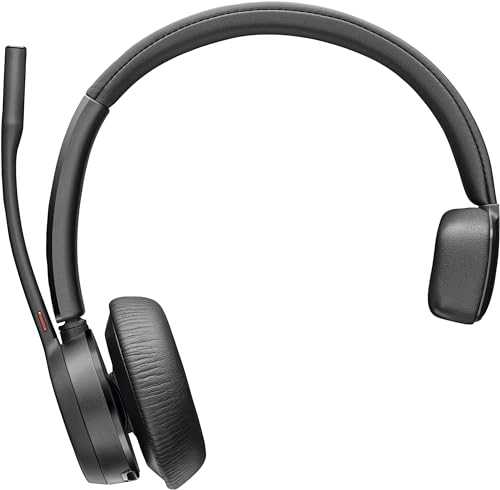
Poly Voyager 4310 with Charge Stand — The desk-based mono
The Voyager 4310 with its stand is the mono idea adapted to a desk, and the stand is not packaging filler. It gives the headset a home, keeps the battery topped up between calls and turns the start of the working day into a single gesture: lift, wear, talk. For a worker whose calls arrive through a computer softphone all day, that routine is worth more than any single audio specification, because the headset is always charged, always findable and always paired to the machine that matters.
The headset itself is a single-ear design with a proper boom, connecting to a PC or Mac through the included USB-A Bluetooth adapter and to a mobile phone over Bluetooth at the same time. That adapter link is the professional pattern: the computer sees a dedicated audio device, call controls behave, and the phone waits politely on the second connection until it rings. The microphone keeps your voice forward in ordinary office and home noise, and the single earpiece leaves you present in the room, able to hear a colleague’s question without the cup-off-one-ear shuffle.
Buy it as the bundle it is. The stand ties the setup to one desk, so hot-deskers and travellers should take the stand-free version below and a cable instead. There is no noise cancellation for your own ear, because mono design treats the room as information rather than interference. For the computer-first worker who wants one ear in the meeting and one on the office, this is the most complete package in the guide.
The 4310 bundle also makes a thoughtful standard issue for a partner or parent beginning remote work, because its learning curve is one morning long. Stand, adapter, boom, button: the whole system can be explained in a single phone call, which is more than can be said for most technology gifts. Guides rarely price explainability, but anyone who serves as their family’s IT department knows it is the feature that decides whether a product is used or shelved.
The stand bundle also future-proofs a desk against the owner’s own upgrading. Because the headset charges in its home regardless of which computer adapter the week brings, moving from an old laptop to a new one disturbs nothing about the routine. Desk equipment earns loyalty by surviving transitions without demanding attention, and a charging stand is, in the end, a small monument to that principle: everything returns to its place, charged, whatever else changed.
Consider also what the stand does to a shared or family desk. A headset with a visible home gets borrowed less destructively and returned more reliably, because its absence from the stand is obvious and its presence there reads as in use by the household’s system rather than abandoned. In homes where two people take computer calls, pairs of desk headsets on stands have quietly replaced the drawer of tangled earbuds in many households. The 4310 bundle is designed for that domestic professionalism, and it shows in how little friction surrounds it after the first week.
- Connection: USB-A Bluetooth adapter and phone Bluetooth
- Style: single-ear headset with boom
- Bundle: charging stand included
- Use: PC and Mac softphone calls plus mobile
Strengths
- Stand keeps the headset charged and parked
- Adapter gives the computer a stable audio path
- One ear stays open to the office
Trade-offs
- Stand anchors the setup to one desk
- No noise cancellation for incoming sound
- USB-A adapter may need an adapter on new laptops
Best for: desk workers whose calls run through a computer and who want a charged headset waiting each morning.
Not suited for: hot-deskers and travellers who need the headset to live in a bag.
Poly Voyager 4310 UC Headset — The travelling twin
This is the Voyager 4310 set free from its furniture. The headset is the same single-ear, boom-microphone office design as its stand-bundled sibling, but the bundle trades the charging stand for portability and swaps the computer adapter to USB-C, matching the ports on current laptops. It is the version for the hybrid worker whose desk is a rota, the consultant whose office is a client site, and anyone who already owns enough charging cables to resent one more dedicated stand.
Everything that makes the 4310 an office headset survives the move: the USB adapter gives a computer a dedicated audio device with dependable call behaviour, Bluetooth holds the phone as a second connection, and the boom keeps your voice clear for listeners while your free ear keeps you in the room. Without the stand, charging becomes a cable habit, and the headset lives in a bag or a drawer between uses, which some owners honestly prefer. The product is a study in how much of a headset’s experience is the bundle around it rather than the headset itself.
Choose between the twins by habitat, not by audio, because the audio is shared. A fixed desk with daily computer calls rewards the stand every single morning. A moving worker rewards the USB-C adapter every time a modern laptop appears. Buyers should also note the adapter difference when ordering for a team: USB-A and USB-C versions of this headset both exist in this guide precisely because fleets and individuals have different ports, and the wrong one is a small, stupid problem to have on day one.
Employers equipping a hybrid fleet often mix the two 4310 bundles deliberately: stands for the office desks, UC versions for the home and travel kits, one headset behaviour across the whole organisation. That mix-and-match coherence is a Poly ecosystem strength the single-product view misses. A worker promoted from home kit to office desk keeps every habit they have learned, and support keeps one page of answers for both.
There is a neat symmetry in the two 4310 bundles that buyers can use as a rule beyond this guide: accessories are habitat made visible. A stand declares a desk, a case declares a pocket, an adapter declares a computer’s generation. Reading any headset bundle that way, as a description of the life its maker imagines for it, prevents most mismatched purchases before they happen. The UC’s imagined life is motion between desks, and its kit is honest about it.
The stand-free 4310 has an underappreciated virtue for employers: it ships to a remote worker complete. Adapter, headset, cable, done, with nothing to assemble and no furniture decision to make in a rented room. Onboarding calls sound professional from the first morning, and when the worker changes laptops the USB-C adapter already matches the new machine. IT departments learned during the great remote expansion that the best peripheral is the one that generates no support ticket, and this bundle reads as if it were specified by someone who answered those tickets.
- Connection: USB-C Bluetooth adapter and phone Bluetooth
- Style: single-ear headset with boom
- Bundle: no stand, cable charging
- Use: hybrid and travelling computer-call workers
Strengths
- USB-C adapter suits current laptops
- Same office-grade call behaviour as its twin
- Bag-friendly without stand or dock
Trade-offs
- Cable charging is easier to forget
- No parked home for the headset
- Still no incoming noise cancellation
Best for: hybrid workers and consultants whose computer changes more often than their headset.
Not suited for: fixed-desk users who would feel the missing stand every morning.

Plantronics Voyager 5200 Bluetooth Headset — The wind-tested classic
Some products become the answer to a category, and for phone earpieces the Voyager 5200 has been that answer for years. It is a compact over-ear earpiece from the Plantronics tradition Poly inherited, built around a microphone system the brand calls WindSmart: multiple microphones and processing aimed squarely at the rustle, gust and street roar that destroy ordinary earpiece calls. A driver with the window cracked or a site worker crossing a yard sounds, to the person on the other end, improbably calm. That is the entire product, executed properly.
The wearing experience explains the longevity. The earpiece hooks over either ear, balances its small weight behind the ear rather than in it, and disappears during a day in a way boom office headsets never try to. Voice controls let calls be answered by speaking, the earpiece announces callers, and the battery covers a working day of scattered calls. It pairs to a phone the ordinary way and asks nothing of a computer, which is correct: this is a phone instrument that happens to use Bluetooth, not an office peripheral.
Age brings honest caveats. The 5200’s charging and case ecosystem predates the USB-C-everything era, its talk time is measured for a day of calls rather than a week, and Poly’s newer Legend 50 below exists precisely to modernise this formula. None of that erases the 5200’s case: a proven, widely understood earpiece, available everywhere, that drivers and outdoor workers keep rebuying because the wind argument was settled in its favour long ago.
One more 5200 virtue deserves recording: it behaves identically on almost any phone a driver or worker is handed. In jobs where handsets change, get replaced or are shared across a fleet, an earpiece whose pairing and controls never surprise is worth more than a newer model with a learning curve per device. Consistency across other people’s technology is a professional skill, and this earpiece has been practising it longer than most.
The 5200 also remains the earpiece most likely to be recognised by the person on the other end of a professional relationship. Dispatchers, clients and colleagues have heard its voice signature for years, and familiarity reads as reliability in a voice. That social fact never appears in a comparison table, but working people trade on it daily. A classic earns its status in exactly this currency, accumulated one clear call at a time.
The 5200’s longevity has created an accessory commons that newer earpieces cannot match: cases, chargers, ear tips and vehicle mounts from years of production, understood by every phone shop and fleet supplier. A driver who loses a charger in another state replaces it the same day, which is a form of reliability no specification sheet captures. Products become infrastructure by surviving, and the 5200 has survived long enough that buying one is less a gadget decision than a decision to join the largest support network in its class.
- Connection: Bluetooth to phone
- Style: over-ear pocket earpiece
- Microphones: WindSmart multi-microphone array
- Controls: voice answer and caller announce
Strengths
- Wind handling is the class benchmark
- Disappears over the ear for all-day wear
- Proven design with years of track record
Trade-offs
- Older charging ecosystem
- Talk time sized for a day, not a week
- No computer adapter in the box
Best for: drivers, site workers and anyone whose calls happen outdoors or on the move.
Not suited for: computer-first office users who need an adapter-based desk setup.

Poly Voyager Legend 50 UC — The modernised legend
The Legend 50 is Poly taking its own classic seriously enough to rebuild it. The Voyager Legend name carries decades of earpiece history, and this UC generation updates the formula with four noise-cancelling microphones, AI-assisted noise blocking for your voice and the WindSmart technology that made the line famous, now aimed at a world where an earpiece must also behave in video meetings. It ships with a charging case, the modern answer to the cable question, so the earpiece tops itself up between calls in a pocket or a cab’s cup holder.
The UC in the name marks the ambition: this earpiece wants the desk as well as the street. It is positioned to connect across phone and computer life, carrying Poly’s current noise story into both. For the worker whose day genuinely splits, site in the morning, laptop in the afternoon, that dual citizenship is the point of the product. The voice that callers hear stays filtered and forward in both habitats, and the case keeps the battery story boring, which is the highest praise a battery story can earn.
Premium positioning is the cost, and buyers should interrogate whether they need it. A pure phone user may find the 5200’s simpler proposition sufficient, and a pure desk user is better served by the 4310’s adapter and stand. The Legend 50 earns its price in the overlap: one earpiece, modern charging, the strongest noise toolkit Poly puts in this shape, and no habitat in a working day where it feels like the wrong tool. For the genuinely mobile professional, that overlap is the whole job description.
The Legend 50 also points at where the whole earpiece category is travelling: fewer, smarter microphones doing computational work, cases replacing cables, and UC behaviour expected as standard rather than sold as a variant. Buying it is partly buying the category’s present tense. Buyers who keep equipment for many years may prefer the 5200’s settled past; buyers who replace on a cycle will find the Legend’s direction simply continues under them.
Buyers hesitating between the Legend 50 and the 5200 should ask how much of their calling life now happens in front of a computer camera. The 5200’s world is the phone call; the Legend 50 was designed after video meetings annexed half of working life, and its UC ambitions, case charging and four-microphone array all serve that annexation. The price gap between them is, almost exactly, the price of the second habitat, and readers can now price their own second habitat honestly.
The Legend 50’s case deserves attention as a behaviour design. An earpiece that charges in its case is an earpiece that gets charged, because the case is where it sleeps, and sleep and charging become the same act. Poly’s older earpieces asked owners to remember a cable; this one asks them to remember a pocket. For professionals whose previous earpieces died of neglect rather than defect, that change of question, from discipline to furniture, is the real upgrade the flagship price is buying, with the four-microphone array as a very capable bonus.
- Connection: Bluetooth, UC-oriented
- Style: earpiece with charging case
- Microphones: four noise-cancelling mics, AI noise blocking, WindSmart
- Use: phone and computer hybrid duty
Strengths
- Strongest noise toolkit in a pocket earpiece here
- Charging case keeps battery routine effortless
- Bridges street and desk in one product
Trade-offs
- Premium price for an earpiece
- Desk users may prefer an adapter and stand
- Case is one more thing to keep track of
Best for: mobile professionals whose calls split between the street, the vehicle and the laptop.
Not suited for: single-habitat users who would pay for versatility they never use.

Yealink BH70 Mono Bluetooth Headset — The certified mono
Certification is rare in the mono Bluetooth world, which is built for phones, and that rarity is the BH70 Mono’s headline. Yealink lists it as certified for Microsoft Teams and Zoom, so the office half of its life, the computer meetings, gets the tested call-control behaviour that certified hardware promises, while the single-ear design keeps the wearer present in the room. For a worker whose mono preference is about awareness rather than travel, a home-based coordinator or a shared-office professional, that combination is exactly the product the category usually forgets to make.
The microphone system uses three microphones working on sound isolation, in Yealink’s description, to keep your voice separated from the room you are deliberately listening to. That is the mono paradox every pick here must solve, hearing the room yourself while preventing the room from reaching your callers, and a multi-microphone array is the honest way to solve it. Bluetooth connection covers the computer and phone pattern of modern work, and the wearing design suits the on-off rhythm of a day spent half in meetings and half in conversation with the people physically present.
The BH70’s compromises are about habitat. It is an office-pattern headset, so the outdoor wind warfare that defines the Voyager earpieces is not its arena, and it lacks the stand-bundle completeness of the 4310 package. Buyers whose mono life happens in vehicles and yards should look at the Poly earpieces. Buyers whose mono life happens at a desk, in meetings, with a door they need to hear, have found the pick in this guide that was designed for them first.
The BH70 Mono rewards a moment’s attention to its three-microphone claim, because in mono design the array is doing double duty: isolating your voice for callers while you deliberately hear the same room they must not. That is a harder trick than stereo noise cancellation, which can simply seal and process. Yealink’s investment in it signals that the BH70 was engineered for the mono paradox rather than merely shrunk from a stereo model, and listeners on the other end can hear the difference.
The BH70 Mono’s certification also future-proofs it against the platform shuffle. Offices drift between Teams and Zoom as contracts and clients change, and a mono headset certified for both spares its owner a re-purchase at each migration. In a category where most products are phone-only, that dual loyalty is a quietly strategic feature, and organisations standardising home-office kits for hybrid staff should weigh it more heavily than its modest price suggests.
The BH70 Mono also speaks to a specific modern anxiety: the worker who is in meetings all day but refuses to be sealed off from their own home while doing it. Parents in home offices are the obvious case, but so are carers, pet owners and anyone whose doorbell outranks their calendar. Certified mono is the rare product that refuses to make that worker choose between professional call behaviour and an ear on the house, and its existence in Yealink’s line suggests the maker has met this customer often enough to build for them deliberately.
- Connection: Bluetooth
- Style: mono single-ear headset
- Microphones: three-microphone sound isolation array
- Certification: Microsoft Teams and Zoom Certified, per the listing title
Strengths
- Platform certification, rare in mono Bluetooth
- Three-mic array separates voice from room
- Suits meeting-heavy days with awareness
Trade-offs
- Office-pattern, not a wind specialist
- No charging stand bundle
- Less pocketable than the pure earpieces
Best for: desk and home-office workers who want mono awareness with certified meeting behaviour.
Not suited for: outdoor and vehicle workers who need a wind-first earpiece.
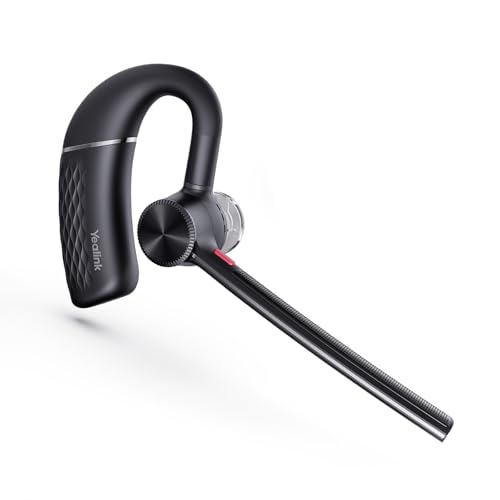
Yealink BH71 Lite Bluetooth Earpiece — The pocket lightweight
The BH71 Lite is Yealink’s entry in the pure earpiece class, a single-ear Bluetooth earpiece for the phone-first user who finds even the Voyager line more hardware than they want. Its listing aims it at office, driving and business use, which translates to the scattered-call day: a coordinator walking a floor, a driver between drops, a small-business owner whose phone is the business. The noise-cancelling microphone keeps those calls professional, and the earpiece itself is small enough to be worn speculatively, there when the phone rings and forgotten when it does not.
Lite is an honest word in the name. The BH71 Lite trims the flagship earpiece formula to its essentials: one ear, one microphone story, Bluetooth to the phone, and a wearing style that can be swapped and forgotten. What it does not attempt is the office pattern: no adapter-based computer link, no certification story, no stand. Buyers comparing it with the BH70 Mono above are really comparing habitats, phone-first movement against desk-first meetings, and the Lite’s lower price simply reflects the narrower brief it sets itself.
As a first mono headset or a second one for the car, the BH71 Lite makes a tidy case. Drivers in particular should note the fit between a light earpiece and a driving day: one ear on the call, one on the road, no boom swinging in the mirror. Its limits are the class limits at this tier, battery measured in a day’s calls and a brand ecosystem smaller than Poly’s. Within those lines it does the simple job simply, which is a compliment this category should hand out more often.
Finally, the BH71 Lite’s restraint makes it the easiest pick in this guide to buy for someone else. A driver, a shopkeeper or a parent who needs hands-free calls does not need a feature lecture; they need an earpiece that pairs, fits and answers. The Lite’s narrow brief is its kindness. In a guide full of considered, multi-paragraph decisions, there is room to honour the product whose entire argument is that the decision should be small.
The BH71 Lite closes the guide with a reminder about how categories actually grow. Most mono loyalists started on something simple, discovered that one open ear suited their working life, and only then climbed toward stands, adapters and flagship arrays. A Lite that converts a sceptic is worth more to the category than a flagship that delights the converted. Yealink clearly knows this, and the little earpiece’s honest, narrow brief is the sign of a maker playing a long game.
The BH71 Lite’s best role may be as the household or small-business second earpiece: the one in the car, the one by the till, the one a partner borrows for a day of calls. At its tier, an earpiece stops being a personal gadget and becomes shared infrastructure, and Yealink’s business lineage keeps it professional enough for customer calls despite the Lite badge. Small operations run on such unglamorous adequacy, and a guide that only recommended flagships would fail exactly the buyers who keep those operations, and their phones, answered.
- Connection: Bluetooth to phone
- Style: single-ear earpiece
- Microphone: noise cancelling
- Use: office, driving and business calls, per the listing
Strengths
- Minimal bulk for all-day speculative wear
- Accessible price in the earpiece class
- Driving-friendly single-ear awareness
Trade-offs
- No computer adapter or certification
- Day-scale battery expectations
- Smaller ecosystem than Poly’s line
Best for: phone-first users, drivers and small-business owners wanting a light first earpiece.
Not suited for: meeting-heavy desk workers who need the certified office pattern.
How do the six mono picks split between desk and street?
| Pick | Form | Connection | Standout trait |
|---|---|---|---|
| Voyager 4310 + Stand | Single-ear | USB-A adapter, Bluetooth | Charging stand bundle |
| Voyager 4310 UC | Single-ear | USB-C adapter, Bluetooth | Stand-free travelling twin |
| Voyager 5200 | Single-ear earpiece | Bluetooth | WindSmart wind handling |
| Voyager Legend 50 UC | Single-ear earpiece | Bluetooth, case | Four-mic AI noise blocking |
| Yealink BH70 Mono | Single-ear | Bluetooth | Teams and Zoom certified |
| Yealink BH71 Lite | Single-ear earpiece | Bluetooth | Lightest phone-first option |
The table divides cleanly into two habitats. The 4310 pair and the BH70 Mono are office-pattern headsets that happen to be mono, built around computers, adapters and, in Yealink’s case, certification. The 5200, Legend 50 and BH71 Lite are phone earpieces that happen to be excellent, built around pockets, wind and movement. Cross-shopping inside your habitat first will save you from the category’s most common disappointment, which is a fine product bought for the wrong half of a working day.
One last pattern in the table is worth naming: price rises with habitat-bridging. The pure earpieces cost least, the pure desk bundles sit in the middle, and the products that credibly serve both street and desk, the Legend 50 above all, cost most. That is a fair market shape, and it lets a buyer price their own versatility honestly instead of paying for a bridge they will never cross.
How should you set up a mono headset for phone and computer together?
Decide which device is the host before you pair anything. Office-pattern buyers should connect the USB adapter to the main computer first and let the headset establish that link, then pair the phone as the second connection, because the adapter path carries the call-control behaviour the office day depends on. Phone-first buyers should pair the earpiece to the phone before anything else and treat any computer connection as a guest that can be dropped without tears. Multipoint headsets remember their priorities better when they learn them in the right order.
Then tune the wearing side and the announce features. Most mono headsets swap ears; choose the ear away from your dominant surroundings, the window side in a vehicle, the door side at a desk, and set caller announcement or voice answer where your model offers it, since an earpiece that names the caller lets you decide whether to answer without touching a screen. Drivers should do this setup parked, once, and then leave the settings alone at speed.
Finally, place the charger where the headset already lands. A stand on the desk, a case in the same pocket, a cable at the same seat: mono headsets are lost and flattened more often than they break, and their batteries die of forgotten routines rather than small capacity. The best setup in this category is the one that makes charging and storage the same gesture, repeated in the same place, until it stops being a decision at all.
Why do professionals keep an earpiece after trying earbuds?
Because the jobs differ in a way the spec sheets hide. Earbuds are built to be a destination, sealing the ear and filling it; an earpiece is built to be a doorway, present when the phone rings and absent otherwise. A professional whose attention is the product, the driver watching the road, the carer watching the room, the coordinator watching the floor, cannot spend that attention on managing a sealed audio bubble. The mono headset’s whole design follows from protecting attention rather than capturing it, and once a worker has felt that difference across a full shift, the earbuds usually retire to music, where their talents belong.
How long should a mono headset last, and what kills them early?
A mono headset’s electronics usually outlive its mechanics. The killers are the ear hook fatigued by a thousand removals, the boom hinge loosened by a thousand adjustments, the battery cycled by a thousand charges and the case or cable lost in the wrong vehicle. Designs that respect those facts, replaceable tips, honest hinges, charging that happens where the headset sleeps, stretch a working life from a year toward several. The office-pattern picks here are built like equipment because their makers sell replacements and spares into fleets that measure such things.
Owners can extend any pick’s life with three habits: store the headset in the same place every time, charge it before it is empty rather than after it dies mid-call, and adjust the boom by its base rather than by the microphone tip. None of this is exciting, and all of it is cheaper than the second purchase. A mono headset is a tool worn closer to the body than almost any other technology; treating it with a tool’s respect is what separates a long service life from a short, annoying one.
Which mono headset should a small team or household standardise on?
Standardising mono is really standardising a habitat. A team of desk-based call handlers should pick the office pattern, the 4310 with stands for fixed desks or the certified BH70 Mono where platform behaviour matters, because shared stands, shared adapters and shared controls make support a one-page document. A team of field workers should standardise on an earpiece, the 5200 for its wind record and accessory commons, because a spare earpiece in a shared vehicle only helps if it pairs the way the lost one did.
Households face the same logic at kitchen-table scale. Two people taking computer calls from one home office will live more peacefully with two desk-pattern headsets on two stands than with a drawer of personal earbuds, while a household whose calls happen in cars and gardens should put its money into one good earpiece and its case. The wrong standard is the one that ignores where the calls physically happen, and it fails politely for months before anyone names the problem.
What mistakes do mono headset buyers keep making?
The most common mistake is buying mono for music. A single-ear headset will play audio, podcasts at a push, but it is a speech instrument, and judging it by a favourite song guarantees disappointment. Buy mono for calls, awareness and battery-efficient presence in the world. If your day includes real listening, pair the decision with the stereo guide rather than asking one earpiece to be two products.
Second, buyers mix up the habitats. An office-pattern headset like the 4310 taken on the road misses its stand and adapter; a pocket earpiece like the BH71 Lite asked to run a desk’s meeting schedule misses call controls and certification. The products in this guide are grouped by habitat for a reason. Decide where your calls actually happen before deciding which brand’s badge you prefer.
Third, people ignore the adapter question on office models. The two 4310 versions in this guide differ mainly in USB-A versus USB-C, and ordering the wrong one for a fleet of new laptops is an unforced error that a thirty-second port check prevents. The same care applies to stands: a bundle’s stand is a virtue only if the headset will genuinely live on one desk.
Fourth, drivers buy sealed or stereo headsets and lose the road. The mono category exists because one ear belongs to the environment, in traffic above all. Any headset choice that seals both ears for a driver should have to argue its way past that sentence, and in this guide none of them tries.
Final Recommendation
The centre of this guide is the Voyager 4310 with its stand, because the most common mono buyer is a computer-first worker who wants one ear in the call and one on the office, with a headset that is always charged and always paired. Its USB-C twin serves the same worker in motion. For certification with mono awareness, the Yealink BH70 Mono is the specialist pick, and it earns that place by being almost alone in offering it.
On the street side of the guide, the Voyager 5200 remains the wind-tested default, the Legend 50 UC is its modernised flagship for lives split between road and laptop, and the BH71 Lite is the light, affordable way into the earpiece habit. Every pick here keeps one ear on the world, because that is the category’s whole philosophy, and the only real choice is which world, desk, vehicle or site, your free ear needs to hear.
Buy for the habitat your calls actually live in, set the charger where the headset already lands, and let one ear do the listening your job does outside the call.
Frequently Asked Questions
Is a mono headset legal and sensible for driving?
A single-ear headset keeps one ear fully open to traffic, which is why mono designs are the standard recommendation for drivers; rules on headset use while driving vary by place, so check your local law. What design can say is that awareness is the point of this category: every pick here leaves the road audible while the boom keeps your voice clear for the call.
Can a mono headset work for video meetings on a computer?
Yes, and two patterns do it properly. Office-pattern models like the Voyager 4310 connect through a USB adapter for dependable computer audio and call behaviour, while the Yealink BH70 Mono adds Teams and Zoom certification. Pure phone earpieces can join over ordinary Bluetooth, but the computer experience is a guest appearance rather than their home ground.
Why do mono headsets sound better on calls than stereo earbuds?
Boom placement. A mono headset parks its microphone near your mouth, so your voice arrives strong compared with the room, and noise processing has an easy separation to make. Earbud microphones sit at your ear, surrounded by the noise they must reject. For speech, geometry beats processing, which is why call professionals keep choosing booms.
What is the difference between the two Voyager 4310 versions here?
The headset is shared; the bundle differs. One version includes a charging stand and a USB-A computer adapter for a fixed desk. The other skips the stand and uses a USB-C adapter for travelling and hybrid workers with current laptops. Choose by desk and ports, not by audio, because the audio experience is the same product wearing two different kits.
How long do these earpieces run between charges?
Ratings vary by model and are manufacturer figures for talk time under test conditions. As a pattern, office headsets with stands make the question moot by charging between calls, earpieces cover a day of scattered calls, and charging cases like the Legend 50’s stretch that across several days. Your call volume, not the brochure, decides which pattern fits.
Can I wear these headsets on either ear?
Most mono headsets and earpieces in this guide are designed to swap sides, either by rotating the boom or re-fitting the earpiece. That matters for drivers, who may prefer the window side free, and for long-day wearers who rotate ears to spread fatigue. Check the specific model’s wearing instructions, and set your preferred side during setup rather than mid-call.
Related Guides
Mono is one philosophy among several; the guides below cover the neighbouring categories that mono buyers most often cross-shop before deciding.
- Best truck Bluetooth headsets for cab-tested boom microphones
- Best Microsoft Teams headsets with genuine certification
- Best Zoom headsets for desk-based video days


