What's inside
- Key Takeaways
- Quick Picks
- How did we sort genuine Zoom certification from plain compatibility?
- What is the real difference between Zoom Certified and Zoom compatible?
- Why do so many Zoom professionals still choose a cable?
- How do wired Zoom headsets compare with the wireless ones colleagues use?
- What does a wired headset need to survive a support or teaching queue?
- Which wired headsets earn a permanent place on a Zoom desk?
- How do the six wired Zoom picks differ where it counts?
- How should you configure Zoom’s audio settings around a wired headset?
- Why does this guide trust listings over brochures?
- What should you do in the first week with a new wired Zoom headset?
- How do you keep a wired headset comfortable through a full Zoom day?
- What do Zoom headset buyers most often get wrong?
- Final Recommendation
- Frequently Asked Questions
- Related Guides
As an Amazon Associate I earn from qualifying purchases. This post may contain affiliate links at no extra cost to you.
widgetverdict.com is reader-supported. When you buy through links on our site, we may earn an affiliate commission.
Where to buy: the six headsets below all link to checked Amazon listings; three carry formal platform certification named in their listings, and the rest are honest USB headsets that Zoom treats as standard audio devices.
The best zoom headsets share a trait that surprises people shopping by spec sheet: almost all of the strongest options are wired. Zoom meetings punish flaky audio more than they punish a cable, and a USB headset that is plugged in, recognised and ready before the waiting room empties beats a wireless model hunting for its dongle. This guide leans into that reality with six wired picks built for desks, call queues and long video days.
Honesty about certification matters here, so let us be precise. The Lenovo wired ANC headset in this guide is Zoom Certified, named as such in its listing. The Yealink UH35 models and the UH37 list Teams and Zoom certification in their manufacturer titles. The Jabra Evolve 10 and the Poly Blackwire 5220 make no such formal claim in their listings; they are standard USB headsets that Zoom detects and uses like any quality audio device, with inline controls for volume and calls. We describe them that way throughout, because compatible and certified are different promises and buyers deserve to know which one they are paying for.
What unites the six is a desk-first philosophy: plug-and-play USB connections, booms that put the microphone where voices live, and controls your fingers can find without looking down mid-sentence. Whether you present to clients, teach classes or clear a support queue, these are headsets designed to disappear into the working day, leaving only your voice behind.
Key Takeaways
- Formal Zoom certification in this set belongs to the Lenovo ANC headset and the Yealink UH35 and UH37 lines; the Jabra and Poly picks are standard USB headsets that Zoom uses without ceremony.
- Wired USB removes charging, pairing and interference from the meeting equation entirely, which is why call centres standardise on it.
- Single-ear and dual-ear versions of the Yealink UH35 let you choose room awareness or full focus on identical controls and microphones.
- The Blackwire 5220’s 3.5mm plug is a quiet superpower, covering phones, controllers and older hardware that USB-only headsets cannot touch.
- Active noise cancellation on a wired headset, as the Lenovo shows, spends no battery because the cable carries the power.
- Inline call controls matter more than app settings when a meeting starts early and your hands are already full.
Quick Picks
| Pick | Badge | Why it earns its place |
|---|---|---|
| Jabra Evolve 10 USB Headset | The simple starter done right | Jabra’s entry Evolve strips the wired headset to its essentials: a noise-cancelling mic, USB-A plug and inline controls. |
| Poly Blackwire 5220 Wired Headset | The three-plug diplomat | USB-C, USB-A and a 3.5mm plug in one headset, with an over-ear fit and a flexible boom that survives real desks. |
| Yealink UH35 Wired Headset (Mono) | The one-ear certified option | A certified single-ear headset with a two-microphone AI noise-cancelling array for people who keep one ear on the room. |
| Yealink UH35 Dual USB Headset | The stereo twin | The dual-ear UH35 adds stereo focus and stronger isolation to the same certified controls and AI microphone. |
| Yealink UH37 USB Headset | The step-up stereo | A stereo USB-C/A headset positioned for office and call-centre duty, with Yealink’s noise-cancelling mic and dual-port flexibility. |
| Lenovo Wired ANC Headset (Zoom Certified) | The certified silence | Zoom Certified, actively noise cancelling, hearing-protection aware and just 145 grams: the wired flagship of this guide. |
How did we sort genuine Zoom certification from plain compatibility?
We read listings the way a careful buyer should: certification counted only when the manufacturer named it in the title or specification. That gave this guide a certified core, the Lenovo ANC headset with Zoom certification stated outright and the Yealink models carrying Teams and Zoom certification in their titles. Around that core we admitted two headsets with no certification claim at all, the Jabra Evolve 10 and Poly Blackwire 5220, because their plug-and-play USB behaviour, microphone quality and inline controls make them excellent Zoom tools, and because pretending otherwise would shrink the guide to a single brand family.
Microphone performance in noise was the next filter. Zoom’s own noise suppression is good, but it works best when the microphone hands it a clean signal to begin with, which is why every pick here uses a boom design that parks the capsule near your mouth. Headsets relying on ear-cup microphones were passed over for this guide. We also favoured models with physical inline controls, since muting from a puck in your hand is faster and more certain than finding a toolbar icon while screen-sharing.
Comfort closed the selection. Zoom days are long, and a headset that fits the buying guide but not the head is a return waiting to happen. The set spans featherweight single-ear designs, padded dual-ear models and one ANC flagship, so readers can trade isolation against awareness honestly instead of being funnelled toward a single wearing style.
One more filter deserves recording: repairability of the everyday kind. Wired headsets live hard lives at the cable’s ends, so we favoured models from makers with accessory ecosystems, replacement cushions, spare cables where the design allows and support channels that answer. A headset is a poor place to save the last few percent if the saving costs the product its third year. The brands in this guide all maintain their business lines as ongoing concerns rather than seasonal products, and that continuity is part of what a desk buyer is purchasing, whether the listing says so or not.
We also favoured headsets whose behaviour a buyer can predict from the listing alone. Where a maker claimed certification, we printed it; where the listing stayed silent, we said so and judged the headset as a standard device. That discipline matters more in this category than in most, because platform badges are exactly the sort of claim that marketing language loves to blur, and a buying guide that repeats the blur has stopped being a guide.
What is the real difference between Zoom Certified and Zoom compatible?
A certified headset has been through the platform’s testing programme, which checks call-control integration and audio behaviour against a defined standard. On a certified model you can expect the hardware controls to cooperate with the app predictably, and the manufacturer can print the badge because the platform owner verified it. The Lenovo and Yealink picks in this guide hold that status, with the certification visible in their listings rather than buried in a footnote.
A compatible headset is simply a standard audio device. Zoom sees a microphone and speakers, routes sound through them, and that is the whole relationship. Inline buttons on such headsets usually still handle volume and often mute at the hardware level, but the app may not mirror every action the way a certified integration does. For many users the difference never surfaces in a meeting. For people who mute and unmute forty times a day, or whose employer standardises equipment, certification earns its premium.
The mistake to avoid is paying certified prices for compatible hardware because a retail headline blurred the two. Read the listing title and specification the way this guide did. If certification is not named, you are buying a good headset, not a certified one, and you should judge it on sound, comfort and controls alone.
Why do so many Zoom professionals still choose a cable?
A cable is a connection that cannot drop, a battery that cannot die and a pairing that cannot attach itself to the wrong laptop. In back-to-back meeting schedules those are not small things. Support teams, trainers and dispatchers standardise on wired headsets because the failure modes are visible and physical: a frayed lead or a loose plug, both fixable in seconds, instead of a wireless mystery five minutes before a client call.
Wired headsets also draw power from the USB port, which is how the Lenovo in this guide runs active noise cancellation without any battery at all. Latency is a non-issue, audio quality does not depend on Bluetooth codecs, and the same headset works on any machine with a port, including the dusty spare laptop kept for emergencies. The cost is movement: you will not pace during a brainstorm or make tea during a webinar without taking the headset off.
The sensible compromise many readers land on is a wired headset as the desk default and whatever wireless option they already own for everything else. This guide simply serves the desk default properly, with picks at several weights, ear configurations and price tiers, all sharing that one virtue of being ready the instant the meeting link is clicked.
How do wired Zoom headsets compare with the wireless ones colleagues use?
The honest comparison is about failure modes rather than sound. A wireless headset fails interestingly: batteries fade mid-meeting, Bluetooth claims the wrong device, a dongle hides in another bag. A wired headset fails boringly: a cable frays after a year of chair wheels, a plug loosens. Boring failures are visible, diagnosable and usually fixable with the spare in the drawer, which is why institutions that cannot reschedule their calls keep choosing the cable even when their staff own wireless headsets at home.
Sound, meanwhile, is a draw at these tiers once the microphone is a boom in both cases. The wireless premium buys movement, and movement is genuinely valuable to the presenter who walks a room or the parent who talks while doing everything else. This guide’s wired six are for the larger population whose meetings happen in a chair they return to daily. Neither population is wrong; they are simply buying different insurance, and the premium should follow the risk each actually faces.
What does a wired headset need to survive a support or teaching queue?
Queue work is headset work at industrial rhythm: calls arrive back to back, notes are typed while listening, and the mute button is pressed more times before lunch than a meeting worker presses it in a week. A queue headset therefore needs controls that can be operated by touch at speed, a boom that returns to the same position after every lift, and a cable and strain reliefs that tolerate being swung, trapped and tugged daily. The Yealink UH37 was designed into exactly this life, and the Blackwire’s flexible boom and replaceable-feeling build explain its long office tenure.
Voice consistency matters commercially here. Customers and students judge competence partly by sound, and a headset that keeps a support agent’s voice identical across a shift, a week and a laptop swap quietly protects a brand. Wired connections help because nothing about the audio path changes when a battery fades or a wireless environment congests. Teams that standardise on one wired model are not being unimaginative; they are buying the same voice for every caller, every day, and that is a deliberate product decision.
Which wired headsets earn a permanent place on a Zoom desk?

Jabra Evolve 10 USB Headset — The simple starter done right
The Evolve 10 is Jabra’s argument that a first work headset should be boring in the best way. Plug the USB-A connector into a laptop and Zoom sees it immediately; the inline control unit handles volume, mute and call functions from a puck that sits where your hand naturally rests; the boom microphone cancels a useful amount of room noise before Zoom’s software even gets involved. There is no app to configure, no firmware ritual and no charging cable to lose, which is precisely the experience a new remote worker or a small team’s IT buyer is hoping for.
The design is a lightweight stereo headset built for hours rather than minutes, with cushions sized for long calls and a boom that rotates so the headset can be worn on either side. Jabra’s business line has always tuned for speech, and the Evolve 10 follows that tradition: voices come through clear and forward, music is serviceable rather than lush, and the microphone keeps your own voice the loudest thing in the room from the listener’s side of the call.
Set expectations honestly. This headset carries no Zoom certification claim in its listing, so treat it as a high-quality standard USB device whose controls work at the hardware level. The connection is USB-A only, which newer laptops may need an adapter to accept. And there is no noise cancellation for your own ears. What you get instead is the trusted name in office audio at its most accessible tier, with TCO certification for the sustainability-minded and a setup experience measured in seconds.
There is also a procurement story in the Evolve 10’s simplicity: nothing about it requires an account, an app or a subscription-shaped relationship with its maker. A school, a clinic or a small firm can buy twenty, hand them out and be finished. In a technology landscape that increasingly rents its users their own equipment, a headset that simply becomes yours has a quiet institutional appeal that outlasts any single feature comparison.
The Evolve 10’s restraint extends to its sound signature, which some buyers initially read as plainness. Voices are clear, present and unexaggerated, and across a day of calls that neutrality is a kindness to the ear. Headsets that excite in a five-minute demo often fatigue by the third meeting; the Jabra is tuned by a company that has watched that pattern for decades and declines to repeat it. Boring, in a work headset, is a compliment with a long evidence base.
Small teams should notice the Evolve 10’s other virtue: uniformity. A box of identical headsets means one control layout for everyone to learn, one spare that fits any desk and one behaviour in every meeting. Training a new starter becomes a two-minute conversation about the mute puck rather than a tour of personal gadgets. Jabra’s business support and the headset’s sustainability certification also make procurement paperwork easier than a basket of consumer alternatives. For a first standard headset across a growing remote team, those administrative virtues are worth real money.
- Connection: wired USB-A
- Style: stereo headset, rotating boom
- Controls: inline call, mute and volume unit
- Certification note: no platform certification claimed in the listing
Strengths
- Genuinely plug-and-play on any laptop
- Noise-cancelling boom suits home offices
- Inline controls are findable without looking
Trade-offs
- USB-A only, so slim laptops need an adapter
- No certification badge for either platform
- No noise cancellation for incoming audio
Best for: new remote workers and small teams equipping several desks without drama.
Not suited for: buyers whose employer requires formally certified hardware on the equipment list.

Poly Blackwire 5220 Wired Headset — The three-plug diplomat
Most wired headsets speak one language; the Blackwire 5220 speaks three. Its connector arrangement covers USB-C and USB-A for computers and still offers a 3.5mm plug for phones, tablets, game controllers and the miscellaneous hardware that accumulates in a working life. For a consultant moving between client laptops, or a household sharing one good headset among several machines, that flexibility quietly removes a whole category of adapter anxiety.
The wearing experience leans comfortable: an over-ear stereo design with soft cushions and a flexible boom that bends to your face rather than demanding your face come to it. Poly’s audio tuning keeps voices natural, and the noise-cancelling microphone does solid work against keyboard clatter and room echo. Inline controls handle calls and volume, and the headset folds into a shape that travels better than its desk-first appearance suggests. It is the sort of product that ends up owned for years because nothing about it ever becomes the problem.
Like the Jabra, the Blackwire makes no formal Zoom certification claim in its listing, and this guide will not invent one. It is a standard USB and analogue headset that Zoom uses happily, with hardware-level controls. Buyers who need the certified badge should look at the Yealink and Lenovo picks. Buyers who need one headset to plug into everything they own, sound professional on all of it and never ask for a charge will find the 5220 very hard to beat at its tier.
The Blackwire’s over-ear cushions earn one more note for glasses wearers, a constituency wired headsets often forget. The cushion depth and the flexible frame accommodate spectacle arms better than most on-ear designs, which press the arms into the ear’s cartilage across a long day. Anyone who has finished a teaching afternoon with sore ears behind their glasses will understand why this unlisted trait decides real purchases.
Teachers and trainers often land on the Blackwire for a reason its listing never mentions: it survives being lent. A headset passed between presenters, rooms and machines needs connectors for everything, a boom that tolerates adjustment by strangers and controls a guest can guess. The 5220’s three-plug diplomacy and guessable layout make it the house headset of many small organisations, and house headsets earn their keep precisely on the days their owner is not the one wearing them.
The Blackwire’s 3.5mm plug deserves a second look from an unexpected angle: resilience. When a laptop dies mid-morning, the 5220 moves to a phone and the calls continue; when a training room’s ancient desktop lacks free USB ports, the analogue plug still works. That kind of boring adaptability is why the Blackwire line has survived in offices for years while trendier headsets cycled out. The cushions and cable are also the sort of parts that can be replaced or worked around, extending a working life that easily outlasts the computer it was bought with.
- Connection: USB-C, USB-A and 3.5mm
- Style: over-ear stereo, flexible boom
- Controls: inline call and volume controls
- Certification note: works with Zoom as a standard device; no certification claimed
Strengths
- Three connection types cover nearly any device
- Flexible boom adjusts to different faces
- Comfortable over-ear cushions for long calls
Trade-offs
- No formal platform certification
- Wired only, with no wireless fallback
- Over-ear fit is warmer than on-ear rivals
Best for: consultants and shared households whose headset must plug into many different machines.
Not suited for: anyone who wants to stand up and walk mid-call without removing the headset.

Yealink UH35 Wired Headset (Mono) — The one-ear certified option
The mono UH35 exists for a specific kind of worker: the one who must hear the doorbell, the toddler, the office around them or the second conversation in the room while still sounding professional on the call. Its single earpiece leaves the other ear open, and the two-microphone array with AI noise cancellation works harder than a lone capsule would, separating your voice from the room you are deliberately staying aware of. Yealink lists Teams and Zoom certification for the UH35 line in its title, so the call controls cooperate with the apps rather than merely feeding them audio.
On-ear and light, the UH35 is built for the on-off rhythm of reception, coordination and support roles, where a headset is worn for a call and pushed up or set down twenty times a day. The USB-A connection keeps setup to a single plug, and the inline controls give mute and volume without a screen visit. Sound for the wearer is clear and speech-focused; with one ear open, nobody should expect immersion, and that is rather the point.
Choose the mono version with open eyes. Stereo separation is gone, music between calls is a background rather than an experience, and a loud room will reach your open ear unfiltered. In exchange you get awareness, lightness and certified controls at a friendly tier. If your calls happen in a quiet, private room, its dual-ear sibling below is the better buy. If your calls happen in the middle of real life, this is the honest tool for them.
Mono sceptics should try the UH35’s arrangement before dismissing single-ear work headsets as half a product. Hearing the room changes how a person inhabits a call: posture relaxes, voice drops to conversational level, and the strange isolation fatigue of sealed headsets never accumulates. Several converts describe the surprise as discovering that the missing earpiece was the feature. The certified controls then keep the experiment professional rather than improvised.
The mono UH35 also suits a pattern nobody markets to: the worker who narrates. Warehouse leads confirming picks, inspectors talking through checklists and coordinators walking a floor all speak in short bursts while moving, and they need their surroundings in one ear and their listener in the other. A light certified headset that stays put and mutes from the cable serves that narration better than any stereo flagship, and its price lets a whole floor be equipped rather than a single desk.
Reception and coordination roles reveal the mono UH35’s subtler strength: voice fatigue management. Hearing your own environment keeps you from raising your voice to compensate for sealed ears, so a full day of short calls ends with a less tired throat than stereo wearers often report. The headset’s light clamp supports that all-day pattern, and because it is so easy to lift off and set down, it fits work that alternates between the phone and the public. For front-desk duty in a small office or practice, that rhythm matters more than stereo could ever compensate for.
- Connection: wired USB-A
- Style: single-ear on-ear headset
- Microphones: two-microphone AI noise cancelling array
- Certification: Teams and Zoom Certified, per the listing title
Strengths
- Certified controls with one ear kept open
- Dual-microphone array protects your voice
- Light enough for all-day intermittent wear
Trade-offs
- No stereo sound or immersion
- Open ear hears the whole room
- USB-A only connection
Best for: receptionists, coordinators and home workers who must stay aware of their surroundings.
Not suited for: listeners wanting focus or music quality between meetings.

Yealink UH35 Dual USB Headset — The stereo twin
Everything the mono UH35 does for awareness, the dual version trades for concentration. Two earpieces close the room down, stereo sound puts callers in a stable place in your head, and long webinars stop feeling like they are happening slightly to your left. The certified Teams and Zoom integration carries over unchanged, as does the AI-assisted noise-cancelling microphone, so your listeners hear the same clean voice whichever version you wear.
The dual UH35 suits the worker whose Zoom day is a sequence of real meetings rather than a stream of short calls: presentations, interviews, teaching sessions and the weekly team call that always runs long. The on-ear cushions keep the weight down compared with full over-ear designs, and the headset still sets down and picks up easily between sessions. Inline call controls sit on the cable where a practised hand finds them without breaking eye contact with the camera, a small courtesy your meeting partners will never notice and always benefit from.
Its limits mirror its sibling’s. The connection is USB-A, the fit is on-ear rather than the deep isolation of an over-ear ANC model, and the room is only muffled, not silenced. Within those lines it is a well-judged middle: certified, stereo, light and priced for equipping a person rather than impressing a procurement department. For most desk-based Zoom users in this guide, this is the version of the UH35 to buy.
The dual UH35 also handles the webinar-heavy day gracefully, because stereo playback keeps a presenter’s voice, shared media and audience questions in distinguishable places. Listening fatigue in long online events is partly spatial confusion, everything arriving from the same flat point, and even modest stereo separation relieves it. For professionals whose Zoom life is as much audience as speaker, that relief is a working feature rather than an entertainment one.
There is a household argument for the dual UH35 worth stating: it is the headset most likely to be understood by a non-technical partner or parent pressed into remote work. One plug, obvious controls, certified behaviour with the two platforms families actually meet, and no battery to explain. Guides often optimise for the enthusiast reader; this pick optimises for the reader buying for someone else, which is half of how headsets actually get purchased.
The dual UH35 also earns a note for presenters and teachers. Stereo separation helps when a session includes shared video, music or a second speaker on a panel call, because voices and media stop competing for the same single channel in your head. The certified controls then let the presenter mute from the cable while advancing slides with the other hand, a small choreography that anyone who teaches online will recognise as the difference between a smooth session and an apologetic one. It is a modest headset that respects the mechanics of being watched while you talk.
- Connection: wired USB-A
- Style: dual-ear on-ear headset
- Microphones: AI noise cancelling microphone system
- Certification: Teams and Zoom Certified, per the listing title
Strengths
- Stereo focus for long meetings
- Certified call controls on the cable
- Same clean microphone as the mono version
Trade-offs
- On-ear isolation is moderate, not total
- USB-A only, adapters may be needed
- Less room awareness than the mono twin
Best for: meeting-heavy professionals who want certified stereo sound without wireless upkeep.
Not suited for: open-plan workers who need to hear colleagues approach.

Yealink UH37 USB Headset — The step-up stereo
The UH37 is Yealink’s pitch to buyers who liked the UH35’s formula and want a more substantial headset for full-time call work. It is a stereo design with a noise-cancelling microphone, built for office and call-centre environments where the headset is worn for a shift rather than a meeting. The connection covers USB-C and USB-A, which quietly solves the port problem that dogs the UH35 pair: whatever a current laptop offers, this headset plugs into it without a detour through the adapter drawer.
In daily use the UH37 feels like equipment rather than accessory. The build tolerates being dropped on desks and stuffed in drawers, the boom positions repeatably, and the controls handle the mute-volume-answer rhythm that call work runs on. Yealink positions the UH37 across Teams and general UC use in its listing, and Zoom treats it as a standard certified-class USB device in the way this whole Yealink family behaves: predictably, with controls that cooperate. Voice clarity is the tuning priority, and callers report the close, dry sound that makes long calls less tiring to listen to.
The UH37 asks a little more money than the UH35 dual for its sturdier build and dual-port cable, and it remains a wired, on-ear class headset rather than an ANC flagship. Buyers choosing between the siblings should decide on ports and duty cycle: occasional meetings on one laptop favour the UH35, while daily call volume across mixed machines is the UH37’s home ground. Either way, the family resemblance means skills and habits transfer if a team standardises on Yealink.
Buyers choosing between the UH37 and the Lenovo should decide what their noise problem actually is. The UH37 assumes the room is tolerable and the job is endurance; the Lenovo assumes the room is hostile and spends its price on cancelling it. Both assumptions describe real workplaces, and misreading your own room is the expensive error. Stand in your workspace at its loudest hour and the correct pick usually announces itself.
The UH37’s cable deserves a final mention, because in call work the cable is a consumable. A headset whose lead is built for daily coiling, trapping and tugging outlasts prettier rivals whose cables were specified by someone who never worked a queue. Yealink’s call-centre heritage shows in such unphotogenic decisions, and buyers who have replaced a headset over a frayed lead will know exactly how much that heritage is worth per shift.
Fleet buyers should weigh the UH37’s standardisation value. A support floor running one model gets one mute behaviour, one cable type across two port generations and one spare-parts conversation. The UH37’s dual-connector cable quietly future-proofs that standard as laptops turn over, because the headset outlives the port transition that strands USB-A-only rivals in a drawer. Individual buyers get the same benefit in miniature: whichever computer the week provides, borrowed, new or ancient, the UH37 plugs into it and the voice stays the voice customers know.
- Connection: wired USB-C and USB-A
- Style: stereo headset for office and call-centre use
- Microphone: noise cancelling boom
- Positioning: Teams and UC platforms, per the listing
Strengths
- Dual USB-C/A cable fits any current laptop
- Sturdier build for shift-length wear
- Clear, listener-friendly voice tuning
Trade-offs
- Costs more than the UH35 stereo
- No active noise cancellation
- Still tethered, like every pick here
Best for: support and sales staff taking calls all day across different computers.
Not suited for: occasional Zoom users who would not feel the step-up differences.
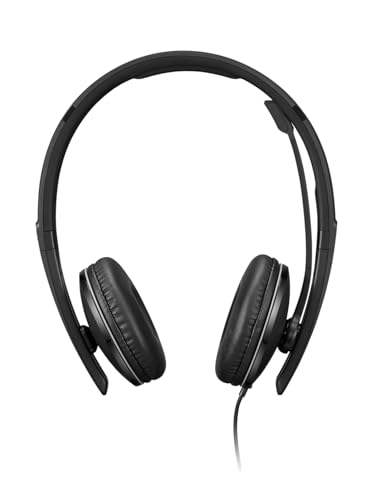
Lenovo Wired ANC Headset (Zoom Certified) — The certified silence
The Lenovo is the only pick here that prints Zoom Certified in its name, and it backs the badge with the guide’s most complete feature set. Active noise cancellation, powered through the USB connection so there is no battery to manage, lowers the steady noise of shared offices and busy homes. At 145 grams it is also remarkably light for an ANC headset, which matters more at hour five than any specification discussed at minute five. USB-C and USB-A connectivity are both built in, so the port lottery disappears.
Lenovo also builds in hearing protection, a feature borrowed from call-centre practice that limits sudden loud peaks reaching your ears. On a day of uneven callers, feedback squeals and notification pings, that protection is the difference between finishing work tired and finishing it with a headache. The microphone keeps voices clear for listeners, and the certified integration means the controls and the app agree about what state the call is in, which is the entire point of the badge this headset carries.
The wired ANC proposition has two honest costs. The cable still tethers you, ANC and all, and the price sits at the top of this guide, above the Yealink family. Buyers in quiet rooms will also use the cancellation less than they expect. But for a Zoom professional in a genuinely noisy environment who wants certification without qualification, this is the guide’s clearest answer: plug in, press the world down, and be heard exactly as clearly as you can now hear.
The Lenovo’s light weight has a cumulative effect worth stating plainly: neck and jaw fatigue are the silent tax of headset professions, and grams saved at the ear are paid back across a career. At 145 grams with ANC and certification aboard, this headset is engineered like it expects to be worn for a decade of working days. That expectation, more than any single feature, is what its price is actually purchasing.
The Lenovo closes the guide with a thought about who certifies the certifier. Its Zoom Certified badge is the claim this entire article has treated most carefully, and Lenovo prints it in the product’s name rather than in a footnote, which is how a confident claim behaves. Buyers burned by blurred badges elsewhere can take the lesson with them: in this category, the honest products say their status plainly, in the title, where it can be checked.
The Lenovo’s hearing protection deserves expansion, because it addresses a real occupational pattern. Callers arrive at wildly different volumes, notification sounds spike, and a headset wearer absorbs those peaks at point-blank range for hours. Protection that trims sudden loud excursions lets a professional finish a long Zoom day without the ringing fatigue that sends people shopping for quieter careers. Paired with the ANC’s steady-state quiet, it makes the Lenovo less a headset with two features than a considered answer to the question of what eight daily hours of other people’s voices do to a pair of ears.
- Connection: wired USB-C and USB-A
- Style: lightweight headset, 145 g, active noise cancellation
- Certification: Zoom Certified, stated in the listing title
- Extras: built-in hearing protection
Strengths
- Formal Zoom certification, plainly stated
- ANC with no battery to charge or deplete
- Featherweight build for very long days
Trade-offs
- Top price in this guide
- Cable still limits movement
- Quiet-room buyers underuse the ANC
Best for: Zoom-heavy professionals working in shared or noisy spaces who want the certified flagship.
Not suited for: budget buyers or quiet-home users paying for silence they already own.
How do the six wired Zoom picks differ where it counts?
| Pick | Form | Connection | Standout trait |
|---|---|---|---|
| Jabra Evolve 10 | Stereo | USB-A | Simplest plug-and-play setup |
| Poly Blackwire 5220 | Over-ear stereo | USB-C, USB-A, 3.5mm | Widest device compatibility |
| Yealink UH35 Mono | Single-ear | USB-A | Certified with one ear open |
| Yealink UH35 Dual | Dual-ear stereo | USB-A | Certified stereo focus |
| Yealink UH37 | Stereo | USB-C and USB-A | Call-centre duty build |
| Lenovo Wired ANC | Stereo with ANC | USB-C and USB-A | Zoom Certified, 145 g |
The table sorts itself into two families. The Jabra and Poly are excellent standard headsets whose listings make no certification claim, and they win on simplicity and device flexibility. The Yealink trio and the Lenovo carry formal platform certification in their listings and win on app integration. Neither family is a consolation prize; they are answers to different questions, and the mistakes section below explains how buyers mix those questions up.
Certification, in the end, is a promise about behaviour rather than about sound, and this table is most useful when read that way: the certified rows promise how the headset and the app will cooperate, while every row, certified or not, promises a clear conversation.
One pattern in the table deserves a final underline: price follows certification and cancellation, not basic call quality. The cheapest picks here will carry a clear Zoom conversation on their first day; what the dearer ones add is guaranteed app behaviour, stronger noise defences and builds rated for queue-length days. Buyers should therefore shop upward for their working conditions, not for their conversations, because the conversation is competently served at every row of this table.
How should you configure Zoom’s audio settings around a wired headset?
Choose the headset explicitly in Zoom’s audio settings rather than leaving the app on the system default, because defaults migrate when webcams, docks and monitors join the setup. Run the built-in speaker and microphone tests, then record a short test meeting with yourself and listen back on different speakers; your own ears in playback are the only honest review of how colleagues hear you. Position the boom a couple of finger-widths from the corner of your mouth, not directly in front of it, to keep plosives and breath out of the capsule.
Zoom’s background noise suppression deserves a deliberate setting rather than a default. On its higher levels it can clip soft speech and swallow the beginnings of sentences, especially with a good noise-cancelling microphone already cleaning the signal. Many wired-headset users find the low or auto setting sounds most natural, letting the boom do the heavy lifting. If your room is genuinely chaotic, raise the suppression for large meetings and lower it for one-to-ones where nuance matters.
Finally, enable the option to mute and unmute from the headset where your model supports it, and practise the inline control until it is muscle memory. The five seconds spent hunting a toolbar during a live question costs more presence than any audio setting buys. A wired headset’s whole promise is readiness; the settings pass is how you collect on it.
Why does this guide trust listings over brochures?
Because the listing is what a buyer can hold a seller to. Brochures and keynote slides speak in futures and families; a product listing names a specific model, a specific connector and, where it exists, a specific certification. This guide’s central distinction, certified Lenovo and Yealink models on one side, honest standard headsets from Jabra and Poly on the other, was built entirely from what the listings themselves claim. That method will occasionally underrate a product whose certification is real but unlisted, and it will never overrate one, which is the direction of error a buying guide should prefer.
Readers can apply the same method in thirty seconds to any headset this guide did not cover. Find the certification in the title or the specification, in the maker’s own words, or treat the product as compatible rather than certified and judge it on sound, comfort and controls. Sellers blur badges because blurring works; a buyer who reads like an auditor makes it stop working, at least on their own desk. That habit, more than any single pick above, is the durable takeaway of this article.
What should you do in the first week with a new wired Zoom headset?
Wear it for one full ordinary day before judging it, because wired comfort reveals itself across hours, not minutes, and the first hour of any headset is partly the novelty of your own ears objecting to change. Adjust once in the morning, once after lunch, and note where pressure gathers; most wired headsets have a position where they disappear, and finding it is a one-time investment. Run one recorded test meeting with yourself and listen back on phone speakers, because that is the least flattering playback your colleagues’ voices will ever get and the truest test of your microphone.
By the end of the week, set the two habits that decide the headset’s working life: the cable’s route and the puck’s parking place. A wired headset’s failures are almost never electronic; they are a cable trapped by a chair wheel in month two or a control unit that lives somewhere different every day. Fix the geography early and the headset becomes what wired designs promise to be, the part of the meeting setup you never think about again.
How do you keep a wired headset comfortable through a full Zoom day?
Alternate the load. Even the lightest headset concentrates pressure somewhere, so vary the band position slightly between long sessions, loosen the fit a notch for listening-heavy webinars where the microphone is idle, and take the headset fully off during breaks rather than wearing it as a necklace of good intentions. On-ear models like the UH35 pair breathe better across a day; the over-ear Blackwire spreads pressure wider; the Lenovo’s 145 grams simply give your neck less to argue about by the afternoon.
Manage the cable as deliberately as the fit. Route it so it neither crosses your keyboard nor hangs where a chair wheel hunts, give it slack at the headset end so head turns do not tug, and keep the inline control puck on the same side of the desk every day so your hand learns its address. Comfort in a wired headset is half cushion and half choreography, and the choreography is free, which is why experienced call workers look oddly graceful doing something as simple as standing up.
What do Zoom headset buyers most often get wrong?
The headline mistake is assuming every headset sold for video calls is Zoom Certified. Certification is a specific, testable claim, and in this guide only the Lenovo and Yealink listings make it. The Jabra and Poly are fine headsets that Zoom uses as standard devices, but a buyer whose workplace mandates certified equipment, or who wants guaranteed control integration, should not blur that line at checkout and discover it in a meeting.
Second, buyers shop wireless out of habit and then spend meetings managing batteries. For a fixed desk, wireless freedom is mostly theoretical: the headset travels between the desk and the drawer. A wired pick removes charging from the week entirely. The readers who genuinely roam while talking should buy wireless deliberately, not by default, and everyone else should at least price the wired option honestly before dismissing it as old-fashioned.
Third, people forget their laptop’s ports. Half this guide is USB-A only, and the slimmest current laptops are not. The UH37 and Lenovo solve it with dual connectors, the Blackwire solves it three ways, and the rest need an adapter that should be ordered in the same basket, not discovered missing on the morning of a presentation.
Fourth, single-ear and dual-ear get chosen by price instead of by room. A mono headset in a private office wastes focus; a sealed stereo headset on a reception desk wastes awareness. Match the ear configuration to the environment you actually work in, and the rest of the specification sheet becomes much easier to read.
Final Recommendation
For a single recommendation, the Yealink UH35 Dual is the centre of this guide: certified for Teams and Zoom, stereo, light, controlled from the cable and priced like equipment rather than jewellery. Most desk-based Zoom users should start there and only move when a specific need pushes them. That need might be awareness, answered by the mono UH35; device-hopping, answered by the Blackwire 5220; shift-length durability, answered by the UH37; or certified noise cancellation, answered by the Lenovo.
The Jabra Evolve 10 remains the easiest first headset to recommend to a colleague, because its entire setup is one plug and its failures are almost impossible to arrange. Whichever pick you choose, the wired discipline is the same: set Zoom to use it explicitly, learn the inline mute by touch, and let the cable be the reason your audio is the least interesting part of every meeting.
Buy the headset whose certification status you can state in one sentence, plug it in before the waiting room fills, and spend your attention on the meeting instead of the machinery carrying your voice.
Frequently Asked Questions
Is the Jabra Evolve 10 Zoom Certified?
Its listing does not claim formal Zoom certification, and this guide does not claim it either. The Evolve 10 is a standard USB headset that Zoom detects and uses normally, with hardware inline controls. If your requirement is the certified badge itself, choose the Lenovo or one of the Yealink models, whose listings state their certification directly.
Why are there no wireless headsets in this Zoom guide?
Because the strongest Zoom desk headsets at these tiers are wired, and the guide follows the use case rather than the trend. Wired USB gives plug-and-play reliability, no charging and no interference, which is what scheduled meetings reward. Wireless Zoom headsets exist and suit people who move while talking; they are simply a different buying decision with different trade-offs.
Does a boom microphone really sound better on Zoom calls?
Yes, for a physical reason: the capsule sits close to your mouth, so your voice arrives loud relative to the room, and noise cancellation, whether in the headset or in Zoom, has an easy job separating the two. Ear-cup microphones start with a worse ratio and no processing fully recovers it. Every pick in this guide uses a boom for exactly that reason.
Can I use these headsets for phone calls too?
Only the Blackwire 5220, with its 3.5mm plug, connects directly to phones and other analogue devices. The USB models are computer headsets; using them with a phone needs an appropriate adapter and is rarely worth the trouble. If phone and computer duty must live in one product, a wireless Bluetooth headset is the more natural tool.
What is the advantage of ANC on a wired headset like the Lenovo?
The cancellation runs on USB power, so it never flattens a battery mid-day and never needs a charging routine. You get quieter listening in noisy rooms with the same plug-and-forget reliability as every wired pick here. The trade-off is only the usual one: you are still on a cable, however quiet the world becomes.
Should a small team standardise on one model?
Usually, yes. A single model means one set of controls to learn, one spare to keep in a drawer and one behaviour in meetings. The Yealink family is built for that logic, with mono and dual versions sharing controls and microphones, so individuals can pick their ear configuration without the team supporting two different products.
Related Guides
Zoom is one room in a larger house of meeting gear; the guides below follow the same desk-first logic into neighbouring platforms and wearing styles.
- Best Microsoft Teams headsets with genuine certification
- Best headsets for working from home all day
- Best call centre headsets for shift-length comfort


