What's inside
- Key Takeaways
- Quick Picks
- How We Chose These Picks
- Comparison
- How Do You Match a Projector to a School’s Source Fleet?
- Where Should a Classroom Projector Be Mounted?
- How Bright Does a Teaching Room Need Its Projector?
- How Do You Plan a Fleet Rollout Across a Whole School?
- What Should the First Week With a New Classroom Projector Look Like?
- How Do Filters, Lamps and Caretakers Fit the Ownership Plan?
- Common Mistakes
- Final Recommendation
- How Should a School Handle the Changeover Week?
- Frequently Asked Questions
- Related Guides
As an Amazon Associate I earn from qualifying purchases. This post may contain affiliate links at no extra cost to you.
widgetverdict.com is reader-supported. When you buy through links on our site, we may earn an affiliate commission.
The best classroom projectors are bought by people who will rarely watch them work. A teacher glances at the image between sentences; thirty students stare at it for six hours a day, copying fractions, reading maps and squinting at the third row of a spreadsheet that somebody has projected at a size meant for a cinema. That imbalance defines the class. A classroom projector must be legible from the back desk, bright enough to survive a wall of windows, boring enough to disappear, and durable enough that the school stops thinking about it for years at a time.
Six machines are reviewed below, and four of them share a surname. The Epson PowerLite line supplies the X49, the E20, the W49 and the 119W, the current education range from the maker whose 3LCD and LCD classroom machines furnish a large share of the world’s teaching walls. Against them stand two short throw alternatives, an NEC and a BenQ, built for the small rooms where a standard projector cannot find the distance it needs to grow a picture and where a teacher’s shadow would otherwise eat the lesson.
Resolution language in a classroom means something different from resolution language in a cinema. XGA, the 4:3 format named in the X49’s and the NEC’s titles, matches the document cameras, older laptops and worksheet proportions that schools still run on. The W49’s 16:10 widescreen format answers the modern laptop. Neither is a mistake; they are tools shaped for different fleets of source devices, and the reviews below treat the choice as a matching exercise rather than a league table.
Facts in this guide come from the listing titles alone, and classroom titles are terse. Where a title gives dimensions, a lumen figure or a throw type, the review uses it. Where a title keeps quiet, and several of these keep very quiet indeed, the spec boxes record the silence in the open, because a school bursar comparing machines deserves to see which questions each listing answers and which it leaves for the manufacturer’s documentation.
One absence should be explained before the reviews begin. This guide covers projectors that throw an image from a lamp or light engine inside the machine, the class a school means when it budgets for a classroom projector. Other venerable teaching devices exist outside that class, and they were left out deliberately rather than by oversight, because mixing device classes in one shortlist helps nobody’s procurement meeting.
Key Takeaways
- Four Epson PowerLite models anchor the guide: X49 and E20 in 4:3 thinking, W49 in 16:10, and the 119W built for permanent installs.
- The NEC NP-M333XS states 3300 lumens and short throw in its title, the clearest specification sentence in this guide.
- The BenQ MP780ST is a WXGA short throw DLP education projector stating 2500 lumens, aimed at small teaching spaces.
- Ceiling mountable appears across the Epson titles, a sign these machines are bought as fixtures, not gadgets.
- Aspect ratio is a matching decision: 4:3 suits document cameras and legacy fleets, widescreen suits modern laptops.
- Several titles print no brightness figure, so the listing and manufacturer documents must finish the comparison.
Quick Picks
| Pick | Badge | Why it earns its place |
|---|---|---|
| Epson PowerLite X49 Classroom Projector | The titled classroom specialist | A 3LCD XGA classroom projector with HDMI named in its title, sold as a single unit for school deployment. |
| Epson PowerLite E20 LCD Projector | The 4:3 ceiling fixture | An LCD projector in 4:3 format, ceiling mountable, finished in white for permanent classroom installation. |
| Epson PowerLite W49 LCD Projector | The 16:10 widescreen answer | An LCD projector in 16:10 widescreen format, ceiling mountable, for rooms fed by modern laptops. |
| Epson PowerLite 119W LCD Projector | The permanent-install 119W | An LCD projector whose title underlines its ceiling-mountable design for permanent room installs. |
| NEC NP-M333XS Short Throw Projector | Short throw with a stated output | An XGA short throw projector stating 3300 lumens, for small rooms where distance is scarce. |
| BenQ MP780ST Short Throw Education Projector | The DLP education veteran | A WXGA short throw DLP education projector stating 2500 lumens and 3D in its title. |
How We Chose These Picks
Education intent came first. Each candidate had to present itself for classroom or education duty in its own listing title, or belong to a line, like PowerLite, whose entire existence is institutional. Home theatre machines with cheerful brightness claims were excluded, because a projector bought for a school answers to a timetable, a caretaker and a procurement process, not to a film fan’s Saturday.
Mounting language was read as a character reference. Ceiling mountable recurs across the Epson titles, and it matters: a ceiling fixture cannot be knocked off a trolley, borrowed by another department or left in a cupboard with a flat remote. Schools buy permanence because permanence ends arguments, and titles that promise it earned their places here.
Format was scored as fit rather than as progress. A 4:3 machine in a school still running document cameras and older desktops is not behind the times; it is correctly matched. A 16:10 machine in a sixth-form block fed by new laptops is equally correct. The reviews therefore argue from the source fleet outward, and buyers should too.
Short throw earned its own column for the rooms that need it most. Small seminar rooms, converted offices and nursery classrooms cannot offer a standard projector its runway, and a teacher working close to the board casts a lesson-eating shadow with a conventional lens. The NEC and the BenQ answer that geometry directly, and both print the words Short Throw in their titles rather than leaving the buyer to deduce it.
Specification honesty closed the judging. The NEC prints a lumen figure; the BenQ prints one too; the Epson titles largely do not, preferring format and mounting language. This guide reports that distribution exactly as found. A buyer comparing the six must finish several comparisons on the listings themselves, and the reviews say so at the points where it matters, instead of laundering catalogue knowledge into the text.

Epson PowerLite X49 Classroom Projector — The titled classroom specialist
The X49 is the only machine in this guide whose title uses the word Classroom as its job description, and that bluntness is a selling point in institutional buying. A school ordering the X49 knows what conversation it is having: a 3LCD XGA projector with HDMI, from Epson’s education line, sold as one unit, sized, per the title’s dimensions, at 3.4 by 11.6 by 10.2 inches. Nothing in that sentence reaches for glamour, and classrooms run on exactly that kind of sentence.
3LCD is the engine Epson built its education reputation on. Three LCD panels handle colour simultaneously, which classroom veterans value for a specific reason: colour brightness holds up in lit rooms, so a diagram’s red and green lines stay distinguishable at the back of a class with the blinds half open. The title does not print a brightness figure, and the review will not invent one, but the engine choice itself is a statement about the rooms Epson expects this machine to serve.
XGA resolution, the classic 4:3 teaching format, matches the installed base of school technology with unusual honesty. Document cameras frame worksheets in 4:3. Older science software assumes it. A great deal of the worksheet-and-whiteboard world still lives in that rectangle, and an XGA projector shows it natively, full height, no letterboxing, no scaling artefacts in the middle of a fractions lesson.
HDMI is named in the title, the only connection any of these six titles bothers to print, and it is the right one to print. The modern classroom’s sources, a teacher’s laptop, a streaming stick for approved video, a document camera with HDMI output, all arrive through that single door. A machine whose title leads with HDMI is telling the IT technician that the morning setup will be a non-event.
Dimensions in a title are a procurement courtesy. A caretaker planning a ceiling mount or a trolley shelf can work with 3.4 by 11.6 by 10.2 inches without opening a second document, and fleet buyers ordering for twelve rooms can check the machine against existing mounts. Small courtesies of that kind separate institutional product lines from consumer boxes wearing institutional adjectives.
A day in the X49’s life is worth picturing. Registration slides at nine, a visualiser demonstration before break, a streamed documentary segment after lunch, and a spreadsheet enlarged past comfort in the last period. The machine’s virtue across that day is not brilliance at any single task but the absence of friction at every handover: the same input, the same remote logic, the same square image. Teachers build their planning around equipment that behaves identically every morning, and they quietly route around equipment that does not, which is why boring reliability is the specification that decides classroom reputations.
The X49’s ownership story is the PowerLite story: manuals written for facilities staff, a model number the education supply chain recognises, and a design language shared with thousands of installed siblings. When a school standardises on a line like this, spare remotes, filters and knowledge all transfer between rooms, and the projector stops being six separate purchases and becomes one decision repeated.
Before a fleet order, open the listing for the brightness figure and lamp details the title omits, and confirm the current price on Amazon in the same sitting, because classroom budgets are approved against numbers and this title, honestly, prints only some of them.
- Engine: 3LCD stated
- Resolution/format: XGA stated
- Connection named: HDMI
- Dimensions: 3.4″ x 11.6″ x 10.2″ stated in title
- Brightness figure: Not stated in the listing title — verify with the manufacturer documentation
Strengths
- Classroom purpose stated outright in its title
- 3LCD colour handling suits lit teaching rooms
- Dimensions printed for mount and fleet planning
Trade-offs
- Title prints no brightness figure for lit-room planning
- 4:3 format letterboxes widescreen laptop content
- Ceiling mounting is implied by class, not stated in title
Best for: a school standardising classrooms around document cameras, worksheets and a recognised education line.
Not suited for: a widescreen-first lecture space fed entirely by modern laptops.

Epson PowerLite E20 LCD Projector — The 4:3 ceiling fixture
The E20’s title is the shortest in this guide, and it reads like a line from a facilities inventory: LCD projector, 4:3, ceiling mountable, white. Each of those four facts is a decision a school has already made by the time it shops. The machine is not asking to be desired; it is asking to be installed, aligned once, and then thought about roughly never, which is the highest compliment institutional equipment can earn.
Ceiling mountable is the operative phrase. A fixed projector cannot wander between departments, cannot be borrowed for a weekend and returned with a missing cable, and cannot be knocked askew by a caretaker’s ladder or a student’s bag. It hangs in the room’s geography like a light fitting, and teachers plan lessons around its permanence: the board is there, the image is there, the class begins.
The 4:3 format states the E20’s generation of schooling plainly. Schools keep enormous libraries of 4:3 material, slides, worksheets, document camera feeds, older interactive whiteboard content, and a native 4:3 projector renders that library at full size. In a primary classroom, where the image is mostly big text, shapes and pictures for young eyes, format purity matters far less than size and clarity, and 4:3 delivers both without waste.
White is not a colour choice here; it is camouflage. A white projector against a white ceiling tile grid disappears from a child’s upward glance, and disappearing is a behavioural feature in a room of eight-year-olds. Equipment that does not draw the eye does not draw questions, fiddling or target practice, and teachers value that invisibility more than any specification a title could print.
LCD, stated without the X49’s 3LCD elaboration, keeps the description at the level a bursar needs. The title offers no resolution badge, no brightness figure and no connection list, so this machine asks its buyer to do the most homework of the six: the listing and Epson’s documentation must supply the numbers before a purchase order is signed. That terseness is a fact about the listing, not a verdict on the machine, and the review records it without embroidery.
Primary teaching loads a projector differently from every other level. The image carries phonics cards, number lines, story illustrations and the occasional celebration video, all of it large, bright and simple, all of it judged by children who sit closer and read slower than any other audience in education. A machine specified for permanence and format fit, like the E20, serves that load without drama. The absence of headline specifications in its title bothers a comparison table far more than it will ever bother a classroom of six-year-olds learning what the letter S sounds like.
Where the E20 makes its quiet case is in fleet logic. A school with Epson projectors already hanging in other rooms gains spares commonality, remote familiarity and a single support conversation by choosing another PowerLite. The individual specification matters less than the family’s coherence, and institutional buyers, who answer for thirty rooms rather than one, think in families first.
Do the reading this title demands: pull the full specification from the listing, confirm brightness and resolution against your room’s window wall, and check the delivered figure on Amazon before the order joins a term’s budget.
- Engine: LCD stated
- Format: 4:3 stated
- Mounting: ceiling mountable stated
- Finish: white stated
- Resolution badge: Not stated in the listing title — verify with the manufacturer documentation
Strengths
- Ceiling mounting ends trolley and borrowing problems
- Native 4:3 serves the legacy teaching library fully
- White finish disappears against classroom ceilings
Trade-offs
- Title omits resolution, brightness and connections entirely
- 4:3 shape mismatches modern widescreen laptops
- Fixed install needs a mount and a ladder to service
Best for: a primary school fitting permanent projectors into rooms built around 4:3 teaching material.
Not suited for: a school whose teaching fleet has already gone fully widescreen.
Epson PowerLite W49 LCD Projector — The 16:10 widescreen answer
If the E20 speaks for the installed past, the W49 speaks for the laptop present. Its title leads with 16:10, the widescreen format that matches the proportions of the machines teachers actually carry into class now, and pairs it with the same ceiling mountable permanence as its 4:3 sibling. A modern laptop plugged into a 16:10 projector fills the screen edge to edge, no black bars, no scaled-down desktop, and that simple geometric courtesy is the W49’s whole argument in one ratio.
Sixteen-ten deserves its own sentence, because it is not quite sixteen-nine. The extra vertical slice suits documents and web pages, the tall content of teaching, better than a television’s proportions do. A spreadsheet shows more rows; a webpage shows more of the article; a coding lesson shows more lines before the scroll. Teachers notice that slice daily without ever naming it.
Ceiling mounting carries the same institutional logic as the E20’s: permanence, safety, an end to trolley logistics. In a secondary school where rooms change hands every hour, a fixed projector aligned to a fixed board is the only arrangement that survives the timetable. The W49 is built for that churn, a machine whose working life is measured in school years rather than in product cycles.
The title, again, is a facilities document rather than a brochure. LCD engine, format, mounting: the facts a planner needs and nothing a marketer would add. Brightness and resolution badges stay unprinted, so the buyer must take them from the listing, and this review will not guess at either. What the W in the model name hints at, widescreen intent, the 16:10 figure confirms in the title’s own numbers.
Sixth-form and staffroom use make the W49’s second case. Older students bring their own devices and expect the room to receive them gracefully, and a widescreen ceiling projector is the difference between a presentation that fills the board and one that floats in a black frame, shrinking every chart the student worked on. Staff training sessions, data reviews and governors’ presentations all inherit the same benefit, which is why a widescreen fixture often ends up justified by the whole building’s calendar rather than by lessons alone.
Consider the W49 in the context of a mixed estate, because most schools are mixed. A block of older rooms on 4:3 machines and a new block on the W49 is not inconsistency; it is matching, provided the IT team labels which rooms expect which sources. The projector that fits its room’s laptops will be praised as bright and clear, while a mismatched one gets blamed for faults that belong to geometry.
Sound, connections and lamp life all live beyond this title’s horizon, and a thorough buyer will extract them from the listing before committing a department’s budget. What the title does establish, format, engine family and mounting, is precisely the shortlist information: if your rooms are widescreen and ceiling-bound, this is the PowerLite shaped like your problem.
Open the listing to complete the specification, particularly brightness against your largest room’s windows, and note the current price on Amazon while the numbers are in front of you.
- Engine: LCD stated
- Format: 16:10 stated
- Mounting: ceiling mountable stated
- Role: widescreen classroom fixture
- Brightness figure: Not stated in the listing title — verify with the manufacturer documentation
Strengths
- 16:10 matches modern teacher laptops without bars
- Extra vertical room suits documents and web content
- Ceiling permanence suits hourly room changeovers
Trade-offs
- Title omits brightness and resolution figures
- Legacy 4:3 material will pillarbox on its screen
- Fixed mounting raises the cost of any future room reshuffle
Best for: a secondary school or college whose teaching runs on modern widescreen laptops all day.
Not suited for: a room still centred on a 4:3 document camera and legacy software.

Epson PowerLite 119W LCD Projector — The permanent-install 119W
The 119W’s title says the quiet part twice: ceiling mountable, and then, in its fuller form, a ceiling-mountable design for permanent room installs. Repetition in a listing title usually signals the phrase buyers search for, and permanence is plainly what this model is bought for. The 119W is the projector a school installs when it has stopped experimenting, a fixture decision closer to choosing lighting than to choosing a gadget.
Permanence changes the buying questions. A trolley projector is judged on the day it arrives; a permanent install is judged in year four, when the mount has held, the image still lands square on the board, and the caretaker’s log shows nothing but filter checks. The 119W’s title speaks to that horizon, and buyers should interrogate the listing with year-four questions: lamp or light source arrangements, filter access from below, and the mount standard it expects.
The title also repeats its format information, 4:3, alongside the mounting language, which places this machine in the same legacy-friendly camp as the E20. A school with a deep library of 4:3 material and a building programme of permanent installs will read the 119W’s title as a checklist already ticked. The W in its name sits alongside that 4:3 statement without further explanation in the title, and this guide declines to decode model nomenclature beyond what is printed.
LCD is the stated engine family, consistent with the PowerLite education line’s classroom identity. As with its siblings, brightness and resolution figures do not appear in the title, and the comparison work must happen on the listing. That gap matters more for a permanent install than for any other purchase in this guide, because a fixture cannot be swapped casually when the first sunny morning reveals it to be underpowered for a glass-walled room.
There is also a safety arithmetic to permanence that schools feel in their bones. A ceiling fixture cannot fall from a trolley, cannot be tripped over by its own cable, and cannot tempt a pupil’s curiosity at arm’s height. Risk assessments for classroom technology read very differently for equipment that hangs certified above head height and never moves. The 119W’s title, with its double emphasis on permanent installation, is written for the people who sign those assessments as much as for the people who teach beneath the machine.
Think about the room this machine will grow old in. Permanent installs belong in rooms whose purpose is settled: the science lab that will be a science lab in a decade, the lecture room whose board wall is structural. Schools in temporary accommodation, or mid-rebuild, should hesitate, because a ceiling fixture in a room about to change purpose becomes somebody else’s removal job.
Fleet coherence argues for the 119W in Epson schools. Shared remotes, shared menus and a single relationship with the education supply chain compound across a building, and the machine’s individual specification, which the buyer must still verify, sits inside that larger institutional comfort.
Because the commitment is permanent, the homework should be too: extract the full specification from the listing, walk your brightest room at its worst hour, and confirm the delivered price on Amazon before the estates team books the installer.
- Engine: LCD stated
- Format: 4:3 stated in title
- Mounting: ceiling mountable, permanent room installs stated
- Role: fixed classroom fixture
- Brightness figure: Not stated in the listing title — verify with the manufacturer documentation
Strengths
- Permanent-install intent stated twice in its title
- 4:3 format serves the legacy teaching library
- PowerLite fleet commonality across a school estate
Trade-offs
- Permanence punishes any room whose purpose changes
- Title prints no brightness or resolution figures
- Ceiling servicing needs ladder access and planning
Best for: an estates team fitting out settled teaching rooms for a decade of unchanged use.
Not suited for: temporary classrooms or rooms awaiting a rebuild.

NEC NP-M333XS Short Throw Projector — Short throw with a stated output
NEC writes the most informative title in this guide: XGA, 3300 lumens, short throw, model NP-M333XS. A buyer can shortlist this machine from its title alone, which is more than any other pick here allows, and that informativeness is itself a recommendation. Institutional buyers drowning in tabs and tenders learn to love the listing that answers first.
Short throw is the machine’s reason to exist. In a small classroom, a seminar room carved from an office, a nursery with a low ceiling, a conventional projector cannot retreat far enough to fill the board, and the teacher working at that board stands inside the beam, shadow swallowing the worked example. A short throw lens builds the full picture from close range, above or in front of the teacher’s head, and the shadow problem simply leaves the room.
The stated 3300 lumens give the planning conversation a number to hold. NEC prints it in the title as a commitment, and for the small rooms this machine targets, a figure in that range speaks to lit-room legibility: small rooms have small screens, and small screens concentrate brightness. Compare the figure as NEC’s claim, in the knowledge that it is the only lumen number in this guide offered alongside a short throw lens from a major institutional maker.
XGA places the NEC in the 4:3 world of document cameras and legacy school software, matching the Epson X49’s format logic. A school whose short throw room also houses its visualiser fleet will find the geometry coherent. Widescreen laptops will letterbox, as they do on every 4:3 machine here, and the timetable should assign this room accordingly.
Interactive teaching is where short throw quietly transforms a lesson. A teacher annotating a diagram on the board, stylus in hand, needs to stand at the surface without eclipsing it, and a close-range lens lets the annotation and the annotator coexist. Pupils called to the front inherit the same freedom: a child demonstrating long division should be the largest thing in the room, not their own shadow. Rooms built around that interactivity, language labs, primary classrooms, design studios, feel the NEC’s geometry as a teaching feature rather than a mounting detail.
NEC’s presence matters as a lineage. The company supplied institutional projection for decades, and a model like the M333XS comes from that AV tradition rather than from the consumer electronics shelf. Schools buying outside the Epson line, for tender reasons or existing NEC estates, get a specialist alternative rather than a compromise.
Ownership questions the title leaves open, lamp arrangements, connections, throw distance in feet, belong to the listing, and the short throw distance is the one to verify first: measure your room’s available depth, then confirm the NP-M333XS fills your board from inside it.
Take the throw figures and the current price from the listing in one visit, because a short throw purchase is a geometry contract and the numbers are its clauses.
- Format: XGA stated
- Brightness: 3300 lumens stated
- Optics: Short Throw stated in title
- Maker line: NEC institutional projection
- Throw distance: Not stated in the listing title — verify with the manufacturer documentation
Strengths
- Only title here pairing short throw with a lumen figure
- Solves the teacher-shadow problem in small rooms
- Title alone is enough to shortlist the machine
Trade-offs
- 4:3 XGA letterboxes widescreen sources
- Short throw alignment is fussy at first install
- Connections and lamp details live beyond the title
Best for: a small classroom or seminar room where the board sits close and the teacher works within arm’s reach of it.
Not suited for: a large hall needing a long throw and a very wide image.
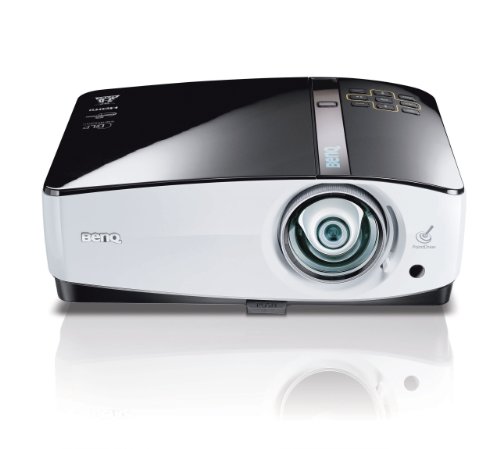
BenQ MP780ST Short Throw Education Projector — The DLP education veteran
BenQ’s MP780ST arrives with the word Education in its title and a specification that reads like a small-room manifesto: WXGA, short throw, 2500 lumens, DLP, 3D. It is the veteran of this guide, a model from the era when interactive whiteboards were conquering classrooms and short throw was the technology that made them practical, and its continued presence in listings speaks to how many schools built rooms around exactly this formula.
WXGA is the interesting format here, a widescreen variant of the XGA world. It stretches the teaching rectangle toward laptop proportions without abandoning the worksheet era entirely, a compromise shape for schools mid-transition. A teacher can show a widescreen video without severe letterboxing and still fill the board with document work, and transitional machines earn their keep in institutions that change fleets slowly.
DLP separates the BenQ cleanly from the five LCD machines arranged around it in this guide. DLP’s single-chip design has its own character, sealed optics that shrug off dust, a classroom advantage in chalky, high-traffic rooms, being the trait teachers historically cite. The title claims the engine plainly, and buyers with a preference either way can act on it without detective work.
The stated 2500 lumens are the lowest figure printed in this guide, and the review will not dress that up. In the small rooms short throw serves, screen sizes stay modest and the figure can be entirely adequate, particularly with blinds drawn. In a large, bright classroom it would be the wrong tool, and the honest buyer will match this machine to the little rooms it was titled for.
3D in the title is a period detail worth reading correctly. Education 3D content had its moment in science teaching, and the claim signals the machine’s generation and its readiness for that material where a school still holds it. It is neither a reason to buy nor a reason to sneer; it is a date stamp that helps a buyer place the model in BenQ’s line and in time.
Schools with existing BenQ interactive setups will read this model differently from newcomers. Where boards, pens and software from the same era already furnish a room, a projector titled for education with matching geometry can complete or revive that ecosystem at a fraction of a refit’s cost. The MP780ST’s value is partly archaeological: it fits the stratum of classroom technology that a great many buildings still stand on, and a buyer who recognises their own building in that description has found the most honest reason to choose it.
Age cuts both ways. A veteran model may lack the connection habits of newer machines, so the listing’s port list deserves scrutiny against the school’s current laptops, and adapter reality should be priced into the comparison. Against that, a long-lived model has a long trail of institutional knowledge behind it, and caretakers may already know its menus by heart.
Verify the connections and the throw distance on the listing, weigh the figure you find on Amazon against the room you are furnishing, and this veteran will tell you itself whether it still fits.
- Format: WXGA stated
- Brightness: 2500 lumens stated
- Engine: DLP stated
- Optics: Short Throw stated; Education purpose in title
- Extras: 3D stated in title
Strengths
- Short throw geometry for small teaching rooms
- WXGA bridges worksheet and widescreen eras
- DLP engine with a dust-resistant reputation
Trade-offs
- Lowest stated brightness figure in this guide
- Veteran model, so check ports against modern laptops
- 3D claim serves legacy content only
Best for: a small classroom with an interactive board tradition and a mixed fleet of older and newer sources.
Not suited for: a large, sunlit classroom needing maximum lit-room output.
Comparison
| Pick | Headline facts from its listing title | Room it suits first |
|---|---|---|
| Epson PowerLite X49 | 3LCD, XGA, HDMI named, dimensions printed | A standard classroom on an education fleet |
| Epson PowerLite E20 | LCD, 4:3, ceiling mountable, white | A primary room needing a permanent fixture |
| Epson PowerLite W49 | LCD, 16:10, ceiling mountable | A widescreen room fed by modern laptops |
| Epson PowerLite 119W | LCD, 4:3, ceiling mountable, permanent installs | A settled room being fitted for a decade |
| NEC NP-M333XS | XGA, 3300 lumens, short throw | A small room where the teacher works at the board |
| BenQ MP780ST | WXGA, 2500 lumens, DLP, short throw, education | A compact room with an interactive board |
How Do You Match a Projector to a School’s Source Fleet?
Walk the building with a notebook before opening a catalogue. List what actually plugs into projectors: the visualiser in science, the ageing desktop in history, the new laptops in sixth form, the streaming stick the media department guards. The fleet’s formats choose the projector’s format, and a buyer who skips the walk will purchase a widescreen machine for a 4:3 school or strand a new laptop fleet behind black bars.
Adapters are the tax on a mismatch, and they are paid in teacher time at 8:55 on a Monday. A matched projector needs no adapter drawer, no remembered dongle, no lesson that begins with a blank screen and an apology. When a school cannot replace a mismatched fleet at once, assign rooms by source: widescreen rooms host the laptop-heavy subjects, 4:3 rooms host the document camera work, and the timetable absorbs the difference.
Where Should a Classroom Projector Be Mounted?
On the ceiling, centred on the board, at the distance its throw demands, is the answer four of these six titles anticipate. A ceiling fixture is safe from bags and elbows, aligned once by someone with a ladder and a level, and present every lesson without a setup ritual. The mount’s position should be surveyed against the board’s centre and the room’s lighting, because a projector fighting a ceiling light fitting loses brightness to geometry no specification can restore.
Short throw machines mount closer, sometimes on a wall arm above the board itself, which suits rooms where the ceiling is low, fragile or full of services. That closeness is their charm and their demand: a few centimetres of mounting error become visible distortion at short range, so the first install deserves a professional’s patience even more than a standard mount does.
How Bright Does a Teaching Room Need Its Projector?
Bright enough that a pupil at the back can read body text without the blinds fully drawn, because a teacher who must darken the room for every diagram will stop using diagrams. The honest method is empirical: note which titles here print a figure at all, the NEC at 3300 and the BenQ at 2500, then obtain the Epson figures from their listings and compare them against your worst room at its worst hour, a west-facing classroom on a June afternoon.
Screen size dilutes brightness, so a small room can thrive on a figure that would fail in a hall. Match the machine to the room’s actual diagonal, not to the largest number in a tender document, and remember that blinds, board material and wall colour are brightness purchases too, often cheaper ones than lumens.
How Do You Plan a Fleet Rollout Across a Whole School?
Phase the building, not the catalogue. A sensible rollout begins with the rooms whose current projector has already failed or whose teaching suffers most visibly, usually the sunniest rooms and the smallest ones, because those are the rooms a wrong specification punishes. Fit two or three rooms first, let a term of teaching judge them, and only then commit the estate. A pilot room teaches a school more about its own habits, its source fleet, its caretaker’s ladder skills, its window problem, than any demonstration afternoon in a darkened hall.
Record everything the pilot reveals in the language of the next purchase order. If teachers in the pilot rooms reach for the remote’s freeze button twenty times a day, remote layout matters. If the visualiser fleet turns out to be 4:3 to a device, format stops being a debate. If the caretaker reports that one mount vibrates when the corridor door slams, the estates team learns where not to hang the next twelve. A rollout planned this way converts each term’s experience into the next term’s specification, and the fleet improves as it grows instead of merely growing.
Keep one spare, always. A school with twenty ceiling projectors and no spare will, by the arithmetic of school life, eventually teach a week of lessons to a blank wall while a replacement crosses the country. The spare need not be the newest model; it needs to fit the common mount, speak the common remote language and be installable by the caretaker in one free period. That insurance logic is another quiet argument for family standardisation, because a spare from the same line fits everywhere the line hangs.
What Should the First Week With a New Classroom Projector Look Like?
Alignment first, while the installer is still booked. The image should sit square on the board with its edges parallel, focused corner to corner, and the keystone correction left as close to zero as the mount allows, because digital correction spends resolution that body text needs. A teacher should test the setup with the smallest text the class will meet, a footnote, a map label, a line of code, read from the back desk by somebody whose eyes are not the teacher’s. If the back desk can read it at noon, the install is finished; if not, the mount, the focus or the blinds still owe work.
Then rehearse the ordinary failures. Pull the source cable and reconnect it. Switch the projector between the laptop and the visualiser until the sequence is muscle memory. Find the blank and freeze controls in the dark. Write the two or three steps that fix a blank screen on a card and tape the card beside the board, because the person who needs it will be a supply teacher at five minutes to nine, and the card will teach the lesson the training session could not schedule.
Finally, log the machine into the building’s memory. Record the model, the install date, the mount position and the lamp or filter arrangements from the documentation in the caretaker’s system, and set the first filter check on a calendar that somebody actually reads. Institutional equipment fails socially before it fails electrically: the projector nobody owns is the projector nobody maintains, and a named owner, even a rotating one, is the cheapest reliability upgrade in this entire guide.
How Do Filters, Lamps and Caretakers Fit the Ownership Plan?
Classrooms are dusty workplaces, and projectors breathe that dust for six hours a day. Filters clog on a schedule set by the room, not by the calendar, and a clogged filter announces itself as overheating shutdowns in the middle of lessons, the single most corrosive failure a school projector can suffer because it teaches staff to distrust the machine. A termly filter rhythm, owned by the caretaker and logged like boiler servicing, prevents nearly all of it, whatever model hangs from the ceiling.
Lamp arrangements, where a model uses a lamp, deserve the same bureaucratic respect. The listing and manufacturer documentation for each pick in this guide hold the relevant details, and the estates team should extract them before purchase rather than after the first dim term. A lamp’s decline is gradual and deniable, lessons get slightly greyer for months before anybody names the problem, so a school that tracks hours and plans replacement beats a school that waits for complaints from the back row.
The caretaker, in the end, is the projector’s true support contract. Manufacturers warrant the machine; the building’s own staff warrant the teaching. Choose models whose filters can be reached from a ladder safely, whose remotes can be replaced without a procurement saga, and whose menus a non-specialist can navigate, and the fleet will still be serving lessons when the pupils who watched its first image have left for university.
Common Mistakes
Buying one model for every room is the procurement error with the longest shadow. Schools contain primary rooms, science labs, seminar cupboards and halls, and a single specification stretched across all of them will be wrong in most. The six picks here exist because rooms differ; a buyer who standardises on a family, like the PowerLite line, while varying format and throw by room gets coherence without the misfit.
Ignoring the source fleet comes next. A beautiful widescreen projector fed by 4:3 visualisers teaches every lesson inside a shrunken window, and the staff will blame the projector for a geometry decision made in an office. The fleet walk described above takes one afternoon and prevents years of that blame.
Forgetting the mount in the budget is the third failure. Ceiling projectors need mounts, power, cabling and an installer’s visit, and a purchase order that covers only the machine leaves a term’s IT budget quietly bleeding. Price the whole fixture, projector, mount, cables, installation, or do not sign.
Test at the worst hour once, and the timetable never ambushes the lesson again. Any projector looks adequate in a darkened demonstration. The classroom test is a sunny afternoon with the blinds imperfect, which is to say, teaching conditions, and a buyer who cannot arrange that test should at least insist on figures from the listing rather than adjectives from a brochure.
Final Recommendation
For the standard classroom in a school that runs on documents, visualisers and worksheets, the Epson PowerLite X49 is the guide’s centre of gravity: classroom-titled, 3LCD, HDMI named, and backed by the education line’s fleet logic. The E20 and 119W serve the permanence-first estate, the former for primary rooms, the latter for buildings being fitted for a decade, while the W49 is the correct PowerLite when the laptop fleet has gone widescreen and the rooms have followed.
The short throw pair answer the small-room problem from two traditions. NEC’s NP-M333XS offers the clearest title in the guide, 3300 stated lumens behind a short throw XGA lens, and BenQ’s MP780ST counters with WXGA breadth, a DLP engine and an education pedigree, at a lower stated output that suits compact, controllable rooms.
Buy for the room and the fleet you actually have, verify every figure the titles leave open, and the projector will do the thing schools ask of all their best equipment: disappear into the teaching.
There is a photograph every school knows: a class in full flow, heads up, a diagram glowing on the board, nobody looking at the machine that put it there. That photograph is the real specification sheet for this entire class of equipment. Format, throw, mounting and engine all serve it, and the six machines above serve it in different rooms for different fleets. Choose the one whose shape matches your building’s daily photograph, and the purchase will justify itself quietly, lesson after lesson, long after the procurement meeting that approved it has been forgotten by everyone who sat in it, and long after the pupils in the photograph have grown up and forgotten the projector entirely, which is exactly what the machine would have wanted. Equipment that is remembered has usually failed somebody; equipment that vanishes into the routine of good lessons has done the finest work a school can ask of anything it buys, and every pick in this guide was chosen with that vanishing act as its final examination, sat every school day, in every kind of weather, in front of the least forgiving audience in the world.
How Should a School Handle the Changeover Week?
Schedule installs during holidays or inset days wherever the building allows it, and never let the first test of a new projector be a real lesson with an audience of thirty. The changeover week should end with each room’s teacher having run one full lesson’s worth of material alone, in daylight, with the door shut and the blinds in their teaching position. Problems found in that rehearsal, a cable a metre short, a remote that needs line of sight the ceiling denies, a board whose surface glares at one angle, are timetable trivia. The same problems found on a Monday morning become folklore.
Keep the old machine in each room until the new one has survived that rehearsal. Schools that strip the outgoing projector on day one to save an installer’s second visit are gambling a week of teaching against a van hire, and the gamble is remembered for years when it fails. The orderly sequence, install, rehearse, remove, store the spare, costs little more and buys the staff’s confidence, which is the currency every later technology decision in the building will be paid in.
Frequently Asked Questions
Is XGA still acceptable in a modern classroom?
Yes, where the teaching material is XGA-shaped. Document cameras, worksheets and a large library of school software still live in 4:3, and a native XGA projector shows them at full size. Rooms built around new widescreen laptops should choose a widescreen machine instead, as the W49’s review explains.
Why do so many of these titles omit brightness figures?
Institutional listings often assume the buyer will work from the manufacturer’s full specification, and the titles compress themselves into format and mounting language. Treat the omission as homework, not as a verdict: the NEC and BenQ titles print figures, and the Epson figures wait on their listings.
What does short throw change for a teacher?
It removes the teacher’s shadow from the lesson. A short throw projector sits close to the board, above or ahead of the teaching position, so the person explaining a diagram no longer stands inside the beam. In small rooms it also makes a large image possible where a standard lens cannot find the distance.
Should a school standardise on one brand?
Standardising on a family, while varying models by room, usually serves a school better than either chaos or a single model. Shared remotes, menus and support arrangements compound across an estate. The PowerLite four in this guide illustrate that family logic; the NEC and BenQ stand as the credible alternatives for rooms or tenders that need them.
What about sound in a classroom setup?
Projection titles in this guide stay silent about speakers, so treat classroom audio as a separate line in the plan rather than an assumption. A teacher’s voice carries the lesson; recorded material needs reinforcement that thirty pupils can hear from the back without the front row wincing. Many schools route sound to a small classroom speaker or soundbar at the board, positioned with the image, and a buyer should confirm the audio path on the listing for whichever pick they choose instead of discovering a silent documentary in period three.
How long should a classroom projector installation last?
Plan in school years, not product cycles. A ceiling fixture should be chosen, mounted and aligned as a decade-scale decision, which is why the 119W’s permanent-install language matters and why verifying the full specification before the installer arrives is worth an afternoon of any IT manager’s term.
Related Guides
Projection questions change shape as rooms change, and the neighbouring guides follow them: daytime projectors for the fullest treatment of brightness claims and lit-room survival, laser projectors for churches for installation machines serving halls far larger than any classroom, and android projectors with bluetooth for the smart, app-driven end of the projector world.


