What's inside
- Key Takeaways
- Quick Picks
- How Did We Choose These Ultra Short Throw Machines?
- What Does Living With a Laser TV Actually Involve?
- How Do the Six Compare as Televisions?
- Which Screen and Console Complete the Setup?
- How Do You Install a UST System Without Regrets?
- What Mistakes Do UST Buyers Keep Making?
- What Does the Room Look Like When the System Is Off?
- How Does a Laser TV Age Over a Decade?
- Can a UST Projector Work in a Dedicated Theatre?
- Built-In Sound, Soundbar or Full System — Which Tier Is Yours?
- How Does a Laser TV Handle the Saturday Sport Test?
- In What Order Should You Buy a UST System?
- How Should You Treat the Room Around a Laser TV?
- Final Recommendation
- Frequently Asked Questions
- Related Guides
As an Amazon Associate I earn from qualifying purchases. This post may contain affiliate links at no extra cost to you.
widgetverdict.com is reader-supported. When you buy through links on our site, we may earn an affiliate commission.
Where to buy: The six ultra-short-throw projectors below are sold through Amazon as current new models. Measure your media console’s depth and your wall’s flatness before ordering either a projector or its screen — in this category the furniture is part of the specification, and returns are usually geometry lessons learned too late.
The best 4k ultra short throw projectors are not really projectors in the traditional sense, and judging them as if they were misses what they are for. They are television replacements: low cabinets that sit on a media console inches from the wall, throw a 100-to-150-inch image upward onto a screen, stream from their own apps, and increasingly sound good enough to make the soundbar optional. The questions that decide between them are therefore television questions wearing projector clothes — how strong is the built-in sound, how deep must the cabinet be, how does the machine behave with a centre speaker competing for its spot, how well does its screen pairing hold up when the room is lit, and how invisible is the whole apparatus when it is switched off? This guide takes those questions in order, across the six machines that currently define the category.
What unites them is geometry. An ultra-short-throw lens works at ratios around a quarter of the image width or less, which means placement is measured in centimetres and the image size is set by the console’s position before a single menu is opened. What divides them is everything built around that lens: single-laser versus triple-laser colour, the quality of the speakers flanking the cabinet, the smart platform’s manners, and the maker’s philosophy about whether a laser TV should disappear into a room or star in it. Those divisions, not the resolution they all share, are where your money will be felt.
Key Takeaways
- Image size is furniture: the console’s depth and distance from the wall set the diagonal, so choose the cabinet and screen as one decision.
- Built-in sound is a headline feature in this category — the best of these machines carry audio systems that genuinely retire the soundbar question.
- An ALR screen designed for UST geometry completes the television illusion in lit rooms and protects the black floor after dark.
- Triple-laser models (Formovie, Hisense, AWOL) own colour width; the Epson’s 3LCD laser owns brightness and calm; the Samsungs own platform polish.
- The centre-channel problem is real and solvable — by the projector’s own speakers, a low soundbar placed carefully, or a projector that can serve as the centre speaker itself.
Quick Picks
| Pick | Badge | Why it is here |
|---|---|---|
| Formovie Theater | Best Picture and Sound | Triple-laser colour, Dolby Vision and a Bowers & Wilkins sound system — the enthusiast’s laser TV. |
| Epson EpiqVision LS800 | Best for Bright Rooms | 4,000 lumens of 3LCD light with Yamaha 2.1 sound — the daylight-proof television replacement. |
| AWOL Vision LTV-3000 Pro | Best for Home Theatre Ambitions | Triple laser, Dolby Vision and Atmos, 3D support and a centre-channel mode for real speaker systems. |
| Hisense PX3-PRO | Best for Gaming Households | Triple laser with Dolby Vision, IMAX Enhanced and a 240Hz gaming path on Google TV. |
| Samsung The Premiere LPU7D | Best Television Experience | Samsung’s newest Premiere: Tizen, Gaming Hub and the most TV-like ownership in the category. |
| Samsung The Premiere LSP7T | Best for Samsung Loyalists | The original Premiere’s 2.2-channel sound and Tizen manners at the gentler end of the line. |
How Did We Choose These Ultra Short Throw Machines?
We judged them as televisions first and projectors second, because that is the job they apply for. The television exam covers the platform — does it stream the household’s services natively, wake quickly, and behave with one remote — the sound, and the cabinet’s life as furniture. The projector exam covers the image: colour width, contrast behaviour in both lit and darkened rooms, and the honesty of the brightness figure against the screen sizes the machine claims. A candidate had to pass both exams; the category is littered with superb projectors that make terrible televisions and charming televisions that project indifferently.
Sound was weighted with unusual seriousness, because UST geometry relocates the audio question. A ceiling projector’s feeble speaker is excused by distance; a laser TV sits exactly where a television’s speakers sit, in a cabinet with room for real drivers, at the precise spot dialogue should come from. Manufacturers have responded accordingly — the speaker systems in this guide range from competent to genuinely hi-fi-adjacent — and the differences between them are differences owners will hear every day, unlike a contrast ratio they will admire twice a year.
Finally we weighed ecosystem and support. A laser TV is a long-lived appliance with an exact screen pairing and a console built around it; the maker’s service network, screen compatibility guidance and platform update record are part of the product. The six survivors are the machines whose total ownership — image, sound, platform, furniture — coheres.
One more criterion quietly shaped the list: honesty of positioning. The category attracts machines that borrow the laser-TV name while offering a dim engine, a toy speaker and a platform that will embarrass their owners within a year. We excluded them regardless of price, because a television replacement that fails as a television teaches its household to distrust the entire idea — and the six above are the proof, each in a different dialect, that the idea itself is sound. Buyers comparing a cheaper unknown against this list should ask which of the two exams — television or projector — the unknown is hoping nobody sets.
What Does Living With a Laser TV Actually Involve?
Begin with the console, because the console is destiny. The projector sits on it, the screen hangs above it, and the distance between the projector’s back and the wall — plus the console’s depth to accommodate the cabinet — determines whether you get 100 inches or 120. Owners shop for low, deep media units the way theatre owners shop for mounts, and the happiest installations are the ones where the furniture was chosen with the placement chart open. Sliding or extending console tops exist for households that want the projector to retreat when idle; they are a luxury, but a telling one — this category thinks about furniture the way televisions never had to.
The screen is the second roommate. Fixed and flat is the rule, because the shallow throw angle turns any wave into a funhouse; in lit rooms the lenticular ALR surface is the standard pairing, rejecting ceiling light and giving the image its television-like solidity. When the system is off, what remains on the wall is a pale, quiet rectangle — closer to a picture frame than to a black television mirror — which is why interior-minded households often prefer the laser TV’s daytime presence to a giant panel’s.
Daily operation is where the category earns its name. The machine wakes in seconds, presents a television’s home screen, and asks for no warm-up, no darkness and no expertise from whoever holds the remote. Children operate it; guests operate it; it gets used for the news. The rituals it abolishes — the darkened room, the ceiling mount, the receiver’s input dance — turn out to have been the real price of projection all along, and the laser TV is the product that stopped charging it.
It also changes the room’s social geometry in a way owners mention with surprise. A television on a stand pulls a room’s furniture into a fixed orientation and holds it there for years; a laser TV’s screen is a pale rectangle that tolerates being ignored, so sofas can face the fireplace, the garden or each other, and turn toward the wall only when the wall has something to say. Rooms with a laser TV are arranged for living and borrowed for cinema, rather than arranged for viewing and borrowed for life. That inversion, more than any specification in this guide, is what the category is actually selling — and why its owners so rarely go back.

Formovie Theater — Best Picture and Sound
The Formovie Theater is the laser TV for people who read projector reviews — the machine that built its name in blind laser-TV shootouts and kept it. Its triple-laser engine produces the widest, most convincing colour in this guide, and Dolby Vision support means the streamed films that dominate modern viewing arrive with scene-by-scene tone instructions the machine is unusually able to honour. On a good ALR screen in a dimmed room, its combination of colour volume and contrast is the closest this category comes to making a theatre owner stop qualifying their praise.
Its sound is the other half of the flagship claim, and the half most relevant to this guide’s television-first lens. The Bowers & Wilkins-designed system is a real stereo pair with the clarity and low-frequency support to carry films, sport and series without assistance — the rare projector audio that reviewers describe in hi-fi vocabulary because no lesser vocabulary fits. For households whose alternative was a soundbar budget, the Theater effectively bundles one of unusually good quality into the cabinet.
The disciplines are placement and pairing, as ever: the console position must be exact, the screen flat, and triple-laser speckle must be managed by choosing a screen surface intended for such engines. Its brightness is calibrated for dimmed and moderately lit rooms rather than daylight combat. Within those terms it is the connoisseur’s laser TV — the one bought for the picture and kept for the sound.
- Technology: triple-laser DLP, ultra-short-throw lens
- HDR: Dolby Vision with HDR10 and HLG
- Sound: Bowers & Wilkins designed stereo system
- Platform: Android TV built in
- Image: 100-to-150-inch class from the console
Strengths
- The category’s reference colour and HDR picture.
- Built-in sound of genuine hi-fi ambition.
- Dolby Vision suits streamed libraries perfectly.
Trade-offs
- Brightness prefers dimmed rooms over daylight.
- Screen pairing must respect triple-laser speckle.
- Exacting placement, like all fixed UST lenses.
Best for: film-first households wanting the finest laser-TV picture and sound.
Not suited for: bright sunlit rooms or casual placement.
Epson EpiqVision LS800 — Best for Bright Rooms
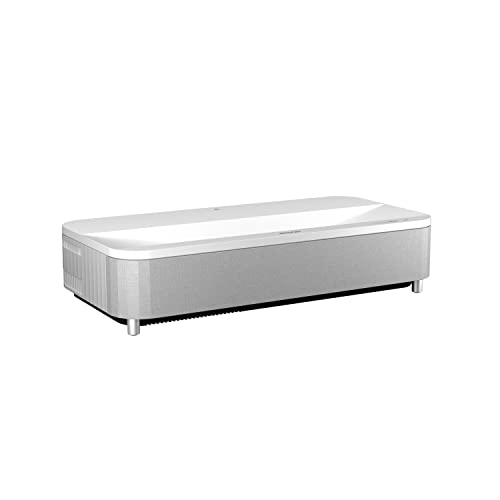
The LS800 is the laser TV that refuses to negotiate with daylight. Four thousand lumens from a three-chip 3LCD engine means the colour brightness equals the white brightness — saturated images keep their full weight under room light — and on an ALR screen the result is the most television-like bright-room picture in this guide, at sizes no comparably priced television attempts. It is the pick for open-plan homes, family rooms with real windows, and any household whose viewing refuses to wait for darkness.
Epson’s television manners are complete. The Yamaha-designed 2.1-channel speakers are the strongest built-in sound here alongside the Formovie’s — dialogue with genuine presence, sport with body — and Android TV streams natively with the household’s services. The 3LCD design also buys calm: no rainbow artefacts for sensitive viewers, no laser speckle on any screen, an image every member of the household sees identically. For a shared family screen, that universality is a feature with daily value.
Its trade is the theatre metric: in a darkened room its contrast belongs to the bright-living-room class, a step behind the triple-laser film machines, and its colour gamut is accurate rather than extreme. The console geometry is fixed and exacting, as with every pick here. Judged as a television — which is the judgement this guide applies — the LS800 is the most complete bright-room answer in the category.
- Technology: 3-chip 3LCD laser, ultra-short-throw lens
- Brightness: 4,000 lumens, colour equal to white
- Sound: Yamaha 2.1-channel built-in system
- Platform: Android TV built in
- Image: up to 150-inch class
Strengths
- Unmatched bright-room authority with full colour output.
- Excellent built-in sound and complete streaming.
- No rainbows or speckle — a calm image for everyone.
Trade-offs
- Dark-room contrast is living-room class.
- ALR screen effectively required in lit rooms.
- Fixed geometry; the console must be measured.
Best for: bright family rooms replacing a large television.
Not suited for: dedicated dark theatres.
AWOL Vision LTV-3000 Pro — Best for Home Theatre Ambitions
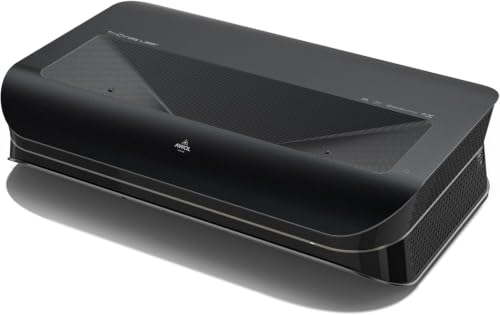
AWOL Vision built the LTV-3000 Pro for the buyer the other laser TVs underserve: the home-theatre enthusiast who wants UST convenience without surrendering theatre features. Its triple-laser engine drives images up to 150 inches with Dolby Vision and HDR10+ both supported — a format neutrality the Samsung picks notably lack — and it carries the category’s enthusiast calling cards, including active 3D support for the libraries that still cherish it and the wide colour gamut triple-laser light makes possible.
Its most distinctive feature answers this guide’s centre-channel question directly: the LTV-3000 Pro can serve as the centre speaker of a surround system, its own drivers voicing dialogue from the screen’s position while external speakers handle the rest of the stage. It is the elegant solution to the UST setup’s oldest geometry puzzle, and it signals a maker thinking about how these machines integrate with real audio systems rather than pretending the soundbar era never happened. Dolby Atmos support completes the theatre brief.
The ownership notes are the category’s usual ones — exact placement, a flat screen, speckle-aware screen pairing for its triple-laser engine — plus a brand consideration: AWOL is a specialist rather than a television giant, which buys focus and feature ambition at the cost of the Samsungs’ service footprint. For the enthusiast building a genuine theatre around a console instead of a ceiling, it is the most interesting machine in this guide.
- Technology: triple-laser DLP, ultra-short-throw lens
- HDR: Dolby Vision and HDR10+, with Atmos support
- Audio: can serve as the centre channel of a surround system
- Extras: active 3D support
- Image: up to 150 inches
Strengths
- Format-neutral HDR and genuine theatre features.
- Centre-channel mode solves the UST audio puzzle.
- 3D support for enthusiast libraries.
Trade-offs
- Specialist brand; smaller service footprint than Samsung or Epson.
- Triple-laser screen pairing needs care.
- Ambition priced accordingly.
Best for: theatre enthusiasts who want UST placement with real audio systems.
Not suited for: buyers prioritising platform polish over theatre features.

Hisense PX3-PRO — Best for Gaming Households
Hisense’s PX3-PRO is the laser TV that read the household correctly: the biggest screen in the home will be gamed on, so it was designed for Xbox from the specification outward. A high-refresh path up to 240Hz at Full HD joins the low-latency manners console players need, while its triple-laser engine — 3,000 lumens class, across image sizes from 80 to 150 inches — covers film duties with Dolby Vision, IMAX Enhanced and the wide colour the technology is known for. It is the only pick here whose gaming credentials are a headline rather than a footnote, and in a gaming household that hierarchy is correct.
As a television it is complete in the modern manner: Google TV with the major services native, Dolby Atmos support for its audio story, and a cabinet designed to sit handsomely in the console it will live on. Hisense’s position as the category’s volume pioneer shows in the details — the platform is current, the screen-pairing guidance is published, and the machine’s contrast, aided by laser dimming, gives film nights more depth than its gaming brief might suggest.
The cautions are its engine’s: triple-laser speckle must be respected in the screen choice, placement is exact, and the high-refresh gaming path is a Full HD path, as it is on every machine in this category. For the household whose evenings alternate between a streamed series and a ranked match, no other laser TV balances the two lives as deliberately.
- Technology: triple-laser DLP with an ultra-short lens
- Brightness: 3,000 lumens class
- Gaming: up to 240Hz at Full HD, designed for Xbox
- HDR: Dolby Vision and IMAX Enhanced
- Platform: Google TV built in
Strengths
- The gaming laser TV, by design rather than by accident.
- Triple-laser colour with Dolby Vision for films.
- Complete, current Google TV platform.
Trade-offs
- High-refresh play is Full HD, not 4K.
- Screen choice must manage triple-laser speckle.
- Sound is good; the Formovie and Epson are better.
Best for: households splitting evenings between streaming and console play.
Not suited for: audio-first buyers or dark-theatre purists.

Samsung The Premiere LPU7D — Best Television Experience
The LPU7D is the laser TV as Samsung currently defines it, and the definition is behavioural: this machine’s triumph is that nobody in the household will ever think of it as a projector. The newest Tizen platform runs the same apps with the same interface as Samsung’s televisions, the Gaming Hub gathers consoles and cloud services into one screen, AI-assisted processing adjusts the picture to content and room with a television’s quiet confidence, and the low fabric-fronted cabinet is furniture that happens to contain a cinema.
The picture is a step forward from the original Premiere — a brighter laser engine that widens the rooms and hours it can serve, in image sizes up to the 120-inch class — while the sound continues the line’s television-grade approach, with a built-in system that covers the room without assistance for most content. For households arriving from a Samsung television, the migration is total: same remote logic, same apps, same voice assistants, four times the picture.
The spec-sheet caveat is format allegiance: Samsung backs HDR10+ and does not offer Dolby Vision, so buyers whose streamed libraries lean on Dolby Vision should weigh the Formovie, Hisense or AWOL. Its laser design’s colour width also sits behind the triple-laser trio. What it sells instead is the most finished ownership experience in the category — and for many households, finish is the feature.
- Technology: laser-driven DLP, ultra-short throw, 2024 design
- Image: up to 120-inch class
- Platform: Tizen with Samsung Gaming Hub
- Picture: AI-assisted processing and adaptation
- Sound: television-grade built-in system
Strengths
- The most television-like ownership in the category.
- Current platform with the longest support runway.
- Gaming Hub treats play as a first-class citizen.
Trade-offs
- No Dolby Vision; HDR10+ is the house format.
- Colour width behind the triple-laser picks.
- Premium pricing for polish.
Best for: Samsung households wanting the definitive laser TV experience.
Not suited for: Dolby Vision library owners.

Samsung The Premiere LSP7T — Best for Samsung Loyalists
The original Premiere remains in this guide because its formula — television manners, real sound, furniture design — has not dated, only been refined by its sibling. Its 2.2-channel built-in audio was the category’s early proof that a laser TV could sound like a television, with drivers arranged to present dialogue from the screen’s position, and its Tizen platform still delivers the zero-learning-curve experience that makes these machines household appliances rather than hobby equipment. Image sizes reach the 120-inch class from the standard console position.
Its single-laser engine is the honest difference from the newer model and the triple-laser trio: colour width sits a step behind, brightness suits dimmed living rooms and ALR pairings rather than daylight, and in exchange the image is calm and speckle-free on any suitable screen. HDR follows Samsung’s HDR10+ path. For the buyer whose priorities are platform, sound and design over colour extremes — and whose room dims in the evening like most rooms — the LSP7T remains a deeply civilised purchase.
Choose between the Samsungs by appetite: the LPU7D for the newest platform, the extra brightness and the gaming layer; the LSP7T for the same philosophy in its original, gentler form. Either way, the household gains a laser TV whose behaviour will never need explaining to a guest, which is a compliment no specification can confer.
- Technology: single-laser DLP behind an ultra-short optic
- Image: up to 120 inches from the console
- Sound: built-in 2.2-channel system
- Platform: Samsung Tizen with voice assistants
- HDR: HDR10+ support
Strengths
- Television-identical behaviour and platform.
- Genuinely good built-in sound.
- Calm, speckle-free image on suitable screens.
Trade-offs
- Colour width and brightness behind newer rivals.
- No Dolby Vision.
- Newer sibling offers more for the ambitious.
Best for: Samsung loyalists wanting laser-TV ease in a dimmed room.
Not suited for: bright rooms or gamut-first buyers.
How Do the Six Compare as Televisions?
| Pick | Sound story | Platform | Headline image trait | Best room |
|---|---|---|---|---|
| Formovie Theater | Bowers & Wilkins stereo | Android TV | Triple-laser colour, Dolby Vision | Dimmed film room |
| Epson LS800 | Yamaha 2.1 | Android TV | 4,000 colour-equal lumens | Bright living room |
| AWOL LTV-3000 Pro | Centre-channel mode for systems | Smart platform | Format-neutral HDR, 150 inches | Console theatre |
| Hisense PX3-PRO | Atmos-supporting system | Google TV | 240Hz gaming path | Gaming household |
| Samsung LPU7D | Television-grade built-in | Tizen + Gaming Hub | AI-assisted picture | Samsung living room |
| Samsung LSP7T | 2.2-channel built-in | Tizen | Calm single-laser image | Dimmed Samsung room |
The table’s lesson is that “best UST” dissolves into constituencies: the film connoisseur, the bright-room family, the theatre builder, the gaming household and the Samsung loyalist each have a different correct answer, and the machines are distinct enough that the constituencies rarely overlap. Choose your constituency honestly and the pick follows.
Which Screen and Console Complete the Setup?
Treat the three purchases — projector, screen, console — as one system specified in one sitting. The screen comes first in the planning: a fixed-frame ALR design in lit rooms, sized to the image the console position will produce, with a surface chosen for your engine — triple-laser owners should follow the screen makers’ compatibility guidance to keep speckle out of the picture, while the Epson and single-laser Samsung pair happily with any quality UST surface. Matte white fixed screens remain the dark-room alternative, brighter and cheaper where light is controlled.
The console must satisfy two numbers from the projector’s placement chart: its depth, which must hold the cabinet at the distance from the wall that your chosen image size requires, and its height, which sets the image’s vertical position relative to the screen. Low and deep is the category’s furniture silhouette for a reason. Leave the projector’s ventilation its breathing room, route the single power and any HDMI runs inside the console’s cable management, and the finished installation has exactly one visible component: the picture.
Sound, if you extend it, goes below the screen and in front of nothing — a soundbar must sit lower than the projector’s upward throw, a clearance measured in centimetres that decides specific pairings. Owners with full speaker systems should look hardest at the AWOL’s centre-channel arrangement, which exists precisely to keep dialogue at the screen while the system does the rest.
How Do You Install a UST System Without Regrets?
Screen first, always. Fix the screen’s position at seated eye level’s natural centre, hang it perfectly level, and verify its flatness with a straight edge and a plain projected image before the projector’s position is finalised. Then derive the projector’s placement from the manufacturer’s chart for your image size — the wall gap and the height offset — and set the console to make those numbers true. Align by moving the cabinet in millimetres: slide for size, shim for level, rotate by degrees too small to feel for squareness, and use the feet before ever opening the keystone menu, because digital correction on a UST image spends the sharpness the lens worked to give you.
Connect like a television: sources into the projector or a receiver with audio return engaged, the platform signed into the household’s services, the remote situation reduced to one device if the household will tolerate the discipline. Run the first evening’s test with familiar content in the room’s normal light, photograph the final placement measurements, and write the console’s dimensions into the same note. UST systems are moved by cleaners, children and curiosity; the household that can restore its geometry from a photograph in five minutes owns a different, calmer product than the one that cannot.
What Mistakes Do UST Buyers Keep Making?
The console mistake leads: a cabinet too shallow for the desired image, discovered when the projector must perch at its front edge to reach the size the screen was bought for. The screen mistake follows — a pull-down or wavy surface under an unforgiving shallow-angle lens, or a bargain ALR whose texture shimmers under a triple-laser engine it was never designed for. The third is skipping the screen entirely on a wall whose flatness was a hope rather than a measurement.
Fourth, owners crowd the soundbar into the light path or block the projector’s vents with the console’s other residents. Fifth, they align with keystone and spend the category’s sharpness to save ten minutes of shimming. Sixth — the subtlest — they buy the projector for the room they plan to redecorate into, and judge it for a year in the room they actually have. Measure the present room, furnish for the present room, and the laser TV will be what its brochure promised.
What Does the Room Look Like When the System Is Off?
A giant television spends its off hours as a black mirror — a glossy void that reflects the room, dominates the wall and announces itself to every visitor. A laser TV spends its off hours as a pale screen and a low cabinet, a presence closer to a framed print than to an appliance, and for many households this daytime personality is the deciding argument. Interior designers have noticed: the UST system is the first hundred-inch display that can be specified into a calm room without apologising for it, and the cabinets — Samsung’s fabric fronts, the category’s general drift toward furniture finishes — are designed by people who understand that the machine will be looked at far longer than it will be looked through.
The disappearing acts extend further for those who want them. Screens that rise from a floor cabinet or descend from a ceiling housing, consoles with sliding tops that carry the projector out for the evening and back for the day — an entire accessory ecosystem exists to make the cinema vanish. None of it is necessary; all of it is evidence that this category serves a household’s whole life with a room, not just its film nights. Buyers should nonetheless start with the honest fixed installation, live with the pale rectangle for a season, and discover whether the vanishing tricks solve a problem they actually have.
There is a practical corollary for renters and the commitment-shy: a laser TV system is reversible in an afternoon. No mount holes in the ceiling, no structural wall work, a screen that can hang from picture hooks’ stronger cousins — the entire cinema can leave with the furniture. In a housing market where few living rooms are forever, that reversibility is a feature with genuine financial value, and one no ceiling installation can match.
How Does a Laser TV Age Over a Decade?
Gracefully in its light source, and interestingly in its software. The lasers in these machines are rated for working lives beyond any realistic decade of evenings, holding brightness with a consistency that makes the system you calibrate in month one the system you own in year nine. There is no lamp door, no consumable budget, no slow dimming to re-litigate — the ownership texture is a television’s, which is the point. The parts that age are fans and dust, managed by the ordinary housekeeping of filters, vents and a lens cloth used rarely and gently.
The platform is the honest question mark, as it is for every smart television: apps evolve, services consolidate, and a decade-old streaming interface will eventually feel its age. The category’s answer is the same as the television’s — an inexpensive streaming stick renews the brain without touching the picture — and buyers should regard the built-in platform as a five-year convenience rather than a lifetime commitment. The projector’s optics, laser and screen pairing, which are the expensive parts, do not participate in that obsolescence at all.
Resale and second-room life follow from the same durability. A laser TV that has served a living room can serve a bedroom, a games room or a buyer down the road, because its light source has not been spent getting there. In a category where the purchase is furniture-scale, that residual usefulness is part of the value — and a quiet contrast with lamp machines, whose second owners inherit a consumable’s countdown along with the cabinet.
Can a UST Projector Work in a Dedicated Theatre?
Yes, with one honest caveat, and the AWOL in this guide exists because the question is asked so often. A dark, controlled room removes the laser TV’s bright-room compromises and lets its colour engines work at full expression; a fixed ALR or matte screen, a proper speaker system with the projector voicing the centre or a soundbar placed with care, and seating at a considered distance produce a theatre whose only unconventional feature is that the equipment sits at the front, silently, where the screen is. Many owners prefer exactly that: no projector fan above the seats, no mount, no long cable runs, and a machine that can be serviced by lifting it off a console rather than descending a ladder.
The caveat is the ultimate black floor. The finest conventional theatre projectors — the contrast-first flagships of the long-throw world — still dig deeper in total darkness than any machine in this guide, and a builder whose theatre exists for that last measure of night-scene depth should buy accordingly. Everyone short of that extreme will find the UST theatre not a compromise but a preference, and the category’s theatre features — format-neutral HDR, 3D, centre-channel integration — are maturing in exactly that direction.
Room geometry gives the final word. A theatre with a low ceiling or a seating plan that puts heads in a long-throw beam is a theatre arguing for UST on physics alone. The beam that travels eighteen inches cannot be interrupted, and the silence of a fan that is not above the audience is a luxury owners mention years later without being asked.
Built-In Sound, Soundbar or Full System — Which Tier Is Yours?
UST is the one projector category where the audio decision is genuinely three-way, because the entry tier is not a joke. Tier one is the projector itself: on the Formovie and the Epson, the built-in systems carry a room for films, sport and series with dialogue anchored at the screen and enough low end to give action its weight; on the Samsungs the television-grade systems do the same in their idiom. Households graduating from a television’s speakers will hear tier one as an upgrade, full stop, and many will never leave it.
Tier two is the soundbar, bought for width and cinema scale rather than for rescue. Its placement is the category’s small geometry exam: below the screen, ahead of the projector, low enough to clear the upward throw — a clearance to verify against your specific pairing’s measurements before ordering, since a bar that eclipses the beam casts a hundred-inch shadow of itself. With that solved, a good bar plus the projector’s own platform is the sweet spot of most living rooms: one remote’s worth of complexity, a stage wider than the cabinet, and dialogue still arriving from the picture’s address.
Tier three is the full speaker system, and it is where the AWOL’s centre-channel mode earns its section in this guide: the projector voices the centre from the screen while towers and surrounds do the rest, solving the placement puzzle by absorbing it. Owners at this tier should route audio by eARC or through a receiver with the projector as a pure display, and should budget the system’s calibration with the same care as the projector’s alignment. The tiers share one rule, which this guide has repeated in every geometry: the voice comes from the screen, or the illusion pays for it nightly.
How Does a Laser TV Handle the Saturday Sport Test?
Sport is the laser TV’s home fixture: bright, saturated, social content in a lit room, watched by people who will not dim anything for anybody. The category passes it on three strengths. The image is big enough that the far seat is still at the match; the ALR pairing holds the pitch’s green against the room’s light; and the platform behaves like a television’s, so the channel or app is found in seconds by whoever holds the remote, including the guest who has never seen the system before. Add the built-in sound’s dialogue-and-crowd balance and the laser TV is not enduring the sport test — it is the best seat in the category for it.
The honest cautions are viewing angle and motion taste. ALR surfaces narrow the cone of full brightness, so a room that watches in a wide arc should choose its screen material with the corner seats in mind. And motion processing divides households: the smoothing that flatters a ball’s flight can make the evening film look like a rehearsal, so the sport preset and the film preset should be set once, labelled honestly, and switched without ceremony. Owners who make those two decisions in the first week stop discussing settings entirely, which is the true finish line of any display purchase.
In What Order Should You Buy a UST System?
In the order of irreversibility. The screen’s size and the console come first in the planning — not necessarily in the delivery — because together they fix the image’s dimensions and position, and every later choice decorates that decision. Measure the wall, choose the diagonal the seating distance justifies, read the projector’s placement chart for that diagonal, and only then shop for a console whose depth and height make the chart true. Households that buy the projector first and the furniture by hope spend their first month negotiating with geometry that a tape measure had already settled.
The projector itself is the second purchase and the screen the third in delivery order, though they should arrive within the same week: a UST projector judged on a wall is a machine being slandered by its surface, and a screen without its projector is wallpaper. Assemble the screen with two people, clean hands and no deadline; hang it; align the projector by hand in millimetres; and only then evaluate anything. Sound, if your pick’s built-in system leaves you wanting more, is the fourth purchase and the only one that can be auditioned honestly after the rest exists — many households discover at that point that the cabinet was carrying the room all along.
Keep the receipts’ lesson general: in this category, the system is the product. A mid-tier projector on its correct screen and console will outperform a flagship improvising on the wrong furniture every evening of the year, and the difference is not subtle. Spend first on the geometry, then on the light, then on the sound — in that order — and the laser TV will be the rare technology purchase that feels, within a month, less like equipment and more like the room simply having a very large, very agreeable window.
How Should You Treat the Room Around a Laser TV?
The laser TV forgives more light than any projector before it, but the room still votes on the picture. The hierarchy of treatments is worth stating plainly, because owners routinely buy them in the wrong order. First, keep direct sun off the screen — no ALR surface and no laser repeals that — with the blind or curtain the window already deserves. Second, manage the ceiling: the light an ALR screen rejects best is the light from above, but a dimmer on the ceiling fixture or a lamp layout that keeps pools of light off the screen wall returns contrast out of all proportion to its cost. Third, consider the wall colour behind and beside the screen; a mid-tone there deepens the picture’s frame the way a dark mount deepens a photograph, and it is the one redecoration a laser TV genuinely rewards.
Sound treatment hides in the same conversation. A big, hard, minimal room — the aesthetic these systems are usually installed into — reflects the built-in speakers’ output into a pleasant liveliness for sport and a slight echo on dialogue at volume. A rug, upholstered seating and curtains are acoustic equipment wearing domestic clothes, and the household that adds them for the light will hear them in the sound. None of this is mandatory; all of it is cumulative, and the laser TV is unusually honest about showing you each improvement, because its own contribution — a stable, bright, well-voiced image — does not drift while you make them.
The final room treatment is behavioural: decide where things are allowed to live. The console’s top, in front of the lens, is a demilitarised zone — no ornaments, no remotes, no plant that will grow into the beam — and the household that agrees this once will never lose a film’s opening scene to a hundred-inch shadow of a vase. Every technology asks one small discipline of its owners; this category’s is a clear console, and it is the easiest discipline home cinema has ever charged.
Final Recommendation
Choose by constituency. Film connoisseurs should take the Formovie Theater and its Bowers & Wilkins sound; bright-room families, the Epson LS800 without a second thought; theatre builders who want a real speaker system, the AWOL LTV-3000 Pro and its centre-channel intelligence; gaming households, the Hisense PX3-PRO; and Samsung households, the LPU7D — with the LSP7T as its gentler, original sibling. Every one of them will put a hundred-plus inches where a television used to be, wake like a television, and ask for nothing but a flat screen, a measured console and an evening. The ultra-short-throw projector stopped being a projector some time ago; these six are simply the best televisions you cannot buy in a shop’s television aisle.
Measure the console before the order, hang the screen before the premiere, and let the household’s actual evenings — news, match, series, film — be the jury in the first week. A laser TV chosen and installed that way does not get reviewed by its owners after a month. It gets used, which is the highest verdict this category recognises.
And if the household argues about only one thing, let it be the screen size — it is the pleasant argument, the one with photographs and tape on the wall, and the one whose answer everyone will enjoy living inside.
Frequently Asked Questions
How far from the wall does a UST projector sit?
Inches, not feet — typically well under half a metre between the cabinet and the wall for a 100-inch image, with the exact gap set by the model’s placement chart and the image size chosen. Larger images need the unit slightly farther out, which is why console depth is a specification: measure yours against the chart for the size you want before ordering.
Do I need a special screen for ultra short throw?
You need a flat one, and in a lit room you need an ALR screen built for UST geometry, whose lenticular surface accepts light from below and rejects the ceiling’s. Pull-down screens are the one pairing to avoid — their waves become visible distortion at this throw angle. Dark rooms can use matte white fixed screens happily.
Can a UST projector replace my soundbar?
The best of them can. The Formovie’s Bowers & Wilkins system and the Epson’s Yamaha 2.1 are genuine sound systems, and the Samsungs are television-grade. Owners with full surround systems are better served by the AWOL’s centre-channel mode or a carefully placed soundbar that clears the upward light path.
What is laser speckle and which models avoid it?
Speckle is a faint shimmer triple-laser light can produce on some screen surfaces. It is managed by pairing — screens designed for triple-laser engines minimise it — and it does not arise in the same way from the Epson’s 3LCD laser design or Samsung’s single-laser models. If you are speckle-sensitive, those two philosophies are your safe ground.
How big should I go — 100, 120 or 150 inches?
Let the room decide: the console position and viewing distance set the sensible range, and brightness divides by area as size grows. Most living rooms land at 100 to 120 inches and are happier there than stretched to 150. The AWOL and Epson reach the largest sizes most credibly; the Samsungs top out in the 120-inch class by design.
Is a UST projector safe around children and pets?
The machines include proximity sensors that dim the laser instantly if someone looks into the lens at close range, and the console position keeps the beam out of the room’s traffic entirely — nobody walks through a UST image. The practical rules are furniture rules: keep the cabinet’s surface clear, teach small hands that the box is not a step, and the system is among the safest ways to own a huge screen.
How does a laser TV compare with a 98-inch television?
On picture absolutes in bright light, the television wins; on size per effort, reversibility and price of entry at 100 inches and beyond, the laser TV wins — it arrives in a carryable box, hangs its screen like a frame and leaves with the furniture when you move. Households that want the largest screen their room can hold, in a room that can be dimmed for films, consistently choose the laser TV and do not revisit the decision.
Can I use a UST projector for everyday news and sport, or is it for films?
Everyday use is its native habitat — instant-on laser, a television’s platform and sound that needs no warming up make it the household’s main screen in most owners’ homes. Films are where it shows off; the news is where it earns its keep, and a category that only impressed on premiere nights would not have survived to a second generation.
Can I mount a UST projector on the ceiling instead?
Most models can be inverted and ceiling-mounted in principle, and a few installations do it to reclaim the console — but it surrenders the category’s conveniences (furniture placement, sources beside the machine, sound at the screen) and complicates the screen geometry. It is a legitimate choice for a dedicated room and a strange one for a living room; the console exists because it is the better idea for the use these machines are bought for.
What happens to the image if the console gets bumped?
The picture shifts or tilts by exactly the amount the cabinet moved — the fixed lens has no memory and no mercy — which is why owners align once, photograph the placement, and teach the household that the projector is furniture that must not be dusted by relocation. Restoration from the photograph takes minutes. Some owners add discreet positioning marks inside the console; it is the category’s smallest and most useful ritual.
Related Guides
For the laser-focused subset with a tabletop alternative, see our guide to 4K laser projectors with short throw. If your UST will live in a bright room, our bright-room 4K projector guide goes deeper on screens and light, and the wider field is compared in our roundup of the best 4K home projectors.


