What's inside
- Key Takeaways
- Where to Buy
- Quick Picks
- How the Picks Were Chosen
- The Six BenQ Models in Detail
- Comparison Table
- How to Choose Within the Band
- Throw Distance and Screen Pairing on a Budget
- Running Costs and Lamp-Era Habits
- Brightness, Translated Into Rooms
- Gaming on a Projector: The Lag Conversation
- The Quiet Features: 3D, Zoom and Keystone
- Common Mistakes
- Frequently Asked Questions
- Final Recommendation
As an Amazon Associate I earn from qualifying purchases. This post may contain affiliate links at no extra cost to you.
[SITE_DOMAIN] is reader-supported. When you buy through links on our site, we may earn an affiliate commission at no extra cost to you. Prices and availability change; check the Amazon listing for the current details.
BenQ builds projectors the way instrument makers build instruments — around the numbers that govern the image — and the best benq projectors under 750 show what that discipline buys inside a strict budget band. Five of the six picks below are linked models whose titles state their brightness in hard lumens, their input lag in milliseconds and their warranty in years; the sixth is a prose-only step-up, covered for guidance and deliberately left unlinked because it belongs above the band this guide is organised around. No prices appear anywhere in what follows. The band is the frame; the specifications are the argument.
The centre of gravity is brightness. Titles here state 3,800 lumens twice, 3,500 once, 3,000 once and 4,000 once — output figures that belong to rooms with lives in them: lamps, windows, a family that watches sport in the afternoon as readily as films at midnight. Around that brightness core, BenQ arranges the second theme of the range, gaming. Input lag is printed in three titles down to the tenth of a millisecond, a 120Hz refresh rate appears once, and game modes are named rather than implied. A budget band usually forces a choice between a bright projector and a responsive one; this catalogue’s interesting claim is that the choice can be postponed.
Resolution draws the guide’s one honest fault line. Four home models state 1080p; the fifth linked pick, the MW560C, is a WXGA business projector included deliberately and flagged openly — its 4,000 stated lumens make it the brightness-first option of the set, and its lower resolution is the price of that output inside the band. Pretending otherwise would corrupt the comparison, so its review argues the trade in the open: boardroom-sharp text and very bright slides against the finer grain of the 1080p machines when a film fills the wall.
Every pick carries a stated three-year warranty in its title, a detail worth pausing on in a budget band, where warranty length is often the first casualty of cost engineering. And every specification quoted below comes from the model’s own title — where a title is silent, on speaker power or throw ratio or contrast, the spec box records the silence instead of decorating it. Read the six reviews as variations on one question: how much verified projector can a strict band hold?
Key Takeaways
- Stated brightness runs from 3,000 to 4,000 lumens across the five linked picks — output aimed at real rooms, not only dark ones.
- Gaming credentials are printed, not implied: 16.7ms input lag on two models, 8.3ms with a 120Hz refresh rate on the TH685P.
- Four linked picks are 1080p home models; the MW560C is a WXGA business model included for brightness and flagged for its resolution.
- Every linked title states a three-year warranty.
- The BenQ TK700 appears as a prose-only step-up above the band — full review depth, no link, by design.
- No prices are quoted anywhere in the guide; the band frames the selection, and the listings carry the current figures.
Where to Buy
- BenQ TH575i — Check price on Amazon
- BenQ TH575 — Check price on Amazon
- BenQ TH671ST — Check price on Amazon
- BenQ TH685P — Check price on Amazon
- BenQ MW560C — Check price on Amazon
Quick Picks
| Pick | Best for | Core spec | Display | Check |
|---|---|---|---|---|
| BenQ TH575i | Streaming and gaming in one bright unit | 1080p, 3,800 lumens, Google TV, 16.7ms lag | Large home screens | Check price on Amazon |
| BenQ TH575 | The all-round bright home model | 1080p, 3,800 lumens, dual HDMI, 1.1x zoom | Large home screens | Check price on Amazon |
| BenQ TH671ST | Short-throw gaming in small rooms | 1080p short throw, 3,000 lumens | Big picture from close range | Check price on Amazon |
| BenQ TH685P | The responsiveness specialist | 1080p, 3,500 lumens, 120Hz, 8.3ms lag | Large gaming screens | Check price on Amazon |
| BenQ MW560C | Meeting rooms and maximum stated brightness | WXGA, 4,000 lumens, 20,000:1 contrast | Presentation screens | Check price on Amazon |
| BenQ TK700 | The step-up above the band | Covered as guidance — see its review | Step-up class | Prose-only coverage, no link |
How the Picks Were Chosen
The band came first. Candidates had to belong credibly to the under-750 territory this guide is organised around, and — since no prices are printed here — belonging was judged on the model’s position in BenQ’s own range: home and small-office machines from the attainable tier of the catalogue, not flagships passing through a discount. Within the band, selection favoured titles that state their evidence. A model whose title prints its lumens, its lag and its warranty can be compared honestly against its siblings; a model whose title deals in adjectives cannot, and several such were left aside despite familiar names.
Coverage was the second rule. The set had to include a streaming-led model, a generalist, a short-throw specialist, a gaming specialist and a business crossover, because the band serves all five readerships and a guide listing five near-identical generalists would fail four of them. The TH575i and TH575 look similar on paper — deliberately so, since their near-twinship is itself useful information, and their reviews separate them on the streaming question. The MW560C’s inclusion was debated longest: a WXGA business model in a home guide earns its place only by being flagged, every time, for exactly what it is, and its review keeps that flag flying.
The TK700’s prose-only status follows from the same discipline. It is the step-up above this band — the direction a reader travels when the band’s ceiling starts to pinch — and covering it with full review depth but no purchase link keeps the guide honest in both directions: the band’s boundary stays visible, and the reader still learns what the next rung demands and delivers. Verifying any listing for it is the reader’s own errand, and its review explains how to run that check. The through-line of the whole selection is verifiability: every claim below can be traced to a title, a figure or a stated warranty, which is the least a budget purchase deserves. Readers whose rooms are brighter than this band’s ambitions should widen the search with our best living room projectors guide, where output for lamps-on viewing is the organising principle.
The Six BenQ Models in Detail

BenQ TH575i
Best for: a bright family room where streaming and console gaming share the same screen, with Google TV inside the unit and 3,800 stated lumens overhead.
Not suited for: a short-throw layout — nothing in the title claims a short-throw lens, so small-room geometry belongs to the TH671ST instead.
- Resolution: 1080p
- Brightness: 3,800 lumens
- Input lag: 16.7ms, as stated in the title
- Streaming: Google TV, via a licensed Google TV dongle per the title
- Keystone: auto vertical keystone
- Warranty: 3 years, as stated in the title
- HDMI count: Not stated in the listing title — verify with the manufacturer documentation
- Speaker output: Not stated in the listing title — verify with the manufacturer documentation
The TH575i takes the brightest generalist formula in this guide and adds the one thing its twin lacks: a streaming brain. The title states the arrangement precisely — a licensed Google TV dongle supplies the platform — and that word “licensed” carries weight in a category where unofficial streaming sticks have taught buyers caution. With the platform inside the purchase, the projector becomes a complete viewing appliance: switch on, pick a service, watch, with the console waiting on another input for later. For a family room that alternates between a film and a game night, that completeness is the model’s whole personality.
The underlying hardware matches its sibling’s headline figures — 1080p resolution, 3,800 lumens, 16.7ms input lag — and each figure earns its place in a lived-in room. The brightness is the family-room figure: enough output to keep a large picture composed when a lamp stays on for the person reading in the corner. The lag figure, stated to the tenth of a millisecond, sits in the range where controller response feels direct for the great majority of console play. Auto vertical keystone quietly handles the coffee-table placement that family rooms actually impose, squaring the picture when the unit sits below screen centre.
Against the TH575 below, the decision is purely about the source. A household already owning a streaming device they love gains nothing from the dongle and may prefer the twin’s dual HDMI arrangement; a household starting from zero, or tired of swapping a stick between screens, gets a tidier room from this one. Either way the three-year warranty stated in the title frames the purchase as a kept appliance rather than a disposable gadget — a framing budget bands rarely offer and this one consistently does.
Strengths
- Licensed Google TV inside the purchase makes it a complete streaming appliance from day one.
- 3,800 stated lumens suit lamps-on family viewing, not just dark-room films.
- 16.7ms stated lag keeps console play responsive on the same screen.
Trade-offs
- HDMI count and speaker output go unstated in the title; both need a documentation check.
- The streaming value is wasted where a capable streaming device already exists.
- Standard throw geometry needs proper distance — small rooms should look at the short-throw pick.
Families building one bright screen for everything will likely start their deliberation here, and the TH575i’s own listing at Check price on Amazon is where its current configuration can be confirmed.
BenQ TH575
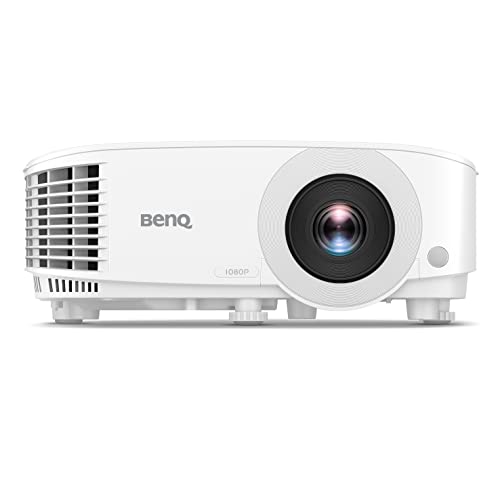
Best for: the classic bright home setup — films and games on a big screen, fed by external sources, with dual HDMI and a modest zoom for placement flexibility.
Not suited for: streaming straight out of the box with nothing attached — the title names no built-in platform, so a source device joins this setup.
- Resolution: 1080p
- Brightness: 3,800 lumens
- Input lag: 16.7ms low latency, with an enhanced game mode
- Inputs: dual HDMI
- Zoom: 1.1x
- 3D: 3D Ready, per the title
- Keystone: auto vertical keystone
- Warranty: 3 years, as stated in the title
- Speaker output: Not stated in the listing title — verify with the manufacturer documentation
The TH575 is the reference point of this guide — the model the others are variations on. Its title is a model of the brand’s specification honesty: 1080p, 3,800 lumens, 16.7ms latency with an enhanced game mode, dual HDMI, 1.1x zoom, 3D readiness, auto vertical keystone and a three-year warranty, each claim checkable and each relevant. Nothing is promised that the projector does not do, and nothing it does is left vague. In a budget band crowded with creative arithmetic, that plainness is a competitive feature.
The dual HDMI inputs shape its daily life more than any single figure. A console and a streaming stick, or a Blu-ray player and a laptop, can live attached simultaneously, and the enhanced game mode waits on whichever input the console occupies. The 1.1x zoom sounds modest and is — yet that small range is frequently the difference between a picture that fits the screen and one that spills past its edges, forgiving the half-metre of placement error that real shelves impose. The 3D Ready note is a legacy pleasure, irrelevant to most evenings and delightful to the minority with a 3D library still in rotation.
Brightness remains the headline in use. Three thousand eight hundred lumens at 1080p is a combination aimed squarely at rooms that refuse to become caves: weekend sport with curtains open, family films with a lamp burning, games in a shared space where darkness would exile everyone not playing. Paired with the stated lag figure, it makes the TH575 the guide’s natural answer to the most common question in this band — what one projector handles a normal room and a normal mixture of viewing without special pleading? The answer has been sitting in BenQ’s catalogue wearing very little marketing, which is rather the point.
Strengths
- The most completely stated generalist specification in the guide, figure by figure.
- Dual HDMI plus 1.1x zoom give placement and source flexibility rivals omit.
- Brightness and lag together cover the family-room mixture of films, sport and games.
Trade-offs
- No streaming platform is named in the title; a source device is part of the setup.
- Speaker output is unstated, so audio planning needs the documentation.
- The zoom range is small — placement still has to be roughly right.
Generalists age well because rooms keep asking general questions, and readers whose viewing refuses to specialise can examine the TH575 closely at Check price on Amazon.

BenQ TH671ST
Best for: small rooms and gaming dens where the projector must sit close to the wall and still draw a big picture — the short-throw specialist of the band.
Not suited for: a large bright lounge; its stated 3,000 lumens is the lowest figure among the home models here, and distance viewing dilutes its close-range advantage.
- Resolution: 1080p
- Throw style: short throw, per the title
- Brightness: 3,000 lumens
- Input lag: low input lag stated in the title, figure not specified there
- Inputs: dual HDMI
- Sound: built-in speaker
- Keystone: auto vertical keystone
- Stated focus: console gaming
- Warranty: 3 years, as stated in the title
- Zoom range: Not stated in the listing title — verify with the manufacturer documentation
Short throw is a room-solving technology before it is a picture technology. A conventional projector in a small room sits behind the players, throws over their heads, and turns every stand-up celebration into a shadow puppet show; the TH671ST inverts the arrangement, sitting near the screen and drawing its large picture from close range, so the players stand behind the light instead of inside it. For console gaming — the use its title names outright — that geometry is transformative in bedrooms, dens and student rooms where distance simply does not exist.
The supporting specification is honest about its priorities. Three thousand lumens is the gentlest output among the home picks here, adequate for the close, controlled spaces the model is designed for and not pretending otherwise. Low input lag is claimed without a printed figure, which places a small homework task beside the TH685P’s published 8.3ms: competitive players should verify the exact number in the documentation, while casual and party gaming can take the claim at face value. Dual HDMI and a built-in speaker complete a self-contained den setup — console in one port, stick or second console in the other, sound from the unit itself.
Longevity in this niche is its own endorsement. The TH671ST has served the short-throw gaming role across years of catalogue turnover, and its formula persists because the problem it solves persists: most rooms are small, most walls are near, and most players would rather sit close to a big picture than far from a small one. Buyers with the space for a standard-throw setup gain brightness by choosing the TH575 instead; buyers without that space are not settling by choosing this — they are fitting the projector to the room, which is the first rule of the whole category.
Strengths
- Short-throw geometry creates big pictures in rooms where conventional throw cannot work.
- Players stand behind the light path — no shadows crossing the screen mid-game.
- Dual HDMI and a built-in speaker make a complete one-unit gaming den.
Trade-offs
- Stated brightness is the lowest of the home picks; bright rooms are not its territory.
- The lag figure itself is not printed in the title, unlike its gaming sibling’s.
- Zoom range goes unstated, so placement precision matters more here.
Small rooms with big gaming ambitions are this model’s parish, and its listing at Check price on Amazon holds the details for readers measuring a short wall tonight.

BenQ TH685P
Best for: players who read lag figures before lumen figures — 8.3ms stated latency and a 120Hz refresh rate make this the responsiveness pick of the band.
Not suited for: a cinema-first room where gaming is occasional; its talents concentrate on response, and film-only households can spend the same band on the generalists.
- Resolution: 1080p
- Brightness: 3,500 lumens
- Refresh rate: 120Hz, as stated in the title
- Input lag: 8.3ms low latency
- Game features: enhanced game mode
- Signal support: HDMI with 4K supported, per the title
- Keystone: auto keystone
- Sound: built-in speaker
- Warranty: 3 years, described in the title as industry leading
- HDMI count: Not stated in the listing title — verify with the manufacturer documentation
Two numbers headline this review and both are printed in the title: 8.3 milliseconds and 120Hz. Input lag at that level moves the projector out of the casual category and into territory where fighting games, rhythm titles and competitive shooters stop feeling cushioned by the display. The 120Hz refresh rate doubles the frame cadence of standard 60Hz projection, smoothing motion in fast camera pans and giving high-frame-rate sources a screen that can actually show what they send. Together they describe a machine specified by people who measure displays with instruments.
The supporting cast keeps the gaming brief from becoming a narrow one. Three thousand five hundred lumens is near the top of this guide’s range, so the picture survives the lit room where gaming sessions actually happen; the enhanced game mode named in the title signals that the low-latency path is a designed feature rather than a side effect; and the title’s note of 4K signal support over HDMI means newer consoles can hand it their full output signal, with the projector rendering at its native 1080p — a distinction worth keeping straight, since signal acceptance and native resolution are different claims and this title, to its credit, words them differently.
Film viewing rides along comfortably rather than leading. A bright 1080p picture with auto keystone and a built-in speaker covers movie nights without ceremony, and the three-year warranty stated in the title underwrites the whole arrangement. But the honest centre of the model is the player’s chair: this is the pick for the household where the projector is a gaming display first and a cinema second, where the lag figure will be quoted at the dinner table, and where 120Hz support decides purchases. Every range needs one unapologetic specialist, and in this band the TH685P wears that badge with its numbers showing. Its ceiling also points upward — readers outgrowing 1080p gaming entirely will eventually study the tier surveyed in our best high-end projectors guide, though the jump in commitment between that tier and this band is considerable.
One more practical note belongs to this specialist: refresh-rate support only matters when the source supplies the frames, so the console or PC feeding it should be set to its high-frame-rate output and connected with a cable rated for the bandwidth. The projector’s title promises the screen side of that chain; the rest of the chain is the owner’s to complete, and completing it is what separates a specification from an experience.
Strengths
- 8.3ms stated lag is the sharpest response figure in the guide.
- 120Hz refresh support doubles the motion cadence of standard projection.
- 3,500 lumens keeps the gaming picture bright in lived-in rooms.
Trade-offs
- HDMI count is unstated in the title; multi-console setups need the documentation.
- Native resolution remains 1080p — 4K in the title refers to signal support.
- Film-first households pay for response they will rarely feel.
Players who keep a mental league table of lag figures will already be reaching for the details, and the TH685P’s page at Check price on Amazon is the next stop on that road.

BenQ MW560C
Best for: meeting rooms, classrooms and training spaces where 4,000 stated lumens and presentation-sharp text outrank cinema resolution.
Not suited for: a film-first home screen — its WXGA resolution sits visibly below the 1080p of the home models when a movie fills the wall.
- Resolution: WXGA — a widescreen format below 1080p, flagged here deliberately
- Brightness: 4,000 lumens, the highest stated figure in this guide
- Contrast: 20,000:1
- Inputs: HDMI and VGA
- Keystone: auto keystone
- Efficiency: SmartEco technology, per the title
- Stated setting: meeting rooms
- Warranty: 3 years, as stated in the title
- Speaker output: Not stated in the listing title — verify with the manufacturer documentation
- Throw ratio: Not stated in the listing title — verify with the manufacturer documentation
This review begins with the flag the model deserves: the MW560C is a business projector, and its resolution is WXGA rather than the 1080p of every home model above. WXGA is a widescreen presentation format — ample for slides, spreadsheets, dashboards and video calls, where content is bold and text is large — and visibly coarser than Full HD when a film’s fine detail fills a wall at home. Any guide that slid this model into a home list without that sentence would be selling brightness by hiding resolution, so the sentence stands at the top.
What the brightness buys, within its proper territory, is considerable. Four thousand stated lumens is the highest figure in this guide, and in a meeting room that figure translates into lights left on, blinds left open, notes taken during the presentation and a picture that stays legible at the back of the room. The stated 20,000:1 contrast supports text clarity — black characters on white slides are a contrast test before they are anything else — and the input pairing of HDMI and VGA quietly covers the reality of shared spaces, where a legacy laptop still appears weekly and must be accommodated without an adapter hunt. SmartEco technology, named in the title, addresses the running-cost side of institutional life, moderating power and lamp wear across long working days.
The home reader still has one legitimate use for this model: the brightness-first crossover. A garage gym, a workshop, a community hall, a very bright multi-purpose space where films are occasional and presentations, sport on a big wall or event slideshows are the main programme — in those venues the resolution gap narrows in importance while the lumen lead widens. The three-year warranty matches the home models, and auto keystone suits rooms where the unit is set up and struck repeatedly. Judged as a meeting-room machine that can moonlight, the MW560C is the most honest value in the set; judged as a cinema, it is the wrong tool, and this guide would rather say both plainly than blur either.
There is a training-room corollary worth stating for the crossover reader. Brightness at this level also forgives poor screens — a painted wall in a community hall, a portable tripod screen with wrinkles — because output covers surface sins that a dimmer machine would expose. That forgiveness, plus VGA for the laptop that refuses to retire, is why models of this class accumulate institutional devotees: they solve the room as it is, not as the facilities plan promised it would be.
Strengths
- 4,000 stated lumens — the guide’s highest — keeps presentations legible with the lights on.
- HDMI and VGA together cover modern and legacy sources in shared spaces.
- SmartEco and a three-year warranty suit institutional running costs and duty cycles.
Trade-offs
- WXGA resolution is visibly below the 1080p home models on film content.
- Speaker output and throw ratio are unstated in the title.
- Its talents aim at text and slides; cinema detail is not among them.
Facilities-minded readers and bright-room crossover cases will weigh this one on its lumens, and the MW560C’s listing at Check price on Amazon carries the current offer for the meeting-room pick.
BenQ TK700
Best for: readers who have priced the band, felt its ceiling, and want to know what the next rung up BenQ’s ladder looks like before deciding whether to climb.
Not suited for: a purchase inside this guide’s band — the TK700 sits above it, which is exactly why this review carries no purchase link.
- Position in range: the step-up above the under-750 band, covered as guidance only
- Purchase link: none in this guide, by design
- Brightness: Not stated in the listing title — verify with the manufacturer documentation
- Input lag: Not stated in the listing title — verify with the manufacturer documentation
- Resolution detail: Not stated in the listing title — verify with the manufacturer documentation
- Warranty: Not stated in the listing title — verify with the manufacturer documentation
Every budget guide owes its readers a map of the border, and the TK700 is this guide’s border marker. It is the model BenQ positions as the step up from the 1080p gaming-and-home class that fills the rest of this page — the direction of travel after a season with a TH-series machine, when the pull toward a finer picture class sets in and the question becomes what the climb costs in complexity as well as in band. Because it sits above the territory this guide is organised around, it is covered here as guidance: full review attention, no link, no image, nothing to click. That absence is the honest signal of where the band ends.
What stepping up generally buys, in this catalogue’s grammar, is a higher resolution class and a gaming feature set carried into that class — the same brand preoccupations visible throughout this guide, pursued with a larger budget for the imaging hardware. What it does not buy is immunity from the guide’s other lessons: brightness still has to match the room, throw still has to match the furniture, and a step-up model placed in a small bright room can satisfy less than a band model placed perfectly. Readers tempted to climb should therefore climb with measurements in hand — room dimensions, screen size, seating distance, the sources actually owned — rather than on the momentum of a good experience with a smaller machine.
Verifying this model is a deliberate errand, and it is worth describing how to run it well. Start from the manufacturer’s own documentation for the exact model name, and confirm the four figures this guide has taught you to ask for — native resolution, stated brightness, input lag at the settings you will actually use, and warranty term — because step-up purchases are precisely where marketing vocabulary stretches furthest. Cross-check any marketplace listing against those documented figures line by line, and treat any listing whose numbers exceed the documentation as a listing to walk away from. Readers who complete that errand and still want the climb will make it with open eyes; readers who find the band’s machines sufficient after the comparison have also been served, which is what a border marker is for. The portable end of the same curiosity — smaller machines, smarter platforms — is surveyed in our best mini smart projectors guide, for readers whose next step is sideways into convenience rather than upward into resolution.
It also deserves noting what the step-up conversation reveals about the band itself. A reader who studies the TK700’s class and returns to the TH575 or TH685P has not failed to climb; they have priced the climb and found the band’s value intact, which is the most useful outcome a border review can produce. Satisfaction in this category is mostly the absence of a specific regret, and regret usually traces to a room mismatch rather than to a missing feature — one more reason the guide keeps returning to tape measures and lamp counts.
Strengths
- Marks the range’s upward path clearly for owners outgrowing the band.
- Covered without a link, so its assessment carries no sales pressure.
- Frames the step-up decision around room measurements rather than catalogue momentum.
Trade-offs
- Above the band by definition — the reason no purchase route is offered here.
- Its key figures must be verified in manufacturer documentation before any decision.
- A higher class cannot rescue a room whose light and throw were never measured.
Because the TK700 is covered as guidance, there is no listing link to follow from this page; verify the model through the manufacturer’s documentation and check any marketplace listing against those documented figures before treating it as a purchase.
Comparison Table
| Pick | Resolution | Brightness (title) | Gaming figure (title) | Role |
|---|---|---|---|---|
| BenQ TH575i | 1080p | 3,800 lumens | 16.7ms input lag | Streaming plus gaming generalist |
| BenQ TH575 | 1080p | 3,800 lumens | 16.7ms, enhanced game mode | All-round home model |
| BenQ TH671ST | 1080p | 3,000 lumens | Low input lag, figure unstated | Short-throw console specialist |
| BenQ TH685P | 1080p | 3,500 lumens | 8.3ms, 120Hz refresh | Responsiveness specialist |
| BenQ MW560C | WXGA | 4,000 lumens | Not a gaming model | Meeting-room brightness pick |
| BenQ TK700 | Step-up class — verify in documentation | Verify in documentation | Verify in documentation | Prose-only step-up above the band |
How to Choose Within the Band
How bright is the room, honestly?
Brightness choice begins with an honest room audit, and honesty is the difficult part. Count the light the projector will actually face: windows and their orientation, lamps that stay on during viewing, the pale walls that bounce light back onto the screen. The stated figures in this guide — 3,000 to 4,000 lumens — are all aimed at real rooms rather than caves, and the spread between them maps to that audit. A dedicated dark room can take the TH671ST’s 3,000 and spend the difference of attention on placement; a family room with afternoon sun needs the 3,800-lumen pair; a meeting room with the lights fully on is the MW560C’s stated home ground. Screen size then multiplies the verdict, because the same lumens spread across a larger picture dim per unit area — a model that feels blazing at 100 inches can feel merely adequate at 150.
Does gaming set the specification, or join it?
Three of the home titles print lag figures, and they divide the readership neatly. At 16.7ms — the TH575i and TH575 — response sits comfortably inside the threshold where the overwhelming majority of console play feels direct, including sports titles and platformers. At 8.3ms with 120Hz, the TH685P serves players who compete, who play rhythm and fighting titles seriously, or who simply feel latency the way musicians feel timing. The TH671ST claims low lag without printing the figure and adds the short-throw geometry that gaming dens need. The deciding question is not whether gaming happens but whether it leads: a film-led room with a console in it belongs to the generalists, a game-led room belongs to the specialists, and confusing the two is how bands get spent twice.
Streaming inside the unit, or a source you already own?
Only the TH575i’s title names a platform — Google TV, via a licensed dongle — and that singularity simplifies the decision. Households starting fresh, or furnishing a room where a separate streaming device would mean another remote and another power brick, gain real tidiness from the built-in route. Households with a beloved console, streamer or media PC already in place gain nothing and should read the TH575’s dual HDMI as the more useful feature. Neither answer is more advanced than the other; the error is buying the dongle model out of habit and never opening its platform, or buying the bare model and discovering the household’s only source is a phone.
What does the warranty tell you about the band?
Every linked title here states a three-year warranty, and in a budget band that uniformity is information. It signals that these machines are engineered as kept appliances with service expectations, not as seasonal gadgets, and it changes the ownership arithmetic: a projector expected to serve for years justifies a proper screen, a considered mount and a surge-protected power run in a way a disposable unit never would. When comparing any model from outside this guide against these five, the warranty line is the fastest character test available — a maker confident in a band product says so in years, in the title, where it can be checked.
What about sound in a bright, busy room?
Two titles here name a built-in speaker — the TH671ST and the TH685P — and the rest leave speaker detail to the documentation, which tells its own story about this band’s priorities: the picture is specified to the lumen, the audio is assumed to be improvable. In practice, built-in projector sound covers dialogue and casual viewing at room distances, while a bright family room with conversation running will eventually ask for an external speaker placed near the screen. Planning that upgrade path costs nothing at purchase time — an accessible audio output and shelf space near the screen — and it keeps the band’s money concentrated on the image, where this catalogue insists it belongs.
Throw Distance and Screen Pairing on a Budget
Placement is where budget projects are won, because the expensive mistakes are geometric rather than electronic. Measure the room’s throw — lens position to screen wall — before choosing between the standard-throw generalists and the short-throw TH671ST, and measure it from where the projector can actually live: a shelf, a mount, a cabinet top, not from an ideal point floating in the room’s centre. The TH575’s 1.1x zoom forgives small errors; nothing forgives choosing the wrong throw class. Ceiling mounting suits permanent rooms and keeps the light path above heads; a low cabinet suits rented rooms and keeps the projector reachable for the source-swapping that family life involves.
Screens deserve the same order of thinking. A smooth pale wall serves every model here respectably, and most owners should start there and learn their room’s light before spending anything. A fixed screen then repays its place in three currencies: flatness, which budget walls rarely guarantee; a defined border, which makes any picture look more deliberate; and gain matched to the room, where a modest-gain surface helps the 3,000-lumen model and a neutral surface suits the brighter pair. Ambient-light-rejecting screens belong to the brightest-room cases and should be auditioned against the actual lamp positions in the room, because their magic is directional and a lamp in the wrong place defeats it expensively.
Running Costs and Lamp-Era Habits
Ownership costs in this class are dominated by habits rather than by parts. Dust discipline comes first: filters and vents on hard-working bright projectors clog in carpeted, pet-friendly rooms, and a gentle cleaning rhythm preserves both brightness and fan quietness across years. Heat discipline follows — clearance around the vents, no enclosed cabinet without airflow, no blanket-draped shelf — because a projector that runs hot dims itself to survive, quietly taxing the very brightness the purchase was based on. The MW560C’s SmartEco feature addresses the institutional version of the same story, moderating consumption across long powered days, and home owners can imitate its logic with the eco settings most bright models offer when full output is unnecessary after dark.
Power habits complete the picture. A surge-protected supply is cheap insurance for any ceiling-mounted machine, and a small uninterruptible supply earns its place where outages are common, because a projector’s cooling fan should finish its cycle after the picture stops — a hard power cut at full temperature is the rudest event in a lamp-era machine’s life. None of these habits requires expertise; all of them compound, and the three-year warranties stated across this guide will feel considerably longer in homes where those habits are practised.
Brightness, Translated Into Rooms
Lumen figures become useful only when they are translated into the rooms they must serve, so here is the translation for this guide’s ladder. Three thousand lumens — the TH671ST — is a controlled-room figure: curtains drawn or evening light, a picture kept near the sizes a small room allows, and in that setting it is ample. Three thousand five hundred — the TH685P — buys forgiveness: a lamp can stay on, a door can stay open, and the picture holds its contrast through both. Three thousand eight hundred, shared by the TH575 pair, is the family-room standard of this set, sized for rooms that host conversation and viewing at once. Four thousand — the MW560C — is institutional light: offices at midday, classrooms with the blinds up, spaces where darkness is not an available feature.
Two cautions keep the translation honest. First, these are the makers’ stated figures, comparable within this single brand’s titles and less safely compared against the creative arithmetic of unknown brands, where the same word can describe a fraction of the light. Second, brightness interacts with picture size relentlessly: every step up in diagonal spreads the same lumens thinner, so a room planning a very large screen should read each figure one rung more conservatively. The screen’s gain can hand some of that back, which is why the pairing advice in the throw section treats screen and projector as one purchase wearing two boxes.
Gaming on a Projector: The Lag Conversation
Input lag is the delay between a controller’s command and the picture’s obedience, and projectors historically carried a poor reputation for it — a reputation this band’s titles argue against in print. The figures here, 16.7ms on the generalists and 8.3ms on the TH685P, sit in the territory where the display stops being the weakest link in the chain; beyond them lie the player’s own reactions, the console’s processing and the network, for online titles. The 120Hz refresh rate on the TH685P addresses the other half of game feel — motion clarity — by doubling the frames the screen can present each second for sources that supply them.
Setup habits protect those figures in practice. Game modes exist to bypass image processing that costs milliseconds, so the enhanced game modes named in these titles should be switched on for the console’s input and left on. Keystone correction and other geometry processing deserve a sceptical look on a gaming input, since every transformation is arithmetic and arithmetic takes time; a squarely placed projector that needs no correction is the fastest projector. Sound follows the same logic — the shortest path from console to speaker wins — and a gaming den arranged around those three habits will feel faster than its specification sheet, while a careless one can feel slower.
The Quiet Features: 3D, Zoom and Keystone
Three features recur through these titles without ever headlining, and each deserves a fair sentence. The TH575’s 3D Ready note serves a small, devoted library of 3D discs and games; it costs the rest of the readership nothing and delights that minority completely, which is the correct economics for a legacy feature. The 1.1x zoom on the same model is placement forgiveness in mechanical form — a small range that converts an almost-right shelf position into a right one. Auto vertical keystone, stated on four of the five linked models, is the feature family rooms use weekly without noticing: the projector sits low, the picture would tilt, the correction squares it, and the small sharpness cost at the edges is a fair trade for a unit that can live on a coffee table instead of a mount. Together these quiet features explain why this band’s machines feel finished in daily use — the specification sheet’s glamour figures get the attention, but the unglamorous trio does the living.
Common Mistakes
Treating the band as a promise about every listing. Bands describe positioning, not a live price check; listings move, bundles differ, and the discipline of this guide — no printed prices — exists because the figure belongs to the day of purchase, not the day of writing.
Reading 4K supported as 4K resolution. The TH685P’s title separates the two claims carefully: its HDMI accepts a 4K signal, its panel renders 1080p. Signal acceptance is useful; it is not resolution.
Skipping the resolution flag on the business model. The MW560C’s 4,000 lumens tempt home readers, and its WXGA panel is the counterweight. Brightness cannot substitute for pixels a film actually contains.
Buying throw by habit. A standard-throw model in a four-metre room, or a short-throw model in a hall, wastes the band on geometry. Measure first; the tape measure is the cheapest consultant in the category.
Ignoring lag until the first fighting game. Response figures are printed in three of these titles precisely so the gaming household can decide before the tournament, not during it.
Frequently Asked Questions
Why are there no prices in this guide?
Because the band is the topic and the listings carry the live figures. Prices and bundles shift constantly, and a printed number would be wrong on a schedule nobody controls; each linked pick’s listing shows its current figure beside the full configuration, which is the only version worth deciding on.
The guide still does the band’s real work: it verifies that each linked model belongs to this tier of BenQ’s range and compares them on stated specifications, so the shortlist is sound whatever the day’s figures say.
What separates the TH575i from the TH575?
The source arrangement. The TH575i’s title adds a licensed Google TV dongle, making it a complete streaming appliance; the TH575 answers with dual HDMI and a 1.1x zoom for households feeding it from sources they already own. Brightness, resolution and the 16.7ms lag figure are shared.
Is WXGA good enough for films?
It is watchable and visibly coarser than the 1080p models — the MW560C is included for meeting rooms and brightness-first crossover spaces, and its review flags the resolution openly. A film-led room should choose among the four 1080p home models.
Which pick suits competitive gaming?
The TH685P, on its stated figures: 8.3ms input lag and a 120Hz refresh rate are the sharpest response credentials in the guide. Where the room is small, the TH671ST’s short throw may matter more than the last milliseconds — verify its exact lag figure in the documentation before deciding.
Why does the TK700 have no link?
Because it sits above the band this guide covers. It is reviewed as guidance — the step-up direction — and including a purchase route would blur the boundary the guide exists to map. Its figures should be verified in the manufacturer’s documentation.
Do all five linked models carry the same warranty?
Each linked title states a three-year warranty, from the TH575i to the MW560C. That uniformity is one of the band’s quiet strengths and a useful benchmark when comparing any outside model against this set.
Short throw or standard throw for a rented room?
Short throw usually wins rentals: the TH671ST’s close placement avoids ceiling mounts and long cable runs, and it leaves with its owner without a trace. Standard-throw models serve renters from a rear shelf where the room’s length allows it, but the tape-measure check comes first either way.
Can these projectors handle sport in the afternoon?
That is close to their design brief. The 3,800-lumen pair and the 3,500-lumen TH685P were specified for rooms that stay lived-in during viewing, and afternoon sport — bright, fast, watched socially — is the canonical case. Curtains drawn against direct sun still help any projector, but none of the home models here requires a darkened cave to stay watchable.
Final Recommendation
Within the band, the TH575 is the centre of gravity: the most completely stated generalist, bright enough for real rooms, responsive enough for real gaming, and flexible in inputs and zoom. Choose the TH575i instead when the streaming platform should live inside the purchase, the TH685P when response figures lead the household’s priorities, and the TH671ST when the room is small enough that throw geometry outranks everything. The MW560C serves meeting rooms and brightness-first spaces with its flag flying, and the TK700 waits above the band for owners whose measurements — not whose impulses — say climb. A budget band rewards the reader who spends it on stated figures and honest flags; on the evidence of these titles, that is exactly the reader BenQ builds for.