What's inside
- Where to Buy These Projectors
- Key Takeaways
- Quick Picks at a Glance
- How the Picks Were Chosen
- The Six Epson Home Projectors in Detail
- Side-by-Side Comparison
- How Do You Choose Between Lamp, Laser and Streaming in the Epson Line?
- Why 3LCD Color Behaves Differently From Single-Chip Designs
- Screens, Gain and Room Color: the Other Half of the Picture
- Living With Fan Noise, Heat and Light Spill
- Matching the Projector to Films, Sport and Games
- Cables, Mounts and the Unglamorous Details That Decide Satisfaction
- Common Mistakes to Avoid
- Frequently Asked Questions
- Final Recommendation
As an Amazon Associate I earn from qualifying purchases. This post may contain affiliate links at no extra cost to you.
[SITE_DOMAIN] is reader-supported. When you buy through links on our site, we may earn an affiliate commission at no extra cost to you. Prices and availability change; check the Amazon listing for the current details.
Where to Buy These Projectors
Epson Home Cinema 980 — View on Amazon
Epson Home Cinema 2350 4K PRO-UHD — See the listing
Epson Home Cinema 3800 4K PRO-UHD — Open the product page
Epson Home Cinema 5050UB — Check the Amazon page
Epson Home Cinema LS6000 4K Laser — View this model
Epson Home Cinema LS11000 — See it on Amazon
Finding the best epson home projectors for a real room means sorting one manufacturer line that spans a plain 1080p starter, a streaming all-rounder, two theater-leaning lamp models and a pair of laser machines with genuinely different personalities. All six projectors compared here share Epson 3-chip 3LCD imaging, so none of them uses a color wheel and none produces the rainbow flashes that trouble some viewers with single-chip designs. What separates them is light source, brightness, processing and how permanently each one expects to live in your home.
This guide reads the six models in price-of-commitment order rather than pretending they are interchangeable. The Home Cinema 980 and 2350 serve living rooms and first media corners. The 3800 and the long-admired 5050UB serve viewers who dim the lights and care about HDR film rendering. The LS6000 and LS11000 bring laser illumination, higher refresh rates and, in the flagship case, motorized optics for a room built around the screen. Specifications quoted anywhere in this article come only from each model listing title, and where a title stays silent, the review says so instead of guessing.
Before the detailed reviews, one habit will save every reader money: measure your room first. Screen size, throw distance, ceiling height and how dark the room can get at the time you actually watch will eliminate half of any shortlist more reliably than any specification sheet. A projector is the rare purchase where the room is half the product, and the six machines below reward honest room measurements with noticeably better decisions.
Keep one more distinction in mind while reading: a specification printed in a listing title is a promise the manufacturer chose to headline, while a specification absent from the title is simply unverified here, not necessarily absent from the machine. The spec boxes below mark that difference honestly, and the buying advice follows the printed evidence first, every single time, without exception.
Key Takeaways
- All six models use 3-chip 3LCD imaging, so color is produced simultaneously with no color wheel and no rainbow effect.
- Published brightness ranges from 2,500 lumens on the LS11000 to 3,400 lumens on the LS6000; the 980 and 3800 titles publish no figure.
- The 2350 is the streaming pick with Android TV built in; the other five assume external sources.
- Laser models LS6000 and LS11000 remove lamp replacement and add 120Hz capability for gaming.
- The 5050UB remains the contrast-focused theater benchmark of the lamp-based group.
Quick Picks at a Glance
| Projector | Headline Specification | Short Verdict |
|---|---|---|
| Epson Home Cinema 980 | 3-Chip 3LCD, 1080p | The simplest route into the line |
| Epson Home Cinema 2350 4K PRO-UHD | 4K PRO-UHD, 2,800 lumens, Android TV | The all-in-one living-room option |
| Epson Home Cinema 3800 4K PRO-UHD | 4K PRO-UHD, HDR technology | For dim rooms that prize HDR films |
| Epson Home Cinema 5050UB | 4K PRO-UHD, 2,600 lumens, pixel-shift | Deep contrast for dedicated theaters |
| Epson Home Cinema LS6000 4K Laser | 4K laser, 3,400 lumens, up to 120Hz | The bright modern all-rounder |
| Epson Home Cinema LS11000 | 4K PRO-UHD laser, 2,500 lumens, HDR10+ | Precision installation, flagship processing |
How the Picks Were Chosen
The selection began with a single constraint: every model had to be a genuine Epson Home Cinema machine with a verified listing, so the comparison stays inside one manufacturer family where differences reflect engineering choices rather than marketing vocabularies colliding. Projectors from the wider EpiqVision and Pro ranges were left aside deliberately, because mixing business and lifestyle lines into a home cinema shortlist produces confusion rather than clarity for a reader planning a movie room.
Within that family, the six were arranged to cover the real decision points an Epson shopper faces. Native 1080p against pixel-shifted 4K PRO-UHD. Lamp against laser. Built-in streaming against bring-your-own source. Published brightness against theater contrast. Each model earned its place by being the clearest answer to one of those questions, and models that duplicated a sibling answer without adding anything were dropped even when their listings were perfectly respectable.
Readers curious how a discontinued business line compares with a living home cinema range can browse the guide to dell Projectors.
Finally, every specification in the reviews below was checked against the listing title for that exact model. Lumens appear only where the title prints them, HDR formats only where named, and refresh rates only where stated. That discipline produces a few honest gaps, flagged in the spec boxes, and those gaps are more useful to a buyer than invented completeness, because they show exactly which figure to confirm in the manufacturer documentation before money changes hands.
The Six Epson Home Projectors in Detail

1. Epson Home Cinema 980
Straightforward 1080p starting point in the Home Cinema range
- Imaging technology: 3-Chip 3LCD
- Resolution: 1080p
- Product line: Home Cinema
- Brightness: Not stated in the listing title – verify with the manufacturer documentation
- Light source: Not stated in the listing title – verify with the manufacturer documentation
The Home Cinema 980 sits at the uncomplicated end of this group, and that simplicity is genuinely its appeal. Its listing title promises a 3-chip 3LCD engine behind a native 1080p image, with no streaming platform, no laser light source and no elaborate processing badge competing for attention. For a spare room that becomes a cinema on Friday nights, or a living room where the projector shares duty with a television, that restraint keeps setup short and keeps the learning curve close to zero. You mount it or shelf it, feed it a signal, and watch.
Because the title gives no brightness figure, honest guidance has to stay careful here. A 1080p 3LCD machine of this class belongs in a room where you can dim the lights for films, and it will reward a plain matte screen and curtains far more than it rewards money spent elsewhere. Sports on a bright afternoon are a different test from a late-evening drama, and the 980 should be judged on the second of those jobs. Treat the missing lumen number as a prompt to check the full manufacturer documentation before ordering, not as a gap to fill with guesses.
Color behavior is where the 3LCD architecture quietly earns its keep. Three separate panels handle red, green and blue simultaneously, so saturated scenes such as animated films, football kits and autumn landscapes hold their richness without the sequential color artifacts that single-chip designs can show to sensitive viewers. Skin tones in close-up dialogue tend to look settled rather than waxy, and that matters more across a two-hour film than any single specification printed on a box.
Gaming and everyday responsiveness deserve a measured word. The title makes no latency claim for this model, so competitive players should look further up this list toward machines that publish gaming figures, while casual console sessions, party games and streamed matches will feel perfectly comfortable. Pair the 980 with a soundbar or a pair of powered speakers if film sound matters to you, because small built-in projector audio rarely fills a room the way the picture does, whatever the brand printed on the chassis.
Position the 980 where its lens naturally fills your screen without digital shrinking, and it will quietly out-perform fancier machines that were installed carelessly.
Ownership of the 980 is refreshingly uneventful, which suits its role. Filter cleaning on a sensible schedule, a lamp that will eventually ask for replacement after long service, and a remote with no streaming interface to learn keep the whole experience close to the television it supplements. In a guest room, a student house or a first flat, that lack of ceremony is a feature: anyone can walk in, press power and watch a film without a tutorial. The projector rewards being treated as an appliance rather than a hobby, and households that want cinema as an occasional pleasure rather than a project will find its temperament exactly right for years of undemanding service.
Strengths
- Native 1080p resolution keeps film detail honest at typical seating distances
- 3-chip 3LCD color avoids sequential rainbow artifacts entirely
- Uncluttered specification makes setup and daily operation simple
Trade-offs
- No brightness figure appears in the listing title, so room suitability needs verification
- No streaming platform is named, so an external source device is required
- No gaming latency figure is published in the title for competitive play
Best for: a first dedicated movie room seeking native 1080p and 3LCD color without paying for streaming or laser hardware
Not suited for: a sunlit open-plan lounge seeking verified high brightness, because the title publishes no lumen figure at all
For the plainest entry into this Epson group, open the 980 listing and confirm the throw figures against your room measurements, then Check price on Amazon.

2. Epson Home Cinema 2350 4K PRO-UHD
Streaming built in, with published brightness and low latency
- Resolution: 4K PRO-UHD
- Brightness: 2800 lumens color and white brightness
- HDR formats: HDR10 and HLG
- Streaming: Android TV built in
- Audio: 10 W speaker, Bluetooth
- Imaging technology: 3-Chip 3LCD
The Home Cinema 2350 is the model in this group that tries hardest to replace a television outright. Android TV is built in, so streaming applications live inside the projector itself rather than in a stick dangling from an HDMI port, and the title publishes 2,800 lumens of both color and white brightness, a figure that gives the picture a fighting chance in a living room that never goes fully dark. A 10 W speaker and Bluetooth support round out a package clearly aimed at rooms without a separate sound system on day one.
That published brightness deserves context rather than blind celebration. Equal color and white brightness figures are the meaningful part of the claim, because they suggest saturated images stay punchy instead of washing toward white when the lamp works hard. A family film at dusk, a streamed series after dinner, or a match with lamps still on in the kitchen behind you all sit comfortably inside that envelope, while a blacked-out dedicated theater would honestly flatter cheaper machines almost as well.
The low latency mention in the title separates the 2350 from several stablemates here. Console gaming on a wall-sized image punishes delay between controller and picture, and Epson chose to headline responsiveness for this model specifically, which tells you where the design priorities sat. Combined with Bluetooth audio for a soundbar or headphones, the 2350 reads as a machine for shared rooms where films, games and casual viewing rotate through the same evening without anyone rewiring anything.
Placement flexibility is the quieter compromise. Streaming projectors at this level usually offer less lens adjustment than the theater-focused models further down this list, so measure your throw distance and screen position before assuming a shelf behind the sofa will land the image exactly where you want it. Keystone correction can rescue a slightly awkward angle, yet every degree of digital correction costs a little sharpness, and a carefully placed 2350 will always look better than a carelessly placed one rescued by software.
Keep the 2350 firmware and applications updated, and its streaming side will age gracefully alongside the services your household actually subscribes to.
One practical note for 2350 owners: the built-in platform changes how updates arrive. Streaming applications update themselves, the interface evolves, and the projector stays current in a way a dumb display never does. That convenience pairs with a responsibility to keep the unit connected and patched, much like a smart television. Sound output over Bluetooth also deserves experimentation, because a modest soundbar placed under the screen transforms dialogue clarity for late-night viewing at low volume, where the internal speaker must work hardest to stay intelligible against its own fan.
Strengths
- Android TV removes the need for an external streaming stick
- Published 2,800 lumens for both color and white brightness suits living rooms
- Low latency positioning plus Bluetooth suits console gaming and flexible audio
Trade-offs
- Lens adjustment is more limited than the theater models in this group
- Built-in 10 W audio still trails a separate soundbar for film soundtracks
- Pixel-shifted PRO-UHD differs from the native panels of flagship laser models
Best for: a shared living room seeking built-in streaming, published brightness and responsive gaming in one cabinet-friendly machine
Not suited for: a ceiling installation seeking generous lens shift, because placement adjustment here is modest beside the 5050UB and LS11000
Households weighing streaming convenience against brightness can compare the full 2350 specification on its listing, then Check price on Amazon.

3. Epson Home Cinema 3800 4K PRO-UHD
HDR-focused step up with theater intentions
- HDR: HDR technology stated in the title
- Brightness: Not stated in the listing title – verify with the manufacturer documentation
- Streaming: Not stated in the listing title – verify with the manufacturer documentation
- Imaging technology: 3-Chip 3LCD
- Resolution: 4K PRO-UHD
The Home Cinema 3800 occupies the thoughtful middle of this range, a machine whose title leads with 4K PRO-UHD resolution and HDR technology rather than streaming tricks. That ordering reflects its audience: a viewer with a dimmable room, a decent screen and a shelf of films who cares how a dark scene holds together at eleven at night. Where the 2350 chases the living room, the 3800 courts the enthusiast who already owns sources and speakers and simply wants the picture itself to improve.
HDR handling is the conversation this projector wants to have. High dynamic range material asks a projector to preserve highlight detail in a bright sky while still separating shadow detail in the room beneath it, and tone mapping decisions shape that balance scene by scene. A 3LCD engine with dedicated HDR processing gives the 3800 a credible claim here, particularly with film content mastered for home release, where restrained, accurate rendering beats the scorched brightness of a showroom torch mode every time.
Again the title withholds a brightness number, and again the correct response is verification rather than invention. In practice this class of Home Cinema machine has historically served medium screens in controlled light very well, and the 3800 should be planned around exactly that use: curtains drawn, screen gain kept sensible, seating arranged so the pixel-shifted 4K image can show its advantage in fine texture such as hair, fabric and distant crowd detail during a close match broadcast.
Owners stepping up from an older 1080p unit will notice the difference most in streamed and disc-based 4K material with strong production design. Costumes, architecture and landscape photography gain a density that makes the screen feel less like a projection and more like a window, provided the source is good. Feed it a poor-quality stream and the projector will faithfully enlarge every compression flaw, which is an argument for decent bitrates and a wired network connection where your setup allows one.
Give the 3800 a fortnight of evening viewing before judging its HDR, because tone mapping preferences settle with familiarity and content variety.
The 3800 rewards patience during setup more than any other model in this half of the range. Spend the first session aligning the image geometrically, focusing at the center and edges, and walking through the picture modes with a familiar film rather than a demo reel. Theater-leaning Epson models often hide their best behavior in a cinema or natural mode that looks subdued for the first five minutes and obviously correct after twenty, once your eyes adjust from the vivid defaults that showrooms prefer. Owners who make that adjustment rarely go back.
Strengths
- HDR technology headlines the specification for film-focused viewing
- 4K PRO-UHD pixel shifting sharpens fine texture beyond the 1080p model here
- 3LCD color keeps saturated HDR scenes stable and natural
Trade-offs
- No brightness figure in the title means output must be verified before purchase
- No streaming platform is named, so sources remain external
- The design favors controlled light over bright-room versatility
Best for: a curtained media room seeking HDR film performance and pixel-shifted 4K detail from an established theater-leaning model
Not suited for: a bright family room seeking a published lumen figure in the title, because this listing leaves brightness unstated
Film-first readers can examine the 3800 HDR specification in full on the product page before deciding, then Check price on Amazon.
4. Epson Home Cinema 5050UB
The enthusiast benchmark of the lamp-era Home Cinema line
- HDR: HDR stated in the title
- Product focus: Home theater movie projection
- Imaging technology: 3-Chip 3LCD
- Resolution: 4K PRO-UHD with advanced pixel-shift processing
- Brightness: 2600 lumens color and white brightness
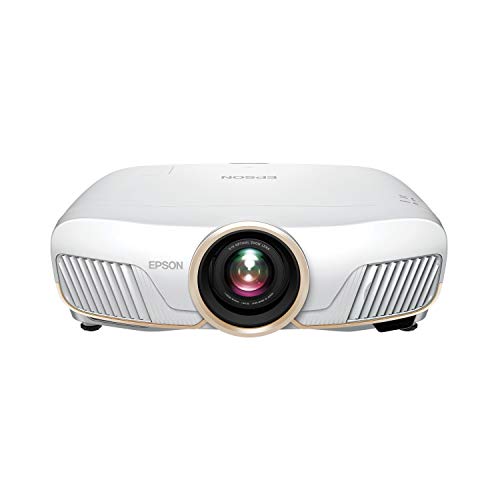
Few projectors in this price territory have been recommended as consistently or for as long as the Home Cinema 5050UB, and its title explains the recipe plainly: 4K PRO-UHD resolution, advanced pixel-shift processing, HDR support and 2,600 lumens of both color and white brightness. This is a machine designed around a dedicated room, a fixed screen and an owner who notices black levels. Its reputation rests on contrast and color accuracy rather than on smart features, and that focus shows in every specification Epson chose to print.
Black performance is the headline in practice. A starfield, a night street or the opening crawl of a space opera exposes weak projectors instantly, because gray blacks shrink the whole image toward a washed rectangle. The 5050UB built its following by holding darker, richer shadows than rivals at its level, which makes films feel cinematic rather than merely large. Pair it with a good screen in a room with dark walls near the screen and the effect compounds, each improvement revealing the next.
Placement is the other half of its appeal for permanent installations. Theater-class Epson models are known for generous motorized lens adjustment, letting an installer mount the projector where the room dictates and then shift the image onto the screen optically instead of tilting and keystoning. The listing title itself does not enumerate those adjustments, so confirm the exact figures in the manufacturer documentation for your ceiling height and screen position, but plan around this being the flexible, install-once machine of the lamp-based group.
Running costs and habits deserve honest mention beside the praise. A lamp-based design asks for eventual lamp replacement and periodic filter care, and a heavily used 5050UB will accumulate those chores across years of ownership in a way the laser models below simply do not. For a household projecting nightly, that arithmetic matters; for a weekend cinema room, the lamp economics remain entirely reasonable, and the purchase saving against laser models buys a great many film nights.
Log lamp hours on the 5050UB from day one, and the eventual replacement becomes a planned errand instead of a mid-film emergency.
A word about screens for the 5050UB specifically: its contrast talent is easily masked by a screen chosen carelessly. High ambient-light-rejecting surfaces designed for bright rooms can narrow viewing angles and add texture that this projector does not need in a dark room, where a smooth matte white surface remains the reference choice. If the room is truly dedicated, spend screen money on flatness and a proper black border, which sharpens perceived contrast at the edges of the image in a way viewers notice on every single scene.
Strengths
- Published 2,600 lumens of equal color and white brightness
- Advanced pixel-shift processing and HDR target serious film viewing
- Theater-class design built around dedicated-room installation
Trade-offs
- Lamp-based light source brings eventual replacement and filter maintenance
- No streaming platform is named in the title, so external sources are required
- Large dedicated-theater design suits permanent mounting more than portability
Best for: a dedicated theater room seeking deep contrast, published brightness and advanced pixel-shift processing for film nights
Not suited for: a shelf-based setup seeking built-in streaming, because the title names no smart platform and the design assumes external sources
Dedicated-room planners can read the complete 5050UB specification, including its processing details, on the listing itself, then Check price on Amazon.

5. Epson Home Cinema LS6000 4K Laser
Laser brightness with a fast refresh for mixed use
- Contrast: 0.8 million to 1 dynamic contrast as printed in the title
- Refresh: Up to 120Hz refresh rate, ALLM, two HDMI ports
- Imaging technology: 3-Chip 3LCD
- Resolution: 4K HDR
- Light source: Laser
- Brightness: 3,400 lumens of color and white brightness
The Home Cinema LS6000 represents the newer laser generation inside this Epson group, and its title reads like a checklist for a room that does everything: 4K HDR resolution, 3,400 lumens of color and white brightness, a dynamic contrast figure, refresh rates up to 120Hz, ALLM for automatic low-latency switching and two HDMI ports. Where the 5050UB is a specialist, the LS6000 is an ambitious generalist, built for the household where a film on Saturday follows fast gaming on Sunday and bright sports on the wall in between.
Laser illumination changes daily life more than any single specification suggests. There is no lamp warming toward full brightness across the opening scene and no lamp dimming gradually across seasons of use, so the picture on month eighteen resembles the picture on day one far more closely. Instant-on behavior also changes habits: a projector that reaches full output quickly gets used for the short session, the lunchtime highlights package and the half-hour episode that a slow lamp machine would never be switched on for.
The 3,400-lumen figure is the highest published in this group, and it buys real freedom. A larger screen becomes practical, a room with imperfect light control becomes workable for sport and gaming, and HDR highlights gain the headroom they need to separate from midtones instead of compressing into them. Film purists will still dim the room for serious cinema, because brightness capability is not the same as a suggestion to watch everything at full output with the curtains open.
Gaming credentials complete the picture. A refresh ceiling of 120Hz with ALLM support means a modern console can negotiate its fast mode automatically when a game loads, rather than relying on someone remembering a menu setting. Two HDMI ports cover a console and a streaming source or disc player without a switcher for most households. The LS6000 asks a higher commitment than the lamp models here, and in return removes most of the compromises that used to divide a projector room into film nights and game nights.
Use the LS6000 ALLM behavior as intended: let the console announce itself, and resist locking the whole projector into one picture mode for every source.
LS6000 ownership has a rhythm of its own: because the laser reaches full brightness almost immediately, the projector gets used in short bursts that lamp owners would skip. Highlights packages, a single episode, a quick gaming session before dinner all become projector occasions. That higher usage is the hidden value in the laser premium, and it also means the LS6000 tends to become the main display of the house rather than a weekend treat, a shift worth anticipating when you choose screen size and seating.
Strengths
- Highest published brightness in this group at 3,400 lumens
- Laser light source removes lamp replacement from ownership
- Up to 120Hz refresh with ALLM serves modern console gaming
Trade-offs
- Dynamic contrast figure is not directly comparable with native contrast claims
- Premium laser positioning costs more commitment than the lamp models
- Two HDMI ports may still need a switcher in source-heavy systems
Best for: a mixed-use room seeking laser consistency, the strongest published brightness here and fast-refresh gaming support
Not suited for: a small screen in a fully dark room seeking the lowest-commitment route, because the LS6000 output and laser specification exceed that modest brief
Readers comparing laser convenience against lamp value can study the LS6000 figures in detail on its page, then Check price on Amazon.

6. Epson Home Cinema LS11000
Motorized lens flagship with HDR10+ and 120Hz
- Lens: Motorized lens shift and focus
- HDR and refresh: HDR10+, 120Hz
- Imaging technology: 3-Chip 3LCD
- Resolution: 4K PRO-UHD
- Light source: Laser
- Brightness: 2,500 lumens of color and white brightness
- Contrast: 1.2 million to 1 dynamic contrast as printed in the title
The Home Cinema LS11000 closes this group as its precision instrument. The title pairs a 4K PRO-UHD laser engine with 2,500 lumens of color and white brightness, a 1.2 million to 1 dynamic contrast figure, motorized lens shift and focus, HDR10+ support and a 120Hz capability. Every item on that list serves an installed theater: the laser for consistency, the motorized optics for exact alignment from the remote, and the processing for extracting the most from well-mastered film sources on a fixed screen.
Motorized lens shift deserves explanation because it changes installation day completely. Instead of nudging a projector physically until the rectangle lands square, the installer mounts the LS11000 securely and then walks the image into place with powered adjustments, storing the result precisely. Focus is motorized too, so the final sharpness check happens from the seating position with a test pattern, not from a ladder with one hand on the lens ring. For a ceiling mount above seating, that difference is felt immediately and remembered fondly.
Its brightness figure is lower than the LS6000 publishes, and the honest reading is that the LS11000 trades raw output for refinement. In a controlled theater with a screen sized sensibly, 2,500 lumens of equal color and white brightness is ample, and the dynamic contrast specification points at where the engineering budget went: shadow gradation, highlight control and the sense of depth that separates a good image from a memorable one during a slow, dark, expensively photographed drama.
HDR10+ support adds scene-by-scene metadata handling for compatible sources, adjusting tone mapping as content demands rather than applying one compromise to an entire film. Combined with 120Hz capability for gaming sources, the LS11000 avoids forcing a choice between the cinema room and the games room. It remains unmistakably a fixed-installation machine, happiest bolted above a room that was planned around it, and households wanting a projector that travels between rooms should look at the simpler models earlier in this list instead.
Store two lens memories on the LS11000 if your screen or content alternates between widescreen films and taller formats, and the installation polish becomes a nightly pleasure.
For the LS11000, consider the mount part of the purchase rather than an accessory. A rigid, low-vibration mount preserves the precision the motorized lens works to achieve, and a mount with fine adjustment makes the installer job calmer. Route power and signal cabling before the projector goes up, leave a service loop, and photograph the final lens settings screen. A flagship installation should feel finished, and the LS11000 gives you every tool to make it feel that way from the first film onward.
Strengths
- Motorized lens shift and focus make ceiling installation precise
- Laser engine with HDR10+ targets refined, consistent film images
- 120Hz capability keeps gaming credible in a theater-focused machine
Trade-offs
- Published brightness trails the LS6000 for very large or brighter rooms
- Flagship specification assumes a fixed installation to show its value
- Refinement focus costs more than the lamp-based Home Cinema models
Best for: a fixed ceiling installation seeking motorized lens precision, laser consistency and HDR10+ film processing
Not suited for: a portable setup seeking to move between rooms, because motorized installation optics and laser theater design assume a permanent home
Installers planning a permanent mount can verify the LS11000 lens and contrast figures on the listing before measuring the room, then Check price on Amazon.
Side-by-Side Comparison
| Projector | Imaging and Resolution | Brightness From the Title | Defining Extra |
|---|---|---|---|
| Epson Home Cinema 980 | 3LCD, 1080p | Not stated in the title | Simplicity of operation |
| Epson Home Cinema 2350 4K PRO-UHD | 3LCD, 4K PRO-UHD | 2800 lumens | Android TV and low latency |
| Epson Home Cinema 3800 4K PRO-UHD | 3LCD, 4K PRO-UHD | Not stated in the title | HDR technology focus |
| Epson Home Cinema 5050UB | 3LCD, 4K PRO-UHD pixel-shift | 2600 lumens | Theater contrast reputation |
| Epson Home Cinema LS6000 4K Laser | 3LCD, 4K HDR laser | 3,400 lumens | Up to 120Hz with ALLM |
| Epson Home Cinema LS11000 | 3LCD, 4K PRO-UHD laser | 2,500 lumens | Motorized lens shift and HDR10+ |
How Do You Choose Between Lamp, Laser and Streaming in the Epson Line?
Start with light control, because it quietly decides more than resolution ever will. A room that reaches genuine darkness for films can exploit the contrast talents of the 5050UB or LS11000 on a modest screen, while a family room with lamps, windows and people moving through it will show the 2350 or LS6000 at their best. Choosing a theater projector for a bright room wastes its subtlety; choosing a bright-room projector for a blacked-out theater wastes money on lumens that become a liability at night.
Next, decide how the projector gets its content. The 2350 carries Android TV inside the chassis, which suits a room with no rack of equipment and a household that streams everything. The other five expect a source you supply: a disc player, a console, a streaming box or a media PC. Neither approach is superior in the abstract, but they lead to different rooms, different remotes on the coffee table and different upgrade paths when streaming platforms evolve faster than projector hardware does.
Then weigh the light source as an ownership decision rather than a specification. Lamp models cost less commitment up front and ask for a replacement lamp after long service; laser models hold brightness steadily, switch on quickly and ask nothing for years. A household projecting twenty hours a week will feel that difference inside two years. A household projecting four hours a week may never replace a lamp at all, which makes the lamp models the rational purchase however fashionable laser has become.
Screen size drives brightness needs more than any other variable, so the companion guide to home Projectors for a 120-Inch Screen.
Finish with installation honesty. Shelf placement behind seating, a ceiling mount, or a coffee-table appearance for big matches each favor different machines from this list. Motorized optics on the LS11000 forgive a mount position chosen by the room; the simpler models demand the projector be placed where the lens mathematics insists. Sketch the room, mark the screen, and let the drawing vote before your enthusiasm does.
One last filter is resale and hand-me-down value, which Epson models historically hold well because the brand support network and lamp availability outlast fashion. A 980 bought today becomes a bedroom or holiday-home projector in five years; a 5050UB becomes the machine a friend builds a first theater around. Buying inside a large, serviced line is a quiet form of insurance that specification tables never capture, and it is part of why this single-brand comparison remains useful even for readers who ultimately choose outside it.
Why 3LCD Color Behaves Differently From Single-Chip Designs
Every projector in this guide produces color with three imaging panels working simultaneously, one each for red, green and blue. The practical consequence most viewers notice is stability: saturated colors hold the same intensity as white highlights, which is why Epson publishes equal color and white brightness figures for several of these models. A red double-decker bus in a travel film or a green pitch under floodlights keeps its saturation instead of thinning as the scene brightens.
The second consequence is the absence of sequential color. Single-chip designs flash color fields in rapid rotation and rely on the eye blending them, which a minority of viewers perceive as rainbow fringes on high-contrast edges, especially when moving their eyes during subtitles. A 3LCD machine never asks the eye to perform that trick. Households where one member reports headaches or rainbows with other projection technologies often settle happily with three-panel designs for exactly this reason.
Panel alignment and convergence form the corresponding discipline of the technology. Three panels must agree precisely, and good examples produce crisp text and clean edges, while a poorly converged sample shows color fringing on subtitles. It is worth displaying a white-text-on-black pattern during the return window of any purchase in this group, whatever the model, because convergence is a per-unit characteristic that a five-minute check can settle for the life of the installation.
Screens, Gain and Room Color: the Other Half of the Picture
A projector throws light; the screen and room decide what returns to your eyes. Matte white screens with modest gain suit most of these Epson models, spreading light evenly across wide seating. High-gain screens concentrate brightness toward viewers sitting centrally and can hot-spot with brighter models such as the LS6000, while gray screens trade a little peak brightness for improved perceived contrast in rooms that cannot fully darken, a trade the 2350 and 3800 often appreciate.
Wall and ceiling color near the screen matter more than paint anywhere else in the house. Light from the screen bounces to the ceiling and back onto the image, lifting blacks in a feedback loop that no projector specification can overcome. Darkening even the first stretch of ceiling and the wall sections flanking the screen produces contrast improvements that owners consistently describe as larger than a model upgrade, and it costs a fraction of the price difference between the 5050UB and the laser pair.
Screen size drives brightness needs more than any other variable, so the companion guide to home Projectors for a 120-Inch Screen.
Finally, treat ambient light as a schedule rather than a fixed condition. Many rooms are bright at six and cinema-dark at nine, and a projector chosen for the nine o clock room will disappoint at six. If your household genuinely watches across both conditions, weight brightness and screen choice toward the harder hour, or accept a two-device household where a television keeps daytime duty and the projector owns the evening, which is how many of these Epson machines live their happiest lives.
Living With Fan Noise, Heat and Light Spill
Projectors are small appliances that move air, and in a quiet room the fan becomes part of the soundtrack unless placement accounts for it. Eco or quiet lamp modes reduce noise considerably at some brightness cost, which is why dark-room models such as the 5050UB and LS11000 often run happily in their calmer modes while bright-room models work harder. Mounting the projector a little farther from the main seats, and never inside a sealed cabinet without ventilation, keeps both noise and heat in their proper place.
Heat output matters in small rooms during summer. A lamp projector is effectively a small heater with a lens, and a long film in a closed room will raise the temperature noticeably. Laser models run more efficiently for the same brightness, another quiet ownership advantage for the LS6000 and LS11000 in compact spaces. Air conditioning placement, a door left ajar and sensible session lengths solve most of what remains.
Light spill is the third roommate nobody invites. Bright projectors in light-colored rooms bounce illumination everywhere, which is pleasant for sport with friends and corrosive for a moody thriller. The practical compromise many Epson households adopt is social brightness for shared events and a dimmed, lamp-calmed cinema mode for films, switching personalities with the same remote that came in the box.
Matching the Projector to Films, Sport and Games
Films reward the qualities this Epson family was built around: stable color, strong contrast in the theater models and freedom from rainbow distraction during dark scenes with bright subtitles. A slow drama exposes everything, and it is no accident that the 5050UB and LS11000 built their names in rooms where the lights go fully down and the phone stays in another room. For that ritual, prioritize black performance and screen quality over every other line in the specification.
Sport asks for almost the opposite virtues. Brightness headroom, motion handling and the ability to keep a green pitch convincing under some ambient light matter more than the last degree of shadow detail, because nobody watches a cup final in a cave. The LS6000 and 2350 suit that social, lights-half-on viewing, and a slightly smaller image with more punch beats a huge washed one when friends are reading the score bug from the kitchen doorway.
Games split the difference and add latency to the verdict. A story-driven adventure tolerates delay that a fighting game or online shooter will not, so match the model to the genres actually played rather than a theoretical library. The published 120Hz figures on the laser pair and the low-latency positioning of the 2350 give this Epson group credible gaming answers at three different levels of commitment, which is more range than most single-brand shortlists manage.
Cables, Mounts and the Unglamorous Details That Decide Satisfaction
Signal cabling deserves a decision before the projector arrives, because 4K HDR sources at longer cable runs punish marginal HDMI leads with dropouts that masquerade as projector faults. For runs beyond a few metres, certified high-bandwidth cables or optical HDMI remove an entire category of intermittent fault, and the cost is trivial beside any model in this group. Run the cable before the mount goes up, test it at full resolution with your most demanding source, and only then close up the installation.
Mount quality separates calm installations from vibrating ones. A rigid mount with fine pitch and roll adjustment lets the LS11000 motorized lens do precision work instead of compensating for a sagging bracket, and it keeps the lamp models honest too. Ceiling construction decides the fixings, so identify joists rather than trusting plasterboard anchors with a heavy theater chassis, and leave a service loop of cable so the projector can be lowered for filter cleaning without disconnecting everything.
Power and surge protection complete the picture. Projectors dislike abrupt power loss while their lamps or lasers are hot and their fans are cooling them, so a small uninterruptible supply or at least a quality surge protector is cheap insurance for the laser pair especially. Route the remote control reality into the plan as well: an infrared repeater or a hub-based remote ends the nightly ritual of pointing behind you at the ceiling, a small friction that otherwise survives every film for years.
Common Mistakes to Avoid
The most expensive mistake in this group is buying brightness for a dark room or contrast for a bright one. The LS11000 virtues are invisible under ambient light, and the LS6000 output is wasted, even counterproductive, in a small blacked-out theater. Match the machine to the room condition at your real viewing hour, and let every other specification argue afterward.
A second recurring error is ignoring throw distance until the projector is unboxed. Each model projects a given image size from a specific distance range, and rooms are stubbornly the size they are. Measure from the intended lens position to the screen wall, compare against the manufacturer throw data for your chosen screen size, and only then order. A projector that must sit in the middle of a walkway will be resented daily regardless of picture quality.
Third, do not let keystone correction become your placement plan. Digital correction reshapes the image by discarding pixels, softening the picture and sometimes adding artifacts on text and patterns. Optical positioning, shelf adjustment and lens shift where fitted always produce the cleaner result. Keystone exists for emergencies and temporary setups, not as a substitute for ten minutes with a tape measure.
Finally, budget the whole system in one thought: screen, mount, cabling, source and sound. A flagship projector fed by a poor stream through its own small speaker undersells itself nightly. The households happiest with these machines usually spent a modest share of the total on the unglamorous pieces, because a stable mount and a decent soundbar improve every single viewing rather than one specification line.
A subtler mistake is judging every model with the same test scene. A torch-mode cartoon will flatter the brightest machine and hide the contrast virtues of the theater models, while a pitch-dark film scene will do the reverse. Judge each candidate with the content you actually watch most, at the hour you watch it, and the ranking rearranges itself honestly. Readers who run that single discipline almost never regret the projector they bring home, because they bought for their own evenings rather than for a showroom afternoon.
Frequently Asked Questions
Is 4K PRO-UHD the same as native 4K?
No. PRO-UHD models here use pixel-shift processing to present a 4K-class image from their 3LCD panels, which delivers visibly finer detail than 1080p with film content. The LS11000 and its siblings built strong reputations on this approach, but the honest description is pixel-shifted rather than native, and the reviews above keep that wording precise.
Which Epson here works best in a bright living room?
The LS6000 publishes the highest brightness at 3,400 lumens, with the 2350 next among the clearly specified models at 2,800 lumens plus built-in streaming. For sport and daytime viewing in a room that stays lit, those two are the natural shortlist from this group.
Do any of these projectors show rainbow artifacts?
No. All six use 3-chip 3LCD imaging with simultaneous color, so the sequential color flashes that cause rainbow perception in single-chip designs never occur. Viewers sensitive to that effect can consider the whole group without that particular worry.
How long do the laser models run before needing attention?
Laser light sources are designed for long, stable service without lamp swaps, which is their central ownership advantage. Exact rated hours sit in the manufacturer documentation rather than these listing titles, so confirm the figure for the LS6000 or LS11000 there before purchase if service life drives your decision.
Can these projectors handle gaming?
The LS6000 and LS11000 publish 120Hz capability, and the LS6000 adds ALLM for automatic low-latency switching. The 2350 headlines low latency for its class. The 980, 3800 and 5050UB titles make no latency claim, so serious competitive players should weight the gaming-specified models.
What screen size suits these models?
All six can serve typical home screens, with brightness deciding how large you can sensibly go in your light conditions. Brighter models hold punch at larger diagonals; theater models reward restraint. Match the diagonal to seating distance first, then check the chosen model throw data.
Should a first-time buyer start with the 980 or the 2350?
Choose the 2350 if streaming and gaming share the room and no other source equipment exists, because its built-in platform and published brightness remove the most friction. Choose the 980 if a streaming device and speakers already live in the room and the projector only needs to be a good 1080p display, because paying twice for the same smart features helps nobody.
How far from the screen should these projectors sit?
Throw distance depends on the model and the screen size, and the listing titles do not publish throw ratios for these six, so the correct figures live in each model manufacturer documentation and throw calculator. Measure your room, choose the screen diagonal, and verify the lens range covers your mounting position before ordering, because a metre of error cannot be corrected by any picture setting.
Final Recommendation
There is also a confidence that comes from choosing inside one mature line: lamps, filters, mounts and documentation are all findable years later, and every model here shares setup logic with its siblings, so a household that starts with the 980 and graduates to an LS11000 keeps its hard-won installation knowledge. That continuity is worth real money across a decade of viewing, even though it never appears in a specification table.
If the room is a living room and the viewing is everything from streaming series to weekend sport, the 2350 is the easiest Epson here to live with, and the LS6000 is its laser-powered, brighter, faster escalation. If the room is a real theater, the decision narrows beautifully: the 5050UB for lamp-era contrast value, the LS11000 for motorized laser precision. The 980 remains the honest starter, and the 3800 the HDR-leaning middle step for a dim room with external sources already owned.
Whichever model you choose, spend the first evening with test patterns and familiar film scenes rather than showroom demos, checking convergence, focus uniformity and black handling in your own room light. That single evening tells you more about the marriage of projector and room than any specification table, including the careful ones in this guide.
In the end, the right Epson here is the one whose strengths match your darkest hour of viewing, and on that measure the 5050UB still owns the night while the LS6000 owns everything else the day can schedule.