What's inside
- Where to Buy These Projectors
- Key Takeaways
- Quick Picks at a Glance
- How the Picks Were Chosen
- The Six Dell Projectors in Detail
- Side-by-Side Comparison
- How Do You Decide Whether a Legacy Dell Projector Makes Sense at All?
- What Happened to Dell Projector Line, and Why It Matters Now
- Lamps, Filters and the Maintenance Reality of Legacy Machines
- Reading a Legacy Listing Like an Archivist
- Where Legacy Dell Projectors Still Earn Their Keep
- Setting Up a Legacy Dell Room That Simply Works
- Common Mistakes to Avoid
- Frequently Asked Questions
- Final Recommendation
As an Amazon Associate I earn from qualifying purchases. This post may contain affiliate links at no extra cost to you.
[SITE_DOMAIN] is reader-supported. When you buy through links on our site, we may earn an affiliate commission at no extra cost to you. Prices and availability change; check the Amazon listing for the current details.
Where to Buy These Projectors
Dell M318WL Mobile Projector — View on Amazon
Dell 1450 Projector — See the listing
Dell 1650 Projector — Open the product page
Dell 1209S Projector — Check the Amazon page
Dell M110 Ultra-Mobile Projector — View this model
Dell M409WX Projector — See it on Amazon
Start with the fact that shapes everything else in this guide: Dell left the projector market years ago, so the best dell projectors available to buy today are legacy and discontinued models sold as remaining stock, not a current range. The six compared here, the M318WL, 1450, 1650, 1209S, M110 and M409WX, are business and classroom machines from the WXGA and XGA era of presentation computing. Nothing in this article will present them as current-generation products, because they are not, and any guide that pretends otherwise is wasting your money.
That honesty cuts both ways. Legacy Dell projectors remain genuinely useful to the institutions and presenters whose rooms, mounts, fleets and habits were built around them, and a like-for-like replacement can be the smartest purchase a facilities manager makes all year. What these machines cannot do is compete with modern projectors on specification, streaming or support, and they should be priced and judged as the legacy components they are. This guide evaluates each model inside that frame, using only what its listing title actually states.
Read the spec boxes as part of the story. Where a Dell title publishes real figures, as the M318WL does with its 500 ANSI lumens and 1280 by 800 resolution, the review uses them fully. Where a title says nothing beyond a model name, the box says not stated, and the review explains what to verify instead of filling silence with invention. In a remaining-stock market, that verification habit is worth more than any single recommendation below.
One more framing note before the models themselves: age alone is not the disqualifier in this category, and condition alone is not the qualifier either. The right purchase is the intersection, a model that matches your room in a specific unit whose state you have evidence for. Everything in the six reviews below is organized to help you find that intersection or to conclude, equally usefully, that it is not on offer today.
Key Takeaways
- Dell exited the projector market years ago; all six models here are legacy, discontinued machines sold as remaining stock.
- Only the M318WL title publishes full figures: 500 ANSI lumens and WXGA 1280 x 800 in a pocket-size body.
- The 1209S and M409WX state DLP imaging in their titles; the other titles leave imaging technology unstated.
- Most Dell titles publish no brightness or resolution, so listing and archive verification is part of the purchase.
- The strongest case for every model here is continuity: matching an existing room, mount or fleet.
Quick Picks at a Glance
| Projector | Headline Specification | Short Verdict |
|---|---|---|
| Dell M318WL Mobile Projector | 500 ANSI lumens, WXGA 1280 x 800 | The one model with real numbers in its title |
| Dell 1450 Projector | Standard projector, specification not stated in title | A fleet-era workhorse sold as remaining stock |
| Dell 1650 Projector | Standard projector in black, title states no figures | The oldest standard model in this comparison |
| Dell 1209S Projector | DLP projector, black | A single-chip DLP entry among the Dell fleet models |
| Dell M110 Ultra-Mobile Projector | Ultra-mobile projector, figures not stated in title | The road-warrior model of the old Dell line |
| Dell M409WX Projector | DLP projector, black, WXGA by model name | The widescreen DLP of the legacy group |
How the Picks Were Chosen
The six models were chosen to represent the full shape of the legacy Dell line as it actually survives in listings: two mobile machines, two standard fleet projectors, and two DLP models including the widescreen variant. A guide that listed only the best-specified survivors would misrepresent the market a buyer actually faces, where bare titles and institutional leftovers are the norm and the skill being tested is verification rather than comparison shopping.
Readers whose real destination is a big home image rather than a meeting room can jump to the guide to home Projectors for a 120-Inch Screen.
Each model also had to be a real, identifiable Dell projector with a verifiable listing, because legacy categories attract vague and mislabeled offers. Model numbers were checked for internal consistency with the line as Dell sold it, and the reviews describe each machine at the level its evidence supports: fully where the title publishes figures, and at class level where it does not, with the gaps flagged rather than papered over.
The ordering runs from the most completely specified model to the most context-dependent, which mirrors the buying experience itself. A reader who works through the six will finish with a clear sense of the only question that matters in this category: not which Dell is best in the abstract, but which Dell, if any, matches the room and the fleet you already have, in a condition you have actually verified.
The Six Dell Projectors in Detail

1. Dell M318WL Mobile Projector
Pocket-size WXGA with the only fully published specification here
- Resolution: WXGA (1280 x 800), 16:10 aspect
- Brightness: 500 ANSI lumens
- Form factor: Pocket size mobile projector
- Imaging technology: Not stated in the listing title – verify with the manufacturer documentation
- Lamp or light source: Not stated in the listing title – verify with the manufacturer documentation
The M318WL is the most honestly specified projector in this entire Dell group, because its listing title actually publishes numbers: 500 ANSI lumens, WXGA resolution at 1280 by 800, a 16:10 aspect ratio and a pocket-size claim. In a guide full of legacy listings with bare titles, that transparency matters. This was Dell portable presentation machine for people who carried a projector the way they carried a laptop, and its specification still reads coherently today for small-room, small-screen work where the audience sits close and the lights can be dimmed.
Five hundred ANSI lumens is a modest figure, and honesty requires placing it correctly. It will not fill a large screen in a bright boardroom, and it was never meant to. On a small portable screen or a pale wall in a dimmed room, presenting slides, charts and training material to a handful of people, the output is serviceable and the extreme portability becomes the entire point. Judge this machine as a briefcase tool from its era, not as a rival to modern installation projectors with ten times the output.
The WXGA resolution suits the documents it was built for. A 1280 by 800 canvas in 16:10 matches the laptop screens of its period, so spreadsheets and slide decks map across without the letterboxing compromises of a 4:3 machine or the scaling of an mismatched panel. Text at presentation sizes stays legible, which is the only resolution test a mobile business projector truly has to pass, and the widescreen shape keeps video content respectable during a training clip or a product demonstration.
Buying one now means buying remaining stock of a discontinued line, and the review would be incomplete without that framing in the open. Check the listing carefully for what is included, confirm the condition being sold, and understand that manufacturer support for a legacy model follows legacy timelines. For a collector of compact presentation gear, a trainer with a fixed small-room routine, or a school keeping an existing fleet consistent, that can still be a rational purchase made with open eyes.
Portability shapes every other judgment about the M318WL. A pocket-size projector invites being carried to the work rather than installed above it, so setup speed, a stable tabletop position and a short throw onto a nearby surface define its working life. Owners who valued it treated it like a document camera era tool: arrive, place, present, pack. That rhythm still works, provided expectations about brightness and screen size stay inside what 500 ANSI lumens can honestly deliver.
A final practical note: mobile projectors live or die by their carrying reality. A padded case, the correct power supply and any proprietary cable the unit shipped with matter more than any specification, so read the listing contents line by line and ask what is actually in the box before assuming a discontinued model arrives complete.
Strengths
- Only model here whose title publishes brightness, resolution and aspect ratio
- Pocket-size form factor suits genuine carry-to-the-meeting use
- WXGA 16:10 canvas matches presentation documents and laptop output
Trade-offs
- 500 ANSI lumens limits it to small screens and dimmed rooms
- Legacy discontinued model, so support follows remaining-stock reality
- Imaging technology is not stated in the listing title
Best for: a small meeting room seeking a pocket-size legacy Dell with published WXGA output for slides and training material
Not suited for: a large bright boardroom seeking a big image under full lighting, because 500 ANSI lumens cannot carry that room
Trainers weighing the M318WL against newer portable machines can confirm its included accessories on the listing, then Check price on Amazon.

2. Dell 1450 Projector
Standard classroom and meeting-room Dell from the legacy line
- Resolution: Not stated in the listing title – verify with the manufacturer documentation
- Brightness: Not stated in the listing title – verify with the manufacturer documentation
- Imaging technology: Not stated in the listing title – verify with the manufacturer documentation
- Intended setting: Classroom and business presentation by product class
- Product class: Standard projector
The Dell 1450 arrives in this guide with the barest title of the six: Dell 1450 Standard Projector, and nothing more. That brevity is itself information. This was a mainstream standard-throw presentation projector from the years when Dell sold a full projector line to schools and businesses, and the surviving listings trade on the model number recognition of institutions that already own them. Anyone considering one should understand they are buying into a discontinued ecosystem, where the strongest argument is consistency with an existing fleet rather than any headline specification.
Standard projectors of this class were built for the daily grammar of meeting rooms: ceiling or cart placement, a screen or whiteboard at the front, slides and documents as the main content, and a remote passed around a table. The 1450 served that grammar for years in classrooms and offices, which is why examples still circulate. Its value today concentrates in rooms already wired and mounted for exactly this class of machine, where a like-for-like replacement avoids re-cabling, re-mounting and retraining in a single stroke.
Because the title publishes neither brightness nor resolution, this review will not invent them. The correct buying process is to open the listing, read whatever specification the seller provides, and cross-check the model number against Dell archived documentation for the 1450 before committing. Legacy business projectors varied by configuration and region more than modern consumer listings suggest, and the discipline of verifying the exact unit matters more than any general statement a guide could make about the model family.
There is also a total-cost honesty to apply. A legacy standard projector may need a lamp, a filter cleaning and possibly a remote, and those items belong in the purchase calculation from the start rather than arriving as surprises. Schools with a shelf of compatible lamps from an existing fleet will find that arithmetic friendly; a first-time buyer with no spares may find a newer machine the simpler path even when the sticker comparison favors the Dell badge.
None of that makes the 1450 a poor choice for its intended reader. Institutions run on continuity, and a model that drops into an existing mount, matches an existing remote layout and presents the same menu system teachers already know has a real operational value that raw specifications never capture. The 1450 is a continuity purchase, and it should be evaluated as one, with condition and completeness verified unit by unit.
Ask about the remote specifically. Legacy fleet projectors often circulate without their original remote, and while universal options exist, menu access for installation settings can depend on having proper control. A complete unit with remote, power cable and a known lamp history is worth meaningfully more than a bare chassis, whatever the listing headline suggests.
Strengths
- Standard-throw class suits existing classroom and meeting-room mounts
- Model recognition helps institutions maintain a consistent fleet
- Simple presentation focus matches slides, documents and lessons
Trade-offs
- Listing title publishes no brightness or resolution figures
- Discontinued line, so parts and lamps follow legacy availability
- Exact configuration must be verified unit by unit before purchase
Best for: a school or office seeking a like-for-like standard Dell replacement that matches an existing mount and fleet
Not suited for: a first installation seeking published modern specifications in the listing, because this title states none
Facilities managers maintaining an existing Dell fleet can check the current 1450 listing details and condition notes, then Check price on Amazon.

3. Dell 1650 Projector
Earlier standard Dell in black, from the first fleet generation
- Resolution: Not stated in the listing title – verify with the manufacturer documentation
- Brightness: Not stated in the listing title – verify with the manufacturer documentation
- Imaging technology: Not stated in the listing title – verify with the manufacturer documentation
- Product class: Standard projector
- Finish: Black
The Dell 1650 is the elder statesman of this group, a standard projector in black from an earlier generation of Dell business line, and its listing title offers nothing beyond the model name, class and color. That places it firmly in specialist territory: the reader for a 1650 today is an institution or enthusiast who knows the model specifically, most often because a room, a mount or a spare-parts shelf already revolves around it. As a cold purchase for a stranger, it demands more verification than any other model in this guide.
Context helps explain why such machines still change hands. Business projectors of this vintage were installed in quantity, built sturdily for daily institutional use, and supported by a generation of IT staff who learned their menus by heart. A working 1650 in a training room is not an anachronism to the people using it; it is simply the projector that has always been there. Replacement-in-kind keeps that room running without a modernization project nobody budgeted for.
The absence of published figures in the title must be treated as a hard stop for assumption. Resolution, brightness and lamp specification for the exact unit on offer need confirmation from the seller and from Dell archived model documentation, in that order, before any money moves. Listings for long-discontinued electronics sometimes carry errors inherited through years of copying, and the older the model, the more valuable a photograph of the actual unit rating label becomes in settling what is truly being sold.
Condition dominates every other variable at this age. Fan bearings, lamp hours, filter state and the clarity of the optics after years of service decide whether a given 1650 is a bargain or a project. A guide can describe the class honestly, but only the individual listing, its photographs and its seller answers can describe the unit, and buyers of vintage institutional hardware should insist on exactly that unit-level evidence.
Considered that way, the 1650 has a clear and narrow dignity. It is not competing with modern projectors and should not be priced or judged as if it were. It is a legacy component in rooms that still run legacy systems, and for the caretakers of those rooms, finding the correct model in working order is the entire requirement, met completely when the unit checks out.
Photographs of the rating label deserve emphasis for this model. The label settles the exact variant, its electrical requirements and its manufacturing period in one image, and a seller willing to provide it is demonstrating the seriousness that vintage hardware purchases require. Treat a refusal or a stock photo as useful information in itself.
Strengths
- Standard class matches older Dell installation rooms and mounts
- Black finish suits formal boardroom and lecture settings
- Long institutional service history means documentation remains findable
Trade-offs
- Oldest model here, so unit condition varies the most
- No figures at all in the listing title to anchor expectations
- Support, lamps and parts are firmly in legacy territory
Best for: a caretaker of an older Dell-equipped room seeking the exact 1650 model to keep an established installation running
Not suited for: a new installation seeking verified specifications and current support, because this legacy listing publishes neither
Readers hunting the specific 1650 for an established room can inspect the current listing photographs and seller notes closely, then Check price on Amazon.

4. Dell 1209S Projector
DLP presentation model in black from the legacy range
- Brightness: Not stated in the listing title – verify with the manufacturer documentation
- Product class: Business presentation projector by line position
- Imaging technology: DLP
- Finish: Black
- Resolution: Not stated in the listing title – verify with the manufacturer documentation
The 1209S earns its place in this comparison by naming its imaging technology where several stablemates stay silent: this is a DLP projector, in black, from Dell legacy business range. That single fact organizes honest expectations. DLP machines of this era were valued for sharp, high-contrast presentation images and compact optics, and they served meeting rooms and classrooms in large numbers. The 1209S belongs to that working tradition, and its remaining listings serve the same continuity buyers as the rest of this group.
DLP also brings its known characteristic, which a fair review states plainly: single-chip DLP designs use a color wheel, and a minority of viewers perceive rainbow fringes on high-contrast content. For presentation material with an audience of many, this rarely decided purchases in the model working life, but a buyer planning any video use should know the technology for what it is. Readers specifically avoiding color wheels will find a dedicated guide elsewhere in this series, and this Dell is not the answer to that particular search.
As with its siblings, the title publishes no brightness and no resolution, so the specification conversation must happen at the listing and in Dell archived documentation for the 1209S. What can be said from the class is that these were room projectors, not pocket devices: expect a standard installation or cart-based life, presentation inputs of their period, and a lamp-based light source with the maintenance rhythm that implies for any heavily used surviving unit.
The black finish and conventional chassis made the 1209S a natural ceiling citizen in rooms where the projector was expected to disappear above the audience. That invisibility is part of why fleets persisted: nobody notices a working ceiling projector, and facilities teams replace like with like precisely to preserve that unremarkable reliability. A verified working unit dropped into an existing 1209S room is the smoothest possible outcome for everyone involved.
Judge any individual offer by the legacy checklist this guide returns to repeatedly: completeness, lamp state, fan behavior, image uniformity and seller evidence. A DLP engine has no panels to converge, which removes one age-related fault from the list, but dust, wheel condition and lamp hours write the real story of a surviving unit, and only unit-level inspection tells it.
For DLP units of this age, ask the seller to project a white field and a dark field and photograph both. A white field reveals dust and uniformity problems, while a dark field shows whether the image still holds together at the low end. Two photographs answer more questions than a page of listing adjectives ever will.
Strengths
- DLP imaging is stated plainly in the title, unlike several siblings
- Conventional black chassis suits ceiling installation in formal rooms
- No panel convergence concerns, simplifying age-related checks
Trade-offs
- Color wheel design means rainbow-sensitive viewers should look elsewhere
- No brightness or resolution figures appear in the listing title
- Legacy status governs lamps, parts and support availability
Best for: an existing Dell DLP room seeking a 1209S replacement in kind to preserve a working ceiling installation
Not suited for: a viewer seeking to avoid color wheels entirely, because this DLP design uses one by construction
Installers matching an existing 1209S room can review the present listing and its condition description in full, then Check price on Amazon.
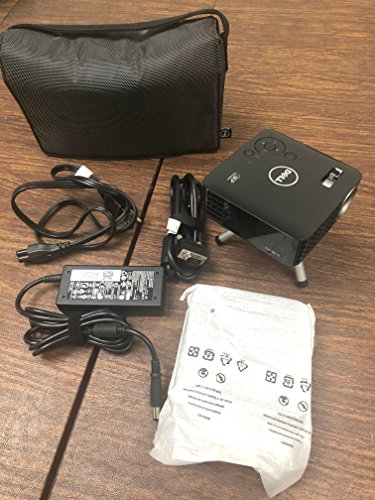
5. Dell M110 Ultra-Mobile Projector
Ultra-mobile legacy Dell for presenters who traveled light
- Mobility focus: Travel presentation by product class
- Product class: Ultra-mobile projector
- Resolution: Not stated in the listing title – verify with the manufacturer documentation
- Brightness: Not stated in the listing title – verify with the manufacturer documentation
- Imaging technology: Not stated in the listing title – verify with the manufacturer documentation
The M110 was Dell answer to the traveling presenter, an ultra-mobile projector from the period when a salesperson or trainer might carry the entire presentation kit between cities. Its listing title today says only that: Dell M110 Ultra-Mobile Projector. No figures, no resolution, no brightness. The model reputation, however, is specific enough to frame honestly: this class of machine traded output for genuine portability, serving small audiences in dimmable rooms wherever the presenter happened to land.
Ultra-mobile projectors of this generation found their audience in hotel meeting rooms, client offices and training sessions for six people rather than sixty. On a small screen or a clear wall section, with blinds drawn, they delivered slides and video clips without the logistics of booking venue equipment. That use case has not vanished, even though modern pico projectors and large laptops now crowd it, and a working M110 still performs the original job for a presenter whose materials and habits were built around it.
Verification discipline matters doubly for travel-era electronics. Batteries are not the question for a mains-powered unit like this, but power supplies, cables and any proprietary connectors are, because an ultra-mobile projector separated from its correct adapter is a paperweight with a lens. The listing contents deserve line-by-line reading, and a seller photograph of the complete kit laid out is worth more than any specification claim for a discontinued travel product.
Brightness expectations must stay inside the class reality. The title publishes no lumen figure, and ultra-mobile machines of the period were modest by installation standards, designed around small images in controlled light. A buyer imagining a bright conference hall will be disappointed by physics rather than by this particular unit. A buyer imagining a darkened room, a four-person briefing and a projector that lived in a laptop bag will recognize the tool immediately.
The M110 therefore closes its case the same way the M318WL opened this guide: as a specialized legacy instrument whose value is portability and continuity, not specification leadership. In a market of remaining stock, the right example in complete condition is a small, satisfying purchase for exactly the presenter it was designed around, and a puzzling one for everyone else, which is precisely how niche tools should be.
Test any ultra-mobile purchase across a full presentation, not a power-on flash. Travel projectors reveal fan noise, heat behavior and focus stability over twenty minutes, not twenty seconds, and a seller demonstration or a generous return window is the practical way to learn those truths before the unit joins your working kit.
Strengths
- Ultra-mobile class built for presenters who carried their own kit
- Small-audience, small-screen role remains coherent today
- Complements the pocket-size M318WL at a different travel scale
Trade-offs
- No specifications at all are published in the listing title
- Completeness of the travel kit decides real-world usefulness
- Modest class output limits it to dim rooms and small images
Best for: a traveling presenter seeking a complete legacy M110 kit for small briefings in dimmed rooms
Not suited for: a fixed venue seeking a bright installed image, because an ultra-mobile legacy design serves the opposite purpose
Presenters rebuilding a period travel kit can examine what the current M110 listing includes before deciding, then Check price on Amazon.

6. Dell M409WX Projector
Widescreen WXGA-class DLP in black, by model designation
- Imaging technology: DLP
- Finish: Black
- Resolution: WXGA indicated by the WX model designation – confirm the exact figure in the listing
- Brightness: Not stated in the listing title – verify with the manufacturer documentation
- Product class: Business presentation projector by line position
The M409WX closes the Dell six with two firm facts and one strong indication. Firmly, its title states a DLP projector in black. Indicatively, the WX in the Dell model designation of this era denoted the widescreen WXGA variant of the line, which is how the model was sold and documented, though the careful buyer will still confirm the exact resolution figure in the listing and archived documentation rather than treating a model suffix as a specification sheet. That balance of confidence and caution is the right posture for the entire legacy Dell range.
A widescreen DLP presentation machine occupied a sweet spot in its working years: laptop output had gone widescreen, slide design had followed, and a WXGA canvas let presenters fill the screen without bars or stretching. In training rooms and mid-size meeting spaces, the M409WX class delivered that fit in a conventional black chassis that mounted or carted without ceremony. Surviving units serve rooms built in that period, whose screens and mounts still assume exactly this shape of image.
The DLP discussion from the 1209S applies here unchanged, and consistency is a virtue in a guide: color wheel imaging, sharp presentation rendering, and the rainbow caveat for sensitive viewers during video content. A widescreen DLP showing spreadsheets and slides to a room is doing the job it was engineered for, and it does that job without the convergence checks that three-panel designs accumulate with age, trading that simplicity for the wheel characteristics already described.
Brightness remains unpublished in this title as in most of the group, so room matching must be settled from the listing specification and Dell documentation for the M409WX, not from enthusiasm. These were room projectors of real working output in their day, neither pocket devices nor auditorium machines, and a unit in good lamp health should still serve the mid-size dimmable room it was installed in originally. Lamp state, as ever, is the difference between that expectation and disappointment.
As the final Dell in the comparison, the M409WX underlines the guide honest conclusion. None of these six is a modern product, and the guide has not pretended otherwise at any point. They are legacy instruments with specific surviving uses, and the M409WX, a widescreen DLP for rooms built around widescreen DLP, may be the most representative of them all: entirely sensible in context, and entirely dependent on context.
Because the WX designation does so much work in identifying this model, confirm the full model string on the unit rating label matches the listing exactly. Dell sold several close siblings in this family, and a single letter difference changes the resolution class, which is the whole reason for choosing this variant in the first place.
Strengths
- DLP technology and black finish are stated directly in the title
- Widescreen WX designation matches the laptop-era rooms it served
- Conventional chassis suits existing mounts and presentation carts
Trade-offs
- Exact resolution should still be confirmed beyond the model suffix
- Brightness is not published in the listing title
- Color wheel design carries the usual rainbow caveat for video
Best for: a widescreen presentation room seeking an M409WX in kind to maintain an established Dell DLP installation
Not suited for: a color-wheel-free home theater plan, because this business DLP was designed around a wheel from the start
Room managers sourcing the widescreen Dell can verify the exact M409WX unit details on its listing page, then Check price on Amazon.
Side-by-Side Comparison
| Projector | Imaging and Resolution | Brightness From the Title | Defining Extra |
|---|---|---|---|
| Dell M318WL Mobile Projector | WXGA 1280 x 800 | 500 ANSI lumens | Pocket-size portability |
| Dell 1450 Projector | Not stated in the title | Not stated in the title | Standard fleet class |
| Dell 1650 Projector | Not stated in the title | Not stated in the title | Earlier standard model, black |
| Dell 1209S Projector | DLP, figure not stated | Not stated in the title | DLP in black |
| Dell M110 Ultra-Mobile Projector | Not stated in the title | Not stated in the title | Ultra-mobile travel class |
| Dell M409WX Projector | DLP, WXGA by designation | Not stated in the title | Widescreen DLP, black |
How Do You Decide Whether a Legacy Dell Projector Makes Sense at All?
Begin with the continuity question, because it decides most real cases. If a room already has a Dell mount, a Dell-shaped screen, a shelf of compatible lamps or a staff trained on Dell menus, a matching legacy unit preserves all of that value at once. If none of that exists, the honest answer is usually that a current projector from a living line serves you better, and this guide would rather tell you that in the choosing section than let you discover it after delivery.
Next, price the whole unit, not the headline. Add the lamp the surviving example probably needs, the remote it may lack, the filter service it certainly needs and the shipping for a heavy legacy chassis. That complete figure is the real price of the Dell, and it should be compared against complete alternatives. Legacy hardware rewards buyers who do this arithmetic and punishes those who fall for a bare chassis price that quietly excludes everything that makes the machine usable.
Modern placement and connectivity expectations are covered in the companion guide to projectors With Lens Shift and Wi-Fi.
Then verify like an archivist. Match the full model string on the rating label to the listing, find the archived Dell documentation for that exact model, and confirm resolution, brightness and lamp type from primary sources. Ask the seller for photographs of a projected white field and the included accessories laid out. Every step takes minutes, and together they convert a gamble on discontinued electronics into a considered purchase with known parameters.
Finally, set the support expectation in writing for yourself before ordering. A legacy Dell will be maintained from remaining parts, archived manuals and general projector knowledge, not from a current manufacturer program. Buyers comfortable with that reality, often institutions with their own technicians, get excellent service from these machines. Buyers who need a warranty line to call should choose a living product line and accept its different price.
There is one more scenario worth naming: the deliberate retro or secondary room. A legacy Dell in a workshop, a garage classroom or a community cupboard does not need to justify itself against a flagship; it needs to work, cheaply and predictably, on the occasions it is called for. Judged at that standard, a verified fleet model is not a compromise at all, and many of the happiest legacy purchases are exactly these modest, well-matched ones.
What Happened to Dell Projector Line, and Why It Matters Now
Dell built projectors for many years as part of its business and education hardware offering, selling everything from pocket mobile units to installed classroom machines through the same channels as its laptops and monitors. The line was a natural companion business: the same IT departments bought both, and the projectors were designed to pair with Dell notebooks of their day. When Dell eventually wound the projector business down, the installed base did not vanish; it simply began aging in place, which is why these models still circulate in quantity.
That history explains the character of the surviving market. Most units for sale are ex-fleet, refurbished-by-sellers or new-old-stock from institutional channels, and listings inherit the terse style of business-to-business catalogs, which is why so many titles in this guide publish almost nothing. The buyer is assumed to know the model, because originally the buyer did: a purchasing department replacing unit forty-one of fifty. Modern consumer expectations of rich listings simply never applied to this category.
It also explains the genuine strengths a legacy buyer inherits. These machines were engineered for daily institutional duty, serviced by generalist technicians and documented thoroughly in their day, and that documentation remains findable. A school caretaker can still download the manual, identify the lamp and teach a new teacher the menu in an afternoon. The ecosystem is frozen, but it is complete, and completeness has its own durable value.
Lamps, Filters and the Maintenance Reality of Legacy Machines
Every projector in this Dell group belongs to the lamp era, and lamp economics govern their remaining lives. A lamp dims gradually across its service hours and eventually needs replacement; a surviving unit with an unknown lamp history should be assumed to need one soon, and the replacement cost belongs in the purchase price from the start. The good news is that popular fleet models generated deep aftermarket lamp supply, so availability for common Dell models remains better than for many discontinued electronics.
Filters are the second discipline. Institutional projectors inhale classroom air for years, and a clogged filter raises operating temperature, stresses the lamp and can trigger thermal shutdowns mid-lesson. Cleaning or replacing the filter on any legacy purchase, before its first full session, is the single highest-value hour an owner can spend. It costs almost nothing, it reveals the general care the unit received, and it prevents the most common legacy failure mode entirely.
Viewers who know a color wheel bothers them should read the dedicated guide to projectors Without a Color Wheel.
Fans and thermals complete the picture. Bearings wear, vents accumulate dust in places a filter never guarded, and a unit that runs quietly through a two-hour film has told you most of what you need to know about its health. Test any legacy Dell across a full working session during the return window, at the brightness the room will actually use, and listen as carefully as you watch.
Reading a Legacy Listing Like an Archivist
A legacy listing rewards a particular reading order: photographs first, contents second, description third, title last. The photographs, if they show the actual unit, reveal cosmetic state, port selection and sometimes the rating label that settles the exact variant. The contents list tells you whether the machine can work the day it arrives. The description may add lamp history or service notes. The title, as this guide has shown repeatedly, may tell you almost nothing beyond the model name you searched for.
Questions to a seller are part of the listing too, and the answers are diagnostic beyond their content. A seller who can state lamp hours, provide a projected-image photograph and list the included cables is demonstrating the unit was handled knowingly. Evasive or generic answers about a discontinued institutional product are information, and they should move the model down your list regardless of price, because the next seller of the same model may answer everything in one message.
Keep records of what you verified. Save the archived specification page, the listing photographs and the seller answers with the purchase receipt. If the unit serves for years, those records become its service file; if it disappoints immediately, they become your return evidence. Legacy buying done at this standard stops feeling like a gamble and starts feeling like procurement, which is exactly the spirit in which these Dell machines were originally sold.
Where Legacy Dell Projectors Still Earn Their Keep
The training room is the natural habitat that remains. A business that delivers the same induction course every month needs slides legible, a remote that works and nothing else, and a legacy Dell that passes its checks delivers exactly that for years at a fraction of modernization cost. The content never changes, the room never changes, and the projector that matches both is not outdated in any sense that matters to the people actually using it every week.
Community spaces form the second habitat: village halls, clubs, houses of worship and sports associations with a screen, a cupboard and a volunteer who knows the equipment. A documented, conventional projector that any committee member can operate beats a sophisticated modern unit that only one person understands. Legacy Dell models, with their printed manuals and conventional menus, fit that social reality remarkably well, provided the unit itself is verified and complete.
The third habitat is the spare-parts ecosystem itself. Institutions running several Dell rooms keep one additional unit as the donor and the spare, cannibalizing lamps, remotes and fans as needed. In that context even a cosmetically tired example has value, and model consistency across the fleet matters more than the condition of any single chassis. It is an unglamorous economy, but it keeps real rooms projecting long after the manufacturer moved on.
Setting Up a Legacy Dell Room That Simply Works
A legacy room succeeds on routine. Mount or place the projector at the distance its lens expects, square it to the screen physically rather than correcting tilt digitally, and focus with a text document at the size lessons actually use. Label the remote, tape a one-page operating guide inside the cupboard door, and leave the input set to the source the room uses daily. Every removed decision is a future support call that never happens, and institutional equipment earns its keep precisely by needing nobody attention.
Cabling deserves the same conservatism. Run the longest, best cable the room might need once, secure it so chairs and cleaning never stress the connectors, and coil a spare at the lectern position for the visiting laptop that always arrives with the wrong expectation. Legacy inputs are what they are, so a small, labeled adapter kit kept with the projector converts presenter panic into a thirty-second formality, and it costs less than one emergency purchase made in haste.
Finally, schedule the boring maintenance on a calendar rather than in someone memory. Filter checks each term, a lamp-hour note each semester and a full projected test pattern twice a year keep a legacy fleet honest. The machines in this guide survived this long because institutions once did exactly this for them, and a room that resumes the habit will usually be rewarded with years of unremarkable, dependable service.
Common Mistakes to Avoid
The defining mistake with legacy Dell projectors is buying one as if it were a current product: expecting a modern warranty posture, current streaming features or a living support line. Dell left this market, and every purchase in this guide should be made inside that fact. Buyers who internalize it tend to be satisfied; buyers who discover it afterward tend to blame the machine for a misunderstanding the listing never actually caused.
A second error is trusting a copied specification. Legacy listings accumulate errors across years of reposting, and figures migrate between sibling models with similar names. The rating label and the archived manual outrank any marketplace text, every time. Five minutes of archival checking has saved more legacy buyers than any other habit in this category, and it is entirely free.
Third, do not ignore the lamp. A legacy projector with an exhausted lamp is a dim projector, and disappointment with brightness in this group traces to tired lamps far more often than to the original design. Budget the lamp, verify what you can, and judge the machine only after it is running with known consumables, the way its original institutional owners always did.
Finally, resist the bare-chassis bargain that excludes the remote, the power supply or the correct cables. Completeness is the scarce resource in discontinued electronics, not the hardware itself. A complete unit at a fair figure is cheaper in money and weeks than an incomplete unit at a tempting one, once the missing pieces are hunted down one by one.
Do not overlook the screen and room the legacy unit will serve. A standard-throw fleet projector placed in a room reconfigured for short-throw modern machines will produce the wrong image size from the only available position, and no menu setting fixes geometry. Confirm the throw relationship between the existing mount point and the screen before assuming continuity, because rooms get renovated more often than their caretakers remember.
One last error deserves naming because it is so human: falling for the badge. A famous name on a discontinued chassis feels safer than an unfamiliar name on a current one, yet support, parts pipelines and documentation freshness all favor the living product once the badge stops shipping. Respect what the Dell name meant in this category, certainly, but buy the verified unit and the archived evidence, never the nostalgia.
Frequently Asked Questions
Are Dell projectors still made?
No. Dell exited the projector market years ago, and every model in this guide is a discontinued legacy machine. Listings sell remaining stock, ex-fleet units and new-old-stock, which is why verification and condition matter so much more here than in a current product category.
Which Dell here has the clearest specification?
The M318WL, by a wide margin. Its title publishes 500 ANSI lumens, WXGA resolution at 1280 by 800, a 16:10 aspect ratio and a pocket-size form factor. The other five titles state little or nothing beyond model and class, so their figures must be confirmed at the listing and in archived documentation.
Can a legacy Dell work for home movies?
Within limits. These are business and classroom machines from the WXGA and XGA era, happiest with presentations. The widescreen models can show films in a dim room, but none was designed as a home cinema projector, and modern home models serve that purpose far better for most households.
What should I check before buying a discontinued projector?
Confirm the exact model from the rating label, read the archived specification, ask for lamp history and a projected-image photograph, and verify the listing includes the remote, power supply and cables. Price a replacement lamp into the decision from the start.
Do the DLP Dell models have color wheels?
Yes. The 1209S and M409WX are DLP designs, and single-chip DLP uses a color wheel by construction. Most presentation audiences never notice anything, but viewers sensitive to rainbow artifacts should factor the technology in, particularly for video use.
Why do the spec boxes say not stated so often?
Because the listing titles genuinely do not publish those figures, and this guide reports evidence rather than filling gaps. The archived Dell documentation for each model is the correct source for the missing numbers, and each review tells you exactly what to confirm there.
Is a legacy Dell a sensible buy for a school?
It can be the most sensible buy of all when the school already runs Dell projectors, because mounts, lamps, remotes and staff familiarity carry over. For a school starting fresh with no existing fleet, a current education model from a living line usually makes the cleaner long-term decision.
Should I buy two of the same legacy model as a spare?
For an institution running that model in several rooms, a verified spare is often the most rational purchase in this entire category, because it guarantees lamps, remotes and a complete replacement from one transaction. For a single room, the same money usually serves better as a lamp reserve and a maintenance hour, unless the room downtime cost is unusually high.
Final Recommendation
Notice what this guide has not done: it has not ranked these six against modern projectors, invented figures their titles omit, or dressed remaining stock in the language of a new launch. That restraint is the review. A legacy category deserves legacy standards of evidence, and the Dell models above are presented at exactly the level of certainty their listings support, no higher and, in fairness to machines that served millions of lessons and meetings, no lower either.
For the narrow audience these machines still serve, the recommendations are clear. The M318WL is the easiest legacy Dell to buy with confidence, because its title actually specifies it. The M409WX suits widescreen DLP rooms, the 1209S its standard-ratio DLP counterparts, the 1450 and 1650 serve standard fleet continuity, and the M110 remains the period travel tool. Every one of those recommendations is conditional on the same clause: the individual unit, verified, complete and honestly lamped.
Step outside that audience and the guidance reverses without embarrassment. A first projector, a home cinema, a bright modern boardroom: all are better served by current models from living lines, several of which appear elsewhere in this series. Legacy buying is a specialist skill with real rewards, and knowing whether you are a legacy buyer is the true first decision this guide exists to help you make.
The Dell badge on these six means something specific now, a well-documented past rather than a supported present, and the buyer who shops with that sentence in mind will get exactly the dependable, unglamorous, thoroughly documented service these machines still honestly offer every single working week of the year.