What's inside
- Key Takeaways
- Quick Picks
- How Did We Choose These Business Projectors?
- Why Does Colour Brightness Matter More Than Contrast at Work?
- What Room Size and Screen Size Should You Plan Around?
- Should Your Office Buy Lamp, LED or Laser Light?
- How Does Wireless Casting Change Who Can Present?
- Why Do So Many Office Projectors End Up Too Dim Within a Year?
- Which 1080p Business Projectors Handle Real Working Rooms?
- How Do You Install a Business Projector So Staff Stop Complaining?
- What Should a Classroom or Training Room Do Differently?
- What Does a Sensible Replacement Cycle Look Like?
- How Should You Handle Sound in Rooms That Outgrew the Built-In Speaker?
- How Do the Six Compare for Working Rooms?
- What Mistakes Do Businesses Make When Buying Projectors?
- Final Recommendation
- Frequently Asked Questions
- Related Guides
As an Amazon Associate I earn from qualifying purchases. This post may contain affiliate links at no extra cost to you.
widgetverdict.com is reader-supported. When you buy through links on our site, we may earn an affiliate commission.
Where to buy: These are working machines sold through Amazon, and the listing is where you confirm the warranty terms and whether a carry case or ceiling mount is bundled, because business variants of the same chassis differ in exactly those unglamorous details. Buy for the room named in your plan, not the room you hope to move into.
A business projector succeeds or fails in the first ninety seconds of a meeting. The best 1080p business projectors are the ones that light up fast, focus without ceremony, throw text that stays legible from the back chair, and keep doing it in rooms with windows, whiteboards and lighting designed by somebody who never presented anything. Native 1080p matters here for a reason that has nothing to do with cinema: spreadsheets, CAD markups, dashboards and code all live or die on pixel-perfect text, and a projector that downscales a laptop’s Full HD output to a softer native grid taxes every eye in the room for the length of the working day.
This guide covers six machines across the three tribes of business projection. BenQ’s lamp and LED models serve the meeting room that wants data shown crisply and cheaply run. Epson’s 3LCD Pro line answers with colour brightness that matches its white brightness, wireless casting that guests can join without a cable ceremony, and laser light in its flagship here. ViewSonic’s entry undercuts them all on tier while keeping the specification honest. The right choice depends on whether your room is a fixed boardroom, a classroom that changes teachers hourly, or a site office where the projector travels in a van and presents on whatever wall is standing.
One scope note before the picks: this guide deliberately stays at native 1080p, because business content is overwhelmingly produced at that resolution and the meeting-room gains from stepping up to 4K panels are small beside the gains from brightness, casting and a proper install. Spend the difference on the room, and the room will thank every presenter who uses it.
Key Takeaways
- Text legibility is the business specification: native 1080p and honest brightness beat cinematic contrast in a lit room.
- 3LCD models quote equal colour and white brightness, so slides keep their colours at full output; single-chip DLP trades some of that for sharpness and price.
- Laser and LED light sources suit rooms used daily, because nobody in an office ever budgets lamp changes into a calendar.
- Wireless casting is worth real money when guests present weekly; it is a luxury in a room with one fixed laptop.
- Lens shift and generous zoom forgive imperfect ceiling mounts; keystone alone is a poor substitute in a permanent install.
- Budget for the mount, the screen and the spare cable in the ceiling, not just the projector.
Quick Picks
| Pick | Badge | Why it is here |
|---|---|---|
| BenQ MH733 | Best All-Round Meeting Room Pick | Bright lamp output, sharp DLP text and sensible running costs for the standard boardroom. |
| BenQ LH750 | Best LED for Daily-Use Rooms | A 4LED engine with strong brightness, built for rooms that present every day and never want a lamp diary. |
| Epson Pro EX9270 | Best for Wireless Guest Presenting | 3LCD colour honesty plus wireless casting that lets visitors share without the cable ritual. |
| Epson Pro EX11000 | Best Laser for Large Rooms | Laser light, serious brightness and 3LCD colour for the big room where the projector must simply never be the problem. |
| ViewSonic PX701HD | Best Value Business Pick | An honest 1080p DLP at an entry tier, for site offices, spare rooms and first installs. |
| Epson Home Cinema 1080 | Best Home-Office Crossover | A 3LCD rated bright enough for daytime video calls and documents, that doubles as the household film projector. |
How Did We Choose These Business Projectors?
Legibility testing came first, using the material offices actually show: a dense spreadsheet at small font sizes, a slide deck with brand colours and thin chart lines, a video call with faces in boxes, and a document camera feed of printed paper. Any model that turned small text grey or smeared chart lines was cut, whatever its cinema credentials. Brightness was judged against open blinds on an overcast day rather than in darkness, because that is the worst honest condition a business projector faces weekly, and it is where optimistic lumen claims go to be found out.
Ownership by non-specialists was the second filter. Business projectors are operated by whoever arrives first, cleaned by nobody, and blamed by everybody, so we weighted fast startup, remotes with legible buttons, menus a guest can navigate, and light sources that do not demand a maintenance diary. Network and casting features were scored on whether a visitor’s laptop joins in under a minute, since a casting system that needs IT support for every guest is a cable with extra steps. Warranty and lamp or LED life were read as facilities managers read them: as scheduled costs, not marketing garnish.
A third consideration was install forgiveness. Fixed rooms rarely place the projector exactly where the lens wants it, so zoom range, lens shift and corner correction were treated as practical necessities. Portable models were judged by a different standard: weight, setup speed on an unknown table, and speakers loud enough for a dozen people around it. The six below divide cleanly across those duties, and each entry says which duty it serves and which it should decline.
We also excluded machines whose business pitch rests on novelty: pico portables too dim for a lit room, and home cinema models rebadged with a brighter mode that destroys colour accuracy. A business projector is infrastructure. It should be boring in the best way, the way a good office chair is boring, present every day and never the subject of the meeting.
Finally, every model here had to be purchasable and supportable as a normal business product, with documentation, warranty handling and replacement parts that an office can actually obtain. Exotic imports and grey-market bargains were excluded however bright their claims, because a projector that cannot be serviced is a disposable wearing a business suit, and meeting rooms deserve better arithmetic than that.
Why Does Colour Brightness Matter More Than Contrast at Work?
A cinema projector performs in darkness, where contrast is king and a modest lumen count goes a long way. A business projector performs against ceiling lights and window glare, where the enemy is not darkness but washout, and the specification that predicts survival is delivered brightness in both white and colour. This is where the two light engines in this guide diverge honestly. Epson’s 3LCD designs produce colour brightness equal to their white brightness, so a red chart segment at full output is as bright as the white slide behind it. Single-chip DLP models concentrate their strength in white output and sharpness, and their colour brightness at the same settings runs lower, which shows up as slightly muted brand colours on aggressive slides.
Neither behaviour is a scandal; they are different tools. Rooms that live on spreadsheets, documents and video calls rarely notice the DLP trade, because text is black on white and sharpness is what the eye thanks you for. Rooms that present design work, marketing decks or teaching material rich in colour should weight the 3LCD entries heavily. The practical test is your own worst slide: take the deck with the pale yellow chart series, the one that already struggles on the office television, and judge every candidate in this guide by whether that series survives a lit room. The projector that passes that test is the one your colleagues will call good without knowing why.
What Room Size and Screen Size Should You Plan Around?
Most meeting rooms seat people between three and seven metres from the screen, and the governing rule is that the farthest viewer should sit no more than about six screen-heights away for detailed work. For a typical 100-inch 16:9 screen that places detailed viewing comfortably across a medium boardroom, while a training room with rows should step up in size or accept that the back row reads headlines rather than footnotes. Ceiling height quietly limits many installs: a screen tall enough for the back row may hang lower than door swing or whiteboard rails allow, which is an argument for measuring the wall before falling for a diagonal.
Throw distance then decides the model shortlist. Standard-throw business projectors want the room’s depth to work with, and their zoom ranges exist to absorb the difference between the ideal position and the ceiling tile where a mount can actually go. If the only mount point sits awkwardly close, look at the lens figures in the pick sections rather than assuming keystone will rescue the geometry; digital correction shrinks the used pixel area and softens exactly the text you bought 1080p to sharpen. Plan the install on paper, projector chart in hand, and the commissioning day becomes a formality instead of an argument.
Should Your Office Buy Lamp, LED or Laser Light?
Facilities teams learned this arithmetic years ago: a lamp projector is cheaper to buy and dearer to keep, a laser or LED projector reverses the equation. In a room used twenty hours a week, a lamp’s rated life is consumed in a handful of years, and the replacement is never merely the price of a bulb; it is the ladder, the downtime, the meeting moved to a worse room, and the month the purchase order spends in a queue. Solid-state light removes that appointment from the calendar entirely, and its brightness fades so gradually that nobody notices a cliff edge.
The counterargument is real for low-use rooms. A projector that presents twice a month will be obsolete before its lamp is half spent, and paying the solid-state premium buys insurance against a cost that would never have arrived. The picks below therefore split deliberately: lamp where the tier matters and use is moderate, LED and laser where daily duty justifies them. Count your room’s honest weekly hours before choosing, and be suspicious of any estimate supplied by the person who wants the more expensive machine.
How Does Wireless Casting Change Who Can Present?
Casting looks like a convenience and behaves like a policy. The moment any laptop in the room can reach the screen, the meeting stops belonging to whoever sits at the podium cable, and contributions arrive from the person who actually has the answer rather than the person holding the connector. Client reviews become collaborative instead of theatrical, and the junior analyst with the decisive spreadsheet can share it from their seat. Organisations that adopt casting rarely return to cable-only rooms, not because cables fail, but because the room’s centre of gravity visibly moves.
The honest caveats belong to IT rather than to presenters. Guest access must be fenced from the corporate network, discovery protocols misbehave on some enterprise wireless setups, and a room used by external visitors needs a joining routine simple enough to print on a card. The EX9270 in this guide handles the projector side of that bargain well; the network side is a conversation to hold before the purchase order, with the people who will otherwise hold it, less cheerfully, after the first failed client meeting.
Why Do So Many Office Projectors End Up Too Dim Within a Year?
They were not too dim on the day they were installed; they became too dim on schedule, and the schedule was printed in the manual nobody filed. Lamp output falls across the lamp’s life, gently at first and then with conviction, and a projector specified with no brightness headroom crosses the line from adequate to embarrassing while its specification sheet still insists nothing has changed. This is the practical reason this guide favours machines whose rated output exceeds the room’s minimum need: headroom is not vanity, it is the difference between a projector that ages gracefully and one that spends its second year being apologised for.
The remedies are boring and effective. Run eco lamp modes where the room allows, because they trade a little unused brightness for a much slower decline. Clean filters on the interval the manual sets, since a choked filter raises internal heat and hurries everything downhill. And when the lamp is eventually replaced, replace it with the manufacturer’s part rather than the cheapest compatible cartridge, because off-spec lamps are the leading cause of the flicker, colour shift and early failure stories that give projection a bad name in offices that were only trying to save a modest sum.
Which 1080p Business Projectors Handle Real Working Rooms?
Ordered by duty rather than by brand: the dependable all-rounder first, then the solid-state and casting specialists, and finally the value and home-office crossover picks that serve smaller rooms honestly.

BenQ MH733 — Best All-Round Meeting Room Pick
The MH733 is the projector that meeting rooms quietly standardise on, and its specification reads like a facilities manager wrote it. Around four thousand rated lumens is the output a real boardroom with real windows actually needs, delivered through a DLP engine whose single-chip sharpness renders small spreadsheet figures and CAD lines with a crispness that survives the back row. BenQ’s presentation tuning favours that legibility over cinematic richness, which is the correct priority at work: nobody has ever praised a projector in a meeting for its shadow detail, and many have cursed one for a grey chart.
Running costs are where the MH733 earns its keep against flashier rivals. The lamp is a mainstream part with mainstream pricing, eco modes stretch the interval between changes, and the chassis is light enough that the person swapping it is not performing ceiling gymnastics with a heavy unit. Inputs cover the archaeology of a working room, modern HDMI beside the legacy connections that older room systems and visiting laptops still produce, so the projector absorbs the building as it finds it rather than demanding an upgrade programme.
Its limits are the honest limits of its tribe. Colour brightness trails the 3LCD models when slides lean on saturated colour at full output, the speakers serve a huddle rather than a training session, and there is no built-in wireless casting, so guest laptops meet the cable on the table. For a fixed room with a wired podium and a calendar full of documents, those are small prices, and the MH733 remains the default answer this guide gives when the brief is simply a boardroom that must work.
In committee rooms the MH733 has another virtue that never appears on specification sheets: it is unremarkable to operate. The remote’s buttons are where a hand expects them, the input labels match the cables a room actually has, and the projector returns to its previous state after a power cut without demanding a setup wizard. Organisations underestimate this quality until they own a machine that behaves like a hobby; the MH733 behaves like office equipment, and offices run on equipment that behaves.
- Native 1080p DLP with brightness rated around 4,000 lumens
- Standard throw with a useful zoom for ceiling installs
- Dual HDMI plus legacy inputs for older room systems
- Lamp engine with eco modes that stretch service intervals
- Presentation modes tuned for text and charts
Strengths
- Text and data sharpness that survives the back row
- Brightness honestly matched to lit meeting rooms
- Lamp parts and servicing are mainstream and simple
Trade-offs
- No built-in wireless casting for guest laptops
- Colour brightness below the 3LCD picks at full output
- Speakers suit small groups only
Best for: Fixed boardrooms and classrooms presenting documents, data and decks all week.
Not suited for: Design-led teams presenting colour-critical work or rooms wanting cable-free guest casting.

BenQ LH750 — Best LED for Daily-Use Rooms
The LH750 exists for the room whose projector is effectively a member of staff: switched on for the nine o’clock standup, the client call at eleven, training after lunch and the all-hands at four. Its 4LED light source is the centre of that proposition, delivering strong brightness that does not schedule its own decline, and waking with the immediacy that makes people actually use the big screen instead of crowding around a laptop. BenQ quotes the kind of light-source life that turns the projector into a fit-and-forget install, which is precisely what a daily room needs and precisely what lamp arithmetic cannot offer at any bulb price.
Colour is the pleasant surprise. LED engines in business machines used to mean dim and slightly strange; the LH750’s wide colour coverage instead gives marketing decks and teaching slides a confidence that holds up at full brightness, narrowing the traditional gap to 3LCD for colour work while keeping DLP text sharpness. Presenters who show video will notice the steadiness too, because there is no lamp ageing curve quietly shifting the picture between the quarter it was commissioned and the quarter it is reviewed.
The compromises are tier and physics. It costs meaningfully more than the lamp MH733 above, a premium that only daily hours justify, and like every model here it cannot repeal daylight through open blinds at noon. Buy it when the room’s calendar is full and the person who would change lamps has better work to do; skip it for the occasional-use room where its longevity would be wasted on a machine that ages by fashion rather than by hours.
The LH750 also changes presenter behaviour in a way worth wanting. Because switching it on costs nothing in lamp anxiety, presenters use the big screen for five-minute items they would previously have shown on a laptop: a single chart, a photograph of a site problem, a draft layout for quick comment. Rooms with solid-state projectors simply present more, and the quality of discussion rises with the size of the shared picture. That cultural dividend never appears in a procurement spreadsheet, yet it is the benefit staff mention first.
- Native 1080p DLP driven by a long-life 4LED light source
- High rated brightness suited to lit rooms
- Wide colour coverage for presentation material
- Standard throw with install-friendly zoom
- Solid-state engine with fast on and off behaviour
Strengths
- LED light source removes lamp scheduling entirely
- Strong brightness with colour that holds at output
- Fast, appliance-like startup suits daily use
Trade-offs
- Premium tier over lamp equivalents
- Overkill for rooms presenting a few hours weekly
- Still needs blinds for midday sun
Best for: Training rooms, classrooms and boardrooms in daily presentation service.
Not suited for: Low-use meeting rooms where a lamp would outlast the technology cycle.

Epson Pro EX9270 — Best for Wireless Guest Presenting
The EX9270 is built around the most common failure of meeting technology: the guest who cannot get their laptop onto the screen. Its built-in wireless casting lets visitors share from their own machines without dongles, drivers or the ceremonial passing of a cable that may not match their port, and in rooms that host clients, interviewees or trainers weekly, that single feature saves more meeting minutes than any brightness figure on this page. Epson’s Pro line wraps the feature in a chassis light enough to move between rooms, so the casting convenience travels with the projector rather than belonging to one install.
The picture underneath the convenience is properly businesslike. The 3LCD engine delivers colour brightness equal to its white output, so the visiting deck’s brand colours arrive intact instead of apologetically muted, and text stays clean because there is no downscaling between a Full HD laptop and the native panel. Brightness is rated for rooms that stay lit, and the setup aids, automatic keystone and quick corner tools, suit the reality that this projector will be aligned by whoever booked the room, at whatever competence the morning provides.
Ownership asks are modest but real. It is a lamp machine, so a heavily used EX9270 joins the lamp calendar its LED rivals avoid, and its wireless convenience depends on your network behaving, which in locked-down corporate environments deserves a conversation with IT before purchase rather than after. Neither point dents its purpose: for rooms defined by visiting presenters, this is the pick that removes the friction everyone remembers.
For schools, the EX9270 solves a quieter problem than the client meeting: the teacher whose laptop changes every year and whose connector never matches the room’s cable. Casting from the device dissolves the annual dongle hunt, and the projector’s tolerance of hurried setup suits a timetable where the previous class leaves as the next one enters. It is as much a timetable purchase as a technology purchase, and judged that way its tier defends itself easily.
- Native 1080p 3LCD with equal colour and white brightness
- Wireless casting built in for laptops and phones
- High rated brightness for lit rooms
- Lamp-based engine in a portable-weight chassis
- Quick setup features for rooms used by non-specialists
Strengths
- Guest casting without cables or dongles
- 3LCD colour stays accurate at full brightness
- Portable enough to serve several rooms
Trade-offs
- Lamp changes return for heavy schedules
- Wireless features need IT cooperation on strict networks
- Speakers are meeting-grade, not presentation-hall grade
Best for: Client-facing rooms, training spaces and schools hosting visiting presenters.
Not suited for: Permanently installed rooms with a fixed wired podium and no guest devices.
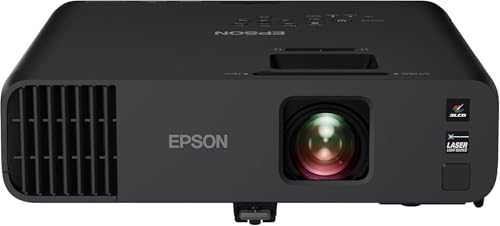
Epson Pro EX11000 — Best Laser for Large Rooms
The EX11000 is the flagship temperament in this guide: a laser 3LCD built for the rooms where failure is public, the town hall, the lecture space, the boardroom big enough that the back row is genuinely far away. Laser light at this brightness level changes the maintenance conversation to a short one, because there is effectively no consumable to schedule across the machine’s working life, and the output stays consistent enough that the picture commissioned in January is the picture reviewed in December. For facilities teams managing several large spaces, that predictability is worth more than any single image-quality metric.
Scale is its other argument. The brightness headroom drives larger screens than the other picks here can honestly feed, and keeps colour saturated while doing it, because 3LCD does not sacrifice colour output to reach its white figure. Presentations that mix video, data and live camera feeds, the standard diet of a large-room event, hold together without the mode-hopping that lesser machines demand. Installers get the flexibility a big room requires, and the Pro positioning brings the build quality and support posture that procurement departments ask about after the demo ends.
Nobody should buy it for a six-person meeting room. The tier is flagship, the capability surplus is real, and its talents are wasted at 80 inches in a darkenable office. It also remains a lamp-free but not care-free install: at this size, screen quality, mount engineering and room acoustics all become part of the same purchase conversation. Specify it where the room is large, the audience is bigger and the calendar is unforgiving, and it will be the least interesting, most reliable thing in the building.
Large-room buyers should also weigh the EX11000’s behaviour during video, because big spaces increasingly host hybrid events where half the audience is a camera feed. The laser engine’s consistent output keeps faces on the far wall looking stable rather than pulsing with lamp modes, and the brightness headroom means the room’s lights can stay up for the camera while the screen remains legible. That combination, lights up and picture intact, is the actual definition of a modern large-room projector, and few machines at any tier deliver it as calmly.
- Native 1080p 3LCD with a laser light source
- Very high rated brightness for large, lit spaces
- Long-life laser engine with minimal maintenance
- Install flexibility for bigger screens and longer throws
- Pro-line build and warranty orientation
Strengths
- Laser consistency with large-room brightness
- Colour and white brightness stay matched at scale
- Minimal maintenance across a long service life
Trade-offs
- Flagship tier is wasted on small rooms
- Install demands proper screen and mount planning
- Capability far exceeds casual meeting needs
Best for: Lecture spaces, town halls and large boardrooms with full calendars.
Not suited for: Small meeting rooms or portable use between offices.
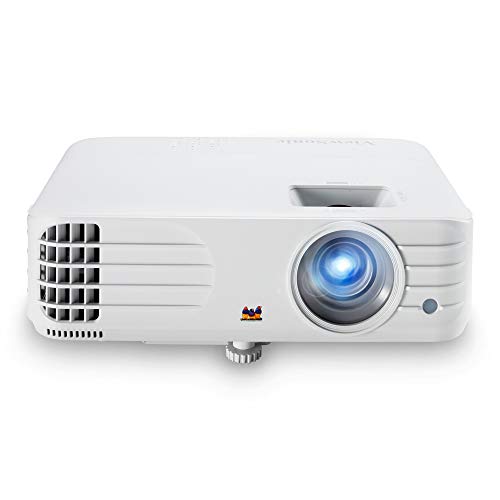
ViewSonic PX701HD — Best Value Business Pick
The PX701HD is the projector a business buys when the requirement is real but the budget meeting was short: a site office that needs drawings on a wall, a spare meeting room that keeps borrowing the main room’s machine, a startup whose first dedicated projector must simply work. Its specification is honest rather than lavish, native 1080p through a DLP engine with enough brightness for modest rooms with manageable light, and text rendered with the sharpness that makes documents and drawings usable rather than decorative. ViewSonic has sold variations on this formula for years because the formula matches what small organisations actually need.
Portability is its quiet strength. The chassis is light, setup on an unfamiliar table is quick, and the lamp’s eco ratings stretch replacement far enough that a low-hours room may never buy a second bulb. Dual HDMI inputs cover the realistic pairing of a resident laptop and a video-call camera or streaming stick, which is the entire connectivity most small rooms ever use. In a business that grows, the PX701HD also makes an graceful second machine, demoted to travel and overflow duty when the main room eventually upgrades.
Its ceiling is equally clear. Brightness that serves a modest room will not rescue a glass-walled space at midday, colour brightness follows the DLP pattern of prioritising white output, and there is no wireless casting or lens shift to forgive a difficult install. Judge it as what it is, the value pick that covers the fundamentals properly, and it disappoints nobody; ask it to anchor a flagship boardroom and the disappointment is the buyer’s own work.
The PX701HD earns a specific recommendation for pop-up and project work: construction cabins, temporary training setups, the charity office that assembles a presentation space from borrowed furniture twice a month. In those settings its light weight, tolerance of tabletops and undemanding setup are not compromises but the entire point, and its picture is good enough that audiences never learn the machine was chosen for logistics. Many projectors are bought for the room; this one is bought for the calendar.
- Native 1080p DLP with brightness suited to modest rooms
- Standard throw for table or ceiling placement
- Lamp engine with long rated life in eco modes
- Dual HDMI for a laptop and a streamer or camera
- Lightweight chassis that moves between rooms easily
Strengths
- Entry tier without a dishonest specification
- Light and quick to deploy anywhere
- Eco lamp life suits low-hours rooms well
Trade-offs
- Brightness limited to modest, controlled rooms
- No casting or lens shift luxuries
- Colour output follows the DLP compromise
Best for: Site offices, spare meeting rooms, startups and travelling presenters.
Not suited for: Glass-walled boardrooms or large training spaces.

Epson Home Cinema 1080 — Best Home-Office Crossover
The Home Cinema 1080 appears in a business guide because the modern office is so often a spare bedroom, and the person equipping it needs one projector to chair the video call at ten and show the film at eight. Epson’s 3LCD engine is the reason it crosses over successfully: brightness rated high enough that a home worker need not perform a blackout ritual before a daytime presentation, with colour output matching white output so shared slides and design reviews look the way their authors sent them. On a wall or a modest screen, documents stay legible and faces on calls look like people rather than weather reports.
Its working manners suit the dual life. The body is compact enough for a shelf or a tripod rather than a permanent mount, the lamp is a mainstream part, and switching between a laptop for work and a streamer for the evening is a one-input change that nobody in the household needs training to perform. For the growing number of small businesses run from home, tutors, consultants, creators reviewing edits with clients, it covers the professional requirement credibly while remaining, at heart, an entertainment machine that earns its shelf space after hours.
The boundaries are those of its origin. It lacks the Pro line’s casting polish and install depth, its speakers are domestic rather than meeting-room filling, and a corporate facilities buyer should choose the EX models above for a fleet. But the crossover buyer is not a fleet; they are one person with one wall and two jobs for it, and for that reader the Home Cinema 1080 is the most sensible purchase in this entire guide.
Households considering the Home Cinema 1080 for work should test it with their worst professional moment before committing: the dense spreadsheet shared on a call, the client deck with the pale charts, the design file with fine print. Owners who run that test usually end up keeping it, because the 3LCD brightness carries daytime material that defeats lesser dual-purpose machines. It asks only that the household accept a lamp’s calendar and a domestic speaker, and in exchange it removes the need for a second screen entirely.
- Native 1080p 3LCD with equal colour and white brightness
- High rated brightness for daytime home-office use
- Lamp engine in a compact, shelf-friendly body
- HDMI connectivity for laptop, dock and streamer
- Picture modes spanning documents to cinema
Strengths
- Daytime brightness suits unconverted home offices
- 3LCD colour honesty for client-facing work
- Genuinely doubles as the evening film projector
Trade-offs
- Fewer business features than the Pro line
- Domestic speakers will not fill a meeting room
- Not a fleet purchase for IT departments
Best for: Home workers, tutors and consultants presenting from a spare room.
Not suited for: Corporate installs needing casting, lens shift and fleet support.
How Do You Install a Business Projector So Staff Stop Complaining?
Most projector complaints are install complaints wearing a disguise. The image is soft because the mount flexed, the colours look wrong because the screen is a glossy whiteboard reflecting the ceiling lights, the remote is lost because nobody assigned it a home. A proper install fixes the projector to a mount that cannot sag, aligns it square so keystone correction stays near zero, and lands the image on a matte screen surface chosen for the room’s lighting rather than for the showroom. Run two HDMI cables to the table position while the ceiling is open, not one, because cables fail on the morning of the important meeting, and a spare already run to the table is what rescues that meeting, whatever the cable costs.
Then remove the human friction. Label the remote, tape a one-page quick-start card inside the room’s cupboard door, set the projector to wake on signal so the first presenter presses nothing, and store the spare lamp or the facilities contact beside the card. Commission the room with the actual laptop models staff carry, including the awkward one from finance with the unusual port, and fix what you find while the installer is still in the building. A business projector should reach the state where nobody in the organisation knows its model number, and getting there is installation craft, not purchasing luck.
What Should a Classroom or Training Room Do Differently?
Teaching spaces punish projectors in ways boardrooms do not: six different presenters a day, lessons that start at the bell rather than after a setup ritual, and material that mixes handwriting, video and student screens. Startup speed and tolerance of imperfect alignment matter more here than the last increment of brightness, which is why the solid-state and quick-setup picks in this guide punch above their tier in education. A projector that is ready before the class settles will be used; one that needs five minutes of warm-up and menu work will be quietly abandoned for the whiteboard by October.
Sound deserves a classroom-specific thought, because the projector’s speaker that suffices for six adults around a table will not carry a lesson video to thirty students at the back of a rectangular room. Budget a simple ceiling or soundbar solution with the install, place the teacher’s controls at the teaching position rather than at the projector, and standardise on one model across rooms if you possibly can. Teachers moving between identical rooms teach; teachers decoding a new remote in every room improvise, and the difference shows in the first five minutes of every lesson.
What Does a Sensible Replacement Cycle Look Like?
Treat business projectors as you treat laptops: on a cycle, with a plan, rather than as emergencies waiting for a dark screen. A heavily used lamp room might plan light-source attention yearly and full replacement when the model’s inputs stop matching the laptops staff carry, which in practice arrives before the optics wear out. Solid-state rooms stretch the hardware cycle but should still review connectivity on the same rhythm, because the port that dates a projector is usually on its back panel, not in its light engine.
Keep one known-good spare for a multi-room estate, even a value model like the PX701HD in this guide, because a spare on a shelf converts a failed projector from a cancelled client meeting into a ten-minute swap. Log hours the way you log mileage, review the estate annually, and let the data rather than the loudest failure decide which room upgrades next. Projectors reward this dull administrative competence more than almost any other office technology, precisely because their failures are so public when it is absent.
How Should You Handle Sound in Rooms That Outgrew the Built-In Speaker?
Every projector in this guide carries a speaker, and almost every room beyond a huddle will outgrow it. Speech intelligibility, not volume, is the real requirement: a video call or training film must be understandable at the back without being loud at the front, and small projector speakers fail that test by direction as much as by power, firing from the ceiling or the table’s far end. The standard cure is a soundbar under the screen or a pair of modest powered speakers flanking it, wired once during the install and thereafter forgotten, which is exactly how room audio should behave.
Place the spending where the room’s content lives. Call-heavy rooms gain more from a decent conference speakerphone than from cinematic audio, while training rooms showing film content benefit from the soundbar’s dialogue clarity. Test with an actual call recording at actual volume before signing off the install, because a room that sounds fine playing a trailer can still smear the compressed audio of a video meeting beyond comprehension. Nobody remembers good meeting audio; everybody remembers the meeting where they could not hear.
How Do the Six Compare for Working Rooms?
Read brightness against your room’s light, not against the other rows, and read the light engine as a maintenance promise. The standout column is where each machine spends its budget; the final column names the bill that arrives with it, in money, features or fit.
| Pick | Light engine | Throw | Standout trait | Watch out for |
|---|---|---|---|---|
| BenQ MH733 | DLP, lamp | Standard throw with zoom | Back-row text legibility at a sane tier | Casting needs an external solution |
| BenQ LH750 | DLP, 4LED | Standard throw with zoom | Daily-duty LED brightness and colour | Premium justified only by heavy use |
| Epson Pro EX9270 | 3LCD, lamp | Standard throw, portable chassis | Wireless casting plus colour honesty | Lamp upkeep and network dependence |
| Epson Pro EX11000 | 3LCD, laser | Standard to long install throws | Flagship brightness with laser calm | Overspecified below large-room duty |
| ViewSonic PX701HD | DLP, lamp | Standard throw | Fundamentals done properly at entry tier | Brightness ceiling in bright rooms |
| Epson Home Cinema 1080 | 3LCD, lamp | Standard throw, compact body | Work by day, cinema by night | Business depth is deliberately light |
What Mistakes Do Businesses Make When Buying Projectors?
Buying the home cinema favourite is the most common error. A projector praised for film contrast in darkness may carry half the brightness a lit boardroom needs, and its colour modes are tuned for movies rather than for the pale charts of a quarterly review. Business rooms should be specified from the worst slide and the brightest hour, not from a reviewer’s darkened theatre.
The second mistake is ignoring the total install. The projector is often barely half the real cost once the mount, screen, cabling, electrician and the electrician’s second visit are counted, yet budgets routinely approve the machine and improvise the rest, producing a bright projector aimed at a glossy wall above a table with no cable. Cost the room as a system and the surprises, which are always charged at the worst moment, mostly disappear.
A third error is specifying for the room you wish you had. The glass-walled corner office with panoramic daylight is a beautiful place to lose a presentation; no projector in this class defeats direct sun, and pretending otherwise wastes the budget that blinds would have spent better. Honest rooms get honest projectors, and the pairing works every single week.
Finally, nobody owns the lamp. Lamp projectors do not fail dramatically; they fade politely for months while presenters compensate by dimming rooms and squinting, until the machine is blamed for what a scheduled consumable would have fixed. Assign the light source to a named owner with a calendar reminder, or buy the solid-state picks above and delete the problem at purchase.
A related oversight is buying one projector when the organisation plainly needs a standard. Three rooms with three different models means three remotes, three menu logics and three sets of quirks for staff to relearn as they move, and the support burden quietly exceeds the savings from shopping each room separately. Standardise on a model per room type, keep the odd specialist purchase for the room that truly differs, and let familiarity do the work that training sessions never quite manage.
Final Recommendation
A word about procurement reality before the recommendations: the projector is the part of the room system that ages slowest and is blamed fastest, so buy the model your facilities team can support rather than the model with the most impressive demonstration. A slightly less bright machine that somebody in the building understands will outperform, across five years of Tuesdays, a spectacular one that nobody dares touch.
For the standard boardroom, start with the BenQ MH733 and only move when your room gives you a reason: daily hours argue for the LH750’s LED calm, visiting presenters argue for the EX9270’s casting, and a genuinely large space argues for the EX11000 and a proper install budget. The PX701HD covers the rooms and the budgets the others overshoot, and the Home Cinema 1080 serves the worker whose office and cinema are the same four walls.
Whichever machine you choose, spend as much thought on the mount, the screen and the spare cable as on the projector itself, because offices remember reliability and forget specifications. The best business projector is the one nobody mentions in the meeting, and every pick above can be that machine in the room it was chosen for.
Frequently Asked Questions
How many lumens does a meeting room projector actually need?
For a typical meeting room with controllable light and a screen around 100 inches, the 3,000 to 4,000 lumen class in this guide is the honest working range. Glass-heavy rooms and larger screens argue for the top of that range or the laser flagship, while a small, blind-fitted room can live happily with less. Treat dramatically higher claims on budget listings with suspicion and judge by room, screen and blinds rather than by the biggest number on the box. If your room seats people beyond seven metres from the screen, step up a screen size before stepping up a brightness class, because geometry usually binds before light does.
Is 1080p enough for spreadsheets and detailed documents?
Yes, provided it is native 1080p and the install is square. A Full HD panel maps a laptop output pixel for pixel, so spreadsheet text at normal sizes stays crisp across a 100-inch screen in a medium room. What softens documents in practice is heavy keystone correction, a misaligned mount or a projector upscaling from a lower native resolution, all of which this guide screened against when choosing the six. Keep one spare input free if you can; the visiting device that needs it always arrives on the day every port is occupied.
DLP or 3LCD for an office?
Choose by material. Document, data and video-call rooms benefit from DLP sharpness and value, and most offices live happily there. Rooms presenting colour-rich design, marketing or teaching material should favour 3LCD, whose colour brightness matches its white brightness, keeping saturated slides honest at full output. Sensitive viewers occasionally notice rainbow artefacts on DLP; if your team presents all day, a quick demo settles whether anyone in the room is affected. A five-minute demo with your own team presenting your own worst slides settles the DLP question faster than any amount of specification reading.
Can a business projector replace the meeting room television?
For presentation-first rooms, yes, and the screen size advantage is decisive once the audience passes eight people. For video-call-first rooms, a large television still wakes faster and handles all-day ambient content with less fuss. Many organisations now pair them: the panel for calls and standby content, the projector for the sessions where size matters. The crossover pick in this guide exists for smaller spaces that cannot justify both. Whichever you choose, keep the room’s lighting plan in the same conversation, because a dimmable row of lights over the screen is worth more than the next projector tier.
How long do business projector lamps really last?
Rated lamp lives assume the eco modes and gentle use of a test bench; a busy room running full-brightness presentation modes should plan on noticeably less, and should treat the rated figure as a ceiling rather than a promise. This is the practical argument for the LED and laser picks in daily-use rooms: not that lamps are unreliable, but that their replacement always lands at an inconvenient hour chosen by the lamp. Solid-state owners should still note the purchase date somewhere durable, because warranty and support questions arrive years later, usually mid-meeting.
What is the cheapest part of a projector install that saves the most trouble?
The spare cable. Running a second HDMI lead, or a conduit that accepts one later, while the ceiling or trunking is open costs almost nothing compared with reopening the install when the first cable fails before a client meeting. Close behind it is the labelled quick-start card in the room itself, which converts most user-error support calls into thirty seconds of reading. Add the labelled remote and a printed input map to that list; together they prevent the majority of support calls that business projectors ever generate.
Related Guides
Keep reading with our companion guides: best 1080p projectors for home and work best projectors for classrooms and training rooms best short throw projectors for small meeting spaces.



[…] reading with our companion guides: best 1080p projectors for mixed living-room use best gaming projectors for consoles best projectors for small […]