What's inside
- Key Takeaways
- Quick Picks
- How Did We Sort the Optoma Range?
- What Do the HD, GT and UHD Names Actually Mean?
- Why Do Optoma Buyers Stay With DLP?
- Lamp or Laser Inside the Optoma Range?
- How Does Optoma Pricing Tier Across the Range?
- What Should You Check on the Listing Before Ordering an Optoma?
- Which Optoma Models Earn Their Place, Family by Family?
- How Do You Upgrade Within the Optoma Range Without Regret?
- What Should an Optoma Owner Do in the First Week?
- What Accessories Does an Optoma Setup Actually Need?
- How Does the Optoma Range Handle Sport and Ordinary Television?
- How Do Optoma Projectors Behave in a Household With Children?
- How Do the Six Optomas Compare With Each Other?
- What Mistakes Do Brand-Loyal Buyers Make?
- Final Recommendation
- Frequently Asked Questions
- Related Guides
As an Amazon Associate I earn from qualifying purchases. This post may contain affiliate links at no extra cost to you.
widgetverdict.com is reader-supported. When you buy through links on our site, we may earn an affiliate commission.
Where to buy: Optoma sells through Amazon with several storefronts carrying the same models, so confirm you are looking at the exact suffix in the model name before ordering, because an HD, a GT and a UHD with similar numbers are three different machines aimed at three different rooms.
A single-brand shortlist only makes sense when the brand’s range is genuinely a range, and Optoma’s is. The best 1080p Optoma projectors are not six versions of one idea but three distinct families wearing one badge: the HD line, home projectors tuned for film in darkened rooms; the GT line, short-throw gaming machines built around response time; and the laser models that trade the lamp’s calendar for solid-state calm. Readers arrive at a brand guide like this one for practical reasons, a good experience with an earlier Optoma, a mount or remote already in the house, a preference for DLP’s particular sharpness, and the honest service this guide can do is to sort the families ruthlessly so the badge does not blur the choice.
Five of the six below are native 1080p machines, and the sixth is included openly as the family’s 4K step-up, labelled as such wherever it appears, because a brand guide that hid the upgrade path would be lying by omission to exactly the readers most likely to climb it. Everything here is DLP, everything is lamp-lit except the one laser model, and the differences that matter are throw, tuning and temperament. Read the family descriptions first, decide which family your room belongs to, and the model choice inside that family becomes almost embarrassingly simple.
A word about what this guide will not do: it will not crown one model the best Optoma in the abstract, because the range’s families make that crown meaningless. It will, however, tell you exactly which model wins each family’s argument, and exactly which households should ignore each winner, which is the only kind of brand guidance worth the reading time it asks for.
Key Takeaways
- Optoma’s range is three families: HD for film, GT for short-throw gaming, UHD for the 4K step-up.
- All six are DLP, so expect crisp texture, strong contrast and the rainbow caveat for sensitive viewers.
- Only the GT2000HDR escapes the lamp calendar, with laser light in a compact gaming body.
- The GT models sit close to the screen; the HD models want a room’s depth and reward it with cinema calm.
- UHD35 appears here as a clearly labelled 4K step-up, not as a 1080p model in disguise.
- Within a family, choose by room and habit; across families, choose by what the projector does most evenings.
- A replaced Optoma rarely leaves the house: demoted to a second room, it keeps serving long after the upgrade arrives.
Quick Picks
| Pick | Badge | Why it is here |
|---|---|---|
| Optoma HD146X | Best HD for Dedicated Film Rooms | The HD line at its purest: contrast-led cinema tuning for rooms that go properly dark. |
| Optoma HD28HDR | Best HD for Streaming Households | The HD line adapted to the streaming era, with HDR tone mapping and gaming speed its sibling lacks. |
| Optoma GT1080HDR | Best GT for Pure Gaming Value | The GT formula at its most accessible: very short throw and very low lag around a console. |
| Optoma GT2000HDR | Best GT for Daily Players | The GT formula with laser light and a smaller body, for players whose projector works every day. |
| Optoma UHD35 | 4K Step-Up — Standard Throw | Included openly as the range’s 4K branch: pixel-shift detail for buyers outgrowing 1080p sources. |
| Optoma UHD35STX | 4K Step-Up — Short Throw | The 4K branch meets the GT placement: UHD detail from bench distance in a small room. |
How Did We Sort the Optoma Range?
By family first, because Optoma’s own naming is the map. HD models were judged as home cinema machines, on contrast, colour tuning and behaviour in darkness. GT models were judged as gaming instruments, on input lag in their enhanced modes, throw distance and how completely the setup disappears around a console. The laser and UHD models were judged on the specific promises their premiums make, maintenance-free ownership in one case, a genuine detail step in the other, and on whether those promises survive contact with a normal living room rather than a showroom.
Within families we were unsentimental. Two HD models stay because they serve genuinely different households, one for the dark-room film lover, one for the streaming household that also plays. Two GT models stay because one is the lamp value in its line and the other is the laser future of it, and buyers deserve that fork presented clearly. Models from the range that duplicate a sibling’s job at a muddier tier were left out, as were the brand’s business and education machines, which belong to a different guide and a different reader.
Every model here is a current, normally purchasable product with a native Full HD panel or, in the single labelled case, a pixel-shifting 4K one. We have not padded the list with discontinued favourites or with variants whose only distinction is a bundled accessory. A brand guide earns its keep by narrowing, and six is already generous for a range that most households will narrow to two by the second section of this page.
We also checked the unglamorous continuities that make brand loyalty rational: remote layouts that stay familiar across generations, menu logic that does not reinvent itself, and lamp parts that remain obtainable for the older models in the line. Readers upgrading within the brand should find the new machine’s habits reassuringly close to the old one’s, and that continuity is part of what the badge is worth.
We also gave weight to how a model behaves in its second year rather than its first week, because brand loyalty is built or lost there: whether the fan stays civilised, whether the lamp’s decline announces itself gracefully, whether the remote’s printing survives thumbs. The models that remain are the ones owners recommend to relatives, which is the most demanding review panel in consumer electronics and the one this guide tried hardest to satisfy.
Availability shaped the list as well. A brand guide that recommends models readers cannot actually buy, or can buy only from a single marketplace seller at a speculative markup, is a museum catalogue rather than a guide. Every model here is a normal retail product through ordinary channels, and where a family’s older favourite has effectively left the market, we have said so by omission and promoted the model that genuinely carries its brief today.
What Do the HD, GT and UHD Names Actually Mean?
The letters are Optoma’s shorthand for intent. HD models are home projectors in the classic sense: standard throw, cinema-leaning colour, brightness set for rooms that darken, and features weighted toward film and television. GT models are gaming tools that happen to project: the G might as well stand for the player, with short-throw lenses for bench placement, enhanced modes that cut input lag to competitive figures, and brightness enough to play with the lights up. UHD models are the 4K branch, pixel-shifting DLP panels that accept and display UHD sources at a tier the native 1080p families cannot reach.
The naming traps are worth naming. A GT is not a better HD; it is a different instrument, and film lovers who buy one for its brightness figures often find its tuning restless for cinema. An HD is not a failed gaming projector; its lag figures serve casual play perfectly well and its picture in darkness is the calmer of the two. Buy the letters that match your evenings, and treat any salesperson’s suggestion that one family is simply the premium version of another as the moment to change the subject to throw distance.
Why Do Optoma Buyers Stay With DLP?
Optoma builds almost exclusively on DLP, and the technology’s character defines the brand’s: a single chip and a spinning colour sequence producing an image with a particular crispness, stable geometry and contrast that flatters dark material. DLP projectors are also mechanically compact, which is why the GT models can be small enough to share a bench with a console, and their sealed optical paths shrug off the dust that slowly hazes more open designs in real homes. Owners who love the look rarely describe it in specifications; they say the picture looks like projection, grain and all, and they mean it as the highest praise available.
The honest caveat travels with the technology. A minority of viewers perceive rainbow artefacts, brief colour fringes on high-contrast edges, particularly when their eyes move quickly across a bright subtitle against a dark scene. Most people never see them; those who do cannot unsee them. A first Optoma purchase should therefore be tested, where possible, with the household’s actual eyes during the return window, watching the dark, contrasty material that provokes the effect. It is the only brand-level risk in this guide, and it is a property of viewers, not a defect of machines.
Lamp or Laser Inside the Optoma Range?
Five of these six machines burn a lamp, and Optoma’s lamp economics are among the more reasonable in the industry: parts are mainstream, replacements are a normal consumer task, and eco modes stretch intervals to the point where a film-night household measures lamp life in years. The lamp is also the reason the HD and GT value models can sit at their tiers, because solid-state light still costs real money to build, and Optoma has historically spent that money only where the use case argues for it.
The GT2000HDR is the argument made flesh: a gaming machine, used daily and in short bursts, is precisely the workload that ages lamps fastest and annoys owners most, so laser light earns its premium there first. Buyers whose pattern is a film twice a week should let the lamp models be; buyers whose projector is the household’s daily screen should read the laser section below as the range’s centre of gravity rather than as an exotic upgrade. The brand’s range, read properly, is a map of exactly that calculation.
How Does Optoma Pricing Tier Across the Range?
Read the range’s tiers as a map of its engineering rather than as a ladder of worth. The value models are lamp-lit and single-purpose, spending everything on the picture their family exists to make. The middle of the range buys versatility, HDR handling, gaming speed, brightness headroom, the features that let one machine serve a whole household. The laser and UHD models buy time in its two forms: time without maintenance, and time before the resolution question returns. None of those purchases is the correct one in the abstract, and the brand deserves credit for keeping the value end honest instead of hollowing it out to upsell the middle.
The practical advice is to set the tier by the room’s other contents. A household with a screen, curtains and sound already in place can let the projector take the larger share and climb toward the laser or UHD cells with justification. A household starting from a bare wall should invert the instinct entirely, buy the value model in the right family, and spend the difference on the room, because the room improves every projector it will ever host while the flagship’s advantages expire with the flagship.
What Should You Check on the Listing Before Ordering an Optoma?
Three things, in order. First, the complete model name including every suffix letter, matched against the manufacturer’s own page for that exact variant, because the range’s naming economy makes near-misses common and consequential. Second, the throw chart for your screen size, worked out in metres rather than assumed from the family name, since even within the GT line the lenses differ. Third, the contents of the box as that seller ships it, because remotes, cables and bundled sticks vary between listings for the identical machine, and the difference only surfaces on the evening you reach for the part that was never included.
Buyers upgrading within the brand should also confirm the mount pattern and the lamp part number for lamp models, the two continuities that make an upgrade a Saturday job rather than a research project. None of this diligence is exciting, and all of it is cheaper than returning a projector that was perfect for a room three centimetres different from yours.
Which Optoma Models Earn Their Place, Family by Family?
The order below walks the families in the sequence most buyers consider them: the two HD cinema models, the two GT gaming models, the laser, and the 4K step-up standing openly at the end.

Optoma HD146X — Best HD for Dedicated Film Rooms
Within the HD family, the HD146X is the model the line is remembered by, because it commits to the family’s promise without decoration. The tuning is cinema-first in a way that survives scrutiny: blacks with real weight, shadow gradation that keeps night exteriors legible, and colour that prefers accuracy to applause. In a darkened room with a decent screen, the picture has the settled, filmlike confidence that made a generation of owners describe this tier of Optoma as the point where home projection stopped feeling like a compromise and started feeling like a preference.
Its manners suit the dedicated room it imagines. Standard throw with a useful zoom lets a ceiling mount sit where the room’s joists and aesthetics allow, the lamp’s eco behaviour keeps both noise and running costs civilised, and the game mode covers the household’s casual console evenings without pretending the machine was built for them. Owners upgrading from an older HD model will find the remote and menus reassuringly familiar, which in a dark room, mid-film, is a feature worth real money.
The family’s limits are its own. Brightness is theatre brightness, so the room must darken honestly; the speaker is a courtesy; and the lamp keeps its appointment in the diary of anyone who uses the projector daily. None of that is hidden, and for the film-first household this remains the HD to buy and the benchmark its bigger siblings must justify themselves against.
Long ownership flatters the HD146X in one more way: it is the model in this range most likely to be found, years from now, still on the ceiling of the room it was bought for, because its brief never went out of fashion. Films in darkness are a permanent human desire, and a machine tuned exactly for them does not date the way feature-led models date. Buyers who keep their technology a long time should weight that permanence heavily; the most sustainable projector is the one nobody feels the need to replace.
- Native 1080p DLP, standard throw with zoom
- Cinema-leaning colour and strong contrast for the tier
- Lamp engine with eco modes for long intervals
- Game mode with lag suited to casual play
- Compact body for ceiling or shelf mounting
Strengths
- Cinema tuning with contrast that anchors dark scenes
- Familiar Optoma manners for upgrading owners
- Tier leaves room for screen and seating upgrades
Trade-offs
- Needs genuine darkness to justify itself
- Lamp calendar for heavy daily users
- Gaming is a sideline, not the mission
Best for: Film-first households with a darkened room and a ceiling mount.
Not suited for: Bright family rooms or competitive gaming setups.

Optoma HD28HDR — Best HD for Streaming Households
If the HD146X is the HD line looking backward to the disc era with love, the HD28HDR is the same line facing the streaming present. Its defining skill is what it does with a 4K HDR feed: tone-mapping the signal down to the Full HD panel with a care that preserves the richness modern series and films are mastered with, so the household’s actual viewing, which arrives from apps rather than shelves, looks noticeably more expensive than its resolution suggests. That is a profoundly practical talent, and it is why this model outsells its purer sibling in households that stream everything.
The second skill is pace. The enhanced gaming mode brings lag down to figures that satisfy committed players, which changes the machine’s household politics entirely: the theatre projector becomes the gaming screen by right rather than by tolerance, and the console migrates to the big wall permanently. Brightness sits a step above the cinema-first model too, buying tolerance for the lamp-lit edges of a family evening, at the cost of a little of the HD146X’s absolute black depth when the room goes fully dark.
Choose between the two HD models by honesty about your sources and your room. Discs and darkness favour the first; streams, games and a sociable living room favour this one, and neither choice is a compromise so much as a diagnosis. The lamp calendar applies equally to both, and the brand’s straightforward parts supply keeps that calendar from becoming a grievance.
The HD28HDR also deserves credit for how it handles ordinary television, the content brand guides forget and households watch most. Broadcast sport and everyday series arrive bright, clean and untroubled, with none of the mode-hopping that some HDR-focused machines demand when the source changes. A projector that treats the mundane well earns the right to be judged on the exceptional, and on the exceptional, its streamed film nights, this Optoma has repeatedly shown it belongs in the family’s front rank.
- Native 1080p DLP accepting 4K HDR signals
- HDR tone mapping for streamed content
- Enhanced gaming mode with very low lag
- Brighter lamp output than the cinema-first HD
- Standard throw for ceiling or rear shelf
Strengths
- HDR streams look richer than the panel suggests
- Gaming speed broadens the household brief
- Extra brightness forgives sociable rooms
Trade-offs
- Blacks a shade behind the cinema-first HD
- HDR gains depend on the stream’s mastering
- Lamp replacement still applies
Best for: Streaming households mixing series, films and console play.
Not suited for: Dark-room disc purists chasing maximum black depth.

Optoma GT1080HDR — Best GT for Pure Gaming Value
The GT1080HDR is the GT family’s founding argument, still persuasive years into its life: put the projector where the console is, make the picture enormous, and make the controls feel instantaneous. The throw is the shortest in this guide alongside its laser sibling, filling a wall from the front edge of a media bench, which abolishes ceiling mounts, long cables and the shadow of anyone crossing the room mid-match. For renters and students and anyone whose gaming room is also their living room, that placement freedom is not a convenience but the entire product.
Performance follows the placement. The enhanced gaming mode’s lag figures belong to the class of monitors players take seriously, and the machine’s willingness to accept a 4K HDR signal from a current console and scale it gracefully means games arrive with a density and tone that a plain Full HD feed cannot match. Brightness is set for play with lights up, teammates present and snacks circulating, the social conditions of real gaming rather than the darkened conditions of a review bench.
What it is not is a cinema instrument, and this guide will not pretend otherwise to fill a table. Film colour is tuned for clarity and punch, the lamp asks its usual tribute across the years, and the speaker wants replacing by anything with a volume knob and ambition. As a gaming purchase it remains the GT benchmark for value; as a household’s only projector it asks the film lover in the home to accept a cheerful compromise.
Renters form a quiet constituency for the GT1080HDR, and their reasons deserve recording: no ceiling mount to negotiate with a landlord, no long cable runs to hide, no furniture rearranged around a beam. The whole cinema fits on a bench and leaves with its owner at the end of the tenancy, picture intact. Few products in this guide can promise a 100-inch screen with a clean deposit return, and that promise, more than any lag figure, explains the model’s endurance in the range.
- Native 1080p DLP with a very short throw lens
- Enhanced gaming mode with very low input lag
- Accepts 4K HDR console signals
- Bright lamp output for lit-room play
- Compact chassis for bench placement
Strengths
- Wall-filling picture from the console’s own bench
- Lag figures that respect competitive play
- Handles modern console signals gracefully
Trade-offs
- Cinema tuning takes second place
- Lamp costs across a long gaming life
- Audio needs external reinforcement
Best for: Console players in rentals, dens and shared living rooms.
Not suited for: Film-first households seeking a theatre instrument.

Optoma GT2000HDR — Best GT for Daily Players
The GT2000HDR takes the GT family’s two founding ideas, sit close, respond instantly, and removes the family’s one recurring bill. Laser light in a gaming projector is not a luxury flourish; gaming is the usage pattern that punishes lamps hardest, all those short daily sessions and rapid restarts, and a light source that simply holds its brightness and asks for nothing converts the projector from a maintained instrument into an appliance. The body shrinks with the technology, small enough to share crowded furniture with the console, the capture gear and the controller charging dock that constitute a modern gaming station.
On screen the character is confident and immediate. Games look bright and sharply drawn, HDR signals from consoles are handled with the family’s usual competence, and the low-lag modes cover the refresh rates current hardware actually uses, so the machine does not ask players to choose between the big screen and the responsive one. For streamed television and the occasional film it performs with the GT family’s cheerful directness, which is to say well enough that nobody in a gaming household will complain, and not so specially that a film purist would trade the HD line for it.
The premium over its lamp sibling is the whole decision, and it should be made with a calendar rather than a specification sheet. Daily players recoup it in lamps unpurchased and brightness unlost; weekend players are buying insurance against costs they would rarely have met. Optoma’s range deserves credit for presenting that fork so cleanly within one family, and this guide’s advice is simply to count your sessions before choosing your side of it.
The GT2000HDR’s laser also changes the machine’s relationship with dust and time in a way players notice slowly. Sealed solid-state designs shrug off the gradual hazing that lamp housings invite, and the picture in the third year of daily play looks like the picture in the third month, which quietly removes the itch to upgrade that fading lamps manufacture. Longevity of image, not merely of parts, is what the premium buys, and heavy users feel it as a kind of calm.
- Native 1080p DLP with a laser light source
- Compact short-throw chassis
- Low-lag gaming modes with high-refresh support
- HDR signal compatibility
- Low-maintenance sealed ownership
Strengths
- Laser light ends lamp budgeting for players
- Smallest footprint in the GT family
- Response and refresh support match modern consoles
Trade-offs
- Premium over the lamp GT sibling
- Film tuning remains gaming-led
- Laser is a whole-unit lifespan, not a replaceable part
Best for: Daily gamers wanting appliance-like ownership.
Not suited for: Occasional players for whom a lamp would outlast interest.
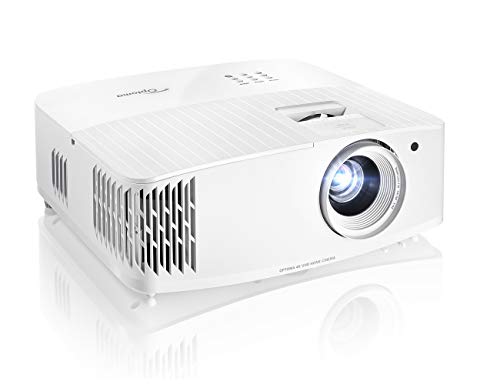
Optoma UHD35 — 4K Step-Up — Standard Throw
The UHD35 stands in this guide under a clear label: it is not a 1080p projector, and it is here because a reader loyal to this brand and ready to step up deserves the step shown honestly rather than discovered elsewhere. Its pixel-shifting DLP panel puts a genuine 4K image on the wall, visibly denser in game worlds, streamed UHD films and fine detail than any native Full HD machine in this list, and it does so at a tier that keeps it in the same conversation as the range’s premium 1080p models rather than in flagship territory. For the household whose sources have quietly become mostly 4K, that density is the upgrade they can actually see.
Optoma sensibly kept the family’s gaming manners in the transition. Fed a 1080p signal, the UHD35’s low-lag modes drop response to figures competitive players accept, so the step up in resolution does not cost the step down in feel that early 4K projectors demanded. Cinema modes calm the picture for film, brightness is generous for a room with curtains rather than a cave, and the whole machine behaves like a range flagship without requiring flagship rituals from its owner.
The cautions are the honest ones. It burns a lamp, its 4K advantage shrinks at long seating distances and smaller screens, and a household whose viewing is mostly broadcast television will pay for pixels it rarely feeds. Read it as the guide’s signpost rather than its destination: if your sources, screen and seating argue for 4K, this is the Optoma that answers; if they do not, the five native 1080p machines above it are not lesser choices, merely better matched ones.
For the UHD35, the decisive audience is the household whose games and films already arrive in 4K and whose seating sits at the closer end of comfortable. There the extra density is not a showroom trick but a nightly fact, visible in landscape detail, in small text rendered by games, in the texture of streamed cinematography. Buyers outside that description should resist the model’s pull with a clear conscience; buyers inside it will wonder why the guide made them read about five other projectors first.
- 4K UHD pixel-shift DLP, not native 1080p
- Standard throw for ceiling installs
- Low-lag modes for 1080p gaming signals
- HDR and HLG signal support
- Lamp engine with cinema and bright modes
Strengths
- Visible detail step from 4K sources
- Gaming response preserved at 1080p signals
- Flagship behaviour without flagship rituals
Trade-offs
- Not a native 1080p model, by design
- Lamp running costs at a premium tier
- Advantage fades with distance and small screens
Best for: Optoma loyalists whose viewing has become mostly 4K.
Not suited for: Buyers whose sources and seating suit native 1080p perfectly.

Optoma UHD35STX — 4K Step-Up — Short Throw
The UHD35STX answers the most specific question in this entire guide: what does the small room buy when it wants 4K. It pairs the UHD family’s pixel-shift detail with a short-throw lens, so the projector sits on the bench in front of the sofa and fills the wall from there, keeping the placement that makes small-room projection possible while feeding it the UHD sources those rooms increasingly own. In gaming dens and compact media rooms, where seating sits close enough to the screen for pixel structure to matter, the combination is not a novelty but a precise fit.
Its behaviour mirrors its standard-throw sibling with the geometry changed. Console signals arrive in 4K HDR and are rendered with the family’s competent tone handling, fast play drops to the rapid 1080p modes, and film nights gain the crispness that close seating rewards. The short throw brings its usual disciplines: the screen must be flat, the placement must be square, and the furniture must be stable, because at this distance the lens forgives nothing and the detail you paid for is the first casualty of a wavy surface.
As with its sibling, the label matters: this is the step-up, priced above every native 1080p model here, lamp-lit and proud of it. Buyers in small rooms whose sources are broadcast and Blu-ray will be served as well by the GT and HD families at friendlier tiers. Buyers whose room is small and whose library is 4K have exactly one Optoma shaped like their problem, and this is it.
The UHD35STX completes the range’s logic so neatly that it is worth stating the pattern it reveals: Optoma’s catalogue is a grid, resolution down one side, throw down the other, and every household’s room and library has a cell. Finding your cell is the entire task of this guide. Readers who arrived wanting the most expensive Optoma and leave wanting the correct one have been served exactly as intended, and the STX’s cell, small room, 4K library, close seating, is simply the grid’s most specialised corner.
- 4K UHD pixel-shift DLP in a short-throw body
- Fills large screens from close placement
- Low-lag 1080p gaming modes
- HDR signal support for consoles and streamers
- Lamp engine, gaming and cinema modes
Strengths
- 4K detail with small-room placement
- Close seating makes the resolution pay
- Gaming modes remain genuinely fast
Trade-offs
- Highest tier among the short-throw options
- Demands a flat screen and square placement
- Lamp costs return at the premium end
Best for: Small rooms and gaming dens built around 4K sources.
Not suited for: Value seekers or rooms with long throw distances available.
How Do You Upgrade Within the Optoma Range Without Regret?
The graceful path runs inside families before it runs between them. An HD owner whose room darkens well rarely regrets stepping to the range’s 4K branch, because the habits, the mount geometry and the picture character carry across, while the same owner moving to a GT for its brightness figures often misses the cinema calm they had. A GT owner, by contrast, upgrades most happily to the laser GT, gaining the ownership calm their daily hours argue for without surrendering placement or pace. Cross-family moves should be driven by a change in the room or the household’s habits, not by a newer badge.
Keep the old machine’s role in mind as well. Optomas demote gracefully: the replaced HD becomes the garden-room or second-room projector, the old GT becomes the travelling gaming rig, and the household ends with projection in two rooms for the price of one upgrade and a spare lamp. Brand continuity makes that demotion painless, since every remote in the house still speaks the same language. It is an unfashionable virtue, continuity, and it is worth more across a decade of evenings than any single generation’s specification lead.
What Should an Optoma Owner Do in the First Week?
Run the household test while the return window is open. Watch the darkest film you own, with subtitles on, and let every regular viewer sit in their usual seat: this is the rainbow-artefact check, the fan-noise check and the black-level check performed in one sitting, under the conditions that will define the machine’s life. Play the fastest game in the house on the gaming input with its mode enabled. Stream the series whose HDR mastering you know well. A projector that passes your own library in your own room will not be failed by a reviewer’s chart later.
Then set the machine up as if you meant it: square the geometry mechanically, save separate picture settings for film and for play, label the inputs for the household, and file the lamp part number somewhere findable if your model burns one. Optoma’s menus reward this hour of attention by disappearing from your life afterwards, which is the brand’s real design philosophy when it is working as intended. The projector should become the least interesting object in the room, directly behind the screen it fills.
What Accessories Does an Optoma Setup Actually Need?
Fewer than the marketplace will suggest. A mount that fits the model’s weight and your ceiling’s structure, a screen matched to the throw, an HDMI lead of the correct length and, for the lamp models, nothing else until the lamp itself eventually asks. Gaming households add a low-lag-friendly arrangement rather than accessories: console wired directly, game mode saved per input. Streaming households may add nothing at all if their model or their television handles the apps, and should resist duplicating smart features across three boxes that then argue about which remote governs the evening.
The one accessory with a genuine claim on every setup is light control for the screen wall, whether that means blackout curtains, a blind, or simply moving the lamp that reflects in the picture’s darkest corner. It costs less than any projector upgrade in this guide and improves all six models impartially, which is the definition of money well spent in a projection household. Buy the room before the gadgets, and the gadgets mostly stop being necessary.
How Does the Optoma Range Handle Sport and Ordinary Television?
Brand guides tend to judge projectors by their finest hour, but Optoma ownership is mostly ordinary hours: the match on Saturday, the news at breakfast in a bright kitchen-adjacent room, the series episode nobody bothered to dim the lamps for. The range handles that diet with the pragmatism its business heritage built into it. The GT and HD28HDR models carry brightness enough for sociable viewing, motion stays composed on broadcast material, and the picture modes let a household keep a bright preset for daytime and a cinema preset for night, switching with one button rather than with a calibration session.
That everyday competence is, in the end, the strongest argument for the brand’s single-technology range. A household that learns one Optoma’s manners has learned them all, so the second room, the upgrade and the demoted hand-me-down all behave identically at the remote. Reviewers undervalue this because they live with a machine for a fortnight; owners live with the manners for a decade, and manners are where this range quietly wins its loyalists.
How Do Optoma Projectors Behave in a Household With Children?
Family life tests projectors in ways no laboratory schedules: midday cartoons with the curtains half open, a console claimed by three siblings in rotation, a remote that lives a harder life than any in the building. The range copes with that regime better than its cinema image suggests. The GT models’ bench placement keeps the machine reachable for the constant input changes family gaming demands, the HD models’ eco settings forgive being left running through a forgotten afternoon, and the whole range’s remotes are cheap to replace when, not if, one is lost to the sofa’s interior.
The one family rule worth setting is the lamp rule for lamp models: the projector is switched off properly, with its cooling cycle allowed to finish, rather than killed at the wall by a helpful child or a timer socket. That single habit, taught once, is worth more lamp life than any eco setting in the menus, and it is the difference between a family projector that ages gracefully and one that becomes a cautionary tale at the school gate.
How Do the Six Optomas Compare With Each Other?
Because every row shares a badge and a light technology, the discriminating columns are throw, tuning and light source. Decide the family by the first two, then let the model’s standout trait settle the rest.
| Pick | Light engine | Throw | Standout trait | Watch out for |
|---|---|---|---|---|
| Optoma HD146X | DLP, lamp | Standard throw with zoom | HD cinema tuning in its purest form | Brightness assumes a dark room |
| Optoma HD28HDR | DLP, lamp | Standard throw | HDR handling plus gaming pace | Trades a little black depth for versatility |
| Optoma GT1080HDR | DLP, lamp | Very short throw | GT gaming formula at its best value | Cinema is the compromise |
| Optoma GT2000HDR | DLP, laser | Short throw, compact | GT formula without the lamp calendar | Costs more than its lamp sibling |
| Optoma UHD35 | DLP pixel-shift 4K, lamp | Standard throw | The labelled step-up of the range | Premium buys pixels some rooms cannot use |
| Optoma UHD35STX | DLP pixel-shift 4K, lamp | Short throw | UHD detail for close seating | Placement discipline is mandatory |
What Mistakes Do Brand-Loyal Buyers Make?
Buying across families by brightness figure is the classic Optoma error. The GT’s lively output tempts film buyers, the HD’s cinema calm tempts nobody in a showroom, and both households end up with a fine projector tuned for somebody else’s evenings. The families exist because the jobs differ; respect the letters and the range rewards you, ignore them and you have bought a badge instead of a projector.
The second mistake is suffix blindness. Optoma’s model names differ by a letter or two between machines with different throws, light sources and purposes, and marketplaces list them side by side with near-identical photographs. Read the full model name on the listing, match it to the throw chart for your room, and treat any too-good price on a familiar-looking model as a prompt to check which suffix is actually being sold.
A third error is assuming the step-up is compulsory. The UHD models in this guide are excellent and honestly labelled, but a household watching broadcast television and Blu-ray at a sensible distance gains little from them, and the tier difference buys a screen, curtains and years of lamps for the native 1080p families. Loyalty to a brand should mean trusting its range to contain your answer, not automatically buying its most expensive sentence.
Finally, owners neglect the demotion path and sell a replaced Optoma for a fraction of its remaining life, when the same machine would have served a bedroom, a garden room or a student flat for years with nothing but a lamp and a shelf. Projectors age slowly and rooms multiply; plan the second life when you buy the upgrade, and the range’s value compounds.
A fifth mistake is reading the range’s age as a ranking. Several models here have been in the catalogue for years because their jobs have not changed, and in projection, where the physics of a dark room and a fast game are stable, longevity is evidence rather than embarrassment. The newer model in a family is the better buy only when its changes address your room; otherwise the proven machine, with its known lamps, known manners and known failure modes, is often the wiser purchase wearing the older badge.
Final Recommendation
One discipline governs every recommendation in this guide: let the room vote first and the catalogue second. Measure the throw your furniture allows, name the content your household actually watches after dinner, count the sessions in an honest week, and the Optoma range will narrow itself to a family and then to a model with very little argument left over. The brand’s breadth is only confusing to buyers who shop it as a list; shopped as a map, it is one of the clearest in projection.
Decide your family and this guide has done its work. Film in a dark room belongs to the HD line, with the HD146X for the purist and the HD28HDR for the streaming household that plays. Gaming belongs to the GT line, with the GT1080HDR as the value instrument and the GT2000HDR as its laser evolution for daily players. The UHD pair stands at the top of the page as the labelled step-up, standard throw or short, for readers whose sources have already made the 4K argument for them.
Staying inside one brand is sometimes dismissed as a failure of imagination, but a range this honestly divided makes it a reasonable strategy, and the right Optoma chosen by family will feel less like a purchase and more like a continuation. Pick the letters that match your evenings, and the badge will take care of the rest.
Frequently Asked Questions
Are all Optoma projectors DLP, and does that matter?
Nearly all of them, including every model in this guide, and it matters as character rather than as quality. DLP gives Optoma its crisp texture, strong contrast and compact bodies, and it carries one viewer-dependent caveat, the rainbow artefacts a minority notice on high-contrast material. Test with your own eyes and your darkest film during the return window; if nobody in the household sees them, the question is settled for the life of the machine. If the household contains both temperaments, the HD28HDR is the range’s natural peace treaty, which is why it appears in so many of this site’s Optoma conversations.
What is the difference between Optoma HD and GT models?
Intent. HD models are home cinema machines with standard throw, cinema-leaning colour and brightness for darkened rooms. GT models are gaming instruments with short-throw lenses for bench placement, enhanced low-lag modes and brightness for lit-room play. Neither is the premium version of the other, and choosing between them is really choosing what the projector will do on most evenings of its life. Think of it as the difference between a tailored suit and a good jacket: both are clothing, and the occasion decides which one the evening requires.
Is the UHD35 a 1080p projector?
No, and this guide labels it accordingly wherever it appears. The UHD35 is a 4K UHD pixel-shifting model included in this brand roundup as the step-up path for readers outgrowing native 1080p sources. If your viewing is mostly broadcast, Blu-ray and 1080p streaming at ordinary distances, the native Full HD models in this guide will serve you as well and leave budget for the screen and the room. Its presence here is a service to brand-loyal readers, not a reclassification, and the native 1080p picks remain the guide’s core recommendations.
Which Optoma is best for a small room?
The GT family, because its short-throw lenses fill a large screen from the front of the room where the furniture already is. The GT1080HDR is the value expression of that idea, the GT2000HDR its laser evolution, and the UHD35STX the 4K version for close seating and UHD sources. Measure your intended screen size against the throw chart before ordering, and prefer a fixed, flat screen, because short-throw geometry exposes every ripple. Standard-throw models in a small room usually end up projecting a smaller picture than the wall allows, which quietly converts them into expensive televisions.
How long do Optoma lamps last, and are they easy to replace?
With eco modes in ordinary household use, owners typically measure lamp life in years rather than months, with film-night households at the long end and daily gaming households at the shorter end. Replacement is a normal owner task on the lamp models here, a few screws and a mainstream part, and keeping the part number noted from day one turns the eventual change into an errand rather than a research project. The laser GT2000HDR removes the question entirely. Note the hour count when the picture first seems dimmer rather than when it becomes unwatchable; ordering the lamp at the first sign keeps a spare in the house permanently.
Can an Optoma HD projector handle gaming?
Casual and story-driven gaming, yes, comfortably, and the HD models here include game modes whose lag suits that play well. Competitive and fast-twitch titles are the GT family’s reason to exist, with enhanced modes and short throws designed around the console. Households that play both ways often find the HD28HDR the natural meeting point, since its gaming mode is genuinely quick while its cinema manners remain intact. The GT models will still win a competitive household’s argument, because their advantage is measured in milliseconds every single session rather than in comfort across a film.
Related Guides
Keep reading with our companion guides: best 1080p projectors across all brands best short throw projectors for gaming rooms best 4k projectors for home theatre.


