What's inside
- Key Takeaways
- Quick Picks
- How Were These Six Chosen for a Two-Machine Life?
- Why Does the 2.4GHz Dongle Matter More Than Bluetooth for Gaming?
- How Should You Split Listening Between a Desk and a Sofa?
- What Does a Hundred and Twenty Hours of Battery Actually Change?
- How Do You Set Up One Headset Across a PC and a PS5 in One Evening?
- What Changes When the Same Headset Serves a Desk and a Console?
- What Do Two-Machine Buyers Most Often Get Wrong?
- How Should Two People Share One Headset Without Ruining It?
- How Do You Keep a Shared Headset Updated and Ready?
- How Does a Shared Headset Change Game Nights With Friends Online?
- What Should You Do on the Day the Second Machine Arrives?
- How Do You Judge Whether Sharing Is Working After a Month?
- Why Do Work Calls Belong in a Gaming Headset Decision?
- How Should Gift Buyers Choose for a Two-Machine Household?
- What Does the Second Machine Teach You About the First?
- Final Recommendation
- Frequently Asked Questions
- Related Guides
As an Amazon Associate I earn from qualifying purchases. This post may contain affiliate links at no extra cost to you.
widgetverdict.com is reader-supported. When you buy through links on our site, we may earn an affiliate commission.
Where to buy: All six picks below are stocked by Amazon and every model connects wirelessly, sparing a PC-plus-PlayStation household the nightly ritual of pulling one lead free before seating it elsewhere.
The best headsets for pc and ps5 answer a question that defines modern gaming households: why should one player own two headsets? The desk has the PC, with its Discord calls, its competitive queues, and its workday meetings bleeding into the evening. The living room or the second desk has the PS5, with its party chat, its cinematic library, and its controller-centric comfort. A headset that serves both must switch machines gracefully, remember both connections without a pairing ritual, carry a microphone that satisfies two different social worlds, and hold enough charge that the move between rooms never becomes a negotiation with a cable. The six titles below were chosen because each one names both machines, or a multiplatform brief that plainly includes them, in its own listing.
The approaches differ in instructive ways. Turtle Beach’s Stealth 600 leads with endurance and manners: fifty-millimetre drivers, an eighty-hour stated battery, a noise-cancelling flip-to-mute microphone, and memory foam, across PS5, PS4, and PC. HyperX’s Cloud III S counters with the longest stated battery in this guide, one hundred and twenty hours, plus a detachable microphone and dual wireless modes. Logitech’s G733 brings its suspension headband and Blue VO!CE voice processing to both platforms. Ozeino’s wireless headset promises lossless audio, forty hours, and the ability to play while charging over its USB and Type-C connections. Acer’s entry pairs a seventy-hour battery with Bluetooth 6.0 and a flip-to-mute microphone in a lightweight white design. SteelSeries closes with the Arctis Nova 3X, whose mobile app control and neodymium magnetic drivers serve the broadest platform list here. If the PC half of your life is competitive, pair this guide with best gaming headsets for first person shooters before deciding which machine’s needs lead.
Key Takeaways
- All six picks are wireless and name both PC and PlayStation 5, or a multiplatform list including them, in their titles.
- Stated batteries span forty hours to one hundred and twenty: the Cloud III S claims the longest endurance in this guide.
- Dual wireless modes recur throughout: a 2.4GHz gaming link for the machines, Bluetooth for phones and second devices.
- Flip-to-mute microphones appear on the Stealth 600, the Ozeino, and the Acer; the Cloud III S and G733 choose detachable and processed alternatives.
- The Arctis Nova 3X is the only pick naming Xbox alongside PS5 and PC, for households with a third machine.
- Only the G733 names its headband architecture, a suspension design, and only the Acer names its Bluetooth generation, 6.0.
Quick Picks
| Pick | Badge | Why it earns its place |
|---|---|---|
| Turtle Beach Stealth 600 Wireless Headset (PS5) | The endurance all-rounder | Eighty stated hours, a flip-to-mute noise-cancelling microphone, memory foam, and 50mm drivers across PS5, PS4, and PC. |
| HyperX Cloud III S Wireless Gaming Headset | The marathon battery pick | One hundred and twenty stated hours, 2.4GHz plus Bluetooth, a detachable microphone, and multi-platform compatibility. |
| Logitech G733 Lightspeed Wireless Gaming Headset | The suspension comfort pick | A suspension headband, Blue VO!CE microphone processing, PRO-G audio, and Lightspeed wireless for PC, PS5, PS4, and Switch. |
| Ozeino Wireless Gaming Headset | The play-and-charge pick | Lossless audio, forty stated hours, the ability to play while charging, and 2.4GHz over USB and Type-C for PS5, PC, and Switch. |
| Acer Wireless Gaming Headset | The lightweight dual-mode pick | Seventy stated hours, Bluetooth 6.0 alongside 2.4GHz, a flip-to-mute microphone, and a lightweight white design. |
| SteelSeries Arctis Nova 3X Wireless Headset | The app-controlled pick | Mobile app control, neodymium magnetic drivers, forty stated hours, and a platform list spanning Xbox, PS5, PC, Switch, and mobile. |
How Were These Six Chosen for a Two-Machine Life?
The first test was naming. A headset entered this guide only if its title names the PS5 and the PC directly, or claims a multiplatform brief whose own words include the machines a two-machine household owns. That rule sounds pedantic until you have bought a headset whose wireless works beautifully on one machine and not at all on the other, because console and PC wireless are separate conversations that a dongle or a Bluetooth mode must explicitly bridge. Every pick here bridges it in its title’s own language, by a 2.4GHz connection the machines share, by Bluetooth, or by both in combination.
The second test was the switching life. Dual-mode designs earned credit because the daily reality of two machines is not two pairings but constant small migrations: a Discord call ends, a PS5 party begins, a phone rings in between. Batteries were recorded exactly as stated, from the Ozeino and SteelSeries at forty hours to the Cloud III S at one hundred and twenty, because a shared headset’s charge is spent by two machines’ worth of evenings. Microphone styles were weighed for both social worlds, Discord’s clarity expectations and the PS5 party’s alike. Where a title stays silent, on the Acer’s driver size or the Cloud III S’s platform enumeration, the silence is reported in place rather than papered over. Households whose second machine travels should also weigh best folding gaming headsets, since a headset serving two rooms often ends up serving two buildings.
Why Does the 2.4GHz Dongle Matter More Than Bluetooth for Gaming?
Both wireless modes appear across these titles, and they do different jobs. The 2.4GHz connection, delivered through a small USB dongle on most designs, is the gaming link: low latency, stable, and treated by the PC and the PS5 as a proper audio device the moment it is plugged in. Moving the dongle, or switching the headset’s mode where the design supports it, is the physical act that moves your audio life between machines. Bluetooth is the convenience link: it pairs to phones, tablets, and laptops without any dongle at all, and its latency and microphone compromises matter little for video, music, and casual calls.
Understanding that division prevents the commonest two-machine disappointment, which is buying a Bluetooth-only headset for gaming and discovering that convenience was purchased with responsiveness. Every pick in this guide leads with the gaming link and treats Bluetooth as the supporting mode, which is the correct hierarchy. The practical ritual is simple: the dongle lives in whichever machine hosts competitive play, Bluetooth covers everything else, and headsets with both, which is most of this list, ask you to learn one mode switch rather than a drawer of cables. The Acer’s Bluetooth 6.0 is the newest generation named here, a small future-proofing note for phone-side use rather than a gaming difference.
How Should You Split Listening Between a Desk and a Sofa?
The two machines usually live in two postures. The PC is a chair, a desk, a near screen, and a microphone used at conversational distance for hours. The PS5 is a sofa or a relaxed chair, a far screen, and sessions that sprawl. A shared headset must be honest in both postures: stable on the head when you lean toward the monitor in a tense round, comfortable when you sink back for a story game’s third hour, and quick to mute in both worlds when the doorbell, the phone, or the household interrupts. This is why flip-to-mute designs recur in this guide; the gesture works identically at a desk and on a sofa, without a screen, a menu, or a free hand hunting for a control.
Volume and mix habits should be set per machine, deliberately, because the PC and the PS5 offer separate audio settings and remember them separately. Spend five minutes in each machine’s audio menu on the first evening: chat balance forward for competitive PC titles, the world forward for cinematic PS5 ones, microphone monitoring at the level where you can just hear yourself on both. Players who do this once stop experiencing the two machines as two headsets’ worth of friction. Players who skip it often conclude, wrongly, that a shared headset sounds worse on one machine, when what actually happened is that one machine was never introduced properly.
What Does a Hundred and Twenty Hours of Battery Actually Change?
Battery figures in this guide span a threefold range, and the lived difference is not arithmetic but behavioural. At forty stated hours, the Ozeino and the Arctis Nova 3X ask for a weekly charging habit, easily kept by anyone who already charges a phone nightly. At seventy and eighty, the Acer and the Stealth 600 stretch that habit toward fortnightly. At one hundred and twenty, the Cloud III S changes the category of the task: charging becomes an occasional errand you perform when the indicator insists, closer to replacing a remote’s batteries than to fuelling a device. For a headset shared by two machines, that endurance has a specific value, because the charge is being spent by two evenings’ worth of play for every one a single-machine headset would count.
Two honest cautions belong here. Stated figures are manufacturer numbers under their own test conditions, and real endurance varies with volume, microphone use, and features like lighting or app connections. And a huge battery can breed the neglect it was meant to forgive: the player who never thinks about charging is the player most surprised the one night it matters, usually a tournament or a long-planned co-op evening. The Ozeino’s play-and-charge design is the pragmatic hedge against that night, letting the session continue on a cable while the battery recovers. Whichever endurance you choose, give the headset a charging home, one place where the cable lives permanently, and the numbers in the titles will take care of themselves.

Turtle Beach Stealth 600 Wireless Headset (PS5) — The endurance all-rounder
The Stealth 600’s title is a model of the two-machine brief: wireless and multiplatform, built for PS5 and PC with PlayStation’s previous generation and Bluetooth in attendance, carrying 50mm drivers, a rechargeable eighty-hour battery, a noise-cancelling flip-to-mute microphone, and memory foam, in white. Every element answers a shared-headset reality. The endurance covers both machines’ weeks. The flip-to-mute boom handles both Discord manners and party-chat manners with one gesture. The noise cancelling defends your voice in whichever room is louder. Memory foam keeps the second machine’s session as comfortable as the first’s.
Turtle Beach’s platform emphasis leans PlayStation, this variant wears the PS5 in its product name, but the title’s own list includes PC without qualification, which is what earns it the lead in a guide about both. Bluetooth rounds out the household duties, phones and tablets included, so the headset that serves the two gaming machines also serves the devices between them. Its compromises are the familiar wireless ones, plus a colour consideration: the white finish named in the title suits bright setups beautifully and shows travel wear more honestly than black. As the balanced centre of this guide, endurance, manners, comfort, and breadth in one design, the Stealth 600 is the pick against which the specialists below must argue.
- Battery: eighty hours, rechargeable, as stated
- Drivers: 50mm
- Microphone: noise-cancelling, flip-to-mute
- Cushions: memory foam
- Connections: wireless plus Bluetooth
- Platforms named: PS5, PS4, PC, with multiplatform wireless as the brief
Strengths
- Eighty stated hours comfortably covers a two-machine week many times over.
- Flip-to-mute plus noise cancelling gives both social worlds the same good manners.
- Memory foam and 50mm drivers keep long sessions on either machine easy.
Trade-offs
- The white finish shows the marks of travel and daily handling sooner.
- Its PlayStation-first naming may undersell how completely it serves the PC.
- Wireless ownership still ends at a charging cable, however rarely it visits.
Best for: a PS5-and-PC household wanting one balanced wireless headset with flagship endurance and manners. Not suited for: a black-setup purist who will resent a white headset in the middle of it nightly.
The Stealth 600 listing on Amazon shows its multiplatform connection story in detail, which is the heart of its two-machine case.

HyperX Cloud III S Wireless Gaming Headset — The marathon battery pick
One hundred and twenty hours is the number this title wants you to remember, and it is a legitimately startling figure in a category where forty passes for respectable. The Cloud III S builds its two-machine case on that endurance, adding 2.4GHz and Bluetooth as dual wireless modes, a detachable microphone, and a multi-platform compatibility claim in HyperX’s durable, comfort-led house style. For the household whose headset is borrowed by two machines and occasionally by two people, that battery is not a luxury; it is the difference between a device that is always ready and a device whose readiness must be managed.
The detachable microphone suits the shared life particularly well. Booms are the component most often knocked, bent, and sat on in busy households, and a microphone that removes for travel, for media, or for the PS5’s cinematic evenings reduces the headset’s exposure to its own busiest part. The title’s restraint deserves noting in the other direction: it claims multi-platform compatibility without enumerating the platforms, so buyers whose second machine is unusual should confirm their exact pairing in the full listing rather than trusting the family name. What is stated is more than enough to rank it here: the endurance champion of this guide, wearing the Cloud line’s reputation for frames and foam that survive years of being shared.
- Battery: one hundred and twenty hours, as stated, the longest figure here
- Connections: 2.4GHz wireless plus Bluetooth
- Microphone: detachable
- Compatibility claim: multi-platform, as titled
- Platform enumeration: the listing title does not list machines individually, so confirm your exact PC and console pairing in the full listing
- Lineage: Cloud series, known for durable frames and memory foam comfort
Strengths
- The stated endurance outlasts every rival here by a wide margin.
- Dual wireless modes divide gaming and everyday duties cleanly.
- A detachable microphone reduces wear in a busy shared household.
Trade-offs
- Platforms are claimed collectively rather than named one by one.
- A detachable boom can be misplaced in exactly the households it serves.
- Its battery advantage is wasted on players who charge nightly by habit anyway.
Best for: a two-machine household that wants charging to become a monthly non-event. Not suited for: a platform-by-platform shopper who needs each machine named individually in the title before trusting compatibility.
Check the Cloud III S listing on Amazon for its enumerated platform support, and let the battery figure do the rest of the persuading.

Logitech G733 Lightspeed Wireless Gaming Headset — The suspension comfort pick
The G733 serves the two-machine household that also cares how a headset feels in hour three, because its suspension headband carries weight on a flexible strap instead of a padded arc, the only architectural comfort answer in this guide. Its title completes the brief with Lightspeed wireless, a Blue VO!CE microphone, PRO-G audio, and a platform list naming PC, PS5, PS4, and Switch, which makes it the natural pick for the household whose second screen is sometimes a handheld and whose PC sessions run long enough for crown pressure to become the evening’s subplot.
Blue VO!CE earns its place in a two-machine guide for a subtle reason: your voice has two audiences, a Discord channel and a PlayStation party, and processing that keeps it level and clear serves both without reconfiguration. The G733’s gaps are the ones this guide has noted before and repeats without embarrassment: its title publishes neither a battery figure nor a weight, in a list where rivals state endurance as a headline. Buyers for whom the charging routine is the decision should resolve that figure through Logitech’s documentation. Buyers for whom the wearing experience is the decision already have their answer in the strap, and the two-machine platform list means that answer travels between desk and console without compromise.
- Headband: suspension design, stated in the title
- Connection: Lightspeed wireless
- Microphone: Blue VO!CE processing
- Audio: PRO-G drivers
- Platforms named: PC, PS5, PS4, Switch
- Battery endurance: no figure appears in the listing title; Logitech’s documentation carries it for endurance-led comparisons
Strengths
- The suspension strap answers crown pressure, the long session’s commonest complaint.
- Blue VO!CE keeps one voice consistent across Discord and party chat.
- Switch joins PC and PlayStation in the title’s own platform list.
Trade-offs
- Battery and weight figures are absent from the title.
- Bluetooth is not named, so phone duties belong to other picks.
- Strap fit is a preference; firm-band loyalists should try before committing.
Best for: a long-session PC and PS5 player whose head aches under conventional headbands. Not suited for: an endurance-led shopper comparing stated battery hours across the whole list.
The G733 listing photographs on Amazon explain the strap better than any paragraph, so start there and read the specifications second.
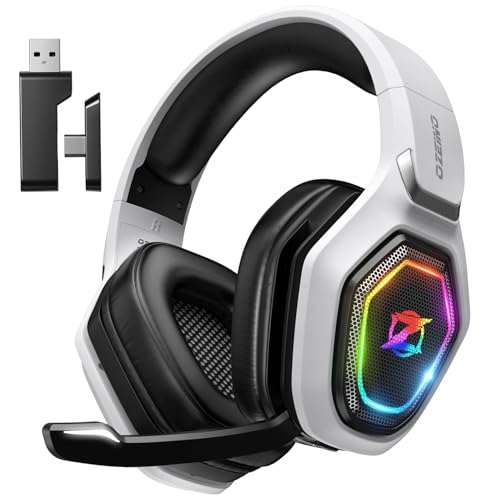
Ozeino Wireless Gaming Headset for PS5 — The play-and-charge pick
Ozeino’s title makes a promise the rest of this guide treats as a footnote: play and charge. Paired with a forty-hour stated battery, lossless audio positioning, a 2.4GHz connection offered over both USB and Type-C, and a flip microphone, it describes a headset designed for players whose sessions outlast their planning. The dual connector generosity matters for the two-machine household in a practical way, because PCs and PS5s present different ports in different places, and a headset that arrives fluent in both USB dialects removes a small daily friction that compounds across years.
Its platform list is the broadest in this guide by count: PS5, PC, and Switch headline, with PS4, Mac, laptops, and mobile named behind them, and the title even names the genres it imagines, FPS and RPG, which between them cover most of what the two machines are for. Forty hours is the list’s joint-lowest stated endurance, and the play-and-charge design reads as the manufacturer’s own answer to that arithmetic: the battery is sized for a week, and the cable is sized for the exception. Buyers should weigh whether they prefer that honesty, or the larger batteries above that postpone the exception further. For a household that hates dead-headset evenings more than it loves big numbers, Ozeino’s arrangement is quietly the most forgiving here.
- Battery: forty hours, as stated, with play-and-charge support
- Audio positioning: lossless audio, as titled
- Connections: 2.4GHz over USB and Type-C
- Microphone: flip design
- Platforms named: PS5, PC, Switch, PS4, Mac, laptops, mobile
- Intended genres, per the title: FPS and RPG play
Strengths
- Play-and-charge removes the dead-battery evening from the household’s calendar.
- USB and Type-C fluency suits the mixed ports of real desks and consoles.
- The broadest platform enumeration in this guide, handhelds and laptops included.
Trade-offs
- Forty stated hours trails the endurance leaders by a wide margin.
- Driver and microphone specifications are not detailed in the title.
- Its value brands are less established than the legacy names surrounding it.
Best for: a busy multi-device household that values never being stopped by a battery over maximising hours. Not suited for: an endurance maximalist who reads forty hours as a compromise too far.
The Ozeino listing on Amazon explains its play-and-charge arrangement, which is the feature that defines its ownership rhythm.

Acer Wireless Gaming Headset for PS5 — The lightweight dual-mode pick
Acer’s entry is the quiet overachiever of this list: a headset for PS5 whose title packs 2.4GHz and Bluetooth 6.0 as dual modes, a flip-to-mute microphone, a lightweight claim, a seventy-hour stated battery, and compatibility with PS4, PC, and Switch, in white. Bluetooth 6.0 is the newest wireless generation named anywhere in this guide, which matters for the phone side of a shared headset’s life, quicker and more efficient pairing with the devices between the two gaming machines. Seventy hours places its endurance second only to the leaders, and the flip-to-mute gesture gives it the same social manners as the Stealth 600.
The lightweight claim is unquantified, joining the G733 in asking documentation-led buyers to look further, and driver specifications are likewise absent from the title. What the title does establish is a complete dual-mode brief from a mainstream computing brand whose laptops fill the desks this headset will sit beside, which is its own kind of reassurance for PC households. The PS4, PC, and Switch list covers the two-machine brief with a handheld in reserve, though the PS5 in its product name should be read alongside that list carefully in the full listing, since the enumeration names the previous PlayStation generation explicitly. Judged on its stated dual-mode completeness and endurance, the Acer earns its place as this guide’s understated option.
- Connections: 2.4GHz plus Bluetooth 6.0, the newest Bluetooth generation named here
- Battery: seventy hours, as stated
- Microphone: flip-to-mute
- Build claim: lightweight, unquantified in the title
- Finish: white
- Platforms named: PS4, PC, Switch, with PS5 in the product name; confirm the full console list in the listing
Strengths
- Bluetooth 6.0 future-proofs the phone and tablet side of a shared headset.
- Seventy stated hours is endurance enough for any two-machine routine.
- Flip-to-mute keeps its manners identical at desk and sofa.
Trade-offs
- Weight and driver figures are not published in the title.
- The platform enumeration requires a careful read against the product name.
- Its gaming lineage is younger than the specialist brands around it.
Best for: a PC-leaning household that wants modern dual-mode wireless and long endurance in a light design. Not suited for: a specification completist who wants every figure, weight and drivers included, printed in the title itself.
Read the Acer listing on Amazon with its platform list open, since that enumeration is where a two-machine buyer should verify their exact setup.

SteelSeries Arctis Nova 3X Wireless Headset — The app-controlled pick
SteelSeries closes the guide with the household that has a third machine, or expects one: the Arctis Nova 3X names Xbox, PS5, PC, Switch, and mobile in a single platform list, the broadest console sweep here, and adds two ideas none of the others claim. The first is mobile app control, tuning the headset from a phone rather than a PC utility, which suits a device that migrates between machines too often to be tethered to one machine’s software. The second is neodymium magnetic drivers, a material specification in the Logitech graphene tradition, signalling that the audio was engineered rather than merely assembled.
Its forty stated hours match the Ozeino at the list’s lower end, and in a headset asked to serve up to five platforms that figure asks for a real charging routine, dock or cable home included. The 2.4GHz and Bluetooth pairing covers the standard dual-mode division of labour. What the title does not detail is the microphone arrangement, which party-chat-heavy buyers should examine in the full listing before ranking it against the flip-to-mute trio. As the three-machine insurance policy of this guide, app-tuned and materially specified, the Nova 3X is the pick for households whose platform list is still growing, and whose next console should not orphan their headset.
- Control: mobile app control, stated in the title
- Drivers: neodymium magnetic
- Battery: forty hours, as stated
- Connections: 2.4GHz plus Bluetooth
- Platforms named: Xbox, PS5, PC, Switch, mobile
- Microphone arrangement: not detailed in the listing title, so check the full listing for boom style and mute behaviour
Strengths
- The only pick naming Xbox beside PS5 and PC future-proofs a growing household.
- App control travels with the headset instead of living on one machine.
- Neodymium magnetic drivers show deliberate audio engineering.
Trade-offs
- Forty stated hours demands the most charging discipline here.
- Microphone details require the full listing to evaluate.
- Households with exactly two machines pay for breadth they may never use.
Best for: a growing multi-platform household that wants app tuning and every console covered by one headset. Not suited for: a strict two-machine home that would rather have double the battery than a third platform.
The Arctis Nova 3X listing on Amazon details its app and microphone, the two areas its title leaves for the second read.
How Do You Set Up One Headset Across a PC and a PS5 in One Evening?
Do the introductions once, in a fixed order, and the machines will remember their manners. Start with the PS5: connect the gaming link, open the audio settings, set the headset as the output and input, and balance chat against game sound with a friend in an actual party. Then move to the PC: connect or switch the mode, set the headset as the default device in the system and in your chat application separately, because they are separate decisions and forgetting the second is the classic reason a new headset sounds perfect in games and silent in calls. Test the microphone in both worlds before any match depends on it, and confirm the mute gesture works identically on both.
Finish by building the physical routine. Decide where the dongle lives if your headset uses one, which machine hosts it, and how the headset travels between rooms: on your head, in your hand, or in a case if the journey involves stairs and doors. Give it a charging home that serves both rooms’ habits, ideally beside the machine you use last in the evening. These are small decisions, but a shared headset’s entire reputation rests on them, because the technology in these six titles already works; what varies between delighted and disappointed households is almost always the routine wrapped around it. Players who split play between home and elsewhere should also keep best comfortable gaming headsets in mind, since the travel days test fit as much as connectivity.
What Changes When the Same Headset Serves a Desk and a Console?
| Headset | Stated battery | Microphone style | Platform reach |
|---|---|---|---|
| Turtle Beach Stealth 600 | Eighty hours | Flip-to-mute, noise-cancelling | PS5, PS4, PC, Bluetooth devices |
| HyperX Cloud III S | One hundred and twenty hours | Detachable | Multi-platform, as titled |
| Logitech G733 | Not stated in title | Blue VO!CE processing | PC, PS5, PS4, Switch |
| Ozeino | Forty hours | Flip design | PS5, PC, Switch, PS4, Mac, mobile |
| Acer | Seventy hours | Flip-to-mute | PS4, PC, Switch, PS5 by name |
| SteelSeries Arctis Nova 3X | Forty hours | See listing details | Xbox, PS5, PC, Switch, mobile |
The pattern the table reveals is a market converging on the same answer from different directions: dual wireless modes as the bridge, endurance as the reassurance, and a microphone gesture or processing style as the personality. The genuine choices left to the buyer are temperament choices. Do you want the marathon battery, the strap, the app, the play-and-charge safety net, or the third console? Those are questions about your household’s habits, and they are happily answerable, unlike the compatibility questions that older generations of shared headsets used to pose. The two-machine problem, on this evidence, has been solved; what remains is choosing which solution’s manners you prefer.
What Do Two-Machine Buyers Most Often Get Wrong?
The first mistake is assuming that wireless on one machine implies wireless on the other, buying on a famous name while its title names only one of your platforms. Every pick here was required to name its machines precisely because that assumption burns households yearly. The second is neglecting the PC’s double settings, system default and application default, and concluding the headset is broken when Discord alone cannot hear it. Third, buyers compare battery figures as if they were rankings rather than routines, choosing one hundred and twenty hours they will never need while ignoring the microphone gesture they will use fifty times a week.
Fourth, households forget the second player’s problem: a shared headset serves one head at a time, and the partner, sibling, or child on the same sofa gets silence unless a second, humbler headset joins the household, a role the wired picks in this series fill cheaply and well. Fifth, players set up one machine lovingly and the other never, then blame the headset for sounding different across rooms when the difference was a chat mixer set once and a chat mixer never visited. The technology forgives almost everything except being set up halfway.
How Should Two People Share One Headset Without Ruining It?
Shared headsets die socially before they die technically. Establish the small constitution early: whose charging routine it is, where the headset lives between sessions, and how the fit gets adjusted, because constant band resizing by two different heads is the fastest way to loosen a headset’s fit for both. Wipe the cushions between users, a ten-second habit that keeps foam alive and goodwill intact. Agree on volume ceilings per machine so nobody’s ears are ambushed by the other person’s settings when the headset changes hands mid-evening.
Where sharing is daily and competitive for both people, honesty may recommend two headsets after all, and this guide’s endurance leaders make a natural pairing with a simpler second unit for the household’s other player. But for the far commoner pattern, one primary player whose partner or family borrows occasionally, a single excellent shared headset with a constitution beats two neglected ones. The six designs here were chosen to survive that social life: detachable and flip microphones that tolerate handling, frames from lines known for durability, and batteries sized so that two people’s evenings do not become a scheduling conflict with a charging cable.
How Do You Keep a Shared Headset Updated and Ready?
Wireless headsets are small computers now, with firmware, companion software, and in the SteelSeries case a phone app, and shared ownership makes their upkeep nobody’s job unless it is assigned. Pick one owner for updates, apply them on a quiet weekday rather than before a planned session, and re-check both machines’ settings afterwards, since updates occasionally reset pairings or balances. Keep the charging cable in its permanent home and the dongle, where one exists, in its permanent machine or its labelled travel spot; more shared headsets are lost to a missing dongle than to any electronic failure.
Inspect the microphone monthly if it detaches or flips, since those mechanisms carry the household’s handling. A boom that no longer holds position or a detachable connector that crackles when touched is a small problem now and a party-chat mystery later. None of this exceeds five minutes a month. It is simply the rent that wireless convenience charges, and households that pay it on schedule describe their shared headset the way these titles hope to be described: as the device that is simply always ready, on whichever machine the evening chooses.
How Does a Shared Headset Change Game Nights With Friends Online?
Cross-platform friendship groups are where the two-machine headset quietly earns its price every single week. The same player appears in a PC Discord on Tuesday and a PS5 party on Friday, and their friends hear one consistent voice, at one consistent quality, with one consistent set of mute manners. That consistency is social infrastructure. Nobody asks which headset you are wearing tonight, nobody waits through a pairing ritual, and nobody endures the tinny evening when a player falls back to a controller microphone because the good headset was married to the other machine.
The picks here support that life in different accents. The Stealth 600’s flip-to-mute gesture is identical in both worlds, so your manners never need relearning. The G733’s voice processing keeps your delivered sound recognisably yours across platforms. The Cloud III S’s detachable boom travels between rooms without drama. Whichever you choose, tell your regular group once that the headset is shared, so the one evening it is charging during an unscheduled session is understood as logistics rather than absence. Communities run on small reliabilities, and a headset that is simply always there becomes one of them.
What Should You Do on the Day the Second Machine Arrives?
Households often buy in the wrong order: the PS5 arrives, excitement peaks, and the headset question is improvised that evening with whatever is in a drawer. A calmer sequence serves better. Before the console’s first night, check your current headset’s title or documentation for the platform claim, honestly, the way this guide checks titles. If it names both machines, perform the setup ritual on the new machine that same evening, while patience is high. If it names only one, you have a genuine decision, and it is cheaper made before the first party than after a month of workarounds.
That decision should also weigh the household’s trajectory. A second machine today suggests a handheld, a child’s console, or an upgrade tomorrow, which is the SteelSeries argument. A stable two-machine home for years is the Stealth 600 or Cloud III S argument. A household where the PC is really a work machine that games occasionally should weight the PS5 side of every brief more heavily, and vice versa. The six titles here cover those futures between them; the only poor outcome is the unexamined one, where a headset bought for one machine is resented for failing at a job its title never claimed.
How Do You Judge Whether Sharing Is Working After a Month?
Give the arrangement a month and audit it like a reviewer rather than a shopper. Count the friction events: the evenings a switch took more than a minute, the sessions that began with a dead battery, the calls where one machine’s settings had silently reset. A healthy shared setup produces near-zero counts, and each category points at its own cure, routine, charging home, or a settings revisit, rather than at the headset. If the counts stay high after the cures, the honest conclusion is that your household’s pattern, simultaneous play, clashing schedules, two competitive players, has outgrown sharing itself, and the second-headset conversation in this guide becomes the answer.
Also audit the pleasures, because they are the point. One fit to learn, one voice your friends know, one device to maintain, one purchase amortised across two machines’ entire libraries. Most households that set a shared headset up properly report that the two-machine question simply stops occurring to them, which is the highest praise any of these six designs can earn. The technology disappeared; the games remained. That is the outcome this guide was written to produce, and every pick above is capable of delivering it in the right home.
Why Do Work Calls Belong in a Gaming Headset Decision?
The PC in a two-machine household is rarely only a games machine. It hosts the workday’s meetings, the family’s video calls, and the evening’s Discord, often in the same chair within the same hour. A shared gaming headset that sounds respectable in a meeting, mutes with a gesture a colleague can trust, and looks unremarkable on camera earns its keep in daylight as well as after dark. The flip-to-mute trio here, the Stealth 600, the Ozeino, and the Acer, offer that gesture most literally. The G733’s voice processing flatters the working voice. The Cloud III S’s detachable boom lets the headset become plain headphones for listening days.
This dual duty also reframes the battery question. A headset spent on meetings all day and games all evening consumes its stated hours at double speed, which is the practical argument for the endurance leaders in households where work and play share a desk. It reframes comfort too, since eight hours of calls plus three of gaming is an eleven-hour wearing day that only the strap and foam designs here should be asked to carry. Judge the two-machine headset by the whole day it will actually live, and the right pick usually announces itself before the specifications finish loading.
How Should Gift Buyers Choose for a Two-Machine Household?
A headset is one of the safest technology gifts for a gaming household precisely because the two-machine problem is so common, and one of the riskiest for the same reason: compatibility is a claim, not a vibe. The safe method is the one this guide used, reading the title for the machines it names. A gift whose title names both the recipient’s PC world and their PS5, with endurance to spare and a mute gesture anyone can learn, lands well even if the fit is later exchanged. The Stealth 600 is the natural safe gift here, balanced in every direction, while the Cloud III S suits the recipient whose charging habits the giver knows to be gloriously neglectful.
Include the receipt without embarrassment and, if you know it, mention the household’s second machine in the card; it tells the recipient the gift was chosen for their actual life rather than a generic gamer. Avoid gifting the platform-broad SteelSeries to a strict two-machine home unless growth is genuinely expected, and avoid the endurance-light picks for households whose sessions you know run marathon length. A gift matched to a household’s real pattern is remembered as thoughtfulness; a gift matched to a marketing photograph is remembered as an exchange trip.
What Does the Second Machine Teach You About the First?
An unexpected benefit of the shared headset is diagnostic. Players who hear the same game audio chain on two machines learn quickly which quirks belonged to the headset and which belonged to a platform’s mix, a game’s audio design, or a room’s acoustics. The player who discovers that their footsteps were always clear on the PS5 and only muddy in one PC title’s settings stops blaming hardware and starts reading menus, a transferable skill. The shared headset becomes the control variable in the household’s audio experiments, the one constant against which every new game, update, and room change can be judged.
That constancy also settles arguments. When two players disagree about whether a game’s mix is at fault, the shared headset, moved between machines in a minute, arbitrates with evidence. Households accumulate these small certainties until the whole audio setup stops being a source of tinkering and becomes furniture: known, trusted, and ignored in favour of the games. Every pick in this guide is capable of becoming that furniture, provided the setup and the routines around it are built once, properly, at the beginning.
Final Recommendation
For most two-machine households, the Stealth 600 is the balanced answer: eighty stated hours, flip-to-mute manners, memory foam, and both machines named without qualification. For households that want charging to vanish from their lives, the Cloud III S and its one hundred and twenty stated hours stand alone. For long-session comfort across both machines, the G733’s strap and voice processing make it the connoisseur’s share. For busy multi-device homes that fear the dead-battery evening, Ozeino’s play-and-charge design is the forgiving choice; for PC-leaning homes wanting the newest Bluetooth and long endurance, the Acer is the understated one. And for households with a third console in their present or future, the Arctis Nova 3X covers the whole map. Set both machines up properly on the first evening, give the headset a charging home and a constitution if it is shared, audit the arrangement after a month with the honesty of a reviewer rather than the hope of a shopper, and one headset really is enough: enough for the desk and the sofa, the ranked queue and the story campaign, the workday call and the midnight party, which is all any of these six designs ever promised, and all a two-machine household ever actually needed from the device that carries its voices between the two.
Frequently Asked Questions
Can one wireless headset really work on both a PC and a PS5?
Yes, provided its title says so, which is the rule this guide enforced. All six picks name both machines or a multiplatform brief including them, and they bridge the two through a 2.4GHz gaming link, Bluetooth, or both. The dongle or mode switch is the mechanism; the listing’s platform list is the guarantee to check.
Do I need to re-pair every time I switch machines?
Generally no. A dongle-based headset follows its dongle, and dual-mode designs keep their connections remembered, so switching is a mode change or a dongle move rather than a fresh pairing ceremony. The first-evening setup in this guide exists precisely so that every later switch is boring.
Which of these has the longest battery?
The HyperX Cloud III S, whose title states a hundred and twenty hours, followed by the Stealth 600 at eighty and the Acer at seventy. The Ozeino and the Arctis Nova 3X state forty, and the G733’s title does not publish a figure, so its documentation is the route for that comparison.
Will Bluetooth be good enough for competitive PC play?
Bluetooth is the convenience mode in these designs, suited to phones, video, and casual use. Competitive play belongs on the 2.4GHz or branded gaming link that every pick here provides, which is engineered for the low latency matches demand. Use each mode for its stated job and neither will disappoint.
What if my household also has an Xbox?
Only the SteelSeries Arctis Nova 3X names Xbox in this guide’s titles, alongside PS5, PC, Switch, and mobile. The other five should not be assumed to serve it. A three-console household should either choose the SteelSeries or plan on the Xbox keeping a headset of its own.
Why does my headset work in games but not in my chat app on PC?
Because the PC keeps two separate decisions: the system default device and each application’s own device choice. Set both, as the setup section describes, and the classic symptom disappears. The PS5’s single audio routing is simpler, which is why the problem almost always appears on the PC side of a shared headset’s life.
Does the dongle wear out from being moved between machines?
Dongles are built for ordinary plugging cycles, but households that move one daily should treat the ritual gently and consider which machine should host it permanently, using Bluetooth or the second mode for the other duties where the design allows. A dongle given a permanent home in the competitive machine and a headset that visits the console by its other mode is the arrangement that wears least, and several picks here support exactly that division.
How do I know if my current headset already covers both machines?
Read its listing title or the manufacturer’s platform list with the same strictness this guide applies: both machines should be named, or a multiplatform claim should plainly include them, for the wireless connection you intend to use. A headset that is wireless on PC and merely plug-compatible on PS5 is a different ownership experience from the six dual citizens here, and knowing which one you own prevents a disappointing first evening with a new console.
Is a shared headset a good idea for two serious players?
For two players who play at different times, yes, with the sharing constitution described in this guide. For two players who play simultaneously, no headset can be in two places, and the honest solution is a flagship shared unit plus a simpler second headset for the other seat, a pairing many households in this guide’s audience already run.
Related Guides
- best comfortable gaming headsets
- best folding gaming headsets
- best gaming headsets for first person shooters


