What's inside
- Key Takeaways
- Quick Picks
- How Were These Six Chosen for Voice Work?
- Why Does Microphone Position Matter More Than Microphone Price?
- What Does an In-Line Sound Card Actually Do for Dictation?
- When Should a Dictation Worker Choose One Ear Instead of Two?
- How Should You Set Up Your Room and Software for a Dictation Session?
- How Do the Six Compare for Long Dictation Days?
- What Do Dictation Buyers Most Often Get Wrong?
- How Do You Maintain a Dictation Headset Across Years of Documents?
- How Should Clinicians, Lawyers, and Writers Choose Differently?
- How Does Dictation Change the Way You Should Think About a Headset Warranty?
- What Happens When Your Software Changes but Your Voice Does Not?
- Why Do Transcription and Dictation Ask for Different Things?
- How Should a First-Time Dictator Spend the First Fortnight?
- What Should an Organisation Standardise Before Buying in Quantity?
- Final Recommendation
- Frequently Asked Questions
- Related Guides
As an Amazon Associate I earn from qualifying purchases. This post may contain affiliate links at no extra cost to you.
widgetverdict.com is reader-supported. When you buy through links on our site, we may earn an affiliate commission.
Where to buy: Each of the half-dozen dictation models reviewed below can be ordered through Amazon, though listings deserve unusually close scrutiny here since usefulness hinges on how microphone design, connection type and named software compatibility line up.
The best headsets for speech recognition software are not gaming headsets with a second job, and treating them as such is the mistake this guide exists to prevent. Dictation makes a unique demand: the microphone sits centimetres from your mouth for hours, capturing one voice, in one room, at conversational level, and feeding it to software that must decide, thousands of times a day, exactly which word you said. That task rewards a close, consistent microphone position, a clean noise floor, a connection the computer treats as a proper audio device, and a wearing experience light enough to forget during long documents. It does not reward surround sound, RGB, or cinematic bass, and the six titles below were chosen because each one speaks the language of voice work, recognition, dictation, or voice-to-text in its own listing.
The field divides by working style. ECS fields two WordCommander models, dual-ear and single-ear versions of a USB voice recognition headset with a noise-cancelling boom, an in-line sound card, and a flexible wire design. A third USB headset is sold explicitly for Dragon NaturallySpeaking 15 in its Home, Premium, and Professional editions, the only title here naming specific software versions. MAIRDI’s USB headset pairs dictation for Dragon Voice Recognition with the meeting life of Teams, Zoom, office, and call centre work. Koss offers the CS95-USB, a single-sided on-ear design naming speech recognition alongside telehealth, education, and call centres. Philips closes the list with the SpeechOne, a wireless dictation headset with a docking station and status light, built for professional dictation workflows. One honesty rule governs everything below: compatibility is claimed only where a title states it, and no headset here is promised to make any software more accurate, because accuracy belongs to the software, the speaker, and the room as much as to the microphone. Readers equipping a broader desk should also see best comfortable gaming headsets for the long-wear principles that dictation shares with gaming.
Key Takeaways
- Five of the six picks are USB designs, because dictation software wants a stable digital audio device rather than an analogue afterthought.
- Two titles name Dragon software directly: one for Dragon NaturallySpeaking 15 editions, one for Dragon Voice Recognition dictation.
- Two titles use the words voice recognition or speech recognition as their headline purpose: the ECS WordCommander pair and the Koss CS95-USB.
- Single-ear and single-sided designs make up half the list, for workers who must keep one ear on the room.
- The Philips SpeechOne is the only wireless pick, and the only one with a docking station and status light.
- Noise-cancelling boom microphones appear in four titles, because the room you dictate in is part of the system.
Quick Picks
| Pick | Badge | Why it earns its place |
|---|---|---|
| ECS WordCommander USB Headset (Dual Ear) | The dual-ear dictation pick | A USB voice recognition headset with a noise-cancelling boom, an in-line sound card, and a dual-ear fit for focused dictation. |
| ECS WordCommander USB Headset (Single Ear) | The single-ear dictation pick | The same WordCommander voice recognition design in a single-ear form, for workers who keep one ear on the office. |
| Voice Recognition USB Headset with Dragon Software | The named-Dragon pick | Sold for Dragon NaturallySpeaking 15 in its Home, Premium, and Professional editions, with a noise cancelling boom. |
| MAIRDI USB Headset for Dictation | The meeting-and-dictation pick | Dictation for Dragon Voice Recognition alongside Teams, Zoom, office, call centre, and VoIP duty in one USB headset. |
| Koss CS95-USB Speech Recognition Headset | The institutional pick | A single-sided on-ear USB-A headset naming speech recognition, telehealth, education, and call centres, in a lightweight design. |
| Philips SpeechOne Wireless Dictation Headset | The professional wireless pick | A wireless dictation headset with a docking station and a status light, from the professional dictation tradition. |
How Were These Six Chosen for Voice Work?
The screening rule was vocabulary. A headset entered this guide only if its title speaks about voice recognition, speech recognition, dictation, or voice-to-text as its purpose, because a microphone marketed for those tasks has been positioned, tuned, and tested by its maker with a single close voice in mind. General headsets with good microphones exist in abundance, several appear elsewhere in this series, but their titles promise gaming or calls, and this guide does not promote products into a specialism their own listings do not claim. Where a title names specific software, the Dragon editions on one pick and Dragon Voice Recognition on another, the guide reports exactly that naming and nothing broader.
The second screen was dictation ergonomics. Boom microphones that hold a consistent position near the mouth were credited, because recognition software is exquisitely sensitive to a microphone that drifts. USB connections were credited, because a computer that sees a dedicated digital audio device behaves more predictably across long sessions than one listening through a shared analogue jack. Single-ear options were treated as a feature, not a compromise, for the many dictation workers who must hear the room, the phone, or the patient beside them. The Philips was admitted as the wireless exception on the strength of its dictation-specific title and its professional docking design. What no pick was credited with is accuracy itself: listings do not publish recognition scores, and any guide promising them is inventing numbers.
Why Does Microphone Position Matter More Than Microphone Price?
Speech recognition software builds a model of your voice as it arrives through a specific microphone at a specific distance and angle. Change the distance by two centimetres and the level, the tonal balance, and the software’s confidence all shift, not because the microphone got worse but because the input stopped matching the model. This is why dictation headsets are built around booms: a boom returns the capsule to the same place every time you put the headset on, and a flexible, well-made boom holds that place through a day of head movements, coffee, and phone interruptions. The ECS titles name their wire design Pro-Flex, a small detail that speaks directly to this daily repositioning.
The practical discipline matters as much as the hardware. Put the headset on the same way each morning, park the boom at the same distance, roughly beside the corner of your mouth rather than in front of it, and dictate a test sentence before the real document, listening for the level your software prefers. Users who treat microphone position as a ritual get the boring, consistent results that make dictation feel like magic. Users who treat it casually blame software for errors that began at their own cheek. Every headset in this guide is capable of the consistent half of that partnership; the ritual half is yours.
What Does an In-Line Sound Card Actually Do for Dictation?
Two of the ECS titles name a premium in-line sound card, and the phrase deserves translation. A USB headset with its own sound card carries its audio conversion inside the headset’s cable or housing rather than borrowing the computer’s internal audio circuitry. For dictation, that independence has three quiet virtues. The input device the software sees is the same on every computer you plug into, so a voice profile built at your desk behaves identically on a laptop. The conversion sits away from the electrical noise inside a busy computer case. And the volume and level behaviour stays consistent across machines, updates, and operating system moods.
Yet none of those features can promise stronger recognition outcomes on their own. What it guarantees is repeatability, and repeatability is the currency dictation runs on. A recognition engine cannot distinguish between a user whose voice changed and a user whose audio chain changed, so professionals eliminate the second variable wherever they can. That is the honest frame for the in-line sound card: not a promise of better words, but one less way for the same words to arrive differently tomorrow. Buyers comparing the two WordCommander variants should note that both carry the feature; the difference between them is worn on the ears, not wired in the cable.
When Should a Dictation Worker Choose One Ear Instead of Two?
Half of this guide is single-sided, and that is not a budget signal. It is a workflow signal. The single-ear WordCommander, the single-sided Dragon headset, and the on-ear Koss all serve workers whose dictation is interleaved with the physical world: the clinician who must hear the patient, the office worker fielding interruptions, the educator moving between students, the call professional whose other ear owns the room. For those workers, a dual-ear seal is not immersion; it is isolation from information they are paid to notice, and the open ear is a professional tool.
Dual-ear designs answer the opposite workflow: the writer, the legal drafter, the report producer, dictating long documents in a room whose noise they would rather exclude, where concentration is the scarce resource and the second earcup is a door closed against it. The dual-ear WordCommander’s noise-cancelling boom defends the software’s input while its second cup defends the user’s attention. Neither arrangement is the advanced one. The honest question is what your other ear does for a living, and the six picks here divide almost symmetrically around the answer, which is exactly how a guide for real workflows should divide.
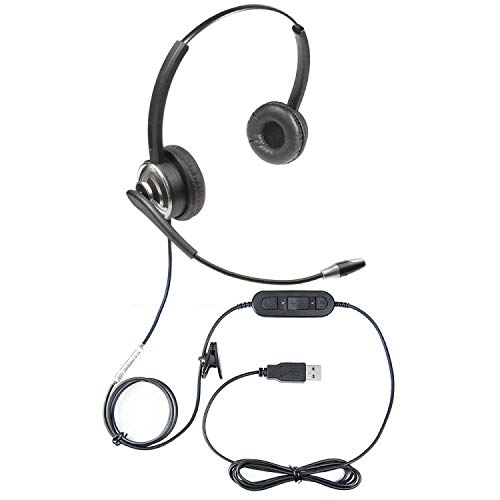
ECS WordCommander USB Headset (Dual Ear) — The dual-ear dictation pick
The dual-ear WordCommander is the focused dictator’s instrument in this guide: a USB voice recognition headset whose title assembles the complete dictation brief, a noise-cancelling boom microphone, a premium in-line sound card, a Pro-Flex wire, an explicit ideal-for-voice-to-text positioning, and claims of superior audio quality and a comfortable fit. Read as a design argument, every element serves consistency. USB and the in-line card stabilise the audio chain. The boom stabilises the microphone’s position. The dual-ear fit stabilises the user’s attention by closing the room out. Voice-to-text is named as the purpose, not discovered as a side effect.
ECS is a name from the transcription and dictation trade rather than the gaming aisle, and the title’s vocabulary shows it: nothing here is decorative. The honest limits are the ones this guide applies to the whole category. The title does not name specific recognition software, so compatibility claims stop at the voice recognition purpose it states; users of a particular package should confirm it against their software’s requirements. Nor does any title in this guide promise accuracy figures, and this one is no exception. What it promises, in its own words, is a headset engineered around voice-to-text work with a comfortable fit for the long documents that work involves, and for the dual-ear workflow described earlier, that is the complete brief.
- Purpose, as titled: voice recognition, ideal for voice-to-text
- Fit: dual ear
- Microphone: noise-cancelling boom
- Audio chain: premium in-line sound card
- Cable design: Pro-Flex wire
- Connection: USB
Strengths
- The complete dictation brief in one title: recognition purpose, cancelling boom, in-line card.
- Dual-ear focus suits long documents in noisy rooms.
- An in-line sound card keeps the audio chain identical across computers.
Trade-offs
- Specific software packages are not named in the title.
- Dual-ear isolation cuts you off from the room, which some workflows cannot afford.
- USB-only design offers no analogue fallback for other devices.
Best for: a focused dictation professional producing long documents who wants the audio chain engineered for voice-to-text. Not suited for: a worker who must keep one ear open to patients, students, or the office floor.
The dual-ear WordCommander listing on Amazon details its in-line sound card, which is the component that defines its consistency argument.

ECS WordCommander USB Headset (Single Ear) — The single-ear dictation pick
This is the same WordCommander design wearing the other workflow’s shape: single ear, with the identical stated equipment, a noise-cancelling boom, a premium in-line sound card, the Pro-Flex wire, and the same voice-to-text positioning. ECS offering the pair as siblings is itself informative, because it tells buyers the difference is ergonomic rather than electronic. The microphone, the audio chain, and the intended software relationship stay constant; what changes is whether your second ear belongs to the document or to the room.
For the clinician dictating notes between patients, the manager drafting between interruptions, or any professional whose authority depends on hearing their name called, that open ear is the entire product. The single-ear form also tends to be the lighter wearing experience across a full working day, since half the apparatus simply is not there, though the title publishes no weight and this guide will not invent one. Software naming is identical to its sibling’s, which means the same honest boundary: voice recognition is the stated purpose, specific packages are not enumerated, and buyers should match the headset against their own software’s stated requirements. As a matched pair, the two WordCommanders make this guide’s central ergonomic question easy to shop: same voice chain, your choice of ears.
- Purpose, as titled: voice recognition, ideal for voice-to-text
- Fit: single ear, one ear open to the room
- Microphone: noise-cancelling boom
- Audio chain: premium in-line sound card
- Cable design: Pro-Flex wire
- Connection: USB
Strengths
- The full WordCommander voice chain with one ear kept on the working environment.
- A natural fit for clinical, educational, and interruption-rich dictation.
- Shares its sibling’s in-line sound card consistency across machines.
Trade-offs
- The open ear admits room noise to your attention, if not to the microphone.
- Specific software packages are not named in the title.
- Listeners who dictate in very loud rooms may prefer the dual-ear seal.
Best for: a dictating professional whose other ear has a job: patients, students, colleagues, or the phone. Not suited for: a deep-focus drafter in a loud room who needs both ears closed against it.
Compare the single-ear WordCommander listing on Amazon directly with its dual-ear sibling, since the wearing shape is the whole decision.
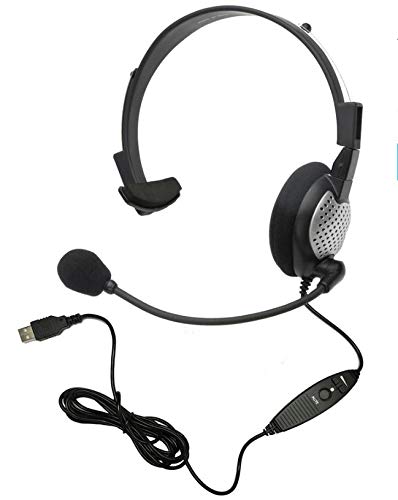
Voice Recognition USB Headset with Dragon Software — The named-Dragon pick
This headset’s title does the one thing cautious buyers in this category wish every listing did: it names its software. The headset is sold for Dragon NaturallySpeaking 15, in the Home, Premium, and Professional editions, with a noise cancelling boom microphone, in a single-sided design, over USB. For a Dragon 15 user, that specificity converts the usual compatibility detective work into a simple confirmation, and it is why this pick anchors the guide despite its plainer presentation elsewhere. A listing that names versions is a listing whose maker expected to be checked.
The single-sided shape suits the Dragon workflow’s typical setting, the professional office where dictation alternates with conversation, and the noise cancelling boom addresses the same office’s ambient reality. The honest boundaries run in both directions. Users of other recognition software, or of other Dragon generations than the named one, should not stretch this title’s claim beyond its words; the listing speaks to Dragon NaturallySpeaking 15 and its three named editions. And as everywhere in this guide, a software match is not an accuracy promise: your voice, your training of the software, your room, and your microphone discipline will decide results jointly. Within its named brief, though, this is the most explicitly matched headset here, and Dragon 15 households should start their shortlist with it.
- Software named in the title: Dragon NaturallySpeaking 15, Home, Premium, and Professional editions
- Purpose, as titled: voice recognition
- Fit: single-sided
- Microphone: noise cancelling boom
- Connection: USB
- Compatibility beyond the named software: not claimed in the listing title, and not assumed by this guide
Strengths
- Named software and editions remove the category’s usual compatibility guesswork.
- A noise cancelling boom suits real offices rather than silent studios.
- Single-sided wear keeps one ear available for the room and the phone.
Trade-offs
- Its named brief is specific to Dragon NaturallySpeaking 15 editions.
- Users of other software generations must verify their own match.
- No in-line sound card is claimed, unlike the WordCommander pair.
Best for: a Dragon NaturallySpeaking 15 user, in any of its three named editions, who wants the match stated on the box. Not suited for: a user of a different recognition package who needs their own software named before buying.
The Dragon headset listing on Amazon repeats its edition naming, which is exactly the text a Dragon 15 buyer should verify first.

MAIRDI USB Headset for Dictation — The meeting-and-dictation pick
The MAIRDI title describes the modern professional’s actual day with unusual honesty: a USB headset with a noise cancelling microphone for computer, PC, and laptop, serving Teams, Zoom, office, call centre, and VoIP phone calls, and dictation for Dragon Voice Recognition. Most dictation workers do not dictate in a sealed booth for eight hours; they dictate between meetings, and a headset that must be swapped every time the calendar changes is a headset that will eventually be left in a drawer. MAIRDI’s answer is one USB device fluent in both halves of the day, with the Dragon dictation relationship named outright in the title.
That naming matters and is reported exactly: dictation for Dragon Voice Recognition is the claim, and users of that software can shop with the same confidence as the Dragon 15 buyers above, while users of other packages should verify their own requirements as usual. The noise cancelling microphone serves both duties symmetrically, cleaning your voice for the meeting’s far end and for the recognition engine’s ear, which are more similar audiences than they first appear. What the title does not specify is the ear configuration in the terms its rivals use, or any in-line sound card, so buyers for whom those details decide should consult the full listing. As the hybrid worker’s pick, fluent in meetings and dictation with one plug, the MAIRDI is the most representative headset in this guide of how voice work is actually lived.
- Software relationship named in the title: dictation for Dragon Voice Recognition
- Meeting platforms named: Teams, Zoom, office, call centre, VoIP calls
- Microphone: noise cancelling
- Connection: USB, for computer, PC, and laptop
- Ear configuration: not specified in the listing title’s terms; the full listing carries the wearing details
- Sound card: no in-line card is claimed in the title
Strengths
- One USB headset covers the meeting day and the dictation hour without swapping.
- The Dragon Voice Recognition dictation relationship is named in the title.
- Noise cancelling serves colleagues and recognition software with the same hardware.
Trade-offs
- Wearing configuration details require the full listing to confirm.
- No in-line sound card is claimed for cross-machine audio consistency.
- Its breadth means dictation purists may prefer a single-purpose design.
Best for: a hybrid professional whose day alternates between Teams or Zoom calls and Dragon dictation sessions. Not suited for: a single-purpose dictation specialist who never attends a meeting in their headset.
The MAIRDI listing on Amazon lays out its call and dictation duties together, which is the dual life this model was built for.

Koss CS95-USB Speech Recognition Headset — The institutional pick
Koss writes its title like an institutional purchase order, and that is a compliment in this category: a single-sided on-ear communication headset, beige, with a USB-A plug, naming speech recognition first among its purposes, then a lightweight design, its microphone, and the B2B worlds it serves, telehealth, education, and call centres. Those three settings share a profile the other picks only touch: headsets bought in quantity, worn by many people, cleaned often, and expected to work without ceremony on whatever computer the institution provides. The CS95-USB is designed for that life, and its speech recognition claim sits inside it naturally, because telehealth notes and classroom dictation are recognition work.
The on-ear, single-sided shape suits institutional rhythms: quick to put on, easy to share a room through, light across a shift. USB-A is the older, universal plug those institutional computers reliably offer, a small detail that matters more in a school or clinic than any audio refinement. The honest limits mirror its brief: the title names no specific recognition software, so package-level compatibility is the buyer’s verification task, and a communication headset’s microphone is positioned for clarity across calls and dictation alike rather than specialised for one. For organisations equipping many seats, and for home users whose dictation resembles those settings, short sessions, shared rooms, many interruptions, the Koss is the guide’s pragmatic institutional answer.
- Purpose, as titled: speech recognition, named first among its uses
- Fit: single-sided, on-ear
- Connection: USB-A plug
- Design claim: lightweight
- Settings named: telehealth, education, call centres, B2B use
- Colour: beige
Strengths
- Speech recognition is its stated headline purpose, not an afterthought.
- Single-sided on-ear wear suits shared, interruption-rich institutional settings.
- USB-A universality matches the computers institutions actually deploy.
Trade-offs
- No specific recognition software is named in the title.
- On-ear fit offers less isolation than over-ear alternatives for focus work.
- Its communication-first design is less specialised than the dictation-only picks.
Best for: telehealth, education, and call centre environments equipping dictation-capable seats at scale. Not suited for: a home drafter seeking a named match for one specific software package.
The CS95-USB listing on Amazon speaks in institutional terms throughout, which makes organisational buying unusually straightforward.

Philips SpeechOne Wireless Dictation Headset — The professional wireless pick
The SpeechOne is the outlier and the flagship at once: a wireless dictation headset from Philips, sold with a docking station and a status light, from the product tradition that equips legal and medical dictation professionals. Wireless changes dictation’s physical life more than outsiders expect. The dictating professional paces, reaches for files, turns to a second screen, and consults documents spread across a desk, and a cable taxes every one of those motions. The dock answers wireless ownership’s two standing questions, where the headset lives and whether it is charged, by giving it a home that does both. The status light is the professional detail: a visible signal of the headset’s state, the kind of small certainty that matters in offices where a recording’s status is a compliance matter, not a preference.
The title is also this guide’s most reserved, naming neither software nor microphone specifications, and the same discipline applied elsewhere applies here with emphasis: Philips’ dictation ecosystem is the context, but specific software compatibility must be verified in the full listing and documentation rather than assumed from the brand. Buyers should also expect a professional tier’s pricing logic and should confirm how the wireless connection is implemented for their computers. What the title guarantees is a dictation-specific wireless design with its dock and status light, from the category’s most established professional name. For the dictating professional whose workflow is mobile within the office and whose standards are set by that tradition, the SpeechOne is the guide’s natural summit.
- Purpose, as titled: wireless dictation
- Connection: wireless, the only non-USB design here
- Included station: docking station, per the title
- Indicator: status light
- Software naming: no specific package is named in the listing title, so verify your software match in the documentation
- Lineage: Philips professional dictation range
Strengths
- Wireless freedom suits dictation that moves around a desk and an office.
- The docking station solves charging and storage as one designed routine.
- A status light gives professional workflows a visible state signal.
Trade-offs
- Software compatibility must be verified beyond the title’s wording.
- Wireless ownership adds battery and connection management the USB picks avoid.
- Professional positioning implies the guide’s highest ownership tier.
Best for: a legal or medical dictation professional who moves while dictating and wants a docked, always-ready system. Not suited for: a package-specific shopper who needs their exact software named in the title before spending.
The SpeechOne listing on Amazon presents its dock and status light as the system they are, which is how a professional buyer should evaluate it. Readers comparing desk setups more broadly may also want best folding gaming headsets for how headsets travel between workspaces, and best gaming headsets for first person shooters is deliberately not this guide’s concern: dictation rewards a different microphone discipline entirely.
How Should You Set Up Your Room and Software for a Dictation Session?
Before the first real document, run the software’s own audio setup with the headset positioned exactly as you will wear it, and dictate the calibration passages in the voice you will actually work in, not a performance voice. Recognition profiles are built from these minutes, and a profile trained on a theatrical reading will spend weeks being surprised by your ordinary Tuesday tone. Choose the quietest hour for training if your room has a daily rhythm, close the door you will usually close, and let the air conditioning or fan that will usually run, run: the goal is a profile that matches your real conditions, including their noise, rather than a laboratory ideal your office never reproduces.
Then establish the working rituals. Keep a glass of water within reach, because a dry voice changes across a long session in ways software notices. Dictate punctuation deliberately and consistently, since the engine learns your habits as surely as your phonetics. Correct errors by voice when your software supports it, rather than silently retyping, because corrections are training data and silent fixes teach the system nothing. Save the profile when the software suggests it. None of this is headset shopping, but all of it decides whether the headset you bought gets the chance to do its job, which is the most common hidden variable in every disappointed dictation review ever written.
How Do the Six Compare for Long Dictation Days?
| Headset | Fit | Connection | Software relationship in title |
|---|---|---|---|
| ECS WordCommander Dual Ear | Dual ear | USB with in-line sound card | Voice recognition, voice-to-text |
| ECS WordCommander Single Ear | Single ear | USB with in-line sound card | Voice recognition, voice-to-text |
| Voice Recognition USB Headset | Single-sided | USB | Named Dragon editions |
| MAIRDI USB Headset | See listing | USB | Dragon Voice Recognition dictation named |
| Koss CS95-USB | Single-sided on-ear | USB-A | Speech recognition purpose named |
| Philips SpeechOne | Wireless headset | Wireless with dock | Dictation purpose named |
The table’s pattern is a category that agrees on fundamentals and divides on lifestyle. USB owns the field because dictation rewards a stable digital device. Booms own the field because position is accuracy’s silent partner. The divisions are about ears, rooms, and software: one ear or two, meetings interleaved or documents uninterrupted, a named Dragon match or a general recognition brief, a cable’s certainty or a dock’s wireless freedom. A long dictation day forgives almost any of these choices made deliberately and punishes every one made by accident, which is why this guide has spent its length on the deliberation rather than on a crown.
What Do Dictation Buyers Most Often Get Wrong?
The first mistake is buying a gaming or entertainment headset for recognition work because its microphone reviewed well for chat. Chat forgives; recognition audits. A microphone praised for sounding pleasant in a game may sit too far, drift too much, or process its signal in ways that flatter ears and confuse engines. The second mistake is expecting the headset to fix the room. A noise cancelling boom rejects a great deal, but a television in the corner and a dog with opinions will still tax any system, and the honest cure is a door and a routine, not a more expensive capsule. Third, buyers skip the software’s own training and setup, then grade the headset on results the profile never had a chance to earn.
Fourth, users move the microphone constantly, wearing the headset differently each day, perched differently after lunch, and then describe the software as inconsistent when the input was the variable. Fifth, buyers assume compatibility from category language, purchasing a recognition headset for software its title never names. Two picks here name Dragon products explicitly and four do not, and that difference is information, not marketing. Read the title, train the profile, fix the room, park the boom in the same place every morning: the unglamorous disciplines are the entire secret of dictation that feels effortless.
How Do You Maintain a Dictation Headset Across Years of Documents?
A dictation headset is a professional tool with a daily duty cycle, and its maintenance is measured in seconds. Wipe the earpiece and boom weekly, since a microphone that lives beside a mouth deserves the hygiene you would give anything else in that neighbourhood. Inspect the boom’s hinge and the cable’s entry points monthly; a boom that no longer holds its parked position is quietly rewriting your audio input, and you will meet the change first as mysterious recognition drift. Coil the cable loosely, never around the headset, and give the headset a resting place that is not the floor of a bag or the edge of a desk above a hard floor.
For the SpeechOne, the dock is the maintenance system: return the headset to it nightly and the battery question answers itself. For the USB five, the equivalent ritual is a consistent unplugging and storage habit that keeps connectors clean and strain off the joints. Replace nothing in a panic when results dip. Work the diagnostic order this guide implies: microphone position first, room second, software profile third, and hardware last, because in dictation the hardware is statistically the least likely culprit and the most expensive guess. Professionals who internalise that order keep headsets for years and profiles for longer.
How Should Clinicians, Lawyers, and Writers Choose Differently?
The clinician’s dictation is bursty and social: thirty notes a day, each dictated in the corridor of a working clinic, with patients and colleagues in the other ear’s jurisdiction. The single-ear WordCommander and the Koss, with its telehealth naming, fit that rhythm, and the SpeechOne serves the clinician whose dictation happens while moving between rooms with files in hand. The lawyer’s dictation is long-form and confidential: extended documents, precise vocabulary, and a premium on a consistent audio chain, which promotes the dual-ear WordCommander’s in-line card and focused seal, with the Dragon-named headset serving firms standardised on that software.
The writer’s dictation is a voice looking for its page: long sessions, idiosyncratic phrasing, and a profile trained over months into a genuine collaborator. Writers should weight wearing comfort and microphone consistency above every other variable, because their sessions are the longest and their profiles the most personal, and either WordCommander or the MAIRDI’s dual-duty design serves depending on whether meetings interrupt the drafting. Across all three professions, the pattern repeats: the workflow chooses the headset, the title confirms the match, and the rituals decide the results. Buy in that order and dictation becomes what its veterans promise, the fastest keyboard in the building.
How Does Dictation Change the Way You Should Think About a Headset Warranty?
Dictation professionals depend on their headset the way drivers depend on a vehicle: a failure is not an inconvenience but a lost working method, because falling back to typing after years of dictating is a genuine productivity collapse. That dependence reframes ownership questions that casual buyers skip. How quickly can this exact model be replaced? Does the maker serve the professional channel, as Philips and ECS do by trade, with continuity of models across years? A voice profile represents months of training invested through one audio chain, and a replacement headset of a different design asks that investment to be partially rebuilt, which is why professionals buy the same model twice without embarrassment and keep the second in a drawer.
The drawer spare is this category’s open secret, and it explains purchasing behaviour that puzzles outsiders, institutions like Koss’s audience buying in multiples, clinicians keeping a backup CS95, law offices standardising on one WordCommander variant for every desk. Standardisation is not laziness; it is profile insurance. Home users can borrow the logic at smaller scale: once a headset and a profile have grown into each other, the simplest safeguard in dictation is a clear record of exactly what you own, boom position included, photographed on your phone, so that any future replacement begins from knowledge rather than archaeology.
What Happens When Your Software Changes but Your Voice Does Not?
Recognition software evolves on a faster clock than headsets, and a professional may pass through several software generations on one trusted audio chain. The titles here divide honestly around that reality. The Dragon-named picks tie their claim to specific software, which is a virtue while you run that software and a question mark the day you migrate. The purpose-named picks, the WordCommanders’ voice recognition brief, the Koss’s speech recognition purpose, the SpeechOne’s dictation identity, make no version promise and therefore age more neutrally across migrations. Neither posture is dishonest; they are different contracts, and the buyer who expects to change software often should weight neutrality, while the buyer settled on a named package should take the named match gratefully.
When migration day comes, carry the rituals across even when the engine changes: same headset, same boom position, same room routine, and a fresh training pass performed with the patience of a beginner. Profiles rarely transfer perfectly between engines, but the disciplined input half of the partnership transfers completely, and it is the half users most often abandon in frustration, blaming new software for what is actually a new learning curve arriving on schedule. The headsets in this guide will outlast several of those curves for most owners, which is precisely why their titles’ modest, checkable claims matter more than any promise of permanence.
Why Do Transcription and Dictation Ask for Different Things?
Buyers often confuse the two voice trades sharing these brands’ catalogues. Transcription listens to recordings and types what others said; its headsets optimise for playback clarity, foot pedal ecosystems, and hours of listening comfort. Dictation speaks and lets software type; its headsets optimise for the microphone, the input chain, and the consistency of one voice arriving at one engine. A transcription favourite may be a mediocre dictation tool and the reverse holds equally, because the two products face opposite directions along the same audio path. This guide is strictly about the speaking direction, and every title in it was admitted for microphone-side, recognition-side language.
The confusion has a practical cost when institutions buy across the two trades with one purchase order, equipping dictating clinicians with listening-optimised headsets and wondering at the error rates. The fix is the vocabulary discipline this guide opened with: read the title for the direction it serves. Voice recognition, speech recognition, dictation, voice-to-text: those are the speaking direction’s words, and they appear in these six titles because their makers built them for the microphone’s side of the desk. Buy the direction you work in, and let the other trade’s excellent tools serve the other trade.
How Should a First-Time Dictator Spend the First Fortnight?
Week one belongs to setup and humility. Install the software, run its training with your chosen headset parked in its permanent position, and dictate low-stakes material, emails you would have typed anyway, notes, drafts nobody will grade. Expect errors and treat each one as information about position, pace, or pronunciation habits rather than as a verdict on the equipment. Resist changing two variables at once; the fortnight’s whole purpose is a stable baseline, and a user who adjusts the boom, the room, and the software settings daily will finish the fortnight knowing nothing except that dictation feels chaotic.
Week two belongs to rhythm. Dictate at the hours you will actually work, in the room as it actually sounds, and begin trusting the system with real documents while keeping the correction-by-voice discipline that trains it. Most new dictators report the same curve: a clumsy first week, a rapidly improving second, and a moment, usually unnoticed until later, when speaking a paragraph feels faster than the keyboard ever did. The headsets in this guide were chosen to make that curve as short as hardware can make it. The rest of the curve is yours, and it is shorter than the sceptics promise.
What Should an Organisation Standardise Before Buying in Quantity?
Institutions buying dictation headsets by the dozen should standardise three things before the purchase order: the model, the wearing routine, and the support script. One model across every seat means one boom position to teach, one connector to stock, and voice profiles that behave predictably when staff move between desks, which is the Koss title’s B2B world and the WordCommander pair’s natural habitat. The wearing routine, a photographed standard for boom placement and headset fit, turns individual superstition into shared practice. The support script, the diagnostic order of position, room, profile, and hardware, prevents the help desk from replacing headsets that were never broken.
Pilot before scaling, with the actual software, the actual rooms, and the actual staff who will dictate, including the sceptics, whose objections surface the workflow problems that enthusiasts politely step around. A pilot of five seats for a month teaches an organisation more than any specification comparison, and the six designs here give that pilot a genuine range to test: single and dual ears, named and general software briefs, wired certainty and one docked wireless system. Scale what the pilot proves, and the fleet will feel less like equipment and more like infrastructure, which is the highest state a dictation headset can achieve.
Final Recommendation
For the complete voice-to-text brief with a stable audio chain, the dual-ear WordCommander is this guide’s centre of gravity, and its single-ear sibling is the same instrument for professionals whose other ear works for a living. For Dragon NaturallySpeaking 15 users, the headset that names those editions is the obvious, verifiable start. For the hybrid professional, the MAIRDI covers meetings and Dragon dictation with one plug. For institutions equipping many seats, the Koss CS95-USB speaks that world’s language fluently. And for the mobile professional who dictates in motion, the SpeechOne’s docked wireless system is the summit. Whichever you choose, train the profile patiently, park the boom in the same place every morning, keep the room’s routine as steady as the headset’s position, correct your errors aloud so the system learns from them, and let that consistency compound quietly across weeks of documents until turning your voice into text at something close to the speed of thought stops feeling like a feature and starts feeling like the ordinary way your work gets written.
Frequently Asked Questions
Will a better headset make my speech recognition more accurate?
No honest guide can promise that, and this one does not. A dictation headset gives the software a consistent, close, clean input, which is the condition accuracy is built from, but results also depend on the software itself, your training of it, your room, and your microphone discipline. What these six picks guarantee is that the hardware half of that partnership was designed for voice work.
Why do dictation headsets use USB instead of a normal headphone jack?
USB presents the computer with a dedicated digital audio device whose behaviour stays consistent across sessions and machines, and designs like the WordCommanders carry their own in-line sound card for the same reason. Recognition software builds a model of your voice as it arrives; a stable arrival path protects that model from the computer’s internal audio moods.
Which picks name Dragon software in their titles?
Two. One headset is sold for the fifteenth generation of Dragon NaturallySpeaking, across the Home, Premium, and Professional editions. The MAIRDI names dictation for Dragon Voice Recognition. The other titles claim voice recognition, speech recognition, or dictation purposes without naming a package, and buyers should verify their specific software against those listings accordingly.
Single ear or dual ear for dictation?
It depends on what your other ear does. Single-ear and single-sided designs, the single-ear WordCommander, the Dragon headset, and the Koss, serve workers who must hear patients, students, colleagues, or the phone. The dual-ear WordCommander serves focused, long-form dictation in rooms whose noise you would rather exclude. Neither is more advanced; they are different workflows.
Can I use one of these for video calls as well?
Yes, and one pick is designed for exactly that double life: the MAIRDI names Teams, Zoom, office, call centre, and VoIP duty alongside its dictation brief. The Koss is likewise a communication headset for institutional settings. The WordCommander pair and the Dragon headset are dictation-first designs that will handle calls capably through the same USB connection. The practical test is your calendar: if meetings and dictation alternate hourly, weight the dual-duty designs first; if dictation owns whole mornings uninterrupted, the single-purpose instruments will serve those mornings with fewer compromises and a quieter conscience about what the purchase was really for in the first place, which is a rarer outcome in office equipment than it should be, and worth recognising when it happens.
What is the status light on the Philips SpeechOne for?
The title lists a status light as part of the SpeechOne system, giving the user and the room a visible indication of the headset’s state. In professional dictation environments, where knowing at a glance whether a device is active matters for privacy and workflow, that small signal is a deliberate design feature rather than decoration.
Do I need a quiet room to dictate successfully?
You need a consistent room more than a silent one. Recognition profiles are trained in your conditions, so a steady office hum that was present during training is largely discounted by the system, while a room that changes character hourly gives the engine a moving target. The noise cancelling booms across this guide reject a further layer of the environment. Aim for a door you can close and a routine you can repeat, and most ordinary offices qualify without acoustic treatment.
Can I dictate while walking around my office?
With the wireless SpeechOne, movement is the design’s point: no cable taxes pacing, reaching, or turning to a second screen, and its dock restores it between sessions. The USB picks tether you to the machine’s neighbourhood, which suits desk-bound drafting and keeps the audio chain at its most stable. Choose by whether your dictation style is seated composition or thinking on your feet, and be honest about which one your documents actually show.
How do I stop recognition errors that appeared suddenly?
Work the diagnostic order before replacing anything: check that the boom sits exactly where it sat when results were good, check the room for a new noise source, re-run the software’s audio check, and only then suspect hardware. Sudden error clusters are usually a moved microphone or a changed room wearing the disguise of a failing headset.
Related Guides
- best comfortable gaming headsets
- best folding gaming headsets
- best gaming headsets for first person shooters


