What's inside
- Where to Buy
- Key Takeaways
- Quick Picks
- How We Chose These Picks
- Comparison
- How to Choose an Epson Business Projector
- Which Epson Line Fits Which Room: Pro, PowerLite or BrightLink?
- How Much Brightness Does a Meeting Room Actually Need From These?
- What Should IT Check Before Rolling Epson Projectors Across an Office?
- How Does a Business Projector Earn Its Keep Across a Working Year?
- What Changes When the Meeting Room Becomes a Hybrid Room?
- Common Mistakes When Buying an Epson Business Projector
- Final Recommendation
- Frequently Asked Questions
- Related Guides
As an Amazon Associate I earn from qualifying purchases. This post may contain affiliate links at no extra cost to you.
widgetverdict.com is reader-supported. When you buy through links on our site, we may earn an affiliate commission.
Where to Buy
All six projectors below are Epson business models, and each name links to its Amazon listing. The range opens with the Epson Pro EX9270, a 1080p wireless model whose listing carries the live figure, and the Epson Pro EX11000, the laser flagship of the set — check its page for today’s cost. The travellers’ pick is the Epson PowerLite 1781W, while installed rooms are served by the Epson PowerLite L210W and the classroom-proven Epson PowerLite X49. The set closes with the Epson BrightLink 760Wi, the ultra-short-throw interactive-room option — Amazon lists its current price alongside the rest.
Choosing the best epson business projectors is a narrower and more practical exercise than choosing projectors in general. The brand question is already settled — the buyer wants Epson’s 3LCD colour, its business support ecosystem and its menu logic running identically in every room — so the real questions are about rooms and routines. How bright, how large, how connected, how permanent? A portable for the consultant who presents in other people’s buildings answers none of the questions a ceiling-mounted classroom machine answers, and this guide keeps the six roles separate rather than averaging them into a single recommendation.
Every pick here is a 3-chip 3LCD design, because that is what Epson business projection is. The architecture’s business meaning is colour honesty: the brand’s titles habitually state colour brightness and white brightness as equal figures, promising that a company’s charts, photographs and brand colours project at the same strength as its white slides. In lit meeting rooms, where business projectors spend their lives, that promise is the product. Buyers cross-shopping other technologies will find the general argument in the DLP-versus-LCD guide linked below; this page assumes the architecture and spends its length on fit.
Figures are reported exactly as the listing titles print them. Four picks state brightness; two — the PowerLite L210W and the BrightLink 760Wi — keep their titles to format and mounting, and their spec boxes record the omissions rather than filling them from the wider catalogue. Epson’s range naming rewards care: EX, PowerLite and BrightLink lines overlap in showrooms while serving different rooms, so each review names the line it belongs to and the work that line exists to do.
Key Takeaways
- Stated brightness runs from 3,200 lumens for the portable PowerLite 1781W to 4,600 lumens for the laser Pro EX11000, all as printed in the titles.
- Two picks are Full HD 1080p — the Pro EX9270 and the Pro EX11000; the 1781W and the BrightLink 760Wi sit in the widescreen WXGA/16:10 family, and the X49 is an XGA classroom model.
- Wireless casting appears in three titles: AirPlay and Miracast on the EX9270, Miracast on the EX11000, and wireless connectivity on the 1781W.
- The Pro EX11000 is the only laser model in the set, with a built-in 16W speaker also stated in its title.
- The BrightLink 760Wi is the outlier by design: an ultra-short-throw 3LCD unit for interactive meeting and teaching spaces, wall-mountable or tabletop.
Quick Picks
| Pick | Badge | Why it earns a place |
|---|---|---|
| Epson Pro EX9270 | Wireless 1080p all-rounder | 4,100 lumens, AirPlay and Miracast streaming, twin HDMI and 1.6x zoom. |
| Epson Pro EX11000 | Laser flagship | 4,600 lumens of laser 1080p with Miracast, USB power and a 16W speaker. |
| Epson PowerLite 1781W | Portable presenter | WXGA at 3,200 lumens in a portable wireless body with HDMI. |
| Epson PowerLite L210W | Ceiling installation | A 16:9 3LCD model described as ceiling mountable for fixed rooms. |
| Epson PowerLite X49 | Classroom standard | An XGA 3LCD classroom projector with HDMI and a compact chassis. |
| Epson BrightLink 760Wi | Interactive UST room | Ultra-short-throw 3LCD in 16:10, wall-mountable or tabletop, for rooms that work on the image. |
How We Chose These Picks
Role coverage governed the shortlist. An Epson business range only makes sense as a set of answers to distinct briefs, so the six had to include a wireless all-rounder for the modern meeting room, a laser flagship for the room that hosts all day, a genuine portable for people who present away from home, a ceiling-mountable installation model, a classroom standard, and the BrightLink ultra-short-throw for rooms that collaborate on the image itself. Any candidate duplicating a role already filled had to displace its rival outright or leave the list.
Title verification ran as strictly here as everywhere on this site. Brightness, resolution, casting and audio claims in the reviews trace to words in each pick’s own listing title. That discipline produces an honest asymmetry in this guide: the Pro models’ titles are rich and their reviews can be specific, while the L210W and BrightLink titles are terse and their reviews say so, sending installers to Epson’s documentation for the figures a commercial order requires. A guide that smoothed over that difference would be lying in the direction of convenience.
Business reality supplied the third filter: connection behaviour. Modern meeting rooms are casting rooms, and three of these titles name their wireless answers — AirPlay, Miracast, wireless generally — while the installed and classroom models assume wired permanence. Both patterns are legitimate; they serve different decades of room design. The shortlist keeps both visible so a buyer outfitting a building can see where Epson’s range draws its own line between the flexible room and the fixed one.
Longevity thinking closed the selection. Business projectors are bought by organisations that will still be using them under different staff, different laptops and different video platforms. Models from Epson’s established business lines carry the support and parts ecosystem that five-year ownership actually consumes, and that ecosystem — unglamorous, unphotogenic — is a rational buyer’s legitimate reason for staying inside one brand’s catalogue in the first place.

Epson Pro EX9270 — Wireless 1080p all-rounder
The EX9270 is the modern meeting room expressed as a specification. Its title states wireless 1080p projection from a 3-chip 3LCD engine at 4,100 lumens of colour and white brightness, with a built-in speaker, streaming from phone or laptop via AirPlay and Miracast, two HDMI ports and a 1.6x zoom. Read that list as a diary of meeting-room friction and every item answers an entry: the cable that never reaches, the guest laptop with the wrong port, the visitor’s phone holding the actual presentation, the mount that cannot sit at the perfect distance.
AirPlay and Miracast named together is the significant detail. Meeting rooms host both ecosystems, often in the same hour, and a projector that casts from either camp without adapters or apologies changes the social physics of presenting: anyone in the room can put their screen up in seconds, which means the person with the answer no longer has to email it to the person with the cable. The 1.6x zoom, generous for the class, forgives the mounting compromises real ceilings impose, and twin HDMI keeps the room PC and a wired guest connection permanently ready beneath the wireless layer.
At 4,100 stated lumens with equal colour and white figures, the EX9270 is specified for the lit room as it is, not as facilities wishes it were. Full HD resolution suits the mixed diet of documents, dashboards and video calls at meeting-room screen sizes, and the built-in speaker covers call audio in small and mid-size rooms without a separate purchase. Nothing in the title claims a laser source, so lamp-era ownership should be assumed and researched on the listing rather than wished away.
Suits the standard corporate meeting room being refreshed for the casting era — the room with a table, a screen wall, a parade of laptops and a standing video call. It is the guide’s default recommendation for that brief. Rooms that host all day, every day should compare the laser EX11000 below; rooms that are really classrooms or lecture spaces should weigh the installed picks, whose permanence this portable-minded all-rounder does not pretend to.
- Technology: 3-chip 3LCD, wireless
- Resolution: 1080p
- Brightness: 4,100 lumens colour and white brightness (as stated in the listing title)
- Casting: stream from phone or laptop, AirPlay, Miracast
- Inputs and optics: 2 HDMI ports, 1.6x zoom, built-in speaker
- Light source: Not stated in the listing title — verify with the manufacturer documentation
Strengths
- AirPlay and Miracast together cover both phone and laptop ecosystems.
- 4,100 stated lumens with equal colour output suits lit rooms.
- 1.6x zoom forgives imperfect ceiling mount positions.
Trade-offs
- No laser source is claimed in the listing title.
- Casting quality depends on the room’s wireless network.
- The built-in speaker serves meeting rooms, not large halls.
Best for: a standard meeting room where guests cast from their own devices all day. Not suited for: a 200-seat lecture hall, where its speaker and mid-tier output are outscaled by the room.
Set this projector up as infrastructure, not as an appliance: name it clearly on the network, pin the casting instructions inside the room where a nervous guest can find them, and keep one HDMI cable coiled at the table for the day the wireless misbehaves. Rooms run that way discover the EX9270’s specification working as advertised — the measure of a business projector is not its best meeting but its fiftieth ordinary one, and this model’s title reads like it was written by people who counted.
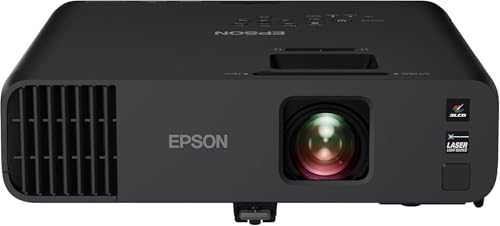
Epson Pro EX11000 — Laser flagship
The EX11000 tops the Pro line by changing the light source and raising everything else with it. Its title states a 3-chip 3LCD Full HD 1080p wireless laser projector at 4,600 lumens of colour and white brightness, with Miracast, two HDMI ports, USB power and a built-in 16W speaker, positioned for business. Laser is the headline: in a room that projects all day, the lamp-replacement cycle is not a footnote but a recurring operational event, and this model retires it while holding the highest stated output in the guide.
The 16W speaker deserves more respect than spec-sheet readers usually give it. Business projectors are the audio system of their rooms more often than AV plans admit, and 16 watts, as printed in the title, is a serious figure for the category — enough to carry video-call voices and presentation video in a proper meeting room without the apologetic tinny quality that teaches staff to bring their own speaker. Paired with USB power for streaming sticks and twin HDMI for resident sources, the EX11000 describes a room that needs nothing else plugged into it.
Miracast covers the Windows-and-Android casting world; unlike its EX9270 sibling, the title does not name AirPlay, and this guide will not grant it by family resemblance. Apple-heavy organisations should register that distinction and choose between the siblings on exactly that line if casting from iPhones and Macs is a daily requirement. It is the cleanest example in this guide of why titles, not brochures, govern these reviews: two near-identical Pro models, one documented difference, and a real buying decision hanging on it.
Suits the heavily used room — the all-day training space, the boardroom with a back-to-back calendar, the hall whose projector is effectively a utility. Laser economics reward hours, and this machine is built for organisations that will give it thousands of them. Occasional-use rooms will never amortise its advantages and are honestly served by the EX9270 or the portable below.
- Technology: 3-chip 3LCD, laser, wireless
- Resolution: Full HD 1080p
- Brightness: 4,600 lumens colour and white brightness (as stated in the listing title)
- Casting and inputs: Miracast, 2 HDMI ports, USB power
- Audio: built-in 16W speaker
- Intended use (from title): business
Strengths
- Laser source removes lamp servicing from an all-day room.
- 4,600 stated lumens is the highest figure in this guide.
- A 16W built-in speaker genuinely covers meeting-room audio.
Trade-offs
- AirPlay is not named in the listing title, unlike its sibling.
- Its laser premium is wasted on occasionally used rooms.
- No zoom figure is printed in the listing title.
Best for: an all-day training or boardroom where the projector runs as a utility and lamp changes are real downtime. Not suited for: an Apple-device office that casts from iPhones daily, unless the listing confirms the AirPlay support this title omits.
Buy this one on total cost and keep the arithmetic in the project file: hours per week, lamp changes avoided, service visits simplified, the speaker purchase never made. Business flagships justify themselves in ledgers rather than in demo rooms, and the EX11000’s title gives a finance-minded buyer every figure needed for that ledger except the one on its Amazon listing — which is where this review sends you, last and deliberately.

Epson PowerLite 1781W — Portable presenter
The 1781W represents the road. Its title states a WXGA portable projector with 3-chip 3LCD imaging at 3,200 lumens of colour and white brightness, wireless connectivity and HDMI, positioned as a wireless projector for business. Every word earns its place in a traveller’s brief: portable is the first claim, wireless the second, and the brightness figure — the lowest in this guide — is the honest price of a machine designed to be carried into rooms its owner does not control.
Presenting away from home is an exercise in unknowns: a bright room, a distant wall, a screen of uncertain size, an audience closer or farther than planned. A portable specified at 3,200 stated lumens with widescreen WXGA is built for that uncertainty at presentation scale — legible slides, honest colour, a picture that survives ordinary office lighting. The wireless connectivity removes the last dependency on the host room’s cabling, which veterans of client sites will recognise as the feature that saves the first five minutes of every meeting.
WXGA deserves a word of defence in this role. The content that travels — slide decks, documents, dashboards, the occasional video — is authored on widescreen laptops, and WXGA matches that shape while keeping text large at the screen sizes a portable can realistically fill. Chasing higher resolution in a carry-around machine spends weight and money on detail that a borrowed wall in a bright room cannot display. The 1781W’s specification is a coherent answer to its actual job.
Suits consultants, trainers, sales presenters and teachers who work across sites — anyone whose projector lives in a bag and performs in strangers’ rooms. It suits them precisely because it does not try to be the installed machine: no ceiling ambitions, no hall-filling claims. Organisations equipping a fixed room should buy the fixed-room picks; individuals equipping themselves should start here and add a spare cable and a travel case.
- Technology: 3-chip 3LCD, portable
- Resolution: WXGA
- Brightness: 3,200 lumens colour and white brightness (as stated in the listing title)
- Connectivity: wireless, HDMI
- Intended use (from title): business presenting
- Light source: Not stated in the listing title — verify with the manufacturer documentation
Strengths
- A genuine portable brief: weight-class design with wireless built in.
- Equal colour and white brightness keeps decks honest in bright rooms.
- WXGA widescreen matches the laptops it will present from.
Trade-offs
- 3,200 stated lumens is the lowest figure in this guide.
- WXGA shows less detail than the 1080p Pro models.
- No built-in speaker is claimed in the listing title.
Best for: a presenter who carries their projector between client sites and borrowed rooms weekly. Not suited for: a fixed large meeting room, where its portable brightness and feature set would be outscaled every day.
The traveller’s ritual completes the picture: keep the remote with the machine, coil a known-good HDMI cable beside it for the room where wireless is forbidden, and learn the keystone controls before the first client does it for you. A portable projector’s reputation is made in other people’s first impressions, and the 1781W’s specification — wireless, widescreen, honestly bright for its class — is designed to make those impressions boring in the best possible way.

Epson PowerLite L210W — Ceiling installation
The L210W’s title is the shortest in the guide: a 3LCD projector in 16:9, ceiling mountable. Where the Pro models advertise, this one files a planning document. It belongs to Epson’s PowerLite L installation family — the line whose siblings appear in this site’s long throw guide — and its role is the fixed room: mounted once, aligned once, and expected to serve a timetable rather than a traveller. The 16:9 frame matches the video-era screen that most refurbished meeting rooms and classrooms now install.
A terse title cuts both ways, and this review keeps both edges visible. The buyer gains a machine from an installation line with the ecosystem that implies — mounts, documentation, service familiarity — and loses the ability to plan from the listing: no brightness, no named resolution beyond the 16:9 shape, no source or control claims are printed. For a facilities purchase that is a normal state of affairs resolved by Epson’s datasheet; for a casual buyer it is a signal to choose one of the richly described Pro models instead, where the listing itself carries the decision.
Ceiling mounting, the one physical claim the title makes, deserves its due. A mounted projector is aligned forever, safe from table knocks and tidying cleaners, invisible to the room’s daily life — and committed. The room gains a permanent appliance and loses the freedom to rearrange itself around a different screen position. Organisations should therefore buy this class of machine the way they buy lighting: after the room’s layout has stopped changing, with the screen, seating and lectern positions settled and measured.
Suits institutions standardising fixed rooms — the school adding identical classrooms, the office floor replicating one meeting-room design, the training centre that wants every space to behave the same. The value is fleet sameness inside the PowerLite ecosystem, and the purchase should be made from documentation, in quantity, with the mount and cabling specified as one package.
- Technology: 3LCD
- Aspect ratio: 16:9
- Mounting: ceiling mountable
- Brightness: Not stated in the listing title — verify with the manufacturer documentation
- Resolution: Not stated in the listing title — verify with the manufacturer documentation
- Light source: Not stated in the listing title — verify with the manufacturer documentation
Strengths
- An installation-line PowerLite built for permanent ceiling duty.
- 16:9 framing matches modern video-era room screens.
- Fleet sameness across replicated rooms simplifies support.
Trade-offs
- The title states no brightness figure for planning.
- Resolution is described only by aspect ratio in the title.
- Permanent mounting ends the room’s layout flexibility.
Best for: an institution replicating one fixed meeting-room or classroom design across many rooms. Not suited for: a casual single-room buyer who needs the listing itself to carry brightness and resolution figures.
Order this machine the professional way: datasheet first, site measurement second, quotation for the complete installed package third. The L210W will never be the projector a reviewer can rave about from its title, because its title is a label rather than a story — but installed Epson L-line machines are the ones quietly running in the background of a thousand ordinary working days, and for the buyer this pick addresses, that anonymity is the entire point.

Epson PowerLite X49 — Classroom standard
The X49 is the guide’s representative of the machine that actually educates the world: a 3LCD XGA classroom projector with HDMI, sold as a single unit, its title even printing the chassis dimensions — 3.4 by 11.6 by 10.2 inches — the way institutional catalogues do. XGA is a legacy resolution in a widescreen age, and this review will not pretend otherwise; it will instead explain why the classroom standard persists, because the reasons are practical rather than nostalgic.
Classrooms run on installed ecosystems. Interactive boards, document cameras, lesson software and a decade of teaching materials were built around the 4:3 XGA frame, and a school replacing projectors inside that ecosystem gains nothing from a wider image that crops its existing content or strands its board’s aspect. The X49 serves the room as it is: HDMI for the modern laptop, a compact chassis for the existing mount positions, 3LCD colour for the bright rooms schools cannot darken because children are working in them.
The title’s silence on brightness is again recorded rather than repaired — an unusual omission for a classroom listing, and one a school buyer should resolve from Epson’s documentation before a fleet order, since classroom output against daylight is the specification this class lives or dies by. What the title does establish is the format, the technology, the connection and the physical size, which together identify the machine’s role unambiguously: the like-for-like refresh of the standard classroom installation.
Suits schools and training organisations maintaining an XGA estate — replacing failed units without rebuilding rooms, keeping one remote logic and one spare-parts shelf across a whole building. It does not suit a new-build classroom designed today around widescreen content, where the EX3290 class of WXGA machine or a 1080p Pro model is the forward-looking choice, and this guide’s honesty requires saying that the X49 is a continuity purchase, proudly and appropriately so.
- Technology: 3LCD
- Resolution: XGA
- Intended use (from title): classroom
- Inputs: HDMI
- Dimensions: 3.4 x 11.6 x 10.2 inches (as stated in the listing title)
- Brightness: Not stated in the listing title — verify with the manufacturer documentation
Strengths
- Matches the installed XGA classroom ecosystem without rebuilding rooms.
- Compact chassis suits existing mount positions and shelves.
- 3LCD colour serves bright rooms where classes work under lights.
Trade-offs
- XGA is a legacy 4:3 format beside the widescreen picks.
- Brightness is not printed in the listing title.
- New widescreen rooms are better served by newer formats.
Best for: a school replacing units inside an existing XGA classroom estate, room by room. Not suited for: a newly built widescreen teaching space, where a WXGA or 1080p model is the correct first purchase.
There is an institutional wisdom in machines like this that consumer reviewing tends to miss. The best classroom projector is frequently the one the caretaker can swap at 7 a.m. from a shelf of identical units, the one every teacher’s laptop already knows, the one whose failure interrupts a morning rather than a term. The X49’s entire specification is that wisdom in product form — and schools measuring value in uninterrupted lessons will read its modest title with more respect than any flagship’s fanfare.

Epson BrightLink 760Wi — Interactive UST room
The BrightLink closes the guide by breaking its geometry. Every other pick throws its image from across a room or a table; the 760Wi is an ultra-short-throw 3LCD projector in a 16:10 frame, wall-mountable or tabletop, from Epson’s BrightLink line — the family Epson builds for interactive spaces, where the projected surface is not just watched but worked on. Mounted immediately above the screen or board, it throws a large image across a few inches of distance, and the presenter stands inside the picture without casting a shadow across it.
That shadow point is the ultra-short-throw argument in one image. In a teaching or workshop room, the presenter works at the board: annotating, pointing, gathering the room around a diagram. A conventional projector puts that person’s silhouette across the content and its light in their eyes. The BrightLink arrangement removes both problems structurally, which is why interactive rooms standardise on it despite the format’s demanding alignment. The 16:10 frame gives the working surface extra height for documents and split views — the natural shape of collaborative content.
The title states format, technology and mounting, and nothing else — no brightness, no pen or touch specification is printed, and this guide claims neither. BrightLink’s interactive identity comes from the product line the title names, and buyers specifying an interactive room should confirm the exact interaction features, surface requirements and software arrangements from Epson’s documentation for this model before committing a room design to them. That caution stated, the role is unambiguous: this is the pick for rooms whose work happens on the image itself.
Suits meeting rooms that run workshops rather than presentations, classrooms built around an interactive board, and design or planning spaces where a team gathers at the wall. It does not suit the conventional brief at all — a buyer wanting a projector for a screen across the room should take any of the five picks above, because an ultra-short-throw unit asked to do a long throw job is the most expensive geometry mistake in this entire guide.
- Technology: 3LCD, ultra short throw
- Aspect ratio: 16:10
- Mounting: wall mountable, tabletop
- Line: BrightLink interactive-room family (line named in the listing title)
- Brightness: Not stated in the listing title — verify with the manufacturer documentation
- Interaction features: Not stated in the listing title — verify with the manufacturer documentation
Strengths
- Ultra-short throw removes presenter shadows from the working image.
- 16:10 gives collaborative content extra working height.
- Wall or tabletop mounting suits retrofit interactive rooms.
Trade-offs
- Brightness is not printed in the listing title.
- Interaction specifics require confirmation in Epson documentation.
- UST alignment is demanding and surface quality matters greatly.
Best for: a workshop-style meeting room or classroom where people present at the board and work on the projected image. Not suited for: a conventional room with the screen across from a distant mount, because ultra-short throw geometry cannot serve that distance.
Treat the surface as part of this purchase. An ultra-short-throw image grazes its screen at a shallow angle, so every ripple and seam in a cheap surface announces itself; the flat, dedicated board or screen the BrightLink class expects is not an upsell but a component. Budget the two together, align them professionally, and the room gains the one capability no other pick in this guide offers at any price: a picture the whole team can stand inside and change.
Before the rollout is declared finished, run one full dress rehearsal in the least technical employee’s hands: a guest laptop, a phone cast, a video call with a remote colleague, and a deliberate source switch mid-meeting. Time it. If the room passes in under two minutes of total friction, the installation is done and the documentation can be filed. If it does not, the remaining work is almost never the projector — it is the instructions on the wall, the cable that is thirty centimetres too short, the network name nobody can identify — and those are the cheapest fixes in the entire project, provided somebody runs the rehearsal while the installers are still answering their phones.
File the rehearsal result with the asset record, beside the settings and the service contact, and repeat the exercise whenever the room’s furniture, network or platform changes. Rooms drift the way projectors do — slowly, and only noticeably against a reference. A dated record of the room working perfectly is that reference, and it converts every future complaint from an opinion into a diagnosis: something specific changed, and the record says what the something used to be.
Comparison
| Pick | Format | Brightness (title) | Wireless | Standout from title |
|---|---|---|---|---|
| Epson Pro EX9270 | 1080p | 4,100 lumens | AirPlay, Miracast | 1.6x zoom, 2 HDMI |
| Epson Pro EX11000 | 1080p laser | 4,600 lumens | Miracast | 16W speaker, USB power |
| Epson PowerLite 1781W | WXGA portable | 3,200 lumens | Wireless | Built to travel |
| Epson PowerLite L210W | 16:9 | Not stated in the listing title | Not stated in the listing title | Ceiling mountable |
| Epson PowerLite X49 | XGA | Not stated in the listing title | Not stated in the listing title | Classroom standard, HDMI |
| Epson BrightLink 760Wi | 16:10 UST | Not stated in the listing title | Not stated in the listing title | Wall mountable or tabletop |
The table divides the range the way Epson’s own lines do. The Pro pair argues about light source and casting ecosystems at the top; the 1781W stands alone as the traveller; the L210W and X49 represent installed continuity, their sparse titles reflecting catalogue selling rather than showroom selling; and the BrightLink occupies a geometry of its own that the other five cannot enter. A buyer who locates their room in that map has effectively chosen.
The three silent brightness cells deserve a final note. They belong to the three most institutionally sold machines in the set — a reminder that the deeper a product lives inside professional channels, the less its marketplace title tries to say. Documentation, not listings, is where those purchases are properly made, and the comparison’s honesty about the gaps is worth more than invented completeness.
Schools deserve the same closing thought in their own vocabulary. A classroom projector’s real specification is the number of lessons it starts without incident across a school year, multiplied by the number of classrooms running its twin. By that arithmetic the humble standard models in this guide outperform flagships installed carelessly, and the caretaker with a labelled shelf of spares is practising a more sophisticated AV strategy than the showcase boardroom with one magnificent, undocumented machine and no plan for the morning it stays dark.
That arithmetic also tells a buyer where the next unit of budget belongs once the projector is chosen: rarely in a brighter projector, often in the screen the room has been promising itself, the spare remote, the labelled cable, the afternoon of staff familiarisation that turns a new installation into a settled habit. Business technology succeeds as a system of small certainties, and every pick in this guide is at its best when the organisation around it supplies those certainties deliberately rather than discovering their absence one meeting at a time.
Revisit the choice once a year, briefly and on paper: hours run, incidents logged, rooms changed, platforms adopted. A fleet reviewed annually stays matched to the organisation it serves, because the review catches the slow divergences — the room that became a hybrid studio, the team that went all-Apple, the classroom block due for its widescreen rebuild — while they are still planning items rather than emergencies. The projectors in this guide will not ask for that attention. That is exactly why it has to be scheduled.
Keep the annual note to one page and keep it with the asset register, so the next person to inherit the estate inherits the reasoning as well as the equipment. Organisations forget why rooms were specified the way they were; a single page of dated reasoning prevents both the repeat purchase of a solved problem and the accidental un-solving of a quiet success.
How to Choose an Epson Business Projector
Begin with the room’s permanence. Fixed rooms with settled layouts belong to the installed picks — the ceiling-mountable L210W, the classroom X49, the wall-hugging BrightLink — because permanence converts alignment from a daily chore into a one-time event. Rooms that reconfigure, host visitors or share their projector with other spaces belong to the Pro pair and the portable 1781W, whose wireless and zoom flexibility exist precisely for unsettled geometry.
Count hours next. A projector’s light-source economics are decided by the calendar: the laser EX11000 justifies itself in rooms that run all day, while lamp-era models serve perfectly in rooms used a few hours a week. Organisations routinely misjudge this in both directions — buying laser for a cupboard-kept portable’s schedule, or sentencing an all-day training room to a decade of lamp logistics. The honest hours estimate, written down, is the most valuable number in the whole purchase.
Inventory the devices that will present. AirPlay in the EX9270’s title and its absence from the EX11000’s is the kind of line that decides real satisfaction, because casting ecosystems are tribal and guests do not switch tribes for your meeting. Match the projector’s documented wireless to your organisation’s actual laptops and phones, keep a wired HDMI path for the exceptions, and test the full ritual — guest arrives, guest casts — before the room’s first important session.
Close with the support question Epson buyers are entitled to ask: what does ownership look like in year three? Filters, lamps where applicable, spare remotes, a service route when a unit fails before a big day. Staying inside one brand’s business range pays its dividend here — common parts, common knowledge, common documentation — and it is the rational core of a single-brand guide like this one.
Which Epson Line Fits Which Room: Pro, PowerLite or BrightLink?
The Pro EX line is the meeting-room present: wireless casting, Full HD, speakers that cover call audio, zoom ranges that forgive ceilings. Choose it when the room is a general-purpose business space whose content arrives on other people’s devices. The two Pro picks divide on light source and casting ecosystem — laser endurance with Miracast, or lamp-era value with AirPlay added — and that single comparison decides most corporate purchases in this guide.
PowerLite is the institution’s line: portables like the 1781W for people who move, installation models like the L210W for rooms that do not, and standards like the X49 where an existing estate dictates the format. Choose PowerLite when the purchase is really about a fleet, a timetable or a building — contexts where sameness and serviceability outrank any single room’s wish list. Its terser titles are the tell: these machines are specified from catalogues and datasheets by people buying in quantity.
BrightLink is the specialist: ultra-short throw for rooms that collaborate on the surface itself. Choose it when the work is workshops, teaching at the board, planning at the wall — and accept its alignment and surface demands as the price of removing shadows from the presenter’s life. A BrightLink bought for ordinary across-the-room projection is the range’s only true misfit; every other line overlap in this guide is a matter of degree, but that one is a matter of geometry.
How Much Brightness Does a Meeting Room Actually Need From These?
The stated figures in this guide form a sensible ladder: 3,200 lumens for the portable that works at close range in ordinary rooms, 4,100 for the standard meeting room, 4,600 for the flagship serving larger or brighter spaces. Those are manufacturer figures as printed in the titles, and their ordering matters more than their absolute precision: each step corresponds to a real expansion in room size or ambient light that the previous step would struggle to serve. A buyer should locate their room on the ladder by its worst lighting hour, not its average one.
Equal colour and white brightness — Epson’s signature wording in four of these titles — changes how the ladder feels in practice. A meeting room’s content is saturated: charts, brands, faces on video calls. A projector whose colour output matches its white output keeps that content vivid at the stated figure, while a machine whose colour output trails its headline number effectively sits a rung lower for the material that fills business days. This is the 3LCD business argument in its most practical form, and it is printed in the titles for buyers to weigh directly.
Screen size is the ladder’s silent variable. Every added metre of width spreads the same lumens thinner, so a room planning a very large image should climb a rung even if its lighting seems forgiving. Conversely, the portable’s 3,200 lumens at the modest sizes a traveller projects is a brighter picture per unit area than the flagship’s figure stretched across a hall. Brightness is a ratio between output and ambition, and the rooms that get it right are the ones that decided both numbers in the same conversation.
What Should IT Check Before Rolling Epson Projectors Across an Office?
Network behaviour first, because casting projectors are network citizens now. Confirm how each model joins the wireless, how guests are admitted without being handed the staff network, and how the projectors are named so a presenter in Room 4 never casts to Room 5. The EX9270’s AirPlay-and-Miracast pairing and the EX11000’s Miracast-only title line stop being marketing details at fleet scale; they become the support desk’s daily reality, and they should be tested with the organisation’s actual device fleet before quantity is ordered.
Management and maintenance come second. Decide who owns firmware, filter schedules and lamp planning for lamp-era models; record each unit’s room, mount and settings in the asset register at installation; and standardise remotes and mounts wherever the range allows. The fleet virtues that argue for a single brand — common parts, common menus, common documentation — only materialise if someone administers them, and the rollout plan is where that administration is either designed or forgotten.
Finally, rehearse the failure. A projector will fail before an important meeting eventually; the organisation that has decided in advance what happens then — the spare portable from the cupboard, the room swap, the service number on the asset record — experiences a hiccup, while the organisation that improvises experiences a story told for years. Epson’s business ecosystem gives IT every component of that plan. Assembling it is the buyer’s last and most professional task.
How Does a Business Projector Earn Its Keep Across a Working Year?
Count the meetings, not the specifications. A projector in a working room is judged by a statistic nobody publishes: the fraction of sessions that begin within a minute of the scheduled time, with the intended content on screen and the intended people audible. Everything in this guide’s titles either serves that statistic or decorates the box. Casting that connects on the first attempt serves it. A speaker loud enough for the room serves it. Brightness that survives the blinds being open serves it. A laser that never schedules its own maintenance during the finance review serves it, quietly, in the background of the whole year.
The failures are equally unglamorous. A projector whose remote lives in a departed employee’s drawer, whose filter warning appears during the client presentation, whose wireless name is indistinguishable from the room next door — these are the machines staff route around, booking the one good room for every meeting and leaving the rest of the estate as expensive wall decoration. None of those failures is a technology failure. All of them are ownership failures, and all of them are preventable at installation with the unexciting disciplines this guide keeps repeating: naming, recording, rehearsing the failure, and assigning an owner.
That is also the fairest frame for the brand decision this guide embodies. Staying inside Epson’s business range does not guarantee the statistic; it makes the statistic administrable, because identical menus, remotes and documentation across rooms turn every lesson learned in one room into an improvement in all of them. The organisation that treats its projectors as a fleet, with a named owner and a shared memory, will get flagship behaviour from mid-range machines. The organisation that treats them as individual gadgets will get gadget behaviour from flagships.
What Changes When the Meeting Room Becomes a Hybrid Room?
The camera’s arrival rearranges the projector’s job. In a hybrid room, the projected image is no longer only for the people present; it is the backdrop against which remote colleagues judge the meeting, and the content on screen is shared digitally while the projector serves the room’s own eyes. That division of labour slightly demotes raw resolution — the remote audience sees the shared file, not the projection — and promotes brightness, colour honesty and audio, the qualities the people physically present actually experience. Read the titles in this guide again with hybrid eyes and the Pro pair’s specification choices look less like features and more like a thesis.
Audio becomes the room’s weakest link most often. The EX11000’s stated 16W speaker and the EX9270’s built-in unit cover the room side of the conversation, but hybrid clarity also depends on microphones the projector does not provide, and a room that upgrades its projector for hybrid work should audition its full audio path — voices out, voices in — before declaring the conversion complete. The projector is the visible purchase; the microphone is usually the consequential one.
Lighting joins the brief as well, because cameras and projectors want opposite rooms: cameras want faces lit, projectors want screens dark. The workable compromise — light the people, shield the screen — rewards projectors with brightness headroom, which is a practical argument for stepping up a rung in this guide’s ladder when a room converts to hybrid duty. Organisations planning that conversion should re-run the brightness decision with the new lighting reality, rather than assuming the projector that served the old room will serve the new one unchanged.
Common Mistakes When Buying an Epson Business Projector
Buying the flagship for a cupboard schedule. Laser economics need hours to repay. A room used twice a week is honestly served by the range’s simpler models.
Missing the casting distinction between siblings. AirPlay is named in one Pro title and absent from the other. Apple-heavy organisations that skip that line will hear about it from their own staff.
Specifying installed models from listings alone. The L210W, X49 and BrightLink titles are deliberately terse. Fleet purchases belong on datasheets, confirmed in writing.
Putting an ultra-short-throw unit in a long-throw room. The BrightLink’s geometry is its genius in the right room and an expensive error in the wrong one. Measure the throw before admiring the concept.
Forgetting the room’s audio. Only two titles here claim speakers, one of them a serious 16W. Rooms buying the others need an audio answer in the same budget.
Final Recommendation
For the typical meeting room, the Pro EX9270 is this guide’s centre of gravity: documented casting for both ecosystems, Full HD, lit-room brightness and a forgiving zoom. Rooms that run all day should step to the laser Pro EX11000 and take its speaker and endurance with it. Presenters who travel take the 1781W; institutions replicating fixed rooms take the L210W; schools maintaining an XGA estate take the X49 without a flicker of embarrassment; and rooms that work on the image itself take the BrightLink 760Wi, the only geometry in the set that lets a team stand inside its own picture.
Whichever room is yours, buy the Epson the way Epson’s business range asks to be bought — by role, by hours and by documented title — and the projector will repay you in the currency business actually values: meetings that start on time, every time, for years.
Frequently Asked Questions
Are Epson business projectors all 3LCD?
The six in this guide are, and 3-chip 3LCD is the architecture Epson’s business range is built on. Its practical signature is the equal colour and white brightness figures printed in most of these titles, which suits the saturated charts, brands and video calls that fill lit meeting rooms.
Which of these is best for a small meeting room?
The Pro EX9270 covers the classic brief — casting from any guest device, Full HD, a built-in speaker, brightness for lights-on meetings. Very small huddle spaces may find the portable 1781W simpler still, though its stated brightness and WXGA resolution mark it as the traveller’s tool rather than a room’s fixture.
Is the laser EX11000 worth it over the EX9270?
It depends on hours and ecosystems. The EX11000 adds laser permanence, the highest stated brightness here and a 16W speaker; the EX9270 counters with AirPlay named in its title. An all-day Windows-based room belongs to the laser model; an Apple-heavy room with moderate hours belongs to its sibling.
Can the BrightLink 760Wi work as a normal meeting projector?
Only in its own geometry: mounted at the wall above the surface it projects onto, at ultra-short distance. It is not a substitute for an across-the-room projector, and treating it as one is the category’s classic specification error. In the right room, its shadow-free working image is unmatched by the conventional picks.
Why do some Epson titles omit brightness entirely?
Installation and education models are commonly sold through catalogues and integrators working from full datasheets, so their marketplace titles summarise format and mounting instead. The figures exist in Epson’s documentation for each exact model; this guide records the titles’ silence rather than borrowing numbers from sibling models.
Related Guides
Organisations equipping theatres as well as offices should continue with the best jvc home theater projectors for dedicated cinema rooms, where the priorities invert in instructive ways. New creators outfitting a desk studio can browse the best inexpensive mirrorless cameras for starting a channel or a portfolio. And teams standardising their wider kit will find the event-ready shortlist in the best mirrorless cameras for wedding photography, chosen for all-day reliability a useful companion read.


