What's inside
- Key Takeaways
- Where to Buy
- Quick Picks
- How These Six Earned Their Places
- The Six Google TV Sets, Reviewed in Order
- Side by Side: What Actually Separates These Six
- How to Choose a Google TV Set Without Regretting It
- Making Google TV Feel Like Yours
- Gaming on Google TV: Reading Refresh Claims Properly
- Setting Up for Sound: What the Listings Do and Do Not Promise
- A Note on Model Years and Mid-Cycle Revisions
- Longevity: Keeping a Google TV Set Current for Years
- Missteps That Turn a Good Google TV Into a Grumble
- Frequently Asked Questions
- Final Recommendation
As an Amazon Associate I earn from qualifying purchases. This post may contain affiliate links at no extra cost to you.
[SITE_DOMAIN] is reader-supported. When you buy through links on our site, we may earn an affiliate commission at no extra cost to you. Prices and availability change; check the Amazon listing for the current details.
Choosing among the best google tv tvs starts with a simple filter that has nothing to do with panel technology: the software on the box either is Google TV or it is not, and that single fact decides how the home screen behaves, how voice search answers, and how a phone hands video to the screen. Every set gathered here runs Google TV according to its own listing, so the comparison can move past platform loyalty and onto the questions that actually separate these six televisions — screen size from a compact 32 inches up to a room-filling 65, LED against Mini-LED backlighting, plain 4K against high-refresh gaming panels, and processors that range from Sony’s long-serving X1 family to a Gemini-branded generation with AI language in its name.
Google TV earns its place on a shortlist for three practical reasons. First, the interface organises viewing around programmes rather than around apps, pulling rows of films and series onto one home screen instead of forcing a hop through six separate services. Second, Chromecast behaviour is woven into the platform, so a phone, a tablet or a laptop tab can hand a video stream to the television without an extra dongle occupying an HDMI socket. Third, voice control sits close at hand — several listings below name a voice remote outright, and one names Google Assistant as built in — which turns finding a specific episode from a thumb-typed chore into a spoken sentence. None of that makes a poor panel good, but it does mean the daily friction of a television drops sharply once the picture side is sorted.
The six sets below divide into clear camps. Sony contributes a 43-inch BRAVIA 2 II and a 55-inch BRAVIA 3 II, both LED models carrying the brand’s picture processing and, in the larger set’s case, a 120Hz panel with four HDMI 2.1 sockets. TCL fields a 32-inch S3 at 1080p for small rooms, plus two 55-inch QLED models — the QM6K with Mini-LED backlighting and a 144Hz figure in its listing, and the T7 with a native 120Hz panel — which are cousins rather than twins, and the tier gap between them gets its own explanation further down. Hisense closes the list with a 65-inch U7 that pushes refresh and gaming language harder than anything else here. Readers weighing a different badge altogether can detour to our roundup of LG OLED televisions before committing, since panel family and platform are separate decisions that happen to arrive in the same box.
A word on how to read the pages that follow. Each review states only what that model’s listing states: a refresh figure appears where the listing prints one, a format appears where the listing names it, and silence is reported as silence rather than filled with borrowed numbers from a sibling model. That discipline matters in this category because manufacturers sell near-identical cabinets at several tiers, and the difference between a delighted purchase and a returned one is usually a single line of specification that somebody assumed instead of checking.
Key Takeaways
- All six televisions run Google TV per their listings; Roku and Fire TV sets were left out deliberately so the comparison stays inside one platform.
- Sizes span 32 to 65 inches, which makes this a ladder from kitchen and bedroom sets up to a main-room 65-inch gaming panel.
- Sony’s two BRAVIA models split by ambition: the 43-inch BRAVIA 2 II is an LED all-rounder, while the 55-inch BRAVIA 3 II adds a 120Hz panel, Dolby Vision and Atmos, and four HDMI 2.1 ports.
- TCL’s QM6K and T7 are different tiers of the same brand — Mini-LED with 144Hz language against a native 120Hz QLED — not the same television in two listings.
- The Hisense U7 carries the strongest gaming specification on this page, with a native 165Hz figure and VRR 330 named in its listing.
- The 32-inch TCL S3 is the only 1080p set here, and that is a deliberate fit for small rooms rather than a shortcoming to apologise for.
Where to Buy
- Sony 43 Inch BRAVIA 2 II — Check price on Amazon
- Sony 55 Inch BRAVIA 3 II — Check price on Amazon
- TCL 55 Inch QM6K — Check price on Amazon
- TCL 55 Inch T7 — Check price on Amazon
- Hisense 65 Inch U7 — Check price on Amazon
- TCL 32 Inch S3 — Check price on Amazon
Quick Picks
| Pick | Best for | Platform / Processor | Display | Check |
|---|---|---|---|---|
| Sony 43 Inch BRAVIA 2 II | Compact Sony processing | 4K Processor X1, X-Reality PRO | 43-inch LED 4K HDR, Triluminos Pro | Check price on Amazon |
| Sony 55 Inch BRAVIA 3 II | Complete main-room Sony | XR Processor with AI, Gemini Google TV | 55-inch LED 4K HDR, 120Hz | Check price on Amazon |
| TCL 55 Inch QM6K | Mini-LED brightness | Google TV with voice remote | 55-inch QLED Mini LED, 144Hz | Check price on Amazon |
| TCL 55 Inch T7 | Native 120Hz sport and gaming | Google TV, Alexa+ | 55-inch QLED, native 120Hz | Check price on Amazon |
| Hisense 65 Inch U7 | Gaming ceiling | Google TV, Hi-QLED | 65-inch Mini-LED ULED, native 165Hz | Check price on Amazon |
| TCL 32 Inch S3 | Small-room value | Google TV, Google Assistant built in | 32-inch LED 1080p | Check price on Amazon |
How These Six Earned Their Places
The selection rule was blunt: a television qualified only if its listing named Google TV as the operating platform, which removed Roku and Fire TV models from consideration by design rather than by quality. Within that boundary, the aim was spread — spread of size, spread of backlight technology, and spread of intent, so that a reader with a spare bedroom and a reader building a gaming wall both find a set that was picked for their situation instead of a compromise stretched across both.
Picture hardware supplied the second filter. LED sets had to bring a named processor or a named colour system to justify their place beside Mini-LED rivals; QLED sets had to state their backlight type plainly. Gaming language was treated with suspicion throughout: a refresh figure only counts in these pages when the listing itself prints it, and phrases like premium gaming were read as marketing until a number backed them up. That is why some well-known models are absent and why the Hisense U7, whose listing stacks verifiable figures one after another, anchors the top end.
Finally, each set had to answer a distinct question. Two Sonys test whether brand processing still matters at LED level. Two TCL 55-inch sets test how much the step from standard QLED to Mini-LED is worth. The Hisense tests the ceiling of the platform. The little TCL S3 tests the floor — what Google TV feels like when the panel brief is simply a clear 1080p picture in a small room. Six questions, six answers, no duplicates wearing different badges.
The Six Google TV Sets, Reviewed in Order

Sony 43 Inch BRAVIA 2 II
Best for: a 43-inch second room or a compact living space where Sony processing and PlayStation 5 features matter more than sheer screen area
Not suited for: filling a wide lounge wall — 43 inches reads small once seating passes roughly two metres, and no processing badge changes geometry
- Screen size: 43 inches
- Panel and resolution: LED, 4K HDR
- Platform: Smart Google TV
- Processor: 4K Processor X1 with 4K X-Reality PRO
- Motion handling: Motionflow XR
- Colour system: Triluminos Pro
- Console features: Exclusive features for PlayStation 5, per the listing
- Native refresh rate: Not stated in the listing title — verify with the manufacturer documentation
Sony’s smallest entry here makes its case on processing rather than spectacle. The listing pairs a 4K HDR LED panel with the 4K Processor X1 and 4K X-Reality PRO, a combination aimed at the unglamorous work most televisions actually do all day: taking broadcast television, older streaming encodes and console output that arrives below 4K, and presenting it cleanly at the panel’s native resolution. Triluminos Pro handles the colour side of that brief, widening the palette beyond basic LED reproduction so that skin tones and saturated animation both hold together. At 43 inches those strengths land well, because a smaller screen hides upscaling artefacts less than a huge one does — the processor is doing visible work every evening, not sitting in reserve.
The PlayStation 5 features named in the listing give this set a second identity as a console companion for a bedroom or study, where a 43-inch screen at close range suits single-player gaming better than a distant 65-inch panel suits it. Motionflow XR is Sony’s motion-processing label, useful for sport and for smoothing the judder that film content can show on LED panels. What the listing does not do is print a native refresh figure, and the spec box above records that silence honestly; motion processing and native refresh are different things, and conflating them is how modest sets get oversold. Judged on what is actually stated — processing, colour, platform, console features — this is a coherent small Sony rather than a cut-down flagship pretending otherwise.
Day to day, the BRAVIA 2 II’s character shows in transitions: broadcast news into a streamed documentary into a game, with the Google TV home screen re-sorting itself around each habit without ceremony. The X-Reality PRO side of its processor earns particular credit on older material — DVD-era box sets and standard-definition channels that larger, dumber panels smear into watercolour. Owners of small Sonys tend to keep them for years as second sets long after a flagship arrives, and nothing in this specification suggests a shorter life: the panel brief is modest, the processing is proven, and the platform is current. It is the set in this group most likely to be bought twice, once for the room it was planned for and once for the room it migrates to.
Strengths
- 4K Processor X1 with X-Reality PRO gives everyday upscaling a named, purposeful engine
- Triluminos Pro colour at a size where many rivals ship plain LED reproduction
- PlayStation 5 features in the listing suit a bedroom console setup
Trade-offs
- LED panel without Mini-LED backlighting, so contrast trails the TCL QM6K and Hisense U7 below
- No native refresh figure stated in the listing title
- 43 inches limits immersion for film nights in larger rooms
For a compact room where Sony processing tops the wish list, the BRAVIA 2 II listing carries the full specification — Check price on Amazon
Sony 55 Inch BRAVIA 3 II
Best for: a main-room 55-inch set where a stated 120Hz panel, four HDMI 2.1 sockets and Dolby Vision and Atmos arrive in one Sony package
Not suited for: a dedicated dark-room cinema build chasing Mini-LED or OLED contrast — this remains an LED panel, however strong its processing
- Screen size: 55 inches
- Panel and resolution: LED, 4K HDR
- Platform: Smart Google TV with Gemini
- Processor: XR Processor with AI Technology
- HDR and audio formats: Dolby Vision and Dolby Atmos
- Refresh rate: 120Hz, as stated in the listing
- HDMI: 4x HDMI 2.1
- Extras: 4K movie credits included; PS5 features
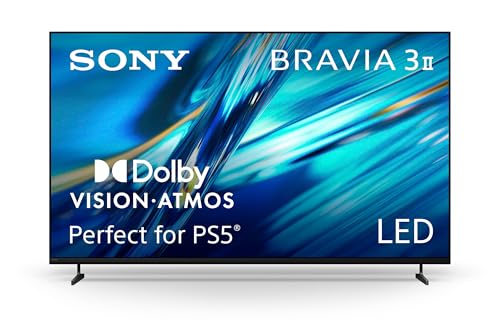
Where the BRAVIA 2 II argues from restraint, the BRAVIA 3 II argues from completeness. Its listing is unusually forthcoming: an XR Processor with AI Technology, Dolby Vision and Dolby Atmos, a 120Hz refresh rate printed outright, four HDMI 2.1 sockets, PlayStation 5 features, and 4K movie credits bundled in. Read together, that is a television specified for a living room that does everything — streamed films in Dolby Vision on Friday, a console on two of those HDMI 2.1 ports on Saturday, broadcast sport smoothed by a genuinely fast panel on Sunday. Four full-bandwidth sockets is a quietly important detail; many sets ration high-spec HDMI to two ports and leave a second console or a soundbar negotiating for space.
The Gemini name in the platform line marks this as Sony’s current-generation Google TV implementation, and the practical consequence is a smarter assistant layer sitting on the familiar interface rather than a redesigned one. The honest boundary is the panel itself: LED, without the Mini-LED backlighting that the TCL and Hisense sets below use to carve a picture into hundreds of dimming zones. Sony’s processing narrows that gap on real content, particularly on faces and low-light scenes where tone mapping matters more than zone counts, but physics keeps a vote. Buy this set for its balance of stated features and processing pedigree, and it rewards that reasoning every day.
Living with the BRAVIA 3 II means living with headroom. Four HDMI 2.1 sockets absorb a console, a PC, a soundbar’s eARC channel and a spare without a switcher; the 120Hz panel leaves motion processing with less repair work to do; Dolby Vision and Atmos arrive together so film streams use the set’s full stated range rather than half of it. The bundled 4K movie credits are a small but telling gesture — Sony expects this set to be fed premium content from its first evening. If a household’s viewing splits evenly between cinema, sport and games, this is the listing whose compromises are hardest to locate, because its specification reads like a checklist written by someone who had been annoyed by televisions before.
Strengths
- 120Hz refresh stated outright, with four HDMI 2.1 ports to feed it
- Dolby Vision and Dolby Atmos both named in the listing
- XR Processor with AI Technology plus bundled 4K movie credits
Trade-offs
- LED backlight rather than Mini-LED, so peak contrast sits below the QM6K and U7
- Gemini platform extras depend on services and regions in a way the listing does not detail
- PS5 features are named as a category, not itemised, in the listing title
Sony’s most complete LED proposition in this line-up rewards a close read of its listing — Check price on Amazon

TCL 55 Inch QM6K
Best for: a bright-room 55-inch screen where Mini-LED contrast, a 144Hz figure and IMAX Enhanced certification headline the brief
Not suited for: a quiet bedroom set used mostly at low volume after dark — its brightness-first design brief is aimed at lit rooms and big content
- Screen size: 55 inches
- Panel and resolution: QLED Mini LED, 4K HDR
- Platform: Smart Google TV with voice remote
- Refresh rate: 144Hz, as stated in the listing
- HDR formats: IMAX Enhanced, HDR10, Dolby Vision
- Audio: Dolby Atmos Audio
- Brightness: High Brightness, per the listing
- HDMI 2.1 port count: Not stated in the listing title — verify with the manufacturer documentation
The QM6K is where this line-up’s backlight story changes gear. Mini-LED replaces the single LED backlight of the Sony sets with a dense field of small diodes grouped into local dimming zones, and the visible result is a picture that can hold a bright window and a shadowed corner in the same frame without washing either one out. TCL pairs that hardware with QLED colour, a 144Hz figure in the listing, and a format list that runs from HDR10 through Dolby Vision to IMAX Enhanced — the last of those being a certification programme with its own mastered content, not merely another HDR badge. High Brightness is stated as a design priority, which tells you the room this set imagines: daylight through real windows, not a blacked-out theatre.
Premium Gaming in the listing is a claim the 144Hz panel figure supports for PC players and for consoles that offer high-frame modes, though the listing does not itemise its HDMI specification, and the spec box leaves that line to manufacturer documentation rather than guessing. Dolby Atmos Audio from the built-in speakers will not replace a soundbar, yet it widens the soundstage enough for dialogue-led television. Set against its own sibling, the T7 reviewed next, the QM6K is the tier where TCL spends money on the backlight first and the badge second — the distinction the article note asked to make explicit, and the one that should drive a choice between them.
The QM6K’s IMAX Enhanced badge deserves a moment of plain explanation, because it is the least self-evident term in its listing. It denotes a certification covering picture and sound standards, with a catalogue of mastered titles produced to those standards; on a Mini-LED panel with high brightness, such content has the dynamic range to actually demonstrate what the backlight was bought for. Outside that catalogue, the same hardware serves ordinary HDR10 and Dolby Vision streams with the zone control they need. TCL has built its recent reputation on exactly this exchange — flagship backlight architecture at a tier where rivals still sell edge-lit panels — and the QM6K is the purest expression of that trade in this group.
Strengths
- Mini-LED backlighting brings local dimming that neither Sony LED set here offers
- 144Hz stated in the listing, with IMAX Enhanced among its formats
- High Brightness design suits rooms that cannot or will not be darkened
Trade-offs
- HDMI specification is not itemised in the listing title
- Brightness-first tuning can feel assertive for late-night low-light viewing
- Voice remote and platform are shared with cheaper sets, so the premium buys panel, not interface
Panel shoppers comparing Mini-LED tiers will find the QM6K’s full listing worth opening — Check price on Amazon

TCL 55 Inch T7
Best for: sport and gaming at 55 inches on a native 120Hz QLED panel, with VRR named in the listing and Dolby Vision and Atmos alongside
Not suited for: chasing the deepest contrast in this group — the T7’s QLED panel lacks the Mini-LED backlight that defines its QM6K sibling
- Screen size: 55 inches
- Panel and resolution: QLED, 4K
- Platform: Smart Google TV; Alexa+ named in the listing
- Refresh rate: Native 120Hz Refresh Rate
- Gaming features: Game Accelerator 240 and VRR, per the listing
- HDR formats: Dolby Vision HDR, HDR10+
- Audio: Dolby Atmos
- Backlight type: QLED without Mini-LED stated in the listing
The T7 exists to answer a fair question: how much of the QM6K experience survives when the Mini-LED backlight leaves the specification? More than sceptics expect. The listing states a native 120Hz refresh rate — native being the operative word, distinguishing a genuinely fast panel from processing-derived motion figures — and adds Game Accelerator 240 with VRR for sports and gaming, Dolby Vision HDR with HDR10+ beside it, and Dolby Atmos. For a sports viewer, that combination is the sport: a fast native panel keeps a ball’s trajectory clean, VRR keeps console frame rates smooth when a game cannot hold its target, and the QLED colour layer keeps kits and pitch grass saturated under stadium lighting.
What the T7 gives back to its sibling is backlight control. Without Mini-LED zones, a dark scene with one bright element — a moon, a scoreboard bug, a streetlamp — will show more halo around that element, and black levels in a dark room sit a step behind. TCL’s own line-up therefore splits cleanly: the T7 spends on motion and formats, the QM6K spends on the backlight, and neither purchase is a mistake so long as the buyer knows which currency they value. Alexa+ appearing in a Google TV listing is a small curiosity worth noting; cross-assistant compatibility widens voice options for homes already invested in Amazon’s ecosystem, and it costs the Google-side experience nothing.
Sport is the T7’s home fixture, and its specification reads accordingly. A native 120Hz panel doubles the temporal information of a standard broadcast feed once processing is engaged, VRR steadies console play, and QLED colour keeps a sunlit pitch from fading into pastel. The Game Accelerator 240 label should be read as the set’s enhanced motion mode rather than a panel claim, and understood that way it is a legitimate tool for fast content rather than a deception. Households whose calendar is organised around fixtures — football weekends, fight nights, Grand Prix Sundays — will extract more weekly value from this set’s motion brief than from a backlight upgrade they would only notice in films they rarely watch.
Strengths
- Native 120Hz panel stated plainly, with VRR and Game Accelerator 240 named
- Dolby Vision, HDR10+ and Dolby Atmos cover the major format bases
- QLED colour at a tier below Mini-LED pricing pressure
Trade-offs
- No Mini-LED backlight, so dark-scene halo control trails the QM6K
- Game Accelerator figure is a processing label; the native panel figure is 120Hz
- Alexa+ naming alongside Google TV may confuse platform purists
Motion-first shoppers should compare the T7’s stated figures directly on its listing — Check price on Amazon

Hisense 65 Inch U7
Best for: a 65-inch gaming wall where a native 165Hz panel, VRR 330 and anti-reflection treatment headline a specification that reads like a challenge
Not suited for: a small or narrow room — 65 inches plus a gaming brief needs viewing distance and wall space to make sense
- Screen size: 65 inches
- Panel and resolution: Mini-LED ULED, 4K UHD, Hi-QLED colour
- Platform: Smart Google TV
- Refresh rate: Native 165Hz
- VRR: VRR 330, as stated in the listing
- HDR formats: HDR10+, Dolby Vision IQ, IMAX Enhanced
- Audio: Dolby Atmos; 2.1.2 channel configuration stated
- Screen treatment: Anti-Reflection
Every line-up needs a ceiling, and the U7 is unambiguously this one’s. Start with the figures its listing is willing to print: native 165Hz, a refresh rate beyond what current consoles can feed and squarely aimed at PC players with serious graphics hardware; VRR 330, extending variable-refresh headroom to match; Mini-LED backlighting under Hisense’s ULED umbrella with Hi-QLED colour; and an anti-reflection treatment that acknowledges the room a 65-inch gaming screen usually lives in — lit, social, and hostile to glossy panels. Dolby Vision IQ, which adapts HDR tone mapping to ambient light, belongs in that same room-aware story, as does IMAX Enhanced for film nights when the gaming chair empties.
The 2.1.2 channel audio stated in the listing deserves its sentence: built-in television sound with dedicated height and low-frequency channels is rare enough that its presence changes the accessory conversation, delaying or shrinking the soundbar purchase for many rooms. None of this makes the U7 the automatic recommendation — its size and gaming emphasis are wasted on a news-and-soap household, and its specification invites a price tier the listing itself must speak for. But as a demonstration of how far Google TV hardware now reaches, it is the set that reframes what the platform’s top end looks like, and the standard against which the other five should be measured for ambition.
There is a temptation to file the U7 under gaming and move on, but its film credentials are woven through the same listing: IMAX Enhanced, Dolby Vision IQ adapting to room light, HDR10+, and that 2.1.2-channel audio stage. A 65-inch Mini-LED with anti-reflection treatment is, in practice, a dual-purpose wall — competitive play in the afternoon, a certified-format film after dark, no reconfiguration beyond an input change. The anti-reflection layer may prove its most-used feature of all, because it defends every kind of content against the windows that share the room. Buyers with the space should weigh that daily dividend as heavily as the headline refresh figure, which most content will never ask the panel to reach.
Strengths
- Native 165Hz with VRR 330 is the strongest motion specification in this group
- Mini-LED backlight, anti-reflection treatment and Dolby Vision IQ suit bright gaming rooms
- 2.1.2 channel built-in audio is stated outright in the listing
Trade-offs
- 65 inches demands space and viewing distance that smaller rooms cannot offer
- Specification headroom exceeds what current consoles can use, so part of the brief serves PC players
- Gaming-first tuning is surplus for purely cinematic viewing
For the full measure of this line-up’s ceiling, the U7 listing lays out every figure — Check price on Amazon

TCL 32 Inch S3
Best for: a kitchen, bedroom or caravan screen where a 1080p picture at close range and a voice remote matter more than 4K bragging rights
Not suited for: a main living-room television — 32 inches and 1080p both show their limits the moment seating distance and screen ambitions grow
- Screen size: 32 inches
- Panel and resolution: LED, 1080p Full HD
- Platform: Google TV
- Voice control: Google Assistant built-in with voice remote; compatible with Alexa
- Model year: 2023 model, per the listing
- Colour: Black
- HDR formats: Not stated in the listing title — verify with the manufacturer documentation
- Refresh rate: Not stated in the listing title — verify with the manufacturer documentation
The S3 closes the list by defending an unfashionable truth: at 32 inches, viewed from a kitchen counter or the foot of a bed, 1080p is not a compromise that eyes can easily detect, and money not spent on unused resolution is money available for the things small-room viewing actually involves — a wall bracket, a streaming subscription, a second set for another room. The listing is correspondingly honest: an LED panel at Full HD, Google TV as the platform, Google Assistant built in with a voice remote in the box, and Alexa compatibility for homes that run Amazon’s assistant elsewhere. That voice remote matters disproportionately at this size, because small sets live in rooms where the remote gets used one-handed, half-awake or flour-dusted.
Dating from 2023, the S3 is the elder of this group, and its listing makes no HDR or refresh claims — the spec box records both silences rather than dressing the set in borrowed flagship language. What it offers instead is the full Google TV experience, Chromecast behaviour and app catalogue included, at the size class where that platform is hardest to find without stepping down to stripped-out hotel-style sets. As a second television it is arguably the most rational purchase on this page; as a main television it would be a category error, and the review says so plainly because a guide that cannot tell the difference is not guiding anything.
Small televisions live or die by friction, and the S3’s listing targets friction directly: a voice remote so searches happen by speech, Google Assistant built in so the set answers rather than merely displays, and a platform identical in structure to the flagships elsewhere in this guide, so moving between rooms never means relearning an interface. Its 2023 vintage even carries an accidental virtue — the model has a track record, its behaviour is documented, and its listing makes no promises that a newer badge would need to keep. For a guest room that hosts grandchildren, a kitchen that runs morning news, or a study that doubles as a console corner, this is the group’s lowest-effort route to a proper smart television.
Strengths
- Full Google TV platform with voice remote at a 32-inch size where rivals often strip features
- 1080p at close viewing distances is a rational match of resolution to screen area
- Google Assistant built in, with Alexa compatibility for mixed-assistant homes
Trade-offs
- 1080p LED panel sits far below the group’s 4K Mini-LED sets for main-room use
- No HDR formats stated in the listing title
- 2023 model year makes it the oldest design in this line-up
Small-room shoppers can confirm the S3’s modest, honest specification on its listing — Check price on Amazon
Side by Side: What Actually Separates These Six
Tables flatten televisions into rows, and the flattening is useful precisely because it exposes which differences are structural — backlight, panel speed, size — and which are vocabulary. Read down the columns and the group’s architecture appears: two LED Sonys built on processing, two TCL 55-inch sets split by backlight tier, one Hisense that outruns everything on motion figures, and one small TCL that competes on fit rather than force.
| Pick | Size | Platform / Processor | Display | Headline trait |
|---|---|---|---|---|
| Sony 43 Inch BRAVIA 2 II | 43 in | 4K Processor X1 | LED 4K HDR | Triluminos Pro colour with PS5 features |
| Sony 55 Inch BRAVIA 3 II | 55 in | XR Processor with AI | LED 4K HDR, 120Hz | Four HDMI 2.1 ports, Dolby Vision/Atmos |
| TCL 55 Inch QM6K | 55 in | Google TV voice remote | QLED Mini LED, 144Hz | IMAX Enhanced, High Brightness |
| TCL 55 Inch T7 | 55 in | Google TV, Alexa+ | QLED, native 120Hz | Game Accelerator 240 with VRR |
| Hisense 65 Inch U7 | 65 in | Google TV, Hi-QLED | Mini-LED ULED, native 165Hz | VRR 330, anti-reflection, 2.1.2 audio |
| TCL 32 Inch S3 | 32 in | Google TV, Assistant built in | LED 1080p | Voice remote at a small size |
The structural divide is the backlight. LED sets — both Sonys and the little S3 — light the whole panel from behind a single layer, leaning on processing to manage contrast. Mini-LED sets — the QM6K and the U7 — divide that backlight into zones that dim independently, which is why their dark scenes hold together in bright rooms. Between those camps, the T7 stands as the control experiment: QLED colour and a fast native panel on a conventional backlight, priced by its absence from the Mini-LED club. Choosing a camp matters more than choosing within one, because camp determines what the picture does at its extremes, while model choice tunes the experience around those extremes.
Size is the second structural fact, and it interacts with resolution. The 32-inch S3 at 1080p and the 65-inch U7 at 4K sit at opposite ends of a pixel-density curve, and both are internally consistent: pixels per inch at normal viewing distances end up closer than the raw numbers suggest. The awkward middle would be a large 1080p set or a tiny 4K one bought for resolution alone. Nobody here commits that error, which is partly luck and partly the filter doing its work.
How to Choose a Google TV Set Without Regretting It
Platform questions come first only because they are the easiest to settle. Google TV’s strengths — content-led home screen, built-in casting, voice search through the remote or the set itself — are uniform across this group, so once the platform is chosen, the decision moves entirely to hardware. That is a liberating simplification: it means a buyer can ignore interface comparisons between these six and spend all their attention on size, backlight and motion, the three things that cannot be changed by a software update after purchase.
What size actually fits the room?
Measure the distance from screen to main seat, then be honest about it. At roughly one and a half metres, the 43-inch Sony fills the view pleasantly for mixed content. At two to two and a half metres, 55 inches is the natural home of the BRAVIA 3 II and both TCL sets. Beyond three metres, or where gaming immersion is the point, the 65-inch U7 stops looking extravagant and starts looking correct. The 32-inch S3 obeys different geometry entirely: counters, desks and bed-ends, where the screen is a companion rather than a destination. Oversizing is the gentler error — few return a set for being too cinematic — but undersizing a main room is the mistake that lingers for years. If 55 inches proves slightly too much wall, look sideways at the 50-inch QLED televisions covered in their own comparison, where the same backlight arguments play out in a smaller frame.
Does the backlight matter more than the badge?
For film-heavy viewing in rooms that darken, yes: backlight architecture decides what black looks like, and black is where LED televisions are judged. Mini-LED’s local dimming, present in the QM6K and U7, keeps letterbox bars dark and night scenes layered. For news, sport and daytime viewing, the difference shrinks dramatically, and processing quality — Sony’s home ground — governs how faces, grass and graphics look instead. Match the backlight to the darkest content you regularly watch, not to the brightest demo reel in a shop.
Making Google TV Feel Like Yours
Out of the box, every Google TV set wants to be a billboard. Ten minutes of setup changes that: sign in so recommendations learn from actual viewing, arrange the app row so the services you pay for sit first, and teach the voice remote your habits by using it for the searches you would otherwise type. Casting deserves a deliberate test on day one — send a phone video to the screen, confirm the handoff is clean, and the feature becomes a reflex rather than a party trick. Profiles for different household members keep children’s rows and adult rows from contaminating each other, which quietly improves every recommendation the platform makes.
Sound and picture presets reward the same small investment. Film-oriented content deserves the set’s most accurate picture mode rather than its most vivid, and each pick above names its HDR formats so you can confirm a Dolby Vision or HDR10+ stream is actually engaging that mode instead of a generic one. Voice remotes with assistant access can also run routines — dimming smart lights when a film starts is the classic — and while such tricks are garnish rather than substance, they are the garnish that makes a platform feel chosen rather than endured. Readers comparing the wider OLED field while they set up will find the platform-agnostic view in our 55-inch OLED television comparison useful background.
Gaming on Google TV: Reading Refresh Claims Properly
Three different numbers circulate in gaming marketing, and this group’s listings contain all three species. Native refresh — the U7’s 165Hz, the T7’s 120Hz — describes the panel itself. A plain stated figure, like the QM6K’s 144Hz or the BRAVIA 3 II’s 120Hz, describes what the listing claims for the set. Processing labels — Game Accelerator 240, Motionflow XR — describe enhancement modes layered on top. Only the first two belong in a purchasing decision; the third is seasoning. VRR, named by the T7 and quantified as 330 on the U7, is the feature that smooths console output when a game engine wavers, and for PS5 and PC players alike it outranks raw refresh beyond 120Hz in everyday feel.
Port specification completes the gaming picture. The BRAVIA 3 II states four HDMI 2.1 sockets outright, which settles the multi-console question in one line. Where a listing stays silent on ports — the QM6K’s case — the correct move is to check the manufacturer documentation before assuming a PC’s high-refresh output will be accepted at full specification. Game mode itself, the low-latency picture setting every modern set carries in some form, should be verified per input during setup, since a console on the wrong preset can feel oddly heavy despite a fast panel underneath it.
Setting Up for Sound: What the Listings Do and Do Not Promise
Only two listings in this group describe their audio in any detail: the BRAVIA 3 II names Dolby Atmos, and the U7 goes further with a 2.1.2 channel configuration. Atmos on a television means the set can decode and render object-based audio through its own speakers with some sense of height; it does not mean the room fills like a cinema. The sensible plan is staged: live with the built-in sound for a fortnight, note whether dialogue clarity or low-end weight is the actual complaint, and then buy the soundbar or receiver that fixes the measured problem rather than the imagined one. Sets whose listings are silent on audio architecture should be assumed to carry conventional stereo speakers until manufacturer documentation says otherwise.
Connection order matters when a soundbar joins. The ARC or eARC socket — where a listing does not specify which HDMI carries it, documentation again decides — should host the bar, leaving the remaining ports for sources. Google TV’s settings will usually detect the bar and route volume control to the television remote, which preserves the one-remote life that makes a platform set pleasant. Gamers adding a bar should confirm that its passthrough does not strip the high-refresh or VRR signals their console sends, a detail no television listing can answer for an accessory it has never met.
A Note on Model Years and Mid-Cycle Revisions
Television ranges refresh annually, and this group spans that cycle openly: the S3 is a 2023 model, the U7 a 2026 one, with the rest between. A newer badge buys platform longevity — more years of Google TV updates — and usually a processor generation, while an older badge buys a proven design at a mature position in its range. Neither is automatically wiser. What matters is that the listing being purchased matches the listing being read: model codes such as K-43S20M2 or 55QM6K exist precisely so a buyer can confirm that the set in the basket is the set whose specification persuaded them, and a thirty-second check of that code prevents the commonest disappointment in online television buying, the near-identical sibling arriving in its place.
Longevity: Keeping a Google TV Set Current for Years
A television now outlives several generations of the phones that control it, so update behaviour deserves a place in the decision. Google TV sets receive platform updates centrally, which historically keeps the interface and app catalogue fresher than manufacturer-proprietary systems of the same age; the practical advice is to enable automatic updates, restart the set monthly so pending updates apply cleanly, and resist sideloading unfamiliar apps onto a device that sits at the centre of a home network. Storage fills slowly with cached thumbnails and abandoned apps, and a five-minute clear-out each season keeps the home screen as responsive as the day the set arrived.
Panel care on LED and Mini-LED sets is mostly a matter of not inviting problems: avoid static images parked for entire days, let the set’s own pixel and panel maintenance routines run when prompted, and keep brightness at the level the room needs rather than the level the showroom used. None of the six sets here asks for exotic handling, which is part of their appeal against more temperamental display technologies. Treated ordinarily, the limiting factor on their lifespan is more likely to be an HDMI standard changing than a panel wearing out — another argument for the BRAVIA 3 II’s four full-specification sockets and for checking port details before purchase rather than after.
Missteps That Turn a Good Google TV Into a Grumble
Buying the panel and ignoring the distance
A 65-inch set at a metre and a half does not feel cinematic; it feels like sitting in the front row of a cinema someone else chose. Screen size errors compound daily and cannot be fixed in settings, so the tape measure outranks the discount when the two disagree.
Reading a processing label as a panel figure
Game Accelerator 240 and Motionflow XR are real features, but neither converts a panel into a 240Hz display. The listings in this guide separate native figures from enhancement labels, and purchase decisions should honour that separation even when marketing blurs it.
Assuming every Google TV set casts and assists identically
The platform is shared, yet the S3 names Google Assistant as built in while others emphasise voice remotes, and the T7 adds Alexa+ compatibility. Voice and casting details live in individual listings; a home built around one assistant should confirm its path on the specific model.
Leaving the vivid preset in charge
Factory picture modes are tuned for shop floors, with colour and brightness pushed until subtlety leaves the room. Ten minutes in the accurate preset — Filmmaker-style modes where offered, standard cinema modes elsewhere — returns skin tones and shadow detail that the purchase price already paid for.
Frequently Asked Questions
Is Google TV the same as Android TV?
Google TV is the current interface layer that sits on the Android TV foundation, organising the home screen around content and profiles rather than app icons. Every set in this guide lists Google TV as its platform, so the experience across them is consistent in structure even where assistants and remotes differ in detail.
Can I cast from a phone to all six sets?
Casting is a core Google TV behaviour, and the platform’s presence on every model here is the basis for expecting it. The listings emphasise it unevenly — voice and assistant features get more title space than casting does — so a buyer for whom casting is the central use should still confirm the function on the specific listing before ordering.
Which of these suits a PlayStation 5 best?
The BRAVIA 3 II states the most complete console brief in one line: 120Hz, four HDMI 2.1 ports and PS5 features. The U7 counters with higher stated motion figures — native 165Hz and VRR 330 — for players who also game on PC. The BRAVIA 2 II names exclusive PlayStation 5 features at 43 inches for smaller rooms.
Does 1080p on the 32-inch S3 actually look soft?
At the distances small sets are watched from — across a kitchen, from a pillow — a 1080p 32-inch panel resolves more detail than the viewing geometry asks for. It looks soft only when pressed into main-room service at distances its size was never meant to cover.
What separates the TCL QM6K from the TCL T7?
Backlight and motion priorities. The QM6K is a QLED Mini-LED set with a 144Hz figure and IMAX Enhanced; the T7 is a QLED set with a native 120Hz panel, VRR and Game Accelerator 240. Same brand, same size, different spending decisions — the QM6K buys contrast, the T7 buys motion value.
Will these sets work with Alexa as well as Google Assistant?
Two listings say so explicitly: the T7 names Alexa+, and the S3 states Alexa compatibility alongside its built-in Google Assistant. For the remaining models the listings centre on Google-side voice, so an Alexa-centred home should verify per model rather than assume symmetry.
How long will a Google TV set stay usable?
The panel hardware in this group should serve for many years of ordinary viewing; the variable is software. Google TV’s central update path is the best available insurance, and enabling automatic updates plus an occasional restart keeps a set current. Buyers planning a decade of service should favour the newer models here, while the 2023 S3 suits roles where a shorter horizon is acceptable.
Do I need a streaming stick with any of these televisions?
No — the platform is built into every set, with casting and app access as core behaviour. A stick still has two niche uses: travel, and reviving an older television elsewhere in the house. Bolting one onto a Google TV set duplicates the interface and complicates the remote situation without adding capability.
Which set here handles a bright room best?
The QM6K states High Brightness as a design aim and the U7 adds an anti-reflection treatment, making those two the bright-room candidates. The Sonys rely on processing rather than stated brightness, and the S3’s small screen suits shaded corners. Curtains remain the cheapest picture upgrade ever sold, whatever the badge.
Final Recommendation
Match the room first and the badge last. A compact space with a console in it points to Sony’s 43-inch BRAVIA 2 II and its processing-led brief. A main room wanting one set that does everything without drama points to the BRAVIA 3 II, whose listing simply states more of what matters — 120Hz, Dolby Vision and Atmos, four HDMI 2.1 ports — than any rival at its size. Bright rooms and film fans should step to the TCL QM6K’s Mini-LED backlight, motion-led value hunters to the T7, and PC-and-console players with the wall for it to the Hisense U7, the group’s undisputed specification ceiling. The little S3, finally, is the set to buy without a flicker of guilt for kitchens and bedrooms, where its honesty about what it is becomes its charm.
One last discipline before ordering: read the chosen model’s listing once more, top to bottom, and confirm that every feature doing persuasive work in your decision actually appears in its text. The reviews above were written under that rule, and a purchase made under it rarely needs the returns window. Sizes, backlights and refresh figures are the facts; everything else is atmosphere.
Google TV itself fades into the background of each recommendation, which is the platform’s compliment to itself: once chosen, it stops being a decision and becomes the furniture of viewing. What remains is a screen, a room, and the fit between them — and on a quiet evening, when the voice remote finds the film you half-remember and the first scene opens exactly as dark or as bright as it should, the fit is the only specification you will still be thinking about.