What's inside
- Key Takeaways
- Quick Picks
- How Did We Assemble This Theatre Intercom Shortlist?
- Why Does Full Duplex Change How a Crew Works?
- Which System Matches Your Crew, Venue and Show?
- Which Production Intercom Fits Your Backstage Crew Size?
- How Should a Company Test Intercom Coverage in Its Own Venue?
- What Mistakes Do Companies Make When Buying Crew Comms?
- How Do You Run Comms Discipline During a Performance?
- How Should Comms Be Planned During the Technical Rehearsal?
- Which Roles Should Wear Single-Ear and Which Should Wear Dual-Ear?
- How Do Batteries Behave Across a Long Run?
- Should a Company Rent Comms or Buy a System Outright?
- What Changes When the Crew Includes Young Performers’ Chaperones?
- How Does Theatre Intercom Differ From Film Set Intercom?
- What Does Troubleshooting Look Like When a Headset Drops Mid-Show?
- How Should a New Crew Member Be Inducted Onto Comms?
- Why Do Two SYNCO Ranges Differ Between Sibling Models?
- How Do Outdoor and Site-Specific Productions Stress These Systems?
- What Should the Get-Out Teach You About Your Next Purchase?
- How Does Comms Quality Change the Audience’s Experience Without Them Knowing?
- What Does a Sensible Spares and Labelling System Look Like?
- How Should Venue Managers Specify Comms in a Refurbishment?
- What Does the First Production on a New System Usually Reveal?
- How Do Dance and Movement-Heavy Shows Change Headset Choice?
- What Is the Place of a Wired Backup in a Wireless World?
- How Should Companies Handle Comms for Relaxed and Accessible Performances?
- Why Does the Interval Matter to Comms Planning?
- How Do You Keep a Shared Kit Hygienic Across a Whole Season?
- A Closing Note on Buying for the Company You Actually Have
- One More Consideration: The Show File
- And a Practical Word on Volume at the Ear
- Final Recommendation
- Frequently Asked Questions
- Related Guides
As an Amazon Associate I earn from qualifying purchases. This post may contain affiliate links at no extra cost to you.
widgetverdict.com is reader-supported. When you buy through links on our site, we may earn an affiliate commission.
Where to buy: production intercom is sold as complete crew systems rather than single headsets, so the listings below are full kits — headsets, radios or beltpacks and chargers matched at the factory for a stated number of users.
Let us be direct about what the best headsets for theater actually are: they are not headphones for listening to music, and nobody in this roundup will make a cast album sound prettier. They are production intercom systems — the full-duplex voice network that lets a stage manager call cues, a lighting operator confirm them, and a followspot team adjust in real time without anyone touching a button or raising a voice in a silent auditorium. When a theatre person says “headsets,” this is the equipment they mean: the cans on the crew, not the cast.
Full duplex is the defining technology. Like a telephone call rather than a walkie-talkie conversation, a duplex intercom lets crew talk over each other, interrupt, and confirm instantly — essential when a cue lands early or a piece of scenery misbehaves mid-scene. Every pick here is a wireless full-duplex system sized for a stated crew, from four users to eight, and the shopping decision is mostly arithmetic plus environment: how many people must be on comms, how large and obstructed is the venue, and how long is the working day from load-in to load-out. Range and battery figures quoted in listings are manufacturer claims measured in friendly, open conditions; a brick fly tower and a steel grid will tax them, and we flag that wherever a number appears.
One catalogue reality deserves stating plainly: SYNCO’s XTalk family occupies four of the six places, because that is what the current market for affordable crew intercom actually looks like. The Hollyland Mars T1000 brings a base-station architecture from the broadcast world, and the Williams AV Digi-Wave 400 brings a transceiver-based system with a proper carry case from the professional audio world. The spread is honest: four variations on one popular theme, plus two genuinely different philosophies for comparison.
Key Takeaways
- These are production intercom systems for crews, not listening headphones for audiences.
- Full-duplex conversation — talk and hear simultaneously — is the non-negotiable core feature.
- Crew size is fixed by the kit: four, five or eight users depending on the system chosen.
- Stated ranges are open-condition manufacturer claims; masonry and steel scenery will shorten them.
- Battery claims of a full working day or more suit load-in-to-load-out schedules when they hold up.
- Architecture splits three ways: all-in-one headsets, base-station beltpacks, and bodypack transceivers.
Quick Picks
| Pick | Badge | Why it earns its place |
|---|---|---|
| SYNCO XTALK X5 Intercom System | The five-person starter | A 2.4GHz full-duplex headset system for five users with a stated 1148ft range and 24-hour working time. |
| SYNCO XTALK XPRO 4-User Intercom System | The long-range four | Four headsets, a stated 1640ft range and 24-hour battery aimed at events and stage work. |
| SYNCO XTALK Master8 | The eight-crew master set | An eight-person full-duplex system with a stated 1640ft range and 30-hour battery. |
| SYNCO Xtalk XMax2 | The dual-ear isolator | Dual-ear noise isolation, AI noise cancellation and Bluetooth in a full-duplex headset system. |
| Hollyland Mars T1000 | The base-station system | A full-duplex intercom with beltpacks and dual-device cascade connection for larger productions. |
| Williams AV Digi-Wave 400 (8 Participants) | The transceiver professional | Eight DLT 400 transceivers with headset microphones and a heavy-duty carry case. |
How Did We Assemble This Theatre Intercom Shortlist?
We required full-duplex wireless operation first, because push-to-talk systems change how a crew works — a stage manager calling a sequence of cues cannot spare a hand or a half-second for a transmit button. We required complete kits second: a theatre company buying comms needs every headset, charger and radio speaking the same protocol on day one, not a science project of compatible parts. Third, we checked that each system’s stated crew size maps to a real production role list — stage manager, deputy, lighting, sound, flys, followspots, wardrobe, chaperones — rather than being an abstract number.
We also weighed the working day honestly. A theatre call can run from a morning load-in through an evening performance, so stated working times in the listings were read against that arc; systems claiming a full day or more earned their place, and every figure is reported as the maker’s claim, not our stopwatch result. Finally, we kept three architectures in the mix so a company can choose its philosophy: headsets that are themselves the radios, a base station with beltpacks, or professional transceivers with separate headset microphones. Volunteer-run venues will recognise the same sizing exercise in Best Wireless Headsets for Churches, where media crews face a gentler version of the same problem.
Why Does Full Duplex Change How a Crew Works?
On a push-to-talk channel, conversation becomes correspondence: one voice at a time, each message framed and finished. Backstage, that discipline collapses under real conditions — a warning needs to interrupt a count, a confirmation needs to land while the instruction is still being given, and the stage manager’s “standby” sequence flows directly into “go” without a channel change. Full duplex restores natural speech, including the small sounds that carry meaning on comms: the intake of breath before a cue, the half-spoken “wait—” that stops a mistake. Crews switching from radios to duplex intercom routinely describe the change as the difference between reporting the show and conducting it.
There is a discipline to duplex too. An open channel hears everything, so mic technique — muting during coughs, conversations and costume changes — becomes a crew virtue, and the stage manager’s channel etiquette sets the culture. Good systems make muting a single obvious control, because a control that requires looking will not be used in the dark. When you evaluate the picks below, weigh the mute as heavily as the microphone.
Which System Matches Your Crew, Venue and Show?

SYNCO XTALK X5 Intercom System — The five-person starter
The X5 is the entry point into the XTalk family: five full-duplex headsets on a 2.4GHz link, a stated range of 1148 feet in open conditions, and a stated working time of 24 hours. Five is a meaningful crew number in real theatres — stage manager, a deputy or assistant, lighting, sound, and one roaming role such as flys or props — which makes the X5 a complete department for a small venue or a school hall rather than a starter fragment of one. The all-in-one headset design means there are no beltpacks to clip, no cables to snag on scenery, and nothing to distribute except the headsets themselves at the half-hour call.
The trade for that simplicity is headcount rigidity: a five-person system serves five people, and the night a production needs a sixth voice — a followspot pair, a chaperone for a youth cast — the system has no native answer. Companies should count their largest realistic crew, including the person who only joins for the finale’s scenery change, before falling for the X5’s tidiness. For a fixed small team, though, its proposition is beautifully plain: charge five headsets, hand them out, run the show.
- Crew size: five users per the kit name
- Link: 2.4GHz full-duplex intercom
- Range: 1148 feet stated by the maker, open conditions
- Working time: 24 hours stated in the listing title
Strengths
- Five headsets cover a complete small-venue crew.
- No beltpacks means faster issue at the call.
- Day-long stated stamina suits load-in schedules.
Trade-offs
- A sixth crew member has no native seat.
- All-in-one headsets concentrate wear on one unit.
- Stated range will shrink inside masonry venues.
Best for: a school or fringe venue running a fixed five-person crew through full show days.
Not suited for: a producing house whose crew grows to seven on musicals, because the five-user ceiling is structural rather than a setting.
The X5’s Amazon listing confirms its five-headset contents.

SYNCO XTALK XPRO 4-User Intercom System — The long-range four
The XPRO 4 trims the crew to four and spends the difference on reach: a stated 1640 feet of range with the same 24-hour working time claim. Four users is the classic minimal production team — stage manager, lighting, sound, and one stage hand — and the extra stated range speaks to venues where those four are spread out: a followspot perched far upstage of the booth, an outdoor festival stage, a site-specific production in a warehouse where the “booth” is a scaffold tower across a yard. SYNCO also positions this set toward weddings and coaching, which tells you its intended habitats include open ground as much as enclosed theatres.
Read the range figure with the honesty this guide applies everywhere: it is a clear-condition claim, and your venue’s walls will spend much of it. What the figure does signal is link budget headroom — a system rated generously tends to hold a connection through the one awkward wall between the booth and the dock door. For a compact crew in a spread-out space, that headroom is worth more than extra headsets they will never issue.
- Crew size: four users per the kit name
- Range: 1640 feet stated by the maker, open conditions
- Battery: 24 hours working time stated in the title
- Format: all-in-one wireless intercom headsets
Strengths
- Generous stated range suits dispersed venues.
- Four headsets match the minimal pro crew exactly.
- Full-day stated battery covers double-show days.
Trade-offs
- Four users is a hard ceiling for growing teams.
- Open-air strengths matter less in a compact studio.
- Headsets alone cannot add a wired base position.
Best for: a four-person crew working a large or outdoor venue where distance, not headcount, is the enemy.
Not suited for: a receiving house running six-person musical crews, because two essential voices would be left off the channel entirely.
See the XPRO 4’s Amazon page for its stated range basis.

SYNCO XTALK Master8 — The eight-crew master set
The Master8 is the XTalk family’s answer to a full production department: eight users, a stated 1640-foot range and a stated 30-hour battery, organised around a master headset concept. Eight voices cover the real musical-theatre roster — stage manager, deputy, assistant, lighting, sound, flys, followspots, wardrobe — with the master unit anchoring the system. The 30-hour claim, read as a maker’s best case, translates practically into multi-show endurance: a two-show day with margin, or a tech day that starts before the building wakes.
A master-based design asks one organisational question: who wears the master, and what happens to the network if that headset is charging, dropped or assigned to the person who leaves at the interval? Sensible companies make the stage manager the master by doctrine and keep the charger discipline around that unit strictest. With that settled, the Master8 offers the largest all-in-one crew in this roundup without stepping up to base-station architecture, which keeps issue-and-collect at the call as simple as the smaller XTalk sets.
- Crew size: eight users per the kit name
- Range: 1640 feet stated by the maker
- Battery: 30 hours stated in the listing title
- Structure: master headset anchors the group
Strengths
- Eight users cover a full musical-theatre department.
- Longest stated battery in the XTalk group.
- All-in-one format keeps distribution simple at scale.
Trade-offs
- The master headset is a single point of discipline.
- Eight headsets mean eight charging slots nightly.
- Small venues pay for capacity they never use.
Best for: a producing theatre running eight-person crews across two-show days.
Not suited for: a two-hander studio production with a three-person crew, because five of its headsets would live in the charger as expensive spares.
The Master8’s Amazon listing details its master arrangement.

SYNCO Xtalk XMax2 — The dual-ear isolator
The XMax2 is the specialist: a full-duplex headset with dual-ear coverage, stated noise isolation, AI noise cancellation and Bluetooth, with a stated range of 500 metres. Dual-ear design is a deliberate backstage choice. A single-ear headset leaves one ear open to the room — useful for a stage manager listening to the show — while dual-ear coverage suits crew stationed in genuinely loud positions: beside a speaker stack, in a followspot booth with fan noise, or on a film set near a generator. The AI noise cancellation aims at the microphone path, keeping a voice intelligible against that local racket.
The Bluetooth addition is intriguing for production-adjacent work — a sound engineer checking playback, a director taking a call between scenes — though on a live show channel it should be treated as a convenience for downtime rather than a show feature. The XMax2’s crew sizing is less headline-driven than its siblings, so buyers should confirm the exact user configuration on the listing against their roster. Choose it when your problem is noise at a position, not numbers on a roster.
- Coverage: dual-ear design with stated noise isolation
- Microphone: AI noise cancellation per the listing
- Extras: Bluetooth connectivity included
- Range: 500 metres stated by the maker
Strengths
- Dual-ear isolation serves loud crew positions.
- Noise-cancelling mic fights local machinery noise.
- Bluetooth adds downtime utility for engineers.
Trade-offs
- Dual-ear wear reduces awareness of the room.
- Crew sizing needs confirming against your roster.
- Isolation suits some roles and hinders others.
Best for: followspot, sound and set-crew positions working beside loud equipment who still need full-duplex comms.
Not suited for: a stage manager who must hear the performance with one open ear, because dual-ear isolation removes exactly that channel of information.
Check the XMax2 configuration options on its Amazon listing.
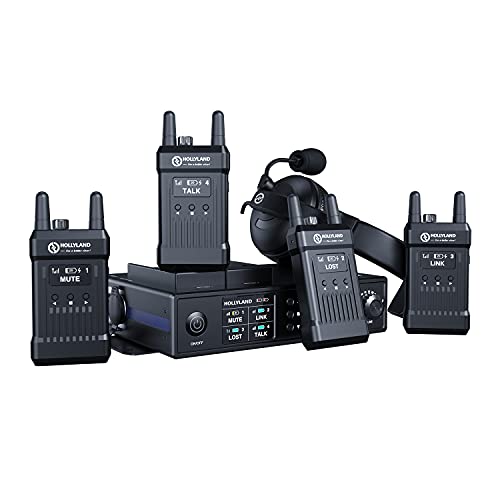
Hollyland Mars T1000 — The base-station system
The Mars T1000 represents the broadcast architecture: a base station serving beltpack units with dynamic headsets, full-duplex communication, and a dual-device cascade connection that lets two systems link for larger productions. Beltpacks change the ergonomics of comms — the radio rides at the waist, the headset becomes light, and a crew member can swap a headset without surrendering the transceiver. The base station also gives the production a fixed home position, typically at the stage manager’s desk, with the system administered from one place.
Cascade is the feature with a future: a company that outgrows one system can link a second rather than replacing the first, which is how rental houses and larger venues think. Hollyland lists churches, events and broadcast among its habitats, and the design suits any venue whose comms are semi-permanent infrastructure rather than a kit carried in per show. The cost of the architecture is setup: a base needs power, placement and a few minutes of intention that all-in-one headsets skip.
- Architecture: base station with beltpack units
- Link: full-duplex wireless intercom
- Expansion: dual-device cascade connection stated
- Headset: dynamic ear headset with microphone
Strengths
- Cascade linking lets the system grow by addition.
- Beltpacks keep the worn headset light.
- A fixed base suits permanent venue installations.
Trade-offs
- Base station needs power and placement each setup.
- Beltpack cables introduce a snag point.
- Touring one-nighters may find setup overhead heavy.
Best for: a venue installing comms semi-permanently with plans to expand crew size over seasons.
Not suited for: a touring fringe company striking the whole rig nightly into one car, because the base-and-beltpack architecture rewards a settled home.
The Mars T1000’s Amazon page explains its cascade arrangement.

Williams AV Digi-Wave 400 (8 Participants) — The transceiver professional
The Digi-Wave 400 kit is the professional-audio entry: eight DLT 400 transceivers, eight MIC 157 headset microphones and a heavy-duty carry case, supporting up to eight participants. The transceiver model differs from headset-centric systems in an important way — the radio is a versatile bodypack that can serve intercom duty here and other duties in the Williams AV ecosystem, and the headset is a component rather than the whole device. For venues, rental departments and institutions that already think in terms of managed audio inventory, that component logic is familiar and maintainable.
The included hard case is not a footnote; it signals the intended life of the kit — transported, stored, inventoried, deployed — and protects an eight-user investment accordingly. Williams AV’s background in assistive listening and professional communication also means the system’s design language is institutional rather than consumer: expect configuration depth that rewards a technician’s setup session and then serves a crew straightforwardly. For a theatre sharing comms with a conference or education operation, that dual citizenship is valuable.
- Contents: eight DLT 400 transceivers
- Headsets: eight MIC 157 headset microphones
- Capacity: up to eight participants per the listing
- Transport: heavy-duty carry case included
Strengths
- Component design suits managed audio inventories.
- Hard case protects a full eight-user investment.
- Institutional design language rewards proper setup.
Trade-offs
- Configuration depth exceeds casual users’ patience.
- Bodypack-plus-headset means two parts per user.
- Ecosystem value shows only if you use the ecosystem.
Best for: an institution or venue running eight-person crews that wants comms as managed, cased infrastructure.
Not suited for: a casual amateur group wanting to charge and go in five minutes, because the Digi-Wave rewards a technician’s configuration session first.
The Digi-Wave kit’s full contents are listed on its Amazon page.
Which Production Intercom Fits Your Backstage Crew Size?
| System | Users | Architecture | Stated headline figure |
|---|---|---|---|
| SYNCO XTALK X5 | 5 | All-in-one headsets | 1148ft range, 24H working time |
| SYNCO XTALK XPRO 4 | 4 | All-in-one headsets | 1640ft range, 24H battery |
| SYNCO XTALK Master8 | 8 | Master headset group | 1640ft range, 30H battery |
| SYNCO Xtalk XMax2 | Depends on the kit version chosen | Dual-ear headsets | 500m range, AI noise cancellation |
| Hollyland Mars T1000 | Base plus beltpacks | Base station system | Dual-device cascade |
| Williams AV Digi-Wave 400 | 8 | Transceivers plus headsets | Heavy-duty case included |
All stated figures are the manufacturers’ own claims under favourable conditions; treat them as relative headroom indicators, not venue guarantees. Count your crew honestly, add the one person everyone forgets, and let that arithmetic lead. Teams coordinating larger volunteer rosters can compare notes with Best Headsets With Mics for Classroom Settings — a different problem, but the same discipline of matching hardware to actual headcount.
How Should a Company Test Intercom Coverage in Its Own Venue?
Walk the show. Put the stage manager at the desk, then send a headset wearer through every working position at performance conditions: behind the cyc, inside the fly tower, down in the dock, out front at the mix position, and into the dressing-room corridor where calls are relayed. Note where the audio thins or drops, and remember that an audience’s bodies, a full set and a closed fire curtain all change the radio picture from an empty-room rehearsal test. Test again during a tech rehearsal with scenery in place; the steel frame that arrived on Tuesday is the obstacle nobody modelled on Monday.
Log the dead spots rather than merely discovering them. A venue that knows its comms geography can position a base station intelligently, assign the roaming roles to the strongest positions, and warn a visiting company in advance. Outdoor and found-space companies should test at the actual site at the actual hour, because neighbouring networks and structures join the experiment uninvited. The field-expedient version of this discipline appears in Best Wireless Walkie Talkies With Headsets, where range claims meet buildings and trees with predictable results.
What Mistakes Do Companies Make When Buying Crew Comms?
Undercounting the crew is the perennial error: the roster on paper excludes the chaperone, the second followspot, the ASM who only joins for the finale, and the director who wants ears during previews. Buy for the largest honest roster. The second error is believing the range on the box; every figure in this category is an open-field courtesy, and masonry venues spend range like a taxi meter. Third, companies neglect the charging plan — eight headsets need eight sockets, a labelled shelf and a person whose job it is, or the system fails socially before it fails electronically. Fourth, they skip the etiquette conversation, so a duplex channel fills with chat until the stage manager stops hearing cues inside the noise.
A fifth mistake is mixing architectures casually. An all-in-one headset fleet and a beltpack fleet do not intermarry; a company should choose its philosophy and expand inside it, as the Mars T1000’s cascade and the XTalk family’s sizes allow. Finally, buyers forget spares thinking: one dropped headset during a run should trigger a swap, not a crisis, which argues for the kit whose replacement unit is easiest to source in your world.
How Do You Run Comms Discipline During a Performance?
The stage manager owns the channel, and everyone else borrows it. Establish the vocabulary before opening: standby warnings with sequence numbers, acknowledgements by name, and silence as the default state between cues. Mute discipline is a physical habit — mic off during costume changes, coughs, laughter and any conversation not meant for the whole crew — and new crew should be taught it during the tech, not corrected during the show. Keep a spare headset at the desk, charged, because the fastest fix for a failing unit mid-performance is a swap at the interval rather than a diagnosis in the dark.
After the show, the system goes home: headsets collected by name, docked in order, faults reported while memory is fresh. Companies that treat comms as infrastructure — maintained, logged, drilled — get seasons of service from a kit; companies that treat it as a gadget get a drawer of flat batteries and a return to shouting from the wings.
How Should Comms Be Planned During the Technical Rehearsal?
The tech is where intercom stops being equipment and becomes choreography. Before actors arrive, the stage manager should run a channel check position by position, confirming that every post can hear and be heard, and noting any location where a headset swap or a base repositioning is needed. Cue-to-cue sessions then stress the channel realistically: rapid standby sequences, simultaneous confirmations, the followspot team’s quiet running commentary. Weak discipline surfaces immediately — cross-talk, unmuted asides, acknowledgements without names — and the tech is the cheapest place to fix it, because the only audience is the company itself.
Build the comms plot like a lighting plot. Who is on the channel for each act, who joins only for scene changes, whose headset gets handed over at the interval and to whom — write it down and pin it at the desk. Handovers are where systems fail socially: a headset passed without a word arrives with the previous wearer’s volume, mute state and earpiece position. A ten-second handover ritual — volume centred, mic live, quick check — prevents the incoming operator from missing their first cue while troubleshooting somebody else’s settings.
Which Roles Should Wear Single-Ear and Which Should Wear Dual-Ear?
The stage manager’s open ear is an instrument: it hears the performance, the audience’s mood, the actor who has dried. Single-ear headsets, which most all-in-one systems here provide, preserve that channel and suit deputies, assistants and wardrobe staff who must also hear the room around them. Dual-ear coverage, the XMax2’s speciality, belongs where the room is the enemy — a followspot booth with fan roar, a sound position near a stack, a fly floor during a loud transformation scene. There, isolation protects the cue feed from competition.
Mixed deployment is normal and sensible: a company might run its general crew on a single-ear system and give one or two noisy posts a dual-ear solution, provided the systems can coexist or the posts are served within one architecture. What matters is assigning by acoustic reality rather than by seniority. The most experienced operator in the building may need the least isolation, and the newest followspot volunteer the most.
How Do Batteries Behave Across a Long Run?
Opening week flatters every battery; week six tells the truth. Charge cycles accumulate, and a headset that just made a two-show day in previews may start fading during the second act months later. Companies should build the charging roster around the longest day in the schedule — the tech day, not the ordinary show day — and treat any unit that cannot complete it as a candidate for the spare position. Stated working times in listings, from the XTalk family’s day-long claims to the Master8’s thirty hours, are starting points for planning rather than guarantees, and the wise company verifies them against its own calendar during the first production.
Rotation helps. If the kit includes any slack — a spare headset, a lighter-attended matinee — rotate units so cycles distribute evenly instead of one headset absorbing every performance. Log faults against unit numbers, not against the system generally; a single tired battery masquerades as a system problem until somebody counts. These habits are dull, cumulative and exactly the difference between comms that last a season and comms that last five.
Should a Company Rent Comms or Buy a System Outright?
Rental suits the one-off: a single large production whose crew size dwarfs the company’s usual needs, or a venue testing whether duplex comms suit its working culture before committing. Purchase suits repetition — a school producing termly shows, a fringe company with a fixed team, a receiving house running weekly changeovers. The systems in this roundup sit at the purchase-friendly end of the market, where owning an XTalk set or a Digi-Wave kit costs less across a season than repeated rental of equivalent capacity, and ownership brings the unglamorous benefits of familiarity: the crew learns one system’s controls, the charging shelf gets built once, and the spares conversation becomes concrete.
The hybrid path is common: own the core system sized to your ordinary crew, and rent or cascade additional capacity for the annual big production — the Mars T1000’s cascade connection exists for precisely that growth pattern. Whichever route a company takes, the decision should be made against the production calendar, not against a single show’s excitement.
What Changes When the Crew Includes Young Performers’ Chaperones?
Youth productions quietly expand the comms roster. Chaperones coordinating dressing rooms, quick changes and the movement of young performers between stage and hall often need a channel voice, and safeguarding practice favours clear, logged, open communication over shouted corridor messages. That can add two or three users nobody counted at the budgeting meeting — one more argument for buying to the largest honest roster, and for systems like the Master8 or the Digi-Wave kit whose eight positions absorb the surprise. Fit matters too: headsets will be worn by occasional users with no comms habits, so simple controls and a patient five-minute induction at the tech repay themselves nightly.
How Does Theatre Intercom Differ From Film Set Intercom?
The equipment overlaps — the XMax2 and Mars T1000 both list filming among their habitats — but the rhythms differ. Theatre comms are cue-driven and continuous across a performance of fixed shape; film comms are burst-driven, reorganising around setups, with long silences between intense coordination. A theatre company’s system lives on a charging shelf in one building; a film unit’s system travels, gets rained on, and serves a crew assembled for the production. Buyers crossing between worlds should weight permanence and simplicity for theatre, and transport protection — the Digi-Wave’s hard case is the emblem — for location work. Either way, full duplex is the shared foundation, because both worlds run on warnings that cannot wait for a channel to clear.
What Does Troubleshooting Look Like When a Headset Drops Mid-Show?
The protocol is triage, not repair. First, the affected operator signals by hand or runner and switches to the spare at the desk at the next safe moment; a show cannot pause for diagnostics. Second, the stage manager notes the time, the unit number and the symptom — silence, crackle, one-way audio — because intermittent faults are only diagnosable from patterns. Third, after the show, the unit is tested at the positions where it failed, with a known-good headset for comparison, separating a unit fault from a venue dead spot. Companies that skip the note-taking step chase the same ghost for a month.
Prevention is mostly placement and power. Bases belong where their signal sees the stage rather than behind a stack of flats; headsets belong on chargers whenever they are off heads; and the one wall every venue has — the thick one between the booth and the stage — should be mapped during the tech so nobody’s role depends on winning an argument with masonry. A system tested honestly in its own building, like the coverage walk described earlier, rarely surprises anyone mid-performance.
How Should a New Crew Member Be Inducted Onto Comms?
Give them fifteen supervised minutes, not a headset and a hope. Cover the physical controls by touch — volume, mute, power — then the channel culture: listen first, speak by name, acknowledge every instruction addressed to you, and keep the channel empty when you have nothing the show needs. Let them shadow a full act from a spare position before they hold a live post. The induction is also the moment to fit the headset properly; a boom placed too far from the mouth makes a new operator sound distant and tempts them to shout, which the whole channel then hears. Small courtesies compound: a well-inducted crew sounds calm, and a calm channel makes a calm show.
Why Do Two SYNCO Ranges Differ Between Sibling Models?
Attentive readers will notice the X5’s stated 1148 feet beside the XPRO and Master8’s stated 1640 feet, and the XMax2’s 500 metres, which converts to roughly the longer figure’s neighbourhood. These are different product generations and test presentations within one brand, and the honest reading is comparative rather than absolute: the longer-stated models carry more link headroom on paper. None of the numbers promises a distance inside your building. Use them to rank headroom within the family, then let the venue walk-test arbitrate what your walls actually permit — a method this guide applies to every claim in the roundup, including battery life.
How Do Outdoor and Site-Specific Productions Stress These Systems?
Move a production out of its building and every assumption inverts. Range stops being about walls and becomes about distance and weather; the XPRO 4’s generous stated reach and the Master8’s headroom earn their keep across a festival site, while rain, wind noise at the microphone and a crew spread between a stage, a control tent and a dressing marquee test seals and windscreens that indoor work never challenges. Power becomes logistics too — a charging shelf is now a charging crate, run from whatever the site provides, and a system whose stated battery covers the full working day removes one generator circuit from the plan. Companies working site-specific shows should rehearse the comms plan at the site, at show hour, with the audience’s eventual footprint imagined in, because an empty field at noon is a different radio environment from the same field full of people at dusk.
What Should the Get-Out Teach You About Your Next Purchase?
Every production ends with a load-out, and load-outs are where comms systems reveal their ownership cost: how long collection and charging take, which headset came back damaged, which position kept dropping during the run. Companies that debrief their kit as honestly as their performances buy better the second time. Perhaps the roster outgrew five and the Master8’s eight is the real size; perhaps the base-station discipline of the Mars T1000 suited the venue better than all-in-one freedom; perhaps one dual-ear post proved the XMax2’s worth nightly. Record it while the bruises are fresh. The next production’s budget meeting will thank the person who wrote it down.
How Does Comms Quality Change the Audience’s Experience Without Them Knowing?
An audience never hears the intercom, yet they feel its quality in every tight cue: the lighting change that lands on the musical button rather than after it, the scenery that arrives silently because the fly crew heard a warning in time, the quick blackout that covers a missed entrance. Sloppy comms leak into the visible show as hesitations and near-misses; crisp comms disappear into the illusion that the production simply works. That invisibility is why experienced companies fund comms before they fund almost any other backstage upgrade, and why the stage manager’s headset is best understood as a conducting baton that happens to carry audio.
It also explains the emotional temperature of a good channel. A crew that trusts its comms stays unhurried during the inevitable mid-show problem, because information moves faster than anxiety. New companies often discover, one production after buying a proper system, that the largest thing they purchased was calm.
What Does a Sensible Spares and Labelling System Look Like?
Number every headset on the housing and on its charger slot, and keep the pairing sacred: unit three lives in slot three, so a glance at the shelf shows what is missing and a fault report names a specific device. Keep one complete spare position beyond the roster where the budget allows — in practice that means an eight-user kit serving a seven-person crew, or a five serving four — because the spare is the difference between an interval swap and a compromised second act. Label the base or master with the venue’s name and a contact number; production kit migrates between companies at festivals, and honest labels bring honest returns. None of this costs much. All of it is the difference between owning a system and merely possessing some headsets.
How Should Venue Managers Specify Comms in a Refurbishment?
When a venue refurbishes, comms deserve a line in the specification beside dimmers and drapes. The questions are architectural: where will the base or master live, which positions must the system reach through the building’s actual fabric, how many crew does the venue’s largest hiring company bring, and where does the charging shelf go with power and ventilation? A system chosen during refurbishment can be tested against the empty building and then re-tested with a set in place, giving the venue a coverage map it can hand to visiting companies. Retrofitting those answers later costs more and learns less. Managers equipping a multi-use hall should also consider the Digi-Wave pattern — cased, countable, lendable — because a venue’s comms may serve a school on Tuesday and a professional company on Saturday, with an inventory check between.
What Does the First Production on a New System Usually Reveal?
Three discoveries arrive on schedule. First, the roster was wrong somewhere — a role nobody planned joins the channel by the second performance, which is why headroom in the kit keeps proving wise. Second, one position in the building eats signal, and the coverage map drawn at the tech gets its first correction in red pen. Third, the crew’s etiquette, not the hardware, becomes the limiting factor by the end of week one, and the stage manager’s calm enforcement of names, acknowledgements and silence decides whether the channel stays an instrument or decays into a chat room. Companies should schedule a short comms review after the first production closes, while all three discoveries are still fresh enough to act on: adjust the roster, move the base, re-drill the etiquette, and write the changes into the venue’s show file for the next team.
How Do Dance and Movement-Heavy Shows Change Headset Choice?
Movement punishes loose kit. A dance captain’s headset, a stage hand resetting furniture at speed, a deputy stage manager crossing the wings during a blackout — each needs a headset that stays seated through exertion and a microphone boom that does not migrate toward the cheek. All-in-one headsets vary in clamp and balance, and the honest test is physical: jog in place, bend, turn sharply, and see what shifts. Beltpack systems move the failure point to the cable and clip, which some movers prefer because the head itself carries almost nothing. Companies staging movement-heavy work should run that undignified test during the tech with every design under consideration; the headset that survives choreography earns the run, and the one that needs readjusting every scene will eventually cost a cue.
What Is the Place of a Wired Backup in a Wireless World?
Prudent venues keep one wired path alive — a desk position on a cable, an old beltpack in the drawer — not from nostalgia but from triage logic. Wireless systems fail in wireless ways: interference, a flat master, a dead spot discovered at the worst moment. A single wired position at the stage manager’s desk guarantees that the person calling the show is never the person troubleshooting the network. It costs little to maintain, it anchors the system during RF mysteries, and it gives a visiting company one known-good reference point when their own kit misbehaves in your building. Wireless freedom backstage is real, but it is freedom built on a wired floor.
How Should Companies Handle Comms for Relaxed and Accessible Performances?
Relaxed performances change backstage traffic: house lights may stay partly up, audience movement is expected, and additional staff — access hosts, a signer, an audio describer — join the coordination picture. The describer in particular works on a tight audio leash, and the comms plan must accommodate extra ears without diluting the cue channel; some venues run description on a separate feed while the describer monitors comms silently. Planning that in advance, and counting those extra users in the roster, is another reason the eight-position systems in this roundup exist. Accessibility backstage and accessibility in the auditorium are the same virtue wearing two coats, and a comms system sized with headroom serves both.
Why Does the Interval Matter to Comms Planning?
The interval is the system’s pit stop: headsets come off, faults get reported, a swapped unit changes hands, and the second act’s roster — often smaller, sometimes stranger — assembles. Companies that treat the interval as a comms checkpoint catch the dying battery and the crackling boom while there is still light and time; companies that let headsets wander to dressing rooms and bars spend the second act’s opening cues discovering absences. A simple rule serves most venues: headsets live on heads or on chargers, never on laps, ledges or the top of the piano. The rule sounds petty until the night it saves a finale.
How Do You Keep a Shared Kit Hygienic Across a Whole Season?
Headsets are worn against skin and hair for hours, shared across a company, and stored warm — a combination that asks for a cleaning routine rather than occasional guilt. Wipe ear cushions and headbands after each production block with a cloth barely dampened with a manufacturer-safe cleaner, replace foam windscreens on booms regularly, and let everything dry fully before the case or shelf closes on it. Assign headsets by name for a run where numbers allow; people care for equipment that is recognisably theirs, and hygiene improves as a side effect of pride. A kit that smells neutral in month three is a kit whose company can recruit volunteers without embarrassment — a small operational detail with an outsized effect on morale.
A Closing Note on Buying for the Company You Actually Have
Brochures imagine a company with a tidy roster and a generous stage; your company has a roster that changes at the interval and a stage shared with a drum kit. Buy for that company. The right system in this roundup is the one whose user count swallows your messiest production, whose architecture matches how settled your venue is, and whose charging routine your actual stage manager — not an idealised one — will perform at midnight after a two-show day. Judge every claim in that light and the catalogue sorts itself.
One More Consideration: The Show File
Whatever system you choose, write its setup into the production’s show file: base or master position, channel assignments by role, the charging roster, the known dead spot and its workaround. Shows get remounted, stage managers get succeeded, and memory leaves with people. A page of comms documentation turns next season’s first tech from archaeology into a checklist, and it costs twenty minutes on a quiet afternoon. Companies that document own their systems; companies that rely on memory merely rent them from the past.
And a Practical Word on Volume at the Ear
Crew headsets sit close to ears for entire working days, so set channel volumes conservatively at the desk check and resist the spiral where each operator creeps upward against a noisy neighbour. A system that sounds clear at moderate level — good seals, a well-placed boom, a quiet channel culture — protects both concentration and comfort across a long run, and it leaves headroom for the one moment in a show when a warning genuinely needs to cut through.
Final Recommendation
Let the roster decide. A fixed crew of five should take the SYNCO XTALK X5 and enjoy the simplest issue-and-collect routine in the group; a compact crew spread across a big or outdoor space should take the XPRO 4’s range headroom instead. Full musical departments belong on the Master8, while the XMax2 serves the noisy positions — followspot booths and stack-side posts — where dual-ear isolation is the point. Venues thinking in seasons rather than shows should weigh the Mars T1000’s cascade growth or the Digi-Wave 400’s cased, component professionalism. Whichever system you choose, test it in your building at show conditions and drill the etiquette before opening night: comms do not fail at the read-through, they fail at the moment everyone needs them, and preparation is the only feature that has ever prevented that.
Frequently Asked Questions
Are these headsets for the audience or the crew?
The crew, entirely. These are production intercom systems that let backstage teams talk to each other during a show. Audience listening systems are a different product family with different transmitters and receivers.
What does full duplex actually change backstage?
It lets crew speak and listen simultaneously, like a phone call, so warnings can interrupt counts and confirmations can land instantly. Push-to-talk forces turn-taking, which breaks down exactly when a cue sequence gets urgent.
Can I add one more headset to a kit later?
It depends on the architecture. Master-based and base-station systems may allow expansion or cascading, while fixed all-in-one kits are sized as sold. Confirm expansion on the specific listing before assuming a sixth or ninth user can join.
Why is the stated range so much longer than my venue needs?
Range is measured in open conditions to give systems headroom; walls, steel and scenery consume it quickly. A generous figure is best read as insurance for the one awkward path between your booth and your furthest crew position.
Who should wear the master or sit at the base?
Conventionally the stage manager, because that role originates most cue traffic and needs the most reliable position. Whoever it is, their unit deserves the strictest charging discipline in the company.
How many headsets should a school production buy?
Count the fullest crew the school’s biggest show needs — stage management, lights, sound, stage hands, plus a spare — and buy to that number. A five-user kit serves most school halls; an eight-user kit serves musicals with followspots and wardrobe on comms.
Related Guides
Related crew-communication reading: Best Wireless Headsets for Churches for volunteer media teams, Best Headsets With Mics for Classroom Settings for managed fleets of wired headsets, and Best Wireless Walkie Talkies With Headsets for push-to-talk radio bundles.


