What's inside
- Key Takeaways
- Quick Picks
- How Did We Shortlist Intercom for Church Production Teams?
- Why Does a Service Need Full-Duplex Comms at All?
- Which Kit Fits Your Sunday Roster and Building?
- Church Production Intercoms Matched Against Crew and Hub Needs
- How Should a Church Test Coverage in Its Own Sanctuary?
- What Mistakes Do Churches Make When Buying Production Comms?
- How Do You Build a Volunteer-Friendly Comms Routine?
- How Does Intercom Change the Quality of a Livestream?
- What About Weddings, Funerals and the Midweek Calendar?
- How Should a Church Handle RF Neighbours: Wireless Microphones and Wi-Fi?
- How Do You Train a Rotating Volunteer Team Without Exhausting Them?
- How Should a Media Leader Present This Purchase to a Budget Committee?
- What Changes for Multi-Site and Plant Churches?
- How Do Seasonal Services Stress the System Differently?
- What Should the Production Desk Setup Include Beyond Headsets?
- How Do You Handle a Headset Failure Five Minutes Before the Service?
- Why Does the Producer Role Matter More Than Any Headset?
- How Should Accessibility Shape the Production Team’s Own Setup?
- What Does a Year of Ownership Teach Most Churches?
- How Can a Church Pilot Intercom Before Committing the Full Budget?
- A Note on Sound Levels at the Volunteer’s Ear
- How Should Churches Plan for Growth Without Buying Twice?
- What Does the First Month on a New System Usually Look Like?
- How Should the Team Debrief Without Discouraging Volunteers?
- Why Do Some Churches Keep a Simple Radio Alongside Intercom?
- How Should a Church Care for Headsets Shared by Many Hands?
- A Final Stewardship Thought Before the Shortlist Decides
- What Should Visitors and Guest Teams Expect From Your System?
- How Do You Know the System Has Become Part of the Church?
- One Practical Caution About Batteries and Spares
- And One Word About Recording the Service
- A Short Word on Trying Before the Committee Decides
- Final Recommendation
- Frequently Asked Questions
- Related Guides
As an Amazon Associate I earn from qualifying purchases. This post may contain affiliate links at no extra cost to you.
widgetverdict.com is reader-supported. When you buy through links on our site, we may earn an affiliate commission.
Where to buy: church production intercom is sold in crew-sized kits, and the sets gathered here are complete systems — matched headsets with their charging and grouping hardware included — rather than single headsets bought one at a time.
The best wireless headsets for churches are not for the congregation and not for the choir; they belong to the production team — the volunteers running sound, cameras, slides and the livestream who need to coordinate a service without ever being heard by it. A modern church service is a small live broadcast: a producer counting in a video transition, a camera operator framing the baptism, an audio volunteer riding a pastor’s microphone, all of them needing a private, instant voice channel while the room hears only worship. Wireless full-duplex intercom is how that channel exists, and the six systems here cover the realistic span of church crews, from a two-person media duo to a nine-volunteer broadcast team.
Churches shop for intercom differently from theatres, and the differences shape this roundup. Crews are volunteers, often rotating weekly, so the system must be learnable in the fifteen minutes before a service and forgiving of occasional users. Budgets are stewardship money, approved by committees, so a kit must justify its size against an honest roster rather than ambition. And the building is usually one fixed sanctuary, which means coverage can be tested once, properly, and then trusted for years. Within that frame, the real axes are crew size, whether a hub with talk groups is needed, and how the system handles muting — because a volunteer’s accidental open microphone during a prayer is this category’s defining embarrassment.
Two families dominate the picks. Hollyland’s Solidcom line brings environmental noise cancellation, push-to-talk mute discipline and, in one model, a hub that can split a crew into groups. SYNCO’s XTalk sets bring simpler, smaller kits — two, three and four users — at the scale most small and mid-sized churches actually staff. There is deliberately no overlap with the theatre roundup’s hardware: different buildings, different crews, different shortlist, even though the underlying full-duplex idea is shared.
Key Takeaways
- These intercom systems serve the production crew — sound, cameras, slides and stream — not the platform or the pews.
- Full-duplex conversation lets a producer direct during a service without push-to-talk delays.
- Crew size runs from two users to nine across the six kits; count your largest Sunday, not your average.
- A hub model adds talk groups, letting audio and video crews share a system without sharing every word.
- Mute and PTT discipline protect quiet moments; single-ear headsets keep one ear on the room.
- Stated ranges are open-condition claims; sanctuary walls and balconies will spend them quickly.
Quick Picks
| Pick | Badge | Why it earns its place |
|---|---|---|
| Hollyland Solidcom C1 Pro (8-Person) | The full broadcast crew set | ENC noise cancellation, full duplex for eight, a stated 1100ft range and PTT mute on single-ear headsets. |
| Hollyland Solidcom SE Pro (9 Users) | The nine-volunteer roster | The largest crew here, on a 1.9GHz link with ENC and a stated 1312ft range. |
| Hollyland Solidcom C1 Pro with HUB (5-Person) | The grouped-crew hub system | Five users plus a hub offering AB group talk, PTT mute and expandability. |
| SYNCO XTalk X4 Intercom Headset System | The four-person media team | Four full-duplex headsets with a stated 24-hour working time for event-style production. |
| SYNCO XTalk X3 | The three-volunteer Sunday | Three-person full duplex with a stated 1148ft range and 24-hour working time. |
| SYNCO XTalk X2 | The two-person starter pair | A two-headset full-duplex pair for the smallest media teams, with 24-hour stated working time. |
How Did We Shortlist Intercom for Church Production Teams?
We began with the volunteer test: could a new team member be handed a headset at 8:40 on a Sunday morning and be useful by the first song? That favoured systems with obvious controls, factory-matched headsets and no per-service configuration ritual. Next came mute behaviour, because the cost of an open mic in a sanctuary is measured in reverence, not decibels; PTT mute designs and decisive mute buttons scored heavily. Crew-size honesty came third — we mapped each kit against real church rosters, from a two-person team in a small parish to a full broadcast crew with a producer, two cameras, audio, graphics, a stage manager and a stream operator.
We also separated hub from hub-less designs deliberately. A hub with grouping, like the C1 Pro HUB model, solves a coordination problem that raw headcount cannot: audio volunteers do not need every camera note, and camera operators do not need every audio note. Churches running a single mixed channel for a small team should not pay for grouping they will never switch on. Finally, all range and battery numbers are reported as the manufacturers state them, under the open conditions manufacturers favour; a sanctuary’s stone, steel and balcony geometry will tax every one, and the testing section below explains how to learn your building’s truth. Churches also running education ministries may find the fleet thinking in Best Headsets With Mics for Classroom Settings familiar — different hardware, same stewardship discipline.
Why Does a Service Need Full-Duplex Comms at All?
Because a service, like a show, is a sequence of cues that cannot pause. The producer must warn the camera before the pastor moves, confirm the lyric slide before the verse arrives, and call the stream’s lower-third while the audio volunteer is mid-adjustment. Push-to-talk radios force those exchanges into turns, and turns introduce the fatal half-second where a moment passes unfilmed or a transition lands late. Full duplex restores the natural overlap of a control-room conversation — interruptible, confirmable, quiet — and it does so at conversational volume, which matters in a room built for reverence.
There is a pastoral dimension too. Volunteers serve better when they are calm, and calm comes from a channel where help is one spoken word away rather than a button-press and a hope. A new camera operator who can whisper a question and hear a patient answer mid-service learns faster and stays longer. Intercom, bought well, is partly a volunteer-retention purchase disguised as an audio purchase.
Which Kit Fits Your Sunday Roster and Building?

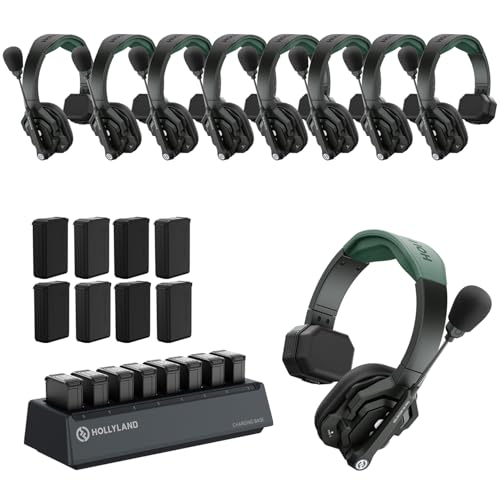
Hollyland Solidcom C1 Pro (8-Person) — The full broadcast crew set
The eight-person C1 Pro is the flagship pattern for a church running a genuine broadcast: producer, director, two or three cameras, audio, graphics and a stream operator, all on one full-duplex channel. Its stated features target exactly that environment — ENC noise cancellation to keep voices clean against a live room, a stated 1100-foot range that reads as headroom for a large sanctuary and its overflow spaces, PTT mute for disciplined quiet, and single-ear headsets that leave every volunteer one ear on the service itself. Single-ear design is a considered choice in worship: the camera operator still hears the congregation sing, the audio volunteer still hears the room they are mixing for.
Eight is also a commitment. Eight headsets need a charging home, a sign-out habit and a named owner on the media team, or the kit dissolves into drawers across the building. Churches whose largest honest crew is five should admire this set and buy a smaller one; churches genuinely fielding eight will find the C1 Pro’s combination of cancelling, muting and single-ear awareness the most complete expression of the brief in this roundup.
- Crew size: eight users per the kit name
- Noise handling: ENC cancellation stated in the title
- Range: 1100 feet stated by the maker, open conditions
- Controls: PTT mute, single-ear headset design
Strengths
- Eight positions cover a full broadcast roster.
- ENC keeps voices clear against a live room.
- PTT mute enforces quiet-moment discipline.
Trade-offs
- Eight headsets demand real charging logistics.
- Capability exceeds a small church’s actual roster.
- Single channel means all talk is shared talk.
Best for: a church livestreaming with a producer-led crew of seven or eight volunteers.
Not suited for: a four-volunteer media team, because half the kit would sit charged and unused while its cost sits on the ministry budget.
The C1 Pro eight-person kit is detailed on its Amazon listing.
Hollyland Solidcom SE Pro (9 Users) — The nine-volunteer roster
The SE Pro stretches the roster to nine users on a 1.9GHz link, with ENC noise cancellation and a stated 1312-foot range. Nine is the number for churches whose production has quietly become a department: multiple camera positions including a roaming operator, a dedicated stream producer, a separate broadcast audio mix, graphics, lighting and a stage manager for the platform party. The 1.9GHz band is worth noting because it places the system away from the crowded 2.4GHz neighbourhood where the building’s Wi-Fi and half the congregation’s phones also live — a thoughtful address in a RF-noisy sanctuary.
The listing mentions a 3.5mm single-ear headset arrangement, which keeps the worn unit light and the room audible. As with its eight-person sibling, the honest question is roster truth: nine positions serve a church that can name nine recurring roles, including the person coordinating the stream chat and the volunteer running lyrics. If your biggest Sunday names six, buy for six and let this set represent the growth path rather than the purchase.
- Crew size: nine users per the kit name
- Band: 1.9GHz version stated in the title
- Range: 1312 feet stated by the maker
- Headset: 3.5mm single-ear design
Strengths
- Largest crew capacity in this roundup.
- 1.9GHz operation sidesteps Wi-Fi congestion.
- ENC supports clean voices in lively rooms.
Trade-offs
- Nine headsets is a serious volunteer infrastructure.
- Oversizing wastes stewardship funds visibly.
- All nine users share one conversation space.
Best for: a large church whose broadcast team genuinely fields nine named roles on a Sunday.
Not suited for: a mid-sized church with a five-person team and growth hopes, because unused positions do not retain volunteers — used ones do.
See the SE Pro’s Amazon page for its nine-user configuration.

Hollyland Solidcom C1 Pro with HUB (5-Person) — The grouped-crew hub system
This five-person C1 Pro variant trades raw headcount for organisation: a hub that supports AB grouping, so the crew can split into two talk groups — audio in one ear of the ministry, video in the other — while leadership bridges them. Five users with grouping serves a church whose problem is not numbers but noise: a producer who needs the whole picture, camera operators who need only camera talk, and an audio volunteer who needs silence to mix by, punctuated by occasional coordination. The listing also describes the system as expandable, which fits a church planning to grow the crew around the hub over time.
The hub itself needs a home — typically at the production desk, powered and placed for coverage — and that small infrastructure step is the price of the grouping intelligence. Churches should also note the G-Mount battery reference in the listing when planning spares and charging. For a mid-sized church with distinct audio and video sub-teams, this is the most thoughtfully shaped kit in the roundup: fewer headsets than the flagships, more structure than the simple sets.
- Crew size: five users plus hub
- Grouping: AB group talk via the hub
- Controls: PTT mute, full-duplex 1.9GHz link
- Growth: described as expandable in the listing
Strengths
- Talk groups separate audio and video chatter.
- Hub anchors coverage at the production desk.
- Expandable design respects a growth plan.
Trade-offs
- The hub needs power and placement every setup.
- Grouping is wasted on a single small team.
- Five seats cap the roster despite the structure.
Best for: a church with distinct audio and video sub-teams whose producer needs to bridge two conversations.
Not suited for: a single-team church where everyone needs to hear everyone anyway, because the grouping that defines this kit would never be switched on.
The hub version’s grouping is explained on its Amazon listing.

SYNCO XTalk X4 Intercom Headset System — The four-person media team
The XTalk X4 is the straightforward four-person system: full-duplex headsets, a stated 24-hour working time, and no hub to place or groups to configure. Four is the natural size of a healthy small-church media team — one person on sound, one on slides or lyrics, one on a camera, and a producer or second camera — and the X4 serves exactly that roster with the all-in-one simplicity that volunteer rotas love: headsets out of the charger, a two-minute briefing, service. SYNCO positions the set for event production and film as well, and that event DNA suits churches whose production includes conferences, weddings and youth events beyond Sunday.
The absence of a hub is a feature here, not a lack: coverage comes from the headsets’ own link, setup is wherever the team stands, and a midweek event in the hall uses the same kit with no infrastructure. The discipline burden shifts to the team — one channel, four voices, mute etiquette agreed in advance — which a stable team of four handles easily.
- Crew size: four users per the kit name
- Link: full-duplex wireless headsets, no hub
- Working time: 24 hours stated in the title
- Use: events and production work per the listing
Strengths
- Four headsets match the classic small media team.
- No hub means setup happens anywhere.
- Day-long stated stamina covers events beyond Sunday.
Trade-offs
- A fifth recurring role has no seat.
- One shared channel carries all four voices.
- No grouping for separate audio and video talk.
Best for: a small church running a stable four-person team across services and midweek events.
Not suited for: a church adding a livestream producer and second camera this year, because the four-user ceiling arrives exactly with that growth.
The X4’s contents and claims are set out on its Amazon page.

SYNCO XTalk X3 — The three-volunteer Sunday
The X3 serves the three-person reality of many congregations: one volunteer on sound, one on media and slides, one coordinating or running a single camera. Its stated figures — a 1148-foot range in open conditions and 24-hour working time — are generous for a sanctuary, which is the point: a small team should never think about the radio layer at all. Three headsets also means three charging slots, a one-shelf home, and an induction conversation that takes minutes for a new volunteer joining the rota.
Smallness is this kit’s virtue and its boundary. A three-person system disciplines a church to define its core roles honestly, and many churches discover three well-coordinated volunteers outperform a larger, confused team. But the volunteer who joins for Christmas, the youth service with an extra camera, the wedding with a coordinator — those days have no native seat here, and the church should decide in advance whether such days borrow a solution or whether the X4’s extra position is worth it from the start.
- Crew size: three users per the kit name
- Range: 1148 feet stated by the maker
- Working time: 24 hours stated in the title
- Format: all-in-one full-duplex headsets
Strengths
- Three headsets suit the commonest small rota.
- Tiny charging footprint lives on one shelf.
- New volunteers learn the system in minutes.
Trade-offs
- Special services quickly outgrow three seats.
- No hub, grouping or expansion path in-kit.
- One absence reshapes the whole team’s plan.
Best for: a congregation whose Sunday production genuinely runs on three named volunteers.
Not suited for: a church whose Christmas and Easter productions double the crew, because those flagship services would leave key coordinators off the channel.
Confirm the X3’s three-headset contents on its Amazon listing.

SYNCO XTalk X2 — The two-person starter pair
The X2 is the smallest possible intercom: two full-duplex headsets, a stated 1148-foot range and 24-hour working time, built for a pair who must coordinate across distance. In church life that pair is recognisable — the sound volunteer in the balcony and the media volunteer at the front, the wedding coordinator and the organist-side stage hand, the stream operator and the one camera. Two-person comms sound modest until you have watched two volunteers try to coordinate a procession with hand signals; a private voice channel transforms the working relationship.
SYNCO also positions the X2 toward boats and events, and that general-purpose honesty is fine: a small church’s pair will serve the building clean-up day and the youth trip too. The X2 is equally a starter in the strategic sense — a church unsure whether intercom culture will take root can prove it with two headsets before a committee funds a crew system. If the pair gets worn every week, the case for an X4 or a Solidcom writes itself from usage rather than enthusiasm.
- Crew size: two users per the kit name
- Range: 1148 feet stated by the maker
- Working time: 24 hours stated in the title
- Format: two-way full-duplex headset pair
Strengths
- The simplest possible introduction to intercom.
- Two headsets are trivial to charge and store.
- Useful far beyond Sunday production.
Trade-offs
- A third coordinator is excluded by design.
- No path to grouping as the team grows.
- Success may argue for a second purchase soon.
Best for: a two-volunteer media duo coordinating across a sanctuary, or a church piloting intercom before scaling.
Not suited for: an established five-person production team, because three of its members would be coordinating by gesture while two talk.
The X2 pair’s details are on its Amazon listing.
Church Production Intercoms Matched Against Crew and Hub Needs
| System | Users | Hub or groups | Defining trait |
|---|---|---|---|
| Hollyland Solidcom C1 Pro 8 | 8 | Single channel | ENC, PTT mute, single-ear |
| Hollyland Solidcom SE Pro | 9 | Single channel | 1.9GHz link, ENC |
| Hollyland Solidcom C1 Pro HUB | 5 | Hub with AB groups | Expandable from the desk |
| SYNCO XTalk X4 | 4 | None | 24H stated working time |
| SYNCO XTalk X3 | 3 | None | 1148ft stated range |
| SYNCO XTalk X2 | 2 | None | Two-headset starter pair |
Read the table from your roster outward: name the roles on your largest recurring service, then choose the smallest system that seats them all with the structure — hub or no hub — your sub-teams actually need. For the push-to-talk alternative some smaller ministries still use, Best Wireless Walkie Talkies With Headsets explains where radios fit and where duplex intercom wins.
How Should a Church Test Coverage in Its Own Sanctuary?
Test during a rehearsal, not an empty weekday. Place volunteers at the real positions — the mix desk at the back, the camera platform, the front media station, the stage door, the overflow or cry room if the stream team coordinates there — and have the producer run a cue sequence at service volume. Bodies, a lifted platform and a full choir loft change the radio picture from an empty building’s, and a balcony’s metal railing has ended more coverage assumptions than any specification sheet. Note the weak positions in the media team’s binder, and if a hub model is in play, try its placement at the desk versus a side wall before drilling anything permanent.
Repeat the test with the building’s other systems awake: the Wi-Fi under Sunday load, the wireless microphones, the hearing loop, the stream encoder. Intercom that behaves on a quiet Tuesday can meet a different RF world at 10:30 on Sunday, and the 1.9GHz models’ appeal becomes concrete in exactly that comparison. Churches that document the test — positions, results, hub placement — hand every future volunteer a map instead of a mystery.
What Mistakes Do Churches Make When Buying Production Comms?
Buying for the average Sunday instead of the largest recurring one tops the list; Easter, Christmas and the youth-led service are when coordination matters most and when an undersized kit excludes exactly the extra volunteers those days depend on. The second mistake is ignoring the mute culture — choosing a system without thinking about how a volunteer’s cough, aside or whispered conversation with a neighbour stays off the channel during prayer. Third, churches forget the charging home, so headsets migrate to cars and kitchens and the rota inherits a weekly treasure hunt. Fourth, they skip induction: a new volunteer handed a headset without the fifteen-minute briefing will either say nothing all service or everything, both of which are failures of training rather than of the person.
A subtler mistake is buying a hub’s complexity for a team that talks as one group, or denying a growing broadcast team the grouping it needs because the smaller kit was cheaper in the meeting. Structure should follow the org chart the church actually has. And finally, churches sometimes let the purchase outrun the roster — nine headsets do not create nine volunteers, and stewardship means seating the team you have while leaving a sane path to the team you are building.
How Do You Build a Volunteer-Friendly Comms Routine?
Make the system boring in the best way. Headsets live in one labelled place, charged, in roster order. The call time includes a two-minute channel check with names, so every volunteer hears their own voice confirmed before the prelude. The producer owns the channel’s culture: talk in short phrases, acknowledge by name, mute by default when your role is listening, and save every non-service conversation for after the benediction. New volunteers shadow one service with a headset and no duties, learning the channel’s rhythm before they carry a cue.
After the service, headsets return to the same shelf, faults get written in the binder while they are fresh, and the kit is ready for the midweek wedding or funeral without a scramble. That routine, repeated, is what turns a purchase into infrastructure — and it is also how a media team quietly teaches reliability to every new person who joins it. Home viewers of the stream, incidentally, benefit from the same production calm that the congregation’s own listeners pursue with tools like those in Best Headsets to Use With TV, where personal audio solves the opposite side of the glass.
How Does Intercom Change the Quality of a Livestream?
Online viewers judge a stream by its recoveries. A camera caught out of position, a lyric slide a verse behind, a microphone left low under the first song — every congregation has watched these happen, and every one of them is a coordination failure before it is a skill failure. A producer on a duplex channel fixes them in the moment: reposition the camera before the reading, warn graphics before the chorus, ask audio for the pastor’s channel while the prayer still covers the adjustment. The stream’s audience never learns how close the moment came, which is the definition of production working. Churches that began streaming with shouted whispers and chat windows consistently describe intercom as the purchase that made the stream feel produced rather than merely transmitted.
There is a subtler gain: volunteers who can talk stay. A camera operator alone with their mistakes disengages; a camera operator coached quietly through a service by a patient producer improves weekly and volunteers again. Retention is the scarcest resource in church media, and a channel that carries encouragement as easily as instruction is a retention tool wearing an audio badge.
What About Weddings, Funerals and the Midweek Calendar?
Sunday is the system’s showcase, but the midweek calendar is where a kit quietly earns its approval. A wedding needs a coordinator, a sound volunteer and someone at the door moving on the same cues as the processional. A funeral needs gentle, invisible coordination — the family must never see the machinery — and a headset channel lets the team adjust music, slides and seating without a single visible conference. Youth events need supervision-friendly communication across a hall. A hub-less kit like the XTalk sets travels to these duties effortlessly because it carries no infrastructure; a hub system serves them from its desk. Churches evaluating cost per use should count these occasions honestly — a system used three times a week is a different stewardship proposition from one used twice a month.
How Should a Church Handle RF Neighbours: Wireless Microphones and Wi-Fi?
A sanctuary is a small radio city. The pastor’s wireless microphone, the worship team’s in-ear transmitters, the congregation’s phones and the building’s Wi-Fi all share the air with the intercom. Most conflicts announce themselves as dropouts or grit at predictable moments — often when the room fills and the network load peaks. Churches can reduce collisions by keeping an inventory of what transmits in the building, by favouring intercom bands that sit away from the busiest traffic — the 1.9GHz Solidcom models exist partly for this reason — and by testing the full system under Sunday conditions rather than weekday calm. When a dropout appears, change one variable at a time and note the result in the binder; RF troubleshooting by folklore wastes more volunteer hours than any other media task.
How Do You Train a Rotating Volunteer Team Without Exhausting Them?
Design for the fifteenth volunteer, not the first. Keep a one-page channel guide taped inside the charging shelf: who talks, who mostly listens, the three phrases every cue uses, and the mute rule in bold. Pair each new volunteer with an experienced buddy for two services, the first with a headset and no responsibility, the second carrying one simple role. Keep the vocabulary small and liturgical in its consistency — the same words for the same moments every week — because rotating teams cannot carry a large phrasebook. And thank people specifically for comms discipline when it happens; a producer who names good muting in the debrief will get more of it than one who only names failures.
How Should a Media Leader Present This Purchase to a Budget Committee?
Committees fund outcomes, so present outcomes. Describe the services the system serves — Sunday worship, the stream’s online congregation, weddings, funerals, youth events — and the failure it removes, in one sentence each. Bring the roster arithmetic: the largest crew, the roles named, the kit sized to them, and the smaller kit you rejected as a false economy because it excludes the Easter volunteers. Name the total cost of ownership honestly: the kit, a charging shelf, spare batteries or headsets in time, and the volunteer hours saved weekly by coordination that works. Stewardship language respects the room — this is the church’s money held in trust — and a leader who has visibly refused to oversize the purchase earns trust for the next request. That is why this roundup repeatedly steers smaller churches to smaller kits: credibility is a ministry asset too.
What Changes for Multi-Site and Plant Churches?
A church planting a second campus inherits a coordination problem with no building history: a launch team spread between a school hall’s stage, a borrowed sound desk and a foyer. Portable, hub-less kits shine here because the system is wherever the headsets are charged the night before, and the same kit that serves launch Sunday serves the midweek rehearsal in a living room. As the campus settles, a hub system can anchor the production desk permanently while the portable kit migrates to the next plant or the youth ministry. Thinking of intercom as a fleet with a life cycle — pilot small, anchor where it settles, redeploy what moves — keeps a growing church from buying the same capability three times under three budget lines.
How Do Seasonal Services Stress the System Differently?
Christmas and Easter are the load tests of church production: extra services, extra volunteers drafted from the wider congregation, a building at capacity, and a production team running on rehearsal fumes. A system sized to the average Sunday fails precisely then, which is why this guide insists on sizing to the largest recurring roster. Seasonal planning should also include a pre-season comms rehearsal — twenty minutes where the expanded team learns the channel before the carol service depends on it — and a battery audit, because headsets that cruised through autumn may meet their first back-to-back double-service day in December. Churches that treat the season as the design case find the ordinary Sundays effortless by comparison.
What Should the Production Desk Setup Include Beyond Headsets?
The desk is the system’s home, and small investments there multiply the kit’s value: a power strip dedicated to chargers so nothing gets unplugged for a vacuum, a labelled shelf or case where each headset’s place is obvious, a printed roster card showing who wears which unit, and the binder where faults and coverage notes accumulate. A small desk lamp with a warm bulb helps more than it should — volunteers manage cables and controls by sight in dim sanctuaries. None of this is glamorous, and all of it is what separates a system that serves for a decade from a purchase that dissolves into the building’s cupboards by year two.
How Do You Handle a Headset Failure Five Minutes Before the Service?
Rehearse the failure before it happens. The order of operations: swap, don’t diagnose — the spare or the least-critical position’s headset moves to the critical role; reassign roles so the producer and audio are covered first; if a position must go without comms, give that volunteer a runner or a sightline to a covered position and a simplified cue sheet. After the service, the faulty unit goes into the binder’s fault log with its number and symptom, and it does not return to the shelf until it has passed a full rehearsal test. Teams that have practised this once treat a real failure as a drill they recognise; teams that have not, improvise under the worst possible lighting — a congregation arriving.
Why Does the Producer Role Matter More Than Any Headset?
Intercom amplifies whoever leads the channel. A producer who narrates the service calmly — warning, confirming, thanking — turns six headsets into a team; an anxious channel makes six volunteers share one person’s stress. Churches choosing a system should therefore invest equally in the role: pick producers for temperament, train them on the vocabulary, and protect them from double duty, because a producer also running a camera is a producer halved. The technology in this roundup is ready before the culture is, in most buildings; the churches that sound professional on comms got there by treating the producer’s chair as a ministry appointment rather than a leftover task for whoever arrives first.
How Should Accessibility Shape the Production Team’s Own Setup?
Production volunteers include people with their own access needs, and a thoughtful media leader plans for them as carefully as for the congregation’s. Single-ear headsets help a volunteer who uses one ear more than the other; a volume range that suits quiet voices matters; a role can be shaped — graphics instead of a roaming camera — so a volunteer’s abilities sit at the centre of their service. Intercom’s gift here is flexibility: a volunteer who cannot move quickly can still coordinate everyone who does, and a volunteer who cannot be in the room can sometimes run the stream from the desk. The channel, run kindly, widens the circle of who gets to serve.
What Does a Year of Ownership Teach Most Churches?
That the roster was the specification all along. Churches report, with metronomic regularity, that the kit they sized honestly gets used weekly and the kit they sized aspirationally gets admired monthly. They learn which position in the building eats signal, which volunteer is the natural producer, and how much of production quality was coordination waiting for a channel. They also learn the value of the humble binder: the fault log, the coverage map, the one-page channel guide — artefacts that let a system outlive the volunteer who installed it. Build those artefacts in the first month and the purchase compounds; skip them and the knowledge leaves with the first team member who moves away.
How Can a Church Pilot Intercom Before Committing the Full Budget?
Borrow the theatre’s trick: prove the habit at the smallest scale that touches real services. A two-person XTalk X2 between the sound desk and the media station will, within a month, produce the evidence a committee respects — smoother transitions, a calmer team, a list of moments where a third and fourth voice were missed. That list becomes the business case for the crew-sized system, written by the services themselves. Piloting also protects against the opposite discovery — that a particular church’s production genuinely runs on two voices — in which case the pilot kit is not a stepping stone but the destination, and the remaining budget serves another ministry entirely.
A Note on Sound Levels at the Volunteer’s Ear
Volunteers wear these headsets for hours across rehearsals and services, so set channel levels conservatively and teach new team members that clarity comes from a quiet channel and a well-placed microphone, not from volume. A producer who keeps the channel calm in both senses — unhurried speech at moderate level — protects the team’s concentration through a long morning, and leaves headroom for the single urgent warning that a service occasionally requires. If a position is genuinely hard to hear, fix the cause — a dead spot, a tired battery, a boom bent away from the mouth — rather than letting one headset’s volume climb against the room.
How Should Churches Plan for Growth Without Buying Twice?
Sequence the purchases. Start with the kit that seats today’s honest roster, choosing within a family or architecture that offers a larger sibling — the XTalk ladder from two to four, the Solidcom line’s hub expandability — so growth means extending a known system rather than replacing an unknown one. Keep the smaller kit when you grow; it becomes the youth ministry’s set, the off-site events set, the spare that saves a funeral’s coordination. Churches that plan the fleet’s life cycle in this way rarely waste a purchase, because every headset they own has a named job in every season of the church’s life.
What Does the First Month on a New System Usually Look Like?
Week one is novelty: everyone wears a headset, the channel is busy, and the producer spends half the service teaching muting by example. Week two is calibration: the roster card gets corrected, one headset’s home on the shelf changes, and the coverage note about the balcony position gets written down. Week three is the first midweek duty — a wedding rehearsal or a funeral — where the team discovers the kit’s second life and the charging routine gets its real test. Week four is the first absence, when a regular volunteer is away and a substitute learns the channel in the fifteen minutes the system was designed to allow. A church that reaches week five with the binder updated and the shelf intact has successfully installed not just equipment but a small institution, and that institution will outlast any single Sunday’s production values.
How Should the Team Debrief Without Discouraging Volunteers?
Keep it short, specific and kind. Name one moment the channel saved and one moment it missed, in that order, and attach both to the system rather than to a person: the transition worked because the warning came early; the reading was missed because the camera note arrived under the prayer, so next week the note moves earlier. Volunteers who hear their work described as a system improving will bring their observations forward; volunteers who feel graded will quietly stop volunteering. The debrief also maintains the fault log better than any inspection regime, because the people who wore the headsets are the only ones who know which one crackled during the second song.
Why Do Some Churches Keep a Simple Radio Alongside Intercom?
Reach beyond the production floor. The car park team, the welcome team at the far door, the volunteer locking up a separate hall — these roles need occasional contact, not a seat in the producer’s conversation, and a simple push-to-talk radio serves them without enlarging the intercom roster. Keeping the two channels distinct protects both: the production channel stays lean and cue-focused, while the facilities conversation happens elsewhere. Churches should resist merging them in the name of tidiness; a channel is a community, and communities work best at the size their purpose dictates.
How Should a Church Care for Headsets Shared by Many Hands?
Shared headsets live hard: worn over hairstyles and hearing aids, handled by nervous first-timers, stored in warm rooms. A gentle regime extends their life — wipe the ear cushion and headband after each service day, let everything air before the shelf or case closes, inspect boom arms monthly for the looseness that makes microphones wander, and keep a small stock of the consumable parts the manufacturer sells. Assign headsets to positions rather than people on a rotating team, so wear distributes by role, and number the units so the fault log’s story stays attached to the right hardware. Care is a form of respect for the next volunteer, and teams feel it.
A Final Stewardship Thought Before the Shortlist Decides
Every kit in this roundup will coordinate a service competently in the building it was sized for; the differences that matter in year three are the ones this guide keeps returning to — whether the roster was counted honestly, whether the charging shelf got built, whether the producer was trained and thanked. Churches are unusually good at this kind of faithfulness when they choose to be, because they practise it everywhere else in the building’s life. Bring that same patience to the media cupboard and the intercom will repay it every single week, in services that feel effortless to everyone except the team who knows exactly how much quiet coordination effortlessness takes.
What Should Visitors and Guest Teams Expect From Your System?
Churches host: a visiting choir’s concert, a diocesan event, a wedding couple’s own videographer. A documented system — roster card, channel guide, a spare headset that a guest producer can wear — turns those occasions from negotiations into hospitality. Brief the guest in the same fifteen minutes you would a new volunteer, lend the spare without anxiety because the fault log tells you it works, and note afterwards what the guest’s fresh eyes noticed about your coverage. Hospitality and maintenance meet in that small ritual, and churches, of all institutions, should be good at it.
How Do You Know the System Has Become Part of the Church?
When nobody discusses it. The headsets appear on heads before the prelude without being requested, the channel carries its quiet traffic of warnings and thanks, a substitute volunteer is inducted by the team rather than by the leader, and the binder’s newest entry is a month old because nothing has gone wrong worth logging. That ordinariness is the return on the whole investment — not a feature, not a figure on a box, but a production culture that holds its shape week after week. Buy the kit that gets your church there, at the size your roster honestly is, and let the services themselves deliver the verdict.
One Practical Caution About Batteries and Spares
However a kit is powered, its working life is a battery story: keep the charging routine sacred, replace tired packs before they fail during a funeral rather than after, and hold at least one spare power source for the producer’s position, because that is the seat the service can least afford to lose. The listings name their battery arrangements — the hub model’s G-Mount reference among them — so plan spares from the specific listing you buy, and write the plan into the binder while the purchase is still new enough to feel important.
And One Word About Recording the Service
Many churches record or stream with a separate broadcast mix, and the production channel often becomes the record of how the service was run — who called what, when the adjustment happened. Treat the channel’s discipline as part of the recording’s dignity: a calm, courteous, well-muted production conversation reflects the church to anyone who ever hears the talkback track, and it models the community’s character to every new volunteer who joins the team. Professionalism, in a volunteer setting, is simply care made audible.
A Short Word on Trying Before the Committee Decides
If any local production company or sister church owns a system from this page, borrow an hour of it during a rehearsal. Fifteen minutes of your real team, in your real building, running your real cue sequence will teach more than a month of specification reading — and the impressions your volunteers report will carry the committee further than any brochure.
Final Recommendation
Count the largest honest roster, then buy the smallest system that seats it with the structure your sub-teams need. Two and three-person teams should start with the XTalk X2 or X3 and enjoy comms that fit on one shelf; a stable four-person team belongs on the X4. Churches with distinct audio and video groups should choose the C1 Pro HUB for its grouping rather than buying raw headcount, while full broadcast operations should take the eight-person C1 Pro — or the nine-user SE Pro where the roster truly reaches nine and a quieter RF band helps. Whichever kit arrives, spend the first month on routine rather than features: one charging home, one channel culture, one binder of notes. A church’s intercom succeeds when the congregation never notices it exists, and every pick here can achieve that invisibility in the building it was sized for.
Frequently Asked Questions
Will the congregation hear the production team’s talk?
No. Intercom is a closed channel among the headsets; nothing the crew says reaches the room or the stream unless a separate mistake routes it there. That privacy is precisely why producers can direct candidly during a service.
What is the difference between the hub and hub-less systems?
A hub anchors the system at a desk and can split users into talk groups, so audio and video sub-teams hear their own traffic plus leadership. Hub-less kits put every user on one shared conversation, which suits smaller teams that coordinate as a single group.
How many headsets does a typical mid-sized church need?
Most land between four and five: sound, media or lyrics, one or two cameras, and a producer. Churches running a fuller broadcast with a dedicated stream role should count to eight honestly rather than squeezing into a smaller kit.
Can one ear stay open to the room with these headsets?
Yes — the Solidcom models use single-ear headsets by design, and that is deliberate for church work: volunteers hear the congregation and the platform with the open ear while the producer speaks in the other.
What happens when a volunteer’s microphone stays open?
The whole crew hears whatever the microphone hears, which is why PTT mute and mute discipline feature so heavily in this roundup. A short induction and a producer who models muting prevent nearly all such moments.
Should a small church start with the two-person kit?
If two people genuinely carry production, yes. The X2 proves the intercom habit at the smallest scale, and a church that outgrows it has usage evidence — not enthusiasm — to take to the budget meeting.
Related Guides
More from the headset shelf: Best Headsets With Mics for Classroom Settings for school fleets, Best Wireless Walkie Talkies With Headsets for radio bundles with earpieces, and Best Headsets to Use With TV for home listening sets with transmitters.


