What's inside
- Key Takeaways
- Quick Picks
- How These Picks Were Chosen
- The Six Headsets in Detail
- Comparison Table
- Why the Dongle Refuses to Die
- How to Choose a Softphone Bluetooth Headset?
- The Microphone Is Your Professional Reputation
- A Day in the Life of a Softphone Headset
- Meetings Culture and the Etiquette of Mute
- Setup Afternoon: Defaults, Docks and the End of Troubleshooting
- Common Mistakes
- Frequently Asked Questions
- Fleets, Spares and the IT Department’s Quiet Criteria
- When Softphone Meets the Wider Desk
- Final Recommendation
- Related Guides
As an Amazon Associate I earn from qualifying purchases. This post may contain affiliate links at no extra cost to you.
widgetverdict.com is reader-supported. When you buy through links on our site, we may earn an affiliate commission.
Where to buy: all six picks link to their Amazon listings; the Lenovo Wireless VoIP Headset leads for certified multipoint completeness, and each listing page is where today’s price should be confirmed.
The best softphone bluetooth headsets exist to end a specific modern misery: the dongle hunt, the pairing lottery and the meeting that begins with three minutes of audio archaeology. Softphone work — Teams, Zoom and their cousins — runs through the PC, and a headset that arrives with its own USB receiver, a noise-cancelling microphone and a battery measured in days rather than hours simply removes the genre’s daily friction. This guide ranks six routes to that calm, from a Teams-certified multipoint flagship to two accessible dongle kits, so your next call starts with the agenda instead of the audio settings.
Notice what unites the picks: none trusts the laptop’s built-in Bluetooth to behave. Adapters and dongles recur throughout, because a dedicated receiver is the cheapest reliability in all of office technology.
Key Takeaways
- A USB receiver in the box — Lenovo, Jabra Link 370, or the work kits’ dongles — is the end of the pairing lottery.
- Multipoint on the Lenovo holds laptop and phone in one headset, matching how softphone days actually alternate.
- Stated endurance spans the guide: 31 hours of talk from Lenovo, 65 hours of working time from LEVN.
- Certification matters where IT departments rule; Jabra’s MS Evolve 65 and the Lenovo speak that language.
- Mono focus survives for a reason: the Pro 930 serves call-heavy desks that mediate a room all day.
- A charging base, as on the work kit pick, is a battery strategy disguised as furniture.
Quick Picks
| Pick | Badge | Why it earns its place |
|---|---|---|
| Lenovo Wireless VoIP Headset (Teams Certified) | The certified all-day flagship | Teams certification, Bluetooth 5.3 multipoint, a USB-A receiver, stated 31-hour talk and 60-hour playback, and replaceable earcups. |
| Jabra Evolve 65 Wireless Headset | The office standard | Stereo Bluetooth with the Link 370 USB adapter included, an advanced noise-cancelling microphone and all-day battery intent. |
| Jabra Pro 930 UC Mono Wireless Headset | The softphone purist | A mono wireless headset made for softphone use over USB only — the specialist’s specialist from Jabra’s Pro line. |
| LEVN Trucker Bluetooth Headset | The endurance road warrior | AI noise cancelling, a mute button and a stated 65 hours of working time, built for truckers and home offices alike. |
| Wireless Headset with Mic for Work (USB Dongle and Charging Base) | The complete work kit | A noise cancelling mic, USB dongle, charging base and mute button assembled for PC, office, call centre and remote work. |
| Wireless Work Headset with USB Dongle | The straightforward dongle route | Bluetooth with noise cancelling, a mute function and a USB dongle for PC, computer, laptop, phones and call centre work. |
Workers whose calls still run through a physical desk phone will find the complementary DECT tradition surveyed in our landline coverage, while professional voice gear of another kind is compared in Best Headsets for Airline Pilots.
How These Picks Were Chosen
Admission required a credible softphone story: a USB receiver or dongle for the PC, Bluetooth for the wireless half of the title, a noise-cancelling microphone, and controls a worker can find mid-sentence. Pure consumer Bluetooth headphones without call hardware were excluded, however musical. Within the frame we spanned the market’s real tiers — certified flagship, office standard, mono purist, road endurance and two complete work kits — because softphone workers are employed by everyone from enterprises to themselves.
Stated figures are reported as their listings state them: Lenovo’s talk and playback hours, LEVN’s working time. Where a listing keeps its counsel, as Jabra’s Pro 930 largely does, the spec boxes direct you to the manufacturer’s documentation rather than filling silence with invention.
The Six Headsets in Detail

Lenovo Wireless VoIP Headset (Teams Certified)
The Lenovo Wireless VoIP Headset arrives with the most complete modern brief in this guide, and its listing itemises it: Teams certification, a noise-cancelling microphone, Bluetooth 5.3 with multipoint, a USB-A receiver in the box, stated endurance of 31 hours of talk and 60 hours of playback, a lightweight over-ear design and replaceable earcups. Read that list as a direct answer to the softphone worker’s actual complaints — dongle anxiety, battery anxiety, hygiene anxiety and the certification question from IT — each addressed in a single clause.
Multipoint is the feature whose value compounds daily. A softphone worker’s audio life spans the laptop where calls live and the phone where everything else lives, and multipoint lets the headset hold both relationships at once, switching allegiance as events demand rather than as menus permit. Paired with the included USB-A receiver — which gives the PC a dedicated, predictable audio path — the connection story is complete on both the certified and the practical level.
The stated endurance figures deserve their plain reading: 31 hours of talk time is a working week of calls for most humans, and the honest effect of such headroom is not longer days but forgotten charging. A headset that needs the cable twice a month behaves, psychologically, like a wired headset with superpowers. Replaceable earcups extend the same philosophy to hygiene and longevity — the part that touches you is the part you can renew.
Teams certification will matter enormously to some buyers and not at all to others, and both are right. In administered Microsoft environments it promises tested call-control behaviour; outside them it is a badge on a headset whose hardware case stands independently. Either way, this is the guide’s most complete softphone proposition.
The replaceable earcups deserve a moment of their own, because they signal how the headset expects to be owned. Cushions are where headsets age first — compressed by daily use, marked by makeup and weather, softened by summers. A design that treats them as renewable parts rather than as the beginning of the end is planning for a third and fourth year of service, and for shared or hot-desk environments it converts hygiene from a negotiation into a non-issue: your cushions, your headset, whatever the fleet’s history.
There is a platform-honesty point to close on. Lenovo’s brief is unapologetically centred on the VoIP desk — the listing says so in its first three words — and that centring is why every other clause lands. Specialists beat generalists at the desk where the work is specialised, and the softphone desk is nothing if not that.
Strengths
- Teams certification smooths administered Microsoft deployments
- Bluetooth 5.3 multipoint holds laptop and phone together
- Stated 31-hour talk time makes charging a rare event
Trade-offs
- Certification premium is wasted outside Microsoft estates
- Over-ear stereo will not suit one-ear awareness roles
- Feature breadth means a fuller first-day setup
| Certification | Teams Certified |
|---|---|
| Wireless | Bluetooth 5.3 multipoint, USB-A receiver included |
| Battery | 31-hour talk, 60-hour playback, as stated |
| Design | Lightweight over-ear, replaceable earcups |
Best for: softphone professionals in Microsoft environments who want multipoint, certification and week-scale battery in one headset.
Not suited for: single-platform Zoom-only desks where the certification carries no weight.
Microsoft-house professionals can open the Lenovo listing, verify the receiver and certification details, and check the Amazon price for the flagship kit.
Jabra Evolve 65 Wireless Headset
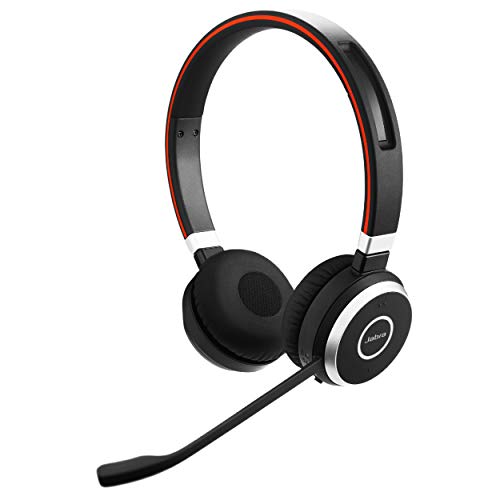
The Jabra Evolve 65 is the headset against which office Bluetooth is still measured, and its listing explains the durability of that status: a stereo wireless headset with the Link 370 USB adapter included, an advanced noise-cancelling microphone and all-day battery intent, from the MS line tuned for Microsoft environments. The included adapter is the detail veterans appreciate first. A dedicated USB receiver gives the PC a stable, pre-paired audio relationship that sidesteps the lottery of built-in Bluetooth stacks — the dongle hunt this guide’s title promises to end, ended by simply including the dongle.
Stereo coverage suits the softphone worker’s real day, which alternates calls with focused work and media. Two ears of Jabra tuning carry a call clearly, then carry the concentration playlist without a device swap, and the microphone’s noise cancelling keeps the professional half of that day clean for the people on the other end. The Evolve line was designed around that alternation — busy light culture, desk-to-meeting-room mobility — and the 65 remains its most balanced expression.
Jabra’s long presence in this category buys the invisible extras: documentation that answers real questions, a replacement ecosystem, and behaviour that IT departments have already met a thousand times. A headset purchase inside an organisation is partly a support decision, and the Evolve 65 is the low-risk entry in this guide’s ledger.
Newer rivals out-spec it in places — multipoint generations, stated hours — and the honest buyer will weigh those. What they rarely out-do is the total: adapter included, stereo, proven, supported. Office standards become standards by accumulating exactly those unglamorous victories.
Long-service culture shows in a subtler way with the Evolve 65: its behaviours are known. The busy-light etiquette, the adapter’s reliability, the way the microphone treats a voice in a glass meeting room — none of it needs discovering, because a decade of offices has already discovered it and written it down. Newer headsets may legitimately surpass it feature by feature while still lacking that surveyed ground, and risk-averse buyers are not foolish for pricing the difference.
For the individual professional the same logic applies at a scale of one. A headset whose quirks are all public is a headset that will never surprise you in front of a client, and in softphone work — where your equipment’s behaviour is your employer’s reputation in miniature — the absence of surprises is a genuine feature, purchasable here.
Strengths
- Link 370 USB adapter included for a stable PC relationship
- Stereo design serves calls and focused work in one device
- Advanced noise-cancelling microphone for professional calls
Trade-offs
- Newer rivals offer fresher Bluetooth generations
- All-day intent is stated without the Lenovo’s hour figures
- Stereo coverage removes room awareness some roles need
| Wireless | Bluetooth with Link 370 USB adapter |
|---|---|
| Fit | Stereo |
| Microphone | Advanced noise-cancelling |
| Variant | MS (Microsoft) version, per the listing |
Best for: office professionals wanting the proven stereo standard with its adapter included and its behaviour documented everywhere.
Not suited for: mono loyalists who take calls with one ear permanently on the room.
Office standard-setters can open the Evolve 65 listing, confirm the MS variant suits their platform, and review the Amazon figure for the classic.

Jabra Pro 930 UC Mono Wireless Headset
The Jabra Pro 930 UC is the guide’s purist: a mono wireless headset for softphone, USB only, stated in its listing with a brevity that borders on philosophy. Where rivals accumulate connections, the 930 concentrates on one — the computer’s softphone — and serves it with the focus of a professional line built for call-heavy desks. Mono is the deliberate choice: one ear for the caller, one for the room, the configuration that call centres and coordinators have preferred for decades because their work is mediation, not immersion.
USB-only deserves translation rather than apology. It means the headset’s world is the PC and the softphone applications on it — the desk where its owner actually earns. There is no desk-phone ambition and no mobile romance, and in exchange the setup story is as short as this category gets: connect, select the headset in the softphone, work. For administered fleets that discipline is a feature, because a device with one job cannot be misconfigured into three others.
The Pro lineage implies the supporting culture: headsets bought by organisations that measure cost per seat per year and keep spares in a cupboard. Individual buyers inherit that seriousness — a tool specified for professional throughput rather than lifestyle appeal.
Set it against the Evolve 65 as Jabra’s internal debate: stereo breadth versus mono focus, adapter-rich versatility versus softphone purity. Neither wins universally; the desk decides. Desks that live inside a softphone all day will recognise the 930 as one of their own.
Call-centre veterans will recognise the 930’s deeper argument about attention. A mono headset leaves the supervisor’s voice, the colleague’s question and the room’s mood all audible, because in a queue-based workplace the room is part of the information system. Stereo headsets optimise the call; mono headsets optimise the floor the call happens on, and confusing those two optimisations is how teams end up with beautiful audio and chaotic operations.
The USB-only discipline has a fleet corollary worth naming: inventory becomes trivial. One cable type, one connection story, one training page for new starters. Organisations drowning in peripheral variety underestimate how much of their support burden is simply variety itself, and the 930 is a small manifesto for the opposite approach.
Strengths
- Mono focus matches call-centre and coordination work
- USB-only simplicity shortens setup to minutes
- Pro line heritage suits administered, high-throughput desks
Trade-offs
- No desk-phone or mobile ambitions in its brief
- Stereo listeners will miss dual-ear coverage
- Listing brevity leaves details to Jabra documentation
| Fit | Mono |
|---|---|
| Connection | USB only, for softphone |
| Line | Jabra Pro series |
| Details | Full specification sits in Jabra documentation, as the listing keeps its promise narrow |
Best for: softphone-only desks and call-heavy teams wanting mono focus with the simplest possible connection story.
Not suited for: hybrid workers needing desk phone, mobile and softphone from one headset.
Purists can open the Pro 930 listing, appreciate its single-minded brief, and weigh the Amazon price against broader rivals.
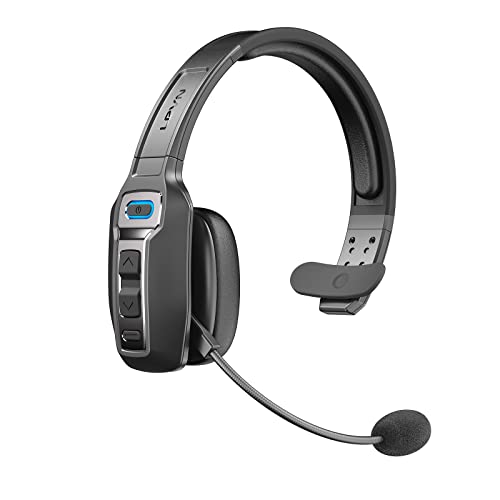
LEVN Trucker Bluetooth Headset
The LEVN headset was born on the road, and its listing carries the highway’s priorities: a Bluetooth headset with microphone, AI noise cancelling, a mute button, and a stated 65 hours of working time, aimed at truckers, home offices and remote work over Zoom. That endurance figure is the headline because the road demands it — a driver cannot charge nightly at a familiar desk, and a headset that works for a week of shifts on a charge is not a luxury but a logistics solution.
AI noise cancelling, in this context, is about environments that fight back: engine drone, wind, depot clatter, the household in full voice behind a home-office door. The claim in the listing is that the microphone’s processing separates the driver’s or worker’s voice from that hostility, and the mute button stands guard for the moments when separation is not enough — the cough, the roadworks, the family negotiation — with a physical control that works at motorway speed or mid-sentence.
The on-ear, single-sided format suits its constituency. Drivers need an ear for the road; home workers need an ear for the house; both need a headset light enough to forget across a shift. LEVN’s design answers with the trucker’s traditional shape, modernised by Bluetooth and endurance rather than reinvented.
Office traditionalists should note what it is not: there is no certification story and no adapter ecosystem in the listing. Its contract is simpler — voice, endurance, mute, value — and for the enormous population working from cabs and kitchen tables, that contract covers the whole job.
The home-office half of the LEVN’s brief deserves equal time, because the household is an acoustic workplace now. A headset that can hold a voice steady against a washing machine’s spin cycle and a child’s important announcement is performing the same separation work it performs against a diesel at idle — the sources differ, the signal processing problem is one problem. Workers whose offices have no door have learned to value that processing the way drivers value it: as the difference between sounding employed and sounding overwhelmed.
Endurance completes the home case too. The kitchen-table desk has no IT department and no charging ritual imposed by a commute; a headset that asks for the cable once a week fits a life where work is woven between everything else, and where the meeting that matters is always the one scheduled in twenty minutes.
Strengths
- Stated 65-hour working time suits week-long shifts
- AI noise cancelling fights engines, wind and households
- Physical mute button works at speed and mid-sentence
Trade-offs
- No certification or adapter ecosystem in the listing
- Single on-ear format will not immerse desk listeners
- Road-first design language suits offices less formally
| Battery | 65 hrs working time, as stated |
|---|---|
| Microphone | AI noise cancelling, with mute button |
| Fit | On-ear trucker style |
| Use | Trucker, home office, remote work, Zoom, per the listing |
Best for: drivers, field workers and home workers whose environments are loud and whose charging chances are rare.
Not suited for: administered offices needing certified, adapter-managed fleets.
Road warriors can open the LEVN listing, note the endurance figure, and check the Amazon price for the long-haul option.

Wireless Headset with Mic for Work (USB Dongle and Charging Base)
This unbranded work headset assembles the softphone kit as a checklist and ticks every box in its listing: a Bluetooth headset with microphone for PC, a noise cancelling mic, a USB dongle, a charging base, a mute button, and a brief spanning computer, office, call centre, phone and remote work from home — truckers included. The charging base is its signature decision. A headset with a home returns to it nightly by gravity rather than by discipline, and the dead-headset morning — the softphone worker’s recurring nightmare — is designed out of existence.
The dongle deserves its sentence too, because it performs the same trick as Jabra’s Link adapter at the accessible end of the market: the PC receives a dedicated audio partner, pre-paired and predictable, instead of negotiating with whatever Bluetooth stack the laptop shipped with. For call-centre and home-office buyers whose IT support is themselves, that predictability is the difference between a tool and a hobby.
Mute on the device, noise cancelling in the microphone, a base on the desk — the kit’s philosophy is that professional behaviour should be physically easy. Nothing here requires an app, a portal or a certification, which suits the small teams and solo professionals who form its natural market.
Set expectations by its positioning: the brand story is the listing itself, support will be documentation-led, and refinement trails the Jabra and Lenovo names. What it offers instead is completeness per pound — every component the softphone worker needs, in one box, at the accessible end of the guide.
There is a small-team economics to this kit that deserves spelling out. A five-person firm equipping five desks needs five complete, identical, working setups — not five adventures in compatibility. A box containing headset, dongle and base, repeated five times, produces a tiny fleet with one behaviour, one spare logic and one page of internal instructions. That is the enterprise pattern reproduced at corner-shop scale, and it is why kits like this one sell steadily to the businesses least able to waste time on audio.
The base also quietly solves the shared-desk problem in hybrid households: the headset lives in one visible place, charged, and the negotiation about whose charger it borrowed simply never occurs. Domestic peace is not a specification, but it is a consequence, and consequences are what purchases actually deliver.
Strengths
- Charging base designs out the dead-headset morning
- USB dongle gives the PC a dedicated audio partner
- Mute button and noise cancelling mic complete the work kit
Trade-offs
- Unbranded positioning means documentation-led support
- Refinement sits below the Jabra and Lenovo tier
- Broad brief means fewer platform-specific optimisations
| Connection | Bluetooth with USB dongle |
|---|---|
| Charging | Charging base included |
| Microphone | Noise cancelling, with mute button |
| Use | PC, office, call centre, phone, remote work, per the listing |
Best for: home-office and small-team workers wanting the complete kit — dongle, base, mute — in a single accessible box.
Not suited for: enterprises requiring certified devices and contracted support.
Kit completists can open this listing, inventory the dongle and base against rival boxes, and review the Amazon figure for the full set.

Wireless Work Headset with USB Dongle
The final pick is the straightforward route incarnate: a wireless work headset with a USB dongle, Bluetooth with noise cancelling, a microphone with mute, and a brief covering PC, computer, laptop, cell phones, remote work and call centres, in black. No certification saga, no brand mythology — just the three components the softphone worker actually asks for, assembled plainly. In a category that sometimes buries its value under platform politics, that plainness has a charm of its own.
The dongle carries the argument, as it does throughout this guide’s accessible tier. Plug it into the laptop and the headset becomes the computer’s chosen audio device, immune to the pairing whims that make built-in Bluetooth a weekly lottery in some offices. The listing’s inclusion of cell phones in the brief widens the headset’s day beyond the desk, which suits the remote worker whose calls migrate between laptop softphone and mobile as the day wanders.
Mute and noise cancelling cover the professional basics: your voice separated from your room, and a certain silence available when the room wins temporarily. Call-centre suitability is claimed in the listing, and the feature set supports the claim at the level of the individual seat — a worker equipping themselves for agency or remote-centre work could start here without embarrassment.
Its ceiling is the familiar one for the tier: support and refinement are listing-led, and administered fleets will look to Jabra or Lenovo. For the solo professional buying a tool this week, the proposition is complete and honestly stated.
Plain kits like this one also serve a democratic function in the category: they set the price of admission for doing softphone work properly. A new remote employee, a career-changer starting a call-centre job from a spare room, an agency worker equipping themselves — each needs the dongle, the mute and the noise cancelling today, not after a procurement cycle. A listing that assembles those essentials without ceremony is performing a service the flagship brands, for all their virtues, do not aim at.
Judge it, finally, by the standard of its own brief. It promises a working wireless headset with a dongle for the machines listed, and it keeps that promise in full view of the buyer. In a market fluent in exaggeration, a complete and honest minimum is a respectable thing to be.
Strengths
- USB dongle ends the pairing lottery on PC
- Mute and noise cancelling cover the professional basics
- Brief spans laptop, phone, remote work and call centres
Trade-offs
- Listing-led support rather than an enterprise ecosystem
- No certification story for administered environments
- Refinement follows its accessible positioning
| Connection | Bluetooth with USB dongle |
|---|---|
| Microphone | Noise cancelling, with mute |
| Colour | Black |
| Use | PC, computer, laptop, cell phones, remote work, call centre, per the listing |
Best for: solo remote professionals and call-centre starters needing a dongle-equipped headset without ceremony.
Not suited for: organisations standardising certified fleets across hundreds of seats.
Solo professionals can open this listing, confirm the dongle arrangement fits their laptop, and check the Amazon price for the plain route.
Comparison Table
| Headset | PC connection | Fit | Standout trait | Natural home |
|---|---|---|---|---|
| Lenovo Wireless VoIP | USB-A receiver, Bluetooth 5.3 multipoint | Stereo over-ear | Teams certification, replaceable earcups | Microsoft professional desks |
| Jabra Evolve 65 | Link 370 USB adapter | Stereo | Proven office standard | General office fleets |
| Jabra Pro 930 UC | USB only | Mono | Softphone purity | Call-heavy desks |
| LEVN Trucker | Bluetooth | Single on-ear | 65-hour stated endurance | Road and home office |
| Work Headset Kit | USB dongle, charging base | Work headset | Base designs out dead mornings | Home office, small teams |
| Work Headset with Dongle | USB dongle | Work headset | Plain, complete route | Solo remote professionals |
Why the Dongle Refuses to Die
Every few years the industry predicts the USB receiver’s death, and every year softphone workers quietly keep theirs. The reason is architectural: a dedicated receiver is a single-purpose relationship between one headset and one computer, established at the factory, immune to the laptop’s other Bluetooth entanglements and to the operating system’s moods. When the meeting starts, the audio path already exists. That certainty is worth a USB port, which is why the certified flagship, the office standard and both budget kits in this guide all ship one.
Built-in Bluetooth has improved, and multipoint designs like the Lenovo’s use it intelligently for the phone side of life. But the professional pattern this guide endorses is hybrid: dongle for the computer that pays you, Bluetooth for the phone that follows you. Buy that pattern in any tier and the dongle hunt ends permanently.
How to Choose a Softphone Bluetooth Headset?
Begin with your platform politics. Microsoft-administered workplaces should start at the certified picks; platform-agnostic and Zoom-centred workers can spend the certification premium elsewhere. Next, count your devices: laptop alone argues for the purist or the kits; laptop plus phone argues for multipoint. Then choose your ear philosophy — stereo for focus and media, mono for room mediation — with the honesty of someone describing their actual day rather than their aspirational one.
Battery strategy closes the decision. Forgetful chargers should buy endurance or a charging base; disciplined dockers can buy anything. And throughout, weight the microphone as heavily as the earcups, because your colleagues experience your headset entirely through it — a truth our aviation colleagues, whose calls carry higher stakes, formalise in Best Noise-Cancelling Aviation Headsets.
The Microphone Is Your Professional Reputation
In softphone work you are, to most colleagues, a voice with a job title. That voice arrives through a microphone three inches from your mouth, competing with your room, your keyboard and your heating system. Noise-cancelling microphones — named in every listing in this guide — exist to tilt that competition toward the voice, and their quality is the closest thing remote work has to a firm handshake.
Support the microphone with placement and habit. Boom close, gain moderate, mute within a thumb’s reach for the coughs and doorbells of real life. The headsets above supply the hardware for all three; the worker supplies the discipline, and colleagues will hear the combination as professionalism without ever knowing why.
A Day in the Life of a Softphone Headset
The working day begins before the first call, in the thirty seconds when the headset is lifted from its dock or base and the laptop wakes. A good softphone setup makes those seconds uneventful: the dongle already resident, the headset already the default device, the battery already a non-question. The first call — often the day’s most important, taken before coffee has finished its work — arrives in a voice that sounds rested and professional, because none of its owner’s attention was spent on audio plumbing.
Midday tests the switching. A call on the softphone, a call on the mobile, a video meeting with the camera’s own opinions — the multipoint and dongle patterns in this guide exist because the modern desk is a junction, not a terminus. Headsets that hold their relationships calmly through that junction let the worker stay inside the conversations; headsets that drop, re-pair or migrate turn the worker into their own helpdesk, several times a day, at professional rates of frustration.
The day ends with the dock. This small ritual — headset home, battery restoring, desk reset — is the softphone era’s equivalent of hanging up a handset, and the picks that support it with bases, docks or sheer endurance are designing for the year’s rhythm rather than the hour’s. Judge any candidate against the whole arc of that day, not against a feature list, and the right tier usually identifies itself.
Meetings Culture and the Etiquette of Mute
Remote work runs on an etiquette that headsets quietly enforce. The mute button’s location is a moral fact: workers with a certain, physical mute use it generously, silencing the keyboard, the household and the thinking-aloud that meetings do not need, while workers hunting through software stay live longer than they intend. Every pick in this guide puts mute on the device, and that shared decision may be the most professional thing about the whole category.
Noise-cancelling microphones write the other half of the etiquette. They excuse your room so your colleagues do not have to, keeping the meeting’s attention on content rather than on somebody’s renovation. There is a courtesy economy in remote teams, paid in clean audio and prompt muting, and its currency is headset hardware chosen with colleagues in mind — the rare purchase whose beneficiaries are mostly other people.
New remote workers should be told plainly what veterans know: you will be judged, kindly but permanently, by how you sound in the first month. A competent headset bought before the first standup is therefore not an expense but an introduction, and introductions, as every profession teaches, are the one thing that cannot be reissued.
Setup Afternoon: Defaults, Docks and the End of Troubleshooting
Spend one afternoon making the headset boring. Insert the dongle and leave it; set the headset as the default device in the operating system and inside each softphone you use, because applications keep their own opinions; run a test call to a patient colleague and adjust the boom until they describe your voice as close rather than loud. Then write the three settings down where a future, flustered version of you can find them at 8:58 on a Monday.
Decide the charging geography in the same sitting. Base on the desk if the kit provides one, cable in a fixed drawer if it does not, and a weekly calendar nudge for the endurance models whose batteries outlast memory. The goal is a setup that survives your worst week without a single act of troubleshooting, because troubleshooting is the tax this entire category was invented to abolish.
Common Mistakes
Trusting built-in Bluetooth for a living is the founding error; the dongle exists because that trust kept being betrayed at 9:02 on Monday mornings. Second, buyers chase stereo for calls that need awareness, or mono for focus work that needs immersion, choosing by price what should be chosen by job description. Third, certification is bought where no IT department exists to care, while the microphone — the part colleagues actually judge — goes untested.
Fourth, battery figures are read as invitations to never charge, rather than as headroom to be managed with a base or a weekly ritual. Fifth, the headset is never set as the softphone’s default device, so the first call of the day exits through laptop speakers to a room of witnesses. Set the default, dock the headset, keep the dongle in the laptop’s bag-side port, and the genre’s entire comedy of errors is retired. Desk workers building a broader setup may also consult Best Audiophile Bluetooth Headsets for the listening-first end of the Bluetooth world.
Frequently Asked Questions
Why not just use my laptop’s built-in Bluetooth?
You can, and the Lenovo’s multipoint shows modern Bluetooth at its best. The dongle’s case is reliability: a dedicated, pre-paired path that ignores the laptop’s other wireless relationships. Workers whose calls are their job generally conclude the USB port is a fair price for never troubleshooting audio in front of an audience again.
What does Teams certification actually change?
It promises tested behaviour with the platform — call control from the headset, predictable audio and mute synchronisation — validated against Microsoft’s standard. In administered environments that promise simplifies approval and support; outside them, the same headset’s hardware virtues must carry the decision, as they do for the Lenovo here.
Is mono or stereo better for softphone calls?
Mono suits mediation — reception, coordination, call queues — where the room is part of the job. Stereo suits focus, media and long listening. The Pro 930 and the Evolve 65 embody the two answers, and your calendar, honestly read, already knows which one you are.
How much battery do I really need?
Enough that charging becomes a weekly ritual rather than a daily anxiety. Lenovo’s stated 31 talk hours and LEVN’s stated 65 working hours both clear that bar with room to spare; a charging base achieves the same peace by habit instead of capacity. Buy either strategy deliberately and the battery leaves your worries permanently.
Can one headset serve my softphone and my phone?
Yes — that is precisely multipoint’s job on the Lenovo, and the dongle kits’ briefs include cell phones alongside PCs. The pattern to buy is a dedicated path for the computer and an open Bluetooth hand for the phone, which every tier of this guide now offers in some form.
Fleets, Spares and the IT Department’s Quiet Criteria
Organisations buy headsets the way they buy chairs: in fleets, against criteria that rarely appear in reviews. Deployment speed matters — a hundred headsets that configure themselves from a dongle beat a hundred that each want a pairing ceremony. Spare ratios matter: one model means one spare pool, one set of cushions, one behaviour for the training video. Support burden matters most of all, because every headset quirk becomes a ticket, and tickets are the true price of variety. Read the certified and standard picks in this guide through that lens and their premiums stop looking like badges and start looking like insurance.
Solo buyers can borrow the fleet mindset profitably. Choose the model you could replace identically in two years, keep its dongle married to its headset, and store the pairing facts with the same care as a password. The individual worker is a fleet of one with a support department of one, and the discipline that serves the enterprise serves the spare room in direct proportion.
When Softphone Meets the Wider Desk
Few desks are purely softphone desks anymore. The same worker may take a landline call, a mobile call and a video meeting inside one hour, and the headset strategy has to acknowledge the junction rather than deny it. Multipoint handles two of the three; the third is why this guide’s cross-references point toward the DECT world, where desk phones keep their own wireless tradition. The mature setup is not one headset to rule the desk but a small, deliberate division of labour in which each device serves the channel it was built for.
That division also protects the worker’s ears and temper. A headset asked to be everything becomes a compromise remembered at every switch; a headset asked to be excellent at softphone calls becomes invisible, which is the highest state office equipment can reach. Buy invisibility where you work most, and tolerate a second device for the margins.
One last evaluation habit is worth adopting from the call-centre world: judge the headset by the call you dread. The difficult client, the performance conversation, the call where a misunderstanding costs real money — picture it, and ask which of these six you would want already on your head, already connected, already trusted. Dread is an honest consultant; it never recommends the headset with the pairing lottery or the battery you meant to charge. Buy for that call and the routine ones will feel like a holiday by comparison.
And give the new headset a fair first week. Voices need two days to learn a boom’s geography, ears need three to forget the old headset’s pressure points, and colleagues need one meeting to notice that you suddenly sound like the office upgraded its opinion of you. By the second week the equipment will have become what it was bought to be — unnoticeable — and the only remaining question will be why the purchase waited as long as it did.
There is a broader truth under the whole category that deserves a paragraph before the verdict. Remote and hybrid work did not merely move the office; it privatised its infrastructure. The headset on a home worker’s desk is doing the job a building full of wiring, switches and IT staff once did invisibly, and buying it properly — dongle, microphone, battery, dock — is the individual worker’s act of facilities management. Treat the purchase with that seriousness and it returns the compliment every working day, in calls that simply work.
Seriousness, here, is mostly a matter of matching. Match the certification to the employer, the ear format to the job, the battery strategy to the memory you actually have rather than the one you intend to develop. The six picks above divide those matches cleanly among themselves, which is why this guide can recommend every one of them to somebody and none of them to everybody.
Matching, done honestly, also settles the budget argument that stalls so many of these purchases. The correct question is never what the headset costs but what a month of troubled calls costs — in repeated sentences, in meetings that start late and end tense, in the slow reputational tax of sounding like a bad connection. Against that ledger, every tier in this guide is inexpensive, and the most expensive headset available is the inadequate one already sitting in the drawer, bought cheaply twice.
Twice-bought cheaply is the biography of half the drawers in the remote-work world, and the way out is not extravagance but sequence: decide the platform, the ear and the battery strategy first, in writing, and let those three decisions walk the catalogue for you. They will arrive at one of the six headsets above with very little argument left, because the argument was the decisions, and the decisions were always about your working life rather than about anybody’s marketing.
Write those three decisions on the same page as the test-call notes from the setup afternoon, and keep the page. It becomes the desk’s small constitution: what the headset is for, how it connects, how it charges, and what your voice is supposed to sound like through it. Constitutions sound grand for a headset, but every reliable setup in this guide is, on inspection, a few good decisions written down and then simply kept.
Kept decisions compound quietly. A month after the setup afternoon, the headset will have survived a software update, a forgotten charge, a borrowed laptop and a meeting that started four minutes early, and it will have asked for nothing through any of it. That is the moment the purchase completes itself — not at the unboxing, but at the first crisis that failed to notice the equipment at all.
Equipment that crises fail to notice is the entire ambition of this category, stated in one line. Everything else — the certifications, the stated hours, the dongles and bases — is engineering in service of that single, unglamorous outcome: a working voice, on time, every time, with nothing left to hunt for.
So end the hunt properly: choose the tier that matches your employer’s platform and your own habits, order it while the reasoning is fresh, and spend the setup afternoon once, completely, the day it arrives. The dongle goes in, the default gets set, the base finds its corner — and from the following morning, the most technically fraught sentence in your working life, the opening of a call, becomes the easiest one you say.
Easiest, and also clearest — because the voice that opens the call will be arriving through a microphone chosen for it, over a connection built for it, powered by a battery strategy designed for it. Colleagues will not be able to name what changed. They will simply start describing you, in the way remote teams do, as somebody who always sounds like they have their act together.
Having your act together, in a voice-only medium, is nine-tenths of the act itself. The remaining tenth is the work, which was never the problem — it only sounded like one, through the wrong equipment, at the start of every call, for longer than anybody should have tolerated.
Toleration ends with this purchase, whichever row of the table it lands on. That is the promise the category makes when it is bought deliberately — platform matched, dongle seated, microphone placed — and it is a promise measured not in specifications but in mornings: the first morning the call simply starts, and every ordinary morning after it.
Ordinary mornings are the product. Buy the headset that makes yours ordinary in the best sense — no rituals of repair, no apologies in the chat, no voice notes explaining the voice — and the working week quietly returns to being about the work.
The work, after all, was always interesting enough. It deserved a voice that arrived intact, and now — with the platform chosen, the receiver seated and the dock waiting — it finally has one, from the first call of the day to the last.
First to last, Monday to Friday, quarter to quarter — the calls are the career in remote work, and the career deserves equipment that treats them that way. Choose accordingly, and then forget the choice entirely, which is what the right equipment is for.
Forget it the way you forget a good chair or a reliable car — not from ingratitude, but because it has merged with the day so completely that noticing it would require an effort. That merger is the finish line of every equipment decision in this guide.
Cross it once, this week, with the setup afternoon done properly — and the dongle hunt that named this guide becomes a story you tell new colleagues, the way veterans tell stories about any hardship that ended before the listener arrived.
Stories about ended hardships are the best kind of onboarding there is. Give your future colleagues a good one, and give yourself the quiet mornings that make it tellable.
Quiet mornings, clear voices, meetings that begin with the agenda — the whole modest, magnificent programme of the softphone desk, available from every row of the table above.
Available, and closer than the deliberation suggests: one order, one afternoon, one docked headset between you and the programme entire.
One afternoon is a small price for a year of calls that start on time, and the year begins the morning after it.
Start the year tomorrow; your voice, and everyone waiting to hear it clearly, will notice the difference immediately.
Immediately, and at every call thereafter.
Every single one, without exception or ceremony.
Keep the packaging until the first month is out, keep the dongle with its headset for life, and keep the standard this guide set — a voice that arrives ready — exactly where your colleagues can hear it.
Final Recommendation
Microsoft professionals should buy the Lenovo and close every question at once — certification, multipoint, receiver, endurance, replaceable earcups. General offices should standardise on the Evolve 65’s proven stereo calm. Mono purists and call queues should take the Pro 930. Road and loud-home workers should claim the LEVN’s endurance, and solo professionals should choose between the two work kits by whether a charging base or plain simplicity suits their desk.
Whichever you choose, plug in the dongle, set the default and dock the headset tonight — tomorrow’s first call should open with your voice already clear, present and unmistakably in charge of the meeting.
Related Guides
- Best Headsets for Airline Pilots
- Best Noise-Cancelling Aviation Headsets
- Best Audiophile Bluetooth Headsets