What's inside
As an Amazon Associate I earn from qualifying purchases. This post may contain affiliate links at no extra cost to you.
widgetverdict.com is reader-supported. When you buy through links on our site, we may earn an affiliate commission.
Where to buy: the most classroom-ready starting point is the Cyber Acoustics AC-5008A, a USB-A headset with in-line volume and mute controls built for classroom or home — the other five picks follow below, split between USB and 3.5mm, single purchases and a ten-pack for whole classes.
The best headsets with a mic for students are bought under constraints that adult headsets never face. The device must survive being dropped into a backpack, sat on, shared, wiped down and plugged into whatever the school or the household actually owns — a Chromebook, a Windows laptop, a tablet, a games controller pressed into service for homework. It must put a child’s or teenager’s voice clearly into a class call, a tutoring session or a language lab, and it must do all of that at a price a family, or a school buying thirty at a time, can defend. Every pick in this roundup is wired, which is deliberate: a cable cannot be lost like a wireless earbud, needs no charging rota, and pairs with nothing.
The first sorting fact is the plug. USB headsets serve computers and are recognised as audio devices by the machine, which keeps volume and microphone behaviour predictable for school IT. The 3.5mm plug serves everything else — tablets, controllers, older laptops, phones with jacks — and asks nothing of the operating system. One pick here, the JIAMQISHI, offers both paths in a single product, which is the pragmatic answer for households whose devices are a museum of generations. The second sorting fact is the buyer: four picks are single headsets for one student, one is a premium-leaning personal headset from Jabra, and one is a bulk ten-pack built for a classroom rather than a child — a distinction the reviews keep explicit, because a parent and a procurement officer are solving different problems with the same search words.
Durability claims deserve reading with a student’s life in mind. A headset’s stated classroom design, a reinforced cord with a name of its own, a share of recycled plastic in the build — these are the signals titles can honestly carry, and they are the signals weighed below. Where a title is silent about a feature families often ask after, such as volume limiting for younger children, the review says so rather than assuming it; hearing protection for small children is a separate category with its own guide, linked at the end, and only picks whose titles raise the subject are discussed in those terms here.
Key Takeaways
- All six picks are wired — no charging, no pairing, nothing small enough to lose in a locker.
- USB models serve computers predictably; 3.5mm models serve tablets, controllers and older machines.
- The JIAMQISHI offers USB and 3.5mm in one headset for mixed-device households.
- The Barks ten-pack is a classroom purchase, priced and built per class rather than per child.
- Two Cyber Acoustics picks are made with 60% recycled plastic and aimed squarely at classrooms.
- Volume limiting is not claimed by these titles — younger children’s hearing protection is a separate guide.
Quick Picks
| Pick | Badge | Why it earns its place |
|---|---|---|
| Cyber Acoustics AC-5008A | The classroom USB standard | USB-A wired headset with in-line volume and mute controls, made for classroom or home, with 60% recycled plastic in the build. |
| Cyber Acoustics AC-5002 3.5mm Stereo Headset | The TuffCord survivor | A 3.5mm stereo headset with a durable TuffCord, classroom positioning and compatibility with Xbox and PlayStation controllers. |
| JIAMQISHI USB Headset | The two-plug household hedge | An on-ear headset with noise cancelling microphone and in-line control, offering USB and 3.5mm for PC classes, Skype and Zoom. |
| Jabra Evolve 10 USB Headset | The grown-up hand-me-down | A wired USB-A headset with noise-cancelling mic, TCO certification, inline call controls and a lightweight design for online meetings. |
| LEVN Headset with Mic | The home-study workhorse | A USB headset with noise canceling microphone positioned for PC work from home, call centres and open offices — and long study sessions. |
| Barks Classroom Headphones with Microphone (10 Pack) | The whole-class purchase | A bulk ten-pack of 3.5mm headsets with mic, adjustable fit and easy-clean design, built for K-12 school testing and daily student use. |
How These Picks Were Chosen
The filter began with the school day rather than the spec sheet: a wired headset with a microphone, a stated or evident classroom or study purpose, and a connection matching devices students actually use. Wireless models were excluded not from prejudice but from logistics — a classroom set of wireless headsets is a charging rota and a pairing lottery, and a family wireless headset is a small object with a talent for disappearing before an exam. Gaming headsets were excluded for the opposite reason: their microphones are fine, but their price buys lighting and surround processing no lesson needs, and their bulk invites the wrong kind of attention in a classroom.
Within the filter, we read titles for evidence: controls a student can operate without a teacher’s help, cords described as durable, certifications a school can file, recycled content a district can report. Cyber Acoustics appears twice because that company’s classroom line is what the current catalogue actually offers at this level — two different plugs for two different device fleets, not a duplication. The Barks ten-pack was included deliberately to represent the institutional purchase, because a guide for students that ignores the way schools actually buy would serve only half its readers. Where titles stay silent — several say nothing about weight, cord length or foldability — the spec boxes record the silence instead of decorating it.
One more selection principle deserves stating, because it explains several inclusions: we favoured headsets a non-technical adult can support over the phone. Grandparents supervising homework, parents troubleshooting from work, teachers facing thirty simultaneous users — all of them need a device whose failure modes are visible and whose fixes are physical. Plug, pod, mute button: a wired headset’s entire support script fits in one breath. Every pick here passes that test, and several flashier products that crossed our desk during selection did not, which is why a guide about students is, quietly, also a guide about the adults who keep students connected.
We also kept the age spread in view. A headset for a seventeen-year-old revising for finals is a personal tool bought once; a headset for a class of nine-year-olds is consumable infrastructure, closer to pencils than to electronics. The reviews judge each pick against its own segment’s standard rather than a single ladder, which is why the bulk pack can be recommended in the same breath as the Jabra without contradiction: they are answers to different questions that happen to share a search box.
The Six Headsets in Detail

Cyber Acoustics AC-5008A
The AC-5008A is the archetype of the school-issue headset: wired over USB-A, with a microphone for class participation and in-line volume and mute controls the student operates directly. Cyber Acoustics builds for the classroom market explicitly — the listing says classroom or home — and the detail that it is made with 60% recycled plastic will matter to districts with sustainability reporting as much as to families who simply prefer it. USB-A connection means the computer sees a proper audio device: the teacher’s platform uses the headset’s microphone by default, the volume lives on the cable where small hands can find it, and nothing depends on a headphone jack’s condition.
The in-line controls are the educational feature, odd as that sounds. A student who can mute and adjust volume physically, without hunting through a meeting window, participates more and disrupts less; the control pod turns audio management into a fidget-proof habit. For home use the same pod serves the parent-supervised call: volume can be set at the cable, and the mute is a button rather than a software state a child may misread. In a category where many headsets offer no controls at all, the AC-5008A’s pod is a considered inclusion, and it is the first thing a school buyer should compare across this table.
The recycled-plastic figure deserves a fair reading. Sixty percent is a substantial share of the build, stated plainly in the title, and it signals a product designed for institutional buyers who must answer for procurement choices. It does not make the headset fragile by implication — classroom headsets are engineered for the drop-and-share cycle first — but buyers should understand the purchase as a fleet decision: this is the headset a school standardises on, keeps spares of, and replaces like for like when a cable finally loses its long argument with a chair leg.
Strengths
- USB-A connection gives school platforms a predictable, dedicated audio device.
- In-line volume and mute controls put audio management in the student’s hand, not the software.
- Made with 60% recycled plastic, with classroom or home use as the stated purpose.
Trade-offs
- USB-A only — tablets, controllers and jack-only devices are outside its reach.
- No volume-limiting claim in the title; young children’s hearing protection needs the dedicated category.
- A fleet-style product whose virtues are practical rather than premium.
| Connection | USB-A wired |
|---|---|
| Controls | In-line volume and mute |
| Build note | Made with 60% recycled plastic |
| Intended setting | Classroom or home |
| Cord length | The listing title gives no cord length; measure your classroom’s desk-to-device distances against the full listing before a fleet order |
For a family buying one, the calculus is simpler: this is the headset to buy when the student’s computer is a laptop or desktop with a USB-A port, the calls are lessons and tutoring, and the buyer’s priority is that the thing works every morning without a negotiation. Keep the receipt until the first full school week has passed — the true test of any student headset is Friday afternoon of week one, after five days of backpack transport — and if it survives that week in a child’s hands, it has passed the only review that ultimately counts.
There is also the matter of the student’s own confidence in the first weeks of a new school, when every routine is unfamiliar and every piece of equipment is a small test. A headset that works the same way every morning — same plug, same button, same sound — removes one variable from a season full of them, and teachers of new classes learn to value that removal out of all proportion to the object’s price.
Teachers notice a subtler benefit of a standardised USB headset: troubleshooting becomes a chant anyone can recite. Is it plugged in? Is the pod muted? Is the platform using the headset rather than the laptop mic? Three questions resolve nearly every classroom audio incident, and they only work as a chant when every seat runs the same device with the same controls. Mixed fleets break the chant — each model hides its mute somewhere new — and the lesson’s first ten minutes evaporate into per-desk diagnosis. Uniformity is a teaching aid disguised as a purchasing habit.
Best for: a student on a USB-A laptop or desktop, or a school standardising a classroom fleet on one wired model. Not suited for: a tablet-and-controller household, where the missing 3.5mm path shuts every door but one. Families can check the AC-5008A listing for the current configuration before the term starts.

Cyber Acoustics AC-5002 3.5mm Stereo Headset
The AC-5002 is the AC-5008A’s analogue sibling: a stereo headset with microphone on the universal 3.5mm plug, built around a cord Cyber Acoustics names the TuffCord, positioned for classrooms or home and stated as compatible with Xbox and PlayStation controllers. That controller line is not a gaming affectation — in many homes the controller’s jack is the nearest 3.5mm socket to the sofa, and in many schools the ageing laptop or the tablet still speaks 3.5mm natively. A headset that plugs into all of them becomes the household’s universal spare: homework at the desk, a call from the tablet, a game after.
The TuffCord is the title’s durability argument, and cord failure is indeed how student headsets die. Jacks are yanked at angles, cables are wound tight around the headset and stuffed into bags, chair casters roll over the slack. A cord sold on toughness addresses the actual mortality table of the category, and buyers comparing two otherwise similar 3.5mm headsets should weight the cord claim heavily — it is the difference between a headset bought per year and a headset bought per term. The stereo earpieces, meanwhile, serve the listening half of a student’s day: language audio, recorded lessons, music while writing, where two channels simply sound more natural than one.
Like its sibling, the AC-5002 is made with 60% recycled plastic, and it shares the fleet logic: schools with 3.5mm device fleets — tablets especially — standardise on models like this. For home buyers, the absence of in-line control claims in the title is the honest caveat: the listing does not promise a control pod, so volume management may live on the device rather than the cable. Families for whom a physical volume control is a supervision tool should note the difference between the two Cyber Acoustics picks and choose accordingly.
Strengths
- 3.5mm plug serves laptops, tablets and the Xbox and PlayStation controllers named in the title.
- TuffCord durability addresses the category’s real cause of death.
- Stereo sound for lessons and listening, with 60% recycled plastic in the build.
Trade-offs
- No in-line controls are claimed in the listing title.
- Analogue connection means the device, not the headset, governs audio behaviour.
- USB-only computers without a jack need an adapter this purchase does not include.
| Connection | 3.5mm wired |
|---|---|
| Sound | Stereo |
| Cord | TuffCord, durability-positioned |
| Named compatibility | Xbox and PlayStation controllers, classrooms or home |
| Controls | No control pod is described in the listing title; confirm the cable arrangement on the full listing if in-line volume is a requirement |
A note on sharing, since 3.5mm headsets get shared more than any other kind: the AC-5002’s classroom positioning implies wipe-down survival, but families should still assign the headset to one student where possible. Fit, hygiene and the simple psychology of ownership — a child cares for a headset that is theirs — all argue for one headset per student, with this model as the spare that covers the week a primary headset is lost, broken or left at the other parent’s house.
The controller compatibility also reframes the headset’s social life at home. A student who uses the same headset for a morning lesson and an afternoon game develops one set of care habits for one object, rather than treating the school headset as fragile kit and the gaming headset as the real one. That continuity quietly protects the school purchase: equipment a child likes is equipment a child looks after. Parents choosing between this and a school-only model should weigh the psychology alongside the plug — the headset that gets used all day is rarely the one that gets stepped on.
Best for: a student whose devices speak 3.5mm — tablets, older laptops, controllers — and whose headset leads a rough, shared, backpack life. Not suited for: a USB-only modern laptop setup, where the plug needs an adapter to work at all. Households can view the AC-5002 listing to confirm jack configuration against their devices.
JIAMQISHI USB Headset
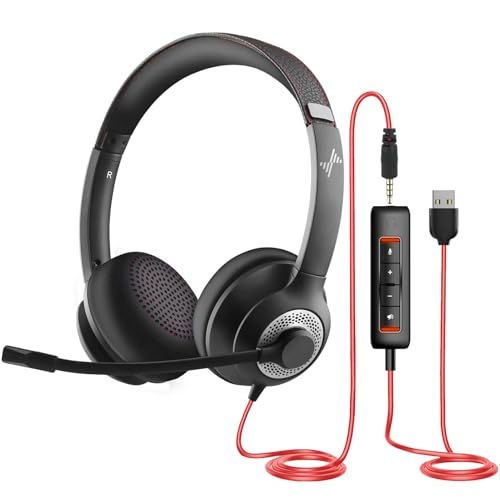
The JIAMQISHI headset is the hedge against device chaos: an on-ear computer headset with a noise cancelling microphone and in-line control, offering both USB and 3.5mm connection, positioned for home office, online class, Skype and Zoom. Read that positioning without embarrassment — the online class sits in the title beside the office uses because the product genuinely serves both desks, and for a student in a household where the study laptop is also a parent’s work machine, the dual identity is the reality. The dual connection is the headline: one headset that plugs into the USB laptop on school days and the 3.5mm tablet on travel days.
Noise cancelling at the microphone is the feature a student in a shared home needs most. The caller’s problem is rarely the student’s voice; it is the sibling, the television and the kitchen arriving with it. A noise cancelling boom favours the voice at its tip over the room behind, which is the difference between a teacher hearing an answer and hearing a household. Combined with the in-line control — the mute within thumb’s reach — the JIAMQISHI covers the two behaviours that decide how a student sounds in class: be clear, and be silent on purpose.
On-ear fit is the comfort question to consider. On-ear designs sit lighter and cooler than over-ear cups, which suits long study sessions in warm rooms and students who dislike the sealed feeling; they also leak more room sound to the wearer, which in a noisy home cuts both ways. Students who study best inside a quiet bubble should note the format honestly, while students who must stay aware of the household — the older sibling supervising younger ones — will find the on-ear openness a feature wearing work clothes.
Strengths
- USB and 3.5mm in one headset — the mixed-device household’s single answer.
- Noise cancelling microphone defends the student’s voice against the shared home.
- In-line control keeps mute and volume physical, immediate and legible.
Trade-offs
- On-ear fit leaks more ambient sound to the wearer than over-ear designs.
- A generalist home-office positioning rather than a classroom-specific design.
- Dual-connection hardware means an adapter arrangement to keep track of in a school bag.
| Connection | USB and 3.5mm |
|---|---|
| Design | On-ear |
| Microphone | Noise cancelling, in-line control |
| Named uses | Home office, online class, Skype, Zoom |
| Colour | Black |
The Skype mention in its positioning dates the design’s ambitions in a useful way: this is a headset from the era when one device was expected to serve every calling platform a household met, and that expectation has aged well. Zoom class, Teams tutoring, a grandparent call on whatever platform the grandparents use — the dual-plug, platform-agnostic headset simply shows up for all of them. For a student whose schedule crosses platforms weekly, that indifference is worth more than any single platform’s certification.
There is a fairness point buried in the noise cancelling claim that households should hear: the microphone protects the class from the household, but it also protects the student. A child answering a teacher while a sibling shouts in the background is a child having a small public embarrassment, repeated daily. A boom that keeps the room out of the call gives the student a private channel inside a shared home — their voice reaches the class, the class does not reach the kitchen. For shy students especially, that one-way privacy is the difference between volunteering an answer and staying muted.
Best for: a student in a mixed-device, shared-noise household who needs one headset to serve laptop, tablet and every calling platform. Not suited for: a student who studies best sealed inside over-ear quiet, where this on-ear design lets the household in. Hedgers can look over the JIAMQISHI listing to confirm how the two connections are implemented.

Jabra Evolve 10 USB Headset
The Evolve 10 is what happens when an office-headset house builds down to a student’s budget without leaving its discipline behind: a wired USB headset with a noise-cancelling microphone, easy USB-A setup, inline call and volume controls, a lightweight design for online meetings, and TCO certification — an environmental and ergonomic certification scheme that institutional buyers recognise. Jabra’s Evolve line serves professional calling; the 10 is its entry point, and for an older student — sixth-form, undergraduate, a young person whose classes are seminars — it offers grown-up call behaviour in a device that will survive the transition into a first job’s home office.
TCO certification is the detail to unpack, because students will not know it and school buyers will. TCO Certified is a sustainability and workplace standard covering manufacturing, materials and ergonomics; its presence on a headset at this level signals a product built for organisational procurement as much as personal purchase. A university department equipping tutors, or a school standardising staff-and-student issue, can file that certification in a way a bare consumer claim cannot match. For a family it functions as a proxy: somebody audited this product’s making, which correlates with the product being made carefully.
The lightweight claim matters across a student’s actual day, which stacks classes back to back in a way office workers would recognise. A headset worn for four seminars is a headset whose grams compound; Jabra designs for that professional reality, and the student inherits it. The inline call controls complete the office inheritance — answer, volume and mute at the cable — though students should note the controls serve meeting platforms on a computer, this being a USB-A device with a computer’s world in mind.
Strengths
- Jabra’s office engineering at the line’s entry point, with a noise-cancelling mic.
- TCO certification gives institutional buyers an auditable standard to file.
- Lightweight design and inline controls suit stacked class schedules.
Trade-offs
- USB-A only — no 3.5mm path to tablets or controllers.
- An office aesthetic and feature set that younger children neither need nor spare.
- Easy-setup simplicity means fewer extras than Jabra’s higher Evolve tiers.
| Connection | USB-A wired |
|---|---|
| Microphone | Noise-cancelling |
| Controls | Inline call and volume controls |
| Certification | TCO Certified |
| Design note | Lightweight, for PC and laptop online meetings |
The hand-me-down economy deserves mention in a student guide. An Evolve 10 bought for a final-year student does not become e-waste at graduation; it becomes the home-office headset of a first job, or passes to a younger sibling whose classes have grown into seminars. Durability of purpose — a device that remains appropriate as its owner ages — is a form of value that pure classroom headsets, sized and styled for children, cannot offer. Buyers choosing between a child-specific design and this office entrant should ask which side of that transition their student stands on.
Seminar manners are the Evolve 10’s invisible curriculum. University teaching increasingly runs on the same etiquette as professional meetings — mute by default, unmute to contribute, expect the call to be recorded — and a headset with proper inline call controls lets a student practise that etiquette in hardware rather than in software menus. The student who arrives at a first internship already fluent in those mechanics has one less thing to learn under observation. It is a small, real form of preparation, and it comes free inside a purchase the student needed anyway.
Best for: an older student or undergraduate whose classes are meetings in all but name, and who will carry the headset into working life. Not suited for: a young child, whose needs are a smaller fit and a classroom-tough design rather than office manners. Seminar-goers can examine the Evolve 10 listing for its current specification.

LEVN Headset with Mic
The LEVN headset arrives from the work-from-home shelf and earns its student place honestly: a USB headset with a noise canceling microphone for PC, positioned for work from home, call centre and open office — three environments whose acoustic problem, a voice that must stay clear inside a noisy room, is identical to a student studying in a busy household. Where the classroom picks optimise for fleets and children, the LEVN optimises for the individual at a desk for long stretches, and an older student with a heavy remote-tutoring schedule is that individual.
Its title is admirably plain — USB headset, microphone, noise canceling, PC — and this review matches that plainness: the working facts are the connection, the microphone’s noise cancelling and the intended desks. No control pod is described in the title, no certification is claimed, and buyers for whom those matter should read the full listing rather than assume parity with the Jabra above. What the LEVN offers instead is focus: one connection done directly, a microphone aimed at the open-plan problem, and a design language that treats the wearer as a worker.
That worker framing cuts in the student’s favour in one specific way: support and accessory ecosystems for work headsets assume adult patterns of use — daily hours, desk permanence — which suits the student whose headset lives at one desk and works a long day. It cuts the other way for the backpack: a desk-first headset is not the natural choice for a device that travels between classrooms in a bag with a water bottle. Assign the LEVN to the desk it was drawn for, and it is a coherent pick; ask it to commute, and the classroom-bred models above are hardier company.
Strengths
- Noise canceling microphone aimed at open, shared, noisy rooms.
- Straightforward USB connection to PC with no adapter story.
- Work-grade positioning suits long, desk-bound study and tutoring days.
Trade-offs
- No in-line controls or certifications are described in the listing title.
- USB connection only, leaving tablets and controllers unserved.
- A desk-first design rather than a backpack-tough classroom build.
| Connection | USB |
|---|---|
| Microphone | Noise canceling |
| Named settings | Work from home, call centre, open office |
| Controls | Control layout is not described in the listing title; the full listing carries the cable and control details |
| Fit detail | Cup style is not specified in the listing title; confirm against the full listing if on-ear versus over-ear matters to the wearer |
Households with two students can use the LEVN as the dividing line of a sensible system: the desk-bound elder gets the work-grade USB headset that never leaves the study, while the younger, mobile student gets a classroom-tough 3.5mm model that travels. Buying one headset to serve both patterns usually serves neither; buying to the pattern costs little more and ends the morning argument about whose headset is in whose bag — an argument no family needs at 7:40 on a school day.
Tutoring economics quietly favour a desk headset like this one. Private tutoring is bought by the hour and delivered by call; a student whose audio fails, echoes or drowns in household noise is spending tuition money on a degraded lesson. A noise canceling USB headset at the study desk is, in that light, not an accessory to the tutoring but part of its delivery infrastructure — the cheapest component in the arrangement and the one every minute of it passes through. Families paying for weekly sessions should equip the desk accordingly and stop apologising for the speakerphone.
Best for: an older student with a fixed study desk, long tutoring calls and a noisy household behind the door. Not suited for: a young student whose headset commutes in a backpack daily. Desk households can review the LEVN listing to fill in the control and fit details its title leaves open.

Barks Classroom Headphones with Microphone (10 Pack)
The Barks ten-pack changes the unit of purchase: this is not a headset, it is a classroom’s worth of headsets — ten 3.5mm headsets with microphones, built for durable everyday student use, with adjustable fit, clear voice, easy-clean surfaces and explicit K-12 school testing positioning. Every phrase in that description serves the institutional buyer. Adjustable fit spans the age range of a school. Easy clean answers the hygiene protocol. Testing positioning names the highest-stakes use in American education, the standardised assessment, where a failed headset is not an inconvenience but an incident.
Bulk buying rewrites the value logic completely. A school does not need the best headset; it needs thirty identical, adequate, replaceable headsets, a shelf of spares, and a per-seat cost the budget survives. A ten-pack from a classroom specialist serves that logic directly, and the 3.5mm connection serves the device fleets schools actually run — tablets and Chromebooks with jacks, testing carts, language-lab machines. The microphone on each unit matters because modern assessments increasingly include speaking components, and because a classroom set without mics is obsolete for half the school’s software.
Families should read this pick as what it is and mostly admire it from outside: a ten-pack is a strange purchase for one child, though homeschool co-operatives, tutoring centres and large families running a shared schoolroom are real exceptions, and for them the arithmetic is the school’s arithmetic. The honest guidance for a parent is to buy the single headset that fits their child — the Cyber Acoustics 3.5mm model above is the same idea at household scale — and leave the ten-pack to the institutions whose problem it solves.
Strengths
- Ten matched headsets with mics at a per-class unit logic no single purchase matches.
- Adjustable fit, easy-clean design and durability aimed at daily K-12 use.
- Positioned for school testing, the highest-reliability-demand use in education.
Trade-offs
- A bulk format that makes little sense for a single-child household.
- 3.5mm only — USB-device fleets need the AC-5008A’s approach instead.
- Fleet adequacy is the design goal; individual premium features are not the point.
| Quantity | 10 headsets per pack |
|---|---|
| Connection | 3.5mm |
| Fit | Adjustable, all-day comfort positioning |
| Hygiene | Easy-clean design |
| Named use | K-12 school testing, everyday student use |
A procurement note for the teachers and administrators reading: buy the spares in the same order. A classroom set’s real size is the class size plus the breakage float, and the float should be planned at purchase, when matching the model is trivial, rather than in October, when the exact model may have been revised. Label the set by room, store it in a single bin with the cables loosely coiled, and the ten-pack’s promise — a working headset on every head on testing morning — becomes a routine rather than a hope.
Testing day deserves its own paragraph in any discussion of this pack, because it is the day the purchase justifies itself in public. Standardised assessments run on tight schedules with proctors who are teachers, not technicians; a headset failure mid-test is a timetable incident with paperwork attached. A matched set of simple 3.5mm headsets, checked the week before and backed by spares from the same pack logic, reduces that risk to its floor. Schools buy this product the way they buy exam paper — as infrastructure whose highest virtue is that nobody thinks about it on the day.
Best for: a school, tutoring centre or co-operative equipping a whole class for daily use and testing days. Not suited for: a parent buying for one child, where a single-unit pick serves better and costs sanely. Institutions can check the Barks ten-pack listing for pack configuration and current availability.
Comparison Table
| Headset | Connection | Microphone note | Buyer it serves | Standout claim |
|---|---|---|---|---|
| Cyber Acoustics AC-5008A | USB-A | Mic, cable pod for volume and mute | Student or school fleet | 60% recycled plastic, classroom design |
| Cyber Acoustics AC-5002 | 3.5mm | Headset mic, stereo | Student, shared devices | TuffCord, controller compatibility |
| JIAMQISHI | USB + 3.5mm | Noise cancelling, in-line control | Mixed-device household | Two connections in one headset |
| Jabra Evolve 10 | USB-A | Noise-cancelling | Older student, institutions | TCO Certified, lightweight |
| LEVN | USB | Noise canceling | Desk-bound older student | Open-office noise focus |
| Barks 10 Pack | 3.5mm | Mic on every unit | Whole classes | Bulk pack, K-12 testing positioning |
USB or 3.5mm: Which Plug Runs Your School Day?
Inventory the devices before the headsets, because the plug decision is really a device decision. A student whose world is one laptop with a free USB-A port is served cleanly by the USB picks, with the AC-5008A’s control pod for school-issue simplicity or the Evolve 10 for an older student’s longer horizon. A student whose world is a tablet, a hand-me-down laptop and a controller needs the 3.5mm AC-5002 or the dual-path JIAMQISHI. A school with a testing cart needs the Barks pack’s arithmetic. The wrong-plug purchase is the most common failure in this category and the most avoidable: five minutes with the actual devices on the table settles it, while no microphone quality can rescue a headset that cannot be plugged in.
Age should steer within the shortlist, too. Primary-age students need the fleet virtues — toughness, simple controls, a headset the school can replace without a meeting — which is the Cyber Acoustics and Barks territory. Secondary students begin to benefit from microphone quality and comfort over long revision sessions, where the JIAMQISHI and LEVN live. Students at university level are adults with seminars, and the Evolve 10’s office discipline fits them without condescension. Buying one tier up or down from the student’s actual stage is the quiet error in this category: the seven-year-old with the seminar headset breaks it by half-term, and the seventeen-year-old with the primary-school unit resents it by Friday.
Then consider who supervises the volume. None of these six titles claims volume limiting, and for older students that is a non-issue handled by habit and the in-line control. For younger children, parents should treat this roundup as the school-age shelf and consult the dedicated children’s guide linked below, where volume limiting is the entire point. Conflating the two shelves — buying a classroom headset for a five-year-old’s hearing, or a volume-limited toddler design for a teenager’s seminar — serves neither child. The categories are neighbours, not substitutes.
Student audio connects outward to the rest of the family’s headset questions in predictable ways: the youngest listeners belong in Best Headsets for Children, the student who graduates to a call-heavy job will meet the desk tools in Best Headsets for Radio only if broadcasting calls, and the on-ear format explored here is compared directly in Best On-Ear PC Headsets with Mic.
Travel between home and school is where the school year’s headsets are actually spent, so the journey deserves engineering. A headset carried loose in a backpack lives among books, bottles and sports kit, and its cable exits the bag at angles its designer never blessed. The pouch or case habit — even a pencil case repurposed — changes the mortality maths completely, and a spare cable-side habit helps too: unplug before packing, every time, rather than letting the bag do it. Students taught to pack the headset the way they pack a laptop treat both objects with the same respect, and both objects repay it in years.
Surviving the School Year: Care and Spares
A student headset’s enemies are transport and lunch. The transport rules are simple enough to teach once: coil the cable loosely rather than wrapping it tight around the cups, carry the headset in its own pouch or the bag’s top pocket rather than under the books, and never use the cable as a handle. The lunch rules are hygiene: wipe the ear cushions weekly, more often in a shared classroom set, and let a headset that has been sneezed on sit out a day. None of this requires a manual — it requires a household or a teacher making the rules visible in the first week, when habits form.
Fitting deserves a check in the first week as well. A headset adjusted for the first day’s excitement is rarely adjusted for the term: the headband should sit so the earpieces rest without pressing the ears flat, the boom should end near the mouth’s corner rather than waving at the cheek, and the cable should fall with enough slack that turning to a bookshelf does not tow the laptop. Students will not report a mediocre fit — they will simply wear the headset less, participate less, and let the household conclude wrongly that the classes are boring. Two minutes of adjustment in week one protects a year of participation.
Spares are the other half of survival. A family with one headset and a child with a 9 a.m. class is one cable failure away from a speakerphone lesson and an apologetic email; a cheap second headset — the AC-5002 is the natural household spare — converts that morning into a shrug. Schools know this instinctively and buy floats; families should borrow the instinct at household scale. The spare also covers the forgotten-headset day, living in the car or at the second home, and earns its shelf space the first time it is needed, which will be sooner than anyone predicts.
Setting Up the First School Week
The first week decides whether a student headset becomes invisible infrastructure or a daily negotiation, and a half-hour of setup in that week pays for the year. Label the headset with the student’s name — in a classroom of identical units, ownership labels end both loss and argument. Set the device as the default in the school platform together, once, with the student watching, so the student can repeat the act on a new machine. Agree the mute habit explicitly: muted on entry, unmuted to speak, the pod’s button rather than the screen’s icon. And run one practice call to a parent in another room, which tests the microphone the way the teacher will hear it and teaches the student how their own voice arrives.
Households should also decide where the headset lives when it is not worn, because a headset without a home migrates to the floor, the sofa’s depths and eventually the dog’s jurisdiction. A hook by the desk, a pouch in the bag’s top pocket, a bin on the classroom shelf — the specific answer matters less than its existence. Schools institutionalise this with labelled bins; families can copy the institution with a single hook and a rule. Equipment with a home gets put away; equipment without one gets replaced, and the difference across a school career is several headsets’ worth of money and several mornings’ worth of calm.
Schools piloting a new standard should run the same first-week discipline at fleet scale: issue the headsets with a one-page routine, photograph the correct boom position for the classroom wall, and collect the first fortnight’s failures in one place rather than letting them scatter into anecdote. The pattern in those early failures — a jack that fits one cart’s tablets loosely, a pod button too small for the youngest hands — is procurement gold, because it arrives while the order can still be adjusted. Districts that skip the pilot learn the same lessons in October, at fleet prices, with the school year already depending on the answer.
Common Mistakes
- Buying the plug you wish the devices had. Count the actual ports on the actual laptop and tablet before choosing USB or 3.5mm.
- Giving a young child a non-volume-limited headset for entertainment. This roundup is the school shelf; hearing-limited designs for young children are a separate, dedicated category.
- Judging by the first week’s sound alone. Student headsets are durability purchases. The cord, the jack and the hinges are the review that matters by November.
- Buying one headset for two students’ simultaneous classes. Schedules collide exactly when both children need the microphone. One headset per student, plus a spare, is the working system.
- Ignoring the control pod’s value. A physical mute and volume control prevents more classroom disruption than any audio feature on this page.
- Ordering a ten-pack for a household. Bulk pricing tempts, but nine spare headsets in a drawer serve nobody; buy the single that fits the child.
Finally, a word on handwriting the future: a student’s headset history usually runs classroom fleet model in primary school, a personal dual-plug or desk model in secondary, and an office-grade USB headset at university or first employment. Families who see the sequence in advance can buy each stage once and hand each stage down, rather than buying three headsets per stage per child in a fog of breakage and loss. The six picks above map onto that sequence almost in order, which is not an accident — it is what the market for student audio actually looks like when it is read as a biography instead of a catalogue.
Frequently Asked Questions
Do students need a headset with a microphone for online classes?
For any class that involves speaking — discussion, language practice, presentations, tutoring — yes. A laptop’s built-in microphone captures the room along with the student and forces the student to lean toward the screen; a headset mic keeps the voice close, consistent and private, and keeps the class audio out of the household’s speakers.
Which connection is better for a Chromebook-based school?
It depends on the fleet’s ports, which vary by model and year: many Chromebooks offer USB-A and 3.5mm, newer ones lean to USB-C. Check the actual machine. If the port is USB-C only, none of these six plugs in directly, and an adapter or a different model is the honest answer — a fact worth learning before the first school morning, not during it.
Are these headsets volume-limited to protect hearing?
None of the six titles claims volume limiting, so treat them as standard headsets whose volume is governed by the device and the in-line control. For younger children, choose from the dedicated children’s category where volume limits are the stated design purpose, and supervise listening levels in the meantime.
How many headsets should a school buy per classroom?
One per student seat, plus a breakage float bought in the same order — headsets fail mid-term as a statistical certainty, and the float is what keeps testing morning calm. Store the set together, labelled by room, and replace from the float while a fresh order restocks it.
Should each student have their own headset, or can siblings share?
Sharing works until two timetables collide, and timetables always eventually collide — a rescheduled class, an exam week, a tutoring slot moved into a sibling’s lesson. One headset per student, with one household spare, is the arrangement that survives the school year. Sharing also carries the fit and hygiene costs discussed above; where budgets force it, assign the shared headset a strict home and a cleaning routine.
Can a student headset double for gaming after school?
The AC-5002’s stated compatibility with Xbox and PlayStation controllers makes it the natural double-duty pick here. The others serve PC gaming adequately as headsets with mics, though none is a gaming design — no surround processing or game-specific features are claimed, and buyers seeking those should shop the gaming shelf deliberately.
Final Recommendation
Match the plug to the devices and the headset to the buyer’s real unit of purchase. One student, one laptop: the AC-5008A for its control pod and classroom manners, or the Evolve 10 when the student is old enough to carry office-grade gear into adult life. Mixed devices and a noisy home point to the JIAMQISHI’s two plugs and cancelling mic; a fixed study desk points to the LEVN; tablets and controllers point to the AC-5002 and its TuffCord; and a whole classroom points, without rival on this page, to the Barks ten-pack. Buy the spare when you buy the headset, teach the cable rules in the first week, label it, house it, teach the mute habit before the first lesson rather than after the first incident, and the humble wired student headset will do what it has quietly done for years — put a young voice clearly into the room where learning is happening, every single morning of every term, without once asking to be charged, paired or found.
Related Guides
Neighbouring shelves for neighbouring ages and uses: Best Headsets for Radio for the broadcast end of student media ambitions, Best Headsets for Children for volume-limited designs for younger listeners, and Best On-Ear PC Headsets with Mic for the on-ear format in adult sizes.