What's inside
- Key Takeaways
- Quick Picks
- How We Chose These Picks
- Comparison
- Native Resolution, Supported Resolution and 4K Claims — the Full Explanation
- ANSI Lumens and Marketing Lumens — Why the Numbers Cannot Be Trusted Across Listings
- How Do You Test a Budget Projector Properly in Its First Week?
- What Should You Feed a Budget Projector?
- How Do You Fix the Sound Without Spending Much?
- Why Is the Bedroom Ceiling This Class’s Home Turf?
- How Long Does a Budget Projector Last?
- How Big a Picture Should a Budget Projector Actually Throw?
- Budget Projector or a Small Television?
- What Should Gift Buyers and Dorm Buyers Do Differently?
- What Accessories Are Actually Worth Adding?
- Common Mistakes
- Final Recommendation
- Frequently Asked Questions
- Related Guides
As an Amazon Associate I earn from qualifying purchases. This post may contain affiliate links at no extra cost to you.
widgetverdict.com is reader-supported. When you buy through links on our site, we may earn an affiliate commission.
Anyone shopping the best projectors under 300 dollars deserves a guide that begins with the two sentences the listings themselves will never print. First: in this class, “4K” means the projector can accept a 4K signal — it decodes it, then displays the picture at its native resolution, which is the number that decides what your eyes receive. A title shouting 4K support above a native 1080p panel is not lying, exactly; it is simply answering a question you did not ask, and this guide will keep pointing at the question you did: what resolution is native? Second: the lumen figures in this class are not standardised. Some are ANSI lumens, measured to a recognised procedure; many are marketing lumens, measured to a procedure of the maker’s own invention, and the two cannot be compared — a modest ANSI figure can describe the brighter machine. The six picks below were chosen and are judged under those two rules, with every claim drawn from the listing titles supplied for this guide. The band in the keyword is a theme, not a price tag: no figure is attached to any pick, and when you follow a linked name to Amazon you can check price on Amazon on the day itself.
One pick requires an introduction of its own, because honesty about it is this guide’s whole method in miniature. The first listing below, carrying ASIN B093Q2V436, is an unbranded listing: its title names no maker at all — it describes a native 1080P projector with WiFi 6 and two-way Bluetooth, and that is all anyone honestly knows about its parentage. This guide presents it exactly as that. It will not be given a brand, a heritage or a reputation it has not earned, and its review will weigh what an unbranded purchase means — the specification can be genuine while the support behind it is a stranger. Readers who understand that bargain may find it the most interesting pick here; readers who do not should choose a named maker below and sleep better.
What can this class honestly do? In a dark room, at a sensible size, a native 1080p picture that gathers a family, lights a garden wall after dusk and turns a bedroom ceiling into a cinema — the real, modest magic that has made budget projection a phenomenon. What it cannot do is daylight, enormous screens or the colour depth of machines costing several times more, and no title in this guide will be allowed to suggest anything else. Judge the six on the honest brief and several of them are genuinely good. Judge them on their titles’ loudest words and all six will betray you.
Key Takeaways
- Native resolution is the figure that matters: several picks state native 1080P outright, and that claim outranks every “4K support” headline.
- Lumen figures in this class mix ANSI and marketing measurements — compare them only within a standard, or not at all.
- The first pick is an unbranded listing with no maker named in its title; it is presented exactly as that, brand-free.
- AuKing’s 2026 upgraded mini and AKIYO’s rotating model cover the portable end, with AKIYO stating auto keystone.
- HAPPRUN is the streaming-led pick: licensed Google TV stated in its title, with Dolby and AirPlay among its claims.
- NISOO leans into outdoor movie nights with two-way Bluetooth audio, while Magcubic’s HY300Pro is the rotating, 4K-support mini for casual rooms.
Quick Picks
| Pick | Badge | Why it made the cut |
|---|---|---|
| Native 1080P WiFi 6 Projector (Unbranded Listing) | The specification without a surname | Native 1080P and WiFi 6 stated plainly by a listing that names no maker. |
| AuKing 2026 Upgraded Mini Projector 1080P | The established mini route | A known budget name’s updated portable for home theater use. |
| AKIYO Mini Projector with WiFi and Bluetooth | The rotating self-squarer | Auto keystone and 360-degree rotation for awkward rooms. |
| HAPPRUN Native 1080P Google TV Projector | The streaming-first pick | Licensed Google TV in the title, with native 1080P beside it. |
| NISOO Mini Projector with WiFi and Bluetooth | The outdoor-night mini | Two-way Bluetooth speaker duty and WiFi 6 for garden screenings. |
| Magcubic HY300Pro Mini Projector | The swivelling casual | 180-degree rotation and auto vertical keystone in a mini body. |
How We Chose These Picks
Selection in this class is an exercise in reading titles like contracts. The first test was the word “native” beside a resolution: picks whose titles state native 1080P were credited with the class’s most important honesty, while “4K support” and “4K decoding” were translated on sight into what they are — input compatibility — and credited as convenience, never as resolution. The second test was the specificity of the rest of the title: connection standards with version numbers, named platforms with licensing language, and automation features stated as verbs all signal a listing written to be checked, and those listings anchor this guide.
Lumen claims were handled by exclusion: because the titles here mix unstandardised figures, no pick was chosen or ranked on brightness numbers, and the reviews instead judge the class’s shared reality — dark rooms, moderate sizes — while teaching the ANSI distinction in the guide sections. The unbranded listing was included deliberately and labelled relentlessly, because it represents a large, real slice of this market that guides usually launder into false respectability; a reader deserves to meet it with its nature stated. Finally, every pick had to offer a distinct brief — streaming, rotation, outdoor audio, minimalism — so that the six together map the class rather than repeat it.

Native 1080P WiFi 6 Projector (Unbranded Listing) — The specification without a surname
Begin with what the title says, because with this listing the title is all there is. It describes a native 1080P projector — the word “native” printed, which in this class is the single most valuable word a title can contain — with WiFi 6 and two-way Bluetooth, a full HD picture for outdoor movies, a 300-inch display claim, “4k” home theater language that this guide translates as 4K input support rather than native resolution, and compatibility spanning iOS, Android, PC, Xbox, PS4, TV sticks, HDMI and USB. No brand is named. Not a house brand, not a maker — the listing is, as supplied, anonymous, and this review will honour that anonymity rather than decorate it.
What does an unbranded purchase actually mean in practice? The hardware proposition can be entirely genuine: factories produce capable 1080p machines that reach the market under many names or none, and the stated specification — native resolution, current WiFi, two-way Bluetooth that lets the projector send audio to a speaker or receive it as one — is a coherent, modern brief. The uncertainties live elsewhere: firmware updates from whom, warranty honoured by whom, a replacement remote sourced from where. The mitigations are the buyer’s own discipline — purchase through the marketplace’s protections, test every input and claim inside the return window, and keep expectations for aftercare at the level the anonymity implies.
The 300-inch figure should be read with the class’s standing translation: it describes the largest picture the geometry allows, not the largest picture the light can honour, and the honest ceiling in a dark room sits far inside it. Judged with clear eyes, this listing is the class’s purest gamble — the strongest single word in any title here, “native”, attached to the weakest provenance. Some buyers, handy and protected by a return window, will take that trade knowingly. This guide’s job is to make sure nobody takes it unknowingly.
- Maker: none named in the listing title — unbranded listing
- Resolution: native 1080P, as stated in the listing title
- Connections: WiFi 6 and two-way Bluetooth, per the listing title
- Compatibility: iOS/Android/PC/XBox/PS4/TV Stick/HDMI/USB, per the listing title
- Maximum picture: 300-inch display claim — geometry, not a brightness promise
- 4K language: input support as framed in the title — not native 4K
Strengths
- Native 1080P stated outright — the class’s key honesty.
- WiFi 6 and two-way Bluetooth are current, useful standards.
- Broad device compatibility covers consoles, sticks and phones.
Trade-offs
- No maker stands behind the listing’s promises.
- Firmware and aftercare are unknowns by definition.
- The 300-inch claim outruns any budget light engine.
Best for: a confident buyer who tests thoroughly inside the return window. Not suited for: a gift purchase where support may be needed later.
AuKing 2026 Upgraded Mini Projector 1080P — The established mini route
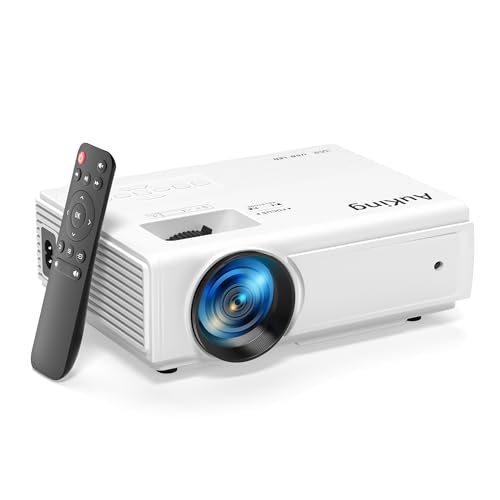
AuKing is one of the names that built the budget mini-projector market, and its 2026 upgraded model arrives with the brief that made the category: a portable mini projector for home theater, describing itself as Full HD 1080P, compatible with HDMI, USB, smartphone, TV box and laptop sources. The title’s language is worth the class’s usual care — it frames the machine around 1080P without the word “native” that the HAPPRUN and the unbranded listing print — so the careful buyer confirms the native specification on the listing page, as this guide’s spec box records. What is not in doubt is the proposition: a known budget brand’s current portable, shaped for the bedroom, the dorm and the borrowed wall.
The mini format’s virtues are the ones this class was invented for. The machine stores in a drawer, travels in a tote, sets up on whatever the room offers, and asks for darkness and modest ambitions in return. Compatibility across HDMI, USB and phones covers the ways households actually feed a projector — a stick for streaming, a laptop for the downloaded film, a phone for the spontaneous clip — and a portable mini lives or dies by exactly that flexibility, because it will be fed by whatever is nearest on the night.
AuKing’s longevity in the niche carries a practical meaning beyond reputation: accessories, replacement remotes and community knowledge exist for a brand that has shipped minis for years, which is the aftercare argument the unbranded listing cannot make. Buyers choosing between this and the anonymous pick above are really choosing between a stated native resolution with no surname and a known surname whose native figure needs confirming — the class in one dilemma, and a fair one. Either way, the room rules apply: dark, moderate size, sound expectations set for a mini.
- Class: mini portable projector, per the listing title
- Picture claim: Full HD 1080P as framed in the listing title
- Native resolution: Not stated in the listing title — verify with the manufacturer documentation
- Compatibility: HDMI/USB/smartphone/TV box/laptop, per the listing title
- Intended use: home theater, per the listing title
- Model year: 2026 upgraded, per the listing title
Strengths
- An established budget brand with an ecosystem behind it.
- Broad source compatibility for a portable’s real life.
- The mini format stores and travels without ceremony.
Trade-offs
- The title does not print the word “native” — confirm it.
- Mini-class brightness: darkness is the entry fee.
- Built-in sound will be mini-class as well.
Best for: bedrooms, dorms and first-time buyers wanting a known name. Not suited for: a large room expecting a big, bright picture.

AKIYO Mini Projector with WiFi and Bluetooth — The rotating self-squarer
AKIYO’s mini answers the portable class’s most common frustration — the awkward room — with mechanics. Its title states WiFi and Bluetooth, a 1080P picture claim for its 2026 upgraded model, support for auto keystone, and a 360-degree rotating design, with compatibility across iOS, Android, laptop and PS5. Rotation is the feature to dwell on: a body that turns through a full circle can throw onto a wall, tilt to a ceiling, or angle into the corner a rental room allows, without the stack-of-books engineering that portable projection usually demands. Auto keystone then squares what the angle costs, within the usual rule that correction spends sharpness and should finish a setup rather than create one.
The PS5’s presence in the compatibility list is a tell about the intended audience: this is a mini for the gamer’s bedroom and the student’s shared house, where the projector’s second job is a big casual screen for the console. Listings in this class do not publish latency figures — this title does not — so the honest positioning is social gaming rather than competitive, a distinction this guide maintains everywhere. For films, the WiFi and Bluetooth cover the casting-and-speaker pattern that portable evenings run on: stream or cast from the phone, hand the audio to a Bluetooth speaker when the audience outgrows the built-in sound.
As with its AuKing neighbour, the title frames 1080P without printing “native”, and the spec box records the buyer’s errand accordingly. What AKIYO adds to the class is placement freedom with automation’s help — the mini most likely to fit the room you actually have, including the ceiling above the bed, which is where minis earn their most devoted owners. If your walls are awkward and your furniture is fixed, the rotating AKIYO is the pick shaped like your problem.
- Class: mini projector, per the listing title
- Picture claim: 1080P as framed in the listing title
- Native resolution: Not stated in the listing title — verify with the manufacturer documentation
- Automation: auto keystone support, per the listing title
- Design: 360-degree rotating, per the listing title
- Compatibility: iOS/Android/laptop/PS5, per the listing title
Strengths
- Rotation makes ceilings and corners usable screens.
- Auto keystone finishes awkward placements quickly.
- Console compatibility suits the bedroom gaming brief.
Trade-offs
- Native resolution needs confirming on the listing.
- Heavy keystone use softens the picture it squares.
- No latency figure is published for serious play.
Best for: renters and students whose rooms dictate odd angles. Not suited for: competitive gamers shopping by stopwatch figures.

HAPPRUN Native 1080P Google TV Projector — The streaming-first pick
HAPPRUN’s title does two honest things in its first breath: it states native 1080P, and it states “Official Licensed Google TV” — the licensing language that separates a real Google TV installation, with the real app store and properly licensed services, from the bare Android builds that leave buyers sideloading their evenings. The rest of the title builds the streaming-first case: more than ten thousand apps claimed through the platform, 4K decoding — translated by this guide as input decoding, not native 4K display — Dolby audio, AirPlay, Wi-Fi and Bluetooth, outdoor readiness, plug-and-play positioning and PS5 compatibility.
Why does the platform matter so much in this class? Because a budget projector’s hardware is a flashlight with opinions, and its software decides whether the evening starts in ten seconds or ten minutes. A licensed Google TV machine wakes to the household’s actual services, signed in, updated, with a remote that runs the whole show; the projector stops being a peripheral and becomes the television’s understudy, ready nightly. AirPlay covers the iPhone household’s casting, Bluetooth covers the speaker, and the native panel underneath means the picture those services deliver is shown at the resolution they deserve.
The outdoor-ready claim should be read in the class’s dialect — a machine happy to work on a patio wall after dusk, not a device rated for weather — and the PS5 note as social gaming, latency being unpublished here as across the class. Within those honest translations, the HAPPRUN is the most complete evening-in-a-box in this guide: native panel, licensed platform, modern connections. For the household that wants the budget class without the budget rituals, it is the obvious first recommendation, and its title — unusually — gives a careful reader everything needed to agree.
- Resolution: native 1080P, as stated in the listing title
- Platform: officially licensed Google TV, per the listing title
- 4K language: 4K decoding — input decoding, not native 4K display
- Audio and casting: Dolby, AirPlay, per the listing title
- Connections: Wi-Fi and Bluetooth, per the listing title
- Compatibility note: PS5 compatible, per the listing title
Strengths
- Licensed Google TV removes the class’s software lottery.
- Native 1080P stated beside the platform claim.
- AirPlay and Bluetooth cover casting and sound.
Trade-offs
- “Outdoor ready” means dusk patios, not weatherproofing.
- 4K decoding must not be misread as 4K display.
- Platform longevity follows Google TV’s update life.
Best for: households wanting a complete streaming projector without extra boxes. Not suited for: a buyer who reads “4K decoding” as a 4K picture.

NISOO Mini Projector with WiFi and Bluetooth — The outdoor-night mini
NISOO’s title is written for the garden: a mini projector with WiFi and Bluetooth, a 1080P outdoor movie brief, two-way Bluetooth that doubles the machine as a speaker, WiFi 6, compatibility spanning phone, PC, TV stick, Roku, PS, DVD, HDMI and USB, and a timer shutdown. That compatibility list is the longest in this guide and it tells a story — this mini expects to be fed by whatever a household owns, including a DVD player, which in 2026 is a sentence about real families and their shelves of discs. The timer shutdown is the sleeper feature: the projector that turns itself off after the film — or after its audience falls asleep — is the one that survives bedroom and garden duty without cooking its lamp hours on an empty room.
Two-way Bluetooth deserves its explanation, because it appears twice in this guide and earns it both times. In one direction the projector sends its audio to a real speaker, which is how a mini’s picture outgrows its sound on a garden night. In the other, the projector becomes the speaker, playing the phone’s music through its own driver — a garden-party trick that makes the machine useful on evenings when no film is planned. WiFi 6, the current standard also stated on the unbranded pick, keeps the streaming path modern where the network supports it.
The title’s 1080P framing, once more, does not print “native”, and the spec box sends the buyer to confirm it — the class’s refrain, repeated because it is the class’s most valuable errand. What NISOO indisputably offers is the outdoor-social brief in full: broad feeding, flexible audio, an off-timer for the end of the night. For the household whose projector lives between the bedroom and the garden fence, that brief is the buying decision, and the NISOO is its clearest expression here.
- Class: mini projector for outdoor movies, per the listing title
- Picture claim: 1080P as framed in the listing title
- Native resolution: Not stated in the listing title — verify with the manufacturer documentation
- Audio: 2-way Bluetooth speaker function, per the listing title
- Connections: WiFi 6; HDMI/USB and broad device compatibility, per the listing title
- Convenience: timer shutdown, per the listing title
Strengths
- The broadest source compatibility in this guide.
- Two-way Bluetooth serves both film sound and music.
- A shutdown timer suits bedrooms and gardens alike.
Trade-offs
- Native resolution is the buyer’s to confirm.
- Outdoor use still means after-dark use.
- Mini sound, even doubled as a speaker, stays mini.
Best for: garden movie nights fed by a household’s mixed devices. Not suited for: a permanent theatre installation.

Magcubic HY300Pro Mini Projector — The swivelling casual
The HY300 line became a social-media phenomenon by being a small cylinder that stands on a surface and swivels its picture from wall to ceiling, and the HY300Pro’s title states the formula: a 2026 upgraded mini with WiFi and Bluetooth, “4K Support” in the headline position, auto vertical keystone, and 180-degree rotation. The translation discipline applies immediately — 4K support is input support, and the title does not state a native resolution, so the spec box records that errand in the largest print this guide can give it. What the title does guarantee is the form and the motion: a projector that lives on a nightstand, points where the evening points, and squares its own vertical geometry.
That form factor is not a gimmick, whatever its virality suggests. The ceiling is the largest unused screen in most homes, and a machine that rotates to meet it without a mount, a tripod or a stack of books collapses the distance between wanting a film and watching one to about a minute. Auto vertical keystone handles the geometry of the tilt; the class’s standing warning — correction spends sharpness, angles should stay honest — applies with its usual force, and at ceiling sizes in dark bedrooms the exchange is one owners happily make nightly.
The HY300Pro is the most casual machine in this guide, and its review should end as casually as it deserves: it is the pick for the viewer whose projection life is spontaneous — a series episode on the ceiling, a match on the wall, a phone’s holiday photos at family size — and whose first requirement is that the machine never becomes a project. Buyers who need a stated native resolution before anything else have two picks above that print it; buyers who need the picture to appear wherever they point will understand the Magcubic in one swivel.
- Class: mini projector, per the listing title
- 4K language: 4K support — input support only, per the listing title
- Native resolution: Not stated in the listing title — verify with the manufacturer documentation
- Design: 180-degree rotation, per the listing title
- Automation: auto vertical keystone, per the listing title
- Connections: WiFi and Bluetooth, per the listing title
Strengths
- The swivel form makes ceiling projection effortless.
- Auto vertical keystone squares the tilted picture.
- As spontaneous as the class gets: point and watch.
Trade-offs
- Native resolution is unstated in the title — confirm it.
- “4K support” is a compatibility claim, nothing more.
- Casual brief: not a machine for a fixed theatre.
Best for: bedroom-ceiling viewers and spontaneous screenings. Not suited for: a buyer who needs native resolution certified upfront.
Comparison
| Pick | Native resolution as titled | Platform / casting | Signature feature |
|---|---|---|---|
| Unbranded B093Q2V436 listing | Native 1080P stated | WiFi 6 casting | No maker named in title |
| AuKing 2026 Mini | Not stated in title | HDMI/USB/phone sources | Established budget brand |
| AKIYO Mini | Not stated in title | WiFi and Bluetooth | 360-degree rotation, auto keystone |
| HAPPRUN Google TV | Native 1080P stated | Licensed Google TV, AirPlay | Streaming built in, licensed |
| NISOO Mini | Not stated in title | WiFi 6, broad inputs | Two-way Bluetooth, timer |
| Magcubic HY300Pro | Not stated in title | WiFi and Bluetooth | 180-degree swivel |
Native Resolution, Supported Resolution and 4K Claims — the Full Explanation
Every confusion in this class grows from three phrases that sound alike. Native resolution is the number of physical pixels the projector’s panel holds, and it is the ceiling of what the picture can ever show: a native 1080p panel shows 1920 by 1080 pixels, however exalted the signal feeding it. Supported resolution — “4K support”, “4K decoding”, “4K input” — describes what the machine can accept and process before downscaling the picture to its native panel. Accepting a 4K feed is genuinely useful: streaming services send their best streams to devices that ask in 4K, and a clean downscale can look better than a native feed of a lesser stream. But it is compatibility, not resolution, and a buyer who pays for the word “4K” believing the panel holds it has been misled by grammar.
The reading skill is transferable to every projector listing on earth: find the word “native”, and believe the number beside it; find “support” or “decoding”, and file the number under connections. In this guide’s six titles, the word “native” appears exactly where the spec boxes say it does — on the unbranded listing and the HAPPRUN — and its absence elsewhere is not an accusation, because several of those machines may well be native 1080p in fact. It is, however, the buyer’s errand to confirm on the listing page, because in this class the difference between a native panel and a lesser one wearing a 1080P-compatible badge is the difference between the picture this guide describes and a softer one nobody recommended.
ANSI Lumens and Marketing Lumens — Why the Numbers Cannot Be Trusted Across Listings
Brightness has the same disease as resolution, in a worse stage. An ANSI lumen is measured to a published standard: a full-white picture sampled at nine points, averaged, under specified conditions. It is not a perfect measure, but it is a shared one, and two ANSI figures can be compared with a straight face. A marketing lumen — sometimes labelled LED lumens, light-source lumens, or given no label at all — is measured wherever the maker finds the largest number: at the light source rather than the screen, in the brightest mode at its least watchable setting, or by a method invented for the occasion. Such figures in this class routinely run several times the ANSI figure for the same machine.
The practical consequences shape this whole guide. No pick here was ranked on brightness, because the titles do not share a ruler. Buyers should instead reason from the class itself: every machine in this band is a dark-room instrument happiest at moderate sizes, and the differences between them on a real wall are smaller than the differences between their printed numbers suggest. Where a listing does state ANSI, credit it as the honest dialect; where it states a vast unqualified figure, divide your trust accordingly. And use the only meter that never lies — the return window, in your room, on your wall, after dark.
How Do You Test a Budget Projector Properly in Its First Week?
The return window is the budget buyer’s laboratory, and it should be used like one. On the first evening, verify the headline claims in the order this guide ranks them: project a detailed 1080p scene and look for the crispness a native panel shows in text and hair; feed the machine a 4K source and confirm it accepts it, understanding now what that acceptance means; connect every input you own — the stick, the console, the laptop, the phone’s cast — because a dead port found in month two is a grievance, while the same port found in week one is an exchange. Run the fan through a quiet scene and listen from your seat.
Across the week, test the duties the machine was bought for: the ceiling angle, the garden wall, the Bluetooth speaker pairing, the timer, the rotation — whichever features carried your decision should each survive a real use, not a menu visit. Photograph the picture in your room, because the photograph will show you in month six what your eyes excused in week one. And keep the box, the films and the paperwork until the window closes; the discipline costs a shelf for a fortnight and converts every uncertainty in this class — including an unbranded listing’s — from a risk into an experiment.
What Should You Feed a Budget Projector?
The source matters more at this level than at any other, because a modest panel forgives nothing it is fed. The licensed Google TV in the HAPPRUN is the class’s cleanest answer — the services live in the machine — but the other five are fed happily by the household’s existing kit: a streaming stick in the HDMI port brings the same services with its own remote and its own update life, a laptop brings the downloaded library, and a phone’s cast brings the spontaneous clip. NISOO’s compatibility list, which runs to DVD players and Roku alongside the modern names, is the honest map of how these machines actually eat: whatever the household already owns, in whatever order it is found.
Feed quality is the second half of the lesson. A low-bitrate stream smeared across 100 inches confesses its compression in every grass texture and dark scene, and the budget panel gets blamed for the stream’s economy. Where a service offers a quality setting, set it at the top for the big screen; where a download is possible, download — a local file is the most reliable luxury in budget projection. The projector’s job is to show what it is given honestly, and at native 1080p, given a good feed in a dark room, the showing is better than the class’s reputation — a reputation earned largely by bad feeds in bright rooms.
How Do You Fix the Sound Without Spending Much?
Every mini in this guide carries a speaker sized for its body, which is to say sized for a huddle. The escape route is printed in most of the titles: Bluetooth. Pair the projector to a speaker the household already owns — the kitchen’s portable, the living room’s bar — and the picture’s scale is suddenly matched by the sound’s, at no new cost beyond the pairing minute. Two-way Bluetooth, stated on the unbranded listing and the NISOO, adds the reverse trick for music evenings. Wired households can use the HDMI chain or an aux lead where the machine offers one, but wireless is the budget room’s natural grammar, because the projector rarely sits where the speaker belongs — near the audience.
Placement of that speaker decides more than its size. Sound should arrive from the picture’s direction at ear height for the seated audience; a speaker behind the sofa, however capable, detaches voices from faces in a way no volume cures. In the garden, bring the speaker to the audience’s table rather than the wall’s base. Dialogue clarity, not loudness, is the test — a whispered scene understood from the back seat is a solved room, and most households solve it with equipment already in a drawer, which is the budget class’s favourite kind of solution.
Why Is the Bedroom Ceiling This Class’s Home Turf?
Because the ceiling forgives everything this class is. It is large, pale, flat and already in the room; the viewing angle from a bed is comfortable for a series episode or a film; and the darkness a bedroom achieves with a closed door flatters a modest light engine into looking rich. The rotating picks — AKIYO’s full circle, Magcubic’s 180 degrees — exist because manufacturers watched where their minis ended up, and it was the nightstand, aimed up. Even the fixed minis join in on a small tripod or a shelf, and the timer on the NISOO reads like a feature designed by someone who has fallen asleep under a projected ceiling and woken at 3 a.m. to a menu screen.
The ceiling’s terms are gentle: keep the beam out of the sleepers’ direct line when anyone is reading or talking, let auto keystone handle the tilt, and accept the slight softness the angle buys as the price of the most comfortable seat in the house. Households that discover ceiling projection tend to reorganise their viewing around it — the living room keeps the television, the bedroom gets the cinema — and a machine in this band, asked to do that one job in the dark, does it well enough to make owners evangelical.
How Long Does a Budget Projector Last?
The light engines in this class are LED-based in spirit and stamina: no lamp to dim on a short fuse, and a working life that should be measured in years of evenings. What ages faster is everything around the light — the fan that inhales bedroom dust, the battery in the truly portable models, and above all the software, where an unlicensed or frozen platform can strand a healthy panel. That is the deeper meaning of the HAPPRUN’s licensed Google TV and of the stick-fed designs: the intelligence can be renewed for the cost of a stick, while the panel carries on. The unbranded listing’s gamble lives here too — its panel may outlast its support by years, and the buyer who knows that owns the fact calmly.
Care is the usual cheap liturgy: vents clear, lens blown clean rather than wiped, the machine stored out of heat and damp, cables unstrained. A budget projector treated that way routinely outlives the phone that feeds it. Judge the class by that realistic span — not a theatre’s decade of permanence, but a good few years of ceilings, gardens and borrowed walls — and its value stops looking like a compromise and starts looking like a category that understood its assignment.
How Big a Picture Should a Budget Projector Actually Throw?
Smaller than the titles dream of, and the discipline pays in picture quality every night. The geometry claims in this class run to 300 inches; the light tells another story, and the honest working range for a mini in a dark room sits between roughly 60 and 100 inches, with the lower half of that range looking noticeably richer than the upper. The arithmetic is unforgiving and simple: the same light spread over twice the diagonal is a quarter as bright per unit of wall, so every step up in size is paid for in contrast. Owners who start at 70 inches and grow only while the picture keeps its depth discover the class’s sweet spot by experience.
Seating distance should grow with the picture: a viewer too close to a large budget image sees the panel’s structure and the stream’s compression holding hands. The bedroom ceiling, the class’s home turf, sets its own geometry — the ceiling’s height decides the size, and it usually lands in the honest range by accident. Garden walls tempt the largest throws and punish them most, because outdoor darkness is rarely total. Let the room choose the size, keep the light concentrated, and a budget picture can look — there is no other word — expensive.
Budget Projector or a Small Television?
The comparison deserves the same honesty as everything else here. A small television in this band’s territory is brighter, sharper per inch, instant and daylight-proof; as a screen for a bright room’s everyday viewing, it wins without a contest. The projector wins the evenings: the picture three times the television’s size, the ceiling screening, the garden wall, the machine that vanishes into a drawer and leaves the room a room. Households are not choosing between good and bad — they are choosing between an appliance and an event.
The deciding question is the diary again. Daily background viewing in a lit room belongs to the television, and forcing a budget projector into that duty manufactures the disappointment this class is famous for. Occasion viewing — films, matches, the series finale, the children’s sleepover — belongs to the projector, at a scale the television in this band cannot approach. Many households, sensibly, end with both, each forgiven its limits because each is asked only for its strengths. This guide’s six are the event machines; buy them for events and they will feel like the best money in the house.
What Should Gift Buyers and Dorm Buyers Do Differently?
A projector given as a gift carries the giver’s reputation into rooms the giver will never see, which reorders the priorities: the named, licensed, complete machine — the HAPPRUN above all — is the kind choice, because the recipient’s first evening should be a film, not a troubleshooting session with an anonymous listing. Include the unglamorous accessories of success: a long enough HDMI lead, a small Bluetooth speaker if the house lacks one, and a note with the two honest rules — native is the resolution, darkness is the entry fee — because a gift that arrives with its instructions understood is a gift that gets used.
Dorm rooms and first flats invert the calculus again: space is the scarcest resource, the ceiling is the screen, the audience is whoever is awake, and the machine will be fed by phones and laptops in rotation. The rotating minis and the broad-compatibility NISOO were practically designed in a dorm, and their modest demands — a wall, a socket, darkness after the corridor lights dim — fit a life stage where the projector competes with textbooks for shelf space. Buy for the room’s reality, in gifts as in dorms, and the budget class rewards the thought.
What Accessories Are Actually Worth Adding?
Three, and the rest can wait. A small tripod or stand comes first, because portable projectors spend their lives at the wrong height on the wrong furniture, and a few pounds of aluminium ends the nightly negotiation with cushions and books — the rotating models carry their own answer, but the fixed minis are transformed by a perch. A Bluetooth speaker comes second, for every reason the sound section gave: it is the single addition that makes a budget picture feel like an event. A plain white blackout cloth or an inexpensive folding screen comes third, for the rooms and gardens where no honest wall exists; it weighs nothing, stores anywhere, and rescues more evenings than any electronic accessory.
The list of what to skip is equally useful: expensive cables promise nothing a short, sound lead does not deliver at these lengths; ceiling mounts contradict the portable brief; and spare anything is premature for machines whose wear parts are fans and time. Spend the accessory budget on placement, sound and a surface — the three things the projector cannot provide for itself — and the class’s modest hardware will perform like a considered system rather than a lucky gadget.
Common Mistakes
Reading “4K support” as a 4K picture is the class’s founding swindle, committed by grammar rather than by any single seller, and it leads this list because it empties more wallets than every other error combined. Comparing lumen figures across listings runs second: a marketing figure several times an ANSI figure describes, often, the dimmer machine, and the buyer who ranks by the big number buys the small light. Third is screen-size greed — every title here will geometrically reach sizes its light cannot serve, and the owner who starts at a modest size in a dark room discovers a class far better than its reputation.
Fourth, buyers skip the native-resolution check on listings whose titles frame 1080P warmly without printing “native” — a two-minute errand that decides the picture they will live with. Fifth comes expecting daylight: this band’s machines are dusk instruments, and the midday test has returned more good projectors than any defect. The last mistake is forgetting sound: a mini’s built-in speaker serves a bedroom huddle, and the garden crowd deserves the Bluetooth speaker several of these titles are ready to feed. Every mistake on this list is a sentence in a listing read too quickly — which is why this guide has read them slowly, out loud.
Final Recommendation
For most households, the HAPPRUN is this class’s safest complete purchase: native 1080P printed in its title, a licensed Google TV platform, and connections that cover the modern evening without extra boxes. The unbranded listing is the guide’s deliberate wild card — the same native claim with WiFi 6, offered without a maker’s name, for the buyer who understands exactly what that means and tests accordingly. AKIYO’s rotator and Magcubic’s swiveller serve the awkward room and the bedroom ceiling respectively; AuKing is the established-name portable once its native figure is confirmed; NISOO owns the garden night. Whichever name you choose, choose it by the native resolution, in a dark room, at a modest size — the three honest coordinates of this class — and a projector bought inside this band can deliver the thing its buyers actually dream about: a wall that becomes a cinema, on an ordinary evening, for an ordinary household.
It is worth ending where the class itself lives — not in a showroom, but in the small hours of real homes. A teenager’s ceiling running a series nobody else in the house watches. A garden fence holding a cup match for six neighbours who brought their own chairs. A grandparent’s living-room wall, fed by a DVD player the NISOO still speaks to, showing photographs at a size that makes a family go quiet. None of those evenings needs a native 4K panel or a standardised lumen; all of them need a machine that was bought with clear eyes, placed in the dark and fed something worth watching. That is the whole secret of this band, and it was never really about the money.
Frequently Asked Questions
Is a projector in this class really 4K?
No — and the titles, read carefully, do not quite claim it is. “4K support” and “4K decoding” mean the machine accepts a 4K signal and shows it at its native resolution, which is 1080p on the picks here that state one. The benefit is real — better streams, clean downscaling — but the picture is a 1080p picture. Buyers who need native 4K should shop the classes above this band, where the word “native” appears beside 4K and the commitment rises to match.
How many lumens do you need in this class?
The honest answer is a room, not a number. Because this class mixes ANSI and marketing figures, a printed lumen count cannot be compared across listings; what can be said is that every machine here is built for dark rooms and moderate screen sizes, and performs there. Judge a candidate in your own room inside its return window, prefer listings that state ANSI when brightness truly decides between two finalists, and treat any enormous unqualified figure as advertising rather than information.
Should you buy the unbranded listing?
Only knowingly. Its title states the class’s most valuable claim — native 1080P — alongside WiFi 6 and two-way Bluetooth, and the hardware may be entirely genuine. What it cannot offer is a maker: no named warranty culture, no firmware steward, no reputation at stake. Buy it through the marketplace’s protections, test every claim in the first week, and it is a rational gamble; buy it as a gift for someone who will need support, and one of the named picks above is the kinder choice.
Can these projectors handle gaming?
Socially, yes — the AKIYO names the PS5 and the HAPPRUN claims PS5 compatibility, and a big casual screen is a joy for party and family titles. Competitively, this class publishes no latency figures, so no pick here can be recommended on stopwatch evidence. Keep the ranked sessions for a display with published numbers, and let these machines do what they are built for: the console evening where the room, not the leaderboard, is the point.
Do you need a screen at this level?
Not to begin. A smooth pale wall in a dark room shows what these machines are, and a plain sheet serves the garden. A screen becomes worthwhile when the room becomes permanent — it flattens colour, adds a border and returns contrast the wall was spending — and at this band it is usually a better second purchase than stepping up a projector tier. Start with the wall; let a month of evenings tell you whether the screen is missing.
What is the single most important check before buying?
Find the native resolution, in those words, either in the listing title or confirmed on the listing page — and walk away from any listing that will not state it anywhere. That one fact predicts the picture more reliably than every other claim in this class combined: more than the lumen figure, more than the maximum screen size, more than the 4K language in the headline. The picks above that print “native” have done the errand for you; for the rest, the two minutes it takes are the best-value minutes in the entire purchase. Sellers of honest machines state the figure because it sells the machine; sellers who hide it are telling you, in their silence, exactly what the panel holds — and a buyer who has read this far already knows how to hear a silence like that one. Apply the same suspicion to every other loud word in a budget listing — the maximum inches, the unqualified lumens, the compatibility lists that promise the world — and ask, each time, for the plain version: native, measured, stated. Listings that survive those three adjectives are the ones worth your evenings, and there are enough of them in this guide to prove the class can be bought well — bought slowly, read carefully, and enjoyed for years afterwards.
Are the huge lumen numbers in this class real?
They are real numbers describing unstandardised measurements, which is a careful way of saying they cannot be compared with ANSI figures or with each other. A maker may measure at the light source, in a mode no one watches, or by a house method; the resulting figure can be several times the same machine’s ANSI rating. This guide therefore ranks nothing by them. If brightness decides between two finalists, prefer the listing that states ANSI — and let your own room, inside the return window, cast the deciding vote.
Related Guides
Start the wider tour with our cellular trail cameras, continue to the stealth models in our blackout trail cameras, and finish on the road with our dash cameras with night vision.