What's inside
- Key Takeaways
- Quick Picks
- How We Chose These Picks
- How Do the Six Compare Side by Side?
- Why Does the Screen Matter as Much as the Projector?
- How Do You Set Up a Room for a Projector Television?
- What Mistakes Do Television-Replacement Buyers Make?
- How Much Daylight Can a Laser TV Room Honestly Handle?
- Final Recommendation
- Frequently Asked Questions
- Related Guides
As an Amazon Associate I earn from qualifying purchases. This post may contain affiliate links at no extra cost to you.
widgetverdict.com is reader-supported. When you buy through links on our site, we may earn an affiliate commission.
The television has one weakness no panel maker can engineer away: it is only ever as large as the box it arrived in. The best projectors to replace tv sets exploit exactly that, and the six machines in this guide all belong to the ultra-short-throw family — projectors that sit on the same media console the television occupied, a short distance from the wall, and throw a picture of one hundred inches or more upward onto it. No ceiling mount. No projector humming behind the sofa. No long cable runs across the room. The swap, physically, is almost absurdly simple: television out, projector onto the same furniture, picture three times the area by evening.
Almost simple. Two truths govern whether the replacement delights or disappoints, and this guide will return to both until they are impossible to forget. The first is light. A television is a lantern; it generates its own brightness and fights a sunny room to a draw. A projector is a torch aimed at a wall, and in daylight that wall is already lit by the sun — so an ultra-short-throw projector without an ambient-light-rejecting screen washes out in a bright room, its blacks reduced to the grey of reflected daylight. The second truth is that the wall itself becomes part of the product: its flatness, its texture, its colour, and the screen you may pair with the projector decide as much of the final picture as the machine does. Buyers who plan for both truths end up with a cinema where their television stood. Buyers who ignore them end up re-hanging the television.
All six picks here are laser machines in the ultra-short-throw format, and all six state 4K-class pictures in their titles — though one of them, the Epson LS800, achieves its 4K PRO-UHD picture by pixel-shifting, a distinction its section and spec box state openly, because this guide does not let the phrase 4K blur technologies that a buyer deserves to tell apart. The field splits into triple-laser designs from AWOL Vision and Hisense, Samsung’s Premiere line in two generations, and Epson’s 3LCD alternative with serious built-in sound. Between them they cover the living-room replacement question from the premium end to the practical one.
Who should make this swap at all? Households whose viewing is dominated by films, series, and big sport; whose main room can be shaded for the viewing that matters; who sit far enough from the wall that a hundred-inch picture is immersion rather than assault; and who value the strange calm of a room with no black glass rectangle dominating it all day. Who should not? Anyone whose television life is breakfast news in full sun, or whose wall is a chimney breast barely wider than the television it would replace. The picks below assume the first household and are written to serve it honestly, limits included.
Key Takeaways
- Every pick is an ultra-short-throw laser projector that lives on the media console and projects a picture of 80 to 150 inches per its listing title.
- An ALR screen is the difference between a washed-out daytime picture and a convincing television replacement; budget for the pairing, not just the projector.
- The Epson LS800’s 4K PRO-UHD picture is pixel-shifted, as its own title states — a legitimate technology, labelled honestly in its section below.
- Triple-laser picks from AWOL Vision and Hisense carry Dolby Vision and IMAX Enhanced credentials in their titles; the Samsung pair counters with its Smart TV platforms and gaming features.
- Built-in sound varies from a stated Yamaha 2.1-channel system on the Epson to platform speakers elsewhere; a soundbar still improves every one of them.
Quick Picks
| Pick | Badge | Why it is here |
|---|---|---|
| AWOL Vision LTV-3000 Pro | Enthusiast Triple Laser | 4K 3D ultra-short-throw triple laser with Dolby Vision, Atmos, and HDR10+ for a 150-inch laser TV setup. |
| Hisense PX3-PRO Laser TV Projector | Gamer’s Laser TV | 3000 lumens, 3000:1 contrast, Google TV, and a Designed for Xbox credential at up to 150 inches. |
| Samsung The Premiere LSP7T | Established Premiere Pick | Samsung’s 120-inch 4K smart laser short-throw with an extended coverage bundle in the listing. |
| Epson EpiqVision LS800 | Brightness and Sound Pick | 4000 lumens of colour and white brightness, Android TV, and a Yamaha 2.1-channel speaker system built in. |
| Hisense PT1 UST Triple Laser Projector | Second-Room Laser TV | 2500 lumens, Google TV, Dolby Vision and Atmos, and IMAX Enhanced at 80 to 150 inches. |
| Samsung The Premiere LPU7D 120″ | Newest Samsung Generation | The 2024 Premiere with Gaming Hub, Vision Boost, and Alexa built in, per its listing title. |
How We Chose These Picks
The replacement question is stricter than the projector question, so the filter was stricter too. A candidate had to be ultra-short-throw, because a television replacement that demands a ceiling mount and a darkened room has answered a different question than the one living rooms ask. It had to state a 4K-class picture and a maximum image size in its title, because those are the two promises the whole category rests on. And it had to offer a credible living-room ecosystem — a smart platform, serious sound, or both — because a television is never just a picture; it is the box the household’s viewing already orbits.
Within that filter, the six divide by philosophy. AWOL Vision and Hisense build triple-laser machines aimed at enthusiasts and gamers, with format support — Dolby Vision, HDR10+, IMAX Enhanced, 3D — that reads like a checklist from a home theatre forum. Samsung builds appliances: two generations of The Premiere whose titles emphasise the Smart TV experience, gaming hubs, and voice assistants, the furniture-friendly face of the category. Epson builds the engineer’s answer, a 3LCD design whose title leads with brightness measured the Epson way — colour and white figures side by side — and with a named Yamaha sound system. The guide keeps all three philosophies in view because households genuinely differ on which one is theirs.
One exclusion deserves explanation, since readers may arrive expecting it: long-throw and standard projectors, however excellent, are not television replacements in the sense this guide means, and neither are the portable minis of the convenience class. The console-sitting, wall-hugging format is the entire premise. Likewise, screens themselves are discussed as partners, never as picks — the right ALR screen depends on your wall width and seating in ways no single product line can settle for everyone.
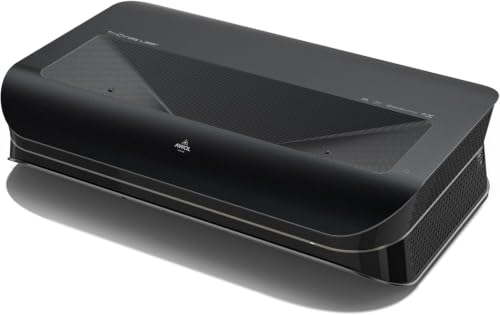
AWOL Vision LTV-3000 Pro — Enthusiast Triple Laser
AWOL Vision built its name in the ultra-short-throw niche by courting the buyers other brands treated as edge cases: the ones who ask about 3D support in an era when televisions abandoned it, who want Dolby Vision and HDR10+ in the same machine rather than choosing a format camp, and who measure a laser TV by the standards of a home theatre rather than by the standards of a television with ambitions. The LTV-3000 Pro’s title is that courtship in compressed form — 4K, 3D, ultra-short-throw, triple laser, Dolby Vision and Atmos, HDR10+, and a picture up to 150 inches.
The triple laser engine is the technical heart. Separate red, green, and blue laser light sources give this class of projector its wide colour reach and its freedom from lamp changes, and in a television-replacement role that longevity matters differently than it does in a theatre: a laser TV is used daily, for news and sport and children’s programmes as much as for films, and its light source accumulates hours the way a television’s does. A light engine built for tens of thousands of hours is not a luxury in this role; it is the correct engineering for the duty cycle.
Format support is where the AWOL presses its advantage. Dolby Vision and HDR10+ are rival dynamic HDR systems, and content libraries are split between them; a machine titled with both, plus Atmos for sound, declines to make its owner care which studio mastered a given film. The 3D support, meanwhile, is a genuinely scarce feature in current displays of any kind. Households with a shelf of 3D Blu-rays have almost nowhere else to go; households without one lose nothing by its presence. IMAX Enhanced is absent from this title — that credential appears on the Hisense pair below — and buyers for whom it is a priority should note the difference rather than assume the enthusiast checklist is identical across brands.
What the title does not state should shape the purchase conversation too. No brightness figure is printed, no smart platform is named, and no speaker arrangement is described. For an enthusiast machine this is a familiar pattern — the assumption is a screen, a sound system, and sources supplied by the owner — but a television-replacement buyer arriving from a one-box television should register what the assumption means: plan the ALR screen, plan the sound, and confirm the streaming arrangement in the full listing and manufacturer documentation. The AWOL rewards the household that builds around it; it is not pretending to be an appliance.
Positioned against the Hisense PX3-PRO, its closest rival here, the AWOL trades the Hisense’s published figures and gaming credentials for the broader format embrace and the 3D support. Against the Samsungs, it is the specialist against the generalists. Its natural buyer has a dedicated wall, a willingness to pair it with a proper ALR screen, and a film library that uses the formats it supports. In that setting, it is the most theatre-minded machine in this guide.
- Format: ultra short throw, as stated in the listing title
- Resolution: 4K, as stated in the listing title
- Light source: triple laser, as stated in the listing title
- Picture formats named in the title: Dolby Vision, HDR10+, 3D
- Sound format named in the title: Dolby Atmos
- Maximum picture size: 150 inches, as stated in the listing title
- Brightness: Not stated in the listing title — verify with the manufacturer documentation
- Smart platform: Not stated in the listing title — verify with the manufacturer documentation
Strengths
- Dolby Vision and HDR10+ together cover both dynamic HDR camps, with Atmos alongside.
- 3D support serves a library that modern televisions have abandoned entirely.
- Triple laser light source suits the daily duty cycle of a television replacement.
Trade-offs
- No brightness figure or platform is stated in the title, so the full listing and documentation must be checked before purchase.
- It assumes owner-supplied screen and sound planning rather than bundling the whole answer.
- IMAX Enhanced, present on the Hisense picks, is not claimed in this title.
Best for: the enthusiast replacing a television in a light-controlled living room, with a film library that uses Dolby Vision, HDR10+, or 3D.
Not suited for: title-only shopping that needs the platform, speakers, and published figures all settled in advance, since this title leaves those to the documentation.

Hisense PX3-PRO Laser TV Projector — Gamer’s Laser TV
Hisense calls this category Laser TV and builds the PX3-PRO like it means the television part. The title publishes the figures the AWOL leaves to documentation: 3000 lumens, a 3000:1 contrast ratio, a picture range of 80 to 150 inches, Google TV as the platform, and a Designed for Xbox credential beside a 240 high refresh rate claim. Add the triple laser engine, Dolby Vision and Atmos, and IMAX Enhanced, and the PX3-PRO emerges as the most completely specified machine in this guide — the one whose listing title alone answers the most questions a television buyer knows to ask.
The gaming credentials deserve unpacking, because they are what separate this pick from its own sibling below. A television replacement in a gaming household inherits the console, and the console is unforgiving about delay and refresh. The title’s 240 high refresh rate figure and the Designed for Xbox line signal a machine engineered to be a gaming display at television scale — at sizes, remember, up to 150 inches, where a racing game’s sense of speed stops being a picture of speed and becomes peripheral vision. Film households can ignore all of this without penalty; gaming households should rank it near the top of their comparison, because few projectors of any format publish their gaming intent this plainly.
Google TV as the platform places the PX3-PRO in the Android ecosystem’s mainstream: the major streaming services, voice search through the Google account the household probably already has, and an interface that behaves like a contemporary television’s. Combined with the published brightness, that makes this the pick whose daily manners most resemble the television it replaces — bright enough for managed daylight on a proper screen, smart enough to need no external box, and specified enough that the purchase can be justified from the title’s own numbers.
The contrast figure invites an honest footnote that applies across the category. A 3000:1 contrast ratio quoted for an ultra-short-throw projector is a laboratory figure, and the contrast a viewer experiences in a living room is governed at least as much by the screen and the room’s ambient light as by the machine. This is precisely why the ALR pairing taught later in this guide matters so much for this pick: the screen is what lets a figure like 3000:1 survive contact with a real room. Judge the PX3-PRO as a system — projector plus ALR screen plus shaded windows — and its published numbers describe a genuinely strong television replacement.
Against the AWOL, the PX3-PRO concedes 3D and HDR10+ — neither appears in its title — and wins on published brightness, platform, and gaming. Against its sibling the PT1, it is the higher-specified machine on the figures both titles share. The buyer choosing between them is really choosing how much gaming and brightness headroom the main room needs, and the PX3-PRO is the answer when the answer is: all of it.
- Format: ultra short throw, as stated in the listing title
- Resolution: 4K UHD, as stated in the listing title
- Light source: triple laser, as stated in the listing title
- Brightness: 3000 lumens, as stated in the listing title
- Contrast: 3000:1, as stated in the listing title
- Picture size range: 80 to 150 inches, as stated in the listing title
- Platform: Google TV, as stated in the listing title
- Picture formats named in the title: Dolby Vision, IMAX Enhanced
- Gaming: 240 high refresh rate and Designed for Xbox, as stated in the listing title
Strengths
- The most fully published specification in this guide, including brightness and contrast figures in the title.
- Gaming intent is explicit: high refresh rate and an Xbox design credential.
- Google TV platform plus Dolby Vision and IMAX Enhanced cover the mainstream streaming bases.
Trade-offs
- 3D and HDR10+, both on the AWOL’s title, do not appear here.
- Its contrast figure, like all in this class, depends on an ALR screen and a managed room to be realised.
- As the flagship specification of the Hisense pair, it asks the larger commitment of the two.
Best for: a gaming household replacing the main television, wanting published figures, Google TV, and a picture up to 150 inches.
Not suited for: collections leaning on 3D discs or HDR10+ titles, since neither format is claimed in this listing title.

Samsung The Premiere LSP7T — Established Premiere Pick
Samsung’s entry into this category carried a particular significance when the LSP7T arrived: the largest television maker in the world declaring that the successor to the big television might not be a television. The Premiere line wraps an ultra-short-throw laser projector in the industrial design and the Smart TV ecosystem of Samsung’s televisions, and the LSP7T — the 120-inch, 4K smart laser model in this listing, a 2021 design bundled here with an additional four-year coverage plan from Epic Protect — is the generation that established the formula.
That formula’s appeal is continuity. A household leaving a Samsung television for a Samsung Premiere keeps its interface habits, its app accounts, and its remote-control instincts; the learning curve that accompanies most category changes simply does not occur. For the many households where the projector must be operated by everyone, including the members who did not choose it and do not read manuals, that continuity is a feature with daily cash value, and it is the strongest argument this pick makes against the more exotic machines in this guide.
The listing’s bundle deserves a direct word. The title states that this unit carries an additional four-year coverage by Epic Protect beyond the standard arrangement. Extended coverage on a laser projector — a device with a light engine, fans, and optics expected to serve as the household’s main display for years — is not a trivial add-on, and buyers comparing this listing against a bare unit elsewhere should price the coverage as part of what is being bought. It also signals the listing’s positioning: this is the considered, keep-it-for-years purchase, not the bargain hunt.
Honesty about generation belongs here too. The LSP7T is a 2021 model, and its own successor sits further down this guide in the LPU7D, whose title advertises a gaming hub and newer platform features. The older machine’s case rests on maturity and on this listing’s coverage bundle rather than on novelty: the platform is proven, the behaviour is known, and the design has years of owner experience behind it. Buyers who prize the newest feature set should compare the two Samsung sections carefully; buyers who prize a settled product with long coverage will find this pick’s argument coherent.
The title leaves the enthusiast figures unstated — no lumens, no contrast ratio, no format list beyond the 4K smart laser description — and this guide will not fill those silences with borrowed numbers. What the title does establish is the shape of the purchase: a 120-inch-class Samsung laser TV alternative with the company’s Smart TV platform, in a listing that adds four years of coverage. Households for whom that shape is the requirement will find the documentation worth the trip; households shopping on specification tables should start with the Hisense and Epson sections, whose titles publish more.
- Format: short throw (Premiere ultra-short-throw class), as described in the listing title
- Resolution: 4K, as stated in the listing title
- Light source: laser, as stated in the listing title
- Picture size: 120 inches, as stated in the listing title
- Platform: Samsung Smart TV, as stated in the listing title
- Coverage: additional 4-year coverage by Epic Protect included in this listing, as stated in the listing title
- Model year: 2021, as stated in the listing title
- Brightness: Not stated in the listing title — verify with the manufacturer documentation
Strengths
- Samsung’s Smart TV continuity removes the learning curve for Samsung television households.
- The listing bundles an additional four years of coverage, priced into the purchase.
- An established, mature design with years of owner experience behind it.
Trade-offs
- A 2021 generation, superseded in features by the LPU7D further down this guide.
- The title publishes no brightness or contrast figures for specification-led comparison.
- Its picture class tops out at the 120-inch size stated in the title, below the 150-inch Hisense and AWOL claims.
Best for: a Samsung television household wanting the projector swap with the least possible change to daily habits, in a listing with long coverage.
Not suited for: specification-led shortlists built on published brightness and contrast figures, since this listing title states none.

Epson EpiqVision LS800 — Brightness and Sound Pick
The LS800 is the pick this guide is most careful with, because it contains the category’s most instructive honesty test. Its title describes a 4K PRO-UHD ultra-short-throw laser projector. PRO-UHD is Epson’s pixel-shifting technology: the 3LCD panels render a 1080p-class image that is shifted rapidly to address a 4K pixel grid, producing a picture that resolves far beyond 1080p without being a native 4K panel. That is a legitimate, effective technology with real advantages — and it is not native 4K, and this guide says so in the spec box, in this analysis, and anywhere else the machine is discussed. A buyer comparing the LS800 against the native-4K-titled machines here deserves the distinction in plain words, and Epson’s own naming, read carefully, provides it.
What the pixel-shift caveat should not do is obscure how much else this title offers, because the LS800’s stated figures are formidable. Four thousand lumens, quoted as both colour brightness and white brightness in the Epson manner, is the strongest brightness claim in this guide — and the one most relevant to the television-replacement problem, since daylight washout is the category’s founding enemy. A 3LCD engine behind that output means saturated colour at full brightness and no rainbow artefacts for sensitive viewers, the same twin advantages the Epson name carried in the standard-throw class. For a bright living room on an ALR screen, this is the machine whose title most directly addresses the room’s hostility.
Sound is the second headline, and it is unique in this guide: a Yamaha 2.1-channel speaker system, named in the title. Every other pick here either describes its audio in format terms or leaves it to documentation; Epson commissioned a recognised audio maker and put the partnership in the title. A 2.1 system with a real low end changes the television-replacement equation, because the commonest failure of the swap is a magnificent picture accompanied by thin sound from a box at ankle height. The LS800 is the one pick that can plausibly serve, unassisted, as the whole living-room system — projector, platform, and speakers — while still accepting a soundbar later through its connections.
The platform is Android TV with smart streaming, and the title adds HDMI and Bluetooth to the connection story: HDMI for the console and the player, Bluetooth for the speaker or headphones that late-night viewing sometimes demands. Set the whole package against the field and the LS800’s identity is clear — it is the pragmatist’s flagship, trading the native-4K badge and the format checklist of the triple-laser machines for brightness, colour integrity, and sound that a family can live with on day one.
The fair summary is a trade, stated plainly. If your room is bright, your viewers include someone who sees rainbow artefacts on single-chip designs, and your sound plans are modest, the LS800’s concessions cost you little and its strengths answer your actual problems. If your room is a controlled theatre and your library is native 4K material examined closely, the pixel-shift distinction matters more and the triple-laser picks argue their case. Neither conclusion is a flaw in the machine; both are the machine, described accurately.
- Format: ultra short throw, as stated in the listing title
- Resolution: 4K PRO-UHD — pixel-shift, not native 4K — as stated in the listing title
- Display technology: 3-chip 3LCD, as stated in the listing title
- Brightness: 4000 lumens colour brightness and 4000 lumens white brightness, as stated in the listing title
- Platform: Android TV smart streaming, as stated in the listing title
- Sound: Yamaha 2.1-channel speakers, as stated in the listing title
- Connections named in the title: HDMI, Bluetooth
- Picture format named in the title: HDR
Strengths
- The strongest stated brightness in this guide, quoted as equal colour and white figures.
- A named Yamaha 2.1-channel speaker system makes it the only credible one-box answer here.
- 3LCD imaging avoids rainbow artefacts and holds colour at full output.
Trade-offs
- Its 4K PRO-UHD picture is pixel-shifted rather than native 4K, as its title states.
- Dolby Vision and IMAX Enhanced, claimed by rivals here, do not appear in its title.
- The enthusiast format checklist is thinner than the triple-laser picks’.
Best for: a bright living room where the replacement must fight ambient light and provide its own convincing sound from day one.
Not suited for: rooms where a native 4K panel is a hard requirement, because this machine’s PRO-UHD picture is pixel-shift by design.

Hisense PT1 UST Triple Laser Projector — Second-Room Laser TV
If the PX3-PRO is Hisense arguing for the flagship, the PT1 is Hisense arguing for the format itself: the same triple laser architecture, the same Google TV platform, the same 80-to-150-inch picture range, Dolby Vision and Atmos, IMAX Enhanced, 3D, and a 240 high refresh rate — at a stated 2500 lumens against its sibling’s 3000, and a shared 3000:1 contrast figure. Read the two titles side by side and the PT1 is plainly the same idea tuned a step down, which in this category is not an insult. It is how a household puts a laser TV in the second room, or a first laser TV in a smaller main room, without paying for headroom the room cannot use.
The retained features matter more than the conceded one. Dolby Vision and IMAX Enhanced survive the step down, so the PT1’s picture pipeline accepts the premium versions of streamed films exactly as its sibling does. The 3D support — absent from the PX3-PRO’s title — appears in this one, a curiosity of the range’s specification that collectors should notice: the cheaper Hisense is the one that keeps the 3D library alive. And the 240 high refresh rate claim travels with it, so the gaming household’s second screen is not a gaming compromise.
The 2500-lumen figure should be read in the context this guide has built. On an ALR screen, in a room whose light is managed — curtains drawn for the film, ordinary shading for the news — 2500 lumens at the PT1’s picture sizes is a workable television replacement output, particularly in the smaller half of its 80-to-150-inch range where the same light is spread over less wall. Stretched to 150 inches in a bright room it will struggle, but so, honestly, will everything in this guide; the PT1 simply reaches that honesty sooner. Size the picture to the mid-range and the machine’s figures cohere.
As a second-room proposition, its virtues compound. Google TV means the household’s accounts and habits transfer without a second platform to learn. The triple laser engine means the daily duty of a family-room display rests on a light source built for it. And the format support means the second room is not the room where certain films refuse to play properly — a small domestic diplomacy that owners of tiered setups will recognise as worth money.
The comparison that decides this pick is therefore not against the flagship field but against its own sibling and against the televisions it undercuts on size. A household choosing between the PT1 and the PX3-PRO should ask two questions: how bright is the room, really, and how large will the picture actually be? Modest answers favour the PT1 without regret. Ambitious answers — the 150-inch wall, the glassy room — are what the sibling’s extra output is for.
- Format: ultra short throw, as stated in the listing title
- Resolution: 4K UHD, as stated in the listing title
- Light source: triple laser, as stated in the listing title
- Brightness: 2500 lumens, as stated in the listing title
- Contrast: 3000:1, as stated in the listing title
- Picture size range: 80 to 150 inches, as stated in the listing title
- Platform: Google TV, as stated in the listing title
- Picture formats named in the title: Dolby Vision, IMAX Enhanced, 3D
- Gaming: 240 high refresh rate, as stated in the listing title
Strengths
- Keeps Dolby Vision, IMAX Enhanced, and the platform of the flagship at a step down in output.
- 3D support appears in this title though not in its sibling’s.
- The same 80-to-150-inch range suits main rooms and second rooms alike.
Trade-offs
- 2500 lumens is the lowest stated output in this guide; bright rooms and the largest sizes will expose it.
- HDR10+ does not appear in its title.
- Like every pick here, it needs the ALR screen pairing to hold its contrast in daylight.
Best for: a second room, a smaller main room, or a first laser TV where the flagship’s extra output buys nothing the room can use.
Not suited for: bright, glass-heavy rooms planned at 150 inches, where its stated 2500 lumens is the wrong tool for the light.

Samsung The Premiere LPU7D 120″ — Newest Samsung Generation
The LPU7D is the 2024 generation of The Premiere, and its title shows where Samsung decided the category’s centre of gravity now sits: a 120-inch-class ultra-short-throw 4K laser projector described as an AI Smart TV, with a Gaming Hub, Vision Boost, powerful sound, and Alexa built in. The vocabulary has shifted from projector language to television language — this is marketed as a TV that happens to project, aimed at the buyer who wants the swap to feel like an upgrade within the television world rather than an emigration from it.
The Gaming Hub is the headline for console households. Samsung’s hub aggregates cloud gaming services and connected consoles into one screen, and in a television replacement it answers the question every gaming family asks the new display: where do the games live? Paired with the ultra-short-throw format — the console sits in the same console furniture, inches from the projector — it makes the LPU7D the most game-forward of the Samsung pair and a direct argument against the Hisense PX3-PRO’s Designed for Xbox credential. The two machines court the same household from different ecosystems, and the household’s existing platform loyalties are the honest tiebreaker.
Vision Boost, named in the title, is Samsung’s name for its picture adaptation processing — the class of feature that adjusts the image to room conditions. In a category whose founding problem is ambient light, a headline adaptation feature is at least aimed at the right enemy, though this guide’s standing advice survives it: processing assists a picture, an ALR screen defends it, and the pairing of the two is what makes a laser TV convincing at noon. Alexa built in completes the appliance picture — voice control of the display and, through it, of the smart home the television usually anchors.
Against its own predecessor in this guide, the LPU7D’s case is generational: newer platform features, the gaming hub, the current model year’s refinements, against the LSP7T listing’s bundled extended coverage and maturity. Against the wider field, Samsung’s case is the ecosystem one it always makes — the interface, the hub, the assistant, the design language of the furniture-grade box. The title, like its predecessor’s, publishes no brightness or contrast figures, and specification-led buyers should again take the trip to the documentation rather than assume parity with the Hisense figures printed above.
What can be said from the title alone is that this is the current Samsung answer, sized at the 120-inch class, built as a smart TV first. Households replacing a Samsung television who found the LSP7T’s continuity argument persuasive but want the present generation’s gaming and platform features have arrived at their pick. Households indifferent to ecosystems should compare it against the Hisense pair on published figures and format support, where the argument runs the other way.
- Format: ultra short throw, as stated in the listing title
- Resolution: 4K, as stated in the listing title
- Light source: laser, as stated in the listing title
- Picture size class: 120 inches, as stated in the listing title
- Platform: Samsung AI Smart TV with Gaming Hub, as stated in the listing title
- Picture feature named in the title: Vision Boost
- Voice assistant: Alexa built in, as stated in the listing title
- Model year: 2024, as stated in the listing title
- Brightness: Not stated in the listing title — verify with the manufacturer documentation
Strengths
- The current Samsung generation, with the Gaming Hub answering the console household’s first question.
- Television-first design and platform make the replacement feel like an upgrade, not a migration.
- Alexa built in keeps the display at the centre of a voice-controlled room.
Trade-offs
- No brightness or contrast figures are published in the title.
- Its stated picture class is 120 inches, below the 150-inch claims of the Hisense and AWOL picks.
- The enthusiast formats — Dolby Vision, IMAX Enhanced, 3D — are not claimed in this title.
Best for: a Samsung-ecosystem household, especially a gaming one, replacing the main television with the current Premiere generation.
Not suited for: format-led shortlists that need Dolby Vision or IMAX Enhanced named in the title, since this listing claims neither.
How Do the Six Compare Side by Side?
| Pick | Picture per title | Brightness per title | Platform | Distinguishing claim |
|---|---|---|---|---|
| AWOL Vision LTV-3000 Pro | 4K, up to 150″ | Not stated in title | Not stated in title | Dolby Vision, HDR10+, and 3D together |
| Hisense PX3-PRO | 4K UHD, 80–150″ | 3000 lumens | Google TV | Designed for Xbox; 3000:1 contrast |
| Samsung The Premiere LSP7T | 4K, 120″ | Not stated in title | Samsung Smart TV | Listing bundles 4-year Epic Protect coverage |
| Epson EpiqVision LS800 | 4K PRO-UHD (pixel-shift), UST | 4000 lumens colour and white | Android TV | Yamaha 2.1-channel speakers built in |
| Hisense PT1 | 4K UHD, 80–150″ | 2500 lumens | Google TV | Triple laser with 3D at the step-down tier |
| Samsung The Premiere LPU7D | 4K, 120″ class | Not stated in title | Samsung Smart TV, Gaming Hub | 2024 generation with Alexa built in |
One pattern in the table is worth pausing over, because it predicts how each machine will feel to own. The two Hisense rows are the only ones whose titles answer a specification shopper completely — picture, brightness, contrast, platform, formats — and that completeness reflects a brand competing on the merits of a published sheet. The Samsung rows answer a different shopper, the one asking what the machine will be like to live with: which hub, which assistant, which generation. The Epson row answers the room, leading with the brightness and the sound system that a real living room tests daily. And the AWOL row answers the library, listing the formats a serious collection actually uses. None of these is the correct set of questions in the abstract; the correct set is the one your household asks at the shop, and the table exists so you can see which manufacturer is answering it.
The table’s gaps are as informative as its entries.
Where a title publishes no brightness, the manufacturer is selling ecosystem and design rather than specification — a legitimate pitch that a specification-led buyer should still verify in documentation before paying flagship money. And the Epson row carries the guide’s standing label: PRO-UHD means pixel-shift, printed here exactly as it should be printed everywhere.
Why Does the Screen Matter as Much as the Projector?
An ultra-short-throw projector fires its picture upward at a steep angle from just below the screen, and an ambient-light-rejecting screen is engineered for exactly that geometry: its surface accepts light arriving from below — the projector — and rejects light arriving from above and the sides, which is where ceiling lights and windows send theirs. The result is the closest thing projection has to a cheat code for the living room. Blacks stay darker at noon, contrast survives the lamps, and the picture stops looking like a projection and starts looking like a display. Without one, the same projector throws onto a wall that reflects the room back at the viewer, and daylight wins.
Size the screen with the projector’s stated range, not with ambition. The Hisense pair and the AWOL claim up to 150 inches; the Samsung pair is a 120-inch class; every machine in this guide will look better at a size its light can fill with authority on your screen material. A fixed-frame ALR screen also solves the wall problem — ripples, texture, and off-white paint all print through an ultra-short-throw picture because the steep angle exaggerates every imperfection — so the screen is simultaneously a light tool and a flatness guarantee.
Placement discipline completes the system. The projector must sit level, at the height and distance the screen’s geometry demands, on furniture that will not be nudged by children, pets, or the vacuum cleaner; an ultra-short-throw image is aligned in millimetres, and a knocked console means a trapezoid evening. Measure the console depth before purchase, because these machines need their specified standoff from the wall, and confirm the screen’s bottom edge will sit where the picture needs to begin. None of this is difficult. All of it is the difference between a laser TV and a projector that happens to be near a wall.
How Do You Set Up a Room for a Projector Television?
Start with the wall and be honest about it. It needs the width for the picture you chose, a console position centred beneath it, and freedom from radiators, shelves, and picture rails in the throw zone. Decide the screen first, mount or place it, and let its dimensions dictate the projector’s position — in ultra-short-throw, the screen is the fixed point and the projector is the adjustable one.
Then manage the light in layers. Blackout or heavy curtains on the windows that face the screen; lamps placed behind the seating rather than beside the wall; a dimmer where the ceiling light is the room’s main source. You are not building a cave — the premise of this category is a living room — but every layer you add is contrast the projector does not have to buy with lumens. Test the result at the brightest hour the television would normally be watched, not at midnight, because that is the hour the replacement must survive.
Wire the room as a television room. The console, games machines, and players live in the same furniture as the projector, so cable runs are mercifully short; the one long run to plan is sound, if a soundbar or receiver enters the picture, and the one device to place carefully is any centre speaker, which must not block the projector’s upward throw. Finish by aligning the image to the screen’s borders using the projector’s geometry tools sparingly, focusing at the top of the picture where ultra-short-throw focus is most telling, and saving the household’s picture modes: one for film darkness, one for daytime sport, so nobody has to become an engineer to watch the news.
What Mistakes Do Television-Replacement Buyers Make?
Skipping the ALR screen is the mistake that defines the disappointed reviews of this entire category. A buyer spends flagship money on a laser projector, throws it at a cream wall in a bright room, watches the blacks turn to dishwater grey at noon, and concludes the technology is a fraud. The technology is a system, and the screen is half of it. If the budget cannot stretch to both, the honest sequence is a smaller picture on a proper screen, not a larger one on a wall.
Buying the largest size the title allows is the second mistake. A 150-inch claim describes a maximum, not a recommendation, and at that size every lumen is spread thin and every wall imperfection is magnified. The households happiest with this category tend to sit in the middle of their projector’s range, where brightness, sharpness, and immersion balance.
Forgetting the daily television comes next: the morning news, the children’s programme while dinner cooks, the ambient quiz show. A replacement that only shines for Friday film night will be resented by Wednesday. That is why this guide weighs platforms, speakers, and startup manners alongside picture formats — and why the picks with the strongest built-in sound and the most familiar interfaces earn their places.
Finally, buyers neglect the furniture. Ultra-short-throw projectors need specific distances from the wall and a stable, level perch; the antique sideboard that wobbles, or the console too shallow for the machine’s standoff, will sabotage alignment weekly. Measure the furniture against the documentation before the machine arrives, and the setup becomes a one-time event instead of a recurring chore.
How Much Daylight Can a Laser TV Room Honestly Handle?
The question deserves a scale rather than a slogan, because “bright room” means four different things in four different houses. At the forgiving end sits the north-facing living room with ordinary curtains: every pick in this guide, on an ALR screen, will serve television there all day without apology. Next comes the room with a large window to one side of the screen wall — side light is the kind ALR surfaces reject best — where the brighter stated machines, the Hisense PX3-PRO and the Epson LS800, hold their contrast longest and the PT1 asks for the curtains to be drawn by mid-afternoon.
Harder is the room whose window faces the screen, throwing daylight directly onto the surface the projector must use. Here the honest answer is that screen choice and shading stop being upgrades and become the purchase itself: a quality ALR screen, blackout shading for viewing hours, and a picture size kept in the middle of the machine’s range. Households willing to make that arrangement can still replace the television; households unwilling should keep a panel for daytime and let a projector own the evening instead, which is a respectable hybrid rather than a defeat.
At the far end sits the glass-walled room in a sunny climate, where no projector in this guide — or any guide — will out-argue the sun at noon. Naming that limit is not pessimism; it is what allows the rest of the advice to be trusted. The laser TV category succeeds precisely in the wide middle of real rooms, and the buyers who thrive in it are the ones who assessed their light before they assessed the projectors. Do that assessment at the worst hour, with the curtains as they will actually be, and the shortlist in this guide will sort itself with very little argument.
Final Recommendation
For the enthusiast’s wall, the AWOL Vision LTV-3000 Pro
brings the widest format embrace, including the 3D support nobody else here offers. For the gaming household that wants its figures published, the Hisense PX3-PRO is the most completely specified laser TV in this guide, and its sibling the PT1 carries the same platform and formats into smaller rooms at a step down in output. For brightness and one-box sound, the Epson LS800 answers — with its pixel-shift PRO-UHD picture labelled as exactly what it is. And for the household that simply wants its television, but enormous, the Samsung Premiere pair offers the gentlest migration, the LSP7T listing adding long coverage and the LPU7D adding the current generation’s gaming hub. Pair whichever you choose with an ALR screen and a shaded window, and the television will not be missed.
Frequently Asked Questions
Can a projector really replace a television for everyday use?
Yes, with the pairing this guide insists on: an ultra-short-throw projector on an ALR screen, in a room whose light can be managed. In that arrangement the laser TV handles news, sport, and streaming with television manners — instant platform, built-in sound, console-friendly placement — while offering picture sizes no comparably priced television approaches. In an unmanaged bright room against a bare wall, no: daylight washout is physics, not a brand flaw.
What is an ALR screen and why does everyone insist on one?
An ambient-light-rejecting screen uses a surface engineered for the ultra-short-throw angle: it accepts the projector’s light from below and rejects room light from above and the sides. That selectivity preserves contrast and black level in lit rooms, which is precisely where a bare wall fails. It also guarantees the flatness that steep-angle projection demands.
Is the Epson LS800 a true 4K projector?
Its title says 4K PRO-UHD, and PRO-UHD is Epson’s pixel-shifting technology: the image is rendered by rapidly shifting a lower-resolution panel to address the 4K grid. The result resolves well beyond 1080p and satisfies most viewers entirely, but it is not a native 4K panel, and this guide labels it pixel-shift wherever the machine appears.
How big should I actually go?
Inside your projector’s stated range, choose the size your seating distance and room light support — commonly the middle of the range. Bigger spreads the same light thinner and magnifies wall flaws; a size the machine can fill with authority looks sharper, brighter, and more cinematic than the maximum size endured.
Do I still need a soundbar?
Not immediately, and in one case perhaps not at all: the Epson LS800’s Yamaha 2.1-channel system is a genuine one-box answer. Elsewhere, built-in sound covers daily television respectably, and a soundbar remains the natural upgrade for film weight and dialogue clarity — an addition, not a rescue.
What happens when someone walks between the projector and the wall?
With ultra-short-throw, almost nothing: the projector sits centimetres from the wall, below the picture, so the walk-through shadow problem of long-throw projection disappears. It is one of the format’s quiet domestic triumphs, especially in rooms with children and dogs.
Related Guides
If the living-room verdict is not yet in, our guide to projectors with WiFi and Bluetooth covers the connected classes that feed a setup like this. Small rooms and short distances get their own treatment in our roundup of projectors for small spaces, where throw geometry rules every choice. And for the student version of the big-screen life, see our picks for a projector in a dorm room, where portability outranks permanence.


