What's inside
- Where to Buy
- Key Takeaways
- Quick Picks
- How the Picks Were Chosen
- Detailed Reviews
- Comparison Table
- How Do You Choose Between Office and Photo Machines at 13×19?
- Paper, Size and the Super B Habit
- Tank, Cartridge, Dye, Pigment: The Ink Decision in Plain Terms
- Colour Management Without the Headache
- Common Mistakes When Buying a 13×19 Printer
- Frequently Asked Questions
- Final Recommendation
As an Amazon Associate I earn from qualifying purchases. This post may contain affiliate links at no extra cost to you.
[SITE_DOMAIN] is reader-supported. When you buy through links on our site, we may earn an affiliate commission at no extra cost to you. Prices and availability change; check the Amazon listing for the current details.
Where to Buy
Epson EcoTank ET-15000 — Check price on Amazon
Epson EcoTank Photo ET-8550 — Check price on Amazon
Epson WorkForce Pro WF-7310 — Check price on Amazon
Epson Expression Photo HD XP-15000 — Check price on Amazon
Canon PIXMA PRO-200S 13in — Check price on Amazon
Epson SureColor P700 — Check price on Amazon
Every machine below prints at 13 x 19 inches — Super B — so the argument among them is not size but purpose: office tank, photo tank, office speed, or dedicated photo craft.
The best color 13×19 inkjet printers answer a frustration that standard printers create the moment a design outgrows a letter page. A poster shrunk to fit loses its presence; a portfolio spread tiled across two sheets loses its dignity; a photograph printed small loses the detail that made it worth printing. Thirteen by nineteen inches — Super B — is the size where those compromises end for home and small-studio work: big enough for a real poster, a full portfolio page, an exhibition print with breathing room, yet still a desktop machine rather than a floor-standing commitment. The six printers in this guide all reach that size, and they divide into two honest tribes. Three are office-leaning machines that happen to print large — two EcoTank all-in-ones and a WorkForce Pro built for business pace — and three are photo machines first, where the wide paper path serves image quality above all else.
Ink economics draw the second line through the set. The two EcoTanks are supertank machines: refillable reservoirs instead of cartridges, sold on the proposition that ink bought by the bottle changes the cost of printing large, where every page drinks like four ordinary pages. The WF-7310 plays the office cartridge game at business scale, with a 500-sheet capacity and a 25 ppm engine. The photo trio — XP-15000, PIXMA PRO-200S and SureColor P700 — spend their ink on colour breadth instead: six colours in the Epson XP, eight dye colours in the Canon, and a ten-channel UltraChrome PRO10 system in the SureColor, because photographic printing is limited by gamut and tonal subtlety long before it is limited by speed.
There is a psychological shift at this size that experienced owners mention and newcomers never expect: printing stops feeling like output and starts feeling like production. A letter page is a copy; a Super B sheet is an object, with a front and a presence, the kind of thing people carry with two hands and lean against the wall to consider. That shift is why this category exists at all, and why its buyers forgive it the desk space, the paper bills and the rituals. Every machine below can produce that object. They differ in what the object costs, how truthfully it renders colour, and how the machine behaves on the three hundred days a year it is printing something else.
Read the reviews with your dominant output in mind, stated plainly. If the 13×19 work is documents, plans, menus and classroom material with occasional colour, the office tribe serves it and the photo premium is wasted. If the wide prints are the photographs themselves — sold, exhibited, portfolio’d — the office tribe’s colour systems will quietly cap your quality no matter how large the sheet. The guide keeps the tribes separate in its badges and verdicts, because the commonest disappointment in this category is a buyer from one tribe purchasing in the other and blaming the machine for a mismatch chosen at the shelf.
Desk geography deserves a mention before the specifications begin, because a 13×19 printer is a piece of furniture as much as a peripheral. It needs a surface deep enough for its paper path, clearance behind or above for large sheets to travel, and storage within reach for paper that must stay flat and boxed. Measure the intended home with a Super B sheet in hand — borrow one from a copy shop if none exists yet — and trace the sheet’s journey from box to tray to output. Photographers who skip that rehearsal discover the machine fits the desk only diagonally, and diagonal printers collect household resentment out of all proportion to their output.
Key Takeaways
- The ET-15000 is the office tank: cartridge-free all-in-one printing to 13 x 19 at up to 17 ppm, with Ethernet, scan, copy and fax.
- The ET-8550 is the photo tank: 6-colour cartridge-free printing to 13 x 19 at up to 16 ppm, aimed at creators and home studios.
- The WF-7310 is the business sprinter: up to 25 ppm, auto 2-sided printing and 500-sheet capacity in wide format.
- The XP-15000 is the cartridge photo all-rounder: 6-colour wide-format photo printing at up to 9.2 ppm with auto 2-sided.
- The Canon PIXMA PRO-200S is a dedicated 13-inch photo printer with 8-colour dye ink and a 3-inch colour LCD.
- The Epson SureColor P700 is the purist’s machine: UltraChrome PRO10 ink through a 10-channel MicroPiezo AMC printhead.
Quick Picks
| Pick | Badge | Headline specification | Why it earns a place |
|---|---|---|---|
| Epson EcoTank ET-15000 | Office tank, wide format | Supertank all-in-one, 13 x 19, up to 17 ppm, Ethernet | Big-format office documents with bottle-fed ink economics and full all-in-one functions. |
| Epson EcoTank Photo ET-8550 | Photo tank for creators | 6-colour supertank, 13 x 19, up to 16 ppm | Photographic colour breadth with tank running costs for home studios. |
| Epson WorkForce Pro WF-7310 | Business wide-format speed | Up to 25 ppm, auto 2-sided, 500-sheet capacity | The office engine of the set, built for volume at wide format. |
| Epson Expression Photo HD XP-15000 | Cartridge photo all-rounder | 6-colour photo, 13 x 19, up to 9.2 ppm, auto 2-sided | Photo-quality colour in an all-in-one-shaped package for photographers at home. |
| Canon PIXMA PRO-200S | Dedicated Canon photo | 13-inch, 8-colour dye ink, 3-inch colour LCD | A print-only photo specialist with Canon’s dye colour system. |
| Epson SureColor P700 | Exhibition-grade purist | UltraChrome PRO10 ink, 10-channel MicroPiezo AMC head | The serious photographer’s 13-inch machine, built around its ink set. |
How the Picks Were Chosen
Admission required one physical fact before any other: the machine prints 13 x 19. Every title in this guide states that size or its 13-inch class outright, and printers that merely accept wide paper in a manual slot as an afterthought were not the quarry — these six are wide-format machines by design. Within that gate, the set was balanced across the category’s real fault lines: tank against cartridge ink, office against photo purpose, all-in-one convenience against dedicated print-only craft. A guide of six near-identical tanks would misrepresent a category whose buyers arrive with genuinely different work.
Specification discipline matters doubly in photo printing, where marketing vocabulary inflates fastest. The figures used below are the ones titles state: speeds as up-to figures, colour counts, the P700’s ink system and printhead architecture, the PRO-200S’s LCD size and dye ink count, the WF-7310’s sheet capacity. No gamut percentages, droplet sizes or paper-weight claims have been borrowed from elsewhere, because a photographer’s real comparison — how a specific image renders on a specific paper — cannot be settled by borrowed numbers anyway. What titles can settle is architecture, and architecture predicts more about a photo printer’s character than any single number: how many colours it mixes, whether its ink arrives by bottle or cartridge, and whether scanning shares its desk space or its budget.
The photo-versus-office split was policed throughout selection, per the honest shape of these listings. Epson itself labels the ET-15000 ideal for home and small offices and the ET-8550 ideal for creators and home studios, and those labels match the hardware — the photo model’s six colours against the office model’s all-in-one completeness. The PRO-200S and P700 make no office pretence at all. Readers whose wide-format ambitions run to graphics at even larger scales should note the boundary of this guide: beyond 13×19 lies the world of our plotter Printers guide, where 24- and 36-inch machines take over, while the document fleets that feed these printers their everyday work live in our kyocera Printers coverage.
One more selection principle ran underneath the tribal balance: each machine had to be the best answer to some coherent buyer’s question, not merely a good printer. The questions are printed in the verdict lines — the office that prints its own posters, the studio iterating portfolios, the business duplexing course packs, the burst-pattern photographer, the glossy portraitist, the edition printer. A machine that answered no question distinctly would have been dropped however impressive its specification, because a buying guide’s unit of value is the matched decision, not the admired product. Readers who find their own question missing from the six should treat that absence as information too: their machine may live one category over, in the plotter range or the office fleet, rather than in this guide.
Detailed Reviews

Epson EcoTank ET-15000
Badge: Office tank, wide format
- Format: Wide format, up to 13 x 19 in.
- Ink system: Cartridge-free supertank
- Functions: Print, scan, copy, fax
- Speed: Up to 17 ppm, per the listing title
- Connectivity: Ethernet, wireless
- Positioning: Home and small offices, per the listing title
The ET-15000 is the pragmatic heart of this guide: a cartridge-free all-in-one that prints to 13 x 19, scans, copies and faxes, and connects by Ethernet or wireless. Its proposition to a small office is completeness at scale. The wide paper path handles the posters, spreadsheets, menus and plans that overflow a letter printer, while the supertank system answers the objection that wide pages drink ink expensively — bottle refills change that arithmetic structurally, which matters more with every square inch of coverage. At up to 17 ppm it will not win a sprint against the WorkForce below, but office pace is about the whole job, and a machine that also scans the signed contract and faxes the order form collapses three devices into one footprint.
Who thrives with it is easy to picture: the estate agent printing window displays and particulars, the café group producing its own menus and posters, the school office running certificates, displays and oversized worksheets, the small firm whose proposals include full-size charts. In each case the wide work is document work — colour that must be clean and present, not colour that must be gallery-faithful — and the ET-15000’s office specification fits it precisely. Ethernet earns its mention for the shared-office reality: wired, findable, boring, exactly what a machine serving five desks should be.
The honest boundary is photographic ambition. This is an office colour system, and while it will print a handsome photograph on the right paper, it is not built around the multi-colour architecture the photo tribe below uses to render skin tones, shadow gradations and saturated skies. Epson’s own positioning — home and small offices — tells the same story. Buy the ET-15000 as the wide office hub it is, and it is arguably the most useful machine in this guide. Buy it as a photo printer and you will spend a year discovering the difference between its tribe and the ET-8550’s.
Strengths
- Full all-in-one functions at wide format, with scan, copy and fax aboard.
- Supertank ink economics suit large pages that drink colour by the sheet.
- Ethernet plus wireless covers both fixed desks and flexible rooms.
Trade-offs
- Office colour system; not the multi-colour architecture of the photo models.
- Up to 17 ppm trails the WorkForce Pro’s business pace.
- Tank discipline applies: print regularly to keep the system in health.
Best for: a small office seeking wide-format documents with tank ink economics and all-in-one completeness.
Not suited for: a photographer seeking gallery colour fidelity, where the photo models’ extra colours decide.
There is a second-order benefit to the wide office hub that reveals itself over a school term or a trading quarter: work stops leaving the building. The poster that used to be emailed to a copy shop with a two-day turnaround is printed between lessons; the menu change that waited for the printer’s monthly run happens the same afternoon; the chart for tomorrow’s meeting exists tonight at full size. Outsourcing wide printing is rarely expensive per piece — it is expensive in latency and in the ideas that quietly die while waiting. A machine like this converts wide format from a procurement event into a desk habit, and offices feel the difference as tempo rather than as specification.
Offices printing their own posters, menus and plans in-house can Check price on Amazon on the ET-15000 listing.

Epson EcoTank Photo ET-8550
Badge: Photo tank for creators
- Format: Wide format, up to 13 x 19 in.
- Ink system: Cartridge-free 6-colour tank
- Functions: Print, scan, copy
- Speed: Up to 16 ppm, per the listing title
- Positioning: Creators and home studios, per the listing title
The ET-8550 is what happens when the supertank idea is aimed at photographs instead of documents, and the single number that tells the story is six: six colours in a cartridge-free system, printing to 13 x 19. Photo printing’s eternal tension is that the machines with the colour breadth to do images justice usually feed on cartridges small enough to make large prints feel like a meter running. A 6-colour tank dissolves that tension structurally. The creator can print the big test, live with it on the wall for a week, adjust, and print again — the iterative rhythm real photographic work requires — without each iteration carrying a cartridge-shaped price tag. Epson positions it for creators and home studios, and for once the positioning undersells nothing.
The all-in-one frame around the photo engine matters practically. Scanning joins printing and copying, so the studio that digitises reference material, old prints or artwork proofs keeps one machine at the centre of the bench. Up to 16 ppm is the stated speed, respectable for a photo-led machine, though photographers should read all such figures as document-mode numbers and expect exhibition prints to take the time quality demands. The 13 x 19 ceiling matches the guide’s premise exactly: portfolio pages, exhibition pieces at domestic scale, posters with genuine presence.
Against its office sibling above, the trade is focus: fax leaves the function list, and the machine’s soul is its colour system rather than its office completeness. Against the dedicated photo machines below, the trade runs the other way — the PRO-200S and P700 are print-only purists with their own ink architectures, while the ET-8550 offers tank economics and all-in-one utility in the same box. For the home studio printing photographs weekly and documents occasionally, that combination is the sweet spot of this entire guide, and the ET-8550 occupies it alone.
Strengths
- Six-colour photo printing with tank economics that forgive iterative test prints.
- Wide format to 13 x 19 with scan and copy for a complete studio bench.
- Creator positioning matches its hardware: colour breadth first, office features second.
Trade-offs
- No fax, and its office pace trails the business-focused models.
- Dedicated photo purists may still prefer the print-only machines’ ink systems.
- Tank care applies: regular printing keeps a 6-colour system happiest.
Best for: a home studio seeking photographic colour at 13 x 19 without cartridge anxiety.
Not suited for: an office seeking fax and document pace, where its sibling’s office specification fits better.
Consider the economics of confidence, because that is what a photo tank actually sells. A cartridge photographer rationing prints makes safe choices: the edit is final before it is tested, the paper is the cheap sheet until the exhibition, and the large print is a commitment made nervously. A tank photographer prints the test at full size, pins it up, lives with it, and lets the image itself argue for the adjustment. Work improves under that regime in ways no specification captures, and portfolios built from full-size iterations carry a coherence that screen-judged work rarely achieves. The ET-8550’s six colours get the credit in most conversations; its permission to iterate is the deeper feature.
Creators printing portfolios and exhibition pieces at home can Check price on Amazon for the ET-8550.

Epson WorkForce Pro WF-7310
Badge: Business wide-format speed
- Format: Wide format, up to 13 x 19 in.
- Speed: Up to 25 ppm, per the listing title
- Duplex: Automatic 2-sided printing
- Paper capacity: 500 sheets, per the listing title
- Functions: All-in-one, per the listing title
- Positioning: Businesses, per the listing title
The WF-7310 is the sprinter of this set, and its title reads like a business case: wide-format printing to 13 x 19, up to 25 ppm, automatic 2-sided printing and a 500-sheet capacity. Each figure answers a specific office pain. The speed answers the shared-printer queue. The duplex answers the paper bill and the filing cabinet. The 500-sheet capacity — a full ream, swallowed whole — answers the empty-tray interruption that strands jobs and tempers alike. Put together, they describe a machine for offices whose wide-format work is not occasional garnish but daily throughput: training providers printing course materials, operations teams producing signage and documentation, businesses whose A3 and Super B output is measured in reams.
Its all-in-one billing in the title keeps it honest as an office hub rather than a single-purpose engine, and the WorkForce Pro badge carries Epson’s business-line expectations for duty and paper handling. What the WF-7310 does not claim is equally instructive: no tank system, no photo colour architecture, no creator positioning. Its ink economics are the cartridge economics of business printing, accepted in exchange for pace and capacity, and its colour purpose is the document register — charts, graphics, branded materials — rendered quickly and cleanly at sizes that make a room pay attention.
Choose it when wide format is a workload rather than an event. The office printing twenty posters a week, duplexed handouts by the hundred and plans on demand will feel every one of its headline figures weekly. The studio printing three exhibition photographs a week will feel none of them, and should spend its money in the photo tribe instead. Few machines in this guide state their buyer as plainly as this one does — businesses, says the title — and the review’s job is simply to agree, with the rider that businesses whose wide work is photographic should read business as documents and keep scrolling.
Strengths
- Fastest stated speed in the set at up to 25 ppm, with auto 2-sided printing.
- 500-sheet capacity takes a full ream and ends mid-job tray interruptions.
- Wide format with all-in-one billing suits daily business throughput.
Trade-offs
- Cartridge ink economics rather than tank refills for heavy colour coverage.
- Document colour purpose; not a photographic colour system.
- Business scale and pace are wasted on occasional wide printing.
Best for: a business seeking wide-format volume with duplex speed and ream-sized paper capacity.
Not suited for: a photo studio seeking colour breadth, since its engine is tuned for documents.
The duplex figure deserves a second look from a business angle, because at wide format it behaves differently than at letter size. Two-sided wide documents — training manuals, bound course packs, double-sided signage inserts — are the difference between a print job and a finishing job, and a machine that duplexes automatically removes the manual flip-and-pray step where large sheets get misaligned and wasted. Large sheets are the expensive ones to waste. Pair that with the ream-sized tray and the WF-7310’s design intent comes into focus: it is built for the unglamorous middle of business printing, where volume is real, deadlines are same-day and the wide format is a working size rather than an occasion.
Operations teams printing course packs, signage and plans daily can Check price on Amazon on the WF-7310 listing.

Epson Expression Photo HD XP-15000
Badge: Cartridge photo all-rounder
- Format: Wide format, up to 13 x 19 in.
- Colour system: 6-colour photo printing
- Speed: Up to 9.2 ppm, per the listing title
- Duplex: Automatic 2-sided printing
- Positioning: Photographers and home studios, per the listing title
The XP-15000 is the traditionalist’s photo printer in this guide: six colours, cartridge-fed, in the Expression Photo HD line whose name has signified Epson’s home photo ambitions for years. Its stated speed, up to 9.2 ppm, is the slowest figure in the set and the most honest about its priorities — photo machines are not bought by the page per minute, and a printer that leads with its colour system rather than its pace is telling you what it is for. Six-colour printing at up to 13 x 19 gives the home photographer the two things that matter, breadth of colour and size of canvas, in a machine shaped like an ordinary all-in-one rather than a piece of laboratory equipment.
Automatic 2-sided printing is the specification that surprises in a photo title, and it earns its place through the photographer’s paper life beyond photographs: contact sheets, portfolio drafts, the document traffic of a working studio. The XP-15000 does not ask its owner to keep a second printer for the mundane, and for a home studio where desk space is the scarcest resource in the building, that consolidation has real value. Epson positions it for photographers and home studios, matching the ET-8550’s audience with the opposite ink philosophy — cartridges for the photographer who prints in bursts and values a machine that waits patiently between them.
That burst pattern is the key to choosing between the two Epson photo all-in-ones. Tank systems reward rhythm; cartridge systems forgive irregularity. A photographer printing forty wide prints in a festival month and four the next is the XP-15000’s natural owner, while the weekly printer belongs to the tank above. Neither is the better machine in the abstract, and this guide refuses to pretend otherwise. Judged on its own terms — six colours, wide format, home-studio manners — the XP-15000 is the set’s most familiar pleasure: the photo printer as a well-bred appliance.
Strengths
- Six-colour photo system at full 13 x 19 width for home photographers.
- Cartridge feeding suits irregular, burst-pattern printing without tank routines.
- Auto 2-sided printing covers the studio’s document traffic in the same machine.
Trade-offs
- Slowest stated speed in the set at up to 9.2 ppm.
- Cartridge economics punish heavy, continuous wide-format printing.
- Print-only photo specialists below offer still deeper ink architectures.
Best for: a home photographer seeking six-colour wide prints with cartridge convenience and duplex documents.
Not suited for: a high-volume studio seeking tank running costs across weekly wide printing.
There is a domestic realism to this machine that the purist models cannot offer and should not be asked to. The home studio it targets shares its building with homework, household documents and the occasional poster for a school project, and a printer that handles the photographic work beautifully while still duplexing the mundane earns its footprint twice. Photographers are often the household’s accidental IT department, and a machine their family can also use — without endangering a specialised print-only instrument — lowers the household friction of the entire hobby. The XP-15000’s all-rounder shape is not a compromise of its photo purpose; it is an adaptation to the building it will actually live in.
Photographers printing in creative bursts rather than weekly rhythms can Check price on Amazon for the XP-15000.

Canon PIXMA PRO-200S 13in
Badge: Dedicated Canon photo
- Format: 13-inch professional photo printer
- Colour system: 8-colour dye ink
- Display: 3-inch colour LCD
- Connectivity: Wireless
- Colour: Black (unit finish), per the listing title
The PIXMA PRO-200S is Canon’s dedicated answer in this guide, and dedicated is the operative word: a professional 13-inch photo printer that does nothing else and apologises for nothing. Its colour system is the headline — eight dye inks — because dye ink at eight colours is Canon’s chosen route to the saturated, glossy, luminous output that defines the classic photo print. Dye inks sink into glossy and luster papers to produce that depth, and eight channels let the machine mix smoother gradients and richer saturated tones than the four- and six-colour systems above it can reach. Photographers whose work lives on glossy media — portraits, weddings, commercial colour — are this architecture’s natural constituency.
The 3-inch colour LCD is a small specification with an outsized daily effect on a print-only machine: ink status, paper settings and job handling at the printer itself, without a pilgrimage to the computer for every query. Wireless connection keeps the dedicated unit placeable — a photo printer’s home is beside the photographer’s desk or in the studio corner, not necessarily beside the router — and the black finish suits the studio furniture it will live among. There is no scanner to discuss, no fax to excuse, no office pace to quote, and that absence is the review’s point: every part of this machine’s budget went into the print.
Against the SureColor P700 below, the PRO-200S represents the dye philosophy where the Epson represents pigment: dye for glossy vibrancy and smooth saturation, pigment for matte depth and archival temperaments. Against the all-in-ones above, it represents specialisation itself. A photographer who prints photographs — only photographs, but photographs that must be right — is buying a tool with no compromises made for other jobs, and the PRO-200S is the Canon-shaped form of that decision at 13 inches.
Strengths
- Eight-colour dye ink system for saturated, glossy photographic output.
- Dedicated print-only design spends the whole budget on the print itself.
- 3-inch colour LCD puts ink and paper control at the machine.
Trade-offs
- Print only: no scanning or copying joins it on the desk.
- Dye ink character favours glossy and luster media over matte fine-art temperaments.
- Cartridge system; heavy printing carries cartridge economics.
Best for: a photographer seeking Canon’s glossy dye colour from a dedicated 13-inch machine.
Not suited for: a studio seeking matte fine-art pigment printing, where the SureColor’s ink set fits.
Wedding and portrait photographers will recognise a specific workflow in this machine’s design. The proofing cycle of that trade — a day’s shoot becoming a set of large, luscious prints a couple chooses from — rewards exactly what the PRO-200S assembles: glossy dye colour that flatters skin and saturation, a screen on the machine for quick status during a batch, and wireless placement in the studio where the choosing happens. Prints sell photography in that world; clients fall for the photograph they can hold. A dedicated 13-inch dye machine beside the viewing table is not equipment indulgence, it is the sales floor, and Canon’s model is specified like it understands the assignment.
Portrait and wedding photographers loyal to glossy colour can Check price on Amazon on the PRO-200S listing.
Epson SureColor P700
Badge: Exhibition-grade purist
- Format: 13-inch photo printer
- Ink system: UltraChrome PRO10
- Printhead: 10-channel MicroPiezo AMC
- Connectivity: Wireless
- Class: SureColor professional photo line
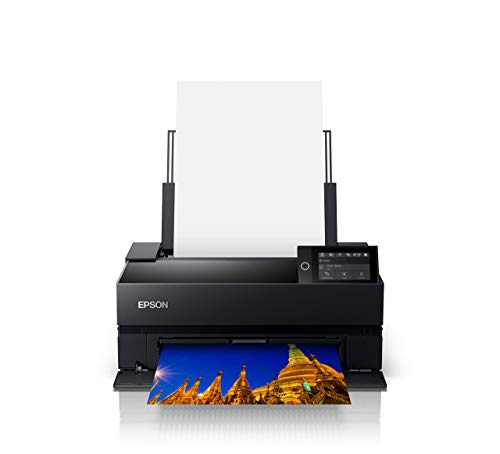
The SureColor P700 closes the set at its most serious address. Its title is an engineer’s sentence: a 13-inch photo printer with UltraChrome PRO10 ink, printed through a 10-channel MicroPiezo AMC printhead, and each clause is a commitment. UltraChrome PRO10 is Epson’s professional pigment ink set, the system its exhibition printers are built around, chosen by photographers who print for walls, sales and archives — pigment particles that sit on the paper’s surface and hold matte and fine-art media with a depth dye systems struggle to match, in a colour architecture broad enough for demanding monochrome as well as colour work. Ten channels in the printhead means the machine addresses that ink set without the swapping compromises smaller systems accept.
The SureColor name carries the lineage: this is the desktop descendant of the large-format machines galleries and print services run, scaled to 13 inches for the photographer whose editions, portfolio and exhibition pieces are produced at home or in a small studio. Wireless connectivity is present and almost beside the point; the P700’s buyer is not choosing by connection but by output character, and will place the machine where the light is right for judging prints. No all-in-one functions dilute it. The entire instrument is aimed at one act — a photograph leaving the printer indistinguishable in intent from the photograph on the screen, on the paper the photographer chose.
That seriousness defines its buyer as precisely as any specification. The P700 is wasted on documents, overkill for casual photo gifts, and exactly right for the photographer selling prints, exhibiting locally, or building a body of work where each 13 x 19 sheet is a finished object rather than a draft. Against the Canon beside it, the choice is philosophical — pigment depth and matte mastery against dye gloss and saturation — and photographers usually know their paper allegiance before they know their printer. If your allegiance is fine-art matte and your standard is the gallery wall, this is the machine in the guide that was built by people who share it.
Strengths
- UltraChrome PRO10 pigment ink serves matte, fine-art and exhibition printing.
- 10-channel MicroPiezo AMC printhead addresses the full ink set without compromise.
- SureColor lineage brings professional print-service architecture to the desktop.
Trade-offs
- Print-only and purpose-built; office tasks need another machine entirely.
- Pigment character is wasted on glossy snapshot-style printing.
- Its seriousness demands good paper and colour discipline to repay.
Best for: a print-selling photographer seeking exhibition pigment quality at 13 inches.
Not suited for: a household seeking one machine for documents and snapshots alike.
Monochrome deserves its sentence in this review, because serious black-and-white work is where ten-channel pigment systems quietly embarrass lesser machines. A black-and-white photograph is a gradient exam: shadow detail at one end, highlight delicacy at the other, and a neutral path between them with no colour cast to hide behind. Photographers printing monochrome editions at 13 x 19 are among the most demanding users in this entire guide, and the P700’s architecture — a broad pigment set addressed through ten channels — is specified for their examination. Colour photographers get the same discipline applied to skies and skin; monochrome photographers simply notice it first, because they have nowhere to hide either.
Fine-art photographers printing editions and exhibition pieces at home can Check price on Amazon for the SureColor P700.
Comparison Table
| Model | Tribe | Ink system | Speed stated | Functions | Standout point |
|---|---|---|---|---|---|
| EcoTank ET-15000 | Office | Supertank, cartridge-free | Up to 17 ppm | Print, scan, copy, fax | Ethernet wide-format office hub |
| EcoTank Photo ET-8550 | Photo | 6-colour supertank | Up to 16 ppm | Print, scan, copy | Photo colour with tank economics |
| WorkForce Pro WF-7310 | Office | Cartridge, business line | Up to 25 ppm | All-in-one | 500-sheet capacity, auto 2-sided |
| Expression Photo HD XP-15000 | Photo | 6-colour cartridge | Up to 9.2 ppm | Wide-format photo all-in-one | Auto 2-sided in a photo machine |
| Canon PIXMA PRO-200S | Photo | 8-colour dye | Not stated in title | Print only | 3-inch colour LCD, glossy dye colour |
| Epson SureColor P700 | Photo | UltraChrome PRO10 pigment | Not stated in title | Print only | 10-channel MicroPiezo AMC head |
How Do You Choose Between Office and Photo Machines at 13×19?
Interrogate your last twenty wide prints, or the twenty you are planning, and sort them by consequence. If they were documents — posters, plans, menus, teaching materials, charts — their success was measured in legibility and presence, and the office tribe serves them at better pace and friendlier running costs: the ET-15000 for tank-economy completeness, the WF-7310 for outright business throughput. If they were photographs whose success is measured in tonal truth — a face rendered honestly, a shadow that keeps its detail, a sky without banding — the photo tribe is not a luxury but the requirement, and the only remaining questions are ink philosophy and feeding system.
Within the photo tribe, paper allegiance decides first. Glossy and luster work, portraits and commercial colour point to the Canon’s eight dye inks. Matte and fine-art papers, exhibition and edition work point to the SureColor’s PRO10 pigments. The two Epson photo all-in-ones sit between those poles as the flexible answers, dividing by rhythm: the ET-8550’s six-colour tank for the studio printing weekly, the XP-15000’s cartridges for the photographer printing in bursts. And across the whole guide, the same office-neighbourhood logic from our ricoh Color Printers guide applies: document colour and photographic colour are different disciplines that happen to share a paper size, and buying for the discipline you practise is the whole decision.
Budget honesty closes the choosing process, and at this size it has three lines rather than one. The machine is the first line and the smallest surprise. Paper is the second — Super B sheets in photographic grades are a real per-print cost, and an edition of twenty carries a paper bill worth planning rather than discovering. Ink is the third, and its shape depends entirely on the tribe and system chosen above: bottles that arrive rarely and pour generously, or cartridges that arrive often and meter every large sky. Total those three lines for your expected first year, not for the purchase day, and the correct machine frequently changes — usually toward the tank for volume, toward the dedicated machines for seriousness, and away from any purchase whose second and third lines were never counted.
Paper, Size and the Super B Habit
Thirteen by nineteen changes a photographer’s habits in ways the specification cannot announce. Work starts being composed for the larger sheet: images that were cropped tightly for small prints breathe again, portfolio pages become single sheets rather than constructions, and posters stop being apologies. Paper choice widens with size, too — the fine-art and baryta sheets photographers covet are stocked in Super B precisely because this is the home exhibition size — and paper is half the print. Budget for paper as a first-class cost from the beginning: a wide printer fed only bargain stock is a sports car on budget tyres, and every machine in the photo tribe will show you the difference between papers with embarrassing clarity.
Handling deserves a practical paragraph. Super B sheets are large enough to kink, curl and catch corners, and they punish a cramped desk. Clear the output path, store paper flat in its box, handle by edges, and let finished prints dry or cure flat before stacking — pigment prints especially reward a few undisturbed minutes. None of this is technique for its own sake; at 13 x 19, every mishandling mark is visible at reading distance, and the photographers who love this size are the ones who built the small rituals that protect it.
Stocking strategy follows from the same arithmetic. Keep one working paper — the sheet your portfolio or your posters live on — in genuine depth, and keep experimental papers in single packs until they earn promotion. Wide paper bought speculatively in bulk has a way of becoming the expensive stratum at the bottom of the storage box, while the working paper runs out mid-edition. The offices in this guide’s other tribe should apply the identical rule in reverse: one standard sheet for the wide documents, bought by the ream-equivalent, and no drawer of exotic stock nobody’s job requires. At Super B sizes, paper discipline is budget discipline wearing a quiet disguise.
Environment is the last paper variable, and it is free to control. Paper drinks room humidity and changes its behaviour with the seasons; a sheet that fed perfectly in a dry winter office can curl its way through a humid summer one. Keep the working stock boxed until the day it prints, keep the box in the room the printer lives in rather than a damp store, and acclimatise a fresh box overnight before an important run. Photographers chasing consistency across an edition learn this quickly, because an edition printed across two humidity regimes can look like two editions — same file, same printer, different weather in the paper.
Tank, Cartridge, Dye, Pigment: The Ink Decision in Plain Terms
Four ink stories run through this guide and each is a temperament as much as a technology. Tank systems — the two EcoTanks — reward rhythm and volume, converting ink from a per-page anxiety into a stocked supply, at the price of preferring regular use. Cartridge systems forgive irregularity and simplify storage, at the price of charging heavily for continuous coverage. Dye inks, in the Canon, deliver glossy saturation and smooth colour, the classic photographic look on the papers most people frame. Pigment inks, in the SureColor, deliver matte depth and the archival temperament of the gallery world.
No hierarchy among the four survives contact with a real desk. The wedding photographer and the print-selling landscape artist can stand in the same shop, read the same six reviews, and correctly buy different machines — the Canon and the Epson respectively — while the school office behind them correctly buys the tank neither photographer would choose. Ink is where a printer’s philosophy becomes physical, and the most useful question in this guide is not which ink is best but which ink behaves the way your work behaves: your papers, your rhythm, your definition of a finished print.
Storage and shelf behaviour complete the ink picture for the home studio. Bottles for a tank system want a cool, upright home away from the paper stock they could ruin in one accident; cartridges want a drawer, not a windowsill; and every system wants its owner to resist the hoarding instinct that fills cupboards with ink for machines long replaced. These are small disciplines, but wide-format printing magnifies small disciplines the way it magnifies images — the studio that keeps its ink, paper and profiles in order is recognisably the studio whose prints come out right the second time as reliably as the first.
Colour Management Without the Headache
Every machine in the photo tribe will, at some point, produce a print that does not match the screen, and the photographer’s response to that moment decides whether wide-format printing becomes a joy or a grievance. The calm version of colour management is a short chain of habits rather than a laboratory regime. Work on a screen you trust, at a brightness matched to print viewing rather than to a dark room’s drama. Use the paper maker’s profile for the exact sheet in the printer, selected in the driver every time the paper changes, because half of all colour complaints are a profile left pointing at last week’s glossy while this week’s matte sits in the tray. Print a known test image — one with skin, sky, shadow and saturated colour — on each new paper before printing real work on it, and keep that test print in a drawer as the paper’s reference card.
Judge prints the way their audience will see them: dry, under ordinary room light, at arm’s length, after a few minutes rather than in the first wet minute. Pigment prints in particular settle as they dry, and photographers who judge in haste adjust images that were never wrong. None of these habits requires equipment beyond the printer itself, and together they convert the six machines’ colour architectures into predictable results. The photographers who insist printing is unreliable are usually skipping one link of that chain; the ones whose walls fill with consistent work are simply keeping all of them, print after print, paper after paper.
One more habit separates studios from dabblers at this size: annotate the keeper. Pencil the paper, profile and settings on the back of every test print that succeeds, and file it with the image’s name. Three months later, when the same image is wanted at the same size for a buyer, the recipe is in your handwriting rather than in your memory’s optimism. Wide-format printing rewards that clerical streak disproportionately, because each sheet is valuable enough that re-deriving a recipe wastes real material.
Viewing distance is the last piece of colour judgement, and it forgives and accuses in equal measure. A 13 x 19 print is made to be read from a step back, where its tonal architecture coheres; judged at nose distance, every inkjet print in this guide reveals the mechanics of its making and invites corrections the audience will never perceive. Photographers who learn to step back before they adjust produce calmer, more confident prints — and they waste fewer of the large, expensive sheets this category runs on. Let the wall, not the loupe, have the final word on all but the most forensic work.
Common Mistakes When Buying a 13×19 Printer
The first mistake is tribal confusion: buying an office machine for photographic work, or a photo machine for office throughput, then blaming the hardware for a selection error. The second is budgeting for the printer and not the paper, when Super B fine-art sheets are a genuine per-print cost. Third is reading up-to speeds as photo speeds; quality modes take the time they take, on every machine here. Fourth is starving a tank printer with irregular use, or feeding a cartridge photo printer a weekly high-volume habit — rhythm and feeding system must match. Fifth is printing exhibition work without a test-print discipline, when the entire economic point of the ET-8550’s tank is that iteration is affordable and the entire point of the P700 is that the final iteration can be perfect.
A sixth mistake is presentational, and it ambushes talented photographers: printing a beautiful 13 x 19 sheet and then mounting, framing or storing it like a letter page. Large prints curl in shallow boxes, scuff in unprotected stacks and fade their first summer in direct sun behind cheap glass. The print is not finished when it leaves the printer; it is finished when it is housed. Budget the mounts, sleeves and flat storage with the machine, and the work these printers produce will still look like the day it printed when someone important finally stands in front of it.
Frequently Asked Questions
What is 13 x 19 paper called? Super B. It is the standard home wide-format size in this guide — large enough for posters, portfolio pages and exhibition prints, small enough for a desktop machine.
Which of these is best for photographs? The photo tribe: the ET-8550 for six-colour tank printing, the XP-15000 for cartridge convenience, the PRO-200S for glossy dye colour and the SureColor P700 for pigment fine-art work. The right one depends on your papers and rhythm.
Can the office models print good photos? They print presentable photographs, and for many offices that suffices. They are not built around multi-colour photo architectures, so a photographer comparing against the photo tribe will see the ceiling in skin tones and shadow detail.
Dye or pigment ink — which lasts and looks better? They look different rather than better: dye favours glossy saturation, pigment favours matte depth and the fine-art register. Paper allegiance, not abstract ranking, should decide between the Canon and the SureColor.
Why does the WF-7310 state a sheet capacity when others do not? Because its title prints one — 500 sheets — as part of its business case. Where titles omit a figure, this guide leaves it unstated rather than borrowing it from a sibling model.
What should a first wide-format paper stock include? One proven working paper in depth — the sheet your posters or portfolio actually live on — plus single packs of one glossy and one matte alternative for testing. Promote a paper to bulk only after a test print on your own machine has earned it.
How should a wide print be judged straight off the printer? Let it dry flat for a few minutes, then view it at arm’s length or further under the light it will live in. Pigment prints settle as they dry, and nose-distance inspection invites corrections no viewer will ever perceive.
Do tank printers suit occasional printing? Tanks reward rhythm; a printer used in rare bursts is usually happier on cartridges, which is why the XP-15000 exists beside the ET-8550 for the same audience.
Final Recommendation
Name your tribe and the choice makes itself. Offices printing wide documents should take the ET-15000 for its tank-fed completeness or the WF-7310 where pace and paper capacity rule the week. Photographers should take the ET-8550 for weekly six-colour tank printing, the XP-15000 for burst-pattern cartridge work, the PRO-200S where glossy dye colour is the house style, and the SureColor P700 where prints are sold, exhibited and kept. Whichever machine earns the desk, the first 13 x 19 print that comes off it — poster-sized, uncompromised, exactly the image you meant — will explain the entire category more eloquently than this guide can. Give that print the paper it deserves, judge it from a step back in honest light, and write its recipe on the back before the details fade; the habits formed around the very first sheet are the ones the next five hundred sheets, editions, posters and portfolio pages will follow, for better or for worse, through every season of printing that follows them in that studio, without exception, year after year, print after print.


