What's inside
- Where to Buy
- Key Takeaways
- Quick Picks
- How We Chose These Picks
- Comparison Table
- How to Choose a Laptop for Bookkeeping Work
- How Much Memory Does a Bookkeeping Laptop Actually Need?
- Does a Numeric Keypad Change Day-to-Day Data Entry?
- Should a Small Firm Insist on Windows 11 Pro?
- How Long Should a Bookkeeping Laptop Be Expected to Last?
- Common Mistakes When Buying a Bookkeeping Laptop
- Final Recommendation
- Frequently Asked Questions
- Related Guides
As an Amazon Associate I earn from qualifying purchases. This post may contain affiliate links at no extra cost to you.
[SITE_DOMAIN] is reader-supported. When you buy through links on our site, we may earn an affiliate commission.
Where to Buy
Six laptops sit below, each tied to a single Amazon listing whose title carries the configuration this guide describes. The HP 255 G10 leads with a stated numeric keypad and 16GB of memory, so open its page to confirm today’s figure for that exact build before the order goes in. Shoppers comparing Intel against AMD should pull up the Lenovo V15 Gen 4 next, where the listing spells out the Core i5-13420H and the RJ45 port in its title. The HP 17 Business Laptop is the big-screen entry, and its page is where the split storage arrangement — part internal SSD, part external drive — gets its full explanation alongside the live total. Anyone speccing a smaller machine for a managed desk should read the Dell Latitude 5450 listing carefully, because that title names several memory and storage tiers and the selected tier decides what ships. The HP 17.3-inch laptop with the Core 5 processor shows its own figure on its product page, and the Lenovo V15 with the Ryzen 7 and 40GB of memory closes the set — its page is the place to verify that unusual memory figure before relying on it.
Bookkeeping looks gentle from the outside. A ledger opens, figures go in, a reconciliation happens, a report prints. Closing a month on an underpowered laptop reveals the reality underneath: the accounting file stays open all day, a browser carries the bank feed and the receipt archive, a spreadsheet holds the working papers, and the machine is expected to hold all of it without complaint from January to December. The best laptops for quick books business use are not the fastest laptops in any catalogue. They are the ones whose keyboards suit figure entry, whose memory absorbs the all-day multitasking pattern, and whose specification can be read plainly before money changes hands.
Three of the six picks below state a numeric keypad in their listing titles, and that detail leads this guide because data entry is the daily reality of the job. Entering a column of figures on a keypad is a different physical act from hunting along the number row: the hand stays in one place, the eyes stay on the source document, and errors fall because the rhythm never breaks. A bookkeeper processing invoices for six hours feels that difference in the wrist and in the error rate. Where a title stays silent about a keypad, the review says so and the spec box records the silence rather than papering over it.
Memory is the second pillar. Accounting work is rarely one program; it is the accounting file plus the bank portal plus the spreadsheet plus the email thread where the client sent the missing invoice. Sixteen gigabytes is the comfortable floor for that pattern, five of these six picks meet or pass it on paper, and one pick carries 40GB for offices whose working papers have grown genuinely large. Storage, screen size and the Windows edition fill out the picture, and each review below weighs them in the order a bookkeeping office would.
Reliability, the third word in this guide’s title, is the hardest quality to see in a listing and the easiest to feel in a workplace. It shows up as a machine that is still opening the company file without drama in its fourth year, that survives the daily commute between desk and meeting room, and that a local technician can service without exotic parts. Business lines from HP, Lenovo and Dell exist precisely because firms buy that durability story, and five of the six picks here come from business ranges rather than consumer shelves. The sixth, a Latitude, is the business range against which the others are implicitly measured. None of that guarantees any individual unit a long life, but it does mean the designs assume daily professional use, weekday after weekday, rather than occasional evening browsing.
One boundary should be drawn before the reviews begin. Accounting software itself is not benchmarked here, and this guide makes no claims about any program’s official system requirements; buyers should read the software publisher’s own current documentation for those figures. What a laptop guide can judge is the hardware pattern the work creates — memory pressure at month-end, storage growth across years of records, keyboard wear under figure entry, screen legibility across a long day — and that is the ground on which the six picks below were chosen and ranked.
Key Takeaways
- Three picks state a numeric keypad in their titles — the HP 255 G10 and both Lenovo V15 models — and the HP 17.3-inch Core 5 machine states a full-size keyboard with a numeric keypad as well.
- Memory runs from 16GB on four picks to 40GB on the Ryzen 7 Lenovo, the largest figure in the guide.
- Five picks run Windows 11 Pro; the HP 17.3-inch Core 5 laptop runs the standard Windows 11 edition named in its title.
- The Dell Latitude 5450 is the only 14-inch machine here and the only touchscreen, aimed at managed desks rather than keypad work.
- The HP 17 Business Laptop reaches its 1TB storage figure by combining a 500GB SSD with a 500GB external drive.
- Two Lenovo V15 models add an RJ45 Ethernet port, useful for offices that wire their bookkeeping desk to the network.
Quick Picks
| Pick | Badge | Why it earns a place |
|---|---|---|
| HP 255 G10 Business Laptop | Keypad and balance | AMD quad-core processor, 16GB of memory, a 512GB SSD and a stated numeric keypad under Windows 11 Pro. |
| Lenovo V15 Gen 4 | Wired-office value | Core i5-13420H, 16GB of memory, a numeric keypad and an RJ45 port for a desk that stays plugged in. |
| HP 17 Business Laptop | Biggest screen | A 17.3-inch display, 16GB of memory and a terabyte of combined storage with an office suite in the listing. |
| Dell Latitude 5450 | Managed-desk pick | A 14-inch touchscreen Latitude with an Ultra 7 processor, an IR webcam and Thunderbolt 4. |
| HP 17.3-inch Laptop (Core 5) | Home-office keypad | A Core 5 processor, 16GB of memory and a full-size keyboard with a numeric keypad on a 17.3-inch frame. |
| Lenovo V15 (Ryzen 7, 40GB) | Memory headroom | A Ryzen 7 processor with 40GB of memory, a 1TB SSD, a numeric keypad and wired Ethernet. |
How We Chose These Picks
The shortlist began with the work itself. Bookkeeping software in daily business use asks for a dependable processor, enough memory for the accounting file to coexist with a browser and a spreadsheet, and storage that will not fill with scanned receipts inside two years. Candidates whose titles could not state their memory and storage plainly were set aside, because a buyer outfitting an office should never have to guess at the two figures that decide how a machine ages.
Keyboards were the second filter, applied honestly. A stated numeric keypad earned a pick prominence in the ordering, but silence about a keypad did not disqualify a machine outright — the Dell Latitude below earns its place on manageability and screen quality for a different kind of desk. What silence did do is get recorded. Every spec box in this guide is built only from its pick’s listing title, and any feature a title does not name is marked with the not-stated line instead of being assumed from the manufacturer’s wider range.
The Windows edition mattered more than it might in a consumer guide. Small firms increasingly manage laptops through business policies, and Windows 11 Pro is the edition those policies expect, so five Pro machines and one standard-edition machine are labelled as exactly that. Finally, the set was arranged to span the real shapes of bookkeeping work: the solo practitioner at a kitchen table, the two-person office with a wired network, the growing firm whose files and staff lists keep expanding, and the employee whose laptop is issued, managed and occasionally carried between sites.

HP 255 G10 Business Laptop — Keypad and balance
The HP 255 G10 reads like a specification written by someone who has watched a bookkeeper work. An AMD quad-core processor, 16GB of memory and a 512GB SSD sit behind a 15.6-inch Full HD display, and the title states the detail this guide cares about most: a numeric keypad, present in the listing’s own words rather than inferred from the chassis width. Add a webcam with a physical shutter, HDMI, Wi-Fi 6, Microsoft Copilot and Windows 11 Pro, and the machine covers the bookkeeping day without a single exotic feature inflating the proposition.
Sixteen gigabytes is the right memory figure for the accounting pattern described in the introduction. The ledger file, the bank portal, the spreadsheet of working papers and the email client can all stay open together, and the processor — a quad-core AMD chip, described in the title without a model number — is sized for exactly that breadth of ordinary work rather than for bursts of heavy computation. A bookkeeping office does not render video or compile code; it keeps many modest things running at once, reliably, for years. This specification is honest about that job.
The webcam shutter deserves its sentence. Bookkeeping involves other people’s financial information, and a camera that can be physically closed is a small, concrete privacy measure for a desk where client calls and sensitive screens share the same hour. The 15.6-inch Full HD panel gives figures room to be read at arm’s length, and the Dark Ash Silver finish keeps the machine looking like office equipment rather than a gaming rig pressed into service. HDMI covers the second monitor that many bookkeeping desks eventually acquire.
It suits a solo practitioner setting up a first dedicated work laptop, a small firm issuing identical machines to two or three staff, and a home-based bookkeeper whose previous laptop was a consumer hand-me-down. The limits are equally clear. The title names no Ethernet port, so a wired office would lean on Wi-Fi 6 or a USB adapter, and the processor is described only as a quad-core AMD part, so buyers comparing chip generations precisely should confirm the exact silicon in the manufacturer documentation before ordering a fleet.
- Processor: AMD quad-core CPU
- Memory: 16GB RAM
- Storage: 512GB SSD
- Display: 15.6-inch Full HD
- Keyboard: Numeric Keypad
- Camera: Webcam with shutter
- Ports named in title: HDMI
- Wireless: Wi-Fi 6
- Operating system: Windows 11 Pro
- Ethernet port: Not stated in the listing title — verify with the manufacturer documentation
Strengths
- A numeric keypad stated outright in the title, ready for figure entry from the first morning.
- 16GB of memory matched to the accounting-plus-browser-plus-spreadsheet working pattern.
- A webcam shutter adds physical privacy to a desk handling client finances.
Trade-offs
- No Ethernet port is named, where both Lenovo picks below state RJ45.
- The processor is described generically, with no model number in the title.
- 512GB of storage is adequate rather than generous for a growing receipt archive.
Best for: a solo bookkeeper or small practice setting up a dedicated figures desk with a stated keypad and Pro software. Not suited for: a wired-only office network, because the title names no Ethernet port and the desk would depend on Wi-Fi 6 or an adapter.
If the shortlist had to be cut to a single recommendation for a first bookkeeping laptop, this HP would be the hardest to argue against — not because it leads any one column, but because it has no column missing.
One practical note on setup: the Copilot mention in the title reflects the current Windows 11 Pro environment rather than a bookkeeping feature, and a practice can safely ignore it. What deserves attention during the first week is simpler — set the keypad’s number lock behaviour to the office’s preference, pin the accounting file and the bank portal where staff expect them, and confirm the webcam shutter slides freely, because that small physical control will be used more often than any software privacy toggle on a client-facing desk.

Lenovo V15 Gen 4 — Wired-office value
Lenovo’s V15 Gen 4 approaches the same job from the wired side of the office. The title names an Intel Core i5-13420H — with a parenthetical claim that it beats a Core i7-1355U, recorded here as the listing’s own framing — driving a 15.6-inch FHD display, with 16GB of memory and a 512GB SSD. Around that core sit the fixtures of a desk that never moves: a numeric keypad for the figures, an RJ45 Ethernet port for a cabled network connection, HDMI for an external screen, a webcam for calls, and Windows 11 Pro in black.
The RJ45 port is the differentiator worth dwelling on. Bookkeeping traffic is not heavy, but it is constant and it is sensitive, and plenty of small offices still run a wired network precisely because a cable does not drop, does not need a password after a router change, and does not share airtime with every phone in the building. A laptop that plugs straight into that network without a dongle is a laptop that gets set up once and forgotten, which is the highest praise office hardware can earn. The V15’s specification is built around that set-and-forget idea.
The Core i5-13420H is an H-series processor, a step up in sustained power from the U-series chips in several rivals here, and for an office machine that will spend its life on mains power at a desk, that trade makes sense: the chip can hold its pace through a long afternoon of imports, exports and report runs. Sixteen gigabytes of memory keeps the multitasking pattern comfortable, and the 512GB SSD matches the HP above — sufficient for documents and scanned records, worth watching if the firm archives years of attachments locally.
It suits the small office with network cabling already in the walls, the bookkeeper whose desk is a fixed place rather than a rotation, and the buyer who prefers an Intel processor with a stated model number over a generic description. Its webcam is named without the shutter detail the HP claims, and the title does not state a Wi-Fi generation, so a buyer planning to use the machine away from the cable should check the wireless specification in the manufacturer documentation rather than assume parity with the Wi-Fi 6 picks.
- Processor: Intel Core i5-13420H
- Memory: 16GB RAM
- Storage: 512GB SSD
- Display: 15.6-inch FHD
- Keyboard: Numeric Keypad
- Ports named in title: HDMI, RJ45 Ethernet
- Camera: Webcam
- Operating system: Windows 11 Pro
- Wi-Fi generation: Not stated in the listing title — verify with the manufacturer documentation
- Webcam shutter: Not stated in the listing title — verify with the manufacturer documentation
Strengths
- RJ45 Ethernet allows a cabled, dongle-free connection to an office network.
- An H-series Core i5 with a stated model number suits sustained desk workloads.
- A stated numeric keypad keeps figure entry at the centre of the design.
Trade-offs
- The title names no Wi-Fi generation for days the machine leaves the desk.
- No webcam shutter is claimed, unlike the HP 255 G10 above.
- 512GB of storage mirrors the class standard rather than exceeding it.
Best for: a bookkeeper at a fixed desk on a wired network, entering figures daily. Not suited for: a consultant working mainly from client premises, because the specification is desk-centred and the title states no wireless generation to plan travel around.
Between this Lenovo and the HP at the top of the guide, the deciding question is the cable: offices that have one should take the machine built to use it.
The black finish and the conventional 15.6-inch shape will draw no comments in a client meeting, which for a bookkeeping machine is a virtue rather than a missed opportunity. This is equipment bought to disappear into the working day: cable in, file open, figures entered, lid closed. Offices standardising on a small number of identical units will also appreciate that the specification is fixed and legible — one processor, one memory figure, one storage figure — so the second and third units ordered later can be matched to the first without decoding a configuration menu.
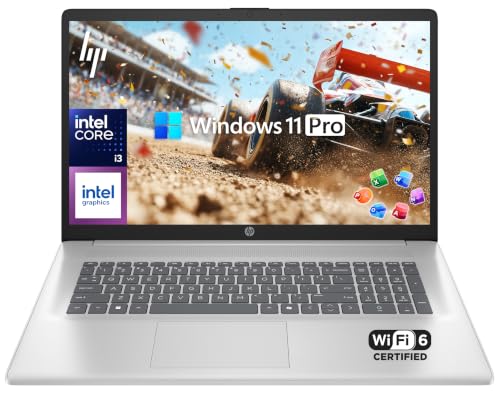
HP 17 Business Laptop — Biggest screen
Some bookkeeping is done on paper-sized columns, and some is done on spreadsheets that sprawl. The HP 17 Business Laptop is built for the second kind. Its 17.3-inch HD+ display is the largest screen in this guide, and around it the title assembles an 8-core Intel i3 processor, 16GB of memory, a terabyte of storage split between a 500GB SSD and a 500GB external drive, an MS Office suite, Wi-Fi 6, a claim of long battery life, and Windows 11 Pro. The proposition is space — on the screen, and in the storage — at the cost of size everywhere else.
The storage arrangement needs plain reading, because the headline figure and the physical reality differ. One terabyte is the total the title advertises, but half of it lives in an external drive rather than inside the chassis. For a bookkeeping desk that arrangement has a genuine upside: the external half can hold the archive — years of scanned invoices and statements — while the internal SSD carries the live files, and the archive can be unplugged and stored separately, which some firms will read as a backup habit built into the purchase. The downside is equally plain: the full terabyte is only available when the external drive is attached, and a figure quoted for the machine alone would be 500GB.
The display asks for a similar honesty. HD+ across 17.3 inches means large, legible characters rather than fine detail; a ledger will be easy to read and easy on ageing eyes, and two windows can sit side by side without either becoming cramped. Buyers expecting the crispness of a high-resolution panel should note that the title claims size, not pixel density, and judge accordingly. The processor, an 8-core Intel i3, is the modest element in the specification — core count is stated, generation is not — and it is adequate for accounting work while sitting below the i5 and Ryzen 7 chips elsewhere in the guide.
One silence matters for this guide’s theme: the title does not state a numeric keypad. A 17.3-inch chassis usually has room for one, but this guide claims keypads only where titles state them, so the spec box records the gap and a buyer for whom the keypad is essential should verify the keyboard layout in the manufacturer documentation before ordering. It suits a home-office bookkeeper who works at one desk, reads large spreadsheets daily, and values screen area and archive room over portability — a machine that will move between rooms, not between buildings.
- Processor: 8-core Intel i3
- Memory: 16GB RAM
- Storage: 1TB total — 500GB SSD plus 500GB external drive
- Display: 17.3-inch HD+
- Software named in title: MS Office Suite
- Wireless: Wi-Fi 6
- Operating system: Windows 11 Pro
- Numeric keypad: Not stated in the listing title — verify with the manufacturer documentation
- Battery capacity: Not stated in the listing title — verify with the manufacturer documentation
Strengths
- The largest display in the guide makes wide spreadsheets readable without zooming.
- A terabyte of combined storage gives the document archive its own home.
- 16GB of memory keeps the standard accounting multitasking pattern comfortable.
Trade-offs
- Half the storage is external, so the headline terabyte needs the drive attached.
- HD+ resolution prioritises size over sharpness across the big panel.
- The title states no numeric keypad despite the wide chassis.
Best for: a desk-bound bookkeeper working in wide spreadsheets with a growing document archive. Not suited for: a bookkeeper travelling between client sites, because a 17.3-inch chassis and a separate external drive make a poor travelling kit.
Treat this HP as the space purchase: screen area and storage room first, with the keypad question settled by documentation before the order, not after delivery.
The included office suite in the listing will suit a desk that lives in documents and spreadsheets, and the long-battery wording in the title — a claim without a figure attached — matters less here than it would in a travel guide, because a 17.3-inch machine spends its life within reach of the socket it sits beside. Buyers should simply note that the claim exists, that no capacity is printed, and that the machine’s real virtues are the ones measured in inches and gigabytes rather than hours.

Dell Latitude 5450 — Managed-desk pick
The Latitude 5450 is the outlier in this guide, and its presence is deliberate. Bookkeeping staff in larger firms do not choose their laptops; IT departments issue them, and the machine issued is very often a Latitude. This listing describes a 14-inch FHD touchscreen built around an Intel 12-core Ultra 7 155U, with an IR webcam, a backlit keyboard, Thunderbolt 4 and Windows 11 Pro, customised by the seller across memory tiers of 16GB, 32GB or 64GB of DDR5 and storage tiers of 512GB, 1TB or 2TB. Read the tier you are actually buying before anything else, because the title describes a range rather than one fixed configuration.
What the Latitude offers a bookkeeping operation is not a keypad — a 14-inch chassis has no room for one, and the title claims none — but manageability and screen quality in a machine an IT team can standardise. The IR webcam supports face-based sign-in, which matters on a desk where the laptop locks and unlocks twenty times a day between calls and queries. Thunderbolt 4 gives that desk a single-cable route to a dock, a monitor and wired peripherals, so the issued laptop becomes a full workstation at its home desk and a genuinely portable machine away from it.
The touchscreen is the feature a pure bookkeeping analysis might dismiss, and for ledger entry it adds little; figures go in through keys. Its value shows up in the rest of the working day — approving, annotating, presenting a report across a desk to a colleague or a client — and in the general truth that a shared office machine gets used for more than the task it was bought for. Buyers speccing purely for data entry should weigh the keypad machines above more heavily; buyers speccing for a staff member whose role mixes books with everything else will find this the most complete tool here.
It suits the employed bookkeeper in a firm with central IT, the office manager standardising a small fleet, and the hybrid worker carrying the machine between home and office. The cautions are the configuration range — confirm the exact memory and storage tier on the listing before purchase, since the title spans three of each — and the absence of a numeric keypad, which heavy figure entry would feel within the first week. An external keypad is a cheap remedy at a fixed desk, and many Latitude owners adopt exactly that pairing.
- Processor: Intel Ultra 7 155U, 12-core
- Memory options named in title: 16GB, 32GB or 64GB DDR5
- Storage options named in title: 512GB, 1TB or 2TB SSD
- Display: 14-inch FHD touchscreen
- Camera: IR webcam
- Keyboard: Backlit
- Ports named in title: Thunderbolt 4
- Operating system: Windows 11 Pro
- Numeric keypad: Not stated in the listing title — verify with the manufacturer documentation
Strengths
- Memory tiers reaching 64GB let a firm spec one model for light and heavy roles alike.
- An IR webcam and Thunderbolt 4 suit a managed, dock-based office desk.
- A touchscreen adds flexibility for the non-ledger half of an office role.
Trade-offs
- No numeric keypad on a 14-inch chassis, the weakest fit here for pure figure entry.
- The title spans several configurations, so the exact tier must be confirmed at purchase.
- The smallest screen in the guide shows fewer spreadsheet columns at once.
Best for: a bookkeeper in a managed firm, issued a standardised laptop for a docked desk. Not suited for: a full-time data-entry bookkeeper, because the 14-inch keyboard carries no numeric keypad for high-volume figure work.
Judged as a bookkeeping machine alone it ranks fourth here; judged as the laptop a whole firm can live with, it may be the most sensible purchase on the page.
The backlit keyboard, easy to overlook in a bookkeeping context, earns its keep in the early-morning and late-evening hours when reconciliations actually get finished, and the 14-inch FHD panel’s touch layer means a manager reviewing figures over a shoulder can point at the line in question rather than describing it. Small things, but a staff laptop accumulates small things across a thousand working days, and the Latitude’s specification is dense with them.

HP 17.3-inch Laptop (Core 5) — Home-office keypad
The second 17.3-inch HP in this guide takes the opposite approach to its sibling. Where the HP 17 Business Laptop above leads with storage, this machine leads with the keyboard: the title states a full-size keyboard with a numeric keypad outright, wrapped around a latest Intel Core 5 processor, 16GB of memory, a 512GB SSD and Wi-Fi 6, and it describes itself as a business and home office laptop. For a home-based bookkeeper, that is a direct answer to the two questions that matter — can I enter figures properly, and can I see the spreadsheet — in a single listing.
The Core 5 processor is Intel’s current mid-range line, positioned below the Core 7 family, and in this company it sits sensibly: faster company than the i3 in the other HP 17, a different proposition from the H-series i5 in the Lenovo V15. For accounting workloads — which are wide rather than deep — it is comfortably sufficient, and the 16GB of memory beside it matters more to the daily experience than any processor distinction at this level. The 512GB SSD matches the guide’s standard storage figure and holds the live files of a home practice without strain.
Two details separate this pick from the five around it, and both deserve clear statement. The operating system is named as Windows 11, without the Pro designation the other five picks carry. For a solo home-office bookkeeper working outside a managed domain, that difference may never be felt; for a machine that must join a firm’s managed environment, it can be decisive, and it is the first thing a business buyer should weigh here. The second detail is simpler: the title gives the screen size as 17.3 inches without stating a resolution, so the spec box records that silence and buyers who care about panel sharpness should confirm the resolution in the manufacturer documentation.
It suits the home-based bookkeeper or home-office worker who wants the big screen and the stated keypad in one purchase, works independently rather than inside a firm’s IT structure, and spends the working day at a single desk. The machine’s size defines its life — it is furniture-grade portable, moving between rooms for a change of scene rather than riding in a bag — and within that life, the combination of screen, keypad and memory is the most direct fit in this guide for home figure work.
- Processor: Intel Core 5 (latest, per listing title)
- Memory: 16GB RAM
- Storage: 512GB SSD
- Display: 17.3-inch
- Keyboard: Full-size keyboard with numeric keypad
- Wireless: Wi-Fi 6
- Operating system: Windows 11
- Display resolution: Not stated in the listing title — verify with the manufacturer documentation
- Ethernet port: Not stated in the listing title — verify with the manufacturer documentation
Strengths
- A full-size keyboard with a stated numeric keypad on the joint-largest screen here.
- 16GB of memory and a current Core 5 processor cover home accounting workloads.
- Wi-Fi 6 is stated, matching the wireless picks at the top of the guide.
Trade-offs
- Windows 11 without the Pro designation carried by the other five picks.
- The title states no display resolution for the 17.3-inch panel.
- 512GB of storage leaves the archive question to the buyer.
Best for: a home-based bookkeeper entering figures at a single desk on a big screen. Not suited for: a firm enrolling laptops into managed business policies, because the title names Windows 11 without the Pro edition those policies generally require.
For the independent bookkeeper, this is arguably the most honest listing in the guide: the two features the job needs most are the two features its title states first.
A home office also changes the support equation. There is no IT desk down the corridor, so a machine whose specification can be read completely from its title — processor family, memory, storage, keyboard, wireless, operating system — is a machine a solo operator can buy, set up and troubleshoot without specialist help. On that measure this HP scores well; the two silences in its title, resolution and Ethernet, are both questions a home worker on Wi-Fi can usually afford to leave to the documentation.

Lenovo V15 (Ryzen 7, 40GB) — Memory headroom
The second Lenovo V15 in this guide shares a nameplate with the second pick and very little else. This configuration pairs an AMD Ryzen 7 processor with 40GB of memory — two and a half times the figure carried by most of the guide — and a 1TB SSD, behind the same 15.6-inch FHD formula, with a numeric keypad, HDMI, RJ45 Ethernet, a webcam, Wi-Fi and Windows 11 Pro in black. It is the specification for the bookkeeping office that has outgrown the standard build and can point to the exact afternoon the old machine ran out of memory.
Forty gigabytes is an unusual figure, and it is worth explaining what it buys rather than simply admiring it. Accounting files grow: a company file with a decade of transactions, a payroll run, three years of statements open for comparison, a browser carrying the bank, the tax portal and the receipt service, and a spreadsheet reconciling them all. Each is modest alone; together they are the workload that makes a 16GB machine hesitate at exactly the moment the deadline arrives. The 40GB configuration removes memory from the list of things a growing practice has to think about, and the 1TB SSD does the same favour for storage, holding the live archive internally rather than on an attached drive.
The Ryzen 7 processor completes a specification with no modest column. AMD’s Ryzen 7 tier sits above the Ryzen 5 class, and for the multi-application pattern of a busy practice it provides headroom the i3 and Core 5 picks cannot claim. The wired Ethernet port returns from the other V15, keeping the cabled-office option open, and the stated numeric keypad keeps figure entry where this guide wants it. A buyer comparing the two V15 models is really deciding one question: whether the practice’s workload has reached the scale where memory and storage stop being specifications and start being insurance.
It suits the growing firm whose files span years, the bookkeeper running payroll alongside the ledgers, and the practice that keeps several client files open in parallel through the day. Buyers whose work is a single small company file and a browser may find the specification more than the job requires — the 16GB picks above exist for them — and the title, like its sibling’s, states no Wi-Fi generation and no webcam shutter, small silences to note rather than obstacles. For the office that has felt the memory wall, this is the pick that removes it.
- Processor: AMD Ryzen 7
- Memory: 40GB RAM
- Storage: 1TB SSD
- Display: 15.6-inch FHD
- Keyboard: Numeric Keypad
- Ports named in title: HDMI, RJ45 Ethernet
- Camera: Webcam
- Operating system: Windows 11 Pro
- Wi-Fi generation: Not stated in the listing title — verify with the manufacturer documentation
- Webcam shutter: Not stated in the listing title — verify with the manufacturer documentation
Strengths
- 40GB of memory is the guide’s largest figure by a wide margin.
- A 1TB internal SSD holds the working archive without an attached drive.
- A Ryzen 7 processor, a stated keypad and Ethernet complete a no-weak-column build.
Trade-offs
- The specification overshoots a single small company file’s actual needs.
- No Wi-Fi generation is stated for work away from the cable.
- The same nameplate as the 16GB V15 above makes careful listing-checking essential.
Best for: a growing practice juggling several client files, payroll and years of records at once. Not suited for: a sole trader with one small company file, because 40GB of memory and a terabyte of storage answer a scale problem that workload does not have.
Two laptops in this guide share the V15 name; this is the one bought by the office that already knows why it needs more.
There is also a staffing argument for headroom that rarely appears in specifications. A practice that hires a junior bookkeeper mid-year does not want the new starter’s first month defined by a struggling machine, and a laptop bought with capacity in reserve absorbs new software, new clients and new habits without a replacement cycle starting early. The 40GB V15 is bought once, at the moment the practice decides to stop thinking about hardware, and its specification is written to make that decision stick.
Read as a set, the six divide cleanly into three pairs. Two are keypad machines for wired or wireless small offices at the standard 16GB specification, differing in processor brand and in the Ethernet port only the Lenovo states. Two are 17.3-inch desk machines for readers of wide spreadsheets, differing in whether the keypad or the storage arrangement leads the listing. And two are capacity plays — the Latitude with its configurable tiers for managed fleets, and the 40GB Lenovo for a practice buying headroom outright. The table below compresses those pairings into figures.
Comparison Table
| Pick | Display | Memory | Storage | Numeric keypad | Operating system |
|---|---|---|---|---|---|
| HP 255 G10 | 15.6-inch Full HD | 16GB | 512GB SSD | Stated in title | Windows 11 Pro |
| Lenovo V15 Gen 4 | 15.6-inch FHD | 16GB | 512GB SSD | Stated in title | Windows 11 Pro |
| HP 17 Business Laptop | 17.3-inch HD+ | 16GB | 500GB SSD plus 500GB external | Not stated in the listing title | Windows 11 Pro |
| Dell Latitude 5450 | 14-inch FHD touchscreen | 16GB, 32GB or 64GB DDR5 options named in title | 512GB, 1TB or 2TB SSD options named in title | Not stated in the listing title | Windows 11 Pro |
| HP 17.3-inch (Core 5) | 17.3-inch | 16GB | 512GB SSD | Stated in title | Windows 11 |
| Lenovo V15 (Ryzen 7) | 15.6-inch FHD | 40GB | 1TB SSD | Stated in title | Windows 11 Pro |
How to Choose a Laptop for Bookkeeping Work
Start with the keyboard, because it is the component your hands will judge every day. If your work is figure entry — invoices, receipts, bank lines, payroll numbers — a stated numeric keypad should sit at the top of the requirements list, and in this guide that means the HP 255 G10, either Lenovo V15, or the HP 17.3-inch Core 5 machine. If your role mixes bookkeeping with management, meetings and travel, the keypad matters less than the screen, the camera and the dock connection, and the Latitude’s case strengthens accordingly.
Memory comes next, and the honest way to size it is to count what stays open at your busiest hour, not your average one. Month-end is the honest hour: the accounting file, the bank portal, the spreadsheet, the email, perhaps a second company file. Sixteen gigabytes carries that load for most small firms. A practice juggling several clients, payroll and years of records should look directly at the 40GB Lenovo and treat the difference as capacity bought once instead of frustration paid monthly. Storage follows the same logic: documents are small, scanned archives are not, and the buyer with a decade of paper to digitise should prefer internal capacity over an arrangement that depends on an attached drive.
The Windows edition is a quiet decision with loud consequences. A machine joining a firm’s managed environment belongs on Windows 11 Pro; five picks here state it. A solo operator working independently can run the standard edition on the HP 17.3-inch Core 5 without noticing the absence, right up until the day the practice hires, incorporates or takes on a client with IT requirements — at which point the edition becomes a project. Buy for the firm you expect to be in two years, not only the one at the desk today.
Finally, decide where the machine will live. A fixed desk rewards the wired Ethernet of the Lenovo pair and the screen area of the 17.3-inch HP models; a hybrid week rewards the Latitude’s smaller chassis and Thunderbolt dock connection. None of these six is a poor machine; each is a different answer to the question of what a bookkeeping day actually looks like, and the right purchase is the one whose specification matches your busiest, most ordinary week.
How Much Memory Does a Bookkeeping Laptop Actually Need?
For a single company file with a browser and a spreadsheet alongside, 16GB is enough, and it will stay enough for the life of the machine. That sentence covers most sole traders and many small firms, and it is why four of the six picks in this guide carry exactly that figure. The pressure that changes the answer is simultaneity: multiple company files, payroll, a scanning workflow feeding a document archive, and reporting tools all open at the deadline hour. When that description matches your month-end, memory stops being a specification and becomes the difference between a machine that keeps up and one that makes you close programs to open others. The 40GB Lenovo exists for that desk, and the Latitude’s tiers let a firm buy the same model at 16GB for junior staff and 64GB for the person running the whole finance function.
Does a Numeric Keypad Change Day-to-Day Data Entry?
Yes, in the specific way that rhythm changes any repeated task. On a keypad, the fingers stay in a small grid and learn it by touch; the eyes can stay on the source document instead of travelling to the keyboard to check each number. Entry speeds up, but the larger gain is accuracy, because most figure errors are born in the glance between screen, document and number row. Touch-typists who enter figures along the top row exist and are fast, but they are the minority, and an office buying for staff of mixed habits should buy the keypad. Where a pick’s title does not state one — the big HP 17 Business Laptop and the Latitude here — treat the keyboard as unconfirmed and verify the layout before the purchase, or plan on a separate USB keypad for a fixed desk.
Should a Small Firm Insist on Windows 11 Pro?
Pro earns its place when the machine is managed: joined to a business account structure, governed by firm-wide policies, encrypted and administered as part of a small fleet rather than as a personal possession. A solo bookkeeper working alone, on their own accounts, will rarely touch the features that separate the editions. The practical rule is about trajectory. A practice expecting staff, clients with compliance requirements, or an IT provider managing its machines should buy Pro from the start — five picks in this guide state it — because changing edition later is a chore out of proportion to the small saving. A stable one-person operation can take the standard edition on the HP 17.3-inch Core 5 and spend the difference elsewhere without regret.
How Long Should a Bookkeeping Laptop Be Expected to Last?
A realistic planning horizon for a business laptop in daily bookkeeping service is four to five years, and the specification choices that decide whether a machine reaches the far end of that span are memory and storage rather than processor speed. Accounting workloads grow slowly and predictably — the file accumulates transactions, the archive accumulates scans — so a machine bought with headroom, like the 40GB Lenovo or a higher-tier Latitude, ages in a straight line, while a machine bought at the minimum spends its last two years being worked around. Buyers planning a four-year life should also prefer the picks whose titles state their full configuration plainly, because the office that can read its own fleet’s specifications can plan replacements by calendar instead of by crisis.
Common Mistakes When Buying a Bookkeeping Laptop
One recurring error is buying the screen and forgetting the keyboard: a beautiful large display paired with a cramped number row makes figure entry slower every single day, and the disappointment arrives on the first invoice run. Check the keypad in the title or the documentation before the screen size seduces the order. A related slip is reading a headline storage figure without asking where the storage physically lives — the HP 17 above reaches its terabyte with an external drive, which is a fine arrangement understood in advance and an irritating surprise discovered at setup.
Another pattern is sizing memory for the quiet week. A laptop bought in a calm month meets its real test at quarter-end, and a machine that hesitates then will hesitate at every deadline for years. Buy for the busiest ordinary week, and treat spare memory as the cheapest insurance in the whole purchase. Configuration ranges cause a third kind of regret: the Latitude’s title spans three memory tiers and three storage tiers, and buyers who order the listing without confirming the selected tier occasionally receive a smaller machine than the headline numbers suggested. The remedy is thirty seconds of reading on the listing page before checkout.
The last mistake is ignoring the edition of Windows until an IT requirement appears. A firm that grows into managed devices, client compliance checks or central administration will want Pro across the fleet, and a single standard-edition machine becomes the exception someone has to work around. None of these errors is dramatic; all of them are permanent, because a laptop bought for bookkeeping is typically kept until it fails. Five minutes spent on keyboard, memory, storage location, configuration tier and Windows edition is the whole defence.
Final Recommendation
For most bookkeeping buyers, the HP 255 G10 is the recommendation to beat: a stated numeric keypad, 16GB of memory, Windows 11 Pro and a webcam shutter in a balanced 15.6-inch machine with no column missing. Offices on wired networks should take the Lenovo V15 Gen 4 for its Ethernet port and H-series processor, and practices that have outgrown standard memory should skip directly to the 40GB Ryzen 7 V15, the guide’s headroom pick. The two 17.3-inch HP models serve desk-bound readers of wide spreadsheets — the Core 5 machine for its stated keypad, the Business Laptop for its storage arrangement — while the Latitude 5450 is the choice for staff inside a managed firm, where standardisation and a dock matter more than a keypad. A bookkeeping laptop earns its keep in unglamorous ways: it opens the file, holds the windows, takes the figures and does it again tomorrow. Match the pick to your busiest ordinary week, and the machine will still feel right at the hundredth month-end.
Frequently Asked Questions
Which of these laptops have a numeric keypad?
Four titles state one: the HP 255 G10, both Lenovo V15 models, and the HP 17.3-inch Core 5 laptop, whose title specifies a full-size keyboard with a numeric keypad. The HP 17 Business Laptop and the Dell Latitude 5450 do not state a keypad in their titles, so verify their keyboard layouts in the manufacturer documentation if a keypad is essential to you.
Is 16GB of memory enough for accounting work?
For one company file worked alongside a browser, a spreadsheet and email, yes — that is the pattern most small firms run, and four picks here carry 16GB. Practices holding several client files, payroll and a document archive open together should look at the 40GB Lenovo V15 or a higher Latitude tier instead.
Why does the HP 17 Business Laptop list 1TB of storage?
Its title describes 1TB of total storage made of a 500GB internal SSD plus a 500GB external drive. The internal figure is the one available when the external drive is detached, so plan the live files around 500GB and treat the external half as archive space.
Does the Dell Latitude 5450 come in one fixed configuration?
No. Its title names memory options of 16GB, 32GB and 64GB of DDR5 and storage options of 512GB, 1TB and 2TB, customised by the seller. Confirm the exact tier selected on the listing before ordering, because the headline title describes the range rather than a single build.
Can these laptops run a second monitor at a bookkeeping desk?
HDMI is stated in the titles of the HP 255 G10 and both Lenovo V15 models, and the Latitude 5450 states Thunderbolt 4, which carries display output through a dock or adapter. For picks whose titles name no video output, confirm the port selection in the manufacturer documentation before building a two-screen desk around them.
Which pick suits a bookkeeper who works from home?
The HP 17.3-inch Core 5 laptop is the direct fit: a big screen, a stated full-size keyboard with a numeric keypad and 16GB of memory for a single home desk. Home bookkeepers inside a firm’s managed setup should instead take one of the Windows 11 Pro picks, such as the HP 255 G10.
Related Guides
Bookkeeping is one desk in a wider office, and the neighbouring decisions have their own guides. Readers speccing machines for financial work beyond the ledger should continue to our guide to the best laptops for business and banking, where security hardware and serious work machines take priority. Those furnishing an executive desk rather than a bookkeeping one will want the best high end laptops for business, a shortlist of flagship machines for demanding work. And any buyer planning a permanent desk with a monitor, keyboard and one cable should finish with the best dockable business laptops, built around one-cable desk setups.
Related guides
- Best 17 Laptops: The Complete Tier-by-Tier Guide to Big-Screen Machines
- Best 4K Monitors for MacBook Pro: USB-C Panels With Real Power Delivery
- Best Routers for Remote Work: VPN Gateways, Travel Routers and Home Wi-Fi That Holds a Call
- Best Sim Racing Monitors: Ultrawide Cockpits From 34-Inch OLED Speed to the 49-Inch Wrap


