What's inside
- Where to Buy
- Introduction
- Key Takeaways
- Quick Picks
- How We Chose These Picks
- Comparison Table
- How to Choose the Right Camera for an HDMI Workflow
- Does an External Recorder Improve the Picture, or Just the Workflow?
- Which of These Cameras Suits a One-Person Streaming Desk?
- How Should You Test a New Rig Before the First Paid Session?
- Common Mistakes When Building an HDMI Camera Setup
- Final Recommendation
- Frequently Asked Questions
- Related Guides
As an Amazon Associate I earn from qualifying purchases. This post may contain affiliate links at no extra cost to you.
[SITE_DOMAIN] is reader-supported. When you buy through links on our site, we may earn an affiliate commission.
Where to Buy
Six cameras are linked from this page, and the sensible way to shop them is side by side in separate tabs, because the differences that matter for an HDMI rig hide in configuration lines rather than headlines. Sony’s a7 IV is listed as a body, so its page is where you confirm exactly which body-only configuration is being offered before a recorder enters the budget. Canon’s EOS R6 Mark II likewise sells body only here, and its listing states the 24.2 megapixel sensor figure this guide relies on. Panasonic’s Lumix GH6 carries the most detailed video wording of the six titles, worth reading in full on its own page. Fujifilm’s X-H2S keeps its title to a single line, so its listing page and Fujifilm’s documentation do the talking together. Sony’s ZV-E1 in black is the compact full-frame option, while Canon’s EOS R8 listing bundles a 24–50mm kit lens, a 64GB memory card and a Canon shoulder bag into one purchase — a different shape of basket from the five body-only offers around it.
Introduction
Choosing the best mirrorless cameras to use for HDMI out starts with an admission most roundups skip: an HDMI feed is a workflow, not a feature badge. The camera becomes one component in a chain that runs through a cable, perhaps a capture device or an external recorder, and into a monitor, a streaming computer or a director’s screen on set. Every link in that chain can degrade the picture or break the session, so the camera at the front of it has to be judged on the signal it can be verified to send, the sensor behind that signal, and the stamina to hold a feed through a long recording day.
A second admission follows, and it shapes everything below. Not one of the six listing titles in this guide names an HDMI port at all — no connector size, no output resolution, no statement about whether the feed is clean of menu overlays. Port type matters physically: a full-size connector locks into a rig differently from a micro connector, and cables, cages and strain relief are bought against that detail. Because the titles stay silent, each spec box in this guide records the HDMI line with the standard not-stated wording, and the reviews treat the port question as a documentation check to complete before money moves — never as a fact this page can hand you. What the titles do confirm is still substantial: five full-frame sensors and one Micro Four Thirds video specialist, resolutions from 12.1 to 25.2 megapixels, and on the Panasonic an explicit promise of unlimited C4K and 4K recording in 4:2:2 10-bit.
Read the guide in that spirit. The verified bones are sensor format, resolution where printed, recording ceilings where printed, stabilisation where printed and mount. The HDMI specifics — connector size, clean-feed behaviour, output formats over the wire — belong to each manufacturer’s documentation, and the buying advice here repeatedly sends you there at exactly the points where a rig builder cannot afford a guess.
Key Takeaways
- No listing title among the six names an HDMI connector type, so full-size versus micro must be settled in manufacturer documentation before cables and cages are ordered.
- The Panasonic Lumix GH6 is the only pick whose title speaks in video-engineering terms: unlimited C4K/4K recording, 4:2:2 10-bit colour and a 7.5-stop 5-axis Dual image stabiliser.
- Five picks are full-frame; the GH6’s Micro Four Thirds sensor is the deliberate exception, trading sensor area for a video-first body and the deep MFT lens catalogue.
- Sony’s ZV-E1 states the leanest specification of the set — 12.1 megapixels, 4K up to 60p, 5-axis stabilisation — on a full-frame sensor built for moving images over stills volume.
- The Canon EOS R8 listing is a bundle with a 24–50mm kit lens, a 64GB card and a shoulder bag; the other five listings are bodies, so baskets are not like for like.
- Canon’s R6 Mark II and R8 both print 24.2 megapixels; only the R8’s title adds a video ceiling, 4K at 60p, and names its Dual Pixel AF II system.
Quick Picks
| Pick | Badge | Why it earns a place |
|---|---|---|
| Sony a7 IV | The hybrid anchor | Full-frame interchangeable-lens body in Sony’s E-mount, the system with the deepest third-party support for rigs and recorders. |
| Canon EOS R6 Mark II | Canon’s working hybrid | 24.2 megapixel full-frame CMOS sensor with photo and video capabilities stated in the title. |
| Panasonic Lumix GH6 | The video specialist | 25.2MP Micro Four Thirds body with unlimited C4K/4K 4:2:2 10-bit recording and 7.5-stop Dual stabilisation. |
| Fujifilm X-H2S | The APS-C flagship body | Fujifilm’s X-mount flagship-tier body for shooters already invested in XF glass. |
| Sony ZV-E1 | The compact full-frame | 12.1MP full-frame sensor, 4K up to 60p and 5-axis in-body stabilisation in a creator-sized body. |
| Canon EOS R8 bundle | The ready-to-shoot kit | 24.2MP full-frame RF body with 4K 60p video and Dual Pixel AF II, sold with a 24–50mm lens, 64GB card and bag. |
How We Chose These Picks
An HDMI-out shortlist has to begin with cameras that serious video work already revolves around, because external recording and monitoring ecosystems grow up around popular bodies: cages are machined for them, cable lengths are known quantities, and recorder manufacturers test against them first. All six bodies here sit inside that working mainstream — three mounts from Sony and Canon at full frame, Panasonic’s video-led Micro Four Thirds line, and Fujifilm’s flagship APS-C body — so whichever you choose, the surrounding hardware conversation already exists.
Sensor format was weighed next, and deliberately not applied as a full-frame-only filter. A feed sent to an external recorder is graded, keyed and broadcast from the sensor’s raw material; full-frame sensors gather more light per frame and render shallower focus at a given framing, which is why five of the six places went to full-frame bodies. The GH6 kept its place against that current because its title makes the strongest recording promise in the set — unlimited runtime in a 10-bit 4:2:2 format — and a camera that never stops mid-take solves the problem HDMI rigs are most often built to solve.
Stabilisation claims were counted only where a title prints them. Two titles do: the GH6 with its 7.5-stop 5-axis Dual system and the ZV-E1 with 5-axis in-body stabilisation. For handheld monitoring work and gimbal-free B-camera angles, a printed stabilisation figure is a rig decision, since a stabilised body can ride a lighter support. The remaining four titles say nothing on the subject, and their reviews say so.
Finally, each listing was read for what it actually sells. Five are bodies — lenses, cables and recorders are separate purchases — while the Canon R8 listing bundles a starter lens, a card and a bag. A guide that priced those six baskets as equivalents would mislead the very readers planning a rig budget line by line, so the distinction is flagged wherever the R8 appears.

Sony a7 IV — The hybrid anchor
The a7 IV earns the opening review because it is the body around which more mixed stills-and-video practices are organised than any other here. Sony’s title calls it a full-frame mirrorless interchangeable lens camera and stops there, offering no megapixel count, no video ceiling and no port description. That restraint cuts both ways. The confirmed part — a full-frame sensor in the E-mount system — is precisely the foundation an HDMI rig wants, because the E-mount lens catalogue and the third-party cage, cable and recorder support built around this camera class are the deepest in the industry. The unconfirmed part is everything an output-focused buyer most needs in writing.
Consider who builds a rig on this body. A hybrid shooter filming interviews, events and commercial pieces while still delivering stills from the same camera benefits from a sensor that serves both crafts and a mount where a fast standard zoom, a portrait prime and a wide zoom can be rented in any large city. When that shooter graduates from internal recording to an external monitor for focus confidence or a recorder for longer takes and edit-friendly files, the a7 IV is the camera already on the tripod. The upgrade path is additive — screen, cable, recorder, cage — rather than a system change, and that continuity is a genuine economic argument for anchoring an HDMI setup here.
Suits a working hybrid professional whose income splits between stills and filmed work, and who values the E-mount’s rental and accessory depth over any single headline specification. The full-frame format supports the low-light filming — evening receptions, window-lit interviews — where external monitoring earns its keep by making focus and exposure judgements reliable at arm’s length.
The verification list for this body is longer than for any rival below, and it should be worked through before the recorder is ordered. The title does not state the HDMI connector size, the resolutions available over the output, whether the feed runs clean of shooting information, or how the output behaves while recording internally. Each answer lives in Sony’s documentation, and each changes a purchase: connector size decides the cable and the cage’s cable clamp; clean-feed behaviour decides whether the camera can drive a streaming switcher directly. None of this makes the a7 IV a poor HDMI candidate — it makes it a candidate whose output chapter must be read in the manual rather than assumed from reputation.
One practical habit follows from that. Buy the body first, run the documentation checks, and only then commit to the recorder tier, because the recorder that suits a confirmed 4K feed differs from one bought on a hopeful reading of a headline. Readers pricing this sequence can open the a7 IV’s Amazon listing to see today’s figure for the body alone, then hold the recorder decision until Sony’s output pages have answered the connector question in writing.
- Format: Full-frame mirrorless interchangeable lens camera
- Mount: Sony E-mount (interchangeable lens system)
- Sensor resolution: Not stated in the listing title — verify with the manufacturer documentation
- HDMI connector type: Not stated in the listing title — verify with the manufacturer documentation
- Video ceiling: Not stated in the listing title — verify with the manufacturer documentation
- In-body stabilisation: Not stated in the listing title — verify with the manufacturer documentation
Strengths
- Full-frame format confirmed in the title, on the mount with the widest third-party rig and recorder support.
- Interchangeable-lens design suits a one-body stills-and-video practice that grows into external monitoring.
- Body-only listing keeps the basket clean for buyers who already own E-mount glass.
Trade-offs
- The title prints no HDMI information at all, so connector size and clean-feed behaviour are documentation errands.
- No megapixel figure is stated, which stills-led buyers must confirm before comparing print capacity.
- No stabilisation system is named, so handheld-feed buyers cannot credit one from this listing.
Best for: a hybrid professional standardising an E-mount rig whose recorder tier will be chosen after Sony’s documentation confirms the output specification. Not suited for: a streaming build that needs a stated full-size HDMI connector from the purchase paperwork itself, because this listing prints no connector type and the rig’s cables cannot be specified from it.

Canon EOS R6 Mark II — Canon’s working hybrid
Canon’s title for the R6 Mark II is the most businesslike of the six: body only, full-frame, a 24.2 megapixel CMOS sensor, photo and video capabilities. For an HDMI-led purchase, that wording frames the camera as a proven hybrid sensor package whose output details — like the Sony above — sit in documentation rather than in the listing. What distinguishes it inside this guide is the combination of that moderate, workhorse resolution with Canon’s RF system, the mount many event and documentary shooters already carry.
Twenty-four megapixels is a considered choice for video-adjacent work. Stills files stay manageable across a long season, and a sensor in this class is typically paired with the fast readout behaviour filming demands, though this guide claims no readout figure the title does not print. The working point stands on firmer ground: a photographer filming a conference, a wedding film team running two bodies, or a content studio shooting product pieces will find the R6 Mark II’s confirmed specification aimed at volume and reliability rather than at a single spectacular number.
Suits Canon-system professionals whose lens bags are already RF, and whose HDMI need is a dependable feed from the same body that shoots their stills. A two-body RF practice gains extra value here, because the second body can serve as a locked-off B-camera feeding a recorder while the A-camera roams — a pattern that only works when bodies, batteries and menus match across the bag.
As with the a7 IV, the output chapter is unwritten in the title. Connector size, output resolutions, clean-feed behaviour and any recording-time behaviour over HDMI must come from Canon’s documentation before a switcher or recorder is specified against this body. The title also names no autofocus system and no stabilisation, so neither is credited here; buyers whose rig depends on a particular AF behaviour while feeding an external screen should confirm that behaviour in the manual’s output sections, since some cameras change focus aids when an external display takes over.
The comparison that matters most for this body is against its smaller sibling further down the page. Both print 24.2 megapixels and full-frame RF credentials; the R8’s title adds a 4K 60p ceiling and a named AF system, while the R6 Mark II’s listing is body-only against the R8’s bundle. A buyer weighing them is really weighing a body-only professional basket against a ready-to-shoot kit, and the sensible way to price that difference is to pull the R6 Mark II’s current Amazon figure into a spreadsheet beside the lenses you already own — the mount you hold is worth more than any single line of specification either title offers.
- Sensor: 24.2 Megapixel CMOS, full-frame
- Format: Mirrorless camera, body only
- Brief: Photo and video capabilities
- Mount: Canon RF system
- HDMI connector type: Not stated in the listing title — verify with the manufacturer documentation
- Video ceiling: Not stated in the listing title — verify with the manufacturer documentation
Strengths
- A 24.2 megapixel full-frame sensor sized for high-volume hybrid shooting.
- The listing title confirms this body covers stills work and moving-image work alike.
- Body-only listing suits RF owners adding a second, recorder-fed body to an existing kit.
Trade-offs
- No HDMI connector or output format is stated, leaving the rig’s cabling to documentation checks.
- The title names no autofocus system, unlike the R8 listing further down this page.
- No video ceiling is printed, so recorder resolution must be matched from Canon’s manual, not this listing.
Best for: an RF-system professional adding a recorder-fed B-camera that shares lenses and batteries with an existing Canon bag. Not suited for: a fixed streaming desk that must be cabled from listing paperwork alone, because the title states no connector type, no output resolution and no clean-feed promise to specify the run against.
Panasonic Lumix GH6 — The video specialist
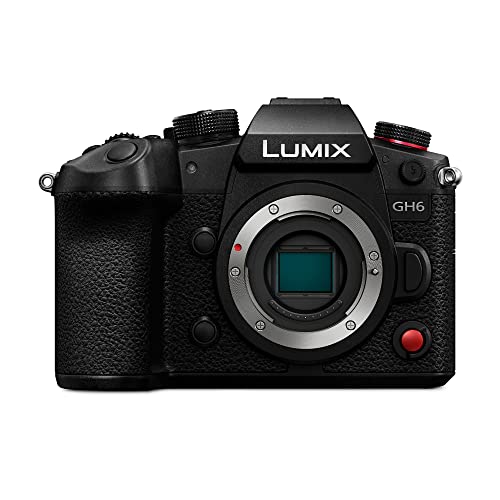
Read the six titles in this guide aloud and one of them sounds like it was written by a video engineer. The GH6’s title promises a 25.2 megapixel Micro Four Thirds sensor, unlimited C4K and 4K recording, 4:2:2 10-bit colour and a 7.5-stop 5-axis Dual image stabiliser. For a camera bought to feed external hardware, the word that matters most in that list is unlimited. Recording limits are the quiet reason many HDMI rigs exist at all — an external recorder cannot rescue a camera that stops — and Panasonic prints the absence of that anxiety in its headline.
The 4:2:2 10-bit figure deserves its own paragraph, because it describes the quality of the material the sensor produces. Colour recorded with that depth and sampling grades more gracefully, holds together under keying and survives the corrections that mixed venue lighting forces on footage. Whether a given production records internally in that format or sends a feed out to a recorder, a body whose internal ceiling is already stated at this level signals a video pipeline designed by people who expect the footage to be worked on, not merely watched.
Suits filmmakers, interview producers and event videographers whose sessions run long — conference talks, ceremonies, stage performances — and whose deliverables are graded in an edit rather than posted straight from the camera. The Micro Four Thirds mount brings a deep, comparatively compact lens catalogue, which matters when the camera lives on a rig all day: smaller glass means lighter supports, smaller cages and a feed operator who can reposition the B-camera between sessions without a rebuild.
The sensor trade is the honest cost. Micro Four Thirds gathers less light per frame than the full-frame bodies around it and renders deeper focus at equivalent framing, so low-light filming leans harder on fast lenses and lighting the scene where the production allows it. The title also stays silent on the HDMI connector itself, so the same documentation discipline applies: connector size and output behaviour come from Panasonic’s manual before the cable order is placed. What the title does settle — runtime, colour format, stabilisation strength — covers the decisions that strand more productions than any connector ever has.
Stabilisation at 7.5 stops, printed in a title, is unusually specific, and for HDMI work it changes the support conversation. A body that steadies itself this far can feed a monitor from a monopod, a small gimbal or a handheld walk-and-talk position that would send an unstabilised feed swimming. If your productions mix locked-off recorder work with roaming cutaway angles from the same body, the GH6’s current listing figure is the number to set against the cost of the larger stabilised rig it may let you leave at home.
- Sensor: 25.2MP Micro Four Thirds
- Recording: Unlimited C4K/4K, 4:2:2 10-bit
- Stabilisation: 7.5-stop 5-axis Dual image stabiliser
- Model: DC-GH6BODY, body configuration, black
- HDMI connector type: Not stated in the listing title — verify with the manufacturer documentation
- Autofocus system: Not stated in the listing title — verify with the manufacturer documentation
Strengths
- Unlimited C4K/4K recording is printed in the title, removing the clip-length ceiling long sessions fear.
- 4:2:2 10-bit colour gives footage grading headroom that matches an external-recorder workflow.
- A stated 7.5-stop Dual stabiliser supports handheld and light-support feed positions.
Trade-offs
- The Micro Four Thirds sensor concedes low-light headroom and shallow focus to the full-frame picks.
- Connector type is unstated, so the cable and cage clamp still depend on Panasonic documentation.
- Stills buyers get a video-led design brief rather than a resolution-first stills body.
Best for: long-form video productions — talks, ceremonies, stage work — that need a stated unlimited 10-bit recording ceiling from the camera at the front of the chain. Not suited for: a low-light filming brief that depends on full-frame light gathering, because the 25.2MP Micro Four Thirds sensor is physically smaller than every full-frame sensor in this guide.

Fujifilm X-H2S — The APS-C flagship body
Fujifilm’s title is the shortest in this guide: a mirrorless camera body, nothing more. No sensor size, no resolution, no recording format, no port. A review that respected its evidence would be a paragraph long, so let the framing be plain — the X-H2S is included because it is Fujifilm’s flagship-tier APS-C body in the X system, the camera Fujifilm shooters reach for when video joins stills at the top of their practice, and its place here is an invitation to verify rather than a bundle of printed promises.
That framing matters for honesty in both directions. It would be wrong to credit this body with output formats, readout speeds or autofocus behaviour its listing never mentions; it would be equally wrong to pretend Fujifilm photographers do not build serious filming kits on this class of body. The X-mount lens range behind it is mature and characterful, and a shooter whose stills work lives in that system has every reason to investigate its flagship as the front end of an HDMI setup before contemplating a mount change that would strand a bag of XF glass.
Suits established Fujifilm photographers adding external monitoring or recording to an existing X-system practice, particularly those whose filming is one strand of a stills-led business — editorial, travel and documentary work where the same body must produce the photographs the client commissioned and the footage the client’s channels now expect.
The verification burden here is the heaviest in the guide, and the review will not pretend otherwise. Sensor format and resolution, video ceilings, stabilisation, autofocus behaviour while outputting, connector size and clean-feed status all sit outside the title, so Fujifilm’s documentation has to supply every one of them before a recorder is matched to this body. Treat that as a structured checklist rather than a deterrent: a flagship body rewards a careful buyer, and the answers determine real purchases — whether an existing recorder’s input ceiling suffices, whether the cage needs a full-size or micro cable clamp, whether focus aids survive on the external screen.
Budget the investigation time as part of the price. Buyers who enjoy that diligence will find the X-H2S listing on Amazon states today’s figure for the body plainly enough, and the hours spent in Fujifilm’s output documentation are the same hours any flagship purchase deserves. Buyers who want their output specification printed in the listing itself should look again at the Panasonic above, whose title does that work for them.
- Format: Mirrorless camera body
- Mount: Fujifilm X system
- Sensor size and resolution: Not stated in the listing title — verify with the manufacturer documentation
- HDMI connector type: Not stated in the listing title — verify with the manufacturer documentation
- Video ceiling: Not stated in the listing title — verify with the manufacturer documentation
- Stabilisation: Not stated in the listing title — verify with the manufacturer documentation
Strengths
- Flagship-tier body position within a mature interchangeable-lens system.
- Keeps Fujifilm shooters on their existing XF lens investment when filming expands.
- Body-only listing suits system owners rather than first-time buyers.
Trade-offs
- The title confirms almost nothing, so every rig-relevant figure is a documentation check.
- APS-C format concedes sensor area to the full-frame bodies in this guide.
- No recording format is printed, so recorder matching cannot start from the listing.
Best for: a Fujifilm X-system photographer whose flagship body will anchor a filming kit after Fujifilm’s documentation confirms its output chapter. Not suited for: a buyer specifying a recorder and cable run this week from listing text alone, because this title states neither a connector type nor any output format to specify against.
Sony ZV-E1 — The compact full-frame
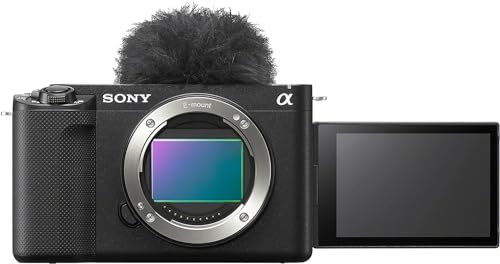
Sony’s second body in this guide takes the opposite approach to the a7 IV: a creator brief written into a small body, with a title that actually prints its numbers. A 12.1 megapixel full-frame Exmor R CMOS sensor, the Bionz XR processor, 4K up to 60p, the E-mount and 5-axis in-body stabilisation — that is a coherent filming specification, and its logic is worth reading slowly. Twelve megapixels on a full-frame sensor means large photosites, and large photosites are the classic recipe for clean images in poor light, which is where creator filming so often happens: kitchens, venues, evening streets.
The resolution choice also declares the body’s priorities. Nobody buys 12.1 megapixels to crop stills aggressively or to print at gallery scale; they buy it because each frame of video is gathered by a sensor that is not wasting sensitivity on resolution the deliverable never shows. For an HDMI feed watched on a production monitor or pushed to a stream, that trade reads as discipline rather than compromise — the picture on the external screen is the product, and this sensor is shaped for pictures in motion.
Suits solo creators, streamers and small production teams who film themselves or run one-person interviews, and who want full-frame rendering without a full-size body on the desk or the gimbal. The 5-axis stabilisation printed in the title supports the handheld walkthroughs and product demonstrations that fill creator schedules, and the E-mount keeps the lens conversation identical to the a7 IV’s — the two Sonys in this guide can share glass, which makes the ZV-E1 a plausible B-camera beside its bigger sibling.
Its limits are printed just as plainly. The title states no HDMI connector and no output behaviour, so the streaming-desk questions — connector size, clean feed, output resolution over the wire — go to Sony’s documentation like everyone else’s. The stills ceiling is the sharper constraint: a creator whose channel also sells printed work or heavily cropped photographs will feel 12.1 megapixels quickly, and no external recorder changes the sensor’s stills arithmetic.
Pricing the ZV-E1 is really pricing a desk. Body, a fast wide prime for the talking-head frame, the cable the documentation specifies and the capture path into the streaming computer form one purchase, and the body’s current Amazon figure is best judged as the largest line in that single basket rather than against the hybrid bodies above, which are bought to do a second job this one declines.
- Sensor: 12.1MP full-frame Exmor R CMOS
- Processor: Bionz XR
- Video: 4K up to 60p
- Mount: Sony E-mount
- Stabilisation: 5-axis in-body stabilisation
- HDMI connector type: Not stated in the listing title — verify with the manufacturer documentation
Strengths
- A full-frame sensor at 12.1 megapixels, shaped for sensitivity in the low light creators film in.
- 4K up to 60p and 5-axis stabilisation are both printed in the title.
- Shares the E-mount with the a7 IV, so lenses and accessories cross over.
Trade-offs
- Stills resolution is the lowest here, ruling out heavy cropping and very large prints.
- No connector type is stated for the streaming-desk cable run.
- The creator-sized body leaves less room for the controls a set-based operator expects.
Best for: a solo creator building a full-frame streaming and filming desk around a compact body with a stated 4K 60p ceiling. Not suited for: a practice that sells large stills prints from the same body, because the 12.1 megapixel sensor sets a hard ceiling on crop room and print size that no recorder can lift.

Canon EOS R8 bundle — The ready-to-shoot kit
The R8’s listing is the only one of the six that arrives as a kit rather than a body, and its title is generous with detail: a 24.2 megapixel full-frame RF camera with 4K 60p video, Dual Pixel AF II and a lightweight design, sold with the 24–50mm kit lens, a 64GB memory card and a Canon shoulder bag. For a buyer assembling a first HDMI-capable Canon setup, that bundle changes the first month’s shopping list — lens, card and carry are settled on day one, leaving the cable, monitor and capture decisions as the only open questions.
The specification it prints is the most complete of the two Canons here. A stated 4K ceiling at 60p gives a recorder or capture device a concrete target to match, and a named autofocus system — Dual Pixel AF II — matters in output work because the operator watching an external screen needs focus behaviour they can trust while attention sits on framing and levels rather than on the camera’s own display. The lightweight design the title claims suits the gimbal and travel positions where a second feed is often wanted.
Suits Canon newcomers and smaller production teams who want a full-frame body filming on the day it arrives, and RF owners adding a lighter B-camera whose title confirms the video ceiling their recorder already expects. A school media department, a house-of-worship streaming rota or a two-person commercial team can each see their first production in this bundle without a second order.
Now the discipline. The title does not state the HDMI connector, so the cable run still begins in Canon’s documentation; nor does it state stabilisation, which handheld feed operators should verify rather than assume. The kit lens is a starting point with the variable-aperture character of its class, and low-light filming will push serious users toward faster RF glass sooner than the bundle’s convenience suggests. The 64GB card, finally, is a beginning rather than a media plan for 4K work — capacity arithmetic belongs in the same budget conversation as the recorder.
Judge the bundle as a bundle. Its Amazon listing figure covers body, lens, card and bag together, so comparing it line-by-line with the body-only prices above flatters or insults it unfairly depending on what your bag already holds. For a buyer starting from an empty shelf, the honest comparison is this listing against a body plus the separate lens and card purchases it replaces — and against that basket, a single delivery that films on arrival has a value beyond arithmetic.
- Sensor: 24.2MP full-frame
- Video: 4K 60p
- Autofocus: Dual Pixel AF II
- Bundle contents: 24–50mm kit lens, 64GB memory card, Canon shoulder bag
- Design note in title: Lightweight design
- HDMI connector type: Not stated in the listing title — verify with the manufacturer documentation
Strengths
- The only listing here that films from the box: lens, card and bag are included.
- A stated 4K 60p ceiling gives capture hardware a concrete figure to match.
- Dual Pixel AF II is named in the title, unlike the R6 Mark II listing.
Trade-offs
- The kit lens is a starter optic; low-light filming will argue for faster RF glass.
- A 64GB card is a small media plan for sustained 4K recording.
- Connector type remains unstated, so cabling still starts in Canon’s documentation.
Best for: a first Canon full-frame filming kit that must shoot on delivery day and grow a recorder or monitor around a stated 4K 60p ceiling. Not suited for: an RF owner who already holds lenses and media, because the bundle’s lens, 64GB card and bag duplicate a shelf that is already stocked.
Comparison Table
| Camera | Sensor as titled | Video as titled | Stabilisation as titled | HDMI as titled |
|---|---|---|---|---|
| Sony a7 IV | Full-frame | Not stated in the listing title | Not stated in the listing title | Not stated in the listing title |
| Canon EOS R6 Mark II | 24.2MP full-frame CMOS | Photo and video capabilities | Not stated in the listing title | Not stated in the listing title |
| Panasonic Lumix GH6 | 25.2MP Micro Four Thirds | Unlimited C4K/4K 4:2:2 10-bit | 7.5-stop 5-axis Dual | Not stated in the listing title |
| Fujifilm X-H2S | Not stated in the listing title | Not stated in the listing title | Not stated in the listing title | Not stated in the listing title |
| Sony ZV-E1 | 12.1MP full-frame Exmor R | 4K up to 60p | 5-axis in-body | Not stated in the listing title |
| Canon EOS R8 bundle | 24.2MP full-frame | 4K 60p, Dual Pixel AF II | Not stated in the listing title | Not stated in the listing title |
How to Choose the Right Camera for an HDMI Workflow
Begin with the destination of the feed, because it dictates everything downstream. A feed bound for an external recorder exists to gain recording time, file formats or both; a feed bound for a streaming computer exists to be captured live; a feed bound for a director’s monitor exists to be watched. The GH6’s stated unlimited recording speaks directly to the first destination. The ZV-E1’s compact full-frame brief speaks to the second. The hybrid bodies speak to the third, where the camera must also be the stills tool between filmed sessions.
Next, write the connector question at the top of your documentation checklist and do not let any purchase precede its answer. Cable type, connector size, whether the feed is clean, and what resolutions the output carries are all manufacturer-documentation facts for every body in this guide. Rigs fail at connectors more often than at sensors: a cable that strains a small port, a clamp that does not fit the cage, a switcher input that expects a format the camera does not send. An hour in the manual’s output chapter is the cheapest insurance in the whole build.
Sensor format comes third, and it is a lighting decision disguised as a specification. Full-frame bodies — five of the six — render the shallow-focus, low-light look that client filming usually wants. The GH6’s smaller sensor answers with depth of field that keeps a stage or a panel discussion sharp front to back, plus a lens catalogue whose size suits all-day rig work. Choose by the rooms you film in, not by format loyalty.
Audio deserves a place in the choosing, even though no title here describes an audio path. A feed that carries picture to a recorder while sound travels a separate route creates synchronisation work in every edit, and productions that film interviews or performances should establish — again from documentation — how each candidate body handles sound alongside its video output, which inputs it offers for external microphones, and whether levels can be monitored on the external screen. The camera that keeps picture and sound in one managed chain saves its owner an hour per session, every session, for years.
Lens choice interacts with the output decision too. A body bought for filming will spend its life behind two or three working lenses, and the mount decides that wardrobe: Sony’s E-mount and Canon’s RF both offer deep native ranges plus adapted options, the Micro Four Thirds catalogue behind the GH6 is broad and compact, and Fujifilm’s XF line is smaller but coherent. Price the two lenses you will actually film with into each candidate’s basket before comparing bodies, because a cheaper body behind expensive glass and a dearer body behind affordable glass frequently arrive at the same total with different pictures.
Finally, cost the chain, not the camera. Recorder or capture device, the specified cable plus a spare, a monitor you trust for focus, media sized for your longest session and the cage or mount that holds it together — a realistic HDMI budget carries all of it, and a body chosen with the chain in view will always outperform a flagship bought alone.
Does an External Recorder Improve the Picture, or Just the Workflow?
Both outcomes are possible, and separating them prevents a disappointing purchase. A recorder cannot add information the sensor never captured, so a camera whose internal recording is already strong gains chiefly workflow: longer runtimes, larger and cheaper media, a bigger and brighter screen for focus, and files that land in edit-friendly formats. The GH6 illustrates the point — with unlimited 4:2:2 10-bit recording printed in its title, its internal pipeline is the story, and external hardware around it is about monitoring and media rather than rescue.
Where a recorder genuinely lifts the picture is at the edges of a camera’s internal specification: sessions that outlast internal limits, productions whose colour pipeline wants the deepest format the output can carry, and multi-camera shoots where matching file types across bodies saves hours in the edit. Those gains are real but conditional, which is why this guide keeps returning to documentation — the output chapter of each manual states what the wire actually carries, and that statement, not the recorder’s brochure, sets the ceiling of any improvement.
A streaming build answers the question differently again. There, the capture path is the broadcast, and the camera’s job is a clean, stable, well-exposed feed for hours at a time. Reliability — power, heat management, a feed that does not drop overlays onto the programme — outranks every format debate, and it is tested by rehearsal, not by specification sheets.
Which of These Cameras Suits a One-Person Streaming Desk?
The desk imposes its own shortlist logic. The camera sits close, runs for hours, and is operated by the person appearing on it, so compactness, trustworthy autofocus behaviour on an external screen and a sensor that flatters room lighting matter more than stills resolution. On titled evidence, the ZV-E1 is shaped most precisely for that chair: full-frame sensitivity at 12.1 megapixels, a stated 4K 60p ceiling, printed 5-axis stabilisation for the handheld segments between desk pieces, and a body small enough to live on a desk mount permanently.
The R8 bundle makes the alternative case for a Canon-leaning desk: a named Dual Pixel AF II system, a stated 4K 60p ceiling and a lens in the box. A creator whose desk doubles as a stills station may prefer the a7 IV’s hybrid brief and accept the longer documentation checklist as the price of a body that also shoots the channel’s photography. Whichever chair you fill, run the full session length as a rehearsal before the first broadcast that matters — the desk reveals its problems at minute forty, not minute four.
How Should You Test a New Rig Before the First Paid Session?
Rehearse the exact session, at the exact length, in the room where it will happen. A ten-minute test proves the chain connects; it proves nothing about the third hour, which is where heat, power draw, media capacity and operator fatigue file their reports. Set the camera feeding its external screen or recorder, record the full duration you intend to sell, and watch the whole chain rather than the camera alone — a recorder that fills early, a monitor that dims, a battery that fades at minute seventy are all discoveries a rehearsal makes cheaply and a paid session makes expensively.
Test the failure modes deliberately while the stakes are zero. Pull the cable and reconnect it: does the feed return cleanly, and does the camera resume the state you left it in? Swap to the spare cable and confirm it carries the same feed, because a spare that has never been tested is a hope, not a spare. Record a passage of the worst lighting the venue offers — the window at noon, the stage wash at full — and grade that footage before the client sees anything, since the point of a 10-bit pipeline like the GH6’s is only proven when the corrections are actually attempted.
Then write the rig down. Connector types, cable lengths, the menu settings that produce a clean feed, the power arrangement and the media rotation belong on a single page taped inside the case lid. Rigs are rebuilt under time pressure by tired people, sometimes by a colleague who never attended the rehearsal, and the difference between a documented chain and a remembered one is the difference between a ten-minute setup and a morning lost to menus. That page, more than any single component, is what turns six good cameras and a box of hardware into a working HDMI practice.
One last rehearsal habit separates careful operators from lucky ones: record the rehearsal’s settings as a checklist for the camera itself. Output resolution, frame rate, which display carries the shooting information and which runs clean, the audio source feeding the recorder — each is a menu state that a firmware reset, a borrowed body or a hurried assistant can silently change. Photograph the relevant menu screens once they are right. When a feed misbehaves on a future morning, those photographs turn a diagnostic hour into a two-minute comparison, and the session starts on time with the picture the client was promised.
Common Mistakes When Building an HDMI Camera Setup
Ordering cables before reading the output chapter. Connector size is a documentation fact for all six bodies here. A cable bought on assumption is a return waiting to happen, and a strained small port is a repair.
Assuming the feed is clean. Whether shooting information can be removed from the output is a per-camera setting with per-camera limits. A streaming build that discovers overlays at rehearsal has left the discovery too late.
Matching a recorder to a headline instead of an output specification. Recorders should be bought against the resolutions and formats the manual says the wire carries, not against the camera’s internal recording ceiling.
Forgetting power. A camera feeding an external screen for a three-hour session is a power plan — mains adapters or serious battery rotation — before it is a picture plan.
Buying the body and starving the chain. The monitor you cannot judge focus on and the media that fills mid-session cost more productions than a modest sensor ever has.
Final Recommendation
For long-form filmed work where the session must never stop, the Panasonic Lumix GH6 is the guide’s clearest answer: unlimited 4:2:2 10-bit recording and a printed 7.5-stop stabiliser make it the body whose titled evidence best matches an external-hardware workflow. Creators building a desk should start with the Sony ZV-E1’s compact full-frame brief, while hybrid professionals already invested in Sony or Canon glass will find their anchor in the a7 IV or the EOS R6 Mark II, with the R8 bundle as the Canon route that films on delivery day. Fujifilm shooters owe the X-H2S a careful documentation session before judging it.
Whichever body you choose, let the cable be the last thing you buy and the manual the first thing you read — a rig assembled in that order works on its first morning, and the feed it sends will still be earning its keep when the novelty of the new camera has long worn off.
Frequently Asked Questions
Do any of these listings state the HDMI connector size?
No. None of the six titles names a connector, which is why every spec box in this guide records the HDMI line as not stated and directs you to the manufacturer’s documentation before cables or cages are ordered.
Which camera here records without a time limit?
On titled evidence, the Panasonic Lumix GH6: its listing prints unlimited C4K/4K recording in 4:2:2 10-bit, the strongest recording promise among the six.
Is full-frame necessary for a good external feed?
Not necessary, but advantageous where light is scarce and shallow focus is wanted. The GH6 shows the counter-case: a smaller sensor with a stated unlimited 10-bit pipeline serves long-form productions extremely well.
Can I stream directly from these cameras?
That depends on each body’s clean-feed and output behaviour, which the titles do not describe. Confirm the output chapter in the manufacturer’s documentation, then test the complete chain — camera, cable, capture device — before a broadcast that matters.
Why does the ZV-E1 have only 12.1 megapixels?
Its title presents a video-shaped full-frame sensor: fewer, larger photosites favour sensitivity in poor light over stills cropping room. For filmed deliverables that trade is deliberate; for large stills prints it is the wrong body.
Does the monitor I choose change what the camera sends?
No — the camera’s output specification sets the feed, and the monitor or recorder must simply accept it. That is why the documentation order in this guide runs camera first, display second: a screen bought before the output chapter is read can turn out to expect a format the body never sends.
What else should I budget for besides the camera?
The cable the documentation specifies plus a spare, a monitor you can judge focus on, media sized for your longest session, continuous power for long feeds, and the cage or mount that keeps connectors unstressed.
Related Guides
Output is one half of a filming kit; capture quality is the other, and our guide to the best mirrorless cameras for video with 4K, and the recording ceilings their titles actually state extends this comparison. Focus behaviour while filming is covered by the best mirrorless cameras with continuous autofocus for moving subjects. And when the same body must also shoot the stills, the best mirrorless cameras for photoshoots, judged on the sensors their listings confirm is the companion read.


