What's inside
- Where to Buy
- Key Takeaways
- Quick Picks
- How We Chose These Picks
- Comparison
- How to Choose a New 17-Inch Laptop
- What Does New Actually Guarantee in This Category?
- Is the LG gram 17 Worth Its Premium Over the HP Range?
- How Should You Time a Purchase in a Narrow Category?
- What Separates the Two Core 5 Configurations?
- Should Students and Home Buyers Read This Guide Differently?
- Common Mistakes When Buying a New 17-Inch Laptop
- What Should Arrive in the Same Week as the Laptop?
- Final Recommendation
- Frequently Asked Questions
- Related Guides
As an Amazon Associate I earn from qualifying purchases. This post may contain affiliate links at no extra cost to you.
[SITE_DOMAIN] is reader-supported. When you buy through links on our site, we may earn an affiliate commission.
Where to Buy
Six current listings make up this roundup, and the word new in each case means a listing live in the present season rather than a promise about a factory line. The LG gram 17 stands apart from the moment its page opens, so begin there if a WQXGA touchscreen and an Ultra 9 processor describe your ambition. The HP OmniBook 17 Ultra 7 carries the flagship end of the HP range, and its listing separates its 32GB DDR5 configuration from its siblings. The HP 17 Core 5 120U 32GB pairs that same memory figure with a plainer badge, worth a slow read on its page. Touch at a gentler specification arrives with the HP 2025 New 17 Touch Laptop, whose listing states an HD+ panel in plain sight. The HP 17 Ryzen 5 7430U 32GB names its processor in full, making its page a model of verifiable shopping. The set closes with the HP 17.3 Core 5 Laptop, whose 16GB and 512GB pairing is stated without decoration.
Shoppers looking for the best new 17 inch laptops for sale in the current season deserve a definition before a ranking, because new does quieter work in this category than in any other. The 17-inch class is no longer where makers launch their flagships, so a new 17-inch laptop means a current listing of a living platform: machines in production, sold with present-day processors, current wireless standards and Windows 11 in the title. Judged by that honest definition, the present season offers a real choice — one premium traveller from LG standing apart from an HP range that spans from a plainly specified Core 5 machine to an Ultra 7 flagship with Wi-Fi 7.
The LG gram 17 is the exception that proves the category’s shape. It is the only pick here from outside the HP platform, the only one with a 17.0-inch rather than 17.3-inch panel, the only WQXGA display and the only machine whose design premise is travel rather than desk residence. Its presence matters beyond its own review, because it shows what the big-screen idea becomes when a maker still invests in it fully: thinner, sharper and aimed at the bag. The five HP listings show the other reality, a single durable platform refreshed into the present with current processors and generous memory figures.
Newness, then, is verified in this guide the way everything else is: in the titles. Current processor generations, DDR5 memory, Wi-Fi 6 and Wi-Fi 7, Copilot features and Windows 11 are the season’s fingerprints, and each review names which of them its pick actually carries. One pick still states an HD+ panel, and it is included with that fact in the open, because a new listing and a sharp panel are different virtues and a buyer is entitled to know which of them they are getting.
Key Takeaways
- New in this guide means a current listing of a living platform; five picks are HP configurations and one, the LG gram 17, is the premium outsider.
- The LG gram 17 is the only 17.0-inch, WQXGA and touchscreen flagship here, and the only pick built around travelling light as a design premise in its line.
- Four of the six configurations carry 32GB of memory, an unusually generous standard for the current season.
- Wi-Fi 7 appears once, on the HP OmniBook 17 Ultra 7; the other picks state Wi-Fi 6.
- One pick, the HP 2025 touch model, states an HD+ panel rather than FHD, and its review keeps that fact in front of the buyer.
Quick Picks
| Pick | Badge | Why it earns a place |
|---|---|---|
| LG gram 17 | Premium traveller | WQXGA touchscreen, Ultra 9-288V, 32GB LPDDR5X and Intel Arc 140V graphics. |
| HP OmniBook 17 Ultra 7 | HP flagship | Ultra 7 255U with 32 GB DDR5, Wi-Fi 7 and a numeric keypad. |
| HP 17 Core 5 120U 32GB | Memory value | Core 5 120U with 32GB RAM and 1TB SSD under a New Released label. |
| HP 2025 New 17 Touch Laptop | Touch entry | Touchscreen with 16 GB RAM and 1 TB SSD, over an HD+ panel stated plainly. |
| HP 17 Ryzen 5 7430U 32GB | Fully named chip | Ryzen 5 7430U printed in full, with Bluetooth 5.4 and fast charge. |
| HP 17.3 Core 5 Laptop | Plain closer | Core 5 120U with 16GB RAM, 512GB SSD and a numeric keypad. |
How We Chose These Picks
Currency was the first gate, applied through the titles rather than through sellers’ labels. A pick had to show the present season’s fingerprints — a current processor line, DDR5 memory where the configuration offers it, Wi-Fi 6 or better, Windows 11 — because the word new in a headline is a claim, and claims in these guides are verified or discarded. Listings whose newness rested on an adjective while their specifications belonged to older generations were set aside for the guides where they belong.
The platform reality was accepted rather than disguised. Five HP configurations made the set because the HP 17 platform is where the current mainstream supply actually is, and padding the roundup with stale listings from other makers would have made it less new, not more balanced. The LG gram 17 earned its place on merit as the season’s one premium alternative, and its review gives it the full flagship treatment its specification invites.
Specification reading kept the batch’s discipline. Memory and storage are reported as printed, panels are FHD, HD+ or WQXGA exactly as titles state, and the one bundle phrase in the set — accessories with the touch model — is recorded as a bundle note rather than expanded into imagined contents. Processor names are given at the precision offered, from the gram’s fully identified Ultra 9-288V down to the family labels, where those occur.
The resulting ladder is the season in miniature: a premium traveller, a Wi-Fi 7 flagship, two 32GB mid-range configurations divided by processor badge, a touch model with a softer panel, and a plain 16GB closer. A buyer who reads all six will know not only which machine is newest in spirit, but which kind of newness — processor, panel, memory or wireless — their own money should buy.

LG gram 17 — Premium traveller
The gram 17 is what the 17-inch laptop looks like when a maker refuses to let the category coast. Its title states a 17.0-inch touchscreen IPS display at WQXGA resolution, an Intel Ultra 9-288V processor, 32GB of LPDDR5X memory, a 1TB PCIe SSD, Intel Arc 140V graphics, AI Copilot features, a backlit keyboard and Windows 11 Pro, under a business laptop framing. Every line of that is current, and several lines — the WQXGA panel, the Arc graphics, the LPDDR5X — appear nowhere else in this guide. This is the season’s premium big-screen machine, and it is not close.
The panel deserves first attention because it changes the daily experience most. WQXGA across 17 inches is a materially sharper canvas than the FHD panels below it in this guide, with the vertical room that documents, timelines and design work consume gratefully. Touch on a screen that size serves the presentation and annotation moments of a working traveller’s day. The gram line’s founding promise, lightness for the size, is a matter of the line’s identity rather than a figure this title prints, so no weight is claimed here; a buyer for whom the exact number decides should take it from the listing page, where it will be stated precisely.
Intel Arc 140V graphics, named in the title, separate this machine from every integrated-graphics-by-another-name listing in the set: this is current integrated graphics with genuine creative and light gaming ability, sized for the professional who edits, presents and occasionally plays rather than for the dedicated gamer. The Ultra 9-288V sits at the top of its processor line, and 32GB of fast LPDDR5X memory with a terabyte of PCIe storage completes a specification with no apologetic line in it. Windows 11 Pro and the backlit keyboard close the business case.
Who it suits is the traveller whose work is big-screen work — the consultant, the designer, the analyst who presents from the machine they carry — and who wants the current season’s best version of the idea rather than its most affordable. It does not suit the desk-bound buyer, whose money buys more screen-adjacent value in the HP flagship’s keypad and Wi-Fi 7. On the gram’s Amazon page, the WQXGA line and the Ultra 9-288V name are the pair to confirm, because together they are this listing’s entire identity.
- Display: 17.0-inch touchscreen IPS WQXGA
- Processor: Intel Ultra 9-288V
- Memory: 32GB LPDDR5X
- Storage: 1TB PCIe SSD
- Graphics: Intel Arc 140V
- Operating system: Windows 11 Pro
- Keyboard: backlit keyboard
- Features: AI Copilot
- Weight: Not stated in the listing title — verify with the manufacturer documentation
Strengths
- WQXGA touchscreen is the sharpest panel in this guide.
- Ultra 9-288V and Arc 140V are fully current components.
- 32GB LPDDR5X and 1TB PCIe SSD complete the flagship spec.
Trade-offs
- 17.0 inches is a shade smaller than the 17.3-inch picks.
- No numeric keypad is stated in the title.
- Its premium positioning is the listing’s own to state.
Best for: a travelling professional who presents, annotates and edits on the machine they carry, and wants the season’s sharpest big screen. Not suited for: a desk-bound administrator who needs a numeric keypad for daily figure entry, because this title never mentions one.
Configure the gram for the road in its first week: set the touch and pen habits you will actually use, arrange the presentation workflow before the first client room demands it, and let the backlit keyboard’s behaviour be learned in a dim room at home rather than in a darkened conference hall. A flagship traveller earns its keep in motion, and the owners who set it up as a system — bag, charger, accounts, backups — are the ones still praising it at the next season’s launch.

HP OmniBook 17 Ultra 7 — HP flagship
HP’s own flagship of the season takes the platform to its current ceiling: an Intel Core Ultra 7 255U, 32 GB of DDR5 memory, a 1 TB SSD, Windows 11 Pro, a 17.3-inch FHD IPS anti-glare display, Intel GPU graphics, Wi-Fi 7, Bluetooth 6.0, Copilot AI, a backlit keyboard and a numeric keypad, under the OmniBook name. Where the gram is the traveller’s flagship, this is the desk’s: every feature a fixed workplace uses — keypad, anti-glare panel, current wireless, generous memory — gathered into one configuration of the familiar platform.
Wi-Fi 7 with Bluetooth 6.0 is the pairing that dates this machine most precisely, placing it at the current edge of home and office networking. A buyer keeping a laptop for five years will change routers inside that span, and this is the one pick here that will meet the new router on equal terms from the first day. The anti-glare FHD panel answers the bright office and the sunny kitchen with the same composure, and the backlit keyboard with its numeric keypad covers the evening shift and the spreadsheet hour in one deck.
The Intel GPU wording is the title’s honest boundary, as it was in the home guide: integrated graphics for displays, media and documents, not a gaming promise. The processor and memory do the heavy work of this machine’s character — an Ultra 7 with 32GB of DDR5 is a multitasking specification that will feel current for years — and the terabyte SSD removes storage from the buyer’s worry list at the same stroke. Copilot AI, stated in the title, is there for the household or office member who adopts it.
Who it suits is the buyer who wants the HP platform’s most complete current form and intends to keep it: the home-office professional, the household administrator with technical ambitions, anyone whose previous machine was replaced for slowness rather than for failure. On its Amazon page, confirm the Wi-Fi 7 line and the DDR5 figure, the two details that separate this flagship from its own range’s lesser variants wearing similar headlines.
- Display: 17.3-inch FHD IPS anti-glare
- Processor: Intel Core Ultra 7 255U
- Memory: 32 GB DDR5
- Storage: 1 TB SSD
- Operating system: Windows 11 Pro
- Connectivity: Wi-Fi 7, Bluetooth 6.0
- Graphics: Intel GPU
- Keyboard: backlit keyboard, numeric keypad
- Features: Copilot AI
Strengths
- Wi-Fi 7 and Bluetooth 6.0 are the season’s current edge.
- 32 GB DDR5 with an Ultra 7 gives years of headroom.
- Keypad and backlit keyboard complete the desk specification.
Trade-offs
- Integrated graphics only, as the title states.
- No touchscreen is stated in the title.
- FHD resolution is a rung below the gram’s WQXGA.
Best for: a home-office professional buying the platform’s flagship to keep for years, with a keypad, anti-glare screen and current wireless. Not suited for: a presentation desk that wants a touchscreen for presenting and annotating, because this title states none and the gram above is the touch flagship.
Let this machine’s setup reflect its intended lifespan. Create the accounts properly, point the backups at the terabyte and beyond it, and set the display for the room’s worst light rather than its best. The Wi-Fi 7 radio will wait patiently for the router that deserves it; everything else in this configuration is ready on the first evening, and a flagship bought for years should be arranged like one from the start.

HP 17 Core 5 120U 32GB — Memory value
The third pick is where the season’s value hides: a New Released HP configuration stating an Intel Core 5 120U in 10-core form running up to 5.0GHz, 32GB of RAM, a 1TB SSD, a numeric keypad, Windows 11 with Microsoft 365 for the web, and Wi-Fi 6, for students and business. The headline insight is the memory. Thirty-two gigabytes, which the flagship above treats as a premium line, appears here on a Core 5 machine — and for the multitasking that dominates real home and office days, memory is the figure that decides how a machine feels in its third year.
The Core 5 120U is a current, efficiency-minded processor, named completely with its core count and ceiling speed in the title, which lets a buyer place it without detective work. Paired with the terabyte SSD, it describes a machine whose everyday responsiveness will outlast its processor’s fashion. The numeric keypad serves the figure work, and the Microsoft 365 for the web phrasing is recorded as the title gives it: web-suite access, with no subscription term stated and none promised in this review.
What the title does not state is equally instructive. No display resolution is printed in its wording beyond the 17.3-inch size in the opening line, no keyboard backlight is named, and the panel’s character goes undescribed. A buyer shortlisting this configuration for its memory should therefore spend their verification minute on the listing page’s display line, because the screen is the one component they will look at for the machine’s whole life, and this title leaves it to the page to describe.
Who it suits is the value-led multitasker: the buyer who has learned that memory and storage are the longevity specifications and that a processor a rung down, honestly named, costs nothing in a documents-and-browser day. On its Amazon page, confirm the 32GB figure first and the display specification second, in that order, because the first is this listing’s promise and the second is its open question.
- Display: 17.3-inch (resolution not stated in the title wording)
- Processor: Intel Core 5 120U, 10-core, up to 5.0GHz
- Memory: 32GB RAM
- Storage: 1TB SSD
- Keyboard: numeric keypad
- Operating system: Windows 11 with MS365 for the Web
- Connectivity: Wi-Fi 6
- Label: New Released, as stated in the title
Strengths
- 32GB RAM at a Core 5 rung is the season’s memory value.
- Processor named with core count and ceiling speed.
- 1TB SSD and numeric keypad complete the working spec.
Trade-offs
- Display resolution is not stated in the title.
- No backlit keyboard is named.
- Wi-Fi 6 rather than the flagship’s Wi-Fi 7.
Best for: a multitasking home or office buyer who prioritises memory and storage headroom over processor tier. Not suited for: a specification check that needs the panel resolution confirmed in the title itself, because this listing leaves that figure to its product page.
Bring this machine’s organisation with you on the first day: the folder structure, the backup destination, the accounts. A configuration with this much working room invites clutter, and the owners who thrive with generous machines are the ones whose files were arranged before they multiplied. Verify the display on arrival against the listing page’s description while the return window is open, and the one open question in an otherwise fully stated purchase is closed.
HP 2025 New 17 Touch Laptop — Touch entry
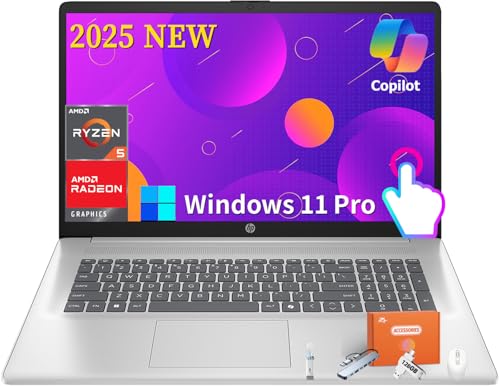
The season’s touch entry wears its year in its name and its compromise in its title, and the guide respects both: a 2025 New HP with a 17.3-inch HD+ anti-glare touchscreen, an AMD Ryzen 5 7430U, AMD Radeon graphics, 16 GB of RAM, a 1 TB SSD, Copilot-AI, Wi-Fi 6, Windows 11 Pro and accessories in the bundle. The touchscreen is the reason this machine exists in the set — it is the HP platform’s current touch route at a mainstream specification — and the HD+ panel is the fact its buyer must accept with open eyes to enjoy it.
At 17.3 inches, HD+ softens text compared with the FHD panels elsewhere here, and the anti-glare finish, while kind in bright rooms, does not restore the missing pixels. A household whose days are reading should weigh that sentence heavily. A household whose days are touching — recipes, photographs, video calls, the grandchildren’s drawings shown at arm’s length — may reasonably decide that the interaction matters more than the last degree of sharpness, and for that household this is the correct machine in the guide. The guide’s duty is to make sure the decision is made as a decision.
The supporting specification is genuinely comfortable: 16GB of memory for the family’s parallel habits, a full terabyte of storage stated as one figure, the 7430U named completely, Radeon graphics identified as the integrated companion to that processor, and Windows 11 Pro beneath it all. The accessories phrase in the title is recorded as the title gives it, without invented contents; the listing page is where a buyer learns what the bundle holds, and should read it before assuming a mouse or anything else is inside.
Who it suits is the touching household at a mainstream specification, buying new rather than inheriting an older touch model. Its Amazon page should be read for the HD+ line first and the accessories second, the two places where this listing’s value is decided.
- Display: 17.3-inch HD+ anti-glare touchscreen
- Processor: AMD Ryzen 5 7430U
- Graphics: AMD Radeon Graphics
- Memory: 16 GB RAM
- Storage: 1 TB SSD
- Operating system: Windows 11 Pro
- Connectivity: Wi-Fi 6
- Features: Copilot-AI
- Bundle: accessories, contents as listed on the product page
Strengths
- The HP platform’s current touchscreen route.
- 1 TB SSD stated as a single storage figure.
- Processor named in full in the title.
Trade-offs
- HD+ resolution is softer than FHD at this size.
- Bundle contents are not itemised in the title.
- 16 GB memory is the mid-ladder figure here.
Best for: daily touch use around a home — kitchen, photographs, calls — where the interaction matters more than panel sharpness. Not suited for: a reader who spends hours in dense documents, because the HD+ panel softens the text that this guide’s FHD picks keep crisp.
Set the text scaling generously on the first evening and let the big touchscreen be what it is: a surface to be used with fingers as much as with a pointer. Learn which of the household’s applications reward touch and which ignore it, and keep the cloth by the machine’s home. A touch laptop bought knowingly, for a household that genuinely touches, is a daily pleasure that a sharper screen on a machine nobody reaches for cannot match.

HP 17 Ryzen 5 7430U 32GB — Fully named chip
Some listings earn their place by telling the buyer everything, and this returning configuration — which also serves the companion student guide, because the season’s supply is what it is — states an AMD Ryzen 5 7430U in full, 32GB of RAM, a 1TB SSD, Windows 11 Pro, a 17.3-inch FHD anti-glare display, Wi-Fi 6, Bluetooth 5.4, fast charge and AI Copilot, for business and student use. In a roundup about newness, it represents the platform’s most completely described current form, the listing against which vaguer headlines can be measured.
The FHD anti-glare panel is this pick’s quiet advantage over the touch model above: the full resolution, finished for bright rooms, on the size the category exists for. Fast charge suits the fragmented pattern of real days, Bluetooth 5.4 is stated with a precision most titles skip, and the 32GB and terabyte pairing repeats the pairing this guide keeps returning to, because memory and storage are the figures a machine’s later years are made of.
Nothing in the title reaches for novelty, and that is its character. A buyer who wants the season’s edges — Wi-Fi 7, WQXGA, Arc graphics — has the two flagships above. A buyer who wants a current machine with no open questions has this one, whose every core figure can be checked against a department specification, a software requirement or a simple list of demands without a single follow-up question to a seller.
Who it suits is the certainty buyer, and households purchasing the same machine twice over. Its Amazon page is a confirmation exercise: the 7430U name, the anti-glare FHD line and the fast charge wording, matched in a minute, and the purchase is exactly the machine described.
- Display: 17.3-inch FHD anti-glare
- Processor: AMD Ryzen 5 7430U
- Memory: 32GB RAM
- Storage: 1TB SSD
- Operating system: Windows 11 Pro
- Connectivity: Wi-Fi 6, Bluetooth 5.4
- Charging: fast charge stated
- Features: AI Copilot
Strengths
- Every core specification is stated in the title.
- FHD anti-glare panel suits bright rooms.
- 32GB and 1TB match the guide’s longevity pairing.
Trade-offs
- No touchscreen or keypad is named in the title.
- Wi-Fi 6 rather than Wi-Fi 7.
- It is the platform’s familiar form, not its flagship.
Best for: a checklist-driven purchase of a current, fully described machine whose specification can be verified against any requirement list in one reading. Not suited for: a buyer chasing the season’s edges in wireless or panel technology, because this configuration’s virtues are completeness and headroom rather than novelty.
Use the completeness as the setup checklist itself: processor, memory, storage and panel confirmed in the system settings on the first evening, course or office software installed before it is needed, and the fast-charging habit — plugged in at the desk, always — adopted from day one. A machine with no open questions deserves an owner with no pending setup tasks.
HP 17.3 Core 5 Laptop — Plain closer
The set closes with the season’s plainest honest machine: a New Released HP stating an Intel Core 5 120U in 10-core form up to 5.0GHz, 16GB of RAM, a 512GB SSD, a numeric keypad, Windows 11 with Microsoft 365 for the web, and Wi-Fi 6, for students and business. It is the Core 5 32GB pick’s sibling with the ladder’s middle specification, and its plainness is a feature for the buyer it serves — every figure stated, nothing inflated, the keypad present where the figures are worked.
Sixteen gigabytes and 512GB describe the comfortable centre of current home and office use, provided the archive habit described throughout these guides is part of the household’s life. The processor is the same fully named Core 5 120U as its sibling’s, so the step between the two configurations is precisely memory and storage, which makes the comparison unusually clean: a buyer choosing between them is pricing headroom and nothing else, and can decide by the size of their working day rather than by a muddle of differing features.
As with its sibling, the title leaves the display’s resolution to the listing page, naming the 17.3-inch size and leaving the panel’s character undescribed. That open question should be closed on the page before purchase, and it is the only one the listing leaves. The Microsoft 365 for the web phrasing is again recorded without a term, and the keypad again serves the administrator in the household.
Who it suits is the buyer whose working day fits the middle specification and who would rather spend the difference on the household than on headroom they will not use. Its Amazon page asks for the same two confirmations as its sibling — the configuration figures, then the display line — and rewards the same minute of care.
- Display: 17.3-inch (resolution not stated in the title wording)
- Processor: Intel Core 5 120U, 10-core, up to 5.0GHz
- Memory: 16GB RAM
- Storage: 512GB SSD
- Keyboard: numeric keypad
- Operating system: Windows 11 with MS365 for the Web
- Connectivity: Wi-Fi 6
- Label: New Released, as stated in the title
Strengths
- Processor named with core count and ceiling speed.
- Numeric keypad serves figure-heavy work.
- A clean, single-variable step below its 32GB sibling.
Trade-offs
- 512GB storage asks for an archive habit.
- Display resolution is not stated in the title.
- 16GB memory is the middle figure, not headroom.
Best for: a home or office buyer whose ordinary day fits 16GB and half a terabyte, and who values a keypad and a fully named processor. Not suited for: a photograph and file archive that already exceeds 512GB unorganised, because the internal SSD is this configuration’s fixed ceiling.
Adopt the archive rhythm in the first week, verify the display against the listing page while the window for remedies is open, and set the keypad’s templates up before the first real figures arrive. Plain machines reward plain diligence, and this one’s specification — stated in full, priced by its listing — is exactly the kind that disappears into years of unremarkable, dependable service.
Comparison
| Pick | Panel from title | Memory / Storage | Notable from title |
|---|---|---|---|
| LG gram 17 | 17.0-inch WQXGA touch IPS | 32GB LPDDR5X / 1TB PCIe SSD | Ultra 9-288V, Intel Arc 140V |
| HP OmniBook 17 Ultra 7 | 17.3-inch FHD IPS anti-glare | 32 GB DDR5 / 1 TB SSD | Wi-Fi 7, BT 6.0, numeric keypad |
| HP 17 Core 5 120U 32GB | 17.3-inch, resolution unstated | 32GB / 1TB SSD | Numeric keypad, up to 5.0GHz |
| HP 2025 New 17 Touch | 17.3-inch HD+ touch anti-glare | 16 GB / 1 TB SSD | Ryzen 5 7430U, accessories bundled |
| HP 17 Ryzen 5 7430U 32GB | 17.3-inch FHD anti-glare | 32GB / 1TB SSD | Bluetooth 5.4, fast charge |
| HP 17.3 Core 5 Laptop | 17.3-inch, resolution unstated | 16GB / 512GB SSD | Numeric keypad, Core 5 120U |
The table’s shape is the season’s shape: one traveller’s flagship apart at the top, a platform flagship beneath it, and a ladder of HP configurations dividing by memory, panel and touch. A buyer who knows which kind of newness they are paying for — panel, processor, memory or wireless — can read their row directly off it.
Notice the memory column’s generosity as a group. Four configurations at 32GB would have been unthinkable in this category a few seasons ago, and it quietly reframes the purchase: the current season’s 17-inch machines are specified to be kept, and the choosing is about screens and keyboards rather than about which machine will survive its owner’s growing files.
One more form of newness deserves naming before the choosing begins, because buyers meet it in listings constantly: the refreshed bundle. A platform machine can be listed this season with a new accessory arrangement, a new storage pairing or a new label while its core specification continues unchanged, and none of those is dishonest — provided the title states the configuration plainly, as the titles in this set do. The reader’s task is to locate the machine inside the listing: processor, memory, storage, panel. Where those four are current, the listing is current in every way that affects ownership, whatever the bundle around them does. Where one of the four belongs to an older generation, the listing belongs in an older guide, and companion guides exist precisely so those machines can be recommended honestly in their own context rather than dressed in this season’s language.
How to Choose a New 17-Inch Laptop
Decide first whether the machine travels or resides, because the set divides cleanly on that line. The gram 17 is the traveller’s answer, built around a sharper panel and a current flagship specification in a line devoted to lightness for the size. Everything else here is a resident: a desk machine whose weight will be a rumour and whose screen, keypad and wireless are the lived specification. Buyers who blur that first decision end up carrying a resident or docking a traveller, and both compromises are avoidable in one honest minute.
Next, spend on the kind of newness your routine will feel. A new panel is felt hourly by readers and presenters. New wireless is felt at the next router change and not before. New memory is felt in the third year, when the files have grown. None of these is the correct purchase in the abstract; each is correct for the buyer whose days touch it. The titles in this guide state which kind each pick offers, which is why they reward the slow reading this guide keeps recommending.
Then check the panel line with a pencil, because it is where this season’s listings vary most quietly. WQXGA, FHD, HD+ and unstated all appear within six titles. Unstated is an errand to the listing page, HD+ is a decision to accept softness for touch or figure, and FHD is the category’s comfortable standard. A buyer who closes the panel question before paying will never have it reopened by the first document they open.
Finish with the seller’s consistency, the standing advice throughout this guide: title, selected variant and basket aligned on memory, storage and operating system before money moves. Current listings multiply variants as enthusiastically as older ones did, and newness is no protection against a mis-selected configuration arriving in the right-looking box.
What Does New Actually Guarantee in This Category?
Less than the word suggests and more than cynics allow. A current listing guarantees a machine in the present supply chain: current support, a present-day operating system with years of updates ahead, processors and wireless from the current catalogue, and a seller answerable now. It does not guarantee a new design, a new panel generation or a flagship’s specification, as the HD+ touch model in this very set demonstrates. New is a statement about currency, and currency is genuinely valuable — it is simply not the same statement as best.
The buyer’s protection is to translate the word into its components every time it appears. Which parts of this machine are current — the processor, the memory type, the wireless, the operating system — and which are continuations? The titles in this guide answer that question line by line for a reader willing to ask it, and a reader who asks it of every future listing will shop the whole category, new and old, with the same clarity.
Is the LG gram 17 Worth Its Premium Over the HP Range?
For the traveller, the comparison is not really premium against mainstream but purpose against purpose. The gram’s WQXGA touchscreen, Ultra 9 processor and Arc graphics answer a life of presenting, annotating and creating away from a fixed desk, in a line designed around carrying the big screen. The HP flagship answers a resident life with a keypad, anti-glare FHD and Wi-Fi 7. A buyer who tries to declare one the winner in the abstract has mistaken two different tools for two rungs of one ladder.
The deciding evidence is a week of your own routine, honestly recalled. Count the days the laptop leaves the house, the hours spent presenting or annotating, the sessions at a desk with a spreadsheet. The gram wins the first two counts; the OmniBook wins the third. Buy the machine your week describes, and the premium question dissolves into the routine that answered it.
How Should You Time a Purchase in a Narrow Category?
Narrow categories reward a different patience from crowded ones. In a market with forty competing models, waiting usually buys a better specification at the same figure, because the competition is relentless. In the 17-inch market, the supply is a living platform and one premium line, and waiting mostly buys the same machines with different bundle arrangements around them. A buyer who has identified their configuration — by memory, panel and keyboard, as this guide keeps arranging it — gains little from delay beyond the ordinary rhythm of seasonal promotions, and risks the specific variant they want quietly leaving the listings, as variants in this category do without announcement.
The practical ritual is a shortlist with a memory. Write down the two configurations that fit, with their titles, and check them weekly rather than browsing the whole category daily. Variant churn in a platform market means the headline you saw last month may describe a different pre-selected configuration this month, so the written title is the anchor: if the listing still matches it, the machine is the machine you chose; if it does not, the shortlist has done its job by catching the change before the basket did.
What Separates the Two Core 5 Configurations?
One variable, cleanly: memory and storage. Both titles name the same Intel Core 5 120U with the same 10-core description and the same ceiling speed, the same numeric keypad, the same Windows 11 with Microsoft 365 for the web, and the same Wi-Fi 6. One carries 32GB of RAM and a 1TB SSD; the other carries 16GB and 512GB. In a market where comparisons usually drown in differing features, this pair offers the rare pleasure of a controlled experiment, and the buyer’s task reduces to a single honest question about their own working life.
Answer it by the busiest ordinary week, not the calmest and not the most extreme. A week of documents, browser research, a call with screen sharing and the household’s administration sits inside 16GB without complaint today, and the question is whether the same week in three years — heavier software, larger files, more accumulated habits — still sits inside it. Buyers who expect their workload to grow should take the 32GB machine and consider the matter settled for the machine’s life. Buyers whose work is stable and whose archive is organised can take the plainer configuration with a clear conscience, because headroom unused for five years is not a virtue but a donation.
Should Students and Home Buyers Read This Guide Differently?
The same listings serve both audiences here — several titles here name students and business in one breath — but the emphasis shifts with the reader. A student should weight fast charge, the fully described 7430U configuration and the memory ladder against a degree’s length, and will find the student companion guide’s treatment of these machines pitched to coursework. A home buyer should weight the keypad, the anti-glare panels and the touch option against the household’s rooms, and the home companion guide reads the same supply through those rooms. Neither reading is the correct one in general; each is correct for the life the machine is entering.
What does not shift is the method. Whichever guide a buyer arrives through, the titles are the contract, the storage is counted in parts, the panel line is read with a pencil, and the variant in the basket is aligned with the variant in the headline before money moves. A category this narrow, served by this few platforms, rewards that method more than any other, because the machines resemble each other so closely that only the reading separates them.
Common Mistakes When Buying a New 17-Inch Laptop
Reading new as a specification. New describes currency, not quality. One pick here is a current listing with an HD+ panel; another is a current listing with a WQXGA one. The panel line, not the label, tells you which you are buying.
Comparing the gram and the HPs as one ladder. They are built for different lives — travel against residence. Compare each against your routine before comparing them against each other.
Skipping the display line on the Core 5 picks. Both Core 5 titles leave the panel resolution to their listing pages. Close that question before paying, not on the first document.
Assuming a bundle’s contents. The touch model states accessories without itemising them. Read the listing page for what is actually in the box before planning around a mouse or a hub that may not be there.
What Should Arrive in the Same Week as the Laptop?
A new big-screen machine anchors a workspace, and the workspace is completed by small decisions made in the same week rather than discovered across the following month. A bag that genuinely fits a 17-inch-class chassis, measured rather than assumed from a label, is the first of them for any machine that will ever leave the house — the gram above all, whose whole purpose is travel. A surge protector for the desk it will live on is the second, unglamorous and permanent. The third is the backup destination, external or cloud, arranged while the drive is empty and the habit costs nothing to form.
Software belongs to the same week. The office suite route each title describes — Microsoft 365 for the web on several picks — should be opened, signed into and tested on a real document before the first deadline leans on it, and the household’s or the course’s required applications installed while support desks are still a novelty rather than an emergency. A machine set up completely in its first week becomes infrastructure; a machine set up gradually becomes a series of small interruptions, each arriving at the least convenient hour available to it.
Keep the paperwork with the same care. Save the listing title with the receipt, because in a platform market the title is the precise record of the configuration promised — processor, memory, storage, panel wording and all — and it settles any later question faster than a photograph of a chassis that a dozen variants share.
Final Recommendation
Choose the LG gram 17 if the machine travels and presents, and its WQXGA touchscreen will be used as the flagship feature it is. Choose the HP OmniBook 17 Ultra 7 if the machine resides, and you want the platform’s most complete current form with Wi-Fi 7 and a keypad. Between the mid-range configurations, take the Core 5 32GB for memory value, the fully described 7430U machine for certainty, the touch model for a household that touches, and the plain Core 5 closer for a middle specification honestly stated.
The current season’s 17-inch shelf is narrower than it once was and better specified than it has ever been — so choose the machine whose kind of newness your own week will feel, and it will still feel new when the next season’s listings arrive to be read with the same care.
Frequently Asked Questions
What does new mean for these laptops?
A current listing of a living platform: present-day processors, Windows 11, current wireless standards and a seller answerable now. It does not guarantee a new design or a flagship panel, which is why each review verifies the components individually.
Why is there only one non-HP pick?
Because the current mainstream supply at this size is the HP platform, and the LG gram 17 is the season’s one premium alternative with a verified listing. Padding the set with stale listings from other makers would have made it less current, not more balanced.
Which pick has the sharpest screen?
The LG gram 17, whose title states a WQXGA touchscreen IPS panel. The FHD picks sit a rung below it, and the touch HP states HD+, a fact its review keeps in front of the buyer.
Which configuration is the memory value of the season?
The HP 17 Core 5 120U with 32GB of RAM and a 1TB SSD. Verify its display specification on the listing page, since the title leaves the panel resolution there.
Is Wi-Fi 7 worth choosing a pick for?
Only as a longevity detail. The OmniBook 17 Ultra 7 states Wi-Fi 7 and Bluetooth 6.0, which will meet a future router on equal terms. For today’s routers, the Wi-Fi 6 picks are entirely sufficient.
How future-proof is a 32GB configuration at this size?
As future-proof as this category honestly gets. Memory is the resource everyday software consumes more of each year, and 32GB — carried by four picks here — gives a machine room to absorb that growth across a long ownership. Storage can be relieved by archives and external drives; a processor’s fashion fades without affecting documents; memory alone decides whether the fifth year feels like the second. Buyers choosing for the long term should let that figure lead, and buyers choosing for a defined shorter term can let it go without anxiety.
Does the gram’s 17.0-inch panel feel smaller than the 17.3-inch picks?
Barely, and its WQXGA resolution more than compensates in information shown: more lines of a document, more rows of a spreadsheet, more of a timeline at once than any FHD 17.3-inch panel here displays. The fraction of an inch is a tape-measure difference; the resolution is an every-hour difference, and it runs in the gram’s favour for the reading and presenting work its buyer does.
What is the first thing to check when the machine arrives?
Identity, while remedies are easy. Read the processor, memory, storage and panel in the system settings against the listing title you saved, confirm the operating system edition matches the title’s promise, and run one ordinary working day — your documents, your call, your photographs — before the return window narrows. Marketplace variants make this ten-minute inspection the highest-value habit in the whole purchase, in this category above all, because the chassis in the box will look correct even when the configuration inside it is a near-namesake of the one you chose.
Are these machines suitable for light gaming?
For the casual end of it, with expectations set by the graphics lines. The gram’s Intel Arc 140V is the strongest graphics named in this set and handles light gaming and creative acceleration credibly; the HP picks name Intel GPU or Radeon integrated graphics suited to media and older or lighter titles. A buyer whose gaming is a serious hobby should shop the gaming companion guide, where discrete graphics cards are stated in titles and weighed as the main event rather than as a footnote to a home and office specification.
Why do two picks share a processor but differ so much in feel?
Because a laptop is a system, and the processor is only its most advertised part. The two Core 5 configurations divide by memory and storage, and those two figures govern how the machine responds when the day gets crowded — how many projects stay open, how much of the archive lives on the fast drive, how rarely the owner performs housekeeping. Identical processors in different memory and storage company produce honestly different machines, which is why this guide keeps ranking those quieter figures ahead of the famous one.
What does the Copilot branding on several titles actually add?
A key, an assistant and an invitation, in that order of certainty. Several titles here name Copilot or AI Copilot, placing Microsoft’s assistant within a press for summaries, drafts and quick questions. Owners who adopt it find small daily uses; owners who ignore it lose nothing measurable, because the machines’ value stands on their screens, memory and storage. Treat the branding as a bundled experiment rather than a selection criterion, and let the specifications a buyer touches hourly — panel, keyboard, memory, wireless — carry the decision, as this guide has arranged them to do.
Related Guides
The complete big-screen field is surveyed in our roundup of laptops with 17-inch screens for home and office use. Students shopping the current season should read the best 17-inch laptops for students, where the same supply is read through coursework. And households arriving with the older operating-system question will find it answered in the best 17.3-inch laptops for home, where the Windows 10 question is settled directly.