What's inside
- Where to Buy
- Key Takeaways
- Quick Picks
- How We Chose These Picks
- Comparison
- How to Choose a 17-Inch Laptop
- Is a 17-Inch Laptop Too Big for Everyday Use?
- How Much Memory Does a Home and Office Laptop Really Need?
- What Does the Numeric Keypad Change in Daily Work?
- How Long Will a Machine Like This Stay Useful?
- Common Mistakes When Buying a 17-Inch Laptop
- Should You Buy the Bundle or the Bare Machine?
- Final Recommendation
- Frequently Asked Questions
- Related Guides
As an Amazon Associate I earn from qualifying purchases. This post may contain affiliate links at no extra cost to you.
[SITE_DOMAIN] is reader-supported. When you buy through links on our site, we may earn an affiliate commission.
Where to Buy
Six large-screen machines are gathered below, and five of them wear an HP badge while one ASUS breaks the run. The HP 17 Business Ryzen 5 opens the set with a 2026 Edition label, so open its Amazon page and confirm the configuration on offer matches the 16GB and 512GB pairing before anything else. The ASUS Vivobook 17 Core 3 is the lone non-HP name here, finished in Quiet Blue, and its listing is where the current figure for that colour and model code lives. HP returns with the HP OmniBook 3 17.3 in Glacier Silver, a machine whose page carries the 17-dk0099nr code worth matching at checkout. Touch arrives with the HP 17.3 Touch i5 Laptop, whose Amazon listing spells out the 1TB storage and fingerprint reader in its own wording. The HP 17.3 FHD 300-Nits Ryzen 5 adds a bundled wireless mouse, so read its page for what ships in the box. Finally, the HP 17.3 i7 32GB tops the memory chart here, and its listing explains how the extra SD card storage is counted.
Anyone hunting for the best laptops with 17 inch screens in 2026 quickly discovers a market that has narrowed to a handful of platforms wearing many configuration badges. That narrowing is not a flaw in the search; it is the honest shape of this category now. Most large mainstream laptops have migrated to 16-inch panels, leaving the true 17.3-inch class to HP’s long-running 17 line, a single ASUS Vivobook, and a scattering of gaming machines covered in a companion guide. This roundup stays with everyday and business machines, the kind bought for spreadsheets, family administration, coursework and long documents rather than for frame rates.
A second truth deserves stating before the reviews begin, because it shapes how the picks should be read. Several machines below share one underlying HP 17 platform, sold through marketplace listings in different processor, memory and storage combinations. Two listings can therefore describe near-identical chassis with genuinely different internals, and a third can bundle storage or accessories in ways that change what a headline capacity figure means. The reviews treat each listing as its own product, repeat only what its own title states, and flag the places where a bundle does the counting.
What a 17.3-inch screen buys, once the platform question is settled, is room. A wide spreadsheet shows more columns before scrolling sideways. Two documents sit side by side at readable sizes. A numeric keypad, named in several titles here, serves anyone who types figures for a living. The cost is carried weight and desk footprint, neither of which any title below quantifies, so the spec boxes leave weight unstated rather than borrowing a figure from a sibling model. Readers for whom portability is the first priority should treat this entire category as a deliberate trade: the screen is the point, and the bag gets bigger because of it.
Key Takeaways
- Five of the six picks are HP 17-platform machines in different configurations; the ASUS Vivobook 17 is the only other brand in the set.
- Every title states a 17.3-inch FHD display, and every title states Windows 11 in either Home or Pro form.
- Memory spans 8GB on the ASUS and the OmniBook 3 up to 32GB on the i7 business configuration.
- Only one pick, the HP Touch i5, states a touchscreen in its title; only that same pick names a fingerprint reader.
- Storage headlines need care: one pick adds a 512GB SD card to its 1TB SSD, so the two numbers should not be merged into a single drive figure.
Quick Picks
| Pick | Badge | Why it earns a place |
|---|---|---|
| HP 17 Business Ryzen 5 | Balanced opener | Ryzen 5 with 16GB RAM, 512GB SSD, numeric keypad and a long battery life claim. |
| ASUS Vivobook 17 Core 3 | The non-HP route | Intel Core 3 100U, 8GB RAM and 512GB SSD in a Quiet Blue Vivobook chassis. |
| HP OmniBook 3 17.3 | Named-model clarity | Core 5 120U with a full model code, 17-dk0099nr, printed in the title. |
| HP 17.3 Touch i5 Laptop | Touch and security | Touchscreen, backlit keyboard, fingerprint reader and 1TB SSD. |
| HP 17.3 FHD 300-Nits Ryzen 5 | Brightness stated | The only title here printing a 300-nits brightness figure, plus Wi-Fi 6 and Bluetooth 5.4. |
| HP 17.3 i7 32GB | Memory ceiling | Core i7-1355U, 32GB RAM, Windows 11 Pro and expanded storage via an SD card. |
How We Chose These Picks
The first filter was physical and non-negotiable: a title had to state a 17-inch-class display, and every survivor names 17.3 inches explicitly. Machines that merely feel large, or that round a 16-inch panel upward in marketing language, were left for other guides. The second filter separated everyday and business machines from gaming hardware, because a reader comparing office laptops gains nothing from graphics-card arithmetic; the gaming side of this screen size has its own roundup linked at the end.
Configuration honesty formed the third pass. Marketplace listings for this HP platform multiply quickly, so each pick had to state its processor, memory and storage plainly enough to be checked line by line. Where a title bundles storage in two parts, the review keeps the two parts separate. Where a title adds an accessory such as a wireless mouse, that addition is reported as a bundle detail rather than as a property of the laptop itself. Titles that hid their core specification behind adjectives alone did not survive.
Operating system wording was read literally as well. Windows 11 Home and Windows 11 Pro both appear in this set, and the difference matters to buyers who need workplace sign-in policies or simply prefer the Pro feature set. Mentions of Office 365 or Microsoft 365 for the web are reported as web-suite access in the titles’ own phrasing, never upgraded into a claim about installed desktop applications or subscription length, because no title here states a term.
Finally, the set was arranged to show the platform’s real range rather than six copies of one configuration. Memory runs from 8GB to 32GB, processors from an Intel Core 3 to a Core i7, and exactly one machine adds touch. A reader who works through all six reviews should finish able to explain what each step up the ladder actually buys, and just as importantly, what it does not.

HP 17 Business Ryzen 5 — Balanced opener
This HP opens the guide because it states the configuration most buyers in this category picture first: an AMD Ryzen 5 processor, 16GB of RAM and a 512GB SSD behind a 17.3-inch FHD display. The title calls it a 2026 Edition business laptop, names a numeric keypad, and claims long battery life without printing an hour figure, so the spec box records the claim in words rather than inventing a number. Windows 11 arrives with Office 365 for the web, a phrasing that points to browser-based Office access rather than a stated desktop install.
The balance is the argument. Sixteen gigabytes of memory is the point where a large-screen office machine stops apologising for a dozen open browser tabs alongside a spreadsheet and a video call, and 512GB of solid-state storage covers documents, photos and a modest application library without immediate housekeeping. The Ryzen 5 name, without a model number in this title, leaves the exact processor generation unstated, and that gap is worth noticing: buyers who care about the specific chip should confirm it on the listing page, because this title does not print one.
A numeric keypad sounds like a minor detail until a household budget, a stock list or a term of coursework figures passes through it, at which point the wide chassis earns its width a second time. The same width serves the display, of course, and FHD resolution across 17.3 inches keeps text at comfortable sizes without scaling tricks. Nothing in the title mentions touch, a backlit keyboard or a fingerprint reader, so readers who need any of those should look at the Touch i5 further down rather than assume this business trim includes them.
Who it suits is the home-office buyer who wants one large machine, sensibly specified, without paying for memory headroom they will never use. Its limits are equally legible: the processor is named only by family, the battery claim carries no hours, and the weight that decides whether it travels well is nowhere in the title. For a desk-anchored machine those gaps matter less than the core pairing of screen, memory and storage, which this listing states cleanly. When you open its Amazon page, the Ryzen generation is the single detail to pin down before the 16GB and 512GB pairing persuades you.
- Display: 17.3-inch FHD
- Processor: AMD Ryzen 5 (model number not stated in the listing title)
- Memory: 16GB RAM
- Storage: 512GB SSD
- Keyboard: numeric keypad
- Battery: long battery life claimed, hours not stated
- Operating system: Windows 11 with Office 365 for the Web
- Weight: Not stated in the listing title — verify with the manufacturer documentation
Strengths
- 16GB RAM and 512GB SSD is the balanced pairing for office multitasking.
- Numeric keypad is named in the title, suiting figure-heavy work.
- 2026 Edition labelling marks it as a current listing.
Trade-offs
- The Ryzen 5 model number is not printed in the title.
- Battery life is claimed without an hour figure.
- No touch, backlight or fingerprint feature is stated.
Best for: a fixed home-office desk where a 17.3-inch FHD screen, 16GB of memory and a numeric keypad cover spreadsheets, documents and calls all day. Not suited for: a shortlist that must cite the exact Ryzen model before ordering, because this listing title names the family only.
Setting this HP up well is mostly about using the width. Arrange your two most-used windows side by side at full height and resist maximising everything out of laptop habit, because the panel was bought for parallel work. Connect the machine to your home network and let Windows 11 finish its first round of updates before judging fan behaviour or battery drain, since a new machine works hardest in its first evening. If the Office for the web route is new to you, open a document in the browser early and confirm it suits your habits while alternatives are still easy to arrange.

ASUS Vivobook 17 Core 3 — The non-HP route
ASUS supplies the set’s only change of badge, and the Vivobook 17 makes its case with tidiness rather than abundance. Its title states an Intel Core 3 100U processor, 8GB of RAM, a 512GB SSD, Windows 11 Home and a 17.3-inch FHD display, all in a Quiet Blue finish under the model code F1704VA-AS34. That code matters more than the colour: it is the string that separates this exact configuration from other Vivobook 17 listings whose memory or storage may differ under a nearly identical name.
Eight gigabytes of memory is the specification to weigh honestly. For browsing, email, documents, streaming and light coursework it remains workable, and the 512GB SSD is the same capacity as the HP opener’s, so storage is not where this machine economises. Heavy multitaskers, though, will feel 8GB sooner on a machine bought for a big screen and parallel windows, because the display invites exactly the side-by-side habits that consume memory. The Core 3 100U is an efficiency-minded processor, and the title makes no performance promises beyond naming it, so expectations should be set for everyday work rather than editing timelines.
The Vivobook line’s appeal has always been a certain plain-spoken neatness, and a coloured finish on a 17-inch chassis is a rarer pleasure than it should be in a category dominated by silver and grey. Quiet Blue will not change a benchmark, yet a machine that sits in a kitchen or a shared living space all day is furniture as much as tool, and ASUS is the only maker here offering a colour decision at all. The title stays silent on a numeric keypad, keyboard backlighting and touch, so none of those should be assumed from the Vivobook name alone.
Who it suits is the buyer who wants the big screen for reading, writing and watching, whose workload is broad rather than deep, and who prefers ASUS to the HP platform on principle or past experience. Its ceiling is plain: memory cannot be negotiated upward within this listing, and anyone whose work already strains an 8GB machine should step to a 16GB pick instead of hoping a larger display compensates. On the Vivobook’s Amazon page, match the F1704VA-AS34 code letter for letter, since that code is the guard against a lookalike configuration arriving in its place.
- Display: 17.3-inch FHD
- Processor: Intel Core 3 100U
- Memory: 8GB RAM
- Storage: 512GB SSD
- Operating system: Windows 11 Home
- Finish: Quiet Blue
- Model code: F1704VA-AS34
- Numeric keypad: Not stated in the listing title — verify with the manufacturer documentation
Strengths
- The only non-HP option in the set, with a named colour finish.
- 512GB SSD matches the storage of pricier-feeling picks here.
- Full model code is printed in the title for exact matching.
Trade-offs
- 8GB RAM is the joint-lowest memory figure in the guide.
- Core 3 is an everyday-work processor, not a performance chip.
- Keypad and backlight features are not stated in the title.
Best for: a reader, writer and streamer who wants a 17.3-inch screen from ASUS and whose open applications stay modest in number. Not suited for: a desk that habitually runs a browser full of tabs beside a spreadsheet and a call, because 8GB of memory is the hard ceiling of this configuration.
Owners of this Vivobook get the most from it by keeping its workload in the shape it was bought for. Pin your document, reference and communication tools so the morning starts in one arrangement, let the SSD carry your active files rather than scattering them across external drives, and close the heavy applications you are not using instead of minimising them into the background. None of that is a hardship on a machine aimed at everyday work, and the big calm display rewards the discipline every time a long article or a full-page document opens without a squint.
HP OmniBook 3 17.3 — Named-model clarity
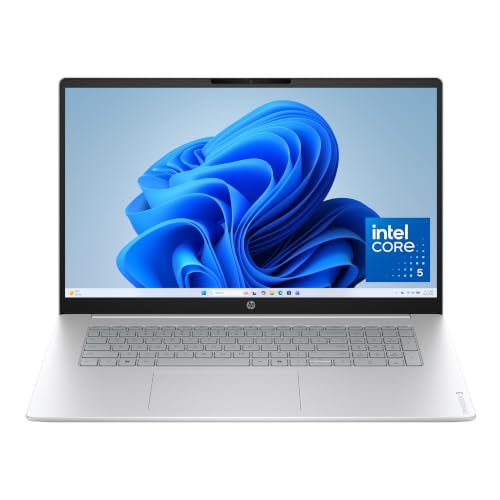
The OmniBook 3 is the listing in this set that behaves most like a manufacturer’s own catalogue page. HP prints the full identity in the title: OmniBook 3, 17.3-inch FHD display, Intel Core 5 120U, 8GB of RAM, a 512GB SSD, Intel Graphics, Windows 11 Home, a Glacier Silver finish and the model code 17-dk0099nr. In a category where marketplace bundles blur together, a complete model code is a genuine consumer protection, because it lets a buyer verify the exact machine across sources before paying.
The Core 5 120U places this pick a rung above the Vivobook’s Core 3 in Intel’s naming ladder, though the memory figure is the same 8GB, and that pairing defines the machine’s character: a modern processor working within a modest memory allowance. Documents, browsing, coursework and streaming will run comfortably, and the integrated Intel Graphics named in the title are the right tool for displays and video rather than for games. Anyone arriving here hoping a 17-inch screen implies gaming ability should read the graphics line carefully, because it promises exactly what it says and no more.
Glacier Silver is the second named finish in the guide, a lighter tone than the standard silver of the other HP listings. The OmniBook branding itself signals HP’s consumer line rather than the business framing of the set’s opener, and Windows 11 Home matches that positioning. The title does not mention a numeric keypad, a Copilot key, touch or a backlit keyboard, and on a model this precisely identified those absences are easy to verify on the listing page against the code.
Who it suits is the careful buyer who values an identifiable, current consumer model over a bundle’s longer feature list, and whose workload fits inside 8GB. It is also the natural pick for someone buying the same machine for two household members, since the model code makes repeat orders exact. Its limits mirror the Vivobook’s on memory while adding a cleaner identity, and buyers who multitask heavily should still step up. The OmniBook’s listing rewards a code-first check: search the page for 17-dk0099nr and let that string, not the headline, confirm what is in the basket.
- Display: 17.3-inch FHD
- Processor: Intel Core 5 120U
- Memory: 8 GB RAM
- Storage: 512 GB SSD
- Graphics: Intel Graphics
- Operating system: Windows 11 Home
- Finish: Glacier Silver
- Model code: 17-dk0099nr
Strengths
- Full model code printed, making exact verification easy.
- Core 5 120U is a current-generation everyday processor.
- Consumer OmniBook line with a named Glacier Silver finish.
Trade-offs
- 8 GB RAM limits heavy parallel workloads.
- Integrated graphics only, as the title states.
- No keypad, touch or backlight feature is named.
Best for: a household buyer who wants a precisely identified current HP model for study, documents and streaming on a 17.3-inch screen. Not suited for: a player expecting discrete graphics performance, because the title names Intel Graphics and nothing stronger.
Because this machine’s identity is so exact, ownership starts with registration and records: keep the model code with your receipt, and photograph the specification label before the box is recycled. Set up Windows 11 Home with each household user’s own account rather than a shared login, since a family machine accumulates fewer mysteries that way. The 512GB SSD will hold a sensible media library, but adopt a backup habit in the first week while the machine is nearly empty and the habit is painless to form.

HP 17.3 Touch i5 Laptop — Touch and security
Touch is the headline here, and this HP is the only pick in the set whose title states a touchscreen outright. Around that panel the listing assembles the richest everyday feature list in the guide: a backlit keyboard, 16GB of RAM, a 1TB SSD, an Intel Core i5 described as a 10-core processor, a fingerprint reader, Windows 11 Home and Microsoft 365 for the web. The title even notes the absence of a mouse in the bundle, a small honesty that prevents an unboxing surprise.
Each of those features answers a distinct daily friction. The touchscreen serves the quick, unthinking interactions — scrolling a recipe, signing a document, enlarging a photograph — that feel clumsy through a touchpad. The backlit keyboard matters in the evening rooms where a 17-inch home machine often lives. The fingerprint reader removes the password typing that a shared household performs a dozen times a day. None of these is a performance figure, yet together they describe the most completely equipped machine in this line-up for ordinary life.
The processor wording deserves a careful read. The title describes the Core i5 as 10-core and adds a parenthetical comparison against an i7-1255U, which is the listing’s own marketing framing rather than a specification, so the review records the core count and leaves the comparison where it belongs, on the seller’s page. Storage, by contrast, is unambiguous: 1TB on a single stated SSD, the joint-largest clean figure in the set, with no second device folded into the number.
Who it suits is the household that will actually use touch — cooks, annotators, grandparents on video calls, anyone who reaches for a screen out of tablet habit. It also suits shared machines, where the fingerprint reader earns its place daily. Buyers who never touch a laptop screen should weigh whether the plainer 16GB picks serve them as well, since touch is this listing’s defining premium. Its Amazon page is the place to confirm the touchscreen wording and the no-mouse bundle note together, because both shape what else you may want to order alongside it.
- Display: 17.3-inch touchscreen
- Processor: Intel Core i5, 10-core as stated in the title
- Memory: 16GB RAM
- Storage: 1TB SSD
- Keyboard: backlit keyboard
- Security: fingerprint reader
- Operating system: Windows 11 Home, Microsoft 365 for the Web
- Bundle note: no mouse included, as stated in the title
Strengths
- The only touchscreen in the set, stated plainly in the title.
- Fingerprint reader and backlit keyboard complete the daily feature list.
- 1TB SSD is stated as a single storage figure.
Trade-offs
- No mouse is included, per the title’s own note.
- The processor comparison in the title is marketing framing, not a spec.
- Windows 11 Home rather than the Pro edition found elsewhere here.
Best for: a shared household machine where touch interaction, fingerprint sign-in and a backlit keyboard will be used every single day. Not suited for: a desk that needs a mouse in the box on arrival day, because the title states plainly that none is included.
Register every regular user’s fingerprint during the first setup session, while patience and good light are available, rather than leaving it to a rushed morning later. Spend a few minutes calibrating touch habits too: enlarge the interface elements you find yourself missing, and keep a soft cloth near the machine, because a touched screen shows it. The backlit keyboard’s timeout setting is worth finding early, since a keyboard that sleeps too eagerly in a dim room becomes a nightly irritation out of proportion to its cause.

HP 17.3 FHD 300-Nits Ryzen 5 — Brightness stated
Brightness is the scarcest honest number in this category, and this HP is the only pick whose title prints one: a 17.3-inch FHD IPS LED anti-glare panel at 300 nits. That single figure tells a buyer more about daily comfort than a paragraph of adjectives, because it speaks to bright kitchens, conservatories and offices where a dimmer screen washes out. The anti-glare description in the same title reinforces the point; this configuration is aimed at rooms with real light in them.
The processor is named completely this time: a Ryzen 5 7430U, paired with 16GB of memory and a 512GB SSD, the same memory and storage pairing as the guide’s opener but with the chip identified. Connectivity is stated with unusual precision as well, Wi-Fi 6 alongside Bluetooth 5.4, and the title adds a webcam with a shutter, a Microsoft Copilot key and a bundled wireless mouse. The model family appears as 17-cp3000, and the finish is listed as Silver. A buyer comparing this listing with the opener can therefore work from named parts rather than from impressions.
The webcam shutter deserves its sentence. On a machine that will sit in a family room or a bedroom-office, a physical shutter is a simpler and more trustworthy privacy control than any software toggle, and its presence in the title suggests the bundle was assembled by someone thinking about how these machines are actually used. The Copilot key, by contrast, is a convenience whose value depends entirely on whether the owner adopts Microsoft’s assistant; the key costs nothing to ignore and the keyboard loses nothing by carrying it.
Who it suits is the buyer in a bright room, and the buyer who prefers a fully named processor to a family label. The bundled mouse makes it the most arrival-complete package in the set alongside its own listing’s promises. Its compromises are the 512GB storage ceiling, half the Touch i5’s figure, and a title that says nothing about touch or fingerprint sign-in. If your room is bright and your files are modest, open its Amazon page and confirm the 300-nits line and the 17-cp3000 family name, the two details that define this particular bundle.
- Display: 17.3-inch FHD IPS LED anti-glare, 300 nits
- Processor: Ryzen 5 7430U
- Memory: 16GB RAM
- Storage: 512GB SSD
- Camera: webcam with shutter
- Connectivity: Wi-Fi 6, Bluetooth 5.4
- Operating system: Windows 11 Home
- Bundle: wireless mouse included; Copilot key on keyboard
- Model family: 17-cp3000
Strengths
- 300-nits brightness and anti-glare panel are stated outright.
- Ryzen 5 7430U is named in full, unlike the opener’s family label.
- Webcam shutter and bundled mouse are practical inclusions.
Trade-offs
- 512GB storage is half the largest figure in this guide.
- No touch or fingerprint feature is stated in the title.
- Bluetooth and Wi-Fi are named, but port selection is not.
Best for: a bright kitchen, conservatory or office desk where a stated 300-nits anti-glare panel decides comfort more than any processor detail. Not suited for: a photo and video archive that already exceeds 512GB, because the internal SSD is this configuration’s fixed storage ceiling.
Place this machine where you intend to keep it before judging the screen, since its whole case rests on performance in real room light. Test the webcam shutter’s action once so the gesture is familiar, pair the bundled mouse before deciding a touchpad is not for you, and set the display brightness to a comfortable working level rather than maximum, because a panel with headroom should be run at the level the room needs. The Copilot key can wait; the lighting cannot, and this is a configuration bought for its behaviour under lamps and windows.

HP 17.3 i7 32GB — Memory ceiling
The closing HP is the configuration for the buyer who has already decided that memory is the specification they refuse to compromise. Its title states an Intel Core i7-1355U, 32GB of RAM, a 1TB SSD plus a 512GB SD card for expanded storage, Windows 11 Pro, Wi-Fi 6 and a Copilot key, in a silver chassis described as thin and lightweight. That last phrase is the title’s own language and is recorded as such; no weight figure is printed, so none is claimed here.
Thirty-two gigabytes changes the texture of a working day more than any other single figure in this guide. Large spreadsheets stay open beside reference documents, a browser can hold its dozens of tabs without the machine quietly closing the oldest, and a video call survives a screen share without drama. The Core i7-1355U is named in full, which lets a buyer place it precisely, and Windows 11 Pro separates this pick from the Home-edition machines for anyone whose workplace connection or personal preference calls for it.
The storage wording needs the careful reading flagged in the introduction. The title lists a 1TB SSD and then a 512GB SD card as expanded storage, which means the machine’s fast internal drive is the terabyte figure and the card is a second, removable tier suited to archives and media rather than to applications. Sellers’ headlines sometimes add the two together; this review does not, and buyers should not either. Used knowingly, the arrangement is genuinely useful — working files on the SSD, finished projects and photo libraries on the card — but it is an arrangement, not a single 1.5TB drive.
Who it suits is the heavy multitasker and the keeper of large working files, the buyer whose previous laptop failed them through memory pressure rather than through age. It is also the pick for Pro-edition requirements. Buyers with lighter habits will not feel the extra memory, and should not pay for headroom as a talisman. On its Amazon page, read the storage line slowly and separate the SSD from the SD card in your own notes, because understanding that split is the difference between this configuration’s real strength and a headline misunderstanding.
- Display: 17.3-inch FHD
- Processor: Intel Core i7-1355U
- Memory: 32GB RAM
- Storage: 1TB SSD plus 512GB SD card for expanded storage
- Operating system: Windows 11 Pro
- Connectivity: Wi-Fi 6
- Keyboard: Copilot key
- Finish: Silver
- Weight: Not stated in the listing title — verify with the manufacturer documentation
Strengths
- 32GB RAM is double every other pick in this guide.
- Core i7-1355U is named in full in the title.
- Windows 11 Pro suits workplace sign-in requirements.
Trade-offs
- Expanded storage is an SD card, not internal SSD capacity.
- Thin and lightweight is claimed without a weight figure.
- No touch, backlight or fingerprint feature is stated.
Best for: a power user whose working set of spreadsheets, documents and tabs regularly exceeds what 16GB holds comfortably. Not suited for: an application library that must live on more than 1TB of internal fast storage, because the extra 512GB here is a removable SD card tier.
Organise the two storage tiers on the first day, before files land wherever the nearest save dialog points. Give the SD card a clear archive role, set your backup tool to cover both tiers, and label the card’s contents in a note kept with the machine. Then enjoy the memory: leave the reference documents open, keep the spreadsheet where it was, and let the machine absorb the untidy working style that 32GB was bought to forgive. That forgiveness, sustained over years, is the entire case for this configuration.
Comparison
| Pick | Processor | Memory / Storage | Notable from title |
|---|---|---|---|
| HP 17 Business Ryzen 5 | AMD Ryzen 5 | 16GB / 512GB SSD | Numeric keypad, Office 365 for the Web |
| ASUS Vivobook 17 Core 3 | Intel Core 3 100U | 8GB / 512GB SSD | Quiet Blue finish, model F1704VA-AS34 |
| HP OmniBook 3 17.3 | Intel Core 5 120U | 8 GB / 512 GB SSD | Model 17-dk0099nr, Glacier Silver |
| HP 17.3 Touch i5 Laptop | Intel Core i5 10-core | 16GB / 1TB SSD | Touchscreen, fingerprint reader, backlit keyboard |
| HP 17.3 FHD 300-Nits Ryzen 5 | Ryzen 5 7430U | 16GB / 512GB SSD | 300 nits, webcam shutter, mouse bundled |
| HP 17.3 i7 32GB | Intel Core i7-1355U | 32GB / 1TB SSD + 512GB SD card | Windows 11 Pro, Copilot key |
Read the table as a ladder with three distinct rungs rather than as six rivals. The 8GB pair, ASUS and OmniBook, serve everyday work and differ mainly in brand and processor naming. The 16GB trio divides by feature: touch and storage on the i5, brightness and bundle completeness on the 300-nits Ryzen, balanced plainness on the opener. The 32GB i7 stands alone for memory-bound work. A buyer who knows their rung can shorten this guide to two reviews in a minute.
The shared platform underneath five of these listings cuts both ways. It means screens, keyboards and general behaviour will feel familiar across the HP picks, so the configuration is the real decision. It also means a buyer loyal to a particular configuration should verify the listing code or bundle details at purchase, because the chassis in the photograph will look the same whichever internals ship.
How to Choose a 17-Inch Laptop
Start with memory, because it is the specification that decides how a machine ages and the one that cannot be negotiated after purchase within these listings. Eight gigabytes serves reading, writing, browsing and streaming without complaint. Sixteen gigabytes serves the parallel-window working style a big screen invites. Thirty-two gigabytes serves the user whose spreadsheet, documents, call and browser all live open at once. Choose by your busiest ordinary day, not by your calmest, and not by the most extreme day of the year either.
Next, read storage figures with a pencil. A single stated SSD capacity is the simple case. A headline that adds an SD card or an external drive is describing two tiers of different speeds and different permanence, and the internal figure is the one your applications will live on. Keep the two numbers separate in your notes, and size the internal drive for your applications plus active files, letting the second tier hold archives.
Then weigh the features that titles state outright. Touch appears once in this set, a fingerprint reader appears once, a backlit keyboard appears once, a brightness figure appears once. Those single appearances are useful signals: if a feature matters to you, the pick that names it is your shortlist of one, and any pick that stays silent should be verified on its listing page rather than assumed generous. Silence in a title is not proof of absence, but it is never proof of presence either.
Finish with the physical reality. A 17.3-inch laptop is a desk machine that can be moved, not a travelling companion that happens to have a large screen. Measure the desk or table it will live on, consider the bag it would travel in on the rare journeys it makes, and be honest about how often it will actually leave the house. Bought with open eyes, the size is a daily pleasure; bought carelessly, it is a daily negotiation with furniture.
One more check belongs in every shortlist: the seller’s own consistency. Read the listing title, the configuration selector on the page and the basket summary as three tellings of one story, and pause if any of them disagrees with the others about memory, storage or operating system edition. Marketplace pages for this platform host many variants, and the variant selected by default is not always the variant in the headline. A minute spent aligning those three texts is the cheapest insurance in the whole purchase, and it is the difference between the machine reviewed here and a near-namesake with half the memory arriving in the same-looking box. Where a model code exists — the OmniBook and the Vivobook both print one — treat that code as the final word and match it in all three places before paying.
Is a 17-Inch Laptop Too Big for Everyday Use?
For a machine that lives on one desk, no. The screen repays its footprint every hour in readable text, parallel documents and figures that fit without sideways scrolling. Everyday use at home is mostly stationary use, and a stationary machine should be sized for the eyes of its owner rather than for the bag it rarely enters. Older eyes in particular often find that a 17.3-inch FHD panel at natural scaling ends the leaning-in that a smaller screen quietly demands.
For a machine that travels weekly, the answer tilts. The chassis is wider than most laptop sleeves, heavier in spirit even where a title calls it lightweight, and awkward on small café tables and train trays. A hybrid worker who hot-desks daily will feel the size as friction. The honest dividing line is frequency: carried twice a year, the big screen is a bargain; carried twice a week, it is a burden that a 16-inch machine would spare you.
How Much Memory Does a Home and Office Laptop Really Need?
The truthful answer follows the shape of your working day. A browser with a handful of tabs, a document and an email client sit comfortably in 8GB, which is why the ASUS and OmniBook picks exist and serve many households well. Add a large spreadsheet, a video call with screen sharing, and the twenty-tab research habit, and 16GB becomes the comfortable floor rather than a luxury. Professional multitaskers with several heavy files open at once are the audience for 32GB, and they usually know who they are because their current machine has told them, repeatedly, through slowdowns.
What memory does not do is rescue a workload that is actually limited by storage space or by a slow internet connection. Diagnose before you spend: if the machine stalls while opening files, storage or its fullness may be the cause; if it stalls while many things are open at once, memory is the likelier culprit. This guide’s ladder exists so that the diagnosis, once made, maps cleanly onto a configuration.
What Does the Numeric Keypad Change in Daily Work?
Three titles in this set name a numeric keypad outright, and the feature is easy to underrate until a week of figures passes through a keyboard that lacks one. Entering a column of expenses, a page of grades or a stock count on a dedicated keypad is faster and less error-prone than hunting along the number row, because the hand learns one small grid and stays there. Accountants and bookkeepers know this in their wrists. Home users discover it during tax season, during the annual budget rebuild, or in the first month of a small business run from the kitchen table.
The keypad also explains part of the category’s survival. A 17.3-inch chassis has the width to hold a full keypad without shrinking the main keys, which is precisely the compromise a 14-inch machine cannot make. Buyers whose work is mostly prose can ignore the feature entirely, and buyers whose work is mostly numbers should treat its stated presence as a shortlisting tool, checking each title for the words rather than assuming the wide body guarantees it. Two picks here stay silent on the point, and silence, as ever in this guide, means verification rather than assumption.
There is a subtler effect worth naming. A keypad shifts the main keyboard and touchpad left of centre on many wide chassis, and touch-typists occasionally need a week to stop drifting. That adjustment is real but brief, and it is the only ergonomic surprise a first-time 17-inch owner commonly reports. Sit with the machine in your usual chair during the return window, type a page you know well, and the question answers itself.
How Long Will a Machine Like This Stay Useful?
Longevity in this category is decided less by the processor than by the memory and storage chosen on the day of purchase, because those are the resources everyday software steadily consumes more of. An 8GB machine bought for light work today will still do light work in five years; the same machine bought for a growing multitasking habit will feel its ceiling within two. The 16GB configurations are the natural long-keepers for mixed home and office use, and the 32GB pick exists for owners who already run the kind of working day that will only grow.
Storage discipline extends the life further than any specification. Keep the internal SSD below roughly four-fifths full, move finished projects to an archive tier or an external drive, and a machine of this class stays responsive far longer than its purchase date suggests. The i7 pick’s SD card tier, understood properly, is a longevity tool in exactly this sense: it gives archives a home that is not the system drive. Owners who adopt that separation early rarely meet the sudden slowdown that owners who fill a drive to its brim describe as the machine getting old.
Physical care is the third leg. A large laptop is moved less, which spares its hinges and corners, but it gathers dust in one place and its battery may sit at full charge for months if it never leaves the desk. Neither habit is fatal, yet an occasional run on battery and a twice-yearly cleaning of vents and keyboard will repay the small effort. The screen, the very reason for the purchase, asks only for a soft cloth and freedom from pointed gestures — except, of course, on the one pick here built to be touched.
Common Mistakes When Buying a 17-Inch Laptop
Adding bundled storage into the internal drive figure. An SD card or external drive in a bundle is a second tier, not SSD capacity. Read the storage line in two parts and size your applications against the internal number alone.
Assuming every listing on one platform is the same machine. Five picks here share an HP platform yet differ in processor, memory, operating system edition and features. The photograph will not tell you which configuration is in the box; the title and model code will.
Expecting gaming ability from screen size. A large panel says nothing about graphics. One pick here names Intel Graphics outright, and none of the six titles names a discrete graphics card, so gaming ambitions belong in the gaming roundup.
Skipping the feature you actually need. Touch, fingerprint sign-in and keyboard backlighting each appear in exactly one title in this set. If one of them is essential, buy the listing that states it rather than hoping a silent title includes it.
Should You Buy the Bundle or the Bare Machine?
Two listings here arrive with something extra in the box: a wireless mouse travels with the 300-nits Ryzen configuration, while the i7 pick’s extra is storage in card form. Bundles deserve neither automatic enthusiasm nor automatic suspicion; they deserve itemised reading. A mouse you would have bought anyway is genuine value and one less parcel to track. A mouse you did not need is a drawer resident. The discipline is to price your own intentions honestly — write down what you would otherwise purchase in the first month, and let the bundle be judged against that list rather than against a vague feeling of generosity.
The Touch i5 offers the mirror-image lesson by stating that no mouse is included. That single line, easy to skim past, is the seller preventing a disappointed unboxing and an avoidable return. It also reminds buyers to assemble the whole desk in their head before ordering: the machine, the pointing device, the bag that fits a 17.3-inch chassis, and the surge protection a permanent desk deserves. A large laptop anchors a workspace, and the workspace is the real purchase.
Finally, keep the paperwork of whichever route you choose. Marketplace configurations multiply, and the listing title you bought under is the most precise record of what was promised — processor, memory, storage arrangement and bundle contents in one paragraph. Save it with the receipt. If a question ever arises about what should have been in the box, that title, matched against the model code where one exists, settles the conversation faster than memory or photographs of a chassis that five different configurations share.
Final Recommendation
Most buyers should land on one of the 16GB machines and choose by room and habit: the Touch i5 for a shared household that will use its touchscreen, fingerprint reader and terabyte of storage, the 300-nits Ryzen 5 for a bright room and a fully named processor, or the balanced Ryzen 5 opener for a plain home-office brief with a numeric keypad. The 32GB i7 is the deliberate step up for memory-bound work and Pro-edition needs. The ASUS Vivobook and the OmniBook 3 serve lighter workloads honestly, the ASUS for brand and colour, the HP for its precisely identified model.
Whichever configuration you choose, let the deciding detail be the one your current machine complains about — memory pressure, a dim screen in a bright room, or the password you type too often — because a 17-inch laptop chosen to silence a real daily complaint will still feel like the right purchase when its wide screen has become ordinary furniture in your home.
Frequently Asked Questions
Are most of these laptops the same HP platform?
Five of the six are HP 17-platform listings in different configurations, and the guide says so openly. They differ in processor, memory, storage arrangement, operating system edition and stated features, so compare the configurations rather than the chassis photographs.
Which pick has the most memory?
The HP 17.3 i7 configuration, with 32GB of RAM stated in its title. The three 16GB picks sit in the middle of the range, and the ASUS Vivobook and HP OmniBook 3 carry 8GB each.
Do any of these laptops have a touchscreen?
One title states a touchscreen: the HP 17.3 Touch i5. The other five titles do not mention touch, so treat the feature as confirmed only where it is printed and verify elsewhere on the listing page if it matters to you.
What does storage plus an SD card actually mean?
On the i7 pick it means a 1TB internal SSD for applications and active files, plus a 512GB SD card as a second, removable tier for archives and media. The two should not be added together and read as one drive.
Is Windows 11 Pro worth choosing over Home?
It is worth it when a workplace connection requires Pro features or when you already know you use them. For a household machine handling documents, browsing and streaming, Windows 11 Home, which most picks here carry, covers the work fully.
Does the brand matter if the platform is shared?
Only at the edges, but the edges are where ownership happens. Support routes, warranty handling and the feel of a keyboard vary by maker even when the screen size and core specification look identical on paper, and a buyer with a strong past experience — good or bad — is rational to let it steer them between the ASUS and the HP listings here. What brand should not do is substitute for configuration reading, because the badge on the lid will not add memory to an 8GB machine or turn an SD card into internal storage.
Which pick should a spreadsheet-heavy user choose first?
Start with the configurations that state a numeric keypad and at least 16GB of memory: the Ryzen 5 opener pairs both, and the 32GB i7 adds headroom for very large files. A keypad you use hourly is worth more than a processor rung you will never feel, so let the stated keyboard feature lead and the memory figure confirm the choice.
Related Guides
Readers narrowing this screen size to a particular life should continue in three directions. Students get their own treatment in our guide to the best 17-inch laptops for students, where coursework budgets shape the picks. Shoppers who want the newest listings first will find them gathered in the best new 17-inch laptops, refreshed for the current season. And players should cross to the best lightweight 17-inch gaming laptops, where graphics cards finally enter the argument.


