What's inside
- Where to Buy
- Key Takeaways
- Quick Picks
- How We Chose These Picks
- Comparison Table
- How to Choose a Printer That Prints 11×17
- Does a Printer That Prints 11×17 Also Scan 11×17?
- Which Paper Should You Stock for Tabloid Printing?
- How Much Desk Does a Wide-Format Printer Really Need?
- Common Mistakes When Buying an 11×17 Printer
- Final Recommendation
- Frequently Asked Questions
- Related Guides
As an Amazon Associate I earn from qualifying purchases. This post may contain affiliate links at no extra cost to you.
[SITE_DOMAIN] is reader-supported. When you buy through links on our site, we may earn an affiliate commission.
Where to Buy
Amazon carries all six machines in this roundup as current listings, and the linked names below lead to the exact configurations whose titles were checked for this guide. Begin with the HP OfficeJet Pro 9730 if an office all-in-one with a tabloid-size document feeder sounds like the centre of your search. The Epson WorkForce Pro WF-7310 answers a different brief, pushing print width to thirteen by nineteen inches with a five-hundred-sheet paper capacity behind it. Brother’s entry, the Brother INKvestment 6960, builds its case on eleven-by-seventeen capability paired with a colour touchscreen. Tank ownership enters through the Epson EcoTank ET-15000, a cartridge-free machine that also prints beyond tabloid size. Canon’s contribution is the Canon PIXMA TS9521Ca, a wireless home all-in-one with the shortest listing title of the six. Closing the set, the HP Color LaserJet CP5225n stands alone as a colour laser, print-only, aimed at office documents.
Tabloid paper changes what a small office or studio can do without leaving the building. Posters for a shop window, spreadsheets that stay readable without a magnifier, architectural sketches, classroom displays, menu boards, proof sheets for a brochure — all of these stop being print-shop errands once a machine on your own desk accepts eleven-by-seventeen stock. Shoppers hunting for the best printers that print 11×17 quickly discover, though, that the headline size hides three separate questions. How wide does the printer print? How wide does it scan? And which paper path actually accepts the big sheet, the main tray or a rear feed used one page at a time? This guide keeps those questions separate, because the listings answer them unevenly and conflating them is how buyers end up with a wide printer sitting beside a narrow scanner.
Five of the six picks are inkjets and one is a laser, and that split matters more than brand loyalty. Inkjet machines dominate wide-format desktop printing because their paper paths handle large sheets without the fuser width a laser needs, and because their purchase prices stay within reach of a home office. The laser in this set earns its place for a narrower reason: offices printing colour documents at steady volume, where toner behaviour and a print-only brief suit a shared workhorse. Neither technology is a verdict on the other; they answer different calendars of work.
Running costs divide the inkjets further. Two of the five use conventional cartridges, one uses Brother’s INKvestment cartridge approach with a subscription trial attached, and two are Epson tank machines — one a WorkForce Pro built for business throughput, one an EcoTank that removes cartridges entirely. A household printing a tabloid poster twice a month and a studio printing forty proofs a week should not buy the same machine, even when both machines print the same size sheet. The reviews below therefore spend as much time on paper handling and ink economics as on the headline width.
One caution runs through everything that follows. Print width and scan width are different measurements, and several all-in-ones in this class print tabloid while scanning smaller originals. Where a listing title states a scan-related figure, the review says so; where the title stays silent about the scanner bed, the review says that too, and points you to the manufacturer’s documentation rather than guessing. A buyer digitising tabloid artwork needs that distinction settled before money moves.
Key Takeaways
- Printing eleven by seventeen and scanning eleven by seventeen are separate abilities; several picks here print wide while their titles say nothing about a tabloid-size scanner bed.
- The Epson WorkForce Pro WF-7310 and EcoTank ET-15000 both print up to thirteen by nineteen inches, giving tabloid pages full-bleed headroom beyond the eleven-by-seventeen brief.
- HP’s OfficeJet Pro 9730 is the only pick whose title states an eleven-by-seventeen automatic document feeder alongside duplex printing and scanning.
- The HP Color LaserJet CP5225n is the sole laser and the sole print-only machine; every other pick is an inkjet all-in-one.
- Tank economics appear twice, in the EcoTank ET-15000 and through Brother’s INKvestment approach on the 6960, against three cartridge-fed rivals.
- Two listing titles — Canon’s TS9521Ca and HP’s CP5225n — state no paper size at all, so their wide-format paperwork needs checking against manufacturer documentation before purchase.
Quick Picks
| Pick | Badge | Why it earns a place |
|---|---|---|
| HP OfficeJet Pro 9730 | Tabloid feeder office pick | Print, scan, copy and fax with an eleven-by-seventeen document feeder and duplex work on both the print and scan paths. |
| Epson WorkForce Pro WF-7310 | Widest business inkjet | Printing up to thirteen by nineteen inches, a stated twenty-five pages per minute and a five-hundred-sheet capacity for busy desks. |
| Brother INKvestment 6960 | Touchscreen tabloid all-in-one | Eleven-by-seventeen capability with a 3.5-inch colour touchscreen and a Refresh subscription trial in the box. |
| Epson EcoTank ET-15000 | Cartridge-free wide format | Supertank ink, four functions and Ethernet, printing up to thirteen by nineteen inches for homes and small offices. |
| Canon PIXMA TS9521Ca | Compact home entry | A wireless home all-in-one inkjet from Canon’s PIXMA line, carrying the briefest listing title in this set. |
| HP Color LaserJet CP5225n | Colour laser, print only | A single-function colour laser aimed at office documents, for rooms where scanning already lives elsewhere. |
How We Chose These Picks
Admission began with the listing titles, read literally. A machine needed wide-format language in its title — an explicit eleven-by-seventeen claim, a thirteen-by-nineteen ceiling, or tabloid capability wording — or, in two cases, a place in the verified pool for this category despite a title that leaves paper size unstated. Those two exceptions are flagged openly in their reviews rather than smoothed over, because a guide that hides its own evidence problems teaches readers to hide theirs.
Beyond width, the six were spread deliberately across ownership models. A buyer comparing only purchase prices would line up three cartridge inkjets and stop; a buyer comparing five-year costs needs the tank machines and the laser in the same conversation. So the set holds an office feeder model from HP, a business throughput model from Epson, a touchscreen INKvestment model from Brother, a supertank from Epson’s EcoTank line, a home PIXMA from Canon and a print-only laser from HP’s Color LaserJet family. Six machines, six different answers to the same sheet of paper.
Speed figures appear only where a title states them: the WF-7310 claims up to twenty-five pages per minute and the ET-15000 up to seventeen. The remaining four titles publish no speed in their listing text, and their reviews leave the line blank in the honest way — marked as not stated — instead of borrowing numbers from sibling models. Paper capacity follows the same rule; only the WF-7310’s five-hundred-sheet figure is quoted, because only its title gives one.

HP OfficeJet Pro 9730 — Tabloid feeder office pick
HP’s OfficeJet Pro 9730 carries the most complete tabloid brief in this guide, and its title is the reason. Print, scan, copy and fax are all stated, the machine is wireless, and two paper-path details separate it from ordinary office inkjets: an automatic document feeder rated up to eleven by seventeen, and duplex handling on both printing and scanning. Read that feeder line slowly. A feeder accepting tabloid originals means a stack of large drawings, ledger pages or poster proofs can be scanned or copied without lifting the lid for every sheet — the single feature that turns wide printing into a wide workflow rather than a wide output tray.
The office positioning is explicit in the title, which calls the machine best for office use, and the included three-month trial of Instant Ink signals how HP expects it to be fed: through a subscription measured against page counts. Busy offices with predictable volume often welcome that arrangement; offices with spiky, project-driven printing should do the arithmetic before the trial converts into a habit. Either way, the decision belongs at setup, made with real page counts from the first weeks rather than with the setup wizard’s optimism.
What the title does not give is a print speed or a tray capacity, so neither appears in the specification list below. That silence matters less here than it might elsewhere, because the 9730’s case rests on its paper path rather than on throughput bragging. An office choosing it is choosing the feeder and the duplex scanner first, the fax line second, and the ink programme third. Offices that never scan tabloid originals should notice how much of this machine’s premium they would leave unused, and look hard at the Epson WF-7310’s wider print ceiling before deciding.
- Functions: Print, scan, copy and fax, as its title states
- Document feeder: Automatic document feeder up to 11×17, as its title states
- Duplex: Duplex print and scan stated
- Print speed: Not stated in the listing title — verify with the manufacturer documentation
- Ink note: Three-month trial of Instant Ink included, per the title
Strengths
- Tabloid-size feeder turns large originals into a load-once scanning job.
- Duplex scanning preserves page order on two-sided wide documents.
- Four full functions cover an office’s paper traffic in one footprint.
Trade-offs
- No print speed is published in the title, so throughput comparisons need the manufacturer’s documentation.
- Subscription ink rewards steady volume and penalises irregular printing habits.
- The feeder’s value vanishes in offices that only ever scan letter-size pages.
Best for: a small office scanning and copying tabloid originals every week. Not suited for: a print-only corner desk with no tabloid scanning workload.
For offices matching that feeder workload, Amazon’s 9730 listing is where the Instant Ink trial terms live — read them beside the price before the first cartridge cycle begins.
Think about where a machine like this sits in a working week. Monday brings a set of marked-up floor plans at tabloid size: they go through the feeder, come back as a correctly ordered duplex scan, and leave for the archive box before coffee cools. Wednesday needs twenty copies of a wide spreadsheet for a meeting where small print would start an argument. Friday closes with a faxed form — yes, fax, still, for the one agency in your orbit that insists on it — sent from the same glass-and-feeder hardware. That rhythm, large paper moving in both directions, is the 9730’s home ground, and it explains why HP built the feeder to the full width instead of stopping at legal size.
Placement deserves forethought. A wide-format all-in-one with a feeder needs vertical clearance for the feeder tray, depth for tabloid sheets to exit without striking a wall, and a surface steady enough that a moving carriage does not set the desk humming. Measure the nook with a tabloid sheet in hand, not with a letter sheet and optimism. Owners who give the machine that room rarely think about it again; owners who wedge it into a letter-sized alcove fight the paper path daily and blame the printer for an argument the furniture started.

Epson WorkForce Pro WF-7310 — Widest business inkjet
Epson’s WorkForce Pro WF-7310 makes the boldest width claim in this guide: printing up to thirteen by nineteen inches, the size photographers call super-B and poster makers call convenient. Eleven-by-seventeen pages sit comfortably inside that ceiling, with borderless headroom the tabloid-only machines cannot offer. Around that width, the title stacks business credentials — up to twenty-five pages per minute, automatic two-sided printing, and a five-hundred-sheet paper capacity that means the tray stops being a daily chore.
The WorkForce Pro badge signals Epson’s business line rather than its home line, and the listing’s closing phrase, ideal for businesses, underlines it. This is a machine for a desk that prints client-facing material in-house: presentation boards, short poster runs, wide tables for the wall of a planning room. Wireless connection keeps it reachable from every seat in a small office, and the all-in-one label in the title confirms scanning and copying ride along, even though the title publishes no scanner-bed dimensions — a gap flagged in the specification list and worth resolving in Epson’s documentation if tabloid scanning is on your shopping list.
Cartridge economics are the counterweight. A business inkjet printing wide pages drinks colour ink at a rate that makes per-page cost a real budget line, and the WF-7310’s title offers no tank system to soften it. The five-hundred-sheet capacity cuts paper handling, not ink handling. Studios printing wide colour work daily should run their monthly page estimate against cartridge yields before falling for the width; studios printing wide work weekly will likely find the trade fair, paying cartridge prices for a print ceiling that cheaper machines simply do not reach.
- Maximum print size: Up to 13 x 19 in., as its title states
- Print speed: Up to 25 ppm stated
- Paper capacity: 500-sheet capacity stated
- Duplex: Auto 2-sided printing stated
- Scanner bed size: Not stated in the listing title — verify with the manufacturer documentation
Strengths
- Thirteen-by-nineteen ceiling covers tabloid with room to spare.
- Five-hundred-sheet capacity suits shared business desks.
- Stated speed and duplex printing support everyday office volume.
Trade-offs
- Cartridge ink costs accumulate quickly under heavy wide-format colour work.
- Scanner dimensions go unstated, leaving tabloid scanning unconfirmed.
- The footprint follows the paper width; small desks will feel it.
Best for: a studio or small business printing posters and tabloid sheets in-house. Not suited for: a cramped home desk with occasional letter-size printing.
Studios drawn to that thirteen-by-nineteen ceiling should open the WF-7310’s Amazon page and, in the same visit, price a full cartridge set — the running-cost picture ought to arrive before the machine does.
Wide printing changes proofing habits in a way owners consistently underestimate. A design that looked finished on a monitor reveals its weak margins, its cramped footnote and its over-eager colour gradient when it comes off the printer at full size, and catching those flaws on your own desk costs a sheet of paper instead of a print-shop invoice and a day of delay. The WF-7310’s width invites that discipline: print the poster at the size the public will see it, pin it to the wall, and read it from the distance the public will stand at. Machines that top out at letter size cannot teach that lesson, which is why graphic-heavy small businesses keep a wide machine even when a faster letter machine sits nearby.
Paper stock becomes a genuine variable at this width. Heavy poster board, matte presentation paper and ordinary office stock each behave differently through a wide paper path, and the two-sided feature expects stock within its stated weight range — a detail the title does not publish and the manual will. Buyers planning duplex tabloid work on thick media should confirm that combination in Epson’s documentation, since width, weight and duplexing form a triangle where any two are easy and all three need checking.
Brother INKvestment 6960 — Touchscreen tabloid all-in-one
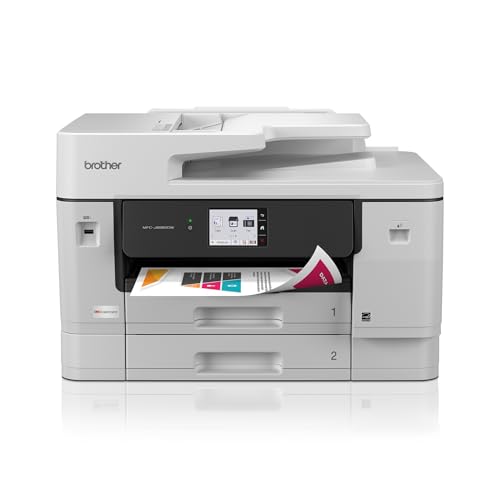
Brother’s INKvestment 6960 states its tabloid brief in quotation marks in the title — eleven-by-seventeen capabilities — and pairs it with a 3.5-inch colour touchscreen, the only explicit screen measurement among the six listings. That screen matters more than it sounds. On a shared machine, a legible colour touchscreen is the difference between walk-up copying that anyone can do and a printer that generates a help-desk conversation every time a guest needs a scan. Brother has built its office reputation on exactly that kind of unglamorous usability, and the 6960 wears the MFC badge of its multifunction line.
The INKvestment name describes Brother’s cartridge strategy: higher-capacity cartridges intended to stretch the interval between replacements, sold here with a Refresh subscription trial included. Treat the trial the way you would treat any subscription attached to hardware — as a decision with a date on it. The trial period is genuinely useful as a measuring window: print normally, watch the counters, and let your own page counts argue for or against continuing. Households and offices with steady, moderate volume are the audience INKvestment economics were designed around.
Wireless colour inkjet printing, scanning and copying complete the stated picture; the model number MFC-J6960DW appears at the end of the title for exact matching when you compare listings. What the title leaves out is any speed figure and any feeder specification, so the specification list below marks speed as not stated rather than borrowing a number from a neighbouring Brother model. Buyers for whom a tabloid feeder is essential should compare this silence with the HP 9730’s explicit feeder claim and decide whether walk-up touchscreen work or feeder width ranks higher in their week.
- Paper capability: 11 x 17 capabilities, as its title states
- Display: 3.5-inch colour touchscreen stated
- Functions: Wireless colour inkjet all-in-one, per the title
- Print speed: Not stated in the listing title — verify with the manufacturer documentation
- Ink note: Refresh subscription trial included, per the title
Strengths
- Measured colour touchscreen simplifies walk-up copying and scanning.
- Tabloid capability arrives inside a mainstream office all-in-one.
- INKvestment cartridges aim at longer intervals between replacements.
Trade-offs
- No feeder specification is published in the title.
- The subscription trial needs an active decision before it renews into routine.
- Speed figures require a trip to Brother’s documentation.
Best for: a shared office valuing walk-up touchscreen copying at tabloid size. Not suited for: a feeder-driven archive project scanning stacks of wide originals.
Shared offices picturing that touchscreen in daily use can check price on Amazon for the MFC-J6960DW and note the Refresh trial length stated on the listing.
The touchscreen deserves one more paragraph, because its value compounds in households as much as in offices. A grandparent copying a tabloid crossword, a teenager scanning artwork for a school portfolio, a partner printing a wide calendar for the kitchen wall — none of them wants a driver dialogue on a laptop as the price of admission. A clear screen on the machine itself turns the printer into an appliance the whole building can operate. That is the 6960’s quiet argument: not the widest ceiling in this guide, not the only feeder, but possibly the lowest-friction route to a tabloid page for a mixed group of users with mixed patience.
Ink planning follows the same low-friction logic. INKvestment cartridges are Brother’s answer to the complaint that office inkjets always run dry mid-job; larger reservoirs simply move the interruption further apart. Pair that with the trial’s delivery mechanism during the measuring window and you learn your household’s true monthly appetite for ink — knowledge that stays useful whichever way the subscription decision falls. The mistake to avoid is letting the trial lapse into paid routine without ever having read your own counters.

Epson EcoTank ET-15000 — Cartridge-free wide format
The EcoTank ET-15000 removes the cartridge from wide-format printing altogether. Its title leads with the supertank identity — cartridge-free print, scan, copy and fax — then adds the figures a small office actually plans around: up to seventeen pages per minute, printing up to thirteen by nineteen inches, and Ethernet alongside the wireless connection implied by its class. Epson positions it for home and small offices, and that positioning is honest: this is the wide machine for premises where ink cost per page is a line item someone watches.
Tank ownership rewrites the psychology of big paper. On a cartridge machine, every tabloid proof carries a visible cost, so people proof on screen and hope; on a tank machine, the marginal cost of one more wide sheet is small enough that printing the draft becomes the default. Designers, teachers and community organisers — people whose work improves when it is seen at full size early — feel that shift within the first month. The four-function set means the same box scans the signed form, copies the handout and faxes the one office across town still asking for faxes.
Ethernet is the detail office buyers should not skim. Wireless printing is convenient until three people, a microwave and a thick wall conspire against it; a wired connection gives a shared printer a fixed address and a calmer temperament. The ET-15000 offering both routes lets a small office cable the machine to the router once and stop troubleshooting other people’s laptops. Against those virtues, set the tank system’s standing condition: ink that sits unused for months invites cleaning cycles, so this machine belongs where wide printing happens regularly, not in a cupboard opened twice a year.
- Ink system: Cartridge-free supertank, as its title states
- Maximum print size: Up to 13 x 19 in. stated
- Print speed: Up to 17 ppm stated
- Connectivity: Ethernet stated; wireless in the product name
- Functions: Print, scan, copy and fax stated
Strengths
- Tank ink collapses the per-page cost of wide colour printing.
- Ethernet steadies a shared office connection.
- Four functions plus a thirteen-by-nineteen ceiling cover small-office paper life.
Trade-offs
- Seventeen pages per minute trails the WF-7310’s stated speed.
- Tank ink dislikes long idle stretches between print jobs.
- Refilling asks for care and a clear desk, unlike a cartridge swap.
Best for: a home studio or small office printing wide colour pages every week. Not suited for: a seasonal workspace printing twice a year.
Amazon’s ET-15000 page lists bottle yields alongside the price, letting weekly wide-format printers sanity-check the tank arithmetic in a single sitting.
A year with a tank machine teaches a different maintenance rhythm than cartridge ownership. Instead of sudden empty-cartridge emergencies, there are slow level windows to glance at while a job prints, and a refill that takes minutes at a moment of your choosing. Owners who build that glance into the weekly tidy-up never meet an empty tank mid-deadline. The discipline is lighter, but it is still a discipline — the ET-15000 rewards households and offices that treat the printer as infrastructure to be checked, not as a vending machine to be kicked when it runs dry.
Paper planning matters at this width too. Thirteen-by-nineteen stock is a deliberate purchase, ordered in packs rather than grabbed from a supermarket shelf, and a wide-format office learns to keep one pack of tabloid and one of super-B in the cupboard the way it keeps toner for the laser. Running out of the big sheet on deadline day is the wide-format equivalent of the cartridge emergency, and just as avoidable with a glance at the shelf during the weekly tidy.

Canon PIXMA TS9521Ca — Compact home entry
Canon’s PIXMA TS9521Ca arrives with the shortest title in this guide: a wireless home all-in-one inkjet printer, full stop. No paper size, no speed, no feeder, no screen measurement. That brevity cuts both ways, and this review will not pretend otherwise. On one side, the PIXMA name carries Canon’s home photo-and-document heritage, and a home all-in-one from that line is a sane thing to put on a family desk. On the other side, a guide about eleven-by-seventeen printing must be plain: the listing title itself states no maximum paper size, so the specification list below records that honestly, and any buyer with a firm tabloid need should verify the paper handling in Canon’s documentation before ordering.
Why does it hold a place in the set at all? Because its listing sits in the verified pool for this category, and because many shoppers arrive at wide-format guides with a mixed brief: mostly home documents, school projects and photographs, with occasional larger work. For that reader, a mainstream Canon home all-in-one is a legitimate candidate — provided the size question is settled from the manufacturer’s own specification rather than from a headline. Consider this review the guide’s standing reminder that a category label is a starting point for verification, not a substitute for it.
Wireless home service is the one capability the title does state, and it is worth picturing accurately. A wireless PIXMA on a home network takes print jobs from the family laptops and phones without a USB cable dictating where the printer lives, which in practice means it can sit near the paper cupboard instead of beside one person’s desk. All-in-one status confirms scanning and copying join printing. Everything beyond that — speeds, capacities, paper ceilings — belongs to the documentation check this review keeps pointing at, deliberately.
- Functions: All-in-one — print with scan and copy, per the product class in the title
- Connectivity: Wireless stated
- Positioning: Home use stated in the title
- Maximum paper size: Not stated in the listing title — verify with the manufacturer documentation
- Print speed: Not stated in the listing title — verify with the manufacturer documentation
Strengths
- Canon PIXMA lineage in home photo and document printing.
- Wireless connection frees the machine from a single desk.
- All-in-one coverage handles everyday home scanning and copying.
Trade-offs
- The title confirms no paper size, so tabloid printing needs documentary verification.
- No speed or capacity figures are published in the listing.
- Buyers with a firm wide-format workload get clearer paperwork from rivals in this guide.
Best for: a family desk covering everyday home printing, scanning and copying. Not suited for: a confirmed tabloid production workload.
Households weighing the Canon need two tabs: Amazon for the TS9521Ca’s price, Canon’s specification page for the paper-size answer its title withholds.
There is a broader shopping lesson inside this short title, and it generalises to every printer in this guide. Marketplace titles are marketing documents, trimmed for search results; the specification sheet is the engineering document. Where the two disagree in emphasis, believe the sheet. Developing the reflex of checking the manufacturer’s own paper-handling table before purchase protects a buyer from ever being surprised by a rear feed that takes one sheet at a time, a scanner bed smaller than the print width, or a duplex unit with a narrower ceiling than the main path. The TS9521Ca simply makes that reflex unavoidable, because its title offers nothing to lean on.
Home buyers should also weigh the unglamorous question of where a wide-capable machine lives in a house. Even a home all-in-one serving occasional big pages needs the depth for those pages to exit, and a hallway console table may serve better than a child’s bedroom desk. Canon’s home positioning suggests the maker expects exactly that domestic negotiation, and families that plan the furniture first tend to keep the printer for years rather than returning it in the first fortnight.
HP Color LaserJet CP5225n — Colour laser, print only
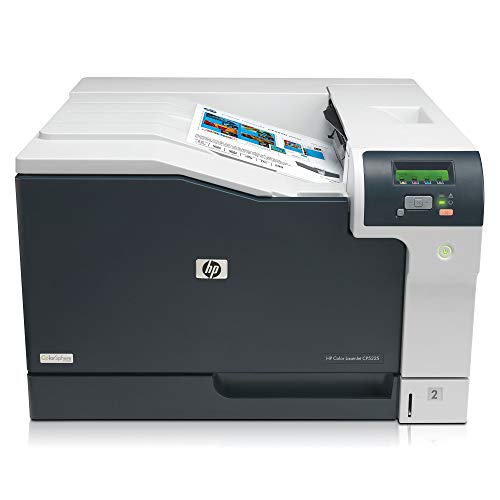
The CP5225n is the deliberate outsider in this set: a colour laser in a guide of inkjets, and a printer only where every rival scans and copies. Its title is a string of office declarations — Color LaserJet Professional, colour documents, single function, ideal for office use — and it states no paper size, which the specification list below records plainly. The machine belongs in this guide because the verified pool for the category includes it and because a real class of buyer wants exactly this: laser output for office documents, with scanning already handled by a machine down the hall.
Laser virtues are consistency virtues. Toner does not dry out during a quiet month, pages emerge dry and smudge-resistant, and text at small sizes carries the crispness that made lasers the default office technology for decades. An office printing colour documents — reports with charts, proposals with covers, internal posters — gets predictable output from the first page of the day to the last, without the warm-up rituals of ink. The Professional line badge and the network-ready implication of the model name suit a shared workgroup corner rather than a personal desk.
The single-function brief is the honest limitation, and it should be read as a filter rather than a flaw. The day someone needs to copy a signed page or scan a receipt, this machine steps aside and another device does the work. Offices with an existing multifunction machine elsewhere in the building lose nothing; a solo operator buying the CP5225n as their only printer gains a gap in their workflow. Likewise, the unstated paper size means the tabloid question must be answered from HP’s documentation — the guide will not stretch a title to cover a claim it never made.
- Print technology: Colour laser, as its title states
- Functions: Print only — single function stated
- Positioning: Office documents, per the title
- Maximum paper size: Not stated in the listing title — verify with the manufacturer documentation
- Scanning and copying: Absent by design — single-function machine
Strengths
- Toner tolerates idle weeks that would trouble an inkjet.
- Laser text and charts suit professional office documents.
- A print-only brief means fewer mechanisms to maintain.
Trade-offs
- No scanning or copying at any size.
- The title states no paper size, so tabloid capability needs documentary confirmation.
- Colour laser running gear outweighs any inkjet in this set.
Best for: an office corner dedicated to colour document printing. Not suited for: a solo desk needing scanning and copying in the same box.
With scanning already covered, an office can price the CP5225n on Amazon — keeping HP’s specification page open alongside, since the paper ceiling must be confirmed before committing.
Longevity is the laser’s closing argument. The CP5225 designation has served office corners for years precisely because the formula — one function, done at volume, with toner — ages slowly. A workgroup that prints colour documents daily and already owns scanning elsewhere can run a machine like this until the furniture changes around it. That steadiness is worth naming in a category where buyers often chase the newest ink system; sometimes the correct wide-format decision is the boring laser that simply never becomes the office’s problem.
There is also a division-of-labour point. Splitting print and scan across two machines sounds like a compromise until an office lives it: the laser keeps printing while someone scans at the other device, and neither queue blocks the other. Workgroups that discovered this by accident rarely return to a single shared all-in-one for both jobs. The CP5225n fits that pattern deliberately — a specialist in a building that already owns a generalist.
Comparison Table
| Pick | Technology | Widest print claim in title | Standout trait |
|---|---|---|---|
| HP OfficeJet Pro 9730 | Colour inkjet | 11×17 feeder stated | Duplex print and scan with fax |
| Epson WorkForce Pro WF-7310 | Colour inkjet | Up to 13 x 19 in. | 500-sheet capacity, up to 25 ppm |
| Brother INKvestment 6960 | Colour inkjet | 11 x 17 capabilities | 3.5-inch colour touchscreen |
| Epson EcoTank ET-15000 | Supertank inkjet | Up to 13 x 19 in. | Cartridge-free ink with Ethernet |
| Canon PIXMA TS9521Ca | Colour inkjet | Title gives no size figure | Wireless home all-in-one |
| HP Color LaserJet CP5225n | Colour laser | Title gives no size figure | Print-only office machine |
How to Choose a Printer That Prints 11×17
Start by writing down which direction the big paper travels. If tabloid sheets mostly leave the printer — posters, proofs, handouts — any pick here with a stated wide print ceiling qualifies, and the choice turns on ink economics. If tabloid originals also arrive — drawings to digitise, ledger pages to copy — the feeder and scanner questions take over, and the HP 9730’s stated eleven-by-seventeen feeder becomes the reference point every other candidate must answer.
Next, estimate wide pages per month, honestly, including the proofs and drafts you currently send out or skip. Under a dozen wide pages monthly, cartridge machines carry no meaningful penalty and their simpler ownership wins. In the dozens-to-hundreds range, the ET-15000’s tank arithmetic starts to dominate the conversation. Somewhere in that same range, an office printing mostly text-and-chart documents should pause over the laser, whose toner ignores idle weeks entirely.
Finally, interrogate the paper path, not the headline. A wide ceiling reached through a one-sheet rear feed serves an artist printing single proofs; it serves a teacher printing thirty tabloid worksheets very badly. Tray-fed width, feeder width and duplex width can each differ inside one machine, and the manufacturer’s paper-handling table — not the marketplace title — is where those three numbers live. Twenty minutes with that table is the cheapest insurance in this entire purchase.
Consider also the humble question of finishing. A tabloid page invites work that a letter page never meets: folding into a booklet, trimming to a smaller finished size, mounting on board for display, or binding along the long edge into a report that opens flat and impressive. Each of those fates favours a different machine virtue. Booklet folding wants accurate duplex registration; trimming wants the borderless headroom of a thirteen-by-nineteen ceiling; mounting wants heavy-stock tolerance through the paper path. None of those virtues appears in a marketplace headline, yet one of them is probably the real reason a wide printer is on your shopping list, so name it before the shortlist hardens.
Cost per wide page deserves its own honest paragraph, because it is where wide-format enthusiasm goes to die quietly. Add the sheet itself, the ink or toner laid on it, and a realistic allowance for spoiled pages while you learn the paper path — every new wide printer eats a few sheets to misalignment and wrong-side loading in its first month. Even with that allowance, in-house tabloid printing undercuts print-shop pricing at surprisingly low volumes, and the convenience of a ten-minute turnaround for a revised poster has a value no per-page table captures. The point of the arithmetic is not to talk anyone out of the purchase; it is to make sure the ink system chosen can sustain the enthusiasm that justified the machine.
Does a Printer That Prints 11×17 Also Scan 11×17?
Often not, and the gap is the most common disappointment in this category. Printing wide requires a carriage and paper path of a certain width; scanning wide requires a glass bed and sensor bar of the same width, which costs more and swells the machine’s footprint. Makers therefore ship all-in-ones that print tabloid and scan letter or legal size, and the listing titles in this guide reflect that unevenness: feeder width is stated for the HP 9730, while scanner dimensions are simply absent from the Epson titles.
The practical test is to name your largest original, not your largest print. Photographers printing their own work rarely scan anything bigger than a letter sheet, so a narrow bed costs them nothing. Drafting offices, schools archiving student artwork and anyone digitising ledger books live on the other side of that line. If your originals are wide, the scanner bed measurement belongs on your shortlist criteria in ink, checked against manufacturer documentation for any model whose title stays silent.
Which Paper Should You Stock for Tabloid Printing?
Ordinary tabloid office stock handles spreadsheets, meeting handouts and internal posters without complaint, and buying it in reams keeps the cost of a wide page close to the cost of a letter page. Step up to a heavier matte presentation paper when the page will be pinned up, handed to a client or read across a table; the stiffness reads as seriousness before anyone parses a word. Photo papers belong to the photo picks in this guide’s sibling roundups, but the inkjets here will still produce a respectable glossy print for a shop window or a family celebration.
Store wide paper flat, in its wrapper, away from damp. A tabloid sheet that has curled in a humid cupboard feeds crookedly, and crooked feeding is the parent of most wide-format jams. Fan a stack before loading it, respect the tray’s stated weight limits from the manual, and keep one unopened pack in reserve so a deadline never depends on a delivery van. These are dull habits; wide-format ownership is mostly dull habits, punctuated by the pleasure of a big, clean page.
How Much Desk Does a Wide-Format Printer Really Need?
More than its footprint suggests. The body measurement excludes the tabloid sheet standing in the feeder, the printed page resting in the output area, the scanner lid at full opening and the rear clearance some paper paths demand. A realistic allowance adds a hand’s width on every side and a full sheet’s depth in front. Kitchens and classrooms, where tabloid machines often land in schools and small businesses, should also reckon with the traffic pattern: a printer whose output tray empties into a walkway will have its pages knocked to the floor weekly.
Weight follows size. Wide machines are two-handed lifts, and the laser in this set is heavier still. Put the machine on furniture rated for it, at a height where loading the tray and lifting the lid do not become a stretch-and-strain exercise, and route the power cable where feet cannot find it. Ten minutes of furniture honesty at setup prevents the slow drift of the printer toward the desk edge that ends, eventually, in a very expensive noise.
Software habits decide how painless the wide life feels day to day. Save a tabloid preset in your print dialogue — paper size, orientation, quality, duplex where the path allows it — and name it plainly, so the wide page becomes one click rather than a monthly archaeological dig through settings. Keep master documents at true tabloid dimensions in their own folder, separate from letter versions, because a file silently resized by a helpful application is a file that prints with mysterious margins. And when a wide job matters, print one proof sheet before the run; the proof is the cheapest page in the whole job, and it has saved more meetings than any specification in this guide.
Network behaviour rounds out the ownership picture. A wide all-in-one shared by a household or a small team should hold a stable place on the network, whether that arrives through the ET-15000’s Ethernet socket or a sensibly placed wireless connection near the router. Printers exiled to the far end of a building, behind two walls and a filing cabinet, generate the dropped jobs and duplicate prints that owners misattribute to the brand. Put the machine where the network is strong and the paper fits; those two placements, decided once, quietly govern satisfaction for the life of the device.
Common Mistakes When Buying an 11×17 Printer
Assuming the scanner matches the printer is the error this guide has circled repeatedly, because it is the one buyers discover after the return window feels distant. Read the bed measurement before purchase, in the manufacturer’s own table, and let that number — not the category label — settle whether the machine digitises your wide originals or merely prints wide copies of narrow scans.
Underestimating ink appetite runs a close second. A tabloid colour page can carry several times the ink of a letter text page, and a cartridge budget built on letter-page habits collapses within the first poster run. Estimate your wide pages, price the ink for that volume across a year, and let the tank-versus-cartridge decision be made by arithmetic rather than by the purchase price that happened to be on screen.
Forgetting the paper supply finishes the set of recurring errors. Tabloid stock is not sold on every corner; the first month with a wide printer should include ordering the paper, a storage spot for it, and a test of every stock you plan to use through every path you plan to use it in. Rehearsing those three things in week one, a household rarely meets a wide-format surprise in month six.
One more scenario deserves air, because it decides real purchases: the community and classroom press. Schools, churches, sports clubs and market committees all live on tabloid paper — the newsletter that folds into a booklet, the fixture list that must be readable from a corridor wall, the raffle poster with type big enough to stop a passer-by. These buyers print in bursts, often on a volunteer’s schedule, and their machines sit idle between events. That rhythm argues against ink systems that sulk when ignored and in favour of whichever pick tolerates the calendar; it also argues for the simplest walk-up operation in the set, because the person printing the poster is rarely the person who bought the printer. If that description sounds like your committee, weigh the Brother’s touchscreen and the laser’s indifference to idle weeks above raw print width.
Environmental questions follow wide printing home, too. A tabloid proof printed in-house replaces a car journey to a print shop; a spoiled wide sheet wastes twice the paper of a letter page. Duplex printing, where the path supports the size, halves the sheet count of wide reports, and draft-quality settings exist precisely for internal proofs that will be recycled by Friday. None of this requires virtue signalling — it is the ordinary arithmetic of paper, ink and journeys that a thoughtful office runs anyway, and wide machines simply make the numbers bigger in both directions.
Final Recommendation
Match the machine to the direction your wide paper travels. Offices scanning tabloid originals belong with the HP OfficeJet Pro 9730 and its full-width feeder. Businesses printing posters and proofs at speed should take the Epson WF-7310’s wider ceiling and deep paper capacity. Steady wide colour volume points to the EcoTank ET-15000, walk-up simplicity to the Brother 6960, a general home desk to the Canon — with its paper paperwork checked first — and a colour-document office corner to the CP5225n laser. Choose by paper path and ink arithmetic, and an eleven-by-seventeen page becomes an ordinary part of the working week rather than a special errand.
Finally, keep the first wide print you are proud of. Pin it near the machine with the date and the paper stock written on the back. Months later it becomes your reference print: the page that tells you whether output has drifted, whether a new paper pack behaves like the last one, and whether the colours you remember were ever really on the page. Printers are judged by memory more harshly than by measurement, and a dated reference sheet is the one witness that never exaggerates. It costs a single sheet of tabloid stock and settles arguments that would otherwise run on impressions.
Frequently Asked Questions
Is 11×17 the same as tabloid?
Yes. Tabloid is the traditional name for the eleven-by-seventeen-inch sheet in North American paper sizing, and ledger refers to the same dimensions in landscape accounting use. Printers in this guide that mention tabloid, ledger or the raw dimensions are describing one sheet size.
What is the difference between 11×17 and 13×19 printing?
Thirteen by nineteen, often called super-B, adds a margin around tabloid on every side. That margin allows full-bleed tabloid output with trim room, which is why the two Epson picks quoting a thirteen-by-nineteen ceiling matter to poster and proof work even in a guide named for the smaller sheet.
Can a wide-format printer handle ordinary letter paper too?
Yes — wide machines print the full range of smaller sizes through their normal trays, and most owners print far more letter pages than tabloid ones. The wide ceiling is a capability in reserve, not a restriction on everyday work.
Do I need special software to print on 11×17 paper?
No special purchase is required. The size must be selected in the print dialogue and the document itself should be laid out at tabloid dimensions; enlarging a letter document at print time works, but designing at the true size gives control over margins and type size.
Why do two picks in this guide not state a paper size in their titles?
Because marketplace titles are shortened marketing text, and Canon’s TS9521Ca and HP’s CP5225n listings simply omit the measurement. Their reviews flag the omission openly and direct the paper-size question to the manufacturers’ specification pages, which is where that number should always be confirmed.
Related Guides
Wide office paper leads naturally to neighbouring questions. Readers weighing ink chemistry for long-lived prints should continue to our guide to pigment ink printers for archival output. Photographers printing big should compare the machines in photo printers sized for 11×17 work. Busy offices outgrowing a single desk machine can step up to workgroup printers built for teams.