What's inside
- Key Takeaways
- Quick Picks
- How Did We Choose Mesh Kits for Congregations?
- Why Does a Sanctuary Defeat Ordinary Coverage Claims?
- What Should the Guest Network Policy Be?
- Which Mesh Systems Deserve a Place on the Shortlist?
- How Does a Volunteer Installation Saturday Actually Go?
- What Does Streaming a Service Ask of the Network?
- How Do the Six Church Mesh Kits Compare at a Glance?
- How Should the Church Office and the Manse Be Handled?
- How Do You Plan for the Festival Peak Rather Than the Ordinary Sunday?
- What Mistakes Do Churches Make With Building Wi-Fi?
- What Should the Council Minute Before Spending Anything?
- How Will You Know the Installation Succeeded?
- Final Recommendation
- What About Digital Giving, Card Machines and the Church Café?
- Frequently Asked Questions
- Related Guides
As an Amazon Associate I earn from qualifying purchases. This post may contain affiliate links at no extra cost to you.
widgetverdict.com is reader-supported. When you buy through links on our site, we may earn an affiliate commission.
Where to buy: Every system in this guide is a consumer mesh kit sold through Amazon’s ordinary networking storefronts — the same boxes a family would buy for a house, chosen here because a church hall asks a house-sized question with a congregation-sized number of phones attached.
Let us be honest at the outset about what the best wireless routers for churches actually are. Churches searching this phrase are imagining the Wi-Fi at a conference centre — ceiling-mounted access points, a controller, a cabling contract — and Amazon’s shelves answer with something different: consumer mesh systems, built for homes, that a volunteer can install on a Saturday with a ladder and a smartphone. This guide works with that reality rather than against it. For the great majority of congregations — a sanctuary, a hall, a few classrooms and an office, in a building empty most of the week and full for a few intense hours — a well-chosen mesh kit is not a compromise. It is the proportionate tool, and the enterprise alternative would consume the entire technology budget on installation before a single device connected.
What a church asks of that tool differs from a home in three ways. First, density: a Sunday service concentrates a hundred or more phones into one room for ninety minutes, a load shape no household produces. Second, separation: the congregation’s devices belong on a guest network, quarantined from the office computer that holds the accounts and the safeguarding records. Third, architecture: sanctuaries are tall, hard-surfaced and often stone, while halls are long and kitchens are radio-hostile, so coverage claims earned in open-plan houses translate loosely at best. Every coverage and device figure in this guide is a manufacturer claim from the product’s listing title, and the pick sections translate those claims into church terms — rooms, services and volunteer-hours — rather than repeating them as promises.
The six systems below divide into three pairs. Two DBIT kits at Wi-Fi 6 speeds offer the modern budget route, in AX1800 and AX1500 forms. Tenda’s Nova line offers an AX3000 flagship-for-the-money and an older AC1200 kit whose price reflects its generation. A second DBIT kit at AC1200 covers the largest stated area of the budget tier, and NETGEAR’s Orbi RBK13 closes the list as the recognised-name Wi-Fi 5 option — labelled plainly as older technology, because a church buying for a decade should know exactly which generation it is adopting.
Key Takeaways
- These are consumer mesh systems deployed for churches, not enterprise access points — proportionate for most congregations, installable by volunteers.
- Device capacity is the church-specific figure: stated ceilings here run from 80 to 150 devices, and a full sanctuary tests them in a way a house never does.
- The Tenda Nova MX12 claims the largest stated footprint, up to 7,000 square feet, with Wi-Fi 6 AX3000 speed.
- DBIT is a budget brand and is treated as one — good value, expectations set accordingly.
- The NETGEAR Orbi RBK13 is Wi-Fi 5, an older generation; it is included for its three-unit spread and name, and labelled as legacy throughout.
- A separate guest network for the congregation is non-negotiable, and every pick here can run one.
Quick Picks
| Pick | Badge | Why it earns its place |
|---|---|---|
| DBIT AX1800 Mesh System | Budget Wi-Fi 6 three-pack | A stated 6,500 square feet and 150 devices across three units, with six gigabit ports in total for the office corner. |
| DBIT AX1500 Mesh System | Small-church two-pack | Two units claiming 3,900 square feet and 120 devices, with four gigabit ports per unit and parental controls for youth rooms. |
| Tenda Nova MX12 AX3000 Mesh System (3-Pack) | Largest stated footprint | Up to 7,000 square feet and AX3000 speed from three units, with EasyMesh, VPN and parental controls in the title. |
| Tenda Nova MW5G | Gentle-price Wi-Fi 5 kit | Three units covering a stated 3,500 square feet for up to 80 devices — sized for a small congregation and a hall. |
| DBIT AC1200 Mesh System | Wide-spread budget option | A stated 6,000 square feet and 90 devices from three AC1200 units, each carrying four gigabit ports. |
| NETGEAR Orbi RBK13 | Recognised name, older Wi-Fi | One router and two satellites covering a stated 4,500 square feet — a Wi-Fi 5 system, bought for spread and familiarity. |
How Did We Choose Mesh Kits for Congregations?
We began by accepting the market as it is: the products actually sold for this job are home mesh systems, so the selection criteria were translated into church terms rather than borrowed from enterprise datasheets. Stated device capacity came first, because a congregation’s peak is a device-count event. Stated coverage came second, discounted mentally for stone, height and the long rectangle of a typical hall. Pack composition came third — three units map naturally onto sanctuary, hall and office, while two-unit kits suit the single-building chapel. Finally, each kit’s extras were read for church value: parental controls become youth-room controls, guest networking becomes the congregation network, and a generous port count becomes the office’s printer, computer and streaming encoder wired in one place.
What we excluded matters too. Single routers, however powerful, cannot bend signal around a stone chancel arch into the hall beyond, and range extenders were set aside because they create the separate network names and half-speed hops that confuse a congregation and its volunteers. Renewed and previous-generation clearance kits were avoided except where the generation is the disclosed point of the pick, as with the Orbi. The result is six kits a church council can compare without an IT department. Congregations whose buildings include a paid-staff office with card machines should also read Best Routers for POS Systems, and those planning to stream services with networked audio may find the voice-network thinking in Best Wireless Routers for VoIP Phones relevant once the coverage question is settled.
Why Does a Sanctuary Defeat Ordinary Coverage Claims?
Manufacturers measure coverage in the currency of open-plan homes: stud walls, eight-foot ceilings, rooms in a row. A sanctuary spends that currency at a ruinous rate. Ceilings may be three times domestic height, which sounds like freedom for radio until you remember that the congregation sits at the bottom of that volume while a node on a wall bracket serves them at a steep angle through hymn books, bodies and a century of dense masonry at the room’s edges. Bodies themselves are mostly water and absorb signal politely but thoroughly; a room tested empty on a Tuesday behaves measurably worse when two hundred people fill it on Sunday. None of this makes mesh the wrong answer — it makes placement the senior partner in the project, ahead of which kit is bought.
The practical translation is to plan nodes by room, not by square footage. The sanctuary gets its own node, high and central, because no signal from the hall will arrive there in useful shape. The hall gets its own node for coffee-hour load and weekday groups. The office and classrooms share a third where the building allows, and the corridor between zones is where a kit’s real-world roaming behaviour is discovered. Judge any of the six systems below by whether its pack count matches your room count; the stated square footage is the manufacturer’s optimism, but the rooms are your fact.
There is a second architectural quirk worth naming: church buildings are rarely one building. They are accretions — the original sanctuary, the hall added in the sixties, the classrooms added in the nineties, each with its own wall construction and its own opinion about radio waves. A signal that crosses the sanctuary’s brick may die entirely at the foil-backed insulation of the newest extension, and the corridor linking two wings often behaves like a waveguide that carries signal surprisingly far in one direction and none in the other. This is why the room-by-room method outperforms every coverage calculator: walk the actual building, with its actual history, and let its walls cast their votes. The kits in this guide are all capable of serving such a building; the survey is what tells you which of them, and how many nodes, your particular accretion requires.
What Should the Guest Network Policy Be?
Decide the policy before the first service, in writing, with the people who hold responsibility for the building’s data. The congregation network should be a true guest network: internet-only, unable to see the office machines, the streaming computer or the network storage where records live. The password question divides churches. A widely shared password printed in the noticesheet is hospitable and simple, and it will wander — which is acceptable precisely because the guest network touches nothing precious. The office network, by contrast, gets a strong unique password, is never printed anywhere, and is shared with named individuals only. Rotating the guest password occasionally and the office password whenever a staff member leaves are the two habits that keep this tidy arrangement true over years.
Bandwidth fairness is the other policy worth setting while everyone is calm. A guest network can be given a sensible share of the connection so that a hall full of phones updating themselves cannot strangle the streamed service or the office’s card machine. Content controls, offered in some form by the parental-control features named in several titles here, are a council decision to make deliberately — many churches apply them to the youth-room and public networks as a safeguarding posture, and the kits below that name parental controls make that posture easy to keep. Write the decisions down, pin them inside the cupboard with the router, and the next volunteer inherits a system instead of a mystery.
Which Mesh Systems Deserve a Place on the Shortlist?
Six kits, three brands, two Wi-Fi generations. Each is assessed for the congregation it fits — by rooms, by Sunday device load and by the volunteers who will actually look after it.
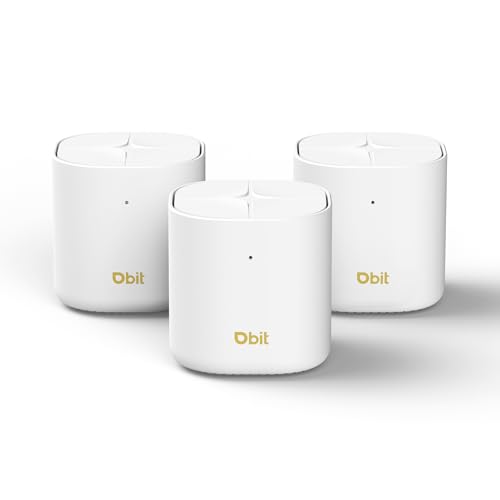
DBIT AX1800 Mesh System — Budget Wi-Fi 6 three-pack
DBIT is a budget brand, and this guide treats its claims with the respect and the discount that status deserves — but the AX1800 three-pack’s title states a combination that maps unusually well onto a mid-size church: Wi-Fi 6 coverage of up to 6,500 square feet, a ceiling of 150 devices, and six gigabit Ethernet ports in total across the three units. Read in church terms, that is a node for the sanctuary, a node for the hall, a node for the office, enough stated device headroom for a full Sunday with phones in every pew, and enough wired sockets at the office node for the computer, the printer and the streaming box without a switch. The D-MAX5 model name in the title identifies this configuration among DBIT’s several similar kits.
The counsel of realism applies twice over. First, the stated coverage assumes domestic construction; in stone and height, plan on the three nodes covering three zones well rather than a number of square feet. Second, a budget brand’s software polish and long-term update cadence will not mirror the market leaders’, so the church that buys this kit should nominate its owner — one named volunteer who keeps the firmware current and the passwords recorded. Within those expectations, the value is difficult to argue with: this is the least elaborate route in the guide to modern Wi-Fi 6 across a whole church plant. The DBIT AX1800’s Amazon listing confirms the D-MAX5 three-pack contents before the council approves the order.
- Wi-Fi: Wi-Fi 6 AX1800, dual-band
- Stated coverage: up to 6,500 sq ft across the 3-pack (manufacturer claim)
- Stated device capacity: 150 devices
- Wired ports: 6 gigabit Ethernet ports in total
- Model name: D-MAX5, 3-pack
- Role: replaces router and extender, per the title
Strengths
- Highest stated device ceiling among the budget kits here.
- Three nodes match the sanctuary-hall-office layout of most churches.
- Six wired ports in total cover the office corner without extra hardware.
Trade-offs
- Budget-brand software and update cadence require a nominated owner.
- Stated coverage will shrink substantially in stone construction.
- AX1800 class is the entry tier of Wi-Fi 6, not its swift end.
Best for: a mid-size congregation wanting Wi-Fi 6 in every zone on a restrained budget. Not suited for: a stone-built parish church with a 300-seat sanctuary, where Sunday density and masonry together outrun a budget three-pack.

DBIT AX1500 Mesh System — Small-church two-pack
Not every church is a campus. The single-building congregation — one worship room that doubles as the hall, a small office, a kitchen — needs a smaller answer, and DBIT’s AX1500 two-pack is shaped for it: a stated 3,900 square feet and 120 devices, seamless roaming named in the title, parental controls, and an unusually generous four gigabit ports per unit. The port count is the detail a small church should linger on. With the main unit in the office, four wired sockets absorb the computer, printer, card machine and a spare without a switch, while the satellite covers the worship space; the second unit’s ports can wire a streaming encoder or a hall television exactly where coax-era buildings never expected network drops.
Parental controls translate directly into youth-work safeguarding: the children’s and youth rooms can run under the filtered, schedulable profile while the office network stays adult and unrestricted. Seamless roaming, the feature the title names, is what lets the minister walk from office to vestry to sanctuary on a call without the connection dropping at a doorway — a small mercy that staff feel daily. The AX1500 class is a step below its AX1800 sibling, and a growing congregation should notice the two-unit ceiling: this kit is the right size for the church it describes, and the wrong size for the church that hopes to be. Find the DBIT AX1500 two-pack on Amazon and confirm the per-unit port count in the listing before ordering for an office-heavy layout.
- Wi-Fi: Wi-Fi 6 AX1500, dual-band
- Stated coverage: 3,900 sq ft across the 2-pack (manufacturer claim)
- Stated device capacity: 120 devices
- Wired ports: 4 gigabit ports per unit — the richest per-unit count here
- Features named in title: seamless roaming, parental controls
- Pack: 2 units
Strengths
- Four ports per unit wire an office without a separate switch.
- Parental controls double as youth-room safeguarding tools.
- Two units suit single-building churches without surplus hardware.
Trade-offs
- Two nodes cannot zone a sanctuary, hall and office separately.
- AX1500 is the gentlest Wi-Fi 6 class in this guide.
- A growing congregation will outgrow the pack, not just the building.
Best for: a small single-building church whose office and worship space share one modest footprint. Not suited for: a church with a separate hall across a yard, where the second node cannot hold a reliable link through two exterior walls.

Tenda Nova MX12 AX3000 Mesh System (3-Pack) — Largest stated footprint
The Nova MX12 is the specification leader of this guide: an AX3000 Wi-Fi 6 three-pack whose title claims up to 7,000 square feet and a 2,976 Mbps class, with EasyMesh compatibility, gigabit ports, VPN support and parental controls, in its V4.0 revision. For a larger church — a big sanctuary, a hall wing, classrooms along a corridor — that stated headroom is the argument: not that the building will receive all 7,000 of those square feet through its actual walls, but that a kit rated generously for domestic space arrives at a demanding building with margin to spare. AX3000 per node also gives the streaming setup and the office a faster local backbone than the budget kits manage.
EasyMesh deserves a sentence of its own, because it is a standard rather than a brand feature: in principle, EasyMesh-certified equipment from different makers can cooperate in one network, which softens the lock-in that proprietary mesh ecosystems impose. In practice, mixed-vendor mesh still rewards caution, but for a church that may add a node in five years when this exact kit is discontinued, the standard is a genuine comfort. Tenda sits a rung above the budget brands in recognition while remaining value-priced, and the V4.0 revision marker in the title is worth matching at purchase so an earlier hardware revision does not arrive in its place. The Nova MX12’s Amazon listing shows the three-pack’s stated figures — read them as the ceiling they are, and plan your rooms beneath it.
A word about the VPN feature, which church buyers occasionally overlook in a title otherwise full of coverage numbers. A small church’s office increasingly lives partly elsewhere — the treasurer reconciling from home, the administrator preparing noticesheets from a kitchen table — and a router that can admit those workers through an encrypted tunnel lets them reach the office machine without exposing it to the open internet. That is grown-up capability in a consumer-priced kit, and for the multi-staff church it may be the MX12’s most consequential feature, outranking even its generous stated footprint. Councils comparing this kit against the DBIT AX1800 should ask which they will use more: the AX1800’s higher stated device ceiling, or the MX12’s speed class and remote-access story. Both are defensible answers; they belong to different churches.
- Wi-Fi: Wi-Fi 6 AX3000, dual-band
- Stated coverage: up to 7,000 sq ft across the 3-pack (manufacturer claim)
- Stated speed class: up to 2,976 Mbps
- Standards: EasyMesh, per the title
- Features named in title: gigabit ports, VPN, parental controls
- Revision: V4.0, 3-pack
Strengths
- Largest stated footprint and fastest class in this guide.
- EasyMesh standard softens future expansion lock-in.
- Parental controls and VPN cover youth rooms and remote office access.
Trade-offs
- Stated figures are the most optimistic here; stone will tax them hardest.
- Three nodes still zone only three areas of a sprawling plant.
- Value-brand support channels are thinner than NETGEAR’s.
Best for: larger churches with several distinct zones wanting the most stated headroom available in a consumer kit. Not suited for: a tiny chapel of one room and thirty seats, where this system’s capacity would never be approached.

Tenda Nova MW5G — Gentle-price Wi-Fi 5 kit
The Nova MW5G is the elder of the Tenda pair: an AC1200 Wi-Fi 5 mesh system in a three-pack, claiming up to 3,500 square feet and 80 devices, with gigabit ports noted in the title. Its argument is proportionality. A small congregation — sixty people on a good Sunday, a hall used by uniformed organisations on weeknights, an office that is really a desk in the corner — does not generate the device density that justifies Wi-Fi 6 money, and this kit’s three nodes still deliver the essential mesh benefit: one network name across the building, with units in the worship room, the hall and the office corner handing devices between them as people move.
The ceilings must be read as ceilings. Eighty devices sounds ample until a carol service fills the building with a hundred and fifty phones; the network will not collapse theatrically, but latecomers may find the Wi-Fi reluctant, and the streamed service should be wired, never wireless, on a kit of this class. Wi-Fi 5 also fixes the purchase in the previous generation, which matters for a church that replaces technology slowly: a kit bought as yesterday’s standard ages from behind. Set against that, the MW5G’s price tier frees budget for the things that matter more — a proper streaming camera, a hearing loop, the electrician to fit a socket where the sanctuary node needs to live. The MW5G’s Amazon listing suits the congregation that has done that arithmetic honestly.
- Wi-Fi: Wi-Fi 5 AC1200, dual-band
- Stated coverage: up to 3,500 sq ft across the 3-pack (manufacturer claim)
- Stated device capacity: 80 devices — the lowest ceiling here
- Wired: gigabit mesh router ports, per the title
- Pack: 3 units
- Role: replaces router and extender, per the title
Strengths
- Three-node mesh discipline at the gentlest price tier in the guide.
- Proportioned honestly for small congregations and weekday hall use.
- Gigabit ports keep the office corner properly wired.
Trade-offs
- 80-device stated ceiling is tested by any large festival service.
- Wi-Fi 5 generation shortens the useful adoption horizon.
- Stated coverage is the smallest of the three-packs here.
Best for: a small congregation whose Sundays number in the dozens and whose budget has higher callings. Not suited for: a church running conferences or a school hall letting, where weekday device counts dwarf the Sunday congregation’s.
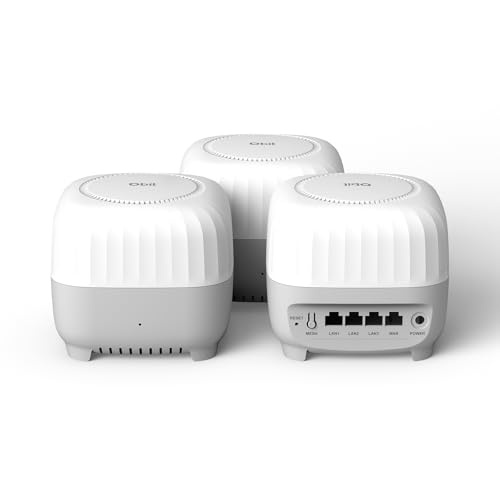
DBIT AC1200 Mesh System — Wide-spread budget option
DBIT’s second appearance in this guide is a study in what the budget tier optimises for: an AC1200 three-pack, model D-MAC3, claiming up to 6,000 square feet and 90 devices, with four gigabit ports per unit — a per-unit wired count that embarrasses kits costing far more. The stated coverage is the widest of the Wi-Fi 5 options here, and the honest reading is that DBIT is selling spread: three nodes to string along a long building, a church hall with classrooms at both ends, a manse or church house next door that needs to join the same network for the office printer’s sake. Churches are often exactly that shape — not one compact footprint but a straggle of rooms added across a century — and a kit designed around coverage-per-cost fits the straggle.
The compromises ride along visibly. AC1200 is Wi-Fi 5, with the generation’s lower per-device speeds, and 90 stated devices is a mid-table ceiling that a large Christmas congregation will lean on. The four ports per unit, though, open a genuinely useful trick for church buildings: wire what can be wired at each node — the hall’s smart television, the office’s everything, the streaming encoder in the sanctuary — and reserve the wireless capacity for the devices that truly move, the phones and tablets. Every device removed from the air is capacity returned to the congregation. Look for the DBIT AC1200 under its D-MAC3 name on Amazon, and set the same nominated-owner expectation as with its AX1800 sibling.
- Wi-Fi: Wi-Fi 5 AC1200, dual-band, 1,200 Mbps class
- Stated coverage: up to 6,000 sq ft across the 3-pack (manufacturer claim)
- Stated device capacity: 90 devices
- Wired ports: 4 gigabit ports per unit
- Model name: D-MAC3, 3-pack
- Role: replaces router and Wi-Fi extender, per the title
Strengths
- Widest stated spread of the Wi-Fi 5 kits in this guide.
- Four ports per unit invite a wire-what-you-can strategy at every node.
- Three nodes suit long, accreted church buildings and hall complexes.
Trade-offs
- Wi-Fi 5 speeds cap what each connected device can do.
- 90-device ceiling is mid-table for festival-sized gatherings.
- Budget-brand ownership caveats apply as with the AX1800 kit.
Best for: a sprawling, accreted church plant where coverage distance matters more than per-device speed. Not suited for: a media-heavy church streaming multi-camera services wirelessly, which needs Wi-Fi 6 headroom and wired cameras regardless.

NETGEAR Orbi RBK13 — Recognised name, older Wi-Fi
The Orbi RBK13 is here for the church council that wants a name it recognises, and this guide will not pretend that instinct is worthless: NETGEAR’s support infrastructure, documentation and sheer installed base are real assets for a volunteer-run building. The kit pairs one router with two satellites for a stated 4,500 square feet. Now the label that must not be softened: the RBK13 is a Wi-Fi 5 system from an earlier product generation. Its radios belong to the previous standard, its design is the oldest in this guide, and a church adopting it in the present day is knowingly buying yesterday’s technology at yesterday’s capability — which can still be the right decision, provided it is made with open eyes and a price that reflects the generation.
Where it earns its place is the uncomplicated middle: a medium church, moderate Sundays, a preference for an ecosystem whose setup flow and help articles a volunteer can find at midnight before the Easter service. The router-plus-two-satellites shape zones a sanctuary, a hall and an office exactly as the three-packs do. What it should not be asked to do is anchor a ten-year technology plan or serve a congregation whose device density is visibly climbing year on year; the Wi-Fi 6 kits above exist for that church, at comparable money. The Orbi RBK13’s Amazon listing is the purchase for the council that values familiarity over headroom — a legitimate preference, honestly labelled. Churches standardising on a single familiar brand across buildings may also glance at Best Linksys Routers for the other household name in mesh.
- Wi-Fi: Wi-Fi 5 — an older generation, stated plainly
- Stated coverage: up to 4,500 sq ft (manufacturer claim)
- Composition: 1 router plus 2 satellites
- Model: Orbi RBK13
- Device ceiling: the listing title gives no device figure — treat capacity conservatively and confirm in NETGEAR’s documentation
- Positioning: recognised-brand consumer mesh
Strengths
- NETGEAR’s documentation and support depth ease volunteer ownership.
- Router plus two satellites zones the classic three-area church layout.
- Familiar ecosystem for councils standardising across buildings.
Trade-offs
- Wi-Fi 5 generation — the oldest technology in this guide.
- No device ceiling stated in the title; plan capacity cautiously.
- Comparable money buys Wi-Fi 6 elsewhere on this page.
Best for: a medium congregation that values a recognised brand and volunteer-friendly ownership over radio headroom. Not suited for: a fast-growing church whose festival services already fill every seat, which should buy the Wi-Fi 6 generation now.
How Does a Volunteer Installation Saturday Actually Go?
Begin before anyone climbs anything: unbox the kit in the office, plug the main unit into the existing connection, and complete the firmware updates and account setup at a desk, where a failed update is an inconvenience rather than a ladder incident. Name the networks now — the office network and the congregation guest network — and set both passwords, recording them in the sealed envelope for the office safe before the first node leaves the room. Walk the building with the plan in hand and mark each node’s position with tape: sanctuary high and central, hall node clear of the kitchen’s metalwork, office node where its ports meet the desk equipment. Check that each marked position has a power socket within cable reach, because the commonest installation delay in church buildings is discovering that the perfect spot has no electricity and the nearest socket is behind a locked cupboard.
Fit the main unit first and prove the internet connection on a wired laptop before any satellite is placed. Then add one node at a time, testing as you go: stand in the far corner of that node’s room with a phone, load a video, walk slowly towards the next zone and watch whether the connection hands over gracefully or clings to the distant node until it dies. Adjust positions in metres, not centimetres — mesh placement rewards bold corrections — and resist declaring victory until the building has been walked in full, including the toilets, the vestry and the car park edge where the youth group will inevitably congregate. Finish by connecting the devices that must never fail on wireless if a wire is possible: the streaming computer, the office desktop, the printer. Label the units with their room names, photograph the installation for the building file, and leave the cupboard tidier than the last technology project left it.
What Does Streaming a Service Ask of the Network?
Many churches now stream, and streaming reorders the network’s priorities: the encoder’s upload becomes the most important traffic in the building, more important than every phone in the pews combined. The first rule follows immediately — the streaming machine connects by cable to the nearest node, never by Wi-Fi, because its stream must survive the exact moment the congregation’s devices all wake up. The second rule concerns the guest network’s share: give the congregation a fair portion of the connection, but protect the stream’s portion in the router’s settings where the kit allows, so a hall full of photo uploads cannot strangle the broadcast that homebound members depend on. Test the full arrangement with a private stream during a busy weekday group, not during a wedding.
Position also serves the stream. If the camera and encoder live at the back of the sanctuary, the sanctuary node should live near them — which happily coincides with the high, central placement the congregation’s coverage wants. Where the building’s internet entry point is the office at the opposite end, a cable run between entry and sanctuary node is worth its modest cost many times over, because it converts the most important link in the system from a wireless hope into a wired fact. Churches planning networked audio or hearing systems alongside streaming should treat those as wired citizens too; the air is for the congregation, the copper is for the production.
How Do the Six Church Mesh Kits Compare at a Glance?
| Pick | Wi-Fi | Stated coverage | Stated devices | Units | Wired note |
|---|---|---|---|---|---|
| DBIT AX1800 | 6 | 6,500 sq ft | 150 | 3 | 6 GbE ports total |
| DBIT AX1500 | 6 | 3,900 sq ft | 120 | 2 | 4 GbE per unit |
| Tenda Nova MX12 | 6 AX3000 | 7,000 sq ft | See title — speed class 2,976 Mbps | 3 | Gigabit ports |
| Tenda Nova MW5G | 5 AC1200 | 3,500 sq ft | 80 | 3 | Gigabit ports |
| DBIT AC1200 | 5 AC1200 | 6,000 sq ft | 90 | 3 | 4 GbE per unit |
| NETGEAR Orbi RBK13 | 5 | 4,500 sq ft | Not stated in title | 1 + 2 | Standard Orbi layout |
Two columns decide most church purchases: the device ceiling, because Sunday is a density event, and the unit count, because rooms are the real unit of coverage. Where a title does not state a figure, the table says so rather than borrowing one from a sibling model.
How Should the Church Office and the Manse Be Handled?
The office is the one room where the church behaves like a business, and its network should be treated accordingly. The office computer, the accounts, the membership database and the safeguarding records sit on the private network, behind the strong password, with the printer beside them. Staff working from the manse or from home extend that office logically rather than physically: the VPN support named in the Tenda MX12’s title is the consumer-scale version of that extension, and churches with several staff should weigh it when choosing. What the office should never do is borrow the congregation’s network for convenience — the day the guest password is printed in the noticesheet, anything sharing that network is effectively public, and the separation costs nothing to maintain once established.
The manse raises a gentler version of the same question. Where the minister’s home adjoins the church — a common arrangement in older parishes — a node in the manse can be a kindness, but the household’s own devices and the church’s network should remain distinguishable, both for safeguarding boundaries and for the simple reason that the next minister inherits the house, not the previous family’s smart television accounts. Many churches sensibly give the manse its own domestic connection and keep the buildings’ networks strangers. The kits in this guide serve either pattern; the decision is pastoral and practical rather than technical, and it deserves a minute of the council’s time rather than an installer’s assumption.
How Do You Plan for the Festival Peak Rather Than the Ordinary Sunday?
Every church network meets its true load a handful of times a year: Christmas, Easter, Remembrance, the school carol service, the wedding with three hundred guests. Planning for the ordinary Sunday and being surprised by December is the standard failure, and it is avoidable with two habits. The first is to choose the kit by the festival number, not the weekly one — which is why this guide keeps translating stated device ceilings into congregations, and why a church whose carol service doubles its attendance should buy the ceiling that fits the carol service. The second habit is rehearsal: run the youth group’s film night, the choir’s social and the toddler group’s busiest morning as informal load tests through the autumn, and let their complaints tune the node positions while the stakes are low.
On the day itself, small disciplines compound. The streaming machine is wired, as established. Staff devices join the private network, leaving guest capacity to guests. Someone named owns the router app and knows where the units are plugged in, because the most common festival failure is not capacity at all — it is a cleaner unplugging a node to charge a vacuum, discovered at the moment the service begins. A strip of tape and a small sign on the relevant sockets has saved more carol services than any specification in this guide.
What Mistakes Do Churches Make With Building Wi-Fi?
Installing for the Tuesday test is the founding error: the network is commissioned in an empty building, pronounced excellent, and then meets its first congregation. Test under load or accept the verdict of the first full service — better, invite the youth group to a film night in the hall before the festival season and watch what the network does with forty phones at once. The second error is one network for everything: the treasurer’s laptop and two hundred guest phones sharing a space with the safeguarding database is a governance failure wearing a technical costume, and the guest-network separation described earlier exists precisely to prevent it.
Placement errors follow. A node beside the organ, the amplifier rack or the hearing-loop equipment invites interference arguments nobody needs; a node at ankle height behind a stone font serves the font. Nodes want height, centrality within their room and distance from large metal. The fourth error is human rather than technical: no named owner. Church networks decay by orphanhood — the volunteer who installed it moves away, the password lives in their inbox, and the next problem becomes archaeology. Write the credentials down, seal them in the office, and record who holds the app account. Finally, do not let the Wi-Fi carry what a cable should: the streaming encoder, the office computer and any future card machine belong on wires, both for their own reliability and for the airtime they hand back to the congregation.
What Should the Council Minute Before Spending Anything?
Church purchases outlive the people who propose them, so the decision deserves four lines in a minute book. First, the requirement in rooms and people: which spaces, what peak congregation, which weekday groups. Second, the kit chosen and the stated figures it was chosen on, recorded as manufacturer claims so a future council does not mistake them for measurements. Third, the network policy: guest separation, password custody, the named owner and deputy. Fourth, the review date, a year out, at which the arrangement is confirmed still fit. Those four lines convert a Saturday project into institutional memory, and they protect the next volunteer from inheriting equipment without a rationale.
The same minute should record what was deliberately not bought. A council that considered enterprise access points and chose consumer mesh for proportionate reasons has made a defensible decision that a future treasurer may otherwise re-litigate from ignorance. Writing the reasoning down — the building’s scale, the volunteer installation, the budget’s competing callings — is how a congregation keeps faith with its own past decisions. Technology in a church is never only technology; it is stewardship with a power cable, and it should be documented like stewardship.
How Will You Know the Installation Succeeded?
Success announces itself quietly over the first month. The noticesheet’s Wi-Fi line stops generating questions at the door. The stream’s archive shows no dropped segments across four Sundays. The youth worker stops bringing a personal hotspot. The office printer, that ancient barometer of church technology morale, simply prints. Keep a small log through that month — date, service, anything that misbehaved — because the pattern in three small complaints is usually one misplaced node, and the fix is a metre of shelf rather than a new kit. Review the log at the month’s end with the installer and the named owner together, adjust once, and then leave the system alone: church networks, like church boilers, reward a commissioning season followed by respectful neglect.
Revisit the arrangement annually, briefly, at the same meeting that reviews the building’s other services. Passwords rotated where people have changed, firmware confirmed current, the sealed envelope still in the safe, the spare socket still taped. Ten minutes a year is the entire ongoing cost of the discipline this guide describes, and it is what separates a network that serves a congregation for a decade from one that becomes a cautionary tale at a deanery meeting.
Final Recommendation
For most congregations, the DBIT AX1800 three-pack is the balanced answer — modern Wi-Fi 6, the highest stated device ceiling among the value kits, and a node for each of the three zones a church actually has — with the Tenda Nova MX12 as the step up for larger plants that want the most stated headroom and the EasyMesh standard’s softer lock-in. Small single-building churches should take the DBIT AX1500 two-pack and its generous ports; the two Wi-Fi 5 three-packs, Tenda’s MW5G and DBIT’s AC1200, serve small and sprawling buildings respectively where budget rules; and the Orbi RBK13 remains the council-comfort choice, bought knowingly as older technology. Whichever kit arrives, install it by rooms, separate the guest network on day one, and test it with a crowd before the crowd that matters — a church network succeeds when nobody at the carol service thinks about it at all. Buy for the fullest room of your year, install for the hardest wall in your building, and govern it like the small public utility it has quietly become. Do those three things and the network takes its place among the building’s unglamorous blessings — like the heating, like the roof — noticed only in the breach, and otherwise simply there, holding the doors of the place open a little wider. That, in the end, is the whole brief: a network in service of a welcome, bought with open eyes about what these kits are and are not.
What About Digital Giving, Card Machines and the Church Café?
Modern congregations increasingly meet the network at a payment point: a contactless giving terminal by the door, a card machine in the bookstall or café, a tablet for the welcome team. These devices change the network’s duty of care, because payment traffic deserves the same separation as the office — card devices belong on the private network or a dedicated segment, never on the congregation’s guest network, however convenient the shared password would be. Their placement also matters practically: a giving terminal at the west door needs reliable coverage at the west door, which is a placement requirement to fold into the node plan rather than a surprise to discover at the first service. Churches whose café or bookstall trades all week should treat that operation with the same seriousness as any small shop, and the failover thinking in this guide’s companion piece on point-of-sale routers becomes relevant the moment a card machine’s outage starts turning customers away.
The welcome dimension cuts the other way: a giving terminal that works flawlessly, a guest network that connects a visitor’s phone before the first hymn, a stream that reaches the housebound member without buffering — these are the moments the network stops being infrastructure and becomes hospitality. That is the standard to hold the installation to, and it is achievable with every kit on this page when the planning above is followed. The technology is the easy half of the gift; the planning is the other half.
Frequently Asked Questions
Is consumer mesh really enough for a church, or do we need enterprise access points?
For most congregations, consumer mesh is enough, and this guide’s premise is stated openly: these are home systems deployed in halls and sanctuaries. Enterprise access points earn their cost where a site has IT staff, structured cabling throughout, hundreds of simultaneous users in one space or formal uptime obligations. A large conference-centre church should get professional advice; a parish church should start here.
How many devices will a Sunday service actually connect?
More than intuition suggests. Count seats, assume most adults carry a phone, add tablets, the streaming setup, staff devices and the hall’s weekday groups if they overlap, then compare the total against the stated ceilings in this guide — and remember those ceilings are manufacturer claims. Choosing a kit whose ceiling is at least double your expected peak is the comfortable rule.
Where should the sanctuary node go?
High, central within the room, and clear of organs, amplifier racks and large metalwork. Height matters because the congregation sits low and bodies absorb signal; a node at gallery or wall-bracket height serves the room far better than one on the vestry floor. If the building has a gallery, its front edge is often the best seat in the house for a node as well as for a chorister.
Should we print the Wi-Fi password in the noticesheet?
Only the guest network’s, and only because that network is designed to be safely shareable: internet-only, separated from office machines and records. The office network password should never be printed, and the guest password can be rotated occasionally without inconvenience precisely because its circulation is expected.
Can the same system cover the church hall’s weekday groups?
Yes — that is the ordinary pattern, with the hall’s node serving toddler groups, uniformed organisations and lettings through the week. If lettings are a significant income stream, put them on the guest network too, and consider the parental-control features named in several titles here as part of the safeguarding posture for youth groups.
Who should hold the router’s admin account?
A named person, with a named deputy, both recorded in the building file. The account should use an email address the church controls rather than a volunteer’s personal address, so that a change of volunteer does not orphan the system. This single administrative habit prevents more church network misery than any hardware choice in this guide.
What internet connection speed does a church actually need?
Less than fear suggests, provided the network is governed well. A congregation’s guest browsing is light; the heavy flows are the streamed service’s upload and any cloud backup the office runs, which should be scheduled outside service hours. A connection that comfortably carries the stream’s upload with the guest share active is sufficient, and money saved on an oversized contract is better spent on the kit’s headroom and the electrician’s socket. If the stream stutters, test it wired and alone before blaming the contract — the fault is usually inside the building, in placement or in a wireless hop that should have been a cable.
Can we add more nodes later if the building grows?
Within the same mesh family, generally yes — that expandability is one of mesh’s virtues for churches whose buildings and congregations change. Keep the receipt and the exact model names in the building file, because adding a node in five years is easiest when the original kit is identified precisely, and the EasyMesh standard named in the Tenda MX12’s title exists to soften exactly this problem.
What if our building is listed or stone-built and signals struggle?
Then placement and node count matter more than kit choice, and expectations should be set by rooms rather than by stated square footage. Heritage constraints may also limit where nodes and cables can go, which argues for more nodes in permitted positions rather than fewer in ideal ones. Every figure in this guide is a manufacturer claim earned in domestic construction; a medieval wall is under no obligation to respect it.
What should we do when the internet itself is the weak link?
Some church buildings sit at the end of a slow or fragile connection, and no mesh kit manufactures bandwidth. If the connection cannot carry the stream plus the congregation, the honest fixes are a better contract, a second connection for the office and stream, or a streamed service at a more modest quality that the line can actually sustain. Test the stream alone, wired, at the intended quality before blaming the Wi-Fi: in our experience of such buildings the air is blamed for the street’s shortcomings more often than the reverse, and the council’s money deserves the correct diagnosis.
Related Guides
Continue with Best Wireless Routers for VoIP Phones for the office phone question, Best Routers for POS Systems for card machines and cafés, and Best Linksys Routers for the other big name in consumer mesh.


