What's inside
- Key Takeaways
- Quick Picks
- How We Chose These Picks
- Why Did the 7 Inch Tablet Die?
- What Is a 7 Inch Tablet Still Good For?
- How Do You Set Up a Child’s First Tablet Properly?
- What Happened to the Famous Small Tablets?
- How Do You Judge a Cheap Small Tablet’s Listing in Ninety Seconds?
- How Do You Read Comfortably on a Small Screen?
- What Should Travellers Know About This Size?
- How Do the Six Line Up?
- What Mistakes Do Small-Tablet Buyers Make Now?
- Final Recommendation
- Frequently Asked Questions
- Related Guides
As an Amazon Associate I earn from qualifying purchases. This post may contain affiliate links at no extra cost to you.
widgetverdict.com is reader-supported. When you buy through links on our site, we may earn an affiliate commission.
Where to buy: a brief obituary before the shopping: the 7 inch tablet is nearly extinct, and this guide’s three linked picks — one general Android slate and two children’s models — are close to all that remains standing. The famous names in the final three sections are discussed without links, because two of them are not really 7 inch tablets at all and the third could not be verified.
Start with the truth a size guide owes its readers: the best 7 inch tablets are a nearly vanished species. A decade ago this was a thriving class — the small tablet was the second screen of choice, small enough for a coat pocket, big enough to read on a train. Then phones grew into the space from below, and the small tablet’s reasons evaporated one by one. What survives at exactly seven inches is a narrow, honest remainder: inexpensive Android slates, a hardy tribe of children’s tablets in rubber armour, and a great deal of nostalgia wearing famous badges at neighbouring sizes.
This guide respects both halves of that reality. The three linked picks are the class as it actually exists, judged on what they can still do well. The three prose picks are the questions buyers actually ask — what about the Fire 7, what about the iPad mini, what about a Kindle — answered plainly: one unverifiable through our check, one an 8.3 inch machine that is not a 7 inch tablet however often it is recommended as one, and one an e-reader, which is a different and honourable species entirely.
Key Takeaways
- The 7 inch class is nearly extinct: phones absorbed its jobs, and manufacturers withdrew almost every serious model.
- The surviving general-purpose pick is a generic Android slate — buy it as a utility screen, with listing-reading discipline.
- Children’s tablets are the class’s living heartland: the HOTTABLET and PEICHENG models wrap modest hardware in the armour childhood requires.
- The Fire 7 is discussed without a link because our check returned no clean listing for it.
- The iPad mini is 8.3 inches, not seven — an excellent machine and the nearest step up, but not a member of this class.
- The Kindle Paperwhite is an e-reader, not a tablet; for pure reading it may beat everything here, on different terms.
Quick Picks
| Pick | Badge | Why it earns its place |
|---|---|---|
| Android Tablet 7 inch with Case | The last generalist | A quad-core Android slate with Widevine L1, a case in the box and expandable storage. |
| HOTTABLET Kids Tablet 7 inch | The armoured all-rounder | Parental controls, a silicone case and dual cameras for school-age children. |
| PEICHENG Kids Tablet 7 inch | The toddler edition | Android 12, a shockproof case and parental controls aimed at the youngest users. |
| Amazon Fire 7 | The unverified veteran | The class’s most famous survivor, discussed in prose because we could not verify a page worth linking. |
| Apple iPad mini (8.3 inch) | Not a 7 inch tablet | The nearest quality step up, labelled at its true size and judged as the escape route it is. |
| Kindle Paperwhite | Not a tablet at all | An e-reader included because readers ask; it wins at reading by refusing everything else. |
How We Chose These Picks
The tape measure ruled first, and at seven inches it is nearly a coroner’s instrument. A pick had to measure a true seven inches to be linked and recommended as a member of the class; the iPad mini, at 8.3 inches, is therefore prose and clearly labelled, however excellent it is. The Fire 7 measures correctly but failed the second test — verification — because our product check could not confirm a listing page for it that we were willing to send readers to, so it too is prose, with the reason stated rather than smoothed over. The Kindle Paperwhite fails a third test, category: it is an e-reader, and including it as a tablet would be a lie of classification, so it appears as a labelled contrast for the readers who arrive asking.
What remained after those filters is the class’s living tissue: one generic Android slate representing the utility end, and two children’s tablets representing the segment that never left. We judged the generalist by the disciplines this batch of guides has taught for unbranded hardware — numeric specifications over adjectives, storage separated from card totals, the returns window treated as the warranty. We judged the children’s pair by armour, controls and honesty of positioning: who the case protects, what the parental controls actually govern, and whether the listing’s promises match a childhood’s realities.
One more inclusion principle deserves stating, because readers of a near-extinct class deserve to know the guide’s sympathies: we have treated smallness itself as a legitimate requirement rather than a quirk to be talked out of. Several neighbouring sizes offer objectively finer machines, and the guide names the best of those honestly — but a buyer whose hands, pocket, child or shelf specifies seven inches is not making an error to be corrected. They are making a specification to be served, and the survivors above serve it.
We refused, finally, to pad the list with ghosts. Discontinued 7 inch models from famous makers still circulate in resale channels, but recommending specific ghosts to general readers would send them into the least verifiable corner of the market carrying our endorsement. The survivors and the honest contrasts are the guide; the ghosts are a warning inside the mistakes section.
Why Did the 7 Inch Tablet Die?
Because its two neighbours conspired against it. From below, phones grew past six inches and took the pocket, the commute and the quick look — the exact territories the small tablet had owned. From above, the ten-inch tablet became so inexpensive that the price argument for shrinking collapsed; a buyer choosing a second screen chose the bigger one for the same money and kept the phone for the pocket. Caught between a phone that was nearly as large and a tablet that was barely dearer, the 7 inch class lost its sentence in the market’s grammar.
The archaeology matters for a practical reason: it predicts the future of the survivors. Classes absorbed by phones do not return when fashions change, because the phone is not a fashion. Buyers should therefore purchase a 7 inch tablet as a finished chapter — a machine whose ecosystem will not be revived, whose accessories will not multiply, and whose value is entirely in the years of service it gives from the day it arrives. Judged that way, the survivors are not relics. They are completed products, and completed products can be excellent purchases.
Two niches resisted the squeeze, and they are the two niches this guide’s linked picks represent. Children’s tablets resisted because a child’s hands, a parent’s anxiety and a household’s budget all still point at seven inches wrapped in rubber. Utility slates resisted because a dedicated screen for one job — the workshop manual, the smart-home wall, the travel backup — values cheapness and size over every specification the mainstream chases. Extinction in technology rarely means disappearance; it means retreat to the niches where the old shape still fits, and seven inches has retreated with unusual dignity.
What Is a 7 Inch Tablet Still Good For?
One-handed reading, first of all: a paperback’s page at a paperback’s weight, held the way a paperback is held, on a train strap or a kitchen stool. Dedicated single jobs, second: the recipe screen that lives in a drawer, the music controller by the amplifier, the video-call device for a grandparent who finds phones fiddly. Children’s first computing, third and largest: sized for small hands, priced for real accidents, controlled by software a parent can actually govern. And travel insurance, fourth: a screen cheap enough to lose without grief, loaded with the books and films that make a delayed journey survivable.
There is an environmental footnote the class can be proud of. A small, inexpensive, long-serving utility tablet — bought once, used for years at one job, handed down rather than landfilled — is a gentler object than a flagship replaced on a fashion cycle. The survivors of this class tend to exactly that life: unglamorous, durable, sufficient. In a market addicted to upgrades, the nearly extinct size may be the most sustainable one still sold.
What it is no longer for is the general second screen. That job belongs to the phone in the pocket and the ten-inch tablet on the coffee table, and buyers who ask a 7 inch survivor to perform it will meet the class’s limits — modest panels, modest processors, modest ambitions — within a week. Buy the niche and the machine delights; buy the ghost of the generalist era and it disappoints. The sections below keep that line bright.
How Do You Set Up a Child’s First Tablet Properly?
Do it before the child sees the box. Charge it, update it, create the child’s profile under your own account, and walk the parental controls end to end while the stakes are zero: set the daily limits, approve the first shelf of apps yourself, disable the open browser or fence it, and test the result by trying to break your own rules. A control suite configured in calm survives contact with childhood; one configured in a hurry, with an audience, becomes a negotiation the child wins by endurance.
Then agree the household physics. Where does the tablet charge — a family station, not a bedroom, is the arrangement that makes time limits enforceable without nightly raids. Where does it sleep, and which hours are simply not screen hours regardless of remaining allowance? The two children’s picks in this guide supply the software half of governance; the charging station and the sleep rule are the hardware half, and families who install both halves report that the tablet becomes a tool with edges rather than an argument with a battery.
Content deserves its evening too. Load the first shelf deliberately — a handful of quality applications rather than a hundred free ones, the family’s own photos and songs, and nothing that requires an account in the child’s name. A small, chosen library teaches a child that the tablet is a place with contents, not a slot machine with a screen; and when the inevitable request for something new arrives, the parent who stocked the shelf has a standard to judge it against.
Finally, plan the graduation at purchase. A 7 inch children’s tablet is a stage, not a destination: the child will outgrow its content, its size and eventually its armour, in roughly that order. Knowing the stage’s shape in advance turns the eventual step up — to a larger tablet, under the same account and the same household rules — into a ceremony rather than a surrender.
What Happened to the Famous Small Tablets?
They became phones. The defining small tablets of the class’s golden age were bought as the bigger screen you carried when the phone was four inches; as phones crossed six inches and stayed there, the small tablet’s portability premium collapsed to nearly nothing, and makers withdrew their lines one by one. The models that remain in resale listings are therefore almost all elderly, and their batteries and software tell the story their badges conceal.
One famous name took the other exit: upward. Apple’s small tablet grew to 8.3 inches, gained a flagship-class processor and became a premium product for adults who travel light — a fine machine, covered in this guide as a labelled contrast, but a repudiation of the old class rather than a continuation of it. The seven-inch idea did not fail. It was absorbed, from below by the phone and from above by its own most successful member, leaving the niches — children, utility, the e-reader’s separate peace — as its living estate.

Android Tablet 7 inch with Case — The last generalist
The generic 7 inch Android tablet is the class’s surviving generalist, and its listing is refreshingly specific for its tier: a 7 inch IPS screen at 1024 by 600, a quad-core processor, 4GB of memory, 32GB of storage expandable up to 1TB, dual cameras, a 3000mAh battery, Bluetooth, Wi-Fi, Google certification and Widevine L1, with a case in the box. Read that list the way this guide has taught — numbers over adjectives — and a coherent little machine emerges: not a powerhouse, but a specified one, which at this end of the market is the difference between a purchase and a gamble.
Consider the household that buys it best: not the household seeking a bargain iPad, but the one that has already assigned the job. The allotment gardener with a reference library and muddy hands. The home mechanic with manuals that should live beside the bench, not on the good tablet. The parent who wants a screen for the car that is nobody’s precious object. In each case the buying logic is identical — the job is real, the environment is hostile or careless, and the correct specification is adequacy wrapped in replaceability. This little slate is the class’s last honest servant of that logic.
Widevine L1 deserves its sentence, because it is the specification that decides whether a cheap tablet streams properly. It is the certification that lets streaming services deliver their better-quality streams rather than a degraded fallback, and its presence in this listing — where rivals often omit it silently — means films and series arrive at the quality the little panel can show. The panel itself, at 1024 by 600, is honest standard-definition-plus: text is legible, video is pleasant, and nobody should pretend it rivals the screens in our larger guides. At seven inches, held close, it serves.
Its single-job versatility deserves a paragraph of examples, because utility is abstract until it is scheduled. Monday it is the smart-home remote that lives on the hallway table. Tuesday it is the teleprompter of recipes, propped in its case while hands are floury. Wednesday it flies, loaded from its card with a season of television, in a seat pocket where a larger tablet would be a negotiation. Thursday it is the video-call screen for a parent who finds a phone’s face too small and a laptop’s ceremony too much. No other pick in this batch of guides can be in all those places for the price of being forgotten in a drawer between them.
The case in the box and the card expansion complete the utility proposition. This is a tablet for the drawer, the glovebox, the workshop shelf and the child’s supervised hands — the jobs where a screen’s virtues are cheapness, adequacy and replaceability. Its processor will not game seriously, its battery is sized for hours rather than days, and its brand is a stranger. Bought as infrastructure for one job, at a utility price, with the listing discipline applied, it is the most sensible general purchase the class still offers.
- Display: 7 inch IPS, 1024 x 600
- Processor: quad-core
- Memory and storage: 4GB RAM, 32GB, expandable to 1TB
- Streaming: Widevine L1 certified; Google services included
- Battery and extras: 3000mAh; dual cameras; case included
Strengths
- Widevine L1 means streaming arrives at proper quality
- Case included and storage expandable to a large ceiling
- Honestly specified for its tier — numbers, not adjectives
Trade-offs
- Modest panel resolution by modern standards
- Quad-core processor suits light duties only
- Unbranded support means the returns window is the safety net
Best for: a dedicated single-job screen — travel, workshop, kitchen, supervised child use. Not suited for: a primary tablet, serious gaming or long-form work.
HOTTABLET Kids Tablet 7 inch — The armoured all-rounder
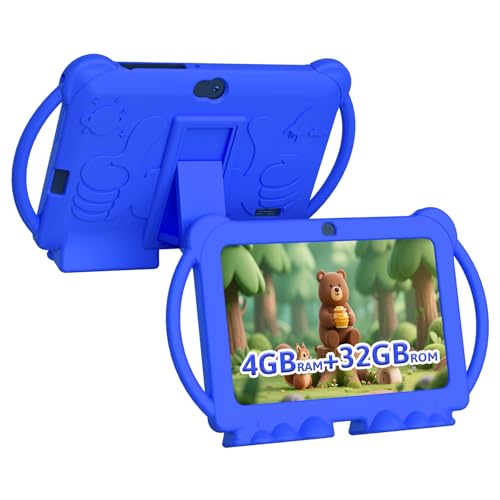
The HOTTABLET kids tablet represents the segment that kept seven inches alive, and its listing shows why the segment works: a 7 inch Android tablet with 4GB of memory, 32GB of storage expandable to 1TB, parental controls, Wi-Fi, Bluetooth, dual cameras and a silicone case, in blue. Every element answers a parent’s actual question. The size fits the hands. The case forgives the drops. The controls govern the content. The cameras — front and rear — cover the video call with grandparents and the photograph of the dog with equal adequacy.
There is a second audience quietly served by this form factor: the grandparent pressed into service as the household’s video-call endpoint. A 7 inch screen at a child’s eye level, in a case that survives the child’s enthusiasm, running a call the adult set up — that is the actual product being bought in a large share of these purchases, and the HOTTABLET’s dual cameras and unintimidating scale serve it directly. Buyers choosing between the two children’s picks should ask whose face the tablet will show most often; the answer organises the decision better than any specification.
Parental controls deserve a parent’s scepticism, applied constructively. The value of a control suite is not its presence on a box but its granularity in the hand: time limits that can differ by day, app approvals that take seconds rather than expeditions, and profiles that separate siblings. Any children’s tablet should be configured in the first evening, by the adult, with the child absent — and the machine judged by how calmly that evening goes. The HOTTABLET’s proposition includes the software layer as a headline feature, which is the correct priority for its category.
School-age reality adds one more test the listing cannot take for you: the sibling factor. A tablet that will be shared, contested or handed down should be bought with its second owner in mind — profiles for each child from the start, the card fitted before the library grows, and the case treated as permanent rather than removable. The HOTTABLET’s specification supports that family arithmetic better than its toddler-focused neighbour, which is the practical line between the two children’s picks: one is a stage, the other is a small institution.
The hardware underneath is the class’s standard recipe, and that is fine, because a children’s tablet’s real specifications are the case’s thickness and the software’s manners. Storage expansion matters more than processor speed here: children’s media libraries grow by accumulation and sentiment, and a card slot postpones the deletion negotiations every family eventually holds. Buy it as what it is — a governed, armoured first computer — and it serves the years between toddlerdom and the first phone with unusual grace.
- Display: 7 inch, child-sized format
- Memory and storage: 4GB RAM, 32GB, expandable to 1TB
- Controls: parental control suite in listing
- Cameras and connectivity: dual cameras, Wi-Fi, Bluetooth
- Case: silicone case included, blue
Strengths
- Armour and controls designed for real childhood
- Expandable storage postpones library deletions
- Dual cameras cover calls and snapshots alike
Trade-offs
- Hardware is the class’s standard modest recipe
- Controls require a deliberate first-evening setup
- Children outgrow the positioning faster than the hardware
Best for: school-age children’s first governed tablet. Not suited for: teenagers, or adults seeking a general-purpose slate.
PEICHENG Kids Tablet 7 inch — The toddler edition
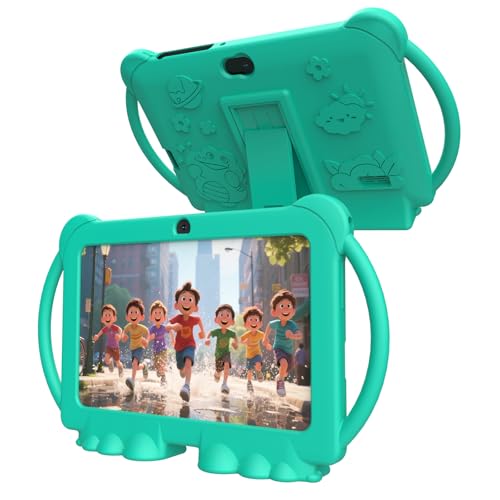
The PEICHENG kids tablet aims younger than its HOTTABLET neighbour, and the aim is printed in its listing: a 7 inch Android 12 tablet for toddlers, with 4GB of memory, 32GB of storage, an IPS screen, Bluetooth, parental controls, dual cameras and a shockproof case, in green, positioned for educational games. The word toddler reorganises every priority. The case is no longer protection but a design material. The controls are no longer a feature but the product. The content is no longer the open internet but a garden the adult fences before the child enters.
The educational positioning deserves one practical translation. For a toddler, educational content means letters traced with a finger, animals named aloud, shapes matched by dragging — applications whose demands are patience and audio clarity rather than processing power, and whose sessions are measured in minutes by the controls the parent set. A tablet specified for that world does not need to apologise for lacking the power of the open internet’s machines; it needs to be unbreakable, unhurried and uninteresting to leave, and those are the qualities this pick’s listing actually enumerates.
Android 12 in the listing is a small, real virtue: a named, reasonably modern system version, where unbranded children’s tablets often hide behind vagueness. It promises a software environment the parent’s own phone-era instincts can navigate, with permission models that behave as expected. The IPS screen matters at toddler angles — a screen shared between a small lap and an adult’s guiding hand is viewed from everywhere except the front, and IPS panels hold their picture at those angles where cheaper panels wash out.
Grandparents feature in this pick’s real life more than in any other section of the guide, because the toddler tablet is so often a grandparental gift or a grandparental lifeline — the screen on which the video call happens at the child’s height, with the child’s programmes a tap away when the call ends. A machine bought for that household geometry should be judged by the least technical adult who will operate it, and the PEICHENG’s proposition — big case, fenced garden, nothing to configure wrongly in public — respects that operator.
Judge it, finally, by the job description of a toddler’s tablet: survive the drop, ration the session, offer the letter game and the animal sounds, and place the video call with the grandparents without an engineering degree. The PEICHENG is specified for exactly that list and nothing beyond it, which in this category is not a limitation but a qualification. Families with older children should step to the HOTTABLET’s positioning; families at the toddler stage should recognise their machine.
- Display: 7 inch IPS screen
- System: Android 12.0
- Memory and storage: 4GB RAM, 32GB
- Controls: parental controls in listing
- Case: shockproof case included, green; educational positioning
Strengths
- Purpose-built for the toddler stage, not adapted to it
- Shockproof case treats drops as certainties
- Named Android version keeps parent expectations accurate
Trade-offs
- The toddler focus dates quickly as children grow
- Hardware is modest even by the class’s standards
- Content curation remains the parent’s ongoing job
Best for: toddlers’ first screen, governed and armoured from the box. Not suited for: older children ready for the open app world.
Amazon Fire 7 — The unverified veteran
The Fire 7 is the name most buyers bring to this size, the survivor of the class’s famous era, still sold by its maker as the smallest and simplest member of the Fire family. It appears here without a link for a reason we state rather than bury: when we ran our verification step, nothing came back that met the standard our linked picks are held to, so this guide will not pretend to send you to a page we have checked. Buy it, if you buy it, directly from Amazon’s own storefront, and confirm the current generation’s specification on that page.
There is a travel argument for it that its maker understands well: a small, inexpensive, content-loaded screen is the one device a family can hand to a child on a train or slip into a bag for a flight delay without a risk meeting beforehand. If the survivors above are bought for niches, the Fire 7’s niche is the journey — and judged strictly as journey equipment, its simplicity is a feature that specification-led rivals keep forgetting to value.
On merit, its role is the ecosystem role its larger sibling plays in our 10.1 inch guide, in miniature: a streaming-and-reading screen centred on one company’s films, books and assistant, sized for a coat pocket and priced in spirit as an appliance. For a household inside that ecosystem, a Fire 7 by the door — for the quick episode, the audiobook, the smart-home glance — is a coherent object. For a household outside it, the same walls apply as with every Fire: the app world is the maker’s own, and general Android expectations should be checked at the door.
A word, too, about what its absence from our links does not imply for owners who already have one: nothing in this section is a recall of the product, only a statement about our verification. Existing Fire 7s in drawers and on nightstands across the country are doing their jobs tonight, and their owners need no one’s permission to keep using them. The guide’s discipline governs what we link, not what households may love.
Its deeper significance is historical. The Fire 7’s ancestors effectively created the inexpensive small tablet as a mass product, and its persistence while rivals withdrew tells you the niche is real even where the class has thinned. We simply cannot verify the listing, and in a guide built on verified links, an honest prose paragraph is worth more than a confident link we could not check.
- Display: 7 inch class, true to this guide’s size
- System: Fire OS, centred on the maker’s services
- Positioning: the smallest, simplest Fire
- Purchase route: buy direct; confirm generation on the page
- Listing status in this guide: prose-only, unverified
Strengths
- The class’s most established name and ecosystem
- Pocketable streaming and reading appliance
- Simple enough for the least technical household member
Trade-offs
- App world is the maker’s own, not general Android
- No verified listing here — diligence is the buyer’s
- Modest hardware even within this modest class
Best for: households inside the maker’s ecosystem wanting its smallest screen. Not suited for: buyers needing Google’s app catalogue as standard.
Apple iPad mini (8.3 inch) — Not a 7 inch tablet
Let the heading be the verdict’s first half: the iPad mini measures 8.3 inches, and it is not a 7 inch tablet. It appears in this guide because every conversation about small tablets ends at its door, and because honesty requires naming the escape route rather than pretending the class’s survivors are the whole map. If your search for a small, excellent tablet has flexibility in its budget and its tape measure, the mini is where the industry’s small-tablet excellence actually went to live.
Its readers deserve a specific acknowledgement, because the mini has become the book-lover’s tablet by acclamation: light enough for one hand at the end of a long day, sharp enough that text feels printed, and sized so that a page is a page rather than a column. Many of the people who mourn the 7 inch class are mourning exactly that reading posture, and the honest news is that the posture survived — it simply moved to 8.3 inches and a premium badge, and it is waiting there for anyone whose requirement was comfort rather than measurement.
As a machine, it is everything the 7 inch class used to promise at its best: a premium small slate with a beautiful display, a powerful processor, the deepest app catalogue and a build that makes the survivors in this guide feel like the utilities they are. It reads gloriously, travels invisibly and will be supported for years. None of that makes it seven inches, and a buyer whose constraint is a specific pocket, a specific small hand or a specific child’s grip should treat the difference as real rather than rounding it away.
Our guidance is therefore conditional. If seven inches was a preference, step up and enjoy the best small tablet money buys. If seven inches was a requirement — the child’s hands, the coat pocket, the mounted space — stay with the survivors above, because an 8.3 inch machine does not become a 7 inch machine by being better. Size guides exist to protect requirements from enthusiasm, including our own.
- Display: 8.3 inch — explicitly not this guide’s size
- System: iPadOS, with the full tablet app catalogue
- Positioning: the premium small tablet, and this class’s escape route
- Support: long update horizon typical of its maker
- Listing status in this guide: prose-only contrast pick
Strengths
- The finest small tablet currently made, by a distance
- Reading and travel ergonomics are superb
- Years of software support protect the purchase
Trade-offs
- It is 8.3 inches; it does not meet a strict 7 inch requirement
- Premium pricing beside a class of utility machines
- Too valuable to hand a toddler or lose on a train calmly
Best for: buyers whose small-tablet wish is a preference, not a measurement. Not suited for: strict 7 inch requirements or children’s sacrificial use.
Kindle Paperwhite — Not a tablet at all
The final pick is a classification lesson wearing a product’s clothes. The Kindle Paperwhite is an e-reader: a device with an e-ink screen built to do one thing — present books — for weeks between charges, in sunlight, without distraction. It is not a tablet, it runs no general apps, and it appears here because a large share of the people searching for a small reading screen are actually searching for this, and deserve to be told that the thing they want exists under a different name.
Judged as a reading machine, it defeats every tablet in this guide without raising its voice. E-ink does not glare, does not tire eyes the way lit panels can over long chapters, and does not interrupt with the entire internet. A novel on a Paperwhite is a more book-like experience than a novel on any backlit screen at any size, and the battery measured in weeks rewrites the travel arithmetic entirely. Readers whose small-screen desire is really a books desire should buy the e-reader and never look back.
One practical consequence follows for households choosing between the Paperwhite and a tablet for a reader: the e-reader is the only screen in this guide that a parent can hand over with literally no governance configuration, because there is nothing on it to govern. In a batch of guides full of control suites and content fences, that absence is a genuine product feature, and for bookish children and distraction-weary adults it may be the deciding one.
Judged as a tablet, it does nothing else, and that is the point of its inclusion: the boundary is the information. Video, apps, browsing, calls — absent by design. The buyer who needs any of them needs a tablet and should return to the survivors above. The buyer who needs none of them has been shopping in the wrong aisle, and this paragraph is the guide’s way of walking them to the right one.
- Category: e-reader with e-ink display — not a tablet
- Battery: measured in weeks, not hours
- Strength: glare-free, distraction-free long-form reading
- Absent by design: apps, video, general browsing
- Listing status in this guide: prose-only contrast pick
Strengths
- The best pure reading experience in this entire guide
- Weeks of battery transform travel reading
- No distractions compete with the book
Trade-offs
- It does nothing a tablet does beyond reading
- E-ink is slow and monochrome by nature
- Locked to its maker’s book ecosystem in practice
Best for: readers who want books, only books, at a small size. Not suited for: anyone needing applications, video or colour.
How Do You Judge a Cheap Small Tablet’s Listing in Ninety Seconds?
Apply the four-question audit this batch of guides has used at every size, tightened for the tier where adjectives breed fastest. One: is the resolution stated in numbers — here, 1024 by 600 is the honest floor, and a listing that will only say “HD” is telling you it falls below it. Two: is the storage internal, or is the headline a card wearing a costume — and is the expansion ceiling stated, as the linked picks here state theirs. Three: is the streaming certification named, because Widevine L1 decides whether the video services you pay for arrive in the quality you pay for. Four: is the system version printed, as the PEICHENG prints its Android 12, or hidden behind the word “latest”, which in this tier means whatever was in the warehouse.
A listing that answers all four cleanly — as, to their credit, this guide’s linked picks largely do — has earned the right to be judged on price and purpose. A listing that fails two or more is not a bargain awaiting discovery; it is a specification awaiting concealment, and the correct response is to close the tab. Ninety seconds of this discipline, applied at seven inches, is worth more than a month of reading reviews of machines whose makers will not describe them.
How Do You Read Comfortably on a Small Screen?
Set the type for the hand, not for the spec sheet. On a 7 inch panel, a slightly larger font with generous line spacing beats a dense page every evening of the week; the page count rises, the eye strain falls, and the book does not care how many pages it has. Use the warm or night display setting after dark on the tablets, keep the screen a forearm’s length away rather than a phone’s distance, and let the device rest every chapter or two — habits that cost nothing and decide whether small-screen reading is a pleasure or an endurance event.
Audio is reading’s overlooked half at this size. Audiobooks and read-aloud stories turn the small tablet into the bedside storyteller, and a 7 inch machine propped by its case, playing a chapter while its screen sleeps, uses less of everything — battery, attention, light in a shared room — than any larger alternative. Households that discover this use tend to keep a retired small tablet by the bed for years after its other duties end.
Choose the format to suit the machine. Reflowable books — novels, most nonfiction — shine on small screens because the text adapts. Fixed-layout material — magazines, comics, textbooks, sheet music — punishes them, because the page must shrink to fit and zooming becomes the reading. Buyers whose reading is mostly fixed-layout should hear the guide’s redirections as addressed to them personally: the mini’s larger, sharper screen or a 10 inch tablet will serve the material, and no loyalty to seven inches should be paid for in squinting.
What Should Travellers Know About This Size?
That it is the last size that disappears. A 7 inch tablet rides in a coat pocket, a handbag’s inner sleeve, a seat-back pocket and a glovebox without announcing itself, and it survives the journey’s indignities precisely because its replacement would be an errand rather than an insurance claim. Load it before departure — books, a season of television on the card, the maps and documents of the trip — because a small tablet’s battery and the journey’s connectivity are both finite, and the prepared traveller notices neither.
Packing follows it too. The 7 inch tablet is the only screen in this entire batch of guides that fits the packing list’s margins — the space left after the clothes, beside the book, inside the day bag that was not bought for technology. Travellers who have abandoned larger tablets at home for weight will recognise the small survivor’s final virtue: it is the screen that actually gets taken, and a taken screen beats a finer one left in a drawer at home by every measure that matters on a journey.
Security follows the same logic of disposability. A utility tablet makes an excellent travel citizen because it can hold a travel-only account, a subset of your life rather than the whole of it, and can be wiped without ceremony if a border or a thief demands the thought. The premium small tablets cannot play that role; their value makes them careful travellers. In the small-screen world, cheapness is not the absence of a feature. On the road, it is the feature.
How Do the Six Line Up?
| Pick | Really 7 inch? | Category | Defining trait |
|---|---|---|---|
| Android Tablet 7 inch with Case | Yes | Tablet | The utility generalist with Widevine L1 |
| HOTTABLET Kids Tablet 7 inch | Yes | Kids tablet | Armour and controls for school-age children |
| PEICHENG Kids Tablet 7 inch | Yes | Kids tablet | The toddler edition in a shockproof case |
| Amazon Fire 7 | Yes | Tablet | Famous survivor, unverified listing here |
| Apple iPad mini | No — 8.3 inch | Tablet | The premium escape route, honestly labelled |
| Kindle Paperwhite | Reading size class | E-reader | Books only, and better for it |
What Mistakes Do Small-Tablet Buyers Make Now?
The first is shopping for the class that was, not the class that is: expecting a modern, premium, general-purpose 7 inch tablet to exist because it once did, and then either overpaying for a ghost or rounding a bigger machine into the requirement. The second is the mirror error — dismissing the survivors because they are modest, when modest is exactly what a child’s first computer or a workshop screen should be. Judge the niche machines by niche standards.
A mistake of configuration haunts the children’s picks specifically: handing the tablet over before the controls are set, on the theory that setup can happen later. Later rarely comes, and the unconfigured children’s tablet is simply a small tablet with a thick case. The first-evening ritual described earlier in this guide is not an optional refinement; it is the difference between buying a governed device and buying a colourful one.
The third mistake is buying a discontinued famous model from a resale listing on the strength of its launch reviews. Those reviews described a young battery and a supported system; the machine in the listing is neither, and the gap between the review and the reality is where regret lives. The fourth is forcing a tablet to do an e-reader’s job or an e-reader to do a tablet’s: the Paperwhite paragraph exists because that confusion, in both directions, generates more disappointed small-screen buyers than any specification ever has.
A fifth mistake is treating the children’s tablet as a toy purchase rather than a computing purchase — skipping the account setup, the updates and the backup of the child’s creations because the case is colourful. The photographs, drawings and first stories on that little machine are family records, and they deserve the same export habit as any computer’s contents before the inevitable drop, loss or graduation arrives.
Final Recommendation
Decide which of the three honest purchases you are making. If it is a child’s first governed screen, take the HOTTABLET for school-age hands or the PEICHENG for a toddler’s, and spend the first evening configuring the controls rather than admiring the case. If it is a utility screen for one job, take the generic Android slate, apply the listing discipline, and let it be cheap and adequate on purpose. And if it is neither — if you wanted a small premium tablet or a pure reading machine — accept the guide’s two honest redirections, to the 8.3 inch mini or the Paperwhite, rather than forcing a survivor to be what its class no longer makes. The 7 inch tablet’s last gift to buyers is clarity about what small screens are for, and the purchases that honour that clarity are the ones that end happily.
Frequently Asked Questions
What size should a child graduate to after a 7 inch tablet?
Eight inches for the next stage of reading and travel, or ten when homework and split-screen lessons begin — the neighbouring guides in this batch cover both steps. The graduation works best when the account, the household rules and the charging station carry over unchanged, so the child experiences a bigger window onto the same governed world rather than an escape from it.
What is the oldest child a 7 inch tablet still suits?
Reading age is the honest boundary: while books, videos and governed apps are the whole of a child’s computing, seven inches suffices and its smallness is a safety feature. Once schoolwork demands split screens, documents and a keyboard’s worth of typing, the child has outgrown the class rather than the device, and the graduation path in the neighbouring guides takes over.
Can a 7 inch tablet handle video calls for grandparents?
Comfortably, and it is one of the survivors’ most honourable jobs. The screen is large enough for a face to feel present, the machine is light enough to carry to the quiet room, and the children’s models add a case that forgives the handling. Set the call application on the home screen, in the largest icon arrangement available, and the technology disappears into the conversation — which is all any grandparent has ever asked of it.
Is a used famous-brand 7 inch tablet a good buy?
Almost never at the prices badges command. The famous small tablets of the golden age are elderly now: batteries worn, systems frozen, parts scarce. A new survivor from this guide, bought for a defined niche, will out-serve a used legend in nearly every real household scenario, and it arrives with a returns window the legend cannot offer.
Does anyone still make a good 7 inch tablet?
Good within its niches, yes: children’s tablets and utility slates are genuinely fit for their purposes. A premium general-purpose 7 inch tablet from a major maker, no — that product category has effectively ended, and the iPad mini at 8.3 inches is where its makers moved the idea.
Why is the iPad mini in a 7 inch guide if it is 8.3 inches?
As a labelled contrast, because buyers ask about it in every small-tablet conversation. We state its true size in its heading, its table row and its text, and recommend it only to buyers whose seven inches was a preference rather than a requirement.
Should I buy a Fire 7 instead of the generic Android pick?
If your household lives inside its maker’s ecosystem and you buy it direct with the current specification confirmed, it is a coherent choice. If you need the general Android app world, or you value a verified listing, the generic pick with Widevine L1 and a case in the box is the guide’s recommendation.
Is a 7 inch tablet big enough for a child?
It is the size the children’s category converged on for good reasons: small hands grip it, light weight survives being carried, and the screen is ample for the educational apps and videos of early childhood. Older children graduate to larger screens, which the neighbouring guides cover.
How long will a children’s 7 inch tablet remain suitable?
Through the stage it was bought for — roughly, the toddler years for the PEICHENG’s positioning and the early school years for the HOTTABLET’s. The hardware usually outlasts the stage, which is why the hand-me-down path matters: a retired children’s tablet becomes a sibling’s first screen, a kitchen timer-and-recipe station, or the travel backup, and a purchase planned with that second life in mind is better value than its first stage alone suggests.
Can a 7 inch tablet work as a smart-home controller?
It is one of the class’s best surviving jobs. Mounted or docked, always charged, running a single dashboard, a small inexpensive tablet gives a household a fixed control point that a phone — which leaves with its owner — cannot. The generic pick’s adequacy is precisely the qualification here; the controller’s virtues are presence and cheapness, not power.
Tablet or e-reader for reading on trains?
For books alone, the e-reader, and it is not close: battery in weeks, no glare, no interruptions. For a mixture of books, video and browsing, a tablet — and at that point most travellers will prefer a larger one, which is precisely the market history that shrank this class.
Related Guides
The small end of the market continues in Best 8 Inch Android Tablets for One-Handed Reading and Travel, and the shapes that replaced this class are covered in Best 10 Inch Windows Tablets for Real Desktop Apps in a Small Bag and Best 2-in-1 Tablets That Genuinely Replace a Laptop.


