What's inside
- Key Takeaways
- Quick Picks
- How We Chose These Picks
- What Makes 11 Inches the Mainstream?
- How Do You Choose Between the Two iPads?
- How Do You Set Up an 11 Inch Tablet for Both Work and Play?
- What Should You Know About Pens and Keyboards at This Size?
- How Do These Tablets Handle Calls, Classes and Meetings?
- Why Do Families Keep Choosing This Size?
- How Long Will an 11 Inch Tablet Stay Useful?
- What About Gaming and Creative Work at This Size?
- How Do the Six Compare at a Glance?
- What Do Buyers Get Wrong at This Size?
- Final Recommendation
- Frequently Asked Questions
- Related Guides
As an Amazon Associate I earn from qualifying purchases. This post may contain affiliate links at no extra cost to you.
widgetverdict.com is reader-supported. When you buy through links on our site, we may earn an affiliate commission.
Where to buy: every pick in this guide carries a checked listing, which makes the buying simple and the choosing the interesting part. Two iPads anchor the top, Samsung and Lenovo divide the Android middle, and a Chromebook with a keyboard closes the list — six machines, three systems, one size.
If the tablet market has a centre of gravity, it sits at eleven inches. The best 11 inch tablets are where manufacturers aim their mainstream effort: large enough for split-screen work, documents and a film that feels like an event, small enough to hold for a chapter and to vanish into an ordinary bag. Screens at this size carry the resolutions buyers actually want, processors at this size span from sensible to startling, and every accessory maker on earth builds for this footprint first. Choosing among them is therefore not a search for competence — all six picks here are competent — but a search for fit.
Fit, in this class, means three decisions. The first is ecosystem: Apple’s pair, Samsung and Lenovo’s Android trio, and Lenovo’s Chromebook answer to different households. The second is intensity: the gap between the standard iPad and the Air, or between Lenovo’s M11 and its Idea Tab, is a gap in how hard you intend to push the machine. The third is completeness: some of these picks arrive with a pen or a case in the box, and some treat every accessory as a separate negotiation. This guide keeps those three decisions visible in every section.
Key Takeaways
- The standard iPad with the A16 chip is the default recommendation for most people: the mainstream size with the mainstream virtues done well.
- The iPad Air M4 is the same footprint with professional headroom — buy it for power you will use, not power you admire.
- Samsung’s Galaxy Tab A11+ is the Android value anchor, with expandable storage, Dolby Atmos speakers and a two-year warranty in its listing.
- Lenovo’s Tab M11 is the complete-box Android pick, folio case included, aimed at reading and everyday work.
- The Lenovo Idea Tab is the student machine: a 2.5K 90Hz screen, a pen and a case in the box.
- The Duet 11 Chromebook is the keyboard-included route for browser-shaped lives.
Quick Picks
| Pick | Badge | Why it earns its place |
|---|---|---|
| Apple iPad 11-inch (A16) | The default answer | Liquid Retina display, A16 chip and the deepest app catalogue in a balanced mainstream slate. |
| Apple iPad Air 11-inch (M4) | The power step | An M4 chip and Wi-Fi 7 in the same 11 inch shape, for creative and professional workloads. |
| Samsung Galaxy Tab A11+ | Android value anchor | Expandable storage, Atmos speakers, AI assist and a two-year warranty in the listing. |
| Lenovo Tab M11 | The complete box | 1920 x 1200 display, folio case included and a ten-hour battery claim for daily duty. |
| Lenovo Idea Tab | The student pick | 2.5K 90Hz touchscreen with the Tab Pen and folio case bundled for coursework. |
| Lenovo Duet 11 Chromebook | Keyboard included | A 2K touchscreen 2-in-1 running Chrome OS, with the keyboard in the box. |
How We Chose These Picks
Every pick had to earn the size honestly: an 11 inch class machine, with the one nuance handled openly — Samsung’s Tab A11+ listing describes a large display without printing a measurement, so we discuss it as an 11 inch class tablet in qualitative terms and invent no panel figures for it. Beyond size, we required a verified listing for every pick, because this guide’s promise is that all six are buyable as described; specifications in each section are drawn from those listings and from nothing else.
One methodological note, because this class invites a specific temptation: with six strong machines, a guide can hide behind balance and refuse to rank. We have ranked. The standard iPad is the default, the Air is the power step, and the Android and Chrome picks are ordered by the clarity of their propositions — completeness, study, warranty-backed value, browser focus. Where your household’s facts differ from the mainstream’s, the sections give you the material to overrule us intelligently, which is the most a guide should ever promise.
Balance governed the shortlist’s shape. A guide to the mainstream size that listed three iPads would fail Android households; one that listed four Lenovos would fail everyone. So the six divide into two Apple machines differentiated by intent, one Samsung representing Android value at scale, two Lenovos representing the complete-box and student expressions of Android, and one Chromebook for the browser-first. Each pick was then interrogated against the same three jobs — work, play and the everything-between of calls, reading and household administration — and the sections below report where each machine’s centre of gravity truly sits.
We also policed the accessory honesty that this class often fudges. When a pen or a case is in the box, we say so as a counted advantage. When a keyboard or pencil is a separate purchase, we say that too, in the pick’s own section rather than in a footnote, because the mainstream buyer deserves the whole price of the proposition before falling for half of it.
What Makes 11 Inches the Mainstream?
Stand in front of the size ladder and the logic is physical. At ten inches and below, split-screen work squeezes; at twelve and above, one-handed holding fades and prices climb toward laptops. Eleven inches is where a document and a reference can share a screen without either apologising, where a film feels cinematic at sofa distance without demanding a table, and where a bag built for a laptop sleeve accepts the tablet without negotiation. Manufacturers know it, which is why their best-selling lines, their case ecosystems and their education contracts all converge here.
There is a historical footnote that explains the convergence. Eleven inches is roughly where the original large-tablet experiments of the last decade settled after trying everything from nine to thirteen, and the industry’s collective memory now treats it as the default canvas — the size software is designed for first, reviewers test first and factories tool for first. Buying the default canvas is not a failure of imagination. It is how a buyer inherits the whole industry’s priorities for free.
The consequence for buyers is pleasant: competition at this size is the fiercest in the market, and it shows in the listings. Pens in boxes, warranties measured in years rather than months, displays that would have been flagship specifications recently — the six picks below collect those pressures. The mainstream is not the boring choice. It is the choice the entire industry is competing hardest to win.
How Do You Choose Between the Two iPads?
By workload honesty. The A16 iPad runs the same app catalogue, shows the same class of Liquid Retina display and handles the everyday mixture — browsing, video, reading, light creation, calls — without strain. The Air’s M4 exists for the work that makes processors sweat: layered creative projects, large media timelines, demanding games at high settings, and the professional apps that treat a tablet as a workstation. If your heaviest weekly task is a video call and a document, the standard iPad is not a compromise; it is the correct tool, and the difference is better spent on storage or accessories. If your tablet is where your creative work actually happens, the Air’s headroom stops being a luxury and becomes the machine’s working life. The sections below keep that distinction unsentimental.
How Do You Set Up an 11 Inch Tablet for Both Work and Play?
Exploit the size’s one structural gift: two respectable halves. Configure your split-screen pairs deliberately — documents beside reference, lesson beside notes, recipe beside timer — and save the pairings your system allows so the arrangement becomes a habit rather than a discovery. A tablet that opens into a working layout invites work; a tablet that opens into a grid of distractions invites the opposite, and at eleven inches the difference is entirely configuration, because the hardware serves both masters equally.
Separate the modes physically as well as digitally. A case that stands the tablet on a desk, a keyboard for the typing hours and the bare slate for the reading hours give the machine three legible personalities, and households that can read which mode the tablet is in argue about it less. On shared machines, use the profile systems each platform offers: the work account, the family account and the child’s account should not be one archaeological layer of everyone’s everything.
Storage housekeeping belongs in the setup hour too. Decide, before the first download spree, where films live, where the photo library syncs and which account owns the family purchases; retrofitting that order onto a full tablet in month six is the kind of chore that makes people hate a machine they otherwise like. The expandable A11+ forgives the most here, the fixed-storage iPads the least, and every pick rewards the household that assigns the filing before the files arrive.
Finally, set the evening rules on day one. Download the week’s video over Wi-Fi rather than streaming against a tired network, schedule updates overnight, and let the reading mode warm the screen after dark. These are five-minute decisions that compound across years of evenings, and the mainstream size — the tablet most likely to be a household’s hardest-working screen — repays them more than any other.
What Should You Know About Pens and Keyboards at This Size?
Eleven inches is where pen input stops being a novelty and becomes a method, because the canvas finally matches a notebook page. The Idea Tab’s bundled Tab Pen is therefore not a garnish but the pick’s thesis. On the iPads, the pencil is a separate purchase and a genuinely excellent one, but its absence from the box should be priced into comparisons against the Lenovo. Judge pens by the work: annotation and sketching forgive almost any pen, while illustration and handwriting-heavy study reward the platforms that treat the stylus as a citizen.
Keyboards divide the same way. The Duet 11 includes its keyboard because Chrome OS without one is half a machine; the iPads treat theirs as an accessory because iPadOS without one is still a whole tablet. Neither philosophy is wrong, but they produce different honest prices, and the buyer comparing a Duet against an iPad should compare the Duet against the iPad plus the keyboard the iPad’s owner will inevitably buy in month two.

Apple iPad 11-inch (A16) — The default answer
There is a reason the standard iPad anchors guides like this one: it is the balanced expression of the mainstream size. The listing describes an 11 inch model with a Liquid Retina display, the A16 chip, 128GB of storage, Wi-Fi 6, matched 12MP front and back cameras, Touch ID and all-day battery life. Read that specification as a sentence and it says: nothing here will annoy you. The screen is the class standard for colour and clarity, the chip is comfortably ahead of everyday work, and the cameras — so often the weak paragraph in a mainstream tablet — are specified for calls and document scans without apology.
The iPad’s deeper advantage is the one no specification line captures: the app catalogue. Tablet-shaped applications — designed for this screen rather than stretched from a phone — exist in depth here that Android still chases in category after category, from creative tools to education to specialised professional apps. A buyer choosing the mainstream size for a child, a parent or themselves is often really choosing that catalogue, and choosing correctly.
Sound is a paragraph this pick has earned. A mainstream tablet is a speaker as often as it is a screen — podcasts in the kitchen, a film in a rented cottage, a grandparent’s voice across a room — and the iPad’s stereo arrangement in landscape gives dialogue the clarity that smaller or cheaper tablets smear. It will not replace a dedicated speaker, but it removes the daily temptation to fetch one, and that removal is what household devices are for.
Ownership is equally considered. Touch ID in the button is the right biometric for a device that changes hands and orientations all day. The accessory ecosystem — cases, stands, keyboards, pencils — is the widest in the industry, so the machine can be dressed for a kitchen, a classroom or a briefcase without improvisation. And Apple’s update record means the mainstream purchase stays mainstream for years rather than drifting into the demoted-appliance role within a couple of seasons.
Picture its week and the balance clarifies. It is the homework machine on the kitchen table, the recipe screen at noon, the film in bed, the call with the grandchildren on Sunday, and the holiday download repository in August. No single one of those jobs justifies a flagship; together they justify a machine with no weak paragraph, which is exactly the specification Apple wrote. The A16 iPad is not the exciting pick in this guide. It is the pick the exciting ones must argue against, and most arguments end by conceding the point for most people.
Its limits are deliberate rather than accidental. The A16 is not the M4, and sustained creative workloads will find the difference. The display, while lovely, is the standard rather than the finest panel Apple sells. Buyers should also note that keyboard and pencil are separate purchases here, so a typing-heavy setup should budget them from the start. None of that dents the verdict for the majority: this is the 11 inch tablet against which the other five are priced and judged.
- Display: 11 inch Liquid Retina
- Chip: Apple A16
- Storage: 128GB in the listed configuration
- Cameras: 12MP front and 12MP back
- Connectivity and security: Wi-Fi 6, Touch ID
Strengths
- The deepest tablet app catalogue, fully at home on this screen
- Balanced specification with no weak paragraph
- Long update life protects the purchase for years
Trade-offs
- Creative heavy workloads belong on the Air instead
- Keyboard and pencil are separate purchases
- Storage is fixed at purchase, with no card expansion
Best for: most people, most households, most jobs — the mainstream choice in the mainstream size. Not suited for: professionals whose creative workloads need the M4’s headroom.
Apple iPad Air 11-inch (M4) — The power step
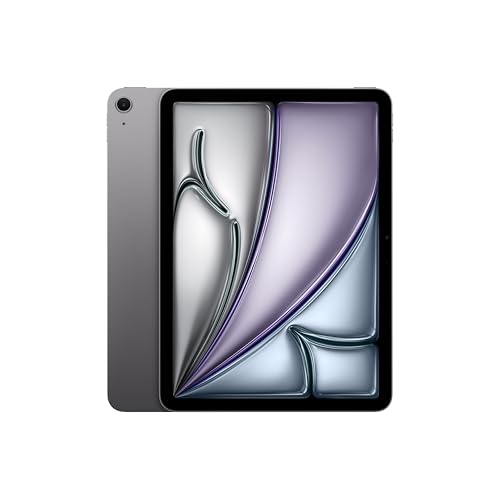
The iPad Air takes the same 11 inch footprint and installs a different class of intent. Its listing leads with the M4 chip, pairs it with a Liquid Retina display, 128GB of storage, 12MP cameras front and back, Wi-Fi 7 with Apple’s N1 networking, Touch ID and all-day battery life. The M4 is a laptop-descended processor, and its presence in a tablet this slim reframes what the machine is for: not coping with work, but volunteering for it.
Who feels that difference? The illustrator whose layered canvas stays fluid, the editor assembling video on a train, the student whose 3D or data applications treat lesser tablets as suggestions, the gamer who wants high settings without heat drama. For those users the Air is not an indulgence; it is the difference between a tablet that assists a workflow and a tablet that hosts one. Wi-Fi 7 belongs to the same story — a machine bought for years of serious use should not be throttled by yesterday’s wireless in tomorrow’s buildings.
Set the two iPads side by side in a shop and the physical near-identity is the point: Apple is not selling a bigger or prettier machine, it is selling time. The M4 buys responsiveness now and relevance later, in the same beloved shape, and the buyers who feel that as value are the ones whose applications will grow into the decade. Everyone else is being offered a faster version of a journey they are not taking, and should politely decline.
The Air also inherits the mainstream size’s practical blessings: the same accessory universe as its sibling, the same balanced hand-feel for reading, the same all-day battery positioning. It asks buyers to be honest in return. If your tablet life is streaming, browsing and calls, the M4 will spend its life idling, and the standard iPad plus a storage step or a keyboard is the smarter allocation of the same money. Power is only value when a workload arrives to spend it.
There is also the matter of what the Air signals inside Apple’s own line: it is the tablet Apple builds for people who create on tablets professionally but do not need the absolute flagship tier. That positioning brings practical benefits — the professional applications are optimised for its chip class, the accessories are the serious ones, and the machine’s resale and hand-me-down value hold up because the next owner inherits headroom rather than adequacy. Buyers who think in terms of total years of service across two owners will find the Air’s arithmetic quietly persuasive.
One more consideration: longevity as economics. A processor with this much headroom extends the machine’s useful years, because tomorrow’s applications are written against today’s flagships. Buyers who keep tablets longest — the five-year owners — can rationally choose the Air as the cheaper purchase per year of service, even where the standard model would suffice today. That is the Air’s quietest argument, and for the right household its strongest.
- Display: 11 inch Liquid Retina
- Chip: Apple M4
- Storage: 128GB in the listed configuration
- Cameras: 12MP front and 12MP back
- Connectivity and security: Wi-Fi 7 with Apple N1, Touch ID
Strengths
- Laptop-class processor for creative and professional workloads
- Wi-Fi 7 future-proofs a long ownership
- Same balanced size and accessory world as the standard iPad
Trade-offs
- Power is wasted on purely recreational use
- Keyboard and pencil remain separate purchases
- Price step demands a workload to justify it
Best for: creators, professionals and long-keepers who will spend the M4’s headroom. Not suited for: streaming-and-browsing buyers better served by the standard iPad.

Samsung Galaxy Tab A11+ — Android value anchor
Samsung’s Galaxy Tab A11+ is the Android mainstream expressed as value engineering. A note on evidence before enthusiasm: its listing describes a large display without printing a measurement, so we place it in the 11 inch class qualitatively and claim no panel figures for it. What the listing does state is a coherent household proposition — 6GB of memory, 128GB of storage with expansion available, a long-lasting battery, Dolby Atmos speakers, AI assist features, a slim and light build, and a two-year warranty, which is a notably confident term in this tier.
The slim, light positioning in the listing deserves respect rather than a skim, because at eleven inches the difference between a tablet that gets carried and a tablet that stays docked is measured in grams and millimetres of daily friction. A household slate earns its keep in proportion to how often it is picked up, and Samsung’s A-series has spent generations learning that ergonomics lesson. The A11+ arrives knowing it.
Each element answers a mainstream anxiety. Expandable storage answers the family download problem without a configuration gamble at purchase. Atmos speakers answer the shared-viewing reality of a living-room tablet, where audio is half the experience. The AI assist answers the small daily frictions — summarising, organising, translating — that increasingly define how households use a screen. And the warranty answers the question value buyers ask most: will the maker stand behind this when the first fault appears in month fourteen?
Against the iPads, the A11+ trades catalogue depth for openness and price-positioning; Android’s flexibility with files, storage and launchers suits households that manage their own media. Against its Lenovo neighbours below, it trades bundled accessories for Samsung’s scale, finish and that warranty. It is the pick for the Android household that wants the mainstream size from the platform’s biggest name, with the paperwork to prove the confidence is mutual.
Consider the household it suits best: the Android-committed family that streams together, keeps a local library of films and music, and wants one screen to administer without a manual. Samsung’s software layer is the most familiar in Android tablets, its account and sharing tools are mature, and the AI assist features in the listing point at the direction family software is travelling — help with the small tasks, offered before they become chores. For that household, the A11+ is not the budget apology in this guide; it is the centre of the Android mainstream, priced and warranted like it knows it.
Buyers should keep two cautions in view. The absence of a printed display measurement in the listing means panel judgements should be made on the product page’s full specification before purchase, not assumed from this guide. And Samsung’s A-series is the value line, not the flagship S-series: performance is pitched at everyday work and entertainment, and buyers chasing creative horsepower should look at the Air or Samsung’s own flagships rather than asking this machine to be both.
- Memory and storage: 6GB RAM, 128GB, expandable
- Audio: Dolby Atmos speakers
- Battery: long-lasting positioning in listing
- Extras: AI assist features; slim, light build
- Warranty: two years, per listing
Strengths
- Expandable storage removes the configuration gamble
- Two-year warranty is unusually confident at this level
- Atmos speakers suit shared viewing and calls
Trade-offs
- Listing omits a display measurement; verify panel details before buying
- Value-line performance, not flagship horsepower
- Accessories are separate purchases
Best for: Android households wanting the mainstream size with warranty confidence. Not suited for: creative professionals or buyers who need confirmed panel specifications from the listing alone.

Lenovo Tab M11 — The complete box
The Lenovo Tab M11 is the pick for buyers who want the box to finish the job. Its listing specifies an 11 inch display at 1920 by 1200, a MediaTek Helio G88 octa-core processor, 4GB of memory, 128GB of storage, an ambient light sensor, a ten-hour battery claim and — the detail that changes the first week — a folio case included. No accessory errand, no naked tablet on the counter, no second order: unbox, sign in, start.
There is a demographic the M11 understands better than its rivals: the first-tablet household. Buyers entering the category do not yet know which accessories they will want, which apps will dominate, or whether the tablet will live in one room or roam. A complete box with a known panel and a case defers every one of those discoveries safely, letting the household learn its own habits on a machine that does not punish the learning. Several more specialised picks in this guide are better second tablets; the M11 may be the best first one.
The specification is pitched at the centre of everyday life and knows it. The 1920 by 1200 panel is the resolution this size wants for text and film alike. The ambient light sensor is a small feature with daily consequences, adjusting brightness as the tablet migrates between kitchen glare and evening lamplight without its owner playing settings janitor. Ten hours of claimed battery covers the realistic day of a household slate: morning news, midday calls, evening episodes, with margin.
Where the M11 asks for honesty is performance ceiling. The Helio G88 is a capable everyday processor, not a creative engine, and buyers planning heavy games or layered media work should step toward the Idea Tab or the Air. Memory at 4GB suits the mainstream mixture but rewards tidy habits — this is a tablet that likes a few open apps, not a dozen. Within those boundaries, though, the M11 is arguably the most friction-free Android purchase in this guide: known panel, known storage, case included, nothing left to chance.
Reading deserves a specific word, because the M11’s panel and sensor pairing serve it quietly. Text at 1920 by 1200 on eleven inches sits at the size where a novel page feels like a novel page, and the ambient light adjustment means the evening chapter does not begin with a brightness negotiation. Households often discover that the tablet bought for video becomes the household’s book; the M11 is specified as though Lenovo anticipated the conversion.
It also suits the gift scenario better than any rival here. A tablet given to a parent or a student should arrive complete and comprehensible, and the M11’s box does that: the case protects it, the specification explains itself, and the size flatters every job a recipient is likely to attempt in the first month. Completeness is a feature, and this pick is built from it.
- Display: 11 inch, 1920 x 1200
- Processor: MediaTek Helio G88 octa-core
- Memory and storage: 4GB RAM, 128GB
- Battery: ten-hour claim in listing
- In the box: folio case included
Strengths
- Folio case included — complete from the first evening
- Sharp, honestly specified panel for text and film
- Ambient light sensor smooths room-to-room use
Trade-offs
- Everyday processor, not a creative or gaming engine
- 4GB memory rewards tidy app habits
- No pen bundled, unlike its Idea Tab sibling
Best for: households and gift-buyers wanting a complete, comprehensible Android tablet. Not suited for: heavy gaming or pen-driven coursework.

Lenovo Idea Tab — The student pick
Lenovo labels the Idea Tab a college tablet, and for once the marketing and the specification agree. The listing describes an 11 inch 2.5K IPS touchscreen running at 90Hz, a MediaTek Dimensity 6300 processor, 4GB of memory, 128GB of storage, and — decisive for its audience — a Tab Pen and folio case included. A student can annotate a lecture PDF the evening the box arrives, which is exactly when a student needs to.
Compare it directly with its own sibling for a moment, because many buyers will. The M11 gives you the case and the calmer specification; the Idea Tab gives you the case, the pen and the sharper, faster screen, tuned a notch more seriously. The choice between them is really a choice about hands: if yours hold a pen or want to, the Idea Tab; if they hold a remote and a mug, the M11. Lenovo has effectively segmented its own mainstream offering by input method, and recognising that makes both picks easier to choose between than their names suggest.
The display specification deserves its moment. A 2.5K panel at this size renders text with the crispness that long reading rewards, and the 90Hz refresh makes scrolling through documents and notes feel fluid rather than dragged. Coursework is an hours-long, eyes-on-text activity; the Idea Tab’s screen is specified for precisely that endurance, where a lesser panel would tax its owner invisibly, page after page.
The pen changes the study method, not just the feature list. Highlighting in the margin, sketching a diagram beside a formula, marking up a draft — these are active-learning behaviours that a keyboard alone does not invite, and bundling the pen removes the budget meeting in which students usually postpone them forever. Paired with the case, the whole proposition is a study kit that happens to stream films beautifully in the evening, rather than an entertainment slate apologising for its homework.
Parents buying for a student should notice the completeness argument in its educational form. A pen bought separately is a pen postponed — first to a birthday, then to next term, then forever — and the annotation habit the pen enables is the actual educational product here. The Idea Tab collapses that delay to zero. Whatever else a family debates about tablets and schoolwork, the machine that arrives ready to mark up a text is the machine that gets used to mark up texts.
Its boundaries mirror its focus. The Dimensity 6300 and 4GB of memory are coursework-grade, not workstation-grade; engineering simulations and heavy creative suites belong on stronger machines. Buyers outside education can still choose it happily for reading and notes — the screen and pen serve any annotator — but should buy it as the pen-forward reading machine it is, not as a general performance step.
- Display: 11 inch 2.5K IPS touchscreen, 90Hz
- Processor: MediaTek Dimensity 6300
- Memory and storage: 4GB, 128GB
- In the box: Tab Pen and folio case included
- Positioning: college and study-first tablet
Strengths
- Pen included, enabling real annotation from day one
- 2.5K 90Hz screen specified for long reading sessions
- Case included completes the study kit
Trade-offs
- Coursework-grade performance ceiling
- 4GB memory suits focused, not sprawling, multitasking
- Student tuning may exceed a pure media buyer’s needs
Best for: students and annotators who read, mark up and take notes daily. Not suited for: heavy creative workloads or buyers indifferent to pen input.

Lenovo Duet 11 Chromebook — Keyboard included
The Duet 11 closes the list by changing the question. Its listing describes an 11 inch 2K LCD touchscreen in a 2-in-1 body, a MediaTek Kompanio 838 processor, 4GB of memory, 128GB of storage and a keyboard included — running Chrome OS, where the browser is the desktop and the desktop is genuinely good. For the large share of life that happens in web applications, this is not the compromise pick. It is the focused one.
Size is where this Duet makes its argument against its own ancestor in our 10.1 inch guide. The extra canvas transforms the Chromebook experience: two windows sit side by side without either becoming a ribbon, documents show at natural scale, and the keyboard — sized for an 11 inch host — stops asking larger hands to negotiate. Students were the original Chromebook constituency and remain well served, but the Duet 11 equally suits any adult whose work is a school portal, an office suite in a browser and a hundred tabs of research.
Travel exposes the Duet’s other talent: it is the pick least troubled by a strange desk. The keyboard is already attached to its working life, the charger is undemanding, the browser reaches the hotel portal and the office suite with equal indifference, and the whole kit weighs less than the laptop it replaces for a two-day trip. Road-warrior households often discover that the second machine gets the journeys while the flagship stays home, and the Duet 11 is specified precisely for that quiet coup.
Chrome OS contributes its own quiet virtues: fast booting, background updates measured in years, and an account model where signing in restores your world. A household can share this machine across profiles without the archaeology of untangling one another’s files, and a lost or replaced unit is an inconvenience rather than a data funeral.
Teachers and school administrators will recognise the deeper argument: a class set of Duets is manageable in a way a class set of anything else struggles to match, because accounts, updates and replacements are centralised and simple. That institutional logic spills into family life — the Duet is the pick a parent can administer for a child without becoming the household’s unpaid IT department, and the pick a grandparent can be given with a single sign-in rather than a training course.
The boundaries are the system’s own. Local storage and offline depth are secondary concerns in Chrome OS’s design, Android apps are guests rather than citizens, and buyers whose tools are heavyweight local applications should choose Windows or the iPads. Within the browser-shaped life, though, the Duet 11 is the most complete proposition in this guide — keyboard in the box, screen sized for real windows, nothing left to buy before it earns its keep.
- Display: 11 inch 2K LCD touchscreen
- System: Chrome OS, 2-in-1 with keyboard included
- Processor: MediaTek Kompanio 838
- Memory and storage: 4GB RAM, 128GB
- Colour in listing: Luna Gray
Strengths
- Keyboard included — a working kit from the box
- 11 inch canvas fixes the small-Chromebook squeeze
- Long, quiet update life and simple shared profiles
Trade-offs
- Browser-first system; heavy local apps need another platform
- Offline media depth is a secondary concern by design
- 4GB memory suits focused window habits
Best for: students and browser-first workers who type as much as they watch. Not suited for: offline-first users or heavyweight local software.
How Do These Tablets Handle Calls, Classes and Meetings?
The pandemic years permanently added a job to the mainstream tablet’s description: it is the household’s second camera for the calls that matter. Judged on that job, the iPads’ matched 12MP front cameras give them the cleanest claim in this guide, and their microphones and speakers are tuned by a company that sells call quality as a headline feature. The A11+’s Atmos speakers flatter the listening half of a call, and Samsung’s software handles the meeting platforms of the Android world without fuss. The Lenovos are adequate communicators whose folio cases matter more than their camera figures, because a tablet propped at a sane angle beats a better camera held at a bad one.
For online classes the ranking shuffles: the Duet’s keyboard and desktop browser make it the best classroom citizen per dollar of effort, the Idea Tab’s pen makes it the best note-taker, and the iPads make the best platform for the education apps that schools increasingly assume. None of the six embarrasses itself in a meeting. The honest advice is to choose by the call’s context — family, classroom or office — rather than by a camera number, because at this level the angle, the light and the stand decide more than the sensor.
Why Do Families Keep Choosing This Size?
Because it is the size that survives the hand-me-down economy. An 11 inch tablet bought for a parent’s work becomes the teenager’s study machine, then the kitchen screen, then the grandparent’s calling device, and at every transfer the size still fits the job. Smaller tablets get outgrown; larger ones get specialised. The mainstream measurement is the one that stays plausible across a decade of changing owners, which quietly makes it the best value in the building even when its ticket is not the lowest.
It is also the size guests understand. Hand any of these six to a visiting relative and no instruction is required: the screen is obviously for watching, the shape obviously for holding, the whole proposition self-evident in a way that exotic sizes and convertible contraptions are not. Technologies that explain themselves get used; technologies that need a tutorial get admired and shelved. Eleven inches explains itself.
How Long Will an 11 Inch Tablet Stay Useful?
Longer than any other size’s, as a rule, because the mainstream is where manufacturers concentrate their update commitments and where accessory and parts ecosystems stay stocked. The iPads lead this argument as they usually do, with software support measured in many years; the Air’s processor headroom extends its runway furthest of the six. Samsung’s warranty term in the A11+ listing signals confidence in the hardware’s early years, while Lenovo’s pair and the Duet rely on their platforms’ respective update cultures — Android’s improving but variable, Chrome OS’s famously long and automatic.
Resale and hand-me-down value follow the same ranking, and they matter to the true cost of ownership. A mainstream iPad in good condition finds its next owner inside the family or outside it with equal ease; the Lenovos and the Samsung pass down comfortably within households that share their ecosystems; the Duet’s second life is almost guaranteed by the school market’s appetite. None of the six is a disposable purchase, and treating the decision with the seriousness of a five-year appliance rather than a seasonal gadget is the mainstream buyer’s final discipline.
The buyer’s half of longevity is behaviour. A tablet kept updated, charged from a home rather than a hunted cable, and stored with headroom rather than at capacity will outserve an identical tablet neglected on all three counts. At eleven inches the hardware ceiling is high enough that software and habits, not specifications, decide the retirement date — one more reason this size is the safe mainstream purchase, and one more reason to buy the pick whose ecosystem your household will actually maintain.
What About Gaming and Creative Work at This Size?
Gaming divides the six cleanly. The Air’s M4 is a games machine without qualification, the standard iPad a very good one, and the Android trio plus the Duet are casual-to-moderate propositions whose owners should choose titles accordingly. Creative work divides them differently: the iPads own the deepest professional creative catalogue, the Idea Tab owns the best bundled annotation setup, and the Duet owns the web-based creative tools — documents, browser design apps, classroom platforms — that increasingly count as creative work in schools and small businesses.
The lesson is that “can it create” is the wrong question at this size; all six can. The right question is where your creating lives — in an app catalogue, in a browser, or in a notebook margin — and the six picks divide almost perfectly along that line. Choose the habitat first and the machine chooses itself.
How Do the Six Compare at a Glance?
| Pick | System | In the box | Defining trait |
|---|---|---|---|
| Apple iPad (A16) | iPadOS | Tablet only | The balanced mainstream default |
| Apple iPad Air (M4) | iPadOS | Tablet only | Laptop-class power in the same shape |
| Samsung Galaxy Tab A11+ | Android | Tablet only | Expandable storage and a two-year warranty |
| Lenovo Tab M11 | Android | Folio case | The complete, comprehensible box |
| Lenovo Idea Tab | Android | Pen and folio case | The study kit with a 2.5K 90Hz screen |
| Lenovo Duet 11 | Chrome OS | Keyboard | The browser-first 2-in-1 |
What Do Buyers Get Wrong at This Size?
The classic error is buying power by badge rather than by workload — paying the Air’s step for a streaming life, or asking the M11’s everyday processor to run a creative studio. Eleven inches hosts the widest performance spread of any size in this batch of guides, so the punishment for badge-buying is larger here than anywhere. Write down your three heaviest weekly tasks before shopping; the correct pick is the one whose ceiling sits just above them.
One more practical error deserves naming: buying the tablet and deferring the case. Eleven inch glass is the household’s most-carried glass, and the first drop tends to arrive before the first accessory order. Two picks here solve that in the box; the other four should be ordered with a case in the same basket, treated as part of the machine rather than an optional garnish.
The second error is ignoring what is not in the box. Two of these six picks bundle the accessory their audience needs most; four do not, and the keyboard or pencil that completes an iPad setup is a real second decision with a real second price. Compare whole propositions, not headline machines. The third error is storage complacency on the fixed-storage picks: 128GB is comfortable for a personal tablet and tight for a shared family one, and on the iPads there is no card slot to forgive the underestimate later.
A fifth error is buying for the household you wish you had. The family that streams together buys the creator’s Air; the solo reader buys the split-screen workstation; the browser-shaped student buys the local-app powerhouse. Every pick in this guide is the right answer to a real life — the discipline is making sure the real life is yours. When in doubt between two picks, choose the one whose strengths describe your last month rather than your next year’s intentions.
The fourth error is subtler: assuming the mainstream size means interchangeable quality. It does not. Panel resolution, pen inclusion, warranty terms and update horizons all vary across these six, and they vary in the dimensions that decide year three of ownership. The mainstream rewards the buyer who reads one level deeper than the badge.
Final Recommendation
Start where the market starts: the iPad with the A16 is the right answer for most people, and choosing it requires no apology. Step to the iPad Air M4 only when a real workload — creative, professional, or simply long ownership — will spend its power. Android households should divide by intent: the Galaxy Tab A11+ for warranty-backed value with expandable storage, the Tab M11 for the complete box, the Idea Tab for study, and the Duet 11 for browser-shaped lives that type. Eleven inches earned its mainstream crown by serving everyone reasonably; these six divide that service by temperament, and the best tablet in this guide is the one whose temperament matches the hands it will actually live in.
Frequently Asked Questions
Is 11 inches big enough for split-screen work?
It is the smallest size where split-screen stops feeling like a trick. A document and a reference, or a lesson and a notes app, each get a usable half, which is why this size anchors both office and education buying. Larger sizes do it more grandly; smaller sizes do it apologetically.
iPad or iPad Air: how do I decide honestly?
List the heaviest applications you genuinely run weekly. If they are browsing, video, reading, documents and calls, the standard iPad covers them fully and the Air’s M4 is admiration, not utility. If creative or professional applications anchor your week — or you keep tablets for five years — the Air earns its step.
Which pick is best for a student?
The Idea Tab, by design: pen and case in the box, a screen specified for long reading, and coursework-grade performance at a student-shaped proposition. Students whose courses live entirely in a browser should also weigh the Duet 11, whose included keyboard suits essay-heavy terms.
Does the Galaxy Tab A11+ really sit in the 11 inch class?
It is positioned and sold as Samsung’s large mainstream A-series tablet, and we discuss it within this class qualitatively. Its listing does not print a panel measurement, so we claim no figures for it; confirm the full specification on the product page if exact dimensions decide your purchase.
Can an 11 inch tablet be a child’s main school device?
Yes, and this size is where schools themselves have largely landed. The screen handles textbooks and split-view lessons, the weight survives a school bag, and every platform here offers parental or administrative controls. Choose by the school’s platform: browser-based schools point to the Duet 11, app-based schools to the iPad, and pen-heavy coursework to the Idea Tab.
Which pick is best for reading?
The Idea Tab, on specification: its 2.5K panel renders text at the crispness long sessions reward, and the 90Hz refresh keeps page turns and scrolling calm. The standard iPad runs it close on catalogue — its book and news apps are superb — while the M11 is the value reader’s choice. All three beat any smaller size for magazines and PDFs, where the 11 inch page approximates the printed original.
Is 128GB enough at this size?
For a personal tablet used for streaming, browsing, reading and documents, yes, with room to spare. For a shared family machine accumulating several people’s downloads and games, it becomes the constraint that ends the tablet’s happy years early — which is why the A11+’s expandable storage matters, and why iPad buyers with family plans should think hardest about configuration before purchase rather than after.
Which of these include their key accessory in the box?
Three: the Tab M11 includes a folio case, the Idea Tab includes its pen and a folio case, and the Duet 11 includes its keyboard. The iPads and the Galaxy Tab treat keyboards and pencils as separate purchases, which should be budgeted alongside the tablet itself.
Related Guides
Neighbouring sizes argue their own cases from here: Best 12 Inch Tablets for Split-Screen Work and Big Canvas Apps, Best 7 Inch Tablets: A Small Size That Is Nearly Gone and Best 8 Inch Android Tablets for One-Handed Reading and Travel.


