What's inside
- Key Takeaways
- Quick Picks
- How did we choose these picks?
- Comparison table
- How do you choose the right 22 to 24 inch monitor for a small desk?
- How do you arrange a small desk around a 24-inch screen?
- What are the most common mistakes buyers make here?
- Final Recommendation
- What does living with a 24-inch screen actually feel like, hour by hour?
- How do you fit two screens, or a screen and a laptop, into this size class?
- Which rooms and households does this size class serve best?
- How sharp is sharp enough? A plain-language guide to 1080p at this size
- What should you know about buying this class second-hand or for a family fleet?
- How do you keep a small-desk setup comfortable across a whole working week?
- Gaming at twenty-four inches: why the pros never left this size
- What is the real difference between the 22-inch and 24-inch ends of this class?
- A fitting session, step by step, for the desk you actually own
- Why does this unglamorous class deserve more respect than it gets?
- How does this class handle the hybrid era’s defining desk, the hot-desk at home?
- A closing word on fitting in: the best 1080p 22 24 inch monitors, fitted
- What about gaming guests, sleepovers and the second controller?
- One sentence to carry to the shop
- And if the desk is not small at all?
- Frequently Asked Questions
- Related Guides
As an Amazon Associate I earn from qualifying purchases. This post may contain affiliate links at no extra cost to you.
widgetverdict.com is reader-supported. When you buy through links on our site, we may earn an affiliate commission.
Where to buy: all six screens below link to verified Amazon listings, and each review states its size, stand and panel character plainly, because at this end of the market those details decide satisfaction more than any headline specification.
Size is a feature, not a compromise. The best 1080p 22 24 inch monitors serve the desks most people actually own: student rooms, bedroom corners, shared studies and kitchen-table offices where a twenty-seven-inch panel would crowd out the keyboard, the notebook and the person. This roundup compares six verified screens in the class on ergonomics, panel character, docking and gaming range, because at twenty-four inches the differences that matter are about living with the screen, not about the resolution they all share.
The class also happens to be a sweet spot of value and physics. At twenty-four inches, 1080p stays sharp enough for documents, pixel density flatters rather than embarrasses, and prices stay low because manufacturers ship these panels in enormous volumes. The buyer’s task is not finding a good screen; it is choosing which of several good screens matches a specific small desk’s daily routine.
Key Takeaways
- Twenty-four inches is the practical ceiling for shallow and shared desks.
- At this size 1080p stays sharp enough for documents and study.
- Stand quality varies wildly and matters more than panel statistics here.
- USB-C docking can delete a dock and two cables from a tiny surface.
- Refresh in this class runs from 60Hz workhorses to a full 144Hz gaming pick.
- Measure your desk depth before ordering; viewing distance drives comfort.
Quick Picks
| Pick | Badge | Why it earns its place |
|---|---|---|
| Dell SE2422HX | Small-desk default | 75Hz balance for work, study and light play. |
| Dell P2422H | Ergonomic upgrade | A real stand and IPS colour for work-first desks. |
| Dell SE2425H | Evening VA pick | Deep blacks for bedroom desks after dark. |
| BenQ GW2490C | One-cable answer | USB-C docking plus a hidden 144Hz panel. |
| LG UltraGear 24G411A | Console-ready gamer | 120Hz for PCs and current consoles alike. |
| ASUS TUF VG249QE5A | Full-speed option | 144Hz IPS at the competitive standard size. |
How did we choose these picks?
We selected for the constraints of small spaces first: physical footprint, stand base depth, bezel waste and the viewing distances a shallow desk imposes. A screen that technically measures twenty-four inches but ships on a deep, splayed stand can steal more desk than a larger panel on a compact base, so the reviews treat the whole object, not the diagonal, as the size that matters.
Ergonomics and panel character came next, because small-desk users sit close and often off-centre. Height adjustment, IPS viewing angles for angled seating, VA contrast for dim bedroom use and credible eye-comfort tuning were weighted as primary features, ahead of gaming garnish. The class’s refresh spread, from a strict 60Hz workhorse to 144Hz gaming panels, was represented deliberately so the list maps onto real desks rather than one imagined user.
Connectivity closed the selection, with the BenQ’s USB-C docking recognised as a space feature in its own right. Every pick was verified against a current listing at checking time, and each review names the desk it suits and the desk it would frustrate, because in this category fit is the whole argument.

Dell SE2422HX — The small-desk default
On a small desk, a monitor’s job description changes: it must be big enough to work on, small enough to leave room for a keyboard, a notebook and a human being, and kind enough for eight-hour days. The SE2422HX, at twenty-four inches with a 75Hz 1080p panel, threads that needle as well as anything in this roundup. Its footprint is modest, its bezels do not waste precious centimetres, and Dell’s ComfortView tuning keeps long document sessions from punishing your eyes for the desk’s size.
The 75Hz refresh quietly improves everything a small-desk user does, from scrolling long documents to the evening’s light gaming, without the cost or the graphics demands of a gaming panel. FreeSync support smooths a modest laptop or PC’s output, and the anti-glare finish matters disproportionately in the small rooms these desks inhabit, where a window is always closer than anyone would choose.
If the brief is one screen, small desk, mixed life, this is the starting point against which the rest of the list must argue. Some argue with ergonomics, some with speed, one with docking, but none displaces it as the balanced default for the best 1080p 22 24 inch monitors conversation.
- Size: 24 inches
- Resolution: 1920 x 1080
- Refresh rate: 75Hz
- Comfort: ComfortView low-blue-light tuning
- Footprint: compact stand for shallow desks
Strengths
- Balanced size for work, study and light play
- Comfort tuning suits long days in small rooms
- 75Hz smooths scrolling and casual gaming
Trade-offs
- Stand lacks height adjustment for taller users
- No USB-C or hub features for laptop docking
- Gaming ceiling is modest by design
Best for: students and home workers with one small desk that must do absolutely everything
Not suited for: users needing docking, full ergonomics or serious gaming speed from the same screen

Dell P2422H — The ergonomic upgrade for tight spaces
Small desks punish bad ergonomics fastest, because there is nowhere to hide from a screen that sits too low or too close. The P2422H answers with the stand this category usually skips: full height, tilt, swivel and pivot adjustment on a compact base, wrapped around a 24-inch IPS panel with strong colour coverage. That stand is not a luxury feature in a cramped setup; it is the difference between a screen fitted to your body and a body slowly fitted, painfully, to a screen.
The IPS panel suits the tight-space brief in a second way. Small rooms mean off-centre seating, a partner pulling up a chair at an angle, a bed doubling as a viewing sofa. IPS keeps the image honest from those positions where cheaper panel types wash out or invert. Colour coverage also flatters the photo editing and design coursework that often share these desks, making this the productivity ceiling of the roundup.
Its 60Hz refresh is the deliberate trade, acceptable because this pick serves work-first desks whose gaming is casual. Buy it when posture, ports and panel quality outrank frames in your real life, which for most small-desk adults is the honest ranking. Ergonomics compound daily; refresh rates only perform during games.
- Size: 24 inches
- Resolution: 1920 x 1080
- Refresh rate: 60Hz
- Panel: IPS with strong colour coverage
- Stand: full height, swivel, tilt and pivot
Strengths
- Stand fits the screen to your body properly
- IPS angles suit off-centre small-room seating
- Ports and build serve serious daily work
Trade-offs
- 60Hz gives gamers no headroom whatsoever
- Premium pricing within this category
- No USB-C docking despite the pro positioning
Best for: work-first small-desk users whose posture and ports matter more than gaming frames
Not suited for: anyone whose evenings are dominated by fast games

Dell SE2425H — The evening screen for a bedroom desk
Bedroom desks have a second life after dark, and the SE2425H is built for it. The VA panel’s deep blacks make films and atmospheric games look genuinely rich in a dim room, where IPS glow would grey the shadows, and ComfortView Plus tuning keeps late sessions from sandpapering your eyes. At twenty-four inches and 75Hz, it covers the size and smoothness brief while adding the contrast character that entertainment-first small spaces appreciate most.
Daytime tells the other half of the story. VA viewing angles narrow the sweet spot, so a partner watching from the bed at a sharp angle sees a shifted image, and bright rooms reduce the contrast advantage that justifies the panel at night. Productivity remains perfectly competent, documents and browsing are unproblematic, but colour-sensitive work belongs on the IPS picks instead.
Choose this Dell when the desk’s centre of gravity is the evening: films, series, story games and browsing in a dim room, with work as a respectable second job. In the size category’s terms it is the character pick, proof that at twenty-four inches the panel’s personality can matter more than its specification sheet.
- Size: 24 inches
- Resolution: 1920 x 1080
- Refresh rate: 75Hz
- Panel: VA for deep contrast
- Comfort: ComfortView Plus tuning
Strengths
- Dark-room films and games look rich and deep
- 75Hz keeps daily motion pleasant
- Comfort tuning suits late sessions
Trade-offs
- Angles narrow for off-centre viewers
- Bright rooms shrink its contrast advantage
- Colour work belongs on IPS instead
Best for: bedroom-desk users whose screen time peaks after dark with films and story games
Not suited for: shared screens watched from wide angles or used for colour-critical work
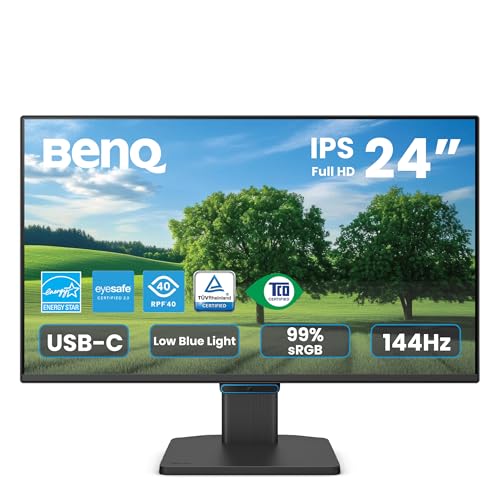
BenQ GW2490C — The one-cable laptop answer
The GW2490C solves the small desk’s ugliest problem, which is not size but cables. Its USB-C input lets a laptop drive the 23.8-inch 144Hz panel through a single lead, collapsing the dock, the charger spaghetti and the HDMI hunt into one connection that a cramped surface can actually sustain. On a desk where every centimetre is contested, deleting a power brick and two cables is a bigger quality-of-life upgrade than any panel statistic.
The surprise is that the screen behind the cable is genuinely good at both of its jobs. BenQ’s eye-care tuning and a home-office presentation make long workdays comfortable, while the full 144Hz refresh means the evening’s gaming needs no apology either. It is the fastest panel in this size roundup wearing office clothes, and that duality fits the laptop-centred life most small desks now lead.
Buy it when a laptop is the desk’s main machine and cable count is a daily irritation. Desktop-only users pay for a feature they cannot use, and the premium belongs elsewhere for them. For the docking household, though, this is the pick that makes a twenty-four-inch desk feel designed rather than improvised.
- Size: 23.8 inches
- Resolution: 1920 x 1080
- Refresh rate: 144Hz
- Connectivity: USB-C plus conventional inputs
- Character: eye-care home-office tuning
Strengths
- One-cable laptop connection declutters tiny desks
- 144Hz gaming hides inside an office design
- Eye-care tuning suits laptop-length days
Trade-offs
- USB-C premium is wasted on desktop-only setups
- Smallest screen in this roundup by a whisker
- Gaming features stay deliberately understated
Best for: laptop-first small-desk users drowning in cables who also game in the evening
Not suited for: desktop-only buyers who gain nothing from the docking premium

LG UltraGear 24G411A — The 120Hz gamer in a 24-inch frame
LG’s 24G411A brings gaming intent into the size class without blowing the brief: a 24-inch IPS panel at 120Hz, fast enough to transform competitive and fast-paced play for console and PC alike, in a frame that still respects a small desk. The 120Hz figure matters beyond PCs, because current consoles’ high-frame modes target exactly that rate, making this the rare pick here that serves a PlayStation or Xbox at full stretch and a gaming PC in the same evening.
Everyday behaviour stays civilised, as UltraGear’s mainstream models tend to manage. Colour presentation is lively, the design is compact, and the screen does not scream gaming peripheral at a desk that hosts video calls. Motion handling at its sensible settings is clean for the class, and the IPS angles suit the angled seating small rooms impose.
Shortlist it against the BenQ by deciding which second job matters more: docking or gaming. The LG is the player’s pick in this size category, the screen for a small desk whose owner games first and works second, and it loses nothing to the office-first models on ordinary desktop competence.
- Size: 24 inches
- Resolution: 1920 x 1080
- Refresh rate: 120Hz
- Panel: IPS
- Console fit: matches high-frame console modes
Strengths
- 120Hz serves gaming PCs and current consoles fully
- IPS angles suit cramped, angled seating
- Design stays presentable for work calls
Trade-offs
- No USB-C docking story for laptop users
- Stand is simpler than the Dell P-series
- Work colour tuning is livelier than accurate
Best for: small-desk gamers splitting time between a PC and a current-generation console
Not suited for: laptop dockers or colour-critical workers with other priorities

ASUS TUF VG249QE5A — The full 144Hz option at this size
The VG249QE5A closes the list as the maximum-speed answer that still respects the size brief: twenty-four inches, 1080p, a 144Hz IPS panel with a slight overclock beyond, in the TUF line’s durable shell. For a small desk that is primarily a gaming station, a battlestation in a bedroom corner or a student’s ranked-play headquarters, this is the screen that asks for no compromises on the gaming side of the ledger.
Its inclusion here, in a size-led roundup, makes a point worth stating: twenty-four inches is not a budget concession for gaming but the competitive standard, the size professional players choose when money is no object. The pixel density at this size keeps text workable, the frame fits a player’s full attention, and the panel’s speed does the rest. Small-desk gamers are not settling; they are, accidentally or deliberately, at the optimum.
The trade is everyday refinement. The office-first picks offer better stands, docking or comfort stories, and a mixed-life desk may value those more. Decide by the desk’s true centre of gravity. If it is gaming, this ASUS is the size category’s ceiling and its most exciting resident.
- Size: 24 inches
- Resolution: 1920 x 1080
- Refresh rate: 144Hz, overclockable slightly beyond
- Panel: IPS
- Adaptive sync: supported for both GPU camps
Strengths
- Full competitive speed at the ideal gaming size
- IPS panel keeps daily use pleasant
- Durable build suits student and shared housing
Trade-offs
- Stand and comfort trail the office-first picks
- No USB-C docking for laptop-centred desks
- Speed premium is wasted on casual libraries
Best for: small-desk players whose setup is a gaming station first and a desk second
Not suited for: mixed-life users who need ergonomics, docking or eye-care above frames
Comparison table
Every screen here shares a resolution and near-identical diagonals, so this table compares the qualities that actually separate them on a small desk.
| Pick | Format | Standout trait | Watch out for |
|---|---|---|---|
| Dell SE2422HX | 24-inch, 75Hz | Balanced small-desk default | No height adjustment |
| Dell P2422H | 24-inch IPS, 60Hz | Stand and colour for work | No gaming headroom |
| Dell SE2425H | 24-inch VA, 75Hz | Evening contrast | Narrower angles |
| BenQ GW2490C | 23.8-inch, 144Hz | USB-C cable deletion | Docking premium |
| LG 24G411A | 24-inch IPS, 120Hz | Console-ready speed | Simple stand |
| ASUS VG249QE5A | 24-inch IPS, 144Hz | Maximum gaming speed | Fewer comfort extras |
How do you choose the right 22 to 24 inch monitor for a small desk?
Measure before you shop, with a tape, not an estimate. Note the desk’s depth, the distance from your chair’s natural position to where the screen will sit, and the width left after keyboard and speakers claim their territory. For most adults, a twenty-four-inch screen wants roughly fifty to seventy centimetres of viewing distance; much closer and the frame edges leave comfortable vision, much farther and 1080p text shrinks below pleasant reading size.
Interrogate the stand as furniture. Its base depth eats the same surface your wrists want, and its height range decides whether the screen meets your eyes or your neck adapts downward for years. Where a stand disappoints, a compact monitor arm can rescue a small desk by floating the panel and returning the footprint entirely, which is why VESA mounting support deserves a line in every small-desk comparison even if the arm comes later.
Match panel type to the room’s seating reality. Solo, centred seating tolerates VA and its contrast rewards; shared or angled seating argues for IPS and its stable angles. Bright rooms argue for matte finishes and adequate brightness; dim entertainment rooms argue for contrast. The room votes first in this category, and the specification sheet merely counts the ballots.
Count cables as a size feature. A USB-C screen can remove a dock and a charger from the surface, effectively enlarging the desk, while a screen needing separate power, video and hub connections shrinks it. Laptop-centred buyers should treat docking as square centimetres, because on a small desk that is literally what it is.
Finally, decide the desk’s centre of gravity honestly. A work-first desk should buy ergonomics and comfort, a gaming-first desk should buy refresh, and an entertainment-first desk should buy contrast. The screens in this roundup each win one of those arguments outright; the commonest disappointment comes from buying a winner of the wrong argument.
How do you arrange a small desk around a 24-inch screen?
Anchor the layout with the screen’s centre at your seated eye height, or the top third of the panel level with your eyes, at roughly an arm’s length. On shallow desks that distance can feel close, so push the panel as far back as the surface allows and pull the keyboard toward you rather than crowding the screen forward. If the stand’s base forces the panel too close, that is the specific problem a slim monitor arm exists to solve.
Route cables as part of the arrangement, not after it. A single bundled run down the desk’s rear edge, with the power strip mounted underneath or behind, keeps the limited surface visually calm and physically usable. Small desks feel smaller through clutter than through dimensions, and cable discipline is the cheapest space expansion available to any setup in this category.
Light the desk for the screen you chose. Position the panel to avoid window reflections, especially with VA panels in bright rooms, and add a small bias light behind the screen for evening use to ease contrast strain. In multi-use rooms, a desk lamp aimed at the work surface rather than the panel preserves both document legibility and screen contrast simultaneously.
Revisit the arrangement when anything changes: a new chair, a laptop replacing a desktop, a second viewer joining for films. Small setups are systems with tight tolerances, and a ten-minute re-fit after a change prevents the slow ergonomic drift that makes owners blame a good screen for a layout that quietly stopped fitting their life.
What are the most common mistakes buyers make here?
Buying by diagonal alone is the category’s founding error. Two twenty-four-inch monitors can differ by centimetres of stand depth and kilograms of presence, and on a small desk those differences decide usability. Read the full dimensions, base included, and compare them against your tape measurements rather than against a showroom impression.
Oversizing in hope is the second trap: the twenty-seven-inch bargain that promises immersion and delivers a keyboard pushed into your lap and text you lean toward all day. In small rooms, the discipline of the size class is the feature, and breaking it for a deal usually costs the comfort the purchase was meant to buy.
Neglecting viewing distance ruins otherwise good choices. A screen placed too close forces constant eye scanning and makes even a fine panel feel fatiguing, which owners misdiagnose as an eye-comfort failure. Geometry first, settings second, complaints last is the correct order of operations.
Lastly, buyers forget the second viewer. Small-room screens get watched from beds, floors and pulled-up chairs at angles no product photo admits. If your screen regularly serves an audience of two, panel viewing angles belong near the top of the decision, not in the fine print.
Final Recommendation
Start with the Dell SE2422HX for a balanced small desk, step to the P2422H when posture and ports lead, choose the SE2425H for evenings, the BenQ when a laptop’s cables are the enemy, and the LG or ASUS when gaming owns the desk. Each of those sentences describes a real household, and the right one is simply the one that describes yours.
Measure the desk, respect the size class, and the best 1080p 22 24 inch monitors will do something larger screens cannot: disappear into daily life, leaving the whole desk, and the whole day, feeling bigger than it is.
What does living with a 24-inch screen actually feel like, hour by hour?
The morning begins with documents and messages, and here the size class quietly proves itself. A twenty-four-inch 1080p panel holds a full page beside a notes window without either becoming a postage stamp, text renders at a size that does not ask your eyes to lean in, and the whole frame sits inside the comfortable cone of vision from a normal chair. Larger screens demand head movement for the same work, which sounds trivial at nine in the morning and feels like a tax by five. This is the unphotogenic truth of the category: its screens are sized to the human visual system at desk distance, not to a showroom’s need to impress from across a floor.
Midday brings the video call, and the small desk’s constraints turn social. A compact screen leaves room for a notebook, a drink and the occasional cat, its camera can sit at an angle that flatters rather than surveils from above, and the panel’s matte finish forgives the window that a small room could not avoid. Colleagues see a tidy frame; you see a desk that still functions as a desk. Owners of vast panels in small rooms often end up working in a permanent construction site of their own equipment, and the contrast is not about minimalism as a style but about a surface that remains usable for the dozen non-screen tasks a day contains.
The evening session, gaming or film, is where sceptics expect the size to apologise, and at desk distance it mostly does not. A twenty-four-inch frame an arm’s length away fills a similar share of your vision as a large television across a living room, with lower latency and a sharper sense of presence than the comparison suggests. The immersion argument for bigger screens is really an argument about distance, and the small desk has already solved distance by being small. What the class cannot do is serve a room, a sofa of viewers across open floor, and it does not pretend otherwise; that job belongs to a television, and confusing the two is how buyers end up dissatisfied with both.
Night brings the detail that sells the category to its owners over years: the screen’s light does not own the room. A compact panel at sensible brightness is a pool of light on a desk, not a glowing wall that dictates the mood of a bedroom or keeps a partner awake. Bias lighting helps further, but the fundamental scale is humane in a way that large panels in small spaces simply are not. People live with these screens for a decade without resenting them, and that absence of resentment, unmeasurable and unmarketable, is the category’s real specification.
How do you fit two screens, or a screen and a laptop, into this size class?
Small desks breed multi-device ambitions, and the size class accommodates them better than any other if the arrangement is planned as a system. The classic layout pairs the 24-inch monitor as the primary display with the laptop open beside it, elevated on a stand so its screen sits near the monitor’s height, serving chat, reference material and calls while the main panel carries the work. The BenQ’s USB-C connection makes this layout a one-cable reality, and the geometry works precisely because neither screen is large enough to bully the other off the surface. Measure the combined width before buying anything, including the laptop’s hinge swing, and the arrangement either fits on paper or it was never going to fit in life.
A true dual-monitor small desk is possible at this size where a larger class forbids it, with two twenty-four-inch panels angled in a shallow arc that keeps both inside comfortable vision. The second panel rarely needs to match the first’s speed or colour ambitions; a retired screen from this very category often serves, which is one reason these monitors circulate through households for years. The discipline is symmetry of height rather than of specification: two screens at the same eye line with a small gap read as one workspace, while mismatched heights read as a compromise you will feel in your neck by Wednesday.
Vertical space is the small desk’s underused dimension, and this class exploits it gracefully. A monitor arm that floats the main panel frees the surface beneath it for the laptop, a dock or the notebook that small desks otherwise exile to the bed. Stacking a laptop beneath a floated screen, closed and driving it through USB-C, is the tidiest configuration this category enables, turning a cramped surface into something that photographs like a design blog while remaining, underneath, an ordinary affordable setup. The lesson repeats across this guide: at this size, arrangement is a feature, and it is mostly free.
Which rooms and households does this size class serve best?
The student room is the canonical case, a desk that must be library, office, cinema and gaming station inside a room that is also a bedroom, often with a landlord’s furniture and a neighbour through each wall. A twenty-four-inch screen is the largest object that serves all four jobs without colonising the room, it travels between term-time and home without drama, and its price survives a student budget’s contact with reality. The gaming picks in this roundup exist largely for this room, where a console and a laptop share the panel and the evening’s entertainment must not require a furniture rearrangement.
The spare-room and box-room office is the second case, increasingly the permanent one for hybrid workers. These rooms punish oversizing more subtly than student rooms do, because the desk shares space with storage, a guest bed or a household’s overflow, and a screen that respects the room keeps the whole arrangement civilised for years. The ergonomic Dell exists for this room’s owner, whose workday is long, whose gaming is modest and whose neck has seniority over their frame rate. Choosing the work-first pick here is not settling; it is correctly identifying which eight hours of the day the screen is really for.
The teenager’s bedroom and the family study form the third case, where the screen is shared, supervised or inherited in rotation. Size discipline keeps the furniture flexible, IPS angles keep the image honest for whoever pulls up a chair, and the class’s prices keep the purchase proportionate to a room that will be redecorated twice before the panel wears out. In all three cases the pattern is identical: the room has a life beyond the screen, and the screen that respects that life wins. That, in one sentence, is why this size class outsells every glamorous alternative year after year.
How sharp is sharp enough? A plain-language guide to 1080p at this size
Pixel density arguments sound technical and end up personal, because they depend on eyes, distance and the work in front of you. At twenty-four inches, a 1080p panel places its pixels at a density that, from a normal desk distance of an arm’s length or a little more, renders ordinary text cleanly enough for documents, code, spreadsheets and study. Move closer, into the distance a shallow desk sometimes imposes, and the structure of the image becomes easier to notice, especially on diagonal lines and small fonts. That is a geometry problem before it is a resolution problem, and it is why this guide keeps returning to viewing distance as the first measurement a small-desk buyer should take.
The honest comparison is with the alternatives at their real prices. A 1440p panel at this size is visibly finer for text and costs meaningfully more, while also taxing a gaming system harder in every title. For a work-first desk doing hours of fine text, that trade can be correct, and this roundup does not pretend otherwise; the Dell P-series pick is where such buyers should start before deciding the resolution itself is the bottleneck. For mixed desks, and for gaming at this size where 1080p is the competitive standard rather than a compromise, the finer panel’s premium usually buys less daily satisfaction than the stand, docking or comfort upgrades available inside this class for the same money.
Age and eyesight belong in the calculation without embarrassment. Many adults find the slightly larger text rendering of 1080p at twenty-four inches actively comfortable, a built-in scaling that higher-density panels must then imitate through software. Operating-system scaling on a denser screen works well these days, yet the simple fact remains that this size and resolution pairing matches a wide range of vision at a natural distance, which is one more reason it became the default in offices worldwide. Defaults become defaults by fitting the median human, and the median human is who this category serves.
What should you know about buying this class second-hand or for a family fleet?
Because these panels are the world’s default office and home screen, the second-hand market is deep, cheap and mostly honest, and a buyer furnishing several desks at once, a family study, a small business, a classroom corner, can exploit that depth intelligently. The checks are the same ones this guide applies to new panels, compressed: power it on, show a grey screen and a dark scene, confirm every input you need, and inspect the stand for the wobble that betrays a hard life. A panel from this class with a clean bill on those four tests will usually serve for years, because the technology is mature and its failure modes are visible rather than hidden.
Fleet buying changes which pick is correct in an interesting way. For a household equipping two or three desks, matching models simplify everything downstream: one menu system to learn, interchangeable stands and cables, a single spare that can substitute anywhere. The Dell SE models are the natural fleet choice for that reason, and their modest individual compromises matter less than the system’s coherence. This is also where the size class’s low prices compound, since the difference between equipping three desks from this roundup and equipping them from a premium tier is measured in holidays, not in loose change.
Warranty logic inverts for fleets and second-hand purchases. A single main screen deserves the protection of a new purchase and a painless return route; the third desk’s panel can rationally be a used bargain whose failure would be an inconvenience rather than a crisis. Matching the purchase channel to the screen’s importance, rather than applying one rule to every desk in the house, is the kind of unglamorous judgement this category rewards at every level, from a student’s first panel to a family’s fourth.
How do you keep a small-desk setup comfortable across a whole working week?
Comfort on a small desk is a system property, and the screen is only its most visible component. The chair’s height sets the eye line the stand must meet, the desk’s depth sets the distance the panel must respect, and the lighting sets the brightness the panel should run. Adjusting any one of them in isolation produces the familiar result of a setup that photographs well and aches by Thursday. The practical method is a single deliberate fitting session: chair first, then screen height with the top third of the panel near eye level, then distance at roughly an arm’s length, then brightness matched to the room at the time of day you work most. Photograph the result, because future rearrangements will drift and the photograph is the reset point.
Breaks are part of the equipment. At this size and distance, the eyes’ focusing muscle works steadily, and the widely used rhythm of looking at something distant for a short interval at regular points in the hour costs nothing and repays noticeably by evening. A window, where the room has one, is the ideal distant target, which is one more reason to arrange the desk so the screen does not wall off the room’s only view. Small desks in small rooms ask more of their owners’ habits than large setups do, and repay the attention with a disproportionate sense of calm when the habits are right.
Finally, protect the setup from entropy. Cables migrate, stands get bumped, a borrowed book becomes a permanent monitor riser and the geometry you fitted quietly dissolves. A five-minute monthly reset, cables re-seated, screen height checked against the photograph, surface cleared back to the arrangement that worked, keeps a small desk feeling designed rather than accumulated. The screens in this roundup will outlast several such resets without complaint; the discipline is for the human, and it is the cheapest comfort upgrade in this entire guide.
Gaming at twenty-four inches: why the pros never left this size
It surprises buyers raised on ever-larger televisions that elite competitive players, free to use almost any equipment, cluster at exactly this roundup’s size. The reason is information geometry. A match’s decisive details, a shoulder at a doorway’s edge, a minimap call, a health bar’s change, must all live where the eyes can reach them without travel, and at desk distance a twenty-four-inch frame is approximately the largest territory that sharp central vision can hold at once. Enlarge the frame and the edges become errands; shrink it and the details compress below comfortable reading. The size is not a budget tier that professionals tolerate. It is the optimum they converged on, which makes the small-desk gamer’s constraint an accidental alignment with the highest level of the hobby.
That convergence has a liberating consequence for this category’s buyers: the gaming picks here are not junior versions of serious equipment. The LG at 120Hz and the ASUS at 144Hz are, in size and resolution, the same instruments the competitive world uses, differing in panel refinement rather than in kind. A student on a bedroom desk and a professional in a studio are solving the same geometry problem and arriving at the same diagonal. Few product categories offer that dignity at this price, and it is worth pausing on before dismissing the class as the small option. Small, here, is simply correct, for the palace and the box room alike.
What is the real difference between the 22-inch and 24-inch ends of this class?
Listings in this category span a band rather than a point, and the band’s lower end behaves differently enough to deserve plain words. A twenty-two-inch class panel, usually nearer twenty-one and a half in truth, suits the tightest surfaces and the supporting roles: a second screen, a child’s first display, a kitchen or workshop information panel, a till or studio side desk. Its text at 1080p is actually a touch denser and crisper than the larger size, a small consolation that matters for a reading screen. What it cannot do is anchor a full working day comfortably for most adults, because split-screen work compresses and the frame leaves central vision underfilled, inviting the lean-in posture that necks remember.
The twenty-four-inch end is where the class becomes a primary instrument, and every pick in this roundup lives there deliberately, between twenty-three point eight and twenty-four inches of actual diagonal. That clustering is the market agreeing with the ergonomics: big enough for a working day and a gaming evening, small enough for the desks real households own. Buyers tempted by the lower end for a main screen should sit in front of one for a full hour before deciding, because the difference between the band’s ends is not two inches of diagonal; it is the difference between a tool and an accessory, and the price gap between them is rarely large enough to justify confusing the two.
A fitting session, step by step, for the desk you actually own
Clear the surface completely before the new screen goes down, because a small desk fitted from empty converges on a better arrangement than one edited around its own clutter. Place the screen first, centred on where your chair naturally sits rather than on the desk’s geometric middle, since bodies are the reference and furniture merely hosts them. Set its height so your eyes meet the upper portion of the panel, confirm the distance with an outstretched arm, and only then admit the keyboard, which belongs where your hands fall with your shoulders down, not where the desk’s edge suggests. Everything else that returns to the surface must now argue for its place against the space the work actually needs.
Route the cables while the arrangement is young, in one bundle down the rear edge, with the power strip fixed beneath or behind the desk so the floor stays clear and the surface keeps its calm. Add the lamp where it lights the work without reflecting in the panel, test the evening configuration with the room’s real lighting rather than the showroom in your head, and make the small corrections, a tilt here, a centimetre there, that a photograph of the setup will then preserve. Take that photograph. It is the constitution of the desk, the document every future drift gets corrected against, and it costs less than a minute.
Live with the result for a full week before judging it, because bodies adapt and first impressions of a new geometry are unreliable narrators. Note the one thing that still irritates you at the week’s end, fix exactly that, and resist the cascade of further changes. A small desk perfected by single, deliberate corrections stays perfected; a desk rearranged weekly in search of a feeling stays a hobby that happens to hold a monitor. The screens in this roundup are patient equipment. The fitting session is how their owners catch up.
Why does this unglamorous class deserve more respect than it gets?
Monitor marketing worships the extremes, the enormous, the curved, the blisteringly fast, because extremes photograph well and justify their margins in a single glance. The class in this roundup does the opposite work: it fits the median room, the median desk, the median budget and the median pair of eyes, and it does so with a maturity that comes from being manufactured by the million for the world’s offices. There is a particular engineering honour in that kind of fitting. A screen that a student, a nurse on night shifts, a parent in a box room and a professional in a studio apartment can all sit in front of, comfortably, for a decade, has solved a harder problem than a flagship has, because its constraints were human rather than financial.
Respecting the class also protects the buyer. The person who understands why twenty-four inches at 1080p became the default is immunised against two expensive errors: the oversize bargain that wrecks a small desk’s ergonomics, and the prestige purchase whose capabilities the room and the routine cannot use. They will buy the Dell that fits their posture, or the BenQ that deletes their cables, or the LG that serves their console, with the calm of someone purchasing a tool rather than entering a competition. That calm, multiplied across the years these panels serve, is worth more than any single specification debated in this guide, and it is the note on which a size-led roundup should properly end.
How does this class handle the hybrid era’s defining desk, the hot-desk at home?
The hybrid era invented a desk that changes occupants and purposes daily: a parent’s office by day, a child’s homework station at four, a gaming desk at eight, a partner’s video-call corner on weekends. This size class is the only one that serves that rotation without renegotiating the furniture each time, because the screen is small enough to share, light enough to reposition and, in the case of the ergonomic and USB-C picks, adjustable enough to fit a tall adult in the morning and a teenager by evening with thirty seconds of stand adjustment between them. Presets per input extend the courtesy to the picture itself, so each user’s machine finds its own settings waiting rather than the previous occupant’s compromises.
Households running such a desk should buy for the rotation explicitly: the stand’s range becomes the headline specification, the input count must cover every machine without a weekly cable ceremony, and the panel’s angles must forgive the chair positions a shared room imposes. Judged on those criteria the Dell P-series and the BenQ divide the honours between them, one for posture, one for cables, and the rest of the list serves the desks with a single settled owner. Naming which desk you own, rotating or settled, is the last and most useful measurement this guide will ask of you, and like all the others, it costs nothing but honesty.
A closing word on fitting in: the best 1080p 22 24 inch monitors, fitted
Every other roundup in this series celebrates a screen for standing out, faster, larger, brighter, more. This one has celebrated the opposite virtue, and it is worth ending by naming it plainly: the best screen for a small desk is the one that fits so completely into the room’s life that the room forgets to resent it. It leaves space for the notebook and the mug, it meets the eyes of whoever sits down, it carries the workday and the film night without demanding the furniture confess which mattered more. Buy that fit, in whichever of these six panels describes your room most accurately, and the smallest category in the monitor market will give you the largest thing it has to offer, which is a desk that feels like yours again.
What about gaming guests, sleepovers and the second controller?
Small rooms host socially in ways floor plans never predict: a friend with a second controller on the desk’s edge, a sibling watching from the bed, a cousin’s laptop joining for a co-op evening. Owners rarely list hospitality among a monitor’s specifications, yet in student rooms and teenagers’ bedrooms it is a weekly reality, and panels that serve it well become the room’s social centre rather than its solitary shrine.
If that social pattern describes your room, let it vote: IPS over VA for the angles, a stand that tilts and swivels without tools, and an input arrangement that lets a guest’s machine connect in one cable rather than a ceremony. The picks here divide those honours clearly enough that the room’s social life, honestly described, chooses the screen almost by itself.
One sentence to carry to the shop
Measure the desk, name its main job, and let those two facts choose among these six, because at this size the correct monitor is never the most impressive one in the store; it is the one your room would have specified for itself, given a voice and a tape measure.
And if the desk is not small at all?
A fair challenge deserves its paragraph: some readers land here with generous desks and wonder whether the class still applies to them. Readers whose work is text-dense and whose distance is long may genuinely belong in a higher-resolution class, and this guide releases them without argument. Everyone else should notice that the professionals of two different worlds, competitive gaming and office ergonomics, converged on this size from opposite directions, and that convergence is evidence no advertisement can buy.
Frequently Asked Questions
Is 22 inches too small, or is 24 inches the right choice?
For most desks, twenty-four inches is the sweet spot: large enough for split-screen work, small enough for shallow surfaces. Twenty-two-inch models suit truly tiny spaces or second-screen duties where the panel plays a supporting role.
Is 1080p sharp enough at twenty-four inches?
Yes for documents, study and media at normal desk distances. It is not as crisp as 1440p for fine design work, but within this size class the density is respectable and the price difference buys other things small desks need more.
Do I need a monitor arm for a small desk?
Not always, but it is the single most effective upgrade when a stand’s base steals surface or its height misses your eye line. Check any screen you buy has VESA mounting so the option stays open.
Which panel type suits a bedroom desk?
VA for solo evening viewing, thanks to its contrast in dim rooms. IPS if the screen is regularly watched from a bed at an angle or shared, because its image stays stable off-centre.
Can a 24-inch monitor handle console gaming well?
Very well. The size suits desk-distance console play, and the 120Hz LG in this roundup matches current consoles’ high-frame modes, while the 75Hz models handle standard console output gracefully.
What matters more at this size, refresh rate or ergonomics?
Whichever matches the desk’s main job. Gamers feel refresh; workers feel ergonomics every hour of every day.
Related Guides
Keep exploring with these companion guides: best 1080 gaming monitors 60hz best 1080p 144hz monitors best monitor arms for small desks.


