What's inside
- Key Takeaways
- Quick Picks
- How did we choose these picks?
- Comparison table
- IPS, TN or VA: which panel actually suits your 144Hz gaming?
- How do you configure a 144Hz monitor for clean motion?
- What are the most common mistakes buyers make here?
- Final Recommendation
- Why did 144Hz become the competitive standard rather than just a step?
- How do different competitive genres use a 144Hz panel differently?
- What does a sensible upgrade path look like from a first 144Hz screen?
- How do you test a 144Hz panel properly during its return window?
- TN in 2026: who should still buy the ZOWIE, honestly?
- What separates the two ASUS picks and the two 24-inch IPS rivals at a glance?
- How do settings differ between competitive and cinematic play on the same panel?
- A note on latency claims, input lag and what you can actually feel
- How should a first-time high-refresh buyer spend the first evening?
- What role does the second screen play in a 144Hz setup?
- Why does this category keep winning against bigger, sharper screens?
- A closing word on the sweet spot: the best 1080p 144hz monitors
- The smallest possible summary, for the player who scrolled
- And one practical promise to end on
- One sentence to carry into the shop
- Frequently Asked Questions
- Related Guides
As an Amazon Associate I earn from qualifying purchases. This post may contain affiliate links at no extra cost to you.
widgetverdict.com is reader-supported. When you buy through links on our site, we may earn an affiliate commission.
Where to buy: all six models below link to verified Amazon listings, including the two picks that deliberately exceed the brief, a 165Hz curved screen and a 200Hz headroom option, both labelled openly in their sections.
If one specification defines modern PC gaming value, it is this one. The best 1080p 144hz monitors pair the resolution mid-range graphics cards can actually feed with the refresh rate that transforms competitive play, and this roundup compares six verified screens across the category’s real fault lines: IPS versus TN panels, 1ms-class response claims, FreeSync and G-Sync support, desk size and the hybrid work-and-play reality most buyers live in. Two picks deliberately step beyond 144Hz, and both say so in their headings rather than hiding in the fine print.
The category’s maturity is good news for shoppers. A decade of refinement means even mid-priced 144Hz IPS panels now deliver motion clarity that once required esports TN hardware, so the decision has shifted from raw speed to character: which compromises suit your games, your desk and your eyes. That is the question each detailed review below is written to answer, pick by pick, without pretending one screen wins every argument.
Key Takeaways
- IPS has largely replaced TN for most players; TN survives as an esports specialism.
- Boxed 1ms figures are marketing dialect; panel type and overdrive tuning matter more.
- FreeSync and G-Sync support decides smoothness when frames dip below 144.
- Twenty-four inches is the competitive size; twenty-seven trades sharpness for immersion.
- USB-C and comfort features make the BenQ the hybrid desk’s favourite here.
- A 200Hz pick earns its place when a GPU upgrade is realistically coming.
Quick Picks
| Pick | Badge | Why it earns its place |
|---|---|---|
| ASUS TUF VG249QE5A | Balanced IPS benchmark | The all-rounder most buyers should start from. |
| BenQ ZOWIE XL2411P | Esports TN specialist | Tournament-bred speed and settings culture. |
| LG UltraGear 24G414B | Polished G-Sync IPS | Punchy colour and tidy NVIDIA sync behaviour. |
| BenQ GW2490C | USB-C hybrid | 144Hz gaming with real laptop docking manners. |
| ASUS TUF VG27VH1B | Curved immersion pick | 27-inch 165Hz wrap for racing and open worlds. |
| Acer Nitro KG251Q X3 | 200Hz headroom pick | Future frames at near-144Hz money. |
How did we choose these picks?
Panel technology framed the whole selection. We required the list to represent the genuine choice buyers face: modern fast IPS for most players, a true TN esports instrument for specialists, and a VA curve for immersion, because a roundup of six near-identical IPS screens would dodge the category’s only interesting question. Each review then judges its panel on the work that technology is actually for, rather than marking every screen against one universal template.
Response behaviour was assessed as a system, panel plus overdrive tuning, with scepticism toward printed figures. A usable 144Hz screen must keep its frame interval clean in the overdrive mode a human would actually select, without bright coronas trailing moving objects. Sync support was the second filter, since real gameplay on mid-range hardware lives between ninety and one hundred forty frames, and that is precisely the territory where FreeSync and G-Sync implementations earn their keep.
Finally, we weighted the desk around the gaming: stand quality, menu sanity, connectivity such as the BenQ’s USB-C, and whether the screen remains bearable across a workday. All six picks were verified against current listings at checking time, so every recommendation here carries a working purchase route.

ASUS TUF VG249QE5A — The balanced IPS benchmark
Every 144Hz roundup needs a centre of gravity, and the VG249QE5A holds that role here: a 24-inch IPS panel at 144Hz with a small overclock beyond, adaptive sync for both graphics camps, and the unglamorous reliability that TUF products trade on. IPS is the significant choice. Compared with the TN panels that built this category, colours stay honest at desk angles, a teammate watching over your shoulder sees the same image you do, and the screen remains pleasant during the work and study hours surrounding the gaming.
Motion performance is where a modern IPS earns its premium over older designs. Pixel response on panels of this generation keeps pace with the 144Hz interval comfortably in its sensible overdrive modes, so fast pans read as movement rather than smear. The 1ms-class claims on the box should be read as marketing dialect rather than measurement, yet the lived experience, clean tracking in shooters and crisp scrolling everywhere else, matches what buyers actually want from those numbers.
As the default answer among the best 1080p 144hz monitors, this ASUS suits the player who games seriously without specialising obsessively. It lacks the esports extremity of the ZOWIE below and the size of the curved 27-inch pick, and in exchange it does almost everything well. Most buyers should start their comparison here and demand a specific reason to move away from it.
- Size: 24 inches
- Resolution: 1920 x 1080
- Refresh rate: 144Hz, overclockable slightly beyond
- Panel: IPS
- Adaptive sync: supported for both GPU camps
Strengths
- IPS colour and angles suit mixed daily use
- Motion clarity matches the 144Hz brief cleanly
- Balanced feature set with no serious weakness
Trade-offs
- Esports specialists can buy faster, harder tools
- Stand is sturdy rather than luxurious
- Box response claims overstate real behaviour
Best for: serious all-round players who want one 144Hz screen for gaming, work and everything between
Not suited for: professional esports players who need tournament-specific motion features

BenQ ZOWIE XL2411P — The esports TN specialist
The XL2411P is a piece of esports history that still earns its shelf space: a 24-inch TN panel at 144Hz with 1ms-class response, built for players who treat settings as part of their technique. TN technology is unfashionable, and its compromises are real, with colour shifting at angles and a flatter image for films. In exchange it delivers the raw pixel speed and the particular motion character that a generation of professional players trained on, plus ZOWIE’s ecosystem of profiles and settings shared between teammates and events.
What keeps this monitor relevant is focus. Everything about it serves competitive play: the bezel, the settings architecture, the absence of decorative nonsense. Players migrating from this panel’s predecessors will feel at home within an hour, and players building a dedicated competition setup, separate from a general desk screen, will appreciate a tool that refuses to be anything else. Black equalisation style features help pull detail from dark corners in shooters, a small but genuine tactical convenience.
The honest boundary is versatility. As an only screen for a household, the ZOWIE asks everyone else to accept its compromises daily. As a specialist instrument beside or instead of a general display, for a player whose hours are overwhelmingly ranked shooters, it remains a legitimate and distinctive choice that IPS all-rounders cannot replicate, which is exactly why it survives in a modern roundup.
- Size: 24 inches
- Resolution: 1920 x 1080
- Refresh rate: 144Hz
- Panel: TN, 1ms-class response
- Focus: esports settings and profiles
Strengths
- Raw TN speed with proven esports pedigree
- Settings ecosystem suits serious competitive routines
- Dark-corner detail features help in shooters
Trade-offs
- Viewing angles and colour are the weakest here
- Films and photo work look flat beside IPS
- Specialist tool, poor household all-rounder
Best for: dedicated competitive players building a focused esports setup
Not suited for: anyone buying a single screen for a whole household’s mixed use

LG UltraGear 24G414B — The 1ms IPS with G-Sync
LG’s UltraGear line brings a particular polish to this category, and the 24G414B pairs a 24-inch IPS panel at 144Hz with 1ms-class response claims and G-Sync support that NVIDIA owners will appreciate. LG’s gaming menus and crosshair-style conveniences are present without overwhelming the interface, and the design language, slim bezels and a purposeful stand, looks at home on a desk that also hosts work calls with the camera on.
The panel’s everyday behaviour is its quiet strength. UltraGear IPS screens tend toward a slightly punchier colour presentation than the ASUS, which flatters games while staying close enough to honest for casual photo work. Motion handling in the sensible overdrive range is clean, and the sync implementation keeps the sub-144 frame rates of heavier titles composed rather than juddery, which is where most real gameplay actually lives on mid-range hardware.
Shortlist this LG against the ASUS as a matter of taste and ecosystem. NVIDIA households gain the tidiest sync story here, and buyers who prefer LG’s menus, styling or warranty handling lose nothing meaningful in panel performance. In a category this mature, those ownership details are legitimate deciding factors rather than tie-break trivia.
- Size: 24 inches
- Resolution: 1920 x 1080
- Refresh rate: 144Hz
- Panel: IPS, 1ms-class response claims
- Adaptive sync: G-Sync support headline
Strengths
- Punchy IPS colour flatters games immediately
- Tidy sync story for NVIDIA systems
- Design and menus feel a tier above budget rivals
Trade-offs
- Colour punch needs taming for accurate work
- FreeSync-side details matter less in its pitch
- Price can sit above the ASUS benchmark
Best for: NVIDIA-based players wanting a polished, good-looking 144Hz IPS screen
Not suited for: colour-critical workers who need a more restrained default presentation
BenQ GW2490C — The USB-C hybrid at 144Hz
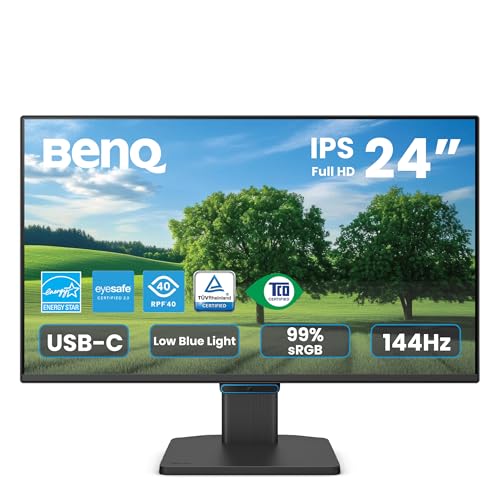
The GW2490C is the interesting hybrid of this roundup: a 23.8-inch 1080p panel running at a full 144Hz, yet wearing the clothes of a BenQ home-office monitor, complete with USB-C connectivity and the company’s eye-care emphasis. That combination serves a real and growing desk, the one where a work laptop docks all day and a gaming PC wakes in the evening, and where a single cable carrying video to the laptop is worth more than any gaming garnish.
Gaming performance is honest midfield. The panel delivers the category’s defining smoothness and works happily with adaptive sync, while its tuning leans toward cleanliness rather than the last fraction of motion aggression. For the player whose competitive ambitions are recreational, that balance is not a compromise at all; it is the correct allocation, with comfort features protecting the eyes through the workday that pays for the hobby.
Choose this BenQ when the desk is shared between employer and evening, and when USB-C docking simplifies a real cable problem you actually have. Pure gaming desks can spend the same money more single-mindedly elsewhere in this list. Hybrid desks will find this the most livable 144Hz option here, and livability across ten daily hours beats a spec-sheet edge across two.
- Size: 23.8 inches
- Resolution: 1920 x 1080
- Refresh rate: 144Hz
- Connectivity: USB-C alongside conventional inputs
- Character: home-office tuning with eye-care emphasis
Strengths
- USB-C simplifies laptop docking dramatically
- 144Hz gaming with genuine workday comfort
- BenQ eye-care tuning suits very long days
Trade-offs
- Motion tuning is clean rather than aggressive
- Gaming garnish is minimal by design
- Small size gives up some immersion
Best for: hybrid workers docking a laptop by day and gaming at 144Hz in the evening
Not suited for: pure gaming setups with no laptop or comfort priorities

ASUS TUF VG27VH1B — The 27-inch curved immersion pick
The VG27VH1B breaks this category’s size discipline deliberately: a 27-inch curved VA panel at 165Hz, included for players who prioritise immersion over pixel density and want the wrap of a 1500R curve in racing, flight and open-world titles. The curve at this size is not a gimmick; it pulls the screen edges into a more natural relationship with your peripheral vision, and VA contrast gives night driving and dark cockpits a depth the IPS picks cannot match.
The trade-offs must be stated as plainly as the benefits. At twenty-seven inches, 1080p spreads thin, text softens, and competitive players lose the compact frame their eyes prefer. VA pixel response in dark transitions also trails the IPS models, so fast dark shooters are not its home turf. This is a cinema-and-simulation screen that happens to be fast, not an esports tool, and buying it for ranked play would misunderstand it completely.
Within its intended brief, though, it is the most fun screen in this roundup. A steering wheel or a controller, a dim room and a sweeping landscape make its case better than any specification can. Buyers with the desk depth to sit at a proper distance, and libraries weighted toward immersion, will understand immediately why it earned a place among faster, sharper rivals.
- Size: 27 inches, curved 1500R
- Resolution: 1920 x 1080
- Refresh rate: 165Hz
- Panel: VA for high contrast
- Best use: racing, flight and open-world immersion
Strengths
- Curve and contrast make scenic games enveloping
- 165Hz keeps motion fluid in fast driving
- Large format suits controller play from farther back
Trade-offs
- 1080p at twenty-seven inches softens text visibly
- Dark-transition response trails IPS rivals
- Competitive players should choose a smaller screen
Best for: immersion-first players with racing, flight or open-world libraries and a deep desk
Not suited for: esports players or anyone doing hours of fine text work daily

Acer Nitro KG251Q X3 — The 200Hz overachiever in a 144Hz list
Including a 200Hz monitor in a 144Hz roundup needs justification, and the KG251Q X3 provides it with its price: Acer’s 24.5-inch FreeSync Premium panel frequently sits close enough to 144Hz money that ignoring it would mislead shoppers. Everything said about headroom elsewhere applies with force here. A system that averages 150 frames today uses this screen well now and keeps growing into it through the next graphics upgrade, which is how monitor purchases should age.
The panel itself repeats the virtues from our 200Hz testing context: a competitive size that keeps 1080p respectable, sync behaviour that stays composed as frame rates wander, and brightness that copes with a normally lit room. Its compromises are equally familiar, chiefly a basic stand that serious users will replace with an arm sooner or later.
The decision between this Acer and a true 144Hz pick is really a decision about your upgrade path. Fixed hardware for years ahead argues for the cheaper 144Hz models. Any realistic prospect of a stronger GPU argues for the headroom, because monitors outlive graphics cards and the frame ceiling you buy is the ceiling you keep. For most ambitious players, that makes the overachiever the smart money in this entire list.
- Size: 24.5 inches
- Resolution: 1920 x 1080
- Refresh rate: 200Hz
- Adaptive sync: FreeSync Premium
- Role in this roundup: headroom pick above the class
Strengths
- 200Hz headroom ages gracefully with GPU upgrades
- Competitive size keeps 1080p density respectable
- Often priced close to 144Hz rivals
Trade-offs
- Extra speed is idle on fixed modest hardware
- Basic stand invites an eventual arm purchase
- Not the cheapest way into high-refresh gaming
Best for: players planning a graphics upgrade who want a screen that will not become the bottleneck
Not suited for: buyers on fixed modest hardware who would never feed frames beyond 144
Comparison table
Panel type is the column that predicts your experience best in this table; refresh rate merely sets the ceiling all six picks share or exceed.
| Pick | Format | Standout trait | Watch out for |
|---|---|---|---|
| ASUS VG249QE5A | 24-inch IPS, 144Hz | All-round balance | No esports extremity |
| BenQ ZOWIE XL2411P | 24-inch TN, 144Hz | Esports speed culture | Weak angles and colour |
| LG 24G414B | 24-inch IPS, 144Hz | Polish and G-Sync | Punchy default colour |
| BenQ GW2490C | 23.8-inch, 144Hz | USB-C hybrid comfort | Gentler motion tuning |
| ASUS VG27VH1B | 27-inch VA curved, 165Hz | Immersion and contrast | Soft text at size |
| Acer KG251Q X3 | 24.5-inch, 200Hz | Headroom for upgrades | Basic stand |
IPS, TN or VA: which panel actually suits your 144Hz gaming?
Start with the honest summary. Fast IPS is the default for a reason: it pairs motion clarity that satisfies most competitive players with colour and viewing angles that keep the screen pleasant for everything else in a day. TN remains the specialist’s instrument, trading image quality for the last increments of pixel speed and a settings culture built around tournament play. VA trades response in dark transitions for contrast that transforms night scenes, suiting immersion over ladder climbing.
Response-time numbers deserve translation. The 1ms figure on a box is measured under conditions chosen by the manufacturer, often with overdrive settings that introduce visible artefacts, and it is not comparable across brands. What you can compare is panel generation and type, plus the behaviour of the middle overdrive setting, which is where these screens live in practice. Reviews and return policies protect you better than a heroic number in a product title.
Adaptive sync is the feature that decides how the monitor feels on your hardware, not the flagship rig in an advertisement. Confirm your graphics card’s camp is properly supported, check the sync range reaches down to your frame-rate dips, and remember that certification tiers exist because basic implementations vary. A screen that holds sync from forty-eight frames upward will feel composed in heavy titles; one that drops out early will judder in exactly the scenes that needed help.
Size interacts with resolution more than with refresh. At twenty-four inches, 1080p remains respectable for text and ideal for tracking a whole competitive frame. At twenty-seven inches the same pixel count softens visibly, which immersion players accept and productivity users resent. Neither answer is wrong, but they are answers to different questions, and mixing them up is how buyers end up returning perfectly good monitors.
Ergonomics and inputs close the decision. Height adjustment matters across long sessions, a USB-C input can delete a dock from a hybrid desk, and a second HDMI keeps a console permanently connected. List your devices and your posture needs before comparing panels, because the best screen on paper loses to the screen your desk and body can actually live with.
How do you configure a 144Hz monitor for clean motion?
Verify the basics before tuning anything exotic: the correct cable, the correct input, and the operating system set to 144Hz, confirmed in the display settings rather than assumed. Then enable adaptive sync in the monitor menu and the graphics driver, and set an in-game frame cap a few frames under the ceiling so the system never leaves the sync range during spikes. That trio of steps delivers most of the experience buyers paid for, and skipping any one of them silently refunds it.
Tune overdrive empirically. Display a fast scrolling test or a familiar map, raise the overdrive one step at a time, and stop at the setting just before bright halos appear behind moving edges. That setting is your panel’s honest maximum, and it may differ from both the factory default and any recommendation written for a different unit. Lock it in and resist revisiting it weekly; consistency lets your eyes adapt and your aim stabilise.
Set brightness for the room you play in, typically well below the scorching defaults panels ship with, and pick the colour mode that keeps shades distinguishable in dark game areas without washing the image grey. Esports titles reward visible shadow detail over cinematic contrast, so a slightly lifted, honest presentation usually serves competitive play better than the movie preset’s crushed blacks.
After driver updates, spend thirty seconds re-confirming refresh rate and sync status, because updates occasionally reset both without asking. Building that tiny ritual into update day protects months of muscle memory from being quietly undermined by a default nobody chose.
What are the most common mistakes buyers make here?
Chasing the printed millisecond is the category’s signature error. Buyers pay premiums for a number measured under unusable settings, then run the panel in a gentler mode identical to a cheaper rival’s. Panel type, generation and sync certification are the honest proxies; the box figure is advertising.
Buying twenty-seven inches at 1080p for competitive play is the second classic. The bigger frame feels like an upgrade in the shop and plays like a handicap, pushing information into peripheral vision while softening the image. Competitive desks stay near twenty-four inches for reasons that have nothing to do with budget.
Forgetting the frame-rate supply chain wastes more money than any panel flaw. A 144Hz screen fed seventy frames by an ageing card is a promise unkept, and the disappointment lands on the monitor. Check your real frame rates in your real games first, then choose the ceiling that matches, or consciously buy headroom as an upgrade plan.
Finally, players copy settings wholesale from professionals without matching the context. A tournament player’s overdrive, brightness and colour choices serve a specific panel, game and venue. Borrow the method, test on your own screen, and keep what your eyes confirm rather than what a settings page commands.
Final Recommendation
The ASUS VG249QE5A is this category’s centre: start there unless a specific need pulls you elsewhere. Esports devotion pulls toward the ZOWIE, NVIDIA polish toward the LG, a hybrid desk toward the BenQ with its USB-C sanity, immersion toward the curved ASUS, and an imminent GPU upgrade toward the Acer’s 200Hz headroom. That spread is the sign of a healthy category, where the right answer genuinely depends on the player asking.
Buy the panel that matches your games and your desk, configure it properly on the first evening, and the best 1080p 144hz monitors will repay you in the only currency that matters here: information arriving cleanly, one hundred forty-four times a second, for years.
Why did 144Hz become the competitive standard rather than just a step?
Standards form where several curves cross, and 144Hz is where the curves of panel manufacturing, graphics hardware and human perception crossed for a decade. The panels could be made in volume at prices ordinary players could reach, mid-range graphics cards could feed them at 1080p in the titles that mattered, and the improvement over 60Hz was large enough that no player who experienced it described it as subtle. Higher rates existed at the margins, but a standard is not the best available thing; it is the best thing that an entire ecosystem, tournaments, streamers, teammates and hardware makers, can assume everyone has. That assumption is what a buyer purchases into, and it remains this category’s deepest advantage.
The ecosystem effect shows up in small, practical places. Game settings guides are written against this class of hardware, so the presets and caps they recommend will match your system. Teammates comparing experiences are describing the same cadence, which makes advice transferable. Tournament and LAN setups standardised around similar panels for years, so the player training at home on a screen like the ZOWIE or the ASUS is rehearsing on equipment whose behaviour resembles the stage. None of that appears on a specification sheet, and all of it has real value to a player whose hobby is social and competitive at once.
There is also a maturity dividend in the panels themselves. A technology produced at this scale for this long has had its failure modes found and engineered out, its overdrive tuning refined across generations, and its pricing compressed by competition to the point where the difference between a good and a great 144Hz IPS panel is now measured in tens rather than hundreds. Buyers entering the category today inherit that decade of refinement for free, which is why this guide can recommend six screens with confidence and spend its words on fit instead of on warnings.
Understanding the standard also clarifies when to leave it. The 200Hz Acer in this list makes sense as a purchase because the ecosystem is drifting upward and prices have followed it down; the esports TN pick makes sense because a subculture never left its own standard. But the centre holds for a reason, and a first high-refresh purchase made anywhere else needs a specific argument. If you cannot state yours in one sentence, the centre is your answer.
How do different competitive genres use a 144Hz panel differently?
Tactical shooters, the slow-peeking kind, use the refresh rate defensively. Most of a round is stillness and anticipation, and the panel’s contribution arrives in the fractions where angles are cleared and duels are taken: motion stays readable through a fast clear, and the information gathered in that sweep remains usable. Players in these titles also live inside scoped and held angles where nothing moves for long stretches, which is why the category’s colour and comfort qualities matter more here than raw speed mythology suggests. A screen you stare through for five rounds of tension must not punish your eyes while it waits.
Arena and hero shooters invert that pattern, with constant verticality, rapid turns and targets crossing at speed. Here the panel works continuously rather than in moments, tracking clarity becomes the whole product, and overdrive behaviour under sustained motion separates the picks more than any menu feature. The fast IPS models in this roundup were effectively designed by this genre’s demands, and the TN specialist’s survival is explained by the same demands taken to their extreme. Players whose hours concentrate here should weight motion sections of each review almost exclusively.
Battle royale titles add scale to the problem: long sightlines, tiny distant targets and frame rates that sag as the player count and effects pile up late in a match. Adaptive sync earns its keep in exactly that sag, and the panel’s behaviour between ninety and one hundred forty frames decides more matches than its ceiling does. This genre is the strongest argument in the roundup for treating sync range as a headline specification and for the headroom pick, whose ceiling absorbs the early-game surplus while its sync handles the endgame deficit.
Fighting and sports titles, often dismissed in refresh discussions, use the panel’s consistency rather than its speed. Their engines run at fixed logic, but the display’s low latency and clean presentation tighten the player’s sense of timing, and in ranked online play every part of the chain that can be made honest should be. The lesson across all four genres is the same one this guide keeps teaching in different clothes: match the panel’s strengths to the moments your games actually decide, and ignore the specifications that perform only in genres you do not play.
What does a sensible upgrade path look like from a first 144Hz screen?
Most owners of these panels will upgrade something else first, and the order matters. The graphics card is the usual bottleneck within a year or two, and raising frame rates toward the panel’s ceiling delivers more felt improvement than any monitor change could. Next comes the desk itself: an arm that places the screen correctly, a chair that survives long sessions, lighting that stops fighting the panel. By the time the monitor is again the weakest link, the owner knows precisely which of its qualities they have outgrown, speed, size, resolution or colour, and the second purchase can be surgical instead of speculative.
When the monitor’s turn does come, this class retires gracefully. A 144Hz 1080p IPS panel is a superb second screen, a hand-me-down that transforms a sibling’s or partner’s setup, and a saleable item in a market full of players making exactly the first purchase this guide describes. That residual usefulness is part of the category’s value and a reason to favour the established models here over obscure bargains with identical specifications: the ecosystem recognises them, trusts them and will take them off your hands.
The mistake to avoid is the sideways shuffle, replacing a good 144Hz panel with a marginally different one chasing a review score or a single specification. Each shuffle costs money and resets your adaptation to a new panel’s character, and the gains are measured in single digits. Upgrade in steps that change the experience categorically, a resolution jump for a new kind of work, a size change for a new room, a refresh leap paired with the hardware to feed it, and let the faithful 144Hz screen serve out its years as the most reliable component you own.
How do you test a 144Hz panel properly during its return window?
Give the panel a structured week rather than a vague impression. Day one belongs to uniformity and defects: full-screen grey, a dark game scene in a dim room, a bright document, and a slow hunt for dead pixels in the areas your eyes inhabit. Defects found now are a return; defects found in month three are a warranty conversation, and the difference between those two experiences is worth one careful evening. Photograph anything questionable under the lighting in which you actually play, because support processes run on evidence and your memory of a glow patch will not survive the phone call.
The middle of the week belongs to motion, tested in your own titles rather than in synthetic patterns alone. Play the fastest game you own, watch hard pans for trailing and bright coronas, and work through the overdrive settings until you find the step where artefacts begin, then settle one step below it. Confirm adaptive sync is genuinely engaged by watching a frame-rate overlay against the panel’s reported rate in a game whose output fluctuates. These checks validate the exact promises the purchase was based on, and they take less than an hour in total across the week.
Finish with the unglamorous inventory: every input you own tested, the stand’s height lived with for a full workday, the menu system navigated without swearing, the speakers tried once even if headphones rule your life. A panel that passes the technical tests and fails your neck has still failed. Keep the packaging until the window closes, and if the unit passes everything, stop testing and start playing; the return window’s purpose is confidence, and confidence, once earned, should be spent on the games.
TN in 2026: who should still buy the ZOWIE, honestly?
The honest case for TN has narrowed to a specific player, and naming that player precisely is a service to everyone else. It is the dedicated competitive specialist whose library is overwhelmingly ranked shooters, who trains with an eye toward organised play, who values the settings culture and motion character that the professional scene standardised on for years, and who either owns a second screen for everything else or genuinely does not care about film nights and photo libraries. For that player the XL2411P is not a compromise at all; it is the correct tool, cheaper than the hobby’s other instruments and proven at the highest level of the discipline.
Everyone else should let the nostalgia go. TN’s historical speed advantage has been eroded by fast IPS to the point where the remaining difference matters at the margins of professional play, while its costs, washed angles, flat colour, a screen that punishes any second viewer, are paid daily by ordinary owners. The panel in a shared household serves films, work and other people, and a technology that only shines inside one genre is a poor household citizen however glorious its pedigree. This is why the ZOWIE sits in this roundup as a labelled specialist rather than as a co-flagship: respect for what it is, clarity about what it is not.
There is a middle path worth mentioning for the curious: because these panels are inexpensive and long-lived, a two-screen arrangement with the TN as a dedicated competition display beside an IPS all-rounder is a legitimate enthusiast configuration where desk space allows. It is not the recommendation for a first purchase, and it is absurd for a small desk, but for the player who recognises themselves in the specialist description and also hosts film nights, it resolves the contradiction without pretending the contradiction away.
What separates the two ASUS picks and the two 24-inch IPS rivals at a glance?
Buyers cross-shopping the ASUS benchmark, the LG and the curved and standard TUF models often ask for the difference in one breath, so here it is in one paragraph each. The VG249QE5A is the generalist: flat IPS, category-standard speed, nothing exaggerated, the screen against which the others justify their existence. The LG matches it closely and differentiates on polish, punchier colour and an NVIDIA-friendly sync story, making it the taste-and-ecosystem choice rather than a performance leap. Neither is wrong; they are two manufacturers’ answers to the same correct brief, and warranty and price on the day should break the tie.
The curved VG27VH1B is not a bigger version of the benchmark but a different thesis, that immersion outranks density, argued with VA contrast and a wrap that suits seated, controller-driven play. Comparing it with the flat IPS models on response figures misses its point entirely, as does comparing it on text sharpness; it is a cinema that games quickly, where the benchmark is a tool that also entertains. Households should decide which of those objects they are buying before comparing anything else, because the two theses share almost no criteria.
And the Acer stands slightly outside the family argument altogether, asking a question about time rather than taste: will your hardware grow? If yes, its ceiling is the rational purchase even inside a 144Hz guide. If no, it is a fine panel bought for a future that will not arrive, and the money difference belongs in the graphics card that decides your present. Four screens, four different questions, which is exactly how a mature category should behave.
How do settings differ between competitive and cinematic play on the same panel?
One panel can serve two masters if its owner bothers to keep two configurations, and most of these models store per-input or per-preset settings that make the duality practical. The competitive configuration protects information: brightness set for the room, overdrive at the tested sweet spot, colour mode the one that keeps dark corners readable, any dynamic contrast or black-stretching features set deliberately rather than by default, and sync engaged with a frame cap just under the ceiling. Nothing in that list is about beauty. It is about ensuring that an opponent in shadow is a visible opponent, rendered the same way every round, because consistency is what practice builds on.
The cinematic configuration serves the opposite god. Films and story games want believable colour, blacks that stay black in a dim room and motion that does not smear a slow pan across a landscape. On the IPS picks that means the calmer colour preset, brightness lowered for the evening, and overdrive relaxed a step since artefacts matter more than milliseconds at thirty frames of film. The VA curve inverts several of those choices again, leaning into its contrast. The point is not the specific values, which belong to your unit and your room, but the habit of treating the panel as two instruments and switching consciously.
Write your chosen settings down somewhere boring, a note in a drawer or a file beside your drivers. Firmware updates, a borrowed console, a helpful housemate and your own curiosity will all eventually scramble a menu, and reconstructing a tuned configuration from memory at midnight is a special kind of misery. The note takes ninety seconds to make and converts every future scramble into a two-minute restoration, which is the sort of unglamorous discipline that separates owners who love their setup from owners who merely bought one.
A note on latency claims, input lag and what you can actually feel
Monitor marketing wraps three different quantities in one word, and untangling them helps a buyer spend sanely. Pixel response governs how fast a pixel changes colour and shows itself as clarity or smearing in motion. Input lag, more precisely display processing delay, governs how long a completed frame waits before appearing, and on modern gaming panels it is small enough at native refresh that it rarely decides purchases inside this category. The third quantity, the frame interval itself, is simply the refresh rate’s arithmetic, and it is the one your hand actually feels as the rhythm of new information. A panel can therefore advertise heroic response figures while its real-world feel is set mostly by its refresh and its sync behaviour.
The practical consequence is permission to relax. Within this roundup, no pick will lose you a duel through its processing delay, and the differences your hand can detect come from refresh, from sync stability during dips and from motion clarity under your chosen overdrive setting. Spend your attention and your money there, and let the millisecond theatre on the boxes play to an audience of none. Players who internalise that hierarchy stop upgrading in circles and start upgrading in steps, which is the entire economic lesson of this category in one sentence.
How should a first-time high-refresh buyer spend the first evening?
Resist the ranked queue for the first hour. Begin on the desktop, where the difference announces itself without stakes: drag a window, scroll a long page, move the cursor in slow circles and simply register that the machine you owned yesterday felt nothing like this. That small ceremony matters because it calibrates your expectations honestly; the upgrade is real, it is large, and it is also finite, and a player who has felt its exact size on the desktop is less likely to blame the panel later for the limits of their hardware or their aim. Then open the settings, confirm the refresh rate the operating system reports, enable sync in both of its homes, and set the frame cap before any game launches.
Choose a familiar game for the first session, ideally the title whose maps your hands know without your eyes, because familiarity is what lets the panel’s contribution stand out from the game’s. Play one ordinary match rather than hunting for a highlight, and notice the tracking first: targets crossing your view should hold together as shapes instead of strobing into steps. Check a dark corner and a bright sky, toggle the overdrive once in each direction from its middle home, and then stop adjusting. The configuration you settle on that evening, verified rather than perfect, is worth more than a week of menu archaeology, because adaptation needs a stable target.
End the evening by writing down what you set, testing the second input if a console shares the desk, and putting the box somewhere retrievable until the return window closes. Then play normally for a week. If, at the end of it, the old 60Hz screen in another room feels like a malfunction when you pass it, the purchase has done everything this category promises, and the correct next step is the hardest one in the hobby: leaving the settings alone and letting the practice begin.
What role does the second screen play in a 144Hz setup?
Many owners of these panels eventually add the screen they replaced as a secondary display, and the arrangement deserves a deliberate thought rather than an accident. A 60Hz side panel is a perfectly good home for chat, streams, build guides and monitoring tools, and keeping those windows off the main screen protects both its frame rate and your attention during matches. The asymmetry is painless in practice because the two screens do different jobs; your eyes live on the fast one, and the slow one’s cadence only shows when a window is dragged across the boundary, a small daily reminder of how far the main panel has come.
Set the arrangement up with the same care as the main configuration: the gaming panel designated as primary in the operating system, games locked to it, and the desktop’s refresh settings checked per display rather than assumed to match. Mixed-refresh desktops occasionally confuse older software, so test your main titles after adding the second screen rather than discovering a stutter during a match. Done properly, the two-screen desk is where this category’s value compounds, turning a replaced monitor from e-waste into infrastructure and postponing the next purchase by years.
Why does this category keep winning against bigger, sharper screens?
Every year the market offers this buyer a seductive alternative: a larger, higher-resolution panel for not much more money, promising a grander image. The players who refuse it are not being stubborn; they have done the arithmetic the advertisement omits. Resolution is a tax levied on every frame, and at the frame rates this category exists to serve, the tax is paid in the currency the buyer cares about most. A 1440p panel fed ninety frames by a mid-range card delivers a prettier still image and a worse game than a 1080p panel fed a synced one hundred forty, and the players who have tried both tend to keep the frames and frame the screenshots they no longer take.
There is a discipline hidden in that refusal which generalises beyond monitors. Specifications are easy to compare and experiences are not, so markets drift toward selling the comparable thing. This category survives because its buyers learned, often by owning the wrong screen first, to price the experience: information density in motion, stability during dips, a size their eyes can hold. If you are reading this guide before making that expensive first mistake, the category’s entire history is available to you at the price of attention, which is the best deal in the whole roundup.
A closing word on the sweet spot: the best 1080p 144hz monitors
Categories earn the title of sweet spot by surviving contact with real budgets and real desks, and this one has survived a decade of both. Its panels are fast enough that hardware stopped being the story, cheap enough that the story could become the games again, and mature enough that a buyer can choose on character with confidence. Whichever of these six screens you take home, the category’s promise travels with it: a hundred and forty-four honest chances per second to see the game clearly, on a panel that will still be serving when the graphics card beside it is a memory. Set it up properly, play the library you love, and let the sweet spot do what sweet spots do, which is disappear into years of unremarkable, excellent evenings.
The smallest possible summary, for the player who scrolled
Collapsed into one breath, this guide says: buy fast IPS at twenty-four inches unless your life argues otherwise, argue for TN only if organised competition is genuinely your world, for the curve only if immersion outranks everything, for the 200Hz panel only if your hardware’s future is real, and configure whichever you choose on the first evening with the cable, the rate, the sync and the cap all verified. Follow that breath and the category’s decade of refinement becomes yours in a single purchase, no drama, no second attempt, just the standard, working exactly as the standard should.
And one practical promise to end on
Whichever screen from this list reaches your desk, the category makes you a trade: an hour of honest configuration on the first evening in exchange for years in which the panel never asks for attention again. Verify the rate, seat the sync, tune the overdrive once against your own eyes, cap the frames, write it down. Owners who make that trade stop shopping for monitors and start playing on them, which is the only graduation this hobby actually offers. The screens above are ready when you are; the hour is yours to spend, and it is the best-value hour in the entire purchase.
One sentence to carry into the shop
Take this with you and the category cannot mislead you: the panel is the instrument, the sync is the tuning, the size is the posture, and the frame rate your own system produces is the music, so buy the instrument that fits your hands and let everything else be commentary.
Frequently Asked Questions
Is IPS or TN better for 144Hz gaming now?
IPS for most players, because modern fast IPS panels are quick enough for serious competitive play while keeping colour and angles pleasant. TN survives for dedicated esports players who value its particular speed and settings culture above image quality.
What does a 1ms response claim really mean?
Less than the box implies. It is a best-case figure under manufacturer-chosen conditions, not a standardised comparison. Judge by panel type and generation, and by how the middle overdrive setting behaves in practice.
Do I need G-Sync or FreeSync at 144Hz?
You need whichever matches your graphics card, because most gameplay happens below the ceiling, in the range where sync keeps motion composed. Certification tiers and a wide sync range are worth more than the logo alone.
Can a mid-range PC drive 144Hz at 1080p?
In competitive and older titles, comfortably. In heavy modern games you will sit between ninety and one hundred thirty frames, which still feels dramatically better than sixty and is exactly where adaptive sync earns its place.
Is twenty-seven inches too big for 1080p?
For text and competitive play, it stretches the resolution thin. For controller-driven immersion from a little farther back, many players happily accept the trade, as the curved pick in this roundup demonstrates.
Should I buy 200Hz instead of 144Hz?
If the price gap is small and a stronger GPU is plausibly coming, yes, because monitors outlive graphics cards. On fixed modest hardware, a good 144Hz panel delivers everything your system can use.
Related Guides
Keep exploring with these companion guides: best 1080 200hz monitors best 1080p freesync 144hz monitors best 1080 gaming monitors 60hz.


[…] exploring with these companion guides: best 1080p 144hz monitors best 1080p 22 24 inch monitors best budget monitors for work and […]