What's inside
- Key Takeaways
- Quick Picks
- How We Chose These Picks
- Side-by-Side Comparison
- How Big Is Too Big? Matching the Screen to the Room
- Does Refresh Rate Matter on a Tablet This Size?
- What Can Split-Screen Actually Do at Twelve Inches and Up?
- How Should You Hold, Prop and Store a Tablet This Large?
- Which Big Tablet Serves Work, and Which Serves the Sofa?
- How Do Big Tablets Change Video Calls and Family Time?
- What Should You Know About Charging and Battery at This Size?
- How Do You Choose Between the Two Samsungs and the Two Lenovos?
- What About Drawing, Music and Other Page-Shaped Pursuits?
- What Goes Wrong When People Buy the Biggest Screen Available
- Final Recommendation
- Frequently Asked Questions
- Related Guides
As an Amazon Associate I earn from qualifying purchases. This post may contain affiliate links at no extra cost to you.
widgetverdict.com is reader-supported. When you buy through links on our site, we may earn an affiliate commission.
Where to buy: the six tablets below are sold through Amazon, and each linked name leads to its listing, where you can check price on Amazon and confirm the configuration. There is a size at which a tablet stops being a big phone and becomes a piece of furniture for the mind — a screen you prop up, gather around and work at — and shoppers looking for the best android tablets 10 inch and over have already decided they want that size. The best android tablets 10 inch and over justify their footprint with things smaller tablets cannot do: films that fill a kitchen counter’s attention, documents shown whole, video calls at conversational scale, split-screen work that does not feel like a parlour trick. This guide spans the class from its sensible floor to its ceiling — Samsung’s Tab A11+, two Lenovos at 12.1 and 12.7 inches, Samsung’s 12.4-inch Tab S9 FE+, TCL’s giant 14.3-inch NXTPAPER, and TCL’s 12.2-inch TAB A1 Plus — because “ten inches and over” is not one product but a whole geography.
Choosing within that geography is mostly a matter of matching the screen to the room. A tablet that lives on a desk or a kitchen stand can grow to sizes that would be absurd in a handbag; a tablet that travels must stay near the class’s lower edge. Resolution, refresh rate and the pen question then refine the choice, and this guide treats each pick as a different answer rather than a rank on a single ladder: the balanced Samsung, the light Lenovo, the student-focused Lenovo Pro, the feature-rich FE+, the paper-like giant, and the fast-screen TCL. Measure your table, your bag and your patience for charging, and one of them will describe itself as yours.
Key Takeaways
- The class spans 11 to 14.3 inches in this guide; the right size is set by where the tablet lives — desk, sofa, bag — more than by any specification.
- Samsung’s Tab A11+ is the balanced entry: expandable 128GB storage, Dolby Atmos speakers and a two-year warranty, though its listing calls the display simply “large” without a diagonal.
- Lenovo’s Idea Tab Plus (12.1-inch, 2.5K, 90Hz) and Idea Tab Pro (12.7-inch, 3K, Dimensity 8300) both include a pen and folio case; the Pro is the stronger student machine.
- Samsung’s Galaxy Tab S9 FE+ brings the richest stated feature list: 12.4-inch 2K+ screen, an 18-hour battery claim, S Pen, two cameras and AI tools.
- TCL’s NXTPAPER 14 is the specialist: a 14.3-inch paper-like 2.4K screen with a 4096-level stylus for readers, annotators and musicians.
- TCL’s TAB A1 Plus answers with speed and sound: a 12.2-inch 2.4K screen at 120Hz, quad speakers and an IP54 metal body running Android 16.
Quick Picks
| Pick | Badge | Why it earns a place |
|---|---|---|
| Samsung Galaxy Tab A11+ | The balanced Samsung | 6GB memory, 128GB expandable storage, Dolby Atmos speakers, AI Assist and a two-year warranty. |
| Lenovo Idea Tab Plus | Light big-screen value | A 12.1-inch 2.5K 90Hz IPS screen with the Tab Pen and folio case included, in a lightweight design. |
| Lenovo Idea Tab Pro | The student flagship | A 12.7-inch 3K display, Dimensity 8300, Google Gemini, pen and folio case included. |
| Samsung Galaxy Tab S9 FE+ | Feature-rich Plus | A 12.4-inch 2K+ screen, 18-hour battery claim, S Pen, dual cameras and AI tools. |
| TCL NXTPAPER 14 | The paper-like giant | A 14.3-inch 2.4K paper-like display, 8+256GB, 4096-level stylus and case, 10000mAh battery. |
| TCL TAB A1 Plus | Fast screen, big sound | A 12.2-inch 2.4K 120Hz display, quad speakers, Android 16 and an IP54 metal body. |
How We Chose These Picks
Size came first, deliberately spread. A guide to big tablets that clustered everything at one diagonal would miss the point of the category, so the six picks staircase from the class’s floor to 14.3 inches, letting readers locate their own room-and-bag constraints on the staircase. Screen quality came second, read strictly from the listings: 2.5K and 3K panels on the Lenovos, 2K+ on the Samsung FE+, 2.4K on both TCLs, refresh rates of 90Hz and 120Hz where stated. Where a listing withholds a figure — the Tab A11+ calls its display “large” without a diagonal — the guide reports the silence rather than filling it, because a big-tablet buyer deserves to know which numbers are verified and which are vibes.
Included pens were weighed heavily, because at these sizes a stylus stops being an accessory and becomes half the product: four of the six picks name a pen in their listings, from Lenovo’s Tab Pen to Samsung’s S Pen to TCL’s 4096-level stylus, and two of the Lenovos add the folio case as well. Battery claims were handled with the same literalism as elsewhere in this batch — the FE+ states 18 hours and we quote it, the NXTPAPER states a 10000mAh capacity and we call it a capacity, the A11+ says “long lasting” and we leave it qualitative. Sound earned its column too: Dolby Atmos on the A11+, quad speakers on the A1 Plus, because big screens are watched and called on, not merely read.
What we excluded matters as well. Tablets whose listings were renewed-only, or whose size claims could not be verified from their own titles, were left out rather than laundered into the guide. The six that remain each represent a coherent reason to go big: balance, lightness, study, features, paper, speed. A reader who knows their reason can stop reading at their pick; a reader still deciding gets the full geography below.

Samsung Galaxy Tab A11+ — The Sensible Gateway to Big Screens
The Tab A11+ opens the guide as the big tablet for people who do not want a research project. Its listing promises 6GB of memory, 128GB of storage with expansion, Dolby Atmos speakers, an AI assistant, a slim and light body in gray, a battery described as long lasting, and a two-year warranty. One honesty note belongs right at the top: Samsung’s listing describes the display as “large” without printing a diagonal, so this guide will not assign it inches it does not claim — buyers for whom an exact measurement matters should confirm it on the listing page. What is not in doubt is the intent: this is the full-size member of Samsung’s A-series line, built as the mainstream big screen.
The ownership experience is the argument. Expandable storage means a family’s photo library and a season of downloaded programmes coexist without the storage negotiations that sour lesser tablets. Dolby Atmos speakers give films and video calls a breadth that suits the big-screen purpose — a tablet this size is a shared display, and shared displays live or die by their sound. The AI assistant will be used by some owners for summaries and quick answers and ignored by others, and either relationship is fine; the durable virtues are the warranty, the storage and the familiarity of Samsung’s interface for the many households already running its phones.
Against the rest of this guide, the A11+ is the pick without an extreme. It does not have the Lenovos’ bundled folio cases, the FE+’s stated 18-hour battery or camera pair, the NXTPAPER’s paper-like surface, or the A1 Plus’s 120Hz speed. What it has is balance and backing — the tablet a family buys when the decision needs to be right rather than interesting. For a first big tablet, or a household standardising on Samsung, that is frequently the correct answer, and the two-year warranty quietly extends the period during which it stays somebody else’s problem if anything goes wrong.
There is a second, quieter role this tablet plays well: the household’s photograph album. A large Samsung screen tied to the same account as the family’s phones becomes the place photographs are actually looked at — passed around after dinner, propped at gatherings — rather than scrolled alone on a handset. Expandable storage is the enabler, since albums grow for decades, and buyers choosing a family’s memory surface should weight that slot more heavily than any benchmark.
Setup counsel for a screen this size: buy the stand or folio at the same time, because a big tablet’s natural state is propped, not held, and its first week should establish where it lives — kitchen, desk or coffee table. Owners who give a large tablet a home base use it constantly; owners who leave it to wander find it, weeks later, exactly where they left it, uncharged. The A11+ rewards the home-base habit with the steadiest all-round service in this guide.
- RAM and storage: 6GB, 128GB with expansion
- Screen: a large display, in the listing’s words; no diagonal printed
- Audio: Dolby Atmos speakers
- Smart help: AI Assist, per listing
- Build: slim, light, Gray
- Cover: 2-year warranty in listing; battery life described as long lasting
Strengths
- Expandable storage and a two-year warranty suit long family service.
- Dolby Atmos sound matches the big-screen, shared-viewing purpose.
- Samsung familiarity for households already in that ecosystem.
Trade-offs
- No diagonal, pen or case is specified in the listing title.
- No battery figure is printed — endurance is a class judgement, not a claim.
- Less specialised than the rest of this line-up, by design.
Best for: a household buying its first big tablet, drawn to Samsung’s balance of sound, storage and warranty without extremes in any direction.
Not suited for: a buyer insistent on an exact screen diagonal in writing, a bundled pen, or a specialist surface like the NXTPAPER’s.
Lenovo Idea Tab Plus — Twelve Inches That Still Travel
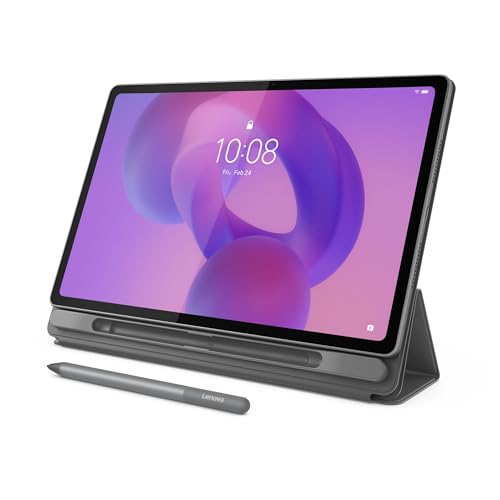
The Idea Tab Plus makes the case that big need not mean deskbound. Lenovo’s listing leads with “lightweight”, then specifies a 12.1-inch 2.5K IPS touchscreen at 90Hz, a MediaTek Dimensity 6400 processor, 8GB of memory, 128GB of storage, an integrated Arm Mali-G57 MC2 graphics unit — and, crucially, a Tab Pen and folio case included. Read that bundle again: at 12.1 inches, with a pen and a case in the box, this is a complete working kit, the tablet equivalent of a notebook that arrives with its own cover and pencil.
The screen specification suits the kit’s purpose. 2.5K at this size draws documents, textbooks and web pages with genuine fineness, and 90Hz keeps scrolling and pen strokes feeling fluid — the small smoothness that separates a tablet used for hours from one used in bursts. The folio case props it for video and protects it in a bag, and the pen turns the big page into a notebook for lectures, meetings and margin notes. Lenovo has aimed this squarely at the student-and-young-professional territory where a laptop feels like too much furniture and a phone feels like too little.
Where does it concede ground? The Dimensity 6400 is a capable mid-range chip rather than the Pro model’s stronger Dimensity 8300 below, and heavy multitaskers will feel the difference in a year of demanding use. There is no battery figure in the listing to quote, and no speaker claims to repeat. But judged as a travelling big tablet — the one that goes to the library, the office, the train — its combination of size, lightness and completeness is the most coherent in this guide, and the included accessories mean its real cost of ownership is lower than its shelf comparison suggests. Check price on Amazon with the bundle in mind.
There is a reading dividend at this size that deserves naming: newspapers and magazines, the awkward middle children of digital reading, finally behave. A broadsheet article column at 12.1 inches needs no zooming, a magazine page shows its layout as designed, and the Sunday long-read stops being a phone-scrolling chore. Owners who abandoned digital magazines on smaller screens often return to them here, and subscriptions that languished get read — a quiet, recurring value that never appears in a specification table.
Owners should lean into the pen early. The first week decides whether a bundled stylus becomes a habit or a souvenir, so annotate the first document, sign the first form, sketch the first diagram. A 12.1-inch page with a pen is the closest a tablet comes to the paper notebook it replaces, and this pick’s whole design — light body, protective folio, fluid screen — is arranged around that single, satisfying substitution.
- Display: 12.1-inch 2.5K IPS touchscreen, 90Hz
- Processor: MediaTek Dimensity 6400; Arm Mali-G57 MC2 graphics
- Memory and storage: 8GB, 128GB
- Included: Tab Pen and folio case
- Listing’s design brief: lightweight
- Battery: no figure in the listing title
Strengths
- Complete kit: pen and folio case included at 12.1 inches.
- 2.5K 90Hz screen keeps pages fine and scrolling fluid.
- Lightweight brief makes a big tablet genuinely portable.
Trade-offs
- Processor is a step below the Idea Tab Pro’s for heavy multitasking.
- No battery or speaker figures stated in the listing.
- Pen suits notes and sketches rather than professional art.
Best for: students and mobile professionals after a big, light page for reading, notes and media — with pen and case already in the box.
Not suited for: power users who should take the Pro’s stronger chip, or film-first buyers insistent on speaker claims in writing.

Lenovo Idea Tab Pro — The Student Flagship With the 3K Page
Where the Plus is the traveller, the Pro is the scholar. Lenovo’s listing for the Idea Tab Pro specifies a 12.7-inch 3K LCD display — the sharpest panel in this guide — driven by a MediaTek Dimensity 8300, with 8GB of memory and 128GB of storage, Google Gemini on board, and a pen and folio case included, all under the explicit banner “Student Tablet”. Take the claims in order. The 3K screen renders textbooks, papers and diagrams at a fineness that rewards long study sessions; small print in a scanned journal page stays legible instead of dissolving, which is the daily reality of academic reading. The Dimensity 8300 is the strongest processor named in this guide, giving the Pro headroom for the split-screen habits of real study — source on one side, notes on the other, reference video above.
The included pen and folio complete the scholar’s kit in the same way as the Plus, but the Pro’s extra screen and silicon change the ceiling of what the kit can do: annotate a full-size PDF without zooming, keep a lecture and a notebook open side by side, draft diagrams at a scale a phone mocks. Gemini’s presence will divide owners — some students will summarise and query daily, others will disable and forget — and the tablet does not depend on it; the hardware argument stands alone. Lenovo is asking this model to be a laptop’s understudy, and on paper it is the only pick here fully dressed for the role.
Its concessions are the mirror of its ambitions. A 12.7-inch tablet is a desk-and-bag device, not a sofa companion; it will be carried deliberately, like a textbook, and readers wanting a couch screen should look at the lighter Plus or the A11+. No battery figure is stated in the listing, so endurance claims rest on the class. And buyers paying for 3K should ensure their material justifies it — text and documents do, streamed video at ordinary bitrates mostly does not. For the student or knowledge worker whose days are documents, though, this is the guide’s most serious machine.
Reading research on this screen has a texture worth describing: a journal page rendered whole, its figures visible beside its text, invites the kind of understanding that zoom-and-pan reading quietly prevents. Students consistently underestimate how much comprehension leaks away through navigation, and a 3K page at 12.7 inches is the antidote this guide can actually sell. That, more than the Gemini garnish or the folio, is the Pro’s scholarly soul.
One workflow note for owners: set up the split-screen pairs you will actually use — reader plus notes, browser plus document — during the first week, and let the folio’s stand angle become your study posture. Big tablets reward ritual; the Pro most of all, because its screen can hold a whole working arrangement at once. Students who build that arrangement early tend to still be using the same tablet at graduation.
- Display: 12.7-inch 3K LCD
- Processor: MediaTek Dimensity 8300
- Memory and storage: 8GB, 128GB
- AI: Google Gemini named in listing
- Included: pen and folio case
- Positioning in listing: student tablet
Strengths
- 3K screen is the sharpest here — documents and diagrams stay legible.
- Strongest processor in the guide for split-screen study.
- Pen and folio case included; a complete study kit.
Trade-offs
- Desk-and-bag size; too much tablet for casual sofa use.
- No battery figure stated in the listing.
- Streamed video alone will not exploit the 3K panel.
Best for: students and document-heavy professionals after one big, sharp, pen-ready page for reading, annotating and split-screen work.
Not suited for: casual viewers happier with a lighter, cheaper-feeling big screen, or a stickler for a stated battery figure.

Samsung Galaxy Tab S9 FE+ — The Fullest Feature List in the Class
The S9 FE+ arrives with the most complete listing in this guide, and it rewards a slow read: a 12.4-inch 2K+ touchscreen, 8GB of memory, 128GB of storage, an 18-hour long battery life claim, an S Pen, cameras of 8MP and 12MP, a build described as lightweight and durable, AI tools, and Android throughout, in the SM-X610 NA version. Where the A11+ is Samsung’s balance, the FE+ is Samsung’s abundance — the big tablet for the buyer who wants every box ticked by the same purchase and is willing to let the listing prove it line by line.
Start with the battery claim, because 18 hours is the only endurance figure of its kind here: quoted as the listing prints it, it promises the longest working day in the guide, the kind of figure that changes habits — a tablet taken to a conference, a field day, a long flight, without a charger in the bag. The S Pen extends the machine into note-taking and sketching with Samsung’s mature pen ecosystem behind it. The camera pair — 8MP and 12MP as listed — is the strongest photographic statement in this guide, useful for photographing documents, whiteboards and the world at a size where a tablet camera finally makes sense. AI tools round out a specification that reads like a checklist being answered in full.
The FE+ also carries Samsung’s interface and ecosystem, which for households already on Galaxy phones means continuity of accounts, galleries and habits at the largest scale. Its honest costs are the usual ones of abundance: it is a 12.4-inch commitment that lives on desks and stands, and buyers should confirm the current listing’s details — check price on Amazon — since FE models are sold in several configurations. Readers whose needs stop at video and browsing may find the A11+ the calmer purchase; buyers who annotate, photograph documents, travel long days and split screens will feel the FE+ earning its premium in the first week.
Families should note how naturally this model becomes the shared screen. A 12.4-inch display with an all-day battery claim is the tablet that gets carried to the sofa for a film, to the table for a homework diagram, to a grandparent’s chair for a call — and survives the itinerary because its listing promises a durable build alongside the lightness. Shared devices die of logistics more often than of specifications; the FE+ is specified against exactly that death.
Durability language in the listing — lightweight and durable together — suits the way these tablets actually live: carried between rooms, propped in kitchens, handed to children under supervision, taken to sites and studios. A big tablet is an investment in a household’s shared screen, and the FE+ is specified like one. If your shortlist has narrowed to “the big Samsung with everything”, this is it, and its listing is the evidence.
- Display: 12.4-inch 2K+ touchscreen
- Memory and storage: 8GB RAM, 128GB
- Battery claim in listing: 18-hour long battery life
- Pen: S Pen named in listing
- Cameras: 8MP + 12MP, per listing
- Build and extras: lightweight, durable; AI tools; model SM-X610, NA version
Strengths
- An 18-hour battery claim unmatched in this guide.
- S Pen and the strongest camera pairing here.
- 2K+ screen at a size that suits work and film equally.
Trade-offs
- A desk-scale device; not a one-handed or travel-light pick.
- Buyers with simple needs pay for features they may never open.
- Several configurations exist, so verify the exact variant on the listing.
Best for: the maximalist — the big Samsung with everything: long battery, pen, cameras, sharp screen — for work, travel days and family sharing.
Not suited for: minimalists content with video and browsing alone, or anyone after a hand-held reading size.

TCL NXTPAPER 14 — Fourteen Inches of Paper-Like Calm
The NXTPAPER 14 is the class’s beautiful eccentric: a 14.3-inch 2.4K display with a paper-like surface running NXTPAPER 3.0, 8GB of memory with 256GB of storage, a 4096-level stylus and case included, AI tools, and a 10000mAh battery stated as capacity. At this size a tablet stops competing with other tablets and starts competing with objects — a broadsheet newspaper, an artist’s pad, a music stand’s folder. The paper-like screen is the reason the size works: a glossy 14.3-inch panel would be a mirror you watch films on, while this matte, reflection-scattering surface turns the giant page into something you read, annotate and draw on for hours.
TCL’s own listing names its tribes — drawing, note-taking, musicians, students and creators — and each maps to a real use of the canvas. Sheet music at full size on a stand. A graphic novel at the dimensions its artist drew. A manuscript or contract annotated in a hand-like scrawl with a 4096-level stylus whose pressure gradations reward real drawing rather than mere tapping. The 256GB of storage swallows media libraries and document archives that would choke lesser picks, and the big battery is sized to the big screen’s appetite, though we report it as the capacity it is rather than inventing hours.
The compromises are physical and obvious: this is a lap, desk and stand device that travels in a proper bag, not a hand, and its talents are wasted on a diet of streamed sitcoms alone — a cheaper glossy screen flatters video more. But for the reader-annotator-creator whose work is page-shaped, nothing else in this guide is even the same species. It is the pick for people who looked at ordinary tablets and thought: bigger, calmer, more like paper. TCL built exactly that, at a scale nobody else in the class attempts.
Teachers and tutors form another quiet constituency for this machine: a lesson’s diagram, a score, a worksheet can be shown to a small group around one calm, glare-free page, and the stylus lets the teacher write on the material as they would on paper handouts. The same quality serves anyone who presents to two or three people at a table — estate agents with floor plans, coaches with formations, grandparents with the family tree. Big, matte and pen-ready is a combination with more audiences than its listing even claims.
Owners should give it a permanent station — a stand on the desk or the music stand it was born for — because a 14.3-inch tablet that must be fetched from a cupboard will be fetched rarely. Stationed, it becomes the household’s big page: the recipe display, the shared photo surface, the document signer, the Sunday comics reader. Few devices in this guide have so clear a destiny; the NXTPAPER 14 simply needs an owner whose life contains pages worth enlarging.
- Panel: 14.3-inch 2.4K, paper-like (NXTPAPER 3.0)
- RAM and storage: 8GB, 256GB
- Cell: 10000mAh, as listed
- In the box: 4096-level stylus, case
- Software extras named: AI tools
- Listing’s named audiences: drawing, note-taking, musicians, students, creators
Strengths
- The largest, calmest page in the class — print scale without glare.
- 256GB storage and a pressure-capable stylus included.
- Uniquely suited to scores, comics, manuscripts and artwork.
Trade-offs
- A station device: desk, lap or stand, never a coat pocket.
- Matte surface slightly mutes video’s glossy punch.
- Its talents are wasted on a video-only diet.
Best for: readers, annotators, musicians and creators whose material is page-shaped and determined to have it at full, calm, paper-like scale.
Not suited for: travellers after a light bag tablet, or viewers who only stream video and prefer a glossy panel.

TCL TAB A1 Plus — The Fast, Loud One: 120Hz and Quad Speakers
The A1 Plus closes the guide with the entertainer’s specification: a 12.2-inch 2.4K display refreshing at 120Hz, 6GB of memory with 128GB of storage, an octa-core processor, AI tools, an 8000mAh battery, Android 16 — the newest software version named anywhere in this guide — quad speakers, and an IP54-rated metal body. Where the NXTPAPER is calm, this TCL is vivid: the high refresh rate makes scrolling, games and interface motion feel liquid, and four speakers give films and music the room-filling voice a 12.2-inch screen deserves.
Android 16 deserves its sentence. Software vintage decides how long a tablet stays compatible and secure, and the A1 Plus starts life ahead of the rest of this line-up — a genuine long-term argument for a device a family might keep half a decade. The IP54 metal body adds a different kind of longevity: resistance to the splashes and dust of kitchens, workshops and gardens, in a shell that feels like equipment. Quad speakers plus that body make this the pick for shared spaces — the tablet that plays a film on the counter, carries a call across a room, and survives being the household’s most borrowed screen.
Its trades are the entertainer’s usual ones. No pen is named in the listing, so annotators should look to the Lenovos, the FE+ or its NXTPAPER sibling. The 8000mAh battery is a capacity figure, not an hours claim, and a 120Hz screen spends power faster than a 60Hz one when pushed. Buyers choosing between the two big TCLs are choosing temperaments: paper-calm and a stylus, or speed, sound and the newest Android. Households that watch together will not hesitate; households that read and write might, correctly, choose the other one.
Kitchen duty deserves a specific word, because it is where big tablets quietly become indispensable and where this one’s IP54 metal body stops being a line in a listing. Steam, splashes, floury hands tapping a recipe — the A1 Plus is built to be wiped down and carried on, and its quad speakers carry a podcast or a call over the sound of cooking. Households that station a tablet in the kitchen should weight that rating heavily; it is the difference between a device that lives there and one that merely visits.
As a family’s big shared screen, though, the A1 Plus has the most complete entertainment brief in this guide, and its modern software gives that brief the longest runway. Put it on a stand in the room where people gather, and it becomes the television that travels, the speaker that shows pictures, the screen that grandchildren call into. Big tablets earn their space by being gathered around; this one is built to be gathered around loudly and for years.
- Display: 12.2-inch 2.4K, 120Hz
- Memory fitted: 6GB RAM with 128GB storage
- Battery capacity: 8000mAh, per listing
- Software: Android 16
- Speakers: quad arrangement
- Body: IP54 metal body; octa-core CPU and AI tools in listing
Strengths
- 120Hz 2.4K screen is the smoothest viewing here.
- Quad speakers suit shared film, music and calls.
- Android 16 and an IP54 metal body promise a long service life.
Trade-offs
- No stylus named in the listing — annotators should look elsewhere in this guide.
- High refresh spends battery faster when pushed.
- Less memory than the 8GB Lenovo and Samsung picks for heavy multitasking.
Best for: a family after a big, loud, long-lived shared screen for film, music, calls and games, with the newest Android underneath.
Not suited for: note-takers dependent on a bundled pen, or readers who prefer a matte paper-like surface to a vivid glossy one.
Side-by-Side Comparison
| Pick | Screen | Memory / storage | Pen | Defining trait |
|---|---|---|---|---|
| Samsung Galaxy Tab A11+ | Large display (diagonal not stated in listing title) | 6GB / 128GB, expandable | Not named in listing | Dolby Atmos; 2-year warranty |
| Lenovo Idea Tab Plus | 12.1-inch 2.5K IPS, 90Hz | 8GB / 128GB | Tab Pen included | Lightweight; folio case included |
| Lenovo Idea Tab Pro | 12.7-inch 3K LCD | 8GB / 128GB | Pen included | Dimensity 8300; student flagship |
| Samsung Galaxy Tab S9 FE+ | 12.4-inch 2K+ | 8GB / 128GB | S Pen named in listing | 18-hour battery claim; 8MP + 12MP cameras |
| TCL NXTPAPER 14 | 14.3-inch 2.4K paper-like | 8GB / 256GB | 4096-level stylus included | Paper-like giant; 10000mAh |
| TCL TAB A1 Plus | 12.2-inch 2.4K, 120Hz | 6GB / 128GB | Not named in listing | Quad speakers; Android 16; IP54 body |
How Big Is Too Big? Matching the Screen to the Room
Work backwards from furniture. A tablet that will live on a desk or a music stand can be as large as the material demands — the NXTPAPER 14’s 14.3 inches is a virtue at a stand and a burden everywhere else. A tablet for the sofa should stay where two hands and a lap can manage it comfortably for an evening, which in this guide means the 12-inch class and below. A tablet that travels in a bag must fit the bag, the tray table and the arm holding it through a journey; the Idea Tab Plus built its whole brief around that constraint at 12.1 inches, and anything larger travels as luggage rather than as a companion.
The failure mode to avoid is buying the maximum because it photographs impressively. Owners adapt their habits to a tablet’s size within a month, and a screen too big for its room quietly becomes a screen in a cupboard. Measure the stand, the bag and the lap first; the correct diagonal is the one those three agree on, and every pick in this guide is the right answer to one of those measurements.
Does Refresh Rate Matter on a Tablet This Size?
At 90Hz and 120Hz, the difference from a standard screen is felt in motion rather than seen in stills: scrolling a long page stays readable instead of smearing, a pen’s line follows the nib without a perceptible chase, games render with a fluidity that smaller screens forgive the absence of. The Idea Tab Plus at 90Hz and the TAB A1 Plus at 120Hz carry the flag here. For reading static pages and watching films — which refresh at their own rates regardless — the benefit is modest; for browsing, drawing, gaming and simply moving around the interface for hours, it is the quality that makes a big tablet feel modern rather than merely large.
The cost is power. A faster-refreshing panel spends battery more quickly when it is working hard, which is one reason the A1 Plus pairs its 120Hz screen with a substantial 8000mAh cell. Buyers who read more than they scroll can safely deprioritise refresh rate entirely; buyers whose tablet is a window in constant motion should treat it as a headline feature, not a footnote.
What Can Split-Screen Actually Do at Twelve Inches and Up?
Below ten inches, split-screen is a party trick; at twelve and above, it becomes a working method. A document beside its notes. A lecture beside the slides it references. A recipe beside the timer and the shopping list it generates. A video call in one half and the shared document in the other, at sizes where both remain legible. The Idea Tab Pro, with its 3K screen and the strongest processor in this guide, is built for exactly this, and the FE+ and Idea Tab Plus handle the same arrangements with slightly less fineness or headroom.
The habit to build is pairing: decide your two or three standard arrangements and practise them until they are reflexes. Owners who split their screens deliberately describe their big tablets as workstations; owners who never do describe them as televisions. Both are legitimate purchases, but they are different ones, and knowing which you are buying tells you whether to weight processor and resolution — or speakers and battery — when choosing between the picks above.
How Should You Hold, Prop and Store a Tablet This Large?
You mostly should not hold it. Big tablets are furniture-adjacent devices: they belong on stands, folio props, laps with cushions, and desks. Every pick here either includes a folio case or deserves one bought alongside, and a stand that offers two angles — upright for calls and film, reclined for reading and drawing — is the single accessory that will shape daily comfort most. Storage follows the same logic: a designated shelf or slot near the charging point, where the tablet returns each night, beats the archaeological approach of finding it under cushions with a flat battery.
Hands still matter for transport, and this is where the class divides honestly. The Idea Tab Plus was designed to be carried; the NXTPAPER 14 was designed to be stationed. Neither is a flaw. What is a flaw is expecting one device to be both — the market’s largest screens and its lightest bodies remain different products, and this guide’s staircase exists so you can choose your compromise with your eyes open.
Which Big Tablet Serves Work, and Which Serves the Sofa?
Work, in this guide, wears three faces. The Idea Tab Pro is the knowledge worker’s and student’s machine: sharpest screen, strongest chip, pen and case included. The FE+ is the traveller-professional’s: the 18-hour claim, the S Pen, the cameras for documents and whiteboards. The NXTPAPER 14 is the page-worker’s: manuscripts, scores, artwork and long documents at print scale. Each carries a pen, because at this size work and handwriting are natural partners.
The sofa has its own champions. The TAB A1 Plus, with 120Hz motion and quad speakers on the newest Android, is the entertainer. The A11+ is the household all-rounder — sound, storage, warranty, no extremes. The Idea Tab Plus splits the difference, light enough for the sofa and kitted enough for the desk. Most households, if honest, are buying one of these two temperaments; naming yours is the fastest route through the comparison table.
How Do Big Tablets Change Video Calls and Family Time?
Scale changes the social physics of a screen. A phone call is a face in a hand; a 12-inch call is a person at conversational size, seated across a table that happens to be digital, and grandparents, remote colleagues and far-flung friends all register the difference within seconds. Big tablets on stands free the hands, hold a steadier frame than any hand-held device, and let two or three people share one side of the call — the whole family on the sofa, visible in one frame, instead of a phone passed hand to hand. The picks with stated sound ambitions, the A11+ with Dolby Atmos and the A1 Plus with quad speakers, serve this use best, because a call you can hear from the kitchen is a call that becomes a habit.
The same scale transforms shared leisure. A film on a 12.2-inch screen at a kitchen counter feeds a room; the same film on a phone feeds a person. Households that buy big tablets often report an unexpected effect: the device becomes a gathering point, the modern equivalent of the radio in the corner — recipes displayed while cooking, photographs browsed together after dinner, a grandchild’s call propped where everyone can wave. That social gravity is the deepest argument for the class, and it belongs to no specification table.
What Should You Know About Charging and Battery at This Size?
Big screens drink more than small ones, and the picks divide by how honestly their listings discuss it. The FE+ states an 18-hour figure — the guide quotes it as printed and treats it as the class benchmark. The NXTPAPER 14 and A1 Plus state capacities of 10000mAh and 8000mAh respectively, sized to their panels; the A11+ promises long life without a number; the Lenovos are silent on the subject in their titles. The practical translation for all of them: a big tablet used for mixed work and media is a device you charge on a rhythm — nightly at its station, or every second night — rather than a device you nurse through a day.
Two habits protect both battery and sanity. Keep the tablet at its home base with its charger, so “where is it and is it charged” has one permanent answer. And use the battery rather than worshipping it: these are large cells designed for years of cycles, and a tablet timidly kept at full charge on a shelf is a screen not being gathered around. The owners who love big tablets are the ones who let them work.
How Do You Choose Between the Two Samsungs and the Two Lenovos?
The Samsungs split by appetite. The A11+ is balance — sound, expandable storage, warranty — for households that want the class without a speciality. The S9 FE+ is abundance — the battery claim, the pen, the cameras, the sharper screen — for buyers whose use spans work, travel and creation. A household that cannot articulate why it needs the FE+’s extras probably does not, and will be happier with the calmer purchase; a buyer who annotates and travels long days will feel the A11+’s restraint within a month.
The Lenovos split by strength of work. The Idea Tab Plus is the complete travelling kit, light with pen and case; the Idea Tab Pro is the same idea with a sharper screen and a stronger processor for split-screen scholarship. Students who carry all day choose the Plus and lose little; students who live in documents choose the Pro and gain daily. In both brands, the honest question is identical: how hard will this tablet be worked, and how far will it be carried? Answer those, and the pairs resolve themselves.
What About Drawing, Music and Other Page-Shaped Pursuits?
A class of buyers comes to big tablets not for film or documents but for pursuits that were always page-shaped. Musicians were the early adopters: a 12-to-14-inch screen holds sheet music at readable scale, turns pages with a tap, and carries a whole library in the space of one folder — the NXTPAPER 14 names musicians in its own listing, and its matte surface reads under stage and room light without glare. Artists and sketchers follow the pens: the 4096-level stylus on that same TCL, the S Pen on the FE+, and the Lenovo pens each turn the big page into a drawing surface whose size finally matches the ambition of the sketch.
Home pursuits scale the same way. A 12-inch recipe screen survives a kitchen; a big photo surface turns editing from squinting into judging; a shared calendar or family planner on a stand becomes household infrastructure. When you evaluate the picks, it is worth asking which page-shaped pursuit in your own life has been waiting for a screen this size — the answer often selects the tablet more decisively than any benchmark, because a device bought for a beloved pursuit gets used with a loyalty that general-purpose purchases rarely inspire.
What Goes Wrong When People Buy the Biggest Screen Available
The classic error is maximising the diagonal and minimising everything else — then discovering the tablet is too heavy for its intended room, too large for its bag, and permanently parked in the wrong place. A second is ignoring the pen question until after purchase: annotators who buy a pen-less pick spend months tapping at margins with a fingertip, while non-annotators pay for bundled pens that fossilise in drawers. A third is trusting a size claim without reading the listing — this guide itself flags a pick whose listing says only “large”, and buyers should bring the same scepticism to every product page.
Two quieter mistakes complete the set. Buyers forget the stand and the case in the budget, though at these sizes they are effectively part of the product. And buyers assume a big tablet replaces a laptop wholesale, then meet the tasks — heavy document production, specialised software — where it does not. A big tablet is a second centre of gravity for work and leisure, and households that buy it as that, rather than as a laptop-killer, are the ones still delighted in year two.
Final Recommendation
A last word on method: every figure in this guide came from the picks’ own listings, every silence was reported as a silence, and no diagonal was invented for the one tablet whose maker declined to print one. Big tablets are bought on trust in measurements more than most gadgets, and a guide that respects the numbers it cannot verify is the only kind worth following into a purchase this physical.
Choose by temperament and room. For documents, study and split-screen work, the Lenovo Idea Tab Pro is the guide’s serious machine; for a lighter travelling version of the same idea, its Idea Tab Plus sibling keeps the pen and case and sheds the weight. For the fullest Samsung specification — the 18-hour claim, S Pen, cameras — take the Galaxy Tab S9 FE+, and for Samsung balance with a two-year warranty, the Tab A11+. For pages at print scale on a calming surface, the TCL NXTPAPER 14 stands alone. For shared entertainment on the newest Android, the TCL TAB A1 Plus. Whichever you choose, check price on Amazon, confirm the exact configuration in the listing, and order the stand or case in the same basket — at this size, they are part of the tablet.
Frequently Asked Questions
Is a 14.3-inch tablet practical, or a novelty?
Practical for page-shaped work, impractical as a portable. The NXTPAPER 14 shows sheet music, comics, manuscripts and PDFs at near-print scale on a calm matte surface, with a pressure-capable stylus included — a genuine tool at a desk or stand. As a travel or hand-held device it is simply too much screen, and the 12-inch picks exist for those lives.
Why does one pick not state its screen size?
Because its listing does not. Samsung’s Tab A11+ listing describes a “large display” without printing a diagonal, so this guide reports the wording rather than inventing a figure. If the exact measurement decides your purchase, confirm it on the listing page — and treat any source that states it without that caveat as guessing.
Which of these is best for students?
The Lenovo Idea Tab Pro: a 3K screen for documents, the strongest processor here for split-screen study, and a pen and folio case in the box. The Idea Tab Plus is the lighter alternative for students who carry their tablet all day and can trade some power for portability.
Do I need a pen with a big tablet?
Only if your work involves handwriting, annotation or drawing — but at these sizes, many owners discover it does. Four of the six picks include or name a pen, so the capability often arrives free; the two that do not, the A11+ and the TAB A1 Plus, are aimed at viewing-first households who will never miss it.
How much storage is enough at this size?
Big tablets attract big media: downloaded films, photo libraries, document archives. The 128GB models here are the comfortable standard, the NXTPAPER 14’s 256GB suits archivists and media-heavy creators, and the A11+ sidesteps the question with expandable storage. Text and apps alone would fit anywhere; buy for your media habits, not your documents.
Which pick is best for watching films?
For shared viewing, the TCL TAB A1 Plus pairs its 12.2-inch 120Hz screen with quad speakers — motion and sound together — on the newest Android. For solo viewing with the longest stated endurance, the S9 FE+ and its 18-hour claim take the honours. The NXTPAPER 14 is the reader’s giant rather than the film fan’s; its matte surface trades some cinematic gloss for calm.
Can a tablet this big replace my laptop?
For reading, media, calls, notes and light document work, largely yes — especially the pen-equipped Pro and FE+. For sustained production work and specialised desktop software, it remains a companion rather than a replacement. Most owners end up splitting their digital life between the two by task, and find the tablet takes more of it than they expected.
Related Guides
Four of these six picks earn their place partly through their pens, and readers who want that question examined on its own should continue to the dedicated guide to tablets with a stylus. Shoppers who started here for size but balk at the prices of the largest screens can check which big-screen virtues survive in the monitors roundup led by 27-inch QHD models for a desk-bound alternative, and those equipping a whole desk rather than a lap may find the 34-inch ultrawide gaming monitor guide a provocative comparison.


