What's inside
- Key Takeaways
- Quick Picks
- How Did We Choose the Best Gaming Mouse for MMO RPGs?
- Why Does the Side Grid Change MMO Play So Much?
- What Should You Look for in the Grid Itself?
- Do These Mice Make Sense Beyond MMOs?
- What Does Each Raid Role Ask From the Grid?
- How Should You Organise Profiles Across Games and Characters?
- Does Weight Matter Differently in an MMO Mouse?
- How Do the Six Compare at a Glance?
- What Should You Verify Before Buying Any Grid Mouse?
- How Do You Learn a Twelve-Button Grid Without Losing Your Mind?
- How Do You Keep a Grid Mouse Working for Years?
- What Mistakes Do New MMO Mouse Owners Make?
- Final Recommendation
- Frequently Asked Questions
- Related Guides
As an Amazon Associate I earn from qualifying purchases. This post may contain affiliate links at no extra cost to you.
widgetverdict.com is reader-supported. When you buy through links on our site, we may earn an affiliate commission.
Where to buy: MMO mice are a niche inside a niche, and listings for them are a swamp of copied shells and inflated button counts — so each pick below links to a listing we verified model by model for this guide. If a listing’s photos show a different side panel than the one described here, you are looking at the wrong variant; back out and use these links.
Choosing the best gaming mouse for MMO RPGs starts with an admission most mouse guides avoid: your keyboard hand is overloaded. A modern MMO rotation asks for a dozen abilities, three modifiers, a mount, a potion, an interrupt and a push-to-talk key, and the standard keyboard simply runs out of comfortable geography. The MMO mouse exists to move that overflow onto the thumb — a grid of side buttons, usually twelve, arranged so a practised thumb can run an entire hotbar without the left hand ever leaving its movement keys. Done well, it changes how the games feel; done badly, it is a number pad glued to a mouse, and your thumb spends raids pressing the wrong heal.
The six mice below span the whole philosophy of the category: one modular flagship that changes its side panel to suit the game, and a family of value designs that put a full twelve-button grid within reach of almost any budget. They were judged the way MMO players actually judge them — by whether the grid can be learned, whether the buttons can be told apart by touch at 2 a.m. in a progression raid, and whether the software lets you build per-game profiles that survive patches, expansions and the occasional full UI rebuild.
Key Takeaways
- The side grid is the product: twelve thumb buttons you can distinguish blind are worth more than any sensor specification.
- Learning a grid takes roughly two weeks of regular play; every pick here is judged partly on how forgiving that learning curve feels.
- One pick swaps its entire side panel, letting a single mouse serve MMOs, MOBAs and shooters with different button counts.
- Wired versus wireless matters less here than in shooters — raids are marathons, and battery or cable discipline is a habit either way.
- Per-game profiles with automatic switching separate a workable MMO setup from a frustrating one; check the software before the shell.
- Weight tuning appears on several picks because a grid mouse is inherently substantial, and balance is personal.
Quick Picks
| Pick | Badge | Why it earns its place |
|---|---|---|
| Razer Naga V2 Pro Wireless MMO Gaming Mouse | Best overall MMO mouse | Swappable side plates for 2, 6 or 12 buttons, a flagship sensor and serious battery life. |
| Redragon M908 Wired MMO Gaming Mouse | Best value grid | The full twelve-button experience with weight tuning at an entry-level commitment. |
| Redragon MMO Gaming Mouse with 12 Side Buttons | Most buttons, wired | Nineteen programmable controls and a tuned weight system for bind maximalists. |
| Redragon Wireless MMO Gaming Mouse | Best budget wireless grid | A rechargeable wireless twelve-button grid that keeps the desk clear for long sessions. |
| UtechSmart Venus Pro Wired MMO Gaming Mouse | Best dual-mode veteran | Wired and 2.4 GHz modes, sixteen buttons and a long track record in the genre. |
| Redragon M913 Wireless RGB MMO Gaming Mouse | Wireless grid with RGB flair | A cable-free side grid with high-DPI headroom for players who roam between games. |
How Did We Choose the Best Gaming Mouse for MMO RPGs?
We started where MMO players start: with the grid. Each candidate’s side panel was assessed for the qualities a thumb actually experiences — button size, spacing, the tilt or texture differences between rows, and whether the front and back rows can be told apart without looking. A grid whose buttons feel identical is a memorisation burden; a grid with sculpted, angled rows becomes a keyboard your thumb reads by shape. We favoured designs that give the thumb landmarks, because in a raid there is no looking down.
Software received equal weight, which is unusual in mouse guides and essential in this genre. An MMO mouse lives inside its profiles: one per game, ideally one per character class, with layers for modifiers and automatic switching when the game launches. We checked that each maker’s utility supports per-program profiles, macro recording with delays you can edit, and export or onboard storage so a profile survives a new PC. Mice whose grids were fine but whose software treated profiles as an afterthought were marked down hard, because the genre punishes exactly that weakness every single session.
We also read the long tail of ownership: which of these mice players are still using two expansions later, which got replaced and why. Grid mice fail socially before they fail mechanically — a player abandons the one whose software lost their profiles in an update, or whose grid buttons turned vague. The survivors in this list are the ones with boring, reliable software stories and buttons that feel the same in year two as in week two.
The third filter was session length. MMO play is measured in evenings, not matches, so we weighed comfort over hours: palm support, a ring-finger rest or ledge, weight that can be tuned rather than merely endured, and — for the wireless picks — battery claims that cover a full week of raiding without a mid-session cable. Sensors, by contrast, were a pass-fail gate; every sensor here tracks far beyond what tab-target combat demands, and we spent no ranking energy pretending otherwise.
Why Does the Side Grid Change MMO Play So Much?
There is a historical reason the category looks the way it does. The first grid mice were curiosities — heavy, expensive, bought by the already-converted. What changed was the games: ability counts climbed expansion by expansion, encounters began demanding movement and execution simultaneously, and the keyboard-only ceiling became a genuine competitive disadvantage in high-end play. The grid mouse stopped being an accessory and became the genre’s standard input, which is why every pick in this guide, at every level, converges on the same twelve-button idea.
Because it repairs a broken division of labour. On a keyboard-only setup, the left hand handles movement, abilities, modifiers and camera-adjacent chores, and it handles them worst exactly when fights get busy — movement and ability keys compete for the same fingers at the moment both matter most. Moving the ability bar to the right thumb separates the two jobs permanently: the left hand moves, the right hand executes, and neither interrupts the other. Players consistently describe the first month on a grid mouse as the moment their character started doing what they intended, on time, while they watched the fight instead of their hands.
The grid also compresses the modifier stack. Keyboard setups lean on Shift, Ctrl and Alt layers to multiply a small set of reachable keys, and every layer is a chance to fire the wrong bar. Twelve thumb buttons, doubled by a single comfortable modifier, cover most classes’ full kits without gymnastics. Healers feel this most — a full grid of targeted heals and cooldowns under one thumb, with the mouse still free to move the camera, is a quality-of-life change that veterans rank alongside getting a second monitor.
None of this arrives free, and honesty about the cost belongs in any guide. The first week on a grid is clumsy: your thumb has no map yet, abilities misfire, and your old keyboard habits keep reaching for keys that no longer do anything. The second week turns a corner, and by the end of the first month the grid feels like it was always there. Every pick below was assessed with that curve in mind — the best grids are the ones whose shapes shorten week one rather than merely rewarding week four.
What Should You Look for in the Grid Itself?
Hold one more idea while you shop: the grid is a long-term tenant, not a trial feature. You will press these buttons tens of thousands of times across an expansion, in the dark, under pressure, with your attention on a boss’s cast bar. That is why this guide keeps returning to tactility — ridges, angles, textures, travel — over totals. A grid is learned by the skin before it is learned by the mind, and the mice that respect that order are the ones still on desks when the next expansion launches.
Start with row design. The most learnable grids tilt or step their rows so the thumb feels a landscape rather than a flat keypad: the Naga’s sculpted twelve, the Redragon family’s angled rows. Flat grids with uniform buttons demand visual confirmation and punish new users for longer. Next, button travel and sound — side buttons should actuate with a short, definite click you can feel through a relaxed thumb, because a mushy side button invites double-presses during frantic cooldown chains.
Also examine how the grid meets the main buttons. On the best designs the side panel’s top edge leaves the left click’s flank clean, so a hard click never rocks the thumb into an accidental grid press; on poorer ones the whole side of the mouse is one continuous button field and misclicks multiply. Photographs taken from directly above are the tell — look for a visible seam and a step between the click and the grid, the small architectural courtesy that keeps combat inputs separate.
Then consider what sits around the grid. A thumb rest below the panel gives the thumb a home position to return to, the way the F and J keys anchor touch-typists; grids without one leave the thumb hovering and guessing. The sensitivity switch and any extra top buttons should live where the index finger can reach without disturbing aim. And the shell’s right side matters more than in other genres: your ring and little fingers hold this mouse for four-hour stretches, so a ledge or a gentle flare there prevents the slow grip fatigue that ends raids early.

Razer Naga V2 Pro Wireless MMO Gaming Mouse — Best overall MMO mouse
The Naga V2 Pro is built around a single brilliant decision: the side panel is magnetic and swappable, so the mouse ships with three personalities. The twelve-button plate is the full MMO grid, each key sculpted and angled so the thumb reads rows by shape. The six-button plate trims the grid into two rows of three for MOBAs and battle royales, where fewer, larger targets beat abundance. The two-button plate turns the mouse into a clean, light-feeling FPS tool. One mouse, three genres, no drawer of specialised hardware — for players whose library rotates, nothing else in this guide attempts the trick.
The rest of the specification reads like a flagship checklist because it is one. Razer’s Focus Pro optical sensor is beyond the genre’s needs and then some, the HyperScroll Pro wheel tilts and switches between ratcheted and free-spinning, and the wireless link is HyperSpeed with battery life measured in weeks of ordinary play — up to roughly 300 hours on the power-saving connection, less on the gaming link, still enough to forget charging exists. Optical switches in the main buttons remove the double-click failure mode entirely. The software supports the deep per-game profiling this genre demands, with profiles stored on the mouse itself.
Living with it means accepting flagship realities: it is the heaviest serious option here, the shape is a committed right-handed ergonomic that smaller hands should test before committing, and the price of the swappable system is that the plates you are not using live in a drawer. But as a single answer to the question this guide asks, it stands alone — the grid is the most learnable, the ecosystem the most complete, and the ability to become a different mouse on a different night is a feature no rival in this list can copy with a firmware update.
One ownership detail deserves emphasis: the plates swap in seconds with no tools, and the mouse recognises which plate is fitted, so profiles can follow the hardware automatically — sit down for raid night with the twelve fitted and your healing layout is simply there. That small automation is the difference between a modular system you use and a modular system you admire in its box, and it is why the Naga’s owners actually change plates rather than leaving the twelve on forever.
- Sensor: Razer Focus Pro optical
- Connection: HyperSpeed 2.4 GHz wireless, Bluetooth, wired
- Side panels: swappable 12-button, 6-button and 2-button plates
- Buttons: up to 20 programmable with the 12-button plate
- Battery: rechargeable, up to roughly 300 hours on Bluetooth
Strengths
- Three magnetic side plates cover MMO, MOBA and shooter nights
- Sculpted grid is the easiest twelve buttons to learn blind
- Weeks of battery and a flagship sensor and wheel
Trade-offs
- Substantial shell; small hands should try before committing
- Unused plates need a home in your desk drawer
- Premium positioning well above the value picks here
Best for: multi-genre players who raid seriously and want one mouse for every game they own. Not suited for: small hands, minimalists, or anyone who only ever plays one genre.

Redragon M908 Wired MMO Gaming Mouse — Best value grid
The M908 is the mouse that put a twelve-button grid within everyone’s reach, and it remains the value benchmark of the genre. Its side panel carries the full dozen in angled rows, tuned so the thumb can find the middle row by the ridge between rows — a small sculptural decision that makes the learning week noticeably shorter. Eighteen programmable functions in total, a sensor reaching 12,400 DPI, and a set of removable weights in the base let you set the mouse’s heft and balance to your own preference, a feature players associate with far pricier hardware.
What ownership feels like: solid, in every sense. The shell is a broad right-handed ergonomic with a pinky ledge, the clicks are definite, and the wired connection means the mouse is awake and honest every second of a raid with no battery thoughts at all. Redragon’s software covers per-game profiles and macro editing with delays, and while its interface will not win design awards, it does the genre’s essential jobs — layers, exports, per-program switching — without complaint. For a player buying their first grid mouse, the M908’s proposition is hard to argue with: the complete experience, the training wheels included, at a commitment small enough that discovering the genre is not for you costs little.
It also has the genre’s most forgiving resale and hand-me-down story: because the layout is the family’s standard, a new player inheriting an M908 can follow years of community keybind guides written for exactly this grid geometry. When a whole ecosystem of advice assumes your hardware, learning anything — a new class, a new game, a new role — gets measurably easier, and that network effect is a real feature no specification table lists.
- Sensor: optical, up to 12,400 DPI
- Connection: wired USB
- Buttons: 18 programmable, 12-button side grid
- Weight: adjustable via removable weights
- Shape: right-handed ergonomic with pinky ledge
Strengths
- Full twelve-button grid with learnable, ridged rows
- Weight tuning rarely seen at this level
- Wired reliability suits marathon raid nights perfectly
Trade-offs
- Software interface is workmanlike rather than slick
- Broad, heavy shell will not suit fingertip players
- Cable management is on you; no wireless option
Best for: first-time grid buyers and value-focused raiders with medium-to-large hands. Not suited for: players who want a cable-free desk or a lightweight mouse.

Redragon MMO Gaming Mouse with 12 Side Buttons — Most buttons, wired
If the M908 is the genre’s value benchmark, this Redragon sibling is its maximalist: nineteen macro-programmable buttons in total, the twelve-button side grid included, with a weight-tuning system of eight small weights that lets you dial the balance in fine steps rather than coarse ones. The sensor matches the family’s 12,400 DPI ceiling, the RGB is present and configurable, and the whole design speaks to a specific player — the one whose keybind screen is a work of art and who counts unbound mouse buttons as wasted potential.
The extra buttons beyond the grid earn their keep in the corners of MMO life: a dedicated key for push-to-talk, one for the mount, one for the screenshot habit, one for the consumable you always forget. Assigning the grid purely to combat and the satellite buttons to life admin keeps the thumb’s combat map clean, which shortens the learning curve in a way raw button counts never show. The shell follows the family’s broad ergonomic pattern with a textured thumb side, and the wired link keeps everything instantaneous during the long sessions this mouse is clearly built for.
Players running several characters will feel the benefit of the extra satellites most in profile design: one shared admin layer — talk, mount, consumables, UI panels — that stays identical across every class, with only the grid itself changing per character. That consistency means switching alts stops feeling like relearning the mouse, and it is the kind of workflow advantage that only appears after a month of ownership rather than in a first-week review.
- Sensor: optical, up to 12,400 DPI
- Connection: wired USB
- Buttons: 19 macro-programmable, 12-button side grid
- Weight: eight-piece tuning set
- Lighting: configurable RGB
Strengths
- Nineteen binds separate combat keys from life-admin keys
- Fine-grained weight tuning with eight pieces
- Full macro support for rotations and crafting chains
Trade-offs
- The densest control set here takes the longest to master
- Large, committed shell; no smaller-hand option
- Wired only, with a substantial cable to route
Best for: bind maximalists, multiboxers and players who run several classes with distinct layouts. Not suited for: players who want a grid they can learn in a weekend.

Redragon Wireless MMO Gaming Mouse — Best budget wireless grid
Wireless MMO mice used to begin at flagship prices, which made little sense for a genre played at a desk, in one chair, for entire evenings — the exact scenario where a cable is easiest to forgive and a battery easiest to manage. This Redragon closes that gap: a rechargeable wireless mouse with the full twelve-button side grid, sixteen macro-programmable buttons, a sensor reaching 16,000 DPI and a battery rated around seventy hours, which translates to a week or more of raiding between charges for most players.
The grid follows the family’s angled-row design, so the thumb training from any Redragon wired model transfers directly — an underappreciated benefit for players upgrading within the brand. In wireless mode the link holds steady through long sessions, and when the battery finally calls for help, plugging in converts it to a wired mouse mid-raid without a dropped pull. The shell keeps the broad ergonomic shape and pinky support of its wired relatives, slightly lighter for the missing cable’s sake. For the player who wants the grid and a clean desk and refuses to pay flagship money for the combination, this is the pick the rest of the list has to answer.
Battery honesty matters here, so let us be specific about the habit it asks for: a weekly top-up rhythm, ideally on a non-raid day, or simply plugging in during the loading-screen minutes of a session’s start. Players who adopt either rhythm report the battery effectively disappearing as a concern; players who charge only when the warning light appears will eventually meet that light mid-boss, which is a story every wireless owner tells exactly once.
- Sensor: optical, up to 16,000 DPI
- Connection: 2.4 GHz wireless, wired fallback
- Buttons: 16 macro-programmable, 12-button side grid
- Battery: rechargeable, around 70 hours
- Shape: right-handed ergonomic
Strengths
- Full grid without a cable, at a value-tier commitment
- Seventy-hour battery covers a raid week comfortably
- Grid layout matches the wired Redragon family for easy upgrades
Trade-offs
- Battery discipline required; no swappable-cell option
- Software polish trails the flagship ecosystems
- Heavier than shooter mice, as all grid mice are
Best for: raiders who want the twelve-button life with a clear desk and a sane budget. Not suited for: players who know they will forget to charge it before raid night.

UtechSmart Venus Pro Wired MMO Gaming Mouse — Best dual-mode veteran
The Venus Pro has been the genre’s quiet workhorse for years, and its dual-mode design explains its staying power: run it wired at the desk, or switch to its 2.4 GHz wireless link and keep the same sixteen-button layout, the same grid geometry, the same profiles. Sixteen programmable buttons are arranged with the twelve-button thumb grid as the centrepiece, the sensor reaches 16,400 DPI, and the wireless mode runs on a rechargeable battery rated around seventy hours — the spec sheet of a mouse that intends to be your only MMO mouse across several expansions.
Experience shows in the details. The grid’s buttons are textured in two patterns so the thumb can separate the front block from the back block without looking, the shell carries a proper rest for the ring finger, and the weight can be tuned with the included set so the mouse balances where your grip expects. UtechSmart’s software is less famous than the big suites but covers the genre’s essentials — per-game profiles, macros with editable timing, onboard storage. For players who split time between a desktop and a laptop, or who simply distrust committing to one connection type, the Venus Pro’s both-ways design is the most flexible answer in this guide after the Naga’s swappable plates.
Its longevity in the market carries a practical dividend: community knowledge. Whatever class, game or macro problem you meet, someone has solved it on this exact mouse and written it down, and replacement feet, cables and guides remain easy to find years into ownership. In a genre where players keep mice across entire expansion cycles, that depth of shared knowledge is worth as much as a specification advantage.
- Sensor: optical, up to 16,400 DPI
- Connection: wired USB and 2.4 GHz wireless
- Buttons: 16 programmable, 12-button side grid
- Battery: rechargeable, around 70 hours wireless
- Weight: adjustable tuning set included
Strengths
- Wired and wireless in one mouse, same layout both ways
- Two-texture grid helps the thumb navigate blind
- Long genre track record and weight tuning included
Trade-offs
- Design language is older and plainer than newer rivals
- Software is capable but spartan in presentation
- Full-size shell only; no compact variant
Best for: players who move between desk and laptop, or want one mouse that refuses connection compromises. Not suited for: style-led buyers or small hands.
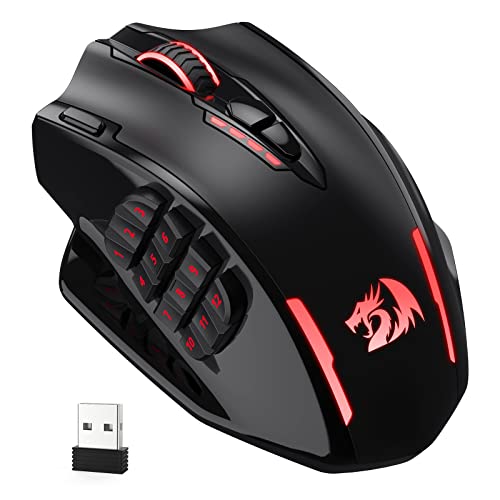
Redragon M913 Wireless RGB MMO Gaming Mouse — Wireless grid with RGB flair
The M913 is the extrovert of Redragon’s MMO family: a wireless grid mouse with full RGB, a sensor reaching 16,000 DPI and a shape tuned slightly more toward players who roam genres than the raid-committed M908. Its side grid keeps the family’s twelve-button promise, its wireless link frees the desk, and its lighting is the most expressive in this guide for players whose setup is partly a display piece. Underneath the glow, the fundamentals are the family’s fundamentals — angled grid rows, macro-capable software, a broad ergonomic shell with support for the outer fingers.
Setup mirrors the family’s other wireless models: pair the receiver, charge fully once, and let the software’s profile switching handle game changes. Owners coming from the wired M908 will find their grid habits transfer untouched, which makes the M913 a natural second mouse for a laptop bag or a second desk — the grid you know, in the place you were not expecting to raid from.
Where it earns its distinct place is in the mixed schedule. Pure raiders are better served by the M908’s wired certainty or the wireless sibling’s battery focus; the M913 suits the player whose week is two raid nights, three evenings of something faster, and a weekend of whatever the group chat decides. The grid is there when the MMO calls, the sensor headroom and wireless freedom serve the faster games credibly, and the mouse never feels like a single-genre appliance you must apologise for owning. That versatility, at this family’s pricing, is a legitimate design goal achieved.
One caution belongs with the praise: the M913 asks its owner to choose, consciously, between its lighting personality and its longest battery intervals, because the glow is not free. Run the RGB at modest brightness or tie it to a profile that dims outside the MMO, and the trade becomes painless. Owners who leave everything at maximum and then blame the battery have misread which product they bought — this is the expressive pick, and expression is its budget line.
- Sensor: optical, up to 16,000 DPI
- Connection: wireless 2.4 GHz, wired fallback
- Buttons: full 12-button side grid, macro programmable
- Lighting: full RGB
- Shape: right-handed ergonomic, broad
Strengths
- Wireless grid plus the family’s most expressive lighting
- High sensor ceiling serves faster genres between raids
- Grid geometry consistent with the rest of the family
Trade-offs
- Lighting shortens battery intervals versus plainer siblings
- Not the lightest or the longest-running wireless pick here
- Styling will not suit a quiet, shared workspace
Best for: mixed-genre players who raid twice a week and want their setup to glow about it. Not suited for: battery misers or players in visually quiet environments.
Do These Mice Make Sense Beyond MMOs?
More than their name suggests. MOBA players were the second audience the category discovered: a trimmed grid — or the Naga’s six-button plate — puts item actives and ability modifiers under the thumb in games where the keyboard hand is busy last-hitting and positioning. ARPG players running build-heavy titles use the grid for the potion, portal and buff routines that otherwise interrupt the mouse’s real job of steering the character. Even outside games entirely, a twelve-button grid is a legitimate productivity surface: video editors park their most-used tools there, spreadsheet workers park navigation macros, and streamers run scene switches from the mouse while their hands stay on the game.
The honest boundary is the fast, flick-heavy shooter, where these shells are simply the wrong tool — heavy, broad, and carrying a grid your thumb can brush at the worst moment. That is not a flaw in the mice; it is the category’s definition. The Naga’s two-button plate exists precisely to blur that boundary for multi-genre players, and everyone else should treat an MMO mouse as the specialist it is: supreme inside its genre family, a guest outside it.
What Does Each Raid Role Ask From the Grid?
Healers are the grid’s strongest argument. A healer’s hands perform two jobs that fight each other on a keyboard: keeping movement keys held while cycling targeted spells across a raid frame. With the grid, the thumb owns the spellbook — single-target heal on the most comfortable button, group heal beside it, dispel on the button with the sharpest landmark, big cooldowns on the row the thumb reaches by rolling rather than stretching — while the mouse itself stays free to select targets and the left hand never leaves movement. Healers who make the switch rarely describe it as an upgrade; they describe it as the role finally being playable as designed.
Tanks live on a smaller, sharper set: taunt, interrupt, defensive rotation, and the positioning keys that must fire while moving precisely. For them the grid’s value is not the count but the certainty — the interrupt must be the button the thumb can find during a boss’s cast bar with zero search time, which is why this guide keeps praising sculpted, distinguishable rows over raw totals. Damage dealers sit between the two: longer rotations reward the full twelve, and the satellite buttons absorb the utility — potions, combat resurrection, engineering toys — that otherwise lives three modifiers deep. Whichever role you main, bind that role’s panic button first and build outward from it; the grid should be organised around your worst moment, not your best one.
How Should You Organise Profiles Across Games and Characters?
Build a skeleton before you build layouts. Decide the universal positions first — interrupt, defensive cooldown, movement ability, health consumable — and freeze them across every profile you ever make. Then let each class fill the remaining grid slots with its own rotation, knowing the skeleton underneath never moves. This two-layer approach is how experienced MMO players switch games without a relearning week: the new title changes the flesh, never the bones, and your thumb’s emergency reflexes stay valid everywhere.
Use automatic switching and test it. Every ecosystem here can launch a profile with its game; spend the ten minutes to configure it, then verify by opening each game once and watching the lighting or the on-screen indicator change. The failure mode to avoid is the silent one — playing an entire evening on the wrong profile and concluding your muscle memory has decayed, when the software simply never switched. Export your finished profiles somewhere safe as well; a profile library built over months is an asset, and rebuilding it after a PC change is the kind of chore that makes players abandon good mice.
Does Weight Matter Differently in an MMO Mouse?
Yes — the priorities invert compared with shooter mice. An MMO mouse is not flicked across the pad hundreds of times an hour; it is held, nudged and parked, often with the hand resting on it between pulls. A little substance helps that life: the mouse stays where you leave it, the grid presses do not shove it sideways, and the outer fingers have something definite to hold during long, low-intensity stretches. That is why this category never joined the ultra-light race, and why several picks ship with tuning weights — not to make the mouse heavier for its own sake, but to place the balance where your particular grip parks it.
The exception is the player who camera-turns with constant small mouse movements, the tab-target equivalent of a high-sensitivity shooter style. If your play looks like that, favour the lighter end of this list, remove any fitted weights, and let the Naga’s two-button plate or the M913’s freer shape carry your off-nights. Weight in this genre is a comfort dial, not a performance ladder, and the right setting is the one your hand forgets by the second hour of the session.
How Do the Six Compare at a Glance?
| Pick | Connection | Side grid | Standout trait |
|---|---|---|---|
| Naga V2 Pro | Wireless / wired | Swappable 12 / 6 / 2 | Three mice in one shell |
| Redragon M908 | Wired | 12 buttons | Value grid with weight tuning |
| Redragon 19-Button MMO | Wired | 12 buttons | Nineteen total programmable controls |
| Redragon Wireless MMO | Wireless | 12 buttons | Rechargeable grid, clear desk |
| UtechSmart Venus Pro | Wired + wireless | 12 buttons | Dual-mode veteran, two-texture grid |
| Redragon M913 | Wireless | 12 buttons | RGB-forward mixed-genre grid |
Read the grid column as the genre’s history: the twelve-button layout won so completely that every serious contender converged on it, and innovation moved to the edges — swappable plates, textures, dual-mode links. When a category converges like that, buying advice simplifies: pick the implementation whose ecosystem and connection suit your life, confident that the core idea has already been proven by a decade of raid nights.
Two patterns stand out. First, the grid itself is a solved problem at every level here — twelve buttons, angled rows, macro software — so the real choices are connection, ecosystem and how much mouse beyond the grid you want to pay for. Second, Redragon’s dominance of the value half is total: four of the six picks share one design family, which sounds like a lack of variety until you realise it means parts knowledge, grid training and software habits transfer across the whole value tier.
What Should You Verify Before Buying Any Grid Mouse?
Three checks, in order. First, your thumb: rest your hand on your current mouse and notice where your thumb actually sits and how far it comfortably travels. A grid whose top row lives beyond that travel will never be learned, only endured, and hand size decides this more than any review can — players with smaller hands should weight the Naga’s sculpted compactness and treat the broadest Redragon shells as try-first purchases. Second, your games’ rules on macros and remapping, checked once, so the setup you build is one you are allowed to keep.
Third, your desk’s other resident: your keyboard hand’s opinion. A grid mouse changes what the left hand does all evening, and players with wrist issues on that side sometimes find the grid a relief — fewer reaches, fewer modifier contortions — while others discover their left hand was never the problem. There is no way to know from a listing page, which is why this category, more than any other in this batch, rewards buying from a seller whose returns process you have actually read. The fortnight of learning described below doubles as your evaluation window; use both deliberately.
How Do You Learn a Twelve-Button Grid Without Losing Your Mind?
Bind in waves, not all at once. Week one: put only your four most-used abilities on the grid’s most comfortable buttons — usually the middle row — and leave the rest of your rotation on the keyboard where it already lives. Your thumb learns four landmarks while your performance barely dips. Week two: move the next four, including your main cooldowns, and put your interrupt on the grid’s most distinct button, the one your thumb can find in a panic. Week three: fill the grid, move your mount and consumables to the satellite buttons, and delete the old keyboard binds so your hands stop hedging.
Expect one strange side effect around week two: your keyboard hand gets quieter. Abilities it used to reach for now happen elsewhere, and players often catch themselves hovering, unsure what that hand is for — the answer is movement, modifiers and the handful of keys you deliberately kept. Reassign that freed capacity consciously: put your camera or targeting keys where the ability keys used to be, and the whole control scheme settles into its new, calmer division of labour.
Two training habits shorten the process dramatically. The first is the dummy drill: ten minutes on a practice target, eyes on the screen, calling abilities in a written sequence — boring, and worth a week of raids. The second is consistency across characters: keep the same categories on the same grid positions for every class (interrupt always here, defensive always there), so the map you are learning is one map with variations rather than five unrelated maps. Players who bind per-character from scratch are the ones still misfiring in month two.
How Do You Keep a Grid Mouse Working for Years?
The grid is a mechanical neighbourhood and it collects the evidence of raid nights: dust, snack salt, the slow film of a thousand hours. A monthly habit keeps it young — a soft brush along the side panel, a blast of air between the buttons, a wipe of the sensor lens — because side buttons that feel gritty are usually dirty rather than dying. Keep the mouse on a pad rather than bare wood; the feet of a heavy grid mouse wear faster than a light mouse’s, and a pad is cheaper than the glide set you will otherwise replace early.
Software housekeeping matters just as much. Export profiles after every major rework, keep one known-good copy untouched, and update firmware deliberately — cable attached, not on raid night. For the wired picks, route the cable so it never bears the shell’s weight off a desk edge; for the wireless ones, avoid letting the battery sit empty for months between games, which shortens its life more than daily use does. Treat the mouse like the multi-year tool it is, and every pick here will outlast the expansion it was bought for.
What Mistakes Do New MMO Mouse Owners Make?
Binding everything on day one is the founding error — a full grid learned under raid pressure produces a thumb that guesses, and guessing heals are worse than keyboard heals. The wave method above exists because of how many players sold their first MMO mouse in week one, convinced the genre was not for them, when the genre was fine and the onboarding was the problem. Give the grid a fortnight of structured patience before you judge either it or yourself.
Choosing by button count alone is the third mistake, and the subtlest. Nineteen buttons you cannot tell apart are worth less than twelve you can read blind, which is why the Naga’s sculpted grid outranks denser rivals for most players and why the two-texture Venus Pro grid punches above its paper specification. Count buttons last; audition their shapes first, even if the audition is only a photograph studied with your thumb’s habits honestly in mind.
The second mistake is neglecting profiles. Players build one beautiful layout, then alt-tab into a second game where the grid fires nonsense, and conclude the mouse is unreliable. Per-game profiles with automatic switching are not an advanced feature in this genre; they are the feature, and every pick here supports them. A related slip is leaving macros unrecorded because recording feels like cheating-adjacent admin — in MMO terms, a crafting macro or a buff-sequence macro is simply the mouse doing the job it was bought for. Finally, do not ignore the rest of the hand: if your ring finger aches after long sessions, adjust your grip and the mouse’s weight before blaming the grid, because marathon comfort is a whole-hand equation.
Final Recommendation
If the budget allows one definitive answer, it is the Naga V2 Pro: the swappable plates future-proof it against your own changing library, the grid is the most learnable twelve buttons made, and the battery and sensor remove every other excuse. Most players, though, should start with the Redragon M908 — the genre’s full experience at a learner’s price — and discover whether the grid life is theirs before spending flagship money. Wireless loyalists split by priority: the Redragon Wireless MMO for battery and value, the Venus Pro for dual-mode flexibility, the M913 for the full glowing mixed-genre package. A closing word about expectations first. An MMO mouse will not fix a rotation you do not understand, a UI that hides your cooldowns, or a guild schedule that raids at hours your body hates. What it removes is the mechanical friction between intention and execution — the missed interrupt because the key sat under the wrong finger, the heal that landed late because movement won the argument. Players underestimate how much of their frustration is that friction until it is gone, and then they cannot imagine the genre without the grid. That conversion, repeated across a decade of players, is why this category exists.
Whichever grid you choose, bind it in waves and give it a fortnight; the mouse on the other side of that learning curve will feel less like a peripheral and more like a second keyboard hand you grew yourself.
Frequently Asked Questions
How long does it really take to learn a side grid?
Most players feel competent inside two weeks of regular sessions and fluent inside a month, provided they bind in waves rather than all at once. The first three days are the worst of it, and they are survivable if you schedule them in low-stakes content — levelling, dailies, old raids — rather than progression night. The sculpted grids of regular sessions and fluent inside a month, provided they bind in waves rather than all at once. The sculpted grids — the Naga’s especially — sit at the fast end of that range because the thumb can navigate by shape instead of memory alone.
Are MMO mice usable for other games?
Yes, with expectations set. In creative software the grid becomes a shortcut panel that many owners end up using more than the game binds it was bought for. The grid is harmless in shooters if you leave it unbound or assign utility keys, the Naga’s two-button plate removes it entirely, and strategy and simulation games often find uses for a dozen extra binds. What these mice will not do is match a light esports shell for flick speed — they are built for breadth, not minimalism.
Do I need macros, or are simple keybinds enough?
Keybinds cover combat for most players. Macros earn their place in the repetitive periphery: crafting sequences, buff routines, mount-and-dismount chains, fishing. Every pick here records them; use them where a sequence is identical every time, and keep reactive play on plain binds where your judgement is the point. One boundary worth respecting: some games’ rules distinguish between one keypress producing one action and automated sequences that play the game for you. Stay on the right side of your game’s terms — convenience macros for menus and crafting are the genre’s norm, unattended automation is not, and no mouse feature is worth an account.
Wired or wireless for raid nights?
Either, honestly. What raids punish is not latency but absence — a dead battery or a forgotten dongle — and both are habits, not hardware. Raids are stationary marathons: a wired mouse never thinks about power, and the wireless picks here carry enough battery for a week of evenings, with wired fallback mid-session if you forget. Choose by desk preference and by which software ecosystem you prefer, not by latency anxiety — tab-target combat forgives everything these links do.
Is a separate gaming keypad a better answer than a grid mouse?
It is a different answer. A left-hand keypad moves the grid to the hand that already does abilities, which some players — especially left-handed ones — find more natural, and it leaves the mouse free to be a light, simple shape. The grid mouse wins on total desk economy: one device, one software profile, nothing new to position. Players who already own a keypad they love do not need this guide; everyone else should start with the mouse, because it solves the problem inside hardware they were replacing anyway.
Can left-handed players use an MMO grid mouse?
Not properly, and the genre should be honest about it: every grid here is sculpted for a right hand with the panel under a right thumb. Left-handed MMO players typically run a symmetrical mouse with keyboard-side binds, or use a left-hand keypad as their grid instead — a route several high-end left-handed raiders genuinely prefer, since a keypad’s larger keys forgive more than a thumb grid does and the device never has to be steered. It is a genuine gap in the market rather than a preference we can route around, and our left-handed guide covers the symmetrical mice that pair best with that setup.
One last encouragement for the undecided: the MMO mouse is the rare peripheral whose value compounds with your account rather than depreciating with its hardware. Every profile you build, every grid position your thumb memorises, transfers to the next mouse in the category — the layouts in this guide’s six picks are more alike than their shells suggest. Starting the learning curve on the value end therefore costs you nothing later; the fortnight you invest now is yours for as long as you play the genre, whichever badge the eventual mouse wears.
Related Guides
Best Wireless Left Handed Gaming Mouse
Best Wireless Gaming Mouse with Wireless Charging
Best Gaming Mouse That Doesn’t Look Like a Gaming Mouse
[…] Best Gaming Mouse for MMO RPGs […]