What's inside
- Key Takeaways
- Quick Picks
- How We Chose These Picks
- Comparison Table
- Why Does a Top-Three List Matter More Than a Top-Fifteen?
- How Should a Company Choose Between the Three Podium Machines?
- What Did the Podium Machines Sacrifice to Get There?
- How Do the Top Three Compare on Battery, Weight and Daily Feel?
- What Should You Check on the Listing Before Ordering a Podium Laptop?
- How Does a Top-Three Fleet Age Over Four Years?
- Common Mistakes When Buying From a Top-Three List
- How Do You Brief Staff When a New Standard Laptop Arrives?
- What Separates a Flagship Business Laptop From a Premium Consumer One?
- How Much Should a Business Expect to Spend Across a Podium Laptop’s Life?
- Why Did Other Famous Names Miss This Podium?
- How Should You Run a Two-Week Pilot of the Podium Three?
- What Do Owners Say a Year After Choosing Each Podium Machine?
- Which Podium Laptop Suits Founders and Small Studios?
- How Do the Podium Three Handle Security Reviews?
- What Accessories Do Podium Owners Actually Need?
- Final Recommendation
- Frequently Asked Questions
- Related Guides
As an Amazon Associate I earn from qualifying purchases. This post may contain affiliate links at no extra cost to you.
widgetverdict.com is reader-supported. When you buy through links on our site, we may earn an affiliate commission.
Most laptop roundups read like a catalogue because catalogues are easy. Naming the best 3 business laptops is harder: it forces a verdict. After working through the current business line-ups from Lenovo, HP, Dell and ASUS, this guide commits to a top three — the ThinkPad X1 Carbon Gen 13, the HP EliteBook 840 G11 and the Dell Latitude 7450, in that order — and then reviews three further machines that missed the podium for specific, explainable reasons. If your company buys one model this year and defends the choice in a budget meeting, start with the podium.
Where to buy: the six machines reviewed below link to Amazon listings verified against the site’s product records on 2026-11-25, so the configuration described in each spec box is the configuration the seller offers. Business ranges churn configurations quickly, and a title search alone can land you on last generation’s stock; verify the processor and display on the listing before ordering, and check price on Amazon at purchase time, since no printed figure in any guide survives contact with a live marketplace.
Why three, and why these three? Because the top of the business market has genuinely converged. The podium machines each represent the best current answer from the three vendors who dominate corporate deployment, and each wins a different argument: Lenovo’s Carbon wins on travel and typing, HP’s EliteBook wins on meetings and serviceability, Dell’s Latitude wins on fleet operations. Everything else in the category is either a variation on those themes or a deliberate step down in price.
Readers in a hurry can take the podium at face value and order with confidence. Readers speccing a fleet should keep going: the sections after the reviews cover pilot programmes, four-year costs, security reviews and the listing checks that protect a large order from configuration drift. The medals were the easy part of this guide; the operational detail is where it earns its length.
Key Takeaways
- First place goes to the ThinkPad X1 Carbon Gen 13 Aura Edition — the most complete travel-and-typing package in business laptops today.
- The EliteBook 840 G11 takes second on the strength of its conferencing hardware and technician-friendly design.
- Dell’s Latitude 7450 completes the podium as the safest fleet standard an IT department can choose.
- The ThinkPad T14 Gen 6 is the first alternate: nearly podium-grade, priced for volume.
- ASUS’s ExpertBook B9 is the OLED outsider, built for travellers who prize screen quality and lightness.
- Lenovo’s ThinkPad E14 Gen 6 proves a genuine business laptop does not require a flagship budget.
Quick Picks
| Pick | Badge | Why it makes the cut |
|---|---|---|
| Lenovo ThinkPad X1 Carbon Gen 13 | No. 1 — Best overall | Aura Edition polish, 2.8K OLED option and Lunar Lake efficiency in the classic Carbon frame. |
| HP EliteBook 840 G11 | No. 2 — Best for hybrid teams | Meeting hardware that flatters everyone on the call, plus easy internal access. |
| Dell Latitude 7450 | No. 3 — Best fleet standard | Deployment tooling, ports and support depth that make large rollouts uneventful. |
| Lenovo ThinkPad T14 Gen 6 | First alternate | The newest T-series formula with touch display, tuned for volume deployment. |
| ASUS ExpertBook B9 | Best OLED traveller | A vivid OLED screen and vPro Essentials in one of the lightest business chassis. |
| Lenovo ThinkPad E14 Gen 6 | Best budget podium-challenger | Ryzen-powered ThinkPad essentials at the friendliest price in this guide. |
How We Chose These Picks
A top-three format demands stricter rules than a long list, so the criteria were set before any model was discussed. A podium machine had to be a current-generation flagship or near-flagship from a vendor with a serious business support network. It had to excel at one of the three jobs business laptops actually do — travelling, meeting or fleet-serving — without failing at the other two. And it had to be buyable in a verified configuration, checked through the site’s Creators API records on 2026-11-25, because a recommendation you cannot purchase in the described specification is a rumour, not a review.
Scoring weighted keyboard quality, display, battery behaviour, conferencing hardware, serviceability and support depth. Raw processor benchmarks counted least, deliberately: the chips in this class all handle office work, and the differences owners feel daily live elsewhere. Machines were also penalised for soldered-everything designs where a rival offered upgrade paths, and rewarded for physical privacy features — camera shutters, fingerprint readers — that staff actually use.
The three alternates were chosen to answer the objections the podium provokes. Too expensive? The E14 Gen 6 answers. Buying two hundred units and the Carbon’s price made finance blink? The T14 Gen 6 answers. Want a screen the podium cannot match? The ExpertBook B9 answers. A top-three list that ignores its own counterarguments is just an advertisement with rankings.
One methodological note: no vendor paid for placement, supplied review units with conditions or saw this ranking before publication. The order reflects the scoring described above and the verified listings available on the stated date — nothing else is for sale on this page except the laptops, and even those are sold by the retailers behind the links, not by us.
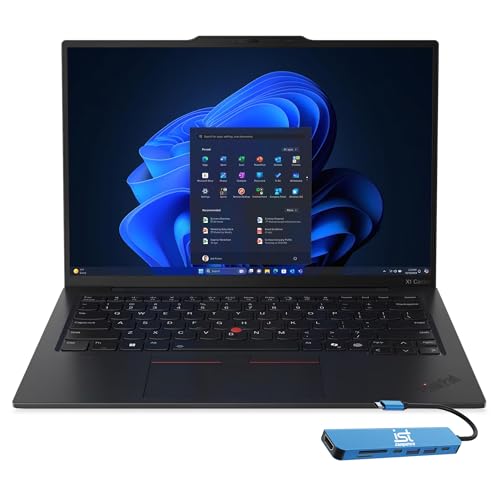
Lenovo ThinkPad X1 Carbon Gen 13 — No. 1 — Best overall
Gold medals should go to the machine with the fewest asterisks, and the X1 Carbon Gen 13 collects fewer than anything else in the business category. The Aura Edition — Lenovo’s co-engineered flagship tier with Intel — pairs the verified listing’s Core Ultra 7 258V with a 2.8K OLED display option that transforms the Carbon from a sober fleet tool into something owners quietly show off. Weight stays near the one-kilogram line that made the line famous, and the carbon-and-magnesium shell keeps its military-tested composure.
Lunar Lake silicon suits this chassis particularly well. The 258V’s efficiency stretches the battery across long travel days, its integrated graphics handle multi-monitor desks and light creative work without complaint, and fan behaviour stays civilised in quiet rooms. Lenovo also used this generation to refine the details owners touch: the keyboard remains the category reference for travel and feedback, the touchpad grew, and the webcam bar above the screen houses a camera that renders hybrid meetings flatteringly.
That OLED deserves both its praise and its warning label. Colours and contrast are the finest in this guide, documents look printed rather than displayed, and video calls gain an almost unfair polish. The cost is battery: drive the OLED at full brightness all day and the endurance advantage over the Gen 12 narrows. Owners who prize runtime over spectacle should choose the range’s lower-power panel option instead — the Carbon is one of the few flagships that lets you pick your priority at ordering.
Fleet credentials complete the case for first place. vPro-class management options, ThinkShield firmware protections and Lenovo’s global service network mean the prettiest laptop in this guide is also deployable at scale. The compromises are the familiar Carbon ones — memory is soldered, so buy the tier your future self needs, and the price sits at the top of the category. First place was never going to be cheap. It was going to be this.
Small delight worth recording: the machine wakes, unlocks and joins a call faster than any rival here, a sequence owners perform a dozen times a day. Podium finishes are usually decided by exactly such repetitions, not by any single heroic specification.
Docking and desk life match the travel story. One cable drives a dual-monitor desk, the hinge opens one-handed yet holds firm on a bumpy train table, and the chassis shrugs off the daily bag-to-desk migration without creaks or finish wear. Lenovo’s support organisation stocks parts for this line globally, so the flagship’s fourth year looks as serviceable as its first. Excellence this consistent is what first place means.
- Display: 14-inch 2.8K OLED option, WUXGA alternatives in range
- Chip: Intel Core Ultra 7 258V (Aura Edition)
- Build: carbon fibre and magnesium, near one kilogram
- Security: ThinkShield, fingerprint reader, camera shutter
Strengths
- Finest display fitted to a business ultraportable
- Keyboard and travel weight remain class benchmarks
- Lunar Lake efficiency stretches the working day
Trade-offs
- OLED at full brightness trims battery life
- Soldered memory demands a generous first order
- Top-of-category pricing throughout
Best for: executives and consultants who want the single best business laptop, full stop.
Not suited for: volume buyers whose budgets are set per seat by tender.

HP EliteBook 840 G11 — No. 2 — Best for hybrid teams
Second place belongs to the laptop that understands what a workday looks like now. The EliteBook 840 G11 was designed by people who counted the hours their customers spend on video calls and refused to ship a mediocre camera ever again. Its webcam, microphones and speakers form the strongest conferencing kit in this guide, and for the growing share of professionals whose reputation travels through a lens, that kit is not a feature — it is the job.
The verified configuration’s Core Ultra 7 165H gives the EliteBook more sustained muscle than the U- and V-series chips in its podium rivals. Data-heavy multitasking, large presentations and browser farms run concurrently without the machine developing opinions about it. The WUXGA touch display in this listing adds fingertip annotation to the meeting toolkit, and HP’s matte finish keeps the screen honest under office lighting.
Serviceability lifts the EliteBook above prettier competitors in fleet evaluations. Captive screws, accessible battery and storage, published repair documentation — HP treats maintenance as a design requirement, and businesses running dozens of seats feel the savings at the first cracked screen or tired battery. Wolf Security’s hardware-level protections add a second argument for regulated industries, where the audit trail matters as much as the firewall.
Why not first place? Weight and battery. The EliteBook is the heaviest of the podium three and its endurance, while adequate for office days, asks for a charger on travel days where the Carbon simply continues. Those are real costs for the road-warrior minority — and minor ones for the desk-and-meeting majority, who should read this ranking as an invitation rather than a consolation.
One underappreciated detail: HP’s hinge and lid feel engineered for the two-handed chaos of real offices, opening smoothly and holding position on a train table. Machines reveal their build philosophy in such moments, and the EliteBook’s philosophy is that work is untidy and hardware should cope.
Presenters should note the touch display’s quieter benefit: walking a client through a dashboard becomes a conversation at the screen rather than a performance with a mouse. Combined with speakers that carry a small room, the EliteBook regularly replaces the meeting-room PC entirely in hybrid offices. That versatility is the substance behind its second-place finish.
- Display: 14-inch WUXGA touch, anti-glare
- Chip: Intel Core Ultra 7 165H
- Conferencing: high-resolution webcam, AI noise reduction
- Security: HP Wolf Security, camera shutter
Strengths
- Conferencing hardware leads the podium clearly
- H-series performance for heavy multitasking
- Designed for fast, cheap repairs
Trade-offs
- Heaviest of the top three
- Battery trails the Carbon on travel days
- Fans speak up under sustained load
Best for: hybrid teams and managers whose calendar is a wall of video meetings.
Not suited for: weekly flyers optimising every gram.

Dell Latitude 7450 — No. 3 — Best fleet standard
Bronze on this podium is an operations medal. The Latitude 7450 is the machine an IT director chooses when the true requirement is not delighting one user but equipping eight hundred without a single headline. Dell’s deployment tooling, configuration consistency and support contracts are the deepest in the business, and the 7450 wraps them in a slim aluminium chassis that no employee will be embarrassed to open in front of a client.
The verified listing’s Core Ultra 7 165H matches the EliteBook’s muscle, so the Latitude never asks staff to downshift their workloads. Its port selection remains the most diplomatically complete of the three — Thunderbolt for the modern desk, HDMI and USB-A for the rest of the world’s meeting rooms — and battery behaviour covers the standard office day with the screen at a brightness humans choose.
Judged one-to-one against the podium’s top two, the Latitude concedes small things: the keyboard is very good rather than beloved, the design language whispers where the Carbon’s OLED shouts. Judged as a fleet, those concessions invert into virtues. Consistency is a feature when you support hundreds of machines; parts commonality is a feature; a vendor whose enterprise organisation answers the phone is a feature.
Pricing rewards the patient negotiator. Latitude quotes improve with volume and warranty bundling in ways single-unit buyers never see, so the per-seat gap between the 7450 and the podium’s top can narrow or vanish inside a real procurement process. Any business buying more than twenty machines should obtain that quote before treating this ranking as a price ranking too.
Longevity closes the case. Latitudes dominate the refurbished channel because they survive first ownership, which means parts, knowledge and resale value all persist. Third place in a top-three list of this quality is not a rebuke; it is the recommendation most large organisations will, correctly, act on.
Security review boards reach the same conclusion by a different road. The Latitude line’s BIOS protections, supply-chain assurances and configuration consistency make compliance sign-off a meeting rather than a project. In organisations where a laptop purchase must survive legal, security and finance review in sequence, the machine with the fewest questions wins — and that machine, most quarters, is this one.
- Display: 14-inch anti-glare class panel
- Chip: Intel Core Ultra 7 165H
- Ports: Thunderbolt 4, USB-A, HDMI, microSD on many configs
- Management: Dell Command suite, vPro options in range
Strengths
- Fleet deployment and support depth
- Strong chip, complete port selection
- Volume pricing improves real-world value
Trade-offs
- Keyboard and styling trail the top two
- Best pricing requires a fleet negotiation
- Display options lack an OLED headline
Best for: organisations standardising hundreds of seats on one supportable model.
Not suited for: individuals chasing the finest screen or keyboard available.

Lenovo ThinkPad T14 Gen 6 — First alternate
Every podium has a fourth chair where the nearly-made-it sits, and the T14 Gen 6 occupies it with dignity. The verified listing runs Intel’s Core Ultra 5 225U with a touch-enabled FHD+ display, which reads like the podium formula translated into fleet economics: current silicon, the full ThinkPad keyboard experience, and a price that lets a department equip everyone rather than anointing a few.
Daily behaviour is pure T-series. The chassis shrugs off bag abuse, the ports cover the office without adapters, and the machine runs cool and quiet under the document-and-browser load that constitutes most employment. The touch layer earns its keep in review-and-annotate work, and the webcam covers meetings adequately, if without the EliteBook’s polish.
Where the T14 concedes ground is ceiling. The Ultra 5 is an efficiency chip; sustained heavy workloads belong on the H-series machines above. Materials feel a grade below the Carbon’s exotic shell, and the display, while perfectly serviceable, will not make anyone put down a Gen 13 OLED. These are the correct compromises for the T14’s mission, and naming them is a compliment to Lenovo’s product discipline rather than a criticism.
Buyers should read the T14 Gen 6 as the volume answer to the podium: the machine to standardise on when the top three’s per-seat pricing multiplies into a number the budget cannot carry. In many real fleets, that makes it not the fourth choice but the actual purchase — with a handful of Carbons reserved for the travellers whose work justifies them.
Upgrade headroom strengthens the long game. The T-series tradition of accessible internals continues in this generation’s mainstream configurations, so a mid-life memory or storage uplift remains a technician’s errand rather than a replacement order. Fleets that exploit that headroom routinely stretch T-series service to five years.
There is a staff-relations dividend here too. Issuing current-generation ThinkPads with touch screens tells employees the company buys properly, while the per-seat saving against the podium funds the monitors, docks and chairs that complete a workstation. The T14 is how a thoughtful IT manager spends visibly and saves invisibly at the same time.
- Display: 14-inch FHD+ touch
- Chip: Intel Core Ultra 5 225U
- Keyboard: full ThinkPad layout
- Ports: Thunderbolt, USB-A, HDMI
Strengths
- Podium-adjacent quality at fleet pricing
- Touch display included in this configuration
- Upgrade-friendly T-series design
Trade-offs
- Efficiency chip caps sustained workloads
- Materials a grade below the Carbon
- Webcam merely adequate for daily calls
Best for: departments equipping many staff with current, supportable machines.
Not suited for: power users or buyers wanting a flagship display.

ASUS ExpertBook B9 — Best OLED traveller
ASUS does not sell the most business laptops, and the ExpertBook B9 suggests it has decided to win a specific argument instead: the traveller who wants a gorgeous screen. The verified listing centres on an OLED display in a chassis light enough to embarrass rivals, with vPro Essentials management keeping the machine legible to corporate IT. It is the connoisseur’s pick in this guide, and connoisseurs should know exactly what they are trading.
The screen is the headline and earns it. OLED contrast makes documents, dashboards and video look expensive, and for staff who present from their own display — consultants, designers, sales engineers — the panel doubles as presentation equipment. Paired with a light chassis and all-day battery ambitions, the B9 builds a coherent case: carry less, show better.
ASUS has been building ExpertBooks long enough for the fundamentals to be sound. The keyboard is comfortable, the port mix covers travel realities, and the build passes the durability testing business buyers should demand. The webcam and speakers handle meetings competently. Nothing about the machine feels like a consumer laptop wearing a blazer, which was not always true of challenger brands in this category.
The cautions are ecosystem cautions. ASUS’s business support network, while professional, lacks the depot depth and parts ubiquity of the podium vendors, and resale channels are thinner. A company standardising a continent of laptops should weigh that heavily; an individual or small team buying a superb travel machine can accept it with open eyes.
Position in this guide: the B9 is the alternate for buyers who looked at the podium, agreed with the reasoning, and still wanted the screen. That is a legitimate preference, and this is the machine that honours it without asking for compromises anywhere else that matter.
Travellers should also weigh the B9’s charger and footprint: the whole kit slips into bags that reject bulkier flagships, and the OLED’s efficiency at moderate brightness keeps the battery honest through long airport days. It is a machine designed by people who clearly fly with their own product, and that lived experience shows in a dozen small decisions.
- Display: OLED panel, high colour coverage
- Management: Intel vPro Essentials
- Build: ultralight business chassis
- Ports: Thunderbolt, USB-A, HDMI class mix
Strengths
- OLED screen doubles as presentation gear
- Among the lightest business laptops here
- Business management features present
Trade-offs
- Support network thinner than the podium’s
- Resale and parts channels are smaller
- Brand less proven in huge fleets
Best for: travelling professionals who present from their own screen.
Not suited for: continent-scale fleets needing maximum service depth.

Lenovo ThinkPad E14 Gen 6 — Best budget podium-challenger
Budgets deserve a serious machine too, and the E14 Gen 6 is the most serious one in this guide. The verified listing runs AMD’s Ryzen 5 7535U, a processor that handles the office mainstream — documents, browser suites, calls, spreadsheets — with an ease that embarrasses its price tier. Around it, Lenovo builds a proper ThinkPad: the keyboard layout staff already know, a durable chassis and business warranty options.
The E-series formula trims finish, not function. The shell uses more conventional materials than the T-series, the display is a workmanlike panel, and some premium options from higher lines are absent. What remains is everything a small business actually uses daily, which is why E-series machines quietly equip so many growing companies.
AMD power deserves a sentence of its own. The Ryzen chip’s integrated graphics outperform many Intel equivalents at this tier, giving the E14 unexpected competence with light visual work and multi-monitor desks. Battery behaviour is honest rather than spectacular, covering the office day and asking for the charger on the road — a fair exchange at this price.
Against the podium, the E14’s argument is arithmetic: a small company can equip its whole team with E14s for the cost of a few Carbons, and a team fully equipped beats a team sharing masterpieces. It misses the podium on materials, display and support depth, and it knows it. As the sixth review in a top-three guide, it exists to prove the floor of this category is higher than buyers fear.
Growth headroom seals the recommendation for startups. Accessible memory and storage in mainstream E14 configurations let a young company buy for today’s headcount and upgrade for tomorrow’s workload, rather than replacing machines at the first promotion wave. That flexibility, at this price, is a strategy, not a compromise.
Support expectations should be set honestly: the E14’s warranty defaults may be shorter than flagship terms, so small businesses should add the on-site uplift at ordering while it is cheap. Configured that way, the E14 delivers the complete business ownership experience — machine, service and upgrade path — at a total the podium cannot approach.
- Display: 14-inch WUXGA class panel
- Chip: AMD Ryzen 5 7535U
- Keyboard: full ThinkPad layout
- Ports: USB-C, USB-A, HDMI, Ethernet options in range
Strengths
- Lowest price among these six reviews
- Ryzen graphics punch above the tier
- Genuine ThinkPad keyboard and warranty
Trade-offs
- Materials and display are workmanlike
- Battery asks for a charger when travelling
- Fewer premium options than T-series
Best for: small businesses and startups equipping whole teams affordably.
Not suited for: buyers wanting flagship materials or displays.
Comparison Table
| Pick | Rank | Chip | Standout trait |
|---|---|---|---|
| ThinkPad X1 Carbon Gen 13 | 1 | Ultra 7 258V | OLED flagship, travel weight |
| HP EliteBook 840 G11 | 2 | Ultra 7 165H | Conferencing and serviceability |
| Dell Latitude 7450 | 3 | Ultra 7 165H | Fleet operations depth |
| ThinkPad T14 Gen 6 | Alternate | Ultra 5 225U | Volume-ready T-series |
| ASUS ExpertBook B9 | Alternate | vPro Essentials platform | OLED in an ultralight shell |
| ThinkPad E14 Gen 6 | Alternate | Ryzen 5 7535U | Budget without embarrassment |
Why Does a Top-Three List Matter More Than a Top-Fifteen?
Long lists defer decisions; short lists force them, and the forcing is the service. A committee choosing a fleet standard does not need fifteen options — it needs the three defensible ones and the reasoning that separates them. This guide’s podium maps to the three real philosophies in business laptops: optimise for the traveller, optimise for the meeting, optimise for the fleet. Every buyer’s actual priority is one of those three, stated or not.
Short lists also age better. Fifteen-model roundups fill their lower ranks with machines that were included for completeness and quietly discontinued by spring. A top three, chosen from flagship lines with multi-year support commitments, stays purchasable and relevant far longer — which matters for a fleet standard that must be re-orderable across a whole refresh cycle.
How Should a Company Choose Between the Three Podium Machines?
Follow the calendar of a typical employee. If the week is airports and client sites, the Carbon’s weight and battery decide it. If the week is a grid of video calls from two locations, the EliteBook’s conferencing kit decides it. If there is no typical employee because the fleet serves forty roles, the Latitude’s operational depth decides it. The podium was ordered for the individual buyer; companies should re-order it by their own dominant pattern without guilt.
Pilot all three if the order is large. A fortnight with real staff on real docks surfaces the deal-breakers — a dock firmware grudge, a keyboard preference with surprising intensity — that no guide can predict for your building. Then negotiate: at fleet volumes, the price gaps between podium machines are negotiable in ways that can legitimately reorder this ranking for your quote.
What Did the Podium Machines Sacrifice to Get There?
Honesty about the top three requires naming their shared blind spot: price and upgradeability. All three solder their memory, all three charge flagship money, and all three assume the buyer values thinness and polish over mid-life expansion. The alternates exist partly as the correction — the T14 and E14 restore the upgrade path, and the B9 restores display drama the Latitude omits.
Gaming and workstation graphics are the other absence, by design. None of the six machines in this guide pretends to CAD or render work; readers with those workloads should jump to the professional-graphics companion guide rather than stretching a podium laptop past its purpose. A top-three list that claims to cover everything covers nothing.
How Do the Top Three Compare on Battery, Weight and Daily Feel?
Numbers first, translated into days. The Carbon Gen 13 is the traveller’s instrument: lightest here, longest-legged on battery when the efficient panel is chosen, and the quickest to wake and unlock. The EliteBook trades some of that endurance for its H-series processor and earns it back in sustained performance; plan on a charger in the bag for multi-day trips. The Latitude sits between them on both measures, which is a fair summary of its entire personality.
Feel is harder to chart and easier to remember. The Carbon’s keyboard makes writers loyal; the EliteBook’s screen-and-camera combination makes presenters confident; the Latitude’s consistency makes administrators calm. Owners rarely describe these machines by their processors. They describe them by the moment the machine either helped or hindered, and the podium was chosen so that those moments land positive for the three most common working patterns.
Noise separates them in quiet rooms. The EliteBook and Latitude, with H-series chips, will be heard during exports and heavy compiles; the Carbon’s Lunar Lake platform stays close to silent outside brief bursts. Open-plan offices with heavy workloads should weigh that trait more than any benchmark gap in this guide.
What Should You Check on the Listing Before Ordering a Podium Laptop?
Flagship ranges are configuration minefields, so verify the five fields that define the reviewed machines. Processor first — the Carbon’s Aura Edition chip and the H-series parts in its rivals are specific SKUs, not the whole range. Display second: the Carbon’s OLED and the EliteBook’s touch panel are options within their lines, and the base panels are different products wearing the same name.
Memory third, because it is soldered in all three podium machines and the tier chosen is permanent. Storage fourth, for the same reason in practice — replacements are possible on some models but never convenient mid-deployment. Warranty fifth: confirm on-site service is attached before checkout, since flagship reputations do not automatically include flagship cover on marketplace listings.
The listings behind this guide were verified on 2026-11-25 against the site’s records, and the spec boxes describe those verified configurations. Stock rotates, titles get reused, and a thirty-second re-check at the moment of ordering is the cheapest insurance in the entire purchase.
How Does a Top-Three Fleet Age Over Four Years?
Year one is honeymoon for any flagship. Year two separates designs: hinges, keyboards and finishes reveal their engineering, and all three podium lines have long records of surviving to this point gracefully. Year three is the battery’s referendum — plan a replacement programme for travel-heavy units, cheaper on the serviceable EliteBook, a service visit on the sealed Carbon. Year four rewards the buyers who specced memory generously at the start, because software growth, not hardware failure, is what retires most business laptops.
Support windows matter as much as hardware. All three vendors maintain drivers and firmware for flagship lines well beyond the sales cycle, and the alternates share that commitment to varying degrees. A top-three standard bought this year remains orderable, imageable and repairable across a normal refresh cycle — the unglamorous property that makes short lists safer than long ones.
End-of-life value closes the loop. Carbons, EliteBooks and Latitudes all hold resale value in the refurbished channel, which returns money to the refresh budget or funds donation programmes. The alternates hold value unevenly — ThinkPads strongly, the ExpertBook in a thinner market — another small argument for the podium in fleet contexts.
Common Mistakes When Buying From a Top-Three List
The first mistake is treating rank as destiny — buying the number one for a role the number three serves better. Rank here reflects breadth of excellence, not fitness for your specific week. The second is ordering the headline configuration without reading the listing, because flagship ranges contain multiple screens and chips under one name; the verified configurations in this guide are the ones reviewed.
Third, buyers forget the ecosystem invoice: docks, spare chargers and warranty uplift can add a third to the machine’s cost, and podium machines differ in what they demand there. Fourth, small teams copy enterprise choices uncritically — a five-person studio rarely needs the fleet tooling that justifies the Latitude’s podium seat, and may be happier with the B9 or E14. Read the verdicts, not just the medals.
How Do You Brief Staff When a New Standard Laptop Arrives?
Rollouts fail socially more often than technically. A short briefing — what changed, where the ports moved, which charger lives where, who to call when something misbehaves — prevents the first week’s tickets from being orientation questions in disguise. Pair it with a one-page sheet covering the dock ritual, the battery setting for desk-bound machines and the warranty process, and keep that sheet where new hires actually look.
Collect the old machines the same day. Laptops that linger in drawers become unregistered data risks and spare-parts confusion. A clean exchange — new machine imaged, old machine wiped and logged — keeps the asset register honest and the security team calm.
Then ask for feedback at thirty days, and mean it. The pilot group cannot surface everything, and a fleet standard that listens in its first month earns the patience it will need in its fortieth. The podium machines reward that patience; they were chosen to be lived with, not merely unboxed.
What Separates a Flagship Business Laptop From a Premium Consumer One?
The showroom differences are small and the ownership differences are enormous. A business flagship brings a support organisation that answers with service-level commitments, parts availability measured in years, security silicon below the operating system, and a manufacturer that publishes repair documentation instead of treating the chassis as a sealed secret. It also brings consistency: the same model, orderable in the same configuration, across a deployment that may span a year of hiring.
Consumer flagships optimise for the first ninety days — the review, the unboxing, the benchmark chart. Business flagships optimise for day nine hundred. Every podium decision in this guide follows from that distinction, and buyers cross-shopping the two worlds should decide which horizon they are purchasing for before comparing a single specification.
The price gap between the worlds is the premium for the second horizon, and for anyone whose laptop is how they earn money, it is usually the most rational premium in the catalogue. Downtime costs more than hardware; the podium exists to minimise the former, not the latter.
How Much Should a Business Expect to Spend Across a Podium Laptop’s Life?
The purchase price is the down payment, not the cost. A realistic four-year ledger for a flagship business laptop includes the warranty uplift to on-site service, accidental-damage cover for travel roles, a dock and second charger per person, one battery replacement for heavy travellers in year three, and the helpdesk time the machine consumes — a figure that differs measurably between a fleet-standard Latitude and an exotic import nobody else in the building owns.
Resale returns money at the end. Podium models hold value in the refurbished channel, and a disciplined disposal process — certified wipe, graded sale, documented chain — can recover a meaningful slice of the original outlay to fund the next cycle. The alternates return less predictably, which belongs in their total-cost comparison too.
None of this arithmetic overturns the podium; it disciplines it. A Carbon that looks expensive as a line item can be the cheapest machine here per year of untroubled service, while a bargain that generates tickets and a mid-life replacement is the costly one. Buyers should run the four-year numbers before letting the first-year number decide.
Why Did Other Famous Names Miss This Podium?
Readers will notice absences, and absences deserve explanations. The larger Latitudes and the 15-inch ThinkPads serve size-specific needs covered in the companion guide to big-screen business laptops; forcing them into a general top three would punish their weight for a virtue their buyers actually want. The workstation lines — ThinkPad P-series, Precision, ZBook — answer a graphics question this guide deliberately excludes, and they receive their own podium in the professional-graphics coverage.
Convertibles missed on arithmetic: the hinge and pen tax buys flexibility most business roles use rarely, and the two podium-adjacent convertible picks get their full hearing in the 2-in-1 guide. Consumer flagships in business clothing missed on support depth — a beautiful machine with a depot-only warranty is a liability wearing a costume. Every absence here is a routing decision, not an oversight, and each routed machine is reviewed where its strengths are the subject.
One more absence is generational. Last year’s flagships remain excellent buys on the refurbished market, but a forward-looking top three must be orderable new, in the reviewed configuration, across a refresh cycle. That rule will retire today’s podium in time, and the verification date on this guide tells readers exactly when its claims were true.
How Should You Run a Two-Week Pilot of the Podium Three?
Give each finalist to two people: one whose work resembles the fleet’s majority and one professional complainer whose standards are unreasonable in useful ways. Load the company’s real software, connect the real docks, and hold real meetings. Score the same five things for every machine — keyboard comfort, call quality, battery honesty, dock behaviour and fan temperament — on a shared sheet, because impressions recorded immediately are data and impressions recalled later are politics.
Include the unglamorous tests. Sleep and wake the machines fifty times. Carry them in the bags staff actually own. Run the biggest spreadsheet, the heaviest presentation and the longest call the company produces. The podium machines will all pass most of this; the pilot exists to find the one local incompatibility — a dock, a VPN client, a peripheral — that turns a correct-on-paper choice into a year of tickets.
Decide with the scores, then negotiate with the decision. Vendors sharpen fleet quotes for buyers who can name their standard and their volume, and the runner-up machine’s quote is legitimate leverage. A pilot costs two weeks; the standard it produces governs four years.
What Do Owners Say a Year After Choosing Each Podium Machine?
Carbon owners talk about travel — the bag that stopped hurting, the battery that stopped featuring in their planning, the keyboard they now defend in arguments they did not start. Their regrets cluster on the memory tier they chose in a hurry. The lesson travels with the machine: spec the Carbon for year four on day one.
EliteBook owners talk about meetings. Clients compliment the picture; colleagues stop asking for repeats; the machine disappears into the call. Their regrets are travel-shaped, the extra weight on the longest days. Latitude owners talk about nothing, which is the point — their machines neither delighted nor failed them, quarter after quarter, and the IT team that issued them reports the same silence from the ticket queue.
Alternate owners report the expected satisfactions: T14 fleets running without drama, B9 owners still pleased with the screen a year on, E14 teams who equipped everyone and never looked back. A podium with honest alternates produces few unhappy owners, because the buyers who needed something else were told where to find it.
Which Podium Laptop Suits Founders and Small Studios?
Small organisations buy differently: no fleet discount, no imaging team, and a founder who reads reviews at midnight. For them the podium reorders by total experience rather than operations. The Carbon Gen 13 suits the founder who travels to win work; the ExpertBook B9, technically an alternate, suits the studio whose screen is part of its portfolio; the EliteBook suits the growing team whose days are client calls, because looking and sounding excellent is a sales feature at that size.
The Latitude’s fleet virtues matter least at this scale, though its support depth still reassures anyone burned by consumer-grade warranty experiences. And the E14 Gen 6 is the honest recommendation when the studio’s budget must cover five people this quarter: a podium is a guide, not a commandment, and equipping everyone decently outranks equipping one person perfectly.
Whatever a small team chooses, buy the warranty uplift and a spare charger with the machine. At this scale one dead laptop is twenty percent of the company’s computing capacity, and the boring accessories are what keep that arithmetic from becoming a crisis.
How Do the Podium Three Handle Security Reviews?
Compliance questionnaires ask about the layer beneath the operating system, and the podium was partly chosen for strong answers there. Firmware protection suites — Lenovo’s ThinkShield, HP’s Wolf Security, Dell’s BIOS verification — guard boot integrity and offer self-healing capabilities that security teams increasingly treat as baseline. All three machines provide TPM-based encryption, biometric sign-in and physical camera shutters, covering the checklist items auditors actually enumerate.
Management reach separates them at the margins. vPro configurations enable out-of-band rescue of a machine that will not boot, valuable for distributed teams with no office to walk into. Businesses without dedicated IT can lean on vendor cloud consoles instead, but should decide the management story before deployment day, not during the first lost-laptop incident.
Data disposal completes the review. Certified wiping processes and documented chain-of-custody matter when a machine leaves service holding client data, and all three vendors support the tooling. Security is a lifecycle, and the podium machines are the ones whose vendors publish answers for every stage of it.
What Accessories Do Podium Owners Actually Need?
Remarkably few, and the same few across all three: a Thunderbolt dock matched to the desk’s monitors, a second charger that lives in the travel bag, and a sleeve or case that respects how thin these machines are. The Carbon and B9 owners should add nothing else; their machines were bought for lightness, and accessories are how lightness dies.
EliteBook and Latitude owners working fixed desks may add a laptop stand and external keyboard to complete the ergonomic picture, since their machines often serve as primary displays. Presenters on any model benefit from a reliable USB-C-to-HDMI adapter kept personally, regardless of the port selection promises — meeting rooms remain undefeated by spec sheets.
Skip the rest. Cooling pads, decorative skins and universal “docking” gadgets of uncertain wattage add cost without changing a working day. The podium machines arrive complete; the discipline is refusing to unpick that completeness.
Final Recommendation
Buy the ThinkPad X1 Carbon Gen 13 if one laptop must be named the best business laptop of this generation: it travels lightest, types best and now shows the finest screen in the class. Choose the EliteBook 840 G11 when meetings are the work, and the Latitude 7450 when the fleet is the work. Keep the T14 Gen 6, ExpertBook B9 and E14 Gen 6 in the drawer for the three objections — volume price, screen drama, team-wide budget — that every good podium provokes. A top-three list earns its keep by making the decision smaller, and this one reduces a crowded market to a single question: which of the three jobs is yours?
Answer that one question honestly and the purchase makes itself: the traveller takes the Carbon, the presenter takes the EliteBook, the fleet takes the Latitude, and the alternates absorb every budget or screen objection left standing. What a top-three list cannot do is want the machine for you — but it can, and this one does, remove every excuse for choosing badly.
Committees should print the podium page and argue from it; solo buyers should trust the verdict lines and stop reading reviews after this one. Either way, verify the configuration on the listing, attach the on-site warranty, and put the machine to work. The best business laptop is ultimately the one that disappears into the job — and each of these three, in its own way, was built to vanish.
Frequently Asked Questions
Is the number-one pick worth it over number three?
For an individual traveller, yes — the Carbon’s weight, keyboard and OLED are felt daily. For a fleet buyer, the Latitude’s tooling and negotiated pricing can outweigh those virtues entirely. The ranking is a starting point for the conversation, not its conclusion.
Why is there no Apple laptop in a business top three?
This guide covers the Windows business fleets that dominate corporate deployment and that the keyword’s readers are cross-shopping. MacBooks are excellent machines evaluated in their own category coverage; mixing ecosystems into one podium would serve neither audience well.
How much memory should a podium laptop have?
Buy 32GB if the machine must serve four years, because all three podium models solder memory permanently. Sixteen gigabytes remains workable for document-focused roles, but it is the floor, not the recommendation, at flagship prices.
Do the alternates carry proper business warranties?
Yes. The T14, ExpertBook B9 and E14 all sit in business lines with commercial warranty options, including on-site service tiers. Confirm the exact term on the listing at ordering, because warranty defaults vary by seller and region.
Which pick is best for a solo consultant?
The Carbon Gen 13 for travellers, the ExpertBook B9 for presenters who sell from their own screen. Solo buyers feel weight and display more than any fleet feature, and those two machines optimise exactly those traits.
Should a growing company buy the podium or the alternates?
Buy the alternates for the team and the podium for the people whose roles touch clients or airports daily. That mixed standard — T14s or E14s as the base, Carbons for travellers, an EliteBook for the meeting-heaviest manager — is how most well-run small fleets actually look, and it spends the flagship premium only where it is felt.
What is the single most important option to add at purchase?
Memory, on any soldered model, because it is the one decision that cannot be revisited. After that, on-site warranty cover. Everything else — docks, chargers, cases — can be bought later at the same quality, which is more than can be said for RAM.
Can a podium laptop drive a full desk setup?
Yes — all three drive dual external monitors, wired networking and charging through a single Thunderbolt dock cable. The EliteBook and Latitude add the friendliest legacy-port fallbacks for undocked moments; the Carbon relies on its dock most completely but performs flawlessly with one.
How do the three podium keyboards compare for heavy writers?
The Carbon’s board is the reference — deepest travel, most trusted layout. The EliteBook runs it close with a crisper, slightly firmer action. The Latitude’s keyboard is comfortable and consistent, a step behind on feel but identical across a fleet, which writers in mixed environments quietly value. All three shame the shallow boards fitted to consumer ultraportables.
Is the OLED worth choosing on the Carbon Gen 13?
For owners who present, design or simply read all day, the OLED’s contrast and colour repay the battery cost. For travellers who measure their day in unplugged hours, the range’s efficient panel is the wiser configuration. Lenovo offering both under one model name is a feature — provided the buyer checks which one the listing describes.
When will this top three change?
Flagship lines refresh annually, and a new generation can reorder the podium — particularly if HP or Dell answers the Carbon’s OLED move. Treat any top-three list as a snapshot with a stated verification date, as this one is, and re-check before a major purchase.
Related Guides
Readers who want the wider field can browse the complete list of the best 15 business laptops, size up the larger options in our 15-to-17-inch business laptop guide, or step down a price tier with our affordable business SSD laptop picks.


