What's inside
- Key Takeaways
- Quick Picks
- How We Chose These Picks
- How Does a Lay-Flat Laptop Compartment Actually Work at the Checkpoint?
- What Else Should an Airport-First Backpack Do Well?
- Which Scan-Friendly Backpacks Earn Their Place in the Cabin?
- How Should You Pack a Scan-Friendly Bag So It Works at the Belt?
- What Happens to the Lay-Flat Advantage Outside the United States?
- How Do You Choose Between Structure, Flexibility and Sheer Volume?
- What Does the Security Queue Teach You About Your Bag?
- How Do the Six Checkpoint-Friendly Picks Compare?
- What Mistakes Do Checkpoint-Friendly Bag Buyers Keep Making?
- How Should You Test a Checkpoint-Friendly Bag in Its First Trip?
- Final Recommendation
- Frequently Asked Questions
- Related Guides
As an Amazon Associate I earn from qualifying purchases. This post may contain affiliate links at no extra cost to you.
widgetverdict.com is reader-supported. When you buy through links on our site, we may earn an affiliate commission.
Where to buy: all six bags below link to checked Amazon listings — the SWISSGEAR 1900 ScanSmart, MATEIN’s 17 inch travel pack, tomtoc’s 40L carry-on, KROSER’s 17.3 inch design, the DUSLANG 17 inch and SHRRADOO’s extra-large lockable model — and every one of them approaches the security belt from the same design idea, explained honestly next.
First, the correction the whole category of best tsa approved laptop backpacks needs, stated before any product is praised: there is no official TSA approval or certification for backpacks. The phrase in the keyword is shopper shorthand, not a credential. What actually exists is a design pattern the TSA has described as checkpoint-friendly: a laptop compartment that unzips and folds completely flat, so the machine lies alone in its own section on the belt and can be scanned without anything above or below it confusing the image. Bags built that way often pass through with the laptop inside. Officers always retain the right to ask for the machine to come out anyway, and travellers should pack expecting that request rather than feeling cheated by it. Every pick in this guide follows the lay-flat pattern or a close travel equivalent, and the sections below judge them on everything else — capacity, organisation, carry comfort — because the scanning trick itself is simply the entry ticket.
Understood that way, this becomes a genuinely useful category: travel laptop backpacks designed around the airport as a system. The best of them combine the flat-opening laptop section with carry-on dimensions, a trolley sleeve for stacking on a suitcase, pockets arranged for documents and small valuables, and enough clothing volume for the trips their owners actually take. The six here range from a 31-litre organiser with RFID protection to a 40-litre one-bag travel system, and from mainstream 17 inch fits to an extra-large design with a combination lock. Read them as airport-literate luggage that happens to be worn, and judge the scanning feature as one convenience among several rather than a promise stamped by any authority.
Key Takeaways
- No official TSA certification exists for bags; the real feature is a lay-flat, scan-friendly laptop section.
- Security officers may still ask you to remove the laptop, so pack for quick removal regardless.
- The SWISSGEAR 1900 ScanSmart is the organiser’s choice, with RFID pockets and a 31L layout.
- tomtoc’s 40L is the one-bag travel pick, sized as a flight-approved carry-on.
- KROSER and SWISSGEAR add RFID-blocking pockets for cards and passports.
- All six picks double as full travel backpacks, so capacity and carry comfort matter as much as scanning.
Quick Picks
| Pick | Badge | Why it earns its place |
|---|---|---|
| SWISSGEAR 1900 ScanSmart Backpack | The scanning pioneer | The ScanSmart lay-flat design that popularised the idea, plus RFID organisation and 31L of structure. |
| MATEIN TSA Travel Laptop Backpack 17 Inch | The value workhorse | A large 17 inch carry-on work bag with a trolley sleeve and an airport-ready layout. |
| tomtoc Travel Backpack 40L | The one-bag traveller | Forty litres of carry-on travel organisation in a PFAS-free, water-resistant build. |
| KROSER TSA Friendly Backpack 17.3 Inch | The big-screen organiser | Room for 17.3 inch machines with RFID pockets and a USB port for the journey. |
| DUSLANG 17 Inch Laptop Backpack | The protective pad design | A water-resistant 17 inch daypack built around a protective padded laptop zone. |
| SHRRADOO Extra Large Travel Backpack | The lockable load-hauler | Extra-large capacity, a combination lock and flight-approved intent for heavy packers. |
How We Chose These Picks
The entry requirement was the scanning layout itself: a laptop section designed to open flat and travel through the belt as its own layer, verified from each listing’s description of its construction rather than from the words TSA in a title. Beyond that gate, we judged these as travel bags, because that is what their owners will use them as for the other ninety-nine percent of every journey. Capacity had to suit real trips, dimensions had to respect carry-on reality, and the organisation had to serve the airport sequence — documents reachable, valuables protected, laptop accessible without excavating clothing. Carry comfort mattered disproportionately, since a bag worn through a hub airport for two hours is a different object from one carried across a car park.
We also looked for the small securities that frequent travellers value: RFID-blocking pockets on two of the six, a combination lock on another, trolley sleeves for stacking on rolling luggage, and water-resistant shells for the walk between terminal and train. No pick here is a pure daypack with a scanning gimmick, and none is a suitcase pretending to be a backpack; the set was built to cover the realistic spread of airport-first buyers, from the weekly business flyer with a 17 inch machine to the one-bag leisure traveller packing forty litres and a laptop into a single carry-on.
How Does a Lay-Flat Laptop Compartment Actually Work at the Checkpoint?
The mechanics are simple once seen. The laptop lives in a dedicated rear section of the bag. At the belt, you unzip that section and fold it back until the bag lies open like a book, with the laptop section flat on one side and everything else on the other. The scanner then sees the machine through a single layer of the bag’s construction, with no chargers, books or clothing stacked over it — the same unobstructed view it would get if the laptop were alone in a bin. You place the opened bag on the belt, walk through, and close it on the other side. When it works, it saves the bin shuffle and keeps the machine protected inside its padding throughout.
When does it not work? When the bag is packed so tightly that the section will not lie flat, when a bulky charger or a metal object has been stuffed into the laptop section with the machine, when a particular checkpoint’s officers prefer laptops out regardless, and when the traveller is selected for additional screening anyway. International checkpoints follow their own rules, which increasingly ask for laptops out as a matter of routine. The mature way to value the feature is as a probability improvement and a packing discipline — the separate section keeps the machine protected and findable even on the days the officer waves it out of the bag — rather than as a guaranteed fast lane.
What Else Should an Airport-First Backpack Do Well?
Everything the journey asks between checkpoints, which is most of it. It should stack on a suitcase through a trolley sleeve without twisting, because hub connections are made at a half-jog with one hand steering luggage. It should stand or lean tidily at a gate seat, open from the top for a book or headphones without exposing the whole interior, and keep documents in a pocket your hand finds without looking. Valuables deserve a pocket that sits against your back or inside the main volume, not in the outermost pouch where a crowd presses close. And the whole bag should remain comfortable at the weight of a real trip, because airport distances are measured in terminals walked, not in the metres from car to desk that most daypacks are designed around.
Durability takes a specific form in travel bags: zips are worked harder, straps are grabbed to hoist the bag into bins, and the base meets more floors in a month than a commuter bag meets in a year. Look for grab handles that feel like lifting points rather than decoration, and for a structure that holds its shape half-empty so the laptop section still opens flat on a lightly packed day trip. The six picks below were read against exactly this list, and their sections note where each one is strong and where the compromises live.
Read the six verdicts that follow with your own checkpoint in mind, and remember that every one of these bags was also judged as luggage in its own right — because the flight itself is an hour, but the bag has to serve the whole trip around it, from the first platform to the last taxi rank.
Which Scan-Friendly Backpacks Earn Their Place in the Cabin?

SWISSGEAR 1900 ScanSmart Backpack — The scanning pioneer
The 1900 ScanSmart is close to the origin story of this category: SWISSGEAR’s ScanSmart name describes exactly the lay-flat laptop section that checkpoint-friendly design means, and the bag around it has been refined around frequent travel ever since. The stated capacity is 31 litres, the laptop fit covers most 17 inch machines, and a TabletSafe pocket gives the second screen its own protected home. Organisation is this bag’s native language — an RFID-protected organiser section for cards and documents, structured pockets that keep their shape, and a layout that a regular flyer can operate by touch in a security queue without looking down.
That structure is also its character in carry: the 1900 feels like a piece of luggage engineered to be worn, protective and deliberate, rather than a soft pack that happens to open flat. Travellers who run their trips like systems — same pockets, same sequence, same ritual at the belt — will find it the most satisfying bag in this guide. It is less suited to being stuffed casually or to doubling as a gym bag, because its compartments have opinions. For the weekly flyer with a big laptop and a developed airport routine, those opinions are the point. Anyone whose travel matches that description should start with the SWISSGEAR listing in the quick picks and check the 31 litre layout against their packing list.
Notice, too, what the 1900’s structure does for the laptop outside the checkpoint. A machine carried in a bag whose compartments hold their shape is a machine that is not being flexed, squeezed or used as a wall for other cargo, and over years of travel that quiet protection accumulates into fewer cracked corners and happier hinges. Frequent flyers tend to underrate this because nothing dramatic ever happens — which is precisely the outcome good structure buys. The ScanSmart ritual at the belt is the visible feature; the invisible one is a laptop that arrives at its five-hundredth meeting in the condition it left its first.
- Laptop fit: most 17 inch machines, lay-flat ScanSmart section
- Capacity: 31L
- Extras: RFID organiser, TabletSafe pocket
- Profile: structured travel and work backpack
- Carry brief: frequent flyers with a fixed routine
Strengths
- Lay-flat design from the line that popularised the concept.
- RFID organiser protects cards and travel documents.
- Structured pockets keep an airport routine consistent.
Trade-offs
- Structured layout resists casual overstuffing.
- Thirty-one litres caps longer trips without a second bag.
- Formal luggage feel will not suit every taste.
Best for: frequent flyers carrying up to 17 inch laptops on organised business trips.
Not suited for: travellers who pack loosely or need maximum clothing volume.

MATEIN TSA Travel Laptop Backpack 17 Inch — The value workhorse
MATEIN approaches the same checkpoint problem with its characteristic formula: a large, square, honestly organised travel backpack at a position in the market that makes it the default recommendation for people who fly for work and buy their own gear. The 17 inch laptop accommodation sits in a carry-on-sized body with a trolley sleeve for stacking on a suitcase, and the interior divides sensibly between the machine, its accessories and the clothing of a short trip. As a college and work bag between flights it is equally at home, which matters for buyers who need one bag to serve the semester and the internship trip alike.
Nothing about the MATEIN is precious, and that is its appeal. It will be dragged through security, stuffed into bins, set down on platform floors and generally treated the way real travel treats luggage, and its design accepts that life without complaint. The scanning-friendly layout does its work at the belt; the rest of the time this is simply a big, practical backpack with a laptop at its centre. Buyers choosing between it and the SWISSGEAR are really choosing between flexibility and structure: the MATEIN forgives looser packing, the 1900 rewards tighter routine. The MATEIN listing, linked from the comparison table below, shows the interior division that most buyers will be deciding on.
MATEIN’s size deserves one clarification for students reading this guide. A bag that flies well and also swallows a day of lectures, a library haul and a change of clothes for the gym is solving a real student problem: one purchase covering the term and the trips inside it. The scanning layout will be used a handful of times a year; the volume and the laptop fit will be used every day, and the design’s priorities reflect that ratio honestly. Buyers whose flying is rare but real — holidays, interviews, conferences — are exactly the people this balance was drawn for.
- Laptop fit: 17 inch machines
- Format: carry-on work and travel backpack
- Extras: trolley sleeve for suitcase stacking
- Profile: large, flexible main compartment
- Carry brief: work trips, college and mixed travel
Strengths
- Big-laptop fit inside a carry-on-friendly body.
- Flexible interior tolerates varied packing styles.
- Trolley sleeve pairs it with rolling luggage.
Trade-offs
- Organisation is practical rather than premium in feel.
- Large body tempts overpacking beyond comfortable carry weight.
- Scanning section needs disciplined packing to lie truly flat.
Best for: working travellers and students flying with 17 inch laptops on short trips.
Not suited for: buyers wanting a highly structured, executive-feeling organiser.

tomtoc Travel Backpack 40L — The one-bag traveller
tomtoc’s 40 litre design is the purist’s one-bag travel instrument in this set: a carry-on-sized backpack intended to replace a suitcase entirely for trips measured in days, with the laptop carried as part of a complete travel system. The listing notes a PFAS-free, water-resistant construction and flight-approved carry-on intent, and the interior follows the one-bag philosophy — a main volume that opens for packing like luggage, space organised for clothing and kit together, and the machine travelling inside that order rather than in a commuter’s afterthought sleeve. For travellers who have moved their whole trip onto their back, this is the most considered design here.
The scanning story fits the same philosophy: the bag is built for the airport sequence end to end, from dimensions to access. Its compromises are the one-bag compromises. Forty litres worn is a real load on a long hub walk, the bag is larger than any daily commute wants, and its travel-first layout is less nimble as an everyday office pack than the MATEIN or SWISSGEAR. But for the reader whose question is really how to fly for four days with only a backpack and a laptop, this tomtoc is the answer the category exists to provide, and the rest of the set are the supporting options. Its listing in the quick picks gives the full dimension set, which one-bag travellers should check against their strictest airline.
One-bag travel has a learning curve, and the tomtoc assumes its owner is climbing it willingly. The first trip in forty litres teaches what actually gets worn; the third trip is usually half a litre lighter and twice as calm. A bag built for that progression — with a layout that rewards editing rather than stuffing — becomes a long-term travel system rather than a container. Readers who suspect they would simply fill any available volume should be honest about it and choose the SWISSGEAR’s structure instead; readers who enjoy the discipline will find this the most satisfying object in the guide to pack.
- Capacity: 40L carry-on travel volume
- Construction: PFAS-free, water-resistant
- Format: flight-approved travel backpack
- Laptop role: integrated within the travel layout
- Carry brief: multi-day one-bag trips
Strengths
- Replaces a suitcase for disciplined multi-day packing.
- Travel-first organisation from dimensions to access.
- Water-resistant, PFAS-free build suits regular flying.
Trade-offs
- Too large to be a nimble daily office backpack.
- Forty litres worn is heavy on long terminal walks.
- One-bag discipline is required to make it work.
Best for: one-bag travellers flying several days with a laptop and no checked luggage.
Not suited for: commuters wanting a compact everyday pack between trips.

KROSER TSA Friendly Backpack 17.3 Inch — The big-screen organiser
KROSER’s entry pushes the laptop fit to 17.3 inches, which immediately makes it relevant to a group most travel bags quietly abandon: owners of genuinely large machines, the mobile workstations and big gaming laptops that measure their screens generously and their chassis even more so. Around that outsized accommodation the bag assembles a modern travel kit — a water-repellent shell, RFID pockets for cards and documents, and a USB port that lets a power bank inside feed a phone outside during the long gate wait. The checkpoint-friendly layout completes the brief, giving the big machine a section of its own that opens flat at the belt.
The honest caveat is that a 17.3 inch laptop plus a full travel load is heavy, and no backpack design repeals that arithmetic; KROSER’s job is to make the weight organised and protected, which it does. Owners of such machines are used to being the exception in bag guides, so a design that starts from their size and adds the security and travel features rather than omitting them deserves its place. Between flights it works as a substantial daily bag for the same big-machine crowd, provided the carrier’s shoulders are consulted. Big-laptop travellers can verify their machine’s dimensions against the KROSER listing linked in the quick picks table, where the sleeve measurements are the detail that decides everything.
Owners of 17.3 inch machines will also appreciate a subtler KROSER decision: the rest of the bag is scaled to match. Travel bags that accept a huge laptop in a standard body leave no room for the machine’s equally huge power supply, and the owner ends up carrying the brick in a coat pocket. Here the volume around the sleeve acknowledges the whole ecosystem of a big laptop — adapter, mouse, cooling-minded spacing — so the kit travels as a kit. It is the kind of completeness that only appears when a designer starts from the big machine rather than tolerating it.
- Laptop fit: 17.3 inch machines
- Shell: water-repellent
- Extras: RFID pockets, USB charging port
- Layout: checkpoint-friendly laptop section
- Carry brief: travel with large laptops
Strengths
- Rare travel design that starts from a 17.3 inch fit.
- RFID pockets guard documents in crowded terminals.
- USB pass-through keeps phones charged on long waits.
Trade-offs
- Fully loaded with a big machine, carry weight climbs fast.
- Large body is more bag than a light daily commute needs.
- Power bank for the port is supplied by the owner.
Best for: travellers whose 17.3 inch laptop rules out most airport bags.
Not suited for: light packers carrying small ultrabooks on short hops.
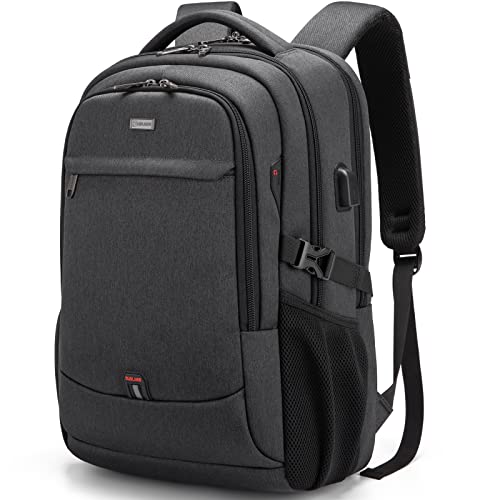
DUSLANG 17 Inch Laptop Backpack — The protective pad design
DUSLANG’s 17 inch design leads with protection: the listing emphasises a protective padded arrangement for the laptop inside a water-resistant daypack body aimed at men and women who move between college, office and airport with the same bag. In a category where the scanning layout gets the headlines, that emphasis is a useful corrective, because the machine spends far more of its life being set down, swung into footwells and leaned against desks than it spends on a security belt. A bag that pads its laptop zone properly and sheds weather on the walk to the terminal covers the whole journey rather than its most photographed minute.
The DUSLANG’s character is that of a substantial everyday backpack with travel manners, rather than a piece of luggage with straps. Buyers whose flying is occasional but whose daily carrying is constant will find that balance right: the checkpoint-friendly design helps on the trips that happen, and the protective, water-resistant daypack serves on all the days between them. It does not chase the tomtoc’s one-bag volume or the SWISSGEAR’s executive structure, and it is better for knowing its lane. Readers who want one honest bag for the working week plus the flights inside it can inspect the DUSLANG’s padding arrangement on its listing, reachable from the comparison table.
The DUSLANG’s padding emphasis has a second audience beyond careful owners: people whose laptops are provided by employers, schools or family members, and who carry a duty of care along with the machine. Returning a work laptop with a cracked corner is a conversation nobody enjoys, and a bag that visibly prioritises protection is a reasonable answer to that responsibility. The same logic applies to students carrying a machine that must last an entire degree. In both cases the checkpoint feature is a welcome extra; the padding is the purchase.
- Laptop fit: 17 inch machines
- Protection: padded protective laptop zone
- Shell: water resistant
- Format: travel-capable daypack for men and women
- Carry brief: daily work and college with occasional flights
Strengths
- Padding emphasis protects the machine every day, not just at security.
- Water-resistant body suits year-round commuting.
- Balanced size works daily and still travels well.
Trade-offs
- Less clothing volume than the dedicated travel picks.
- Organisation is simpler than the SWISSGEAR system.
- Not a one-bag solution for multi-day trips.
Best for: daily carriers with 17 inch laptops who fly occasionally and value padding.
Not suited for: one-bag travellers packing several days into a single carry-on.

SHRRADOO Extra Large Travel Backpack — The lockable load-hauler
SHRRADOO builds the biggest bag in this set and adds the feature none of the others offer: a combination lock. The extra-large body is aimed at men travelling with a 17 inch laptop and a substantial amount of everything else, with carry-on flight-approved intent in the listing and a layout that treats volume as the primary virtue. The lock changes the bag’s security story in hostels, shared offices and crowded trains, where a zipped bag is otherwise an invitation; it will not stop a determined thief with time and privacy, and no soft bag can, but it closes the casual-opportunist gap that accounts for most travel losses.
Size is both the offer and the warning. An extra-large backpack fully loaded is a serious carry, and travellers should be honest about whether their trips need this volume or merely enjoy the idea of it. For long trips, heavy packers, and travellers whose work kit travels with them — tools, materials, spare clothing for uncertain weather — the capacity is the point, and the lock and laptop fit make it a coherent system rather than a sack. For a two-day business trip it is surplus. Readers whose packing lists genuinely run long can open the SHRRADOO listing from the quick picks and weigh its stated dimensions against their airline’s carry-on box, because at this size that check stops being a formality.
The combination lock also reframes how the SHRRADOO can be used at a destination. A lockable bag left in a hotel room, a site office or a luggage storage area carries a different risk profile from an open one, and travellers who work out of their bags — reps, trainers, field engineers — gain a small mobile safe for documents and small equipment. It remains a deterrent rather than a vault, and valuables with real worth belong in a hotel safe where one exists, but for the ordinary run of opportunistic theft the locked zip is the difference between an easy target and a skipped one.
- Laptop fit: 17 inch machines
- Capacity class: extra large travel body
- Security: built-in combination lock
- Format: flight-approved travel backpack
- Carry brief: long trips and heavy packing lists
Strengths
- Combination lock deters casual access in shared spaces.
- Extra-large volume swallows long packing lists.
- Full-size laptop fit inside a travel-first body.
Trade-offs
- Fully loaded weight demands honest shoulders.
- Size must be checked carefully against stricter airlines.
- More bag than short business trips can justify.
Best for: heavy packers travelling long with a 17 inch laptop and valuables to secure.
Not suited for: minimalists or travellers on strict personal-item allowances.
There is one more traveller this category quietly serves: the person whose laptop is their office in the fullest sense — consultants billing by the day on client sites, auditors moving between firms, trainers carrying a classroom in a bag. For them the airport is not an interruption to work but a corridor between workplaces, and a bag that treats the corridor efficiently pays for itself in recovered time and reduced friction every single week. Their packing lists are stable, their machines are valuable, and their tolerance for a bag that wastes motion is zero. If that description fits, weight the structured end of this set heavily; the SWISSGEAR and KROSER were effectively designed around your calendar.
Students occupy the opposite pole and should not be shy about it: their flights are few, their daily loads are large, and their bags must survive being dropped on lecture-hall floors for years. The MATEIN and DUSLANG answer that brief better than any executive organiser, and the scanning feature will simply be a pleasant surprise at the airport twice a year. Naming your pole honestly — corridor professional or campus carrier — does more to settle this purchase than any comparison of pocket counts, and the guide’s six picks were chosen so that both poles, and the wide middle between them, find a bag that respects their actual pattern of travel.
How Should You Pack a Scan-Friendly Bag So It Works at the Belt?
The feature succeeds or fails in your hotel room, hours before the checkpoint. The laptop section must contain the laptop and nothing else — that rule is absolute, and every other packing decision flows from it. Chargers and cables belong in the organiser or a pouch in the main compartment, where they can stay for the whole journey; documents live in the pocket your hand finds blind; and the items you will want in the cabin — headphones, a book, a layer against cold air — should sit near the top opening rather than beneath clothing. Packed this way, the security sequence becomes a single motion: unzip, fold flat, belt, close, walk. Packed carelessly, the same bag produces the familiar pavement of bins, loose items and repacking under pressure.
Clothing placement matters to the flat fold more than travellers expect. A bag stuffed to rigidity cannot open like a book; its sections strain against each other and the laptop layer arrives at the belt curved and crowded. Leave the structure a little mercy — pack to ninety percent, keep hard objects away from the centre fold, and let soft clothing occupy the side opposite the machine. On the return journey, when the bag carries purchases and laundry, defend the laptop section’s emptiness as a rule rather than a preference, because that is the trip where discipline usually collapses and where the feature quietly stops working.
There is a second packing system worth building: the removal drill. Since any officer can ask for the machine out, arrange the bag so that request costs you ten seconds — laptop section unzipped, machine lifted clear, nothing stacked on it, nothing tethered to it. Practise the motion once at home with the bag fully packed for a real trip. Travellers who have rehearsed it stop fearing the request, and the lay-flat design returns to its proper status: a convenience enjoyed often and missed never, because the alternative has been made equally easy.
What Happens to the Lay-Flat Advantage Outside the United States?
Rules diverge quickly once a journey leaves the TSA’s jurisdiction. Many international checkpoints require laptops out of bags as a blanket policy, applied by signage before any officer is involved, and some are moving toward newer scanner technology that lets everything stay inside for the opposite reason — the machine sees clearly regardless of packing. A scan-friendly bag serves its owner differently in each regime: under blanket-removal rules it is simply a well-organised travel backpack with an unusually accessible laptop section, which is no small thing when the removal queue is long; under new-scanner regimes its discipline is unnecessary but harmless.
The practical conclusion is that frequent international travellers should buy these bags for their travel qualities — capacity, organisation, protection, carry — and treat the scanning layout as a domestic bonus. That is exactly how this guide has ranked them, and it is why the pick sections spend more words on sleeves, pockets and volumes than on the belt. A bag that only made sense inside one country’s checkpoint would be a poor purchase for anyone whose work crosses borders, and none of the six here has that weakness: each one earns its keep on the train, in the hotel and at the desk at the far end of the journey.
One more border-crossing note concerns the small securities. RFID-blocking pockets are indifferent to geography and work wherever contactless cards are carried, while a combination lock’s usefulness actually grows abroad, in couchettes, hostels and shared workspaces where a bag is left among strangers. Judge those features by your own map rather than by the airport in the product photographs, and the right pick usually selects itself.
One further habit separates smooth travellers from the rest, and no bag can supply it: arrive at the belt already configured. Coat pockets emptied into the bag before the queue, laptop section unzipped while you wait, documents in hand rather than in a fourth pocket. The designs in this guide make that pre-configuration easy because their sections and pockets have fixed addresses; use the queue time the way the bag’s designers imagined, and the checkpoint becomes the least interesting part of your journey, which is the highest compliment airport equipment can earn.
It is worth saying plainly, too, that none of these bags will shorten a queue, waive a pat-down or exempt a traveller from a random selection, and any listing implying a faster security outcome than an easier scan is selling weather. What the best of them genuinely sell is order: a machine protected and findable, documents where your hand expects them, and a trip that stays composed at its most chaotic checkpoint. Order, compounded across dozens of journeys a year, is worth real money to the people who live in airports — and merely pleasant for everyone else, which is still a fair return on a backpack.
How Do You Choose Between Structure, Flexibility and Sheer Volume?
The six picks divide along one axis more than any other: how much they trust you. Structured bags like the SWISSGEAR trust you least and help you most — every object has a designated place, the places hold their shape, and the traveller who submits to the system moves through airports with almost no decisions left to make. Flexible bags like the MATEIN trust you more: a generous main space, sensible pockets, and the freedom to pack a trip your way, at the price of occasionally excavating for a cable at the wrong moment. Volume-led bags like the tomtoc and the SHRRADOO change the question entirely, from how you organise to how much you can bring, and they reward the traveller who has already solved organisation with pouches and habits of their own.
None of these philosophies is superior in the abstract, which is why experienced travellers often own two bags from different points on the axis. The diagnostic question is what your last three trips actually looked like. If you repacked at the gate, fished for documents, or arrived with a charger tangled around a shirt, structure is the medicine and the SWISSGEAR or KROSER should lead your shortlist. If your packing was calm but your bag was full by day two, volume is the constraint and the one-bag designs deserve the look. If your trips were fine and only the laptop felt exposed, the DUSLANG’s protection-first balance is the honest answer, and the scanning layout is a bonus you will enjoy a few times a year.
Budget enters the same decision without needing figures: money spent on structure buys daily convenience, money spent on volume buys trip range, and money spent on neither — saved by choosing the straightforward workhorse — buys the second bag sooner. The mistake is paying for a philosophy you will not practise. A structured bag used loosely is just a heavy bag; a forty-litre bag used for overnight trips is just a big one. Read your own habits before the listings, and the six sections above will sort themselves into a shortlist of two, which is where good buying decisions in this category are actually made.
What Does the Security Queue Teach You About Your Bag?
Watch a checkpoint for ten minutes and the whole category explains itself. The travellers who glide are not the ones with the most features; they are the ones whose bags open the way the process expects, whose documents live in one place, and whose hands know the sequence. The travellers who stall are excavating — a laptop under clothing, a charger in a side pocket wrapped around a water bottle, liquids in a fourth location. A scan-friendly backpack cannot give you the first group’s habits, but it is designed to make those habits easy to build, which is the real product being sold in this entire category.
That is also why this guide insists on the honest definition up front. A traveller who believes a label has certified their bag stops building the habits, and then blames the bag at the first waved-out laptop. A traveller who understands the design for what it is — a flat, clear, protected section and a bag organised around an airport’s rhythm — gets the benefit at the belt most days and loses nothing on the others. Buy the bag, learn its system on one calm trip, and by the third flight the queue will be teaching the people behind you what yours taught you.
How Do the Six Checkpoint-Friendly Picks Compare?
| Pick | Laptop fit | Standout feature | Best matched trip |
|---|---|---|---|
| SWISSGEAR 1900 ScanSmart | 17 inch | RFID organiser, 31L structure | Weekly business flying |
| MATEIN Travel 17 Inch | 17 inch | Trolley sleeve, flexible volume | Short work trips |
| tomtoc Travel 40L | Integrated travel fit | Full one-bag capacity | Multi-day carry-on only |
| KROSER 17.3 Inch | 17.3 inch | RFID pockets plus USB port | Big-laptop travel |
| DUSLANG 17 Inch | 17 inch | Protective padded zone | Daily carry plus flights |
| SHRRADOO Extra Large | 17 inch | Combination lock, XL volume | Long, heavy trips |
Keep the comparison anchored to your own itinerary as you read it: the best-matched trip column is the one to scan first, because a bag aligned with your journey length and laptop size will satisfy you more reliably than any single standout feature bought in isolation from the trips you actually take.
What Mistakes Do Checkpoint-Friendly Bag Buyers Keep Making?
The foundational mistake is believing the label. A buyer who expects a bag to guarantee the laptop stays inside at every checkpoint will eventually meet the officer who decides otherwise, and the disappointment is sharper for having been promised. Treat lay-flat design as a strong convenience and a good packing system, and every outcome at the belt is acceptable. The second mistake is packing the laptop section with company — a charger brick or a paperback sharing the flat section defeats the scan clarity the design exists to create. The section is for the machine alone; discipline there is what the feature runs on.
Third, travellers buy travel volume and then commute with it, wondering why the bag feels cumbersome at the office; a 40 litre one-bag design is a trip instrument, and the daily-carry picks in this set exist because the two jobs differ. Fourth, people skip the dimension check against their own airline, trusting the words flight approved in a listing, when carriers set their own sizers and change them. Fifth, owners neglect the small securities they paid for — RFID pockets only protect the cards actually placed in them, and a combination lock only works when it is set and used. The features in this category are systems, and systems reward the travellers who build the small habits around them.
How Should You Test a Checkpoint-Friendly Bag in Its First Trip?
Treat the first journey as a rehearsal rather than a performance. Pack the night before, slowly, and lay the bag open flat on a bed to confirm the laptop section folds the way the photographs promise with your machine inside and the main compartment loaded. Time the full sequence once — unzip, open, close — so your hands learn it without an audience. At the airport, arrive with margin, because a new bag plus a tight connection teaches nothing except anxiety, and watch what the officers at your home airport actually do with lay-flat bags; local practice varies, and knowing your home checkpoint’s habits is worth more than any general claim in this guide.
On the far side of the flight, audit honestly. Did the bag stand at the gate or slump? Did the trolley sleeve behave on your suitcase at a run? Which pocket did you reach for wrongly, and what will you move before the next trip? One deliberate rearrangement after a first journey converts a purchase into a system, and travellers who perform that audit get compounding value from these designs — each trip smoother than the last — while those who never adjust blame the bag for a layout they never finished setting up. The second trip, not the first, is the fair test of any bag in this set, and it is the test all six were selected to pass.
Finally, note the weight reality while the experience is fresh. Airport bags are usually bought empty and judged full, and the walk from the far gate to the taxi rank with a loaded bag on your back is the truest review you will ever write. If that walk felt long, the answer for next time is rarely a different bag; it is a shorter packing list, a trolley sleeve used without pride, or the admission that your trip has outgrown backpack-only travel — all useful knowledge, and all cheaper to learn on trip one than on trip ten.
Before ordering, run one last check that frequent travellers swear by: find your most restrictive upcoming flight — the budget cabin, the small regional aircraft, the strict personal-item sizer — and judge your chosen bag against that flight rather than against your most generous one. A bag that passes the hardest test in your calendar passes every easier one automatically, and you will never stand at a gate re-deciding a purchase you already made.
Final Recommendation
For the organised business flyer, the SWISSGEAR 1900 remains the reference design in this category — structured, protected and fluent at the belt. For the traveller who wants the whole trip in one bag, the tomtoc 40L is the more complete answer, and for big-laptop owners the KROSER finally starts from the right screen size. Whichever you choose, hold the honest definition in mind as you pack for the first flight: a well-designed section that opens flat and a machine that travels protected — the rest, as the officer on the day will remind us all, is a courtesy and not a certificate.
And if your calendar contains no flights at all this year, let the daily virtues decide anyway — padding, fit and organisation are what you will live with — because a bag bought honestly for the ground will still be waiting, scanning section and all, on the year the flights return.
Frequently Asked Questions
Does TSA officially approve any backpack?
No. There is no approval, certification or endorsed list for bags. The agency has described design guidelines for checkpoint-friendly bags — a dedicated laptop section that folds flat with nothing else in it — and bags following those guidelines are often allowed through with the laptop inside, at the screening officer’s discretion on the day.
Will my laptop definitely stay in the bag at security?
No bag can promise that. Officers may ask for the laptop to be removed for a clearer scan, a random check or a local rule, and international checkpoints frequently require removal as standard. Pack so the machine lifts out in seconds and the lay-flat feature becomes a bonus when it is accepted, not a grievance when it is not.
What should I keep out of the laptop section?
Everything except the laptop. Chargers, mice, books, metal cases and even thick notebooks stacked in the scanning section obstruct the image the design is meant to keep clear. Give accessories their own pocket elsewhere in the bag and the flat section keeps the unobstructed profile that screeners want to see.
Are RFID pockets worth having in a travel backpack?
They are a low-cost layer of caution for contactless cards and passports in crowded terminals, and two picks here include them. They do not replace keeping valuables in an against-the-body pocket or staying aware in crowds, but as built-in protection that asks nothing of the traveller after packing, they earn their space.
Can these backpacks replace a carry-on suitcase?
The larger designs can: the tomtoc at forty litres and the extra-large SHRRADOO are built for exactly that, provided your packing is disciplined and your airline’s sizer agrees. The mid-size picks suit shorter trips or pairing with a small roller through their trolley sleeves, which is the more forgiving strategy for most travellers.
Is a checkpoint-friendly bag worth it if I fly only twice a year?
It can be, provided the bag also suits your daily carrying, which is why the DUSLANG and MATEIN are in this set: their scanning layouts cost you nothing on the 363 days you are not flying, and their padding, volume and laptop fit justify the purchase alone. A dedicated travel-only bag bought for two flights a year is harder to defend unless those flights are long and heavily packed.
Do these bags work as my only luggage on a week-long trip?
For most travellers, a week asks more than even forty litres worn comfortably, once weather variety and work clothing enter the list. The realistic one-bag ceiling for the designs here is three to five days for a disciplined packer; beyond that, pair a mid-size pick with a rolling suitcase through its trolley sleeve and let each bag do the job it is shaped for.
What is the difference between checkpoint-friendly and a normal laptop sleeve?
A normal sleeve protects the machine inside a closed bag, and the laptop still comes out at the belt because the scanner would otherwise see it through layers of other cargo. A checkpoint-friendly design gives the laptop its own section that unfolds to lie flat and alone on the belt, which is the arrangement screeners can accept in place of removal. The protection job is similar; the scanning geometry is the entire difference.
Should I choose RFID pockets or a lock if a bag offers only one?
Match the feature to the risk you actually meet. Terminal crowds and contactless cards argue for the RFID pockets, which work silently every day you travel; shared rooms, hostels and storage areas argue for the lock. Most travellers face the first risk more often, but the reader whose trips involve leaving a bag among strangers should weight the lock accordingly and choose the SHRRADOO without hesitation.
Related Guides
Travellers building a complete cabin kit may also want best laptop backpacks with trolley sleeves for pairing a pack with rolling luggage, and those whose trips lean longer should compare best carry-on backpacks for one-bag travel before settling on a capacity. Wet-weather commuters should also read Best Waterproof Laptop Backpacks Travel before choosing a shell.


