What's inside
- Key Takeaways
- Quick Picks
- How We Chose These Picks
- Where Do the Six Engineering Picks Actually Differ?
- Gaming Laptop or Mobile Workstation: Which Path Should an Engineer Take?
- How Much Memory Does CAD and Simulation Work Really Need?
- What Does GPU Certification Actually Certify?
- How Should You Set Up an Engineering Laptop for a New Project?
- Why Do Cooling and Sustained Clocks Matter More Than Peak Numbers?
- Which Screen Qualities Matter for Engineering Work?
- How Do You Budget the Whole Engineering Setup, Not Just the Laptop?
- What Should a Student Engineer Buy First: GPU Tier or Memory Tier?
- Common Mistakes When Buying an Engineering Laptop
- What Does an HX Processor Suffix Actually Signal?
- How Should You Archive an Engineering Project When It Ends?
- Why Do Engineers Disagree About OLED for CAD?
- What Is the Cheapest Upgrade to an Engineering Setup After the Laptop?
- How Do You Verify a Delivered Engineering Laptop Matches Its Title?
- Why Does This Guide Avoid Quoting Simulation Benchmarks?
- What Should a Freelance Engineer Standardise Across Projects?
- How Does Power Supply Wattage Quietly Limit a Gaming Laptop?
- When Should an Engineering Student Choose the Workstation Path Early?
- What Does ‘Mobile Workstation AI PC’ on the 3490’s Title Mean?
- How Should You Transport a 16-Inch Workstation to Site?
- Why Is FHD+ a Workstation Format Worth Wanting?
- How Should an Engineer Keep Drivers Straight Across a Machine’s Life?
- Final Recommendation
- Frequently Asked Questions
- Related Guides
As an Amazon Associate I earn from qualifying purchases. This post may contain affiliate links at no extra cost to you.
widgetverdict.com is reader-supported. When you buy through links on our site, we may earn an affiliate commission.
The search for the best affordable engineering laptops runs into a fork that consumer guides rarely mark. Down one path sit gaming laptops — Legion, TUF, Katana — whose powerful graphics cards and strong cooling make them natural hosts for CAD, rendering and simulation at student and freelancer budgets. Down the other sit true mobile workstations — Dell’s Precision line — whose professional GPUs, certified drivers and business support are engineered for firms whose drawings carry liability. The six picks below walk both paths deliberately: four gaming machines at ascending GPU tiers, then two Precisions that show what the workstation premium actually purchases.
GPU tier is the organising fact of the engineering brief, so the guide states each card plainly as its title does: an RTX 3050 at the entry, an RTX 4050 above it, an RTX 5060 in the Legion, an RTX 5070 in the Katana, and the RTX 2000 Ada professional card in the big Precision. Those numbers are not a simple league table — the Ada card’s value lives in certified software drivers rather than frame rates — but for viewport smoothness, GPU rendering and simulation acceleration, the consumer cards’ order is real and worth buying deliberately rather than accidentally.
Memory and storage follow the engineering pattern too. The Precision 7680 carries 64GB, double any other configuration here; most of the remaining machines carry 16GB, which is the honest floor for serious CAD assemblies; the Legion and the smaller Precision carry 32GB, the comfortable tier for simulation and large models. Storage is 512GB on the two TUF models and a terabyte nearly everywhere else, with the Katana adding a bundled portable drive in its title. Engineering files are large and versioned, so these numbers deserve the same scrutiny as the graphics cards.
One discipline applies throughout: performance claims stay at the level the titles support. Where a title states a panel’s refresh rate, colour coverage or resolution, the guide uses it; where it is silent — most GPU memory figures on the consumer cards, exact simulation benchmarks — the guide teaches you how to judge the class rather than inventing numbers for the unit. Engineering buyers, of all buyers, should insist on that distinction.
Key Takeaways
- Four picks are gaming laptops doing engineering duty — Legion 5a, two TUF A15 configurations, MSI Katana — and two are true mobile workstations, the Precision 7680 and 3490.
- GPU tiers ascend deliberately: RTX 3050, RTX 4050, RTX 5060, RTX 5070 on the consumer side; the Precision 7680’s RTX 2000 Ada trades raw pace for certified professional drivers.
- The Precision 7680’s 64GB of memory is double the field — the pick for very large assemblies and heavy simulation meshes.
- The Legion 5a pairs its RTX 5060 with a 15.3-inch OLED WQXGA 165Hz panel and 32GB, the strongest screen-and-silicon pairing among the gaming picks.
- Both TUF A15 models carry 512GB drives; the remaining picks carry a terabyte, and the Katana bundles an additional 1TB portable HDD in its title.
- The Precision 3490 is the portable workstation: 14 inches, 32GB, twin Thunderbolt 4 ports and Windows 11 Pro for engineers who travel to sites.
Quick Picks
| Pick | Badge | Why it is here |
|---|---|---|
| Lenovo Legion 5a (RTX 5060, OLED, 32GB) | Gaming Pick With the Best Screen | An RTX 5060 behind a 15.3-inch OLED WQXGA 165Hz panel, with 32GB of memory and a terabyte of storage. |
| ASUS TUF Gaming A15 (RTX 3050, Ryzen 5) | Entry GPU Tier | The engineering entry point: RTX 3050 graphics, Ryzen 5 7535HS, 16GB DDR5 and a 144Hz FHD panel. |
| ASUS TUF Gaming A15 (RTX 4050, Ryzen 7) | The Sensible GPU Step-Up | One chassis family, one tier up: RTX 4050, Ryzen 7 7435HS and a 100% sRGB panel over the entry TUF. |
| MSI Katana 15 HX (RTX 5070, QHD 165Hz) | Top Consumer GPU Here | The strongest consumer GPU in the guide — RTX 5070 — with an i7 HX processor, QHD 165Hz panel and a bundled 1TB portable drive. |
| Dell Precision 7680 (RTX 2000 Ada, 64GB) | True Workstation Flagship | The professional article: RTX 2000 Ada with 8GB, a 20-core i7 HX, 64GB of memory and Windows 11 Pro in a 16-inch workstation. |
| Dell Precision 3490 (Ultra 5, 32GB, 14-inch) | Portable Workstation | The travelling workstation: 14-inch FHD, Core Ultra 5 135H, 32GB, a terabyte, twin Thunderbolt 4 and Windows 11 Pro. |
How We Chose These Picks
Selection began with the two families an engineering buyer genuinely cross-shops. Excluding gaming laptops would ignore how students and independent engineers actually equip themselves; excluding workstations would hide what certification, professional drivers and business support are worth. So the guide admits both, labels each honestly, and spends its buying-guide sections on the decision between them — which depends on software, employer requirements and the cost of a crashed render at a deadline, not on tribal loyalty to either camp.
Within the gaming four, GPU spread was the criterion: the two TUF configurations exist to price the step from RTX 3050 to RTX 4050 inside the same chassis family, while the Legion and Katana mark the higher tiers where OLED and QHD panels join the specification. Within the workstations, size was the criterion: a 16-inch flagship with the professional GPU and 64GB, against a 14-inch traveller with integrated-class duties, 32GB and the full Pro platform.
Every pick was also screened for the engineering basics that gaming marketing sometimes skips: at least 16GB of memory, a solid-state drive of defensible size, and a processor with the core count to feed the GPU. Machines that game brilliantly but starve those basics did not make the list, because an engineering laptop is a production tool first and an entertainment machine only in its spare hours.

Lenovo Legion 5a (RTX 5060, OLED, 32GB) — Gaming Pick With the Best Screen
The Legion 5a makes the strongest all-round case among the gaming picks because it refuses to pair its graphics card with a mediocre screen. The RTX 5060 handles CAD viewports, GPU rendering and simulation acceleration in the current generation’s mid-tier, while the 15.3-inch OLED WQXGA display — sharper than the FHD panels around it, refreshing at 165Hz — gives the engineer a panel worth modelling on: fine lines stay fine, contrast separates overlapping geometry, and the high refresh rate keeps orbiting a large assembly feeling fluid rather than stepped. For design-review work where the screen is the deliverable’s first audience, that panel is a professional feature wearing gaming clothes.
The supporting configuration matches the headline: a Ryzen 7 250 processor, 32GB of memory — double the TUF pair — and a terabyte of storage. That memory figure matters specifically for engineering: assemblies with many parts, simulation meshes and a browser full of documentation coexist without the machine paging to disk. The 2026 model-year designation in the title and the Eclipse Black finish complete a machine that reads as current-generation in every column an engineer checks.
Its compromises are the gaming family’s usual ones. The graphics drivers are consumer drivers, optimised for games; professional CAD vendors certify workstation drivers, and a firm whose support contract demands certification should look at the Precisions below. Battery endurance under engineering load will be measured in a few hours, not a working day, as with every discrete-GPU machine here. Judged as what it is — the most complete gaming-derived engineering laptop in the guide — the Legion is the default recommendation for students and independent professionals whose software allows the consumer-driver path.
- Display: 15.3-inch OLED WQXGA, 165Hz
- Graphics: NVIDIA GeForce RTX 5060
- Processor: AMD Ryzen 7 250
- Memory: 32GB RAM
- Storage: 1TB
- Model year in title: 2026, Eclipse Black
Strengths
- OLED WQXGA panel is the finest screen among the gaming picks
- 32GB of memory suits large assemblies and meshes
- RTX 5060 is current-generation GPU muscle
Trade-offs
- Consumer drivers, not certified workstation drivers
- Discrete GPU limits unplugged endurance
- GPU memory figure is not stated in the listing title
Best for: engineering students and independent professionals running one machine for CAD, rendering and design review
Not suited for: firms whose CAD support contracts require certified workstation drivers
ASUS TUF Gaming A15 (RTX 3050, Ryzen 5) — Entry GPU Tier
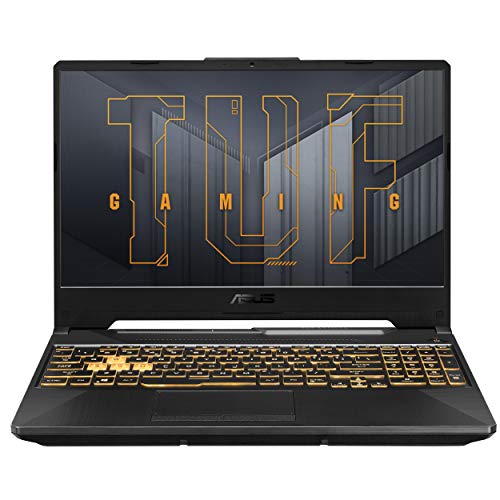
Every discipline needs an honest entry point, and this TUF A15 configuration — model FA506NC-DS53 — is the engineering list’s. The GeForce RTX 3050 is the previous generation’s entry discrete GPU, and the guide places it without apology: for 2D CAD, moderate 3D modelling, coursework assemblies, MATLAB-class computation and learning the simulation workflow, it is genuinely sufficient, and its presence keeps this machine at the guide’s most accessible tier. The Ryzen 5 7535HS is a proper high-performance mobile processor, 16GB of DDR5 memory meets the engineering floor, and the 512GB PCIe Gen 4.0 drive is quick if not large.
The TUF family’s contribution is durability-minded construction at a value tier — the name advertises toughness, and the line is built to a more rugged brief than ASUS’s slim consumer machines. For a student whose laptop will cross campus daily for four years, that brief matters as much as the GPU tier. The 15.6-inch FHD panel refreshes at 144Hz, which serves the machine’s second life in games and keeps interface motion smooth during long modelling sessions, even if engineering work itself rarely exploits the rate.
Know its ceiling before buying: large assemblies with thousands of parts, heavy GPU rendering queues and big simulation meshes will expose the RTX 3050’s limits and the 512GB drive’s size within a serious project. The pick suits the first two years of an engineering degree and the lighter end of professional practice — drafting, review, moderate models — better than a thesis-scale simulation habit. Buy it as the capable starter it is, and the upgrade path in this guide is clearly signposted when the work outgrows it.
- Display: 15.6-inch FHD, 144Hz
- Graphics: NVIDIA GeForce RTX 3050
- Processor: AMD Ryzen 5 7535HS
- Memory: 16GB DDR5 RAM
- Storage: 512GB PCIe Gen 4.0 SSD
- Model: FA506NC-DS53, Windows 11 Home, Wi-Fi 6
Strengths
- Most accessible discrete-GPU entry in the guide
- 16GB DDR5 meets the engineering memory floor
- TUF brief suits daily campus carrying
Trade-offs
- RTX 3050 is the previous generation’s entry GPU
- 512GB fills quickly with project archives
- Home edition Windows for a work machine
Best for: engineering students in their first years and drafters with moderate 3D workloads
Not suited for: large-assembly CAD or heavy GPU rendering as a daily practice

ASUS TUF Gaming A15 (RTX 4050, Ryzen 7) — The Sensible GPU Step-Up
Placed beside its sibling, this TUF A15 — model FA507NUR-AS73 — is a controlled experiment in what one GPU tier buys. The RTX 4050 succeeds the 3050 with a newer architecture, better efficiency and access to the current generation’s frame-generation and AI-assisted features in supported applications; for engineering, the practical gains are smoother viewports in dense models, faster GPU renders and more headroom as software requirements climb. The processor steps up in parallel to a Ryzen 7 7435HS, and the panel adds a quantified colour promise the entry model lacks: 100% sRGB coverage, stated in the title.
That colour figure deserves attention from engineers who present work. sRGB is the standard colour space of screens and documents; a panel covering all of it renders drawings, diagrams and client-facing visuals as intended rather than approximately. Memory and storage hold at 16GB DDR5 and 512GB — the guide would prefer the terabyte found elsewhere, and project archives will need an external drive habit — while the 144Hz FHD format carries over. The chassis family’s durability brief carries over too, which keeps the machine suited to the campus-and-site life of its likely owner.
This is the configuration for the buyer who priced the entry TUF, felt the GPU ceiling looming, and wants the tier where the ceiling recedes beyond a degree’s typical demands. Final-year projects, freelance CAD on the side, a rendering habit — the 4050 absorbs them with less negotiation. It remains a consumer-driver gaming machine, with the certification caveat that applies to the whole gaming half of this guide, but as a balance of GPU, processor, panel and price-class, it is the TUF family’s centre of gravity.
- Display: 15.6-inch FHD, 144Hz, 100% sRGB
- Graphics: NVIDIA GeForce RTX 4050
- Processor: AMD Ryzen 7 7435HS
- Memory: 16GB DDR5 RAM
- Storage: 512GB PCIe SSD
- Model: FA507NUR-AS73, Windows 11, Wi-Fi 6
Strengths
- RTX 4050 brings current-architecture GPU headroom
- 100% sRGB panel stated in the title
- Ryzen 7 processor matches the GPU step-up
Trade-offs
- 512GB storage unchanged from the entry model
- Consumer drivers rather than certified ones
- Panel resolution stays FHD at this tier
Best for: later-year students and freelance engineers whose models and renders are growing
Not suited for: buyers needing terabyte storage or workstation certification

MSI Katana 15 HX (RTX 5070, QHD 165Hz) — Top Consumer GPU Here
The Katana 15 HX is the gaming path’s upper argument. Its RTX 5070 is the most powerful consumer graphics card in this guide, driven by an Intel Core i7-14650HX — the HX suffix denoting Intel’s high-wattage performance tier, the desktop-leaning silicon that sustains clocks under long loads. For GPU rendering, dense simulation work and viewports crowded with geometry, this pairing is the closest the consumer path comes to workstation pace, and the 15.6-inch QHD panel at 165Hz gives that power a sharper canvas than FHD: more pixels for toolbars and timelines, finer detail in the model itself.
MSI’s Cooler Boost 5, named in the title, is the thermal system on which sustained performance depends — a reminder that in this class, cooling is a specification, because a GPU that throttles after ten minutes delivers its brochure numbers only in sprints. Storage is a terabyte internally, and the bundle adds a 1TB portable HDD, a genuinely useful inclusion for project archives and version backups, provided its contents and terms are confirmed on the listing. Wi-Fi 6E and an RGB backlit keyboard complete a specification that leans unapologetically toward performance.
Its trade-offs are weight of expectation rather than specification: 16GB of memory is the guide’s floor, not its comfort tier, and a buyer planning heavy simulation should weigh the Legion’s or Precisions’ 32GB and 64GB figures seriously. The drivers are consumer drivers, the operating system is Home edition, and the machine’s gaming identity is worn openly. For the independent engineer whose bottleneck is raw GPU throughput and whose software accepts the consumer path, though, the Katana is the strongest instrument here — bought for its card and its cooling, in that order.
- Display: 15.6-inch QHD, 165Hz
- Graphics: NVIDIA GeForce RTX 5070
- Processor: Intel Core i7-14650HX
- Memory: 16GB DDR5 RAM
- Storage: 1TB SSD, plus bundled 1TB portable HDD per title
- Extras in title: Cooler Boost 5 cooling, Wi-Fi 6E, RGB backlit keyboard, Windows 11 Home
Strengths
- RTX 5070 is the guide’s strongest consumer GPU
- HX-class Intel processor sustains heavy loads
- QHD 165Hz panel gives the GPU a sharper canvas
Trade-offs
- 16GB of memory is the floor, not the comfort tier
- Home edition Windows on a production machine
- Bundled drive’s terms need confirming on the listing
Best for: independent engineers and renderers whose bottleneck is raw GPU throughput
Not suited for: memory-hungry simulation work better served by 32GB or 64GB configurations

Dell Precision 7680 (RTX 2000 Ada, 64GB) — True Workstation Flagship
The Precision 7680 is a different species from the four machines above, and its title reads like a firm’s purchase order: a 16-inch FHD+ mobile workstation carrying NVIDIA’s RTX 2000 Ada professional GPU with 8GB of graphics memory — the only GPU memory figure stated in this guide — an Intel Core i7-13850HX described as 20-core, 64GB of DDR5 memory, a terabyte drive and Windows 11 Pro. Dell’s own framing in the title names its audience without blush: engineer, designer, creator. This is the machine a practice buys when the laptop’s output is a drawing someone will build from.
The Ada card’s distinction is not frame rates but certification: professional GPUs run drivers that CAD and simulation vendors test and certify against their applications, which converts crashes and viewport glitches from your problem into a supported configuration’s problem. Pair that with 64GB of memory — enough for assemblies and meshes that would strangle the 16GB machines — and a 20-core HX processor, and the 7680’s brief becomes clear: sustained, supported, professional throughput. The 16-inch FHD+ panel adds vertical room for toolbars and drawing space in the taller format engineers favour.
Nothing about it pretends to be a bargain in the gaming sense; its value is denominated in billable reliability. A freelancer whose clients mandate certified software, a small firm standardising on a supported platform, an engineer whose simulation queue runs overnight — these buyers are purchasing the absence of a category of failure. Gamers and students will find the RTX 2000 Ada’s talents oddly aimed, which is precisely the point: this is the workstation path in its undiluted form, and the guide includes it so the premium’s contents can be inspected rather than imagined.
- Display: 16-inch FHD+
- Graphics: NVIDIA RTX 2000 Ada, 8GB
- Processor: Intel Core i7-13850HX, 20-core
- Memory: 64GB DDR5 RAM
- Storage: 1TB SSD
- Operating system: Windows 11 Pro; mobile workstation class
Strengths
- Certified professional GPU drivers for CAD vendors
- 64GB of memory doubles the entire field
- 20-core HX processor for sustained simulation loads
Trade-offs
- Workstation pricing logic, not gaming value logic
- 16-inch chassis is a desk-and-site machine, not a traveller
- Gaming performance per money trails the consumer cards
Best for: practices and professionals whose software, clients or support contracts call for a certified workstation
Not suited for: students or gamers buying GPU throughput on a budget

Dell Precision 3490 (Ultra 5, 32GB, 14-inch) — Portable Workstation
Not every engineer’s laptop can be a 16-inch anchor. The Precision 3490 compresses the workstation brief into 14 inches: an Intel Core Ultra 5 135H, 32GB of DDR5 memory, a terabyte of storage, two Thunderbolt 4 ports, a 1080p webcam and Windows 11 Pro, in a machine Dell classifies as a mobile workstation and an AI PC. The title positions its processor against the i7-1355U found in consumer lines, a comparison aimed at buyers cross-shopping from the Inspiron shelf — the message being that this smaller, professional machine keeps pace while adding the workstation platform around it.
Judge it by the site-visit brief. The engineer who reviews models on a client’s screen, marks up drawings in a site cabin, runs moderate CAD and simulation checks away from the office, and docks at headquarters through Thunderbolt — that engineer’s laptop is this one. Thirty-two gigabytes keeps real assemblies comfortable, the terabyte holds a project’s local copy, and the Pro platform with twin Thunderbolt ports makes it a citizen of a managed fleet. What it does not carry is a discrete professional GPU in its title; heavy viewport and rendering work belongs to its 16-inch sibling or the gaming cards above.
As the guide’s closing pick, it marks the workstation path’s accessible end: certification-class platform, professional support lineage and Pro software, sized for a bag. Buyers whose engineering is review, markup, moderate modelling and travel will find it the most grown-up machine here. Buyers whose engineering is rendering should spend their money where the GPUs live. The Precision pair, taken together, teaches the guide’s final lesson — ‘workstation’ names a support and certification ecosystem as much as a specification, and the 3490 delivers that ecosystem in its most portable form.
- Display: 14-inch FHD
- Processor: Intel Core Ultra 5 135H
- Memory: 32GB DDR5 RAM
- Storage: 1TB SSD
- Operating system: Windows 11 Pro
- Extras in title: 2x Thunderbolt 4, 1080p webcam, mobile workstation class
Strengths
- Workstation platform in a travel-size 14-inch chassis
- 32GB and a terabyte match serious project work
- Twin Thunderbolt 4 ports for one-cable docking
Trade-offs
- No discrete professional GPU stated in the title
- 14-inch screen is tight for full-time modelling
- Ultra 5 tier sits below the 7680’s HX flagship silicon
Best for: site-visiting engineers reviewing, marking up and modelling moderately while travelling
Not suited for: render-heavy workflows that need a discrete GPU first
Where Do the Six Engineering Picks Actually Differ?
Read the graphics column as two currencies. The consumer cards — 3050, 4050, 5060, 5070 — trade in raw throughput per unit of money, ascending in a clean ladder. The RTX 2000 Ada trades in certification, a currency the ladder cannot price. Memory tells a second story: 16GB is the gaming family’s standard, 32GB its comfort tier, and 64GB a workstation-only figure in this guide. A buyer who reads both stories before choosing a row has understood the engineering market better than most spec-sheet comparisons ever explain.
| Pick | Display | Graphics | Memory | Storage |
|---|---|---|---|---|
| Lenovo Legion 5a (RTX 5060, OLED, 32GB) | 15.3-inch OLED WQXGA 165Hz | RTX 5060 | 32GB | 1TB |
| ASUS TUF Gaming A15 (RTX 3050, Ryzen 5) | 15.6-inch FHD 144Hz | RTX 3050 | 16GB DDR5 | 512GB SSD |
| ASUS TUF Gaming A15 (RTX 4050, Ryzen 7) | 15.6-inch FHD 144Hz, 100% sRGB | RTX 4050 | 16GB DDR5 | 512GB SSD |
| MSI Katana 15 HX (RTX 5070, QHD 165Hz) | 15.6-inch QHD 165Hz | RTX 5070 | 16GB DDR5 | 1TB SSD + 1TB portable HDD |
| Dell Precision 7680 (RTX 2000 Ada, 64GB) | 16-inch FHD+ | RTX 2000 Ada 8GB | 64GB DDR5 | 1TB SSD |
| Dell Precision 3490 (Ultra 5, 32GB, 14-inch) | 14-inch FHD | No discrete GPU in title | 32GB DDR5 | 1TB SSD |
Gaming Laptop or Mobile Workstation: Which Path Should an Engineer Take?
Start with your software’s support page, not with the hardware. Professional CAD and simulation vendors publish certified hardware lists, and if your employer, client or university support desk works from those lists, the Precision path is not a preference but a requirement — a certified configuration converts graphics glitches into the vendor’s problem. If your software is the same applications used outside certification regimes — as it is for most students, freelancers and small practices — the gaming path delivers substantially more GPU per unit of money, and the money saved buys memory, storage or a second monitor.
Then weigh the failure modes. A gaming laptop that struggles presents as slow viewports and long renders: annoying, schedulable, survivable. An uncertified configuration that misbehaves inside a client’s mandated workflow presents as a support refusal at the worst moment. Professionals whose drawings carry contractual weight buy the ecosystem that answers the phone. Everyone else should buy throughput — and this guide’s four gaming picks exist because, for the majority of engineering buyers, throughput is honestly the right purchase.
How Much Memory Does CAD and Simulation Work Really Need?
Sixteen gigabytes, the floor across this guide’s gaming picks, handles coursework assemblies, moderate part counts and one serious application at a time with the browser kept honest. Thirty-two gigabytes — Legion and Precision 3490 territory — is where large assemblies, simulation pre-processing and parallel documentation stop negotiating with each other. Sixty-four, the big Precision’s figure, serves the workloads whose owners already know their names: full-vehicle assemblies, dense CFD meshes, city-scale models, virtual machines running alongside the CAD session.
The diagnostic is your current machine’s behaviour. If your present laptop pages to disk during modelling — watch memory pressure in the task manager while a real assembly is open — the next machine’s memory is not a luxury but the fix. Memory in this class of laptop should be bought for the largest model you expect in the machine’s third year, not the average model of its first, because assemblies grow and memory, in most of these designs, is the specification least open to later revision.
What Does GPU Certification Actually Certify?
Certification means the workstation vendor and the software vendor have tested a specific combination — professional GPU, its driver branch, the application version — and agreed to support it. Professional drivers are tuned for the OpenGL and precision workloads CAD uses, prioritising viewport accuracy and stability over game frame rates, and they are validated against the applications’ own test suites. When a certified user reports a graphics fault, the support conversation starts from a known-good configuration rather than from suspicion about the hardware.
What certification does not mean is that consumer cards cannot run the software — they plainly can, and do, in thousands of student and freelancer hands. It means the responsibility boundary moves. A buyer should therefore price certification like insurance: essential when a contract or employer demands it, valuable when downtime is billable, and legitimately skippable when the work is learning, drafting or independent practice where the user is their own support desk. The Precision 7680’s premium is mostly this boundary, drawn in the buyer’s favour.
How Should You Set Up an Engineering Laptop for a New Project?
Begin with the unglamorous foundations: install the CAD and simulation stack, then update graphics drivers through the GPU maker’s channel and confirm the application is actually using the discrete GPU — a setting that occasionally defaults to integrated graphics and quietly halves viewport performance. Point the application’s scratch and autosave locations at the internal drive, set autosave intervals short enough that a crash costs minutes, and establish the project folder structure and naming convention before the first real file lands, because retrofitting order onto a grown project archive is miserable work.
Then protect the work like the asset it is. The Katana’s bundled portable drive, or any external drive, should become the project’s backup target from week one, with versions kept rather than overwritten — engineering files are arguments with clients waiting to happen, and version history is the evidence. Calibrate the display if presentations matter, using the panel figures the title states as your starting point, and record the machine’s configuration alongside the project documentation, so a result produced this year can be reproduced, or interrogated, next year.
Why Do Cooling and Sustained Clocks Matter More Than Peak Numbers?
Engineering loads are marathons disguised as sprints. A simulation that runs for forty minutes or a render queue that runs overnight draws power and produces heat continuously, and a laptop’s thermal system decides what fraction of its peak performance survives to minute thirty. This is why the Katana’s title names its Cooler Boost 5 system and why the HX-class processors in the Katana and big Precision exist: high-wattage silicon in a chassis built to feed and cool it. A thin machine with a nominally faster chip can lose a long render to a sturdier machine with a humbler one.
Buyers can help the hardware honestly: work on a hard surface that leaves vents unobstructed, elevate the rear of the chassis if the design breathes from below, and keep dust out of intakes with occasional compressed air. During the first long job, watch temperatures and clock behaviour with a monitoring tool — not from anxiety, but to learn your machine’s sustained personality. That knowledge, filed away, is what separates an engineer who schedules renders confidently from one who hopes.
Which Screen Qualities Matter for Engineering Work?
Resolution first, because toolbars, property panels and timelines consume fixed pixel counts, and what remains is your drawing. The Legion’s WQXGA OLED and the Katana’s QHD panel leave more of the screen for the model than the FHD machines, a difference felt in every session. Colour coverage second, when work is presented or published: the TUF 4050’s stated 100% sRGB is the consumer path’s quantified promise, while OLED’s contrast serves design review in dim rooms. Refresh rate, the gaming headline, matters least for engineering — yet the smoothness of a 165Hz orbit genuinely reduces the fatigue of a day spent rotating assemblies.
Size is the final variable, and it trades against travel. The Precision 7680’s 16-inch FHD+ canvas is the desk engineer’s choice; the 3490’s 14-inch panel is the site engineer’s. Neither is wrong, but a buyer should choose by where the modelling hours actually happen, not where the laptop is photographed. And whichever panel wins, an external monitor at the home desk remains the cheapest productivity accessory in engineering — the laptop’s screen becomes the reference display, and the model gets the big canvas.
How Do You Budget the Whole Engineering Setup, Not Just the Laptop?
The laptop is the largest line, not the only one. A serious engineering station wants a large external monitor, a mouse built for precision work — many engineers add a 3D navigation device once the habit forms — an external drive for project archives, and software licences where the student versions end. Gaming-path buyers should reserve part of the workstation-path savings for exactly these items, because a Legion with a proper monitor and backup discipline out-produces a Precision starved of peripherals for most independent work.
Software deserves its own line in the budget conversation. Student and maker licences cover learning; commercial practice requires commercial licences whose cost can rival the hardware. The affordable engineering laptop is therefore best understood as one component in an affordable engineering practice, and the guide’s price-class discipline — spend on the specifications the work touches, refuse the ones it does not — applies to every line of that wider budget, not merely to the machine at its centre.
What Should a Student Engineer Buy First: GPU Tier or Memory Tier?
For a degree’s arc, memory is the safer first investment and GPU the more exciting one — and the guide’s spread prices both. Coursework in the early years is modelling tuition: parts, assemblies, drawings, where 16GB and an RTX 3050-class card suffice. Later years add simulation and rendering, where GPU tier starts to pay rent. A student buying once for four years should therefore weight the configuration whose limits arrive last: between the two TUF models, the 4050’s headroom outlasts; between the Legion’s 32GB and the Katana’s stronger card at 16GB, the answer depends on whether the degree’s climax is a mesh or a render.
There is no shame in the staged strategy either: the entry TUF now, its replacement informed by two years of knowing exactly which ceiling your own work hits. Students routinely overbuy GPU for coursework that never arrives and underbuy memory for the multitasking that arrives in week one. Let your own modules, not the showroom, write the specification — and revisit this guide’s table when they have, because its rows are arranged as the staircase your degree will climb.
Common Mistakes When Buying an Engineering Laptop
**Buying the GPU badge and starving the memory.** A strong card behind 8GB of memory — a configuration this guide excluded — renders the user, not the model, the bottleneck. Sixteen gigabytes is the floor for serious CAD; simulation ambitions should start at 32GB and read the Precision 7680’s 64GB as the professional tier it is.
**Assuming certification is a scam or a necessity without checking.** It is neither universally. It is a support boundary whose value depends on your software regime, employer and clients. The check takes one visit to your application’s certified-hardware page; skipping it risks either overpaying for insurance you cannot use or underbuying support you contractually need.
**Filling a 512GB drive with the first project archive.** Engineering files version relentlessly, and the two TUF picks carry the guide’s smallest drives. Pair them with an external archive habit from week one — the Katana’s bundled portable drive is the pattern to copy — rather than discovering the wall mid-deadline.
**Judging sustained performance by a five-minute demo.** Viewport spins in a shop tell you nothing about minute forty of a render. Cooling, wattage class and chassis design decide long loads; that is why this guide names the Katana’s cooling system and the HX processors’ tier instead of repeating peak clock claims.
**Ignoring the screen because the GPU looked exciting.** Engineers stare at the panel for every working hour and at the specification sheet for none. The Legion’s OLED and the Katana’s QHD exist in this guide to correct the imbalance: resolution and contrast are production specifications, not entertainment garnish.
**Buying a 14-inch workstation for full-time modelling.** The Precision 3490 is a superb travelling instrument, but a career spent modelling on 14 inches is an ergonomic tax paid daily. Match screen size to where the modelling hours happen, and dock the small machine when they happen at a desk.
What Does an HX Processor Suffix Actually Signal?
HX marks Intel’s high-wattage mobile tier — silicon allowed to draw desktop-leaning power when the chassis can cool it, sustaining high clocks under the long, all-core loads that simulation and rendering impose. Its presence in the Katana and the Precision 7680 is a statement about intended workload duration, not just peak speed. The honest corollary is that HX machines earn their numbers plugged in and ventilated; on battery or a soft surface, physics collects its tax. Buy HX when your work runs long, and give it the hard desk it expects.
How Should You Archive an Engineering Project When It Ends?
Export the native files, a neutral-format copy of the key models, the drawings as PDFs, and a plain-text note recording the software versions and the machine configuration that produced them. Store the bundle in two places, one off the laptop. Engineering work has a long legal and professional tail — questions arrive years later, from clients, regulators or your own future self — and an archive that can be opened without the original software stack is the difference between evidence and archaeology. The habit costs an hour per project and is worth a career of quiet confidence.
Why Do Engineers Disagree About OLED for CAD?
Because CAD is two visual jobs wearing one name. For design review — colour, contrast, presentation — the Legion’s OLED is superb. For long hours of fine line work, some engineers prefer the matte, steady character of a good LCD and worry, mostly theoretically at modern panel standards, about static toolbars and image retention over years. The disagreement is really about which job dominates the buyer’s week. This guide’s position is procedural: if your week is review-heavy, take the OLED; if it is eight daily hours of static interface, weigh the QHD Katana or an external monitor strategy.
What Is the Cheapest Upgrade to an Engineering Setup After the Laptop?
A large external monitor, and it is not close. The model gets room, the laptop’s panel becomes the reference and communication screen, and posture improves because the main display can sit at eye level. Every pick in this guide can drive one, the Precisions through Thunderbolt docking most gracefully. Second place goes to an external drive dedicated to archives, third to a mouse your hand actually likes. Engineers optimise the machine by reflex; the setup around it usually holds the cheaper wins.
How Do You Verify a Delivered Engineering Laptop Matches Its Title?
Open the system information and read the four numbers that define the bargain: processor model, memory size, drive capacity and graphics card name, each compared character by character with the listing title you saved at purchase. Then run the CAD application, confirm in its settings that the discrete GPU — not the integrated graphics — is the active device, and open your largest existing model as a smoke test. Fifteen minutes of verification on day one is worth more than any benchmark, because it checks the machine you actually received.
Why Does This Guide Avoid Quoting Simulation Benchmarks?
Because a benchmark number without the model, mesh, solver settings and software version is a horoscope. Two engineers running ‘a simulation’ can differ by orders of magnitude in load, and a figure quoted from one would mislead the other with false precision. What transfers honestly between readers is class knowledge — GPU tiers, memory tiers, cooling classes, certification regimes — applied to the reader’s own workload. Run your own representative model during the return window; that single test outranks every chart on the internet, including this guide’s.
What Should a Freelance Engineer Standardise Across Projects?
Three things pay for themselves immediately: a folder and naming convention that every project inherits, a backup rhythm that does not depend on memory, and a configuration record for the machine itself. Standardisation feels like overhead on project one and like professionalism by project five, when a client asks for a revision of last year’s model and you can find, open and reproduce it without archaeology. The laptop choices in this guide support that practice — memory for the archive’s growth, storage discipline, portable drives — but the practice itself is the actual product clients buy.
How Does Power Supply Wattage Quietly Limit a Gaming Laptop?
A discrete GPU and an HX processor can together demand more than a small adapter supplies, and some machines throttle or even drain battery under full load when under-adapted. The adapter in the box is engineered for the machine, so the rule is simple: use it for heavy work, and treat slim travel chargers as top-up devices for light days. Engineers who render from hotel rooms learn this once, memorably. Check the bundled adapter’s rating when the machine arrives and record it with the configuration notes — future you, ordering a spare, will be grateful.
When Should an Engineering Student Choose the Workstation Path Early?
When the destination is known and certified: a target employer whose stack is certified-only, a research group standardised on Precision-class hardware, or consultancy ambitions where client requirements arrive with the first contract. Buying into the ecosystem early spreads its cost across the whole degree and builds familiarity with professional driver behaviour. Absent that destination, the gaming path’s value is too large to surrender for a hypothetical — circumstances change, and an RTX 4050’s savings fund a great deal of monitor, storage and software in the meantime.
What Does ‘Mobile Workstation AI PC’ on the 3490’s Title Mean?
It is Dell positioning the 3490 inside the current AI-PC conversation: its Core Ultra processor carries a neural processing unit for on-device AI features in Windows and applications. For engineering buyers, the practical reading is modest — such features assist with calls, search and increasingly with CAD-adjacent tools, but they do not accelerate a finite-element solve. Treat the phrase as a platform-currency signal, like the Pro edition and Thunderbolt ports beside it, rather than as engineering performance. The machine’s engineering case rests on its memory, storage, platform and portability.
How Should You Transport a 16-Inch Workstation to Site?
In a bag whose laptop compartment is genuinely sized for 16 inches, with the charger in a separate pocket so its brick cannot press the lid, and with the project drive in a different bag entirely — backups that travel with the machine they back up are not backups. The Precision 7680 is built for professional life, yet its screen remains the fragile component, and site environments add dust and vibration that office life does not. A hard sleeve inside the bag is cheap insurance for the engineers whose office is wherever the drawing is being built.
Why Is FHD+ a Workstation Format Worth Wanting?
The plus is vertical pixels, and vertical pixels are where engineering interfaces live: layer panels, property sheets, timelines and toolbars all stack vertically, so the taller format returns drawing area that standard FHD surrenders to chrome. On the 7680’s 16-inch panel, FHD+ at a large physical size also keeps text at comfortable native scale without magnification. It is an unglamorous specification with an hourly payoff, characteristic of workstation design, where the brief is a decade of Tuesdays rather than a showroom minute.
How Should an Engineer Keep Drivers Straight Across a Machine’s Life?
Decide on one source per driver family and write the decision down: graphics drivers from the GPU maker or the laptop maker, applied deliberately rather than whenever an updater asks, and never in the middle of a deadline week. Workstation owners should stay on the certified branch their software vendor lists, since wandering to a newer gaming branch quietly surrenders the certification they paid for. Record each driver version beside the projects produced under it. When a fault appears months later, that small ledger turns a superstition — ‘it broke after an update’ — into a diagnosable fact with a date attached.
Final Recommendation
For the majority of engineering buyers — students, freelancers, small practices working outside certification regimes — the gaming path delivers the right machine. The TUF pair brackets the sensible entry: the RTX 3050 model for coursework’s first years, the RTX 4050 model as the step-up that outlasts a degree. Above them, choose the Legion 5a when memory and screen quality share your bottleneck, or the Katana when raw GPU throughput is the bottleneck and its cooling can be trusted with your longest jobs. Each of those four is a production tool that happens to game, bought for its card, its memory and its panel in that order.
The Precision pair serves the other honest brief. The 7680 is the certified flagship — professional Ada graphics, 64GB, a 20-core HX processor — for work whose support contracts and client obligations make certification part of the deliverable. The 3490 carries the workstation ecosystem onto sites and into bags at 14 inches. Decide which path your software regime dictates before comparing a single specification, verify the full configuration in the listing title at checkout, and the affordable engineering laptop you buy will be the one your third-year workload would have chosen.
Frequently Asked Questions
Can a gaming laptop really replace a workstation for CAD?
For running the software, in most student and independent practice, yes — the applications are the same, and the gaming cards in this guide carry more raw throughput per unit of money. The replacement fails at the support boundary: certified drivers, vendor-tested configurations and business support are workstation properties that no gaming laptop replicates. If your employer or clients operate inside certification regimes, that boundary is the product. If you are your own support desk, the gaming path’s value is real and this guide recommends it without hedging.
Is the RTX 4050 worth the step over the RTX 3050?
For a machine expected to serve several years, generally yes. The newer architecture brings better efficiency and current-generation features, and its viewport and rendering headroom postpones the day growing assemblies start to stutter. The step matters less for 2D drafting and light modelling, where the 3050 remains sufficient, and more for final-year projects, freelance work and GPU rendering habits. Price the step against your longest expected project, not your first assignment.
How important is the Precision 7680’s 64GB of memory?
It is the specification that defines the machine’s professional tier. Very large assemblies, dense simulation meshes and CAD running beside virtual machines or analysis tools consume memory in ways that close down 16GB machines entirely. Most engineers will never open a model that needs 64GB — and the ones who will already know, because their current machine has told them, usually mid-deadline. Buy memory for the largest model in your foreseeable pipeline.
Does the RTX 2000 Ada outperform the RTX 5070?
They excel in different currencies. The RTX 5070 in the Katana is the stronger raw-throughput card for rendering and games. The RTX 2000 Ada’s value is its professional driver branch — certified and tuned for CAD viewports and stability in engineering applications — plus its stated 8GB of graphics memory. Comparing them on one axis misleads; the workstation buyer is purchasing certified behaviour in professional software, which the consumer card does not offer at any speed.
Is 512GB enough storage for engineering work?
For active projects, usually; for archives, never. A current project’s models, simulations and documentation fit comfortably, but versioned history compounds until any internal drive becomes the wrong place for it. The workable pattern is internal storage for live work and an external drive — bundled with the Katana, cheap to add elsewhere — for archives and backups. Buyers who skip the pattern should take a terabyte model and still expect to adopt it eventually.
Which pick suits an engineering student who also games?
The Legion 5a, because it refuses the usual compromise: RTX 5060 for both coursework and games, 32GB for the multitasking a degree actually involves, and an OLED WQXGA panel that serves design review and entertainment alike. The Katana counters with a stronger card and QHD screen if gaming and rendering throughput outrank memory in your week. Either way, the student brief and the gaming brief converge happily in this category — one of engineering’s small mercies.
Why does the Precision 3490 lack a discrete GPU in its title?
Because its brief is portability within the workstation ecosystem: review, markup, moderate modelling, docking and travel, on a platform whose certification and support are the product. Heavy viewport and rendering work belongs to the 7680 or the gaming cards. The 3490’s title is honest about that division, and buyers should honour it — a small workstation asked to behave like a render node disappoints exactly as much as a gaming laptop asked to produce a support contract.
Related Guides
Engineering muscle is one destination for an affordable budget; the guides below cover the creative brief, where the screen takes command, and the two brand ladders most engineers cross-shop first.
our guide to the best affordable creative laptops and their OLED panels the best affordable ASUS laptops, including the TUF family’s home range the best affordable Dell laptops, from Inspiron to XPS


