What's inside
- Key Takeaways
- Quick Picks
- How Were These Drone Chargers Selected?
- Why Are Drone Batteries Locked to Their Chargers?
- Sequential or Parallel: Which Charging Logic Fits Your Flying?
- How Should You Charge the Night Before a Flying Day?
- How Do the Six Hubs Compare?
- What Should a Pilot Check in a Hub’s First Week?
- How Do Altitude, Cold and Travel Affect Charging Plans?
- What Mistakes Do Drone Charger Buyers Keep Making?
- Final Recommendation
- Frequently Asked Questions
- Related Guides
As an Amazon Associate I earn from qualifying purchases. This post may contain affiliate links at no extra cost to you.
widgetverdict.com is reader-supported. When you buy through links on our site, we may earn an affiliate commission.
Where to buy: the six hubs below are Amazon listings spanning DJI’s own Mini hub, specialist third-party units and two parallel chargers for working pilots. Confirm your aircraft’s exact model name before anything else, because drone batteries accept no substitutes.
The best drone chargers cannot be shopped the way phone chargers are, because drone batteries are locked to their aircraft families with a completeness that surprises newcomers. A Mini battery does not fit a Mavic, a Mavic battery does not fit an Air, and within the Mini line the Pro and entry families part company as well. Every pick in this guide therefore leads with its compatibility, and the honest pilot reads that line before the wattage, because a charger that does not fit your battery is not a charger at all.
The second divide is philosophical: sequential versus parallel. Sequential hubs charge one battery at a time and ready the first pack quickly, which suits recreational flying’s rhythm. Parallel hubs feed several batteries at once and ready the fleet together, which suits planned, professional days. Neither is superior in the abstract, and this guide assigns each pick to the pattern it serves rather than pretending one logic fits every pilot. DJI’s own hub appears as the benchmark for its family, with third-party specialists offering the displays, car inputs and parallel power the official range leaves on the table.
Key Takeaways
- Drone charging is locked by battery family: Mini, Mini Pro, Air and Mavic batteries are not interchangeable, and neither are their hubs.
- DJI’s own hub is the benchmark for the Mini 3 Pro, charging sequentially so one pack is flight-ready as early as possible.
- Parallel hubs ready a whole fleet together and belong to planned, multi-battery and professional flying days.
- Storage charge mode protects batteries during weeks between flights, a feature worth more than raw speed to expedition pilots.
- Third-party hubs from DJI specialists are the practical route to displays, car charging and parallel power.
- An adequate power supply is half of any USB-C hub’s performance; an underpowered brick silently slows them all.
Quick Picks
| Pick | Badge | Why it earns its place |
|---|---|---|
| DJI 30W Two-Way Charging Hub for Mini 3 Pro | The official Mini hub | DJI’s own hub for Mini 3 Pro batteries, charging in sequence with the cell management the drone’s maker designed, plus power-bank duty in reverse. |
| CYNOVA DJI Mini 4K Charging Hub | Mini 4K and Mini 2 family hub | A 30W two-way hub for the Mini 4K and the Mini 2 and SE batteries it shares, from an accessory maker specialising in DJI gear. |
| LYONGTECH LCD Charging Hub for DJI Mini | Display-equipped sequential hub | A two-way hub with an LCD readout for the Mini 4K, Mini 2 and 2 SE batteries, charging three in sequence with visible per-battery information. |
| Hanatora Air 2S Wall and Car Charger | Parallel hub for Air family | A five-in-one rapid parallel hub for Air 2S and Mavic Air 2 batteries, with wall and car charging, built for pilots who fly several packs per outing. |
| LYONGTECH 230W Charger for DJI Mavic 3 | Heavy parallel power for Mavic 3 | A 230W LCD multifunction hub charging three Mavic 3 family batteries simultaneously, the heavy artillery of this roundup for working pilots. |
| Hanatora LCD Charger for DJI Mini 5/4/3 Pro | Parallel hub for modern Mini Pro line | A six-in-one LCD hub charging Mini 5, 4 and 3 Pro batteries simultaneously with a storage-charge mode, the modern Mini family’s parallel answer. |
How Were These Drone Chargers Selected?
Compatibility truth came first. Each pick had to name its battery family precisely, and hubs with vague fits-everything language were excluded, because in this category vagueness is how batteries get damaged and pilots get stranded. The survivors cover the families pilots actually fly: the Mini generations in their two branches, the Air line, and the Mavic 3.
Charging philosophy came second. The shortlist deliberately mixes DJI’s sequential benchmark, specialist sequential hubs with displays, and parallel units at two scales, so that a pilot can choose by flying pattern rather than by marketing volume. Two-way power, car inputs and storage modes then separated picks within each philosophy.
Maker focus completed the filter. Every third-party name here builds its business inside the drone accessory world, because a hub is an electrical relationship with an expensive battery, and specialists have reputations in that world to lose. Anonymous generalists were left to sell phone cables.
Why Are Drone Batteries Locked to Their Chargers?
A modern flight battery is a managed energy system: cells, protection electronics, a fuel gauge and a communication line to the aircraft, packaged in a shape that locks into one airframe family. The charger must speak to that management system, respect its charge curve and terminate correctly, which is engineering specific to each battery design. A universal drone charger would need to be six chargers in a trench coat, and the market has sensibly declined to build it.
The lock has a safety logic as well as a commercial one. Lithium packs of this energy density deserve chargers that know them intimately, and the family’s own hub, or a specialist’s licensed-by-experience equivalent, is where that intimacy lives. Pilots should treat any hub claiming universal drone compatibility the way they would treat a parachute claiming universal human compatibility.
Sequential or Parallel: Which Charging Logic Fits Your Flying?
Choose sequential when your flying is opportunistic: one battery in the air, one on the hub, the day unfolding by weather and whim. The first pack returns quickly, the rotation sustains itself, and total wattage stays modest enough for a small power supply and a smaller bag. Most recreational pilots live here and are well served by the official philosophy.
Choose parallel when your flying is scheduled: a job, a trip, a sunrise that will not wait. The whole fleet charges together, the plan depends on all of it, and the hub’s wattage, bulk and price are justified by the calendar. The mistake is buying parallel hardware for opportunistic flying, where it becomes an expensive way to watch three batteries reach eighty percent while the light goes.

DJI 30W Two-Way Charging Hub for Mini 3 Pro — The official Mini hub
Drone batteries are not AA cells with ambitions. A DJI intelligent flight battery carries its own management electronics, reports its health to the aircraft, and costs enough that its charger deserves the same seriousness as the drone itself. This hub is DJI’s own answer for the Mini 3 Pro family: a compact unit that takes the batteries in turn, charging the fullest one first so a flyable pack exists as early as physics allows.
That sequential logic is a design philosophy worth understanding, because half this guide argues the opposite. DJI’s approach optimises for the recreational pilot’s real pattern: arrive, fly one battery, and want the next ready soon. By concentrating thirty watts into a single battery rather than dividing it three ways, the hub returns one pack to service quickly, then moves on. The pilot with three batteries and a sunset to catch is served better by that queue than by three batteries all reaching eighty percent together.
The two-way trick is the hub’s party piece. Load it with charged batteries and it will feed power back out to a phone or controller, turning your flight spares into the world’s most overqualified power bank. On a travel day that flexibility has rescued more than one pilot’s phone, and it costs nothing when unused.
Compatibility discipline is absolute, and this guide will repeat it until it bores: this hub serves Mini 3 Pro batteries. It does not serve the Mini 2, the Mini 4 Pro’s siblings outside its stated family, or anything wearing a Mavic badge. Drone charging is a locked ecosystem per battery family, and every pick in this guide wears its lock openly.
Buy it as the reference implementation for its family. Third-party hubs below offer speed and parallelism the official hub declines to chase, but they chase it as guests in DJI’s ecosystem, and the official unit’s charge curves remain the ones the battery’s designers signed.
- Compatibility: DJI Mini 3 Pro intelligent flight batteries
- Power: 30W USB-C input class
- Mode: sequential charging, highest battery first per DJI design
- Extra: two-way design can discharge batteries to power other devices
Strengths
- Made by the battery’s own manufacturer, so charge curves and protections match the cells exactly
- Sequential logic readies one flight battery as early as possible instead of spreading charge thinly
- Two-way function turns spare drone batteries into an emergency power source for a phone
Trade-offs
- Sequential charging means the third battery waits its turn on a multi-battery day
- Needs a USB-C supply of adequate output, which is not the same as any phone brick in the drawer
- Locked to the Mini 3 Pro battery family, useless to a Mavic or Air owner
Pair the hub with a USB-C supply comfortably above its thirty-watt appetite. An underpowered brick slows the sequence silently, and the pilot blames the hub for a bottleneck sitting in the wall. The supply is part of the charger, whatever the box contents say.
Travel pilots should weigh this hub’s manners in a hotel room. It asks for one socket and a modest supply, charges quietly through the evening, and leaves the fleet ready before an early start. Equipment that behaves well in borrowed rooms earns its place in a travel kit faster than equipment with bigger numbers and bigger demands.
The hub also disciplines battery rotation without trying. Because it always finishes the fullest battery first, pilots naturally fly packs in a varied order across a trip, spreading cycles across the fleet instead of always draining the same favourite to the warning line.
Owners upgrading within the Mini family should check battery continuity before assuming this hub becomes redundant. DJI’s families shift between generations, and the hub’s usefulness ends exactly where its battery family’s does. Knowing that boundary in advance turns an upgrade decision into an informed one.
Finally, the official hub sets the temperature expectations by which third-party units should be judged. Charge a battery on this hub, note how it feels at completion, and you own a reference for every other charger in your kit. Benchmarks are valuable precisely because they make other products legible.
A battery’s relationship with its aircraft also runs through this hub. DJI batteries report their history to the drone, and a charging life spent on the maker’s own hub is the cleanest history a battery can present. When an aircraft under warranty develops a battery complaint, a clean story is worth having.
Keep the hub in the same case as the batteries it serves. Separated charging equipment is forgotten charging equipment, and the Mini’s portability makes its kit unusually prone to being grabbed in halves. One case, one grab, whole system.
Best for: Mini 3 Pro owners who want the manufacturer’s own charging behaviour and carry two or three batteries.
Not suited for: Pilots needing several batteries charged simultaneously for commercial turnaround.

CYNOVA DJI Mini 4K Charging Hub — Mini 4K and Mini 2 family hub
The Mini line’s naming is a trap for the unwary, so this pick begins by springing it in print. The Mini 4K is the successor in the entry tier and shares its battery architecture with the Mini 2 and Mini 2 SE. This CYNOVA hub serves that family. It does not serve the Mini 3 or Mini 4 ranges, whose batteries differ, and a pilot who orders by the word Mini alone will own a handsome paperweight. Check the aircraft’s exact name against the hub’s stated list, every time.
CYNOVA’s specialisation is the argument for choosing it over a generic hub. The company builds its catalogue around DJI aircraft, which means its hubs are designed against the real batteries’ connectors, latches and charge expectations rather than approximated from photographs. Specialists still sit below the manufacturer’s own unit in the trust hierarchy, but they sit well above the anonymous end of the marketplace.
The thirty-watt, two-way format mirrors the official philosophy for this class: charge the family’s batteries in a managed sequence, and let charged packs return power to a phone or controller when the flying is done. For the entry-tier pilot whose kit lives in a small sling bag, a hub that doubles as the day’s emergency power source earns its grams twice.
Supervision advice applies as it does to every third-party hub in this guide. Run the first full cycle where you can observe it, confirm the batteries seat and release cleanly, and check that packs come off the hub at the temperature you would expect, warm rather than hot. A hub that passes its probation in your hands has earned the bag space it will occupy for years.
Choose this hub when your aircraft’s name matches its list exactly and you want a specialist’s fit at a third-party tier. The Mini family’s affordability makes it many pilots’ first drone, and its batteries deserve a charger chosen with the same care as the aircraft.
- Compatibility: DJI Mini 4K, Mini 2 and Mini 2 SE batteries per maker
- Power: 30W dual-battery charging hub class
- Mode: two-way charging hub design
- Maker focus: DJI accessories specialist
Strengths
- Serves the Mini 4K and the older Mini 2 family that share its battery shape
- Specialist maker whose catalogue lives inside the DJI ecosystem
- Two-way design adds the same power-bank flexibility as the official approach
Trade-offs
- Third-party charge management asks for the usual first-cycle supervision
- Thirty watts shared across batteries means patience on multi-pack days
- Owners must confirm their exact Mini variant, since the Mini line’s names blur together
Write your aircraft’s full model name on the hub with a paint pen if your household owns more than one Mini generation. The batteries look like cousins because they are, and a label applied in calm conditions prevents a forced, damaging mismatch attempted in fading light at a flying field.
Entry-tier pilots often underestimate how much of their flying satisfaction is battery logistics. Two packs and a hub that keeps them rotating smoothly will add more flight time across a season than any camera setting, and this unit is priced and sized for exactly that modest, transformative role.
The hub’s two-way character suits the way entry drones actually travel: in a small bag, alongside a phone that is also the screen, the map and the ride home. When one device in that bag can refuel the others, the whole kit gains a resilience out of proportion to its cost.
Families sharing a Mini 4K between parents and teenagers should appreciate a hub with no settings to argue about. Batteries go in, charging happens, and the aircraft’s next pilot inherits a ready fleet rather than a mystery. Simplicity is a social feature in shared equipment.
Keep the hub’s contacts clean with a dry brush occasionally. Field dust is abrasive and faintly conductive in the wrong circumstances, and thirty seconds of housekeeping per month is the entire maintenance budget this class of equipment requests.
Second-hand buyers of the Mini 2 generation should treat this hub as the completion of a used kit. Aircraft change hands more often than their chargers do, and a fresh hub from a specialist maker gives an older drone a known-good charging life from its first day with you.
The entry family’s batteries also serve beautifully in a two-hub household strategy: this unit at home, the aircraft’s simple cable charging on the road. Not every problem needs the same tool twice, and the Mini’s scale forgives improvisation that larger aircraft punish.
Best for: Mini 4K, Mini 2 and Mini 2 SE owners wanting a dedicated hub from a DJI-focused maker.
Not suited for: Mini 3 or Mini 4 Pro owners, whose batteries belong to a different family entirely.

LYONGTECH LCD Charging Hub for DJI Mini — Display-equipped sequential hub
Information is this hub’s distinguishing feature. Where most Mini-family hubs communicate through a couple of LEDs and optimism, the LYONGTECH unit carries an LCD that reports what the charge is actually doing across its three batteries, which it works through in sequence. For a pilot charging the night before a trip, that visibility converts an anxious guess into a plan: you can see which pack will be ready, and when, and pack the bag accordingly.
Three-battery handling matches the shape of the fly-more kits most Mini owners actually bought. The sequential order follows the same philosophy as DJI’s own hub, finishing one battery before devoting itself to the next, so the first pack is flight-ready early in the evening rather than all three arriving together at midnight. Pilots who fly at dawn should recognise their own routine in that design.
The two-way ability survives the addition of the screen, so the hub can still lend its batteries’ charge to a phone or controller in the field. It is a small thing until the day a pilot’s phone dies at a remote launch site with the car locked by an app, at which point it becomes the most important feature any accessory has ever had.
A display invites a durability note. Screens dislike being the thing a tripod leg lands on, so the hub deserves a padded pocket of its own rather than the bottom of the kit bag. Treat it as an instrument rather than a brick and it will behave like one, which is the correct relationship with anything that reports numbers.
Choose it when your Mini family’s charging happens in batches and your temperament prefers evidence to inference. The screen is not decoration; it is the difference between knowing your morning is ready and hoping it is.
- Compatibility: DJI Mini 4K, Mini 2 and Mini 2 SE per maker
- Capacity: three batteries in sequence
- Display: LCD showing charging information
- Mode: two-way hub, can serve as a power source
Strengths
- The screen replaces guesswork with numbers during long multi-battery charges
- Three-battery sequential handling suits a full fly-more kit
- Two-way function keeps the emergency power option open
Trade-offs
- Sequential still means the third battery’s turn comes last
- A display is one more component to protect in a field bag
- Third-party electronics warrant the standard supervised first cycles
Use the display diagnostically across the season. A battery that consistently lags its siblings in charge time is telling you about its health months before the aircraft complains, and rotating your packs so the laggard flies shortest is the kind of quiet fleet management that extends a kit’s working life.
The display changes how a pilot talks to their future self. A note on the calendar saying the fleet will be ready by nine is possible only because the screen said so at seven, and that small certainty reorganises the evening around the trip rather than around the charger.
Three batteries in sequence also reveal the fleet’s pecking order over time. The pack that always seems to need the longest on the hub is the pack to watch, and pilots who notice early can retire a weakening battery to gentle duty before it surprises an aircraft at altitude.
For pilots who charge in a vehicle between fields, the screen’s readability in bright light matters more than its resolution. A display you can read at a glance through a windscreen keeps attention on the road where it belongs, with charging demoted to a peripheral confirmation.
This hub also suits the kitchen-table charger, the pilot whose kit lives domestically rather than in a vehicle. Its information-forward design makes it the household member that answers questions, and households ask chargers a surprising number of questions across a season.
Pilots who lend their kit will find the screen diplomatically useful. A borrower can be shown, in numbers, what a full fleet looks like, and the same screen verifies the fleet’s state on return. Trust improves when instruments testify.
The hub’s sequential order also teaches new pilots a transferable lesson: batteries are individuals. Watching three packs behave slightly differently on one display builds the intuition that keeps fleets healthy long after this particular hub retires.
Best for: Mini-family pilots with three batteries who like watching charge state rather than wondering about it.
Not suited for: Pilots who need parallel speed for paid work, and minimalists who distrust screens on chargers.
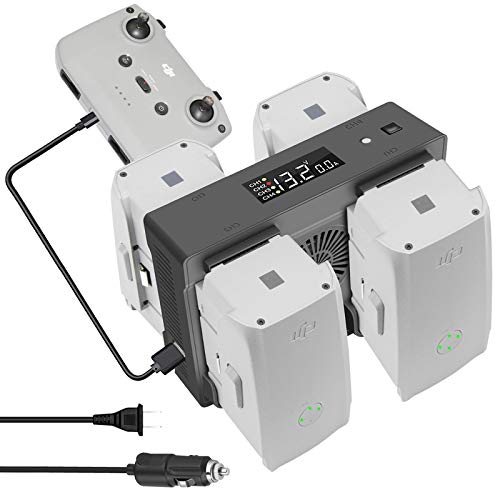
Hanatora Air 2S Wall and Car Charger — Parallel hub for Air family
Parallel charging is the professional pattern, and this Hanatora hub brings it to the Air family. Instead of queueing batteries one behind another, a parallel hub feeds several at once and brings the whole set to readiness together, which matches how planned flying days actually work: charge everything overnight or between sites, fly everything, repeat. The Air 2S and Mavic Air 2 share this hub’s stated compatibility, and their pilots tend to fly exactly those multi-battery days.
The car input is the feature that changes itineraries. A drive between launch locations becomes charging time rather than dead time, and a pilot working a coastline or a series of properties can rotate batteries through the hub while the road does the waiting. Wall charging covers the base-camp hours, so the hub lives two lives, vehicle and home, without an adapter menagerie.
Five-in-one layout language means the hub gathers the kit’s charging into one station: batteries in their slots and the day’s other powered accessories at the same altar. Consolidation matters in the field because scattered charging is forgotten charging, and a battery left on a random cable in a rental is a battery that flies at half charge tomorrow.
Size is the honest cost. Parallel electronics and car hardware make this a vehicle-and-base hub, not a sling-bag companion, and pilots who hike to their launch sites should look at the Mini-class picks’ philosophy instead. Tools have habitats, and this one’s habitat has wheels.
Supervise the first cycles, confirm each slot’s behaviour with your own batteries, and then let the hub run its parallel programme. For the Air pilot with a route and a schedule, it converts charging from the day’s bottleneck into its background hum.
- Compatibility: DJI Air 2S and Mavic Air 2 batteries per maker
- Mode: parallel multi-battery charging
- Inputs: wall and car charging options
- Layout: five-in-one hub, batteries plus accessories
Strengths
- Parallel charging readies the whole set together, the right pattern for planned outings
- Car input turns driving time into charging time between locations
- Multiple device points consolidate a scattered Air-family kit
Trade-offs
- Parallel speed divides attention across packs, so individual batteries finish later than a focused sequential charge
- A larger hub that belongs in a vehicle or a base camp rather than a jacket pocket
- Air-family lock applies absolutely; Mini and Mavic 3 batteries need their own hubs
In car use, start the engine before connecting a loaded hub, and let the hub work while driving rather than while parked. Vehicle electrics appreciate the courtesy, and a pilot who flattens the car battery while charging drone batteries has merely moved the problem to a heavier vehicle.
Route planning is where this hub quietly earns professional money. A survey pilot working a line of sites can sequence the day so the hub is always charging during drives and the aircraft is always charged on arrival, converting windscreen time into flight time with no extra hours in the day.
The hub’s consolidation also simplifies the pre-flight check. One station to inspect, one set of indicators to read, one place where every battery’s state is known: checklists exist to reduce scattered attention, and a consolidated charger is a checklist item that checks itself.
Air-family batteries are not cheap, and a hub that treats them in parallel with proper management protects a meaningful sum. Pilots should weigh the hub’s price against the fleet it guards rather than against the cheapest way to push current into a connector.
In hot climates the parallel layout has a housekeeping implication: spread the hub’s surroundings, give it shade and air in the vehicle, and avoid charging in a sealed car baking at a launch site. Heat management is part of parallel charging’s discipline, and the pilots who respect it keep their batteries longer.
Wedding and event pilots working the Air family between venues will recognise this hub as the piece that makes a two-location day feasible. The car leg stops being downtime, and the second venue inherits a fleet instead of a apology.
Keep a microfibre cloth in the hub’s bag for connector faces. Air batteries live outdoors, their contacts meet grass dust and pocket lint, and a wiped contact is a reliable charge. Field hygiene is unglamorous and decisive in equal measure.
Best for: Air 2S and Mavic Air 2 pilots flying multi-battery days who travel between launch sites by car.
Not suited for: Mini owners, and backpack pilots for whom every gram and litre is spoken for.

LYONGTECH 230W Charger for DJI Mavic 3 — Heavy parallel power for Mavic 3
Wattage is the headline and for once the headline is the story. Two hundred and thirty watts devoted to three Mavic 3 batteries simultaneously is a working tool’s specification, aimed at pilots whose batteries are inventory and whose turnaround time is money. Where a sequential hub readies one pack early, this LYONGTECH unit readies the fleet together, and a wedding shooter or inspection pilot plans the day around exactly that simultaneity.
The Mavic 3 family’s batteries are large, expensive and central to aircraft that cost serious money, so a hub for them must be judged as infrastructure. The LCD panel reporting the charge is part of that infrastructure mindset: a professional does not guess whether the third battery will make the afternoon session, they read it. Information, again, is a feature with cash value when a schedule depends on it.
Simultaneous charging at this scale makes thermal and electrical demands that bargain hubs fake and proper hubs engineer. Ventilation space around the unit is not a suggestion, and the first cycles deserve observation with your own batteries, checking seating, temperatures and the display’s agreement with the aircraft’s own battery reporting afterwards. A hub that passes that audit at this wattage has earned genuine trust.
Recreational Mavic owners should admire this unit from a distance. With one battery and no client waiting, its capacity buys nothing but a larger object in the cupboard, and the money serves better spent on a second battery. This guide recommends tools against workloads, and this workload is professional.
For the pilots it fits, though, this is the pick that changes what a flying day can contain. Three batteries in parallel at real wattage means the aircraft, not the charger, sets the day’s limits again, which is the natural order of things.
- Compatibility: DJI Mavic 3 family including Pro and Cine per maker
- Output: 230W class multifunction charger
- Mode: simultaneous parallel charging of three batteries
- Display: LCD information panel
Strengths
- Simultaneous three-battery charging at serious wattage collapses turnaround time
- LCD reporting suits a professional workflow where charge state is schedule information
- Built for the Mavic 3 family’s larger, hungrier batteries rather than adapted from a smaller class
Trade-offs
- 230W of charging hardware is bulky, mains-focused and priced for people whose flying earns money
- Overwhelming overkill for a one-battery recreational Mavic owner
- Third-party status at the top of the power range demands careful first-use verification
Log your batteries’ cycle counts alongside this hub’s use if you fly commercially. High-throughput charging rewards fleet records: the pack that has lived hardest should fly the gentlest assignments, and only a written record keeps that rotation honest across a busy season.
Commercial pilots should read the wattage as a scheduling instrument. Knowing the fleet’s turnaround to the quarter hour lets a shooter promise a client a second session with confidence, and confidence of that kind is billable. The hub’s cost amortises against the first job it rescues from a flat battery.
The display’s per-battery reporting supports the record-keeping serious operators already practise. Charge state at the start of a job, anomalies noticed during turnaround, the pack that behaved oddly: a hub that shows its work makes the operator’s log easier to keep honestly.
Mavic 3 batteries represent a significant capital sum in a working kit, and a hub engineered for their size treats that capital with appropriate seriousness. Ventilation, seating and termination all matter more as the packs grow, and this unit was designed at that scale rather than stretched to it.
There is also a crew dimension: a big, legible hub is equipment a second operator can run without tuition. On a two-person shoot, the person not flying can own the batteries entirely, and a hub that explains itself through its display makes that division of labour safe.
A 230W hub changes the home charging station’s geography. It deserves a fixed place with air around it, near the kit’s storage, rather than a rotation of borrowed surfaces. Infrastructure should have an address, and this unit has earned one in a working pilot’s home.
Insurance-minded operators should photograph their charging setup once, hub, batteries and serials in frame. If the worst happens to a working kit, that photograph accelerates every conversation that follows, and it costs one minute on a quiet evening.
Best for: Working Mavic 3 pilots, survey, inspection and wedding shooters, turning batteries around against a schedule.
Not suited for: Recreational owners with a single battery and no clock running, for whom the official route suffices.

Hanatora LCD Charger for DJI Mini 5/4/3 Pro — Parallel hub for modern Mini Pro line
The Mini Pro line grew up, and its charging grew up with it. This Hanatora hub charges the batteries of the Mini 5, Mini 4 and Mini 3 Pro simultaneously rather than in sequence, under an LCD that reports each pack, and it adds the feature thoughtful pilots ask about most: a storage charge mode that leaves batteries at a partial level suited to weeks of rest instead of the full charge that ages lithium cells fastest.
Storage mode deserves its paragraph because it separates pilots who manage batteries from pilots who merely own them. A lithium pack stored full, especially in warmth, loses capacity permanently at a pace that surprises owners. A hub that can park the fleet at a storage level after the last flight of a trip, then top them before the next, is performing quiet asset management on the most expensive consumables in the bag.
Parallel charging fits the Pro line’s usage pattern. These are aircraft bought for image quality and flown deliberately, often in multi-battery sessions at chosen locations, and their pilots plan around having the whole set ready at departure rather than one pack ready early. The hub’s six-in-one layout gathers that set, plus the day’s accessories, into one supervised station.
The compatibility span across three Pro generations is genuinely useful in a line where owners upgrade aircraft and keep batteries where the families allow. It remains a locked span, though: the entry Mini 4K family lives in a different battery world, and this hub will not visit it. Read your aircraft’s full name, as this guide has insisted since its first pick.
Choose this hub when your Mini Pro flying comes in expeditions separated by storage. It charges like a professional tool and stores like a careful one, and that combination is rarer in this category than it should be.
- Compatibility: DJI Mini 5, Mini 4 and Mini 3 Pro batteries per maker
- Mode: simultaneous parallel charging
- Feature: storage charge mode per maker
- Display: LCD panel with per-battery information
Strengths
- Parallel charging suits the modern Mini Pro pilot’s multi-battery day
- Storage mode holds batteries at a kinder level for weeks between flights
- One hub spans three generations of the Mini Pro line
Trade-offs
- Pro-line lock still applies; the entry Mini 4K family is a different battery world
- Simultaneous hardware costs and weighs more than the sequential official hub
- Storage mode only helps owners who remember to use it before a layoff
Build the storage habit into the trip home: batteries go onto storage charge the evening you return, not the week after. Habits attached to journeys survive; habits attached to intentions evaporate, and a storage mode unused is merely a line in a listing.
Expedition pilots, the ones who fly hard for a week and then not for a month, are this hub’s truest audience. Parallel speed serves the expedition, storage mode serves the month after, and the same piece of hardware covers the two halves of that rhythm without compromise in either direction.
The three-generation span also future-proofs a pilot’s accessories through an aircraft upgrade inside the Pro line. Chargers that survive an upgrade are rare in this locked category, and each survivor reduces the true cost of the new aircraft by the price of the hub it did not obsolete.
Storage mode has a travel corollary worth practising: after the final flight of a trip, storage-charge the fleet before the journey home rather than after it. Batteries then travel and rest at their kindest level, and the pilot arrives home with the chore already done.
Minimalists may ask whether the official sequential hub plus discipline could do this job. For a two-battery pilot, honestly, yes. This Hanatora earns its place at three batteries and beyond, or the first time a stored-full fleet loses capacity over a quiet month, whichever arrives sooner.
Renters of the Pro line for a single project should still prefer a hub with storage mode for the return. Handing batteries back at a kind level is professional courtesy, and the next renter’s first flight will silently thank your discipline.
The hub’s display also helps a pilot decide when a battery should retire. A pack whose reported behaviour drifts from its siblings across several charges is composing its resignation letter, and reading it early is cheaper than reading it in the air.
Best for: Mini 3, 4 and 5 Pro pilots with several batteries who fly in bursts and store between them.
Not suited for: Entry-tier Mini 4K and Mini 2 owners, whose batteries this hub does not serve.
How Should You Charge the Night Before a Flying Day?
Sequence the evening by departure, not by habit. Batteries for the first location go on charge first, the power supply is the one the hub’s maker specifies, and the fleet is checked once before bed rather than worried over hourly. Sequential-hub owners should load packs in the order they intend to fly them, since the hub’s queue is a plan waiting to be used.
Parallel-hub owners have the easier evening and the greater responsibility: everything charges at once, so everything must be seated correctly at once, with ventilation respected. Finish with the batteries stored as the next day demands, in the case, in order, with the aircraft’s card and props where the morning’s hands expect them. A calm morning is manufactured the night before, and charging is where its manufacture starts.
How Do the Six Hubs Compare?
| Pick | Family | Logic | Signature feature |
|---|---|---|---|
| DJI Two-Way Hub | Mini 3 Pro | Sequential | Official design, two-way power |
| CYNOVA Hub | Mini 4K / Mini 2 family | Two-way hub | Specialist fit for entry family |
| LYONGTECH LCD Hub | Mini 4K / Mini 2 family | Sequential, 3 packs | LCD reporting |
| Hanatora Air Charger | Air 2S / Mavic Air 2 | Parallel | Car and wall inputs |
| LYONGTECH 230W | Mavic 3 family | Parallel, 3 packs | 230W simultaneous power |
| Hanatora LCD Charger | Mini 5/4/3 Pro | Parallel | Storage charge mode |
Find your family in the second column before reading any other. A pilot whose aircraft is absent from a row should treat that row as a description of somebody else’s hobby, however attractive its features read.
What Should a Pilot Check in a Hub’s First Week?
Run each battery through a full cycle and fly it, noting whether the aircraft reports the charge state the hub promised. Check seating and release on every slot, feel each pack’s temperature at completion, and confirm the hub’s indicators agree with the battery’s own lights. Disagreements in week one are return-window information; the same disagreements in month six are merely regrets.
Also test the failure you can afford: unplug the hub mid-charge, reconnect it, and watch whether it resumes sensibly. Field power is imperfect, vehicles stall, hotel sockets wobble, and a hub’s behaviour on recovery tells you more about its engineering than its behaviour on a perfect supply ever will.
How Do Altitude, Cold and Travel Affect Charging Plans?
Cold batteries charge reluctantly and fly briefly, so a pilot heading for a winter sunrise should charge indoors, transport packs insulated, and let them warm before flight rather than asking cold cells to perform. The hub’s work is only half the system; the temperature at which batteries meet the aircraft is the other half, and mountain pilots learn to budget for both.
Air travel imposes its own charging arithmetic. Flight batteries travel in the cabin, arrive partly discharged by regulation and by prudence, and need a hub at the destination that the local power can feed. A compact sequential hub travels well in that world, while the big parallel units belong to road-based work. Match the hub to the journey as carefully as to the aircraft, and the fleet will be ready wherever the flying is.
What Mistakes Do Drone Charger Buyers Keep Making?
Ordering by the word Mini, or Mavic, alone is the champion error of this category. The families subdivide, the batteries differ, and the hub that arrives fits nothing the pilot owns. The defence is tedious and total: read the aircraft’s full model name off the aircraft, then read the hub’s compatibility list, and require an exact match.
Starving a USB-C hub with a weak power supply is the second error. Hubs advertise their appetite honestly; a supply below it turns a fast hub slow without telling anyone, and pilots blame batteries for a wall adapter’s inadequacy. Buy the supply the hub’s maker specifies, or better, as part of the same decision.
Storing batteries full and hot completes the trio. Lithium flight packs age fastest at full charge in warm rooms, so pilots without a storage mode should fly or discharge packs down before a long layoff, and every pilot should keep batteries out of hot cars and sunny windowsills between trips.
Final Recommendation
Mini 3 Pro owners should start with DJI’s own hub and graduate to parallel hardware only when their flying develops a schedule. The entry Mini family is best served by the CYNOVA or the display-equipped LYONGTECH, Air pilots who drive between sites by the Hanatora car hub, Mavic 3 professionals by the 230W LYONGTECH, and Mini Pro expedition pilots by the Hanatora with its storage mode. Each assignment follows from the aircraft and the calendar, the only two honest inputs this category accepts.
Charge the fleet the night before, store it kindly, and spend the morning flying rather than waiting.
Battery cost is the lens that brings this whole category into focus. A working pilot’s fleet can represent a sum rivalling the aircraft’s own price, and every decision in this guide, hub quality, charging logic, storage discipline, is ultimately about protecting that sum while extracting its full working life. Viewed through that lens, the difference between a specialist hub and a bargain one is not a preference but a rounding error against the value at risk.
New pilots should absorb one cultural norm from the experienced: nobody at a flying field mocks a careful charging setup. The pilots with labelled batteries, a proper hub and a rotation habit are the ones whose aircraft come home for years, and their example is the cheapest education in the hobby. Join them early and your batteries will age like theirs do, slowly and without drama.
Clubs and schools running shared fleets should standardise on one hub per aircraft family and label ruthlessly. Shared equipment fails at interfaces, and the interface between a tired instructor and a shelf of similar batteries at dusk is exactly where labels earn their keep. A club that labels its hubs by aircraft name in large print will never hold the inquest that begins with a forced connector and ends with a written-off pack.
One final habit separates fleets that last from fleets that fade: fly batteries down to a sensible reserve and charge them back with patience rather than urgency. Rapid turnarounds have their place on working days, but a fleet charged gently on ordinary days and stored kindly between them will outlast a fleet lived at full throttle. The hubs in this guide support both tempos; the pilot chooses which one becomes the fleet’s culture.
Resale value closes the loop on careful charging. A used aircraft sold with a tidy fleet, a proper hub and batteries whose history the seller can describe commands a premium over the same aircraft with mystery packs. Buyers of used drones are really buying the previous owner’s charging habits, and the pilots who understood that from their first hub purchase get paid for their discipline twice.
Gift buyers shopping for a drone owner should know that a correct hub is among the most useful presents in the hobby, and among the easiest to get wrong. Ask for the aircraft’s exact model name, in writing, and match it against the hub’s list character for character. A hub that fits is a delight; a hub that almost fits is an errand.
And when the fleet finally retires, retire its batteries responsibly through a proper recycling route rather than a household bin. The packs served at altitude for years, and a pilot’s care for them properly includes their ending. Hubs can be handed on with the aircraft; batteries should end their story where their chemistry is handled by people equipped for it.
Frequently Asked Questions
Can I charge drone batteries from a power bank?
Small USB-C hubs can draw from a sufficiently powerful bank, which suits field top-ups for the Mini families. Treat it as an expedition technique rather than a home routine, and confirm the bank’s output meets the hub’s stated appetite before relying on it.
How should I store flight batteries between trips?
Partly charged, cool and dry. Use a hub’s storage mode if it offers one, as the Hanatora Mini Pro pick does, and avoid leaving packs full in hot vehicles, which is where their capacity goes to retire early.
Why does my hub charge one battery at a time?
That is sequential logic working as designed, concentrating power so the first pack is flight-ready sooner. If your flying needs the whole fleet together, the parallel picks in this guide exist for exactly that pattern.
Are third-party hubs safe for DJI batteries?
Specialist makers with a track record inside the DJI ecosystem are the reasonable choice, used with supervised first cycles and attention to temperature. Anonymous universal hubs are the ones this guide steers pilots away from.
Can one hub serve my Mini and my Mavic?
No. The battery families are physically and electrically distinct, and each needs its own hub. Households with two aircraft should budget for two charging systems and label them, because the batteries’ resemblance exceeds their compatibility.
Related Guides
A charged fleet is the beginning of a good flying day rather than the whole of it, and the guides below cover the kit that surrounds the batteries: cases, spare props and the bags that carry them all.
Best Spare Batteries for Popular Drones
Best Portable Power Stations for Field Charging


