What's inside
- Key Takeaways
- Quick Picks
- How Did We Draw the Line Between Sound Cards and Interfaces?
- What Does a Recording Chain Actually Need That a Sound Card Lacks?
- Do Sample Rates and Bit Depth Matter for Recording?
- Why Will Your Room Outvote Your Interface?
- How Do the Six Divide Between Cards and Interfaces?
- How Should the Microphone Budget and the Interface Budget Talk to Each Other?
- Which Recording Are You Actually Planning to Make?
- How Do You Set Up a First Recording Chain Without the Usual Tears?
- What Should a Second Purchase Be, Once the First Chain Works?
- What Mistakes Do First-Time Recordists Make With Hardware?
- Final Recommendation
- Frequently Asked Questions
- Related Guides
As an Amazon Associate I earn from qualifying purchases. This post may contain affiliate links at no extra cost to you.
[widgetverdict.com] is reader-supported. When you buy through links on our site, we may earn an affiliate commission.
The best pci sound cards for recording come with a truth this guide will state in its first paragraph and then spend six picks proving: a sound card is a playback device that can record a little, while an audio interface is a recording device that also plays back — and for anyone capturing a voice or an instrument, that difference in ancestry matters more than any specification. Two of the picks below are genuine PCIe sound cards, included because they are what the search promises and because they serve light recording duties honestly. The other four are USB audio interfaces of escalating seriousness, included because steering a would-be recordist to a card with a microphone jack and no real preamp would be a disservice dressed as an answer. Every pick is labelled by what it actually is, and the sound cards’ limits are stated as plainly as the interfaces’ strengths.
Where to buy: product names link to the Amazon listings behind this guide. Recording gear rewards a careful listing check — confirm the exact input types in the photographs, because the difference between an XLR socket, a combo jack and a 3.5 mm microphone input is the difference between three different microphones you might own. If a listing bundles software or accessories, verify they are named in the box contents rather than implied by the photography.
Key Takeaways
- Sound cards are built playback-first: their microphone inputs are convenience features without the gain, preamp quality or monitoring a real recording chain needs.
- An XLR input with a proper microphone preamp — and phantom power for condenser microphones — is the dividing line between a recording device and a playback device with a mic socket.
- The M-Audio M-Track Solo is the most conventionally “real” interface here: XLR, line and DI inputs with a professional software suite, from a maker whose business is recording.
- The two XLR USB interfaces in this roundup (XTUGA and the unbranded Q-12-style unit) serve podcast-and-demo budgets, with listings that promise ultra-low latency and plug-and-play setup.
- The Cubilux CB5 is a middle shape: a USB audio interface built around 3.5 mm connections, suited to streaming and podcasting with consumer microphones.
- The two true PCIe cards — Audigy Fx Pro and GLOTRENDS ST113 — earn their place for playback quality and light capture, not as studio front ends.
Quick Picks
| Pick | Badge | Why it is here |
|---|---|---|
| Creative Sound Blaster Audigy Fx Pro | True PCIe sound card | The honest internal card of the group: fine playback, light recording duty, no studio pretensions. |
| XTUGA USB Audio Interface | Budget XLR interface | An XLR-equipped USB interface aimed at computer recording, with plug-and-play, low-latency positioning. |
| M-Audio M-Track Solo | The established interface | XLR, line and DI inputs plus a professional software suite from a recording-focused maker. |
| Cubilux CB5 USB Audio Interface | 3.5 mm streaming interface | A USB interface with stereo mic input, line-in, line-out and headphone jack for streaming and podcasting. |
| USB Audio Interface XLR | Unbranded XLR interface | A Q-12-style XLR interface for PC recording with the same plug-and-play promise, at the commodity end. |
| GLOTRENDS ST113 PCIe Sound Card | True PCIe card, hi-fi angle | A named-DAC PCIe card for listeners who record occasionally and listen constantly. |
How Did We Draw the Line Between Sound Cards and Interfaces?
By inputs and intent. A recording device is defined by what it can capture well: a microphone preamp with enough clean gain to raise a quiet voice to a healthy level without hiss, an XLR or combo input that accepts professional microphones, phantom power for condensers, a DI path for instruments, and monitoring that lets the performer hear themselves without delay. A playback device is defined by what it can reproduce well. The six products below were sorted by asking which definition their listings actually satisfy — not which word the listing uses, since at the budget end the phrase “sound card” and “audio interface” are used almost interchangeably by sellers, including on two listings here that call an XLR interface a sound card in their own titles.
The practical consequence shaped the whole guide: if your recording ambition is a podcast, a stream, voiceover or demos of songs, the interfaces are your shortlist and the PCIe cards are context. If your ambition is excellent playback with the occasional voice call or a casual capture through a headset mic, the cards suffice and the interfaces are overkill with cables. Neither conclusion insults either product kind; the failure mode this guide exists to prevent is buying one kind while needing the other.
What Does a Recording Chain Actually Need That a Sound Card Lacks?
Start with the microphone preamp, because it is the whole argument in one component. A microphone produces a whisper of a signal, and something must amplify it enormously before conversion. A sound card’s microphone input typically offers a fixed, modest amount of gain designed for a headset boom mic held two centimetres from your mouth; move a proper microphone to a natural working distance, or use a quiet dynamic microphone, and the input runs out of clean gain — the recording arrives hissy, because the gain that exists was raised alongside the circuit’s own noise. An interface’s preamp is designed for exactly this lift, with gain to spare and a knob to set it precisely. That knob, humble as it looks, is the difference between a recording device and a socket.
Phantom power is the second dividing line. Condenser microphones — the large, sensitive microphones of podcasting and vocal recording — require 48-volt phantom power delivered through the XLR cable, and a device without it simply cannot use them at all. The third line is the input’s physical form: XLR and combo jacks accept the balanced cables that reject interference over a run across a room, while a 3.5 mm input is an unbalanced convenience connection for gear that lives on the desk. The fourth is monitoring: recording yourself while hearing your own voice a fraction of a second late, through the computer’s round trip, is genuinely disorienting, and interfaces solve it with direct monitoring that routes your voice to your headphones before the computer touches it. Latency figures in listings — “ultra-low latency” — gesture at this problem; a hardware direct-monitor path is the robust version of the answer.
None of this makes sound cards dishonest products. It makes them playback products. The Audigy Fx Pro’s listing promises hi-res audio, surround and clean sound for a PC upgrade, and it delivers its promise in its own direction. The misunderstanding only begins when a buyer reads “has a microphone input” as “is a recording device” — a reading this guide’s labels are designed to interrupt before money moves.
Do Sample Rates and Bit Depth Matter for Recording?
Less than the industry’s font sizes suggest, and in a specific order. Bit depth matters first, for a practical reason: recording at 24-bit gives you headroom to set gains conservatively — the discipline the setup section preaches — without the noise floor creeping into quiet recordings. It is the format’s forgiveness, not its fidelity, that earns the recommendation. Sample rate matters a distant second: the standard rates cover the audible spectrum completely, and higher rates mostly serve specialised production workflows rather than home recording quality. A beginner choosing between a higher sample-rate figure and a better preamp should choose the preamp every time, because the preamp touches every second of every recording, while the rate ceiling touches none of the content a voice or guitar actually produces.
Where format choices do bite is consistency. Pick one sample rate for a project and keep the interface, the software and the operating system in agreement about it; mismatched rates are the hidden cause of recordings that play back at the wrong pitch or drift out of sync with video. Podcasters delivering to platforms and musicians delivering to collaborators will find their destinations specify ordinary rates anyway. The exotic figures belong to playback marketing; recording rewards the boring virtues — correct gain, matched rates, a quiet room — in that order, every session.
Why Will Your Room Outvote Your Interface?
Every recordist learns this eventually, usually after an upgrade disappoints: the room is a component. A microphone does not hear your voice the way a nearby friend does; it hears your voice plus the room’s reflections of it, the fan, the traffic, the hard wall behind you adding a slap of echo to every syllable. An interface captures that mixture more faithfully as it improves, which is why a better interface in a bad room can sound worse than a modest one in a treated corner — the better device is honestly reporting a worse acoustic. The cheapest recording upgrade in existence is a duvet hung behind the performer and another behind the microphone, and it outperforms most component swaps at this guide’s tier.
This is also where the sound-card-versus-interface question finds its proper scale. The step from a headset input to a real preamp is large and audible. The step from a budget interface to an established one is smaller, and the step from an untreated room to a treated one is larger than both. Spend in that order of impact — device kind first, room second, brand refinement third — and the recordings improve in the sequence the physics dictates rather than the sequence the marketing prefers. The picks below are ordered by that same honesty: kind first, refinement after.

Creative Sound Blaster Audigy Fx Pro — True PCIe sound card
Here is the sound card of the roundup, presented without apology and without inflation. The Audigy Fx Pro is a hi-res PCIe card whose listing promises surround sound and clean audio as a PC upgrade, and as a playback device it is a perfectly sensible purchase: it lifts a desktop off tired onboard audio, drives ordinary headphones and speakers well, and gives a gaming or media machine a managed audio home. Its microphone input serves the purposes it was designed for — a headset for voice chat, a desk mic for calls — at the level those purposes require.
What it is not is a recording front end, and the specifics matter. There is no XLR input, no phantom power, no preamp gain staged for a studio microphone at working distance, and no direct monitoring path for a performer. A podcaster who buys it for a condenser microphone will discover the microphone cannot even be powered, let alone captured well. A streamer using a headset, by contrast, will never encounter those limits.
Consider also what the Fx Pro’s presence in a recording guide does for the playback side of a creator’s desk. Editing and mixing are listening tasks, and a creator who records through an interface but monitors through a chaotic onboard output is judging their work through the weakest link in the room. A competent internal card gives that monitoring a managed home inside the PC — one reason hybrid desks exist, with an interface for capture and a card or quality output for everything else. The products are complements more often than rivals, and the rivalry framing says more about search keywords than about studios.
That asymmetry is the entire lesson of this guide in one product: the Fx Pro is a good answer to a playback question and a wrong answer to a recording question, and its presence at the head of a recording guide is deliberate — it is the reference point that defines what the interfaces below add.
- Device kind: PCIe sound card (playback-first)
- Listing promises: hi-res audio, surround sound, clean audio PC upgrade
- Recording scope: headset and desk-mic duty for calls and chat
- Absent by design: XLR input, phantom power, studio preamp gain, direct monitoring
Strengths
- Clean, managed playback upgrade over onboard audio
- Internal installation keeps the desk and its cables simple
- Entirely sufficient for voice chat and call-quality capture
Trade-offs
- Cannot power or properly amplify a studio microphone
- No monitoring path suited to performing while recording
- Money spent here does not advance a real recording setup
Best for: playback-first desktops that record only their owner’s voice in calls and games. Anyone whose microphone cost more than their headset should skip directly to the interfaces — the M-Track Solo is where this guide’s recording story properly begins.

XTUGA USB Audio Interface — Budget XLR interface
The XTUGA crosses the line the Audigy cannot: it is a USB audio interface for PC recording with an XLR input, described in its listing as a Q-12 model promising ultra-low latency and plug-and-play operation for a recording-studio context. Translate the studio language with budget realism and the product is still meaningful: an XLR input means real microphones connect properly, a gain-staged preamp means they can be captured at a sensible level, and a USB interface format means the whole chain — capture, monitoring, playback — lives in one small box designed around recording rather than around games.
Who is it for? The first-recording buyer: a podcaster graduating from a headset, a singer capturing demos, a streamer whose audience has started commenting on the audio. At this tier, the honest expectations are about polish rather than capability — the preamp will do its job, while documentation, driver refinement and long-term support will be thinner than the established brands provide. The listing’s “3.55m microphone jack” wording appears to describe an accompanying microphone connection detail; as with all budget listings, confirm the exact contents and connector set from the listing’s photographs before ordering, and verify the interface against your microphone on arrival while returns are easy. Bought with those disciplines, a unit like this is how many perfectly good podcasts begin.
A practical note for the XTUGA’s likely owner: pair it with a dynamic microphone rather than a condenser for a first chain, if your room is untreated. Dynamic microphones are less sensitive to room echo and household noise, forgive imperfect gain staging, and their lower output is exactly the test a budget preamp should be set — record a loud passage and a quiet one, and listen for whether the quiet one brings a tide of hiss with it. That two-minute test, done in the return window, tells you more about your specific unit than any review, including this one, can promise on its behalf.
- Device kind: USB audio interface (recording-first)
- Input headline: XLR microphone connection, Q-12 model per listing
- Promises in listing: ultra-low latency, plug and play
- Recording scope: voice and instrument capture for podcasts, demos, streaming
Strengths
- Real XLR input crosses the threshold into actual recording gear
- Interface format brings gain control and monitoring thinking with it
- Low-commitment entry into a proper microphone chain
Trade-offs
- Budget-tier documentation and support polish
- Listing details need photographic verification before ordering
- Preamp refinement will trail the established recording brands
Best for: a first real microphone chain on a budget — podcast, demo or stream — where crossing the XLR threshold matters more than brand heritage. Buyers who want the established version of the same idea should compare the M-Track Solo next; it is the reference this tier is measured against.
M-Audio M-Track Solo — The established interface
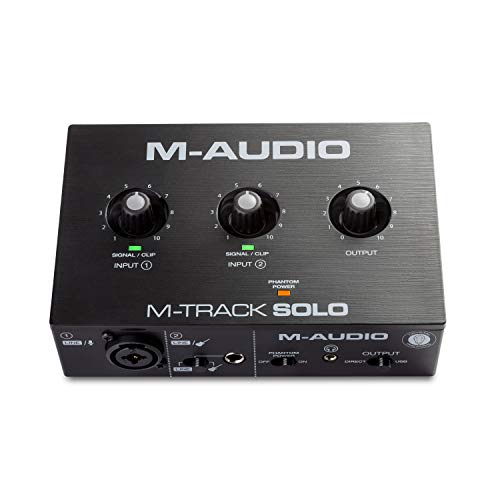
The M-Track Solo is the roundup’s anchor of conventionality, and in recording gear conventionality is praise. M-Audio’s listing describes a USB audio interface with XLR, line and DI inputs and a professional software suite for recording, streaming and podcasting. Each input type answers a distinct citizen of a home studio: XLR for the microphone, line for a keyboard or an external preamp, and DI for a guitar or bass plugged straight in — the trio that covers the overwhelming majority of what a solo creator records, which is precisely the user the product’s name addresses. A maker whose catalogue is recording equipment also brings the unglamorous assets: drivers maintained as a core business, manuals written by people who record, and a software bundle chosen to start a beginner rather than to inflate a box.
For the reader who arrived via the phrase “PCI sound card,” the M-Track Solo is the clearest available demonstration that the interface is a different species. It does not install in a slot; it sits where the performer can reach its gain knob. It does not advertise surround; it advertises inputs. Its playback is perfectly good — interfaces double as the computer’s sound device — but its design budget visibly went to the recording direction: preamp, input variety, monitoring. If your plans include a condenser microphone now or plausibly ever, this is the pick whose phantom-powered XLR input keeps that door open, and it is the purchase in this guide least likely to be replaced within a year of a creator’s ambitions growing.
The DI input deserves its own sentence for the guitarist reading this guide, because it is the feature most often omitted from beginners’ mental checklists and most missed afterward. Plugging a guitar directly into a line input mismatches levels and impedance, producing the thin, buzzy capture that convinces beginners their playing is the problem. A proper DI stage accepts the instrument as it is, giving amp-simulation software a healthy signal to work with. If six strings live anywhere near your desk, that input alone can justify the M-Track Solo over every cheaper option in this roundup.
- Device kind: USB audio interface (recording-first)
- Inputs stated: XLR, line and DI
- Included: professional software suite, per listing
- Maker profile: dedicated recording-equipment brand
Strengths
- The full input trio covers microphone, line sources and direct instruments
- Established maker with recording as its core business
- Software suite gives a beginner a working start without further purchases
Trade-offs
- A solo-creator format: one performer at a time is the design assumption
- Desk footprint and cabling that an internal card avoids
- Playback-only buyers pay for preamps they will never use
Best for: the solo recordist — podcaster, singer-songwriter, streamer — who wants the established, supported version of a first interface. If your recording is limited to a 3.5 mm consumer microphone and a stream, the Cubilux below matches that narrower brief at a narrower scale.

Cubilux CB5 USB Audio Interface — 3.5 mm streaming interface
The CB5 occupies the honest middle of this guide’s spectrum. Cubilux describes it as a USB audio interface for recording, streaming and podcasting — a USB-to-3.5 mm sound card with a stereo microphone input, line-in, line-out and a headphone jack for monitors, supporting Windows and Mac. Read the connector list as its philosophy: this is an interface for the 3.5 mm ecosystem, the world of consumer microphones, lavalier mics, headsets and phone-style accessories, given a proper little hub with separated inputs and outputs instead of a laptop’s single compromised combo jack. For a streamer whose microphone is a decent lavalier or a desk mic with a 3.5 mm plug, that separation alone — mic in on its own socket, line-in for a second source, headphone out for monitoring — is a genuine workflow upgrade.
Its boundary is equally clear, and this guide’s framework names it without hesitation: there is no XLR input and no phantom power here, so the CB5 does not open the door to studio microphones, and a creator whose ambitions point that way should buy the M-Track Solo instead and skip a step. Within its own ecosystem, though, the CB5 is coherent in a way the budget XLR units sometimes are not — every connector matches the gear its buyer already owns. Cubilux’s specialisation in small audio adapters shows in that coherence. Judge it as the best-organised version of consumer-connector recording, and it earns its place; judge it as a studio interface and the comparison was rigged from the start.
The CB5 also quietly serves a second audience: the digitiser. Its line-in gives a laptop a clean stereo capture path for a cassette deck, a record player’s line output, or a keyboard — sources that a combo-jack machine handles badly or not at all. Households digitising a shelf of tapes before they degrade are doing recording in the full sense, and an organised little interface with honest line-level inputs is a better tool for that patient work than a gaming card’s afterthought input. Not every recording ambition wears a microphone, and this pick covers the ones that wear a cable instead.
- Device kind: USB audio interface, 3.5 mm ecosystem
- Connections: stereo microphone input, line-in, line-out, headphone jack
- Stated uses: recording, streaming, podcasting on Windows and Mac
- Absent by design: XLR input and phantom power
Strengths
- Separates the inputs and outputs a laptop combo jack merges badly
- Matches the consumer microphones streamers actually own
- Headphone jack supports monitoring without extra hardware
Trade-offs
- No path to XLR or condenser microphones later
- Consumer-connector capture quality has a lower ceiling
- Easy to outgrow if recording ambitions professionalise
Best for: streamers and podcasters working happily inside the 3.5 mm world who want it organised properly. The moment a studio microphone enters your plans, this becomes a stepping stone rather than a destination — buy the interface with XLR first if that moment is already visible.
USB Audio Interface XLR — Unbranded XLR interface
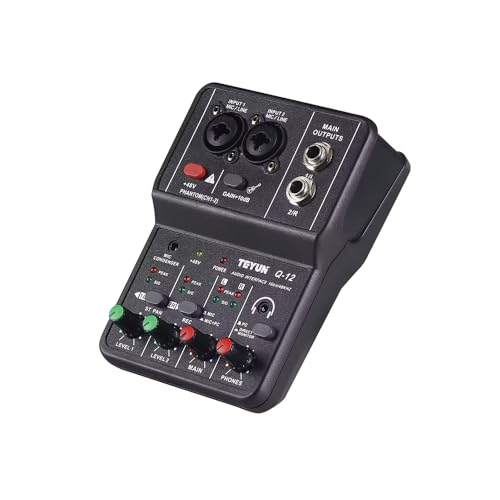
The fifth pick is the commodity expression of the XTUGA’s idea: an unbranded USB audio interface for PC recording whose listing repeats the Q-12 formula — XLR input with a microphone jack detail, ultra-low latency claims, plug-and-play positioning for a recording-studio context. Two near-identical budget interfaces in one guide is a deliberate editorial choice, mirroring the reality of this market shelf: the same functional design circulates under multiple names, and the buyer’s real decision is not which badge but whether the budget XLR concept fits their needs and whether the specific listing in front of them describes its unit completely.
The guidance therefore matches the concept rather than the badge. An XLR input at this tier genuinely changes what a beginner can record — a real dynamic microphone, properly gained, will out-record any headset — and the plug-and-play promise means the operating system’s class drivers do the work, which keeps setup friction low. What the tier cannot promise is refinement: preamp noise at high gain, documentation, and support are where the money was saved, and a buyer recording quiet sources in quiet rooms will meet those savings first. Verify the delivered unit against its listing photographs, test the gain range with your own microphone during the return window, and the purchase is a rational experiment; skip the verification and it is a lottery ticket with an XLR socket.
One more expectation belongs in writing for this tier: channel count. These are solo-performer devices, built around one microphone at a time, and the buyer imagining a two-person podcast recorded through separate microphones needs a different class of interface with two preamps. Read the input list as a cast list — one XLR input means one microphone, however the photography arranges the box — and a surprising number of disappointed purchases across this whole category reduce to that single miscount, made in hope rather than in the listing.
- Device kind: USB recording interface at the commodity tier, unbranded
- Input headline: XLR, Q-12-style design per listing
- Promises in listing: ultra-low latency, plug and play
- Buying note: verify unit against listing; test gain with your microphone
Strengths
- XLR threshold crossed at the commodity end of the market
- Class-driver simplicity keeps setup friction minimal
- A rational low-cost experiment for a first microphone chain
Trade-offs
- Unbranded support and documentation are the thinnest here
- High-gain preamp noise is where this tier’s savings show
- Near-duplicate of the XTUGA concept — choose on listing completeness
Best for: the experimentally minded beginner who wants XLR capability at the lowest commitment and will verify the unit on arrival. Buyers who prefer to skip the verification ritual should pay the modest premium for the XTUGA’s named listing or the M-Audio’s established one.

GLOTRENDS ST113 PCIe Sound Card — True PCIe card, hi-fi angle
The ST113 closes the guide as the second genuine PCIe sound card, and its recording story is the mirror of the Audigy Fx Pro’s. Where the Audigy is a mainstream playback card, the ST113 is a hi-fi playback card — an ES9018K2M ESS SABRE32 DAC, driver-free setup, and an isolated optical output, per its listing — and its capture abilities are those of a quality playback device: a line-level path can digitise a stereo source respectably, and a casual microphone through an appropriate input serves calls and drafts. What it does not contain is a microphone preamp chain of the interface kind, and no amount of converter pedigree changes that anatomy. A superb DAC makes playback superb; recording quality is decided at the input, by a different component, travelling the other direction.
That distinction is exactly why the ST113 belongs in a recording guide despite not being a recorder: it is the pick for the reader whose proportions are ninety percent listening, ten percent capturing. A musician who plays reference tracks all day and occasionally records a line-level sketch from a keyboard; a podcaster who records elsewhere but edits and monitors at this PC; a listener who wants driver-free hi-fi inside the case and accepts that a future recording hobby means a future interface purchase. For those readers, buying an interface now would spend the budget in the wrong direction.
There is a final, unfashionable argument for the ST113 in a recording context: stability. A driver-free playback device removes an entire category of session-day failures — the interface driver that sulked after an update, the control panel that forgot its settings — from the monitoring half of the desk. Professionals pay heavily for that kind of boring reliability. A hybrid setup that monitors through a device which simply always works, while capturing through an interface chosen for its preamp, distributes risk the way experienced recordists do instinctively, and the ST113 fits that architecture without pretending to be the half it is not.
The ST113 also appeared in this series’ headphone guide wearing its converter hat; here the hat is honesty about direction — conversion out is its craft, and conversion in is a courtesy.
- Device kind: PCIe sound card (playback-first, hi-fi tier)
- Converter stated: ESS SABRE32 ES9018K2M DAC
- Setup: driver-free; isolated optical output included
- Recording scope: line-level capture and casual voice, not studio microphones
Strengths
- Named audiophile converter for the playback and monitoring side
- No software layer to maintain across system updates
- Optical isolation option serves a future external DAC path
Trade-offs
- No microphone preamp, XLR input or phantom power
- Recording ambitions will eventually require a separate interface
- Smaller maker means a thinner owner community
Best for: listeners first and recordists occasionally, who want their monitoring chain excellent and their conscience clear about what the card is. If recording is the headline of your purchase rather than the footnote, this guide has already introduced you to three interfaces — believe them.
How Do the Six Divide Between Cards and Interfaces?
| Product | Kind | Microphone path | Recording verdict |
|---|---|---|---|
| Audigy Fx Pro | PCIe sound card | Headset/desk mic input | Calls and chat, not studio capture |
| XTUGA USB Interface | USB interface | XLR input with preamp | Budget recording chain |
| M-Audio M-Track Solo | USB interface | XLR plus line and DI | Established solo recording |
| Cubilux CB5 | USB interface | 3.5 mm stereo mic input | Streaming/podcast, consumer mics |
| USB Audio Interface XLR | USB interface | XLR input with preamp | Commodity recording chain |
| GLOTRENDS ST113 | PCIe sound card | Line-level and casual capture | Playback-first, recording second |
The kind column is the guide. Four interfaces and two cards were not a shortlist accident but the honest shape of the answer: recording is an interface’s profession and a card’s sideline, and the microphone-path column shows the physical reason — a preamp behind an XLR socket is a different instrument from a convenience input on a playback card, whatever either listing’s headline calls it.
How Should the Microphone Budget and the Interface Budget Talk to Each Other?
First-time buyers routinely split this decision wrongly, buying the microphone that photographs well and the interface that was left over in the budget. The chain argues for the opposite emphasis. A modest microphone into a competent preamp records cleanly and can be upgraded alone later; an excellent microphone into a starved, hissy input is compromised on every take, and its owner usually blames the microphone — the expensive half — for the cheap half’s noise. Within this guide’s tier, the balanced first chain is a serviceable dynamic microphone and the M-Track Solo, or a budget XLR interface verified carefully; the unbalanced chain, in either direction, is where regret concentrates.
Dynamic versus condenser is the second conversation the two budgets must have together. A dynamic microphone forgives untreated rooms, needs no phantom power, and asks a lot of preamp gain — which argues for the established interface. A condenser hears the room in high fidelity, needs phantom power, and asks little gain — which argues for treating the room before celebrating the microphone. Neither is “better for podcasting” in the abstract, despite a thousand confident claims; each is better for a specific room and a specific voice, and the interface choice follows from that pairing rather than preceding it. Plan the chain as one purchase wearing two boxes and the recordings will sound like it.
Which Recording Are You Actually Planning to Make?
Let the artefact decide. A podcast voice, recorded at a natural distance on a decent microphone, needs preamp gain and quiet capture: interface territory, with the M-Track Solo as the established route and the XLR budget pair as the experimental one. A stream with a lavalier or 3.5 mm desk microphone needs organised inputs and monitoring more than it needs XLR: the CB5’s brief. A guitar demo needs a DI input that accepts the instrument’s level without clipping: again the M-Track Solo, whose input trio was designed for exactly that citizen. A song demo with a condenser microphone needs phantom power, which eliminates both PCIe cards and the CB5 in a single stroke — a useful reminder that one accessory purchase, the microphone, can decide the entire interface question before this guide is even opened.
And the honest null case: if the recording you are planning is your voice in game chat and work calls, you need none of the interfaces, and either PCIe card — or the budget gear in our best sound cards under 50 dollars roundup, for the lightest version of the job — serves you completely. Recording guides have a commercial interest in upselling everyone into a studio chain; this one would rather sell the right-sized thing, because a creator who buys appropriately the first time is a creator who trusts the second recommendation.
How Do You Set Up a First Recording Chain Without the Usual Tears?
Order of operations matters more than any single setting. Connect the interface, install its driver or confirm the operating system recognises it, and set it as the default recording and playback device before opening any creative software — most “my interface doesn’t work” stories are really “two applications disagree about which device is real.” Set the microphone position before touching gain: a hand’s span from the mouth, slightly off-axis so breath blasts pass beside the capsule rather than into it. Then raise the gain while speaking at your loudest expected level until the software’s meter peaks comfortably below the top; recording a little quietly is recoverable, while a clipped peak is gone forever, and digital audio forgives the first sin and never the second.
Monitoring is the next decision. If the interface offers direct monitoring, use it while tracking — your voice arriving in your headphones without the computer’s round-trip delay — and switch to software monitoring only when you need to hear effects as you perform. Record thirty seconds of your actual material, in your actual room, and listen back on headphones before any real session: room echo, computer fan noise and a refrigerator’s hum all announce themselves in that test, and all three are fixed by position and blankets more cheaply than by equipment. Finally, save the working configuration as the application’s default template, because the second session should start from the first session’s answers rather than from amnesia.
One habit separates creators who improve quickly from those who plateau: keep a reference recording. Save the thirty-second test from your first session, unedited, and repeat the identical passage after every change — a new microphone position, a treated corner, a different gain. Memory flatters and deceives; the reference file does neither, and comparing against it turns the vague feeling that things sound better lately into knowledge about which change earned the improvement. Studios run on that discipline at great expense. At this guide’s tier it costs one saved file, and it will teach you more about your own chain than another round of product research.
What Should a Second Purchase Be, Once the First Chain Works?
Resist the symmetrical urge to upgrade everything at once. A working first chain teaches you its own weakest link within a month of real sessions: perhaps the room, as the room section warned; perhaps the microphone’s character on your particular voice; perhaps the interface’s preamp running out of quiet gain on soft passages. The second purchase should answer that observed weakness and no other. Creators who upgrade by observation build chains that sound considered; creators who upgrade by catalogue build chains that sound expensive, which is a different and less useful adjective.
Notice, too, what rarely needs upgrading: the decision framework itself. Once your desk contains a genuine interface for capture and an honest playback path for monitoring, later purchases become substitutions inside a sound architecture rather than new confusions about categories. That stability is the real dividend of buying the right kind of device first — the M-Track Solo owner shopping for a second microphone is shopping; the sound-card owner shopping for a first interface is starting over. Starting over is the most expensive move in this hobby, and every section of this guide has been an argument for not having to make it.
What Mistakes Do First-Time Recordists Make With Hardware?
The canonical mistake is the one this guide opened with: buying a playback card for a recording job, usually because the listing said “microphone input” in the same font as everything else. The second is its mirror — buying an interface to fix a playback complaint, then discovering that interfaces are earnest, knob-covered desk objects when all the listener wanted was cleaner music. The third is gain staging by optimism: recording as hot as possible “for quality,” clipping the best take, and learning that in digital recording, headroom is quality.
Fourth, beginners monitor through the computer with effects and latency, hate performing that way, and blame their own talent for what is really a routing decision. Fifth, they buy the microphone before the interface or the reverse, without checking that the two agree about phantom power and connectors — the pairing must be planned as a chain, because the chain is what records. Sixth, they judge their first recordings in a reflective room against studio references and conclude the hardware failed, when the room contributed more to the sound than any component in the chain. Treat the room, set the gain conservatively, monitor directly — and the hardware in this guide, honestly labelled, will do the rest. Readers whose recording is really about voice clarity for calls should also know the Creative cards’ mic processing gets its own hearing in our best creative sound cards roundup, where that feature is the headline rather than a footnote.
Final Recommendation
For the reader this search was really about — someone who wants to record — the M-Audio M-Track Solo is the recommendation: the established interface, the complete input trio, the maker whose business is your use case. Budget-constrained beginners who will verify on arrival can start with the XTUGA or its unbranded sibling and record genuinely from day one; streamers inside the 3.5 mm ecosystem should take the CB5 and enjoy its coherence. The two PCIe cards close the guide as they opened it, as context with integrity: the Audigy Fx Pro for playback-first desktops, the ST113 for hi-fi listeners, both fine products that become wrong purchases only when asked to be interfaces.
A last word about proportion, because recording forums rarely supply it: most home creators are limited by consistency, not by equipment tier. A modest interface used with the same microphone position, the same gain discipline and the same treated corner will produce a body of work that sounds professional in the way audiences actually judge — intelligible, steady, free of distractions. The gear in this guide is sufficient for that standard at every tier above the sound cards. Buy the kind correctly, then let repetition, rather than another purchase, do the improving for a while.
If a single sentence survives this guide, let it be the one to repeat at the checkout: a microphone preamp with an XLR input is what makes a recording device, and everything else — sample rates, surround modes, lighting — is decoration on that fact. Creators planning a surround-capable desk alongside the recording rig will find the playback half of that desk honestly surveyed in our best external 5-1 channel sound cards guide, where the same discipline applies: buy the mechanism your room actually needs, and let the badges argue among themselves.
Frequently Asked Questions
Can a sound card record a condenser microphone?
Not properly, and usually not at all. Condenser microphones need phantom power delivered through an XLR connection, which sound cards do not provide; their microphone inputs are designed for headset and desk microphones that power themselves or run on the small plug-in power of a 3.5 mm socket. If a condenser microphone is in your present or near future, an interface with a phantom-powered XLR input — the M-Track Solo is this guide’s established example — is not an upgrade but a requirement.
What does “ultra-low latency” in a budget interface listing really promise?
Less than it implies, and something real nonetheless. All USB interfaces add some round-trip delay between your voice and the computer’s return of it; the practical cure is direct monitoring, where the interface routes your voice to your headphones before the computer is involved, making the effective delay zero for performing. Treat latency claims as a prompt to check for a direct-monitor feature or switch, which is the mechanism that actually delivers the promise, rather than as a measured figure you can compare across listings.
Do I need an interface if I only record my voice for videos?
It depends on the microphone and the distance. A USB microphone contains its own interface and needs nothing here. A headset or a 3.5 mm desk microphone close to your mouth can sound perfectly respectable through a sound card or the CB5. A proper microphone at a natural working distance — the setup that makes voiceover sound like voiceover — needs preamp gain, and that is interface territory. Decide by the microphone you intend to use, not by the word “recording.”
Can an audio interface replace my sound card for gaming and music?
For playback, largely yes: an interface becomes the computer’s audio device and handles games, films and music competently, with a good headphone output for monitoring. What it will not give you is the gaming card’s toolkit — virtual surround processing, per-game profiles, multichannel speaker outputs. Dual-purpose desks often end up with both philosophies over time, but if one device must be chosen, choose by which activity pays your rent or your happiness more: recording points to the interface, surround gaming points to the card.
Why do two picks in this guide look almost identical?
Because at the budget XLR tier, they nearly are: the same functional interface design circulates under different names, including the XTUGA and the unbranded unit here. Rather than pretend a meaningful gap, the guide treats them as one concept with two listings and advises choosing by the completeness of the listing and verification on arrival. The meaningful steps in this category are not between those two, but between them and the CB5’s different ecosystem, and between all three and the M-Audio’s established tier.
What is the cheapest honest way to start recording this week?
Use the microphone you already own, at the distance it was designed for, into the most honest input you already have — and spend the first money on the gap that test reveals. Record a minute of your real material through your current setup and listen critically: if the voice is clear but the room shouts, the first purchase is a duvet and a better corner, not hardware. If the voice itself is hissy, thin or distant at any position, the input is the gap, and the cheapest honest fix is the budget XLR tier or the CB5, matched to your microphone’s connector. Diagnosis before purchase is the whole method; this guide’s six products are simply the answers to the six commonest diagnoses.
Is a PCIe card ever the right recording purchase?
Yes, in the proportions this guide described: when recording is a sideline to listening — calls, chat, a line-level sketch, monitoring and editing work captured elsewhere — a card like the ST113 or Audigy Fx Pro serves the whole desk better than an interface would. The error is not buying a card; the error is buying a card while planning a studio. Match the device kind to the ambition’s actual centre of gravity and either purchase is defensible.
Related Guides
Three neighbouring guides complete the picture this one draws. The budget roundup linked earlier covers the lightest playback-and-chat tier, for readers whose recording ambitions honestly end at a clear voice in a call. The Creative roundup linked in the mistakes section judges the mic-processing cards by entertainment standards, which is the right court for them. And the surround roundup linked in the recommendation handles the speaker side of a creator’s desk, where the same buy-the-mechanism discipline separates real multichannel from badge multichannel. Read the one that matches your next purchase, and bring this guide’s dividing line with you: inputs decide recording, outputs decide playback, and a product honest about which it is deserves your money first. That habit of reading past the headline to the anatomy — preamp or no preamp, phantom power or none, monitoring or its absence — is worth more than any single product in this roundup, because product lines refresh yearly while anatomy stays true for decades, and the reader who learns to see it will never again need a guide to warn them that a playback card in recording clothing is still, underneath, a playback card. Keep the line in mind beyond this category, too — cameras, mixers and microphones all have their own versions of the playback product wearing a recording costume, and the buyer who asks “where is the preamp in this chain, and what feeds it?” before asking about any other feature will be mis-sold to far less often than the buyer who starts with the headline.


