What's inside
- Where to Buy These Sound Cards for Recording Guitar
- Key Takeaways
- Quick Picks
- How Did We Pick These Interfaces for Guitar Recording?
- Why Does a Guitar Need a Hi-Z Input Instead of a Line Input?
- How Low Does Latency Need to Be for Playing Through Amp Sims?
- Which Are the Best Sound Cards for Recording Guitar, Pick by Pick?
- How Do You Set Up an Interface for Guitar Recording, Step by Step?
- Which Mistakes Ruin Guitar Recordings Before the Mix?
- Can You Record Acoustic Guitar and Bass With These Interfaces?
- How Should You Choose Between the Two Scarlett Solo Generations?
- How Do the Six Interfaces Compare for Guitarists?
- What Do Guitarists Get Wrong When Buying a First Interface?
- Final Recommendation
- Frequently Asked Questions
- Related Guides
As an Amazon Associate I earn from qualifying purchases. This post may contain affiliate links at no extra cost to you.
[widgetverdict.com] is reader-supported. When you buy through links on our site, we may earn an affiliate commission.
Where to Buy These Sound Cards for Recording Guitar
Let us start with the honest truth that shapes this entire guide: when people search for the best sound cards for recording guitar, the product they actually need is almost never a sound card. Internal PCIe cards and gaming dongles are built for playback and chat; they lack the one input a guitarist cannot work around — a proper high-impedance instrument input that treats a guitar pickup the way an amplifier does. The devices that do this job are USB audio interfaces, desktop boxes with instrument inputs, low-latency drivers and direct monitoring. Every pick in this guide is one of those interfaces, chosen because it records guitar well, and we will call them interfaces throughout, because naming things correctly is how you end up buying the right one.
Why does the instrument input matter so much? A guitar pickup is a delicate, high-impedance source. Plug it into a line input or a microphone input and the signal loads down: the top end dulls, the dynamics flatten, and the recorded tone sounds like the guitar is playing from inside a cupboard. A Hi-Z input presents the pickup with the load it expects, preserving the brightness and pick attack that amp-simulation software needs as raw material. Feed an amp sim a compromised DI signal and no plugin downstream can restore what was lost at the jack.
The other two axes of judgment are latency and monitoring. You will play through software amplifiers and effects, and the delay between plucking a string and hearing the processed result — governed by the interface’s drivers, usually ASIO on Windows — decides whether that experience feels like playing guitar or like shouting across a canyon. Direct monitoring, which lets you hear your unprocessed guitar instantly while the computer records it, is the safety net. The six interfaces below were ranked on those three axes first: honest Hi-Z inputs, drivers that keep latency low, and monitoring that keeps you in time.
Prices in this category are friendlier than the results suggest: the distance between the cheapest pick here and the most expensive is smaller than the distance between either of them and a single hour of studio time, which is precisely why home guitar recording won. Judge the six as long-term tools rather than gadgets, and the value arithmetic takes care of itself.
Key Takeaways
- Every pick here is a USB audio interface, because guitar recording needs a Hi-Z instrument input that sound cards do not provide.
- The Scarlett Solo 4th Gen is the benchmark: a strong instrument input, 24-bit/192kHz conversion and Focusrite’s mature low-latency drivers.
- The Scarlett Solo 3rd Gen remains a smart buy for players who find it discounted and do not need the newer model’s extra dynamic range.
- M-Audio’s M-Track Solo and Duo are the budget doorway, with the Duo’s second input suiting players who also sing or record a second source.
- The iRig USB is the minimalist option, built purely around getting a guitar or bass into a phone, tablet or computer.
- The MAONO PS22 Lite adds streaming-friendly extras like loopback alongside its instrument input and ASIO driver.
- Record a dry DI on every take even when you love the amp-sim tone in your headphones; the clean track is the one your future self can re-voice, rescue and remix.
Quick Picks
| Pick | Badge | Why it made the list |
|---|---|---|
| Focusrite Scarlett Solo 3rd Gen | Best proven all-rounder | The long-running standard for home guitar recording, with a proper Hi-Z input and clean, quiet conversion. |
| Focusrite Scarlett Solo 4th Gen | Best current Solo for clean DI tracks | The newest Solo, with more dynamic range and refined gain staging for cleaner DI tracks. |
| M-Audio M-Track Solo | Best budget entry point | The least expensive credible way into recording guitar and one microphone at the same time. |
| M-Audio M-Track Duo | Best budget two-input option | Two combo inputs for the guitarist who also sings, or who records guitar in stereo pairs. |
| IK Multimedia iRig USB | Best guitar-only minimalist interface | A guitar-first interface with almost nothing else attached — ideal for practice and mobile recording. |
| MAONO PS22 Lite | Best for players who also stream | An interface aimed at players who also stream, with loopback and routing software in the box. |
How Did We Pick These Interfaces for Guitar Recording?
We judged every candidate as a guitar-recording tool first and a general interface second. That ordering matters, because the market is full of interfaces that record microphones beautifully and guitars indifferently. The instrument input’s impedance and headroom came first: a pickup driven hard by an aggressive player produces hot transients, and an input that clips on a hard strum ruins takes in a way no software can un-clip. Interfaces whose instrument inputs are known to run out of headroom with high-output pickups were marked down, however good their microphone preamps might be.
Driver quality was the second filter, and it is the one spec sheets cannot tell you about. On Windows, ASIO driver maturity decides whether you can run a small buffer — and therefore low latency — without crackles. Focusrite and M-Audio have shipped drivers for this class of hardware for many years, and their current packages are the reference points. Newer entrants were included only where their driver story was documented and their feature set offered something the incumbents do not, such as the MAONO’s loopback routing for streamers.
We also checked the complete recording chain each box offers: conversion resolution, with 24-bit/192kHz now common in this class; a headphone output strong enough to track with; and direct monitoring that can be blended or switched without opening software. Bundled software was treated as a tiebreaker rather than a headline, because amp-simulation trials expire while hardware remains. Finally, every pick was verified against its Amazon listing for the exact model and generation — with Focusrite especially, the generation changes the product, and a listing that blurs 3rd and 4th Gen is a listing to avoid.
One deliberate exclusion deserves explanation: we did not include any gaming sound cards or USB dongles, even well-regarded ones, because none offers an instrument input. A guitarist who buys one buys a playback device and still needs an interface. This guide refuses to sell that detour.
We also considered the player’s likely second instrument. Many guitarists add bass within a year, dabble in vocals, or record an acoustic with a single microphone, and an interface that handles those gracefully saves a second purchase. That is why the one-input picks here were required to have genuinely good microphone preamps as well as instrument inputs, and why the two-input Duo earns its place despite sharing its sibling’s budget tier.
Why Does a Guitar Need a Hi-Z Input Instead of a Line Input?
A passive guitar pickup generates its signal across a coil with high output impedance, and it expects to see an input impedance of around a megohm — the load a guitar amplifier presents. That pairing is part of the instrument’s designed sound: the pickup and the input interact, and the resonant peak they create together is much of what we hear as a guitar’s brightness and character. Connect the same pickup to a line input with far lower impedance and the interaction changes; the peak flattens, treble drains away, and the resulting DI track sounds lifeless before any processing begins.
Active pickups and guitars with onboard preamps are more forgiving, since their electronics buffer the signal, but the safe assumption for any collection is that at least one instrument will be a passive single-coil or humbucker that cares deeply about its load. Every interface in this guide provides a dedicated instrument-level input — selected with a switch or a dedicated jack — precisely so that question never needs asking at recording time. When you audition interfaces, ‘INST’ or ‘Hi-Z’ on the input you will use is not a feature; it is the entrance requirement.
There is a headroom corollary. A Hi-Z input must accept the full voltage swing of a hard-hit chord without clipping its converter. Players with high-output humbuckers should watch the input meter on their first session and set gain so the loudest strum stays below the red with room to spare. A DI track recorded slightly quiet and clean can be amplified endlessly in software; a clipped one is clipped forever, and the crackle sits in every mix that uses it.
How Low Does Latency Need to Be for Playing Through Amp Sims?
Latency is the round trip your signal makes: into the interface, through the computer’s processing, and back out to your headphones. At roughly ten milliseconds or less, most players stop noticing it as a delay and simply play. Between ten and twenty, opinions divide — some adapt, others feel the guitar has become reluctant. Above that, timing suffers audibly, especially on fast, muted, rhythmic parts where the pick attack and the heard attack visibly separate. Your target when configuring an interface is a total figure in the single digits or low teens.
Two settings govern it: the buffer size in the driver, and the sample rate. Smaller buffers mean lower latency and harder work for the computer; higher sample rates shrink the time each buffer represents. A modern computer with mature ASIO drivers — the combination the Scarlett and M-Track lines offer — can usually hold a 64- or 128-sample buffer at 48kHz comfortably for tracking with an amp sim. If crackles appear, raise the buffer a step rather than abandoning the session; a stable twelve milliseconds beats an unstable six.
Direct monitoring exists for the moments when even that is too much, or when the computer is busy with a large mix. It routes your guitar straight from input to headphones inside the interface, with effectively no delay, while the recording software captures the signal in parallel. You hear the dry guitar rather than the amp sim, which is a compromise — but for laying down a tight performance against a backing track, a perfectly timed dry signal beats a sluggish processed one. The best workflow uses both: monitor through the sim when latency allows, and fall back to direct monitoring when it does not.
Which Are the Best Sound Cards for Recording Guitar, Pick by Pick?
The six interfaces below share the entrance requirements — real instrument inputs, credible drivers, usable monitoring — and differ in polish, inputs and intended audience. The right choice depends on whether guitar is your only source or merely your first one.

Focusrite Scarlett Solo 3rd Gen — Best proven all-rounder
The third-generation Scarlett Solo is the interface that taught a generation of home recordists the craft, and its formula remains sound: one of Focusrite’s microphone preamps with the company’s Air mode for added presence, one dedicated line/instrument input for your guitar, conversion at 24-bit/192kHz, and a direct monitor switch on the front panel. For guitar specifically, the instrument input is the story — it presents the right load, takes a hard strum without drama, and delivers a DI clean enough that amp sims sound like themselves rather than like a compromise.
Its 56dB of preamp gain matters less to guitarists than to vocalists, but it signals the general competence of the analog design. The headphone output drives typical tracking headphones adequately, the big monitor knob is a small daily pleasure, and the driver package is among the most battle-tested in the class. What the 3rd Gen does not have is its successor’s extra dynamic range and auto-gain conveniences. As prices for this generation settle, it has become the value benchmark: the interface to beat for anyone recording one source at a time.
In daily guitar use, the Solo’s virtues are quiet ones. The DI tracks it produces sit well in mixes because they are honest — no baked-in coloration to fight the amp sim’s own voicing. Air mode belongs to the microphone channel, but guitarists borrowing the interface for a vocal overdub will find it flatters a dynamic microphone on spoken and sung parts. The unit’s metal chassis survives the desk-edge knocks and guitar-case transport that home recording involves, and its bus power means a laptop session needs no extra supply.
Its limitations are the limitations of the one-input philosophy: you cannot record a vocal and a guitar simultaneously, and a stereo keyboard or a two-microphone acoustic setup is out of reach. Players who write on guitar and sing scratch vocals at the same time should read the Duo review below before deciding. For the guitarist who records parts one at a time — the overwhelming majority of home recording — the Solo 3rd Gen remains a complete answer, and its enormous user community means any question you will ever have has already been answered somewhere.
- Inputs: 1 XLR mic preamp with Air mode; 1 line/instrument input
- Conversion: 24-bit/192kHz
- Gain range: 56dB on the microphone preamp
- Monitoring: direct monitor switch on front panel
- Connection: USB-C, bus powered
Strengths
- Instrument input with proper load and headroom
- Mature, low-latency drivers for amp-sim tracking
- Huge user community and software support
Trade-offs
- One input at a time in practice for guitar-plus-voice writers
- Headphone output is adequate rather than powerful
- Newer generation offers more dynamic range
Best for: guitarists recording parts one at a time who want the proven, well-documented route into amp-sim recording.
Not suited for: players who must capture guitar and vocals simultaneously, or stereo sources.
If one great input is all your writing process needs, the Scarlett Solo 3rd Gen is the safe pair of hands — verify the generation on the Amazon listing before you buy, since both generations circulate.

Focusrite Scarlett Solo 4th Gen — Best current Solo for clean DI tracks
The fourth-generation Solo keeps the one-mic, one-instrument layout and improves nearly everything inside it. The headline figure is 120dB of dynamic range on the converter side, which in practical terms means DI tracks with a lower noise floor and more freedom to gain-stage conservatively — record your guitar with generous headroom and the silence between notes stays silent. The preamp’s gain range grows, the Air mode gains a harmonic-drive variant for microphones, and the whole unit feels like a flagship idea executed at Solo scale.
For guitarists, the refinements that matter are headroom and confidence. Hot pickups that flirt with clipping lesser inputs have more room here, and the metering and gain staging tools make it harder to ruin a take unknowingly. The drivers continue Focusrite’s tradition of low, stable latency for playing through amp simulations, and the headphone output is stronger than its predecessor’s, which tracking guitarists wearing closed-back headphones in a noisy room will appreciate immediately.
Choose the 4th Gen over the 3rd when the price gap is modest or when your guitars are loud. High-output humbuckers and aggressive playing styles are exactly where the newer input stage earns its keep, and the cleaner conversion pays dividends across years of recordings — DI tracks are worth recording well because they can be re-amped and re-processed forever, and a noisy or clipped DI is a permanent flaw in your archive. This is the interface for the player building a library of performances, not just capturing ideas.
The counterargument is simple arithmetic: if the 3rd Gen is heavily discounted and your guitars are polite single-coils, the audible difference shrinks and the savings can buy strings, cables or a better set of tracking headphones. Both Solos belong in this guide because both answers are right for somebody. What is not in doubt is the tier: this is the most refined single-input guitar recording experience in the list, from a company whose entire business is this product category.
- Inputs: 1 XLR mic preamp; 1 line/instrument input
- Conversion: 24-bit/192kHz with 120dB dynamic range
- Air modes: presence and harmonic drive variants
- Monitoring: direct monitoring with strong headphone output
- Connection: USB-C, bus powered
Strengths
- Exceptional dynamic range keeps DI tracks pristine
- Generous input headroom suits hot pickups
- Stronger headphone output for tracking
Trade-offs
- Costs more than the still-capable 3rd Gen
- Single-input layout limits simultaneous sources
- Best features reward players who gain-stage carefully
Best for: guitarists with assertive pickups and long-term recording plans who want the cleanest DI their budget class allows.
Not suited for: players who need two inputs today, or bargain hunters well served by the older model.
Building a DI archive you will re-amp for years? The Solo 4th Gen is the careful choice — check the Amazon listing for the current bundle, since included software varies.
M-Audio M-Track Solo — Best budget entry point
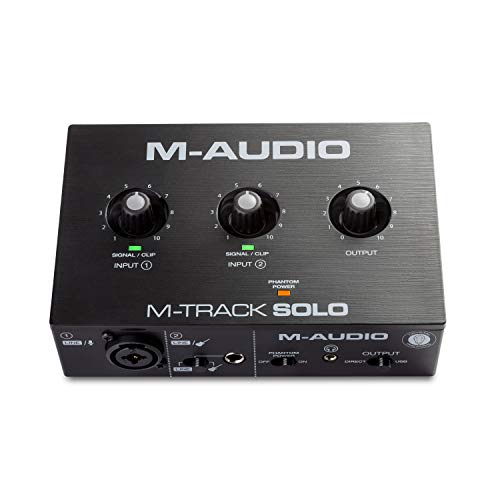
The M-Track Solo is the interface that removes the last excuse. It offers a combination XLR/line/instrument input — one socket that accepts a microphone, a line source or, with the instrument setting engaged, your guitar — plus a second line input, all feeding conversion that is entirely respectable for the price tier. M-Audio’s Crystal preamp design keeps recordings clean, and the bundled software suite gives a new recordist a DAW and starter instruments to begin with. For a first interface bought to learn whether recording guitar is for you, this is the rational amount of money to risk.
Expect the compromises to be ergonomic rather than sonic. The single combo input means guitar and microphone cannot be captured together, the build is lighter than Focusrite’s metal boxes, and the driver experience, while perfectly serviceable with ASIO support, lacks the last degree of polish the class leaders show at tiny buffer sizes. None of these will stop a beginner from making good recordings; all of them explain why the M-Track costs what it costs. As a first rung, it is honestly built and honestly priced.
There is a particular buyer this interface serves perfectly: the player who records guitar ideas, practices with amp sims, and occasionally captures a vocal or an acoustic through one microphone. For that workload the M-Track Solo is not a compromise at all — it is the correct tool, and the money saved against a Scarlett can fund the headphones that will reveal more about your recordings than any interface upgrade would. Beginners consistently under-buy headphones and over-buy interfaces; this pick helps correct the balance.
Know its growth ceiling before you buy. The day you want to record a friend’s guitar alongside yours, or a vocal while you play, the single input becomes the story of the session. M-Audio sells the Duo below for exactly that day. Buy the Solo with eyes open and it will either serve for years or teach you precisely which bigger interface you need — both outcomes are worth its price.
- Inputs: 1 combo XLR/line/instrument input; 1 line input
- Preamps: Crystal preamp design
- Software: bundled DAW and instrument suite
- Monitoring: direct monitoring available
- Role: entry-level two-channel interface
Strengths
- Lowest-cost credible route into guitar recording
- Combo input accepts mic, line or instrument
- Generous starter software bundle
Trade-offs
- Single main input blocks simultaneous guitar and vocal
- Lighter build than metal-bodied rivals
- Driver polish a step behind class leaders
Best for: beginners recording guitar alone who want a real interface without a serious financial commitment.
Not suited for: collaborators, singer-guitarists recording live takes, or stereo recordists.
Starting from zero and watching the budget? The M-Track Solo on Amazon is the sensible first step — just be sure one input matches how you actually write.
M-Audio M-Track Duo — Best budget two-input option
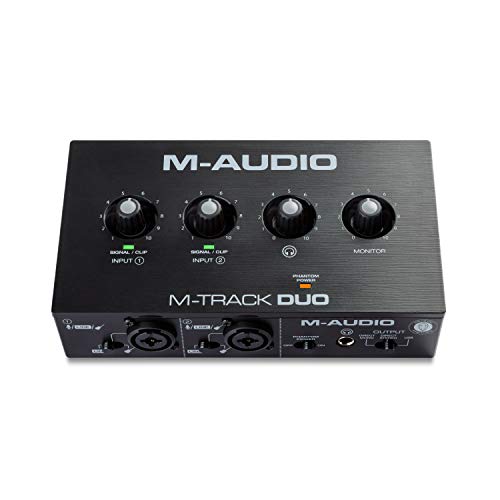
The Duo takes the M-Track formula and removes its biggest restriction: two combo inputs, each accepting XLR, line or instrument signals, so a guitarist can record a vocal at the same time, capture an acoustic guitar with two microphones, or leave a guitar and a bass plugged in without a cable-swapping ritual. For singer-songwriters, that second input is not a luxury — it is the difference between recording performances and recording parts. The Crystal preamps and the core design carry over from the Solo, keeping the price within reach of the same budget audience.
Guitar recording benefits in subtler ways too. An electric can be tracked with its DI on one channel while a microphone listens to a small practice amp on the other, giving the mix both the flexibility of re-amping and the character of a real speaker. Stereo techniques for acoustic guitar — the classic spaced pair or X/Y arrangement — become possible at all. The Duo’s drivers and monitoring follow the family pattern: ASIO support for amp-sim work, direct monitoring for latency-free tracking, and a headphone output sized for typical tracking phones.
Think of the Duo as insurance against the most common regret in home recording: outgrowing a single input within a year. The price step from the Solo is small; the capability step is the entire category of simultaneous recording. Teachers recording a lesson with a student’s guitar, podcasters who play, and duos of any kind all live on the far side of that step. Even solo players find uses — a permanently connected second input ends the friction of plugging in, and friction is the enemy of capturing ideas while they are fresh.
The same tier caveats apply as with its sibling: construction is functional rather than luxurious, and the conversion and drivers, while good, do not chase the Scarlett 4th Gen’s refinement. At this price the honest question is not whether the Duo is the best interface money can buy, but whether anything else at its money does the two-input job as completely. For guitarists who also sing, the answer is what earns it this slot.
- Inputs: 2 combo XLR/line/instrument inputs
- Preamps: Crystal preamp design on both channels
- Software: bundled DAW and instrument suite
- Monitoring: direct monitoring for low-latency tracking
- Role: two-channel entry interface
Strengths
- Two instrument-capable inputs at a budget price
- Enables guitar-plus-vocal and stereo acoustic recording
- DI plus amp-microphone tracking in one pass
Trade-offs
- Build and refinement trail the Focusrite tier
- Headphone output modest for demanding models
- No premium extras like auto-gain
Best for: singer-guitarists and collaborators whose recording style needs two sources captured together.
Not suited for: solo players certain they will never record a second source.
If your songs arrive with voice and guitar attached, skip the one-input tier entirely — the M-Track Duo listing on Amazon is the budget door to recording them properly.

IK Multimedia iRig USB — Best guitar-only minimalist interface
The iRig USB strips the interface idea down to its guitar-shaped essence. IK Multimedia built its name on getting guitars into phones and tablets, and this model carries that philosophy to USB-C devices generally: plug the guitar in one side, connect the host on the other, and play through IK’s amp modeling ecosystem or any software you prefer. Conversion runs at 24-bit/48kHz, which covers guitar recording completely — the instrument’s range does not need more — and the whole device is small enough to live in a guitar case pocket.
What you give up is everything that is not guitar. There is no microphone preamp, no phantom power, no second input for a collaborator. What you gain is a practice and recording tool with almost zero setup friction, equally at home with an iPad on a music stand, a laptop in a hotel room, or a desktop where it occupies no space at all. For players whose interface needs begin and end with one guitar or bass, the iRig’s focus is not a limitation but a correct reading of the assignment.
The iRig’s natural habitat is the practice routine. Amp sims on a tablet, a pair of headphones, and a guitar are a complete silent practice rig for apartments and late nights, and the iRig is the piece that makes the guitar sound right going in — proper instrument loading rather than the dull compromise of adapters never designed for pickups. Travelers feel the benefit most: the entire recording rig fits in the guitar case, and a song idea captured in a hotel room arrives home as a usable DI rather than a phone memo.
Consider the ecosystem honestly. IK’s software is a strength if you enjoy its amp models, and the device also works as a standard interface with other software, so you are not locked in. But buyers who later want to record vocals, acoustic microphones or a second instrument will be buying a second interface, full stop. The iRig is a specialist, and specialists are wonderful right up to the moment the job changes. Buy it for the job it describes and it is one of the most satisfying small tools in this guide.
- Input: dedicated guitar/bass instrument input
- Conversion: 24-bit/48kHz
- Connection: USB-C to phones, tablets and computers
- Software: IK Multimedia amp modeling ecosystem
- Form factor: pocket-sized, case-friendly
Strengths
- Purpose-built instrument input with correct loading
- Tiny enough to live in a guitar case
- Ideal partner for tablet-based practice rigs
Trade-offs
- No microphone input of any kind
- Single instrument only — no expansion path
- 48kHz ceiling will bother spec-driven buyers
Best for: guitarists and bassists who record and practice through amp sims on mobile devices and want zero desk footprint.
Not suited for: anyone who will ever need a microphone input or a second channel.
If your recording life is one guitar and a tablet, the iRig USB is the tailored answer — confirm USB-C compatibility with your devices on the Amazon listing.

MAONO PS22 Lite — Best for players who also stream
The PS22 Lite approaches guitar recording from the streaming era’s direction: yes, there is a proper instrument input and a low-noise preamp, conversion runs to 24-bit/192kHz, and an ASIO driver keeps amp-sim latency in check — but the distinguishing features are loopback and routing software, the plumbing that lets a player broadcast their DAW’s output, their voice and their game audio to an audience without a separate mixer. For the guitarist whose recording and streaming lives are the same life, that integration is the product.
Judged purely as a guitar interface, it stands up respectably: the instrument input handles electric guitar and bass duties, the preamp covers vocals for songs and stream commentary, and the routing flexibility exceeds anything the M-Track tier offers. MAONO is a newer name in interfaces than Focusrite or M-Audio, so the long-term driver track record is shorter — the honest trade for features the incumbents reserve for pricier models or omit entirely. Players who stream weekly will feel the loopback’s value in the first broadcast.
The streaming workflow deserves a concrete picture. Without loopback, sending amp-sim output to a broadcast usually means virtual cable software, extra latency and a configuration that breaks whenever an update lands. With the PS22 Lite’s routing, the processed guitar, the microphone and the computer’s audio can be arranged inside the interface’s own software and presented to the streaming application as one tidy source. Setup time collapses, and a casual ‘let me play that riff again’ moment stops requiring an engineering intermission.
Pure recording buyers should weigh whether they are paying for plumbing they will never use. If no audience is involved, the Scarlett tier’s conversion refinement and driver pedigree may serve better for the same money. But the overlap audience — bedroom guitarists who stream their practice, take requests, and record the highlights — is large and growing, and this is the only pick in the six designed from their chair. Features matched to the actual user beat abstract superiority every time.
- Inputs: instrument and microphone inputs with low-noise preamp
- Conversion: 24-bit/192kHz
- Drivers: ASIO driver for low-latency monitoring
- Streaming: loopback and routing software included
- Role: interface for recording plus live streaming
Strengths
- Loopback routing simplifies streaming a DAW
- Instrument input and vocal preamp in one box
- ASIO support keeps amp-sim latency low
Trade-offs
- Shorter driver track record than legacy brands
- Routing software adds a learning curve
- Pure recordists may not use its signature features
Best for: guitarists who stream their playing and want recording and broadcast plumbing in a single interface.
Not suited for: studio-focused players with no streaming ambitions.
Streamers who play should look closely at the PS22 Lite on Amazon — its loopback routing solves a problem the other picks leave to extra software.
How Do You Set Up an Interface for Guitar Recording, Step by Step?
Begin with the physical chain: guitar, a short good cable, the interface’s instrument input with the Hi-Z setting engaged. Short matters more than exotic — long cables load passive pickups and dull them before the interface ever gets a vote. Set the interface as your audio device in the recording software, select the ASIO driver on Windows, and start with a 128-sample buffer at 48kHz as a stable baseline you can tighten later.
Gain staging comes next, and it is the step beginners skip. Play your loudest chord — the actual loudest thing in the song, not a polite rehearsal strum — and set the input gain so the meter peaks comfortably below clipping, roughly in the upper-middle of its range. Then leave the knob alone. Consistency between takes is worth more than squeezing level, because amp sims respond to input level as part of their sound; a DI recorded at a different gain is, to the sim, a different guitar volume setting.
Finally, choose your monitoring honestly for each part. Tight rhythm parts against a click reward direct monitoring’s zero delay; lead parts where the amp sim’s feel shapes your phrasing reward monitoring through the software if your latency is low enough. Record the DI always, even when you also capture a processed track, because the clean performance is the asset that survives every future change of taste in guitar tones.
One more setup habit separates clean home recordings from frustrating ones: record a short test take and listen to it on the same headphones you will mix on, before committing to a full performance. Thirty seconds of playback reveals a buzzing cable, a wrongly selected input, or a fan in the room that your ears had edited out while playing. Interfaces make recording easy enough that the test take feels redundant — right up until the day it saves a performance that cannot be repeated.
Which Mistakes Ruin Guitar Recordings Before the Mix?
The most expensive mistake is recording through the wrong input type — a guitar into a line input produces the dull, lifeless DI described earlier, and it cannot be rescued with equalization because the lost treble was never captured. The second is clipping the converter with enthusiastic gain staging; digital clipping is not the warm saturation of a tube amp, and it lives in the track as harsh crackle on every loud note. Both mistakes are made in the first five minutes of setup and paid for in every hour of mixing afterward.
A quieter killer is monitoring confusion: players record while hearing a delayed version of themselves and unconsciously play behind the beat to compensate, baking the compensation into the performance. If your takes feel strangely reluctant despite a click, check the monitoring path before blaming your hands. And the oldest mistake of all predates interfaces entirely — old strings. A DI magnifies string condition mercilessly, and no interface in this guide can make a dead set sound alive.
Can You Record Acoustic Guitar and Bass With These Interfaces?
Yes, and the picks divide by input count when you try. Acoustic guitar is usually a microphone job: one microphone at the twelfth fret through any of these interfaces’ preamps gives a serviceable track, while the M-Track Duo’s two inputs unlock the stereo techniques that make acoustic recordings bloom. A DI from an acoustic’s pickup can blend underneath for low-end solidity, which is another two-input trick — one channel for the microphone, one for the pickup, mixed to taste.
Bass guitar is the electric guitar workflow with the volume turned down: the same Hi-Z input, the same DI discipline, often with even more benefit, because a clean bass DI is the foundation most home mixes are built on and amp sims for bass are excellent. The iRig USB handles bass as happily as guitar, and the Scarletts’ headroom suits active basses with hot outputs. Nothing in this guide is guitar-exclusive except the iRig’s focus — the rest are general instruments-first interfaces that happen to be judged here on guitar duty.
How Should You Choose Between the Two Scarlett Solo Generations?
Because both generations of the Solo appear in this guide, the comparison deserves its own space. The 3rd Gen is the known quantity: its sound, its drivers and its behavior with every major recording program have been mapped by millions of users, and its price now reflects a product late in its life cycle. If your guitars are single-coils or moderate humbuckers and your recording is demos, lessons and songs in progress, it gives up nothing you will hear in a mix. Its instrument input has captured more good guitar takes than any other in this guide by sheer population.
The 4th Gen justifies itself with headroom and silence. Its converter’s dynamic range means you can record DI tracks at conservative levels — peaks well below the ceiling — and still have a noise floor low enough that heavy amp-sim gain later does not excavate hiss. Players with high-output pickups, active electronics or a heavy strumming hand feel the difference first, because those signals are the ones that crowd an input’s limits. Think of the choice as insurance: the 3rd Gen insures nothing because it rarely needs to; the 4th Gen insures your loudest guitar against your loudest moment.
There is also a support-horizon argument. The newer model will receive driver attention for longer, and its USB-C design matches current computers without adapters. Against that, the older model’s sheer installed base means troubleshooting help is one search away for any conceivable problem. Neither consideration is decisive alone; stacked together with the price gap on the day you buy, they usually produce a clear winner for a given player. What both share — and what matters most — is the correct instrument input and drivers that respect your timing.
How Do the Six Interfaces Compare for Guitarists?
All six record guitar properly; they part company on input count, refinement and side talents. The table lays out the split.
| Pick | Connection | Standout trait | Suits best |
|---|---|---|---|
| Focusrite Scarlett Solo 3rd Gen | USB-C, 1 mic + 1 instrument | Proven DI quality with Air-equipped preamp | Solo guitarists wanting the standard choice |
| Focusrite Scarlett Solo 4th Gen | USB-C, 1 mic + 1 instrument | 120dB dynamic range, generous headroom | Players building a long-term DI archive |
| M-Audio M-Track Solo | USB, 1 combo + 1 line | Lowest-cost credible instrument input | Beginners testing the recording waters |
| M-Audio M-Track Duo | USB, 2 combo inputs | Simultaneous guitar and vocal capture | Singer-songwriters and duos |
| IK Multimedia iRig USB | USB-C, instrument only | Pocket-sized guitar-focused input | Mobile practice and travel recording |
| MAONO PS22 Lite | USB, instrument + mic | Loopback routing for broadcasts | Guitarists who stream their playing |
What Do Guitarists Get Wrong When Buying a First Interface?
Buying a gaming sound card and an adapter cable
It is the most common wrong turn this guide exists to prevent. A gaming card’s microphone input is not an instrument input; the impedance is wrong, the gain structure is wrong, and the resulting guitar tone is dull in a way that convinces beginners their guitar or their playing is at fault. The fix costs no more than the mistake: a real interface with a Hi-Z input, from the M-Track Solo upward, records the guitar you actually own.
Choosing inputs for a band you do not have
Eight-input interfaces tempt beginners who imagine recording a full band, but the band rarely materializes and the money sleeps in unused preamps. Buy for your actual process: one input for the solo writer, two for the singer-guitarist, and no more until a real session demands it. The interfaces here hold their value well enough that upgrading when the need is real costs little more than overbuying speculatively at the start.
Judging an interface by its bundled software
Bundles photograph well and expire quietly. Trial versions lapse, lite editions cap track counts, and the amp sim you fall in love with may be the one component not included. Hardware — input quality, headroom, drivers — serves you for a decade; software can be bought, upgraded or replaced any weekend. Let bundles break ties between otherwise equal interfaces, never make the decision.
Ignoring the headphone output until tracking day
Recording guitar means listening to yourself closely, often for hours, and a weak or noisy headphone stage makes that fatiguing and misleading. Interfaces differ here more than their spec sheets admit. If your tracking headphones are demanding, favor the picks noted for stronger outputs, and in all cases test your actual headphones at your actual tracking volume before a session that matters, not during it.
Setting input gain by watching instead of listening to the loudest moment
Meters are honest only about the moment being played. Guitarists set gain during a gentle verse, then the chorus arrives with full strums and the converter clips on the take that mattered. The discipline is boring and absolute: set gain with the loudest playing in the song, at performance intensity, and then do not touch the knob between takes. Amp sims interpret input level as part of the performance, so consistency here is also tonal consistency across every track you record.
Final Recommendation
The recommendation simplifies once the category error is cleared away: you need an interface, and the choice among interfaces is about inputs and habits. One source at a time and a taste for the proven path points to the Scarlett Solo 3rd Gen; the same workflow with hotter guitars and longer plans points to the 4th Gen. Singers who play should start at the M-Track Duo, strict budgets at the M-Track Solo, travelers at the iRig USB, and streamers at the MAONO PS22 Lite. Every one of them will record a guitar more honestly than any product actually called a sound card.
Budget for the chain, not just the box. A short quality cable, fresh strings and a pair of headphones you trust will change your recordings more than stepping one tier up this list, and the interfaces here are deliberately priced to leave room for them. The players who get the most from home recording are rarely the ones with the most expensive interface; they are the ones whose whole modest chain is in tune with itself.
Whichever box lands on your desk, spend the first session on setup rather than songs: cable short, Hi-Z engaged, gain staged against your loudest chord, latency measured by feel and adjusted until playing through the computer feels like playing. The best sound cards for recording guitar were never sound cards at all — they are the small, honest translators between a pickup and a hard drive, and with the right one in place, the guitar you already love is ready to be recorded properly.
Frequently Asked Questions
Can I plug my guitar straight into my computer without an interface?
Physically, adapter cables exist; musically, the result disappoints. A computer’s microphone or line input presents the wrong impedance for a pickup, so the tone arrives dull and noisy, and the input’s gain structure makes clean recording levels awkward to set. Players do capture usable scratch ideas this way, and for a fleeting idea that is better than nothing. For anything you intend to keep, mix or share, an interface’s instrument input is the difference between a demo of the song and a recording of the guitar.
There is a middle path worth knowing about: dedicated guitar-to-USB cables with a built-in converter exist, and the iRig in this guide is essentially that idea executed properly, with correct input loading. The generic versions often skimp on exactly that loading and on driver support, which is why a named device from a guitar-focused maker is the safer version of the experiment.
Do I need an amp if I record with an interface?
No — the interface plus amp-simulation software replaces the amplifier for recording purposes, and that is the workflow most home guitarists now use. The interface captures the dry DI, the software provides the amp, cabinet and effects, and you can change the entire tone after the performance. A real amp still offers things software approximates — air movement, speaker interaction, the feel of volume — and many players keep one for playing pleasure while recording through sims for practicality. The interface serves both paths, since it can also capture an amp with a microphone.
What sample rate should I record guitar at?
48kHz is the sensible default for most home recording: it captures the guitar’s full range with room to spare, keeps latency low, and matches video work if your recordings ever meet a camera. Higher rates like 96kHz or 192kHz, which several picks here support, shrink latency further at the cost of larger files and heavier processing, and some players prefer them for heavily processed tones. What matters more than the number is consistency — pick a rate for a project and keep every track in it at that rate.
Why does my recorded guitar sound different from my amp?
Because the DI-plus-sim chain and the amp-in-a-room are genuinely different listening experiences. Your amp’s sound includes the speaker, the cabinet and the room, heard from wherever you stand; the recording hears the pickup directly and rebuilds everything else in software, presented through headphones or monitors. The gap closes with good cabinet simulation and a little room reverb in the mix. Many players also discover the recording is more honest about their technique — an adjustment every guitarist makes exactly once.
Can these interfaces record two guitars at once?
Only the two-input picks can: the M-Track Duo accepts two instruments simultaneously, and the MAONO covers a guitar plus a microphone or second source depending on how its inputs are assigned. The Solos and the iRig are one-performance devices. Duos, teaching situations and guitar-plus-bass writing all belong on two-input hardware, and trying to fake it by alternating takes loses the interplay that made you want to record together in the first place.
Is a more expensive interface going to make my guitar sound better?
Up to a point, and the point arrives quickly. Moving from no interface to any pick here is a transformation; moving from the M-Track tier to the Scarlett 4th Gen is a refinement — lower noise, more headroom, cleaner conversion that matters most on quiet, dynamic material and over years of archived DI tracks. Beyond this guide’s tier, spending shifts toward more inputs and features rather than better guitar tone. Buy the refinement if your playing is dynamic and your archive matters; otherwise, the honest entry tiers record guitars very well indeed.
Related Guides
Guitar recording touches several neighboring topics in our audio coverage.
- Best ASIO sound cards for low-latency work
- Best sound cards for voice over
- Best external USB sound cards


