What's inside
- Key Takeaways
- Quick Picks
- How We Chose These Picks
- Why Does the Horizontal Shape Matter So Much?
- How Quiet Is Quiet Enough for a Film?
- The Six Living-Room Cases, Pick by Pick
- How Do the Six Compare Side by Side?
- How Do You Set Up a Living-Room PC Once It Is Built?
- What Mistakes Do Living-Room PC Buyers Keep Making?
- Is a Living-Room PC Still Worth Building at All?
- Which Components Belong Inside a Living-Room Case?
- How Should a Living-Room PC Behave When Nobody Is Watching?
- How Do You Measure a Media Shelf Before Ordering?
- Final Recommendation
- Frequently Asked Questions
- Related Guides
As an Amazon Associate I earn from qualifying purchases. This post may contain affiliate links at no extra cost to you.
[widgetverdict.com] is reader-supported. When you buy through links on our site, we may earn an affiliate commission.
Where to buy: the six cases below are sold through their linked listings; four carry one maker’s badge, which says something true about this small market, explained in the introduction.
The best living room pc cases answer a different question from every other case category: not how fast the machine inside can be, but whether the machine can be in the room at all. A living room already has a visual and acoustic order — a television, perhaps a soundbar or an amplifier, furniture chosen to be sat with — and a glowing tower with a gaming silhouette breaks that order twice, once by looking like office equipment that wandered in, and again by humming through the quiet scene of the film it was built to play. The HTPC case exists to end both offences: a horizontal, AV-shaped enclosure that sits where a Blu-ray player used to sit, and cooling quiet enough to disappear beneath dialogue.
An honest observation about the shelf comes first, because buyers will notice it anyway: four of these six picks are SilverStone designs. That is not favouritism; it is the market. The living-room case is a niche that most case makers abandoned when streaming sticks ate the casual HTPC, and SilverStone — through its Grandia, Milo and Crown lines — is the maker that kept designing for it seriously while others left. The remaining two picks show the niche’s edges: InWin’s slim desktop with a power supply included, and a tiny 4.1-litre ITX box from SGPC that takes the disappearing act to its limit. A concentrated market is not a broken one, but it does mean the buyer’s real choice is among philosophies — full ATX in AV dress, slim and low, or miniature — more than among brands.
The acoustic half of the brief deserves its weight. A living-room PC plays films, and films have quiet passages engineered to be heard; a case whose fans rise and fall against that soundtrack is a defect no specification sheet will confess. Living-room suitability is therefore partly a parts discipline — efficient components, modest heat, fans that can turn slowly — housed in a case shaped for the shelf. The picks below are judged on both halves: how convincingly each wears the AV shape, and how honestly each supports the quiet build it will be asked to contain.
Key Takeaways
- A living-room case must satisfy the room twice: it should look like AV equipment and stay inaudible beneath a film’s quiet passages.
- SilverStone makes four of the six picks — the HTPC niche is concentrated, and the real choice is among sizes and philosophies.
- The GD09 and Grandia 11 take full ATX boards in horizontal AV dress; the Grandia adds 240mm radiator support.
- The Milo 11 is slim micro-ATX and requires a TFX power supply, sold separately — budget for it.
- The InWin BL040 is the only pick with a power supply included: a 450W TFX unit pre-installed in an 11.5-litre slim case.
- The SGPC K29 is the extreme: 4.1 litres of mini-ITX for a media machine that all but vanishes.
Quick Picks
| Pick | Badge | Why it earns its place |
|---|---|---|
| SilverStone GD09 HTPC Case | The classic AV-width tower alternative | Faux aluminium front and room for ATX or Micro-ATX boards in the Grandia line’s traditional shape. |
| SilverStone Grandia 11 HTPC Case | The modern compact ATX HTPC | Compact ATX in home theatre form with 240mm radiator support for a stronger, quieter build. |
| SilverStone Milo 11 HTPC Case | The slim shelf unit | Slim and compact micro-ATX for office or home theatre, built around a TFX power supply. |
| SilverStone Crown 04 HTPC Case | The statement centrepiece | Aluminium, 360mm-class presence, designed openly as the room’s centrepiece rather than its apology. |
| InWin BL040 Slim Desktop Case (450W TFX PSU) | The ready-to-build slim box | 11.5 litres, four low-profile slots and a 450W TFX power supply already installed. |
| SGPC K29 4.1L Mini ITX Case | The vanishing act | 4.1 litres of mini-ITX in a gradient acrylic edition, for HTPC and office builds that hide. |
How We Chose These Picks
We began with the room test, applied literally: could this enclosure sit on a media shelf, at television height, in a furnished room, without reading as a computer that lost its way? Horizontal AV-shaped designs passed by nature; the one miniature pick passed by the opposite route, being too small to read as anything. Upright gaming towers, however quiet their marketing, were excluded — the keyword is the room, and the room is the filter.
The second filter was build honesty. A living-room case makes promises its dimensions must keep: which boards fit, which power supply format the slim designs demand, which slots are low-profile. The picks below state those terms in their titles where it matters most — the Milo’s TFX requirement is printed in its listing, the InWin’s included 450W TFX unit likewise — and where a title is quieter, the reviews say what must be verified rather than filling the silence with invention. A case bought for a shelf it does not fit, or a power supply format discovered after the fact, fails the room test more completely than any fan noise.
Finally we spread the sizes deliberately, because living rooms differ. The full-ATX Grandia designs serve the enthusiast who wants a real computer in the rack; the slim Milo and InWin serve the shelf with limited height; the K29 serves the room that wants no visible computer at all. Between them, most honest versions of the living-room PC are covered — and the enthusiast version and the invisible version, it turns out, want almost nothing in common except quiet.
Why Does the Horizontal Shape Matter So Much?
Partly it is furniture physics. Media shelves, TV stands and hi-fi racks are built for wide, low components; a tower either stands on the floor beside them, announcing itself, or does not fit at all. The horizontal case takes the shelf slot the room already provides — the one vacated by the disc players and cable boxes of the previous era — and inherits its sightlines: front panel at the room’s eye level when seated, ports reachable, nothing looming. The GD09’s faux aluminium front exists because that sightline is judged against amplifiers and receivers, and a plastic gaming face would fail the comparison before the machine was ever switched on.
Partly it is the signal the shape sends the builder. A horizontal case disciplines the parts list toward the room’s needs: full-height expansion cards give way to what the design accommodates, towering air coolers give way to low-profile ones, and the build that emerges is the build the room wanted — efficient, cool-running, quiet by construction rather than by fan curve heroics. The Crown 04 makes the same point from the luxury end: SilverStone describes it openly as a centrepiece, a case that expects to be looked at and is finished accordingly. In this category the enclosure is furniture that computes, and the horizontal shape is where that identity starts.
How Quiet Is Quiet Enough for a Film?
Quieter than a desk machine needs to be, because the listening conditions are harsher. At a desk, the listener sits within a metre of the machine and habituates to a steady sound; in a living room, the machine sits metres away but the soundtrack it accompanies swings between explosions and whispers, and a fan that becomes audible in the whispers has failed even if it is objectively modest. The practical target is a machine whose noise floor sits beneath the room’s own — beneath the refrigerator’s hum from the kitchen, the traffic outside, the house settling — so that in a quiet scene the audience hears the room, not the equipment.
Reaching that floor is a system property, and the case is only its container. Efficient processors that sip rather than gulp, storage without spinning platters, fans large enough to turn slowly or few enough to matter little, and a shelf position with air around it — the picks below support that system in different measures, from the Grandia 11’s radiator support, which lets a stronger build cool slowly and quietly, to the K29’s tiny thermal envelope, which simply forbids hot parts. The buyer should read each review for the build the case can keep quiet, not merely the build it can physically hold: in the living room, those are different specifications, and the second one is the one the film will grade.
The Six Living-Room Cases, Pick by Pick

SilverStone GD09 HTPC Case — The classic AV-width tower alternative
The GD09 is the Grandia line’s established answer to the enthusiast’s living-room problem: a full computer — ATX or Micro-ATX motherboard, per the title — inside a horizontal case with a faux aluminium front that sits convincingly among AV components. The Grandia formula has been refined across many generations precisely because the problem does not change: the shelf slot is a fixed size, the board is a fixed size, and the design work is everything that must happen between those two facts without the result looking like a tower lying on its side in embarrassment.
The faux aluminium front deserves a fair reading. It is not the Crown 04’s real aluminium statement, and it does not pretend to be; it is a finish chosen so the case’s face matches the receivers and amplifiers it lives beside, at a level the build’s budget can survive after the components are paid for. In the living room that matching matters more than the material’s pedigree, because the front is what the room sees for the machine’s whole life while the chassis behind it is seen twice — on build day and on upgrade day. SilverStone’s long practice in this exact trade shows in the GD09’s continued presence: it is the default recommendation shape for a first serious HTPC, the one against which the room’s other options are measured.
The build it suits is the capable media machine: a full board’s connectivity, room for the tuner, capture or sound hardware that living-room enthusiasts accumulate, and components chosen at sensible temperatures for a horizontal enclosure. The buyer should plan cooling as the category demands — efficient parts, an unhurried fan profile, air around the shelf — because the GD09’s job is to house a quiet system, not to rescue a loud one. Chosen that way, it delivers the category’s central pleasure: a real PC, in the rack, that guests mistake for a piece of the hi-fi until the screen says otherwise.
- Form factor: horizontal HTPC case with faux aluminium front design, black
- Motherboard support: ATX and Micro-ATX, stated in the listing title
- Model: SST-GD09B, per the listing title
- Radiator support and included fans: not stated in this listing’s title — check the full listing when planning the cooling
- Power supply format: not stated in the listing title — confirm before reusing an existing unit
Strengths
- A full ATX board in genuine AV dress — the enthusiast HTPC’s classic shape.
- The faux aluminium front matches real AV equipment at a survivable cost.
- A long-refined Grandia design, with the shelf manners the line is known for.
Trade-offs
- The title leaves cooling and PSU details to the full listing, adding checks to the order.
- Horizontal ATX is still a large shelf presence beside slim components.
- Quiet depends on the parts chosen; the case houses a quiet system rather than creating one.
Best for: a first serious HTPC around a full ATX or Micro-ATX board that must sit in the rack without apology. Not suited for: a shelf with limited width, or a build whose hot components expect the case to silence them.
Rack planners should open the GD09 listing to confirm its power supply format and fan provision against their parts list.
SilverStone Grandia 11 HTPC Case — The modern compact ATX HTPC
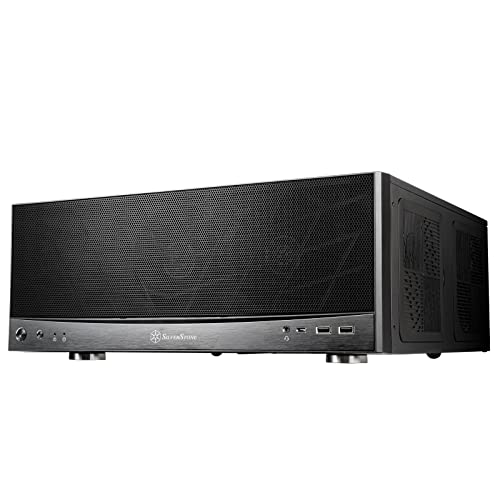
The Grandia 11 is the line’s modern chapter: a compact ATX home theatre case — the title’s own words — with 240mm radiator support, which in an HTPC enclosure is a statement of intent. Liquid cooling in a living-room case is not about overclocking; it is about moving heat to a radiator where large, slow fans can shed it at a murmur, and about keeping a stronger processor composed through a long film or a gaming session on the big screen. The GD11 is the pick for the living-room machine that also plays — the rack PC that drives the television for films on Friday and for games on Saturday, without either role embarrassing the other.
Compact ATX in this context means the Grandia discipline applied tighter: the full board’s expansion and connectivity, in an enclosure trimmed of the older generations’ spare volume. The buyer gains a case that sits more easily in modern media furniture — which has itself slimmed down in the soundbar era — while keeping the platform that makes an HTPC more than a streaming box: the capture card, the extra storage, the sound hardware, the upgrade path. That combination is precisely the one the abandoned end of this market used to serve, and the GD11’s existence is evidence that SilverStone still believes someone is building these machines. This guide is written for that someone.
The radiator support should be read with the living-room rule from this guide’s quiet section: the GD11 can hold a stronger build, and can keep it quiet, provided the build’s heat is honest. A flagship graphics card in a horizontal shelf case remains a mismatch of physics and furniture whatever the radiator figure says — the card’s heat still has to leave the shelf. Within sane terms — a capable processor under liquid, a graphics solution sized for the room — the Grandia 11 is the most complete living-room proposition here: modern, compact, liquid-ready and unmistakably an HTPC rather than a tower in costume.
- Form factor: compact ATX HTPC case, black
- Radiator support: 240mm, stated in the listing title
- Model: SST-GD11B, per the listing title
- Motherboard format: ATX (compact ATX design), per the listing title
- Included fans and PSU format: not broken down in the listing title — verify on the full listing
Strengths
- 240mm radiator support lets a stronger build cool slowly and quietly.
- Compact ATX keeps the full board’s expansion in modern media furniture.
- The most current Grandia design, aimed at machines that play games as well as films.
Trade-offs
- Liquid cooling is an added cost and complexity a pure film machine does not need.
- The shelf still sets the thermal law — flagship graphics heat has nowhere to go.
- Fan and PSU specifics wait on the full listing rather than the title.
Best for: a living-room machine with a double life — films in the week, games on the television at the weekend — around a compact ATX board. Not suited for: the simplest possible media box, where the Milo or K29 ask less and cost less.
Dual-life builders can open the Grandia 11 listing to check its graphics card clearance before committing a card to the shelf.

SilverStone Milo 11 HTPC Case — The slim shelf unit
The Milo 11 is SilverStone’s slim answer: a compact Micro-ATX enclosure for office or home theatre — the title names both duties — that requires a TFX power supply, sold separately. Every phrase in that sentence is a term of the bargain, and the TFX requirement is the one to absorb first. TFX is a smaller, slimmer power supply format than the ATX unit in a typical spares drawer; the Milo’s slimness is bought with it, and the buyer who discovers the format after the case arrives has bought a delay. SilverStone prints the requirement in the title, which is the honest way to sell a slim case, and this guide repeats it in the spec box and here so it cannot be missed.
What the slimness buys is placement. The Milo’s low profile fits the shelves and TV stands that a full-height Grandia cannot — the soundbar-era media unit with its shallow compartments, the office desk where a horizontal machine slides under a monitor. The dual office-and-theatre brief in the title is genuine: the same unobtrusive box that plays films in the evening runs a reception desk’s machine in the day, and in both rooms its virtue is the same, a computer that does not visually argue with the furniture. Micro-ATX keeps the build honest — real expansion, real connectivity — at a size the slim brief can house.
The discipline is thermal and electrical modesty. A slim case with a TFX supply is a machine designed around efficient components, and the parts list should be written in that spirit: a processor chosen from the efficient shelves, integrated graphics or a low-profile card where the design allows, storage that runs cool. So built, the Milo disappears into its shelf and its soundtrack alike. Built greedily, it becomes the warm, hurried little box its dimensions warned against. The case is not fragile; it is specific, and specificity respected is the whole secret of this category.
- Form factor: slim, compact Micro-ATX enclosure, black
- Power supply: requires TFX format, sold separately — stated plainly in the listing title
- Model: SST-ML11B, per the listing title
- Intended duty: office or home theatre, per the listing title
- Expansion details and included fans: not stated in the listing title — confirm on the full listing
Strengths
- A genuinely slim profile for shallow modern media furniture.
- Micro-ATX keeps real expansion inside a shelf-sized box.
- The TFX requirement is declared in the title, not discovered at build time.
Trade-offs
- The TFX power supply is a separate purchase in a less common format.
- Slim dimensions cap cooler height and component ambition firmly.
- Office-and-theatre generality means neither role gets a dedicated design’s extremes.
Best for: a shallow media unit or a dual-duty desk, around a Micro-ATX board and efficient parts, where height is the scarce dimension. Not suited for: a builder reusing an ATX power supply, or a gaming build of any heat.
Slim-shelf buyers should open the Milo 11 listing and order the TFX power supply in the same breath as the case.

SilverStone Crown 04 HTPC Case — The statement centrepiece
The Crown 04 does not want to disappear, and SilverStone’s title says so in so many words: an HTPC described as a timeless centrepiece for the living room, in aluminium, with a 360mm figure attached. This is the luxury end of the category — the case as the rack’s focal object, finished in real metal, sized with presence. Where the rest of this guide discusses how a computer can stop offending a room, the Crown argues the opposite case: that a beautifully made machine can earn the room’s attention the way a fine amplifier does, by being the best-made object on the shelf.
The 360mm figure in the title — read in context as the case’s radiator-class accommodation — signals that the statement is not only skin. A centrepiece that cannot cool a serious build would be a sculpture with a power cord; the Crown’s proposition pairs the aluminium presence with room for a substantial machine beneath it, the enthusiast’s full living-room build wearing its best suit. Buyers should confirm the figure’s exact meaning and the board support on the full listing, since the title is written in the language of occasion rather than specification — but the intent is legible: this is the no-compromise shelf machine, for the room where the equipment is part of the décor and the décor is part of the pleasure.
Judged fairly, the Crown 04 is the pick least concerned with value and most concerned with rightness — the right material, the right proportions, the right weight in the hand and on the shelf. That is a legitimate axis; living rooms are where people keep the objects they most enjoy looking at, and a machine that lives there for a decade can justify being one of them. The buyer it refuses is equally clear: anyone whose media unit hides its components behind doors is paying for a finish no one will see, and the GD09 further up this guide serves that room better. The Crown is for the open shelf and the proud rack, and in that room it has no rival here.
- Form factor: HTPC case in aluminium, black (SST-CW04TB)
- Design intent: a centrepiece for the living room, in the listing title’s own words
- Cooling figure: 360mm named in the listing title — confirm its exact application on the full listing
- Motherboard support and PSU format: not stated in the listing title — verify before planning the build
- Position in range: SilverStone’s premium living-room design
Strengths
- Real aluminium presence — the only pick designed to be looked at.
- A substantial cooling figure pairs the finish with a serious build beneath.
- The centrepiece brief suits open racks where equipment is part of the décor.
Trade-offs
- The premium is real, and it buys finish and presence rather than extra ports.
- The title speaks in occasions, not specifications — the listing must be read carefully.
- Behind cabinet doors, its entire reason for existing is hidden.
Best for: an open, proud AV rack in a room where the equipment is décor, around a serious build. Not suited for: a closed media cabinet, or a budget that should be spent on components instead.
Centrepiece shoppers can open the Crown 04 listing to confirm board support and the 360mm figure’s application to their build.
InWin BL040 Slim Desktop Case (450W TFX PSU) — The ready-to-build slim box
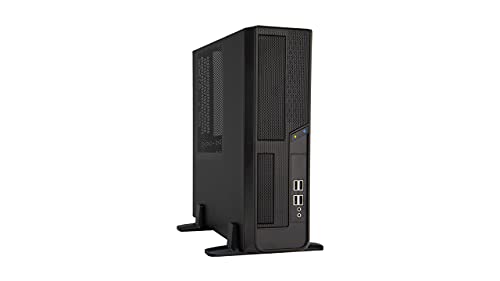
The BL040 is the pragmatist’s pick, and its title is a complete little specification: a slim Micro-ATX and Mini-ITX desktop case of 11.5 litres, USB 3.0 front ports, four low-profile expansion slots, and — the detail that reorganises the purchase — a 450W TFX power supply pre-installed. Where the Milo 11 asks the buyer to source a TFX unit separately, InWin simply includes one, sized to the case and to the efficient builds the case exists for. For the buyer assembling a living-room or small-office machine without a spares drawer to raid, that inclusion turns the case into the build’s foundation rather than its first errand.
The four low-profile slots deserve translation, because they define the machine’s expansion character. Low-profile cards sit at half the height of standard ones, and four slots of them is generous in a slim case — room for the tuner, capture, network or sound cards that living-room and small-office machines accumulate, in the format the slim shelf allows. Combined with board support spanning Micro-ATX and Mini-ITX, the BL040 is the flexible small box of the guide: not the slimmest, not the smallest, but the one whose terms are all stated and whose box contains the fewest surprises, power supply emphatically included.
The 450W figure should be read as the case does: as the right size for the efficient builds this enclosure serves, not as a limitation to apologise for. A media machine, an office desktop, a living-room PC driving the television — these are tens-of-watts duties at the wall in ordinary use, and a supply matched to them runs in its comfortable range. The buyer planning a gaming card should look at the Grandia 11 instead, not because the InWin is weak but because its brief is different: slim, complete, quiet and ready. In a category full of homework, the BL040’s charm is how little of it arrives unfinished.
- Form factor: slim desktop case, 11.5 litres, black
- Power supply: 450W TFX unit pre-installed, stated in the listing title
- Motherboard support: Micro-ATX and Mini-ITX, per the listing title
- Expansion: 4 low-profile slots, per the listing title
- Front connectivity: USB 3.0 front ports, per the listing title
Strengths
- The included 450W TFX supply removes the slim format’s classic extra purchase.
- Four low-profile slots is generous expansion for a slim enclosure.
- Every deciding term is stated in the title — the lowest-homework pick here.
Trade-offs
- Low-profile slots exclude standard-height expansion cards.
- The included supply is sized for efficient builds, not gaming hardware.
- Slim dimensions still cap cooler height and component ambition.
Best for: a living-room or small-office build that should start complete — case and power supply in one box — around efficient parts. Not suited for: a standard-height expansion card, or a graphics-led gaming build.
Ready-build buyers should open the BL040 listing to confirm its drive mounting against their storage plan.

SGPC K29 4.1L Mini ITX Case — The vanishing act
The K29 takes the living-room brief to its logical extreme: if the perfect HTPC case is the one the room never notices, then 4.1 litres of mini-ITX is close to the perfect size. SGPC’s title describes a tiny case for HTPC and office builds in a gradient acrylic edition — the small-form-factor hobbyist’s aesthetic, where the enclosure is a neat object in its own right but one that occupies about as much shelf as a hardback book stood upright. Beside the Grandia designs this is not a smaller version of the same machine; it is a different philosophy, in which the computer’s entire claim on the room is a few litres and a whisper of heat.
The parts discipline is correspondingly strict, and the review should not soften it. A 4.1-litre ITX build means a mini-ITX board, a low-profile cooling solution, a power arrangement sized to the tiny format and no expansion beyond the board itself — the graphics are the processor’s, the storage is compact, and the whole machine is an appliance in the honourable sense: assembled once, placed, and forgotten. For film and media duties that is not a compromise at all, because the workload is decoding and serving, tasks a modest modern board performs without warming its own shadow. The K29’s buyer is purchasing the absence of everything the workload does not need.
The gradient acrylic finish is the one flourish, and it is a considered one: at this size the case is a desk or shelf object, and SGPC’s small-form-factor audience treats the little box as a made thing rather than a hidden one. Buyers should verify the power supply arrangement and cooler clearance on the full listing, because at 4.1 litres those two facts decide the build more than any other — the title names the volume and the purpose, and the rest of the discipline is the buyer’s to confirm. Confirmed and respected, the K29 delivers the purest version of this guide’s promise: the film plays, the room is quiet, and nobody in it could point to the computer.
- Form factor: mini-ITX case, 4.1 litres, gradient acrylic edition
- Intended duty: HTPC and office builds, per the listing title
- Motherboard format: Mini-ITX only
- Power supply arrangement and cooler clearance: not stated in the listing title — both are decisive at this size and must be confirmed on the full listing
- Expansion: bounded by the ITX format and the 4.1-litre volume
Strengths
- The smallest footprint in the guide — a media machine that nearly vanishes.
- A made-object finish from the small-form-factor world, not a grey box.
- Its strictness is its virtue: the parts list it forces is the parts list HTPC duty needs.
Trade-offs
- No expansion beyond the board, and no room for a discrete graphics card’s ambitions.
- Power and cooler arrangements must be verified — at this size they decide everything.
- Thermal headroom is minimal; the build must be efficient by design.
Best for: a pure media appliance in a room that wants no visible computer, around a mini-ITX board and integrated graphics. Not suited for: gaming, expansion hardware, or any build that expects to grow.
Minimalists should open the K29 listing to pin down its power supply arrangement before choosing the board.
How Do the Six Compare Side by Side?
| Case | Board | Power supply | Size character | Defining trait |
|---|---|---|---|---|
| SilverStone GD09 | ATX / Micro-ATX | Check listing | Full AV width | The classic Grandia shape |
| SilverStone Grandia 11 | Compact ATX | Check listing | Compact AV width | 240mm radiator support |
| SilverStone Milo 11 | Micro-ATX | TFX, sold separately | Slim | Low profile for shallow units |
| SilverStone Crown 04 | Check listing | Check listing | Statement presence | Aluminium centrepiece |
| InWin BL040 | Micro-ATX / Mini-ITX | 450W TFX included | Slim, 11.5L | Ready to build, 4 low-profile slots |
| SGPC K29 | Mini-ITX | Check listing | 4.1L miniature | The vanishing media appliance |
Choose by the shelf before the specification. Measure the compartment the machine will live in — width, height, depth and the air around it — and the table sorts itself: full-height AV compartments open the Grandia conversation, shallow units point to the Milo or the InWin, and a room with no compartment to spare points to the K29 standing wherever a book could stand. The power supply column is the second filter, because it is the one that generates returns: TFX required, TFX included, or a format to verify, and the buyer who reads it before ordering has skipped the category’s most common delay.
How Do You Set Up a Living-Room PC Once It Is Built?
Placement first, for the same reason the fanless guide in this batch insists on open air: a shelf machine radiates and breathes into its compartment, and a compartment with a closed back and no clearance turns the quietest build warm and hurried. Leave space at the sides and rear, keep the case off the top of a hot amplifier, and if the furniture has doors, expect to leave them open during films or choose ventilated furniture. The machine’s noise floor, so carefully bought, is partly a furniture decision.
Then the control question, which living-room PCs live or die by. The machine should be operable from the sofa: a wireless keyboard with a trackpad, a remote the streaming software understands, and power settings that let the machine wake for a film and sleep after it without a walk across the room. Set the display scaling for television distance — the interface that is crisp at a desk is illegible from a sofa — and let the machine boot into the media interface rather than a desktop nobody can read at ten feet. None of this is case business, strictly, but it is the difference between an HTPC that is used nightly and one that becomes the room’s most elegant spare computer.
What Mistakes Do Living-Room PC Buyers Keep Making?
The first is importing a desk build unchanged: a hot processor, a tall cooler that does not fit, a graphics card whose fans are tuned for a headset’s forgiveness. The room grades noise more harshly than the desk does, and the parts must be chosen for the room. The second is the power supply ambush — the slim case that needs TFX, discovered with the build half-assembled; this guide flags it on the Milo precisely because it is the category’s most avoidable delay, and the InWin exists as the answer for buyers who want it solved. The third is measuring the shelf after ordering: AV compartments vary, doors eat depth, and a case that fits the compartment but not its cables has not fit.
The fourth mistake is chasing silence with software alone — fan curves dragged down until the shelf compartment becomes an oven and the fans, when they finally must run, run at full voice in the film’s quietest scene. A living-room machine stays quiet because its parts make little heat and its case and compartment let that heat leave slowly and steadily; curves are the garnish, not the meal. The fifth is forgetting the sofa entirely: a beautiful, silent machine that needs a desk keyboard and a squint to operate will be used twice and abandoned, and the room will go back to a streaming stick that asked less of everyone.
Is a Living-Room PC Still Worth Building at All?
The honest challenge deserves an honest answer, because the streaming stick is cheap and the smart television is already there. A dedicated living-room PC earns its shelf in the gaps those devices leave: the local media library, in full quality, without a subscription’s permission; the game library on the big screen; the capture, tuner and archival duties; the browser, the files, the software a television’s walled garden does not stock; and ownership of the interface rather than tenancy in it. Households whose viewing is entirely subscription streaming honestly do not need this guide, and it says so without resentment.
For the households in the gaps, the machine’s virtues compound over years: the library stays, the hardware upgrades in pieces, and no service’s licensing decision can remove a film from a shelf the owner controls. That is the constituency these six cases serve, and it is why a concentrated little market of SilverStone designs and small specialists persists while the mainstream moved on. The living-room PC is not the default any more; it is the connoisseur’s and the archivist’s machine, and it is better built deliberately — like everything else in this batch — than apologetically.
Which Components Belong Inside a Living-Room Case?
The room’s rules, applied to a parts list, produce a recognisable machine. The processor comes from the efficient shelves — modern integrated graphics handle film decoding, streaming and desktop duties without warming the shelf, and the efficient chips do it at a fraction of a flagship’s heat. The cooler is chosen by the case’s height, which in horizontal enclosures means low-profile air or, in the Grandia 11’s case, a radiator that lets fans turn slowly. Storage is solid-state, because a spinning drive’s seek chatter is exactly the sound a quiet scene exposes, and capacity lives either in a generous SSD or on a network machine in another room whose noise is somebody else’s problem.
The display connection deserves more thought than it gets. The machine should connect to the television or receiver the way the room’s other sources do, with the audio carried to the soundbar or amplifier rather than to the television’s own speakers where those are the weak link, and with display settings — resolution, refresh, dynamic range — matched to the panel rather than inherited from a desk monitor’s habits. Owners who run the PC through an AV receiver gain the room’s best audio path and a single remote’s switching; owners who connect directly to the television should check the audio return arrangements so film sound still reaches the good speakers. These are small decisions, made once, and they decide whether the machine feels like part of the room’s system or like a guest plugged into it.
How Should a Living-Room PC Behave When Nobody Is Watching?
Like the room’s other equipment: asleep, instantly available, and never demanding attention. The settings work is unglamorous and decisive. Sleep should be aggressive enough that the machine is never found humming at an empty room at midnight, and wake should be available from the remote or the wireless keyboard so the sofa never has to stand up. Updates belong in scheduled hours, not in the first ten minutes of a film. Recording, library and server duties — the background jobs many HTPCs also carry — should be scheduled and throttled so they never coincide audibly with playback, because a library scan that spins the fans up during a quiet scene has failed the room’s only real test.
There is a household dimension here that desk computing never meets: the machine serves people who did not build it. The interface should open where the family expects it, the library should be browsable by a guest with the remote, and nothing about ordinary use should require the builder’s presence or passwords. A living-room PC that only its builder can operate is a desk machine in a horizontal case. The six enclosures in this guide can each house the genuine article — a machine the whole room uses without thinking — provided the software manners are set with the same care as the fan curves, and for the same reason: the room is the user.
How Do You Measure a Media Shelf Before Ordering?
With a tape, five minutes and a scepticism about the furniture’s stated dimensions, which are usually the outside ones. Measure the compartment’s internal width, height and depth; then subtract what the brochure forgets — the door’s swing and thickness if the unit closes, the skirting or lip at the shelf’s front, and the rear space the cables will occupy, because a case whose depth exactly equals the compartment’s leaves no room for the plugs that must bend behind it. Height deserves a second measurement with the shelf above in place, since AV compartments are often adjustable and the shelf you measured in the shop may not be the shelf that arrives.
Then match the case’s shape to the compartment’s character rather than merely its size. A wide, low compartment with an open back is Grandia territory; a shallow soundbar-era unit is the Milo’s or the InWin’s; a compartment already full of equipment argues for the K29 standing in the gap a book would fill. Note where the compartment’s air comes from — open back, slatted doors, or sealed — and let that answer discipline the parts list’s heat, as the placement section insists. The buyer who does this before ordering will never meet the category’s saddest sight: a beautiful HTPC case standing vertically beside the media unit it did not fit, humming at the room it was meant to disappear into.
Final Recommendation
The Grandia 11 is the recommendation for the living-room machine with ambitions: compact ATX, radiator support for slow and quiet cooling, and the full board’s future kept open. The GD09 remains the classic choice for a straightforward full-size HTPC, the Milo 11 the answer to the shallow media unit — with its TFX supply budgeted — and the InWin BL040 the ready-made foundation that includes its power supply and asks the fewest questions. The Crown 04 is for the rack that is proud of itself, and the K29 for the room that wants the computer to disappear entirely. Our own shelf would take the Grandia 11: it is the one design here that treats the living-room PC as a living platform rather than a finished appliance, and a machine that can grow is the one still in the room in ten years. Whatever you choose, measure the compartment before the order, budget the power supply format the title declares, and choose parts for the room’s ears as much as for its screen — the three disciplines that separate the living-room PCs still in nightly use from the elegant ones standing in the hall, waiting for a shelf that was never actually measured with a tape in hand before the order was placed.
Frequently Asked Questions
Can a living-room PC replace a streaming device entirely?
For local libraries, games and general computing, yes — that breadth is the reason to build one. For subscription streaming, the honest answer is mixed: services sometimes reserve their highest quality tiers and smoothest apps for dedicated devices and televisions, so many owners run both, the PC for the library and the games, a small streaming device for the subscriptions. The case decision is unaffected — the PC’s duties remain the ones only it can do.
What power supply does a slim HTPC case need?
Read the title before anything else. The Milo 11 requires a TFX supply, sold separately; the InWin BL040 includes a 450W TFX unit pre-installed. TFX is a slimmer format than the standard ATX supply, chosen so the case can be slim, and the two are not interchangeable. Where a title does not state the format, as with the GD09 and Crown 04 here, confirm it on the full listing before reusing a supply from another build.
How do I control a living-room PC from the sofa?
With the three habits from the setup section: a wireless keyboard with an integrated trackpad for general control, a remote the media software understands for playback, and power settings that wake and sleep the machine without a trip across the room. Set the interface scaling for television distance at the same time. A living-room PC that can only be driven from a desk chair will not be driven at all, however silent and beautiful its case.
Will a horizontal case cool a gaming graphics card?
Within limits the reviews state plainly. The Grandia 11’s 240mm radiator support helps the processor, but a graphics card’s heat must still leave a shelf compartment, and flagship cards make more of it than living-room furniture is shaped to shed. Capable mid-range gaming on the television is a realistic living-room build; the flagship end belongs in a tower under a desk, with the television connected by a cable rather than by proximity.
Why are so many of these cases from one maker?
Because the niche contracted and SilverStone stayed. When streaming devices took the casual HTPC market, most case makers stopped designing horizontal AV enclosures; SilverStone’s Grandia, Milo and Crown lines continued, which is why four of six picks here carry that badge. The concentration is a fact of the market rather than a preference of this guide, and the two non-SilverStone picks — the InWin and the SGPC — were included because they serve shapes the SilverStone range does not: the PSU-included slim box and the 4.1-litre miniature.
Does a living-room PC need a disc drive?
Only if the household’s library is still on discs — and for many of the households this guide serves, it is. A slim optical drive in an HTPC turns the machine into the room’s universal player and, more durably, into the tool that rips the library onto its own storage before the discs age. Households that have already made that migration, or never owned the discs, lose nothing by omitting the drive; the shelf space and the silence both survive. It is worth noting that this batch’s optical-drive guide covers the tower side of that question, while the living-room versions of the idea live in the Grandia tradition these picks come from.
How much space should I leave around an HTPC case?
Enough for air to arrive and leave without negotiation: clearance at the sides and rear rather than a case wedged wall-to-wall, nothing stacked directly on top unless the design invites it, and distance from other warm equipment such as amplifiers. In a compartment with doors, plan to run with them open or choose ventilated furniture. The quiet these cases are bought for is partly a placement decision, and the shelf is where that decision is made.
Can one of these cases serve as both the living-room PC and the home server?
Yes, with the duties arranged so they never fight. A machine that serves files to the house while playing films to the room is a common and sensible consolidation — the Grandia designs, with full boards and storage room, suit it best. The disciplines are scheduling and storage: backups, scans and library work belong in the small hours, and the drives that hold the archive should be chosen knowing a spinning disk’s small sounds are the ones a quiet room notices. Many households instead split the jobs, keeping the archive on a machine in a cupboard or office and the living-room PC purely a player; both arrangements are respectable, and the case choice follows the arrangement rather than dictating it.


