What's inside
- Key Takeaways
- Quick Picks
- How did we choose these picks?
- What changes as you cross the range from 21.5 to 22?
- How does this range behave as a pair?
- What does text actually look like across this range?
- How does gaming really feel inside this span?
- What happens to these monitors in their second lives?
- How do the six picks compare side by side?
- How should you decide between the two ends of the range?
- What should you set up first on a monitor in this range?
- How do calls, sound and cameras fit a range with few speakers?
- What mistakes do buyers make inside this range?
- Which buyers should leave this range entirely?
- What is the short checklist before ordering the best 21 23 inch monitors?
- Final Recommendation
- How do students, renters and first-desk buyers fare in this range?
- How should you maintain a screen in this range?
- Frequently Asked Questions
- What should the first evening with the new screen include?
- Related Guides
As an Amazon Associate I earn from qualifying purchases. This post may contain affiliate links at no extra cost to you.
widgetverdict.com is reader-supported. When you buy through links on our site, we may earn an affiliate commission.
Where to buy: all six screens below carry verified Amazon links, each with its true diagonal printed in its heading, because a range guide lives or dies on whether its sizes can be trusted.
Some searches are a size, and some are a span. The best 21 23 inch monitors is a span search: the buyer knows a 27-inch panel would swamp the desk, knows a 19-inch panel felt like a porthole in the shop, and is shopping the honest middle where most working desks actually live. This guide covers that middle as a range, from 21.5 inches at the compact end to 22 inches at the generous end, and explains what each step inside the range gives and takes away.
A boundary needs stating before the picks begin. The 23-inch shelf in most stores is occupied by 23.8-inch panels wearing a 24-inch label, and those screens belong to a different guide on this site; they are deliberately absent here. What remains is the true 21-to-22 territory, a class of full HD panels with a surprising spread of character: office calm from Lenovo, classroom toughness from ViewSonic, living-room polish from Samsung and Philips, and a genuine gaming outlier from Sceptre that runs faster than everything else in the range.
Why does this span suit so many desks? Because at full HD, each step from 21.5 to 22 inches trades a whisper of pixel density for a whisper of presence, and neither whisper matters as much as the stand, the panel type and the inputs wrapped around the glass. The reviews that follow therefore judge each screen as a complete object for a named kind of desk, and the buying sections afterwards help you locate your own desk inside the range.
Key Takeaways
- The real span here is 21.5 to 22 inches; 23.8-inch panels live in the 24-inch class.
- Every pick runs full HD, so character, not resolution, separates them.
- IPS panels dominate the range and suit shared, angled seating best.
- Refresh climbs from a calm 100Hz to a gaming-grade 144Hz inside one size span.
- Half an inch changes cabinet width enough to matter in alcoves and hutches.
- Buy the stand and the inputs as carefully as the panel itself.
Quick Picks
| Pick | Badge | Why it earns its place |
|---|---|---|
| Acer KB220Q 21.5-inch | Value anchor | Full HD at 100Hz with legacy VGA kept, for desks that must accept any machine. |
| Lenovo L22-4e 21.5-inch | Office composure | An IPS panel with a calm, businesslike tune for long document days. |
| ViewSonic VA2256-MHD 22-inch | Classroom citizen | Frameless IPS with DisplayPort, built for institutions that standardise. |
| Samsung S30GD 22-inch | Living-room polish | A tidy IPS design with a game mode, for desks in rooms that are also lived in. |
| Philips 22E2N1100 22-inch | Warranty reassurance | Fast IPS motion and a long advance replacement promise for awkward installations. |
| Sceptre 22-inch gaming | Speed outlier | Up to 144Hz and built-in speakers, the range’s one true gaming screen. |
How did we choose these picks?
The range itself was the first filter, applied strictly. Candidates had to sit between 21 and 23 inches by their true diagonal, which admitted the 21.5 and 22-inch panels in the verified pool and excluded the 23.8-inch screens that dominate neighbouring searches. A range guide that smuggles in a bigger class betrays the buyer who measured a hutch, so the boundary stayed hard even where a 23.8-inch panel would have reviewed well.
Character came second, because six identical office panels would make a useless guide. The shortlist deliberately spans the range’s real personalities: a value anchor with legacy inputs, a business-tuned Lenovo, an institutional ViewSonic with DisplayPort, two polished home-office screens from Samsung and Philips, and one gaming machine with speakers. Most desks in this span match one of those personalities closely, and the reviews are written to make the match obvious.
Third, we checked the ordinary virtues that decide ownership after the first week: whether the stand merely tilts or actually adjusts, whether the menu system can be driven without a manual, whether the cabinet carries a mounting pattern for the day an arm arrives, and whether the maker’s support story suits a home buyer or an institution. Specification sheets tie often in this class; ownership does not.
Every linked pick was confirmed against the verified pool, model by model, with its size, resolution and headline features matched to the listing. Nothing in the six is prose-only, because this range is well served by verified stock, and a guide should say so plainly when fortune favours it.
What changes as you cross the range from 21.5 to 22?
Less than the numbers suggest, and more than the eye expects. The cabinet grows by roughly a centimetre in width, which is nothing on an open desk and decisive inside a hutch, a caravan or a fitted study unit. Measure the opening before falling for either end of the range, because the smaller panel that fits is better than the larger panel that must be returned.
Pixel density moves in the opposite direction, gently. Full HD spread across 21.5 inches is a touch denser than the same grid across 22, so text edges are a fraction crisper on the smaller glass at the same distance. The difference sits below the threshold most people can point to, yet readers who sit close and read all day consistently prefer the smaller end when shown both, and consistently cannot explain why. Now you know why.
Presence moves with size in a way that matters for video and games. A film or a football match simply occupies more of your view at 22 inches, and a desk that doubles as the household’s second television leans larger for that reason alone. The range thus splits by habit: text-first desks toward 21.5, mixed media desks toward 22, and shared desks toward whichever end the room’s other furniture has already chosen.
Price, discussed only in tiers, barely separates the ends at all. The range is a commodity battlefield where panel size is not the cost driver; stands, inputs, warranty and brand support are. That is liberating news, because it means the size decision can be made on fit and habit alone, and the money decision can be made afterwards, on the features that actually vary.

Acer KB220Q 21.5-inch — Value anchor
Every range needs a floor, a screen that defines what the money should at least buy, and the KB220Q sets this range’s floor impressively high. Full HD, a 100Hz refresh, a fast quoted response for its tier and colour coverage Acer states at 99 percent of sRGB: read cold, that list belongs to a class above. Then the details ground it again, a tilt stand, HDMI beside an unapologetic VGA port, and a cabinet styled to disappear into an office.
The VGA port deserves its paragraph, because it reveals the screen’s intended life. Acer expects this panel to meet old machines: the previous desktop kept for accounts, the training room’s mixed fleet, the family PC that predates the children’s laptops. A buyer whose world is entirely modern loses nothing by its presence; a buyer with one legacy machine gains a screen that asks for no adapters and no apologies.
AdaptiveSync support steadies the picture when a modest graphics chip drives it, smoothing the judder that makes scrolling and casual games look strained. Combined with the 100Hz ceiling, the effect is a screen that feels calmer than its tier, a quality owners describe as the display never making them think about the display. For a value anchor, invisibility is the highest praise available.
The stand is where the saving shows. Tilt is provided, height is not, and a buyer whose desk and chair conspire to need height should budget a riser or use the VESA pattern Acer included. Judged with that single caveat priced in, the KB220Q is the screen against which the rest of this range must justify any premium, and several of them work hard to do it.
- Size: 21.5 inches
- Resolution: 1920 by 1080
- Refresh rate: 100Hz with AdaptiveSync
- Inputs: HDMI and VGA
- Mounting: VESA mountable
- Stand: tilt only
Strengths
- The strongest baseline specification in the range.
- Legacy input keeps old machines in service.
- Calm, steady picture for everyday work.
Trade-offs
- No height adjustment from the included stand.
- Styling is office plain, deliberately so.
- No speakers for call-heavy desks.
Best for: mixed-age households, training rooms and value-first desks. Not suited for: buyers who need ergonomic adjustment out of the box.

Lenovo L22-4e 21.5-inch — Office composure
Lenovo builds monitors the way it builds business laptops, with a restraint that can look like dullness until you have worked a week in front of one. The L22-4e is an IPS panel at full HD and 100Hz, finished in the company’s Raven Black, tuned for the documents, spreadsheets and browser windows that constitute an office day. Nothing about it performs for a showroom. Everything about it respects a Tuesday.
The IPS panel is the substance. Colours hold when a colleague pulls a chair alongside, contrast survives the angle of a standing conversation, and the 99 percent sRGB coverage Lenovo quotes keeps charts and presentations honest between screens. Office work is increasingly a shared visual activity, comments made over a shoulder, figures checked in pairs, and a panel that only looks right from one chair is a panel that slows a team down.
Its quoted response figure uses the MPRT measure, which flatters compared with the grey-to-grey numbers elsewhere, and the honest reading is that this is a work panel with adequate motion rather than a fast one. Scrolling is smooth at 100Hz, video is clean, and nobody should buy it to compete in anything. Lenovo’s audience knows its own needs with unusual clarity, and motion bravado is not among them.
The tilt stand continues the theme: sufficient, unadorned, matched to desks where the screen is set once and forgotten. Buyers furnishing a home office with a corporate card will find the whole package reassuringly procurable, the model name tidy, the support channels businesslike. It is the range’s recommendation for anyone who wants a monitor decision to stay decided.
- Size: 21.5 inches
- Resolution: 1920 by 1080
- Panel: IPS, wide viewing angles
- Refresh rate: 100Hz
- Colour: 99 percent sRGB quoted
- Stand: tilt, business plain
Strengths
- Viewing angles built for shared, over-shoulder work.
- Calm colour that travels between office screens.
- A business support story behind the panel.
Trade-offs
- Response figures use the flattering MPRT measure.
- No gaming ambitions of any kind.
- Stand adjustment stops at tilt.
Best for: home offices with corporate habits and shared desks. Not suited for: gamers or buyers wanting domestic warmth in the design.

ViewSonic VA2256-MHD 22-inch — Classroom citizen
ViewSonic names this screen’s habitats in its own listing: home office or classroom. That pairing is more profound than it looks, because both are places where a monitor is used by many hands, cleaned by other hands, and expected to work identically every morning without a specialist in the building. The VA2256-MHD is built for that expectation, a frameless 22-inch IPS panel with the input spread institutions actually wire.
DisplayPort is the tell. Alongside HDMI, its presence lets this screen join the daisy-chained, dock-driven desks that schools and offices standardise on, where the retail favourites with HDMI alone become the odd ones out. A technician rolling out thirty identical desks cares about that port more than about any picture statistic, and ViewSonic, which has sold into education for decades, knows its buyer precisely.
The frameless design earns its keep in pairs. Two of these side by side present a nearly continuous teaching or monitoring surface, and the flicker-free backlight with a blue light filter addresses the genuine fatigue of a classroom day, for the teacher at the front as much as the student in the third row. Eye comfort claims are easy to print; on a screen bought by an institution for children, they are also a duty the maker appears to take seriously.
Longevity is the closing argument. This model line has served the institutional channel long enough that replacement units, matching brackets and familiar menus persist across buying cycles. A school that standardises on it is not buying six monitors; it is buying the absence of monitor decisions for years. Home buyers get the spillover benefit of that same stubborn availability.
- Size: 22 inches
- Resolution: 1920 by 1080
- Panel: IPS, frameless design
- Inputs: HDMI and DisplayPort
- Mounting: VESA mount ready
- Comfort: flicker-free with blue light filter
Strengths
- DisplayPort joins institutional desk standards.
- Frameless edges pair beautifully in twos.
- An education pedigree that keeps it available.
Trade-offs
- Refresh stays at the class’s calm end.
- No VGA for the oldest classroom machines.
- Design is tidy rather than characterful.
Best for: classrooms, libraries and standardised office rollouts. Not suited for: gamers or legacy machines needing VGA.

Samsung S30GD 22-inch — Living-room polish
Some desks stand in rooms with sofas. The monitor on them will show spreadsheets at noon and a streaming drama at nine, and its design will be judged by everyone who sits in the room, not only by the person who bought it. Samsung’s S30GD is the range’s answer to that social reality, a 22-inch IPS essential monitor with tidy lines, a tilt stand and a picture tuned to flatter ordinary content.
The panel runs full HD at 100Hz, and Samsung includes a game mode that sharpens the screen’s response posture for casual play. Read that mode honestly: it makes the family computer’s games feel keener and look cleaner, it does not make this a competitive display. Within its actual brief, an evening of relaxed gaming after a day of documents, the balance is exactly right and the marketing, for once, matches the machine.
Eye care is the other half of the proposition, and in a living space it matters doubly, because the screen is watched at night, at close range, in dim rooms. Samsung’s eye-care tuning lowers the strain of bright panels after dark, and the IPS viewing angles let a second person on the sofa’s arm follow the same film without the colours collapsing. A desk screen that moonlights as a small television needs precisely these virtues and no others.
The tilt-only stand is the compromise the design makes, and in a living room it stings less, because the screen is set for the room rather than adjusted per user. Buyers who will work long hours at this desk daily should test the fixed height against their chair before committing, or plan the small riser that Samsung’s clean lines will, to be fair, make look deliberate.
- Size: 22 inches
- Resolution: 1920 by 1080
- Panel: IPS
- Refresh rate: 100Hz
- Extras: game mode, eye-care tuning
- Stand: tilt only
Strengths
- Design that survives judgement by the whole household.
- Evening viewing comfort is genuinely considered.
- Casual gaming feels keener than the tier suggests.
Trade-offs
- Game mode is polish, not competitive speed.
- Height is fixed where the stand puts it.
- Fewer legacy connections than the Acer.
Best for: desks in living rooms, bedrooms and shared family spaces. Not suited for: tournament ambitions or VGA-dependent machines.
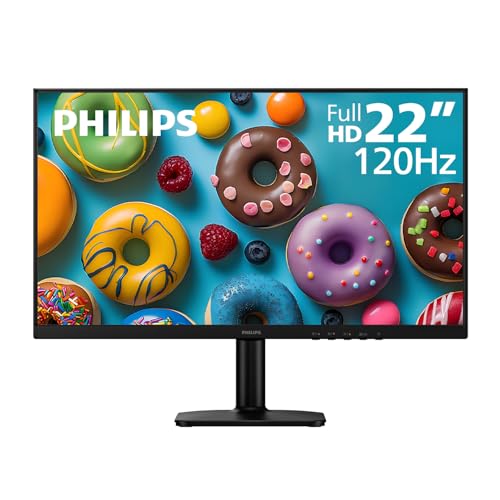
Philips 22E2N1100 22-inch — Warranty reassurance
Philips sells this screen with a promise most rivals in the range will not match: a long advance replacement warranty, under which a replacement ships before the faulty unit travels. For a monitor on a normal desk that is a convenience. For a monitor mounted above a shop counter, installed in a rental property or fixed in a relative’s home three towns away, it is the difference between a phone call and a project, and it earns the 22E2N1100 its place here.
The panel beneath the promise is a fast-feeling IPS: full HD, a refresh Philips rates up to 120Hz in overclocked operation, a quick motion response figure and Adaptive Sync to keep modest graphics hardware honest. In daily terms the screen scrolls and plays with a fluidity the calmer 100Hz picks approach but do not quite reach, and its viewing angles carry that fluidity to anyone standing alongside.
VESA readiness is advertised in the product’s name, which signals how Philips expects the screen to be used, and the flicker-free, low-blue tuning suits the long, mixed days of a home worker. HDMI and VGA cover the modern and the inherited machine, a pairing this guide has praised before and praises here again because mixed fleets are the norm, not the exception.
The honest caveats are size and that overclock. At 22 inches it is the range’s wider citizen and must be measured against its intended space, and the headline refresh asks the owner to enable it rather than arriving unboxed. Neither caveat dents the central proposition: a lively, mountable panel whose maker has thought unusually hard about the day something goes wrong.
- Size: 22 inches
- Resolution: 1920 by 1080
- Panel: IPS with Adaptive Sync
- Refresh rate: up to 120Hz overclocked
- Inputs: HDMI and VGA
- Warranty: long advance replacement cover
Strengths
- The strongest failure-day promise in the range.
- Lively motion for work and relaxed play.
- Mount-ready with legacy input retained.
Trade-offs
- Top refresh must be switched on deliberately.
- Width needs measuring in fitted spaces.
- More capability than a simple post requires.
Best for: mounted installs, rentals and relatives’ desks you support remotely. Not suited for: the tightest alcoves in the range.

Sceptre 22-inch gaming monitor — Speed outlier
Every range has one pick that embarrasses the others on a single axis, and here it is speed. Sceptre’s 22-inch gaming monitor runs full HD at up to 144Hz, with HDMI and DisplayPort and built-in speakers, a specification that reads like a larger gaming screen’s until the tape measure confirms the compact cabinet. For a small desk that games seriously, this is not a compromise candidate; it is the candidate.
The 144Hz ceiling changes which games feel at home. Fast shooters and racing titles that smeared across the 100Hz picks hold together here, and the panel’s size, often apologised for, becomes an advantage competitive players quietly understand: the whole scene fits in a glance, no head movement, no peripheral hunting. Small and fast is a legitimate gaming philosophy, and this screen is its purest expression in the range.
Built-in speakers, so often a derisory line in a specification, earn respect in this context. A compact gaming desk, a bedroom setup, a console that migrates between rooms: in each, the Sceptre’s own sound removes a separate speaker purchase and its cables from a surface that had no room for either. The sound will not thrill a musician, and it was never asked to; it was asked to be there, and it is.
Workday manners are the trade. Sceptre tunes for games first, so the office virtues this guide has praised elsewhere, the calmest colour, the institutional support, the legacy VGA, are thinner here. A buyer whose desk games at night and writes all day should weigh which hours dominate. If the evening wins, this is the range’s most exciting screen; if the day wins, it is a fast detour.
- Size: 22 inches
- Resolution: 1920 by 1080
- Refresh rate: up to 144Hz
- Inputs: HDMI and DisplayPort
- Sound: built-in speakers
- Role: compact serious gaming
Strengths
- Genuine gaming speed inside a compact cabinet.
- Speakers remove clutter from small gaming desks.
- Whole-scene visibility suits competitive play.
Trade-offs
- Office colour and support are not its priorities.
- No VGA for older work machines.
- Speaker quality is convenience, not hi-fi.
Best for: bedroom and small-desk gamers who play fast titles. Not suited for: institutions, colour-critical work or legacy fleets.
How does this range behave as a pair?
Two screens from this span, side by side, form the working surface that a single larger monitor imitates at higher cost and with less flexibility. The arithmetic is seductive: a pair of 21.5-inch panels gives a compact desk two full HD workspaces, one for the document and one for everything that serves it, and lets the owner angle each panel toward the chair rather than accepting the flat compromise of one wide screen. Writers live in this arrangement happily for years, reference on the left, draft on the right, neither window ever minimised in anger.
Matching matters more than size in a pair. Two panels of the same model, bought together, share a colour temperament and a brightness curve, so a window dragged across the seam does not change its personality mid-journey. The frameless candidates in this guide exist for this moment. A mismatched pair, one warm and one cool, one glossy and one matte, will irritate its owner in a low, constant way that no specification sheet predicts and no setting fully cures.
The desk must be honest about the width. Two 21.5-inch cabinets span roughly a metre, and a metre of glass demands a desk that can hold it plus a keyboard in front and a human behind. Measure before dreaming, and consider the portrait option for the second screen, which trades width for height and suits the reference role beautifully. Many owners who planned a landscape pair settle into one of each and never look back.
Power and cables double along with the panels, a banal point that decides whether the pair looks designed or accumulated. A single power strip mounted under the desk, two signal leads of matched length, and a laptop or dock that can truly drive both displays at full refresh are the unglamorous prerequisites. Confirm the driving machine first; a pair of screens showing a mirrored image because the laptop supports only one external display is a heartbreak this guide would rather prevent.
What does text actually look like across this range?
Spend a morning reading on each end of the span and a pattern emerges that numbers alone blur. At 21.5 inches, full HD gives body text a density close to a good laptop screen, so the eye moves between laptop and monitor without refocusing its expectations. Documents hold more lines than the coarser classes below, spreadsheets show their columns without a zoom ritual, and the general sensation is of a proper desk rather than a compromise station.
At 22 inches the same grid breathes a little. Text is a fraction larger at the same settings, which readers with tired eyes or longer viewing distances experience as kindness. Video calls benefit too, faces sitting at a natural size rather than a postage scale, and a shared screen in a small meeting room reads from the far chair. The range’s two ends are thus not better and worse but nearer and farther, tuned to the distance your chair keeps.
Scaling is the tool owners forget. A modest operating system scaling step on the smaller end can reproduce the larger end’s comfort while keeping the sharper grid underneath, which is why the 21.5-inch picks forgive a wider range of eyesight than their size suggests. Experiment during the first week, per application where the system allows, and write the winning settings down for the day a driver update resets them.
What none of these panels will do is flatter tiny interface text in professional software. Design and engineering tools crowd their palettes at full HD in this span, and heavy users of such tools should look at the denser classes above, accepting the larger cabinets that come with them. This range serves the broad middle of computing honestly, and honesty includes naming the work it should decline.
How does gaming really feel inside this span?
Start with the Sceptre, because it reframes the question. At up to 144Hz in a 22-inch cabinet, fast games hold their coherence in a way that surprises players arriving from larger, slower screens. The whole frame sits inside a single glance, opponents appear without a head turn, and the desk, the room and the evening all stay compact. Competitive players have long understood that a smaller, faster screen can be a weapon; this range simply makes the weapon affordable and furniture-friendly.
The 100Hz majority occupy a middle kingdom of play that deserves respect rather than apology. Story games, strategy titles, sports games and the endless middle of the games catalogue all look fluid and feel responsive at 100Hz, and a console connected by HDMI finds a willing partner in any of them. The Samsung’s game mode and the Philips’s extra headroom each lend their evenings a keenness that their office hours never hint at.
What the range cannot offer is spectacle. A cinematic game wants width, height and dynamic range that a compact full HD panel does not possess, and playing one here is like watching a fine film on a good small television: enjoyable, complete, and aware of its frame. Players whose gaming is mostly spectacle should save toward the larger classes; players whose gaming is mostly play will be served here for years.
Sound, once more, is the practical footnote. Only the Sceptre speaks for itself, and its voice is modest. Every other pick assumes headphones or a small speaker, which a gaming desk should budget alongside the screen rather than after the first silent evening. A compact desk disciplines its owner in these small accountings, and rewards the discipline with a setup that feels finished.
What happens to these monitors in their second lives?
A screen from this range rarely dies at its first desk. It migrates: to a child’s room when the home office upgrades, to a workshop when the family computer retires, to a relative whose laptop screen has cracked, to a community hall that needs a display for its noticeboard software. The size travels well because it fits everywhere, the inputs travel well because they span generations, and the weight travels well because one person can carry the thing under an arm.
That cascade has a buying implication worth stating plainly. A screen with both HDMI and VGA, a standard mount and a maker who keeps parts and manuals available will find its second and third homes easily, while a screen with one exotic input and a proprietary stand becomes e-waste at its first retirement. The Acer and the ViewSonic in this guide are cascade-friendly by design; the gaming Sceptre will cascade to a younger player with equal ease.
Donation and resale reward the same virtues. Schools, charities and starter households want exactly this span, working, complete with its stand and leads. Keeping the box is unrealistic for most owners, but keeping the stand, the screws and one working cable in a labelled bag is a five-minute kindness that decides whether a retired screen gets reused or landfilled. The range’s modest value makes the kindness cheap to perform.
Longevity at the first desk follows the familiar rules: brightness run at the level the room needs rather than the maximum the panel offers, a screen cleaned with a soft cloth instead of kitchen spray, and firmware or settings left alone once they please. These are not fragile instruments. Treated ordinarily, a panel from this range should outlast the computer it was bought for, and possibly the one after that.
How do the six picks compare side by side?
| Pick | Size | Refresh | Defining trait |
|---|---|---|---|
| Acer KB220Q | 21.5 inch | 100Hz | Value with legacy VGA |
| Lenovo L22-4e | 21.5 inch | 100Hz | Business composure |
| ViewSonic VA2256-MHD | 22 inch | Class standard | DisplayPort, institutions |
| Samsung S30GD | 22 inch | 100Hz | Living-room polish |
| Philips 22E2N1100 | 22 inch | Up to 120Hz | Warranty and mounting |
| Sceptre gaming | 22 inch | Up to 144Hz | Speed with speakers |
Notice what the table cannot show: the personalities. Two screens can share a size, a resolution and a refresh figure and still suit opposite rooms, because one was tuned by a business division for procurement departments and the other by a gaming brand for teenagers. Read the reviews for character and the table for arithmetic, in that order, and the range resolves into a shortlist of one or two.
How should you decide between the two ends of the range?
Begin with the furniture, not the screen. A fitted alcove, hutch or caravan desk hands the decision to the tape measure, and the 21.5-inch picks win by the only argument that matters, which is fitting. An open desk returns the decision to habit, where the honest questions are about hours: how many are spent reading, how many watching, how many playing, and whose eyes besides yours must the panel please.
Reading hours pull toward the smaller, denser end and toward the Lenovo’s calm or the Acer’s value. Watching hours pull toward 22 inches and toward Samsung’s evening manners. Playing hours override both pulls when they are serious, because the Sceptre’s speed cannot be added later to a calmer screen, while a calmer screen’s virtues can be approximated with settings. Shared and institutional hours pull toward ViewSonic’s ports and Philips’s promise, the two picks designed to be owned by organisations rather than individuals.
There is also a two-screen reading of the range that deserves a sentence. A pair of 21.5-inch panels often serves a compact desk better than a single larger monitor, giving documents and calls separate homes, and the frameless candidates here were chosen with that pairing in mind. The range is a span, and spans invite combinations as well as choices.
What should you set up first on a monitor in this range?
Set the refresh rate deliberately, because several of these panels ship at a conservative default and their owners never meet the 100 or 120Hz they paid for. The setting lives in the operating system’s display panel, takes a minute, and changes scrolling and motion more than any picture control in the monitor’s own menu. Do it on day one, while the purchase is still being judged, so the judgement is fair.
Set the height next, with books if the stand will not cooperate, until the top of the screen sits near eye level and the panel tilts slightly upward toward your face. Then set brightness against the room rather than the showroom: a panel matched to its lighting at midday will still be kind at midnight if the evening lamp is the reference, and most of these screens include a low-blue mode that deserves enabling for the last hour of the day.
Finally, set the cables and the power behaviour. Route the signal lead so the desk can be cleaned without unplugging anything, confirm the screen wakes with the computer rather than demanding its own button ritual, and save your picture settings once they please you. A monitor in this range should become invisible within a week, a surface the work happens on, and these small ceremonies are how invisibility is achieved.
How do calls, sound and cameras fit a range with few speakers?
Only one pick in this guide speaks, which makes audio a genuine planning item for the other five. A desk that lives on video calls needs a voice solution: the laptop’s own speakers beside the monitor, a small desktop speaker, or the headphones most call workers already own. None of these is a burden, but all of them are surprises if discovered during the first meeting on a new screen, so decide the arrangement while the order is still theoretical.
Camera position follows from the same setup. A webcam perched on a 21.5 or 22-inch panel sits at a flattering, near-eye height that laptop cameras, gazing upward from below, cannot match, and the compact cabinets here accept a camera’s clip without the wobble that deep-bezel designs sometimes suffer. Centre the camera over the panel’s middle, not over your own, because the person on the other end deserves to be looked at rather than near.
Call lighting completes the trio, and it is the room’s job rather than the monitor’s. A lamp or a window in front of the face, never behind it, matters more than any camera upgrade, and the eye-care tuning several picks offer will keep the screen itself from glaring back during evening calls. This range, in other words, hosts calls perfectly well; it simply asks its owner to assemble the voice and the light deliberately, once, instead of inheriting them by accident.
What mistakes do buyers make inside this range?
The commonest mistake is shopping the label instead of the span. A buyer who searches for a 23-inch monitor and accepts a 23.8-inch panel has left this range without noticing, and discovers the fact against a hutch wall. Read the true diagonal, compare it with the measured space, and let the class names fall where they may.
The second mistake is paying for speed the desk will never use, or refusing speed the desk uses nightly. A spreadsheet does not care about 144Hz and a racing game cares about little else, and both truths are obvious once stated, yet showrooms blur them by running the same demo on every screen. Shop from your own hours, not from the demo loop.
The third mistake is treating the stand as packaging. In this range the stand is the ergonomics budget, and a tilt-only base on a fixed-height desk is a daily posture decision made by default. Price the riser or the arm into the comparison at the start, and some apparent bargains quietly reprice themselves.
The fourth mistake is ignoring the second machine. The laptop that visits the desk on weekends, the console under the television, the old tower in the cupboard all have outputs, and the screen that welcomes them with the right port earns its keep in ways the main machine never reveals. Count every source before choosing the input list.
Which buyers should leave this range entirely?
Three kinds of buyer should close this guide with thanks and shop elsewhere, and naming them is part of the guide’s job. The first is the colour professional, whose proofs, grades and client approvals demand a gamut and a calibration story that no panel in this span pretends to offer. Their money belongs in the creator classes above, and spending it here, however carefully, buys a daily argument with the evidence of their own eyes.
The second is the spreadsheet maximalist, the analyst whose models run to a hundred columns and whose timelines span quarters. Full HD in this span will show such work honestly but partially, and the constant horizontal travel will tax every hour. A wider or denser screen is not a luxury for that desk; it is the tool the work actually requires, and the larger classes exist precisely for it.
The third is the cinematic gamer, whose evenings are built around spectacle, scale and dramatic contrast. This range will play their games completely and enjoyably, and will still leave them aware of the frame, the black level and the road not taken. They should save toward the larger, faster, deeper classes, and this guide’s Sceptre, for all its speed, should not be allowed to talk them out of it.
Everyone else, which is most people who compute, belongs here. The range’s honesty is that ordinary work, ordinary play and ordinary rooms are its entire brief, and it fulfils that brief without asking the buyer to fund capabilities that will glow unused for the life of the screen. Recognising yourself in the majority is not settling; it is shopping with both eyes open.
What is the short checklist before ordering the best 21 23 inch monitors?
Measure the space in width and height, including any shelf above the desk. Decide your end of the range by habit, text toward the smaller, watching toward the larger, serious play toward the Sceptre. List every machine the screen must welcome and match the inputs to that list. Price the stand honestly, adding a riser or an arm where the included base cannot reach your eye line. Set the refresh rate in the operating system on the day the screen arrives, keep the stand and screws if you mount it, and read for one full morning before judging the size. Buyers who run that sequence inside this range almost never exchange the screen, because every disappointment available here announces itself somewhere along those seven steps.
Final Recommendation
Let the room cast the deciding vote. A measured alcove takes the Acer KB220Q and its honest value; a businesslike home office takes the Lenovo and stops thinking about monitors for years; a classroom or a standardised rollout takes the ViewSonic; a desk in a lived-in room takes the Samsung; an awkward installation that must not fail takes the Philips and its promise; and a small desk that games in earnest takes the Sceptre, proudly, at full speed. The span between 21 and 23 inches is where most desks were always meant to land, and every pick here lands there with its size printed honestly and its character intact.
How do students, renters and first-desk buyers fare in this range?
Students are this span’s natural citizens. A hall room or a shared house desk fits a 21.5-inch panel where a 27 would rule the surface, the work of essays and research sits comfortably at full HD, and the screen travels home at term’s end in a car already full of everything else. The Acer’s value and VGA tolerance suit the hand-me-down computers student life runs on, while the Sceptre waits for the student whose recreation is competitive and whose desk is also their arena.
Renters gain a subtler benefit: reversibility. A screen in this range on its own stand leaves no mark on a room, and on a clamp arm it leaves no mark either, which keeps deposits and landlords out of the monitor conversation entirely. When the tenancy changes, the whole setup, screen, arm, leads and stand, fits in one box and one trip, and the new room inherits a desk that was already solved once.
First-desk buyers, equipping a teenager or a newly remote worker, should hear the guide’s simplest advice without embarrassment: the middle of this range, honestly bought, is a complete answer. The Lenovo for composure, the Acer for value, either will host years of ordinary computing without a single specification becoming a regret. Upgrades in this span are pleasures, not rescues, and a first desk that starts complete teaches its owner to buy that way forever.
How should you maintain a screen in this range?
Maintenance is mercifully slight. Dust the panel with a dry microfibre cloth weekly if the room is a kitchen or a workshop, monthly if it is a study, and lift fingerprints with the same cloth barely dampened, never sprayed. Keep drinks behind the keyboard rather than beside the stand, check the cable seating whenever the desk is moved, and let the screen sleep when the computer sleeps instead of glowing at an empty room all night. Once a season, revisit the height and tilt with fresh eyes, because chairs change, cushions compress and posture drifts, and a two-minute adjustment in spring prevents a season of quiet neck ache being blamed on the wrong furniture.
Frequently Asked Questions
Is there really no true 23-inch monitor in this guide?
Correct, and deliberately so. The panels sold around that label measure 23.8 inches and belong to the 24-inch class, which has its own guides on this site. This range covers the true 21.5 and 22-inch screens, so buyers measuring fitted furniture can trust every heading.
Does half an inch of size actually matter?
On an open desk, almost never. Inside a hutch, under a cabinet or in a caravan, the centimetre of cabinet width that comes with it can decide whether the screen fits at all. Measure the space, then decide how much the half inch matters to you.
Which pick suits a student best?
The Acer KB220Q for value and legacy tolerance, or the Sceptre if the student’s evenings are gaming hours. Both leave money in a student budget for the chair, which, between us, matters more to a student’s back than any specification in this guide.
Can these monitors serve as a small television?
Several can, with help. An HDMI source, a streaming stick and, where the screen lacks speakers, a small external speaker turn the Samsung or the Philips into a perfectly civilised bedroom television. The Sceptre even brings its own sound, modest but present.
What refresh rate should a non-gamer choose?
The 100Hz panels are the sweet spot for ordinary work, visibly smoother than the older 60Hz generation in scrolling and window movement. Anything above that is a gaming or enthusiast pleasure, pleasant to have, unnecessary to seek for documents and browsing.
Are all six picks mountable later?
Most carry a VESA pattern, and the Philips advertises its readiness openly. Confirm the pattern on the specific listing before ordering an arm, and keep the original stand in storage, because a mounted screen whose stand was discarded has fewer futures than one whose owner kept a labelled bag of parts.
What should the first evening with the new screen include?
Unbox onto the desk it will serve, not onto a table elsewhere, because the first judgement, does it fit the room, should happen in the room. Connect every source you own, set the refresh the panel promised, and open the three things you actually do: your document, your browser, your game or your programme. Read a page, scroll a feed, watch a scene. A screen in this range declares its character within that half hour more truthfully than a week of test patterns would.
Then adjust one thing at a time. Height before brightness, brightness before colour, colour before any gaming or eye-care mode, so that each change has a known author. Save or note the settings that please you, photograph the cable route behind the desk, and put the stand’s spare screws and the manual where the household keeps such things. The first evening’s small administration is what separates a setup from an appliance, and it is the last effort this class of screen will ask of you for a long while.
One closing observation from years of watching people shop this span: almost nobody who buys carefully inside it ever describes the purchase as small. They describe it as right, the screen that fit the alcove, matched the chair, welcomed the old tower and the new laptop alike, and then disappeared into the work. A range that produces that sentence from so many different rooms has earned its place at the centre of the monitor market, and this guide’s six are its current best ambassadors.
Treat the choice, finally, as a room decision rather than a technology decision, and it becomes easy. Rooms know their alcoves, their light and their hours; screens merely answer. Answer yours with the pick whose character matches the room’s own, and the span will do the rest without another thought.
And if the tape measure, the hours audit and the character sketches still leave two finalists standing, choose the one whose maker you would rather telephone in three years. Panels in this span are bought for a decade of Tuesdays, and the relationship with the company behind the glass outlasts every specification that separated the finalists on the day of purchase.
Related Guides
Buyers whose measurements allow the larger class should compare our 23.8 and 24-inch monitor guides, while those drawn to the compact end can narrow further with the dedicated 21.5-inch roundup. The full 22-inch field is examined on its own in our 22-inch monitor comparison.


