What's inside
- Key Takeaways
- Quick Picks
- How Did We Compare Two Platforms Sold at Five Sizes?
- Deco or eero: Two Philosophies of the Same Category
- What Does the 6 GHz Band Actually Do Inside a Mesh?
- When the 6 GHz Lane Is Busy: Backhaul Under Real Loads
- How Many Units Does Your Home Actually Need?
- The Six Listings, Pack by Pack
- Coming From Wi-Fi 6 Mesh: Is the 6E Step Worth Taking?
- Six Listings, Two Platforms: The Numbers in One Place
- Can These Systems Use Wired Backhaul, and When Should They?
- How Should You Place 6E Nodes Differently From Older Mesh?
- What Goes Wrong When People Buy 6E Mesh?
- Final Recommendation
- Frequently Asked Questions
- Related Guides
As an Amazon Associate I earn from qualifying purchases. This post may contain affiliate links at no extra cost to you.
widgetverdict.com is reader-supported. When you buy through links on our site, we may earn an affiliate commission.
Where to buy: this guide compares pack sizes of the same systems as much as it compares systems, so each Amazon listing deserves a slow read of its pack configuration — the difference between the options below is often simply how many identical units arrive in the box.
Wi-Fi 6E added a whole new band to home networking, and mesh is where that band does its most interesting work. The best wifi 6e mesh routers use the 6 GHz spectrum in two ways at once: as a clean, wide lane for your newest devices, and as backhaul — the inter-node conversation that decides whether a mesh system feels like one network or like a chain of compromises. This guide covers the two systems that defined the category’s mainstream: TP-Link’s Deco XE75 family, in three pack sizes plus a Pro variant, and Amazon’s eero Pro 6E in two pack sizes. Six listings, two platforms, and a set of decisions that are mostly about arithmetic — how many units, over how much house, fed by how fast a connection.
Because the same product appears here at several sizes, precision about listings matters more than usual, and this guide holds itself to the titles. The Deco XE75 appears as a 3-pack claiming up to 7,200 sq. ft., a 2-pack claiming up to 5,500 sq. ft., and a 1-pack claiming up to 2,900 sq. ft.; the XE75 Pro is a separate 2-pack whose title specifies one 2.5 Gbps WAN/LAN port and two 1 Gbps LAN ports. The eero Pro 6E appears in two listings whose titles disagree about coverage — one claims up to 6,000 sq. ft. for its 3-pack, the other up to 4,000 sq. ft. for its 2-pack — and we call each by its own title’s figure rather than merging them into a single invented number. Where you see a coverage figure below, it belongs to that listing, exactly as printed.
Who needs 6E mesh at all? The household whose devices have quietly become a crowd, whose newest laptops and phones support the 6 GHz band and find the older bands congested, and whose floor plan defeats a single router. The 6 GHz band’s virtues are emptiness and width; its vice is reach, since higher frequencies fade faster through walls — which is precisely why mesh, with several nodes shortening every hop, is the architecture that flatters it. A single 6E router strands its best band in one room; a 6E mesh spreads it across the home.
Key Takeaways
- This guide compares two platforms at several pack sizes: Deco XE75 in 1-, 2- and 3-packs plus an XE75 Pro 2-pack, and eero Pro 6E in 2- and 3-packs.
- Coverage figures are quoted per listing title and never merged — the two eero Pro 6E listings claim different areas (6,000 and 4,000 sq. ft.) for different pack sizes.
- The XE75 Pro’s distinguishing hardware, per its title, is one 2.5 Gbps WAN/LAN port plus two 1 Gbps LAN ports.
- The 6 GHz band serves both devices and backhaul; its short reach through walls is exactly what mesh node placement compensates for.
- Both platforms support internet plans up to 2.5 Gbps on the eero side per its titles, so plan speed should steer the port conversation.
- Pack size is a reversible decision in both ecosystems — start where the house demands, add a unit where testing says so.
Quick Picks
| Pick | Badge | Why it earns its place |
|---|---|---|
| TP-Link Deco XE75 WiFi 6E Mesh (3-Pack) | The default whole-home set | AXE5400 tri-band coverage claimed up to 7,200 sq. ft., with AI-driven mesh and WPA3 per its title. |
| TP-Link Deco XE75 WiFi 6E Mesh (2-Pack) | The mid-size house answer | The same XE75 platform at up to 5,500 sq. ft., pitched in its title at gaming and streaming homes. |
| TP-Link Deco XE75 WiFi 6E Mesh (1-Pack) | The single-unit start | One XE75 unit claiming up to 2,900 sq. ft. — a router replacement today, a mesh seed for later. |
| TP-Link Deco XE75 Pro WiFi 6E Mesh (2-Pack) | The 2.5G-port Pro | A 2-pack whose title specifies a 2.5 Gbps WAN/LAN port and two 1 Gbps LAN ports, up to 5,500 sq. ft. |
| Amazon eero Pro 6E Mesh System (3-Pack) | The eero flagship set | A 3-pack claiming up to 6,000 sq. ft., 100+ devices and support for plans up to 2.5 Gbps per its title. |
| Amazon eero Pro 6E Mesh System (2-Pack) | The smaller eero start | A 2-pack claiming up to 4,000 sq. ft. and 100+ devices, with the same 2.5 Gbps plan support in its title. |
How Did We Compare Two Platforms Sold at Five Sizes?
By treating pack size as a specification, not a footnote. In mesh, the box count is the coverage, so a guide that compared “the XE75” against “the eero Pro 6E” as though each were one product would mislead everyone. Instead, each listing stands on its own title: its pack count, its claimed coverage, its device count, its ports where the title states them. Platform qualities — TP-Link’s AI-driven mesh language, Amazon’s set-and-forget ecosystem — are discussed at platform level, while every number stays attached to the listing that printed it.
The second discipline concerns the 6 GHz band itself. Both platforms are AXE5400-class or equivalent tri-band designs in their titles, and both use the new band seriously, but the titles differ in what they promise around it: the Deco listings name AI-driven mesh and WPA3, the Pro names its 2.5 Gbps port, the eero listings name plan support up to 2.5 Gbps and device counts above one hundred. We report those emphases as the makers stated them, because a buyer choosing between ecosystems is really choosing which promises to hold a maker to. Six listings survived the pool’s checks; the sections below take them one at a time, sizes and all.
Deco or eero: Two Philosophies of the Same Category
Strip the numbers away and the platforms disagree about who should run your network. TP-Link’s Deco presents itself as a system you participate in: the titles talk about the mesh’s own intelligence — AI-driven organisation, AI-roaming in the wider Deco family — and the platform generally leaves more of the network’s behaviour visible and adjustable to its owner. Amazon’s eero presents itself as infrastructure you forget: its titles talk about outcomes and ceilings — devices connected, plans supported, houses covered — while the platform makes its decisions backstage and keeps the app’s surface calm. Neither philosophy is a euphemism for better or worse; they are answers for different households, and they predict your satisfaction more reliably than any figure in the comparison table.
The practical consequences show up over years. The participating owner enjoys diagnosing a weak node and rearranging the system like furniture; the forgetting owner enjoys never learning what a node is. Visitors notice the difference too, in a small way: the Deco household can usually tell you its network’s name for the guest room and why the node sits where it sits, while the eero household waves at a white puck and says it just works — and both households are, by their own lights, completely satisfied. Satisfaction in this category is temperament-shaped, which is why this guide refuses to declare a platform winner and instead keeps returning the reader to the question of which owner they are. Subscription models follow the same split — platforms that sell serenity tend to charge rent for parts of it, a pattern the eero sections flag where relevant — while platforms that sell hardware tend to leave the owner holding more of the maintenance. Choose the philosophy first and the pack size second; a household that buys eero’s calm and then resents its curated settings, or Deco’s openness and then resents its options, has bought against its own temperament, and no coverage figure repairs that.
What Does the 6 GHz Band Actually Do Inside a Mesh?
Two jobs, and a mesh is the stage where both shine. As a device band, 6 GHz offers wide, quiet channels to the laptops, phones and consoles new enough to speak it — devices that would otherwise crowd onto 5 GHz with everything else in the house and, in dense neighbourhoods, with everyone else’s houses too. As backhaul, it gives nodes a fast lane of their own: a satellite can relay the whole household’s traffic to the main unit on 6 GHz while serving local devices on 5 and 2.4, the tri-band division of labour that made this category. The XE75 titles name the band and the AI-driven steering that manages it; the eero titles fold it into their plan and device promises.
The band’s weakness is physics: 6 GHz fades through walls and floors faster than 5 GHz, faster still than 2.4. In a single-router home that weakness confines the best band to a room or two. Mesh answers by geometry — nodes placed a room apart keep 6 GHz hops short, so the band’s speed survives the journey across the house in relays. This is the honest core of the 6E mesh proposition: not that the new band is magic, but that several radios, thoughtfully placed, let a short-range band cover a long-range home. Placement therefore matters as much in this guide as in our multifloor one, and for the same reason.
When the 6 GHz Lane Is Busy: Backhaul Under Real Loads
A subtlety worth understanding before you judge any of these systems by a first-evening test: the 6 GHz band is shared between its two jobs. When a satellite relays a busy household’s traffic on 6 GHz while a 6E laptop in its room also streams on 6 GHz, the band schedules both, and the system’s steering decides, moment by moment, which flows ride which band. This is the work the Deco titles call AI-driven and the eero platform does without naming — continuous, unglamorous arbitration that determines whether the mesh feels like one calm network or like a relay race with dropped batons. It is also why headline class figures, identical across the XE75 packs, tell you so little: the arbitration, not the arithmetic, is the experience.
Under genuinely heavy load — the multi-screen, multi-call, downloading evening this batch’s other guides keep invoking — tri-band 6E mesh holds its composure better than the dual-band generation precisely because it has a third lane to arbitrate with. But there is a ceiling no arbitration removes: a satellite can only forward what its backhaul receives, and a node placed beyond a good link starves politely at any band. The placement section below is therefore not decoration. In 6E mesh, geometry is performance, and the systems in this guide differ less in their radios than in how forgiving their steering is of the geometry your house imposes.
How Many Units Does Your Home Actually Need?
Let the titles’ own arithmetic tutor you, then discount it for your walls. TP-Link claims up to 7,200 sq. ft. for three XE75 units, 5,500 for two and 2,900 for one — a progression that tells you each added node buys less than the one before, because nodes overlap by design. Amazon claims up to 6,000 sq. ft. for three eero Pro 6E units and 4,000 for two. Read as ratios rather than promises, these figures sketch the truth: one unit for a flat or small house, two for the typical family home, three when floors, length or masonry enter the story. The operative phrase in every title is “up to,” and the discount for brick, concrete and foil-backed insulation is steep.
There is also the matter of what a “unit of coverage” means in a lived house, because the titles’ arithmetic assumes empty, friendly space and your house is neither. Furniture, bookcases, aquariums, the metal carcass of a refrigerator — each taxes the signal in ways no square-foot figure models, and upper floors tax it again through the slab. A prudent household therefore reads its own floor plan against the claims with a finger on the scale: if the claim and the house are close, buy the larger pack or accept the likelihood of an added node; if the claim dwarfs the house, trust the smaller pack and keep the change. The listings in this guide span a wide enough range of sizes that most homes can find their honest rung without rounding up out of fear.
The reassuring property of both ecosystems is reversibility.
A household that starts with an XE75 2-pack can add a unit; an eero home grows the same way. So the pack decision is not a marriage — it is a starting position, correctable after a week of living with the network and testing the far rooms at the busy hour. Buy for the house you can describe today, place the units with the stairwell-and-hallway logic mesh rewards, and let evidence, not anxiety, argue for the extra node.
The Six Listings, Pack by Pack

TP-Link Deco XE75 WiFi 6E Mesh (3-Pack) — The reference whole-home set
The XE75 3-pack is the listing this category is usually judged by: an AXE5400 tri-band Wi-Fi 6E system claiming Wi-Fi up to 7,200 sq. ft., carrying an Engadget “Best for Most People” rating in its title, and promising to replace both router and extender with AI-driven mesh and WPA3. Three units is the configuration where 6E mesh shows its full geometry — a main unit at the modem, a satellite mid-house, a third at the far end or the far floor — with the 6 GHz band available for devices and for the relay work between nodes. For the household upgrading from a single elderly router, this is the box that ends the dead-room era in one purchase.
There is a household rhythm this pack suits particularly: the one whose network grew by accretion — a router from one era, an extender from another, two network names and a dead zone everyone routes around like furniture. Replacing that archaeology with three matched nodes, one name and one app is a quality-of-life purchase as much as a performance one, and the 3-pack’s title says as much in its “replaces Wi-Fi router and extender” phrasing. The calm that follows — every room simply covered, every device on one network — is what most buyers are actually purchasing, with the 6 GHz band as the mechanism rather than the motive.
Its virtues are the platform’s: TP-Link’s Deco app makes setup and later adjustments approachable, the AI-driven mesh language in the title refers to the system’s self-organisation of its links, and WPA3 keeps security current.
The cautions are the class’s: three units still obey placement, and a household that lines them up badly will own an expensive chain of weak hops; and the title’s 7,200 sq. ft. is the friendliest of friendly numbers, to be discounted hard by masonry. Households with a faster-than-gigabit plan should also read the Pro’s section below, since the port story — not the radios — is where the plain XE75 and the Pro divide.
- Platform: TP-Link Deco XE75, AXE5400 tri-band Wi-Fi 6E
- Pack: 3 units
- Claimed coverage: up to 7,200 sq. ft., per this listing’s title
- Named features: AI-driven mesh, 6 GHz band, WPA3; replaces router and extender
- Recognition: Engadget rated best for most people, as stated in the title
Strengths
- Three nodes give 6 GHz backhaul short hops across a whole house.
- The Deco platform’s app keeps a multi-unit system manageable for non-specialists.
- WPA3 and AI-driven steering cover the modern basics without add-ons.
Trade-offs
- The coverage claim needs the steepest discount in a masonry house.
- Three units placed carelessly underperform two units placed well.
- Multi-gig households should compare its ports with the Pro’s before buying.
Best for: a full-size family home making the single-router-to-mesh leap in one step. Not suited for: a small flat — three nodes in 900 sq. ft. would spend their lives shouting over each other, and the 1-pack below exists for exactly that home.
The XE75 3-pack listing confirms the current pack contents and unit specification.
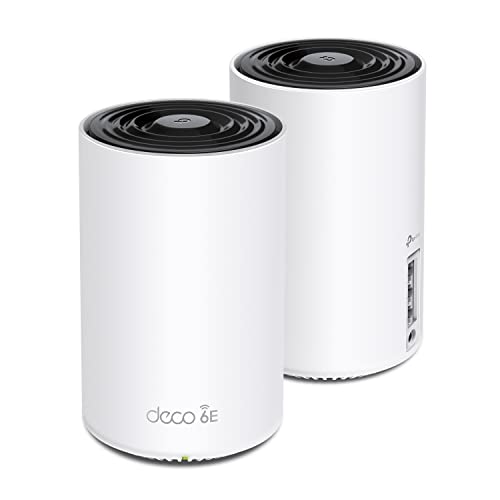
TP-Link Deco XE75 WiFi 6E Mesh (2-Pack) — The same platform, one node fewer
The 2-pack is the XE75 for the median house: the same AXE5400 tri-band platform, the same 6 GHz band, WPA3 and AI-driven mesh in the title, claiming up to 5,500 sq. ft. and pitched by TP-Link at gaming and streaming homes. Two nodes is a genuinely different topology from three — one relay instead of a chain — and for the long flat, the two-storey house with the modem at one end, or the home whose dead zone is one known room, it is the correct topology rather than a compromise. The second unit sits where the main unit’s signal starts to fray, and the pair covers the home without a third radio competing for placement.
Choose it with the expansion path in mind: Deco units can be added, so the 2-pack is a beginning that a growing household or a newly converted attic can extend. There is a psychological dividend to the two-node start that three-pack buyers forgo: you learn your own house’s radio geography from a simple system, one relay whose behaviour you can actually follow in the app, before the chain grows complex enough to hide its weak link. Households new to mesh often place a two-node system better by the second week than a three-node system they installed all at once and never revisited — simplicity is a diagnostic feature, not merely a saving. The honest comparison against the 3-pack is not speed — the radios are the platform’s radios — but geometry: if your home’s problem rooms sit in two directions from the modem, one satellite cannot face both ways, and the 3-pack is the honest buy. If they sit in one direction, the 2-pack saves money and a shelf. Its title’s gaming-and-streaming pitch is fair in this sense: a two-node 6E system gives a console or a streaming television a short, clean hop to a node, which is most of what those workloads ever needed.
- Platform: TP-Link Deco XE75, AXE5400 tri-band Wi-Fi 6E
- Pack: 2 units
- Claimed coverage: up to 5,500 sq. ft., per this listing’s title
- Named features: 6 GHz band, WPA3, AI-driven mesh; whole-home router replacement
- Title’s stated workloads: gaming and streaming Wi-Fi
Strengths
- The full XE75 platform at the pack size most houses actually need.
- A two-node topology is simpler to place well than a three-node chain.
- Expandable later with additional Deco units if the house changes.
Trade-offs
- One satellite cannot cover problem rooms in opposite directions.
- The 5,500 sq. ft. claim assumes friendly construction, as they all do.
- Large multi-floor homes will likely return for the third unit anyway.
Best for: a two-storey or long single-storey home with dead zones in one direction from the modem. Not suited for: a house with problem rooms at both ends — one satellite cannot face two ways, and the 3-pack is the truthful answer there.
Check the XE75 2-pack listing for the current unit count in the box before comparing prices across sellers.

TP-Link Deco XE75 WiFi 6E Mesh (1-Pack) — A router today, a mesh tomorrow
The single-unit XE75 is the most misunderstood listing in this guide, so let its title speak: a whole-home Wi-Fi router replacement claiming up to 2,900 sq. ft., with the 6 GHz band, WPA3 and AI-driven mesh. Bought alone, it is a tri-band 6E router for a flat or small house — and a good one, giving a compact home the new band’s clean air without paying for satellites it has no rooms to put in. Its strategic value is the second act: because it is a Deco, the household that later moves, extends or discovers a dead room can add units and wake up owning a mesh, rather than replacing a standalone router outright.
Judge it against single routers, not against its own siblings’ pack claims. Against that field it holds a quiet trump card: ordinary single routers are dead ends, however good their radios, while this unit is a door left open — and doors left open are disproportionately valuable to households whose next home, next extension or next working arrangement is genuinely unknown. The 2,900 sq. ft. figure is a single radio’s promise and should be discounted like one: through two walls it will fray, as every lone unit does. What it offers over an ordinary single router is the platform — the app, the steering, the growth path — plus tri-band radios that serve a small, device-dense flat better than dual-band rivals. For the renter whose next home is unknown, that optionality is worth real money: this is the only pick in the guide that is simultaneously a complete purchase for a small home and the first instalment of a large home’s system.
- Platform: TP-Link Deco XE75, AXE5400 tri-band Wi-Fi 6E
- Pack: 1 unit — a standalone router replacement, expandable into mesh later
- Claimed coverage: up to 2,900 sq. ft., per this listing’s title
- Named features: 6 GHz band, WPA3, AI-driven mesh
- Title’s stated role: whole-home Wi-Fi router replacement
Strengths
- Full 6E tri-band platform at a single-unit commitment.
- The only pick here that grows into a mesh without replacing anything.
- Ideal sizing for flats where extra nodes would have nowhere to live.
Trade-offs
- A single radio obeys single-radio physics through walls and floors.
- Its coverage figure is the smallest claim in this guide, honestly so.
- Households certain they need two nodes today should simply buy the 2-pack.
Best for: flats and small houses, and renters who want today’s router to survive tomorrow’s move. Not suited for: a multi-floor family home buying it as the whole answer — one unit cannot be on three floors, and its own title’s figure says as much.
The XE75 1-pack listing is the one to compare against ordinary single routers.

TP-Link Deco XE75 Pro WiFi 6E Mesh (2-Pack) — The Pro is a ports story
The XE75 Pro 2-pack shares the platform’s AXE5400 tri-band identity and the same up-to-5,500 sq. ft. claim as the plain 2-pack — and its title spends its extra words on ports: one 2.5 Gbps WAN/LAN port and two 1 Gbps LAN ports. That is the Pro difference, stated exactly as the listing states it, and it matters to two specific households. The first pays for internet faster than gigabit, and needs a WAN port that does not cap the plan at the first device it touches. The second wires things at the main unit — a NAS, a desktop, a switch — and values a 2.5 Gbps-capable jack for the fastest wired resident. For everyone else, the plain XE75 listings are the same mesh for less complication.
Read the port map carefully, because it is a map of one fast lane, not three: a single 2.5 Gbps WAN/LAN port flanked by two gigabit LAN ports, per the title. That shape tells you the intended installation with unusual clarity: the fast port faces either the multi-gig modem or the household’s one genuinely fast wired citizen — a NAS serving the whole home is the canonical tenant — while the gigabit pair handles the ordinary wired residents. A buyer whose wired ambitions exceed that shape is not being refused; they are being handed a design decision, and the correct response is a multi-gig switch behind the fast port, budgeted as part of the Pro purchase rather than discovered after it. A household imagining multiple multi-gig wired devices should plan a 2.5G-capable switch behind that port rather than expect the mesh unit to be the switch. As a 2-pack it inherits the two-node geometry of its sibling — superb in one direction, expandable later — and the AI-driven mesh and 6 GHz band of the platform. The Pro is the connoisseur’s XE75: identical air, better door.
- Platform: TP-Link Deco XE75 Pro, AXE5400 tri-band Wi-Fi 6E
- Pack: 2 units
- Claimed coverage: up to 5,500 sq. ft., per this listing’s title
- Ports per the title: one 2.5 Gbps WAN/LAN port, two 1 Gbps LAN ports — the Pro’s defining detail
- Named features: AI-driven mesh, 6 GHz band
Strengths
- A 2.5 Gbps WAN/LAN port stops the mesh from capping a multi-gig plan.
- The fast port can feed a wired NAS or desktop at beyond-gigabit speed.
- Same proven XE75 mesh platform and 2-pack geometry as its sibling.
Trade-offs
- Only one port exceeds gigabit; multi-device wired speed needs a switch.
- On a gigabit-or-slower plan, the Pro premium buys dormant headroom.
- Two-node geometry still cannot face two directions at once.
Best for: a multi-gig internet household, or one with a fast NAS at the main unit. Not suited for: a sub-gigabit home with nothing wired faster than gigabit — the plain XE75 2-pack is the same mesh there, and the Pro’s port would never be exercised.
The XE75 Pro listing restates the port layout that justifies the Pro name.

Amazon eero Pro 6E Mesh System (3-Pack) — The flagship eero set, 6,000 sq. ft. listing
Call this listing by its own numbers, as this guide promised: the eero Pro 6E 3-pack whose title claims coverage up to 6,000 sq. ft., connection for 100+ devices, and support for internet plans up to 2.5 Gbps. Amazon’s pitch is the inverse of TP-Link’s — where Deco talks about its mesh intelligence, eero talks about outcomes: this many devices, this much house, this fast a plan, with the system’s decisions handled quietly by the platform and its app. For a household that wants 6E mesh as an appliance rather than a project, that philosophy is the product, and the Pro 6E is its flagship expression: tri-band 6E radios in three rooms, a device ceiling sized for a genuinely smart home, and plan support that keeps multi-gig households from shopping elsewhere.
Picture the household it flatters: forty-odd devices before anyone counts carefully — phones, tablets, two televisions, a doorbell, plugs and bulbs accumulating like sediment — and nobody who regards the network as a hobby. In that house, the eero Pro 6E 3-pack’s promises map one-to-one onto the pain: the device ceiling absorbs the sediment, the three nodes absorb the floor plan, the plan support absorbs the fast connection, and the app absorbs the administration. It is the only pick in this guide whose buyer is purchasing the absence of a subject — the network stops being a topic of household conversation — and for many families that absence is worth more than any setting another platform offers.
The eero trade-offs are the ecosystem’s familiar ones.
Settings depth is limited by design; the person who wants to hand-tune their network will feel the walls of the garden. Some eero capabilities live behind the maker’s subscription tier — a five-year ownership cost worth weighing — and this listing leaves their extent undescribed. And note carefully that this 6,000 sq. ft. figure belongs to this 3-pack listing — the 2-pack below carries a different number in its own title, and conflating them is exactly the error this guide exists to prevent. On its own terms, this is the set-and-forget flagship of the 6E mesh category.
- Platform: Amazon eero Pro 6E, tri-band Wi-Fi 6E mesh
- Pack: 3 units
- Claimed coverage: up to 6,000 sq. ft. — this listing’s figure, per its title
- Devices and plans: connect 100+ devices; supports internet plans up to 2.5 Gbps, per the title
- Ecosystem note: managed through the eero app; how much of the platform’s deeper feature set sits behind eero’s subscription is something this listing leaves for the buyer to check
Strengths
- A 100+ device title rating matches genuinely device-dense smart homes.
- Plan support up to 2.5 Gbps keeps fast connections uncapped at the door.
- The most hands-off setup and upkeep philosophy in this guide.
Trade-offs
- Limited settings depth for owners who like to tune a network.
- Subscription-tier features add an ownership cost the title leaves vague.
- Three units still need thoughtful placement; the app cannot repeal walls.
Best for: a smart, busy household that wants flagship 6E mesh to behave like an appliance. Not suited for: a network tinkerer — the eero’s curated settings will frustrate an owner who wants the Deco platform’s or a prosumer system’s open controls.
The eero Pro 6E 3-pack listing carries this pack’s own coverage figure in its title, as quoted here.

Amazon eero Pro 6E Mesh System (2-Pack) — The smaller eero start, 4,000 sq. ft. listing
The second eero listing is the same Pro 6E platform at two units, and its title claims up to 4,000 sq. ft. — a different figure from its 3-pack sibling’s, attached to this pack size, and the only figure this section will use for it. Everything else in the title matches the flagship’s promises: 100+ devices, internet plans up to 2.5 Gbps. That combination makes the 2-pack the considered eero entry: a two-node geometry for the typical house, retaining the platform’s device headroom and plan headroom, expandable later with additional eero units when a room or a floor demands one.
Why would a household choose this over the Deco 2-packs? Philosophy, mostly: eero’s guided placement, automatic upkeep and appliance manners against TP-Link’s more open platform. There is also a generational comfort to starting at two within the eero line specifically: the platform’s whole reputation rests on painless growth, and a household that begins here and adds a third unit a year later — for the extension, the teenager’s floor, the garden office — experiences the ecosystem exactly as its maker advertises it. The 2-pack is thus less a smaller product than a first chapter, priced and sized for the house as it stands this year rather than as it might stand in three. Why choose it over its own 3-pack? Geometry and honesty about the house: two nodes placed well serve most two-storey homes, and the third node’s money can wait until a week of testing identifies a room that actually needs it. The cautions mirror its sibling’s — settings depth by design, subscription questions the title does not itemise — plus the two-node limit that one satellite faces one direction. As with the XE75 pair, the pack decision is reversible, which is the healthiest way to hold it.
- Platform: Amazon eero Pro 6E, tri-band Wi-Fi 6E mesh
- Pack: 2 units
- Claimed coverage: up to 4,000 sq. ft. — this listing’s own figure, per its title, distinct from the 3-pack’s
- Devices and plans: connect 100+ devices; supports internet plans up to 2.5 Gbps, per the title
- Expansion: additional eero units can join the system later
Strengths
- Flagship eero platform and device headroom at a two-node start.
- Guided setup suits households that will never open a settings page.
- Expandable when a floor or extension joins the household.
Trade-offs
- Two nodes cannot cover problem rooms in opposite directions.
- The curated settings philosophy limits manual tuning.
- Its 4,000 sq. ft. claim should not be confused with the 3-pack’s larger figure when comparing prices.
Best for: a typical two-storey smart home wanting eero’s appliance experience without the third unit yet. Not suited for: a sprawling or three-floor house buying it as the final answer — its own title’s figure describes a smaller footprint than its sibling’s, and the geometry will collect the difference.
Compare this pack’s title figure on the eero Pro 6E 2-pack listing against the 3-pack’s before deciding.
Coming From Wi-Fi 6 Mesh: Is the 6E Step Worth Taking?
Households already running a Wi-Fi 6 mesh face the sharpest version of the upgrade question, because their current network is not broken — it is merely crowded in a way that worsens yearly. The honest gains of the step are three. Your 6E-capable devices — likely your newest laptops and phones, which is to say the devices you use most — move to emptier air and stop competing with the household’s long tail of older gadgets. The backhaul gains a lane, steadying the whole system at the busy hour. And the device ceilings in the eero titles, 100+ connections, acknowledge where smart homes are actually heading. Set against that: every non-6E device in the house experiences the upgrade only indirectly, through the relieved 5 GHz band, and the old mesh’s resale or hand-me-down value softens the cost less than buyers hope.
The households that should skip the step are equally identifiable: those whose Wi-Fi 6 mesh still passes the busy-hour test in every room, whose device census is stable and modest, and whose internet plan is the real ceiling on their evenings. For them, 6E mesh is a pleasure deferred without penalty, because the platforms in this guide are not going anywhere. Upgrade when a symptom names itself — a band that saturates nightly, a new flagship device with nowhere clean to sit, a house extension the old nodes cannot reach — and let the symptom choose the pack size, the way this guide has argued from its first section.
Six Listings, Two Platforms: The Numbers in One Place
| Listing | Pack | Title-claimed coverage | Devices / plans per title | Defining detail |
|---|---|---|---|---|
| Deco XE75 | 3-pack | Up to 7,200 sq. ft. | Not stated in title | AI-driven mesh, WPA3 |
| Deco XE75 | 2-pack | Up to 5,500 sq. ft. | Not stated in title | Gaming and streaming pitch |
| Deco XE75 | 1-pack | Up to 2,900 sq. ft. | Not stated in title | Router replacement, expandable |
| Deco XE75 Pro | 2-pack | Up to 5,500 sq. ft. | Not stated in title | One 2.5 Gbps WAN/LAN + two 1 Gbps LAN |
| eero Pro 6E | 3-pack | Up to 6,000 sq. ft. | 100+ devices; plans up to 2.5 Gbps | Flagship eero set |
| eero Pro 6E | 2-pack | Up to 4,000 sq. ft. | 100+ devices; plans up to 2.5 Gbps | Smaller eero start |
Notice the asymmetry the table exposes: TP-Link’s titles compete on coverage and platform features, Amazon’s on devices and plan support. Neither set of figures is interchangeable with the other, and the empty-looking cells are honest — a title that does not state a device count has not promised one, whatever the platform’s reputation says. The table also quietly demonstrates why this category confuses shoppers in the wild: the same product name, Deco XE75, spans a threefold range of hardware commitment, and the same eero name spans two different coverage promises, so a recommendation overheard from a neighbour is meaningless until the pack size is attached to it. Repeat the pack size the way this guide does, and half the category’s confusion evaporates.
Can These Systems Use Wired Backhaul, and When Should They?
Both platforms support wiring nodes together — Ethernet backhaul, in the vocabulary of our multifloor guide — and a 6E household with cables in the walls should consider it the deluxe configuration: the inter-node conversation leaves the air entirely, and all three bands on every node serve devices. The households that benefit most are those whose 6 GHz wireless hops are marginal by architecture — long houses, masonry interiors — where a single wired link between the main unit and the far satellite converts the weakest relay into the strongest. The XE75 Pro’s 2.5 Gbps port gives that wired backbone a faster door at the main unit, which is the other half of the Pro’s case.
Wiring is not mandatory virtue, though. A well-placed wireless 6E mesh in an ordinary timber house performs beautifully, and running cable to satisfy a principle rather than a diagnosed weak hop is effort spent where it buys nothing. The disciplined sequence from our other guides applies unchanged: place wirelessly first, test at the busy hour, read the nodes’ own link reports, and wire the specific hop the evidence indicts. Mesh’s gift is that the cable can arrive months later, as a targeted improvement, without disturbing anything else in the system.
How Should You Place 6E Nodes Differently From Older Mesh?
A little closer together than instinct suggests. The 6 GHz band that makes these systems special is also the shortest-legged, so nodes that would have been comfortable at Wi-Fi 5 distances may hold only a fraying 6 GHz backhaul link at Wi-Fi 6E distances. Place each satellite where it still enjoys a strong signal from its neighbour — as a rule of thumb, within a room or two, with line-of-sight down a hallway worth more than raw proximity through a floor. Then verify with the system’s own link indicators, which both platforms surface in their apps, and treat a node reporting a weak link as a placement instruction rather than a verdict on the hardware.
For a three-unit layout, treat the middle satellite as the load-bearing member of the whole arrangement. Traffic originating beyond it must cross its link twice in spirit — once arriving from the far node, once departing toward the gateway — so a mediocre middle hop taxes distant rooms far more than an equally mediocre final hop would. When the app grades one link poorly, experiment with the bridge unit first, shifting it along the hallway axis rather than sideways into another room, and re-check the reported link quality after each modest move; small relocations along the corridor frequently transform the chain while barely changing where devices themselves sit.
Devices deserve the same realism. A 6E laptop in the node’s own room will taste the new band; the same laptop two floors away will be served, perfectly well, on 5 GHz by steering — the mesh’s quiet competence is that it stops mattering which band carries a distant device. Judge the system by the whole house’s experience at the busy hour, not by whether every speed test in every room shows the 6 GHz badge. The badge is a means; the calm evening is the end.
Height and openness apply here as everywhere in mesh: a node at waist height on an open shelf out-reaches a more powerful position inside a cabinet, and the landing, hallway table and kitchen counter — the waypoints of a house’s daily traffic — are usually the right addresses. Both platforms’ apps will grade your placements after the fact; use the grade as a prompt to experiment by a room in each direction before accepting a weak link as permanent, because in 6E the difference between a mediocre hop and a strong one is often a single doorway.
What Goes Wrong When People Buy 6E Mesh?
Merging the eero listings’ coverage figures. The 3-pack’s title claims up to 6,000 sq. ft. and the 2-pack’s claims up to 4,000. Quoting the larger number for the smaller box is how a house ends up under-meshed.
Buying the Pro for its name. The XE75 Pro’s difference, per its title, is one 2.5 Gbps port among gigabit ones. On a sub-gigabit plan with nothing fast to wire, that is a premium paid for a dormant jack.
Expecting 6 GHz in every room. The band’s reach is short by physics. Mesh relays it across the house, but distant devices will often ride 5 GHz — which is the design working, not failing.
Oversizing the pack for a flat. Three nodes in a small home interfere with each other’s serenity. The XE75 range itself offers a 1-pack because small homes are a real category.
Ignoring the plan at the door. A mesh is only as fast as the connection entering it. The eero titles’ 2.5 Gbps plan support and the Pro’s 2.5 Gbps port exist for fast plans; on a slow line, every pick here is equally capped by the street.
Final Recommendation
Let the house choose the platform size and the plan choose the ports. For most whole-home upgrades, the Deco XE75 3-pack is the reference buy — three nodes of tri-band 6E with the category’s most recognised mainstream pedigree in its title. It is worth adding that both platforms have earned their places here the slow way, across years of households running earlier generations of the same systems; a mesh is a five-year resident of your home, and a platform’s history of updates and support is part of the hardware in every way that matters after the first month. On that measure, this guide’s two families are the category’s safest pair of hands, and the choice between them can safely be made on temperament and pack arithmetic alone. Two-node homes should take the XE75 2-pack, or the eero Pro 6E 2-pack where Amazon’s appliance philosophy suits the household better, remembering that the two eero listings carry different coverage figures and the smaller pack’s is 4,000 sq. ft. Multi-gig households on the Deco side should step to the XE75 Pro for its 2.5 Gbps port; device-drenched smart homes that want zero administration should take the eero Pro 6E 3-pack and its 100+ device promise. And the small home should not be talked out of the XE75 1-pack, the rare mesh product honest enough to be one unit. Whichever listing you choose, place the nodes for the 6 GHz band’s short legs, test at the busy hour, and add a unit only when a room — not a worry — asks for it.
Frequently Asked Questions
Is Wi-Fi 6E mesh noticeably better than Wi-Fi 6 mesh?
In a device-dense home with 6E-capable gear, yes — the extra band relieves the crowded 5 GHz band and gives nodes a cleaner backhaul lane. In a home whose devices all predate 6E, the new band serves only backhaul, which still helps but less dramatically. The honest test is your own device census: count what can speak 6 GHz before paying for a band. Remember, too, that the improvement shows itself at the margins of the day — the busy hour, the far room, the simultaneous-everything evening — rather than in a solitary speed test, so judge a trial system by its worst hour of the week and not by its best minute.
Why do the two eero Pro 6E listings claim different coverage?
Because they are different pack sizes, and each title states its own figure: up to 6,000 sq. ft. for the 3-pack listing and up to 4,000 sq. ft. for the 2-pack listing. This guide quotes each listing’s number only for that listing. When comparing prices, make sure the figure you are imagining belongs to the box you are actually buying.
What makes the Deco XE75 Pro different from the plain XE75?
Per its title, ports: the Pro 2-pack specifies one 2.5 Gbps WAN/LAN port and two 1 Gbps LAN ports. The platform, the AXE5400 tri-band class and the up-to-5,500 sq. ft. claim match the plain 2-pack. Buy the Pro when a faster-than-gigabit plan or a fast wired device can use that port; otherwise the plain listings are the same mesh.
Can I start with one XE75 and add more later?
Yes — that is the 1-pack’s entire strategic point. A single XE75 works as a tri-band 6E router for a small home today, and additional Deco units can join it later to form a mesh when the home grows or changes. The same expandability applies across the eero listings, which is why pack size in both ecosystems is a starting position rather than a life sentence. When you do add a unit, add it for a diagnosed room and re-run the busy-hour test afterwards; expansion by evidence keeps a mesh lean, while expansion by anxiety fills shelves with radios the house never needed.
Do I need a 2.5 Gbps internet plan to justify 6E mesh?
No. The eero titles’ support for plans up to 2.5 Gbps and the XE75 Pro’s fast port are ceilings, not requirements. A modest plan still benefits from 6E mesh inside the house — cleaner bands, better backhaul, calmer evenings — because most of what mesh improves is the network between your devices and the router, not the line beyond it.
Will older devices that cannot use 6 GHz still gain anything?
Yes, though the benefit reaches them indirectly rather than through the new band itself. Every 6E-capable laptop or phone that migrates upward vacates airtime on the crowded lower bands, leaving more room for the older gadgets remaining there. The nodes’ relay traffic likewise shifts onto the new spectrum where steering allows, so a legacy tablet in a back bedroom contends with fewer flows than it did under the previous system. Expect calmer behaviour at peak times rather than a dramatic change in a lone speed test conducted beside the router on a quiet morning.
Should I mix Deco and eero units in one home?
No — the two platforms are separate ecosystems, and a Deco unit will not mesh with an eero unit as one system. Households sometimes run one platform upstairs and another downstairs as two independent networks, which works after a fashion but surrenders the single-name roaming that makes mesh feel like one network. Choose one platform per home; this guide’s six listings are two families, not one shelf of interchangeable parts.
Related Guides
Readers comparing the neighbouring options will find them in the best routers for multifloor homes, the best routers for remote work and the best smart TV routers.
Related guides
- Best 3.0 Qualcomm Quick Chargers: QC 3.0 Adapters That Still Earn Their Outlet
- Best Time Machine Compatible Hard Drives: Mac-Ready and Reformatted Picks
- Best 3D Mechanical Engineering Laptops: Certified Workstations for CAD and Simulation
- Best Portable Photo Printers: 4×6 Prints From Phones, Bags and Kitchen Counters


