What's inside
- Key Takeaways
- Quick Picks
- How Did We Choose These $50 PC Cases?
- What Changes Between a $30 Case and a $50 Case?
- Our Six Picks in Detail
- How Do the Six Compare Side by Side?
- How Do You Build Well in a Fifty-Dollar Case?
- What Mistakes Do Buyers Make on the Fifty-Dollar Shelf?
- How Quiet Is the Fifty-Dollar Shelf, Honestly?
- How Should You Choose Between the $30, $50 and $100 Shelves?
- What Does Good Cable Management Look Like at This Price?
- What Does a Second Build in the Same Case Teach You?
- What Should You Expect From Front Ports and Controls Here?
- How Do Dust and Filters Behave on This Shelf?
- How Big Is Too Big — Sizing the Case to the Room?
- What Does Lighting Look Like at Fifty Dollars?
- A Worked Example — Specifying a Whole Build Around This Shelf
- When Should You Skip This Shelf Entirely?
- How Should You Maintain a Fifty-Dollar Case Across Its Service Life?
- Final Recommendation
- Frequently Asked Questions
- Related Guides
As an Amazon Associate I earn from qualifying purchases. This post may contain affiliate links at no extra cost to you.
widgetverdict.com is reader-supported. When you buy through links on our site, we may earn an affiliate commission.
Where to buy: three of the six cases below carry verified Amazon links — Montech’s X3 Mesh and AIR 100 and Zalman’s S4, the proven residents of this shelf — while the remaining three are covered as prose-only picks, established designs and archetypes whose listings rotate too much to link responsibly, so the whole fifty-dollar landscape is here in one honest map.
Fifty dollars is the most interesting price in PC cases, because it is where the word “case” starts meaning the thing enthusiasts mean by it. The best 50 dollar pc cases are not deluxe — nobody’s steel is thick here, nobody’s glass is hinged like a watch case — but the essentials stop being negotiable: a front panel that admits air on purpose, fans that are actually in the box, edges that have met a finishing process, standoffs that align with the holes they serve, and a maker’s name that will still exist when you need a replacement panel in year three. Twenty dollars below this shelf, our thirty-dollar guide documents a rougher country of thin steel and sealed fronts. Fifty dollars above it, the hundred-dollar band adds polish, ecosystems and headroom. This shelf is the ground floor of respectability, and for a first serious build it is exactly the right floor to stand on.
The six picks divide the shelf by intent. Montech appears twice with two different arguments — the X3 Mesh, a mesh-front tower that fits a surprising fan set and a hinged glass panel into this money, and the AIR 100, the same philosophy compressed into a Micro-ATX box for small desks. Zalman’s S4 represents the traditional budget tower done properly by a maker with decades in the trade. The prose-only picks cover the shelf’s other citizens: a famous airflow-first design from Cooler Master that defined this price point for years, Fractal’s long-running entry tower, and the glass-showcase archetype that tests whether your priorities are thermal or theatrical. Choose by the machine you are building and the room it will live in; at fifty dollars, for the first time on the ladder, every choice here is defensible.
Key Takeaways
- $50 is where real airflow design, included fans and finished edges begin — the ground floor of respectable cases.
- Mesh fronts are available from genuine makers here; sealed glass at this price is still a thermal compromise.
- Included fan counts of two to four change the true price — count the box contents, not the mounts.
- Steel remains budget-grade: treat the case as a one-to-two-build home, not a decade-long heirloom.
- Micro-ATX is this shelf’s sweet spot for value; full ATX fits, but check card and cooler clearances twice.
- Brand accountability is a feature at $50 — makers with reputations answer for standoffs, screws and panels.
Quick Picks
| Pick | Badge | Why it earns its place |
|---|---|---|
| Montech X3 Mesh | The shelf’s ceiling | Full mesh front, a generous lit fan set and a hinged glass panel — features poached from pricier cases. |
| Montech AIR 100 | The compact complete | Micro-ATX size with four fans and real mesh airflow, the small-desk answer that skips nothing essential. |
| Zalman S4 | The traditional tower | An established maker’s tidy, shrouded budget tower with a long, dependable track record. |
| Cooler Master MasterBox NR400 | The airflow purist | The design that taught this price point to breathe, covered prose-only as the shelf’s reference compact tower. |
| Fractal Design Focus G | The elder statesman | Fractal’s long-running entry case with a window, dual front fans and the brand’s finishing habits. |
| The glass showcase archetype | The theatrical option | Budget glass-and-light towers that sell the view; viable for cool builds, chosen knowingly. |
How Did We Choose These $50 PC Cases?
We applied the fifty-dollar test: a case belongs here if its complete, as-delivered specification — fans fitted, panels as photographed, airflow as designed — serves a real gaming or general-purpose build without an immediate second purchase. That test quietly disqualifies much of the shelf’s marketing. Cases advertising six fan mounts and including none were judged as the bare boxes they are; cases whose glass fronts seal their fans’ intake were judged as the ovens they become in August. What survived were designs whose budgets were spent in the order a builder would spend them: air path first, fans second, structure third, decoration last — or, in the showcase archetype’s case, a design included precisely because its decoration-first order is executed well enough, for cool enough components, to be a knowing choice rather than a trap.
Three picks carry verified links because their listings could be confirmed as the genuine maker’s product. The other three are prose-only by design: the NR400 and Focus G are famous, long-lived designs whose street listings rotate between sellers and generations, and the showcase is an archetype rather than a product. In each case the guidance is written to survive the specific listing — what to verify, what to expect, what to refuse — because at this price the durable skill is still judgement, even though the products have become respectable enough to name.
What Changes Between a $30 Case and a $50 Case?
Everything that frustrated you in the cheaper guide, softened by exactly one grade — and that grade turns out to be the one that matters. Steel thickens from foil-adjacent to merely thin: panels stop oil-canning at a touch, the chassis holds its shape when lifted, and screws thread into metal that keeps the thread. Fans multiply from the token one to a working set — two at the front as intake begins to be normal, and the Montechs fit three or four — so the case arrives as a cooling system rather than as a suggestion of one. Front panels make their peace with physics: mesh becomes a genuine option from genuine makers, and where glass appears, the better designs flank it with intake vents of real area instead of decorative slits.
The building experience changes most of all, because that is where the money hides. Standoffs arrive pre-installed in the ATX pattern on the better picks. Cable space behind the tray grows from a rumour to a shallow but usable channel, often with tie points where cables actually run. Power supply shrouds — the partition that hides the supply and its cable excess — appear across this shelf, and their tidiness effect on a finished build is out of all proportion to their cost. Front panels gain USB ports of a current generation and, occasionally, the shelf’s first USB-C sightings. None of this is luxury. All of it is the difference between a case you build in and a case you build against, and it is why this guide treats fifty dollars as a threshold rather than a gradation: below it, you are buying shelter; at it, you are buying a tool.
What does not change deserves equal billing, lest the threshold sound like a coronation. Radiator support remains modest — a 240mm unit is the realistic ceiling in most of these designs, and thick radiators need measuring, not assuming. Glass, where fitted, is usually screw-mounted rather than hinged, with the X3 Mesh the notable exception that proves the rule’s direction. Noise remains a negotiation with budget fans, better than the thirty-dollar shelf’s bearings but not yet the refined hush of the hundred-dollar band. And the steel, while honest, will not forgive being treated as furniture across a decade of moves. Fifty dollars buys a good case. It does not buy an heirloom, and this guide will not pretend otherwise in either direction.
Our Six Picks in Detail

Montech X3 Mesh — The shelf’s ceiling
In our thirty-dollar guide the X3 Mesh appeared as the stretch pick, the case you buy when the budget bends; here, in its natural price homeland, it is simply the one to beat. Montech fits a full mesh front, a set of fans that rivals cases a band above — several of them lit — and a hinged tempered glass side panel that opens like a door rather than unbolting like a chore. The interior follows the modern pattern faithfully: shrouded power supply bay, cable room behind the tray, clearance for a mid-length graphics card and an ordinary tower cooler. Nothing about the specification reads as fifty dollars, which is precisely Montech’s business model and the buyer’s good fortune.
Living with it clarifies both the triumph and the remaining distance to the hundred-dollar band. The triumph is thermal and visual: the mesh feeds the fans, the fans keep a gaming build composed, and the glass shows a tidy interior that the shroud makes almost automatic. The distance is in the materials under the design — steel that is adequate rather than armour, fan bearings that will eventually be heard, finishing that is neat rather than machined. Owners who understand that trade describe the X3 Mesh the way its reviews do: as the case that made them stop apologising for the budget. For a first gaming build, that is not a small thing to purchase, and at this shelf it is the benchmark the other five are measured against.
- Size: ATX mid-tower
- Intake: open mesh across the whole front
- Fans in the box: a multi-fan set with lighting on several
- Window: tempered glass on a hinge, opens like a door
- Interior: shrouded supply bay and routed rear channel
Strengths
- Mesh airflow and fan count poached from a higher band
- Hinged glass panel is this shelf’s party trick
- Finished builds look a price class above their cost
Trade-offs
- Steel and fan bearings remain budget-grade underneath
- Lighting effects are simple rather than fully addressable
- Radiator support modest despite the generous fans
Best for: first gaming builds wanting maximum completeness per dollar. Not suited for: liquid-cooling plans beyond a modest radiator.
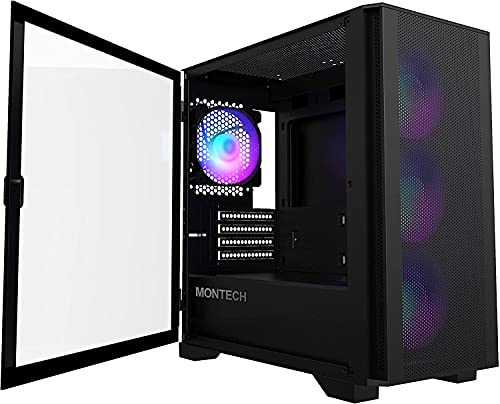
Montech AIR 100 — The compact complete
The AIR 100 argues that a small case at this price should be a complete case, and then proves it by fitting four fans and a real mesh front into a Micro-ATX tower that leaves its owner nothing essential to buy. Where compact budget cases traditionally economise by sealing the front and fitting a single fan as a gesture, the AIR 100 breathes like its larger relatives — because Montech’s whole design language is airflow-first, scaled down rather than watered down. The interior routes cables with a shroud and a rear channel sized honestly for the smaller board, and graphics card clearance covers the compact and mid-length cards that Micro-ATX builds actually use.
Its role in a household is specific and valuable: the bedroom gaming PC, the living-room machine, the student’s tower that must share a desk with textbooks. In those rooms its footprint is a feature the full towers cannot counterfeit, and its four fans mean the small box does not pay the usual compact tax in temperatures. The limits are the format’s own — no full ATX board, no flagship-length card, radiator ambitions kept to a modest size and verified twice — and they are stated here as plainly as in the hundred-dollar guide where this case also earns its place. A builder whose parts fit its geometry gets the shelf’s most complete small package; a builder whose parts do not should climb to the X3 Mesh rather than reach for a shoehorn.
- Form factor: Micro-ATX mini-tower
- Front panel: mesh
- Included fans: 4
- Motherboard support: Micro-ATX, Mini-ITX
- Layout: PSU shroud, compact cable channel
Strengths
- Four fans and mesh airflow at compact size and price
- Nothing essential left to purchase after the case
- Small footprint suits real desks and small rooms
Trade-offs
- Micro-ATX ceiling — no full ATX boards
- Long graphics cards need careful measurement
- Less future expansion than the mid-towers
Best for: Micro-ATX gaming and general builds in small spaces. Not suited for: ATX boards or the longest graphics cards.

Zalman S4 — The traditional tower
The S4 is this shelf’s elder: a compact ATX tower from a maker that was building cases when the century was young, executed in the traditional grammar — mesh-accented front, acrylic side window, power supply shroud, a fan arrangement sized for honest mid-range components. It does not chase the X3 Mesh’s feature fireworks, and that restraint is its character. What it offers instead is the accumulated correctness of a long production life: holes that align, edges that are finished, a layout that a first-time builder can assemble without the case inventing difficulties, and a price that sometimes drifts low enough to embarrass the shelf below.
Choose it when the build is a general-purpose or light-gaming machine and the buyer’s priority is a calm afternoon rather than a specification victory. Its airflow serves efficient processors and mid-range cards contentedly; hotter builds should take the Montechs’ mesh and fan counts instead. The acrylic window will not satisfy a buyer dreaming of glass, though it is lighter, tougher against accidents and honest about what it is. In a guide full of arguments, the S4 is the quiet one: the case for the builder who wants the traditional tower, done properly, from a name that answers its email. Shelves need citizens like that, and so do first builds.
- Form factor: Mid-tower ATX, compact
- Side panel: acrylic window
- Layout: PSU shroud, tidy cable routing
- Front: mesh-accented intake
- Character: traditional design, long production life
Strengths
- Predictable fit and finish from an established maker
- Tidy shrouded interior unusual in traditional budget towers
- Gentle building experience for first-timers
Trade-offs
- Airflow sized for modest components, not flagship heat
- Acrylic rather than tempered glass
- Feature set restrained beside the Montech pair
Best for: general-purpose and light-gaming builds wanting a calm, traditional tower. Not suited for: high-heat components or glass-panel showcases.
Cooler Master MasterBox NR400 — The airflow purist
Some designs teach a market its manners, and the NR400 taught the fifty-dollar shelf that a fine mesh front and an uncluttered interior were not premium features but basic decency. Its formula is minimalism with intent: a mesh face with a subtle optical-drive-era versatility in its family tree, a clean single-chamber interior, tempered glass on the windowed version, and thermals that reviewers measured with surprise when it appeared — because at this price, breathing this well was news. We cover it prose-only because its listings have rotated through sellers and regional variants for years, and the design’s lessons are more durable than any single listing.
As a purchase today, it rewards the buyer who finds a genuine unit from a reputable seller: verify the mesh is the fine open weave of the original, confirm whether the listing is the glass or solid variant, and expect a case whose cable management is competent rather than coddling — the NR400 assumes a builder who routes with intent. Its interior favours air cooling and modest radiators, its drive support reflects its era’s balance between spinning disks and solid state, and its whole bearing is that of a tool designed by people who measured temperatures before they styled panels. If the Montechs are this shelf’s generous hosts, the NR400 is its stern teacher, and a build that satisfies it will run cool anywhere.
- Form factor: Micro-ATX / compact tower class
- Front panel: fine mesh, airflow-first
- Side panel: tempered glass on windowed variant
- Character: minimal, thermal-led design
- Status: prose-only — verify seller and variant
Strengths
- Reference airflow behaviour for this price class
- Uncluttered interior that rewards tidy building
- Design honesty — nothing spent on theatre
Trade-offs
- Listings vary by seller, region and variant
- Cable management competent, not generous
- Drive and radiator support reflect its design era
Best for: airflow purists building compact systems. Not suited for: buyers wanting a guaranteed single listing to order blindly.
Fractal Design Focus G — The elder statesman
Fractal Design’s name is built on the hundred-dollar band’s restraint, and the Focus G is the brand’s long-running emissary to this shelf: a mid-tower with a mesh front section, two included front fans with white LED accents in its classic form, a large side window, and the finishing habits — panel fit, paint, general solidity — that make Fractal cases feel a class up in the hand. It has been sold for years with minimal changes, which at this price is a credential: designs that cut corners fatally do not get to become fixtures. We list it prose-only because its variants and colours rotate through listings, and the right purchase is a verified genuine unit rather than a specific link.
The Focus G’s compromises are its era’s. Cable management behind the tray is workable rather than spacious, the window in classic versions is acrylic rather than glass, and radiator support is a modest front-mount conversation rather than a headline. What it returns is composure: a case that looks designed rather than decorated, cools honestly through its mesh and twin fans, and carries a maker’s support network behind its panels and parts. For a builder whose taste runs to the Scandinavian end of the spectrum and whose components are mid-range, it remains the shelf’s most grown-up object — proof that at fifty dollars, restraint itself can be the feature.
- Form factor: Mid-tower ATX
- Front panel: mesh section with twin fans
- Side panel: large window (acrylic on classic versions)
- Character: Fractal restraint and finish
- Status: prose-only — variants rotate
Strengths
- Brand-grade finish and panel fit at entry price
- Twin front fans and mesh intake cool honestly
- Understated design ages gracefully in any room
Trade-offs
- Cable space behind the tray is merely workable
- Classic versions use an acrylic window
- Radiator support is modest and front-focused
Best for: taste-led builders with mid-range components. Not suited for: elaborate liquid cooling or maximal cable projects.
The Glass Showcase Archetype — The theatrical option
Every shelf has its theatre, and at fifty dollars the showcase case — glass front and side, a fan set chosen for its lighting, lines styled after cases three times its price — has improved enough to deserve a fair paragraph rather than a warning label. The better executions have learned the thirty-dollar mirage’s lesson: intakes of real area flank the glass, fans are included rather than merely supported, and the steel beneath has thickened to this shelf’s standard. For a build of efficient, cool-running components — the esports machine with a mid-range card is the type specimen — such a case can hold sane temperatures while delivering the lit, visible interior its buyer actually wants.
The archetype still demands a knowing buyer, and we list it prose-only because its quality spread is the widest on the shelf. Interrogate the intake path physically: where does air enter, in square centimetres, not adjectives? Confirm the fans are included and whether their lighting is motherboard-controllable or a fixed rainbow with a remote. Check that the glass is tempered and genuinely specified. A showcase that survives those questions is a legitimate aesthetic purchase; one that evades them is the mirage wearing this shelf’s clothes. Buy the view with your eyes open and your components cool, and the theatre earns its ticket.
- Form factor: Mid-tower, glass front and side
- Intake: side or flank vents — verify real area
- Fans: lit sets, inclusion varies by listing
- Cooling verdict: adequate for efficient components
- Status: prose-only archetype — interrogate the listing
Strengths
- The lit showcase look at a genuinely accessible price
- Better examples now include fans and real intakes
- Efficient, cool builds can live in it happily
Trade-offs
- Thermal ceiling below the mesh-front picks
- Quality varies more than any other type here
- Lighting control ranges from proper to fixed-rainbow
Best for: style-first builds with efficient components. Not suited for: high-heat cards or buyers who skip the intake questions.
How Do the Six Compare Side by Side?
| Pick | Size | Front | Defining idea |
|---|---|---|---|
| Montech X3 Mesh | ATX mid-tower | Full mesh | Most features per dollar |
| Montech AIR 100 | Micro-ATX | Mesh | Compact completeness |
| Zalman S4 | ATX mid-tower | Mesh-accented | Traditional dependability |
| Cooler Master NR400 | Compact tower | Fine mesh | Airflow purism |
| Fractal Focus G | ATX mid-tower | Mesh section | Finish and restraint |
| Glass showcase | ATX mid-tower | Glass, flank vents | The view, knowingly bought |
Five of the six fronts admit air as a first principle, and the sixth admits it as a negotiated settlement — that ratio is the fifty-dollar shelf in one observation. Compared with the thirty-dollar country, the basics here are trustworthy; compared with the hundred-dollar band, the polish and headroom are still to come. This is the shelf where a builder stops surviving the case and starts using it.
How Do You Build Well in a Fifty-Dollar Case?
The technique at this shelf is the professional sequence performed with slightly less forgiveness available, so order matters more than tools. Begin with the power supply and its cables routed before the motherboard lands, because rear cable space here is workable rather than generous and every cable placed early is a wrestling match avoided later. Fit the motherboard’s I/O shield with the respect this shelf still demands — many of these cases use the traditional push-in shield rather than a pre-installed one, and seating it fully, with its tabs clear of the ports, is the rite of passage that separates a finished build from a future rattle. Install the storage before the graphics card claims the interior’s working room, and route the front-panel connectors while your fingers still fit the space they live in.
Fan strategy at this price is about completing the pattern the case began. The stock arrangements — front intake, rear exhaust — are correct as far as they go; a single added top exhaust helps a hot graphics card more than any other single purchase, and it should be a fan whose bearing you will not hear at desktop speeds, because this shelf’s acoustics are decided by the worst fan in the box. Set curves by temperature with a gentle floor, keep the intake side filtered where filters exist, and resist filling every mount: beyond three or four fans, money buys noise more reliably than degrees. Close the rear panel before the first boot and again after it — a panel that closes cleanly both times is the build’s certificate that its cables were routed, not stuffed.
What Mistakes Do Buyers Make on the Fifty-Dollar Shelf?
The characteristic mistake here is not ignorance but misallocation: spending the shelf’s fifty on the showcase’s glass while the build’s graphics card deserved the mesh’s air — or, in mirror image, buying the purist’s mesh for a machine whose components run so cool that the theatre would have cost nothing. Match the case to the components’ heat and the room’s eyes, in that order. The second mistake is assuming the ladder’s rungs are sealed: buyers price a fifty-dollar case, then add two fans and a controller and discover they have spent seventy-five on a fifty-dollar specification, when the hundred-dollar band was waiting with the fans included and the steel to match. Price the finished enclosure, always.
Third, the shelf’s respectable names tempt buyers to skip the measuring they would do at thirty dollars — and clearances remain clearances: the long graphics card, the tall cooler and the thick radiator all still need their millimetres verified against the specific case. Fourth, Micro-ATX and ATX confusion claims a victim every season; the AIR 100’s compactness is a feature only if your board is actually Micro-ATX. Fifth, buyers forget the second build: this shelf’s cases can serve a refresh gracefully if the first purchase kept some headroom, and the X3 Mesh’s clearance and the Focus G’s standard layout age better than the tightest bargains. Buy the shelf’s generosity where it is offered, and the case will repay it at upgrade time.
How Quiet Is the Fifty-Dollar Shelf, Honestly?
Quieter than its price suggests, provided the airflow is real — the same law that governed the cheaper shelf, operating with better materials. A mesh front lets fans turn slowly, and this shelf’s fans, while not the refined bearings of the band above, are honest mid-grade units that behave at low speed. The acoustic ceiling here is set less by the case than by the components: a mid-range graphics card’s cooler will out-sing any case fan in this guide under load, which reframes the purchase — at fifty dollars you are buying a case that does not add its own voice to the machine’s, and all six picks meet that standard when their intakes are open and their curves are set with the gentle floor described in the build section.
The bedroom test is the practical measure. At the desktop, with curves set, every pick here can sit at the edge of audibility in a quiet room. Under a gaming load, expect a composed whoosh from the mesh picks and a harder-working note from the showcase, whose fans negotiate with glass. Steel thinness contributes one more sound worth knowing: panel resonance, a faint hum when a panel vibrates in sympathy with a fan or drive, cured by reseating the panel, adding a sliver of foam tape at a contact point, or moving the case off a hollow desk surface that acts as a sounding board. These are five-minute fixes, and knowing them converts the shelf’s acoustic compromises from verdicts into trivia.
How Should You Choose Between the $30, $50 and $100 Shelves?
Our three case guides form one ladder, and this middle rung is where most builders should honestly land — but the choosing deserves a method rather than a mood. Start with the components’ heat. Efficient parts — the renewed elder builds, office machines, esports systems with mid-range cards — can live happily on the thirty-dollar shelf when it is chosen with that guide’s interrogation, and the savings there are real money for storage or memory. Cross to fifty when the build becomes a gaming machine you will keep, when a first-time builder’s confidence is part of the budget, or when the fans and finish of the cheaper shelf would be upgraded anyway — because upgraded-anyway is the fifty-dollar shelf’s whole argument, pre-assembled.
Cross to a hundred when the horizon lengthens: when the case should serve two or three builds, when a flagship card’s length and heat enter the plan, when radiators grow past 240mm, or when the machine’s appearance in a considered room is itself a requirement. Notice that none of the crossings is about the case’s prestige; each is about time, heat or room. The fifty-dollar shelf wins the broad middle because most builds are single, mid-range and kept for a few years — precisely the service these six cases were designed to give. Buy the rung your build’s biography actually occupies, and the ladder stops being a temptation and becomes a map.
What Does Good Cable Management Look Like at This Price?
It looks like intention within limits. The rear channel on these cases is shallow — a place for flat, deliberate runs, not a void for excess — so the craft is in sequencing: power supply cables routed first and flat, front-panel wires gathered along the tray’s edge, the graphics card’s power cable given its own clean drop rather than a share of the main bundle. Tie points exist where the main runs travel on the better picks; use them in order and the rear panel closes with the soft click that tells you the build is finished rather than forced. The shrouds across this shelf do the visible half of the work, hiding the power supply and its cable surplus from the window, which is why even a modestly routed build in the X3 Mesh or S4 photographs like a tidier machine than it strictly is.
Two habits separate the shelf’s good outcomes from its bulging panels. First, dress cables for the components’ service, not just for the photograph: leave the graphics card’s connectors reachable, keep a fan cable’s slack where a future fan swap can find it, and never bury the front-panel wires beneath the power supply’s bundle, because the day you change a case switch or a board, you will excavate. Second, accept the shelf’s honest limit — a fully modular supply’s complete cable set will not all hide here, so store the unused cables in the case box rather than stuffing them behind the tray. A fifty-dollar case rewards the builder who brings a plan; it punishes, gently and in panel-bulge, the builder who brings only optimism.
What Does a Second Build in the Same Case Teach You?
Builders who reuse a fifty-dollar case report a consistent curriculum. The screws’ heads show their softness on the second tour — a magnetic screwdriver and a light hand stop being courtesies and become necessities, and the accessory bag you kept becomes the hero of the afternoon. The paint’s thinness declares itself at the corners and the rear, where cards and panels have rubbed; it is cosmetic, and owners divide into those who call it patina and those who quietly resolve to buy the hundred-dollar band next time. The fans are the real examination: a fan that began to rattle in year two will not have healed, and the second build is when the shelf’s owners most often fit one quality fan and understand, viscerally, what the next band’s money buys.
And yet the second build usually succeeds, which is the shelf’s defence. The layout is standard, the clearances were honest, the machine reassembles into a case whose quirks are known rather than discovered. Owners emerge with a precise, personal specification for their next case — the exact clearance, fan quality and cable room they lacked — and that education is worth money no review can refund. A fifty-dollar case, fully used across two builds, is not a compromise that failed to be a hundred-dollar case. It is tuition that also housed two computers.
What Should You Expect From Front Ports and Controls Here?
The front panel at fifty dollars has mostly grown up. Expect two USB-A ports of a current generation as the norm, a combined headset jack on the better designs, and power and reset buttons with distinguishable feels; USB-C remains the shelf’s occasional guest rather than its resident, appearing on the newest designs and absent from the elders, so buyers whose peripherals have standardised on it should check the specific pick rather than assume. Port placement follows the case’s intended home — top-edge ports for floor-standing towers, front-facing for desk pieces — and the fifty-dollar buyer, more likely than the thirty-dollar one to place the machine deliberately, should choose accordingly.
The daily dividend of this shelf is that these details stop being gambles. On the established makers’ cases — all six picks qualify — the front-panel cables are long enough to reach their headers without strain, the audio jack is free of the electrical whine that haunts the cheapest implementations, and the power button’s click will feel the same in year three as on day one. None of that photographs, and all of it is what the extra twenty dollars over the bargain shelf actually purchased. Judge a fifty-dollar case in the hand and at the front panel, not only in the thermal charts, and you will have understood the shelf the way its repeat buyers do.
How Do Dust and Filters Behave on This Shelf?
Better than below, short of above — the shelf’s motto applies to dust as to everything. Mesh-front cases here increasingly carry a filter layer behind the mesh or a removable front filter, and power supply intakes are usually filtered as a matter of course; side and top openings remain the unfiltered frontier, which is one more argument for the gentle positive-pressure fan arrangement described earlier, since air leaving through seams carries dust outward rather than inviting it in. The cleaning rhythm that suits this shelf is a filter rinse or brush every few months and an interior blow-out twice a year, adjusted honestly for pets, carpets and floor placement, the three great dust accelerants of domestic computing.
The reason to bother is thermal honesty over time. A mesh case’s celebrated temperatures are measured with clean filters; a year of neglect can close a fine mesh as effectively as a glass panel, silently promoting your fifty-dollar airflow case into the sealed category its buyer deliberately avoided. The picks here make the chore tolerable — fronts that unclip, filters that slide — and the two minutes that costs, quarterly, is the maintenance contract that keeps the shelf’s central promise. Set a reminder when you build the machine. Future-you, wondering why the fans sound busier than they did, will be grateful for the appointment.
How Big Is Too Big — Sizing the Case to the Room?
This shelf spans the AIR 100’s compact footprint to full ATX mid-towers, and the right size is the one the room ratifies. A mid-tower under a standard desk needs its height checked against drawer units and knee room; the same tower on a desk trades footprint for presence, and its glass side should face the room rather than the wall if the view was part of the purchase. Measure the intended spot with the cables’ exit space included — a case pushed flush against a wall strangles its rear exhaust and traps its own weather — and remember that doors, drawers and chair arms all negotiate with a tower’s corners in a lived-in room.
The compact picks exist because many rooms vote small, and this guide’s position is that their vote is legitimate rather than a compromise to outgrow. A Micro-ATX build in an AIR 100 on a student’s desk is not a lesser machine awaiting a tower; it is a correctly sized one, with its four fans and mesh front delivering the shelf’s full functional promise in the space available. Size the case to the room and the board, in that order, and let the expansion you genuinely foresee — not the expansion that flatters the imagination — arbitrate between the compact and the full-size picks.
What Does Lighting Look Like at Fifty Dollars?
Present, popular and — the detail that matters — divided into two species that listings blur. The first is fixed-effect lighting: fans that glow in a preset rainbow or a single colour, controlled by a button or a remote, owing nothing to the motherboard. It is cheerful, self-contained and entirely sufficient for a build that wants light as decoration. The second is addressable lighting on the standard motherboard header, which surrenders control to the board’s software and lets the case’s fans march with the rest of the system’s illumination. The X3 Mesh’s lit fans and the showcase archetype span this divide depending on variant, so the buyer’s question is specific: which species is in this listing, and does it match the motherboard’s headers and your software patience?
The shelf’s honest advice is to decide how much the light show matters before it decides for you. A build whose lighting is unified under one application looks intentional; a build with three competing rainbows looks like a fairground, and the difference is entirely in this purchasing detail. Also verify the off switch — software or button — because the most-used lighting setting in a bedroom machine, after the first month, is dark. Every pick here can be subdued; make sure the specific showcase listing you fancy can be too, and the theatre will remain a pleasure rather than a curfew negotiation.
A Worked Example — Specifying a Whole Build Around This Shelf
Abstract guidance lands better with a concrete machine, so consider the shelf’s archetypal build: a six-core processor of the current or previous generation, a mid-range graphics card of moderate length and power draw, sixteen or thirty-two gigabytes of memory, one solid-state drive, and air cooling throughout. Every pick in this guide houses that machine; the choosing is in the fit details. The card’s length clears the X3 Mesh and Focus G without a thought, and asks one measurement in the AIR 100. The stock fans in all six cool it without additions, the Montechs with headroom to spare. Its power supply, a standard ATX unit of sensible wattage, mounts in every pick, shrouded in most. Assembled in the X3 Mesh, the machine looks like it cost a band more; assembled in the NR400, it runs a degree or two cooler and says less about it.
Now stress the example at its edges, because edges are where shelves separate. Swap in a flagship-length card and the compact picks leave the conversation while the mid-towers hold. Add a 240mm liquid cooler and the radiator charts start voting, eliminating the tightest interiors. Plan a second build in three years and the standard-layout mid-towers pull ahead of the compacts on flexibility. The worked example’s lesson is the guide’s thesis in miniature: at fifty dollars the mainstream build is fully served by every pick, and the choice is made by your edges — the biggest card you foresee, the cooling you might adopt, the desk you actually own. Specify those honestly and the shelf cannot steer you wrong.
When Should You Skip This Shelf Entirely?
A ladder guide owes its readers the exits as well as the rungs, and this shelf has two honest ones. The first leads downward: if the machine is a utility build — the cupboard server, the office box, the spare-parts media PC — the thirty-dollar shelf’s honest citizens will house it for less, and the difference buys storage or memory that the machine will actually use. The fifty-dollar case’s fans and finish are wasted on a computer nobody opens, hears or looks at, and our cheaper guide exists to make that purchase confidently rather than by default. The second exit leads upward: if the build carries a flagship graphics card, a custom cooling plan, a decade-long service ambition or a room whose design the machine must honour, the hundred-dollar band’s clearance, steel and ecosystems are not indulgences but requirements, and buying this shelf first would only rent the lesson.
Between those exits stands the broad middle this guide serves, and its borders are worth restating plainly because they are the whole decision. One build, mid-range heat, a few years of service, a builder who values a calm afternoon and a tidy result: that biography belongs here, and within it the six picks divide by size, taste and airflow appetite rather than by worth. Read your build’s biography before its benchmark scores, choose the shelf that matches the life rather than the launch day, and the case — whichever rung it came from — will be the part of the machine you never think about again, which is the highest praise this component ever earns.
How Should You Maintain a Fifty-Dollar Case Across Its Service Life?
The maintenance contract at this price is short and mostly free. Quarterly, rinse or brush the intake filters and wipe the mesh faces, because this shelf’s thermals are promised on clean breathing. Twice a year, open the case and look — really look — at the fans’ blades, the power supply’s vent and the cable runs, evicting the dust felt that gathers where air slows. Once a year, reseat the side panels and check their screws for the softness this shelf’s hardware develops, replacing any screw that has begun to strip with one from the accessory bag you kept. None of this requires skill beyond patience, and all of it is the difference between a case that serves its second build and one that merely survives to it.
Keep the box if storage allows, because a case that must travel — a house move, a sale, a gift to a younger sibling starting their own first build — travels safely only in its original packaging, and thin steel forgives nothing in a removals van. A fifty-dollar case maintained this way commonly outlasts the estimate this guide gave it, which is the shelf’s last pleasant surprise: cared for, the ground floor of respectability turns out to have been built on decent foundations after all.
Final Recommendation
Start with the Montech X3 Mesh unless your build gives you a reason not to: it is the most complete case this money buys, and its mesh, fans and hinged glass set the shelf’s standard. Shrink the desk and the AIR 100 keeps the same completeness in Micro-ATX form. Prefer tradition and calm, and the Zalman S4 or Fractal Focus G will serve with a maker’s manners; prize airflow above all and hunt a genuine NR400. Take the showcase only with cool components and open eyes. Whichever you choose, you have crossed the threshold that matters — the case is now helping the build instead of taxing it — and the machine you assemble inside it will feel, every day, like it cost more than it did.
Frequently Asked Questions
Is a $50 case good enough for a gaming PC?
Yes — a real one, honestly chosen. A mid-range gaming build in the X3 Mesh or AIR 100 runs cool and quiet enough that the case disappears from the experience, which is all a case is asked to do. The conditions are the guide’s refrains: mesh or genuinely vented front, fans included, and components whose heat matches the design. Flagship cards with extreme power draw belong in the hundred-dollar band’s headroom.
What is the difference between $50 and $100 cases?
Polish, headroom and ecosystems. The hundred-dollar band thickens steel further, hinges its glass, widens radiator and card clearance, refines cable systems into covered channels, and adds USB-C and fan ecosystems as standard. The fifty-dollar shelf delivers the functional core — airflow, fans, tidy layout — without those finish layers. For most single builds the core is the substance; the band above is for keepers and showcases.
Should I choose Micro-ATX or ATX at this price?
Let the motherboard you own or prefer decide, then enjoy the consequence: Micro-ATX builds get this shelf’s best value in the AIR 100 and NR400 class, with smaller footprints and complete fan sets, while ATX opens the X3 Mesh and Focus G. Neither format limits a mid-range build’s performance; the difference is desk space, expansion slots and future board choice.
How many fans should a $50 case come with?
Two is the respectable minimum — front intake and rear exhaust — three is comfortable, and the Montech pair’s fuller sets are this shelf’s generosity outliers. Judge by inclusion, never by mounts: a case “supporting” six fans and shipping with one is a one-fan case with homework. One added quality fan beats three bargain fans for both temperature and temper.
Can I liquid-cool in a $50 case?
Modestly. A 240mm all-in-one is the realistic ambition in the roomier picks, mounted where the specific case’s chart allows and measured against your graphics card’s length, since front radiators and long cards compete for the same centimetres. Custom loops and thick radiators belong to the band above. Air cooling, by contrast, is this shelf’s native language and needs no apology.
Will a $50 case last through my next build?
Often, yes — that is the shelf’s quiet virtue. Standards change slowly, and a case with honest clearance and a standard layout can house a refreshed board and card without complaint. Treat the steel kindly, keep the accessory bag, and expect one to two builds of service rather than the hundred-dollar band’s decade. Buy with a little headroom and the second build is a pleasure, not a negotiation.
Related Guides
Compare the neighbouring shelves with our guides to the best $30 PC cases, the best $100 PC cases and the best 27 inch 1440p monitors.
Related guide: Best NZXT PC Cases
Related guide: Best Cooler Master PC Cases
Related guide: Best Clear Pc Cases
Related guide: Best Console Pc Cases
Related guide: Best Biggest PC Cases
Related guide: Best Blue PC Cases


