What's inside
- Key Takeaways
- Quick Picks
- How Did We Shortlist Routers That Truly Source Power?
- Why Does the PoE Budget Matter More Than the Port Count?
- Which Installations Actually Benefit From a PoE Router?
- Which PoE Routers Deserve a Closer Examination?
- How Do You Plan a PoE Installation Step by Step?
- Passive or Standards-Based Power — Which Are You Actually Getting?
- How Do These Six PoE Routers Compare on Ports and Power?
- Which of These Routers Fits Which Kind of Site?
- How Do You Troubleshoot a Powered Port That Will Not Behave?
- What Goes Wrong in PoE Router Installations?
- What Happens to Powered Devices When the Mains Fail?
- How Should You Read a PoE Listing Before Trusting It?
- Final Recommendation
- What Changes When the Router Lives Outdoors?
- Frequently Asked Questions
- Related Guides
As an Amazon Associate I earn from qualifying purchases. This post may contain affiliate links at no extra cost to you.
widgetverdict.com is reader-supported. When you buy through links on our site, we may earn an affiliate commission.
Where to buy: PoE-capable routers sell through a handful of networking storefronts on Amazon, and the six units gathered here are the ones whose own listing titles actually promise power output on their Ethernet ports — not merely power input, which is a different and much commoner thing.
The search for the best poe routers starts with a vocabulary trap. Hundreds of routers advertise PoE somewhere in their description, and most of them mean they can be powered by PoE — fed electricity through their own Ethernet cable. What installers, small offices and camera owners actually want is the opposite direction: a router that sources power, pushing electricity out of its ports to access points, IP cameras, phones and outdoor radios at the far ends of the cables. That distinction, PoE-out versus PoE-in, filters the entire market down to a short list dominated by MikroTik, with Ubiquiti’s EdgeRouter line and one Grandstream unit keeping it company.
The six routers below are that short list, and they share a personality: none of them is a friendly consumer box with a phone app and a setup wizard that holds your hand. These are configuration-first devices, mostly running MikroTik’s RouterOS or an equivalent professional interface, bought by people who would rather set a rule once than tap through a wizard monthly. In exchange for that learning curve you get something no consumer mesh kit offers — a single unit in the rack or cabinet that routes the network and powers the devices hanging off it, with no injector bricks cluttering the shelf. Every port count, PoE claim and interface named in this guide comes from the manufacturer’s listing title; where the title is silent about the detail that matters most — the total PoE power budget — this guide says so plainly, because that figure lives in the manufacturer’s documentation and decides real installations.
One product you may expect here is deliberately absent from the picks: TP-Link’s ER605 is a fine small-business router, but it has no PoE output, so it appears in this guide only as context — the benchmark plain router against which the extra cost and complexity of a power-sourcing unit should be justified. If your access points and cameras already have their own power supplies or a PoE switch sits in your cabinet, the honest advice is that you may not need a PoE router at all, and the sections below will help you reach that conclusion as readily as any other.
Key Takeaways
- PoE-out is the whole game: every pick here sources power on at least some ports, per its listing title — verify the total watt budget in manufacturer documentation before designing around any of them.
- MikroTik owns this niche, holding five of the six slots across indoor, outdoor and value designs.
- The PowerBox Pro is the outdoor specialist, with PoE output on four of its five gigabit ports plus an SFP socket.
- The hEX S (2025) is the modern indoor choice, adding a 2.5G SFP port and USB to the PoE formula.
- Grandstream’s GWN7003 is the port-count outlier — eleven wired ports with dual PoE outputs, aimed at small-office VPN duty.
- Passive versus active PoE is a safety question, not a detail: match the router’s output mode to what each powered device expects.
Quick Picks
| Pick | Badge | Why it earns its place |
|---|---|---|
| MikroTik PowerBox Pro | Outdoor power workhorse | Five gigabit ports with PoE output on four of them, plus SFP, in a unit built to live outside the rack. |
| MikroTik hEX S (2025) | Modern indoor all-rounder | A 2025 wired router with a 2.5G SFP port, five gigabit ports, PoE out, USB and a dual-core CPU. |
| MikroTik hEX PoE RB960PGS | The established cabinet choice | The long-running five-port gigabit RouterOS unit that defined this category for small installations. |
| MikroTik hEX PoE lite | Value route into PoE-out | Five ports with PoE output on ports two to five, passing through the same voltage the unit itself receives. |
| Ubiquiti EdgeRouter PoE (ERPoe-5) | The EdgeOS alternative | Five ports with Power over Ethernet from Ubiquiti’s EdgeRouter family for those outside the MikroTik ecosystem. |
| Grandstream GWN7003 | Port-heavy office gateway | Eleven wired gigabit ports and dual PoE outputs in a VPN router built for small offices. |
How Did We Shortlist Routers That Truly Source Power?
The filter was a single question applied without mercy: does the listing title itself state that the router outputs power on its Ethernet ports? That test eliminated most of the catalogue, including respectable routers that merely accept PoE input and a long tail of listings where power delivery turned out to live in a bundled switch rather than the router. Six units passed cleanly. Four carry the claim in so many words — output on named ports, or PoE output as a headline feature — and the remaining two are established models whose titles carry the PoE designation that their documentation backs with output capability.
Survivors were then spread across the real shapes of demand rather than ranked by novelty: an outdoor unit for mast and yard installations, two generations of indoor MikroTik cabinet routers, a value model for small camera counts, Ubiquiti’s representative for EdgeOS loyalists, and Grandstream’s many-ported office gateway. Specifications quoted below come only from the titles; anything a title leaves unstated — total power budget, per-port ceiling, passive or active mode on a given model — is flagged as a documentation check rather than filled in from memory. Readers planning the wired side of a larger property will find the routing-heavy end of this conversation continued in Best Industrial Routers, while those whose real problem is wireless coverage for a congregation-sized building should look at Best Wireless Routers for Churches after settling the power question here.
Why Does the PoE Budget Matter More Than the Port Count?
A router with four PoE ports and a modest total power budget can run four frugal devices or two hungry ones, and the difference between those outcomes is arithmetic, not opinion. Every powered device draws watts; access points sip, cameras with heaters and pan-tilt motors gulp, and outdoor radios sit somewhere between. The budget — the total wattage the router can source across all its output ports at once — is set by the unit’s power supply and internal design, and it is the figure the listing titles in this category almost never print. That is why this guide repeats one instruction in several voices: before designing an installation around any pick here, open the manufacturer’s documentation and confirm both the total budget and the per-port limit, then add up your devices with headroom to spare.
Voltage is the second half of the same lesson. Several MikroTik designs pass through the voltage they are fed, which makes the choice of power supply a design decision: feed the router a higher-voltage supply and its outputs offer that voltage to attached devices, within the limits the documentation sets. Feed it the wrong figure and devices at the cable’s end may refuse to start — or worse, accept power they were never built for. Passive PoE systems in particular place the burden of matching on the installer, unlike negotiated standards-based power where the devices agree terms before current flows. None of this is a reason to avoid the category; it is a reason to treat the first installation as an engineering exercise with a notebook, and to label every cable with the device and voltage it carries.
Which Installations Actually Benefit From a PoE Router?
The classic case is the small site with a handful of powered endpoints and no appetite for a rack of separate equipment: a farm office feeding two outdoor access points and a camera, a workshop with a yard radio and a door phone, a rental property whose network closet is a shelf. In those places a PoE router collapses three boxes — router, switch, injectors — into one, and every removed power brick is a removed failure point. The second classic case is the remote or awkward site: equipment mounted high, outdoors or in a separate building, where running one Ethernet cable is feasible and running mains power alongside it is expensive, regulated or both.
The honest counter-case is scale. Once a site grows past a handful of powered devices, a dedicated PoE switch fed by an ordinary router usually wins on budget per port, on manageability and on keeping routing and power faults in separate boxes. Nothing in this guide argues against that architecture; the PoE router is the right tool precisely where the device count is small and the value of consolidation is high. Buyers whose endpoints are mostly desk phones should also pause: a building wired for voice may be better served by the gateway thinking in Best Wireless Routers for VoIP Phones, where the FXS world meets the network at a different point.
Which PoE Routers Deserve a Closer Examination?
Five MikroTik designs and one Grandstream, spanning a decade of this niche’s development. Read each against the installation you actually have — device count, indoor or outdoor mounting, and your appetite for RouterOS — rather than against the newest model on the page.

MikroTik PowerBox Pro — Outdoor power workhorse
The PowerBox Pro exists for the installations that begin at a pole, a mast or the outside wall of a barn. Its listing title gives the recipe plainly: five gigabit Ethernet ports with PoE output on four of them, and one SFP port for a fibre or copper uplink module. That combination is a small site’s entire network in a single weather-minded enclosure — one cable run up the mast can feed the router, and the router in turn powers the radios, cameras and point-to-point links mounted around it. The RB960PGS-PB model code in the title is the identifier to match when ordering, since the PowerBox family includes lesser siblings with fewer capabilities.
RouterOS is the other half of the proposition. The same software that runs MikroTik’s carrier gear runs here, which means queues, firewall rules, VPN tunnels and scripting are all available on a pole in a field — and that the configuration burden is equally real. This is not the router for a first networking project; it is the router for someone who already knows why they want per-port control outdoors. The pass-through nature of MikroTik power design also puts the supply decision on you: the documentation’s stated budget and voltage window govern what the four output ports can collectively feed, and a mast-top camera with a heater will claim a large share of it. If your site is outdoors, powered and remote, the PowerBox Pro’s Amazon listing is the one to study first — with the MikroTik documentation open beside it.
- Ports: 5 gigabit Ethernet, per the listing title
- PoE output: on 4 of the 5 Ethernet ports
- Uplink: 1 SFP port
- Model code: RB960PGS-PB
- Total PoE budget: the listing title gives no wattage figure — check MikroTik’s documentation for the budget and voltage window before planning loads
- Software: RouterOS (manufacturer platform)
Strengths
- Four powered gigabit ports plus SFP in one outdoor-oriented unit.
- RouterOS depth brings carrier-style control to mast and yard sites.
- Consolidates router, switch and injectors at sites where shelf space is a pole.
Trade-offs
- Configuration assumes RouterOS fluency; there is no consumer-style wizard.
- Power supply choice shapes the output budget and sits with the installer.
- Four powered ports cap the design — larger camera counts outgrow it.
Best for: rural and outdoor sites powering a few radios or cameras from one elevated unit. Not suited for: an office needing a dozen powered desk devices, where a dedicated PoE switch carries the load more cheaply.

MikroTik hEX S (2025) — Modern indoor all-rounder
The hEX S in its 2025 revision — model code E60iUGS — is the indoor counterpart to the PowerBox’s outdoor act, and its title reads like a checklist of what a small modern installation asks for: a 2.5G SFP port for a fast uplink, five gigabit Ethernet ports, PoE out, a USB socket and a fast dual-core CPU to keep routing features from becoming the bottleneck. That SFP cage is the detail to dwell on. It accepts fibre or copper modules, which lets this compact box terminate a fibre run from another building or step up to a 2.5-gigabit uplink without replacing the router — the kind of flexibility that keeps a cabinet relevant as the site around it evolves.
Position it as the brain of a small office, a serious home network or a workshop: it routes, it powers the access point on the ceiling and the camera over the door, and its USB port opens the door to storage or a failover modem arrangement, subject to what RouterOS supports on this hardware — another documentation check worth the two minutes it takes. The PoE-out claim in the title is singular rather than enumerated, so the exact set of powering ports and their shared budget must come from MikroTik’s documentation before you promise it a ceiling full of access points. Treat the hEX S (2025) as the default indoor recommendation of this guide: the Amazon listing confirms the E60iUGS revision, which is the version whose specification this section describes.
- Model code: E60iUGS, 2025 revision
- Uplink: 2.5G SFP port
- Ports: 5 gigabit Ethernet
- PoE: PoE out stated in the listing title; powered-port set and budget need confirming in MikroTik’s documentation
- Extras: USB port; dual-core CPU
- Form: compact wired router — no wireless radios in the title
Strengths
- 2.5G SFP uplink gives the cabinet a growth path plain gigabit lacks.
- PoE out plus USB make it the most versatile indoor unit here.
- Current 2025 revision, so its support horizon runs longest.
Trade-offs
- Title does not enumerate which ports source power — documentation homework required.
- Wired only; wireless coverage needs separate access points.
- RouterOS learning curve applies in full.
Best for: small offices and serious home networks wanting one modern router that also powers an access point or two. Not suited for: a buyer expecting built-in Wi-Fi, since this wired design leaves every radio to separate hardware.

MikroTik hEX PoE RB960PGS — The established cabinet choice
Before the 2025 refresh, this was the MikroTik PoE router — the RB960PGS, a five-port gigabit RouterOS unit whose long production life has filled forums with configuration examples for nearly every scenario a small installation can invent. That accumulated public knowledge is a genuine feature. When a hEX PoE misbehaves at midnight, the odds are overwhelming that someone has already documented your exact symptom and its remedy; with newer hardware you may be the first to meet a quirk. The title is terse — five-port gigabit Ethernet router, Routerboard branding — and the PoE capability sits in the model name, backed by the manufacturer’s documentation for the port and budget specifics.
Choose it when the installation is conventional and indoor: a cabinet, a patch panel, a few powered endpoints with known appetites, and an administrator who values the deepest pool of community experience over the newest silicon. Its gigabit-everywhere design matches sites whose internet connection and internal traffic are gigabit-class, which remains most small sites. What it concedes to the newer hEX S is the faster SFP uplink and the general headroom of a current revision; what it concedes to the PowerBox Pro is the outdoor orientation. Between those two relatives it holds the middle ground of proven, indoor, unglamorous competence. The hEX PoE’s Amazon listing is the straightforward purchase it appears to be — just confirm the RB960PGS code so a lesser hEX variant does not arrive in its place.
- Model code: RB960PGS
- Ports: 5 gigabit Ethernet
- PoE: output capability carried in the model designation; per-port and budget figures sit in MikroTik’s documentation, not the listing title
- Software: RouterOS
- Positioning: indoor cabinet router, long production history
- Wireless: none — wired router only
Strengths
- Enormous base of documented configurations and troubleshooting experience.
- Five gigabit ports suit the classic small-cabinet layout.
- Proven hardware with a long, stable production run.
Trade-offs
- Older design; no 2.5G uplink path like the 2025 hEX S offers.
- Title is silent on power specifics, so documentation verification is essential.
- Same RouterOS fluency requirement as every MikroTik here.
Best for: administrators who prize documented, predictable hardware for a conventional indoor cabinet. Not suited for: a site planning a multi-gigabit fibre uplink next year, which will want the newer model’s SFP cage instead.
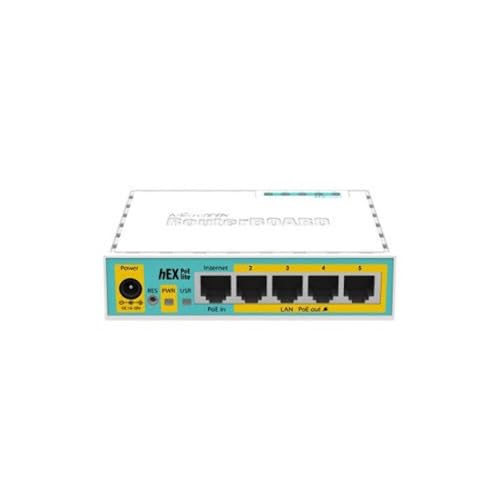
MikroTik hEX PoE lite — Value route into PoE-out
The hEX PoE lite — RouterBoard RB750UPr2 — is the honest budget entry in this family, and its listing title is admirably specific about the power design: a small five-port router with one USB 2.0 port and PoE output, where ports two to five can power other PoE-capable devices with the same voltage as applied to the unit. That last clause is the whole engineering brief in one phrase. The lite passes through whatever voltage feeds it, so the power supply you choose defines what your cameras and radios receive — elegant, economical, and entirely the installer’s responsibility to get right.
Scale your expectations to the name. This is the router for two or three modest powered devices: a pair of cameras over a shop door, an access point and an outdoor radio at a smallholding, a door phone at a clinic. Its ports and processor belong to an earlier, slower tier than the gigabit hEX models above, which matters if the same box must also route heavy internal traffic. Within its intended envelope, though, it delivers the category’s essential trick — route and power from one small box — at the gentlest entry cost in this guide, and RouterOS still provides the firewall and VPN depth of its bigger relatives. The hEX PoE lite’s Amazon listing states the pass-through design in full; read that sentence twice before choosing its power supply.
- Model code: RB750UPr2
- Ports: 5, with PoE output on ports 2–5
- Power design: outputs carry the same voltage as applied to the unit, per the listing title
- Extras: 1 USB 2.0 port
- Total budget: wattage is absent from the listing title — the MikroTik documentation figure governs any load plan
- Positioning: small installations, few powered endpoints
Strengths
- Four pass-through powered ports at the lowest entry point here.
- Explicit power design stated right in the listing title.
- RouterOS feature depth survives the budget cut.
Trade-offs
- Pass-through voltage makes power-supply selection a safety-relevant decision.
- Earlier hardware tier; heavy routing loads will find its ceiling.
- Budget wattage is modest by design — hungry devices need a bigger sibling.
Best for: a shop or smallholding powering two or three light endpoints from one inexpensive box. Not suited for: a camera array with heaters and pan-tilt motors, whose combined draw swamps a lite-class budget.

Ubiquiti EdgeRouter PoE (ERPoe-5) — The EdgeOS alternative
Not every administrator lives in MikroTik’s world, and the EdgeRouter PoE is the standing answer for those who run Ubiquiti’s EdgeOS instead. The title is brief — five-port router with Power over Ethernet — and the ERPoe-5 designation identifies the model within a family that network engineers have deployed for years in small offices, wireless ISP back offices and branch sites. Its presence in this guide is partly about ecosystem gravity: a site already managed through Ubiquiti tooling, already documented in EdgeOS configurations, gains little by importing a second vendor’s philosophy for the sake of one powered router.
Judged on its own terms, the ERPoe-5 covers the category’s core scenario — routing plus powered ports for a small set of endpoints — inside a mature, well-understood software environment with a deep bench of community documentation. The specifics of its power delivery, including which arrangements its ports support and the total budget, belong to Ubiquiti’s documentation, because the listing title confines itself to the headline claim; treat that lookup as part of the purchase, exactly as with the MikroTik models. Age is the consideration to weigh openly: this is a long-serving design, and buyers standardising a fresh site for many years should compare its support outlook against the 2025 MikroTik revision before committing. The EdgeRouter PoE’s Amazon listing suits the EdgeOS-committed buyer it was built for.
- Model code: ERPoe-5
- Ports: 5, with Power over Ethernet per the listing title
- Software: EdgeOS (manufacturer platform)
- Power specifics: budget and per-port arrangements are stated in Ubiquiti’s documentation rather than the listing title
- Positioning: small office and branch routing with powered endpoints
- Wireless: none — wired router only
Strengths
- Keeps Ubiquiti-standardised sites inside one software philosophy.
- Mature platform with years of deployment documentation behind it.
- Covers the route-and-power brief without ecosystem switching costs.
Trade-offs
- Long-serving design; weigh its remaining support horizon for new standardisation.
- Title gives no power budget, so verification homework is unavoidable.
- EdgeOS skills, like RouterOS skills, must already exist in the building.
Best for: sites already running EdgeOS that need powered ports without adopting a second vendor. Not suited for: a brand-new installation choosing a platform for the next decade, which should weigh the current-generation MikroTik first.

Grandstream GWN7003 — Port-heavy office gateway
Grandstream approaches this category from the office rather than the mast. The GWN7003’s title promises an eleven-port wired gigabit VPN router with dual PoE output ports, and that port count redraws the conversation: most small offices run out of sockets long before they run out of routing power, and an eleven-port chassis can absorb the printer, the storage box, the desk drops and the spare runs that lesser routers exile to an extra switch. The dual PoE outputs are deliberately modest — two powered ports for the ceiling access point and the door camera — because Grandstream expects the rest of the office to be ordinarily wired, ordinarily powered endpoints.
The VPN emphasis in the title signals its intended duty as a small-office or branch gateway, where encrypted links to a head office matter more than raw local throughput records. Grandstream’s management ecosystem will feel familiar to offices already running the brand’s phones or access points, and that continuity is a legitimate buying reason. As ever in this category, the title’s silence on the total PoE budget means the documentation decides whether your intended pair of powered devices fits — two ports does not automatically mean two hungry devices. For the office that wants one box at the centre of a tidy wired network, the GWN7003’s Amazon listing is the most conventional purchase on this page.
- Ports: 11 wired gigabit, per the listing title
- PoE output: dual PoE output ports
- Role: wired VPN router for small offices
- Power budget: no wattage in the listing title — Grandstream’s documentation carries the figure that governs the two outputs
- Wireless: none built in; access points are separate
- Ecosystem: Grandstream GWN family management
Strengths
- Eleven gigabit ports can retire a separate small switch entirely.
- Dual PoE outputs cover the classic access-point-plus-camera pairing.
- VPN-first design fits branch-office duty naturally.
Trade-offs
- Only two powered ports — power-hungry plans need a switch anyway.
- Office-bound design; no outdoor pretensions like the PowerBox Pro.
- Budget verification still required despite the tidy specification.
There is a subtler reason the GWN7003 belongs in a guide otherwise dominated by one brand: it demonstrates that the PoE router idea is not a single vendor’s quirk but a genuine product category with different centres of gravity. MikroTik’s centre is the network edge — masts, cabinets, remote sites, administrators who script. Grandstream’s centre is the office wall — telephony neighbours, branch VPNs, a manager who thinks in terms of sites and extensions. A buyer who reads only MikroTik forums could be forgiven for thinking the category begins and ends in Latvia; the GWN7003 is the reminder that the purchasing question is not which brand owns the niche, but which centre of gravity matches the building the router will serve. For an office already running Grandstream phones, that alignment compounds: one vendor’s door phones, desk phones, access points and gateway tend to be documented as a system, and support calls get shorter when the answer cannot be another manufacturer’s box.
Best for: small offices wanting one wired gateway with ports to spare and two endpoints to power. Not suited for: a yard or mast installation, where the outdoor MikroTik design is built for the weather this chassis never meets.
How Do You Plan a PoE Installation Step by Step?
Begin with an inventory, written down, of everything the router will power: device, location, cable length from the cabinet, and the power figure from that device’s own documentation — its worst-case draw, with heaters, motors and infrared illuminators running, not the idle number on the box. Add the figures. Then open the candidate router’s documentation and set two numbers beside your total: the total PoE budget and the per-port ceiling. Your total must sit comfortably under the budget — experienced installers leave a fifth to a quarter in reserve for the device nobody has bought yet and for the cold night when everything draws at once — and no single device may exceed its port’s ceiling. If either test fails, the design changes on paper: a hungrier router, a separate switch for the heavy endpoints, or local power for the one device that breaks the budget.
Next, decide voltages before touching hardware. On pass-through MikroTik designs the supply you fit defines the output, so the inventory’s voltage column governs the purchase: list what each endpoint expects, group them, and if two groups demand different voltages from one router, that is a design smell worth solving with a second power domain rather than a compromise voltage that suits neither. Choose the supply with the same headroom discipline as the budget, because the brick feeding a loaded PoE router carries the router’s own consumption plus every endpoint’s draw. Then plan the cable runs as power delivery, not just data: favour shorter, better-quality runs for the hungriest devices, keep the longest runs for the lightest loads, and test any run that approaches the standard’s length limit with the real device attached before the ladder comes out and the mounting becomes permanent.
Commissioning deserves its own unhurried hour. Bring endpoints up one at a time, confirming each boots, negotiates its link at the expected speed and draws a sane figure where the router reports consumption. Label both ends of every cable with the device name and the voltage it carries — the next person in that cabinet may be you in three years, at midnight, in the rain. Photograph the finished installation, save the router’s configuration file somewhere that is not the router, and write the budget arithmetic into the site notes. Installations documented this way are the ones that get fixed in minutes; the undocumented ones get rebuilt.
Passive or Standards-Based Power — Which Are You Actually Getting?
The PoE label covers two philosophies. Standards-based power, the negotiated kind defined by the IEEE 802.3 family, begins with a conversation: the sourcing equipment probes gently, the powered device identifies its class, and only then does full voltage flow. Plug a non-PoE laptop into such a port and nothing happens, which is exactly the point. Passive power skips the conversation. The port carries a fixed voltage whenever it is enabled, set by the supply and the design, and whatever is plugged in receives it. Passive systems are simpler, cheaper and common across the MikroTik world represented in this guide; they are also entirely dependent on the installer matching voltages correctly, every time, including the tired Friday-afternoon time.
Neither philosophy is superior in the abstract. Negotiated power suits mixed, changing environments — offices where unknown devices meet powered ports — because the system protects itself. Passive power suits fixed installations where the endpoints are known, labelled and unlikely to change: the mast with its two radios, the yard with its three cameras. The practical rule is to know which philosophy each port of your chosen router speaks before the first device is connected, a fact the listing titles do not volunteer and the documentation states plainly. Where a design mixes philosophies across one site, discipline in labelling stops being good practice and becomes the only thing standing between a new apprentice and a damaged radio.
How Do These Six PoE Routers Compare on Ports and Power?
| Pick | Total ports | PoE output | Uplink note | Software | Natural habitat |
|---|---|---|---|---|---|
| PowerBox Pro | 5 GbE + 1 SFP | 4 ports | SFP module slot | RouterOS | Outdoor, mast, rural |
| hEX S (2025) | 5 GbE + SFP | Stated; set per documentation | 2.5G SFP | RouterOS | Modern indoor cabinet |
| hEX PoE RB960PGS | 5 GbE | Per model designation and documentation | Gigabit | RouterOS | Established indoor cabinet |
| hEX PoE lite | 5 | Ports 2–5, pass-through voltage | Standard tier | RouterOS | Small, budget installations |
| EdgeRouter PoE | 5 | Stated in title; budget per documentation | Gigabit | EdgeOS | Ubiquiti-standardised sites |
| GWN7003 | 11 GbE | 2 ports | Gigabit, VPN-first | Grandstream | Small office gateway |
The table’s most honest column is the one full of documentation references. That is not evasion; it is the shape of this market, where titles advertise the existence of PoE output and datasheets carry the numbers that decide whether a design works. Any guide that printed confident wattage figures without that sourcing would be guessing with your installation as the stake.
Which of These Routers Fits Which Kind of Site?
Translate the shortlist into sites and the choices sharpen quickly. The hilltop relay or farmyard — equipment on a pole, weather on everything, a long cable between the building and the action — is PowerBox Pro territory, because the unit was designed to live where the devices are and to feed them from the same enclosure. The growing small office, with a fibre line arriving and a ceiling access point or two to feed, belongs to the hEX S (2025): its SFP cage takes the fibre story seriously, its processor has room for the firewall and VPN rules an office accumulates, and its current-revision status means the purchase is not already ageing. The established workshop or warehouse cabinet, run by someone who has configured RouterOS before and values an answer being one search away, is the original hEX PoE’s natural home.
The small retail unit — two cameras, a door phone, an access point, a tight budget and an owner who will pay an installer by the hour — is where the hEX PoE lite earns its name, provided the installer respects its pass-through voltage design and its modest budget. The site already standardised on Ubiquiti, perhaps a small wireless ISP or a business whose branches all speak EdgeOS, should not defect for one box: the EdgeRouter PoE keeps the fleet coherent, and coherence is worth more than any single specification in this guide. And the conventional wired office — desks, printer, storage, a branch VPN, eleven things that need sockets and only two that need power — is the GWN7003’s argument, the one chassis in this guide that counts ports the way offices actually run out of them. Notice what none of these sketches contains: a site with fifteen cameras. That site needs a PoE switch, and the router question there becomes a different guide’s problem.
How Do You Troubleshoot a Powered Port That Will Not Behave?
Start by separating power faults from data faults, because they masquerade as each other. A camera that appears and vanishes may be rebooting under load — its heater cycling on a cold evening, its draw spiking past a per-port ceiling — while the network configuration is blameless. The diagnostic order that experienced installers follow is dull and effective: confirm the device on a short cable at the cabinet, where power delivery is easiest; if it stabilises, the run is implicated, and length, cable quality or a damaged pair moves to the top of the list. If it misbehaves at the cabinet too, swap the port, then consult the budget arithmetic — a device added last month may have quietly consumed the headroom the whole design depended on.
Keep a written record as you test, because intermittent power faults are the easiest in networking to chase in circles. Note the ambient temperature when failures cluster; cold-weather correlation points at heaters and at cable runs contracting in outdoor fittings. Note firmware and configuration changes with the same suspicion you would give hardware, and export the router’s configuration before changing anything, so every experiment is reversible. The deepest habit is the simplest: change one variable at a time. A PoE installation has enough interacting quantities — voltage, budget, length, temperature, firmware — that shotgun troubleshooting manufactures new faults faster than it finds old ones.
What Goes Wrong in PoE Router Installations?
The budget miscalculation leads the field: ports counted, watts ignored, and a camera array that browns out on the first cold night when every heater switches on together. Total the draw of every powered device at its worst, not its idle, and hold headroom in reserve. Second comes voltage carelessness on pass-through designs — feeding a unit a supply whose voltage suits the router but endangers a 24-volt device at the cable’s far end. Label the supply, label the cables, and write the design down where the next person to open the cabinet will find it.
Cable length is the quiet third failure. Power fades along a run, and a device that boots happily on a ten-metre test lead may sulk at the end of ninety metres of thin cable; outdoor installs should be tested at full length before anything is mounted at height. Fourth is the assumption that PoE-out means standards-negotiated power on every port — several designs here are passive, delivering what they are configured to deliver whether the far end asked or not, which is precisely why non-PoE devices should never be plugged into a live passive port. Finally, buyers forget the router itself needs power sized for the whole design: the supply feeding a fully loaded PoE router carries the router plus every endpoint, and an undersized brick undermines the entire cabinet.
What Happens to Powered Devices When the Mains Fail?
A PoE router concentrates a site’s power fate in one supply, which cuts both ways during an outage. Put the router on a battery backup and every endpoint it feeds — cameras, access points, radios — stays alive for exactly as long as the router does, with no separate batteries scattered across ceilings and poles to maintain. That elegance is why small critical sites, a gate camera and the radio that reports it, are designed this way deliberately. The discipline it demands is honesty about runtime: the backup must be sized for the whole powered load, not merely for the router’s own modest draw, and the arithmetic from the planning section returns wearing a different hat. A backup sized by guesswork will carry the router proudly while the cameras it exists to feed drag the whole assembly down in the first minutes of a cut.
There is a second-order benefit worth planning for: graceful behaviour when power returns. A single sourcing point restarts the site in one place, endpoints booting as their ports energise, rather than a lottery of individual bricks recovering in whatever order the mains stabilise. Test the full cycle once — pull the supply, watch the runtime, restore it, confirm every endpoint rejoins without a visit to the cabinet — because the outage you designed for will not schedule itself around your availability. Sites where that test keeps failing are telling you the design wants a dedicated switch and a larger backup, and it is cheaper to hear that message during commissioning than during the first real storm.
How Should You Read a PoE Listing Before Trusting It?
Marketplace listings in this category reward a sceptical reading order. Start with the title, as this guide did, and locate the direction of power: output, out, sourcing, or a named set of powered ports. Titles that say only that a router is PoE-capable, PoE-powered or PoE-ready are describing the other direction until proven otherwise. Move next to the model code, because this category’s families reuse names across very different hardware — a hEX is not a hEX PoE, and a PowerBox is not a PowerBox Pro — and the code is the one part of a listing that cannot be spun. Sellers photograph the glamorous angle; the code tells you what is actually in the box.
Then hunt for the two numbers titles omit: total budget and per-port ceiling, in the manufacturer’s documentation for that exact code. While you are there, confirm the power philosophy — negotiated or passive — and, for pass-through designs, the voltage window the unit accepts and forwards. Check what the box includes, because a router shipped without its power supply transfers a real cost and a real compatibility decision to you. Finally, sanity-check the seller’s other listings: this category attracts grey imports and mislabelled variants, and a storefront that cannot keep its model codes straight in the title will not rescue you when the wrong unit arrives. None of this diligence is paranoia; it is the ordinary price of buying professional equipment through a consumer marketplace, and it takes less time than returning a mast router.
One last consideration belongs to anyone speccing for a site they do not personally occupy — a rental, a relative’s farm, a branch office three hours away. Every pick in this guide can be managed remotely once configured, and that capability should be set up, tested and documented before the site is left, including a recovery path that survives a broken tunnel or an expired credential. The difference between a PoE router as an asset and as a liability at an unattended site is rarely the hardware; it is whether the person who installed it left behind the configuration export, the budget arithmetic and the labelled cables that let someone else — or the same person, older and forgetful — restore order in one visit. Build that paper trail into the purchase price of whichever unit you choose, and the category’s considerable power stops being a risk and becomes what it was meant to be: infrastructure that quietly stays up. Choose the site first, the software philosophy second, and the specific box third — in this category, that order of decisions has never once produced a regretted installation.
Final Recommendation
Start indoors or outdoors. Outdoors, the PowerBox Pro is the category in its purest form and the default choice for masts, yards and rural sites. Indoors, the hEX S (2025) is the modern default — current revision, flexible SFP uplink, PoE out for the ceiling access point — while the original hEX PoE remains the connoisseur’s pick where documented predictability outranks novelty. The hEX PoE lite serves the small, careful installation honestly, the EdgeRouter PoE keeps Ubiquiti households in one ecosystem, and the GWN7003 answers the office that counts sockets before watts. Whichever you choose, do the wattage arithmetic from the manufacturer’s documentation before the first cable is crimped: in this category, the installations that fail were usually lost on paper, weeks before anything was plugged in. Do that arithmetic honestly, label everything you install, and a PoE router becomes the most quietly satisfying box in the building — one cable at a time, carrying both the conversation and the current.
What Changes When the Router Lives Outdoors?
Outdoor installation rewrites several indoor assumptions. Surge and lightning exposure stops being theoretical: a mast-top router sits at the end of long copper runs that act as collectors, and the site’s grounding and surge strategy deserve the same budget conversation as the router itself. Cable choice changes too — outdoor runs call for jacketing rated for ultraviolet exposure and burial or conduit where animals and strimmers roam, and every connector becomes a future corrosion site to be sealed, supported and given a drip loop so water travels down the cable rather than into the enclosure. Temperature swings test both the electronics and the power arithmetic, since a camera’s heater draw and a battery-backed supply’s behaviour both shift in deep cold.
Access is the other outdoor tax. Every configuration mistake at a mast-top PowerBox Pro is paid for in ladder time, which argues for bench-configuring the entire design indoors first — every endpoint connected on short leads, every rule tested, the configuration exported — and only then carrying the proven assembly up the pole. It also argues for remote management discipline: a documented way back into the unit that does not depend on the one tunnel you are about to reconfigure. Indoor cabinet routers forgive improvisation; outdoor ones invoice for it.
Frequently Asked Questions
What is the difference between PoE-in and PoE-out on a router?
PoE-in means the router itself can be powered through its Ethernet cable, which is handy for mounting it where no socket exists. PoE-out means the router supplies power to other devices through its ports. This guide is about the second kind; many products advertise the first in language designed to blur the distinction, so read titles for the direction of travel.
Can a PoE router replace a PoE switch entirely?
At small scale, yes — that consolidation is the category’s reason to exist. At larger scale, a dedicated switch offers more powered ports, a bigger shared budget and separation between routing faults and power faults. The crossover usually arrives somewhere beyond four to six powered endpoints.
Why do the listings not state the total PoE budget?
Because titles are marketing summaries, and the budget depends on the power supply fitted and the configuration chosen. The figure lives in each manufacturer’s documentation, and this guide flags it as a mandatory check for every pick rather than repeating unsourced numbers.
Is passive PoE dangerous for my devices?
It is unforgiving rather than dangerous when handled knowingly. Passive designs deliver a fixed voltage whenever the port is live, with no negotiation, so a device built for a different voltage — or a device expecting no power at all — can be damaged. Match voltages deliberately, and keep non-PoE equipment off live passive ports.
Why is the TP-Link ER605 only mentioned in passing?
Because it has no PoE output. It is a capable small-business router and a useful benchmark for what a plain router costs, but a guide to routers that source power cannot list a pick that does not. If your endpoints are powered another way, it re-enters the conversation on its own merits.
Should the router or a switch power a growing access-point fleet?
Let the count decide. Two or three access points sit comfortably within what the stronger picks here can source alongside their routing duties, and consolidating keeps a small site’s cabinet honest. Beyond that, the fleet deserves a switch sized for it — not because the router concept fails, but because access points multiply quietly over the years, each renovation and coverage complaint adding one more, and a design that began with headroom ends with a router running at its power ceiling every evening. Moving the fleet to a switch at that point is an upgrade, not a confession, and the router you bought for the small design remains an entirely good router.
Can one of these routers power a whole camera system?
A small one, deliberately designed, yes — two to four cameras with modest appetites is the heartland of the PowerBox Pro and hEX PoE. A large one, no: camera counts in double figures, especially with heaters and motorised mounts, belong on a dedicated PoE switch whose budget and port count were designed for the job. The inventory-and-arithmetic method in this guide’s planning section tells you which side of that line your design sits on.
What power supply should I buy with a pass-through model?
The one whose voltage matches your hungriest design constraint and whose capacity covers the router plus every endpoint at full draw, with headroom. On pass-through designs the supply defines the output voltage, so it is a system component, not an accessory; buy it from the router manufacturer’s compatibility guidance rather than from a bargain bin, and record its specification in the site notes.
Do I need RouterOS experience before buying a MikroTik?
You need either the experience or the willingness to acquire it. RouterOS rewards study with unusual depth for the price, and the community documentation is extensive, but there is no appliance-style wizard. A first networking project is better served by a consumer system; a second one is where these units start to make sense.
Related Guides
Continue with Best Industrial Routers for harsher environments, Best Wireless Routers for Churches for large-hall coverage, and Best Wireless Routers for VoIP Phones for the voice side of the network.
Related guide: Best Routers for Basements
Related guide: Best Routers with Port Aggregation


