What's inside
- Key Takeaways
- Quick Picks
- How We Chose These Picks
- How Wide Is Wide Enough for Two Screens?
- Stands, Arms or the Bare Surface: How Should Two Screens Sit?
- What Does a Second Screen Do to Cables, Power and Heat?
- How Do You Align Two Screens So Your Neck Forgives You?
- What About a Third Screen, or One Turned Sideways?
- How Do Two Screens Change a Room’s Light and Layout?
- The Six Dual Monitor Desks, Reviewed One by One
- Side by Side: Where Do Two Screens Actually Sit on Each Desk?
- How Do You Set Up a Dual Monitor Desk in the Right Order?
- What Mistakes Do Dual Monitor Buyers Keep Making?
- Final Recommendation
- Frequently Asked Questions
- Related Guides
As an Amazon Associate I earn from qualifying purchases. This post may contain affiliate links at no extra cost to you.
**[widgetverdict.com] is reader-supported. When you buy through links on our site, we may earn an affiliate commission.**
Where to buy: each desk in this guide is sold on Amazon, and the pick names in the Quick Picks table and in the detailed reviews link straight to their listings. Two screens punish guesswork, so before ordering, tape your monitors’ combined width and your preferred viewing distance onto the desk you own now, and compare that lived measurement with the dimensions on the listing page.
The best dual monitor computer desks are designed around a simple, unforgiving piece of geometry: two screens side by side occupy a width, demand a depth, and dictate where your head can be. Get any of the three wrong and the second monitor — bought to make work easier — becomes the thing your neck complains about, angled too sharply, sitting too close, or crowding the keyboard off the surface’s centre. A desk that suits dual monitors is not merely a wide desk. It is a desk whose width, depth and screen provision were thought through together, for a user who sits in one place and turns their head through a working day.
The six desks below attack that geometry from six directions. Two are electric standing desks, one of them an extra-deep 55 by 32 inch design explicitly built to hold a 49-inch ultrawide alongside dual screens. One is a 66-inch L that parks the screens in a corner’s deep point. One carries a full monitor stand across 60 inches. One is a 94.5-inch two-person desk that gives each user a screen territory of their own. And one compact standing desk is built around C-clamp monitor mounts, assuming your screens will float on arms rather than stand on the surface. Between them they cover every honest way two screens get arranged at home.
One principle runs through the whole guide and is worth stating before the picks: the second screen should extend your workspace, not your head’s rotation. Desks and stands that keep both screens close to the centre line, at a distance your eyes can take in with glances rather than turns, are doing the real ergonomic work. Width is how they buy that geometry; depth is how they pay for it; the reviews below keep returning to both numbers because they matter more than any finish or light strip.
Key Takeaways
- Dual monitor comfort is geometry: combined screen width, desk depth and viewing distance decide it before any feature does.
- The Grandder’s 55 by 32 inch top is the depth champion, sized for a 49-inch ultrawide plus dual screens, with a 176 lb capacity.
- The ErGear and HUANUO bring two screens to 48-inch standing desks, the HUANUO adding drawers and C-clamp mount compatibility.
- The Korfile’s 66-inch L uses the corner’s depth to keep two screens at a natural distance.
- The Furologee’s full monitor stand lifts both screens and returns the surface beneath them to the keyboard.
- The SEDETA at 94.5 inches is the shared-desk answer: two people, two screen setups, one very long surface.
Quick Picks
| Pick | Badge | Why it earns its place |
|---|---|---|
| Grandder 55×32 Extra-Deep Standing Desk | Best for ultrawide plus dual screens | A 32-inch-deep electric top that fits a 49-inch ultrawide with dual screens, rated to 176 lbs with anti-collision. |
| ErGear 48×24 Electric Standing Desk | Best compact standing desk | Four memory presets and a stable steel frame carrying two screens on a 48 by 24 inch top. |
| Korfile 66 Inch L-Shaped Gaming Desk | Best corner arrangement | A reversible 66-inch L with drawers, outlets, LED and a CPU stand, built for multiple monitors. |
| Furologee 60 Inch Gaming Desk | Best with a full monitor stand | Sixty inches with a full-width monitor stand, four drawers, a file cabinet, printer space and power. |
| SEDETA 94.5 Inch Two-Person Desk | Best for two users | A 94.5-inch double desk with eight drawers, shelves, a power strip with USB and a monitor stand. |
| HUANUO 48 Inch Standing Desk with Drawers | Best for monitor arms | Electric height, two drawers, four presets and C-clamp mount compatibility for floating screens. |
How We Chose These Picks
Screen geometry came first. We calculated each desk against the pairings people actually run — two mainstream monitors side by side, an ultrawide flanked by a portrait screen, a laptop beside a monitor — and favoured desks whose width and depth keep both screens inside a comfortable head-turn. Depth scored unusually heavily in this guide, because a deep desk is the cheapest ergonomic upgrade a dual setup can get: every extra inch of depth is an inch of viewing distance, and viewing distance is what lets two screens be read as one workspace.
Load and stability came second, and they are not the same thing. Two screens, their stands or arms, a tower and the day’s clutter add up, and a desk that carries the weight but trembles under typing has solved the wrong problem. The standing desks here state capacities of 176 lbs, which matters because a rising desk lifts its screens with it; wobble at standing height is amplified by leverage, so frame stability was read as a first-order feature for the ErGear, Grandder and HUANUO rather than a footnote.
Third, we scored the screen provision itself. A full monitor stand, as on the Furologee and SEDETA, lifts both screens to a shared height and frees the surface below; C-clamp compatibility, as on the HUANUO, assumes arms and rewards them; the corner geometry of the Korfile uses the L’s deep point as a natural screen bay. Each approach suits a different owner, and the reviews say which. Power and storage were scored as supporting acts — a dual setup doubles the cable farm, and desks with outlets, drawers and CPU stands keep that farm from eating the surface the screens were bought to extend.
Finally, we kept the field honest about who each desk excludes. A 94.5-inch desk is a wonderful answer for two people and an absurd one for a studio flat; a 48-inch standing desk is a fine home for two modest screens and a poor one for two large ones. The exclusions are stated in every review, because a dual monitor desk bought against the wrong room fails more completely than a single-screen desk ever can.
A final judging note concerns time. Dual setups evolve faster than single ones — a matching second screen becomes a larger main screen, a laptop joins, an arm replaces a stand — and a desk that only fits today’s exact pairing becomes tomorrow’s constraint. We favoured desks with geometric slack: depth that can absorb a bigger screen’s stand, width that can re-deal its territories, edges that can accept an arm when the stands retire. The cheapest dual monitor desk is the one bought once, and slack is what makes once possible.
How Wide Is Wide Enough for Two Screens?
Do the arithmetic with your own monitors, because the answer lives in their bezels. Two mainstream screens side by side span roughly the mid-forties in inches before any angling, and angling — which you will do, because flat screens in a flat line force the outer edges too far from the eyes — adds effective width while pulling the pair’s centre closer. A 48-inch desk holds that pairing with discipline: screens near the back edge, keyboard centred, nothing else wide allowed. A 55- to 60-inch desk holds it with a life around it: the notebook, the phone, the speaker pair. The 66-inch L and the 94.5-inch double desk change the category entirely, giving the second screen its own territory rather than a share of the first’s.
The ultrawide complication deserves its paragraph. A 49-inch ultrawide is, in workspace terms, two screens fused, and pairing it with a second display — the Grandder’s stated party trick — produces a span that only depth can civilise: the wider the array, the further back it must sit to stay readable. That is why the Grandder’s 32 inches of depth matter more than its 55 of width, and why shallow desks with ultrawides feel like sitting in the front row of a cinema.
Laptop-plus-monitor pairings play by kinder rules. The laptop’s screen is smaller, sits lower, and usually plays a supporting role — chat, mail, the call window — while the main monitor takes the work. Almost any desk in this guide hosts that pairing comfortably, including the 48-inch pair, and laptop users should spend their worry on screen height instead: a laptop beside a monitor is a pairing of two different eye levels, and a stand or arm that lifts the smaller screen toward the larger one’s line pays for itself in neck comfort within a week.
Stands, Arms or the Bare Surface: How Should Two Screens Sit?
On their own stands is the default and, on a deep enough desk, a respectable one. Factory stands cost nothing extra and keep each screen independently adjustable; their price is footprint — two stand bases eat a meaningful share of the surface’s back strip, and the strip behind the keyboard is where notebooks and documents want to slide. Desks with generous depth forgive this; shallow desks make you feel it daily.
A full monitor stand, the Furologee and SEDETA approach, trades that strip for a shelf: both screens rise together onto one platform, the surface beneath becomes a tunnel for the keyboard when it is not in use, for documents, for the laptop closed and docked. The stand’s fixed height is its limitation — your eye level must suit the platform’s, or a riser joins the stack — but for two matching screens it is the tidiest geometry in this guide, and the only one that returns surface instead of consuming it.
Arms are the maximalist answer: screens float, angles become independent, the surface is wholly yours. They demand two things from a desk — a back edge that takes a clamp or a grommet, and the stiffness to carry two levered loads without trembling. The HUANUO states its C-clamp compatibility in its title, which is the manufacturer answering the first demand in writing; the standing desks’ stated capacities answer the second. If your dual setup is headed toward arms eventually, buy the desk that admits it now, because retrofitting a clamp onto a desk whose edge cannot take one is a small, recurring misery.
What Does a Second Screen Do to Cables, Power and Heat?
It doubles the farm. Two power leads, two display cables, the tower or dock that feeds them, plus everything a desk already carried — and display cables are the inflexible kind, thick and length-limited, that dictate where the tower must live whether you like it or not. Desks that plan for this, with outlets at the surface like the Korfile’s, a power strip built into the SEDETA, or a CPU stand that parks the tower where the cables can reach, save their owners the specific frustration of a setup that works only in one exact arrangement of furniture.
Heat is the quieter consequence. Two screens and a tower working hard warm the air behind the desk, and a desk pushed flush against a wall in a small room becomes the warm corner of that room by afternoon. Leave the desk a hand’s width off the wall — the cables will thank you too — and prefer arrangements, like the corner L, that let air move around the screens’ backs. None of this is dramatic; all of it is the difference between a dual setup that feels engineered and one that feels accumulated.
Standing desks add motion to the equation. Every cable on a rising desk needs slack for the full travel, and dual setups have twice the cables to plan. Do that planning at the desk’s highest position, bundle the permanent runs together so they rise as one umbilical, and the daily sit-stand rhythm will never tug a display cable out of its port mid-meeting — a small disaster that has ended more presentations than any software ever written.
How Do You Align Two Screens So Your Neck Forgives You?
Start with the primary screen’s centre, because the whole arrangement hangs from it. Your chair and keyboard face the primary display squarely; its centre sits at or fractionally below eye level, close enough that its top edge does not ask your neck to tilt. The secondary screen then angles inward from the side of your non-dominant hand, its inner edge near the primary’s frame, tilted like a book opened toward you. That satellite arrangement — one screen faced, one screen glanced at — is the posture that survives eight-hour days, and it is worth more than any symmetry in the photographs.
Height matching is the detail owners fudge and necks notice. Two screens whose top edges differ by inches force a small vertical head movement into every glance between them, thousands of times a week. Stands, arms or a shared platform — the Furologee’s full stand exists precisely to guarantee this match — should bring the pair’s tops level, and their brightness and colour temperature should be matched in the same sitting, because eyes read a mismatched pair as two rooms and tire shuttling between them. Spend the twenty minutes once; the alternative is spending them daily, in discomfort’s currency.
Distance completes the triangle. Both screens should sit at roughly the same distance from your eyes — the angled satellite’s centre a touch closer is natural and fine — and far enough that the pair reads as one landscape rather than two billboards. This is where desk depth pays its dividend, and why the Grandder’s 32 inches and the corner geometry of the Korfile keep returning in this guide’s argument: they buy distance without asking the user to perch the screens at a cliff’s edge. Measure your distance with an outstretched arm as the rough gauge, then trust your eyes over the tape.
What About a Third Screen, or One Turned Sideways?
The portrait screen is the dual setup’s most useful mutation. A monitor rotated vertical holds a document, a codebase, a chat column or a feed at a reading shape those things actually have, and it costs less width than a third landscape screen while adding more genuine territory. Desks absorb it kindly — a portrait display’s footprint is narrow — provided the main pair’s arrangement leaves it a flank. The wider desks here, the Furologee and the corner-wrapping Korfile, host a portrait satellite without negotiation; the 48-inch pair will ask something else to leave.
A true third landscape screen is a bigger claim, and honesty requires saying it changes the desk category. Three across spans beyond what 48 and most 55-inch desks hold at sane angles; the array wants the Grandder’s depth to stay readable or the SEDETA’s sheer length to stay possible, and even then the outer screens become glance-territory, consulted rather than worked in. Many three-screen owners discover the third display is really a status screen — dashboards, feeds, the call that watches them — and that a smaller, cheaper display serves that role better than a third matching panel. Buy the third screen for a job, not for the silhouette.
Laptop-as-third-screen deserves its sentence too, because it is the most common real-world array: two monitors for the work, the laptop open below or beside for the call and the chat. Its screen sits lower than the pair, which the neck tolerates precisely because it is a glance-screen, visited in seconds. A small stand that lifts it partway toward the pair’s line is the kindest upgrade, and it costs a fraction of any other change in this section.
How Do Two Screens Change a Room’s Light and Layout?
Two screens are two windows that never close, and they rearrange a room’s light whether the owner plans it or not. Daylight first: a dual setup placed facing a window turns both screens into mirrors by afternoon, while a setup with the window at its side lights the user’s face and leaves the panels readable — the corner desks complicate this happily, since an L offers two walls and therefore two chances to get the window’s angle right. Measure the light at the hours you actually work, not at the hour the desk is assembled, because glare is a timetable problem disguised as a furniture problem.
Artificial light follows the same logic at night. Two bright panels in a dark room are the room’s dominant light source, washing the user’s face in screen-glow and making every other lamp feel like an intruder. A soft light behind the screens — the bias principle this guide’s sibling categories also preach — restores the balance, and desks with stands or depth give that light somewhere to live. The Korfile’s LED, in this field, is the built-in version of the idea; on the plainer desks a simple lamp behind the pair achieves the same mercy.
Layout is the last consequence, and it is social as much as optical. A dual setup is a room’s anchor: it is wide, it glows, it faces a chair that faces it, and everything else in the room arranges around that fact. In shared rooms, that argues for the corner and the wall placements this guide’s picks assume, and against the heroic mid-room island that only studios can afford. Place the pair so the room can still be a room when the screens sleep, and the setup will be loved at hours when it is not even on.
Shared living rooms add one more negotiation: the television. A dual setup and a TV in the same room compete for the same wall and the same evening light, and the households that manage both best treat the desk as a zone with borders — screens dark by switch when the room turns social, the chair turned away, the setup’s glow governed rather than ambient. The desks here were not chosen as room dividers, but the corner and wall placements they assume make that zoning natural, which is one more reason the dual monitor question is always partly a room question.
The Six Dual Monitor Desks, Reviewed One by One

Grandder 55×32 Extra-Deep Standing Desk — Best for ultrawide plus dual screens
The Grandder is built around the most demanding screen array in home computing: a 49-inch ultrawide with dual screens alongside, a span that defeats ordinary desks not on width but on depth. Its answer is a 55 by 32 inch electric top — the 32 inches of depth are the headline, pushing that enormous array back to a distance where it reads as a workspace instead of a wall — with a 176 lb capacity, two memory presets and anti-collision protection for the moments the desk rises toward a shelf or a windowsill it should not meet.
Depth this generous changes the whole surface economy. The screens sit at the back third; the middle third holds keyboard and documents at honest distances; the front third is the first genuinely spare surface a multi-screen user has owned, because nothing needs to crowd forward. Oak finish softens what could have been an intimidating slab of equipment into something a home office can host. For ultrawide owners who have spent years too close to their own screen, this desk is less an upgrade than a correction.
The standing mechanism has to lift the heaviest load in this guide, and the stated capacity plus anti-collision read as the manufacturer understanding that. Two presets suit a sit-stand pair of positions; users who want a third, perching height should note the ErGear and HUANUO carry four. And the honest boundary: a conventional two-monitor setup does not need 32 inches of depth, and buyers with ordinary pairings will pay for room they use as a document shelf. Buy the Grandder for the array it names; it is a specialist, and proud of it.
- Overall size: 55 x 32 inches, electric standing
- Screen provision: fits a 49 inch ultrawide plus dual screens
- Capacity: 176 lbs, anti-collision
- Memory: 2 presets
- Finish: oak
Strengths
- Thirty-two inches of depth civilises the widest home screen arrays.
- Capacity and anti-collision suit a heavy, valuable load in motion.
- Spare surface survives even after a three-screen layout lands.
Trade-offs
- Two presets where rivals offer four.
- Depth this large needs a room that can give the desk its floor space.
- Ordinary two-screen setups will not use what they are paying for.
Best for: an ultrawide owner adding side screens for trading, timelines or sprawling workspaces. Not suited for: a modest two-screen setup in a small room that needs floor space more than depth.

ErGear 48×24 Electric Standing Desk — Best compact standing desk
The ErGear makes the restrained version of the standing argument: a 48 by 24 inch black top on a stable steel frame, electric adjustment with four memory presets, a 176 lb capacity and an emphasis on easy assembly. Two mainstream screens fit its width with the discipline described earlier — back edge, centred keyboard, no sprawl — and in return the desk fits rooms, and budgets of floor space, that the larger standing desks cannot enter.
Four presets at this size is a thoughtful specification. A household sharing the desk gets a sitting and standing height each; a solo user gets sit, stand and two experiments. The steel frame’s stability matters disproportionately here because dual screens at standing height are two lever arms waiting for a tremor, and the ErGear’s pitch — stable frame, serious capacity — is aimed exactly at that physics. Easy assembly is the third leg of the argument: standing desks have a reputation for punishing builds, and a compact one that goes together kindly will actually be in use the day it arrives.
Its boundaries are the dimensions themselves. Twenty-four inches of depth puts screens closer than the Grandder’s arrangement, best answered with a monitor arm when the budget allows; forty-eight inches of width ends the conversation about a third screen or a sprawling document habit. Within those boundaries, though, this is the dual monitor standing desk for the normal room and the normal pair of screens — the one most readers of this guide should probably buy, precisely because it refuses to be a specialist.
- Overall size: 48 x 24 inches, electric standing
- Frame: stable steel frame
- Capacity: 176 lbs
- Memory: 4 presets
- Finish: black
Strengths
- Four presets serve shared desks and position experiments alike.
- Stable frame keeps two screens calm at standing height.
- Compact footprint and easy assembly suit real rooms and real weekends.
Trade-offs
- Depth of 24 inches rewards a monitor arm over factory stands.
- No drawers or built-in outlets are named in the listing title.
- Width discipline is mandatory; sprawl has nowhere to go.
Best for: a two-screen worker in a normal-sized room who wants sit-stand without a giant desk. Not suited for: an ultrawide-centred array that needs depth above all.

Korfile 66 Inch L-Shaped Gaming Desk — Best corner arrangement
The Korfile uses the oldest trick in this guide: the corner itself. Sixty-six reversible inches wrap two walls, and two screens angled into the corner’s deep point gain viewing distance from the geometry rather than from the desk’s depth — the corner section is deeper than any straight desk of this width, so the screens sit back while the keyboard rests in the angle and the return wing takes the tower, the documents or the second machine. Storage drawers, power outlets, LED light and a CPU stand complete a specification that reads like a checklist of what a corner battlestation needs.
The CPU stand is worth pausing on, because in a corner the tower’s placement decides the cable farm’s whole map. Parked on its stand within the L’s shelter, the tower sits where display cables can reach both screens without strain and where its heat rises into the corner’s air rather than into your knees. The reversible layout means the return — and therefore the tower, the drawers and your writing side — can be built on the side your room’s door and window dictate, a flexibility that fixed corner desks make you live without.
Gaming styling and LED light come with the territory, and the desk’s work credentials survive them: the surface is the surface, and it is large. The costs are the corner’s own — a measured, honest corner is required, assembly is a substantial project, and the desk will dominate a small room rather than furnish it. For the user whose work and play share two screens in a corner that can take 66 inches, this is the arrangement that feels inevitable once it is built. Readers whose corner must also house the household printer can compare the shelf-led layouts in Best Computer Desks with a Printer Shelf, where the second wing works for paper instead of play.
- Overall size: 66 inches, L-shaped, reversible
- Storage: storage drawers
- Power and extras: power outlets, LED lights, CPU stand
- Screen provision: built for multiple monitors
- Finish: black
Strengths
- Corner geometry gives two screens natural distance and angle.
- CPU stand parks the tower where cables and heat behave.
- Reversible build lets the layout follow the room’s light and door.
Trade-offs
- Demands a true, measured corner and a long assembly.
- Black gaming styling is a strong flavour for a work room.
- The corner section tempts clutter into its least reachable point.
Best for: a gamer-worker running two screens in a corner that can take a 66-inch wrap. Not suited for: a desk that must sit mid-wall in a room without a free corner.
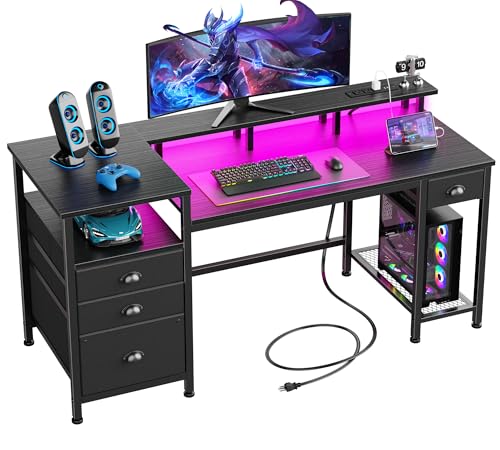
Furologee 60 Inch Gaming Desk — Best with a full monitor stand
The Furologee’s defining object is its full monitor stand: a platform across the 60-inch desk that lifts both screens onto one level and hands the surface beneath them back to you. That returned surface is the desk’s real feature — the keyboard slides under when the desk becomes a writing table, documents live under the screens’ sightline, a docked laptop disappears into the tunnel — and it arrives alongside four drawers, a fabric file cabinet, a printer space, a shelf, LED lights and a power outlet, the fullest supporting cast in this guide.
Two matching screens on a shared stand is the tidiest dual geometry available without arms, and for the large population whose second screen mirrors the first, the stand’s fixed height is a fair trade for the alignment it guarantees. The printer space widens the desk’s brief beyond screens: this is a whole home-office system in one purchase, aimed at the buyer setting up a room from empty rather than upgrading a piece at a time. The file cabinet and drawers absorb the paperwork and supplies that such a room generates in its first year.
Judge the compromises clearly. A stand fixes screen height, so users whose eye level disagrees with the platform will add risers or wish for arms; fabric storage organises rather than archives; and 60 inches of full-featured desk is a large, many-part assembly. But as a single purchase that answers screens, storage, printing and power together, nothing else here is as complete — coders in particular, whose second screen usually holds documentation, should weigh this desk against the plainer surfaces in Best Coding Desks, where the same two-screen life is arranged without the stand.
- Overall size: 60 inches
- Screen provision: full monitor stand
- Storage: 4 drawers, fabric file cabinet, shelf, printer space
- Power and extras: power outlet, LED lights
- Finish: black
Strengths
- Full stand aligns two screens and returns the surface beneath them.
- Storage bench covers files, supplies and a printer in one desk.
- Surface power keeps the doubled cable farm on a short leash.
Trade-offs
- Stand height is fixed; your eye level must agree with it.
- The largest parts count here makes for a long build.
- Fabric cabinet suits a home office’s paper, not an archive.
Best for: a from-empty home office setup that wants screens, storage and printing in one desk. Not suited for: an arm-mounted setup that needs an open, clampable back edge instead of a stand.

SEDETA 94.5 Inch Two-Person Desk — Best for two users
The SEDETA reframes the dual monitor question entirely: not two screens for one person, but a screen setup each for two people, along 94.5 inches of double desk. Eight drawers, storage shelves, LED lights, a power strip with USB and a monitor stand spread across a T-shaped black frame, and the arithmetic is the argument — each user gets a territory wider than most solo desks in this guide, with storage and power of their own, in one piece of furniture that keeps a shared room coherent.
Shared desks fail in predictable ways, and the specification reads like answers to them. Power is the first failure — two setups, one wall socket, a daisy chain of resentment — answered by the built-in strip with USB. Storage is the second, answered by eight drawers that let each side keep its own clutter in its own territory. The monitor stand running the desk’s length lifts both users’ screens to a shared sightline, which also gives the room a designed look that two mismatched desks shoved together never achieve. Couples working from home, siblings in a shared study, a parent and teen doing parallel homework: the audience is anyone whose household has two screen workers and one room.
The boundaries are physical and final. Ninety-four and a half inches needs a wall that can take it and a doorway the parts can travel through; the desk defines the room it enters, permanently, and neither user can adjust a height or a layout the other does not share. Solo buyers should also resist the temptation of the sprawl: one person on a two-person desk tends to occupy it like weather, spreading across both territories and gaining nothing but distance. For its stated purpose, though, the SEDETA is the only honest answer in the guide — two real workstations, not one wide compromise.
- Overall size: 94.5 inches, two-person double desk
- Storage: 8 drawers, storage shelves
- Power and extras: power strip with USB, LED lights, monitor stand
- Frame: double T-shaped design
- Finish: black
Strengths
- Two complete workstations with individual storage and shared power.
- Built-in strip ends the two-setups-one-socket conflict.
- One coherent piece of furniture instead of two desks colliding.
Trade-offs
- Needs a 94.5-inch wall and a room it may dominate.
- Neither user can adjust height or layout independently.
- A solo user will sprawl rather than benefit.
Best for: two people working or studying side by side in one room, every day. Not suited for: a single user hoping extra width alone will organise them.

HUANUO 48 Inch Standing Desk with Drawers — Best for monitor arms
The HUANUO is the standing desk for people whose screens will not be standing on it. Its title states C-clamp mount compatibility outright — the back edge is built to take monitor arms — and pairs that with electric height adjustment, four preset heights, two drawers and two hooks in a 48 by 24 inch black top. The design assumption is a modern dual setup done properly: two screens floating on arms, angles independent, surface clear, and the desk rising and falling beneath them through the day.
Arms plus a standing desk is the combination that most rewards careful setup and most punishes careless cabling, and the HUANUO’s details lean into the careful side. Four presets give the position rotation real range; the drawers — rare on a compact standing desk — swallow the desk’s own clutter so the clear surface the arms create is not immediately re-colonised by chargers and notebooks; the hooks take the headphones and the bag that otherwise live on the floor or the surface’s corner. It is a small desk that has thought hard about where everything goes.
Its limits mirror the ErGear’s dimensions with an arm-shaped twist: 48 inches of width with two armed screens is comfortable, with two standing screens is tight, and the 24-inch depth is precisely why the arms matter — they return the depth the stands would have eaten. Buyers not planning arms should take the ErGear’s simplicity instead. Buyers who are, get the only desk here that says so on the label, and a standing frame that treats their dual setup as the main event rather than an afterthought.
- Overall size: 48 x 24 inches, electric standing
- Screen provision: C-clamp mount compatible for monitor arms
- Storage: 2 drawers, 2 hooks
- Memory: 4 preset heights
- Finish: black
Strengths
- Stated C-clamp compatibility removes the arm-fit gamble.
- Drawers on a compact standing desk keep the cleared surface clear.
- Four presets support a genuine sit-stand rotation.
Trade-offs
- The design assumes arms; without them the depth feels rationed.
- Arms and their cables need slack planning for the desk’s travel.
- Two drawers is organisation, not storage for a paperwork habit.
Best for: a dual-arm setup that wants electric height and a clear surface in a compact footprint. Not suited for: two large screens on factory stands, which need width and depth instead.
Side by Side: Where Do Two Screens Actually Sit on Each Desk?
| Pick | Size | How the screens sit | Storage | Power |
|---|---|---|---|---|
| Grandder | 55 x 32 in | On the deep top, ultrawide plus dual | None stated | Not stated in title |
| ErGear | 48 x 24 in | On the top, own stands | None | Not stated in title |
| Korfile | 66 in L | Angled into the corner | Drawers | Outlets, LED |
| Furologee | 60 in | On a full monitor stand | 4 drawers, file cabinet | Outlet, LED |
| SEDETA | 94.5 in | On a monitor stand, one setup each | 8 drawers, shelves | Strip with USB, LED |
| HUANUO | 48 x 24 in | Floating on clamped arms | 2 drawers | Not stated in title |
The middle column is the one to shop by. Screens on a deep top suit the ultrawide array; screens on their own stands suit the straightforward pair; screens in a corner suit the room that has one; screens on a stand suit matching monitors and a tidy instinct; screens split between two people suit a household, not a person; screens on arms suit the user who adjusts everything and accepts the setup hour that adjustability costs. Match your screens’ sitting style first, and the desk usually chooses itself from the remaining rows.
One pattern in that table is worth naming before the setup advice: the desks divide into those that decide the screens’ position for you — the stands, the corner, the clamp-ready edge — and those that hand you a surface and trust you with it. Neither philosophy is superior, but they suit different owners. Buyers who want the geometry solved should shop the first group without apology; buyers who change their arrangement with every project should shop the second, and accept the setup evenings as the price of freedom.
How Do You Set Up a Dual Monitor Desk in the Right Order?
Order matters because each step constrains the next. Begin with the empty desk in its final position, a hand’s width off the wall, and the power plan settled — strip mounted or outlets located — before any screen leaves its box. Place the tower or dock second, where the display cables’ lengths say it must live, and only then set the primary screen on your axis, centred on the chair’s position rather than the desk’s. The secondary screen follows, angled as a satellite, and the keyboard comes last among the hardware, centred on the primary screen and not on the desk, a distinction that looks pedantic and feels like wisdom by the second day.
Cabling comes before the fine-tuning, while every back panel is still reachable. Route the permanent runs along the desk’s back edge, bundle the two displays’ cables as one family, and leave the daily cables loose. On a standing desk, raise it to full height before tying anything down, then run the travel test — full range, slowly, watching every cable — because a cable that survives the test in setup week will survive the year, and one that fails will choose a meeting to announce itself.
Fine-tuning is the last step and the longest: a week of small adjustments, honestly. The secondary screen’s angle will want two tries; the brightness match will want a dark evening to judge; the chair’s height will want revisiting once the screens settle. Resist declaring the setup finished on day one. A dual monitor desk is tuned like an instrument, in small corrections against real work, and the owners who accept that week are the ones whose setups still feel inevitable a year later.
What Mistakes Do Dual Monitor Buyers Keep Making?
The first is measuring the screens and not the setup. Monitors get angled, stands have depth, arms need clearance behind the desk, and a pairing that fits on paper collides in the room. Tape the full footprint — stands, angle, cable bend and all — before ordering, and leave the desk its hand’s width from the wall.
The second is centring the join instead of the work. Two screens tempt buyers to sit at the seam, turning the head equally both ways all day; most workflows have a primary screen, and the chair, keyboard and primary display should share one axis, with the secondary screen angled in as the satellite it is. Desks cannot fix this for you, but width in the right place — the Furologee’s stand, the corner’s bay — makes the correct arrangement the easy one. The third mistake is forgetting that a second screen doubles the light in a dark room: two bright rectangles at night are a fatigue source, and matching the screens’ brightness to each other and the room matters as much as their positions.
The fourth is buying a standing desk and cabling it sitting down. Cables measured at sitting height become guitar strings at standing height, and the first rise either unplugs something or teaches the desk’s anti-collision a lesson. Cable at full height, bundle the rise into one umbilical, and test the travel before the screens’ positions are final. Buyers who would rather skip assembly altogether, at the cost of the standing and stand features, will find the folding alternatives in Best No-Assembly Computer Desks — a different trade, honestly labelled.
Final Recommendation
Most dual monitor households should start at the ErGear: two screens, four presets, a stable frame and a footprint that fits a real room. Step up to the Grandder when an ultrawide enters the array, because depth is the only cure for width that wide. Take the Korfile when the room offers a corner, the Furologee when the setup is being built from empty and wants its stand and storage in one purchase, the HUANUO when arms are already the plan, and the SEDETA when the second setup belongs to a second person.
Whichever desk arrives, spend the first evening on geometry rather than admiration: primary screen on your axis, secondary angled as a satellite, brightness matched, cables slack at full height. Two screens reward that evening for years, because a dual setup’s comfort is not bought with the desk — it is tuned into it, one honest measurement at a time.
And if the arithmetic still will not settle, settle it empirically: tape the outline of the candidate desk on the floor, put your current desk’s screens at the taped width and depth for one working day, and let your neck vote. Geometry questions about your own body are answered best by your own body, and a roll of tape is the cheapest expert in this entire guide.
Frequently Asked Questions
Can a 48-inch desk really hold two monitors?
Yes, with mainstream screens, provided the arrangement is disciplined: screens at the back edge, angled slightly inward, keyboard centred on the primary display. The ErGear does it on the surface; the HUANUO does it more comfortably on arms, which return the stands’ footprint to the desk. Two large screens, or an ultrawide pairing, outgrow 48 inches and belong on the wider picks.
Is an ultrawide better than two monitors?
For seamless work across one canvas — timelines, wide spreadsheets, code with many panes — the ultrawide wins and has no seam. For window discipline, two monitors win: full-screen applications sit naturally one per display, and a call can own one screen while work owns the other. The Grandder exists for those who refuse to choose and run an ultrawide with a side screen.
Do I need a monitor arm for a dual setup?
No, but arms solve three problems at once: they return the stands’ surface, they set each screen’s height and angle independently, and they push screens to a chosen distance on shallow desks. They need a clampable edge and a stiff desk, which is why the HUANUO’s stated C-clamp compatibility matters. A full monitor stand, as on the Furologee, is the simpler middle path for matching screens.
How much weight do two monitors put on a standing desk?
Two screens with stands or arms, a laptop or tower share, and the day’s equipment add up faster than intuition suggests, which is why the standing desks here state their capacities — 176 lbs on the Grandder and ErGear. Stay comfortably inside the stated figure, centre the load over the frame’s legs rather than at one end, and the rise will stay smooth and level.
Where should the second screen go if I mostly use one?
Angled at the side of your secondary hand, close enough to glance at without a full head turn, holding the things you consult rather than work in: chat, mail, documentation, the call window. Sitting at the seam between two screens is the arrangement to avoid; your primary screen, keyboard and chair should form one straight line, with the second screen as a satellite to that axis.
Do both monitors need to match?
Matching pairs are easier on the eyes — one brightness curve, one colour temperature, tops that level without shims — and the shared-stand desks here, the Furologee and SEDETA, are built on the assumption of a matched pair. Mismatched pairs work fine in the satellite arrangement, where the second screen is glanced at rather than read for hours; just match their brightness by eye on a dark evening and accept that colour-critical work belongs on the better panel.
Is a standing desk worth it with two monitors?
For users who rotate positions, yes — with two conditions. The frame’s stated capacity must cover the whole rising load with margin, as the 176 lb capacities of the Grandder and ErGear do, and the cables must be planned at full height so the pair can travel daily without tugging. A dual setup makes a standing desk heavier and its cable plan less forgiving, but it also doubles the posture problem that standing exists to relieve, which is why the combination is so common in practice.
Can a dual monitor desk work in a bedroom?
Yes, and most of them do — the discipline is about light and shutdown rather than space. Choose a desk whose footprint the room can absorb, the 48-inch standing pair here being the bedroom-sized end of the field, and arrange the whole setup on one switch so two glowing panels do not keep the room’s sleep on standby. A corner L like the Korfile can also serve as the room’s divider, giving the work zone a border the bedroom half will respect.
Can I use a television as my second monitor?
You can, and for glance-work — dashboards, calls, reference video — a modest TV on a desk or stand serves honestly. The cautions are ergonomic rather than technical: televisions are built to be watched from across a room, so their size at desk distance can overwhelm the pair’s geometry, and their stands rarely level with a monitor’s top edge. If the TV is the second screen you already own, arrange it as the satellite, keep the real monitor as your axis, and let the wider desks here carry the span.
Related Guides
When the second screen’s neighbour is a printer rather than a document, the shelf-first layouts in Best Computer Desks with a Printer Shelf apply the same width logic to paper. Buyers who need a desk working today rather than tuned over a weekend can look at Best No-Assembly Computer Desks. And for the keyboard-first view of a two-screen day, Best Coding Desks judges these surfaces by the session rather than the screens.
Related guide: Best Computer Desks With Hutch
Related guide: Best Classroom Computer Desks


