What's inside
- Key Takeaways
- Quick Picks
- How We Chose These Picks
- What Does RGB Lighting Actually Do for a Setup?
- How Much Desk Does a Lit Setup Need?
- Can an RGB Desk Behave in a Shared Room?
- App, Remote or Button: How Should Desk Lighting Be Controlled?
- What Else Belongs in a Lit Setup Besides the Desk?
- How Does a Lit Desk Age, and How Do You Keep It Looking New?
- The Six RGB Desks, Reviewed One by One
- The RGB Lineup Compared: Light Control, Motors and Surface
- How Do You Plan a Lit Setup’s Power and Cables From Day One?
- What Mistakes Do RGB Desk Buyers Keep Making?
- Final Recommendation
- Frequently Asked Questions
- Related Guides
As an Amazon Associate I earn from qualifying purchases. This post may contain affiliate links at no extra cost to you.
**[widgetverdict.com] is reader-supported. When you buy through links on our site, we may earn an affiliate commission.**
Where to buy: all six desks in this guide are listed on Amazon, and each pick’s name links to its listing from the Quick Picks table and from its detailed review. RGB desks are bought on two specifications at once — the desk and the light — so read the listing for both: the surface dimensions for your screens, and the lighting’s control method, because an app, a remote and a single button produce three very different daily experiences.
The best RGB desks understand something their critics miss: the light is not decoration pasted onto a desk, it is part of how a modern setup feels to sit at after dark. A soft glow behind the screens softens the contrast your eyes work against at midnight. A colour wash across the wall turns a bedroom corner into a place with an atmosphere, which matters in rooms that are bedroom, office and leisure space in rotation. And for streamers and gamers, the lit desk is quite literally part of the picture — the background the camera sees, the identity of the setup in every photograph. Judged as furniture with a lighting system, rather than as a desk with a gimmick, the category makes sense.
The six picks below span the category’s honest range. One is a 47-inch desk whose RGB is app-controlled, with the accessories of a complete small battlestation. One is a 63-inch electric standing flagship with dual motors and a 352 lb capacity, aimed at gamers, streamers and home studios who want the light and the lift in one machine. Between them sit a compact 48-inch desk with a monitor stand and drawers, a 59-inch design built around showcasing the PC itself, a wide 55-inch T-shaped battlestation surface, and a 48-inch L-shaped corner desk with power and storage. Every one of them lights up; they differ in what the desk underneath the light is for.
A word of calibration before the reviews: RGB will not make a bad desk good, and this guide scored the desks first and the lighting second. Surfaces, frames, stands and storage were judged as they would be in any desk guide, and the light was then judged on control — how precisely you can set it, dim it, and turn it off — because the difference between a lighting system and a light show is whether it can be quiet when you need it quiet.
Key Takeaways
- RGB earns its place as bias light at night, atmosphere in multi-use rooms, and background identity for streamers — control is what separates a system from a show.
- The FLEXISPOT E6G CyberX is the flagship: 63 inches, dual-motor three-stage lift, 352 lb capacity, RGB built into a serious standing desk.
- The HLDIRECT’s app-controlled lighting is the most adjustable here, in a 47-inch Z-frame desk with cup holder, hook and mouse pad.
- The Korfile 48-inch pairs its LED with a monitor stand, CPU stand and drawers — the fullest compact specification.
- The 59-inch desk’s PC showcase stand treats the lit computer as part of the display, with triple drawers hiding the clutter.
- The ODK brings RGB to a reversible 48-inch L with outlets, shelves and a tower stand for corner setups.
Quick Picks
| Pick | Badge | Why it earns its place |
|---|---|---|
| HLDIRECT 47 Inch RGB Gaming Desk | Best light control | App-controlled RGB in a 47-inch Z-frame desk with cup holder, headphone hook, cable management and a mouse pad. |
| FLEXISPOT E6G CyberX RGB Standing Desk | Best RGB flagship | A 63-inch dual-motor, three-stage standing desk rated to 352 lbs, with RGB for gamers, streamers and studios. |
| Korfile 48 Inch Gaming Desk with LED | Best compact all-rounder | LED, a power outlet, monitor stand, CPU stand and drawers in a reversible 48-inch carbon-fibre-finish desk. |
| 59 Inch RGB Gaming Desk with PC Showcase Stand | Best for showing the build | A reversible 59-inch desk whose showcase stand displays the PC, with triple drawers for cables and clutter. |
| GTPLAYER 55 Inch Gaming Desk with LED | Best wide battlestation | Fifty-five inches of T-shaped, carbon-fibre-surfaced desk with LED, a full mouse pad and a headphone hook. |
| ODK 48 Inch L-Shaped Gaming Desk with LED | Best RGB corner desk | A reversible 48-inch L with LED, outlets, a monitor stand, open shelves, a side bag and a PC tower stand. |
How We Chose These Picks
The desk came first in the judging, deliberately. We scored surface size against the setups these desks will actually carry — two screens is the category’s home load — and frames against the tremor test that typing and gaming both apply. A lit desk that wobbles is a disco in the worst sense, so Z-shaped and T-shaped frames and the standing desk’s dual-motor build were read as structural claims and weighed as such. Storage and screen provision came next: stands that lift the monitors above the glow line, drawers and bags that keep the lit surface as clean as the lighting wants it to look.
The lighting itself was judged on control and placement. Control, because a system you can dim to a whisper for a midnight work session and raise for a stream is a tool, while a system with three flashing modes is a toy with an off switch. App control scored highest, as on the HLDIRECT, because it puts colour, brightness and effects in the same device that runs the rest of the setup’s life. Placement, because light aimed at the wall behind the screens does ergonomic work as bias lighting, while light aimed at the user’s eyes does the opposite — the reviews note where each design’s glow lives.
Third, we scored the supporting details that lit setups specifically need. Cable management matters more when a power brick for the lighting joins the farm; cup holders and headphone hooks, present on several picks, keep liquids and gear off a surface whose whole point is how it looks; a showcase stand, on the 59-inch desk, acknowledges that in this category the PC itself is a lit object that wants displaying rather than hiding under the desk.
Finally, room diplomacy. Most RGB desks live in shared or multi-use rooms, and a desk whose light can go fully dark, whose styling reads as furniture at noon, survives in those rooms longer than one that performs around the clock. The reviews are honest about which picks can behave in daylight and which are committed to the bit.
One more lens shaped the final order: what the lighting costs the desk around it. Every lit system draws power, adds a cable or a brick to the farm, and asks for a control habit — an app opened, a button found in the dark. Desks that folded those costs into their design, with built-in outlets to feed the plant or cable management to hide its wiring, scored as complete systems; desks that left the glow’s logistics to the owner scored as surfaces with potential. In a category sold on atmosphere, logistics are what the second month feels like.
What Does RGB Lighting Actually Do for a Setup?
Three jobs, in descending order of seriousness. The first is bias lighting: a gentle wash of light behind the screens that reduces the contrast between a bright display and a dark room. Eyes working against that contrast tire faster, and anyone who has finished a late session with an ache behind the eyes has met the problem the glow solves. The light does not need to be colourful to do this job — a soft, steady tone does it best — but it needs to be behind the screens and dimmable, which is why placement and control outranked colour counts in the choosing.
The second job is atmosphere, and it should not be sneered at. A desk in a bedroom corner that can shift the corner’s mood — warm for the evening’s reading, cool for work, coloured for play — gives a multi-use room a way to mark its own transitions. People who work and live in the same twelve square metres feel the absence of those transitions keenly; a lighting system that provides them cheaply and instantly is doing psychological work that a lamp change cannot match.
The third job is display. For streamers, the lit desk is set design: it reads on camera, it brands the setup, it makes a spare-room stream look produced. For builders, a showcase stand plus RGB turns the PC from a beige obligation under the desk into the centrepiece the build’s own lighting always wanted it to be. Neither job is frivolous to the people whose work or hobby it is, and the picks aimed at them — the FLEXISPOT for studios, the 59-inch desk for builders — are reviewed with that seriousness.
How Much Desk Does a Lit Setup Need?
More than the same setup unlit, for a subtle reason: light reveals arrangement. A cluttered surface under a glow looks staged-badly, and the accessories that keep a lit desk looking intentional — screens on a stand, the tower in its place, cables managed out of sight — all consume geometry. The 47- and 48-inch picks here answer with accessories and stands that impose order at small sizes; the 55-, 59- and 63-inch picks answer with raw room. Choose based on your honest tidiness: the smaller desks will organise you, the larger ones will forgive you.
Two screens remain the category’s centre of gravity. At 47 inches, the HLDIRECT carries a dual-monitor setup with discipline; at 55 and above, the pair breathes. The L-shaped ODK plays the corner’s trick, angling the screens into the deep point where the glow pools most effectively against two walls — a corner is, not coincidentally, the best light trap in any room, and an RGB desk in a corner performs above its specification for exactly that reason.
Depth deserves its mention here too. A lit strip at the desk’s back edge needs the screens in front of it and the wall behind it, in that order, with enough depth that the glow spreads rather than stripes. Shallow desks pushed against the wall give a hard line of light; deeper arrangements diffuse it. If your room forces a shallow setup, favour the desks whose lighting is integrated along the surface’s edge rather than a single back strip, and test the effect at night before declaring the setup finished.
Can an RGB Desk Behave in a Shared Room?
Yes, if two conditions hold: the light can be fully off, not merely dimmed to a standby glow that keeps a bedroom awake, and the desk’s daylight styling can pass as furniture. Most of this guide passes both tests — carbon-fibre-look tops and black frames read as ordinary gaming desks at noon, and the farmhouse-adjacent rooms of the world have made their peace with that aesthetic. The negotiation to have with housemates is about the evening, not the object: a setup that glows through a film night in a shared living room is a setup that will be discussed, and the app- and preset-controlled systems are the ones that can compromise gracefully, dropping to a warm dim that reads as a lamp rather than a performance.
Bedrooms impose the strictest rule: sleep. Any lighting system with a standby draw that keeps an LED breathing after the PC sleeps should be on a switched strip you control, and the desks with built-in outlets make that easy to arrange — the whole farm, lights included, dies with one switch. Set that up on day one and an RGB desk in a bedroom is no more a sleep problem than a television is.
There is also the question of taste’s half-life. Lighting is software-defined, which means an RGB desk can grow out of its own styling: the rainbow cycle of year one becomes the static warm white of year three without a single part changing. That adaptability is the category’s quiet defence against the charge of gimmickry — the desk underneath remains a desk, and the light can mature as fast as its owner does.
App, Remote or Button: How Should Desk Lighting Be Controlled?
Control is where lit desks divide into instruments and toys, and the three common methods deserve a fair comparison. The app, which the HLDIRECT builds its identity around, offers the deepest control — fine brightness steps, exact colours, effects and schedules — at the cost of reaching for a phone and depending on the maker’s software staying alive. For users who already run their rooms from a phone, that cost is near zero and the precision is real; a midnight session’s glow can be set to a whisper without leaving the chair or waking the room with a cycling button’s trial and error.
The humble button and the remote trade depth for certainty. A button cycles modes and brightness in coarse steps, works in the dark by touch, and will work in ten years regardless of any company’s servers. Its weakness is granularity: the level you want is often between the levels it offers, and effects-heavy systems make the button a slot machine of modes you did not ask for. Judge a button-controlled desk by its simplest behaviour — can it reach a steady, dim, single colour in a few presses, and can it be dark in one? A system that passes those two tests is honestly controlled, whatever its brochure counts in modes.
Whichever method a desk uses, set the lighting up as scenes rather than settings: one for work, dim and warm; one for play, coloured and brighter; one for the camera, if a camera is involved; and off, truly off, for sleep. Scenes turn control from a nightly fiddle into a single habitual press, and they are the difference between owners who still use their lighting daily in year two and owners whose strips have been dark since the novelty month. The desks in this guide were all read with that scene test in mind.
What Else Belongs in a Lit Setup Besides the Desk?
A lit desk is the centre of a small ecosystem, and three companions decide whether the ecosystem coheres. The chair is viewed more than any other object in a streamed or photographed setup, and its colour either rhymes with the desk’s glow or argues with it nightly; choose the chair’s palette with the set in mind, not in isolation. The wall behind the desk is the second companion — the glow’s canvas — and it rewards a plain, light surface that takes colour honestly, while punishing busy wallpaper and dark paint that swallow the light the desk is making.
The PC itself is the third companion, and this guide’s showcase pick makes the point physically: modern cases are lit objects, and a setup reads as designed when the case’s lighting and the desk’s lighting agree on a colour story, or at least stop contradicting each other. Synchronising them exactly is a software project; merely choosing a shared palette — one accent colour, repeated — is an afternoon’s decision that photographs like a professional’s. Builders who have invested in a beautiful case should read the 59-inch desk’s review as the argument for letting it be seen.
Finally, the room’s other light must be negotiated. Ceiling light at full blast flattens any desk glow into irrelevance, so lit setups live in dimmed rooms, with the desk’s system and a lamp sharing the evening between them. That negotiation is the real lifestyle cost of the category — a household that loves bright rooms will love these desks less — and it is better faced in a buying guide than discovered in a living room. Where the negotiation succeeds, the result is the atmosphere the category promises; where it cannot, the desks still function as desks, with the lights as an occasional rather than a resident feature.
How Does a Lit Desk Age, and How Do You Keep It Looking New?
Light is an unforgiving auditor: it reveals dust that daylight forgives, fingerprints that matte finishes hide, and the slow accumulation of a setup’s life along the back edge where the glow lives. A lit desk therefore asks for a slightly different housekeeping rhythm — a weekly pass with a cloth along the strip’s neighbourhood, cables dusted when the screens are, and a rule that drinks live in the cup holder or off the desk entirely, because a lit spill is a spectacle as well as a mess. Owners who keep that rhythm find their setups photograph as well in year two as in week one; owners who do not discover that RGB’s cruelest feature is honesty.
The lighting hardware itself ages gracefully when treated plainly. LED systems are solid-state, with no filament to fail, and their realistic enemies are heat and neglect rather than hours — ventilation around any control box, cables unstressed at their bends, and a switched strip that gives the whole system a true rest each night. Effects and colours, being software, do not age at all; the desk that cycles rainbows today can glow warm white in five years with the same hardware, which is why this guide keeps insisting the furniture underneath is the real purchase.
What dates a lit setup fastest is not the light but the arrangement around it — last year’s peripherals in this year’s colour story, a chair that belongs to a different aesthetic era. The desks that age best are the ones whose own styling is restrained enough to let the light carry the fashion, because light can be re-decided in an evening while a carbon pattern is forever. Keep the scenes updated, the surfaces clean and the palette deliberate, and a lit desk matures like a room rather than expiring like a gadget.
Scenes, refreshed seasonally, are the cheapest upgrade in this entire category. The palette that suited summer’s bright evenings will glare in November; the colour story chosen for one game will tire by the next. Owners who treat their lighting scenes as a living setting — reviewed when the clocks change, warmed when the room darkens earlier, cooled when spring returns — keep the desk feeling current without spending anything, and they use the control they paid for instead of abandoning it at the factory demo. It is a small habit, and it is the difference between a lighting system and a lighting souvenir.
The Six RGB Desks, Reviewed One by One
HLDIRECT 47 Inch RGB Gaming Desk — Best light control
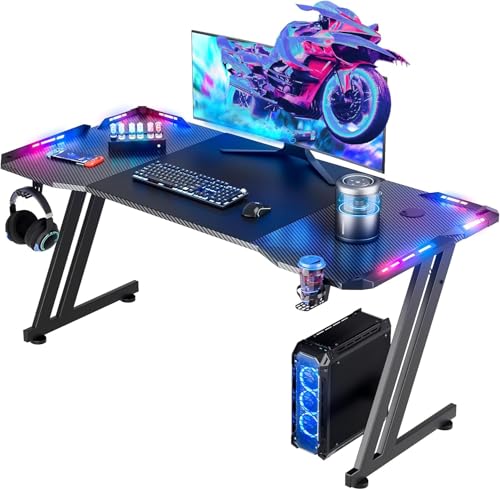
The HLDIRECT leads this guide because its lighting is run by an app, and app control is what turns RGB from a novelty into an instrument. Colour, brightness and effects sit in the phone that already runs the setup’s music and messages, adjustable from the chair in increments a physical button cannot offer — the whisper-dim for midnight work, the exact team colour for a stream, the off that is truly off. Around that control sits a complete 47-inch battlestation: a Z-shaped frame, a cup holder, a headphone hook, cable management and a mouse pad, in black, pitched at dual-monitor gaming and work.
The Z-frame deserves its sentence, because small desks wobble and this one’s geometry is the answer its maker chose: diagonal bracing that keeps a compact footprint planted when the gameplay gets physical. The accessories are the small-desk survival kit — the cup holder moves the drink off the lit surface where a spill would be both a disaster and a spectacle, the hook parks the headphones, the cable management keeps the back edge clean enough for the glow to read as intentional. At 47 inches the desk organises its owner firmly, and for a bedroom battlestation that firmness is a feature.
Its limits are size and app-dependence together. Two large screens will crowd it; a user who hates controlling furniture from a phone will hate its best feature. And an app-controlled anything carries a small, honest question about the app’s longevity that a dumb button never asks. For the dual-monitor gamer in a bedroom, though, this is the most precisely controllable light in the guide on a desk that has thought about everything else the small setup needs.
- Overall size: 47 inches
- Lighting: app-controlled RGB LED
- Frame: Z-shaped design
- Extras: cup holder, headphone hook, cable management, mouse pad
- Finish: black
Strengths
- App control gives the finest lighting adjustment here, from the chair.
- Complete accessory kit keeps a small lit surface clean and safe.
- Z-frame plants a compact desk against gaming forces.
Trade-offs
- Forty-seven inches disciplines a dual-screen setup firmly.
- Lighting control depends on the maker’s app staying available.
- No drawers or monitor stand; screens sit on their own feet.
Best for: a bedroom battlestation that wants precise, phone-run lighting. Not suited for: a three-screen sprawl or a user who wants a physical dial and nothing else.

FLEXISPOT E6G CyberX RGB Standing Desk — Best RGB flagship
The CyberX is what happens when the RGB category grows up and gets a dual motor. Sixty-three inches of electric standing desk, three-stage lift, a 352 lb capacity — the heaviest rating in this guide by a distance — with RGB LED built into a workstation its maker aims at gamers, streamers and home studios in one breath. The specification is a refusal to make the buyer choose between the serious standing desk and the lit one, and for the user whose setup is also their stage, that refusal is the whole product.
Capacity is the number to dwell on. A studio-grade load — multiple screens on arms, a showcase PC, audio gear, the camera’s share of the world — adds up to weights that embarrass ordinary standing desks, and 352 lbs carries it with the margin that keeps a lift smooth and level for years. The three-stage frame extends the height range at both ends, suiting tall users standing and low seating alike. RGB on a desk of this class reads differently than on a budget battlestation: it is the studio’s accent lighting, dimmable to a bias glow for editing sessions and raisable to a backdrop when the camera rolls.
The costs are commitment and scale. This is the largest, heaviest and most involved desk here, a piece of studio infrastructure rather than a bedroom upgrade, and its price class — whatever the listing says on the day — will match that ambition. Buyers whose streams are a hobby and whose screens are two should take the compliment the smaller picks pay them and spend the difference elsewhere. Buyers building a room that earns money on camera have exactly one candidate in this guide, and it is this one.
- Overall size: 63 inches, electric standing
- Drive: dual motor, 3-stage frame
- Capacity: 352 lbs
- Lighting: RGB LED
- Aimed at: gamers, streamers, home studios
Strengths
- Studio-grade capacity carries multi-screen, camera-ready loads.
- Dual-motor lift stays smooth under the heaviest setups here.
- RGB integrated into a serious workstation, not pasted onto a toy.
Trade-offs
- The biggest commitment in the guide, in size and in setup effort.
- Capacity far beyond a normal two-screen desk’s needs.
- No drawers named in the title; storage is the studio’s own problem.
Best for: a streamer or creator whose desk is a working studio set. Not suited for: a casual bedroom setup that needs a light, not an infrastructure.

Korfile 48 Inch Gaming Desk with LED — Best compact all-rounder
The Korfile is the most completely specified 48 inches in this guide: LED light, a power outlet, a monitor stand, a CPU stand and drawers, wrapped in a reversible frame with a carbon fibre black finish and a side hook for the headphones. Read that list again and notice what it covers — light, power, screens, tower, storage — the entire anatomy of a setup, in a desk that fits the wall a bedroom actually has spare. For a first serious battlestation, there is nothing left to buy separately except the screens themselves.
The monitor stand is the piece that makes the LED work harder. Raising the screens puts their backs at the glow’s height, so the light washes the wall where the eyes need the contrast softened, and the surface beneath the stand becomes the tunnel where the keyboard rests and the clutter hides. The CPU stand performs the same tidying below, parking the tower off the floor and out of the footwell, within cable reach of everything. Drawers take the soft clutter. It is a system, and systems are what compact setups live or die by.
Reversibility lets the drawer side and the layout mirror to the room, and the carbon fibre finish will divide opinion precisely as it intends to — it is a gaming desk’s livery, unapologetic. The compromises are the compact class’s own: two screens fit with discipline, the drawers organise rather than archive, and a user who wants the light without the livery should look at the GTPLAYER’s broader, calmer surface or accept the finish as the price of the specification.
- Overall size: 48 inches, reversible
- Lighting: LED
- Screen and tower: monitor stand, CPU stand
- Storage: drawers, side hook
- Power: built-in outlet; finish carbon fibre black
Strengths
- Every subsystem a setup needs, in one 48-inch purchase.
- Monitor stand places screens at the glow’s working height.
- Reversible layout adapts the system to the room’s handedness.
Trade-offs
- Carbon fibre livery is a strong flavour for shared rooms.
- Compact width disciplines dual screens and documents alike.
- Drawers are organisers, not filing furniture.
Best for: a first battlestation bought as one complete system for a small room. Not suited for: a wide, paper-heavy workstation that happens to want a glow.

59 Inch RGB Gaming Desk with PC Showcase Stand — Best for showing the build
This desk starts from a truth the other five politely ignore: in a modern build, the PC is the best-looking object in the room, and hiding it under the desk wastes it. Its showcase stand raises the tower into view beside the screens, where the case’s own lighting joins the desk’s RGB in one composed display, across a reversible 59-inch surface with triple drawers underneath hiding the cables, controllers and clutter that would break the composition. It is a desk designed by someone who builds PCs and is tired of crouching to admire them.
The showcase arrangement has practical bones beneath the theatre. A tower on a stand breathes better than a tower on carpet, its intakes clear of the floor’s dust; its front ports and power button sit at a reachable height; and the cable runs from a displayed tower to the screens are short, visible and therefore manageable — you route them neatly because you can see them, which is more than can be said for any under-desk farm. The triple drawers are sized by the same philosophy: the mess is not eliminated, it is assigned a closed home within the desk’s footprint.
At 59 inches there is surface for two screens and the working layer in front of them, and the reversible build lets the showcase stand sit on the side the room admires from. The honest costs: a tower on display is a tower whose fans are audible at ear height’s neighbourhood, a plain office PC gains nothing from being showcased, and the composition demands a tidiness habit to sustain it. Builders will pay those costs gladly; everyone else should take the GTPLAYER or Korfile and let the tower live its quiet life below.
- Overall size: 59 inches, reversible
- Defining feature: PC showcase stand
- Lighting: RGB LED
- Storage: triple drawers
- Aimed at: compact towers displayed beside the screens
Strengths
- Showcase stand turns the build into the setup’s centrepiece.
- Raised tower breathes cleaner air and offers reachable ports.
- Triple drawers give the composition a place to hide its mess.
Trade-offs
- A displayed tower’s fans sit closer to the ears.
- A plain work PC gains nothing from the stand.
- The look demands a tidiness habit to sustain it.
Best for: a PC builder whose case deserves an audience of one room. Not suited for: a quiet-office setup that wants the tower invisible and inaudible.

GTPLAYER 55 Inch Gaming Desk with LED — Best wide battlestation
The GTPLAYER is the straightforward wide option: 55 inches of T-shaped desk with a carbon fibre surface, LED lights, a full mouse pad across the working area and a headphone hook, pitched as a large computer desk for home office and gaming alike. Where the Korfile packs systems into 48 inches, the GTPLAYER simply gives a battlestation room — two screens with space between them and the user, a keyboard and mouse on a pad sized for both, and a surface that does not ask anything to be stored vertically or cleverly.
The T-shaped frame is the engineering under the calm: a central spine that keeps a wide top planted without a forest of legs in the footwell, so the chair’s casters and the user’s feet move freely beneath a desk that still feels rigid under a leaning elbow. The full mouse pad deserves more respect than it gets in listings — it is the surface’s finish, unifying the keyboard and mouse zones, softening the desk’s acoustics, and protecting the carbon fibre top from the daily abrasion of a gaming life.
What the GTPLAYER does not do is organise. No drawers, no stand, no shelves are named in its title: the surface is the storage, and the buyer is assumed to be the kind of user whose setup is screens, peripherals and nothing else. For that user — and battlestations breed that user — the honesty is refreshing and the width is the feature. Buyers whose desks accumulate paper and supplies should take the hint and look at the drawer-carrying picks instead, perhaps starting with the layouts in Best Coding Desks, where wide calm surfaces are judged by the work session rather than the glow.
- Overall size: 55 inches
- Frame: T-shaped design
- Surface: carbon fibre finish, full mouse pad included
- Lighting: LED lights
- Extras: headphone hook
Strengths
- Genuine width for two screens and a full-size keyboard-and-mouse zone.
- T-frame keeps the footwell open under a wide, rigid top.
- Full mouse pad unifies and protects the working surface.
Trade-offs
- No drawers, stand or shelves; the surface is all the storage there is.
- No built-in power is named in the listing title.
- Screens sit at their own stands’ height, on the surface.
Best for: a two-screen battlestation that wants width and calm over systems. Not suited for: a clutter-generating workflow that needs the desk to hide its own mess.

ODK 48 Inch L-Shaped Gaming Desk with LED — Best RGB corner desk
The ODK takes RGB into the corner, where light performs best. A reversible 48-inch L with LED lights, power outlets, a monitor stand, open storage shelves, a hanging side bag and a PC tower stand, in black — the corner’s two walls become the glow’s backdrop, the screens angle into the deep point under the raised stand, and the return wing takes the tower on its stand and the shelves’ worth of games, books and gear. It is the compact corner battlestation as a single, complete purchase.
Power outlets matter more in a corner than anywhere, as this guide’s readers may remember from every desk category: the sockets behind a corner desk are the least reachable in the house, and the ODK bringing power to the surface means the corner’s farm plugs in at the desk and one cable makes the journey to the wall. The side bag is the corner’s soft storage — controllers, notebooks, the handheld — hanging where a drawer stack would eat the return’s knee space, and the open shelves use the wall side of the return that feet never visit.
The compromises are the corner class’s own. Forty-eight inches of L is a compact wrap: one user, two screens with discipline, no sprawl. The reversible build must be decided at assembly, and corners must be measured before they are believed. But for the bedroom corner that is a battlestation by night and a study desk by day, the ODK is the most complete answer here — and if the corner’s second job is a second screen for work rather than play, the geometry is worked through from the screens’ side in Best Dual Monitor Computer Desks.
- Overall size: 48 inches, L-shaped, reversible
- Lighting: LED lights
- Screen and tower: monitor stand, PC tower stand
- Storage: open shelves, hanging side bag
- Power: built-in outlets; finish black
Strengths
- Corner placement makes the LED glow perform above its class.
- Surface power solves the corner’s unreachable wall sockets.
- Stand, shelves and bag organise a compact corner completely.
Trade-offs
- A compact L seats one user and two disciplined screens.
- Open shelves and a bag organise softly; nothing locks or hides fully.
- Corner measurement and orientation must be settled before assembly.
Best for: a bedroom corner battlestation that studies by day. Not suited for: a mid-wall layout in a room with no corner to give.
The RGB Lineup Compared: Light Control, Motors and Surface
| Pick | Size | Light control | Screen provision | Defining extra |
|---|---|---|---|---|
| HLDIRECT | 47 in | App-controlled RGB | Own stands, dual-monitor pitch | Cup holder, cable management |
| FLEXISPOT CyberX | 63 in | RGB LED, standing flagship | Arms assumed, 352 lb capacity | Dual motor, 3-stage lift |
| Korfile | 48 in | LED | Monitor stand | Drawers, CPU stand, outlet |
| 59 Inch Showcase | 59 in | RGB LED | Own stands | PC showcase stand, triple drawers |
| GTPLAYER | 55 in | LED | Own stands | Full mouse pad, T-frame |
| ODK | 48 in L | LED | Monitor stand | Outlets, shelves, tower stand |
Shop the third column first if the light is why you came: the HLDIRECT’s app control is the precision instrument, the CyberX’s system is the studio’s, and the LED picks offer the glow with simpler control. Then shop the fourth column, because how the screens sit decides your daily comfort long after the light’s novelty settles. The desks that raise screens — Korfile, ODK — place them at the glow’s working height; the wide desks give them room; the flagship carries them through the air twice a day without complaint.
Notice, reading down that table, how the category’s centre has moved: four of the six desks raise, stand or showcase the equipment rather than merely surfacing it, because a lit setup is a display by definition and displays are composed vertically. The two plain wide surfaces, the GTPLAYER chief among them, remain the right answer for owners who compose with width instead. Either way, the light is the last thing to choose and the first thing visitors will mention — plan accordingly, in that order.
How Do You Plan a Lit Setup’s Power and Cables From Day One?
A lit setup has one more power consumer than its unlit twin and, in the showcase and studio cases, several more — case lighting, camera lights, the stream’s supporting cast — so the power plan deserves the same care as the furniture choice. Count the plant honestly: PC, screens, the desk’s own lighting supply, chargers, lamp, and the accessories still on the wishlist. Then give that plant one home — a proper strip mounted under the desk’s back edge, or the built-in outlets the Korfile and ODK provide — with the whole farm dying by one switch, which is the arrangement bedrooms and shared rooms will thank you for at midnight.
Cable routing in a lit setup has an aesthetic clause ordinary setups escape: visible cables are lit cables. A run draped across the back edge will be silhouetted by the glow it crosses, so route behind the light’s line, not through it, and bundle the permanent runs where the wash cannot rim-light them. The HLDIRECT’s included cable management and the 59-inch desk’s clutter-hiding drawers exist because their makers understood this; on the plainer desks, a cable tray under the back edge achieves the same innocence for the price of one setup hour.
Do the work in the order that respects the physics: desk placed, strip mounted, permanent runs bundled with slack, lighting positioned and tested in a dark room before the screens’ positions are declared final. The dark-room test matters because glow behaves differently than drawings promise — strips pool, corners flare, a colour that flattered the wall at noon can glare at midnight. Fifteen minutes of testing on day one is the entire difference between a setup that looks produced and one that looks assembled.
What Mistakes Do RGB Desk Buyers Keep Making?
The first is buying the light and forgetting the desk. A glow cannot rescue a surface too small for the screens or a frame that trembles, and the returns process is full of lit desks that failed as furniture. Judge size, frame and storage with the lights mentally off; then let the lighting break the tie between desks that already work.
The second is pointing light at faces. Strips mounted where they shine toward the user, or brightness left at showroom levels, turn an evening setup into an endurance event. The glow belongs behind the screens and on the wall, dimmed to the room — set it once at midnight, honestly, and save that level as your default rather than the demo’s. The third mistake is letting the lighting join the standby farm: systems that breathe and pulse after the PC sleeps will eventually be unplugged in irritation, usually at 2 a.m., and a switched strip arranged on day one prevents the whole arc. The fourth is neglecting the daylight test — walk away from the desk at noon and look at it as a guest would; the picks that pass as furniture in daylight are the ones still owned in three years.
Final Recommendation
Start with the Korfile if you want one compact purchase that does everything — light, stand, storage, power — and the HLDIRECT if the lighting itself is the hobby and you want it under your thumb, precisely, from an app. Take the GTPLAYER for width and calm, the 59-inch desk if your PC build is the room’s artwork, the ODK for a corner, and the CyberX when the desk is a studio that happens to glow. Readers whose setups print as hard as they play can also weigh the shelf-led alternatives in Best Computer Desks with a Printer Shelf, though they will trade the glow for paper handling.
Whichever arrives, spend the first evening setting the light like you mean to live with it: dimmed behind the screens, warm when the room is shared, off when the room sleeps. RGB done that way stops being a feature you demonstrate to visitors and becomes the thing you would miss first — the desk’s own sense of what time of day it is.
There is a question underneath this whole category that buyers rarely ask aloud: will I still like this in three years? The honest reassurance is that the light is the most changeable part of the furniture you will ever own — colour, brightness and mood are software, revised in an evening — while the desk beneath it is judged by the same standards as any desk in any guide. Choose the furniture for the decade and the lighting for the year, and the purchase ages in the right order.
Frequently Asked Questions
Does RGB lighting actually reduce eye strain?
A soft wash of light behind the screens — bias lighting — reduces the contrast between a bright display and a dark room, and that contrast is a real source of fatigue in late sessions. The effect depends on placement and brightness: behind the screens, dimmed to the room, steady rather than animated. Colour is optional; the HLDIRECT’s app control makes holding that gentle level easiest, but any of these systems can be set kindly.
Can I turn the lights off completely for work or sleep?
That is the right question to ask of any lit desk, and the practical answer is to arrange the whole setup — desk lighting included — on one switched power strip, so off means off regardless of a system’s standby behaviour. Desks with built-in outlets, like the Korfile and ODK, make that single-switch arrangement simple to build on day one.
Is a 47-inch RGB desk enough for two monitors?
For two mainstream screens, yes, with the discipline small desks impose: screens at the back edge, peripherals corralled by the desk’s own accessories. The HLDIRECT is pitched at exactly that load. Larger screens, or a third display, move the answer to the 55-inch class and above — the GTPLAYER’s width or the CyberX’s flagship span.
What is a PC showcase stand for?
It raises the computer tower onto a stand beside the screens, displaying the build — and its own lighting — instead of hiding it under the desk. Beyond the display, a raised tower breathes cleaner air than a floor-standing one and puts its ports within reach. The 59-inch desk in this guide is built around the idea, with drawers hiding the clutter the composition cannot include.
Will an RGB desk look out of place in a home office?
In daylight, most of these read as ordinary black gaming desks, a style home offices have absorbed. The light is the only loud element, and it is adjustable down to a warm, lamp-like glow or off entirely. The desks that commit hardest to the aesthetic are the carbon-fibre-finished Korfile and GTPLAYER; the CyberX, as studio equipment, reads as professional kit in any room that hosts it.
What colour should I set for late-night work?
Warm and dim is the working answer: a low, amber-leaning glow behind the screens softens contrast without keeping your brain in daylight mode, and it photographs kindly if the session turns social. Save the saturated colours and the effects for play, where they belong, and let the work scene be boring on purpose — the best work lighting is the kind you stop noticing by the second hour.
Can an RGB desk be a serious work desk?
Yes, and this guide’s field proves the range: the CyberX is studio infrastructure, the Korfile and ODK are complete workstations with storage and power, and even the compact HLDIRECT is pitched at work as well as play. The light is a layer, not a substitute for structure. Judge any lit desk by surface, frame and storage first — as this guide did — and a desk that passes those tests works as seriously as its owner does, with the lights off or on.
Do RGB desks use a lot of power?
LED lighting is among the cheapest loads in a setup — a strip’s draw is a rounding error beside a gaming PC’s — so the honest power question is not cost but management: one more supply in the farm, one more standby glow to govern. Put the lighting on the same switched strip as the rest of the plant, as this guide’s setup section advises, and its power footprint becomes a switch you already own rather than a cost you ever notice.
Can desk lighting react to games or music?
Some lighting ecosystems offer reactive modes, but what any individual desk does depends on its own control system, and the listings here make different promises — the HLDIRECT’s app control is the deepest platform in this guide, while the simpler LED desks offer their built-in effects. If reactive lighting is a buying requirement rather than a curiosity, verify the exact behaviour on the listing page of the specific desk before ordering, and treat anything not stated there as not included.
Should the desk’s light match my PC’s lighting?
It should agree with it, which is a lower and kinder bar than matching. Pick one accent colour the whole setup shares — the case, the desk’s glow, the keyboard’s backlight if it has one — and let everything else run warm or neutral. Exact synchronisation is a software project with a maintenance habit; a shared palette is a decision made once. The showcase desk’s review makes the display case for the PC, and a shared palette is what makes that display look composed rather than coincidental.
Related Guides
Setups that work as hard as they glow can compare the paper-first layouts in Best Computer Desks with a Printer Shelf. For the keyboard-centred view of a long day at a wide desk, Best Coding Desks judges surfaces by the session. And when two screens are the fixed point and everything else arranges around them, Best Dual Monitor Computer Desks works through the geometry in full.