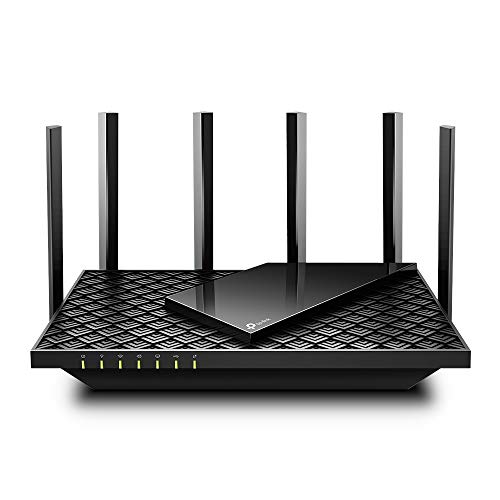
What's inside
- Key Takeaways
- Quick Picks
- How Did We Divide This Guide Between Combinations and Pure Modems?
- What Does DOCSIS 3.1 Actually Change for a Household?
- The Combination Units: Modem and Router in One Box
- The Pure Modems: No Wi-Fi, No Router, No Apologies
- How Do You Activate an Owned Modem Without Losing an Evening?
- Six Cable Devices, Two Architectures: The Full Comparison
- What Do Cable Buyers Most Often Get Wrong?
- Final Recommendation
- Frequently Asked Questions
- The Rental Arithmetic, Done Properly
- The Upstream Story: Why Cable’s Other Direction Matters Now
- Reading a Modem’s Status Page Like a Technician
- The Combination’s Hidden Geography Problem — and Its Answers
- Three Cable Households, Three Correct Baskets
- What About the Next Standard After 3.1?
- One More Compatibility Question: Voice Lines and Bundled Services
- The Pre-Purchase Checklist for Cable Households
- Keeping Records: The Modem File Every Cable Household Should Have
- Troubleshooting the First Week With an Owned Modem
- What Changes if the Household Later Leaves Cable?
- The Modem’s Place in the Whole-Home Picture
- Related Guides
As an Amazon Associate I earn from qualifying purchases. This post may contain affiliate links at no extra cost to you.
widgetverdict.com is reader-supported. When you buy through links on our site, we may earn an affiliate commission.
Where to buy: cable modems and modem-router combinations are sold through Amazon, the makers’ stores and electronics chains, and each pick below links to its checked listing. Before ordering any cable device, do the one check this category demands above all others: confirm the exact model appears on your own provider’s approved-device list for your speed tier, because a modem the provider will not activate is not a bargain at any price — it is a paperweight with excellent specifications.
The best routers docsis 3.1 shoppers are actually looking for come in two species that share a shelf and a keyword, and this guide keeps them separated from the first paragraph. DOCSIS 3.1 is the cable standard that carries gigabit-class internet over the coaxial network — the modem’s side of the conversation. Four picks here are combinations: a DOCSIS 3.1 cable modem and a Wi-Fi 6 router fused into one box, from NETGEAR’s Nighthawk CAX30 and CAX80 and ARRIS’s Surfboard G34 and G20. Two picks are pure cable modems with no Wi-Fi and no routing at all — the ARRIS SURFboard SB8200 and the NETGEAR CM1000 — which exist to feed a separate router that you choose yourself. Neither species is the honest version of the other. The combination is one box, one power supply, one throat to choke; the separate modem is the architecture of every serious home network in this series, where the modem does one job for a decade while routers come and go around it.
Why buy the modem at all, when the cable company rents one? The rental arithmetic is the usual motive — a monthly fee, indefinitely, for a device the provider chose — but the stronger motive is control: an owned modem ends the rental, and a modem-router combination or a separate router of your choosing replaces the provider’s Wi-Fi with your own. Every pick here lists compatibility with the big three American cable providers — Xfinity, Spectrum and Cox appear in listing after listing — and every pick is a DOCSIS 3.1 device, the standard that gigabit and near-gigabit tiers assume. What separates them is speed class, port count, wireless ambition and that founding question of one box or two.
Key Takeaways
- DOCSIS 3.1 is the modem standard for gigabit-class cable; all six picks speak it, but they split into four modem-router combinations and two modem-only devices.
- The SB8200 and CM1000 contain no Wi-Fi and no router — they require a separate router, and this guide treats that as their design, not a defect.
- Combination units (CAX30, CAX80, G34, G20) trade architectural flexibility for one-box simplicity and a single setup.
- Provider approval is the gate: every pick names Xfinity, Spectrum and Cox compatibility, but your tier on your provider’s current list is the only confirmation that counts.
- Port counts divide the combinations: the CAX30, CAX80 and G34 offer four wired ports; the G20 offers two; the SB8200’s two ports serve its 2 Gbps aggregate design.
- Buying replaces renting — the modem typically pays for itself against the rental fee and then keeps the change for years.
Quick Picks
| Pick | Badge | Why it is here |
|---|---|---|
| NETGEAR Nighthawk CAX30 Modem Router | Combo — mid-tier anchor | DOCSIS 3.1 modem plus Wi-Fi 6 at 2.7 Gbps, multi-gig positioning and four gigabit ports in one Nighthawk box. |
| NETGEAR Nighthawk CAX80 Modem Router | Combo — flagship | The combination at full ambition: Wi-Fi 6 at 6 Gbps, multi-gig support and four gigabit ports for the fastest tiers. |
| ARRIS Surfboard G34 Modem Router | Combo — gigabit-plan value | AX3000 Wi-Fi 6 covering up to 2,500 sq ft, four 1 GbE ports, aimed at plans up to 1 Gbps. |
| ARRIS Surfboard G20 Modem Router | Combo — compact sibling | The G34’s brief in a leaner body: AX3000, up to 1 Gbps plans, 2,500 sq ft, two 1 GbE ports. |
| ARRIS SURFboard SB8200 Cable Modem | Modem only — separates classic | A pure DOCSIS 3.1 modem for up to 1 Gbps plans, two 1 GbE ports delivering up to 2 Gbps wired aggregate; router required. |
| NETGEAR Nighthawk CM1000 Cable Modem | Modem only — single-port staple | The long-serving modem-only standard: DOCSIS 3.1 at 1 Gbps class, one gigabit port, ready to feed any router you own. |
How Did We Divide This Guide Between Combinations and Pure Modems?
By refusing to rank them against each other on a single ladder. A combination and a modem-only device are answers to different household philosophies, so the selection instead ensured each philosophy is represented at more than one level: combinations from the G20’s compact brief to the CAX80’s flagship one, pure modems in the CM1000’s single-port staple form and the SB8200’s dual-port aggregate design. Within each species, picks were judged on the evidence of their listings — speed class, plan ceiling, port census, coverage where a router is included — and on the clarity of their provider-compatibility statements, which in this category are not marketing garnish but the product’s licence to operate.
One evidential note applies to the whole category and is worth stating once, clearly: plan-speed figures in these listings — “up to 1 Gbps plans” and the like — describe the tier class a device is built and approved to serve, and the combination routers’ wireless figures describe their Wi-Fi class. Neither is a promise about your street, your node or your Tuesday evening. Cable performance is shared-neighbourhood performance, and the modem’s job is to stop being the bottleneck; the picks below were chosen because their ceilings sit at or above the tiers they name, so the bottleneck can move back where it belongs — to the network outside your walls. Readers whose bottleneck is instead inside the walls, a floor down, will find the companion analysis in Best Routers for Basements, where the router half of this purchase gets its own examination.
What Does DOCSIS 3.1 Actually Change for a Household?
DOCSIS is the standard that lets data ride the cable television network, and version 3.1 is the generation that made gigabit downloads ordinary and — just as importantly for modern households — widened the upstream and improved how the modem handles a busy neighbourhood segment. The practical differences a buyer feels are three. First, tier access: providers reserve their fastest plans for 3.1 devices, so the modem is the ticket to the tier, not merely a witness to it. Second, longevity: a 3.1 modem sits on the current side of the providers’ upgrade path, while older 3.0 devices are steadily retired from approved lists. Third, behaviour under load: 3.1’s queue management improvements exist precisely for the evening peak, when the street’s traffic converges — the cable equivalent of the bufferbloat problem the gaming guides in this series attack from the router side.
What 3.1 does not do is fix anything downstream of the modem. It will not improve Wi-Fi coverage, discipline a household’s traffic, or give a basement office a signal. Those are the router’s jobs, which is why the one-box-or-two question is really a question about how much router you are buying along with your modem. The combinations in this guide bundle competent Wi-Fi 6 routers; the modem-only picks assume you will bring a router with its own ambitions — a mesh system, a gaming platform, a WireGuard gateway — and they reward that assumption by being excellent at the single job they keep.
The Combination Units: Modem and Router in One Box

NETGEAR Nighthawk CAX30 Modem Router — Mid-tier anchor
The CAX30 is the combination concept at its most balanced: a DOCSIS 3.1 cable modem fused with a Wi-Fi 6 router rated at 2.7 Gbps, multi-gig positioning in its listing, guided setup, free expert help, and four gigabit ports for the wired cluster around the television or desk. NETGEAR names Xfinity, Spectrum and Cox compatibility outright. For the household whose cable corner currently holds a rented gateway and a tangle of good intentions, the CAX30 is the one-box reset: the rental goes back, the Wi-Fi becomes a Nighthawk’s, and the network’s entire wired and wireless life runs through a single, current device.
Its honest boundaries are the combination’s eternal ones. The Wi-Fi class is mid-tier — entirely adequate for the streaming household, short of the flagship’s headroom for the device-dense one — and the fusion means the modem and router share a fate: when the household eventually wants Wi-Fi 7 or a mesh architecture, the whole box is replaced rather than half of it. Households that can already picture that future should read the modem-only section with care. Households that want the cable corner solved this weekend, at a sane tier, with ports for the wired regulars, have found their pick.
- Type: DOCSIS 3.1 modem-router combination
- Wireless: Wi-Fi 6, 2.7 Gbps class, dual-band
- Wired: 4 x gigabit ports, multi-gig positioning as listed
- Compatibility: Xfinity, Spectrum and Cox named in the listing
- Support: guided setup and free expert help named in the listing
Strengths
- One box ends the rental and upgrades the Wi-Fi in the same purchase.
- Four gigabit ports keep the wired entertainment cluster fully connected.
- Guided setup and named expert help suit households without a network enthusiast.
Trade-offs
- Mid-tier Wi-Fi class; device-dense homes should look at the CAX80.
- Modem and router share one fate at upgrade time.
- No mesh architecture in the brief — coverage growth means a new plan.
Best for: a streaming household on a mainstream gigabit-class tier that wants the cable corner solved in one box.
Not suited for: a home already planning a mesh system or a Wi-Fi 7 router within this modem’s expected life.
NETGEAR Nighthawk CAX80 Modem Router — Flagship combination
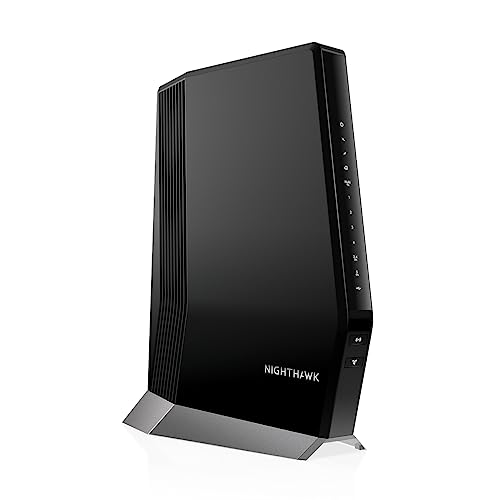
The CAX80 is the combination with the ceiling raised: the same DOCSIS 3.1 plus Wi-Fi 6 formula as its sibling, but the wireless side rated at 6 Gbps, multi-gig support carried in the listing, and the same four gigabit ports and big-three provider compatibility. It exists for the household that wants the one-box life without the one-box compromise — the fastest cable tiers, a house full of Wi-Fi 6 clients, wired machines at the desk, all of it behind a single device that does not ask the owner to think in systems.
That convenience is the product, and it should be bought knowingly. The CAX80’s buyer is paying flagship money for integration: fewer cables, one admin world, one firmware to keep current, and performance that covers the overwhelming majority of real households outright. The reader it does not suit is the architect — the one sketching a wired backbone, a basement node and a VPN gateway as separate citizens — because a combination’s router half cannot be promoted, demoted or repositioned independently. Within the one-box philosophy, though, this is the strongest expression of it in the guide, and for the large household that simply wants cable internet to be excellent and finished, it is the correct flagship to buy.
- Type: DOCSIS 3.1 modem-router combination
- Wireless: Wi-Fi 6, 6 Gbps class, dual-band
- Wired: 4 x gigabit ports, multi-gig support as listed
- Compatibility: Xfinity, Spectrum and Cox named in the listing
- Support: guided setup and free expert help named in the listing
Strengths
- The fastest wireless class among the combinations here, matched to top cable tiers.
- Four gigabit ports and multi-gig positioning keep the wired side from capping the plan.
- Single-device ownership at flagship level: one setup, one update stream, one box.
Trade-offs
- Flagship pricing for integration that separates-architecture households will not use.
- The router half cannot evolve independently when Wi-Fi generations turn.
- Still a single location’s radios — a big or difficult house may need coverage help regardless.
Best for: a large, device-dense household on a top cable tier that wants the strongest one-box answer available.
Not suited for: a network architect who expects to treat modem, router and access points as separate purchases.

ARRIS Surfboard G34 Modem Router — Gigabit-plan value combination
The G34 is ARRIS’s combination pitched exactly at the market’s centre of gravity: a DOCSIS 3.1 modem with an AX3000 Wi-Fi 6 router, built for plans up to 1 Gbps, covering up to 2,500 sq ft, with four 1 GbE ports and compatibility with Xfinity, Cox and Spectrum stated in the listing. ARRIS is the name most associated with the cable modem itself — the Surfboard line is the genre’s elder — and the G34’s proposition is that pedigree in the modem half, a modern Wi-Fi 6 router in the other, and a price posture aimed at households doing the rental arithmetic and wanting it to end.
AX3000 is the right-sized wireless class for the gigabit-plan household: enough for the family’s streaming, calls and browsing with headroom, without paying for radio capacity the plan cannot feed. The 2,500 sq ft coverage figure suits the mainstream house or large flat, and four wired ports match the CAX units socket for socket. Where the G34 asks for judgement is the same place every combination does — the fused fate at upgrade time — plus one ARRIS-specific comfort: a household that keeps its modem for the long term is buying from the maker whose name is practically the category. For the gigabit-plan mainstream, this is the value centre of the entire guide.
- Type: DOCSIS 3.1 cable modem and Wi-Fi 6 router combination
- Wireless: AX3000 Wi-Fi 6, coverage up to 2,500 sq ft
- Plan class: up to 1 Gbps plans, as listed
- Wired: four 1 GbE ports
- Compatibility: Xfinity, Cox and Spectrum named in the listing
Strengths
- Surfboard modem pedigree paired with a right-sized AX3000 router.
- Four gigabit-class ports match the pricier combinations.
- Aimed squarely at the most common tier — gigabit plans — without overselling beyond it.
Trade-offs
- Plans above the gigabit class belong to the multi-gig combinations instead.
- Combination architecture: router upgrades mean a whole new box.
- Coverage is a single unit’s — larger homes still face placement physics.
Best for: a mainstream household on a gigabit-class plan that wants the rental ended and the Wi-Fi modernised together.
Not suited for: a subscriber on an above-gigabit tier whose plan would outrun this unit’s stated class.

ARRIS Surfboard G20 Modem Router — Compact sibling combination
The G20 is the G34’s brief with two ports’ worth of restraint: the same DOCSIS 3.1 plus AX3000 Wi-Fi 6 formula, the same up-to-1 Gbps plan class, the same 2,500 sq ft coverage claim and the same three-provider compatibility, but two 1 GbE ports where its sibling carries four. That single difference defines its household precisely. A flat or smaller home whose wired world is a television and perhaps one console does not need four sockets; it needs the modem, the Wi-Fi and the rental ended, in the smallest sensible package — and the G20 is that package, from the same Surfboard line.
Do not mistake the leanness for a lesser modem: the cable half is the same DOCSIS 3.1 standard at the same plan class, and the wireless half is the same AX3000. What the buyer gives up is wired expansion — the day a desk, a NAS and a streaming box all want sockets, a small switch joins the shelf, which is a perfectly respectable outcome rather than a failure. Read the G20 as the combination for homes that are honest about being wireless-first: two ports for the television corner, Wi-Fi 6 for everything else, and the provider’s rental gateway in a returns box by Friday.
- Type: DOCSIS 3.1 cable modem and Wi-Fi 6 router combination
- Wireless: AX3000 Wi-Fi 6, coverage up to 2,500 sq ft
- Plan class: up to 1 Gbps cable plans, as listed
- Wired: two 1 GbE ports
- Compatibility: Xfinity, Cox and Spectrum named in the listing
Strengths
- The full DOCSIS 3.1 plus AX3000 formula in the leanest combination here.
- Coverage and plan class match its bigger sibling; only the port count is trimmed.
- An easy rental replacement for wireless-first flats and smaller homes.
Trade-offs
- Two wired ports fill quickly once a desk or storage enters the picture.
- Same combination caveat: modem and router retire together.
- Above-gigabit plans belong to the multi-gig tier of this guide.
Best for: a wireless-first flat or smaller home on a gigabit-class plan with a television corner as its only wired cluster.
Not suited for: a household whose desk, console and storage all expect a wired socket on day one.
The Pure Modems: No Wi-Fi, No Router, No Apologies
The two devices below contain no radios and run no household network. They convert the cable signal to Ethernet and stop there, expecting a router you choose to take it from that point. This section exists because a large share of this keyword’s searchers want exactly that division of labour — and because confusing a modem-only device for a combination is the category’s most expensive reading error.
ARRIS SURFboard SB8200 Cable Modem — Modem only, dual-port design
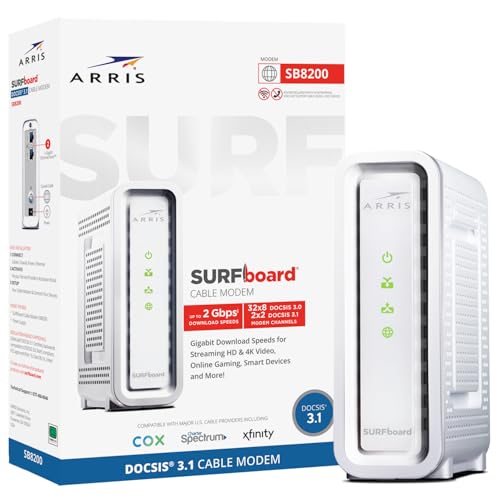
The SB8200 is the separates architecture’s classic: a DOCSIS 3.1 cable modem — modem only, router required, as its listing states in plain words — built for plans up to 1 Gbps, compatible with Xfinity, Cox and Spectrum, and carrying two 1 GbE ports that its listing credits with delivering up to 2 Gbps of wired aggregate. That second port is the design’s signature: on providers and setups that support bonding the modem’s outputs, the pair can feed a router’s aggregated WAN — the very arrangement this series examines in Best Routers with Port Aggregation — while on ordinary setups it simply stands ready. Either way, the modem’s job description is one line long, and the SB8200 has been doing it at the top of the category’s reputation for years.
Everything the SB8200 does not do is the point. No Wi-Fi to be disappointed by in three years, no router firmware to babysit, no combination fate: the modem will sit beside a succession of routers — a mesh system this year, a Wi-Fi 7 flagship next cycle, a VPN gateway after that — converting coax to Ethernet with complete indifference. The household it suits already owns, or is buying in the same basket, a router it actually wants; the gaming household pairing it with a router from Best WiFi 6 Gaming Routers is its archetypal customer. Buy the SB8200 when the modem is meant to be infrastructure: installed, activated, and forgotten for the better part of a decade.
- Type: DOCSIS 3.1 cable modem only — no Wi-Fi, no routing; a separate router is required, as listed
- Plan class: up to 1 Gbps plans, as listed
- Wired: two 1 GbE ports delivering up to 2 Gbps wired aggregate, as listed
- Compatibility: Xfinity, Cox and Spectrum named in the listing
- Role in this guide: the separates architecture’s dual-port option
Strengths
- A pure modem outlives several routers; the cable half never becomes the outdated half.
- Dual ports with a stated 2 Gbps aggregate suit bonding-capable router pairings.
- Surfboard pedigree and broad provider compatibility make activation uneventful.
Trade-offs
- It provides no network by itself — a router purchase is mandatory, not optional.
- The second port’s aggregate value depends on provider and router support for bonding.
- Plan class tops out at the gigabit tier its listing names.
Best for: a household with a chosen router — mesh, gaming or gateway — that wants a long-lived modem beneath it.
Not suited for: a buyer expecting Wi-Fi out of the same box; this device has no radios at all.

NETGEAR Nighthawk CM1000 Cable Modem — Modem only, single-port staple
The CM1000 is the modem-only idea at its most distilled: a DOCSIS 3.1 cable modem in the 1 Gbps class, modem only as its listing states, with one gigabit port, guided setup, free expert help, and compatibility with Xfinity, Spectrum and Cox. It has been a default answer in this category for years for a straightforward reason — most households’ separates architecture needs exactly one Ethernet socket out of the modem, because exactly one router plugs into it. The CM1000 is that socket, from a maker whose support apparatus the listing is keen to mention, in a device with nothing else to go wrong.
Its comparison with the SB8200 is the cleanest in this guide: same species, same plan class, one port against two. If your router has a single WAN port and no aggregation ambitions — true of the overwhelming majority of home routers — the CM1000’s leanness is not a compromise but a match. If the diagram on your desk includes a bonded WAN or a second wired path from the modem, the SB8200 is the pick instead. Either modem frees its owner from the rental and from the combination’s fused fate; the CM1000 simply does it with the fewest moving parts in the entire guide, which for infrastructure is a compliment of the highest order.
- Type: DOCSIS 3.1 cable modem only — modem only, as listed; a separate router is required
- Plan class: 1 Gbps class, as listed
- Wired: 1 x gigabit port
- Compatibility: Xfinity, Spectrum and Cox named in the listing
- Support: guided setup and free expert help named in the listing
Strengths
- The simplest separates modem here: one port, one job, nothing extraneous.
- DOCSIS 3.1 at the gigabit class covers the mainstream tiers outright.
- Long-serving category staple with broad provider acceptance.
Trade-offs
- One port forecloses the modem-side bonding the SB8200’s pair enables.
- No Wi-Fi or routing — the network begins at the router you supply.
- Above-gigabit tiers belong to multi-gig devices instead.
Best for: a household with a single-WAN router it loves, wanting the rental replaced by the simplest modem in the category.
Not suited for: a network design that needs two wired paths out of the modem.
How Do You Activate an Owned Modem Without Losing an Evening?
The ritual is standardised across the big providers and still manages to surprise first-timers, so here it is in order. Before touching cables, photograph the rented gateway’s label and note your account details; then connect the new modem to the coax — ideally the home’s primary feed rather than a splitter-weakened branch — power it, and wait for its lights to settle into their connected pattern, which can take several minutes of negotiation with the network. Activation then runs through the provider’s app or web flow, which will ask for the new device’s MAC address from its label; the combinations will afterwards want their Wi-Fi set up, while the modem-only picks simply hand the connection to the router already cabled to them. Keep the rented unit until the new one has survived a full day, then return it and — the step everyone forgets — confirm the rental fee has actually left the next bill.
Signal quality is the activation gremlin worth knowing by name. A modem can activate successfully on a marginal line and then underperform for months, blaming every device downstream. If speeds disappoint after a swap, the modem’s own status page — reachable through its local address on combination and modem-only units alike — reports the incoming signal levels in language your provider’s support line will recognise. Splitters, ancient coax runs and corroded connectors in the basement are the usual culprits, which is one more reason the cable corner and the lower level keep appearing in the same conversations across this series.
Six Cable Devices, Two Architectures: The Full Comparison
| Pick | Architecture | Wi-Fi | Plan class | Wired ports |
|---|---|---|---|---|
| NETGEAR CAX30 | Modem-router combo | Wi-Fi 6, 2.7 Gbps | Multi-gig positioning | 4 x gigabit |
| NETGEAR CAX80 | Modem-router combo | Wi-Fi 6, 6 Gbps | Multi-gig positioning | 4 x gigabit |
| ARRIS G34 | Modem-router combo | AX3000 Wi-Fi 6 | Up to 1 Gbps | 4 x 1 GbE |
| ARRIS G20 | Modem-router combo | AX3000 Wi-Fi 6 | Up to 1 Gbps | 2 x 1 GbE |
| ARRIS SB8200 | Modem only | None — router required | Up to 1 Gbps | 2 x 1 GbE, up to 2 Gbps aggregate |
| NETGEAR CM1000 | Modem only | None — router required | 1 Gbps class | 1 x gigabit |
The architecture column decides first, the plan class second, and everything else after. A household that reads the table bottom-up — falling for a modem-only price before noticing the missing router — has the category exactly backwards, and the two modem-only rows are labelled in every column to make that mistake difficult to commit accidentally.
What Do Cable Buyers Most Often Get Wrong?
The category’s signature error is buying a modem-only device while believing it is a combination — the SB8200 and CM1000 listings both say “modem only” in plain language, and still the returns happen, which is why this guide repeats their nature in every section they touch. The second error is skipping the provider check: compatibility logos are a starting point, but activation follows your provider’s current approved list for your tier, and that list is the authority. The third is tier mismatch in both directions — a gigabit-class modem on an above-gigabit plan, or a flagship combination bought for a basic tier whose household will never tax it. The fourth is returning the rental before the owned unit has proven itself through a billing cycle, leaving the household one failure away from no connection and a support queue. And the fifth is blaming the new modem for the street’s evening congestion, when the device has merely made the neighbourhood’s shared physics visible for the first time.
Final Recommendation
Choose the architecture before the model. Households that want the cable corner finished in one purchase should take the G34 for the gigabit-plan mainstream, the G20 for the wireless-first flat, the CAX30 for a step up in wireless class, and the CAX80 where the tier and the device count justify the flagship. Households that think in systems — a router chosen on its own merits, replaced on its own schedule — should put a pure modem underneath it: the CM1000 for the single-WAN mainstream, the SB8200 where a second port and its aggregate design have a job to do. Either way, verify the model on your provider’s list, keep the rental until the new device has earned its shelf, and check the next bill for the fee’s departure. The modem is the least glamorous purchase in the network and, done once and done right, the one you will think about least for the next several years.
Frequently Asked Questions
Is a DOCSIS 3.1 modem also a router?
Sometimes — and the distinction is this guide’s backbone. Combination units like the CAX30, CAX80, G34 and G20 contain both a DOCSIS 3.1 modem and a Wi-Fi router in one box. Pure modems like the SB8200 and CM1000 contain no router and no Wi-Fi at all; they convert the cable signal to Ethernet and require a separate router to build a network. Every listing here states which species it is, and the spec boxes repeat it.
Will any of these work with my cable provider?
All six listings name Xfinity, Spectrum and Cox compatibility, which covers most American cable households. Treat that as the shortlist rather than the guarantee: providers activate devices from their own current approved lists, tier by tier, so confirm the exact model against your provider’s list for your plan before ordering. If your provider is a smaller regional operator, that check matters even more.
Is buying really better than renting the provider’s gateway?
For most households that stay at one address, yes: the purchase replaces an indefinite monthly fee, the device typically covers its cost well inside its service life, and an owned router side — whether the combination’s or your own separate unit — is yours to configure rather than the provider’s to manage. Renting retains one advantage: the provider owns failures. Households that move yearly or dread troubleshooting sometimes rationally keep the rental; everyone else should do the arithmetic once and notice how it leans.
What speed tier should I match the modem to?
Match the device class to the plan you have or are about to buy, with one eye on the provider’s upgrade path. Gigabit-class households are served by the G34, G20, SB8200 and CM1000 as listed; above-gigabit tiers belong to the multi-gig combinations. Buying one class up is cheap insurance against a plan upgrade; buying three classes up mostly purchases specifications the street cannot deliver.
Can I use the SB8200’s two ports for two separate networks?
The pair exists for the modem’s stated aggregate design — up to 2 Gbps wired aggregate, as the listing puts it — and in practice whether the second port serves a bonded router WAN or sits unused depends on your provider’s provisioning, since most residential accounts activate a single public connection. Plan on one router behind the modem, with the second port as bonding headroom where supported, rather than as a second household network.
Why does provider approval change with your plan or address?
Provider approval attaches to a model in context, not to the box alone. A provider tests a device against a tier, pushes its configuration to that model, and publishes the result on the list for that market. That is why a modem that activates on a gigabit plan deserves a fresh check after an upgrade, a house move, or a transfer to another cable system, even though the hardware has not changed.
When does modem-only beat a combination outright?
Choose the SB8200 or CM1000 when a trusted router already waits for the job, when a mesh system is planned for a difficult house, or when the router must sit centrally while the coax enters at a corner. Separating the boxes lets each retire on its own schedule, so a wireless upgrade never forces a modem replacement. Budget for the router too: the honest comparison is the two-box total against a G34 or CAX30.
The Rental Arithmetic, Done Properly
Every cable household has run some version of this calculation on the back of a bill, so let it be run carefully once. The provider’s gateway rents by the month, forever, with the fee drifting upward over the years in the way of such fees; the owned modem costs once. The break-even point for the devices in this guide typically arrives well inside the second year, and everything after it is the household keeping money it used to send away monthly for the same electrons. But the honest arithmetic has three more lines. An owned modem is yours when it fails — the provider replaces a rental, you replace a purchase — so a small risk premium belongs in the owned column. An owned modem also travels badly between providers and not at all between technologies: the household that switches to fibre next year retires a cable modem with the coax. And the combination’s arithmetic differs from the pure modem’s, because the combination also replaces the router purchase the household might otherwise make — for a home that would genuinely have used the provider’s Wi-Fi, the combo’s rival is not another router but the rental itself.
Run with those lines included, the conclusion survives for the households this guide addresses: stable addresses, mainstream tiers, years-long horizons. The modem is infrastructure, and infrastructure rewards ownership. The households for whom renting remains rational — the yearly movers, the fibre-imminent, the resolutely non-technical with a responsive provider — are real but specific, and they will recognise themselves in the description rather than needing persuasion out of it.
The Upstream Story: Why Cable’s Other Direction Matters Now
Cable networks were designed in an era when households downloaded and rarely uploaded, and their channel plans still lean that way. Modern households lean back: video calls send a face for every face they receive, cloud backups and camera uploads run all day, and the working-from-home household’s upstream is a production asset. DOCSIS 3.1 improved the upstream’s efficiency and headroom over its predecessor, which is one of the quieter reasons the standard matters beyond the download figure on the plan’s advertisement. A household choosing between a lingering 3.0 device and any pick in this guide should weigh the upstream difference as heavily as the download class — the call that freezes is almost never waiting on download.
Within this guide, the upstream story argues for matching the modem to the household’s working pattern as much as to its plan. The combinations carry the whole burden — their routers’ queue management decides how the upstream is shared when the backup meets the video call — while the separates architecture lets the household choose a router whose traffic discipline it prefers and keep it when the modem eventually changes. Neither answer is automatic; both are better than the accidental architecture of a rented gateway whose settings nobody has ever opened.
Reading a Modem’s Status Page Like a Technician
Every device in this guide, combination and pure modem alike, keeps a status page on the local network reporting the cable connection’s vital signs: downstream and upstream power levels, signal-to-noise figures, and a log of events with timestamps. A household need not become fluent, but two habits pay. The first is a baseline: a screenshot of the healthy page on a good day, filed with the network’s other notes, so that a bad week has something to be compared against. The second is vocabulary for the support call — “my upstream power has climbed”, “the log shows daily re-syncs” — which moves a conversation from the script’s first page to the page where technicians live. Most chronic cable problems are physical and old: the splitter from a previous decade, the coax run pinched behind a bookcase, the connector green at the edges in a damp basement. The modem reports their symptoms faithfully; it simply cannot reach out and tighten them itself.
The Combination’s Hidden Geography Problem — and Its Answers
A combination unit must live where the coax is, and the coax is rarely where the Wi-Fi should be. Cable enters houses at corners, in basements, behind the television it was installed for in another decade — while good wireless wants the centre of the home, elevated and unhidden. The modem-only architecture dissolves this tension by geography: the modem stays at the entry point, an Ethernet run carries the connection to wherever the router belongs, and each device sits in its right place. The combination household has three honest answers when the entry point is awkward. It can accept the corner and discover the coverage is adequate anyway — often true in flats and smaller homes, which is why the G20 and G34 briefs are sized as they are. It can extend the coax itself to a better room, a modest cabling job with real returns. Or it can let the combination serve as the modem plus a wired base and add wireless help downstream — an access point or mesh node placed where the people are — accepting a hybrid architecture that many real homes quietly run.
What the combination household should not do is hide the unit for tidiness: inside a closed cabinet, behind the television’s metal back, under a stack of other warm electronics. Heat and obstruction are the two taxes such hiding levies, and both are paid in stability. The pure modems, having no radios, are exempt from the placement half of this sermon — the SB8200 and CM1000 can live in the utility corner forever, indifferent, which is one more line in the separates ledger that their owners tend to discover with pleasure.
Three Cable Households, Three Correct Baskets
The streaming family in a two-storey house, on a gigabit plan, with the provider’s gateway in the living room and a fee on the bill: their basket is one combination, chosen by how much wireless ambition the house holds — the G34 for the mainstream version of their life, the CAX30 a step up, the CAX80 if the device census keeps growing and the tier above gigabit is on the provider’s roadmap. Their project is an afternoon: activate, set the Wi-Fi name to the old one so every device rejoins without a tour of the settings, return the rental, verify the bill.
The enthusiast with a network diagram — mesh or gaming router already owned, a NAS, opinions about firmware — has no business buying a combination at all. Their basket is the SB8200, whose second port stands ready for the bonded-WAN experiments their router supports, or the CM1000 where the diagram is contentedly single-port. Their modem will be the oldest device in the rack within three years and the least regretted, which is the separates philosophy working exactly as designed.
The flat-dweller on a gigabit plan, wireless-first, television in the corner where the coax lives: the G20 was drawn for this home. Two ports are enough because the wired world is a television and a console that mostly streams; the AX3000 radios cover the flat from the corner because flats forgive what houses do not. Their rental ends, their bill drops, and the category never troubles them again — the outcome every pick in this guide is ultimately selling, at six different levels of ambition.
What About the Next Standard After 3.1?
Standards have successors, and cable’s roadmap beyond 3.1 is a matter of public engineering record — but the purchasing question it raises has a settled answer for households shopping today. Providers build their tiers on the installed standard, retire old devices slowly and announce changes with long runways; a DOCSIS 3.1 device bought now sits on the current side of that machinery, with years of approved-list life as the reasonable expectation. The households that should care about the horizon are the ones buying at the very top tier in the very largest markets, and even they are choosing among this guide’s multi-gig combinations rather than waiting for a standard their street cannot yet deliver. Buy for the network that exists, at the tier you actually hold, from the architecture your household prefers — the future will send its own catalogue when it is ready, and the modem you own outright will have long since paid its way.
One More Compatibility Question: Voice Lines and Bundled Services
Some cable households take a home phone line from the same provider, and a share of those services run through the rented gateway’s telephone ports — hardware none of the six devices in this guide provides. If your household’s landline, alarm dialer or medical alert rides the provider’s box, resolve that dependency before the modem swap, not during it: providers can usually separate the voice service onto its own small device, or the household can move the number to a dedicated VoIP adapter on the new network. The check costs one support conversation and prevents the particular misery of a perfect internet installation that has silently disconnected the house phone. Households without such services — the growing majority — can skip this paragraph with a clear conscience, which is exactly why it is a paragraph and not a section.
The Pre-Purchase Checklist for Cable Households
Five confirmations, in the order they bite. First, the provider’s approved list: your exact model, your exact tier, today — not a forum post from a previous year. Second, the architecture decision, made consciously: combination for the one-box life, modem-only for the separates life, with the router half of a modem-only plan named and budgeted rather than assumed. Third, the port census against your wired reality — the G20’s two sockets and the G34’s four are the same modem wearing different hospitality, and the SB8200’s pair only matters if a bonded WAN is genuinely in your router’s future. Fourth, the voice and bundled-services check above, if anything besides internet rides the old gateway. Fifth, the return plan for the rental: where it goes back, what receipt proves it, and a diary note to inspect the following bill for the fee’s removal. A household that has made those five confirmations can order any pick in this guide with the calm this category rarely affords, because every expensive surprise the category owns has been met in advance, on paper, where surprises are cheap.
Keeping Records: The Modem File Every Cable Household Should Have
Close the project the way technicians do: with a file. One note, kept with the household’s other infrastructure records, holding the modem’s model and MAC address, the activation date, the provider and tier it was approved for, a photograph of its label, the healthy status-page screenshot from the setup section, and the date the rental was returned with its receipt. That small dossier converts every future interaction — a support call, a tier upgrade, a house move, a resale — from archaeology into reference. Cable modems serve long and silently, which is precisely why their paperwork evaporates; the household that keeps the file will, some year from now, answer a support agent’s second question while other callers are still looking for the ladder to the attic. Infrastructure rewards the documented, in modems as in everything else this series has covered.
Troubleshooting the First Week With an Owned Modem
New modems attract blame for old problems, so work the first week’s complaints in order of likelihood. Speeds fine at midnight and poor at eight in the evening describe the neighbourhood segment, not your device — log the pattern for a few days before calling anyone, because a timestamped pattern is the one piece of evidence a support organisation cannot argue with. Speeds uniformly below the tier, at every hour, point inward: check the status page’s levels, reseat the coax, remove one splitter from the path and test again, changing one thing at a time. A connection that drops and re-syncs several times a day announces itself in the modem’s log with a regularity that separates it from Wi-Fi trouble entirely — if the wireless devices complain but the log is clean and the wired speed is steady, the problem lives downstream of the modem, in the router’s world, and the modem deserves an apology and its shelf back. The household that tests in this order will spend its first week learning its own network instead of arguing with a call centre, which is the last dividend the owned modem pays.
What Changes if the Household Later Leaves Cable?
An owned cable modem’s one true fragility is technological loyalty: it speaks coax, and only coax. A household that moves to a fibre street or a fixed-wireless service retires the modem with the connection, and should price that possibility honestly if a move is already on the horizon — the shorter the expected cable tenure, the stronger the case for the guide’s value end over its flagship end, and the weaker the case for buying at all against a short remaining rental. For the settled household, the same loyalty is no fragility at all: the modem’s single-mindedness is what lets it serve a decade without asking questions. Judge the purchase by the household’s map, not by the technology’s headlines, and the modem will have been either a brief, cheap bridge or a long, quiet servant — both honourable outcomes, chosen with open eyes.
The Modem’s Place in the Whole-Home Picture
It is worth stepping back to the full diagram one last time. The modem is the network’s border post: everything the household sends to the world and receives from it crosses this one device, which is why its standard, its tier class and its physical line quality echo through every other purchase in this series — the gaming router’s queue discipline assumes a modem that is not itself the bottleneck, the basement mesh assumes a healthy feed at the top of the stairs, the VPN gateway assumes an address the world can reach. A household that chooses this border post deliberately, documents it, and then forgets it for years has understood the category completely. The six devices above are six ways of staffing that post; the right one is the one whose architecture matches the household behind it.
Related Guides
Pair the modem with its other half using Best WiFi 6 Gaming Routers, Best Routers for Basements and Best Routers with Port Aggregation.