What's inside
- Key Takeaways
- Quick Picks
- How Did We Sort Six Very Similar Docks?
- Why Does a Dock Beat the Cable in the Drawer?
- What Should You Check Before a Dock Joins Your Setup?
- What Does a Stated 1.8 Hours Mean Across a Gaming Week?
- How Does a Dock Change a Household With Kids and Guests?
- The Detailed Picks: Six DualShock 4 Docks Examined
- What Separates These Six PS4 Docks at a Glance?
- How Should You Set Up the Dock on Its First Evening?
- Which Dock Habits Keep a DualShock 4 Alive Longest?
- What Mistakes Do PS4 Households Make With Controller Charging?
- Final Recommendation
- Frequently Asked Questions
- Related Guides
As an Amazon Associate I earn from qualifying purchases. This post may contain affiliate links at no extra cost to you.
widgetverdict.com is reader-supported. When you buy through links on our site, we may earn an affiliate commission.
Where to buy: the six docks in this guide are listed on Amazon; the details worth confirming on the page are whether a charging cable is included, what the dock draws its power from, and whether the listing names your exact console generation — PS4, PS4 Slim or PS4 Pro — since the titles below differ on exactly that point.
The best ps4 controller chargers solve a problem so small it is embarrassing to describe and so nightly it shapes a gaming life: the DualShock 4 that dies mid-session because it was left on the couch, the armrest, the floor — anywhere except on charge. The DualShock 4’s battery was never generous, and a controller that spends its idle hours anywhere but a dock will eventually betray you at the worst moment of a boss fight. A charging dock converts discipline into furniture. The controller has a home; when it is home, it is charging; the habit maintains itself.
Six docks compete for that home below, and they are more alike than their listings pretend and more different than their photographs suggest. Three of them put a number on charging speed — 1.8 hours appears in title after title — while three sell themselves on upgraded fast-charging ports without a figure. Some name all three console generations, some speak only of the DualShock 4 itself. One includes its charging cable as a headline feature, one leads with its LED indicator and storage role, one is a named brand with a long history in console accessories. This guide reads those titles the way a careful buyer should: as claims to be weighed, not as gospel to be repeated.
Key Takeaways
- Every pick here is a dock for the DualShock 4; the differences live in stated charge time, indicators, included cables and which console generations the title names.
- Three titles claim a 1.8-hour charge (OIVO, the LED-indicator dock station, and the dock sold with its cable); three claim upgraded fast-charging ports without a number.
- Dock charging beats cable charging for households because the controller’s resting place and charging place become the same place.
- Check the title for your console: some picks name PS4, Slim and Pro explicitly, others address the DualShock 4 alone.
- An LED charge indicator is the feature you will use most — it turns “is it charged?” into a glance across the room.
- A dock is also storage: controllers parked on a dock are controllers not lost inside a sofa.
Quick Picks
| Pick | Badge | Why it earns its place |
|---|---|---|
| OIVO PS4 Controller Charger Dock | The established name | A 1.8-hour charging claim for the DualShock 4 from a brand built on console accessories, doubling as tidy controller storage. |
| PS4 Controller Charger Dock Station | The indicator-and-chip pick | 1.8-hour fast charging with an LED indicator and a named charge chip, dual USB, titled for PS4, Slim and Pro. |
| NBGame PS4 Controller Charger Dock | The LED storage dock | A charging dock with LED indication that presents itself as both the DualShock 4’s charger and its parking place. |
| PS4 Controller Charger Docking Station | The upgraded-port stand | An upgraded fast-charging port in a stand format, titled across PS4, Slim and Pro, finished in black. |
| PS4 Controller Charger Dock with Cable | The cable-included pick | 1.8-hour fast charging with the charging cable in the box — the detail stranded buyers appreciate most. |
| PS4 Controller Charging Dock Station | The straightforward fast-charge dock | An upgraded fast-charging port and DualShock 4 compatibility stated plainly, with no ornament beyond the job. |
How Did We Sort Six Very Similar Docks?
By reading titles like contracts. In a category where the hardware concept is identical — a stand, contacts, a power feed — the listing title is where each maker declares what it thinks matters, and those declarations are the only evidence a buyer can compare without buying all six. So we sorted on declared evidence: who states a charging time and who merely says “fast”; who names an indicator; who includes a cable; who lists the Slim and the Pro alongside the original console; who mentions a charge chip, the small piece of circuitry that manages how the battery is fed.
We also weighted the household realities that titles hint at. A dock lives in the living room, in sight, for years — so its second job as storage and its tidiness are not decoration but function, a point the OIVO and NBGame titles both make by naming storage outright. And because a PS4 household rarely charges only controllers — the same room often hosts a car charger decision in the garage and hobby batteries on a bench — we note where this guide’s siblings help: Best Home Level 2 EV Chargers for the vehicle, Best Tesla Chargers for the NACS side of the driveway, and Best RC Car Chargers for the workbench, each written to the same title-evidence standard.
What we did not do is invent laboratory results. No charging-time figure appears below except where a title states it; no dock is credited with an indicator, a chip or a cable its title does not mention. Where a title is silent, the spec box says so in this guide’s own words for this article, and the analysis leans on the dock’s format and stated audience instead. In a category this commoditised, that restraint is the difference between a buying guide and a brochure.
Why Does a Dock Beat the Cable in the Drawer?
The DualShock 4 charges perfectly well from a cable — when the cable is found, when it is plugged into something powered, and when the controller is left alone long enough to fill. Domestic life defeats all three conditions regularly. The cable migrates to a phone. The console’s USB ports sleep when the console sleeps, depending on settings the household half-remembers configuring. The controller gets borrowed mid-charge for “one quick game” and returned to the couch at midnight, empty. A dock abolishes the failure chain by making the charged state the default state: the controller’s parking place is its filling station, and gravity plus habit do the rest.
Dock designs for the DualShock 4 typically connect through the port on the controller’s underside, which frees the top micro-USB port from nightly wear and lets the controller drop in without a fiddly alignment ritual in the dark. That drop-in gesture is the whole product, really. Every pick below is, at heart, a machine for making one gesture effortless — which is why the honest differences between them are about indicators that report the gesture’s success, charge management that protects the battery while it sits there, and footprints that suit the shelf they will occupy.
The dock also changes what “ready” means for the second controller — the one that exists for a partner, a sibling, a visiting friend. In cable households the second pad is a rumour, charged by exception and dead by default; in dock households it sits beside the first, equally full, equally available. Multiplayer households consistently underestimate how much of their friction is that one dead second controller, and consistently overestimate what fixing it costs. It costs a dock and a habit, and both are in this guide.
There is a battery-health footnote worth keeping. A controller that lives on a dock spends much of its life at or near full charge, and lithium cells age fastest at the extremes of their range. The charge chip named in one title below exists to manage exactly that relationship — feeding the battery attentively rather than brutally. For the rest, the practical mitigation is simple: a docked controller that gets played regularly cycles its battery through real use, and real use, not storage anxiety, is what these docks are for.
What Should You Check Before a Dock Joins Your Setup?
Start with the console generation question, because the titles divide on it. The DualShock 4 served the original PS4, the Slim and the Pro alike, and most docks serve all three — but “most” is doing work in that sentence, and the titles below that name all three generations have earned more confidence than the ones that speak only of the controller. If your household runs a Slim or a Pro, favour a title that says so, or verify on the product page. It costs a minute and prevents the particular disappointment of a dock that almost fits the household’s actual hardware.
Next, the power question. Docks draw from USB — a console port, a wall adapter, a powered hub — and the title that mentions “Dual USB” is gesturing at that arrangement. What matters practically is that the dock’s power source stays awake when you want charging to happen. A dock fed from a console that fully sleeps is a storage stand with ambitions; fed from a wall adapter, it charges on its own schedule regardless of the console’s state. Decide which behaviour you want before the dock arrives, and if the listing’s cable inclusion matters to that plan — one pick below sells the included cable as its headline — check what your shelf already offers.
Finally, count your controllers honestly. A two-controller household that plays together needs both pads charged nightly, and every pick here is built around the DualShock 4 as its unit of account — the question is whether the dock’s format suits your shelf, your indicator preferences and your patience for cables. Households with a single controller and a small media unit should weight footprint and looks more heavily; households running a gaming den with guests rotating through should weight stated charge time, because a dock that turns a controller around in a stated 1.8 hours is a dock that survives a Saturday.
What Does a Stated 1.8 Hours Mean Across a Gaming Week?
Put the number in its natural habitat. A DualShock 4 that has carried an evening’s play returns to its dock holding perhaps a third of its charge; the dock’s job is not the full 1.8 hours of the title but the fraction of it that restores the evening’s spending — typically well under an hour of actual feeding, done while the household sleeps. The stated figure matters at the edges of the week: the Saturday when controller one dies at noon and controller two is already spoken for, the holiday visit where pads rotate through guests like plates. On those days, a dock with a stated turnaround is a known quantity, and a dock with an adjective is a hope.
This is also why the three unstated picks should not be read as three slow picks. Their makers chose not to print a number; the docks themselves may well charge in the same realistic window, since the controller and its battery set much of the pace regardless of the station feeding them. The honest difference is epistemic, not necessarily electrical: with the stated three, you know what you are planning around; with the unstated three, you are trusting that physics and category norms are on your side. Households differ in how much that distinction is worth, and this guide’s job is to price the distinction accurately, not to pretend it away.
One more calibration: charge time is measured by makers under friendly conditions — a healthy battery, a proper power source, a controller at rest. A dock fed from a weak USB source, or a battery in its fourth year, will take longer through no fault of the dock’s design. If an ageing controller seems to charge slowly on any pick here, suspect the battery’s years before the station’s claims; lithium cells are consumables wearing a controller costume, and the dock is usually the messenger, not the culprit.
How Does a Dock Change a Household With Kids and Guests?
Children experience a controller dock the way they experience a shoe rack: as the place the thing simply goes. That is a profound advantage in a household where controllers otherwise migrate — under cushions, into toy boxes, once memorably into a laundry basket. A dock gives the DualShock 4 a fixed address that even a seven-year-old can honour, and the LED picks in this guide close the loop for young players: the light says charging, the light says ready, and nobody needs to wake a console to interrogate a battery icon. Families should place the dock at the height and in the room where play actually ends, not where the furniture catalogue would put it.
Guests create the dock’s second test: turnover. A visitor weekend runs controllers harder and empties them faster, and the household that docks religiously between sessions sails through while the cable household performs drawer archaeology at midnight. This is where the stated-time picks earn their titles and where the cable-included pick earns its box contents — spares and completeness are guest-proofing. It is also where a second controller stops being a luxury; a two-pad household with a dock is a system, while a one-pad household with guests is a queue.
There is a small etiquette the dock teaches a household, worth naming because it generalises: devices that live somewhere get cared for, and devices that live nowhere get replaced. The PS4 generation is mature enough that its controllers are no longer on every shelf, and a DualShock 4 in good health is worth the trivial ceremony of parking it properly. Every pick in this guide is, in that sense, selling preservation as much as power — the charging is almost incidental to the address.
The Detailed Picks: Six DualShock 4 Docks Examined

OIVO PS4 Controller Charger Dock — The established name
OIVO is one of the few names in this category that a console owner might already own something by, and its dock’s title makes the category’s central promise with a number attached: a 1.8-hour charging time for the DualShock 4, in a dock that doubles as the controller’s storage. That pairing — speed claim plus storage role — is the complete dock argument in one line. The controller lives somewhere deliberate, and while it lives there it refills at a pace the title is willing to state, which already separates this listing from the three below that ask you to take “fast” on faith.
The storage framing deserves more respect than it usually gets. A DualShock 4 costs real money, has a talent for sliding between cushions, and shares living rooms with drinks, pets and toddlers. A dock that presents itself as the controller’s home — the OIVO title literally frames the product as a replacement for the console’s cases-and-storage arrangement — is selling household order as much as electricity. For the gaming shelf that currently looks like a controller nest, that order is the feature; the charging is what justifies the shelf space.
Picture the household this dock suits best: a media unit with two controllers in daily rotation, a shelf that guests see, and a standing rule that the pads live in one place. In that household the OIVO’s stated time supports the rotation — a pad spent by mid-afternoon is back for the evening — and the storage-first design keeps the unit’s front tidy enough for a shared living room rather than a dedicated games room. It is also the pick least likely to be outgrown by the household’s ambitions, because nothing about its proposition depends on a fad feature; it is a named maker’s dock with a number on its speed, and that combination ages gracefully.
What the title does not mention is equally instructive: no LED indicator is named, and no console generations beyond the DualShock 4 itself are listed. Neither absence condemns the dock — indicators are conveniences, and the controller is the compatibility that matters most — but a buyer choosing between this and the indicator-forward picks below should know the trade they are making: an established accessories brand and a stated charge time, against docks that advertise their status lights in the title. For most households, we judge the stated 1.8 hours and the storage-first design the stronger hand.
- Compatibility: DualShock 4, per the listing title
- Charging time: 1.8 hours, per the listing title
- Format: dock station doubling as controller storage
- Indicator: the listing title does not say — treat the product page’s specification section as the authority
- Included cable: not stated in the listing title
- Console generations named: the controller is named; specific PS4 models are not listed in the title
- Brand: OIVO, console accessories maker
Strengths
- A stated 1.8-hour charge time instead of an unquantified speed claim.
- Storage is part of the product’s stated purpose, suiting tidy gaming shelves.
- An accessories specialist’s name behind a category full of anonymous listings.
Trade-offs
- No indicator is advertised in the title for at-a-glance charge checks.
- Console generations beyond the DualShock 4 are not enumerated in the title.
- Cable inclusion is unconfirmed by the title, so check the box contents before ordering.
Best for: households that want a stated charge time and a dock that tidies the gaming shelf by design.
Not suited for: a player who checks charge status from the sofa and needs a status light to do it.

PS4 Controller Charger Dock Station — The indicator-and-chip pick
This dock’s title is the most technically vocal of the six: 1.8-hour fast charging, an LED indicator, a charge chip, dual USB, and compatibility spelled out across PS4, PS4 Slim and PS4 Pro. Read slowly, that is a near-complete buying checklist answered inside one listing title. The stated time matches the OIVO’s; the indicator answers the question the OIVO leaves open; the console roll-call settles the generation question that several rivals leave to the product page. If a buyer wanted to decide on title evidence alone, this listing makes that easiest.
The charge chip deserves its sentence. A dock is a battery’s long-term landlord, and how it feeds the cell across hundreds of overnight stays matters more than any single session’s speed. A title that names charge management circuitry is at least claiming the right priority — attentive feeding over brute force — and while a title cannot prove the circuitry’s quality, its presence in the short list of things the maker chose to advertise is a meaningful signal in a sea of listings that advertise nothing but shape.
The dual USB mention points at flexible powering: the dock expects to draw from USB sources, which suits console-adjacent shelves where ports are plentiful and wall sockets are not. The corresponding homework is the standing one — confirm the dock’s power arrangement stays live when your console sleeps, or feed it from an adapter that never does. Everything else about this pick is the category’s honest core: two controllers’ worth of nightly reliability, reported by a light, at a stated pace. It is the completeness pick of the six.
- Compatibility: PS4, PS4 Slim and PS4 Pro, per the listing title
- Charging time: 1.8 hours fast charging, per the listing title
- Indicator: LED indicator named in the title
- Charge management: charge chip named in the title
- Power: dual USB arrangement named in the title
- Format: dock station for DualShock 4 controllers
- Included cable: not stated in the listing title
Strengths
- The fullest title evidence in the guide: time, indicator, chip and console range all stated.
- LED indicator makes charge status a glance rather than an investigation.
- Named charge chip signals attention to battery care across nightly use.
Trade-offs
- Anonymous branding — the listing’s evidence must carry what a name would elsewhere.
- USB-powered arrangements need a host that stays awake, or a wall adapter plan.
- Cable inclusion is not stated in the title.
Best for: Slim and Pro households that want stated compatibility, a status light and a stated charge time in one dock.
Not suited for: a household that prefers an established accessories brand over listing evidence.
NBGame PS4 Controller Charger Dock — The LED storage dock
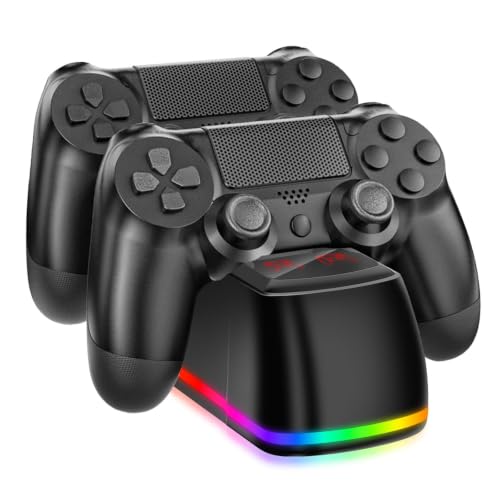
NBGame’s dock presents itself with a modesty the other listings might learn from: a charging dock with LED indication, offered as a replacement charging station for the PlayStation 4 controller, with storage in its job description. There is no charging-time claim in this title, and we will not lend it one. What it promises is the dock concept in its purest form — a defined place where the DualShock 4 lives, a light that reports its state, and an end to the controller’s nomadic life across the furniture.
That purity has a real audience. Plenty of PS4 households are not chasing turnaround speed at all: the controller is played in the evening, docked overnight, and needed again tomorrow, a rhythm in which the difference between a stated 1.8 hours and an unstated overnight is precisely zero. For that rhythm, the features that matter are the ones this title does name — the indicator that confirms the nightly ritual took, and the storage role that keeps the pad visible, reachable and off the floor. Judged against its own promises rather than its rivals’ numbers, the NBGame is coherent.
The buyer’s homework is correspondingly simple. With no time figure stated, expectations should be set at “overnight, comfortably” and verified against the product page if a number is needed. Console generations beyond the PlayStation 4 controller itself are not enumerated in the title, so Slim and Pro households should make the same one-minute check advised elsewhere in this guide. And the replacement-station framing in the title suggests it happily steps into an existing setup’s habits — a dock for a household that already knows it wants one, and wants it uncomplicated.
- Compatibility: PlayStation 4 DualShock 4 controller, per the listing title
- Charging time: the listing title does not say — treat the product page’s specification section as the authority
- Indicator: LED named in the title
- Format: charging dock with storage role
- Positioning: replacement charging station, per the title
- Console generations named: the controller is named; Slim and Pro are not enumerated in the title
- Included cable: not stated in the listing title
Strengths
- LED indication covers the nightly did-it-charge check.
- Storage role is stated, keeping the controller parked visibly and safely.
- Uncomplicated proposition for households whose rhythm is play, dock, sleep, repeat.
Trade-offs
- No charging-time figure in the title for turnaround planning.
- Slim and Pro compatibility is not enumerated in the title.
- Fewer stated technical features than the indicator-and-chip pick above.
Best for: overnight-rhythm households that value the indicator and the parking place over speed claims.
Not suited for: a games-night host who needs a stated turnaround time for back-to-back sessions.
PS4 Controller Charger Docking Station — The upgraded-port stand
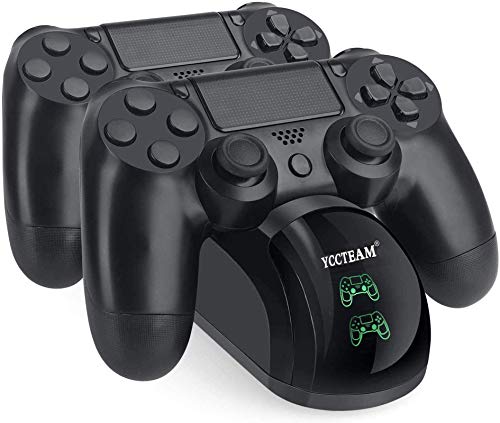
This listing’s pitch rests on two phrases: an upgraded fast-charging port, and a stand. The port language appears across this category — two other picks below use near-identical words — and it refers to the dock’s charging connection being a revised, quicker design than the docks of earlier seasons. No figure accompanies the claim here, so we record it as the maker presents it: an assertion of improvement, not a measurement. The stand format, though, is a tangible choice — a dock that presents the controller upright and visible, as much display as appliance, finished in black to match the console generation it serves.
The compatibility line is this title’s strongest suit: PS4, P4 Slim and PS4 Pro are all named, which settles the generation question for the whole DualShock 4 family in one breath. Households running the Pro — the enthusiast console whose owners tend to run two controllers and long sessions — can shortlist this dock on title evidence alone. The stand presentation also suits that audience: a gaming setup with a designed look wants its controllers displayed at rest, not lying in a charging tray like phones in an airport.
Against that, the title is silent on indicators and on charge management, and the “upgraded” claim invites the fair question — upgraded relative to what, and by how much? The product page is where that question earns an answer; if it stays unanswered there, weigh this pick on its format and its compatibility roll-call, which are real, rather than on the adjective, which is vapour. As a black, upright, all-generations stand, it has a defined place in the six; as a speed proposition, it asks for trust the stated-time picks do not.
- Compatibility: PS4, PS4 Slim and PS4 Pro controllers, per the listing title
- Charging claim: upgraded fast-charging port; no time figure stated in the title
- Format: docking stand, upright presentation
- Finish: black
- Indicator: the listing title does not say — treat the product page’s specification section as the authority
- Charge management: not stated in the listing title
- Included cable: not stated in the listing title
Strengths
- All three console generations named, settling compatibility on title evidence.
- Upright stand format doubles as a display for a designed gaming setup.
- Black finish matches the console family’s own aesthetic.
Trade-offs
- “Upgraded” speed is claimed without a figure to plan around.
- No indicator is named in the title for status checks.
- Stand presentation takes a more visible footprint than low-profile docks.
Best for: Pro and Slim households that want an upright display stand with compatibility stated outright.
Not suited for: a games room that plans purchases around stated charging times only.

PS4 Controller Charger Dock with Cable — The cable-included pick
Somewhere in the accessories industry there is a hall of fame for small mercies, and “charging cable included” belongs in it. This dock’s title leads with exactly that — a dock station for the PS4 controller with the charging cable in the box — and pairs it with a stated 1.8-hour fast-charging time for the DualShock 4. The combination is quietly the most purchase-complete proposition in the guide: the speed is numbered, and the box contains the means to use the dock the evening it arrives, without a rummage through the household’s cable drawer or a second order.
Do not underestimate the cable point; it is where dock purchases go to sulk. A dock that arrives needing a cable the buyer does not have spare — or of a length their shelf cannot use — spends its first week as sculpture. By stating the inclusion in the title, this listing removes the most common friction in the category and signals a maker thinking about the unboxing rather than only the photograph. The 1.8-hour figure, matching the OIVO and the indicator-and-chip dock, puts it in the stated-speed class as well.
There is a gift dimension here that should not be embarrassed to exist. A dock is a classic present for the PS4 household — useful, bounded, impossible to get badly wrong — and the included cable converts it from a present that implies homework into one that works at the moment of unwrapping. Anyone buying for a younger player’s setup, or for a household whose technical patience is a finite resource, should weigh that completeness heavily; the difference between a dock charging on Christmas evening and a dock waiting on a cable order is the difference between a good gift and a pending one.
The title’s silences are the familiar ones: no indicator is named, and the console generations are expressed through the DualShock 4 rather than enumerated model by model. Buyers for whom the status light is the deciding feature should look at the LED picks; buyers whose Saturday-night fear is an empty box and a missing cable have found their dock. In a six-product guide, this is the one we would hand to a friend who asked for the fewest possible surprises between ordering and playing.
- Compatibility: PlayStation 4 DualShock 4, per the listing title
- Charging time: 1.8-hour fast charging, per the listing title
- Included cable: charging cable included, stated in the title
- Format: dock station
- Indicator: the listing title does not say — treat the product page’s specification section as the authority
- Console generations named: the controller is named; Slim and Pro are not enumerated in the title
- Power source: via the included charging cable
Strengths
- Cable in the box removes the category’s most common first-week friction.
- Stated 1.8-hour charging time matches the guide’s fastest stated class.
- The title answers the two questions buyers most often discover too late: speed and contents.
Trade-offs
- No indicator named in the title for at-a-glance status.
- Console generations not enumerated beyond the DualShock 4 itself.
- Fewer stated extras than the indicator-and-chip pick.
Best for: buyers who want the dock working the evening it arrives, with nothing else to source.
Not suited for: a setup where charge status must be visible across the room.
PS4 Controller Charging Dock Station — The straightforward fast-charge dock
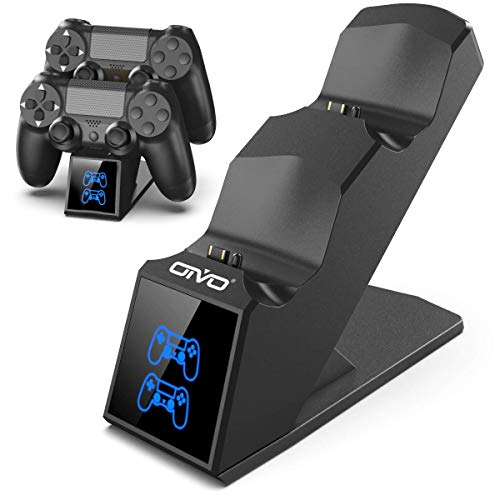
The last pick makes the category’s simplest pitch: a charging dock station compatible with the DualShock 4, built around an upgraded fast-charging port. No time figure, no indicator claim, no cable promise — just the dock, the controller it serves, and the assertion of a quicker port design. There is a kind of honesty in that spareness. The listing is not decorating itself with numbers it cannot support in the title, and the buyer is left with a clean decision: the format and the compatibility, at whatever the product page adds.
Context from its siblings sharpens the judgement. Two other titles in this guide use the same “upgraded fast-charging port” language — the black stand above and, in spirit, this dock’s own phrasing — which tells you the phrase is a category dialect rather than a distinguishing feature. What distinguishes docks, on title evidence, is everything else: stated times, indicators, chips, cables, generation roll-calls. On those axes this title is the quietest of the six, and a buyer comparing strictly on evidence will rank it accordingly — while a buyer who simply needs a DualShock 4 dock and finds the product page satisfactory may never miss the missing adjectives.
Its natural home is the uncomplicated setup: one console, controllers that live beside it, overnight charging as the standing rhythm, and no appetite for feature archaeology. There is also a spare-dock logic that suits it: a second station at a second seat — the desk where the console sometimes migrates, the spare room where guests play — costs little in this category, and a plain, compatible dock is exactly what such outposts need. Not every purchase in a setup has to be the flagship; some just have to be there, working, when the main room is occupied. The DualShock 4 compatibility is stated plainly, which is the one claim that truly cannot be compromised. Everything beyond that — how fast “fast” is, whether a light reports progress — is product-page homework for the interested, and an irrelevance for the overnight household. Simplicity is a feature when it is chosen; this pick asks you to choose it knowingly.
- Compatibility: DualShock 4, stated in the listing title
- Charging claim: upgraded fast-charging port; no time figure stated in the title
- Format: charging dock station
- Indicator: the listing title does not say — treat the product page’s specification section as the authority
- Included cable: not stated in the listing title
- Console generations named: the controller is named; specific PS4 models are not enumerated in the title
- Charge management: not stated in the listing title
Strengths
- DualShock 4 compatibility stated without ambiguity.
- Uncluttered proposition for an overnight charging rhythm.
- The dock format delivers the core habit benefit shared by all six picks.
Trade-offs
- No stated charging time to plan sessions around.
- No indicator or charge-management claims in the title.
- Shares its headline port language with rivals, so differentiation rests on the product page.
Best for: a single-console household that wants a dock, plainly, and charges overnight as a matter of routine.
Not suited for: a feature-led comparison shopper building a shortlist from title evidence alone.
What Separates These Six PS4 Docks at a Glance?
| Pick | Stated charge time | Indicator | Generations named | Distinguishing claim |
|---|---|---|---|---|
| OIVO PS4 Controller Charger Dock | 1.8 hours | Not stated in title | DualShock 4 | Brand name, storage role |
| PS4 Controller Charger Dock Station | 1.8 hours | LED | PS4, Slim, Pro | Charge chip, dual USB |
| NBGame PS4 Controller Charger Dock | Not stated in title | LED | DualShock 4 | Storage role, replacement station |
| PS4 Controller Charger Docking Station | Not stated in title | Not stated in title | PS4, Slim, Pro | Upright stand, black finish |
| PS4 Controller Charger Dock with Cable | 1.8 hours | Not stated in title | DualShock 4 | Charging cable included |
| PS4 Controller Charging Dock Station | Not stated in title | Not stated in title | DualShock 4 | Plain upgraded-port dock |
The table’s pattern is the guide in miniature: the category divides into docks that state a number and docks that state an adjective. Stated numbers cluster at exactly 1.8 hours across three unrelated listings, which reads less like coincidence than like the DualShock 4’s realistic full-charge window under dock power — a useful anchor for expectations whatever you buy. The adjective docks are not thereby slow; they are thereby unmeasured in their titles, and your confidence in them should be priced accordingly.
The second pattern is how rarely any single dock states everything. Only the indicator-and-chip pick pairs a time with a light and a generation roll-call; the cable-included pick pairs its time with the box contents but no light; the stand pairs its roll-call with presentation but no time. Choosing a dock is therefore choosing which evidence you value — and the right answer depends on whether your household checks lights, hosts marathons, or simply cannot face another missing cable.
How Should You Set Up the Dock on Its First Evening?
Choose the spot by watching where controllers already land for a few evenings before the dock arrives; the winning location is the one the household has already voted for with its habits. Clear that surface properly — a dock wobbling on magazines charges nothing reliably — and route its power lead so it cannot be hooked by a passing foot or a vacuum cleaner. If the dock feeds from the console, walk into the console’s settings while you are thinking about it and confirm rest-mode USB power; if it feeds from a wall adapter, use a sound adapter with a permanent home in the socket, not the household’s most-borrowed phone charger, or the dock will be unplugged by Tuesday and blamed by Friday.
Then rehearse the ritual once, deliberately, with everyone who plays: controller off, controller seated, light confirmed. It takes twenty seconds and it converts the dock from an object into a routine. For the LED picks, learn the light’s vocabulary on that first evening — what it shows while charging, what it shows when full — because the entire point of the indicator is a future glance across a dark room, and a glance only works if the reader already knows the language. Households with younger players should make the light check a game for the first week; by the second week it is simply what happens after playing.
Finally, resist redecorating. The dock’s first position, if honestly chosen, is usually its best; the setups that fail are the ones optimised for how the shelf photographs rather than how the household moves. A dock in the path of life gets used; a dock in a display arrangement gets admired and bypassed. Utility first, aesthetics a respectful second — and on that ordering, all six picks in this guide perform identically, because the habit they sell is the same.
Which Dock Habits Keep a DualShock 4 Alive Longest?
Treat the dock as the controller’s address, not its occasional hospital. Controllers that return to the same place after every session get charged in small, regular meals rather than desperate feasts, and their whereabouts stop being a household mystery. Keep the dock where the console lives — a dock exiled to a hallway because its cable was short will be visited as rarely as it deserves. If your dock draws from the console, check the console’s rest-mode power settings once, properly, so USB power survives the night; if it draws from a wall adapter, that ritual is unnecessary and the dock answers to nobody’s sleep schedule.
Seat the controller with a moment’s care. Drop-in docks reward a vertical, unhurried placement; a controller slammed sideways onto contacts a hundred times will eventually complain through its port. Keep drinks on a different surface from the dock — the living room’s oldest law — and give the contacts an occasional dry wipe if the household includes the young, the snacking or the enthusiastic. When a second controller joins the household, dock both from the first evening; a rotation where one pad is always charged and one is always dying teaches exactly the wrong lesson to everyone who plays.
What Mistakes Do PS4 Households Make With Controller Charging?
The founding mistake is the cable-in-the-drawer system: charging treated as an event rather than a resting state, guaranteeing the mid-session death that sends someone to a forum at 1 a.m. The second is buying on the adjective — paying for an “upgraded fast-charging port” while expecting a stated time the title never gave. Third is the generation assumption: presuming a dock suits a Slim or Pro because it suits a DualShock 4, when the careful titles in this guide show that the good listings say so explicitly. Fourth is powering the dock from a source that sleeps, then blaming the dock for mornings it never had the chance to prevent.
A related error is dock placement by photograph. Setups arranged for how they look in a listing of one’s own room — dock centred, controllers angled, cables vanished — often place the dock a half-step beyond the household’s actual path, and half-steps are where habits go to die. The dock that wins is the one slightly in the way: on the route between the couch and the kitchen, at the hand’s natural resting height, impossible to bypass without noticing. Judge your placement by returns per week, not by symmetry.
Fifth is ignoring the second controller. Households buy a dock when the first pad dies mid-game, then leave the guest controller to the drawer system indefinitely, recreating the original problem at half scale. Sixth is treating the dock as pure utility and exiling it somewhere ugly and unreachable; a dock’s power is precisely that it sits in the room, in the routine, in the path between the couch and everywhere else. Put it where the controllers already land, and the habit builds itself.
Final Recommendation
On title evidence, the indicator-and-chip dock station makes the most complete case: a stated 1.8-hour charge, an LED to report it, charge management named, and every console generation listed. The OIVO answers with a brand and the same stated time for households that prefer a known maker; the cable-included dock answers with the smoothest first evening; the NBGame and the black stand serve the storage-minded and the display-minded respectively; and the plain dock serves anyone whose needs end at a DualShock 4 parked and filling overnight. All six sell the same underlying miracle — a controller that is simply ready, every time you reach for it — and the household that picks any of them and actually docks nightly will wonder why the drawer full of cables ever seemed like a system at all.
Frequently Asked Questions
How long does a DualShock 4 take to charge on a dock?
Three titles in this guide state 1.8 hours, which is the category’s realistic full-charge window and the only figure we repeat. The other three titles claim fast or upgraded charging without a number; for planning purposes, treat them as overnight chargers until the product page gives you a figure of their own. In practice, most controllers return to the dock partly charged, so most real sessions are shorter than any full-charge figure.
Will these docks work with a PS4 Slim or Pro?
Two titles say so explicitly — the indicator-and-chip dock station and the black docking stand both name PS4, Slim and Pro. The other four address the DualShock 4 itself, which is the same controller across the family, but if your household runs a Slim or Pro, either choose a title that names your console or spend one minute confirming on the product page. That minute is the best-value precaution in this entire guide.
Does a dock charge while the console is off?
That depends on where the dock draws its power. Fed from a wall adapter, yes, independently of the console entirely. Fed from the console’s USB ports, it depends on the console’s rest-mode settings for supplying power to USB — a setting worth checking once when the dock arrives. Several households solve the question permanently by dedicating a small wall adapter to the dock and never thinking about it again.
Is it bad for the battery to leave the controller docked?
A docked controller sits at full charge for long stretches, which lithium cells tolerate far better than being run flat and left flat — the drawer system’s signature abuse. The charge chip named in one title here exists to manage the feeding intelligently. In real households, regular play cycles the battery healthily, and the practical risk to a DualShock 4 comes from neglect and deep discharge, not from a dock doing its job.
Can one dock serve two controllers?
The docks in this category are built around the DualShock 4 as their unit, and dual-controller households are their home turf — the titles speak of controllers, docks and stations in exactly that two-pad living-room context. If your household runs more than two pads in rotation, confirm the dock’s capacity on the product page and consider whether a second dock at a second seat is the honest answer.
Should I replace a dock if my controller starts charging slowly?
Not before checking the simpler suspects. Confirm the dock’s power source is delivering what it should — swap the adapter or port as a test — and seat the controller carefully to rule out a contact issue. If a different controller charges briskly on the same dock, the slow unit’s battery is ageing, and no dock in this guide can repeal that chemistry. Replace the failing part, not the faithful one; docks are blamed for battery senescence with a regularity that borders on slander.
Why does my controller die even though I own a dock?
Almost always because the dock is not where the controller lands. The fix is environmental, not technical: move the dock to the controller’s natural resting place, confirm its power source stays live overnight, and make docking the last gesture of every session for one deliberate week. Habits installed in week one run themselves by week three — that, more than any specification, is what you are buying.
Related Guides
The same title-evidence discipline runs through this site’s other charging guides: Best Home Level 2 EV Chargers for the car on the driveway, Best Tesla Chargers for its NACS counterpart, and Best RC Car Chargers for the batteries on the workbench.
Related guides
- Best 17 Laptops: The Complete Tier-by-Tier Guide to Big-Screen Machines
- Best 4K Monitors for MacBook Pro: USB-C Panels With Real Power Delivery
- Best Routers for Remote Work: VPN Gateways, Travel Routers and Home Wi-Fi That Holds a Call
- Best Sim Racing Monitors: Ultrawide Cockpits From 34-Inch OLED Speed to the 49-Inch Wrap


