What's inside
- Where Each Listing Earns a Second Look
- Key Takeaways
- Quick Picks
- How We Chose These Picks
- Comparison
- How to Choose a Projector for 3D Projection Mapping
- How Many Projectors Does One Surface Actually Need?
- What Content Survives Being Wrapped Around an Object?
- Does a Mapping Kit Replace Mapping Software?
- How Bright Does a Mapped Surface Really Need to Be?
- What Should You Test on the First Evening?
- Common Mistakes
- Final Recommendation
- Frequently Asked Questions
- Related Guides
As an Amazon Associate I earn from qualifying purchases. This post may contain affiliate links at no extra cost to you.
[SITE_DOMAIN] is reader-supported. When you buy through links on our site, we may earn an affiliate commission.
Where Each Listing Earns a Second Look
Follow any linked name below and you land on that model’s own Amazon page, where the full description, the current figure and the questions other buyers asked are gathered in one place. Bring your surface with you when you read: the object you intend to wrap, its dimensions, the distance your room or venue allows, and the computer that will run your mapping software. A projector for this work is half of a system, and the listing is where you confirm the half you are buying actually meets the half you already own.
Choosing the best projectors for 3d projection mapping starts with a distinction most shopping pages blur. Projection mapping means warping and masking a video image so it lands precisely on an irregular surface — a wedding cake, a building facade, a car body, a stage prop — so the surface appears to move, glow or change material. The warping is done by software. Only two machines in this guide ship with a dedicated mapping kit named in their titles; the other four are capable projectors that expect you to bring mapping software of your own, such as MadMapper or Resolume, running on a separate computer.
That split shapes everything that follows. A bundled kit trades flexibility for a guided path: templates, automated alignment, a workflow designed for one machine. An external-software route trades guidance for power: the mature mapping applications used by professionals, with their own learning curves, licences and hardware demands, paired with whatever projector your budget and venue dictate. Neither route is the correct one in the abstract. The correct route is the one matched to how many surfaces you map, how often, and how much of the craft you want to learn.
Brightness language needs the same care. This guide quotes an ANSI lumen figure only where a title prints the word ANSI beside the number, because ANSI is a measurement standard and the other numbers in these titles are not. Where a title prints a plain lumen figure without the standard’s name, the figure is reported as the title’s own wording and never ranked against an ANSI figure. Where a title prints no figure at all, brightness is described in words — high, verified, unstated — and the buyer is sent to the listing for whatever the maker publishes there.
Resolution claims are read the same literal way. A title that says 4K names a 4K-class image; a title that says 4K Supported or 4K Support is describing signals the machine accepts, which is a different promise, and the reviews below keep those two promises separate every time they appear.
One more framing idea runs through every review below: mapping is a repeat performance. A wedding professional maps the same cake shapes monthly; a household maps the same facade every October and December; a gallery maps a new form once and then runs it for a season. Machines were judged against that repetition — how quickly a show can be rebuilt, how forgiving the setup is on the tenth night rather than the first, and how much of the workflow lives in the projector versus in a laptop that might be replaced mid-season. A guide that only imagined opening night would recommend different machines than this one does.
Key Takeaways
- Only the two Nebula bundles carry a dedicated 3D mapping kit in their titles — SpaceFlow, with more than 100 ready-to-use templates claimed for each.
- Every other pick here is a general projector: powerful, and in one case very bright, but the mapping itself must come from software you supply.
- ANSI lumen figures appear only for the Nebula pair (3,500) and the NICPOW (2,000); other brightness claims are quoted as their titles word them, never converted.
- The ViewSonic LS740HD is the placement specialist: optical zoom, corner adjustment and 360-degree projection from a laser light source.
- Template-driven mapping suits events and celebrations; external-software mapping suits artists building a repeatable practice.
Quick Picks
| Pick | Badge | Why it earns its place |
|---|---|---|
| Nebula X1 SpaceFlow Mapping Bundle | The kit that maps with you | A triple laser projector bundled with a 3D mapping kit, 3,500 ANSI lumens, Dolby Vision and over 100 ready-to-use templates. |
| Nebula X1 Pro SpaceFlow Kit | Mapping kit, cinema sound | The same SpaceFlow mapping kit and 3,500 ANSI lumens, with 7.1.4 Dolby Atmos sound for mapped shows that are also performances. |
| ViewSonic LS740HD | Placement without compromise | A 1080P laser projector with optical zoom, corner adjustment and 360 projection — geometry tools a mapper reaches for constantly. |
| NICPOW 2000 ANSI Projector | Honest lumens, huge canvas | A stated 2,000 ANSI lumens, 4K signal support, zoom and a 300-inch maximum image for big, simple surfaces. |
| VISSPL Smart 4K Projector | Focus that sets itself | AI auto focus, built-in Netflix and portable outdoor framing for small mapping tests and casual pieces. |
| ONOAYO ONO5Pro 2.0 Outdoor Projector | Verified-lumen claim, licensed apps | A verified real-lumen claim, 80W Dolby Audio and officially licensed apps in a smart outdoor projector. |
How We Chose These Picks
Mapping relevance came first, and it was judged strictly from titles. A machine earned the top of this guide only if its title named mapping hardware or software outright; that test admits exactly two products, and they lead. Below them, machines were ranked by the qualities mapping actually consumes: placement flexibility, because a mapped surface rarely sits where a textbook says a screen should; brightness with an honest label, because outdoor and lit-room work punishes dim images; and geometry correction, because keystone and corner tools are the daily bread of alignment even when dedicated software does the fine warping.
Claims discipline came second. Every figure in these reviews is traceable to a title: contrast ratios, template counts, sound wattages, connection lists. Where a title is silent — and several are silent about things a mapper would love to know, from lens throw to input lag — the silence is recorded in the spec box rather than papered over with general knowledge about the brand.
Use-case spread came third. A guide read by a wedding professional, a Halloween enthusiast and a gallery artist in the same week owes each of them a machine whose title speaks to their scale: a kit with templates for the celebrant, a placement-flexible laser for the installer, an honestly rated mid-brightness machine for the facade experimenter, and portable smart projectors for the beginner testing whether mapping is their craft at all.
Finally, sound was treated as part of the show rather than an afterthought, because mapped pieces are usually watched, not just seen. Two picks here carry serious stated audio — a 40W system on each Nebula, 80W Dolby Audio on the ONOAYO — and for event work that can retire a separate speaker from the kit list entirely.

Nebula X1 SpaceFlow Mapping Bundle — The kit that maps with you
This bundle is the only entry in the guide whose title assembles the whole mapping proposition in one breath: a triple laser projector, a 3D mapping kit under the SpaceFlow name, and a library of more than 100 ready-to-use templates. For a buyer who wants to map a cake, a Christmas display or a product launch backdrop without first apprenticing themselves to professional software, that assembly is the entire argument. The machine arrives with the craft’s hardest part — aligning content to a surface — already productised.
The optical claims are stated with unusual precision. Brightness is given as 3,500 ANSI lumens, the standard-labelled figure this guide trusts most, and contrast is printed at 56,000:1 (written 56000:1 in the title). Dolby Vision is named, which matters for mapped pieces built from rich video content: the same engine that wraps a surface can also screen a film night credibly, and a machine bought for December’s display will earn its keep in July’s garden cinema.
Sound is specified at 40W, substantial for a projector and relevant because mapped shows are usually accompanied. A wedding cake that blooms with flowers while music plays from the same box is a simpler rig to transport, insure and rehearse than a projector plus a separate PA, and event professionals price simplicity in hours, not features.
What the title does not give is any account of the mapping kit’s mechanics — how surfaces are captured, how many objects one show can hold, whether content beyond the templates can be imported and warped freely. Template counts promise a starting library, not a ceiling, but the listing and the maker’s documentation are where a serious buyer confirms the import question before committing, because a kit that only plays its own templates is a jukebox, while a kit that warps your own footage is an instrument.
Consider who this suits in practice. The celebrant mapping a handful of known surfaces — cakes, facades, a fireplace surround — gains the most, because templates plus automation collapse weeks of learning into an evening of placement. The artist mapping a new sculptural form every month should read the import question as the whole purchase decision. Both are told the same thing by this title; they simply need different answers from the listing. When you check the price on Amazon for the X1 bundle, read the mapping kit’s description first and the projector’s second — the kit is what you are really buying.
- Mapping: SpaceFlow 3D mapping kit included, per title
- Brightness: 3,500 ANSI lumens, per title
- Contrast: 56000:1, per title
- Light source: triple laser, per title
- Sound: 40W, per title; Dolby Vision named
- Templates: 100+ ready-to-use, per title
- Kit mechanics and content import: Not stated in the listing title — verify with the manufacturer documentation
Strengths
- Dedicated mapping kit and template library in the box
- Standard-labelled 3,500 ANSI lumen brightness
- Triple laser engine with Dolby Vision for dual-duty screening
Trade-offs
- Kit’s import and warping freedom unconfirmed by the title
- Template-led workflow may ceiling an experimental artist
- Sound and cinema features add cost a silent-display user wastes
Best for: event and celebration mappers who want a guided kit with templates on known surfaces.
Not suited for: artists who need confirmed free-form warping of their own footage — the title does not state the kit’s import capability.
Nebula X1 Pro SpaceFlow Kit — Mapping kit, cinema sound
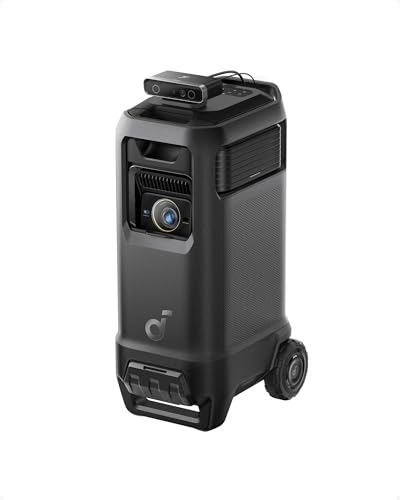
The X1 Pro carries the same SpaceFlow proposition as its sibling — a 4K AI mapping kit, 3,500 ANSI lumens, triple laser light, a 56,000:1 contrast figure and the same library of more than 100 templates — and then spends its extra ambition on sound. The title specifies 7.1.4 Dolby Atmos, a full spatial audio layout, beside the same 40W sound figure. Read the pairing carefully: this is the bundle for mapped pieces where the audio is not accompaniment but content.
Think of the shows that implies. A mapped product reveal where sound design sweeps around the room as the surface transforms. A home installation where a wall becomes a forest and the forest is heard in three dimensions. A premium garden cinema that opens the evening with a mapped title sequence across the house wall. In each case the projector is the whole theatre, and the Atmos claim — unusual enough in a projector title to be worth the maker’s ink — is the differentiator that justifies choosing Pro over the standard bundle.
For mapping itself, nothing in the title separates the Pro from the bundle beside it: same kit name, same template count, same brightness, same contrast. That honesty cuts both ways. A buyer whose mapped work is silent, or who already owns serious speakers, gains nothing mappable from the upgrade and should let the standard bundle keep the difference. A buyer building one-box shows gains a dimension.
The same unconfirmed questions apply to the kit here — surface capture method, object count, freedom to import and warp personal content — and they matter more, not less, at this tier, because the Pro buyer is plausibly building performances rather than decorations. Confirm them on the listing with performance questions in mind: how a show is programmed, whether cues can be timed, how content is loaded on show night when the venue’s network is not yours.
Practical placement notes follow from the title’s silence. No throw distance, lens or mounting detail is printed, so a permanent installation needs the listing’s full specification before brackets are bought. Portable show work is the safer assumption: a machine with this sound system and a template library is designed to be carried to the surface, not bolted above it. Amazon’s page for the X1 Pro kit is worth checking for the current price once you have decided the Atmos system replaces speakers you would otherwise transport.
- Mapping: SpaceFlow 4K AI mapping kit included, per title
- Brightness: 3,500 ANSI lumens, per title
- Contrast: 56,000:1, per title
- Light source: triple laser, per title
- Sound: 7.1.4 Dolby Atmos, 40W, per title
- Templates: 100+ ready-to-use, per title
- Throw, lens and mounting detail: Not stated in the listing title — verify with the manufacturer documentation
Strengths
- Full SpaceFlow kit with spatial Atmos sound in one box
- Standard-labelled brightness and high stated contrast
- Template library suits repeatable one-person shows
Trade-offs
- Mapping capability identical to the cheaper sibling on paper
- Kit programming depth unstated in the title
- Owners of real speaker systems pay for sound twice
Best for: performers and hosts whose mapped shows carry designed sound as part of the piece.
Not suited for: silent-display mappers — the title’s premium buys a 7.1.4 Atmos system that silent work never switches on.

ViewSonic LS740HD — Placement without compromise
Nothing in this title mentions mapping, and the review will not pretend otherwise. The LS740HD earns its place here the way most professional mapping projectors actually earn theirs: by being a bright, flexible laser projector that external software can drive onto difficult surfaces. Its stated tools read like a mapper’s checklist — optical zoom, keystone correction, corner adjustment and 360-degree projection — because alignment is a physical problem before it is a digital one, and this machine attacks the physical half seriously.
Corner adjustment deserves its sentence. When a projector cannot sit square to a surface — and on real sets, in real halls, it almost never can — corner correction lets each corner of the image be pulled to its mark independently. Mapping software then refines what the projector’s geometry has already made plausible. Optical zoom plays the same supporting role: image size can be tuned from a fixed mounting point, which is how installations survive the discovery that the perfect position is occupied by a beam.
The brightness figure is printed as 5500 lumens without the ANSI label, and this guide reports it exactly that way — the title’s own number, not converted, not ranked against the Nebula pair’s standard-labelled figure. What can be said plainly is that the figure is the largest printed in this guide and that the laser light source behind it suits long installation hours: the title’s own application list runs to auditorium and classroom, venues that measure a projector’s worth in semesters.
Resolution is stated as 1080P Full HD, and for mapping that is a considered trade rather than a deficiency. Mapped surfaces are textured, curved and viewed at distance; the audience reads motion and illusion, not pixel grids. A 1080P laser with strong placement tools will outperform a sharper machine that cannot be positioned where the surface demands — a truth every installer learns on the first scaffold.
Its stated habitats include golf simulation and home theater alongside the auditorium, which tells you the maker expects versatile, long-hour use. For the mapper, the buying logic is: bring your own software — MadMapper, Resolume or their peers, named here as the general class of tools this route requires — and let this machine be the dependable light engine underneath it. Check the ViewSonic’s current Amazon price against the cost of the software licence it presupposes; the pair together is the real purchase.
- Resolution: 1080P Full HD, per title
- Brightness: 5500 lumens as worded in the title (not labelled ANSI)
- Light source: laser, per title
- Geometry: optical zoom, keystone, corner adjustment, 360 projection, per title
- Stated venues: classroom, auditorium, golf simulation, home theater
- Mapping software or kit: Not stated in the listing title — verify with the manufacturer documentation
Strengths
- Corner adjustment and optical zoom serve awkward placements
- Laser engine suits long installation hours
- 360-degree projection frees mounting orientation
Trade-offs
- No mapping kit or software is included or named
- 1080P ceiling where two rivals claim 4K class
- Brightness figure carries no ANSI label in the title
Best for: installers pairing external mapping software with a placement-flexible laser engine.
Not suited for: buyers expecting any mapping capability in the box — the title names none, so software and its licence are separate purchases.
NICPOW 2000 ANSI Projector — Honest lumens, huge canvas
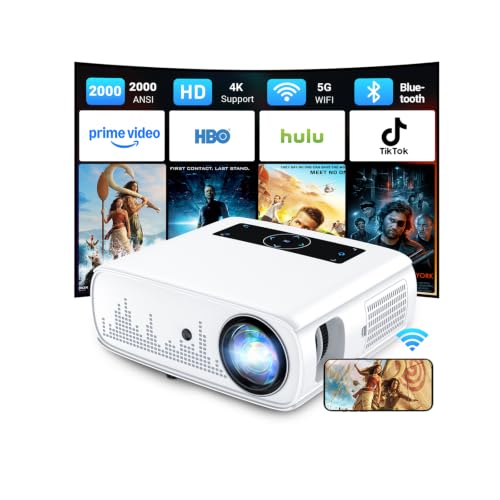
The NICPOW’s title does something rare in this corner of the market: it labels its brightness with the standard. Two thousand ANSI lumens is the figure, and because it is standard-labelled it can be compared honestly — it sits below the Nebula pair’s 3,500, and for indoor evening mapping on modest surfaces that gap may never be seen. What the NICPOW offers instead of flagship brightness is scale and connection breadth: a stated image up to 300 inches, zoom, and a compatibility list that runs from HDMI and USB through AV to phones, tablets, laptops, DVD players and game consoles.
For mapping, read that list as a source strategy. A facade experiment fed from a laptop running mapping software, a school hall piece fed from a tablet, a Halloween window fed from a TV stick — the machine accepts the device the project already owns. Zoom matters here too: on a fixed surface, zoom is how the image is fitted to the architecture when the projector’s position is dictated by a garden path or a pavement rather than by preference.
The 4K wording is “4K Supported”, and the distinction from a native 4K claim is preserved in this review deliberately. The machine accepts 4K signals; the title does not state a 4K native resolution. For mapping work — where content is warped, masked and rarely pixel-peeped — signal acceptance plus an honest brightness label is a respectable combination, and beginners building their first large piece will feel the 300-inch ceiling as freedom rather than the resolution wording as a limit.
WiFi and Bluetooth are both stated, which suits the casual end of mapping: testing a design cast from a phone before committing the laptop, or running a simple looping piece without a cable across the lawn. Serious multi-surface work will still arrive by HDMI from a computer, and the port is there. Nothing in the title speaks of keystone or corner tools, so alignment finesse must come from placement and from whatever software feeds it — plan the tripod and the distance before the first show, not during it.
This is the guide’s value engine for big, simple surfaces: one wall, one facade, one garage door, wrapped by software you control, at a scale the mini projectors cannot reach. Look at the NICPOW’s Amazon listing to confirm today’s price and the zoom range detail its title omits; the 300-inch claim deserves a throw-distance check against your own garden before the order is placed.
- Brightness: 2,000 ANSI lumens, per title
- Signal: 4K Supported, per title (acceptance, not a native 4K claim)
- Image size: up to 300 inches, with zoom, per title
- Wireless: WiFi and Bluetooth, per title
- Connections named: HDMI, USB, AV, smartphone, pad, laptop, DVD, TV stick, PS5
- Keystone or corner correction: Not stated in the listing title — verify with the manufacturer documentation
Strengths
- Standard-labelled brightness a buyer can trust and compare
- Very large stated image with zoom for fitting facades
- Broadest source compatibility list in this guide
Trade-offs
- Brightness trails the Nebula pair by a wide stated margin
- No geometry correction tools are named in the title
- 4K wording covers signal support only
Best for: first large-surface mapping — one facade or wall, software-fed, on an honest brightness budget.
Not suited for: multi-angle installations needing stated corner correction — the title names no geometry tools, so alignment depends entirely on placement.

VISSPL Smart 4K Projector — Focus that sets itself
The VISSPL arrives with the least mapping-relevant title in this guide, and its review is correspondingly precise about what it is: a portable smart projector, described as high brightness without a printed figure, with AI auto focus, 3D Dolby Audio, built-in Netflix and WiFi Bluetooth, framed for outdoor movies and bedroom ceilings. It is included because a real class of reader needs it — the beginner who wants to test mapping ideas tonight, on a bedroom wall or a garden sheet, before deciding whether the craft deserves a flagship.
Auto focus is the feature that serves that reader best. Mapping experiments involve constant repositioning — closer, further, angled at a prop — and a machine that refocuses itself after every move keeps the experiment flowing. The portability in the title is genuine workflow here: this is a projector that will be carried to surfaces rather than installed before them, and its smart platform means a test clip is a remote-click away rather than a laptop session.
Its limits must be stated as plainly as its conveniences. No lumen figure is printed, so no brightness promise can be made for it beyond the title’s own “High Brightness” wording; evening and dark-room work is the safe assumption. No mapping kit, keystone or corner tool is named, so alignment is manual and software — if the experiment graduates — will live on whatever device feeds it. The 3D in its title belongs to its audio wording, not to any stereoscopic or mapping claim, and this review declines to blur that.
Used within those limits, the machine has a real role: prototyping. Artists routinely test a mapped idea at small scale before renting or buying installation hardware, and a portable smart projector on a shelf, aimed at a model or a corner, is a sketchbook for light. The VISSPL’s price tier — check its Amazon page for the current figure — is the tier where sketching is affordable.
Home users whose “mapping” ambition is actually a festive window display or a party backdrop will also find this pick proportionate: a looping video fitted by eye to a window or wall, with sound from the machine itself, is a complete evening’s entertainment, and no one at the party will ask about corner correction.
- Brightness: described as high brightness; no figure stated in the title
- Focus: AI auto focus, per title
- Platform: Netflix named; smart projector with WiFi and Bluetooth
- Audio wording: 3D Dolby Audio, per title
- Form: portable, outdoor and bedroom/ceiling framing, per title
- Mapping kit, keystone and corner tools: Not stated in the listing title — verify with the manufacturer documentation
Strengths
- Auto focus keeps repositioning experiments fast
- Built-in streaming removes the laptop for casual pieces
- Portable form suits prototyping on models and corners
Trade-offs
- No brightness figure is printed to plan against
- No alignment tools are named in the title
- Smart-platform design centres movies, not installations
Best for: beginners prototyping mapping ideas and casual festive displays in dark rooms.
Not suited for: lit venues or precise surface work — with no stated lumen figure and no named geometry tools, neither brightness nor alignment can be planned from the title.

ONOAYO ONO5Pro 2.0 Outdoor Projector — Verified-lumen claim, licensed apps
The ONO5Pro 2.0 makes its brightness argument with a phrase rather than a number: “Verified Real-Lumen”, bracketed in its title beside 80W Dolby Audio and officially licensed apps. This guide reports the phrase as the maker’s claim and prints no figure for the machine, because none is given. Buyers who need a plannable number should treat that absence as the fact it is; buyers who read it as a maker answering the market’s inflated-numbers problem will still want the listing’s detail before a bright venue is promised.
What is concrete in the title is the rest of the package. AI auto focus handles the repositioning that outdoor and event work involves. The licensed-apps wording matters more than it looks: projectors with unofficial streaming arrangements lose apps and break logins, while officially licensed apps keep the casual half of the machine’s life — the movie nights between mapping shows — dependable. And 80W of Dolby Audio is the strongest sound figure printed in this guide, double the Nebula pair’s stated wattage, which for outdoor mapped pieces removes the separate speaker from the lawn entirely.
For mapping duty, place this machine honestly in the external-software, casual-to-mid tier. No kit is named, no geometry tools are named; the warping will be done by an application on a connected device, and alignment by placement, distance and the auto focus keeping the result sharp. Within that tier its pitch is atmosphere: a garden facade glowing with a looping piece, sound carried by the machine, content refreshed from licensed apps when the piece is simply a beautiful backdrop.
The outdoor framing in the title is repeated — bedroom and outdoor use both named — and outdoor mapping is where this class of machine is most forgiving. Facades are large, viewing distances are long, and the difference between a good consumer image and a great one dissolves into the pleasure of the effect. A first facade, a birthday name wrapped around a garage door, a Halloween scene across the front of the house: these are its home fixtures.
Before ordering, the ONOAYO’s Amazon page is the place to hunt for the two things its title withholds — any published lumen figure behind the verified claim, and any keystone wording — because both decide whether it can graduate from festive facades to a dim hall. Its price there will also settle whether the 80W sound system is replacing a speaker purchase in your own kit list.
- Brightness: “Verified Real-Lumen” claim in title; no figure stated
- Sound: 80W Dolby Audio, per title
- Focus: AI auto focus, per title
- Platform: officially licensed apps, smart projector, WiFi and Bluetooth
- Stated use: bedroom and outdoor, per title
- Mapping kit and geometry tools: Not stated in the listing title — verify with the manufacturer documentation
Strengths
- Strongest stated sound output in this guide at 80W
- Licensed apps keep the streaming side dependable
- Auto focus suits outdoor repositioning and events
Trade-offs
- Brightness claim carries no number to plan a venue with
- No mapping kit or alignment tools are named
- Model naming is generic; support depth is a listing question
Best for: garden facades and festive outdoor pieces where sound and simplicity carry the show.
Not suited for: venue work contracted against a brightness specification — the title’s verified-lumen wording states no figure a contract could cite.
Comparison
| Pick | Mapping route and headline facts | Mapper it suits first |
|---|---|---|
| Nebula X1 SpaceFlow Bundle | Dedicated SpaceFlow kit; 3,500 ANSI; triple laser; 100+ templates; 40W sound | The event mapper who wants guidance |
| Nebula X1 Pro SpaceFlow Kit | Same kit and brightness; 7.1.4 Dolby Atmos sound | The performer whose sound is content |
| ViewSonic LS740HD | External software route; 1080P laser; zoom, corner adjustment, 360 projection | The installer with awkward surfaces |
| NICPOW 2000 ANSI | External software route; 2,000 ANSI stated; 300-inch image; broad inputs | The first-facade experimenter |
| VISSPL Smart 4K | No kit; AI auto focus; built-in Netflix; portable | The prototyping beginner |
| ONOAYO ONO5Pro 2.0 | No kit; verified-lumen claim; 80W Dolby Audio; licensed apps | The garden-show host |
How to Choose a Projector for 3D Projection Mapping
Decide the route before the machine. If your surfaces are known, your shows repeat and your appetite for software is modest, a bundled kit with templates — the Nebula route — converts money into evenings saved. If your surfaces change, your content is your own and your ambitions grow monthly, the external-software route is the profession’s road: budget for the application alongside the projector, and choose the projector for placement tools and honest brightness.
Measure your surface and your throw before either route is priced. The distance the room allows, divided into the image size the surface needs, defines the lens class you require; titles that omit throw data — most of these — send you to the listing with a tape measure’s numbers in hand. Map the audience’s position too: a piece read from three metres forgives resolution that a piece read from one metre does not.
Interrogate brightness claims by their labels. An ANSI figure is a measurement; a bare lumen figure is a maker’s wording; a phrase like verified real-lumen is a promise without a number. Match the claim class to the venue class: dark rooms forgive everything, lit halls forgive only honest, standard-labelled output, and daylight forgives nothing in this guide at all.
Finally, rehearse the show in your head, end to end, against the candidate’s title: content created where, carried how, aligned by what, heard through which speakers, struck and stored by whom. The machine whose title answers the most steps of your actual rehearsal is the machine to buy — every other line of the specification is commentary.
Budget honestly around the machine while that rehearsal is fresh. The projector is rarely the whole cost of a first show: mapping software carries a licence on the external route, a stand or mount carries the machine, cables reach further than expected, and outdoor work adds weather protection and safe power runs. A buyer who prices the whole rehearsal — projector, warping, support, cable, cover — can compare the kit route and the software route truthfully, because the kit’s apparent premium often shrinks once the software route’s supporting cast is itemised. Decide with the full list in view and neither route will ambush you in the week before the show.
Support and season deserve a thought as well. Mapping gear is used hard at predictable peaks — December, October, wedding season — and a failure in peak week is a different event from a failure in February. Established makers with published documentation answer questions faster in those weeks, and the titles in this guide that read like documents from such makers are, in part, being credited for it. A first show should still never depend on a support reply: rehearse the failure, carry the spare cable, and keep last year’s working file untouched as the fallback show.
How Many Projectors Does One Surface Actually Need?
One, for most of the surfaces in most readers’ lives. A single machine covers a cake, a fireplace, a garage door, a modest facade or a stage flat, provided its image can be made large enough from the distance available and bright enough for the room’s darkness. The single-projector piece is the natural unit of this craft: one alignment, one content file, one point of failure to rehearse.
Second projectors enter for three reasons, and only three. Size: when one image cannot cover the surface at acceptable brightness, two machines split the surface or blend along a seam. Angle: when a three-dimensional object must glow on faces that no single viewpoint can see, each face wants its own machine. Redundancy: when a show cannot fail — a wedding, a paid reveal — a hot spare is cheaper than an apology. Buyers tempted by a second machine for general impressiveness should know that blending two images into one seamless piece is precisely the work external software exists to do, and precisely the work template kits are least likely to describe in their titles.
The practical consequence for this guide is reassuring: every pick here is a legitimate complete purchase for a one-machine show. The question to carry to the listing is not whether a machine works alone — each does, on its route — but whether its brightness and image size cover your one surface with something in reserve.
What Content Survives Being Wrapped Around an Object?
Motion survives; fine detail does not. A mapped surface is textured, angled and often coloured, and content that reads beautifully on a flat preview — small text, thin lines, subtle gradients — dissolves when wrapped around brick, icing or carved foam. The pieces audiences remember are built from bold shapes, slow transformations, strong contrast and movement timed to the surface’s own features: windows that open where windows are, vines that climb the actual corners, snow that settles on the real ledges.
Templates, like the libraries the Nebula bundles claim, are valuable precisely because they are usually designed with that grammar already learned — sized bold, timed slow, fitted to common surfaces. Buyers building their own content for the software route should adopt the same discipline from the first export: design at the surface’s aspect, not the projector’s; keep essential action inside the surface’s flattest region; and preview on the object early, while changing the design is still free.
Sound obeys the same rule of boldness. A mapped piece watched from a pavement or a garden is heard through distance and open air, and delicate audio detail is lost the way fine visual detail is lost. The stated sound systems in this guide — 40W on the Nebula pair, 80W on the ONOAYO — are sized for that reality: presence and warmth at social distance, not studio nuance.
Does a Mapping Kit Replace Mapping Software?
For the surfaces the kit was designed around, largely yes — that is the product. A kit like SpaceFlow, with its template library, packages the capture, warping and playback steps into a guided flow, and for cakes, facades and seasonal displays the result can be indistinguishable from a software-built piece. The replacement holds while your ambitions stay inside the kit’s assumptions: its surfaces, its content shapes, its way of working.
Professional software — MadMapper and Resolume are the names the field reaches for — exists for everything outside those assumptions: multiple projectors blended into one image, live inputs, generative content, cues fired from a lighting desk, surfaces no template anticipated. The dividing question is not quality but authorship. If you are presenting pieces, the kit presents beautifully. If you are composing them, the software is the instrument and the projector is its voice.
A practical middle path is common: begin with a kit, learn what mapping feels like on real surfaces, and let the pieces you cannot yet build define whether software joins the kit list later. The projector bought for the kit route — bright, laser, honestly labelled — remains useful on the software route, which is more than can be said for the reverse journey.
How Bright Does a Mapped Surface Really Need to Be?
Brightness in mapping is spent differently than in cinema. A cinema image fights only the room; a mapped image fights the surface itself — its colour, its texture, its own ambient reflections. A white cake returns light generously; a brick facade keeps most of what it is given; a dark stage prop keeps nearly all of it. The same projector is three different instruments on those three surfaces, which is why this guide refuses to crown a brightness winner across claim classes.
The workable rule is environmental. Map after dark or in controlled light, choose the brightest honestly labelled machine your route allows, and test on an offcut of the real surface — a spare brick, a dummy cake tier, a painted flat — before show week. A test on the true material at the true distance answers in ten minutes what no specification table can.
Scale spends brightness too. Doubling an image’s width quarters the light on each part of it, so the facade that glowed at three metres wide may sulk at six. When a piece outgrows its projector, the professional answers are a second machine blended beside the first, or a smaller, denser piece — never a menu setting, because there is no brightness left in the menu that the title did not already claim.
What Should You Test on the First Evening?
Test the alignment, because alignment is the craft. Set the machine at its real distance, on its real stand, and fit content to the real surface — or its stand-in — using every tool the purchase promised: the kit’s capture flow, the projector’s corner adjustment, the software’s warp grid. Note how long a good fit takes and whether it survives the machine being nudged, because show-night setups are always rebuilds.
Test the content path next. Load your own footage, not only the templates or the demo loop: your file formats, your lengths, your sound. A kit that warps the library beautifully but balks at your export settings has told you its most important fact on the first evening, while returns are still simple.
Then test the room as the audience will meet it — lights at show level, viewers at show distance, sound at show volume. Mapping is theatre with a lamp; judge it as theatre. Machines that pass their owner’s first evening honestly rehearsed rarely disappoint in December, or on the wedding day, or at the gallery opening they were bought for.
Common Mistakes
Confusing a bright projector with a mapping system is the error this guide exists to prevent. Brightness wraps nothing by itself; warping comes from a kit or from software, and a buyer who budgets only for lumens owns a very bright rectangle. Decide where the warping lives before any money moves, and let that decision — not a brightness headline — order the shortlist.
Trusting unlabelled brightness figures runs a close second. A number without a standard is a mood, and moods do not light facades. Compare ANSI with ANSI, treat bare figures as their makers’ wording, and treat phrases as phrases. The ten minutes spent reading labels in this guide’s spec boxes will save a show.
Ignoring the surface’s own colour and texture undoes careful shoppers every season. Projectors add light; they cannot subtract the brick’s red or the prop’s gloss. Test material early, design content for the surface you have — bright elements on dark grounds, motion over detail — and the machine you already own will look twice as capable.
Skipping the content rehearsal is the quiet fourth. A mapped piece is a file before it is a miracle: export settings, aspect, sound sync and loop points all fail in private first or in public later. Run the whole show once, alone, at full length, before anyone is invited to admire it.
Underestimating setup time on show day completes the set. Alignment that took twenty relaxed minutes in rehearsal takes an hour under an audience’s arrival, with cables to tape, neighbours to consider and a surface that turns out to be two centimetres further away than remembered. Professionals build the show twice — once in rehearsal, once in a timed rebuild — and amateurs should steal that habit whole: if the piece cannot be rebuilt calmly inside its window, simplify the piece, not the clock.
Final Recommendation
For most readers, the Nebula X1 SpaceFlow bundle is the purchase this guide would defend in a year: a dedicated kit, a template library, standard-labelled brightness and a laser engine, assembled by people who clearly intend the box to produce finished shows. Choose the X1 Pro instead only when sound design is part of your pieces — its Atmos system is a real dimension, priced as one. Installers and artists committed to external software should take the ViewSonic’s placement tools for difficult rooms, or the NICPOW’s honest ANSI figure and vast canvas for a first facade, and let the VISSPL and ONOAYO serve the prototyping and the parties.
Whichever machine arrives, spend its first evening on alignment and your own content, on the real surface, at the real distance. Mapping rewards rehearsal more than it rewards equipment, and the best projector in this guide is the one whose show you have already run once before anyone watches.
A last word about ambition, because this category invites it. Start with one surface and one evening’s piece, however grand the eventual dream is. A cake mapped beautifully teaches more than a facade mapped approximately, and the skills compound in the right order: alignment first, content second, scale last. The machines above span that whole journey — the portable pair for the first experiments, the honestly rated NICPOW for the first facade, the ViewSonic for installations that must fit real rooms, and the Nebula kits for shows that need to be finished pieces from the first night. Buy for the step you are actually on, keep the rehearsal habit sacred, and let each successful show argue for the next machine. That is how mapping practices are actually built: one surface, honestly lit, at a time.
There is also a storage truth worth stating before the season turns: mapped shows are archives. Keep the working files, the exported show file and a note of the machine’s position and settings together, labelled by surface and date. Next year’s rebuild then starts from evidence rather than nostalgia, and a kit’s template that delighted one December can be found again the next without an evening of searching. The projector is the visible half of the purchase; the labelled folder is the half that makes it a tradition instead of an anecdote.
Frequently Asked Questions
Which of these projectors can map without a computer?
The two Nebula bundles are the guide’s kit route: their titles include a SpaceFlow mapping kit and a template library, so guided mapping pieces are built around the machine itself. The other four picks expect content and warping to arrive from a connected device running your own software.
Is 2,000 ANSI lumens enough for house-scale mapping?
For evening work on a modest facade or a single wall, a standard-labelled 2,000 ANSI figure is a workable starting point, especially with bright content designed for the surface. Larger facades, lighter brick and any ambient street light all argue for the 3,500 ANSI class instead.
What does “4K Supported” mean on the NICPOW?
It means the projector accepts 4K signals from a source. The title does not claim a native 4K resolution, and this guide keeps the two ideas separate; mapped content at facade distances rarely turns on the difference, but buyers should know which promise they hold.
Can the ViewSonic LS740HD do projection mapping?
It can serve as the light engine for it: laser brightness as worded in its title, optical zoom, keystone and corner adjustment, and 360-degree projection. The mapping itself must come from external software, since its title names no kit or mapping application.
Do I need a special screen or surface for mapping?
No — the surface is the point. Mapping wraps content around objects and architecture as they are, and light-coloured, matte surfaces return the most faithful image. Dark, glossy or deeply coloured surfaces still work, but content should be designed brighter and bolder for them, and a test on the real material is worth more than any specification.
Why does this guide not rank the 5500-lumen ViewSonic above the 3,500 ANSI Nebulas?
Because the figures are labelled differently. The Nebula figure carries the ANSI standard’s name; the ViewSonic figure is printed without it. Numbers from different claim classes are reported as their titles word them, never converted into a single league table.
Related Guides
- Best projectors for house mapping — the facade-first companion to this guide
- Best projectors for middle-range 3D video mapping — the tier between mini and production
- Best projectors for production mapping — event and stage scale, professionally framed


