What's inside
- Where to Buy
- Key Takeaways
- Quick Picks
- How We Chose These Picks
- Comparison Table
- How to Choose a Large Venue Projector
- How Many Lumens Does a Venue Screen Actually Need?
- Why Do Some Installation Projectors Ship Without a Lens?
- Should a Venue Still Consider a 4:3 Projector?
- Common Mistakes in Venue Projection
- Final Recommendation
- Frequently Asked Questions
- Related Guides
As an Amazon Associate I earn from qualifying purchases. This post may contain affiliate links at no extra cost to you.
[SITE_DOMAIN] is reader-supported. When you buy through links on our site, we may earn an affiliate commission.
Where to Buy
Venue projectors are configured as much as they are bought, so each listing below deserves a lens-and-mount conversation before money moves. Epson’s 16,000-lumen large venue laser should be checked for which lens options the seller pairs with that output class. Panasonic’s PT-MZ10KL listing is terse, so confirm its full specification sheet with the seller before shortlisting it for a hall. The PT-DX100U page is where to verify the 1024 x 768 panel suits your content before its 10,000 lumens tempt you. NEC’s NP-PA622U arrives with a lens in its title, and the listing is the place to confirm that bundled glass covers your throw distance. Sharp NEC’s NP-PV800UL needs its brightness figure pulled from the listing itself, since its title omits one. The NEC 7KL laser install unit ships without a lens by its own title’s admission, so budget the glass separately and confirm availability on its page first.
Auditoriums, houses of worship, university lecture halls and exhibition spaces share one unforgiving trait: the screen is far away, the room is rarely dark, and the audience includes people seated at punishing angles. The best large venue projectors answer that combination with output measured in five figures, optics chosen for a specific throw, and light engines built to run for years above a ceiling nobody wants to visit with a ladder. Six machines are gathered here, spanning a 16,000-lumen laser flagship down to a 6,200-lumen installation model sold with its lens included, and the spread between them is the real subject of this guide.
Brightness dominates venue buying, yet brightness alone misleads. A 10,000-lumen projector feeding a modest screen in a hall that can dim its lights will look commanding; the same output stretched across an oversized screen in a sunlit atrium will look washed and tired. What matters is lumens per square metre of screen, in the light the room actually has, at the hour the room is actually used. Every review below therefore pairs its stated figure with the room that figure can honestly serve, and treats any title that withholds a figure as a prompt to verify, never as an invitation to guess.
Resolution divides this group sharply, and buyers should notice before they fall for output numbers. One pick here is a 1024 x 768 DLP machine — a panel format from an earlier era of presentation graphics — while others decline to print a resolution in their titles at all. Large venue work still includes plenty of content that forgives modest pixel counts: song lyrics, lecture slides, scoreboards, camera feeds of a speaker. It also increasingly includes fine print, spreadsheets and detailed imagery that do not forgive. Knowing which side of that line your programme sits on matters more than any single specification in this guide.
Installation economics run underneath every pick. A venue projector is a system: the unit, a lens matched to the throw, a mount rated for the weight, power and signal runs, and the labour to align it all. One machine below is sold explicitly without a lens, which is not a defect — interchangeable optics are how serious venues are built — but it changes the arithmetic completely. Another includes its lens, simplifying a smaller installation. Reading those two titles side by side teaches more about venue buying than any brightness chart.
Sound rarely gets discussed in projector guides, yet venue buyers should think about it in the same breath, because a hall’s audio system and its screen form one experience in the audience’s mind. None of these titles makes an audio claim worth repeating, which is itself the guidance: plan on the room’s own sound system, confirm how audio will travel from source to speakers over the same long cable runs the video uses, and never let a projector’s incidental speaker stand in for hall audio during a service, a lecture or a ceremony that matters to the people in the seats.
Timing shapes venue purchases more than most buyers admit. Halls buy projectors when the old one fails, when a renovation opens the ceiling anyway, or when a bequest or grant lands with conditions attached. Each timing favours a different pick here: failure favours whatever can be installed fastest, renovation favours doing the full system properly while access is open, and grant money favours the flagship whose capability will not embarrass the venue in fifteen years. Naming which situation you are in, out loud, at the start of the project, quietly eliminates half the shortlist.
Key Takeaways
- Epson’s large venue laser states 16,000 lumens and 3LCD in its title, the strongest printed output claim in this group.
- Panasonic’s PT-DX100U pairs a stated 10,000 lumens with a 1024 x 768 DLP panel, so its case rests on brightness for presentation content, not fine detail.
- NEC’s NP-PA622U states 6,200 lumens and includes a lens, the simplest installation story here.
- The NEC 7KL laser install unit ships without a lens, per its own title, and must be budgeted as a body plus separate glass.
- Two titles here withhold brightness or resolution entirely; those silences are recorded in the spec boxes rather than filled with borrowed figures.
Quick Picks
| Pick | Badge | Why it is here |
|---|---|---|
| Epson 16,000-Lumen Large Venue Laser Projector | The Output Ceiling | A stated 16,000 lumens of 3LCD laser light for the largest screens in this guide. |
| Panasonic PT-MZ10KL | The Quiet Contender | A Panasonic installation nameplate whose terse title demands a specification check before judgement. |
| Panasonic PT-DX100U | The Brightness Workhorse | A stated 10,000 lumens and 10,000:1 contrast from a DLP engine at 1024 x 768. |
| NEC NP-PA622U | The Lens-Included Install | A stated 6,200 lumens in an advanced professional installation body sold with its lens. |
| Sharp NEC NP-PV800UL | The 16:10 Ceiling Unit | An LCD body in black, ceiling mountable, shaped for widescreen venue content. |
| NEC 7KL Laser Install Projector | The Body-Only Laser | An LCD laser installation unit whose title states plainly that no lens is included. |
How We Chose These Picks
Venue duty was the entry ticket: each candidate had to present itself, in its own title, as a large venue or professional installation machine. That filter admits flagships and workhorses alike, and excludes bright home models that would be out of their depth above an auditorium. Within the filter, stated brightness was recorded exactly as printed — 16,000 lumens, 10,000 lumens, 6,200 lumens — and titles that printed no figure were kept in the guide with that silence documented, because venue buyers routinely meet terse listings in the real market and need a method for handling them.
Optics were treated as a first-class criterion rather than an accessory detail. Whether a lens is included, interchangeable or absent changes cost, throw flexibility and the skill required to install the machine. The six below cover all three arrangements, and the reviews keep the lens question in front of the reader at all times, because a venue that orders the wrong glass has bought an expensive ceiling ornament.
Light source claims were credited only where a title makes them. Two of these six name laser light; the others leave the question open in their titles, and their reviews say so. A venue planning a decade of service needs that answer from the manufacturer’s documentation before signing anything, and this guide models that discipline instead of assuming laser everywhere in a category where it is increasingly common but not universal.
Panel technology was noted where printed — 3LCD, LCD and DLP all appear — because each carries practical consequences for colour behaviour and maintenance in dusty halls. Aspect ratio mattered too: a 16:10 body suits widescreen presentation content, while a 1024 x 768 panel belongs to a 4:3 world that some venues still inhabit. The shortlist deliberately spans those worlds rather than pretending one format has won everywhere.

Epson 16,000-Lumen Large Venue Laser Projector — The Output Ceiling
Sanctuaries with soaring screens, civic auditoriums and exhibition halls that refuse to dim will recognise their requirement in this Epson’s title: 16,000 lumens, 3LCD, laser, large venue. That is the strongest combination of claims any title in this guide makes, and it is aimed at rooms where the image must survive ambient light rather than negotiate with it. A congregation reading lyrics at noon, a conference audience following a keynote under house lights, a museum wall carrying a looping installation — these are the assignments a five-figure lumen count exists for.
3LCD architecture carries a specific venue advantage worth spelling out: colour brightness travels with white brightness in a 3LCD design, so saturated content — hymn backgrounds, brand colours, photographic slides — holds its intensity instead of paling as output climbs. In a hall, where the back rows judge the screen as a bright rectangle of information, that colour stamina is the difference between a picture that communicates and one that merely glows.
Laser light at this scale is an operations decision. A 16,000-lumen machine lives beyond easy reach, often above seating, rigging or a stage, and every service visit is a planned event with access equipment. Removing lamp changes from that calendar, and holding output steady across years of services and seasons, is worth as much to a venue manager as the headline figure. The title does not state a resolution, and this review will not invent one: a buyer whose programme includes fine text should pull the native panel figure from the manufacturer’s documentation and test it against their smallest font at their longest seat.
Scale cuts both ways. Output of this class demands a screen sized to receive it, a mount and structure rated for a substantial machine, power and signal infrastructure planned rather than improvised, and an installer who understands venue geometry. A parish hall with a modest screen would be buying capability it cannot use and infrastructure it does not need. The Epson belongs where its number has somewhere to go.
- Brightness: 16,000 lumens, as printed in the title
- Technology: 3LCD
- Light source: laser
- Intended setting: large venue, per title
- Native resolution: Not stated in the listing title — verify with the manufacturer documentation
Strengths
- A stated 16,000 lumens addresses halls that cannot or will not darken.
- 3LCD design keeps colour intensity alongside white output for saturated programme content.
- Laser light removes lamp service from a machine mounted beyond casual reach.
Trade-offs
- The title states no native resolution, so detail-critical buyers must verify before committing.
- Output at this class requires a screen, mount and power plan of matching scale.
- Small halls would pay for lumens their screens cannot use.
Best for: auditoriums, sanctuaries and exhibition spaces running large screens under working light.
Not suited for: a modest hall with a small screen, where 16,000 lumens would overwhelm the room and the budget alike.
Think of this Epson as the ceiling of the guide in the literal sense: it defines how much light a venue can reasonably ask a single unit to produce, and every other pick below is, in part, a negotiation downward from this figure toward a particular room’s real requirement.
Venue managers should also weigh what a machine of this output class asks of the room’s electrical and thermal planning. A projector pouring five-figure lumens into a hall is also pouring heat into the ceiling void, and older buildings with limited ventilation above the mount point can turn a summer afternoon service into a thermal shutdown. None of that disqualifies the Epson; it simply belongs on the same checklist as the screen and the mount, verified by the installer before the unit is flown rather than discovered during the first heatwave.
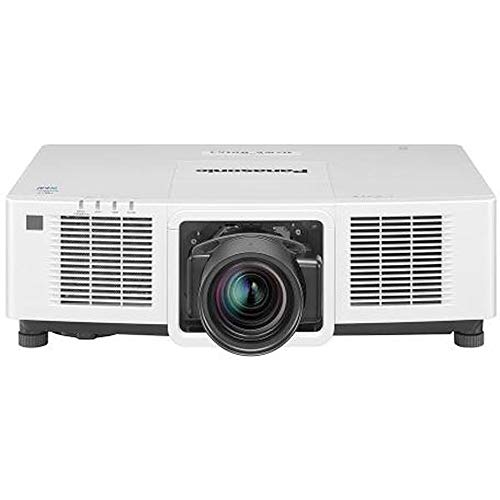
Panasonic PT-MZ10KL — The Quiet Contender
Some listings arrive with a paragraph of claims; this Panasonic arrives with a name. Its title identifies the PT-MZ10KLWU as a projector and panel product from Panasonic’s solutions company and then stops, offering no brightness, no resolution, no light source and no lens information. A careless guide would fill that silence from general knowledge of the model line. This one refuses, because venue procurement built on assumed specifications is how halls end up with the wrong machine flown above the seats.
What can honestly be said begins with the nameplate itself. Panasonic’s professional projector division supplies houses of worship, universities and rental fleets, and the PT-MZ naming sits inside that professional catalogue rather than the company’s consumer range. A venue already running Panasonic installation gear — with mounts, lenses or service relationships in place — has a rational reason to shortlist this unit and then do the documentation work its title demands.
That work is specific. Before this machine can be compared with the stated figures elsewhere in this guide, a buyer needs four numbers from the manufacturer: native resolution, rated brightness, light source type and the lens options the body accepts. Each one maps to a decision in this guide’s how-to-choose section. A venue that obtains them may find a thoroughly modern installation projector; a venue that cannot obtain them should treat the listing itself as the finding and move on.
There is a broader lesson in this pick’s presence. Professional AV channels often sell through quotations and integrators, with public listings acting as placeholders. The PT-MZ10KL reads exactly like such a placeholder. Buyers with an integrator should hand the model number to that professional and let the channel supply its documentation; buyers shopping alone should weigh the fully specified alternatives in this guide first.
- Product: Panasonic PT-MZ10KLWU projector, per title
- Brightness: Not stated in the listing title — verify with the manufacturer documentation
- Native resolution: Not stated in the listing title — verify with the manufacturer documentation
Strengths
- A professional Panasonic installation nameplate with an established venue service channel behind it.
- Suits venues standardising on one maker’s installation ecosystem across several rooms.
- The model designation gives an integrator everything needed to quote the machine properly.
Trade-offs
- Its title states no brightness figure, so no room can be matched to it from the listing alone.
- Resolution and light source are equally unstated, blocking any direct comparison here.
- Lens inclusion is unclear, which leaves total installed cost open until documented.
Best for: venues working through an integrator who can document the full specification before purchase.
Not suited for: direct ordering without a documentation step, since the title supplies neither a lumen figure nor a resolution to plan around.
One more consideration applies to venues replacing an older Panasonic installation: familiarity is a genuine asset in volunteer-run spaces. The person operating the system on a Sunday morning is often not the person who bought it, and a machine whose menus, remote and behaviour resemble the one it replaced shortens the learning curve for every operator who follows. That continuity cannot be read off a title either, but it belongs in an integrator conversation alongside the missing figures.
Shortlist this Panasonic the way a facilities manager shortlists anything undocumented: with interest, with questions, and with no signature until the answers arrive in writing from the manufacturer.
A further practical point in this Panasonic’s favour is channel depth. Professional models sold through AV integrators tend to come with loaner arrangements, advance replacements and technicians who have flown the same chassis before. A venue comparing a bare online price against an integrator’s installed price is not comparing like with like, and the undocumented listing in front of us is best read as an invitation to start that channel conversation rather than as a finished offer.

Panasonic PT-DX100U — The Brightness Workhorse
Panasonic’s PT-DX100U states its bargain in full: 10,000 lumens, a 1024 x 768 panel, a 10,000:1 contrast ratio and a DLP engine. Nothing there is fashionable, and everything there is legible, which is precisely the point. A great many venue screens still carry content built for the 4:3 era — legacy slide decks, lyric software, camera feeds, signage loops — and a bright DLP machine in that native shape serves such programmes with authority and without scaling awkwardness.
Ten thousand lumens is serious output, enough to hold a large image in a hall that dims partially rather than fully. DLP projection brings its own venue virtues: a sealed-feeling optical path that tolerates dusty environments well, and crisp text rendering that presentation content rewards. The stated contrast ratio, read honestly, is a dynamic-era figure of its generation; it promises readable blacks for slides and video in working light, not cinema shadow detail, and venues should expect exactly that.
The panel is the boundary a buyer must respect. At 1024 x 768, fine spreadsheets, detailed architectural drawings and small-font documents will soften, and modern 16:9 video will letterbox inside a 4:3 frame, surrendering panel area. A venue whose programme has already moved to widescreen video and dense data should read that as disqualifying and look at the 16:10 body below instead. A venue still living in lyric-and-slides land will never notice the limitation and will enjoy the brightness every single service.
Its title names no light source, so service planning must come from the documentation: if the unit is lamp-based, a hall should price spare lamps and access labour into the comparison against the laser picks here. That arithmetic, done honestly across a five-year horizon, is how this workhorse should be judged — on total cost of keeping 10,000 lumens flying, not on the day-one figure alone.
- Brightness: 10,000 lumens, as printed in the title
- Native resolution: 1024 x 768
- Contrast: 10,000:1, per title
- Technology: DLP
- Light source: Not stated in the listing title — verify with the manufacturer documentation
Strengths
- A stated 10,000 lumens holds large images in halls that only partly darken.
- DLP rendering keeps text and graphics crisp for presentation-led programmes.
- The native 4:3 panel matches legacy lyric, slide and signage content without scaling compromises.
Trade-offs
- 1024 x 768 resolution softens fine data and detailed imagery at venue screen sizes.
- Widescreen video letterboxes inside the 4:3 frame, wasting panel area.
- The title gives no light source, so lamp service costs must be established from documentation.
Best for: halls whose programmes remain slides, lyrics and camera feeds on a large screen in partial light.
Not suited for: a venue presenting fine data or widescreen film, where the 1024 x 768 panel is the binding constraint.
Workhorse is the right word and no insult: this Panasonic was specified to be read from the back row, and back rows are where venue projectors earn or lose their keep.
Dust deserves a sentence of its own in any DLP venue discussion. Halls accumulate it — from carpets, from hymn books, from the simple traffic of hundreds of shoes — and a projection path that tolerates a dusty environment without visible artefacts or frequent intervention saves a venue both money and embarrassment. Combined with the brightness figure, that tolerance explains why machines of this pattern remained installed in schools and sanctuaries for years after sleeker specifications appeared elsewhere.

NEC NP-PA622U — The Lens-Included Install
NEC’s NP-PA622U occupies the sensible middle of this guide: a stated 6,200 lumens, an advanced professional installation brief, and — the detail that simplifies everything — a lens included in the sale, identified in the title by its 13ZL suffix. For a mid-size sanctuary, a school auditorium or a corporate presentation hall, that combination reads as a complete sentence: enough light for a substantial screen in a dimmable room, professional installation features, and no separate optics order standing between purchase and first service.
Six thousand two hundred lumens calibrates expectations honestly. This is not the machine for a sunlit atrium or a festival-scale screen; it is the machine for the far larger population of venues that can darken respectably and seat a few hundred people within a sensible throw. In those rooms, output beyond need buys nothing except electricity bills and fan noise, and a well-matched 6,200 lumens on the right screen size looks every bit as commanding as a flagship looks in its own larger hall.
The included lens deserves a buyer’s full attention before ordering, because included is not the same as suitable. A bundled standard lens covers a range of throw distances, and a venue whose projector position is fixed by architecture — a rear wall, an existing mount point, a balcony rail — must confirm that the room’s throw ratio falls inside that range. Ten minutes with the manufacturer’s lens chart protects the entire purchase; the listing page is the place to start that check.
Resolution and panel technology go unstated in the title, joining the documentation list alongside the light source. What the title does establish — professional installation class, a named lens bundle, a credible mid-venue output figure — is enough to shortlist the machine for the enormous middle of the venue market, provided the paperwork confirms the rest before the order is placed.
- Brightness: 6,200 lumens, as printed in the title
- Class: advanced professional installation projector, per title
- Lens: included, identified as 13ZL in the title
- Native resolution: Not stated in the listing title — verify with the manufacturer documentation
Strengths
- A lens in the box removes a separate optics order from a mid-size installation.
- A stated 6,200 lumens matches dimmable halls seating a few hundred people.
- Professional installation classification signals the mounting and control features venues expect.
Trade-offs
- The bundled lens still has to cover the room’s throw ratio, which needs checking against the lens chart.
- Output is insufficient for very large screens in undimmed light.
- Resolution is unstated in the title, so detail expectations need documentation.
Best for: mid-size sanctuaries, school halls and presentation venues that can dim their lights and seat hundreds.
Not suited for: a bright atrium or festival screen, where 6,200 lumens cannot hold the image.
Plenty of venues overbuy brightness because it is the easiest number to compare; this NEC rewards the venue that measures its room first and buys the number the room actually asked for.
Control is the quieter half of the installation argument. A professional body of this class is expected to wake, sleep and switch sources on a venue’s schedule, often driven by the same control system that runs the lights and the sound desk, so the person running a service never climbs anywhere near it. Buyers should confirm the control interfaces from the documentation alongside the missing resolution and light source figures, because a projector that cannot join the room’s control system will be operated by remote and ladder, and both of those get old quickly.

Sharp NEC NP-PV800UL — The 16:10 Ceiling Unit
Sharp NEC’s NP-PV800UL announces a shape before it announces anything else: LCD technology, a 16:10 aspect ratio, ceiling mountable, finished in black, carrying a 41ZL suffix that follows NEC’s convention of naming a lens configuration. The 16:10 frame is the detail a modern venue should linger on. It swallows 16:9 video with slim margins and gives presentation software extra vertical room, which is exactly the geometry of contemporary content — dashboards, documents and video sharing one screen across a working week.
Ceiling mountable sounds like boilerplate until a venue remembers that every pick in this guide will spend its life overhead. A body designed for that orientation, in a black finish that disappears against a dark ceiling grid, is a body designed by people who install projectors for a living. Lecture theatres, boardrooms of unusual size and worship spaces with modern media programmes are the natural homes for this shape of machine.
Brightness, however, is missing from the title, and for a venue projector that omission is the whole ballgame until resolved. No responsible buyer can match an unstated output to a known room. The listing and the manufacturer’s documentation must supply the figure, and the venue should then run the same lumens-per-screen-size reasoning applied to the stated figures elsewhere in this guide. Until that number exists, this Sharp NEC is a promising shape awaiting its defining fact.
LCD architecture at least is declared, which tells the venue to expect the colour behaviour of a three-panel design and to plan filter and vent care into its maintenance rhythm, as LCD installations in dusty halls reward scheduled attention. Combined with the widescreen shape, the picture that emerges is of a contemporary installation unit whose paperwork simply has to be finished before it can be ranked — a common situation in professional channels, and no reflection on the machine itself.
- Technology: LCD, per title
- Aspect ratio: 16:10
- Mounting: ceiling mountable, per title
- Finish: black
- Brightness: Not stated in the listing title — verify with the manufacturer documentation
Strengths
- A 16:10 frame suits the mix of video and documents modern venues actually show.
- Ceiling-mount design and a black finish suit permanent overhead installation.
- LCD colour behaviour serves saturated presentation and media content well.
Trade-offs
- No brightness figure appears in the title, so room matching waits on documentation.
- Native resolution is likewise unstated in the title.
- LCD installations in dusty halls need filter and vent care on a schedule.
Best for: lecture theatres and modern worship or corporate spaces built around widescreen content and a permanent ceiling mount.
Not suited for: procurement that must confirm output from the listing alone, since the title prints no lumen figure at all.
Judge this unit in two steps: first the shape, which is right for the widescreen era, then the missing number, which only the manufacturer’s sheet can supply.
Another angle on the 16:10 shape concerns dual-use rooms. A hall that hosts worship on Sunday, lectures on Tuesday and a film society on Friday asks one screen to be three screens, and the slightly taller frame flatters that rotation: documents gain lines, video loses almost nothing, and the document camera feed that education venues lean on sits naturally in the frame. Versatility of shape is a modest claim beside a lumen count, but rooms live with shape every day and with peak brightness only on the brightest ones.

NEC 7KL Laser Install Projector — The Body-Only Laser
No title in this guide is more honest than this one. NEC’s 7KL is described as an LCD laser installation projector for professional use, and then the title says, twice and in capital letters, that the product ships without a lens. Read that as the defining fact of the purchase. Whoever orders this machine is ordering a light engine and a body; the glass that decides image size and throw distance is a second, deliberate decision, made from NEC’s lens range to fit one specific room.
That arrangement is standard practice at the serious end of installation, and it carries real advantages. A venue with an unusual throw — a long hall, a rear projection room, a mount forced off-centre by architecture — can select exactly the lens its geometry demands instead of accepting a bundled compromise. Rental and staging firms can hold bodies and lenses as separate inventory. The cost, of course, is that the headline purchase is incomplete by design, and a budget that forgets the lens line will stall the installation on its first day.
Laser light and LCD panels make a coherent pairing for a permanent install: the laser removes lamp service from a machine that may hang in place for a decade, while the LCD design serves colour-rich venue content. The 7KL designation hints at its output class by name, but this guide does not convert a model name into a specification; the rated figure belongs in the manufacturer’s documentation, and a venue should take it from there before matching the machine to a screen.
Professional installation language in the title should also be taken literally. This is a unit for buyers who either employ an integrator or genuinely enjoy lens charts, throw calculators and mount engineering. A small venue wanting one box, one lens and a Saturday installation should choose the lens-included NEC above and spend its weekend on alignment instead of procurement.
- Technology: LCD, per title
- Light source: laser
- Class: advanced professional laser installation unit, per title
- Lens: not included — the title states the product ships without a lens
- Brightness: Not stated in the listing title — verify with the manufacturer documentation
Strengths
- Interchangeable optics let the lens be chosen for the room’s exact throw geometry.
- Laser light removes lamp changes from a permanent overhead installation.
- The title’s lens warning is explicit, so no buyer can be surprised by the body-only sale.
Trade-offs
- A lens must be budgeted and ordered separately before the machine can project anything.
- No brightness figure is printed in the title, so output matching needs the specification sheet.
- Professional installation scope exceeds what a small venue should attempt unaided.
Best for: venues and rental firms with unusual throw geometry who select optics per room.
Not suited for: single-box purchases, since this unit ships with no lens at all.
Treat the 7KL as a foundation rather than a finished purchase: the right lens on this body will outserve a bundled compromise for years, but only a buyer who budgets both halves will ever see that picture.
Rental firms should note one more body-only advantage: when a lens is damaged on the road, the body survives as inventory and only the glass leaves the fleet. When a body fails, the lenses stay. That separability is why professional channels think in systems rather than units, and why the 7KL’s apparently incomplete box is, to its intended buyer, simply the correct unit of purchase.
Comparison Table
| Pick | Headline facts from its listing title | Lens arrangement |
|---|---|---|
| Epson 16,000-Lumen Large Venue Laser | 16,000 lumens, 3LCD, laser, large venue | Not stated in the listing title |
| Panasonic PT-MZ10KL | Professional Panasonic projector nameplate; core figures not printed in the title | Not stated in the listing title |
| Panasonic PT-DX100U | 10,000 lumens, 1024 x 768, 10,000:1 contrast, DLP | Not stated in the listing title |
| NEC NP-PA622U | 6,200 lumens, advanced professional installation class | Included (13ZL) |
| Sharp NEC NP-PV800UL | LCD, 16:10 aspect ratio, ceiling mountable, black | 41ZL configuration named in the title |
| NEC 7KL Laser Install | LCD, laser, advanced professional installation class | Ships without a lens |
Read the middle column as a lesson in listing literacy. Some professional titles print their defining numbers in full; others print almost nothing and expect an integrator to complete the picture. A venue that can tell those two kinds of listing apart at a glance will budget more accurately than one that treats every product page as equally informative.
How to Choose a Large Venue Projector
Measure the room before reading another specification. Screen width, the distance from mount to screen, the farthest seat, and the light falling on the screen wall at programme time: those four measurements decide everything. Brightness follows from screen size and ambient light together, which is why this guide refuses to rank 16,000 lumens as simply better than 6,200 — in a dimmable hall of two hundred seats, the smaller figure may be the correct engineering answer, with money left over for the screen and sound the audience will also judge.
Settle the content question next. A programme of lyrics, slides and speaker cameras forgives a 1024 x 768 panel; a programme of data, design work and widescreen film does not. Match the panel and aspect ratio to the content the venue actually shows most Sundays, most lectures, most conferences — not to the most demanding event of the year, which can rent its own solution.
Then price the whole installation, not the projector. Lens, mount, power, signal, access equipment and alignment labour belong in the same spreadsheet as the unit, and the body-only NEC in this guide exists to remind buyers why. A cheaper unit that needs an expensive lens can cost more installed than a pricier unit sold complete, and only the full-system figure reveals which is which.
Throw geometry deserves its own pass through the calculator before any order. Divide the mount-to-screen distance by the intended image width and the result is the throw ratio the lens must deliver; then check that ratio against the range of the bundled lens, or use it to select the separate lens a body-only unit requires. Venues with a fixed mount point and a fixed screen have no freedom here at all — the ratio is whatever the architecture says it is — which is why discovering a mismatch after delivery is so painful and why the arithmetic belongs at the front of the project.
Screen gain is the other half of the brightness equation that buyers routinely leave unexamined. A higher-gain surface returns more of the projector’s light to the audience and can rescue an installation that would otherwise need a brighter machine, while a matte surface spreads light more evenly for wide seating. Pairing the screen decision with the projector decision, rather than inheriting whatever surface already hangs in the hall, is one of the cheapest performance upgrades a venue can make.
Finally, plan service before the first event. How is the machine reached? Who cleans filters, who holds spare parts, what happens when it fails an hour before a wedding or a graduation? Laser picks reduce the lamp part of that conversation; they do not remove the conversation. Venues that write the service plan at purchase time are the ones whose projectors are still earning applause a decade later.
How Many Lumens Does a Venue Screen Actually Need?
Start from the screen, not the catalogue. A useful mental model is that perceived brightness falls as screen area grows and as ambient light rises, so doubling screen width quarters the punch of the same lumen figure while a wall of windows can undo a specification step entirely. This is why the guide pairs every stated figure with a room: 6,200 lumens is generous on a moderate screen in a dimmable hall and inadequate on a vast screen under skylights, and both statements are about geometry, not about the machine’s quality.
Seat count sneaks into the calculation through screen size: a hall seating six hundred needs an image the back row can read, which usually means a larger screen, which in turn spreads the same lumens thinner. Two venues with identical projectors can therefore have completely different experiences of brightness, and both can be telling the truth. The number on the box is a property of the machine; the brightness in the room is a property of the whole system.
Content adjusts the answer further. High-contrast slides and lyrics survive in light that would wash out film; a venue showing cinema should budget more output, more light control, or a smaller screen than a venue showing text. The cheapest lumens in any installation are the ones bought by controlling light — blinds, dimmers and screen placement routinely outperform a specification upgrade at a fraction of its cost.
Why Do Some Installation Projectors Ship Without a Lens?
Because one body serves many rooms only when its optics can change. Throw distance in venues ranges from a few metres to the length of a cathedral, and no single fixed lens spans that range with the image sizes venues demand. Selling the body alone lets an installer pair it with a short-throw lens for a cramped hall or a long-throw lens for a balcony mount, and lets rental firms stock lenses independently of bodies.
Rental and staging work sharpens the logic further. A hire firm sending projectors into a different hall every weekend cannot know next month’s throw distance, so it stocks bodies and a case of lenses and pairs them per job. A fixed lens would be a liability in that world, and the body-only format is the industry’s answer to geometry that refuses to standardise.
For the buyer, the practice converts a purchase into a small engineering project: calculate the throw ratio from the room’s measurements, select the lens whose range contains it with margin, and confirm availability before ordering the body. The NEC 7KL’s title performs a genuine service by stating its lens situation in capital letters; the failure mode it prevents — a projector and a mount and an audience, but no glass — is more common in venue projects than anyone in the trade likes to admit.
Should a Venue Still Consider a 4:3 Projector?
Only after an honest audit of the content library. Many worship and education venues discover, when they actually count, that the bulk of what they show — lyric files, legacy teaching decks, document camera feeds — was authored in 4:3 and looks correct on a native panel of that shape. For those programmes, the PT-DX100U’s arrangement is not a compromise but a match, and its 10,000 stated lumens do the rest.
Screen shape belongs in the same audit. A 4:3 projector paired with a widescreen that a venue installed during a renovation will pillarbox its image between black bars, and the congregation will read the mismatch as cheapness even if nobody can name it. Panel, screen and content form a triangle; changing one corner without checking the other two is how venues end up with expensive geometry problems.
The audit cuts the other way for venues whose presenters arrive with modern laptops and widescreen expectations. Letterboxed video on a 4:3 screen shrinks the image the audience came to see, and re-authoring a library is real labour. The deciding question is not which format is newer; it is which format the next five years of your programme will actually be authored in.
Common Mistakes in Venue Projection
Ordering a body-only projector without its lens is the costliest unforced error in this category, and it happens because a headline price looked complete. Any title carrying language like the NEC 7KL’s should trigger a second line in the budget before the order, not a surprised phone call after delivery.
Brightness bought without a screen measurement runs a close second. Venues fall for the largest lumen figure in their price conversation, then discover the screen is too big, the room too bright, or — just as wastefully — the room so modest that half the output was never needed and the money should have gone to audio.
Ignoring the service path is quieter but just as expensive over time. A projector mounted without safe access, without a filter schedule, without a plan for the morning it fails, converts every small issue into scaffolding and delay. Installation day is the cheapest moment to solve access; it only gets pricier afterwards.
Leaving the screen out of the budget is the mistake that hides inside all the others. A new projector throwing onto a yellowed, wrinkled or wrongly sized surface will be judged by that surface every day, and the audience will blame the machine. Venues should hold back part of any projection budget for the screen until both halves of the system have been assessed together.
Matching the panel to last decade’s content is the slow mistake. A venue that buys 4:3 while its presenters have already moved to widescreen will spend years letterboxing, and a venue that buys resolution its content never uses has starved some other part of the system — usually the screen or the sound — to pay for pixels nobody sees.
Final Recommendation
For the largest rooms running under working light, Epson’s 16,000-lumen 3LCD laser is the guide’s clear flagship: its title states the output, the technology and the light source a big hall needs, and only its resolution awaits documentation. Panasonic’s PT-DX100U serves the substantial population of venues still showing 4:3 programmes, with 10,000 stated lumens doing honest work. NEC’s lens-included NP-PA622U is the measured choice for mid-size dimmable halls, while the body-only 7KL rewards venues with unusual geometry and an integrator’s patience. The PT-MZ10KL and the NP-PV800UL both deserve their shortlist places once their missing figures are supplied in writing.
A word about sequencing for venues mid-renovation: decide the screen position before the mount, the mount before the lens, and the lens before the body is ordered, because each decision narrows the next. The picks in this guide can all be made to work in a well-sequenced project; even the finest of them can be defeated by a mount point chosen by an electrician for cable convenience rather than by an installer for geometry.
Whichever name a venue circles, the purchase order should be the last step of a measurement exercise, not the first step of a hope. A hall that knows its screen, its light and its content will find that one of these six was specified almost personally for it — and will still be thanking that tape measure when the projector is a decade old and the room is full.
Frequently Asked Questions
Does the NEC 7KL really come with no lens?
Yes — its listing title states twice that the product ships without a lens. Budget a compatible NEC lens as a separate purchase, chosen from the room’s throw distance, before ordering the body.
Is 6,200 lumens enough for a church hall?
For a mid-size sanctuary with a moderate screen and lights that can dim, a stated 6,200 lumens is a sensible match. A very large screen or a glass-walled hall pushes the requirement toward the higher figures in this guide.
Why do two picks here have no brightness figure?
Because their listing titles print none. Rather than borrowing figures from other sources, the spec boxes record the silence and direct buyers to the manufacturer’s documentation, which is where a venue should confirm output before signing anything.
Can a 1024 x 768 projector still serve a modern venue?
It serves programmes built from slides, lyrics and camera feeds very well, especially at 10,000 lumens. It is the wrong panel for fine data, detailed documents and widescreen film, which will soften or letterbox.
How long should a venue expect an installation like this to serve?
Plan in decades rather than product cycles. A well-chosen venue projector, mounted once and serviced on a schedule, should outlast several generations of the laptops and media players feeding it, which is why the decisions that age worst are the geometric ones — screen size, mount position, lens range — rather than the electronic ones. Buy geometry generously, because the room will ask questions of it long after the electronics have been forgiven.
What else must be budgeted besides the projector?
The lens where one is not included, a rated mount, power and signal runs, access equipment for alignment, and a service plan. On body-only units the lens alone can be a substantial second purchase.
One closing discipline separates venues that love their projector from venues that tolerate it: a short commissioning ritual on installation day. Project a test pattern, photograph the aligned image from the back seat, record the lens and focus settings in the venue’s own files, and save the documentation gathered during purchase in the same folder. When a volunteer, a new caretaker or a service technician meets the machine in five years, that folder is the difference between an afternoon of archaeology and a ten-minute adjustment.
Related Guides
Venue projection continues into two neighbouring questions: our guide to projectors for events, where portability and setup speed join brightness in the judging, and our laser phosphor projector guide, which examines the light engine several of these installation machines share.


